



Skip to content
  • Home
  • Aktuell
  • Tags
  • 0 Ungelesen 0
  • Kategorien
  • Unreplied
  • Beliebt
  • GitHub
  • Docu
  • Hilfe
Skins
  • Light
  • Brite
  • Cerulean
  • Cosmo
  • Flatly
  • Journal
  • Litera
  • Lumen
  • Lux
  • Materia
  • Minty
  • Morph
  • Pulse
  • Sandstone
  • Simplex
  • Sketchy
  • Spacelab
  • United
  • Yeti
  • Zephyr
  • Dark
  • Cyborg
  • Darkly
  • Quartz
  • Slate
  • Solar
  • Superhero
  • Vapor

  • Standard: (Kein Skin)
  • Kein Skin
Einklappen
ioBroker Logo

Community Forum

donate donate
  1. ioBroker Community Home
  2. Deutsch
  3. ioBroker Allgemein
  4. Problem bei Update js-controller from @3.3.18 to @3.3.22
NEWS

  • Jahresrückblick 2025 – unser neuer Blogbeitrag ist online! ✨
    BluefoxB
    Bluefox
    16
    1
    1.6k

  • Neuer Blogbeitrag: Monatsrückblick - Dezember 2025 🎄
    BluefoxB
    Bluefox
    13
    1
    864

  • Weihnachtsangebot 2025! 🎄
    BluefoxB
    Bluefox
    25
    1
    2.1k

Problem bei Update js-controller from @3.3.18 to @3.3.22

Geplant Angeheftet Gesperrt Verschoben ioBroker Allgemein
55 Beiträge 7 Kommentatoren 2.6k Aufrufe 5 Watching
  • Älteste zuerst
  • Neuste zuerst
  • Meiste Stimmen
Antworten
  • In einem neuen Thema antworten
Anmelden zum Antworten
Dieses Thema wurde gelöscht. Nur Nutzer mit entsprechenden Rechten können es sehen.
  • S SpeedyBlade

    @glasfaser
    das steht im ioBroker

    Linux/macOS (manuell installiert)
    Eine manuelle Installation erfolgt meist unter root als User und daher ist vor den Befehlen ein "sudo" nötig.

    Bitte in einer SSH-Shell (Konsole) folgende Befehle ausführen:

    cd /opt/iobroker
    sudo iobroker stop
    sudo iobroker update
    sudo iobroker upgrade self
    sudo iobroker start oder Server rebooten, danach sollte ioBroker neu starten und man kann sicher sein das alle alten Prozesse beendet waren.
    Falls beim Upgrade-Befehl Fehler wegen Zugriffsrechten/Permissions angezeigt werden, müssen diese behoben werden. Teilweise reicht "sudo" nicht aus und man muss die Installation als echter Root (Vorher einfach sudo su - eingeben) ausführen.

    wie kann ich den npm updaten?

    Thomas BraunT Online
    Thomas BraunT Online
    Thomas Braun
    Most Active
    schrieb am zuletzt editiert von
    #17

    @speedyblade

    Die Anleitung, wo auch immer die her ist, ist veraltet.

    npm wird gar nicht separat upgedatet. In meiner Sigantur steht drin, wie man nodejs (und damit auch npm) richtig installiert.

    Linux-Werkzeugkasten:
    https://forum.iobroker.net/topic/42952/der-kleine-iobroker-linux-werkzeugkasten
    NodeJS Fixer Skript:
    https://forum.iobroker.net/topic/68035/iob-node-fix-skript
    iob_diag: curl -sLf -o diag.sh https://iobroker.net/diag.sh && bash diag.sh

    GlasfaserG 1 Antwort Letzte Antwort
    0
    • S Offline
      S Offline
      SpeedyBlade
      schrieb am zuletzt editiert von
      #18

      das steht im host vom iobroker

      1 Antwort Letzte Antwort
      0
      • GlasfaserG Glasfaser

        @speedyblade sagte in Problem bei Update js-controller from @3.3.18 to @3.3.22:

        sudo su

        Wo hast du das her , da wird nichts mit sudo gemacht und dann noch mit su !?

        Bei der kurzen meldung kann man nicht viel sagen , weil der Rest von der Meldung fehlt .

        Das einzige was auffällt ist :

        NPM version: 7.20.5

        S Offline
        S Offline
        SpeedyBlade
        schrieb am zuletzt editiert von
        #19

        @glasfaser sagte in Problem bei Update js-controller from @3.3.18 to @3.3.22:

        @speedyblade sagte in Problem bei Update js-controller from @3.3.18 to @3.3.22:

        sudo su

        Wo hast du das her , da wird nichts mit sudo gemacht und dann noch mit su !?

        Bei der kurzen meldung kann man nicht viel sagen , weil der Rest von der Meldung fehlt .

        Das einzige was auffällt ist :

        NPM version: 7.20.5

        was passt mit der npm nicht, muss die auf Version 6 downgegradatet werden?
        Wenn ja, wie ist das nun noch möglich?

        S 1 Antwort Letzte Antwort
        0
        • S SpeedyBlade

          @glasfaser sagte in Problem bei Update js-controller from @3.3.18 to @3.3.22:

          @speedyblade sagte in Problem bei Update js-controller from @3.3.18 to @3.3.22:

          sudo su

          Wo hast du das her , da wird nichts mit sudo gemacht und dann noch mit su !?

          Bei der kurzen meldung kann man nicht viel sagen , weil der Rest von der Meldung fehlt .

          Das einzige was auffällt ist :

          NPM version: 7.20.5

          was passt mit der npm nicht, muss die auf Version 6 downgegradatet werden?
          Wenn ja, wie ist das nun noch möglich?

          S Offline
          S Offline
          SpeedyBlade
          schrieb am zuletzt editiert von
          #20

          hilft euch das weiter?
          pi@All-In-One_RasPi:/opt/iobroker $ nodejs -v && node -v && npm -v && which node js && which node && which npm

          v14.18.2
          v14.17.4
          7.20.5
          /usr/bin/nodejs
          /usr/local/bin/node
          /usr/local/bin/npm

          Thomas BraunT 1 Antwort Letzte Antwort
          0
          • Thomas BraunT Thomas Braun

            @speedyblade

            Die Anleitung, wo auch immer die her ist, ist veraltet.

            npm wird gar nicht separat upgedatet. In meiner Sigantur steht drin, wie man nodejs (und damit auch npm) richtig installiert.

            GlasfaserG Offline
            GlasfaserG Offline
            Glasfaser
            schrieb am zuletzt editiert von
            #21

            @SpeedyBlade

            @thomas-braun sagte in Problem bei Update js-controller from @3.3.18 to @3.3.22:
            @speedyblade

            ..........................

            ....................
            In meiner Sigantur steht drin, wie man nodejs (und damit auch npm) richtig installiert.

            Synology 918+ 16GB - ioBroker in Docker v9 , VISO auf Trekstor Primebook C13 13,3" , Hikvision Domkameras mit Surveillance Station .. CCU RaspberryMatic in Synology VM .. Zigbee CC2538+CC2592 .. Sonoff .. KNX .. Modbus ..

            S 1 Antwort Letzte Antwort
            0
            • S SpeedyBlade

              hilft euch das weiter?
              pi@All-In-One_RasPi:/opt/iobroker $ nodejs -v && node -v && npm -v && which node js && which node && which npm

              v14.18.2
              v14.17.4
              7.20.5
              /usr/bin/nodejs
              /usr/local/bin/node
              /usr/local/bin/npm

              Thomas BraunT Online
              Thomas BraunT Online
              Thomas Braun
              Most Active
              schrieb am zuletzt editiert von
              #22

              @speedyblade

              Wie bereits vermutet: Krumm installiert.
              Wie man es korrigiert:

              Im zweiten Posting hier:
              https://forum.iobroker.net/topic/35090/howto-nodejs-installation-und-upgrades-unter-debian

              Aber den ersten Part darf man auch lesen.

              Linux-Werkzeugkasten:
              https://forum.iobroker.net/topic/42952/der-kleine-iobroker-linux-werkzeugkasten
              NodeJS Fixer Skript:
              https://forum.iobroker.net/topic/68035/iob-node-fix-skript
              iob_diag: curl -sLf -o diag.sh https://iobroker.net/diag.sh && bash diag.sh

              1 Antwort Letzte Antwort
              0
              • GlasfaserG Glasfaser

                @SpeedyBlade

                @thomas-braun sagte in Problem bei Update js-controller from @3.3.18 to @3.3.22:
                @speedyblade

                ..........................

                ....................
                In meiner Sigantur steht drin, wie man nodejs (und damit auch npm) richtig installiert.

                S Offline
                S Offline
                SpeedyBlade
                schrieb am zuletzt editiert von SpeedyBlade
                #23

                @glasfaser

                npm und nodejs sind nun auf die stable versionen downgegraded worden

                Nun wollte ich die Adapter updaten und das geht leider nicht. Als ersten sollte der "admin" adapter auf 5.2.3 upgedated werden, aber das funktioniert nicht in der Weboberfläche noch in der Konsole

                pi@All-In-One_RasPi:/opt/iobroker $ sudo iobroker stop
                pi@All-In-One_RasPi:/opt/iobroker $ sudo iobroker update
                Used repository: Stable (default)
                hash unchanged, use cached sources
                update done
                Adapter    "admin"         : 5.2.3    , installed 4.2.2 [Updateable]
                Adapter    "backitup"      : 2.2.2    , installed 2.1.15 [Updateable]
                Adapter    "cloud"         : 4.1.0    , installed 4.1.0
                Adapter    "discovery"     : 2.7.3    , installed 2.7.0 [Updateable]
                Adapter    "flot"          : 1.10.7   , installed 1.10.6 [Updateable]
                Adapter    "history"       : 1.9.14   , installed 1.9.13 [Updateable]
                Adapter    "hm-rega"       : 3.0.33   , installed 3.0.30 [Updateable]
                Adapter    "hm-rpc"        : 1.14.50  , installed 1.14.43 [Updateable]
                Adapter    "info"          : 1.9.8    , installed 1.9.8
                Adapter    "iogo"          : 0.7.0    , installed 0.7.0
                Adapter    "javascript"    : 5.2.13   , installed 4.11.0 [Updateable]
                Controller "js-controller" : 3.3.22   , installed 3.3.15 [Updateable]
                Adapter    "knx"           : 2.0.5    , installed 1.0.45 [Updateable]
                Adapter    "mobile"        : 1.0.1    , installed 1.0.1
                Adapter    "mqtt-client"   : 1.4.0    , installed 1.4.0
                Adapter    "nina"          : 0.0.25   , installed 0.0.25
                Adapter    "node-red"      : 2.4.1    , installed 2.4.0 [Updateable]
                Adapter    "nuki-extended" : 2.3.1    , installed 2.3.1
                Adapter    "ping"          : 1.5.0    , installed 1.5.0
                Adapter    "pushover"      : 2.0.5    , installed 2.0.5
                Adapter    "roomba"        : 1.1.4    , installed 1.1.4
                Adapter    "rpi2"          : 1.3.1    , installed 1.3.1
                Adapter    "scenes"        : 2.3.8    , installed 2.3.6 [Updateable]
                Adapter    "shelly"        : 4.0.7    , installed 4.0.8
                Adapter    "simple-api"    : 2.6.1    , installed 2.6.1
                Adapter    "socketio"      : 3.1.4    , installed 3.1.4
                Adapter    "sonos"         : 2.1.1    , installed 2.1.1
                Adapter    "vis"           : 1.4.5    , installed 1.4.3 [Updateable]
                Adapter    "vis-hqwidgets" : 1.1.7    , installed 1.1.7
                Adapter    "web"           : 3.4.9    , installed 3.4.8 [Updateable]


                ..und hier macht er einfach nicht mehr weiter

                update.jpg

                ...und nach etlichen Minuten nun das

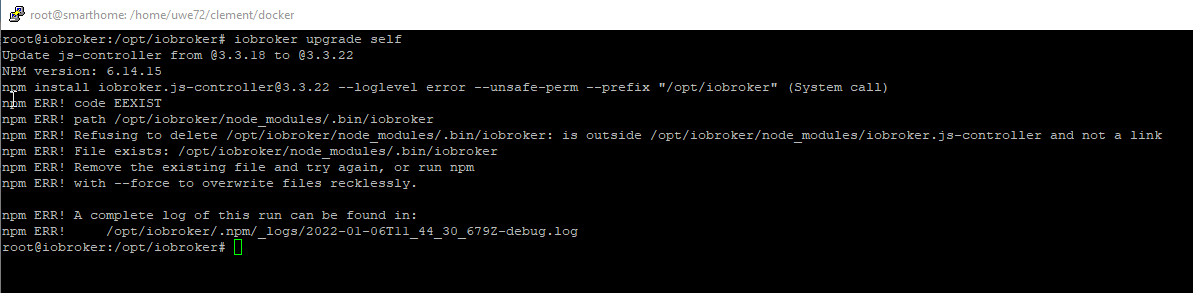
                pi@All-In-One_RasPi:/opt/iobroker $ sudo iobroker upgrade self
                Update js-controller from @3.3.15 to @3.3.22
                NPM version: 6.14.15
                npm install iobroker.js-controller@3.3.22 --loglevel error --unsafe-perm --prefix "/opt/iobroker" (System call)
                npm ERR! code EEXIST
                npm ERR! path /opt/iobroker/node_modules/.bin/uuid
                npm ERR! Refusing to delete /opt/iobroker/node_modules/.bin/uuid: ../uuid/bin/uuid symlink target is not controlled by npm /opt/iobroker/node_modules/uuid
                npm ERR! File exists: /opt/iobroker/node_modules/.bin/uuid
                npm ERR! Remove the existing file and try again, or run npm
                npm ERR! with --force to overwrite files recklessly.
                
                npm ERR! A complete log of this run can be found in:
                npm ERR!     /home/iobroker/.npm/_logs/2022-01-07T14_03_34_230Z-debug.log
                
                
                BananaJoeB Thomas BraunT 3 Antworten Letzte Antwort
                0
                • S SpeedyBlade

                  @glasfaser

                  npm und nodejs sind nun auf die stable versionen downgegraded worden

                  Nun wollte ich die Adapter updaten und das geht leider nicht. Als ersten sollte der "admin" adapter auf 5.2.3 upgedated werden, aber das funktioniert nicht in der Weboberfläche noch in der Konsole

                  pi@All-In-One_RasPi:/opt/iobroker $ sudo iobroker stop
                  pi@All-In-One_RasPi:/opt/iobroker $ sudo iobroker update
                  Used repository: Stable (default)
                  hash unchanged, use cached sources
                  update done
                  Adapter    "admin"         : 5.2.3    , installed 4.2.2 [Updateable]
                  Adapter    "backitup"      : 2.2.2    , installed 2.1.15 [Updateable]
                  Adapter    "cloud"         : 4.1.0    , installed 4.1.0
                  Adapter    "discovery"     : 2.7.3    , installed 2.7.0 [Updateable]
                  Adapter    "flot"          : 1.10.7   , installed 1.10.6 [Updateable]
                  Adapter    "history"       : 1.9.14   , installed 1.9.13 [Updateable]
                  Adapter    "hm-rega"       : 3.0.33   , installed 3.0.30 [Updateable]
                  Adapter    "hm-rpc"        : 1.14.50  , installed 1.14.43 [Updateable]
                  Adapter    "info"          : 1.9.8    , installed 1.9.8
                  Adapter    "iogo"          : 0.7.0    , installed 0.7.0
                  Adapter    "javascript"    : 5.2.13   , installed 4.11.0 [Updateable]
                  Controller "js-controller" : 3.3.22   , installed 3.3.15 [Updateable]
                  Adapter    "knx"           : 2.0.5    , installed 1.0.45 [Updateable]
                  Adapter    "mobile"        : 1.0.1    , installed 1.0.1
                  Adapter    "mqtt-client"   : 1.4.0    , installed 1.4.0
                  Adapter    "nina"          : 0.0.25   , installed 0.0.25
                  Adapter    "node-red"      : 2.4.1    , installed 2.4.0 [Updateable]
                  Adapter    "nuki-extended" : 2.3.1    , installed 2.3.1
                  Adapter    "ping"          : 1.5.0    , installed 1.5.0
                  Adapter    "pushover"      : 2.0.5    , installed 2.0.5
                  Adapter    "roomba"        : 1.1.4    , installed 1.1.4
                  Adapter    "rpi2"          : 1.3.1    , installed 1.3.1
                  Adapter    "scenes"        : 2.3.8    , installed 2.3.6 [Updateable]
                  Adapter    "shelly"        : 4.0.7    , installed 4.0.8
                  Adapter    "simple-api"    : 2.6.1    , installed 2.6.1
                  Adapter    "socketio"      : 3.1.4    , installed 3.1.4
                  Adapter    "sonos"         : 2.1.1    , installed 2.1.1
                  Adapter    "vis"           : 1.4.5    , installed 1.4.3 [Updateable]
                  Adapter    "vis-hqwidgets" : 1.1.7    , installed 1.1.7
                  Adapter    "web"           : 3.4.9    , installed 3.4.8 [Updateable]


                  ..und hier macht er einfach nicht mehr weiter
                  update.jpg

                  ...und nach etlichen Minuten nun das

                  pi@All-In-One_RasPi:/opt/iobroker $ sudo iobroker upgrade self
                  Update js-controller from @3.3.15 to @3.3.22
                  NPM version: 6.14.15
                  npm install iobroker.js-controller@3.3.22 --loglevel error --unsafe-perm --prefix "/opt/iobroker" (System call)
                  npm ERR! code EEXIST
                  npm ERR! path /opt/iobroker/node_modules/.bin/uuid
                  npm ERR! Refusing to delete /opt/iobroker/node_modules/.bin/uuid: ../uuid/bin/uuid symlink target is not controlled by npm /opt/iobroker/node_modules/uuid
                  npm ERR! File exists: /opt/iobroker/node_modules/.bin/uuid
                  npm ERR! Remove the existing file and try again, or run npm
                  npm ERR! with --force to overwrite files recklessly.
                  
                  npm ERR! A complete log of this run can be found in:
                  npm ERR!     /home/iobroker/.npm/_logs/2022-01-07T14_03_34_230Z-debug.log
                  
                  
                  BananaJoeB Offline
                  BananaJoeB Offline
                  BananaJoe
                  Most Active
                  schrieb am zuletzt editiert von BananaJoe
                  #24

                  @speedyblade also wenn du nicht mindestens 5 Minuten gewartet hast ... das dauert manchmal, je nach System und Internet und Sonnenstand

                  ioBroker@Ubuntu 24.04 LTS (VMware) für: >260 Geräte, 5 Switche, 7 AP, 9 IP-Cam, 1 NAS 42TB, 1 ESXi 15TB, 4 Proxmox 1TB, 1 Hyper-V 48TB, 14 x Echo, 5x FireTV, 5 x Tablett/Handy VIS || >=160 Tasmota/Shelly || >=95 ZigBee || PV 8.1kW / Akku 14kWh || 2x USV 750W kaskadiert || Creality CR-10 SE 3D-Drucker

                  1 Antwort Letzte Antwort
                  0
                  • S SpeedyBlade

                    @glasfaser

                    npm und nodejs sind nun auf die stable versionen downgegraded worden

                    Nun wollte ich die Adapter updaten und das geht leider nicht. Als ersten sollte der "admin" adapter auf 5.2.3 upgedated werden, aber das funktioniert nicht in der Weboberfläche noch in der Konsole

                    pi@All-In-One_RasPi:/opt/iobroker $ sudo iobroker stop
                    pi@All-In-One_RasPi:/opt/iobroker $ sudo iobroker update
                    Used repository: Stable (default)
                    hash unchanged, use cached sources
                    update done
                    Adapter    "admin"         : 5.2.3    , installed 4.2.2 [Updateable]
                    Adapter    "backitup"      : 2.2.2    , installed 2.1.15 [Updateable]
                    Adapter    "cloud"         : 4.1.0    , installed 4.1.0
                    Adapter    "discovery"     : 2.7.3    , installed 2.7.0 [Updateable]
                    Adapter    "flot"          : 1.10.7   , installed 1.10.6 [Updateable]
                    Adapter    "history"       : 1.9.14   , installed 1.9.13 [Updateable]
                    Adapter    "hm-rega"       : 3.0.33   , installed 3.0.30 [Updateable]
                    Adapter    "hm-rpc"        : 1.14.50  , installed 1.14.43 [Updateable]
                    Adapter    "info"          : 1.9.8    , installed 1.9.8
                    Adapter    "iogo"          : 0.7.0    , installed 0.7.0
                    Adapter    "javascript"    : 5.2.13   , installed 4.11.0 [Updateable]
                    Controller "js-controller" : 3.3.22   , installed 3.3.15 [Updateable]
                    Adapter    "knx"           : 2.0.5    , installed 1.0.45 [Updateable]
                    Adapter    "mobile"        : 1.0.1    , installed 1.0.1
                    Adapter    "mqtt-client"   : 1.4.0    , installed 1.4.0
                    Adapter    "nina"          : 0.0.25   , installed 0.0.25
                    Adapter    "node-red"      : 2.4.1    , installed 2.4.0 [Updateable]
                    Adapter    "nuki-extended" : 2.3.1    , installed 2.3.1
                    Adapter    "ping"          : 1.5.0    , installed 1.5.0
                    Adapter    "pushover"      : 2.0.5    , installed 2.0.5
                    Adapter    "roomba"        : 1.1.4    , installed 1.1.4
                    Adapter    "rpi2"          : 1.3.1    , installed 1.3.1
                    Adapter    "scenes"        : 2.3.8    , installed 2.3.6 [Updateable]
                    Adapter    "shelly"        : 4.0.7    , installed 4.0.8
                    Adapter    "simple-api"    : 2.6.1    , installed 2.6.1
                    Adapter    "socketio"      : 3.1.4    , installed 3.1.4
                    Adapter    "sonos"         : 2.1.1    , installed 2.1.1
                    Adapter    "vis"           : 1.4.5    , installed 1.4.3 [Updateable]
                    Adapter    "vis-hqwidgets" : 1.1.7    , installed 1.1.7
                    Adapter    "web"           : 3.4.9    , installed 3.4.8 [Updateable]


                    ..und hier macht er einfach nicht mehr weiter
                    update.jpg

                    ...und nach etlichen Minuten nun das

                    pi@All-In-One_RasPi:/opt/iobroker $ sudo iobroker upgrade self
                    Update js-controller from @3.3.15 to @3.3.22
                    NPM version: 6.14.15
                    npm install iobroker.js-controller@3.3.22 --loglevel error --unsafe-perm --prefix "/opt/iobroker" (System call)
                    npm ERR! code EEXIST
                    npm ERR! path /opt/iobroker/node_modules/.bin/uuid
                    npm ERR! Refusing to delete /opt/iobroker/node_modules/.bin/uuid: ../uuid/bin/uuid symlink target is not controlled by npm /opt/iobroker/node_modules/uuid
                    npm ERR! File exists: /opt/iobroker/node_modules/.bin/uuid
                    npm ERR! Remove the existing file and try again, or run npm
                    npm ERR! with --force to overwrite files recklessly.
                    
                    npm ERR! A complete log of this run can be found in:
                    npm ERR!     /home/iobroker/.npm/_logs/2022-01-07T14_03_34_230Z-debug.log
                    
                    
                    Thomas BraunT Online
                    Thomas BraunT Online
                    Thomas Braun
                    Most Active
                    schrieb am zuletzt editiert von Thomas Braun
                    #25

                    @speedyblade

                    Bitte den iobroker NICHT mit sudo anpacken.

                    iobroker stop
                    iobroker fix
                    iobroker update -i
                    iobroker upgrade self
                    iobroker upgrade
                    iobroker start
                    

                    nodeJS ist jetzt sauber?
                    Mit

                    which nodejs node npm && nodejs -v && node -v && npm -v && whoami && sudo apt update &> /dev/null && sudo apt update && apt policy nodejs
                    

                    nachschauen.

                    Linux-Werkzeugkasten:
                    https://forum.iobroker.net/topic/42952/der-kleine-iobroker-linux-werkzeugkasten
                    NodeJS Fixer Skript:
                    https://forum.iobroker.net/topic/68035/iob-node-fix-skript
                    iob_diag: curl -sLf -o diag.sh https://iobroker.net/diag.sh && bash diag.sh

                    1 Antwort Letzte Antwort
                    0
                    • S SpeedyBlade

                      @glasfaser

                      npm und nodejs sind nun auf die stable versionen downgegraded worden

                      Nun wollte ich die Adapter updaten und das geht leider nicht. Als ersten sollte der "admin" adapter auf 5.2.3 upgedated werden, aber das funktioniert nicht in der Weboberfläche noch in der Konsole

                      pi@All-In-One_RasPi:/opt/iobroker $ sudo iobroker stop
                      pi@All-In-One_RasPi:/opt/iobroker $ sudo iobroker update
                      Used repository: Stable (default)
                      hash unchanged, use cached sources
                      update done
                      Adapter    "admin"         : 5.2.3    , installed 4.2.2 [Updateable]
                      Adapter    "backitup"      : 2.2.2    , installed 2.1.15 [Updateable]
                      Adapter    "cloud"         : 4.1.0    , installed 4.1.0
                      Adapter    "discovery"     : 2.7.3    , installed 2.7.0 [Updateable]
                      Adapter    "flot"          : 1.10.7   , installed 1.10.6 [Updateable]
                      Adapter    "history"       : 1.9.14   , installed 1.9.13 [Updateable]
                      Adapter    "hm-rega"       : 3.0.33   , installed 3.0.30 [Updateable]
                      Adapter    "hm-rpc"        : 1.14.50  , installed 1.14.43 [Updateable]
                      Adapter    "info"          : 1.9.8    , installed 1.9.8
                      Adapter    "iogo"          : 0.7.0    , installed 0.7.0
                      Adapter    "javascript"    : 5.2.13   , installed 4.11.0 [Updateable]
                      Controller "js-controller" : 3.3.22   , installed 3.3.15 [Updateable]
                      Adapter    "knx"           : 2.0.5    , installed 1.0.45 [Updateable]
                      Adapter    "mobile"        : 1.0.1    , installed 1.0.1
                      Adapter    "mqtt-client"   : 1.4.0    , installed 1.4.0
                      Adapter    "nina"          : 0.0.25   , installed 0.0.25
                      Adapter    "node-red"      : 2.4.1    , installed 2.4.0 [Updateable]
                      Adapter    "nuki-extended" : 2.3.1    , installed 2.3.1
                      Adapter    "ping"          : 1.5.0    , installed 1.5.0
                      Adapter    "pushover"      : 2.0.5    , installed 2.0.5
                      Adapter    "roomba"        : 1.1.4    , installed 1.1.4
                      Adapter    "rpi2"          : 1.3.1    , installed 1.3.1
                      Adapter    "scenes"        : 2.3.8    , installed 2.3.6 [Updateable]
                      Adapter    "shelly"        : 4.0.7    , installed 4.0.8
                      Adapter    "simple-api"    : 2.6.1    , installed 2.6.1
                      Adapter    "socketio"      : 3.1.4    , installed 3.1.4
                      Adapter    "sonos"         : 2.1.1    , installed 2.1.1
                      Adapter    "vis"           : 1.4.5    , installed 1.4.3 [Updateable]
                      Adapter    "vis-hqwidgets" : 1.1.7    , installed 1.1.7
                      Adapter    "web"           : 3.4.9    , installed 3.4.8 [Updateable]


                      ..und hier macht er einfach nicht mehr weiter
                      update.jpg

                      ...und nach etlichen Minuten nun das

                      pi@All-In-One_RasPi:/opt/iobroker $ sudo iobroker upgrade self
                      Update js-controller from @3.3.15 to @3.3.22
                      NPM version: 6.14.15
                      npm install iobroker.js-controller@3.3.22 --loglevel error --unsafe-perm --prefix "/opt/iobroker" (System call)
                      npm ERR! code EEXIST
                      npm ERR! path /opt/iobroker/node_modules/.bin/uuid
                      npm ERR! Refusing to delete /opt/iobroker/node_modules/.bin/uuid: ../uuid/bin/uuid symlink target is not controlled by npm /opt/iobroker/node_modules/uuid
                      npm ERR! File exists: /opt/iobroker/node_modules/.bin/uuid
                      npm ERR! Remove the existing file and try again, or run npm
                      npm ERR! with --force to overwrite files recklessly.
                      
                      npm ERR! A complete log of this run can be found in:
                      npm ERR!     /home/iobroker/.npm/_logs/2022-01-07T14_03_34_230Z-debug.log
                      
                      
                      Thomas BraunT Online
                      Thomas BraunT Online
                      Thomas Braun
                      Most Active
                      schrieb am zuletzt editiert von
                      #26

                      @speedyblade sagte in Problem bei Update js-controller from @3.3.18 to @3.3.22:

                      /opt/iobroker/node_modules/.bin/uuid

                      Bitte mal schauen was das für eine Datei ist:

                      ls -la /opt/iobroker/node_modules/.bin/uuid
                      

                      Linux-Werkzeugkasten:
                      https://forum.iobroker.net/topic/42952/der-kleine-iobroker-linux-werkzeugkasten
                      NodeJS Fixer Skript:
                      https://forum.iobroker.net/topic/68035/iob-node-fix-skript
                      iob_diag: curl -sLf -o diag.sh https://iobroker.net/diag.sh && bash diag.sh

                      S 1 Antwort Letzte Antwort
                      0
                      • Thomas BraunT Thomas Braun

                        @speedyblade sagte in Problem bei Update js-controller from @3.3.18 to @3.3.22:

                        /opt/iobroker/node_modules/.bin/uuid

                        Bitte mal schauen was das für eine Datei ist:

                        ls -la /opt/iobroker/node_modules/.bin/uuid
                        
                        S Offline
                        S Offline
                        SpeedyBlade
                        schrieb am zuletzt editiert von
                        #27

                        wenn ich das richtig sehe, ist der pfad falsch
                        lt. der vorhin angegebenen anleitung sollte da nichts unter local sein

                        pi@All-In-One_RasPi:/opt/iobroker $ which nodejs node npm && nodejs -v && node -v && npm -v && whoami && sudo apt update &> /dev/null && sudo apt update && apt policy nodejs
                        /usr/bin/nodejs
                        /usr/local/bin/node
                        /usr/local/bin/npm
                        v14.18.2
                        v14.18.2
                        6.14.15
                        
                        
                        Thomas BraunT 2 Antworten Letzte Antwort
                        0
                        • S SpeedyBlade

                          wenn ich das richtig sehe, ist der pfad falsch
                          lt. der vorhin angegebenen anleitung sollte da nichts unter local sein

                          pi@All-In-One_RasPi:/opt/iobroker $ which nodejs node npm && nodejs -v && node -v && npm -v && whoami && sudo apt update &> /dev/null && sudo apt update && apt policy nodejs
                          /usr/bin/nodejs
                          /usr/local/bin/node
                          /usr/local/bin/npm
                          v14.18.2
                          v14.18.2
                          6.14.15
                          
                          
                          Thomas BraunT Online
                          Thomas BraunT Online
                          Thomas Braun
                          Most Active
                          schrieb am zuletzt editiert von
                          #28

                          @speedyblade sagte in Problem bei Update js-controller from @3.3.18 to @3.3.22:

                          lt. der vorhin angegebenen anleitung sollte da nichts unter local sein

                          Exakt. Und in der verlinkten Anleitung steht auch drin wie man das korrigiert.

                          Linux-Werkzeugkasten:
                          https://forum.iobroker.net/topic/42952/der-kleine-iobroker-linux-werkzeugkasten
                          NodeJS Fixer Skript:
                          https://forum.iobroker.net/topic/68035/iob-node-fix-skript
                          iob_diag: curl -sLf -o diag.sh https://iobroker.net/diag.sh && bash diag.sh

                          1 Antwort Letzte Antwort
                          0
                          • S SpeedyBlade

                            wenn ich das richtig sehe, ist der pfad falsch
                            lt. der vorhin angegebenen anleitung sollte da nichts unter local sein

                            pi@All-In-One_RasPi:/opt/iobroker $ which nodejs node npm && nodejs -v && node -v && npm -v && whoami && sudo apt update &> /dev/null && sudo apt update && apt policy nodejs
                            /usr/bin/nodejs
                            /usr/local/bin/node
                            /usr/local/bin/npm
                            v14.18.2
                            v14.18.2
                            6.14.15
                            
                            
                            Thomas BraunT Online
                            Thomas BraunT Online
                            Thomas Braun
                            Most Active
                            schrieb am zuletzt editiert von Thomas Braun
                            #29

                            @speedyblade

                            Aber kannst du mir mal sagen, wie man von v14.17.4 auf v14.18.2 in /usr/local/bin kommt? Ist ernst gemeint die Frage, ich versteh einfach nicht wo das immer herkommt.
                            Ich würds aber gerne mal verstehen... HILFE!

                            Linux-Werkzeugkasten:
                            https://forum.iobroker.net/topic/42952/der-kleine-iobroker-linux-werkzeugkasten
                            NodeJS Fixer Skript:
                            https://forum.iobroker.net/topic/68035/iob-node-fix-skript
                            iob_diag: curl -sLf -o diag.sh https://iobroker.net/diag.sh && bash diag.sh

                            S 1 Antwort Letzte Antwort
                            -1
                            • Thomas BraunT Thomas Braun

                              @speedyblade

                              Aber kannst du mir mal sagen, wie man von v14.17.4 auf v14.18.2 in /usr/local/bin kommt? Ist ernst gemeint die Frage, ich versteh einfach nicht wo das immer herkommt.
                              Ich würds aber gerne mal verstehen... HILFE!

                              S Offline
                              S Offline
                              SpeedyBlade
                              schrieb am zuletzt editiert von
                              #30

                              @thomas-braun

                              das kommt davon, dass Leute wie ich nicht viel Ahnung von Linux haben und einfach nur wollen, dass das System läuft ;)

                              Thomas BraunT HomoranH 2 Antworten Letzte Antwort
                              0
                              • S SpeedyBlade

                                @thomas-braun

                                das kommt davon, dass Leute wie ich nicht viel Ahnung von Linux haben und einfach nur wollen, dass das System läuft ;)

                                Thomas BraunT Online
                                Thomas BraunT Online
                                Thomas Braun
                                Most Active
                                schrieb am zuletzt editiert von Thomas Braun
                                #31

                                @speedyblade
                                Aber bitte mal konkret: Wie bist du die Installation von nodejs angegangen? Nach welcher Anleitung? Du hast dir ja nicht irgendwas ausgedacht und dann war es schwuppdiwupp in /usr/local/bin.

                                Linux-Werkzeugkasten:
                                https://forum.iobroker.net/topic/42952/der-kleine-iobroker-linux-werkzeugkasten
                                NodeJS Fixer Skript:
                                https://forum.iobroker.net/topic/68035/iob-node-fix-skript
                                iob_diag: curl -sLf -o diag.sh https://iobroker.net/diag.sh && bash diag.sh

                                S 1 Antwort Letzte Antwort
                                0
                                • Thomas BraunT Thomas Braun

                                  @speedyblade
                                  Aber bitte mal konkret: Wie bist du die Installation von nodejs angegangen? Nach welcher Anleitung? Du hast dir ja nicht irgendwas ausgedacht und dann war es schwuppdiwupp in /usr/local/bin.

                                  S Offline
                                  S Offline
                                  SpeedyBlade
                                  schrieb am zuletzt editiert von
                                  #32
                                  pi@All-In-One_RasPi:/opt/iobroker $ which nodejs node npm && nodejs -v && node -v && npm -v && apt policy nodejs
                                  /usr/bin/nodejs
                                  /usr/bin/node
                                  /usr/bin/npm
                                  v14.18.2
                                  -bash: /usr/local/bin/node: Datei oder Verzeichnis nicht gefunden


                                  so...ich glaub das sieht nun ganz gut aus.
                                  Muss nun npm noch installiert werden und wenn ja wie, denn dies habe ich nicht in der Anleitung gelesen

                                  Thomas BraunT 1 Antwort Letzte Antwort
                                  0
                                  • S SpeedyBlade
                                    pi@All-In-One_RasPi:/opt/iobroker $ which nodejs node npm && nodejs -v && node -v && npm -v && apt policy nodejs
                                    /usr/bin/nodejs
                                    /usr/bin/node
                                    /usr/bin/npm
                                    v14.18.2
                                    -bash: /usr/local/bin/node: Datei oder Verzeichnis nicht gefunden


                                    so...ich glaub das sieht nun ganz gut aus.
                                    Muss nun npm noch installiert werden und wenn ja wie, denn dies habe ich nicht in der Anleitung gelesen

                                    Thomas BraunT Online
                                    Thomas BraunT Online
                                    Thomas Braun
                                    Most Active
                                    schrieb am zuletzt editiert von
                                    #33

                                    @speedyblade sagte in Problem bei Update js-controller from @3.3.18 to @3.3.22:

                                    so...ich glaub das sieht nun ganz gut aus.

                                    Nein, jetzt fehlt nodeJS ganz.
                                    Einmal ausloggen, besser neustarten und dann 'von Grund auf' nodejs 14 installieren.

                                    Linux-Werkzeugkasten:
                                    https://forum.iobroker.net/topic/42952/der-kleine-iobroker-linux-werkzeugkasten
                                    NodeJS Fixer Skript:
                                    https://forum.iobroker.net/topic/68035/iob-node-fix-skript
                                    iob_diag: curl -sLf -o diag.sh https://iobroker.net/diag.sh && bash diag.sh

                                    S 1 Antwort Letzte Antwort
                                    0
                                    • Thomas BraunT Thomas Braun

                                      @speedyblade sagte in Problem bei Update js-controller from @3.3.18 to @3.3.22:

                                      so...ich glaub das sieht nun ganz gut aus.

                                      Nein, jetzt fehlt nodeJS ganz.
                                      Einmal ausloggen, besser neustarten und dann 'von Grund auf' nodejs 14 installieren.

                                      S Offline
                                      S Offline
                                      SpeedyBlade
                                      schrieb am zuletzt editiert von
                                      #34

                                      @thomas-braun

                                      so meinst du?

                                      curl -sL https://deb.nodesource.com/setup_VV.x | sudo -E bash
                                      sudo apt install nodejs
                                      sudo ln -s /usr/bin/node /usr/bin/nodejs
                                      
                                      wendy2702W 1 Antwort Letzte Antwort
                                      0
                                      • S SpeedyBlade

                                        @thomas-braun

                                        so meinst du?

                                        curl -sL https://deb.nodesource.com/setup_VV.x | sudo -E bash
                                        sudo apt install nodejs
                                        sudo ln -s /usr/bin/node /usr/bin/nodejs
                                        
                                        wendy2702W Online
                                        wendy2702W Online
                                        wendy2702
                                        schrieb am zuletzt editiert von wendy2702
                                        #35

                                        @speedyblade du must die Anleitung vollständig lesen:

                                        Die gewünschte Version anpassen, also in
                                        
                                        setup_VV.x
                                        
                                        entsprechend VV durch den gewünschten Versionszweig (z.B. 14) ersetzen.
                                        Wobei das bei einem komplett frischen Debian nicht mal erforderlich ist, der iobroker-Installer installiert ohnehin eine Version von nodejs, wenn noch nicht vorhanden.
                                        

                                        Version angeben da iobroker ja schon vorhanden ist oder fängst du komplett bei "0" an ?

                                        Bitte keine Fragen per PN, die gehören ins Forum!

                                        Benutzt das Voting rechts unten im Beitrag wenn er euch geholfen hat.

                                        1 Antwort Letzte Antwort
                                        0
                                        • S SpeedyBlade

                                          @thomas-braun

                                          das kommt davon, dass Leute wie ich nicht viel Ahnung von Linux haben und einfach nur wollen, dass das System läuft ;)

                                          HomoranH Nicht stören
                                          HomoranH Nicht stören
                                          Homoran
                                          Global Moderator Administrators
                                          schrieb am zuletzt editiert von
                                          #36

                                          @speedyblade sagte in Problem bei Update js-controller from @3.3.18 to @3.3.22:

                                          @thomas-braun

                                          das kommt davon, dass Leute wie ich nicht viel Ahnung von Linux haben und einfach nur wollen, dass das System läuft ;)

                                          und wie hast du dann deine node-Installation(en) gemacht?
                                          alleine durch wollen wird es ja wohl nicht gegangen sein.

                                          kein Support per PN! - Fragen im Forum stellen - es gibt fast nichts, was nicht auch für andere interessant ist.

                                          Benutzt das Voting rechts unten im Beitrag wenn er euch geholfen hat.

                                          der Installationsfixer: curl -fsL https://iobroker.net/fix.sh | bash -

                                          S 1 Antwort Letzte Antwort
                                          -1
                                          Antworten
                                          • In einem neuen Thema antworten
                                          Anmelden zum Antworten
                                          • Älteste zuerst
                                          • Neuste zuerst
                                          • Meiste Stimmen


                                          Support us

                                          ioBroker
                                          Community Adapters
                                          Donate
                                          FAQ Cloud / IOT
                                          HowTo: Node.js-Update
                                          HowTo: Backup/Restore
                                          Downloads
                                          BLOG

                                          569

                                          Online

                                          32.6k

                                          Benutzer

                                          82.1k

                                          Themen

                                          1.3m

                                          Beiträge
                                          Community
                                          Impressum | Datenschutz-Bestimmungen | Nutzungsbedingungen | Einwilligungseinstellungen
                                          ioBroker Community 2014-2025
                                          logo
                                          • Anmelden

                                          • Du hast noch kein Konto? Registrieren

                                          • Anmelden oder registrieren, um zu suchen
                                          • Erster Beitrag
                                            Letzter Beitrag
                                          0
                                          • Home
                                          • Aktuell
                                          • Tags
                                          • Ungelesen 0
                                          • Kategorien
                                          • Unreplied
                                          • Beliebt
                                          • GitHub
                                          • Docu
                                          • Hilfe


