




Slave-Installation - reassign instance falsch [SOLVED]
-
@dennis-b sagte in Slave-Installation - reassign instance falsch:
You need to re-login before doing anything else on the console!
did you do that?
@homoran yea i have tried that before but it does not really do anything if you do re-login.... I only grabbed 2 new pi's because i have the same issue with my debian server and that the server might have an issue but it might be something else here.
-
@homoran yea i have tried that before but it does not really do anything if you do re-login.... I only grabbed 2 new pi's because i have the same issue with my debian server and that the server might have an issue but it might be something else here.
@dennis-b OK - dann bitte manuell konfigurieren über
iobroker setup custom(kein enable oder discover nutzen)
Anschließende Neustarts der beiden Hostskein Support per PN! - Fragen im Forum stellen - Benutzt das Voting rechts unten im Beitrag wenn er euch geholfen hat.
Das Forum freut sich über eine Spende. Benutzt dazu den Spendenbutton oben rechts. Danke!
der Installationsfixer: curl -fsL https://iobroker.net/fix.sh | bash - -
@dennis-b OK - dann bitte manuell konfigurieren über
iobroker setup custom(kein enable oder discover nutzen)
Anschließende Neustarts der beiden Hostspi@pi:~ $ iobroker setup custom Current configuration: - Objects database: - Type: file - Host/Unix Socket: 0.0.0.0 - Port: 9001 - States database: - Type: file - Host/Unix Socket: 0.0.0.0 - Port: 9000 - Data Directory: ../../iobroker-data/ Type of objects DB [(f)ile, (r)edis, ...], default [file]: file Host / Unix Socket of objects DB(file), default[0.0.0.0]: 0.0.0.0 Port of objects DB(file), default[9001]: 9001 Type of states DB [(f)file, (r)edis, ...], default [file]: file Host / Unix Socket of states DB (file), default[0.0.0.0]: 0.0.0.0 Port of states DB (file), default[9000]: 9000 Data directory (file), default[../../iobroker-data/]: Host name of this machine [pi]: pi updating conf/iobroker.json pi@pi:~ $ sudo reboot now Connection to pi closed by remote host. Connection to pi closed.pi@rp-surveillance:~ $ iobroker setup custom Current configuration: - Objects database: - Type: file - Host/Unix Socket: 192.168.101.99 - Port: 9001 - States database: - Type: file - Host/Unix Socket: 192.168.101.99 - Port: 9000 - Data Directory: ../../iobroker-data/ Type of objects DB [(f)ile, (r)edis, ...], default [file]: file Host / Unix Socket of objects DB(file), default[192.168.101.99]: 192.168.101.99 Port of objects DB(file), default[9001]: 9001 Type of states DB [(f)file, (r)edis, ...], default [file]: file Host / Unix Socket of states DB (file), default[192.168.101.99]: 192.168.101.99 Port of states DB (file), default[9000]: 9000 Host name of this machine [rp-surveillance]: rp-surveillance updating conf/iobroker.json pi@rp-surveillance:~ $ sudo reboot now Connection to rp-surveillance closed by remote host. Connection to rp-surveillance closed.nach neustart beider hosts geht es leider immer noch nicht.
pi1
2021-11-24 10:08:37.364 - info: host.pi iobroker.js-controller version 3.3.19 js-controller starting 2021-11-24 10:08:37.381 - info: host.pi Copyright (c) 2014-2021 bluefox, 2014 hobbyquaker 2021-11-24 10:08:37.383 - info: host.pi hostname: pi, node: v14.18.1 2021-11-24 10:08:37.385 - info: host.pi ip addresses: fe80::9ca0:7208:2eb7:69f7 2021-11-24 10:08:38.466 - info: host.pi connected to Objects and States 2021-11-24 10:08:38.538 - info: host.pi added notifications configuration of host 2021-11-24 10:08:41.434 - info: host.pi 3 instances found 2021-11-24 10:08:41.462 - info: host.pi starting 3 instances 2021-11-24 10:08:41.601 - info: host.pi instance system.adapter.admin.0 started with pid 956 2021-11-24 10:08:45.573 - info: host.pi instance system.adapter.discovery.0 started with pid 1014 2021-11-24 10:08:49.559 - info: host.pi instance system.adapter.backitup.0 started with pid 1075 2021-11-24 10:08:49.922 - info: discovery.0 (1014) starting. Version 2.7.0 in /opt/iobroker/node_modules/iobroker.discovery, node: v14.18.1, js-controller: 3.3.19 2021-11-24 10:09:02.964 - info: admin.0 (956) starting. Version 5.1.25 in /opt/iobroker/node_modules/iobroker.admin, node: v14.18.1, js-controller: 3.3.19 2021-11-24 10:09:03.131 - info: admin.0 (956) requesting all states 2021-11-24 10:09:03.136 - info: admin.0 (956) requesting all objects 2021-11-24 10:09:04.510 - info: admin.0 (956) received all objects 2021-11-24 10:09:05.848 - info: admin.0 (956) http server listening on port 8081 2021-11-24 10:09:05.863 - info: admin.0 (956) Use link "http://localhost:8081" to configure. 2021-11-24 10:09:07.848 - info: backitup.0 (1075) starting. Version 2.2.2 in /opt/iobroker/node_modules/iobroker.backitup, node: v14.18.1, js-controller: 3.3.19 2021-11-24 10:09:08.046 - info: backitup.0 (1075) [iobroker] backup was activated at 02:40 every 1 day(s) 2021-11-24 10:10:11.726 - info: host.pi stopInstance system.adapter.admin.0 (force=false, process=true) 2021-11-24 10:10:11.765 - info: admin.0 (956) Got terminate signal TERMINATE_YOURSELF 2021-11-24 10:10:11.769 - info: admin.0 (956) terminating http server on port 8081 2021-11-24 10:10:11.772 - info: admin.0 (956) terminating 2021-11-24 10:10:11.775 - info: admin.0 (956) Terminated (ADAPTER_REQUESTED_TERMINATION): Without reason 2021-11-24 10:10:11.800 - info: host.pi stopInstance system.adapter.admin.0 send kill signal 2021-11-24 10:10:11.812 - info: host.pi stopInstance system.adapter.discovery.0 (force=false, process=true) 2021-11-24 10:10:11.835 - info: discovery.0 (1014) Got terminate signal TERMINATE_YOURSELF 2021-11-24 10:10:11.839 - info: discovery.0 (1014) terminating 2021-11-24 10:10:11.842 - info: discovery.0 (1014) Terminated (ADAPTER_REQUESTED_TERMINATION): Without reason 2021-11-24 10:10:11.886 - info: host.pi stopInstance system.adapter.backitup.0 (force=false, process=true) 2021-11-24 10:10:11.894 - info: host.pi stopInstance system.adapter.discovery.0 send kill signal 2021-11-24 10:10:11.903 - info: backitup.0 (1075) Got terminate signal TERMINATE_YOURSELF 2021-11-24 10:10:11.907 - info: host.pi stopInstance system.adapter.backitup.0 send kill signal 2021-11-24 10:10:11.907 - info: backitup.0 (1075) cleaned everything up... 2021-11-24 10:10:11.909 - info: backitup.0 (1075) terminating 2021-11-24 10:10:11.912 - info: backitup.0 (1075) Terminated (ADAPTER_REQUESTED_TERMINATION): Without reason 2021-11-24 10:10:12.369 - error: host.pi instance system.adapter.admin.0 terminated by request of the instance itself and will not be restarted, before user restarts it. 2021-11-24 10:10:12.370 - info: host.pi Do not restart adapter system.adapter.admin.0 because desired by instance 2021-11-24 10:10:12.440 - error: host.pi instance system.adapter.discovery.0 terminated by request of the instance itself and will not be restarted, before user restarts it. 2021-11-24 10:10:12.442 - info: host.pi Do not restart adapter system.adapter.discovery.0 because desired by instance 2021-11-24 10:10:12.508 - error: host.pi instance system.adapter.backitup.0 terminated by request of the instance itself and will not be restarted, before user restarts it. 2021-11-24 10:10:12.509 - info: host.pi Do not restart adapter system.adapter.backitup.0 because desired by instancepi2
2021-11-24 10:09:54.486 - info: host.rp-surveillance iobroker.js-controller version 3.3.19 js-controller starting 2021-11-24 10:09:54.495 - info: host.rp-surveillance Copyright (c) 2014-2021 bluefox, 2014 hobbyquaker 2021-11-24 10:09:54.496 - info: host.rp-surveillance hostname: rp-surveillance, node: v14.18.1 2021-11-24 10:09:54.497 - info: host.rp-surveillance ip addresses: 192.168.102.188 fe80::865:3498:6aae:1eb7 2021-11-24 10:09:54.794 - info: host.rp-surveillance connected to Objects and States 2021-11-24 10:09:54.891 - info: host.rp-surveillance added notifications configuration of host 2021-11-24 10:09:55.528 - info: host.rp-surveillance Reassign instance admin.0 from pi to rp-surveillance 2021-11-24 10:09:55.616 - info: host.rp-surveillance Reassign instance discovery.0 from pi to rp-surveillance 2021-11-24 10:09:55.695 - info: host.rp-surveillance Reassign instance backitup.0 from pi to rp-surveillance 2021-11-24 10:09:55.762 - info: host.rp-surveillance Delete host system.host.pi 2021-11-24 10:09:55.803 - info: host.rp-surveillance Delete state "system.host.pi.notifications.system" 2021-11-24 10:09:55.826 - info: host.rp-surveillance Delete state "system.host.pi.plugins.sentry.enabled" 2021-11-24 10:09:55.892 - info: host.rp-surveillance Delete state "system.host.pi.compactModeEnabled" 2021-11-24 10:09:55.912 - info: host.rp-surveillance Delete state "system.host.pi.compactgroupProcesses" 2021-11-24 10:09:55.931 - info: host.rp-surveillance Delete state "system.host.pi.instancesAsProcess" 2021-11-24 10:09:55.954 - info: host.rp-surveillance Delete state "system.host.pi.instancesAsCompact" 2021-11-24 10:09:56.025 - info: host.rp-surveillance Delete state "system.host.pi.cpu" 2021-11-24 10:09:56.047 - info: host.rp-surveillance Delete state "system.host.pi.cputime" 2021-11-24 10:09:56.114 - info: host.rp-surveillance Delete state "system.host.pi.mem" 2021-11-24 10:09:56.143 - info: host.rp-surveillance Delete state "system.host.pi.memHeapUsed" 2021-11-24 10:09:56.179 - info: host.rp-surveillance Delete state "system.host.pi.memAvailable" 2021-11-24 10:09:56.264 - info: host.rp-surveillance Delete state "system.host.pi.memHeapTotal" 2021-11-24 10:09:56.306 - info: host.rp-surveillance Delete state "system.host.pi.memRss" 2021-11-24 10:09:56.384 - info: host.rp-surveillance Delete state "system.host.pi.uptime" 2021-11-24 10:09:56.404 - info: host.rp-surveillance Delete state "system.host.pi.load" 2021-11-24 10:09:56.419 - info: host.rp-surveillance Delete state "system.host.pi.alive" 2021-11-24 10:09:56.481 - info: host.rp-surveillance Delete state "system.host.pi.freemem" 2021-11-24 10:09:56.496 - info: host.rp-surveillance Delete state "system.host.pi.inputCount" 2021-11-24 10:09:56.511 - info: host.rp-surveillance Delete state "system.host.pi.outputCount" 2021-11-24 10:09:56.526 - info: host.rp-surveillance Delete state "system.host.pi.eventLoopLag" 2021-11-24 10:09:56.543 - info: host.rp-surveillance Delete state "system.host.pi.logLevel" 2021-11-24 10:09:56.601 - info: host.rp-surveillance Delete state "system.host.pi.diskSize" 2021-11-24 10:09:56.620 - info: host.rp-surveillance Delete state "system.host.pi.diskFree" 2021-11-24 10:09:56.637 - info: host.rp-surveillance Delete state "system.host.pi.diskWarning" 2021-11-24 10:09:56.686 - info: host.rp-surveillance 3 instances found 2021-11-24 10:09:56.706 - info: host.rp-surveillance starting 3 instances 2021-11-24 10:09:56.824 - info: host.rp-surveillance instance system.adapter.admin.0 started with pid 1111 2021-11-24 10:10:00.815 - info: host.rp-surveillance instance system.adapter.discovery.0 started with pid 1693 2021-11-24 10:10:01.942 - info: admin.0 (1111) starting. Version 5.1.25 in /opt/iobroker/node_modules/iobroker.admin, node: v14.18.1, js-controller: 3.3.19 2021-11-24 10:10:02.138 - info: admin.0 (1111) requesting all states 2021-11-24 10:10:02.139 - info: admin.0 (1111) requesting all objects 2021-11-24 10:10:02.835 - info: admin.0 (1111) received all objects 2021-11-24 10:10:03.350 - info: admin.0 (1111) http server listening on port 8081 2021-11-24 10:10:03.351 - info: admin.0 (1111) Use link "http://localhost:8081" to configure. 2021-11-24 10:10:19.816 - info: discovery.0 (1693) starting. Version 2.7.0 in /opt/iobroker/node_modules/iobroker.discovery, node: v14.18.1, js-controller: 3.3.19 2021-11-24 10:10:20.874 - info: host.rp-surveillance instance system.adapter.backitup.0 started with pid 1762 2021-11-24 10:10:23.378 - info: backitup.0 (1762) starting. Version 2.2.2 in /opt/iobroker/node_modules/iobroker.backitup, node: v14.18.1, js-controller: 3.3.19 2021-11-24 10:10:23.485 - info: backitup.0 (1762) [iobroker] backup was activated at 02:40 every 1 day(s) -
pi@pi:~ $ iobroker setup custom
Current configuration:
- Objects database:
  - Type: file
  - Host/Unix Socket: 0.0.0.0
  - Port: 9001
- States database:
  - Type: file
  - Host/Unix Socket: 0.0.0.0
  - Port: 9000
- Data Directory: ../../iobroker-data/

Type of objects DB [(f)ile, (r)edis, ...], default [file]: file
Host / Unix Socket of objects DB(file), default[0.0.0.0]: 0.0.0.0
Port of objects DB(file), default[9001]: 9001
Type of states DB [(f)file, (r)edis, ...], default [file]: file
Host / Unix Socket of states DB (file), default[0.0.0.0]: 0.0.0.0
Port of states DB (file), default[9000]: 9000
Data directory (file), default[../../iobroker-data/]:
Host name of this machine [pi]: pi
updating conf/iobroker.json
pi@pi:~ $ sudo reboot now
Connection to pi closed by remote host.
Connection to pi closed.
pi@rp-surveillance:~ $ iobroker setup custom Current configuration: - Objects database: - Type: file - Host/Unix Socket: 192.168.101.99 - Port: 9001 - States database: - Type: file - Host/Unix Socket: 192.168.101.99 - Port: 9000 - Data Directory: ../../iobroker-data/ Type of objects DB [(f)ile, (r)edis, ...], default [file]: file Host / Unix Socket of objects DB(file), default[192.168.101.99]: 192.168.101.99 Port of objects DB(file), default[9001]: 9001 Type of states DB [(f)file, (r)edis, ...], default [file]: file Host / Unix Socket of states DB (file), default[192.168.101.99]: 192.168.101.99 Port of states DB (file), default[9000]: 9000 Host name of this machine [rp-surveillance]: rp-surveillance updating conf/iobroker.json pi@rp-surveillance:~ $ sudo reboot now Connection to rp-surveillance closed by remote host. Connection to rp-surveillance closed.nach neustart beider hosts geht es leider immer noch nicht.
pi1
2021-11-24 10:08:37.364  - info: host.pi iobroker.js-controller version 3.3.19 js-controller starting
2021-11-24 10:08:37.381  - info: host.pi Copyright (c) 2014-2021 bluefox, 2014 hobbyquaker
2021-11-24 10:08:37.383  - info: host.pi hostname: pi, node: v14.18.1
2021-11-24 10:08:37.385  - info: host.pi ip addresses: fe80::9ca0:7208:2eb7:69f7
2021-11-24 10:08:38.466  - info: host.pi connected to Objects and States
2021-11-24 10:08:38.538  - info: host.pi added notifications configuration of host
2021-11-24 10:08:41.434  - info: host.pi 3 instances found
2021-11-24 10:08:41.462  - info: host.pi starting 3 instances
2021-11-24 10:08:41.601  - info: host.pi instance system.adapter.admin.0 started with pid 956
2021-11-24 10:08:45.573  - info: host.pi instance system.adapter.discovery.0 started with pid 1014
2021-11-24 10:08:49.559  - info: host.pi instance system.adapter.backitup.0 started with pid 1075
2021-11-24 10:08:49.922  - info: discovery.0 (1014) starting. Version 2.7.0 in /opt/iobroker/node_modules/iobroker.discovery, node: v14.18.1, js-controller: 3.3.19
2021-11-24 10:09:02.964  - info: admin.0 (956) starting. Version 5.1.25 in /opt/iobroker/node_modules/iobroker.admin, node: v14.18.1, js-controller: 3.3.19
2021-11-24 10:09:03.131  - info: admin.0 (956) requesting all states
2021-11-24 10:09:03.136  - info: admin.0 (956) requesting all objects
2021-11-24 10:09:04.510  - info: admin.0 (956) received all objects
2021-11-24 10:09:05.848  - info: admin.0 (956) http server listening on port 8081
2021-11-24 10:09:05.863  - info: admin.0 (956) Use link "http://localhost:8081" to configure.
2021-11-24 10:09:07.848  - info: backitup.0 (1075) starting. Version 2.2.2 in /opt/iobroker/node_modules/iobroker.backitup, node: v14.18.1, js-controller: 3.3.19
2021-11-24 10:09:08.046  - info: backitup.0 (1075) [iobroker] backup was activated at 02:40 every 1 day(s)
2021-11-24 10:10:11.726  - info: host.pi stopInstance system.adapter.admin.0 (force=false, process=true)
2021-11-24 10:10:11.765  - info: admin.0 (956) Got terminate signal TERMINATE_YOURSELF
2021-11-24 10:10:11.769  - info: admin.0 (956) terminating http server on port 8081
2021-11-24 10:10:11.772  - info: admin.0 (956) terminating
2021-11-24 10:10:11.775  - info: admin.0 (956) Terminated (ADAPTER_REQUESTED_TERMINATION): Without reason
2021-11-24 10:10:11.800  - info: host.pi stopInstance system.adapter.admin.0 send kill signal
2021-11-24 10:10:11.812  - info: host.pi stopInstance system.adapter.discovery.0 (force=false, process=true)
2021-11-24 10:10:11.835  - info: discovery.0 (1014) Got terminate signal TERMINATE_YOURSELF
2021-11-24 10:10:11.839  - info: discovery.0 (1014) terminating
2021-11-24 10:10:11.842  - info: discovery.0 (1014) Terminated (ADAPTER_REQUESTED_TERMINATION): Without reason
2021-11-24 10:10:11.886  - info: host.pi stopInstance system.adapter.backitup.0 (force=false, process=true)
2021-11-24 10:10:11.894  - info: host.pi stopInstance system.adapter.discovery.0 send kill signal
2021-11-24 10:10:11.903  - info: backitup.0 (1075) Got terminate signal TERMINATE_YOURSELF
2021-11-24 10:10:11.907  - info: host.pi stopInstance system.adapter.backitup.0 send kill signal
2021-11-24 10:10:11.907  - info: backitup.0 (1075) cleaned everything up...
2021-11-24 10:10:11.909  - info: backitup.0 (1075) terminating
2021-11-24 10:10:11.912  - info: backitup.0 (1075) Terminated (ADAPTER_REQUESTED_TERMINATION): Without reason
2021-11-24 10:10:12.369  - error: host.pi instance system.adapter.admin.0 terminated by request of the instance itself and will not be restarted, before user restarts it.
2021-11-24 10:10:12.370  - info: host.pi Do not restart adapter system.adapter.admin.0 because desired by instance
2021-11-24 10:10:12.440  - error: host.pi instance system.adapter.discovery.0 terminated by request of the instance itself and will not be restarted, before user restarts it.
2021-11-24 10:10:12.442  - info: host.pi Do not restart adapter system.adapter.discovery.0 because desired by instance
2021-11-24 10:10:12.508  - error: host.pi instance system.adapter.backitup.0 terminated by request of the instance itself and will not be restarted, before user restarts it.
2021-11-24 10:10:12.509  - info: host.pi Do not restart adapter system.adapter.backitup.0 because desired by instance
pi2
2021-11-24 10:09:54.486 - info: host.rp-surveillance iobroker.js-controller version 3.3.19 js-controller starting 2021-11-24 10:09:54.495 - info: host.rp-surveillance Copyright (c) 2014-2021 bluefox, 2014 hobbyquaker 2021-11-24 10:09:54.496 - info: host.rp-surveillance hostname: rp-surveillance, node: v14.18.1 2021-11-24 10:09:54.497 - info: host.rp-surveillance ip addresses: 192.168.102.188 fe80::865:3498:6aae:1eb7 2021-11-24 10:09:54.794 - info: host.rp-surveillance connected to Objects and States 2021-11-24 10:09:54.891 - info: host.rp-surveillance added notifications configuration of host 2021-11-24 10:09:55.528 - info: host.rp-surveillance Reassign instance admin.0 from pi to rp-surveillance 2021-11-24 10:09:55.616 - info: host.rp-surveillance Reassign instance discovery.0 from pi to rp-surveillance 2021-11-24 10:09:55.695 - info: host.rp-surveillance Reassign instance backitup.0 from pi to rp-surveillance 2021-11-24 10:09:55.762 - info: host.rp-surveillance Delete host system.host.pi 2021-11-24 10:09:55.803 - info: host.rp-surveillance Delete state "system.host.pi.notifications.system" 2021-11-24 10:09:55.826 - info: host.rp-surveillance Delete state "system.host.pi.plugins.sentry.enabled" 2021-11-24 10:09:55.892 - info: host.rp-surveillance Delete state "system.host.pi.compactModeEnabled" 2021-11-24 10:09:55.912 - info: host.rp-surveillance Delete state "system.host.pi.compactgroupProcesses" 2021-11-24 10:09:55.931 - info: host.rp-surveillance Delete state "system.host.pi.instancesAsProcess" 2021-11-24 10:09:55.954 - info: host.rp-surveillance Delete state "system.host.pi.instancesAsCompact" 2021-11-24 10:09:56.025 - info: host.rp-surveillance Delete state "system.host.pi.cpu" 2021-11-24 10:09:56.047 - info: host.rp-surveillance Delete state "system.host.pi.cputime" 2021-11-24 10:09:56.114 - info: host.rp-surveillance Delete state "system.host.pi.mem" 2021-11-24 10:09:56.143 - info: host.rp-surveillance Delete state "system.host.pi.memHeapUsed" 2021-11-24 10:09:56.179 - info: host.rp-surveillance Delete state "system.host.pi.memAvailable" 2021-11-24 10:09:56.264 - info: host.rp-surveillance Delete state "system.host.pi.memHeapTotal" 2021-11-24 10:09:56.306 - info: host.rp-surveillance Delete state "system.host.pi.memRss" 2021-11-24 10:09:56.384 - info: host.rp-surveillance Delete state "system.host.pi.uptime" 2021-11-24 10:09:56.404 - info: host.rp-surveillance Delete state "system.host.pi.load" 2021-11-24 10:09:56.419 - info: host.rp-surveillance Delete state "system.host.pi.alive" 2021-11-24 10:09:56.481 - info: host.rp-surveillance Delete state "system.host.pi.freemem" 2021-11-24 10:09:56.496 - info: host.rp-surveillance Delete state "system.host.pi.inputCount" 2021-11-24 10:09:56.511 - info: host.rp-surveillance Delete state "system.host.pi.outputCount" 2021-11-24 10:09:56.526 - info: host.rp-surveillance Delete state "system.host.pi.eventLoopLag" 2021-11-24 10:09:56.543 - info: host.rp-surveillance Delete state "system.host.pi.logLevel" 2021-11-24 10:09:56.601 - info: host.rp-surveillance Delete state "system.host.pi.diskSize" 2021-11-24 10:09:56.620 - info: host.rp-surveillance Delete state "system.host.pi.diskFree" 2021-11-24 10:09:56.637 - info: host.rp-surveillance Delete state "system.host.pi.diskWarning" 2021-11-24 10:09:56.686 - info: host.rp-surveillance 3 instances found 2021-11-24 10:09:56.706 - info: host.rp-surveillance starting 3 instances 2021-11-24 10:09:56.824 - info: host.rp-surveillance instance system.adapter.admin.0 started with pid 1111 2021-11-24 10:10:00.815 - info: host.rp-surveillance instance system.adapter.discovery.0 started with pid 1693 2021-11-24 10:10:01.942 - info: admin.0 (1111) starting. Version 5.1.25 in /opt/iobroker/node_modules/iobroker.admin, node: v14.18.1, js-controller: 3.3.19 2021-11-24 10:10:02.138 - info: admin.0 (1111) requesting all states 2021-11-24 10:10:02.139 - info: admin.0 (1111) requesting all objects 2021-11-24 10:10:02.835 - info: admin.0 (1111) received all objects 2021-11-24 10:10:03.350 - info: admin.0 (1111) http server listening on port 8081 2021-11-24 10:10:03.351 - info: admin.0 (1111) Use link "http://localhost:8081" to configure. 2021-11-24 10:10:19.816 - info: discovery.0 (1693) starting. Version 2.7.0 in /opt/iobroker/node_modules/iobroker.discovery, node: v14.18.1, js-controller: 3.3.19 2021-11-24 10:10:20.874 - info: host.rp-surveillance instance system.adapter.backitup.0 started with pid 1762 2021-11-24 10:10:23.378 - info: backitup.0 (1762) starting. Version 2.2.2 in /opt/iobroker/node_modules/iobroker.backitup, node: v14.18.1, js-controller: 3.3.19 2021-11-24 10:10:23.485 - info: backitup.0 (1762) [iobroker] backup was activated at 02:40 every 1 day(s)@dennis-b sagte in Slave-Installation - reassign instance falsch:
2021-11-24 10:08:37.385 - info: host.pi ip addresses: fe80::9ca0:7208:2eb7:69f7
ist das der Master?
@dennis-b sagte in Slave-Installation - reassign instance falsch:
2021-11-24 10:09:54.497 - info: host.rp-surveillance ip addresses: 192.168.102.188 fe80::865:3498:6aae:1eb7
und das der slave?
Beim Master kein IPv4?
kein Support per PN! - Fragen im Forum stellen - Benutzt das Voting rechts unten im Beitrag wenn er euch geholfen hat.
Das Forum freut sich über eine Spende. Benutzt dazu den Spendenbutton oben rechts. Danke!
der Installationsfixer: curl -fsL https://iobroker.net/fix.sh | bash - -
pi@pi:~ $ iobroker setup custom
Current configuration:
- Objects database:
  - Type: file
  - Host/Unix Socket: 0.0.0.0
  - Port: 9001
- States database:
  - Type: file
  - Host/Unix Socket: 0.0.0.0
  - Port: 9000
- Data Directory: ../../iobroker-data/

Type of objects DB [(f)ile, (r)edis, ...], default [file]: file
Host / Unix Socket of objects DB(file), default[0.0.0.0]: 0.0.0.0
Port of objects DB(file), default[9001]: 9001
Type of states DB [(f)file, (r)edis, ...], default [file]: file
Host / Unix Socket of states DB (file), default[0.0.0.0]: 0.0.0.0
Port of states DB (file), default[9000]: 9000
Data directory (file), default[../../iobroker-data/]:
Host name of this machine [pi]: pi
updating conf/iobroker.json
pi@pi:~ $ sudo reboot now
Connection to pi closed by remote host.
Connection to pi closed.
pi@rp-surveillance:~ $ iobroker setup custom Current configuration: - Objects database: - Type: file - Host/Unix Socket: 192.168.101.99 - Port: 9001 - States database: - Type: file - Host/Unix Socket: 192.168.101.99 - Port: 9000 - Data Directory: ../../iobroker-data/ Type of objects DB [(f)ile, (r)edis, ...], default [file]: file Host / Unix Socket of objects DB(file), default[192.168.101.99]: 192.168.101.99 Port of objects DB(file), default[9001]: 9001 Type of states DB [(f)file, (r)edis, ...], default [file]: file Host / Unix Socket of states DB (file), default[192.168.101.99]: 192.168.101.99 Port of states DB (file), default[9000]: 9000 Host name of this machine [rp-surveillance]: rp-surveillance updating conf/iobroker.json pi@rp-surveillance:~ $ sudo reboot now Connection to rp-surveillance closed by remote host. Connection to rp-surveillance closed.nach neustart beider hosts geht es leider immer noch nicht.
pi1
2021-11-24 10:08:37.364  - info: host.pi iobroker.js-controller version 3.3.19 js-controller starting
2021-11-24 10:08:37.381  - info: host.pi Copyright (c) 2014-2021 bluefox, 2014 hobbyquaker
2021-11-24 10:08:37.383  - info: host.pi hostname: pi, node: v14.18.1
2021-11-24 10:08:37.385  - info: host.pi ip addresses: fe80::9ca0:7208:2eb7:69f7
2021-11-24 10:08:38.466  - info: host.pi connected to Objects and States
2021-11-24 10:08:38.538  - info: host.pi added notifications configuration of host
2021-11-24 10:08:41.434  - info: host.pi 3 instances found
2021-11-24 10:08:41.462  - info: host.pi starting 3 instances
2021-11-24 10:08:41.601  - info: host.pi instance system.adapter.admin.0 started with pid 956
2021-11-24 10:08:45.573  - info: host.pi instance system.adapter.discovery.0 started with pid 1014
2021-11-24 10:08:49.559  - info: host.pi instance system.adapter.backitup.0 started with pid 1075
2021-11-24 10:08:49.922  - info: discovery.0 (1014) starting. Version 2.7.0 in /opt/iobroker/node_modules/iobroker.discovery, node: v14.18.1, js-controller: 3.3.19
2021-11-24 10:09:02.964  - info: admin.0 (956) starting. Version 5.1.25 in /opt/iobroker/node_modules/iobroker.admin, node: v14.18.1, js-controller: 3.3.19
2021-11-24 10:09:03.131  - info: admin.0 (956) requesting all states
2021-11-24 10:09:03.136  - info: admin.0 (956) requesting all objects
2021-11-24 10:09:04.510  - info: admin.0 (956) received all objects
2021-11-24 10:09:05.848  - info: admin.0 (956) http server listening on port 8081
2021-11-24 10:09:05.863  - info: admin.0 (956) Use link "http://localhost:8081" to configure.
2021-11-24 10:09:07.848  - info: backitup.0 (1075) starting. Version 2.2.2 in /opt/iobroker/node_modules/iobroker.backitup, node: v14.18.1, js-controller: 3.3.19
2021-11-24 10:09:08.046  - info: backitup.0 (1075) [iobroker] backup was activated at 02:40 every 1 day(s)
2021-11-24 10:10:11.726  - info: host.pi stopInstance system.adapter.admin.0 (force=false, process=true)
2021-11-24 10:10:11.765  - info: admin.0 (956) Got terminate signal TERMINATE_YOURSELF
2021-11-24 10:10:11.769  - info: admin.0 (956) terminating http server on port 8081
2021-11-24 10:10:11.772  - info: admin.0 (956) terminating
2021-11-24 10:10:11.775  - info: admin.0 (956) Terminated (ADAPTER_REQUESTED_TERMINATION): Without reason
2021-11-24 10:10:11.800  - info: host.pi stopInstance system.adapter.admin.0 send kill signal
2021-11-24 10:10:11.812  - info: host.pi stopInstance system.adapter.discovery.0 (force=false, process=true)
2021-11-24 10:10:11.835  - info: discovery.0 (1014) Got terminate signal TERMINATE_YOURSELF
2021-11-24 10:10:11.839  - info: discovery.0 (1014) terminating
2021-11-24 10:10:11.842  - info: discovery.0 (1014) Terminated (ADAPTER_REQUESTED_TERMINATION): Without reason
2021-11-24 10:10:11.886  - info: host.pi stopInstance system.adapter.backitup.0 (force=false, process=true)
2021-11-24 10:10:11.894  - info: host.pi stopInstance system.adapter.discovery.0 send kill signal
2021-11-24 10:10:11.903  - info: backitup.0 (1075) Got terminate signal TERMINATE_YOURSELF
2021-11-24 10:10:11.907  - info: host.pi stopInstance system.adapter.backitup.0 send kill signal
2021-11-24 10:10:11.907  - info: backitup.0 (1075) cleaned everything up...
2021-11-24 10:10:11.909  - info: backitup.0 (1075) terminating
2021-11-24 10:10:11.912  - info: backitup.0 (1075) Terminated (ADAPTER_REQUESTED_TERMINATION): Without reason
2021-11-24 10:10:12.369  - error: host.pi instance system.adapter.admin.0 terminated by request of the instance itself and will not be restarted, before user restarts it.
2021-11-24 10:10:12.370  - info: host.pi Do not restart adapter system.adapter.admin.0 because desired by instance
2021-11-24 10:10:12.440  - error: host.pi instance system.adapter.discovery.0 terminated by request of the instance itself and will not be restarted, before user restarts it.
2021-11-24 10:10:12.442  - info: host.pi Do not restart adapter system.adapter.discovery.0 because desired by instance
2021-11-24 10:10:12.508  - error: host.pi instance system.adapter.backitup.0 terminated by request of the instance itself and will not be restarted, before user restarts it.
2021-11-24 10:10:12.509  - info: host.pi Do not restart adapter system.adapter.backitup.0 because desired by instance
pi2
2021-11-24 10:09:54.486 - info: host.rp-surveillance iobroker.js-controller version 3.3.19 js-controller starting 2021-11-24 10:09:54.495 - info: host.rp-surveillance Copyright (c) 2014-2021 bluefox, 2014 hobbyquaker 2021-11-24 10:09:54.496 - info: host.rp-surveillance hostname: rp-surveillance, node: v14.18.1 2021-11-24 10:09:54.497 - info: host.rp-surveillance ip addresses: 192.168.102.188 fe80::865:3498:6aae:1eb7 2021-11-24 10:09:54.794 - info: host.rp-surveillance connected to Objects and States 2021-11-24 10:09:54.891 - info: host.rp-surveillance added notifications configuration of host 2021-11-24 10:09:55.528 - info: host.rp-surveillance Reassign instance admin.0 from pi to rp-surveillance 2021-11-24 10:09:55.616 - info: host.rp-surveillance Reassign instance discovery.0 from pi to rp-surveillance 2021-11-24 10:09:55.695 - info: host.rp-surveillance Reassign instance backitup.0 from pi to rp-surveillance 2021-11-24 10:09:55.762 - info: host.rp-surveillance Delete host system.host.pi 2021-11-24 10:09:55.803 - info: host.rp-surveillance Delete state "system.host.pi.notifications.system" 2021-11-24 10:09:55.826 - info: host.rp-surveillance Delete state "system.host.pi.plugins.sentry.enabled" 2021-11-24 10:09:55.892 - info: host.rp-surveillance Delete state "system.host.pi.compactModeEnabled" 2021-11-24 10:09:55.912 - info: host.rp-surveillance Delete state "system.host.pi.compactgroupProcesses" 2021-11-24 10:09:55.931 - info: host.rp-surveillance Delete state "system.host.pi.instancesAsProcess" 2021-11-24 10:09:55.954 - info: host.rp-surveillance Delete state "system.host.pi.instancesAsCompact" 2021-11-24 10:09:56.025 - info: host.rp-surveillance Delete state "system.host.pi.cpu" 2021-11-24 10:09:56.047 - info: host.rp-surveillance Delete state "system.host.pi.cputime" 2021-11-24 10:09:56.114 - info: host.rp-surveillance Delete state "system.host.pi.mem" 2021-11-24 10:09:56.143 - info: host.rp-surveillance Delete state "system.host.pi.memHeapUsed" 2021-11-24 10:09:56.179 - info: host.rp-surveillance Delete state "system.host.pi.memAvailable" 2021-11-24 10:09:56.264 - info: host.rp-surveillance Delete state "system.host.pi.memHeapTotal" 2021-11-24 10:09:56.306 - info: host.rp-surveillance Delete state "system.host.pi.memRss" 2021-11-24 10:09:56.384 - info: host.rp-surveillance Delete state "system.host.pi.uptime" 2021-11-24 10:09:56.404 - info: host.rp-surveillance Delete state "system.host.pi.load" 2021-11-24 10:09:56.419 - info: host.rp-surveillance Delete state "system.host.pi.alive" 2021-11-24 10:09:56.481 - info: host.rp-surveillance Delete state "system.host.pi.freemem" 2021-11-24 10:09:56.496 - info: host.rp-surveillance Delete state "system.host.pi.inputCount" 2021-11-24 10:09:56.511 - info: host.rp-surveillance Delete state "system.host.pi.outputCount" 2021-11-24 10:09:56.526 - info: host.rp-surveillance Delete state "system.host.pi.eventLoopLag" 2021-11-24 10:09:56.543 - info: host.rp-surveillance Delete state "system.host.pi.logLevel" 2021-11-24 10:09:56.601 - info: host.rp-surveillance Delete state "system.host.pi.diskSize" 2021-11-24 10:09:56.620 - info: host.rp-surveillance Delete state "system.host.pi.diskFree" 2021-11-24 10:09:56.637 - info: host.rp-surveillance Delete state "system.host.pi.diskWarning" 2021-11-24 10:09:56.686 - info: host.rp-surveillance 3 instances found 2021-11-24 10:09:56.706 - info: host.rp-surveillance starting 3 instances 2021-11-24 10:09:56.824 - info: host.rp-surveillance instance system.adapter.admin.0 started with pid 1111 2021-11-24 10:10:00.815 - info: host.rp-surveillance instance system.adapter.discovery.0 started with pid 1693 2021-11-24 10:10:01.942 - info: admin.0 (1111) starting. Version 5.1.25 in /opt/iobroker/node_modules/iobroker.admin, node: v14.18.1, js-controller: 3.3.19 2021-11-24 10:10:02.138 - info: admin.0 (1111) requesting all states 2021-11-24 10:10:02.139 - info: admin.0 (1111) requesting all objects 2021-11-24 10:10:02.835 - info: admin.0 (1111) received all objects 2021-11-24 10:10:03.350 - info: admin.0 (1111) http server listening on port 8081 2021-11-24 10:10:03.351 - info: admin.0 (1111) Use link "http://localhost:8081" to configure. 2021-11-24 10:10:19.816 - info: discovery.0 (1693) starting. Version 2.7.0 in /opt/iobroker/node_modules/iobroker.discovery, node: v14.18.1, js-controller: 3.3.19 2021-11-24 10:10:20.874 - info: host.rp-surveillance instance system.adapter.backitup.0 started with pid 1762 2021-11-24 10:10:23.378 - info: backitup.0 (1762) starting. Version 2.2.2 in /opt/iobroker/node_modules/iobroker.backitup, node: v14.18.1, js-controller: 3.3.19 2021-11-24 10:10:23.485 - info: backitup.0 (1762) [iobroker] backup was activated at 02:40 every 1 day(s)@dennis-b
Die Kisten der und in unterschiedlichen Netzen? Wird UDP da geroutet? -
@dennis-b sagte in Slave-Installation - reassign instance falsch:
2021-11-24 10:08:37.385 - info: host.pi ip addresses: fe80::9ca0:7208:2eb7:69f7
ist das der Master?
@dennis-b sagte in Slave-Installation - reassign instance falsch:
2021-11-24 10:09:54.497 - info: host.rp-surveillance ip addresses: 192.168.102.188 fe80::865:3498:6aae:1eb7
und das der slave?
Beim Master kein IPv4?
beide gurkern haben ipv4 und sind im selben netz. Habe nur range 192.168.100.x bis 192.168.103.x
pi1
eth0: flags=4099<UP,BROADCAST,MULTICAST>  mtu 1500
        ether b8:27:eb:5a:93:30  txqueuelen 1000  (Ethernet)
        RX packets 0  bytes 0 (0.0 B)
        RX errors 0  dropped 0  overruns 0  frame 0
        TX packets 0  bytes 0 (0.0 B)
        TX errors 0  dropped 0 overruns 0  carrier 0  collisions 0

lo: flags=73<UP,LOOPBACK,RUNNING>  mtu 65536
        inet 127.0.0.1  netmask 255.0.0.0
        inet6 ::1  prefixlen 128  scopeid 0x10<host>
        loop  txqueuelen 1000  (Local Loopback)
        RX packets 7431  bytes 6954458 (6.6 MiB)
        RX errors 0  dropped 0  overruns 0  frame 0
        TX packets 7431  bytes 6954458 (6.6 MiB)
        TX errors 0  dropped 0 overruns 0  carrier 0  collisions 0

wlan0: flags=4163<UP,BROADCAST,RUNNING,MULTICAST>  mtu 1500
        inet 192.168.101.99  netmask 255.255.252.0  broadcast 192.168.103.255
        inet6 fe80::9ca0:7208:2eb7:69f7  prefixlen 64  scopeid 0x20<link>
        ether b8:27:eb:0f:c6:65  txqueuelen 1000  (Ethernet)
        RX packets 24241  bytes 14846082 (14.1 MiB)
        RX errors 0  dropped 1  overruns 0  frame 0
        TX packets 22505  bytes 20633425 (19.6 MiB)
        TX errors 0  dropped 0 overruns 0  carrier 0  collisions 0
pi2
eth0: flags=4163<UP,BROADCAST,RUNNING,MULTICAST> mtu 1500 inet 192.168.102.188 netmask 255.255.252.0 broadcast 192.168.103.255 inet6 fe80::865:3498:6aae:1eb7 prefixlen 64 scopeid 0x20<link> ether e4:5f:01:05:49:07 txqueuelen 1000 (Ethernet) RX packets 759645 bytes 717546600 (684.3 MiB) RX errors 0 dropped 3 overruns 0 frame 0 TX packets 446798 bytes 35770471 (34.1 MiB) TX errors 0 dropped 0 overruns 0 carrier 0 collisions 0 lo: flags=73<UP,LOOPBACK,RUNNING> mtu 65536 inet 127.0.0.1 netmask 255.0.0.0 inet6 ::1 prefixlen 128 scopeid 0x10<host> loop txqueuelen 1000 (Local Loopback) RX packets 193 bytes 10190 (9.9 KiB) RX errors 0 dropped 0 overruns 0 frame 0 TX packets 193 bytes 10190 (9.9 KiB) TX errors 0 dropped 0 overruns 0 carrier 0 collisions 0 -
beide gurkern haben ipv4 und sind im selben netz. Habe nur range 192.168.100.x bis 192.168.103.x
pi1
eth0: flags=4099<UP,BROADCAST,MULTICAST>  mtu 1500
        ether b8:27:eb:5a:93:30  txqueuelen 1000  (Ethernet)
        RX packets 0  bytes 0 (0.0 B)
        RX errors 0  dropped 0  overruns 0  frame 0
        TX packets 0  bytes 0 (0.0 B)
        TX errors 0  dropped 0 overruns 0  carrier 0  collisions 0

lo: flags=73<UP,LOOPBACK,RUNNING>  mtu 65536
        inet 127.0.0.1  netmask 255.0.0.0
        inet6 ::1  prefixlen 128  scopeid 0x10<host>
        loop  txqueuelen 1000  (Local Loopback)
        RX packets 7431  bytes 6954458 (6.6 MiB)
        RX errors 0  dropped 0  overruns 0  frame 0
        TX packets 7431  bytes 6954458 (6.6 MiB)
        TX errors 0  dropped 0 overruns 0  carrier 0  collisions 0

wlan0: flags=4163<UP,BROADCAST,RUNNING,MULTICAST>  mtu 1500
        inet 192.168.101.99  netmask 255.255.252.0  broadcast 192.168.103.255
        inet6 fe80::9ca0:7208:2eb7:69f7  prefixlen 64  scopeid 0x20<link>
        ether b8:27:eb:0f:c6:65  txqueuelen 1000  (Ethernet)
        RX packets 24241  bytes 14846082 (14.1 MiB)
        RX errors 0  dropped 1  overruns 0  frame 0
        TX packets 22505  bytes 20633425 (19.6 MiB)
        TX errors 0  dropped 0 overruns 0  carrier 0  collisions 0
pi2
eth0: flags=4163<UP,BROADCAST,RUNNING,MULTICAST> mtu 1500 inet 192.168.102.188 netmask 255.255.252.0 broadcast 192.168.103.255 inet6 fe80::865:3498:6aae:1eb7 prefixlen 64 scopeid 0x20<link> ether e4:5f:01:05:49:07 txqueuelen 1000 (Ethernet) RX packets 759645 bytes 717546600 (684.3 MiB) RX errors 0 dropped 3 overruns 0 frame 0 TX packets 446798 bytes 35770471 (34.1 MiB) TX errors 0 dropped 0 overruns 0 carrier 0 collisions 0 lo: flags=73<UP,LOOPBACK,RUNNING> mtu 65536 inet 127.0.0.1 netmask 255.0.0.0 inet6 ::1 prefixlen 128 scopeid 0x10<host> loop txqueuelen 1000 (Local Loopback) RX packets 193 bytes 10190 (9.9 KiB) RX errors 0 dropped 0 overruns 0 frame 0 TX packets 193 bytes 10190 (9.9 KiB) TX errors 0 dropped 0 overruns 0 carrier 0 collisions 0@dennis-b sagte in Slave-Installation - reassign instance falsch:
ether b8:27:eb:5a:93:30 txqueuelen 1000 (Ethernet)
LAN hat keine IPv4 Adresse - nur im WLAN
@dennis-b sagte in Slave-Installation - reassign instance falsch:
inet 192.168.101.99 netmask 255.255.252.0 broadcast 192.168.103.255
kein Support per PN! - Fragen im Forum stellen - Benutzt das Voting rechts unten im Beitrag wenn er euch geholfen hat.
Das Forum freut sich über eine Spende. Benutzt dazu den Spendenbutton oben rechts. Danke!
der Installationsfixer: curl -fsL https://iobroker.net/fix.sh | bash - -
@dennis-b sagte in Slave-Installation - reassign instance falsch:
ether b8:27:eb:5a:93:30 txqueuelen 1000 (Ethernet)
LAN hat keine IPv4 Adresse - nur im WLAN
@dennis-b sagte in Slave-Installation - reassign instance falsch:
inet 192.168.101.99 netmask 255.255.252.0 broadcast 192.168.103.255
-
beide gurkern haben ipv4 und sind im selben netz. Habe nur range 192.168.100.x bis 192.168.103.x
pi1
eth0: flags=4099<UP,BROADCAST,MULTICAST>  mtu 1500
        ether b8:27:eb:5a:93:30  txqueuelen 1000  (Ethernet)
        RX packets 0  bytes 0 (0.0 B)
        RX errors 0  dropped 0  overruns 0  frame 0
        TX packets 0  bytes 0 (0.0 B)
        TX errors 0  dropped 0 overruns 0  carrier 0  collisions 0

lo: flags=73<UP,LOOPBACK,RUNNING>  mtu 65536
        inet 127.0.0.1  netmask 255.0.0.0
        inet6 ::1  prefixlen 128  scopeid 0x10<host>
        loop  txqueuelen 1000  (Local Loopback)
        RX packets 7431  bytes 6954458 (6.6 MiB)
        RX errors 0  dropped 0  overruns 0  frame 0
        TX packets 7431  bytes 6954458 (6.6 MiB)
        TX errors 0  dropped 0 overruns 0  carrier 0  collisions 0

wlan0: flags=4163<UP,BROADCAST,RUNNING,MULTICAST>  mtu 1500
        inet 192.168.101.99  netmask 255.255.252.0  broadcast 192.168.103.255
        inet6 fe80::9ca0:7208:2eb7:69f7  prefixlen 64  scopeid 0x20<link>
        ether b8:27:eb:0f:c6:65  txqueuelen 1000  (Ethernet)
        RX packets 24241  bytes 14846082 (14.1 MiB)
        RX errors 0  dropped 1  overruns 0  frame 0
        TX packets 22505  bytes 20633425 (19.6 MiB)
        TX errors 0  dropped 0 overruns 0  carrier 0  collisions 0
pi2
eth0: flags=4163<UP,BROADCAST,RUNNING,MULTICAST> mtu 1500 inet 192.168.102.188 netmask 255.255.252.0 broadcast 192.168.103.255 inet6 fe80::865:3498:6aae:1eb7 prefixlen 64 scopeid 0x20<link> ether e4:5f:01:05:49:07 txqueuelen 1000 (Ethernet) RX packets 759645 bytes 717546600 (684.3 MiB) RX errors 0 dropped 3 overruns 0 frame 0 TX packets 446798 bytes 35770471 (34.1 MiB) TX errors 0 dropped 0 overruns 0 carrier 0 collisions 0 lo: flags=73<UP,LOOPBACK,RUNNING> mtu 65536 inet 127.0.0.1 netmask 255.0.0.0 inet6 ::1 prefixlen 128 scopeid 0x10<host> loop txqueuelen 1000 (Local Loopback) RX packets 193 bytes 10190 (9.9 KiB) RX errors 0 dropped 0 overruns 0 frame 0 TX packets 193 bytes 10190 (9.9 KiB) TX errors 0 dropped 0 overruns 0 carrier 0 collisions 0@dennis-b sagte in Slave-Installation - reassign instance falsch:
LAN ist nicht verbunden
passt
im log wird versucht mit @dennis-b sagte in Slave-Installation - reassign instance falsch:inet6 fe80::9ca0:7208:2eb7:69f7
zu verbinden, das ist die WLAN-Adresse. Aber IPv6
kein Support per PN! - Fragen im Forum stellen - Benutzt das Voting rechts unten im Beitrag wenn er euch geholfen hat.
Das Forum freut sich über eine Spende. Benutzt dazu den Spendenbutton oben rechts. Danke!
der Installationsfixer: curl -fsL https://iobroker.net/fix.sh | bash - -
@dennis-b sagte in Slave-Installation - reassign instance falsch:
LAN ist nicht verbunden
passt
im log wird versucht mit @dennis-b sagte in Slave-Installation - reassign instance falsch:inet6 fe80::9ca0:7208:2eb7:69f7
zu verbinden, das ist die WLAN-Adresse. Aber IPv6
ich habe ipv6 jetzt auf beiden deaktiviert und neu gestartet, leider immer noch das Problem.
sobald der slave zum master connected kommt das hier:
2021-11-24 10:09:54.794 - info: host.rp-surveillance connected to Objects and States 2021-11-24 10:09:54.891 - info: host.rp-surveillance added notifications configuration of host 2021-11-24 10:09:55.528 - info: host.rp-surveillance Reassign instance admin.0 from pi to rp-surveillance 2021-11-24 10:09:55.616 - info: host.rp-surveillance Reassign instance discovery.0 from pi to rp-surveillance 2021-11-24 10:09:55.695 - info: host.rp-surveillance Reassign instance backitup.0 from pi to rp-surveillance -
@dennis-b wir hatten letztens erst einen seltsamen Fehler in dieser Art
https://forum.iobroker.net/topic/49496/slave-installation-master-unter-slave-adresse-erreichbar/20?_=1637743925119Auch mit "komischer" Netmask
Allerdings hatte dort ein
iobroker fixgeholfen - warum auch immerkein Support per PN! - Fragen im Forum stellen - Benutzt das Voting rechts unten im Beitrag wenn er euch geholfen hat.
Das Forum freut sich über eine Spende. Benutzt dazu den Spendenbutton oben rechts. Danke!
der Installationsfixer: curl -fsL https://iobroker.net/fix.sh | bash - -
@dennis-b wir hatten letztens erst einen seltsamen Fehler in dieser Art
https://forum.iobroker.net/topic/49496/slave-installation-master-unter-slave-adresse-erreichbar/20?_=1637743925119Auch mit "komischer" Netmask
Allerdings hatte dort ein
iobroker fixgeholfen - warum auch immer -
ich habe ipv6 jetzt auf beiden deaktiviert und neu gestartet, leider immer noch das Problem.
sobald der slave zum master connected kommt das hier:
2021-11-24 10:09:54.794 - info: host.rp-surveillance connected to Objects and States 2021-11-24 10:09:54.891 - info: host.rp-surveillance added notifications configuration of host 2021-11-24 10:09:55.528 - info: host.rp-surveillance Reassign instance admin.0 from pi to rp-surveillance 2021-11-24 10:09:55.616 - info: host.rp-surveillance Reassign instance discovery.0 from pi to rp-surveillance 2021-11-24 10:09:55.695 - info: host.rp-surveillance Reassign instance backitup.0 from pi to rp-surveillance@dennis-b sagte in Slave-Installation - reassign instance falsch:
ch habe ipv6 jetzt auf beiden deaktiviert und neu gestartet
auch nochmal mit
iobroker setup customreingesehen?kein Support per PN! - Fragen im Forum stellen - Benutzt das Voting rechts unten im Beitrag wenn er euch geholfen hat.
Das Forum freut sich über eine Spende. Benutzt dazu den Spendenbutton oben rechts. Danke!
der Installationsfixer: curl -fsL https://iobroker.net/fix.sh | bash - -
@dennis-b sagte in Slave-Installation - reassign instance falsch:
ch habe ipv6 jetzt auf beiden deaktiviert und neu gestartet
auch nochmal mit
iobroker setup customreingesehen?@homoran said in Slave-Installation - reassign instance falsch:
iobroker setup custom
jo - sieht auch gut aus
pi@pi:~ $ iobroker setup custom
Current configuration:
- Objects database:
  - Type: file
  - Host/Unix Socket: 0.0.0.0
  - Port: 9001
- States database:
  - Type: file
  - Host/Unix Socket: 0.0.0.0
  - Port: 9000
- Data Directory: ../../iobroker-data/
- Host name: pi
pi@rp-surveillance:~ $ iobroker setup custom Current configuration: - Objects database: - Type: file - Host/Unix Socket: 192.168.101.99 - Port: 9001 - States database: - Type: file - Host/Unix Socket: 192.168.101.99 - Port: 9000 - Data Directory: ../../iobroker-data/ - Host name: rp-surveillance -
@homoran said in Slave-Installation - reassign instance falsch:
iobroker setup custom
jo - sieht auch gut aus
pi@pi:~ $ iobroker setup custom
Current configuration:
- Objects database:
  - Type: file
  - Host/Unix Socket: 0.0.0.0
  - Port: 9001
- States database:
  - Type: file
  - Host/Unix Socket: 0.0.0.0
  - Port: 9000
- Data Directory: ../../iobroker-data/
- Host name: pi
pi@rp-surveillance:~ $ iobroker setup custom Current configuration: - Objects database: - Type: file - Host/Unix Socket: 192.168.101.99 - Port: 9001 - States database: - Type: file - Host/Unix Socket: 192.168.101.99 - Port: 9000 - Data Directory: ../../iobroker-data/ - Host name: rp-surveillance@dennis-b Dann bin ich am Ende mit meinem Latein.
Hast du die Frage von @Thomas-Braun geprüft und beantwortet?
-
@dennis-b
Die Kisten der und in unterschiedlichen Netzen? Wird UDP da geroutet? -
UDP geht.
pi@pi:~ $ nc -ul 6111
test
test
test
test
^C
pi@pi:~ $
pi@rp-surveillance:~ $ nc -u pi 6111 test test test test ^C pi@rp-surveillance:~ $@dennis-b sagte in Slave-Installation - reassign instance falsch:
UDP geht.
steht denn jetzt die IPv4 im log bei Verbindungstversuch (Slave neustart über Admin des Masters?)
kein Support per PN! - Fragen im Forum stellen - Benutzt das Voting rechts unten im Beitrag wenn er euch geholfen hat.
Das Forum freut sich über eine Spende. Benutzt dazu den Spendenbutton oben rechts. Danke!
der Installationsfixer: curl -fsL https://iobroker.net/fix.sh | bash - -
@dennis-b Dann bin ich am Ende mit meinem Latein.
Hast du die Frage von @Thomas-Braun geprüft und beantwortet?
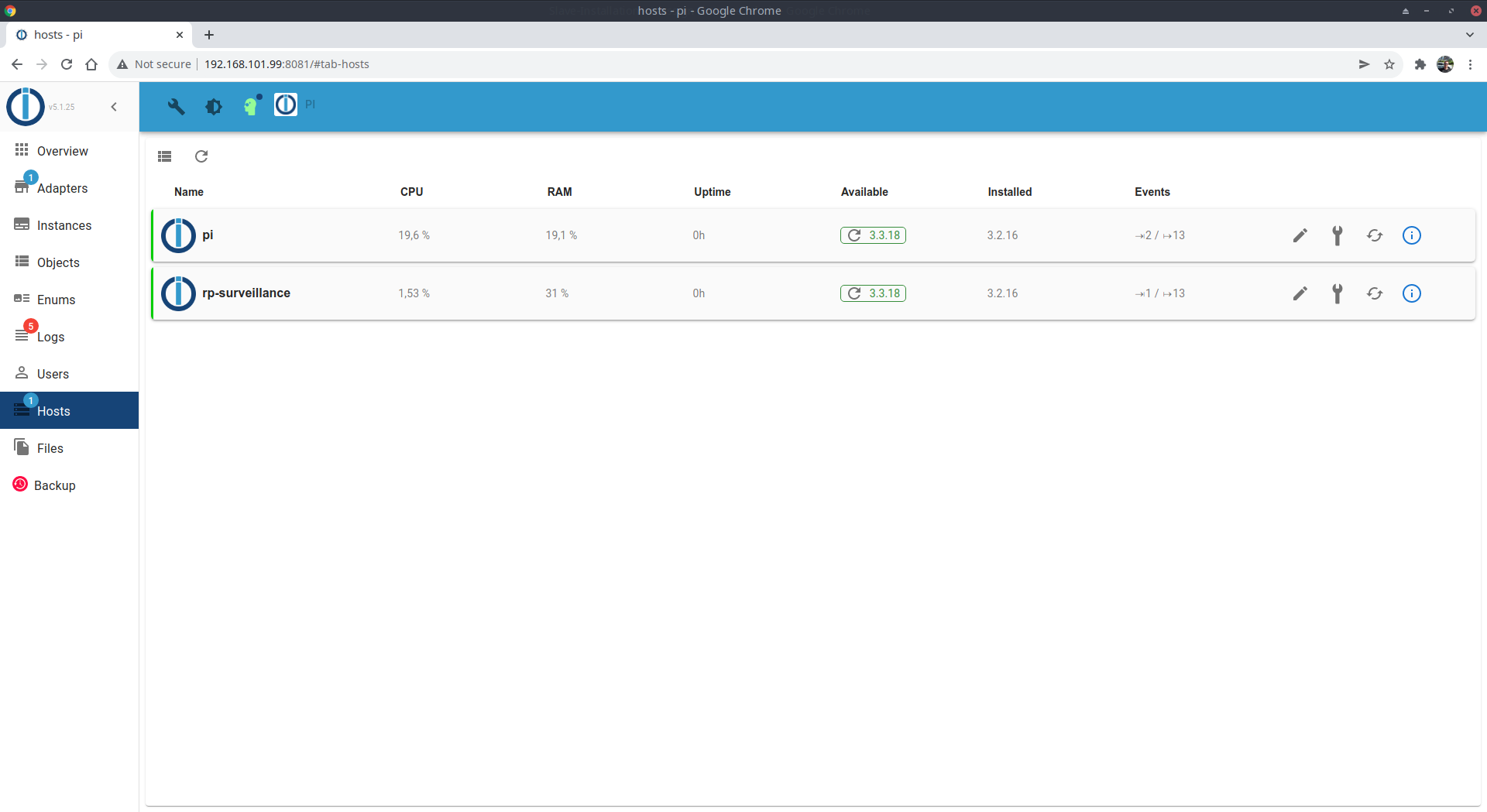
Ich kämpfe seit 2 Tagen mit dem selben Problem.
Habe schon 2 Raspis aufgesetzt, gleiches verhalten,
dann 2 ct am Proxmox, auch kein Erfolg.Downgrade vom js-controller auf 3.2.16 -> multihost geht sofort
Ab welcher Version das nicht mehr funktioniert wäre auszutesten...
-
@dennis-b sagte in Slave-Installation - reassign instance falsch:
UDP geht.
steht denn jetzt die IPv4 im log bei Verbindungstversuch (Slave neustart über Admin des Masters?)


Hey! Du scheinst an dieser Unterhaltung interessiert zu sein, hast aber noch kein Konto.
Hast du es satt, bei jedem Besuch durch die gleichen Beiträge zu scrollen? Wenn du dich für ein Konto anmeldest, kommst du immer genau dorthin zurück, wo du zuvor warst, und kannst dich über neue Antworten benachrichtigen lassen (entweder per E-Mail oder Push-Benachrichtigung). Du kannst auch Lesezeichen speichern und Beiträge positiv bewerten, um anderen Community-Mitgliedern deine Wertschätzung zu zeigen.
Mit deinem Input könnte dieser Beitrag noch besser werden 💗
Registrieren Anmelden402
Online33.0k
Benutzer83.6k
Themen1.3m
Beiträge