Skip to content
  • Home
  • Recent
  • Tags
  • 0 Unread 0
  • Categories
  • Unreplied
  • Popular
  • GitHub
  • Docu
  • Hilfe
Skins
  • Light
  • Brite
  • Cerulean
  • Cosmo
  • Flatly
  • Journal
  • Litera
  • Lumen
  • Lux
  • Materia
  • Minty
  • Morph
  • Pulse
  • Sandstone
  • Simplex
  • Sketchy
  • Spacelab
  • United
  • Yeti
  • Zephyr
  • Dark
  • Cyborg
  • Darkly
  • Quartz
  • Slate
  • Solar
  • Superhero
  • Vapor

  • Default (No Skin)
  • No Skin
Collapse
ioBroker Logo

Community Forum

donate donate
  1. ioBroker Community Home
  2. Deutsch
  3. ioBroker Allgemein
  4. Probleme beim Installieren von MQTT-Client
NEWS

  • Jahresrückblick 2025 – unser neuer Blogbeitrag ist online! ✨
    BluefoxB
    Bluefox
    17
    1
    2.4k

  • Neuer Blogbeitrag: Monatsrückblick - Dezember 2025 🎄
    BluefoxB
    Bluefox
    13
    1
    979

  • Weihnachtsangebot 2025! 🎄
    BluefoxB
    Bluefox
    25
    1
    2.3k

Probleme beim Installieren von MQTT-Client

Scheduled Pinned Locked Moved ioBroker Allgemein
91 Posts 5 Posters 8.9k Views 2 Watching
  • Oldest to Newest
  • Newest to Oldest
  • Most Votes
Reply
  • Reply as topic
Log in to reply
This topic has been deleted. Only users with topic management privileges can see it.
  • AlCalzoneA AlCalzone

    @berges01 sagte in Probleme beim Installieren von MQTT-Client:

    does not start any instances on this host

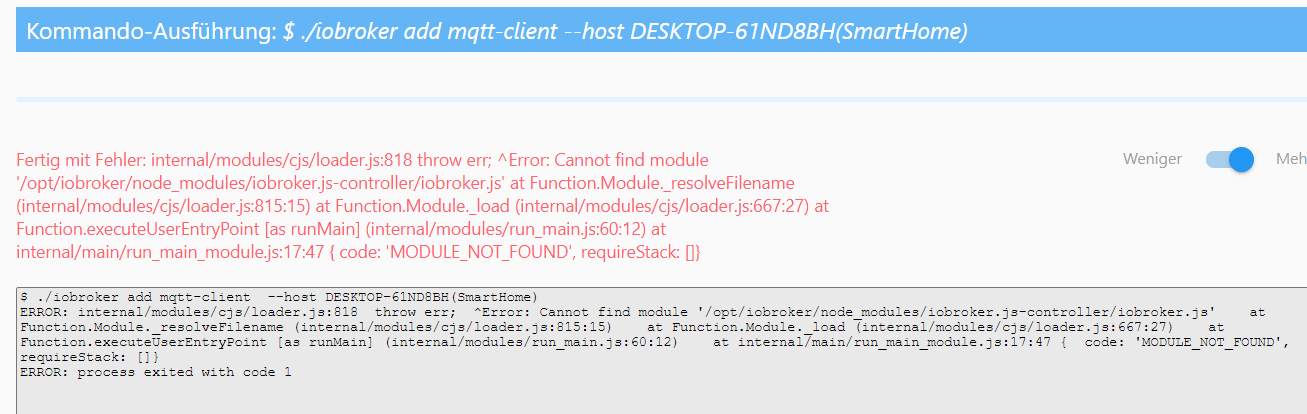
    Der Hostname hat sich geändert und die Instanzen sind noch dem alten Hostnamen zugeordnet. Daher wird nichts gestartet.

    @apollon77 @Homoran ich bin hier grad ein bisschen eingerostet - habt ihr ggf. das richtige Kommando parat? War das iobroker host this?

    Berges01B Offline
    Berges01B Offline
    Berges01
    wrote on last edited by
    #81

    @alcalzone said in Probleme beim Installieren von MQTT-Client:

    @berges01 sagte in Probleme beim Installieren von MQTT-Client:

    does not start any instances on this host

    Der Hostname hat sich geändert und die Instanzen sind noch dem alten Hostnamen zugeordnet. Daher wird nichts gestartet.

    @apollon77 @Homoran ich bin hier grad ein bisschen eingerostet - habt ihr ggf. das richtige Kommando parat? War das iobroker host this?

    laut Hilfe müsste es so aussehen :

    iobroker host <hostname> Set host to given hostname

    "hostnahme = Neuer Name", meine Vermutung.

    Dann währe der Befehl :
    iobroker host Strommix-Smart

    Das tippe ich aber erst nach OK ein !

    F.B.

    Thomas BraunT 1 Reply Last reply
    0
    • Berges01B Berges01

      @alcalzone said in Probleme beim Installieren von MQTT-Client:

      @berges01 sagte in Probleme beim Installieren von MQTT-Client:

      does not start any instances on this host

      Der Hostname hat sich geändert und die Instanzen sind noch dem alten Hostnamen zugeordnet. Daher wird nichts gestartet.

      @apollon77 @Homoran ich bin hier grad ein bisschen eingerostet - habt ihr ggf. das richtige Kommando parat? War das iobroker host this?

      laut Hilfe müsste es so aussehen :

      iobroker host <hostname> Set host to given hostname

      "hostnahme = Neuer Name", meine Vermutung.

      Dann währe der Befehl :
      iobroker host Strommix-Smart

      Das tippe ich aber erst nach OK ein !

      Thomas BraunT Online
      Thomas BraunT Online
      Thomas Braun
      Most Active
      wrote on last edited by
      #82

      @berges01

      iobroker host this
      

      Linux-Werkzeugkasten:
      https://forum.iobroker.net/topic/42952/der-kleine-iobroker-linux-werkzeugkasten
      NodeJS Fixer Skript:
      https://forum.iobroker.net/topic/68035/iob-node-fix-skript
      iob_diag: curl -sLf -o diag.sh https://iobroker.net/diag.sh && bash diag.sh

      Berges01B 1 Reply Last reply
      0
      • Thomas BraunT Thomas Braun

        @berges01

        iobroker host this
        
        Berges01B Offline
        Berges01B Offline
        Berges01
        wrote on last edited by
        #83

        @thomas-braun said in Probleme beim Installieren von MQTT-Client:

        iobroker host this

        
        berges01@Strommix-Smart:~$ iobroker host this
        Host "DESKTOP-61ND8BH(SmartHome)" successfully renamed to "Strommix-Smart".
        The host for instance "system.adapter.admin.0" was changed from "Strommix-Smart" to "Strommix-Smart".
        The host for instance "system.adapter.alexa2.0" was changed from "Strommix-Smart" to "Strommix-Smart".
        The host for instance "system.adapter.backitup.0" was changed from "Strommix-Smart" to "Strommix-Smart".
        The host for instance "system.adapter.cloud.0" was changed from "Strommix-Smart" to "Strommix-Smart".
        The host for instance "system.adapter.devices.0" was changed from "Strommix-Smart" to "Strommix-Smart".
        The host for instance "system.adapter.info.0" was changed from "Strommix-Smart" to "Strommix-Smart".
        The host for instance "system.adapter.iot.0" was changed from "Strommix-Smart" to "Strommix-Smart".
        The host for instance "system.adapter.javascript.0" was changed from "Strommix-Smart" to "Strommix-Smart".
        The host for instance "system.adapter.mqtt.0" was changed from "Strommix-Smart" to "Strommix-Smart".
        The host for instance "system.adapter.netatmo.0" was changed from "Strommix-Smart" to "Strommix-Smart".
        The host for instance "system.adapter.ping.0" was changed from "Strommix-Smart" to "Strommix-Smart".
        The host for instance "system.adapter.socketio.0" was changed from "Strommix-Smart" to "Strommix-Smart".
        The host for instance "system.adapter.tr-064.0" was changed from "Strommix-Smart" to "Strommix-Smart".
        The host for instance "system.adapter.vis.0" was changed from "Strommix-Smart" to "Strommix-Smart".
        The host for instance "system.adapter.web.0" was changed from "Strommix-Smart" to "Strommix-Smart".
        The host for instance "system.adapter.whatsapp-cmb.0" was changed from "Strommix-Smart" to "Strommix-Smart".
        The host for instance "system.adapter.zwave2.0" was changed from "Strommix-Smart" to "Strommix-Smart".
        berges01@Strommix-Smart:~$


        F.B.

        Thomas BraunT 1 Reply Last reply
        0
        • Berges01B Berges01

          @thomas-braun said in Probleme beim Installieren von MQTT-Client:

          iobroker host this

          
          berges01@Strommix-Smart:~$ iobroker host this
          Host "DESKTOP-61ND8BH(SmartHome)" successfully renamed to "Strommix-Smart".
          The host for instance "system.adapter.admin.0" was changed from "Strommix-Smart" to "Strommix-Smart".
          The host for instance "system.adapter.alexa2.0" was changed from "Strommix-Smart" to "Strommix-Smart".
          The host for instance "system.adapter.backitup.0" was changed from "Strommix-Smart" to "Strommix-Smart".
          The host for instance "system.adapter.cloud.0" was changed from "Strommix-Smart" to "Strommix-Smart".
          The host for instance "system.adapter.devices.0" was changed from "Strommix-Smart" to "Strommix-Smart".
          The host for instance "system.adapter.info.0" was changed from "Strommix-Smart" to "Strommix-Smart".
          The host for instance "system.adapter.iot.0" was changed from "Strommix-Smart" to "Strommix-Smart".
          The host for instance "system.adapter.javascript.0" was changed from "Strommix-Smart" to "Strommix-Smart".
          The host for instance "system.adapter.mqtt.0" was changed from "Strommix-Smart" to "Strommix-Smart".
          The host for instance "system.adapter.netatmo.0" was changed from "Strommix-Smart" to "Strommix-Smart".
          The host for instance "system.adapter.ping.0" was changed from "Strommix-Smart" to "Strommix-Smart".
          The host for instance "system.adapter.socketio.0" was changed from "Strommix-Smart" to "Strommix-Smart".
          The host for instance "system.adapter.tr-064.0" was changed from "Strommix-Smart" to "Strommix-Smart".
          The host for instance "system.adapter.vis.0" was changed from "Strommix-Smart" to "Strommix-Smart".
          The host for instance "system.adapter.web.0" was changed from "Strommix-Smart" to "Strommix-Smart".
          The host for instance "system.adapter.whatsapp-cmb.0" was changed from "Strommix-Smart" to "Strommix-Smart".
          The host for instance "system.adapter.zwave2.0" was changed from "Strommix-Smart" to "Strommix-Smart".
          berges01@Strommix-Smart:~$
          
          
          Thomas BraunT Online
          Thomas BraunT Online
          Thomas Braun
          Most Active
          wrote on last edited by
          #84

          @berges01

          iobroker restart
          

          Linux-Werkzeugkasten:
          https://forum.iobroker.net/topic/42952/der-kleine-iobroker-linux-werkzeugkasten
          NodeJS Fixer Skript:
          https://forum.iobroker.net/topic/68035/iob-node-fix-skript
          iob_diag: curl -sLf -o diag.sh https://iobroker.net/diag.sh && bash diag.sh

          Thomas BraunT Berges01B 2 Replies Last reply
          0
          • Thomas BraunT Thomas Braun

            @berges01

            iobroker restart
            
            Thomas BraunT Online
            Thomas BraunT Online
            Thomas Braun
            Most Active
            wrote on last edited by
            #85

            @thomas-braun
            Notiz an mich selbst:
            Den host change sieht man im log file

            2021-05-17 07:52:44.827  - info: host.Strommix-Smart All instances are stopped.
            2021-05-17 07:52:44.898  - info: host.Strommix-Smart terminated
            2021-05-17 07:53:02.319  - info: host.DESKTOP-61ND8BH(SmartHome) iobroker.js-controller version 3.2.16 js-controller starting
            2021-05-17 07:53:02.320  - info: host.DESKTOP-61ND8BH(SmartHome) Copyright (c) 2014-2021 bluefox, 2014 hobbyquaker
            2021-05-17 07:53:02.321  - info: host.DESKTOP-61ND8BH(SmartHome) hostname: DESKTOP-61ND8BH(SmartHome), node: v12.22.1


            Linux-Werkzeugkasten:
            https://forum.iobroker.net/topic/42952/der-kleine-iobroker-linux-werkzeugkasten
            NodeJS Fixer Skript:
            https://forum.iobroker.net/topic/68035/iob-node-fix-skript
            iob_diag: curl -sLf -o diag.sh https://iobroker.net/diag.sh && bash diag.sh

            1 Reply Last reply
            0
            • Thomas BraunT Thomas Braun

              @berges01

              iobroker restart
              
              Berges01B Offline
              Berges01B Offline
              Berges01
              wrote on last edited by
              #86

              @thomas-braun said in Probleme beim Installieren von MQTT-Client:

              iobroker restart

              AHHHHHHH
              Schau an da is er wieder !
              Instanzen sind da aber noch nicht aktiv.

              F.B.

              Thomas BraunT 1 Reply Last reply
              0
              • Berges01B Berges01

                @thomas-braun said in Probleme beim Installieren von MQTT-Client:

                iobroker restart

                AHHHHHHH
                Schau an da is er wieder !
                Instanzen sind da aber noch nicht aktiv.

                Thomas BraunT Online
                Thomas BraunT Online
                Thomas Braun
                Most Active
                wrote on last edited by
                #87

                @berges01
                Dann schau nochmal per

                iobroker list instances
                iobroker start admin
                

                Linux-Werkzeugkasten:
                https://forum.iobroker.net/topic/42952/der-kleine-iobroker-linux-werkzeugkasten
                NodeJS Fixer Skript:
                https://forum.iobroker.net/topic/68035/iob-node-fix-skript
                iob_diag: curl -sLf -o diag.sh https://iobroker.net/diag.sh && bash diag.sh

                Berges01B 1 Reply Last reply
                0
                • Thomas BraunT Thomas Braun

                  @berges01
                  Dann schau nochmal per

                  iobroker list instances
                  iobroker start admin
                  
                  Berges01B Offline
                  Berges01B Offline
                  Berges01
                  wrote on last edited by
                  #88

                  @thomas-braun said in Probleme beim Installieren von MQTT-Client:

                  iobroker list instances

                  
                  berges01@Strommix-Smart:~$ iobroker list instances
                  + system.adapter.admin.0                  : admin                 : Strommix-Smart                           -  enabled, port: 8081, bind: 192.168.2.50, run as: admin
                  + system.adapter.alexa2.0                 : alexa2                : Strommix-Smart                           -  enabled
                  + system.adapter.backitup.0               : backitup              : Strommix-Smart                           -  enabled
                  + system.adapter.cloud.0                  : cloud                 : Strommix-Smart                           -  enabled
                    system.adapter.devices.0                : devices               : Strommix-Smart                           - disabled
                  + system.adapter.info.0                   : info                  : Strommix-Smart                           -  enabled
                  + system.adapter.iot.0                    : iot                   : Strommix-Smart                           -  enabled
                  + system.adapter.javascript.0             : javascript            : Strommix-Smart                           -  enabled
                  + system.adapter.mqtt.0                   : mqtt                  : Strommix-Smart                           -  enabled, port: 1883, bind: 0.0.0.0
                  + system.adapter.netatmo.0                : netatmo               : Strommix-Smart                           -  enabled
                  + system.adapter.ping.0                   : ping                  : Strommix-Smart                           -  enabled
                  + system.adapter.socketio.0               : socketio              : Strommix-Smart                           -  enabled, port: 8084, bind: 0.0.0.0, run as: admin
                    system.adapter.vis.0                    : vis                   : Strommix-Smart                           -  enabled
                  + system.adapter.web.0                    : web                   : Strommix-Smart                           -  enabled, port: 8082, bind: 0.0.0.0, run as: admin
                  + system.adapter.whatsapp-cmb.0           : whatsapp-cmb          : Strommix-Smart                           -  enabled
                  + system.adapter.zwave2.0                 : zwave2                : Strommix-Smart                           -  enabled
                  
                  + instance is alive
                  
                  
                  code_text
                  

                  F.B.

                  Berges01B 1 Reply Last reply
                  0
                  • Berges01B Berges01

                    @thomas-braun said in Probleme beim Installieren von MQTT-Client:

                    iobroker list instances

                    
                    berges01@Strommix-Smart:~$ iobroker list instances
                    + system.adapter.admin.0                  : admin                 : Strommix-Smart                           -  enabled, port: 8081, bind: 192.168.2.50, run as: admin
                    + system.adapter.alexa2.0                 : alexa2                : Strommix-Smart                           -  enabled
                    + system.adapter.backitup.0               : backitup              : Strommix-Smart                           -  enabled
                    + system.adapter.cloud.0                  : cloud                 : Strommix-Smart                           -  enabled
                      system.adapter.devices.0                : devices               : Strommix-Smart                           - disabled
                    + system.adapter.info.0                   : info                  : Strommix-Smart                           -  enabled
                    + system.adapter.iot.0                    : iot                   : Strommix-Smart                           -  enabled
                    + system.adapter.javascript.0             : javascript            : Strommix-Smart                           -  enabled
                    + system.adapter.mqtt.0                   : mqtt                  : Strommix-Smart                           -  enabled, port: 1883, bind: 0.0.0.0
                    + system.adapter.netatmo.0                : netatmo               : Strommix-Smart                           -  enabled
                    + system.adapter.ping.0                   : ping                  : Strommix-Smart                           -  enabled
                    + system.adapter.socketio.0               : socketio              : Strommix-Smart                           -  enabled, port: 8084, bind: 0.0.0.0, run as: admin
                      system.adapter.vis.0                    : vis                   : Strommix-Smart                           -  enabled
                    + system.adapter.web.0                    : web                   : Strommix-Smart                           -  enabled, port: 8082, bind: 0.0.0.0, run as: admin
                    + system.adapter.whatsapp-cmb.0           : whatsapp-cmb          : Strommix-Smart                           -  enabled
                    + system.adapter.zwave2.0                 : zwave2                : Strommix-Smart                           -  enabled
                    
                    + instance is alive
                    
                    
                    code_text
                    
                    Berges01B Offline
                    Berges01B Offline
                    Berges01
                    wrote on last edited by Berges01
                    #89

                    @berges01 said in Probleme beim Installieren von MQTT-Client:

                    @thomas-braun said in Probleme beim Installieren von MQTT-Client:

                    iobroker list instances

                    
                    berges01@Strommix-Smart:~$ iobroker list instances
                    + system.adapter.admin.0                  : admin                 : Strommix-Smart                           -  enabled, port: 8081, bind: 192.168.2.50, run as: admin
                    + system.adapter.alexa2.0                 : alexa2                : Strommix-Smart                           -  enabled
                    + system.adapter.backitup.0               : backitup              : Strommix-Smart                           -  enabled
                    + system.adapter.cloud.0                  : cloud                 : Strommix-Smart                           -  enabled
                      system.adapter.devices.0                : devices               : Strommix-Smart                           - disabled
                    + system.adapter.info.0                   : info                  : Strommix-Smart                           -  enabled
                    + system.adapter.iot.0                    : iot                   : Strommix-Smart                           -  enabled
                    + system.adapter.javascript.0             : javascript            : Strommix-Smart                           -  enabled
                    + system.adapter.mqtt.0                   : mqtt                  : Strommix-Smart                           -  enabled, port: 1883, bind: 0.0.0.0
                    + system.adapter.netatmo.0                : netatmo               : Strommix-Smart                           -  enabled
                    + system.adapter.ping.0                   : ping                  : Strommix-Smart                           -  enabled
                    + system.adapter.socketio.0               : socketio              : Strommix-Smart                           -  enabled, port: 8084, bind: 0.0.0.0, run as: admin
                      system.adapter.vis.0                    : vis                   : Strommix-Smart                           -  enabled
                    + system.adapter.web.0                    : web                   : Strommix-Smart                           -  enabled, port: 8082, bind: 0.0.0.0, run as: admin
                    + system.adapter.whatsapp-cmb.0           : whatsapp-cmb          : Strommix-Smart                           -  enabled
                    + system.adapter.zwave2.0                 : zwave2                : Strommix-Smart                           -  enabled
                    
                    + instance is alive
                    
                    
                    code_text
                    

                    Adapter alle grün
                    z-wave wieder da und 2 Nodes funktionieren (mehr hatte dauert aber wenn 2 gehen)
                    Blockly alle da
                    Das scheind Gut gegangen zu sein !
                    Dann ist das jetzt auf einem Debian Server ohne Desktop.
                    Oh mann was machte ich nur ohne EUCH ?

                    Erst mal DANKE (Organisiert ein User-Treffen und ich werfe eine Runde Freibier) !!!

                    F.B.

                    1 Reply Last reply
                    0
                    • Berges01B Berges01

                      @thomas-braun said in Probleme beim Installieren von MQTT-Client:

                      @berges01

                      iobroker start admin
                      iobroker start web
                      
                      
                      berges01@Strommix-Smart:~$ iobroker start admin
                      berges01@Strommix-Smart:~$ iobroker start web
                      The adapter "web.0" was started.
                      berges01@Strommix-Smart:~$


                      und nix

                      
                      berges01@Strommix-Smart:~$ ^C
                      berges01@Strommix-Smart:~$ iobroker start admin
                      berges01@Strommix-Smart:~$ iobroker start web
                      The adapter "web.0" was started.
                      berges01@Strommix-Smart:~$ ^C
                      berges01@Strommix-Smart:~$ iobroker list instances
                        system.adapter.admin.0                  : admin                 : Strommix-Smart                           -  enabled, port: 8081, bind: 192.168.2.50, run as: admin
                        system.adapter.alexa2.0                 : alexa2                : Strommix-Smart                           - disabled
                        system.adapter.backitup.0               : backitup              : Strommix-Smart                           -  enabled
                        system.adapter.cloud.0                  : cloud                 : Strommix-Smart                           - disabled
                        system.adapter.devices.0                : devices               : Strommix-Smart                           - disabled
                        system.adapter.info.0                   : info                  : Strommix-Smart                           - disabled
                        system.adapter.iot.0                    : iot                   : Strommix-Smart                           - disabled
                        system.adapter.javascript.0             : javascript            : Strommix-Smart                           - disabled
                        system.adapter.mqtt.0                   : mqtt                  : Strommix-Smart                           - disabled, port: 1883, bind: 0.0.0.0
                        system.adapter.netatmo.0                : netatmo               : Strommix-Smart                           - disabled
                        system.adapter.ping.0                   : ping                  : Strommix-Smart                           - disabled
                        system.adapter.socketio.0               : socketio              : Strommix-Smart                           - disabled, port: 8084, bind: 0.0.0.0, run as: admin
                        system.adapter.tr-064.0                 : tr-064                : Strommix-Smart                           - disabled
                        system.adapter.vis.0                    : vis                   : Strommix-Smart                           - disabled
                        system.adapter.web.0                    : web                   : Strommix-Smart                           -  enabled, port: 8082, bind: 0.0.0.0, run as: admin
                        system.adapter.whatsapp-cmb.0           : whatsapp-cmb          : Strommix-Smart                           - disabled
                        system.adapter.zwave2.0                 : zwave2                : Strommix-Smart                           - disabled
                      
                      + instance is alive
                      berge
                      
                      HomoranH Do not disturb
                      HomoranH Do not disturb
                      Homoran
                      Global Moderator Administrators
                      wrote on last edited by Homoran
                      #90

                      @berges01 sagte in Probleme beim Installieren von MQTT-Client:

                      enabled, port: 8081, bind: 192.168.2.50, run as: admin

                      wieso denn das?
                      da gehört 0.0.0.0 rein

                      das kommt dann wohl schon aus dem Backup.
                      Jetzt wo du wieder an den admin kommst, dort unbedingt in der Konfig 0.0.0.0 eingeben!
                      https://www.iobroker.net/#de/adapters/adapterref/iobroker.admin/README.md
                      (ist schon was älter, gilt aber immer noch)

                      kein Support per PN! - Fragen im Forum stellen - es gibt fast nichts, was nicht auch für andere interessant ist.

                      Benutzt das Voting rechts unten im Beitrag wenn er euch geholfen hat.

                      der Installationsfixer: curl -fsL https://iobroker.net/fix.sh | bash -

                      Berges01B 1 Reply Last reply
                      0
                      • HomoranH Homoran

                        @berges01 sagte in Probleme beim Installieren von MQTT-Client:

                        enabled, port: 8081, bind: 192.168.2.50, run as: admin

                        wieso denn das?
                        da gehört 0.0.0.0 rein

                        das kommt dann wohl schon aus dem Backup.
                        Jetzt wo du wieder an den admin kommst, dort unbedingt in der Konfig 0.0.0.0 eingeben!
                        https://www.iobroker.net/#de/adapters/adapterref/iobroker.admin/README.md
                        (ist schon was älter, gilt aber immer noch)

                        Berges01B Offline
                        Berges01B Offline
                        Berges01
                        wrote on last edited by
                        #91

                        @homoran said in Probleme beim Installieren von MQTT-Client:

                        @berges01 sagte in Probleme beim Installieren von MQTT-Client:

                        enabled, port: 8081, bind: 192.168.2.50, run as: admin

                        wieso denn das?
                        da gehört 0.0.0.0 rein

                        das kommt dann wohl schon aus dem Backup.
                        Jetzt wo du wieder an den admin kommst, dort unbedingt in der Konfig 0.0.0.0 eingeben!
                        https://www.iobroker.net/#de/adapters/adapterref/iobroker.admin/README.md
                        (ist schon was älter, gilt aber immer noch)

                        Erledigt !

                        Danke !

                        F.B.

                        1 Reply Last reply
                        0
                        Reply
                        • Reply as topic
                        Log in to reply
                        • Oldest to Newest
                        • Newest to Oldest
                        • Most Votes


                        Support us

                        ioBroker
                        Community Adapters
                        Donate
                        FAQ Cloud / IOT
                        HowTo: Node.js-Update
                        HowTo: Backup/Restore
                        Downloads
                        BLOG

                        594

                        Online

                        32.6k

                        Users

                        82.2k

                        Topics

                        1.3m

                        Posts
                        Community
                        Impressum | Datenschutz-Bestimmungen | Nutzungsbedingungen | Einwilligungseinstellungen
                        ioBroker Community 2014-2025
                        logo
                        • Login

                        • Don't have an account? Register

                        • Login or register to search.
                        • First post
                          Last post
                        0
                        • Home
                        • Recent
                        • Tags
                        • Unread 0
                        • Categories
                        • Unreplied
                        • Popular
                        • GitHub
                        • Docu
                        • Hilfe