Weiter zum Inhalt
  • Home
  • Aktuell
  • Tags
  • 0 Ungelesen 0
  • Kategorien
  • Unreplied
  • Beliebt
  • GitHub
  • Docu
  • Hilfe
Skins
  • Hell
  • Brite
  • Cerulean
  • Cosmo
  • Flatly
  • Journal
  • Litera
  • Lumen
  • Lux
  • Materia
  • Minty
  • Morph
  • Pulse
  • Sandstone
  • Simplex
  • Sketchy
  • Spacelab
  • United
  • Yeti
  • Zephyr
  • Dunkel
  • Cyborg
  • Darkly
  • Quartz
  • Slate
  • Solar
  • Superhero
  • Vapor

  • Standard: (Kein Skin)
  • Kein Skin
Einklappen
ioBroker Logo

Community Forum

donate donate
  1. ioBroker Community Home
  2. Deutsch
  3. ioBroker Allgemein
  4. Anfänger sucht Hilfe bei Install. proxmox auf INTELNUC8i3BEK
NEWS

  • Monatsrückblick Januar/Februar 2026 ist online!
    BluefoxB
    Bluefox
    18
    1
    718

  • Jahresrückblick 2025 – unser neuer Blogbeitrag ist online! ✨
    BluefoxB
    Bluefox
    18
    1
    5.9k

  • Neuer Blogbeitrag: Monatsrückblick - Dezember 2025 🎄
    BluefoxB
    Bluefox
    13
    1
    1.5k

Anfänger sucht Hilfe bei Install. proxmox auf INTELNUC8i3BEK

Geplant Angeheftet Gesperrt Verschoben ioBroker Allgemein
1.0k Beiträge 16 Kommentatoren 262.6k Aufrufe 15 Beobachtet
  • Älteste zuerst
  • Neuste zuerst
  • Meiste Stimmen
Antworten
  • In einem neuen Thema antworten
Anmelden zum Antworten
Dieses Thema wurde gelöscht. Nur Nutzer mit entsprechenden Rechten können es sehen.
  • G GOETSCHHOFER

    @thomas-braun said in Anfänger sucht Hilfe bei Install. proxmox auf INTELNUC8i3BEK:

    @goetschhofer
    Ja, mit dem Befehl wird die falsche Datei gelöscht.
    Die würde sonst immer beim apt update angemeckert werden.

    Diese findet er aber offenbar nicht ?

    Ich war folgendermaßen vorgegangen.

    1. falsche Eingabe Befehl
    2. richtige Eingabe Beschreibung von dir.
    root@IOBROKER:~# rm /etc/apt/sourceslist.d/influxdb.listcode_text
    rm: das Entfernen von '/etc/apt/sourceslist.d/influxdb.listcode_text' ist nicht möglich: Datei oder Verzeichnis nicht gefunden
    root@IOBROKER:~#
    
    
    Thomas BraunT Online
    Thomas BraunT Online
    Thomas Braun
    Most Active
    schrieb am zuletzt editiert von
    #894

    @goetschhofer

    ls -la /etc/apt/sources.list.d
    

    Linux-Werkzeugkasten:
    https://forum.iobroker.net/topic/42952/der-kleine-iobroker-linux-werkzeugkasten
    NodeJS Fixer Skript:
    https://forum.iobroker.net/topic/68035/iob-node-fix-skript
    iob_diag: curl -sLf -o diag.sh https://iobroker.net/diag.sh && bash diag.sh

    G 1 Antwort Letzte Antwort
    1
    • Thomas BraunT Thomas Braun

      @goetschhofer

      ls -la /etc/apt/sources.list.d
      
      G Offline
      G Offline
      GOETSCHHOFER
      schrieb am zuletzt editiert von
      #895

      @thomas-braun said in Anfänger sucht Hilfe bei Install. proxmox auf INTELNUC8i3BEK:

      ls -la /etc/apt/sources.list.d

      root@IOBROKER:~# ls -la /etc/apt/sources.list.d
      insgesamt 20
      drwxr-xr-x 2 root root 4096 Aug 17 11:35 .
      drwxr-xr-x 7 root root 4096 Mai  2 15:24 ..
      -rw-r--r-- 1 root root  102 Aug 17 11:35 influxdb.list
      -rw-r--r-- 1 root root  102 Aug 17 11:30 influxdb.listcode_text
      -rw-r--r-- 1 root root  204 Mai  2 20:24 nodesource.list
      root@IOBROKER:~#
      
      
      Thomas BraunT 1 Antwort Letzte Antwort
      0
      • G GOETSCHHOFER

        @thomas-braun said in Anfänger sucht Hilfe bei Install. proxmox auf INTELNUC8i3BEK:

        ls -la /etc/apt/sources.list.d

        root@IOBROKER:~# ls -la /etc/apt/sources.list.d
        insgesamt 20
        drwxr-xr-x 2 root root 4096 Aug 17 11:35 .
        drwxr-xr-x 7 root root 4096 Mai  2 15:24 ..
        -rw-r--r-- 1 root root  102 Aug 17 11:35 influxdb.list
        -rw-r--r-- 1 root root  102 Aug 17 11:30 influxdb.listcode_text
        -rw-r--r-- 1 root root  204 Mai  2 20:24 nodesource.list
        root@IOBROKER:~#
        
        
        Thomas BraunT Online
        Thomas BraunT Online
        Thomas Braun
        Most Active
        schrieb am zuletzt editiert von Thomas Braun
        #896

        @goetschhofer

        rm /etc/apt/sources.list.d/influxdb.listcode_text
        

        Da fehlte mir ein Punkt im Pfad.

        Linux-Werkzeugkasten:
        https://forum.iobroker.net/topic/42952/der-kleine-iobroker-linux-werkzeugkasten
        NodeJS Fixer Skript:
        https://forum.iobroker.net/topic/68035/iob-node-fix-skript
        iob_diag: curl -sLf -o diag.sh https://iobroker.net/diag.sh && bash diag.sh

        G 1 Antwort Letzte Antwort
        1
        • Thomas BraunT Thomas Braun

          @goetschhofer

          rm /etc/apt/sources.list.d/influxdb.listcode_text
          

          Da fehlte mir ein Punkt im Pfad.

          G Offline
          G Offline
          GOETSCHHOFER
          schrieb am zuletzt editiert von
          #897

          @thomas-braun said in Anfänger sucht Hilfe bei Install. proxmox auf INTELNUC8i3BEK:

          rm /etc/apt/sources.list.d/influxdb.listcode_text

          Ja, die ist jetzt weg.

          Vielen herzlichen Dank.

          Muss ich jetzt noch die influxdb.conf anpassen ? bind-adress = Port 8088 ?

          root@IOBROKER:~# ls -la /etc/apt/sources.list.d
          insgesamt 20
          drwxr-xr-x 2 root root 4096 Aug 17 11:35 .
          drwxr-xr-x 7 root root 4096 Mai  2 15:24 ..
          -rw-r--r-- 1 root root  102 Aug 17 11:35 influxdb.list
          -rw-r--r-- 1 root root  102 Aug 17 11:30 influxdb.listcode_text
          -rw-r--r-- 1 root root  204 Mai  2 20:24 nodesource.list
          root@IOBROKER:~# ^C
          root@IOBROKER:~# rm /etc/apt/sources.list.d/influxdb.listcode_text
          root@IOBROKER:~#  ls -la /etc/apt/sources.list.d
          insgesamt 16
          drwxr-xr-x 2 root root 4096 Aug 17 11:46 .
          drwxr-xr-x 7 root root 4096 Mai  2 15:24 ..
          -rw-r--r-- 1 root root  102 Aug 17 11:35 influxdb.list
          -rw-r--r-- 1 root root  204 Mai  2 20:24 nodesource.list
          root@IOBROKER:~#
          
          
          Thomas BraunT 1 Antwort Letzte Antwort
          0
          • G GOETSCHHOFER

            @thomas-braun said in Anfänger sucht Hilfe bei Install. proxmox auf INTELNUC8i3BEK:

            rm /etc/apt/sources.list.d/influxdb.listcode_text

            Ja, die ist jetzt weg.

            Vielen herzlichen Dank.

            Muss ich jetzt noch die influxdb.conf anpassen ? bind-adress = Port 8088 ?

            root@IOBROKER:~# ls -la /etc/apt/sources.list.d
            insgesamt 20
            drwxr-xr-x 2 root root 4096 Aug 17 11:35 .
            drwxr-xr-x 7 root root 4096 Mai  2 15:24 ..
            -rw-r--r-- 1 root root  102 Aug 17 11:35 influxdb.list
            -rw-r--r-- 1 root root  102 Aug 17 11:30 influxdb.listcode_text
            -rw-r--r-- 1 root root  204 Mai  2 20:24 nodesource.list
            root@IOBROKER:~# ^C
            root@IOBROKER:~# rm /etc/apt/sources.list.d/influxdb.listcode_text
            root@IOBROKER:~#  ls -la /etc/apt/sources.list.d
            insgesamt 16
            drwxr-xr-x 2 root root 4096 Aug 17 11:46 .
            drwxr-xr-x 7 root root 4096 Mai  2 15:24 ..
            -rw-r--r-- 1 root root  102 Aug 17 11:35 influxdb.list
            -rw-r--r-- 1 root root  204 Mai  2 20:24 nodesource.list
            root@IOBROKER:~#
            
            
            Thomas BraunT Online
            Thomas BraunT Online
            Thomas Braun
            Most Active
            schrieb am zuletzt editiert von Thomas Braun
            #898

            @goetschhofer Meld dich als root ab!!!

            exit
            

            Linux-Werkzeugkasten:
            https://forum.iobroker.net/topic/42952/der-kleine-iobroker-linux-werkzeugkasten
            NodeJS Fixer Skript:
            https://forum.iobroker.net/topic/68035/iob-node-fix-skript
            iob_diag: curl -sLf -o diag.sh https://iobroker.net/diag.sh && bash diag.sh

            G 1 Antwort Letzte Antwort
            1
            • Thomas BraunT Thomas Braun

              @goetschhofer Meld dich als root ab!!!

              exit
              
              G Offline
              G Offline
              GOETSCHHOFER
              schrieb am zuletzt editiert von
              #899

              @thomas-braun said in Anfänger sucht Hilfe bei Install. proxmox auf INTELNUC8i3BEK:

              @goetschhofer Meld dich als root ab!!!

              exit
              

              Danke, hätte ich jetzt vergessen ! 😊

              G 1 Antwort Letzte Antwort
              0
              • G GOETSCHHOFER

                @thomas-braun said in Anfänger sucht Hilfe bei Install. proxmox auf INTELNUC8i3BEK:

                @goetschhofer Meld dich als root ab!!!

                exit
                

                Danke, hätte ich jetzt vergessen ! 😊

                G Offline
                G Offline
                GOETSCHHOFER
                schrieb am zuletzt editiert von GOETSCHHOFER
                #900

                @crunchip

                Muss ich da jetzt noch in der influxdb.conf etwas anpassen ? bind-adress = Port 8088 ?
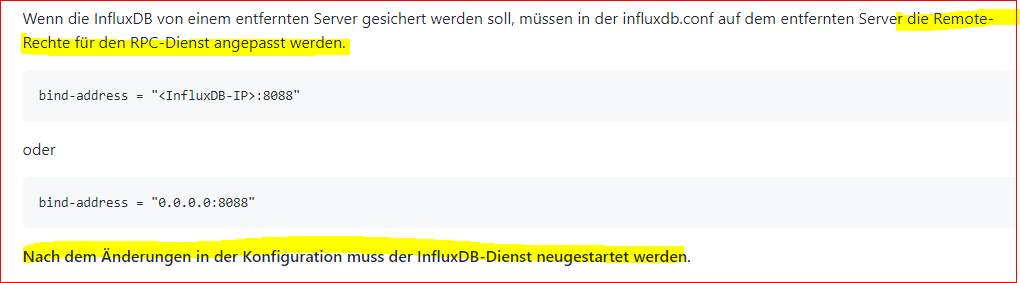
                8092541e-9332-4c07-b2c9-84f125ba5b40-image.png

                Wenn die InfluxDB von einem entfernten Server gesichert werden soll, müssen in der influxdb.conf auf dem entfernten Server die Remote-Rechte für den RPC-Dienst angepasst werden.
                 
                bind-address = "<InfluxDB-IP>:8088"
                oder
                 
                bind-address = "0.0.0.0:8088"
                Nach dem Änderungen in der Konfiguration muss der InfluxDB-Dienst neugestartet werden.
                

                Die bindadress sieht in der influxdb.config genaus aus, wie bei der Variante 2. "0.0.0.0:8088".

                Oder muss hier unbedingt unter bind-adress die IP-Adresse in der influxdb rein: "192.168.1.177:8088" ?

                Danke

                Influxdb.conf:

                ### Welcome to the InfluxDB configuration file.
                
                # The values in this file override the default values used by the system if
                # a config option is not specified. The commented out lines are the configuration
                # field and the default value used. Uncommenting a line and changing the value
                # will change the value used at runtime when the process is restarted.
                
                # Once every 24 hours InfluxDB will report usage data to usage.influxdata.com
                # The data includes a random ID, os, arch, version, the number of series and other
                # usage data. No data from user databases is ever transmitted.
                # Change this option to true to disable reporting.
                # reporting-disabled = false
                
                # Bind address to use for the RPC service for backup and restore.
                  bind-address = "0.0.0.0:8088"
                
                
                crunchipC 1 Antwort Letzte Antwort
                0
                • G GOETSCHHOFER

                  @crunchip

                  Muss ich da jetzt noch in der influxdb.conf etwas anpassen ? bind-adress = Port 8088 ?

                  8092541e-9332-4c07-b2c9-84f125ba5b40-image.png

                  Wenn die InfluxDB von einem entfernten Server gesichert werden soll, müssen in der influxdb.conf auf dem entfernten Server die Remote-Rechte für den RPC-Dienst angepasst werden.
                   
                  bind-address = "<InfluxDB-IP>:8088"
                  oder
                   
                  bind-address = "0.0.0.0:8088"
                  Nach dem Änderungen in der Konfiguration muss der InfluxDB-Dienst neugestartet werden.
                  

                  Die bindadress sieht in der influxdb.config genaus aus, wie bei der Variante 2. "0.0.0.0:8088".

                  Oder muss hier unbedingt unter bind-adress die IP-Adresse in der influxdb rein: "192.168.1.177:8088" ?

                  Danke

                  Influxdb.conf:

                  ### Welcome to the InfluxDB configuration file.
                  
                  # The values in this file override the default values used by the system if
                  # a config option is not specified. The commented out lines are the configuration
                  # field and the default value used. Uncommenting a line and changing the value
                  # will change the value used at runtime when the process is restarted.
                  
                  # Once every 24 hours InfluxDB will report usage data to usage.influxdata.com
                  # The data includes a random ID, os, arch, version, the number of series and other
                  # usage data. No data from user databases is ever transmitted.
                  # Change this option to true to disable reporting.
                  # reporting-disabled = false
                  
                  # Bind address to use for the RPC service for backup and restore.
                    bind-address = "0.0.0.0:8088"
                  
                  
                  crunchipC Offline
                  crunchipC Offline
                  crunchip
                  Forum Testing Most Active
                  schrieb am zuletzt editiert von
                  #901

                  @goetschhofer sagte in Anfänger sucht Hilfe bei Install. proxmox auf INTELNUC8i3BEK:

                  Die bindadress sieht in der influxdb.config genaus aus, wie bei der Variante 2. "0.0.0.0:8088".
                  Oder muss hier unbedingt unter bind-adress die IP-Adresse in der influxdb rein: "192.168.1.177:8088" ?

                  0.0.0.0 passt, dann wird auf "allen gehört"

                  umgestiegen von Proxmox auf Unraid

                  G 1 Antwort Letzte Antwort
                  1
                  • crunchipC crunchip

                    @goetschhofer sagte in Anfänger sucht Hilfe bei Install. proxmox auf INTELNUC8i3BEK:

                    Die bindadress sieht in der influxdb.config genaus aus, wie bei der Variante 2. "0.0.0.0:8088".
                    Oder muss hier unbedingt unter bind-adress die IP-Adresse in der influxdb rein: "192.168.1.177:8088" ?

                    0.0.0.0 passt, dann wird auf "allen gehört"

                    G Offline
                    G Offline
                    GOETSCHHOFER
                    schrieb am zuletzt editiert von GOETSCHHOFER
                    #902

                    @crunchip

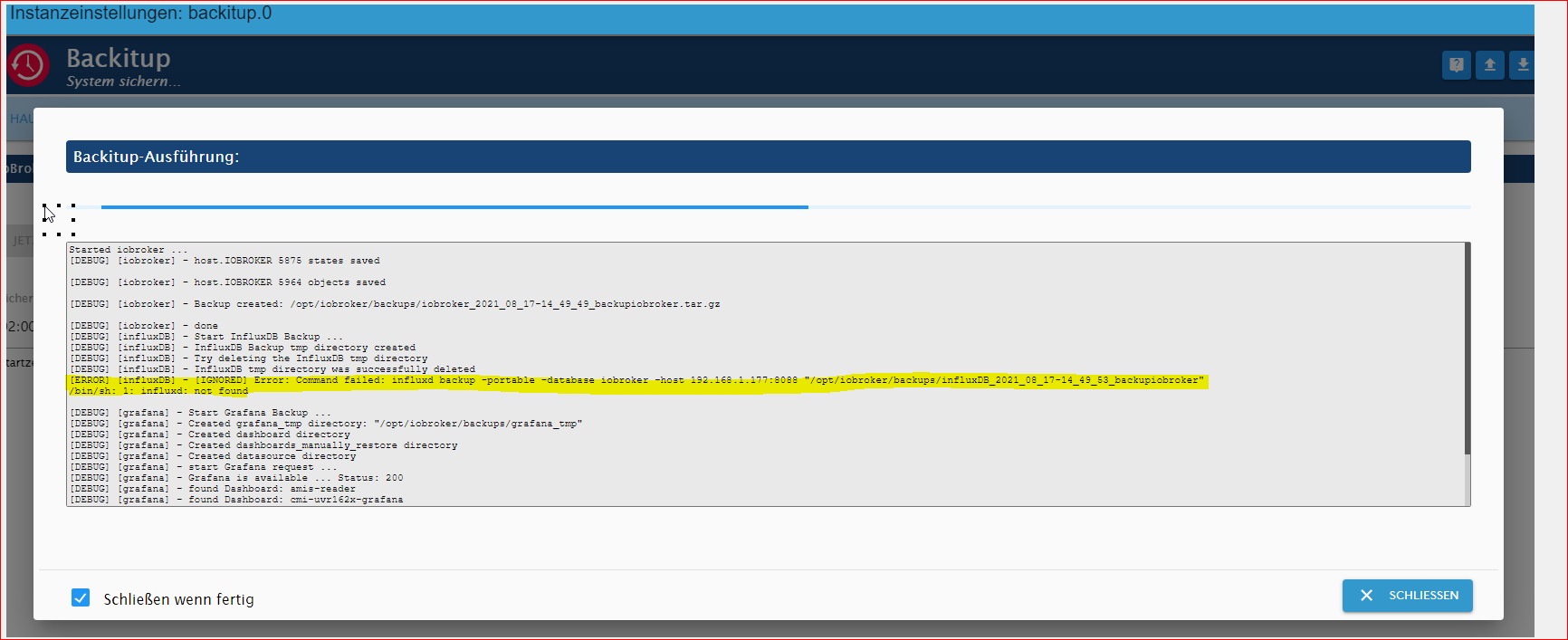
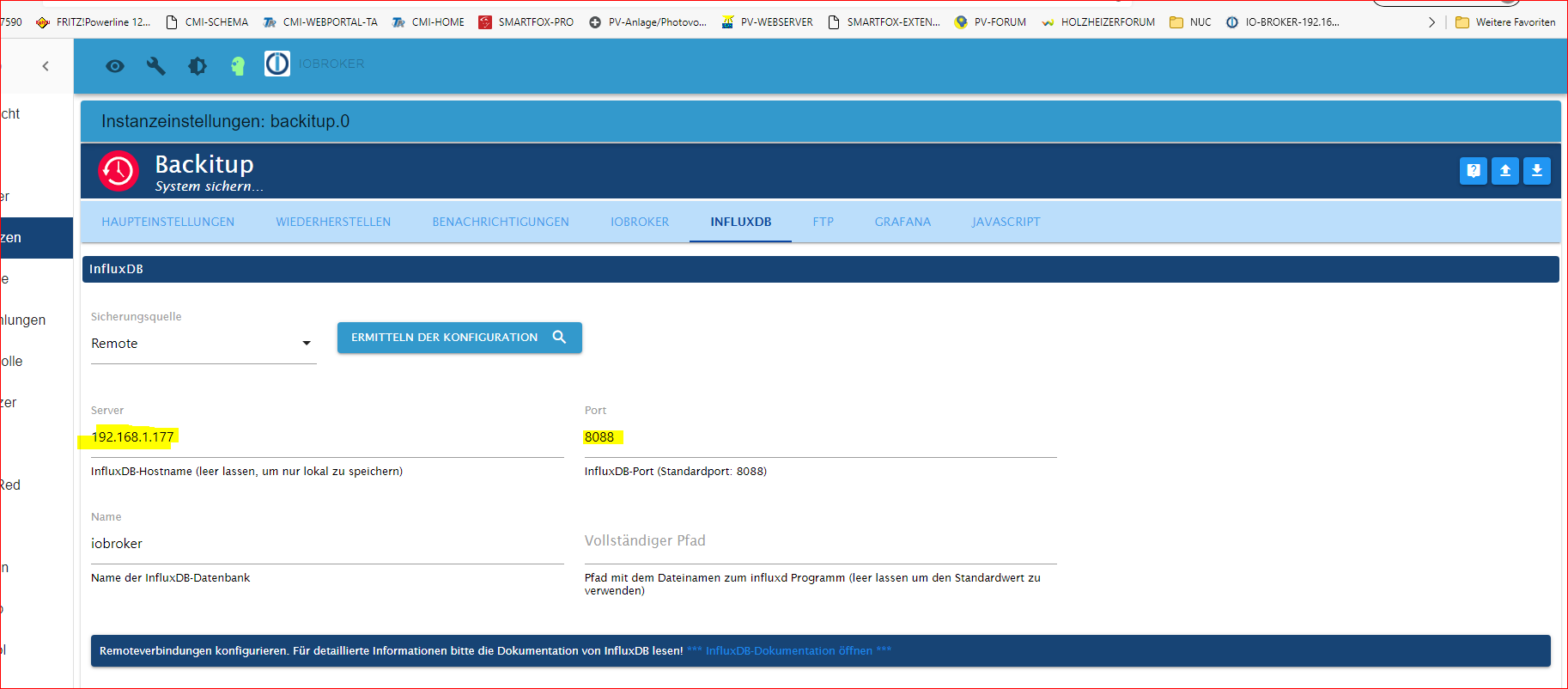
                    Im backitup-Adapter im iobroker habe ich unter influxdb die IP-Adresse der Influxdb und Port: 8088 eingetragen.

                    Bekomme aber immer noch eine Fehlermeldung.


                    ade7447b-1823-4543-8eb6-e9a334657622-image.png


                    db247fd8-3204-44dd-aa73-9d99e94bb650-image.png

                    Thomas BraunT 1 Antwort Letzte Antwort
                    0
                    • G GOETSCHHOFER

                      @crunchip

                      Im backitup-Adapter im iobroker habe ich unter influxdb die IP-Adresse der Influxdb und Port: 8088 eingetragen.

                      Bekomme aber immer noch eine Fehlermeldung.


                      ade7447b-1823-4543-8eb6-e9a334657622-image.png


                      db247fd8-3204-44dd-aa73-9d99e94bb650-image.png

                      Thomas BraunT Online
                      Thomas BraunT Online
                      Thomas Braun
                      Most Active
                      schrieb am zuletzt editiert von
                      #903

                      @goetschhofer Version von Backitup?

                      Linux-Werkzeugkasten:
                      https://forum.iobroker.net/topic/42952/der-kleine-iobroker-linux-werkzeugkasten
                      NodeJS Fixer Skript:
                      https://forum.iobroker.net/topic/68035/iob-node-fix-skript
                      iob_diag: curl -sLf -o diag.sh https://iobroker.net/diag.sh && bash diag.sh

                      G 1 Antwort Letzte Antwort
                      1
                      • Thomas BraunT Thomas Braun

                        @goetschhofer Version von Backitup?

                        G Offline
                        G Offline
                        GOETSCHHOFER
                        schrieb am zuletzt editiert von
                        #904

                        @thomas-braun said in Anfänger sucht Hilfe bei Install. proxmox auf INTELNUC8i3BEK:

                        @goetschhofer Version von Backitup?

                        v.2.1.13


                        2f06a051-4f3e-472c-83fa-0b6aa0725532-image.png

                        crunchipC 1 Antwort Letzte Antwort
                        0
                        • G GOETSCHHOFER

                          @thomas-braun said in Anfänger sucht Hilfe bei Install. proxmox auf INTELNUC8i3BEK:

                          @goetschhofer Version von Backitup?

                          v.2.1.13


                          2f06a051-4f3e-472c-83fa-0b6aa0725532-image.png

                          crunchipC Offline
                          crunchipC Offline
                          crunchip
                          Forum Testing Most Active
                          schrieb am zuletzt editiert von crunchip
                          #905

                          @goetschhofer blöde Frage, wo hast du denn die Config geändert, auf deinem Iobroker oder auf deiner Influx? zeig mal von beiden diese zwei Zeilen, sollte so aussehen

                          iobroker

                          # Bind address to use for the RPC service for backup and restore.
                          # bind-address = "127.0.0.1:8088"
                          

                          influx

                          # Bind address to use for the RPC service for backup and restore.
                           bind-address = "0.0.0.0:8088"
                          

                          und natürlich muss der Dienst

                          • auf dem Iobroker gestartet sein
                          sudo systemctl start influxdb
                          sudo systemctl enable influxdb.service
                          
                          • nach der Änderung in deiner Influx Config muss influx neu gestartet werden, damit die Änderung wirksam wird
                          sudo systemctl restart influxdb
                          

                          umgestiegen von Proxmox auf Unraid

                          G 1 Antwort Letzte Antwort
                          1
                          • crunchipC crunchip

                            @goetschhofer blöde Frage, wo hast du denn die Config geändert, auf deinem Iobroker oder auf deiner Influx? zeig mal von beiden diese zwei Zeilen, sollte so aussehen

                            iobroker

                            # Bind address to use for the RPC service for backup and restore.
                            # bind-address = "127.0.0.1:8088"
                            

                            influx

                            # Bind address to use for the RPC service for backup and restore.
                             bind-address = "0.0.0.0:8088"
                            

                            und natürlich muss der Dienst

                            • auf dem Iobroker gestartet sein
                            sudo systemctl start influxdb
                            sudo systemctl enable influxdb.service
                            
                            • nach der Änderung in deiner Influx Config muss influx neu gestartet werden, damit die Änderung wirksam wird
                            sudo systemctl restart influxdb
                            
                            G Offline
                            G Offline
                            GOETSCHHOFER
                            schrieb am zuletzt editiert von GOETSCHHOFER
                            #906

                            @crunchip

                            Die influxdb.config finde ich nur im LXC-InfluxDB und hier befinden sich folgende Werte:
                            Abfrage mit:

                            sudo nano /etc/influxdb/influxdb.conf
                            

                            LXC-INFLUXDB: IP: 192.168.1.177

                            
                            ### Welcome to the InfluxDB configuration file.
                            
                            # The values in this file override the default values used by the system if
                            # a config option is not specified. The commented out lines are the configuration
                            # field and the default value used. Uncommenting a line and changing the value
                            # will change the value used at runtime when the process is restarted.
                            
                            # Once every 24 hours InfluxDB will report usage data to usage.influxdata.com
                            # The data includes a random ID, os, arch, version, the number of series and other
                            # usage data. No data from user databases is ever transmitted.
                            # Change this option to true to disable reporting.
                            # reporting-disabled = false
                            
                            # Bind address to use for the RPC service for backup and restore.
                              bind-address = "0.0.0.0:8088"


                            Wenn ich die gleiche Abfrage nun auf der VM-iobroker-192.168.1.176 mache, dann findet er die Datei offenbar nicht.
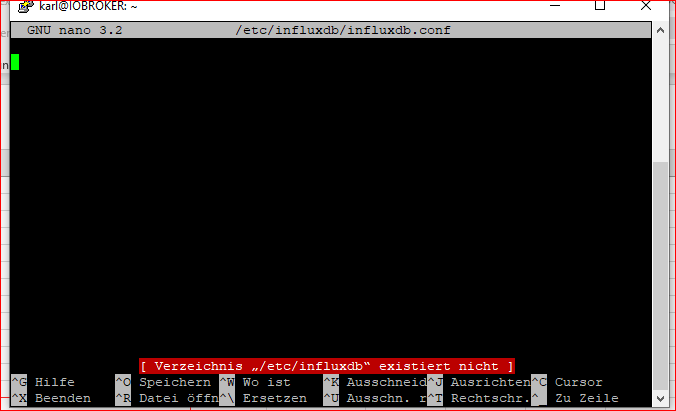
                            e39e1c4b-7d38-4043-a0a9-ecbe94969b2e-image.png

                            Aber in diesem Verzeichnis habe ich eine .conf Datei.

                            karl@IOBROKER:~$ ls -la /etc/apt/
                            insgesamt 36
                            drwxr-xr-x  7 root root 4096 Mai  2 15:24 .
                            drwxr-xr-x 75 root root 4096 Aug 16 17:38 ..
                            drwxr-xr-x  2 root root 4096 Aug  1 08:24 apt.conf.d
                            drwxr-xr-x  2 root root 4096 Dez  7  2020 auth.conf.d
                            -rw-r--r--  1 root root  150 Mai  2 15:20 listchanges.conf
                            drwxr-xr-x  2 root root 4096 Dez  7  2020 preferences.d
                            -rw-r--r--  1 root root  881 Mai  2 15:24 sources.list
                            -rw-r--r--  1 root root    0 Mai  2 15:08 sources.list~
                            drwxr-xr-x  2 root root 4096 Aug 17 11:46 sources.list.d
                            drwxr-xr-x  2 root root 4096 Aug 17 11:30 trusted.gpg.d
                            karl@IOBROKER:~$


                            Danke im Voraus für die Hilfe.

                            crunchipC 1 Antwort Letzte Antwort
                            0
                            • G GOETSCHHOFER

                              @crunchip

                              Die influxdb.config finde ich nur im LXC-InfluxDB und hier befinden sich folgende Werte:
                              Abfrage mit:

                              sudo nano /etc/influxdb/influxdb.conf
                              

                              LXC-INFLUXDB: IP: 192.168.1.177

                              
                              ### Welcome to the InfluxDB configuration file.
                              
                              # The values in this file override the default values used by the system if
                              # a config option is not specified. The commented out lines are the configuration
                              # field and the default value used. Uncommenting a line and changing the value
                              # will change the value used at runtime when the process is restarted.
                              
                              # Once every 24 hours InfluxDB will report usage data to usage.influxdata.com
                              # The data includes a random ID, os, arch, version, the number of series and other
                              # usage data. No data from user databases is ever transmitted.
                              # Change this option to true to disable reporting.
                              # reporting-disabled = false
                              
                              # Bind address to use for the RPC service for backup and restore.
                                bind-address = "0.0.0.0:8088"


                              Wenn ich die gleiche Abfrage nun auf der VM-iobroker-192.168.1.176 mache, dann findet er die Datei offenbar nicht.
                              e39e1c4b-7d38-4043-a0a9-ecbe94969b2e-image.png

                              Aber in diesem Verzeichnis habe ich eine .conf Datei.

                              karl@IOBROKER:~$ ls -la /etc/apt/
                              insgesamt 36
                              drwxr-xr-x  7 root root 4096 Mai  2 15:24 .
                              drwxr-xr-x 75 root root 4096 Aug 16 17:38 ..
                              drwxr-xr-x  2 root root 4096 Aug  1 08:24 apt.conf.d
                              drwxr-xr-x  2 root root 4096 Dez  7  2020 auth.conf.d
                              -rw-r--r--  1 root root  150 Mai  2 15:20 listchanges.conf
                              drwxr-xr-x  2 root root 4096 Dez  7  2020 preferences.d
                              -rw-r--r--  1 root root  881 Mai  2 15:24 sources.list
                              -rw-r--r--  1 root root    0 Mai  2 15:08 sources.list~
                              drwxr-xr-x  2 root root 4096 Aug 17 11:46 sources.list.d
                              drwxr-xr-x  2 root root 4096 Aug 17 11:30 trusted.gpg.d
                              karl@IOBROKER:~$


                              Danke im Voraus für die Hilfe.

                              crunchipC Offline
                              crunchipC Offline
                              crunchip
                              Forum Testing Most Active
                              schrieb am zuletzt editiert von
                              #907

                              @goetschhofer sagte in Anfänger sucht Hilfe bei Install. proxmox auf INTELNUC8i3BEK:

                              Die influxdb.config finde ich nur im LXC-InfluxDB

                              sollte aber auf deinem iobroker auch vorhanden sein
                              zeig mal die Ausgabe auf deinem iobroker

                              sudo systemctl status influxdb.service
                              

                              umgestiegen von Proxmox auf Unraid

                              G 1 Antwort Letzte Antwort
                              1
                              • crunchipC crunchip

                                @goetschhofer sagte in Anfänger sucht Hilfe bei Install. proxmox auf INTELNUC8i3BEK:

                                Die influxdb.config finde ich nur im LXC-InfluxDB

                                sollte aber auf deinem iobroker auch vorhanden sein
                                zeig mal die Ausgabe auf deinem iobroker

                                sudo systemctl status influxdb.service
                                
                                G Offline
                                G Offline
                                GOETSCHHOFER
                                schrieb am zuletzt editiert von
                                #908

                                @crunchip said in Anfänger sucht Hilfe bei Install. proxmox auf INTELNUC8i3BEK:

                                @goetschhofer sagte in Anfänger sucht Hilfe bei Install. proxmox auf INTELNUC8i3BEK:

                                Die influxdb.config finde ich nur im LXC-InfluxDB

                                sollte aber auf deinem iobroker auch vorhanden sein
                                zeig mal die Ausgabe auf deinem iobroker

                                sudo systemctl status influxdb.service
                                

                                Die kann er im iobroker nicht finden ?

                                login as: karl
                                karl@192.168.1.176's password:
                                Linux IOBROKER 4.19.0-17-amd64 #1 SMP Debian 4.19.194-2 (2021-06-21) x86_64
                                
                                The programs included with the Debian GNU/Linux system are free software;
                                the exact distribution terms for each program are described in the
                                individual files in /usr/share/doc/*/copyright.
                                
                                Debian GNU/Linux comes with ABSOLUTELY NO WARRANTY, to the extent
                                permitted by applicable law.
                                Last login: Wed Aug 18 09:00:19 2021 from 192.168.1.3
                                karl@IOBROKER:~$ sudo systemctl status influxdb.service
                                [sudo] Passwort für karl:
                                Unit influxdb.service could not be found.
                                karl@IOBROKER:~$
                                
                                
                                crunchipC 1 Antwort Letzte Antwort
                                0
                                • G GOETSCHHOFER

                                  @crunchip said in Anfänger sucht Hilfe bei Install. proxmox auf INTELNUC8i3BEK:

                                  @goetschhofer sagte in Anfänger sucht Hilfe bei Install. proxmox auf INTELNUC8i3BEK:

                                  Die influxdb.config finde ich nur im LXC-InfluxDB

                                  sollte aber auf deinem iobroker auch vorhanden sein
                                  zeig mal die Ausgabe auf deinem iobroker

                                  sudo systemctl status influxdb.service
                                  

                                  Die kann er im iobroker nicht finden ?

                                  login as: karl
                                  karl@192.168.1.176's password:
                                  Linux IOBROKER 4.19.0-17-amd64 #1 SMP Debian 4.19.194-2 (2021-06-21) x86_64
                                  
                                  The programs included with the Debian GNU/Linux system are free software;
                                  the exact distribution terms for each program are described in the
                                  individual files in /usr/share/doc/*/copyright.
                                  
                                  Debian GNU/Linux comes with ABSOLUTELY NO WARRANTY, to the extent
                                  permitted by applicable law.
                                  Last login: Wed Aug 18 09:00:19 2021 from 192.168.1.3
                                  karl@IOBROKER:~$ sudo systemctl status influxdb.service
                                  [sudo] Passwort für karl:
                                  Unit influxdb.service could not be found.
                                  karl@IOBROKER:~$
                                  
                                  
                                  crunchipC Offline
                                  crunchipC Offline
                                  crunchip
                                  Forum Testing Most Active
                                  schrieb am zuletzt editiert von
                                  #909

                                  @goetschhofer wo bitte hast du dann influx installiert?

                                  apt policy influxdb
                                  

                                  umgestiegen von Proxmox auf Unraid

                                  G 1 Antwort Letzte Antwort
                                  1
                                  • crunchipC crunchip

                                    @goetschhofer wo bitte hast du dann influx installiert?

                                    apt policy influxdb
                                    
                                    G Offline
                                    G Offline
                                    GOETSCHHOFER
                                    schrieb am zuletzt editiert von
                                    #910

                                    @crunchip said in Anfänger sucht Hilfe bei Install. proxmox auf INTELNUC8i3BEK:

                                    apt policy influxdb

                                    Offenbar hat die Installation mit wget .......... des Influx Repository in iobroker nicht geklappt ?

                                    login as: karl
                                    karl@192.168.1.176's password:
                                    Linux IOBROKER 4.19.0-17-amd64 #1 SMP Debian 4.19.194-2 (2021-06-21) x86_64
                                    
                                    The programs included with the Debian GNU/Linux system are free software;
                                    the exact distribution terms for each program are described in the
                                    individual files in /usr/share/doc/*/copyright.
                                    
                                    Debian GNU/Linux comes with ABSOLUTELY NO WARRANTY, to the extent
                                    permitted by applicable law.
                                    Last login: Wed Aug 18 10:16:34 2021 from 192.168.1.3
                                    karl@IOBROKER:~$ apt policy influxdb
                                    influxdb:
                                      Installiert:           (keine)
                                      Installationskandidat: 1.6.4-1+deb10u1
                                      Versionstabelle:
                                         1.6.4-1+deb10u1 500
                                            500 http://deb.debian.org/debian buster/main amd64 Packages
                                            500 http://security.debian.org/debian-security buster/updates/main amd64                                                                                                                                                              Packages
                                    karl@IOBROKER:~$
                                    
                                    
                                    login as: karl
                                    karl@192.168.1.177's password:
                                    Linux LXC-INFLUXDB-192 5.4.124-1-pve #1 SMP PVE 5.4.124-1 (Wed, 23 Jun 2021 13:4                                                                                                                                                             7:09 +0200) x86_64
                                    
                                    The programs included with the Debian GNU/Linux system are free software;
                                    the exact distribution terms for each program are described in the
                                    individual files in /usr/share/doc/*/copyright.
                                    
                                    Debian GNU/Linux comes with ABSOLUTELY NO WARRANTY, to the extent
                                    permitted by applicable law.
                                    Last login: Wed Aug 18 10:17:52 2021 from 192.168.1.3
                                    karl@LXC-INFLUXDB-192:~$ apt policy influxdb
                                    influxdb:
                                      Installed: 1.8.7-1
                                      Candidate: 1.8.7-1
                                      Version table:
                                     *** 1.8.7-1 500
                                            500 https://repos.influxdata.com/debian buster/stable amd64 Packages
                                            100 /var/lib/dpkg/status
                                         1.6.4-1+deb10u1 500
                                            500 http://ftp.debian.org/debian buster/main amd64 Packages
                                            500 http://security.debian.org buster/updates/main amd64 Packages
                                    karl@LXC-INFLUXDB-192:~
                                    
                                    crunchipC 1 Antwort Letzte Antwort
                                    0
                                    • G GOETSCHHOFER

                                      @crunchip said in Anfänger sucht Hilfe bei Install. proxmox auf INTELNUC8i3BEK:

                                      apt policy influxdb

                                      Offenbar hat die Installation mit wget .......... des Influx Repository in iobroker nicht geklappt ?

                                      login as: karl
                                      karl@192.168.1.176's password:
                                      Linux IOBROKER 4.19.0-17-amd64 #1 SMP Debian 4.19.194-2 (2021-06-21) x86_64
                                      
                                      The programs included with the Debian GNU/Linux system are free software;
                                      the exact distribution terms for each program are described in the
                                      individual files in /usr/share/doc/*/copyright.
                                      
                                      Debian GNU/Linux comes with ABSOLUTELY NO WARRANTY, to the extent
                                      permitted by applicable law.
                                      Last login: Wed Aug 18 10:16:34 2021 from 192.168.1.3
                                      karl@IOBROKER:~$ apt policy influxdb
                                      influxdb:
                                        Installiert:           (keine)
                                        Installationskandidat: 1.6.4-1+deb10u1
                                        Versionstabelle:
                                           1.6.4-1+deb10u1 500
                                              500 http://deb.debian.org/debian buster/main amd64 Packages
                                              500 http://security.debian.org/debian-security buster/updates/main amd64                                                                                                                                                              Packages
                                      karl@IOBROKER:~$
                                      
                                      
                                      login as: karl
                                      karl@192.168.1.177's password:
                                      Linux LXC-INFLUXDB-192 5.4.124-1-pve #1 SMP PVE 5.4.124-1 (Wed, 23 Jun 2021 13:4                                                                                                                                                             7:09 +0200) x86_64
                                      
                                      The programs included with the Debian GNU/Linux system are free software;
                                      the exact distribution terms for each program are described in the
                                      individual files in /usr/share/doc/*/copyright.
                                      
                                      Debian GNU/Linux comes with ABSOLUTELY NO WARRANTY, to the extent
                                      permitted by applicable law.
                                      Last login: Wed Aug 18 10:17:52 2021 from 192.168.1.3
                                      karl@LXC-INFLUXDB-192:~$ apt policy influxdb
                                      influxdb:
                                        Installed: 1.8.7-1
                                        Candidate: 1.8.7-1
                                        Version table:
                                       *** 1.8.7-1 500
                                              500 https://repos.influxdata.com/debian buster/stable amd64 Packages
                                              100 /var/lib/dpkg/status
                                           1.6.4-1+deb10u1 500
                                              500 http://ftp.debian.org/debian buster/main amd64 Packages
                                              500 http://security.debian.org buster/updates/main amd64 Packages
                                      karl@LXC-INFLUXDB-192:~
                                      
                                      crunchipC Offline
                                      crunchipC Offline
                                      crunchip
                                      Forum Testing Most Active
                                      schrieb am zuletzt editiert von crunchip
                                      #911

                                      @goetschhofer mach mal so auf deinem Iobroker mit deinem Benutzer Karl, einzeln nach der Reihe

                                      sudo apt update
                                      
                                      wget -qO- https://repos.influxdata.com/influxdb.key | sudo apt-key add -
                                      echo "deb https://repos.influxdata.com/debian buster stable" | sudo tee /etc/apt/sources.list.d/influxdb.list
                                      
                                      sudo apt update
                                      
                                      sudo apt install -y influxdb
                                      
                                      sudo systemctl enable --now influxdb
                                      
                                      systemctl status influxdb
                                      

                                      umgestiegen von Proxmox auf Unraid

                                      G 1 Antwort Letzte Antwort
                                      1
                                      • crunchipC crunchip

                                        @goetschhofer mach mal so auf deinem Iobroker mit deinem Benutzer Karl, einzeln nach der Reihe

                                        sudo apt update
                                        
                                        wget -qO- https://repos.influxdata.com/influxdb.key | sudo apt-key add -
                                        echo "deb https://repos.influxdata.com/debian buster stable" | sudo tee /etc/apt/sources.list.d/influxdb.list
                                        
                                        sudo apt update
                                        
                                        sudo apt install -y influxdb
                                        
                                        sudo systemctl enable --now influxdb
                                        
                                        systemctl status influxdb
                                        
                                        G Offline
                                        G Offline
                                        GOETSCHHOFER
                                        schrieb am zuletzt editiert von
                                        #912

                                        @crunchip said in Anfänger sucht Hilfe bei Install. proxmox auf INTELNUC8i3BEK:

                                        systemctl status influxdb

                                        login as: karl
                                        karl@192.168.1.176's password:
                                        Linux IOBROKER 4.19.0-17-amd64 #1 SMP Debian 4.19.194-2 (2021-06-21) x86_64
                                        
                                        The programs included with the Debian GNU/Linux system are free software;
                                        the exact distribution terms for each program are described in the
                                        individual files in /usr/share/doc/*/copyright.
                                        
                                        Debian GNU/Linux comes with ABSOLUTELY NO WARRANTY, to the extent
                                        permitted by applicable law.
                                        Last login: Wed Aug 18 10:16:49 2021 from 192.168.1.3
                                        karl@IOBROKER:~$ sudo apt update
                                        [sudo] Passwort für karl:
                                        Holen:1 http://deb.debian.org/debian buster InRelease [122 kB]
                                        Holen:2 http://security.debian.org/debian-security buster/updates InRelease [65,                                                                                                                                                             4 kB]
                                        Holen:3 http://deb.debian.org/debian buster-updates InRelease [51,9 kB]
                                        Holen:4 https://deb.nodesource.com/node_12.x buster InRelease [4.584 B]
                                        Holen:5 https://repos.influxdata.com/debian buster InRelease [4.737 B]
                                        Holen:6 http://security.debian.org/debian-security buster/updates/main Sources [                                                                                                                                                             198 kB]
                                        Holen:7 http://security.debian.org/debian-security buster/updates/main amd64 Pac                                                                                                                                                             kages [301 kB]
                                        Holen:8 http://security.debian.org/debian-security buster/updates/main Translati                                                                                                                                                             on-en [158 kB]
                                        Holen:9 https://repos.influxdata.com/debian buster/stable amd64 Packages [1.063                                                                                                                                                              B]
                                        Holen:10 https://deb.nodesource.com/node_12.x buster/main amd64 Packages [769 B]
                                        Es wurden 907 kB in 1 s geholt (978 kB/s).
                                        Paketlisten werden gelesen... Fertig
                                        Abhängigkeitsbaum wird aufgebaut.
                                        Statusinformationen werden eingelesen.... Fertig
                                        Aktualisierung für 3 Pakete verfügbar. Führen Sie »apt list --upgradable« aus, u                                                                                                                                                             m sie anzuzeigen.
                                        N: Für das Depot »http://security.debian.org/debian-security buster/updates InRe                                                                                                                                                             lease« wurde der »Suite«-Wert von »stable« in »oldstable« geändert.
                                        N: Für das Depot »http://deb.debian.org/debian buster InRelease« wurde der »Suit                                                                                                                                                             e«-Wert von »stable« in »oldstable« geändert.
                                        N: Für das Depot »http://deb.debian.org/debian buster-updates InRelease« wurde d                                                                                                                                                             er »Suite«-Wert von »stable-updates« in »oldstable-updates« geändert.
                                        karl@IOBROKER:~$ wget -qO- https://repos.influxdata.com/influxdb.key | sudo apt-                                                                                                                                                             key add -
                                        OK
                                        karl@IOBROKER:~$ echo "deb https://repos.influxdata.com/debian buster stable" | sudo tee /etc/apt/sources.list.d/influxdb.list                                                                                                               deb https://repos.influxdata.com/debian buster stable
                                        karl@IOBROKER:~$ sudo apt update
                                        OK:1 http://deb.debian.org/debian buster InRelease
                                        OK:2 http://security.debian.org/debian-security buster/updates InRelease
                                        OK:3 http://deb.debian.org/debian buster-updates InRelease
                                        OK:4 https://repos.influxdata.com/debian buster InRelease
                                        OK:5 https://deb.nodesource.com/node_12.x buster InRelease
                                        Paketlisten werden gelesen... Fertig
                                        Abhängigkeitsbaum wird aufgebaut.
                                        Statusinformationen werden eingelesen.... Fertig
                                        Aktualisierung für 3 Pakete verfügbar. Führen Sie »apt list --upgradable« aus, u                                                                                                                                                             m sie anzuzeigen.
                                        karl@IOBROKER:~$ sudo apt install -y influxdb
                                        Paketlisten werden gelesen... Fertig
                                        Abhängigkeitsbaum wird aufgebaut.
                                        Statusinformationen werden eingelesen.... Fertig
                                        Die folgenden NEUEN Pakete werden installiert:
                                          influxdb
                                        0 aktualisiert, 1 neu installiert, 0 zu entfernen und 3 nicht aktualisiert.
                                        Es müssen 54,4 MB an Archiven heruntergeladen werden.
                                        Nach dieser Operation werden 153 MB Plattenplatz zusätzlich benutzt.
                                        Holen:1 https://repos.influxdata.com/debian buster/stable amd64 influxdb amd64 1                                                                                                                                                             .8.9-1 [54,4 MB]
                                        Es wurden 54,4 MB in 12 s geholt (4.494 kB/s).
                                        Vormals nicht ausgewähltes Paket influxdb wird gewählt.
                                        (Lese Datenbank ... 46405 Dateien und Verzeichnisse sind derzeit installiert.)
                                        Vorbereitung zum Entpacken von .../influxdb_1.8.9-1_amd64.deb ...
                                        Entpacken von influxdb (1.8.9-1) ...
                                        influxdb (1.8.9-1) wird eingerichtet ...
                                        Created symlink /etc/systemd/system/influxd.service → /lib/systemd/system/influx                                                                                                                                                             db.service.
                                        Created symlink /etc/systemd/system/multi-user.target.wants/influxdb.service → /                                                                                                                                                             lib/systemd/system/influxdb.service.
                                        Trigger für man-db (2.8.5-2) werden verarbeitet ...
                                        karl@IOBROKER:~$ sudo systemctl enable --now influxdb
                                        karl@IOBROKER:~$ systemctl status influxdb
                                        ● influxdb.service - InfluxDB is an open-source, distributed, time series databa
                                           Loaded: loaded (/lib/systemd/system/influxdb.service; enabled; vendor preset:
                                           Active: active (running) since Wed 2021-08-18 10:58:32 CEST; 8s ago
                                             Docs: https://docs.influxdata.com/influxdb/
                                          Process: 13019 ExecStart=/usr/lib/influxdb/scripts/influxd-systemd-start.sh (c
                                         Main PID: 13021 (influxd)
                                            Tasks: 12 (limit: 4915)
                                           Memory: 16.6M
                                           CGroup: /system.slice/influxdb.service
                                                   └─13021 /usr/bin/influxd -config /etc/influxdb/influxdb.conf
                                        lines 1-10/10 (END)...skipping...
                                        ● influxdb.service - InfluxDB is an open-source, distributed, time series database
                                           Loaded: loaded (/lib/systemd/system/influxdb.service; enabled; vendor preset: enabled)
                                           Active: active (running) since Wed 2021-08-18 10:58:32 CEST; 8s ago
                                             Docs: https://docs.influxdata.com/influxdb/
                                          Process: 13019 ExecStart=/usr/lib/influxdb/scripts/influxd-systemd-start.sh (code=exited, status=0/SUCCESS)
                                         Main PID: 13021 (influxd)
                                            Tasks: 12 (limit: 4915)
                                           Memory: 16.6M
                                           CGroup: /system.slice/influxdb.service
                                                   └─13021 /usr/bin/influxd -config /etc/influxdb/influxdb.conf
                                        ~
                                        ~
                                        ~
                                        ~
                                        ~
                                        ~
                                        ~
                                        ~
                                        ~
                                        ~
                                        ~
                                        ~
                                        ~
                                        ~
                                        ~
                                        ~
                                        ~
                                        ~
                                        ~
                                        ~
                                        ~
                                        ~
                                        ~
                                        ~
                                        ~
                                        ~
                                        ~
                                        ~
                                        ~
                                        ~
                                        ~
                                        ~
                                        ~
                                        ~
                                        ~
                                        ~
                                        ~
                                        ~
                                        ~
                                        ~
                                        ~
                                        ~
                                        ~
                                        ~
                                        ~
                                        ~
                                        ~
                                        ~
                                        ~
                                        ~
                                        ~
                                        ~
                                        lines 1-10/10 (END)
                                        
                                        
                                        crunchipC 1 Antwort Letzte Antwort
                                        0
                                        • G GOETSCHHOFER

                                          @crunchip said in Anfänger sucht Hilfe bei Install. proxmox auf INTELNUC8i3BEK:

                                          systemctl status influxdb

                                          login as: karl
                                          karl@192.168.1.176's password:
                                          Linux IOBROKER 4.19.0-17-amd64 #1 SMP Debian 4.19.194-2 (2021-06-21) x86_64
                                          
                                          The programs included with the Debian GNU/Linux system are free software;
                                          the exact distribution terms for each program are described in the
                                          individual files in /usr/share/doc/*/copyright.
                                          
                                          Debian GNU/Linux comes with ABSOLUTELY NO WARRANTY, to the extent
                                          permitted by applicable law.
                                          Last login: Wed Aug 18 10:16:49 2021 from 192.168.1.3
                                          karl@IOBROKER:~$ sudo apt update
                                          [sudo] Passwort für karl:
                                          Holen:1 http://deb.debian.org/debian buster InRelease [122 kB]
                                          Holen:2 http://security.debian.org/debian-security buster/updates InRelease [65,                                                                                                                                                             4 kB]
                                          Holen:3 http://deb.debian.org/debian buster-updates InRelease [51,9 kB]
                                          Holen:4 https://deb.nodesource.com/node_12.x buster InRelease [4.584 B]
                                          Holen:5 https://repos.influxdata.com/debian buster InRelease [4.737 B]
                                          Holen:6 http://security.debian.org/debian-security buster/updates/main Sources [                                                                                                                                                             198 kB]
                                          Holen:7 http://security.debian.org/debian-security buster/updates/main amd64 Pac                                                                                                                                                             kages [301 kB]
                                          Holen:8 http://security.debian.org/debian-security buster/updates/main Translati                                                                                                                                                             on-en [158 kB]
                                          Holen:9 https://repos.influxdata.com/debian buster/stable amd64 Packages [1.063                                                                                                                                                              B]
                                          Holen:10 https://deb.nodesource.com/node_12.x buster/main amd64 Packages [769 B]
                                          Es wurden 907 kB in 1 s geholt (978 kB/s).
                                          Paketlisten werden gelesen... Fertig
                                          Abhängigkeitsbaum wird aufgebaut.
                                          Statusinformationen werden eingelesen.... Fertig
                                          Aktualisierung für 3 Pakete verfügbar. Führen Sie »apt list --upgradable« aus, u                                                                                                                                                             m sie anzuzeigen.
                                          N: Für das Depot »http://security.debian.org/debian-security buster/updates InRe                                                                                                                                                             lease« wurde der »Suite«-Wert von »stable« in »oldstable« geändert.
                                          N: Für das Depot »http://deb.debian.org/debian buster InRelease« wurde der »Suit                                                                                                                                                             e«-Wert von »stable« in »oldstable« geändert.
                                          N: Für das Depot »http://deb.debian.org/debian buster-updates InRelease« wurde d                                                                                                                                                             er »Suite«-Wert von »stable-updates« in »oldstable-updates« geändert.
                                          karl@IOBROKER:~$ wget -qO- https://repos.influxdata.com/influxdb.key | sudo apt-                                                                                                                                                             key add -
                                          OK
                                          karl@IOBROKER:~$ echo "deb https://repos.influxdata.com/debian buster stable" | sudo tee /etc/apt/sources.list.d/influxdb.list                                                                                                               deb https://repos.influxdata.com/debian buster stable
                                          karl@IOBROKER:~$ sudo apt update
                                          OK:1 http://deb.debian.org/debian buster InRelease
                                          OK:2 http://security.debian.org/debian-security buster/updates InRelease
                                          OK:3 http://deb.debian.org/debian buster-updates InRelease
                                          OK:4 https://repos.influxdata.com/debian buster InRelease
                                          OK:5 https://deb.nodesource.com/node_12.x buster InRelease
                                          Paketlisten werden gelesen... Fertig
                                          Abhängigkeitsbaum wird aufgebaut.
                                          Statusinformationen werden eingelesen.... Fertig
                                          Aktualisierung für 3 Pakete verfügbar. Führen Sie »apt list --upgradable« aus, u                                                                                                                                                             m sie anzuzeigen.
                                          karl@IOBROKER:~$ sudo apt install -y influxdb
                                          Paketlisten werden gelesen... Fertig
                                          Abhängigkeitsbaum wird aufgebaut.
                                          Statusinformationen werden eingelesen.... Fertig
                                          Die folgenden NEUEN Pakete werden installiert:
                                            influxdb
                                          0 aktualisiert, 1 neu installiert, 0 zu entfernen und 3 nicht aktualisiert.
                                          Es müssen 54,4 MB an Archiven heruntergeladen werden.
                                          Nach dieser Operation werden 153 MB Plattenplatz zusätzlich benutzt.
                                          Holen:1 https://repos.influxdata.com/debian buster/stable amd64 influxdb amd64 1                                                                                                                                                             .8.9-1 [54,4 MB]
                                          Es wurden 54,4 MB in 12 s geholt (4.494 kB/s).
                                          Vormals nicht ausgewähltes Paket influxdb wird gewählt.
                                          (Lese Datenbank ... 46405 Dateien und Verzeichnisse sind derzeit installiert.)
                                          Vorbereitung zum Entpacken von .../influxdb_1.8.9-1_amd64.deb ...
                                          Entpacken von influxdb (1.8.9-1) ...
                                          influxdb (1.8.9-1) wird eingerichtet ...
                                          Created symlink /etc/systemd/system/influxd.service → /lib/systemd/system/influx                                                                                                                                                             db.service.
                                          Created symlink /etc/systemd/system/multi-user.target.wants/influxdb.service → /                                                                                                                                                             lib/systemd/system/influxdb.service.
                                          Trigger für man-db (2.8.5-2) werden verarbeitet ...
                                          karl@IOBROKER:~$ sudo systemctl enable --now influxdb
                                          karl@IOBROKER:~$ systemctl status influxdb
                                          ● influxdb.service - InfluxDB is an open-source, distributed, time series databa
                                             Loaded: loaded (/lib/systemd/system/influxdb.service; enabled; vendor preset:
                                             Active: active (running) since Wed 2021-08-18 10:58:32 CEST; 8s ago
                                               Docs: https://docs.influxdata.com/influxdb/
                                            Process: 13019 ExecStart=/usr/lib/influxdb/scripts/influxd-systemd-start.sh (c
                                           Main PID: 13021 (influxd)
                                              Tasks: 12 (limit: 4915)
                                             Memory: 16.6M
                                             CGroup: /system.slice/influxdb.service
                                                     └─13021 /usr/bin/influxd -config /etc/influxdb/influxdb.conf
                                          lines 1-10/10 (END)...skipping...
                                          ● influxdb.service - InfluxDB is an open-source, distributed, time series database
                                             Loaded: loaded (/lib/systemd/system/influxdb.service; enabled; vendor preset: enabled)
                                             Active: active (running) since Wed 2021-08-18 10:58:32 CEST; 8s ago
                                               Docs: https://docs.influxdata.com/influxdb/
                                            Process: 13019 ExecStart=/usr/lib/influxdb/scripts/influxd-systemd-start.sh (code=exited, status=0/SUCCESS)
                                           Main PID: 13021 (influxd)
                                              Tasks: 12 (limit: 4915)
                                             Memory: 16.6M
                                             CGroup: /system.slice/influxdb.service
                                                     └─13021 /usr/bin/influxd -config /etc/influxdb/influxdb.conf
                                          ~
                                          ~
                                          ~
                                          ~
                                          ~
                                          ~
                                          ~
                                          ~
                                          ~
                                          ~
                                          ~
                                          ~
                                          ~
                                          ~
                                          ~
                                          ~
                                          ~
                                          ~
                                          ~
                                          ~
                                          ~
                                          ~
                                          ~
                                          ~
                                          ~
                                          ~
                                          ~
                                          ~
                                          ~
                                          ~
                                          ~
                                          ~
                                          ~
                                          ~
                                          ~
                                          ~
                                          ~
                                          ~
                                          ~
                                          ~
                                          ~
                                          ~
                                          ~
                                          ~
                                          ~
                                          ~
                                          ~
                                          ~
                                          ~
                                          ~
                                          ~
                                          ~
                                          lines 1-10/10 (END)
                                          
                                          
                                          crunchipC Offline
                                          crunchipC Offline
                                          crunchip
                                          Forum Testing Most Active
                                          schrieb am zuletzt editiert von
                                          #913

                                          @goetschhofer na passt doch jetzt, dann sollte nun auch dein backup funktionieren

                                          umgestiegen von Proxmox auf Unraid

                                          G 1 Antwort Letzte Antwort
                                          1

                                          Hey! Du scheinst an dieser Unterhaltung interessiert zu sein, hast aber noch kein Konto.

                                          Hast du es satt, bei jedem Besuch durch die gleichen Beiträge zu scrollen? Wenn du dich für ein Konto anmeldest, kommst du immer genau dorthin zurück, wo du zuvor warst, und kannst dich über neue Antworten benachrichtigen lassen (entweder per E-Mail oder Push-Benachrichtigung). Du kannst auch Lesezeichen speichern und Beiträge positiv bewerten, um anderen Community-Mitgliedern deine Wertschätzung zu zeigen.

                                          Mit deinem Input könnte dieser Beitrag noch besser werden 💗

                                          Registrieren Anmelden
                                          Antworten
                                          • In einem neuen Thema antworten
                                          Anmelden zum Antworten
                                          • Älteste zuerst
                                          • Neuste zuerst
                                          • Meiste Stimmen


                                          Support us

                                          ioBroker
                                          Community Adapters
                                          Donate
                                          FAQ Cloud / IOT
                                          HowTo: Node.js-Update
                                          HowTo: Backup/Restore
                                          Downloads
                                          BLOG

                                          336

                                          Online

                                          32.7k

                                          Benutzer

                                          82.6k

                                          Themen

                                          1.3m

                                          Beiträge
                                          Community
                                          Impressum | Datenschutz-Bestimmungen | Nutzungsbedingungen | Einwilligungseinstellungen
                                          ioBroker Community 2014-2025
                                          logo
                                          • Anmelden

                                          • Du hast noch kein Konto? Registrieren

                                          • Anmelden oder registrieren, um zu suchen
                                          • Erster Beitrag
                                            Letzter Beitrag
                                          0
                                          • Home
                                          • Aktuell
                                          • Tags
                                          • Ungelesen 0
                                          • Kategorien
                                          • Unreplied
                                          • Beliebt
                                          • GitHub
                                          • Docu
                                          • Hilfe