Skip to content
  • Home
  • Aktuell
  • Tags
  • 0 Ungelesen 0
  • Kategorien
  • Unreplied
  • Beliebt
  • GitHub
  • Docu
  • Hilfe
Skins
  • Light
  • Brite
  • Cerulean
  • Cosmo
  • Flatly
  • Journal
  • Litera
  • Lumen
  • Lux
  • Materia
  • Minty
  • Morph
  • Pulse
  • Sandstone
  • Simplex
  • Sketchy
  • Spacelab
  • United
  • Yeti
  • Zephyr
  • Dark
  • Cyborg
  • Darkly
  • Quartz
  • Slate
  • Solar
  • Superhero
  • Vapor

  • Standard: (Kein Skin)
  • Kein Skin
Einklappen
ioBroker Logo

Community Forum

donate donate
  1. ioBroker Community Home
  2. Deutsch
  3. ioBroker Allgemein
  4. Anfänger sucht Hilfe bei Install. proxmox auf INTELNUC8i3BEK
NEWS

  • Jahresrückblick 2025 – unser neuer Blogbeitrag ist online! ✨
    BluefoxB
    Bluefox
    14
    1
    257

  • Neuer Blogbeitrag: Monatsrückblick - Dezember 2025 🎄
    BluefoxB
    Bluefox
    13
    1
    585

  • Weihnachtsangebot 2025! 🎄
    BluefoxB
    Bluefox
    25
    1
    1.8k

Anfänger sucht Hilfe bei Install. proxmox auf INTELNUC8i3BEK

Geplant Angeheftet Gesperrt Verschoben ioBroker Allgemein
1.0k Beiträge 16 Kommentatoren 249.8k Aufrufe 15 Watching
  • Älteste zuerst
  • Neuste zuerst
  • Meiste Stimmen
Antworten
  • In einem neuen Thema antworten
Anmelden zum Antworten
Dieses Thema wurde gelöscht. Nur Nutzer mit entsprechenden Rechten können es sehen.
  • Thomas BraunT Thomas Braun

    @crunchip @GOETSCHHOFER
    Stop!

    Da ist ein Kopierfehler drin!

    So muss das aussehen:

    wget -qO- https://repos.influxdata.com/influxdb.key | gpg --dearmor > /etc/apt/trusted.gpg.d/influxdb.gpg
    export DISTRIB_ID=$(lsb_release -si); export DISTRIB_CODENAME=$(lsb_release -sc)
    echo "deb [signed-by=/etc/apt/trusted.gpg.d/influxdb.gpg] https://repos.influxdata.com/${DISTRIB_ID,,} ${DISTRIB_CODENAME} stable" > /etc/apt/sources.list.d/influxdb.list
     
    
    G Offline
    G Offline
    GOETSCHHOFER
    schrieb am zuletzt editiert von
    #889

    @thomas-braun said in Anfänger sucht Hilfe bei Install. proxmox auf INTELNUC8i3BEK:

    wget -qO- https://repos.influxdata.com/influxdb.key | gpg --dearmor > /etc/apt/trusted.gpg.d/influxdb.gpg export DISTRIB_ID=$(lsb_release -si); export DISTRIB_CODENAME=$(lsb_release -sc) echo "deb [signed-by=/etc/apt/trusted.gpg.d/influxdb.gpg] https://repos.influxdata.com/${DISTRIB_ID,,} ${DISTRIB_CODENAME} stable" > /etc/apt/sources.list.d/influxdb.list

    Ergebnis 2. Versuch:

    root@IOBROKER:~# wget -qO- https://repos.influxdata.com/influxdb.key | gpg --dearmor > /etc/apt/trusted.gpg.d/influxdb.gpg
    export DISTRIB_ID=$(lsb_release -si); export DISTRIB_CODENAME=$(lsb_release -sc)
    echo "deb [signed-by=/etc/apt/trusted.gpg.d/influxdb.gpg] https://repos.influxdata.com/${DISTRIB_ID,,} ${DISTRIB_CODENAME} stable" > /etc/apt/sources.list.d/influxdb.list
    
    root@IOBROKER:~# export DISTRIB_ID=$(lsb_release -si); export DISTRIB_CODENAME=$(lsb_release -sc)
    root@IOBROKER:~# echo "deb [signed-by=/etc/apt/trusted.gpg.d/influxdb.gpg] https://repos.influxdata.com/${DISTRIB_ID,,} ${DISTRIB_CODENAME} stable" > /etc/apt/sources.list.d/influxdb.list
    
    
    1 Antwort Letzte Antwort
    0
    • Thomas BraunT Thomas Braun

      @goetschhofer

      rm /etc/apt/sourceslist.d/influxdb.listcode_text
      
      G Offline
      G Offline
      GOETSCHHOFER
      schrieb am zuletzt editiert von
      #890

      @thomas-braun said in Anfänger sucht Hilfe bei Install. proxmox auf INTELNUC8i3BEK:

      @goetschhofer

      rm /etc/apt/sourceslist.d/influxdb.listcode_text
      

      Ist dies der Storno Befehl ?

      Thomas BraunT 1 Antwort Letzte Antwort
      0
      • Thomas BraunT Thomas Braun

        @crunchip @GOETSCHHOFER
        Stop!

        Da ist ein Kopierfehler drin!

        So muss das aussehen:

        wget -qO- https://repos.influxdata.com/influxdb.key | gpg --dearmor > /etc/apt/trusted.gpg.d/influxdb.gpg
        export DISTRIB_ID=$(lsb_release -si); export DISTRIB_CODENAME=$(lsb_release -sc)
        echo "deb [signed-by=/etc/apt/trusted.gpg.d/influxdb.gpg] https://repos.influxdata.com/${DISTRIB_ID,,} ${DISTRIB_CODENAME} stable" > /etc/apt/sources.list.d/influxdb.list
         
        
        crunchipC Abwesend
        crunchipC Abwesend
        crunchip
        Forum Testing Most Active
        schrieb am zuletzt editiert von
        #891

        @thomas-braun stimmt, hatte ich nicht darauf geachtet, das ist das original der Influx Seite, muss natürlich angepasst werden

        /etc/apt/sources.list.d/influxdb.list


        umgestiegen von Proxmox auf Unraid

        1 Antwort Letzte Antwort
        1
        • G GOETSCHHOFER

          @thomas-braun said in Anfänger sucht Hilfe bei Install. proxmox auf INTELNUC8i3BEK:

          @goetschhofer

          rm /etc/apt/sourceslist.d/influxdb.listcode_text
          

          Ist dies der Storno Befehl ?

          Thomas BraunT Online
          Thomas BraunT Online
          Thomas Braun
          Most Active
          schrieb am zuletzt editiert von
          #892

          @goetschhofer
          Ja, mit dem Befehl wird die falsche Datei gelöscht.
          Die würde sonst immer beim apt update angemeckert werden.

          Linux-Werkzeugkasten:
          https://forum.iobroker.net/topic/42952/der-kleine-iobroker-linux-werkzeugkasten
          NodeJS Fixer Skript:
          https://forum.iobroker.net/topic/68035/iob-node-fix-skript
          iob_diag: curl -sLf -o diag.sh https://iobroker.net/diag.sh && bash diag.sh

          G 1 Antwort Letzte Antwort
          1
          • Thomas BraunT Thomas Braun

            @goetschhofer
            Ja, mit dem Befehl wird die falsche Datei gelöscht.
            Die würde sonst immer beim apt update angemeckert werden.

            G Offline
            G Offline
            GOETSCHHOFER
            schrieb am zuletzt editiert von
            #893

            @thomas-braun said in Anfänger sucht Hilfe bei Install. proxmox auf INTELNUC8i3BEK:

            @goetschhofer
            Ja, mit dem Befehl wird die falsche Datei gelöscht.
            Die würde sonst immer beim apt update angemeckert werden.

            Diese findet er aber offenbar nicht ?

            Ich war folgendermaßen vorgegangen.

            1. falsche Eingabe Befehl
            2. richtige Eingabe Beschreibung von dir.
            root@IOBROKER:~# rm /etc/apt/sourceslist.d/influxdb.listcode_text
            rm: das Entfernen von '/etc/apt/sourceslist.d/influxdb.listcode_text' ist nicht möglich: Datei oder Verzeichnis nicht gefunden
            root@IOBROKER:~#
            
            
            Thomas BraunT 1 Antwort Letzte Antwort
            0
            • G GOETSCHHOFER

              @thomas-braun said in Anfänger sucht Hilfe bei Install. proxmox auf INTELNUC8i3BEK:

              @goetschhofer
              Ja, mit dem Befehl wird die falsche Datei gelöscht.
              Die würde sonst immer beim apt update angemeckert werden.

              Diese findet er aber offenbar nicht ?

              Ich war folgendermaßen vorgegangen.

              1. falsche Eingabe Befehl
              2. richtige Eingabe Beschreibung von dir.
              root@IOBROKER:~# rm /etc/apt/sourceslist.d/influxdb.listcode_text
              rm: das Entfernen von '/etc/apt/sourceslist.d/influxdb.listcode_text' ist nicht möglich: Datei oder Verzeichnis nicht gefunden
              root@IOBROKER:~#
              
              
              Thomas BraunT Online
              Thomas BraunT Online
              Thomas Braun
              Most Active
              schrieb am zuletzt editiert von
              #894

              @goetschhofer

              ls -la /etc/apt/sources.list.d
              

              Linux-Werkzeugkasten:
              https://forum.iobroker.net/topic/42952/der-kleine-iobroker-linux-werkzeugkasten
              NodeJS Fixer Skript:
              https://forum.iobroker.net/topic/68035/iob-node-fix-skript
              iob_diag: curl -sLf -o diag.sh https://iobroker.net/diag.sh && bash diag.sh

              G 1 Antwort Letzte Antwort
              1
              • Thomas BraunT Thomas Braun

                @goetschhofer

                ls -la /etc/apt/sources.list.d
                
                G Offline
                G Offline
                GOETSCHHOFER
                schrieb am zuletzt editiert von
                #895

                @thomas-braun said in Anfänger sucht Hilfe bei Install. proxmox auf INTELNUC8i3BEK:

                ls -la /etc/apt/sources.list.d

                root@IOBROKER:~# ls -la /etc/apt/sources.list.d
                insgesamt 20
                drwxr-xr-x 2 root root 4096 Aug 17 11:35 .
                drwxr-xr-x 7 root root 4096 Mai  2 15:24 ..
                -rw-r--r-- 1 root root  102 Aug 17 11:35 influxdb.list
                -rw-r--r-- 1 root root  102 Aug 17 11:30 influxdb.listcode_text
                -rw-r--r-- 1 root root  204 Mai  2 20:24 nodesource.list
                root@IOBROKER:~#
                
                
                Thomas BraunT 1 Antwort Letzte Antwort
                0
                • G GOETSCHHOFER

                  @thomas-braun said in Anfänger sucht Hilfe bei Install. proxmox auf INTELNUC8i3BEK:

                  ls -la /etc/apt/sources.list.d

                  root@IOBROKER:~# ls -la /etc/apt/sources.list.d
                  insgesamt 20
                  drwxr-xr-x 2 root root 4096 Aug 17 11:35 .
                  drwxr-xr-x 7 root root 4096 Mai  2 15:24 ..
                  -rw-r--r-- 1 root root  102 Aug 17 11:35 influxdb.list
                  -rw-r--r-- 1 root root  102 Aug 17 11:30 influxdb.listcode_text
                  -rw-r--r-- 1 root root  204 Mai  2 20:24 nodesource.list
                  root@IOBROKER:~#
                  
                  
                  Thomas BraunT Online
                  Thomas BraunT Online
                  Thomas Braun
                  Most Active
                  schrieb am zuletzt editiert von Thomas Braun
                  #896

                  @goetschhofer

                  rm /etc/apt/sources.list.d/influxdb.listcode_text
                  

                  Da fehlte mir ein Punkt im Pfad.

                  Linux-Werkzeugkasten:
                  https://forum.iobroker.net/topic/42952/der-kleine-iobroker-linux-werkzeugkasten
                  NodeJS Fixer Skript:
                  https://forum.iobroker.net/topic/68035/iob-node-fix-skript
                  iob_diag: curl -sLf -o diag.sh https://iobroker.net/diag.sh && bash diag.sh

                  G 1 Antwort Letzte Antwort
                  1
                  • Thomas BraunT Thomas Braun

                    @goetschhofer

                    rm /etc/apt/sources.list.d/influxdb.listcode_text
                    

                    Da fehlte mir ein Punkt im Pfad.

                    G Offline
                    G Offline
                    GOETSCHHOFER
                    schrieb am zuletzt editiert von
                    #897

                    @thomas-braun said in Anfänger sucht Hilfe bei Install. proxmox auf INTELNUC8i3BEK:

                    rm /etc/apt/sources.list.d/influxdb.listcode_text

                    Ja, die ist jetzt weg.

                    Vielen herzlichen Dank.

                    Muss ich jetzt noch die influxdb.conf anpassen ? bind-adress = Port 8088 ?

                    root@IOBROKER:~# ls -la /etc/apt/sources.list.d
                    insgesamt 20
                    drwxr-xr-x 2 root root 4096 Aug 17 11:35 .
                    drwxr-xr-x 7 root root 4096 Mai  2 15:24 ..
                    -rw-r--r-- 1 root root  102 Aug 17 11:35 influxdb.list
                    -rw-r--r-- 1 root root  102 Aug 17 11:30 influxdb.listcode_text
                    -rw-r--r-- 1 root root  204 Mai  2 20:24 nodesource.list
                    root@IOBROKER:~# ^C
                    root@IOBROKER:~# rm /etc/apt/sources.list.d/influxdb.listcode_text
                    root@IOBROKER:~#  ls -la /etc/apt/sources.list.d
                    insgesamt 16
                    drwxr-xr-x 2 root root 4096 Aug 17 11:46 .
                    drwxr-xr-x 7 root root 4096 Mai  2 15:24 ..
                    -rw-r--r-- 1 root root  102 Aug 17 11:35 influxdb.list
                    -rw-r--r-- 1 root root  204 Mai  2 20:24 nodesource.list
                    root@IOBROKER:~#
                    
                    
                    Thomas BraunT 1 Antwort Letzte Antwort
                    0
                    • G GOETSCHHOFER

                      @thomas-braun said in Anfänger sucht Hilfe bei Install. proxmox auf INTELNUC8i3BEK:

                      rm /etc/apt/sources.list.d/influxdb.listcode_text

                      Ja, die ist jetzt weg.

                      Vielen herzlichen Dank.

                      Muss ich jetzt noch die influxdb.conf anpassen ? bind-adress = Port 8088 ?

                      root@IOBROKER:~# ls -la /etc/apt/sources.list.d
                      insgesamt 20
                      drwxr-xr-x 2 root root 4096 Aug 17 11:35 .
                      drwxr-xr-x 7 root root 4096 Mai  2 15:24 ..
                      -rw-r--r-- 1 root root  102 Aug 17 11:35 influxdb.list
                      -rw-r--r-- 1 root root  102 Aug 17 11:30 influxdb.listcode_text
                      -rw-r--r-- 1 root root  204 Mai  2 20:24 nodesource.list
                      root@IOBROKER:~# ^C
                      root@IOBROKER:~# rm /etc/apt/sources.list.d/influxdb.listcode_text
                      root@IOBROKER:~#  ls -la /etc/apt/sources.list.d
                      insgesamt 16
                      drwxr-xr-x 2 root root 4096 Aug 17 11:46 .
                      drwxr-xr-x 7 root root 4096 Mai  2 15:24 ..
                      -rw-r--r-- 1 root root  102 Aug 17 11:35 influxdb.list
                      -rw-r--r-- 1 root root  204 Mai  2 20:24 nodesource.list
                      root@IOBROKER:~#
                      
                      
                      Thomas BraunT Online
                      Thomas BraunT Online
                      Thomas Braun
                      Most Active
                      schrieb am zuletzt editiert von Thomas Braun
                      #898

                      @goetschhofer Meld dich als root ab!!!

                      exit
                      

                      Linux-Werkzeugkasten:
                      https://forum.iobroker.net/topic/42952/der-kleine-iobroker-linux-werkzeugkasten
                      NodeJS Fixer Skript:
                      https://forum.iobroker.net/topic/68035/iob-node-fix-skript
                      iob_diag: curl -sLf -o diag.sh https://iobroker.net/diag.sh && bash diag.sh

                      G 1 Antwort Letzte Antwort
                      1
                      • Thomas BraunT Thomas Braun

                        @goetschhofer Meld dich als root ab!!!

                        exit
                        
                        G Offline
                        G Offline
                        GOETSCHHOFER
                        schrieb am zuletzt editiert von
                        #899

                        @thomas-braun said in Anfänger sucht Hilfe bei Install. proxmox auf INTELNUC8i3BEK:

                        @goetschhofer Meld dich als root ab!!!

                        exit
                        

                        Danke, hätte ich jetzt vergessen ! :blush:

                        G 1 Antwort Letzte Antwort
                        0
                        • G GOETSCHHOFER

                          @thomas-braun said in Anfänger sucht Hilfe bei Install. proxmox auf INTELNUC8i3BEK:

                          @goetschhofer Meld dich als root ab!!!

                          exit
                          

                          Danke, hätte ich jetzt vergessen ! :blush:

                          G Offline
                          G Offline
                          GOETSCHHOFER
                          schrieb am zuletzt editiert von GOETSCHHOFER
                          #900

                          @crunchip

                          Muss ich da jetzt noch in der influxdb.conf etwas anpassen ? bind-adress = Port 8088 ?
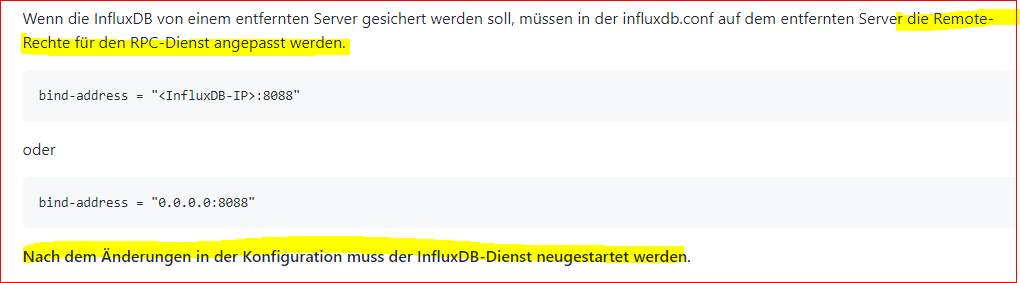
                          8092541e-9332-4c07-b2c9-84f125ba5b40-image.png

                          Wenn die InfluxDB von einem entfernten Server gesichert werden soll, müssen in der influxdb.conf auf dem entfernten Server die Remote-Rechte für den RPC-Dienst angepasst werden.
                           
                          bind-address = "<InfluxDB-IP>:8088"
                          oder
                           
                          bind-address = "0.0.0.0:8088"
                          Nach dem Änderungen in der Konfiguration muss der InfluxDB-Dienst neugestartet werden.
                          

                          Die bindadress sieht in der influxdb.config genaus aus, wie bei der Variante 2. "0.0.0.0:8088".

                          Oder muss hier unbedingt unter bind-adress die IP-Adresse in der influxdb rein: "192.168.1.177:8088" ?

                          Danke

                          Influxdb.conf:

                          ### Welcome to the InfluxDB configuration file.
                          
                          # The values in this file override the default values used by the system if
                          # a config option is not specified. The commented out lines are the configuration
                          # field and the default value used. Uncommenting a line and changing the value
                          # will change the value used at runtime when the process is restarted.
                          
                          # Once every 24 hours InfluxDB will report usage data to usage.influxdata.com
                          # The data includes a random ID, os, arch, version, the number of series and other
                          # usage data. No data from user databases is ever transmitted.
                          # Change this option to true to disable reporting.
                          # reporting-disabled = false
                          
                          # Bind address to use for the RPC service for backup and restore.
                            bind-address = "0.0.0.0:8088"
                          
                          
                          crunchipC 1 Antwort Letzte Antwort
                          0
                          • G GOETSCHHOFER

                            @crunchip

                            Muss ich da jetzt noch in der influxdb.conf etwas anpassen ? bind-adress = Port 8088 ?

                            8092541e-9332-4c07-b2c9-84f125ba5b40-image.png

                            Wenn die InfluxDB von einem entfernten Server gesichert werden soll, müssen in der influxdb.conf auf dem entfernten Server die Remote-Rechte für den RPC-Dienst angepasst werden.
                             
                            bind-address = "<InfluxDB-IP>:8088"
                            oder
                             
                            bind-address = "0.0.0.0:8088"
                            Nach dem Änderungen in der Konfiguration muss der InfluxDB-Dienst neugestartet werden.
                            

                            Die bindadress sieht in der influxdb.config genaus aus, wie bei der Variante 2. "0.0.0.0:8088".

                            Oder muss hier unbedingt unter bind-adress die IP-Adresse in der influxdb rein: "192.168.1.177:8088" ?

                            Danke

                            Influxdb.conf:

                            ### Welcome to the InfluxDB configuration file.
                            
                            # The values in this file override the default values used by the system if
                            # a config option is not specified. The commented out lines are the configuration
                            # field and the default value used. Uncommenting a line and changing the value
                            # will change the value used at runtime when the process is restarted.
                            
                            # Once every 24 hours InfluxDB will report usage data to usage.influxdata.com
                            # The data includes a random ID, os, arch, version, the number of series and other
                            # usage data. No data from user databases is ever transmitted.
                            # Change this option to true to disable reporting.
                            # reporting-disabled = false
                            
                            # Bind address to use for the RPC service for backup and restore.
                              bind-address = "0.0.0.0:8088"
                            
                            
                            crunchipC Abwesend
                            crunchipC Abwesend
                            crunchip
                            Forum Testing Most Active
                            schrieb am zuletzt editiert von
                            #901

                            @goetschhofer sagte in Anfänger sucht Hilfe bei Install. proxmox auf INTELNUC8i3BEK:

                            Die bindadress sieht in der influxdb.config genaus aus, wie bei der Variante 2. "0.0.0.0:8088".
                            Oder muss hier unbedingt unter bind-adress die IP-Adresse in der influxdb rein: "192.168.1.177:8088" ?

                            0.0.0.0 passt, dann wird auf "allen gehört"

                            umgestiegen von Proxmox auf Unraid

                            G 1 Antwort Letzte Antwort
                            1
                            • crunchipC crunchip

                              @goetschhofer sagte in Anfänger sucht Hilfe bei Install. proxmox auf INTELNUC8i3BEK:

                              Die bindadress sieht in der influxdb.config genaus aus, wie bei der Variante 2. "0.0.0.0:8088".
                              Oder muss hier unbedingt unter bind-adress die IP-Adresse in der influxdb rein: "192.168.1.177:8088" ?

                              0.0.0.0 passt, dann wird auf "allen gehört"

                              G Offline
                              G Offline
                              GOETSCHHOFER
                              schrieb am zuletzt editiert von GOETSCHHOFER
                              #902

                              @crunchip

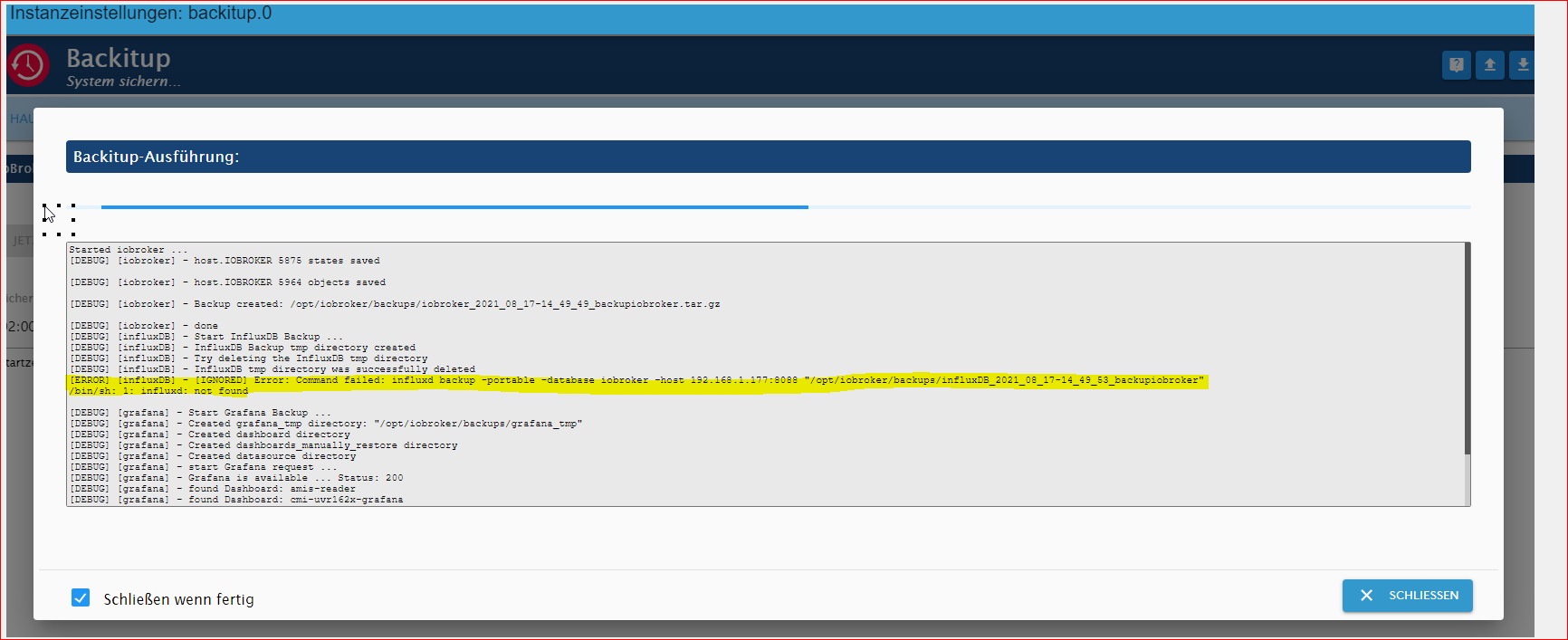
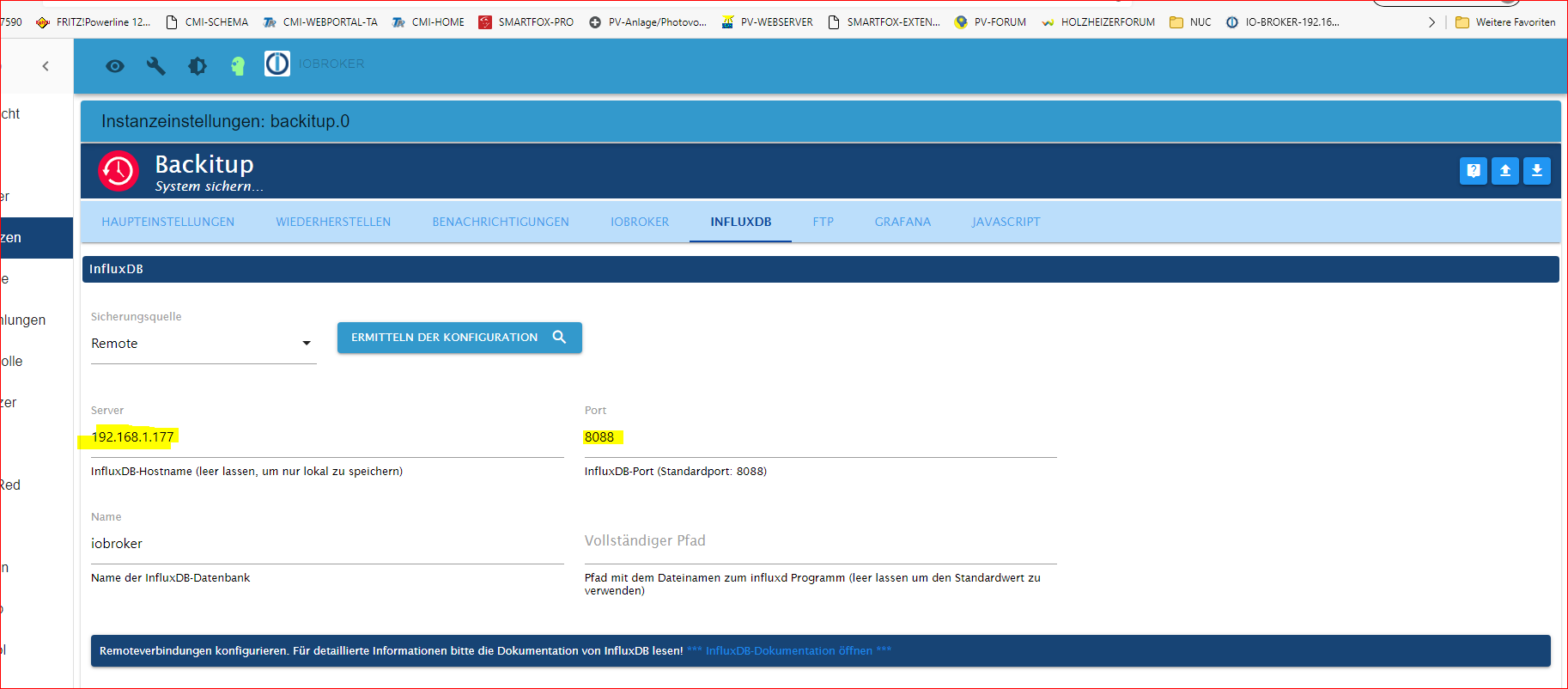
                              Im backitup-Adapter im iobroker habe ich unter influxdb die IP-Adresse der Influxdb und Port: 8088 eingetragen.

                              Bekomme aber immer noch eine Fehlermeldung.


                              ade7447b-1823-4543-8eb6-e9a334657622-image.png


                              db247fd8-3204-44dd-aa73-9d99e94bb650-image.png

                              Thomas BraunT 1 Antwort Letzte Antwort
                              0
                              • G GOETSCHHOFER

                                @crunchip

                                Im backitup-Adapter im iobroker habe ich unter influxdb die IP-Adresse der Influxdb und Port: 8088 eingetragen.

                                Bekomme aber immer noch eine Fehlermeldung.


                                ade7447b-1823-4543-8eb6-e9a334657622-image.png


                                db247fd8-3204-44dd-aa73-9d99e94bb650-image.png

                                Thomas BraunT Online
                                Thomas BraunT Online
                                Thomas Braun
                                Most Active
                                schrieb am zuletzt editiert von
                                #903

                                @goetschhofer Version von Backitup?

                                Linux-Werkzeugkasten:
                                https://forum.iobroker.net/topic/42952/der-kleine-iobroker-linux-werkzeugkasten
                                NodeJS Fixer Skript:
                                https://forum.iobroker.net/topic/68035/iob-node-fix-skript
                                iob_diag: curl -sLf -o diag.sh https://iobroker.net/diag.sh && bash diag.sh

                                G 1 Antwort Letzte Antwort
                                1
                                • Thomas BraunT Thomas Braun

                                  @goetschhofer Version von Backitup?

                                  G Offline
                                  G Offline
                                  GOETSCHHOFER
                                  schrieb am zuletzt editiert von
                                  #904

                                  @thomas-braun said in Anfänger sucht Hilfe bei Install. proxmox auf INTELNUC8i3BEK:

                                  @goetschhofer Version von Backitup?

                                  v.2.1.13


                                  2f06a051-4f3e-472c-83fa-0b6aa0725532-image.png

                                  crunchipC 1 Antwort Letzte Antwort
                                  0
                                  • G GOETSCHHOFER

                                    @thomas-braun said in Anfänger sucht Hilfe bei Install. proxmox auf INTELNUC8i3BEK:

                                    @goetschhofer Version von Backitup?

                                    v.2.1.13


                                    2f06a051-4f3e-472c-83fa-0b6aa0725532-image.png

                                    crunchipC Abwesend
                                    crunchipC Abwesend
                                    crunchip
                                    Forum Testing Most Active
                                    schrieb am zuletzt editiert von crunchip
                                    #905

                                    @goetschhofer blöde Frage, wo hast du denn die Config geändert, auf deinem Iobroker oder auf deiner Influx? zeig mal von beiden diese zwei Zeilen, sollte so aussehen

                                    iobroker

                                    # Bind address to use for the RPC service for backup and restore.
                                    # bind-address = "127.0.0.1:8088"
                                    

                                    influx

                                    # Bind address to use for the RPC service for backup and restore.
                                     bind-address = "0.0.0.0:8088"
                                    

                                    und natürlich muss der Dienst

                                    • auf dem Iobroker gestartet sein
                                    sudo systemctl start influxdb
                                    sudo systemctl enable influxdb.service
                                    
                                    • nach der Änderung in deiner Influx Config muss influx neu gestartet werden, damit die Änderung wirksam wird
                                    sudo systemctl restart influxdb
                                    

                                    umgestiegen von Proxmox auf Unraid

                                    G 1 Antwort Letzte Antwort
                                    1
                                    • crunchipC crunchip

                                      @goetschhofer blöde Frage, wo hast du denn die Config geändert, auf deinem Iobroker oder auf deiner Influx? zeig mal von beiden diese zwei Zeilen, sollte so aussehen

                                      iobroker

                                      # Bind address to use for the RPC service for backup and restore.
                                      # bind-address = "127.0.0.1:8088"
                                      

                                      influx

                                      # Bind address to use for the RPC service for backup and restore.
                                       bind-address = "0.0.0.0:8088"
                                      

                                      und natürlich muss der Dienst

                                      • auf dem Iobroker gestartet sein
                                      sudo systemctl start influxdb
                                      sudo systemctl enable influxdb.service
                                      
                                      • nach der Änderung in deiner Influx Config muss influx neu gestartet werden, damit die Änderung wirksam wird
                                      sudo systemctl restart influxdb
                                      
                                      G Offline
                                      G Offline
                                      GOETSCHHOFER
                                      schrieb am zuletzt editiert von GOETSCHHOFER
                                      #906

                                      @crunchip

                                      Die influxdb.config finde ich nur im LXC-InfluxDB und hier befinden sich folgende Werte:
                                      Abfrage mit:

                                      sudo nano /etc/influxdb/influxdb.conf
                                      

                                      LXC-INFLUXDB: IP: 192.168.1.177

                                      
                                      ### Welcome to the InfluxDB configuration file.
                                      
                                      # The values in this file override the default values used by the system if
                                      # a config option is not specified. The commented out lines are the configuration
                                      # field and the default value used. Uncommenting a line and changing the value
                                      # will change the value used at runtime when the process is restarted.
                                      
                                      # Once every 24 hours InfluxDB will report usage data to usage.influxdata.com
                                      # The data includes a random ID, os, arch, version, the number of series and other
                                      # usage data. No data from user databases is ever transmitted.
                                      # Change this option to true to disable reporting.
                                      # reporting-disabled = false
                                      
                                      # Bind address to use for the RPC service for backup and restore.
                                        bind-address = "0.0.0.0:8088"


                                      Wenn ich die gleiche Abfrage nun auf der VM-iobroker-192.168.1.176 mache, dann findet er die Datei offenbar nicht.
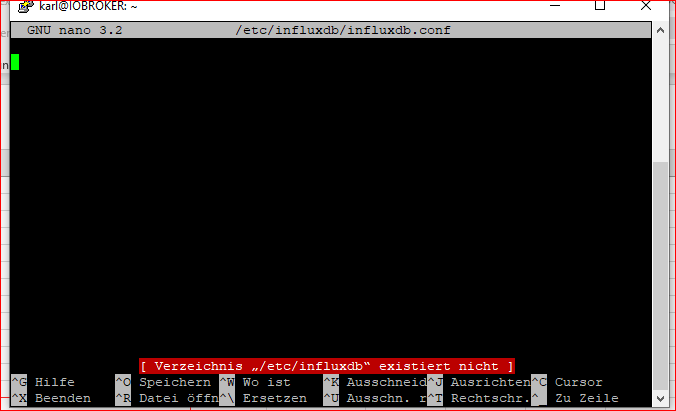
                                      e39e1c4b-7d38-4043-a0a9-ecbe94969b2e-image.png

                                      Aber in diesem Verzeichnis habe ich eine .conf Datei.

                                      karl@IOBROKER:~$ ls -la /etc/apt/
                                      insgesamt 36
                                      drwxr-xr-x  7 root root 4096 Mai  2 15:24 .
                                      drwxr-xr-x 75 root root 4096 Aug 16 17:38 ..
                                      drwxr-xr-x  2 root root 4096 Aug  1 08:24 apt.conf.d
                                      drwxr-xr-x  2 root root 4096 Dez  7  2020 auth.conf.d
                                      -rw-r--r--  1 root root  150 Mai  2 15:20 listchanges.conf
                                      drwxr-xr-x  2 root root 4096 Dez  7  2020 preferences.d
                                      -rw-r--r--  1 root root  881 Mai  2 15:24 sources.list
                                      -rw-r--r--  1 root root    0 Mai  2 15:08 sources.list~
                                      drwxr-xr-x  2 root root 4096 Aug 17 11:46 sources.list.d
                                      drwxr-xr-x  2 root root 4096 Aug 17 11:30 trusted.gpg.d
                                      karl@IOBROKER:~$


                                      Danke im Voraus für die Hilfe.

                                      crunchipC 1 Antwort Letzte Antwort
                                      0
                                      • G GOETSCHHOFER

                                        @crunchip

                                        Die influxdb.config finde ich nur im LXC-InfluxDB und hier befinden sich folgende Werte:
                                        Abfrage mit:

                                        sudo nano /etc/influxdb/influxdb.conf
                                        

                                        LXC-INFLUXDB: IP: 192.168.1.177

                                        
                                        ### Welcome to the InfluxDB configuration file.
                                        
                                        # The values in this file override the default values used by the system if
                                        # a config option is not specified. The commented out lines are the configuration
                                        # field and the default value used. Uncommenting a line and changing the value
                                        # will change the value used at runtime when the process is restarted.
                                        
                                        # Once every 24 hours InfluxDB will report usage data to usage.influxdata.com
                                        # The data includes a random ID, os, arch, version, the number of series and other
                                        # usage data. No data from user databases is ever transmitted.
                                        # Change this option to true to disable reporting.
                                        # reporting-disabled = false
                                        
                                        # Bind address to use for the RPC service for backup and restore.
                                          bind-address = "0.0.0.0:8088"


                                        Wenn ich die gleiche Abfrage nun auf der VM-iobroker-192.168.1.176 mache, dann findet er die Datei offenbar nicht.
                                        e39e1c4b-7d38-4043-a0a9-ecbe94969b2e-image.png

                                        Aber in diesem Verzeichnis habe ich eine .conf Datei.

                                        karl@IOBROKER:~$ ls -la /etc/apt/
                                        insgesamt 36
                                        drwxr-xr-x  7 root root 4096 Mai  2 15:24 .
                                        drwxr-xr-x 75 root root 4096 Aug 16 17:38 ..
                                        drwxr-xr-x  2 root root 4096 Aug  1 08:24 apt.conf.d
                                        drwxr-xr-x  2 root root 4096 Dez  7  2020 auth.conf.d
                                        -rw-r--r--  1 root root  150 Mai  2 15:20 listchanges.conf
                                        drwxr-xr-x  2 root root 4096 Dez  7  2020 preferences.d
                                        -rw-r--r--  1 root root  881 Mai  2 15:24 sources.list
                                        -rw-r--r--  1 root root    0 Mai  2 15:08 sources.list~
                                        drwxr-xr-x  2 root root 4096 Aug 17 11:46 sources.list.d
                                        drwxr-xr-x  2 root root 4096 Aug 17 11:30 trusted.gpg.d
                                        karl@IOBROKER:~$


                                        Danke im Voraus für die Hilfe.

                                        crunchipC Abwesend
                                        crunchipC Abwesend
                                        crunchip
                                        Forum Testing Most Active
                                        schrieb am zuletzt editiert von
                                        #907

                                        @goetschhofer sagte in Anfänger sucht Hilfe bei Install. proxmox auf INTELNUC8i3BEK:

                                        Die influxdb.config finde ich nur im LXC-InfluxDB

                                        sollte aber auf deinem iobroker auch vorhanden sein
                                        zeig mal die Ausgabe auf deinem iobroker

                                        sudo systemctl status influxdb.service
                                        

                                        umgestiegen von Proxmox auf Unraid

                                        G 1 Antwort Letzte Antwort
                                        1
                                        • crunchipC crunchip

                                          @goetschhofer sagte in Anfänger sucht Hilfe bei Install. proxmox auf INTELNUC8i3BEK:

                                          Die influxdb.config finde ich nur im LXC-InfluxDB

                                          sollte aber auf deinem iobroker auch vorhanden sein
                                          zeig mal die Ausgabe auf deinem iobroker

                                          sudo systemctl status influxdb.service
                                          
                                          G Offline
                                          G Offline
                                          GOETSCHHOFER
                                          schrieb am zuletzt editiert von
                                          #908

                                          @crunchip said in Anfänger sucht Hilfe bei Install. proxmox auf INTELNUC8i3BEK:

                                          @goetschhofer sagte in Anfänger sucht Hilfe bei Install. proxmox auf INTELNUC8i3BEK:

                                          Die influxdb.config finde ich nur im LXC-InfluxDB

                                          sollte aber auf deinem iobroker auch vorhanden sein
                                          zeig mal die Ausgabe auf deinem iobroker

                                          sudo systemctl status influxdb.service
                                          

                                          Die kann er im iobroker nicht finden ?

                                          login as: karl
                                          karl@192.168.1.176's password:
                                          Linux IOBROKER 4.19.0-17-amd64 #1 SMP Debian 4.19.194-2 (2021-06-21) x86_64
                                          
                                          The programs included with the Debian GNU/Linux system are free software;
                                          the exact distribution terms for each program are described in the
                                          individual files in /usr/share/doc/*/copyright.
                                          
                                          Debian GNU/Linux comes with ABSOLUTELY NO WARRANTY, to the extent
                                          permitted by applicable law.
                                          Last login: Wed Aug 18 09:00:19 2021 from 192.168.1.3
                                          karl@IOBROKER:~$ sudo systemctl status influxdb.service
                                          [sudo] Passwort für karl:
                                          Unit influxdb.service could not be found.
                                          karl@IOBROKER:~$
                                          
                                          
                                          crunchipC 1 Antwort Letzte Antwort
                                          0
                                          Antworten
                                          • In einem neuen Thema antworten
                                          Anmelden zum Antworten
                                          • Älteste zuerst
                                          • Neuste zuerst
                                          • Meiste Stimmen


                                          Support us

                                          ioBroker
                                          Community Adapters
                                          Donate
                                          FAQ Cloud / IOT
                                          HowTo: Node.js-Update
                                          HowTo: Backup/Restore
                                          Downloads
                                          BLOG

                                          956

                                          Online

                                          32.5k

                                          Benutzer

                                          81.9k

                                          Themen

                                          1.3m

                                          Beiträge
                                          Community
                                          Impressum | Datenschutz-Bestimmungen | Nutzungsbedingungen | Einwilligungseinstellungen
                                          ioBroker Community 2014-2025
                                          logo
                                          • Anmelden

                                          • Du hast noch kein Konto? Registrieren

                                          • Anmelden oder registrieren, um zu suchen
                                          • Erster Beitrag
                                            Letzter Beitrag
                                          0
                                          • Home
                                          • Aktuell
                                          • Tags
                                          • Ungelesen 0
                                          • Kategorien
                                          • Unreplied
                                          • Beliebt
                                          • GitHub
                                          • Docu
                                          • Hilfe