
NEWS




[ESPHome] Beta release
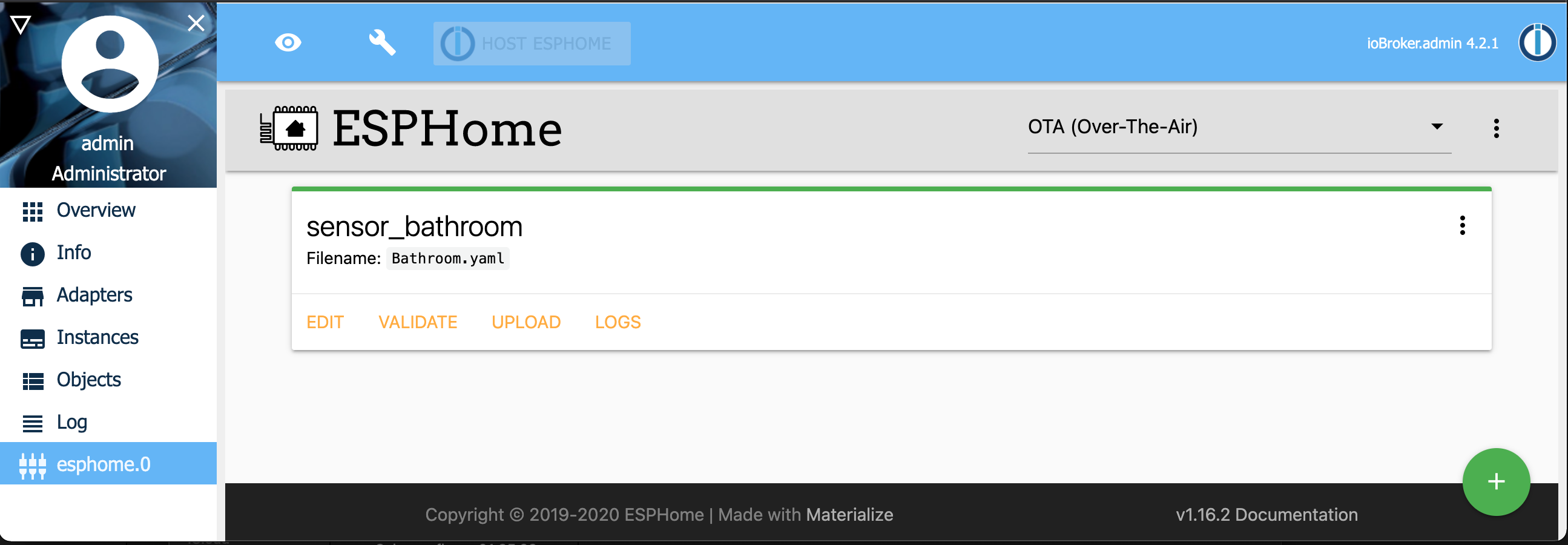
-
@tloeffel sagte in [ESPHome] Beta release:
Hallo Zusammen,
ich musste mein Ubuntu auf Version 20-4 bringen. Somit habe ich auch IOBROKER neu installieren müssen. Nun habe ich folgenden Fehler. Ich bekomme "optisch" keine Adapter mehr "online". Im LOG werden sie angezeigt und auch beim Adapter selbst kann ich Ihn sehen. Aber in dieser Anzeige nicht, somit geht auch kein kompilieren und über Wifi updaten mehr. Habt Ihr eine Idee?
Gruß Thomas
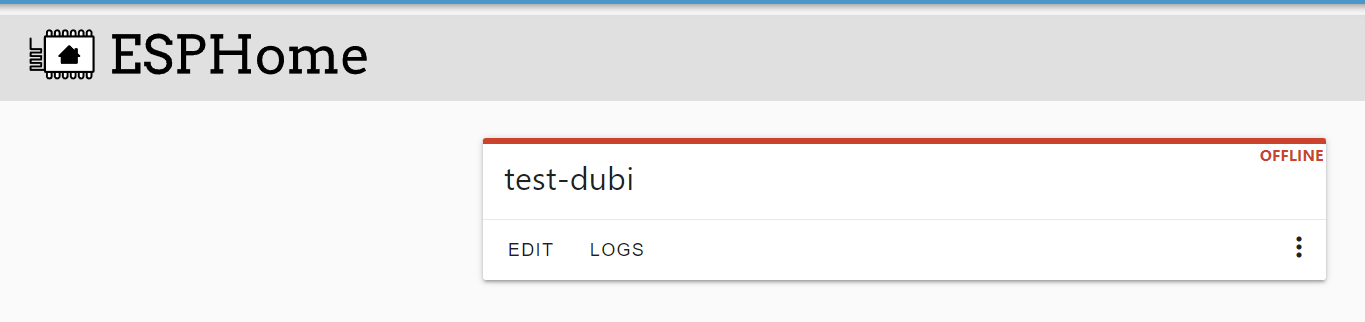
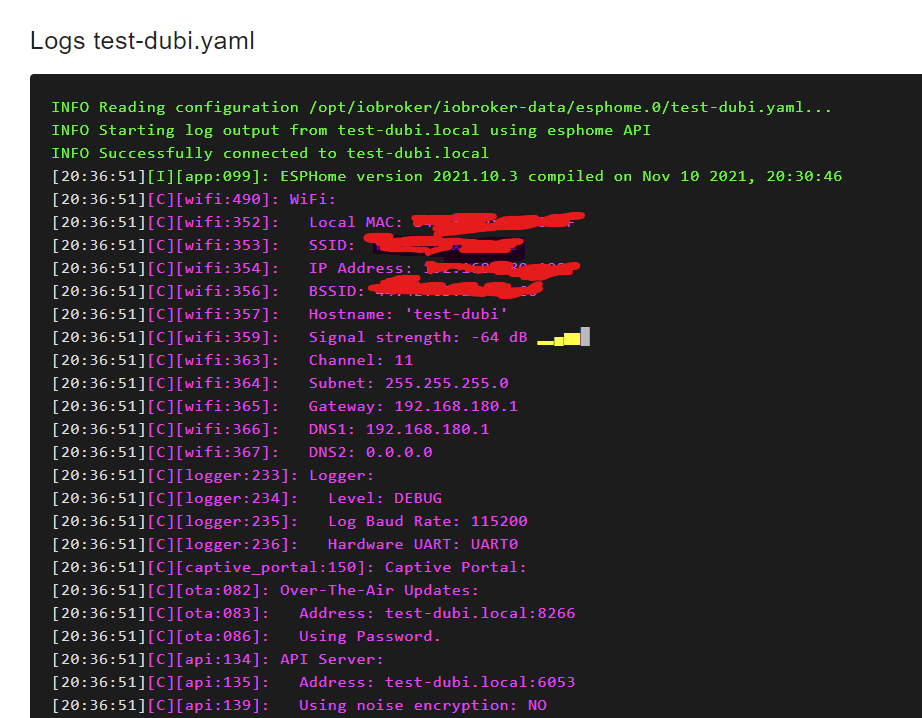
Bei der Installation wird immer die aktuellste ESPHome Dashboard Version genommen daarin bevinden sich leider gerade ein bug (außerhalb ioBroker)
-
Danke für die schnelle Antwort :-). Gehst Du dem BUG nach?
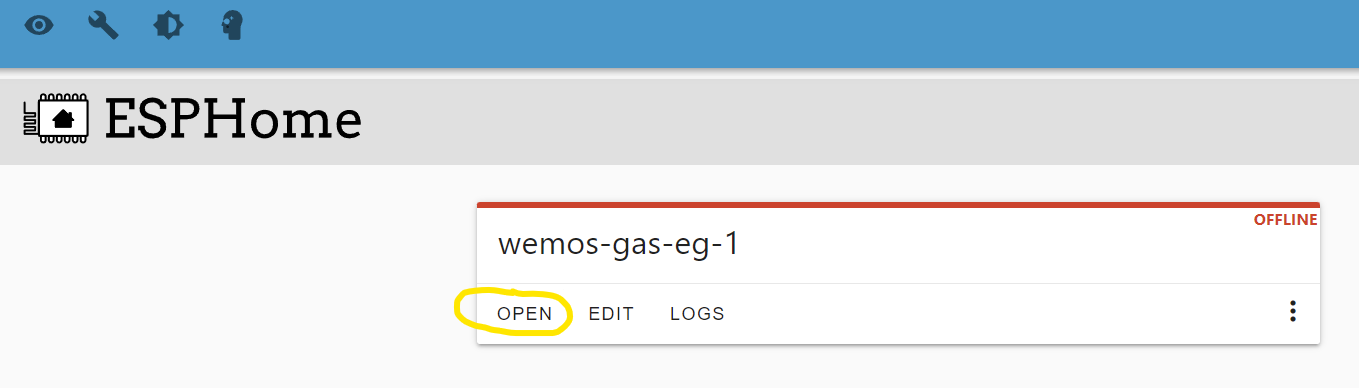
"Open" geht übrigens. Auch das Update über Wifi geht trotz roter "offline" Anzeige.
Gruß Thomas
@tloeffel sagte in [ESPHome] Beta release:
Danke für die schnelle Antwort :-). Gehst Du dem BUG nach?
eh nein, ich entwickle nicht ESPHome ;) ist aber bei denen bekannt
-
@tloeffel sagte in [ESPHome] Beta release:
Danke für die schnelle Antwort :-). Gehst Du dem BUG nach?
eh nein, ich entwickle nicht ESPHome ;) ist aber bei denen bekannt
Wäre es eigentlich möglich auf einem Multihost am Slave den Adapter zu installieren.
Ich meine installiert habe ich ihn bereits auf Master und Slave.
Jetzt wollte ich auf den Slave umziehen aber beim erstellen einer Instanz kommt :2021-11-19 18:07:20.599 - error: host.achbotslave startInstance system.adapter.esphome.1: required adapter "admin" not found!Raspberry Pi 4 8GB, Debian 11, js-controller: 5.0.12, Nodejs: v18.18.2, NPM: 9.8.1 (Multihost),
Wago PFC200 mit Dali Lichtsteuerung. -
Wäre es eigentlich möglich auf einem Multihost am Slave den Adapter zu installieren.
Ich meine installiert habe ich ihn bereits auf Master und Slave.
Jetzt wollte ich auf den Slave umziehen aber beim erstellen einer Instanz kommt :2021-11-19 18:07:20.599 - error: host.achbotslave startInstance system.adapter.esphome.1: required adapter "admin" not found!@marsmännchen Das klingt danach, dass du keine Admin auf dem Slave hast (was nach meinem Wissensstand auch nicht notwendig ist).
-
@marsmännchen Das klingt danach, dass du keine Admin auf dem Slave hast (was nach meinem Wissensstand auch nicht notwendig ist).
Das hab ich mir aufgrund der Fehlermeldung auch gedacht.
Habe dann gestern nachgesehen, aber da ist ein Admin Adapter am Slave.
Dachte ich!!
Hab mich wohl geirrt.
Gerade nochmal nachgesehen, nein am Slave ist kein Admin.
Spricht etwas dagegen auf einem Slave einen Admin Adapter zu installieren um ESPHome zu nutzen?
MfG
PatrickEdit:
Habe auch von ähnlichem Problem bei einem anderen Adapter gelesen: https://forum.iobroker.net/topic/47840/adapter-worx-funktioniert-nicht-mehr-nach-update
Ich denke es geht nicht anders als einen Admin Adapter anzulegen, außer der Adapterersteller ändert etwas an den "globalDependencies"!?Raspberry Pi 4 8GB, Debian 11, js-controller: 5.0.12, Nodejs: v18.18.2, NPM: 9.8.1 (Multihost),
Wago PFC200 mit Dali Lichtsteuerung. -
Das hab ich mir aufgrund der Fehlermeldung auch gedacht.
Habe dann gestern nachgesehen, aber da ist ein Admin Adapter am Slave.
Dachte ich!!
Hab mich wohl geirrt.
Gerade nochmal nachgesehen, nein am Slave ist kein Admin.
Spricht etwas dagegen auf einem Slave einen Admin Adapter zu installieren um ESPHome zu nutzen?
MfG
PatrickEdit:
Habe auch von ähnlichem Problem bei einem anderen Adapter gelesen: https://forum.iobroker.net/topic/47840/adapter-worx-funktioniert-nicht-mehr-nach-update
Ich denke es geht nicht anders als einen Admin Adapter anzulegen, außer der Adapterersteller ändert etwas an den "globalDependencies"!?@marsmännchen sagte in [ESPHome] Beta release:
Das hab ich mir aufgrund der Fehlermeldung auch gedacht.
Habe dann gestern nachgesehen, aber da ist ein Admin Adapter am Slave.
Dachte ich!!
Hab mich wohl geirrt.
Gerade nochmal nachgesehen, nein am Slave ist kein Admin.
Spricht etwas dagegen auf einem Slave einen Admin Adapter zu installieren um ESPHome zu nutzen?
MfG
PatrickEdit:
Habe auch von ähnlichem Problem bei einem anderen Adapter gelesen: https://forum.iobroker.net/topic/47840/adapter-worx-funktioniert-nicht-mehr-nach-update
Ich denke es geht nicht anders als einen Admin Adapter anzulegen, außer der Adapterersteller ändert etwas an den "globalDependencies"!?Werde es diese Woche fixen
-
hallo zusammen, kann mir jemand sagen, warum ich ESPHome nicht installiert bekomme:
'''
0 info it worked if it ends with ok
1 verbose cli [
1 verbose cli '/usr/local/bin/node',
1 verbose cli '/usr/local/bin/npm',
1 verbose cli 'install',
1 verbose cli 'esphome/esphome#1424091ee51a31d75558f8e4a029ea80edb4d415',
1 verbose cli '--prefix',
1 verbose cli '/opt/iobroker'
1 verbose cli ]
2 info using npm@6.14.11
3 info using node@v14.15.4
4 verbose npm-session 03dd482e48963b72
5 silly install loadCurrentTree
6 silly install readLocalPackageData
7 silly fetchPackageMetaData error for github:esphome/esphome#1424091ee51a31d75558f8e4a029ea80edb4d415 premature close
8 timing stage:rollbackFailedOptional Completed in 2ms
9 timing stage:runTopLevelLifecycles Completed in 8223ms
10 verbose stack Error: premature close
10 verbose stack at PassThrough.onclose (/usr/local/lib/node_modules/npm/node_modules/end-of-stream/index.js:47:67)
10 verbose stack at PassThrough.emit (events.js:327:22)
10 verbose stack at emitCloseNT (internal/streams/destroy.js:87:10)
10 verbose stack at processTicksAndRejections (internal/process/task_queues.js:79:21)
11 verbose cwd /opt/iobroker
12 verbose Linux 5.10.63-v7l+
13 verbose argv "/usr/local/bin/node" "/usr/local/bin/npm" "install" "esphome/esphome#1424091ee51a31d75558f8e4a029ea80edb4d415" "--prefix" "/opt/iobroker"
14 verbose node v14.15.4
15 verbose npm v6.14.11
16 error premature close
17 verbose exit [ 1, true ] -
hallo zusammen, kann mir jemand sagen, warum ich ESPHome nicht installiert bekomme:
'''
0 info it worked if it ends with ok
1 verbose cli [
1 verbose cli '/usr/local/bin/node',
1 verbose cli '/usr/local/bin/npm',
1 verbose cli 'install',
1 verbose cli 'esphome/esphome#1424091ee51a31d75558f8e4a029ea80edb4d415',
1 verbose cli '--prefix',
1 verbose cli '/opt/iobroker'
1 verbose cli ]
2 info using npm@6.14.11
3 info using node@v14.15.4
4 verbose npm-session 03dd482e48963b72
5 silly install loadCurrentTree
6 silly install readLocalPackageData
7 silly fetchPackageMetaData error for github:esphome/esphome#1424091ee51a31d75558f8e4a029ea80edb4d415 premature close
8 timing stage:rollbackFailedOptional Completed in 2ms
9 timing stage:runTopLevelLifecycles Completed in 8223ms
10 verbose stack Error: premature close
10 verbose stack at PassThrough.onclose (/usr/local/lib/node_modules/npm/node_modules/end-of-stream/index.js:47:67)
10 verbose stack at PassThrough.emit (events.js:327:22)
10 verbose stack at emitCloseNT (internal/streams/destroy.js:87:10)
10 verbose stack at processTicksAndRejections (internal/process/task_queues.js:79:21)
11 verbose cwd /opt/iobroker
12 verbose Linux 5.10.63-v7l+
13 verbose argv "/usr/local/bin/node" "/usr/local/bin/npm" "install" "esphome/esphome#1424091ee51a31d75558f8e4a029ea80edb4d415" "--prefix" "/opt/iobroker"
14 verbose node v14.15.4
15 verbose npm v6.14.11
16 error premature close
17 verbose exit [ 1, true ]@arne007 sagte in [ESPHome] Beta release:
1 verbose cli '/usr/local/bin/node',
1 verbose cli '/usr/local/bin/npm',NodeJS ist falsch installiert.
-
@arne007 sagte in [ESPHome] Beta release:
1 verbose cli '/usr/local/bin/node',
1 verbose cli '/usr/local/bin/npm',NodeJS ist falsch installiert.
-
@thomas-braun falsche Version installiert? Wenn ja, welche sollte ich nehmen?
Steht in meiner Signatur.
Lies insbesondere den Teil mit den falschen Pfaden besonders gründlich. -
Steht in meiner Signatur.
Lies insbesondere den Teil mit den falschen Pfaden besonders gründlich.Hallo, irgendwie mags bei mir auch nicht. Welche Version ist falsch?
npm: 6.14.15
node: 14.18.2
python: 3.9.7$ ./iobroker add esphome --host raspberrypi NPM version: 6.14.15 npm install iobroker.esphome@0.2.4 --loglevel error --prefix "/opt/iobroker" (System call) Exception: Traceback (most recent call last): File "/tmp/tmpvlou37m4/pip.zip/pip/basecommand.py", line 215, in main status = self.run(options, args) File "/tmp/tmpvlou37m4/pip.zip/pip/commands/install.py", line 272, in run with self._build_session(options) as session: File "/tmp/tmpvlou37m4/pip.zip/pip/basecommand.py", line 66, in _build_session session = PipSession( File "/tmp/tmpvlou37m4/pip.zip/pip/download.py", line 329, in __init__ self.headers["User-Agent"] = user_agent() File "/tmp/tmpvlou37m4/pip.zip/pip/download.py", line 93, in user_agent from pip._vendor import distro File "<frozen importlib._bootstrap>", line 1007, in _find_and_load File "<frozen importlib._bootstrap>", line 986, in _find_and_load_unlocked File "<frozen importlib._bootstrap>", line 664, in _load_unlocked File "<frozen importlib._bootstrap>", line 627, in _load_backward_compatible File "<frozen zipimport>", line 259, in load_module File "/tmp/tmpvlou37m4/pip.zip/pip/_vendor/distro.py", line 1050, in <module> _distro = LinuxDistribution() File "/tmp/tmpvlou37m4/pip.zip/pip/_vendor/distro.py", line 593, in __init__ self._lsb_release_info = self._get_lsb_release_info() \ File "/tmp/tmpvlou37m4/pip.zip/pip/_vendor/distro.py", line 931, in _get_lsb_release_info raise subprocess.CalledProcessError(code, cmd, stdout, stderr)subprocess.CalledProcessError: Command 'lsb_release -a' returned non-zero exit status 1. Traceback (most recent call last): File "/opt/iobroker/node_modules/nopy/src/get-pip.py", line 20061, in <module> main() File "/opt/iobroker/node_modules/nopy/src/get-pip.py", line 194, in main bootstrap(tmpdir=tmpdir) File "/opt/iobroker/node_modules/nopy/src/get-pip.py", line 172, in bootstrap sys.exit(pip.main(["install", "--upgrade"] + args)) File "/tmp/tmpvlou37m4/pip.zip/pip/__init__.py", line 233, in main File "/tmp/tmpvlou37m4/pip.zip/pip/basecommand.py", line 248, in main File "/tmp/tmpvlou37m4/pip.zip/pip/basecommand.py", line 66, in _build_session File "/tmp/tmpvlou37m4/pip.zip/pip/download.py", line 329, in __init__ File "/tmp/tmpvlou37m4/pip.zip/pip/download.py", line 93, in user_agent File "<frozen importlib._bootstrap>", line 1007, in _find_and_load File "<frozen importlib._bootstrap>", line 986, in _find_and_load_unlocked File "<frozen importlib._bootstrap>", line 664, in _load_unlocked File "<frozen importlib._bootstrap>", line 627, in _load_backward_compatible File "<frozen zipimport>", line 259, in load_module File "/tmp/tmpvlou37m4/pip.zip/pip/_vendor/distro.py", line 1050, in <module> File "/tmp/tmpvlou37m4/pip.zip/pip/_vendor/distro.py", line 593, in __init__ File "/tmp/tmpvlou37m4/pip.zip/pip/_vendor/distro.py", line 931, in _get_lsb_release_info subprocess.CalledProcessError: Command 'lsb_release -a' returned non-zero exit status 1. Error: Exited with code 1. at ChildProcess.<anonymous> (/opt/iobroker/node_modules/nopy/src/api.js:277:20) at ChildProcess.emit (events.js:400:28) at maybeClose (internal/child_process.js:1058:16) at Process.ChildProcess._handle.onexit (internal/child_process.js:293:5) npm ERR! code ELIFECYCLE npm ERR! errno 1 npm ERR! iobroker.esphome@0.2.4 install: `npip install` npm ERR! Exit status 1npm ERR! npm ERR! Failed at the iobroker.esphome@0.2.4 install script.npm ERR! This is probably not a problem with npm. There is likely additional logging output above. npm ERR! A complete log of this run can be found in:npm ERR! /home/iobroker/.npm/_logs/2021-12-03T11_34_34_767Z-debug.log ERROR: host.raspberrypi Cannot install iobroker.esphome@0.2.4: 1 ERROR: process exited with code 25 -
Hallo, irgendwie mags bei mir auch nicht. Welche Version ist falsch?
npm: 6.14.15
node: 14.18.2
python: 3.9.7$ ./iobroker add esphome --host raspberrypi NPM version: 6.14.15 npm install iobroker.esphome@0.2.4 --loglevel error --prefix "/opt/iobroker" (System call) Exception: Traceback (most recent call last): File "/tmp/tmpvlou37m4/pip.zip/pip/basecommand.py", line 215, in main status = self.run(options, args) File "/tmp/tmpvlou37m4/pip.zip/pip/commands/install.py", line 272, in run with self._build_session(options) as session: File "/tmp/tmpvlou37m4/pip.zip/pip/basecommand.py", line 66, in _build_session session = PipSession( File "/tmp/tmpvlou37m4/pip.zip/pip/download.py", line 329, in __init__ self.headers["User-Agent"] = user_agent() File "/tmp/tmpvlou37m4/pip.zip/pip/download.py", line 93, in user_agent from pip._vendor import distro File "<frozen importlib._bootstrap>", line 1007, in _find_and_load File "<frozen importlib._bootstrap>", line 986, in _find_and_load_unlocked File "<frozen importlib._bootstrap>", line 664, in _load_unlocked File "<frozen importlib._bootstrap>", line 627, in _load_backward_compatible File "<frozen zipimport>", line 259, in load_module File "/tmp/tmpvlou37m4/pip.zip/pip/_vendor/distro.py", line 1050, in <module> _distro = LinuxDistribution() File "/tmp/tmpvlou37m4/pip.zip/pip/_vendor/distro.py", line 593, in __init__ self._lsb_release_info = self._get_lsb_release_info() \ File "/tmp/tmpvlou37m4/pip.zip/pip/_vendor/distro.py", line 931, in _get_lsb_release_info raise subprocess.CalledProcessError(code, cmd, stdout, stderr)subprocess.CalledProcessError: Command 'lsb_release -a' returned non-zero exit status 1. Traceback (most recent call last): File "/opt/iobroker/node_modules/nopy/src/get-pip.py", line 20061, in <module> main() File "/opt/iobroker/node_modules/nopy/src/get-pip.py", line 194, in main bootstrap(tmpdir=tmpdir) File "/opt/iobroker/node_modules/nopy/src/get-pip.py", line 172, in bootstrap sys.exit(pip.main(["install", "--upgrade"] + args)) File "/tmp/tmpvlou37m4/pip.zip/pip/__init__.py", line 233, in main File "/tmp/tmpvlou37m4/pip.zip/pip/basecommand.py", line 248, in main File "/tmp/tmpvlou37m4/pip.zip/pip/basecommand.py", line 66, in _build_session File "/tmp/tmpvlou37m4/pip.zip/pip/download.py", line 329, in __init__ File "/tmp/tmpvlou37m4/pip.zip/pip/download.py", line 93, in user_agent File "<frozen importlib._bootstrap>", line 1007, in _find_and_load File "<frozen importlib._bootstrap>", line 986, in _find_and_load_unlocked File "<frozen importlib._bootstrap>", line 664, in _load_unlocked File "<frozen importlib._bootstrap>", line 627, in _load_backward_compatible File "<frozen zipimport>", line 259, in load_module File "/tmp/tmpvlou37m4/pip.zip/pip/_vendor/distro.py", line 1050, in <module> File "/tmp/tmpvlou37m4/pip.zip/pip/_vendor/distro.py", line 593, in __init__ File "/tmp/tmpvlou37m4/pip.zip/pip/_vendor/distro.py", line 931, in _get_lsb_release_info subprocess.CalledProcessError: Command 'lsb_release -a' returned non-zero exit status 1. Error: Exited with code 1. at ChildProcess.<anonymous> (/opt/iobroker/node_modules/nopy/src/api.js:277:20) at ChildProcess.emit (events.js:400:28) at maybeClose (internal/child_process.js:1058:16) at Process.ChildProcess._handle.onexit (internal/child_process.js:293:5) npm ERR! code ELIFECYCLE npm ERR! errno 1 npm ERR! iobroker.esphome@0.2.4 install: `npip install` npm ERR! Exit status 1npm ERR! npm ERR! Failed at the iobroker.esphome@0.2.4 install script.npm ERR! This is probably not a problem with npm. There is likely additional logging output above. npm ERR! A complete log of this run can be found in:npm ERR! /home/iobroker/.npm/_logs/2021-12-03T11_34_34_767Z-debug.log ERROR: host.raspberrypi Cannot install iobroker.esphome@0.2.4: 1 ERROR: process exited with code 25@johannes-bauerstatter sagte in [ESPHome] Beta release:
lsb_release -aWas kommt da in der Konsole zurück?
-
@johannes-bauerstatter sagte in [ESPHome] Beta release:
lsb_release -aWas kommt da in der Konsole zurück?
pi@raspberrypi:~ $ lsb_release -a Traceback (most recent call last): File "/usr/bin/lsb_release", line 25, in <module> import lsb_release ModuleNotFoundError: No module named 'lsb_release' -
pi@raspberrypi:~ $ lsb_release -a Traceback (most recent call last): File "/usr/bin/lsb_release", line 25, in <module> import lsb_release ModuleNotFoundError: No module named 'lsb_release'Da ist irgendwas kaputt.
sudo apt update sudo apt install --reinstall lsb-release -
Da ist irgendwas kaputt.
sudo apt update sudo apt install --reinstall lsb-release@thomas-braun
Ist eine ganz frische Installation auf einem Raspi 4.pi@raspberrypi:~ $ sudo apt install --reinstall lsb-release Reading package lists... Done Building dependency tree... Done Reading state information... Done 0 upgraded, 0 newly installed, 1 reinstalled, 0 to remove and 0 not upgraded. Need to get 28.1 kB of archives. After this operation, 0 B of additional disk space will be used. Get:1 http://raspbian.raspberrypi.org/raspbian bullseye/main armhf lsb-release all 11.1.0+rpi1 [28.1 kB] Fetched 28.1 kB in 1s (19.0 kB/s) Traceback (most recent call last): File "/usr/bin/apt-listchanges", line 29, in <module> import apt_pkg ModuleNotFoundError: No module named 'apt_pkg' (Reading database ... 50809 files and directories currently installed.) Preparing to unpack .../lsb-release_11.1.0+rpi1_all.deb ... Unpacking lsb-release (11.1.0+rpi1) over (11.1.0+rpi1) ... Setting up lsb-release (11.1.0+rpi1) ... Processing triggers for man-db (2.9.4-2) ... pi@raspberrypi:~ $NPM version: 6.14.15 npm install iobroker.esphome@0.2.4 --loglevel error --prefix "/opt/iobroker" (System call) Exception:Traceback (most recent call last): File "/tmp/tmpys8yyc8z/pip.zip/pip/basecommand.py", line 215, in main status = self.run(options, args) File "/tmp/tmpys8yyc8z/pip.zip/pip/commands/install.py", line 272, in run with self._build_session(options) as session: File "/tmp/tmpys8yyc8z/pip.zip/pip/basecommand.py", line 66, in _build_session session = PipSession( File "/tmp/tmpys8yyc8z/pip.zip/pip/download.py", line 329, in __init__ self.headers["User-Agent"] = user_agent() File "/tmp/tmpys8yyc8z/pip.zip/pip/download.py", line 93, in user_agent from pip._vendor import distro File "<frozen importlib._bootstrap>", line 1007, in _find_and_load File "<frozen importlib._bootstrap>", line 986, in _find_and_load_unlocked File "<frozen importlib._bootstrap>", line 664, in _load_unlocked File "<frozen importlib._bootstrap>", line 627, in _load_backward_compatible File "<frozen zipimport>", line 259, in load_module File "/tmp/tmpys8yyc8z/pip.zip/pip/_vendor/distro.py", line 1050, in <module> _distro = LinuxDistribution() File "/tmp/tmpys8yyc8z/pip.zip/pip/_vendor/distro.py", line 593, in __init__ self._lsb_release_info = self._get_lsb_release_info() \ File "/tmp/tmpys8yyc8z/pip.zip/pip/_vendor/distro.py", line 931, in _get_lsb_release_info raise subprocess.CalledProcessError(code, cmd, stdout, stderr)subprocess.CalledProcessError: Command 'lsb_release -a' returned non-zero exit status 1. Traceback (most recent call last): File "/opt/iobroker/node_modules/nopy/src/get-pip.py", line 20061, in <module> main() File "/opt/iobroker/node_modules/nopy/src/get-pip.py", line 194, in main bootstrap(tmpdir=tmpdir) File "/opt/iobroker/node_modules/nopy/src/get-pip.py", line 172, in bootstrap sys.exit(pip.main(["install", "--upgrade"] + args)) File "/tmp/tmpys8yyc8z/pip.zip/pip/__init__.py", line 233, in main File "/tmp/tmpys8yyc8z/pip.zip/pip/basecommand.py", line 248, in main File "/tmp/tmpys8yyc8z/pip.zip/pip/basecommand.py", line 66, in _build_session File "/tmp/tmpys8yyc8z/pip.zip/pip/download.py", line 329, in __init__ File "/tmp/tmpys8yyc8z/pip.zip/pip/download.py", line 93, in user_agent File "<frozen importlib._bootstrap>", line 1007, in _find_and_load File "<frozen importlib._bootstrap>", line 986, in _find_and_load_unlocked File "<frozen importlib._bootstrap>", line 664, in _load_unlocked File "<frozen importlib._bootstrap>", line 627, in _load_backward_compatible File "<frozen zipimport>", line 259, in load_module File "/tmp/tmpys8yyc8z/pip.zip/pip/_vendor/distro.py", line 1050, in <module> File "/tmp/tmpys8yyc8z/pip.zip/pip/_vendor/distro.py", line 593, in __init__ File "/tmp/tmpys8yyc8z/pip.zip/pip/_vendor/distro.py", line 931, in _get_lsb_release_infosubprocess.CalledProcessError: Command 'lsb_release -a' returned non-zero exit status 1. Error: Exited with code 1. at ChildProcess.<anonymous> (/opt/iobroker/node_modules/nopy/src/api.js:277:20) at ChildProcess.emit (events.js:400:28) at maybeClose (internal/child_process.js:1058:16) at Process.ChildProcess._handle.onexit (internal/child_process.js:293:5) npm ERR! code ELIFECYCLE npm ERR! errno 1 npm ERR! iobroker.esphome@0.2.4 install: `npip install`npm ERR! Exit status 1 npm ERR! npm ERR! Failed at the iobroker.esphome@0.2.4 install script.npm ERR! This is probably not a problem with npm. There is likely additional logging output above. npm ERR! A complete log of this run can be found in:npm ERR! /home/iobroker/.npm/_logs/2021-12-03T15_55_36_557Z-debug.log ERROR: host.raspberrypi Cannot install iobroker.esphome@0.2.4: 1 ERROR: process exited with code 25 -
@thomas-braun
Ist eine ganz frische Installation auf einem Raspi 4.pi@raspberrypi:~ $ sudo apt install --reinstall lsb-release Reading package lists... Done Building dependency tree... Done Reading state information... Done 0 upgraded, 0 newly installed, 1 reinstalled, 0 to remove and 0 not upgraded. Need to get 28.1 kB of archives. After this operation, 0 B of additional disk space will be used. Get:1 http://raspbian.raspberrypi.org/raspbian bullseye/main armhf lsb-release all 11.1.0+rpi1 [28.1 kB] Fetched 28.1 kB in 1s (19.0 kB/s) Traceback (most recent call last): File "/usr/bin/apt-listchanges", line 29, in <module> import apt_pkg ModuleNotFoundError: No module named 'apt_pkg' (Reading database ... 50809 files and directories currently installed.) Preparing to unpack .../lsb-release_11.1.0+rpi1_all.deb ... Unpacking lsb-release (11.1.0+rpi1) over (11.1.0+rpi1) ... Setting up lsb-release (11.1.0+rpi1) ... Processing triggers for man-db (2.9.4-2) ... pi@raspberrypi:~ $NPM version: 6.14.15 npm install iobroker.esphome@0.2.4 --loglevel error --prefix "/opt/iobroker" (System call) Exception:Traceback (most recent call last): File "/tmp/tmpys8yyc8z/pip.zip/pip/basecommand.py", line 215, in main status = self.run(options, args) File "/tmp/tmpys8yyc8z/pip.zip/pip/commands/install.py", line 272, in run with self._build_session(options) as session: File "/tmp/tmpys8yyc8z/pip.zip/pip/basecommand.py", line 66, in _build_session session = PipSession( File "/tmp/tmpys8yyc8z/pip.zip/pip/download.py", line 329, in __init__ self.headers["User-Agent"] = user_agent() File "/tmp/tmpys8yyc8z/pip.zip/pip/download.py", line 93, in user_agent from pip._vendor import distro File "<frozen importlib._bootstrap>", line 1007, in _find_and_load File "<frozen importlib._bootstrap>", line 986, in _find_and_load_unlocked File "<frozen importlib._bootstrap>", line 664, in _load_unlocked File "<frozen importlib._bootstrap>", line 627, in _load_backward_compatible File "<frozen zipimport>", line 259, in load_module File "/tmp/tmpys8yyc8z/pip.zip/pip/_vendor/distro.py", line 1050, in <module> _distro = LinuxDistribution() File "/tmp/tmpys8yyc8z/pip.zip/pip/_vendor/distro.py", line 593, in __init__ self._lsb_release_info = self._get_lsb_release_info() \ File "/tmp/tmpys8yyc8z/pip.zip/pip/_vendor/distro.py", line 931, in _get_lsb_release_info raise subprocess.CalledProcessError(code, cmd, stdout, stderr)subprocess.CalledProcessError: Command 'lsb_release -a' returned non-zero exit status 1. Traceback (most recent call last): File "/opt/iobroker/node_modules/nopy/src/get-pip.py", line 20061, in <module> main() File "/opt/iobroker/node_modules/nopy/src/get-pip.py", line 194, in main bootstrap(tmpdir=tmpdir) File "/opt/iobroker/node_modules/nopy/src/get-pip.py", line 172, in bootstrap sys.exit(pip.main(["install", "--upgrade"] + args)) File "/tmp/tmpys8yyc8z/pip.zip/pip/__init__.py", line 233, in main File "/tmp/tmpys8yyc8z/pip.zip/pip/basecommand.py", line 248, in main File "/tmp/tmpys8yyc8z/pip.zip/pip/basecommand.py", line 66, in _build_session File "/tmp/tmpys8yyc8z/pip.zip/pip/download.py", line 329, in __init__ File "/tmp/tmpys8yyc8z/pip.zip/pip/download.py", line 93, in user_agent File "<frozen importlib._bootstrap>", line 1007, in _find_and_load File "<frozen importlib._bootstrap>", line 986, in _find_and_load_unlocked File "<frozen importlib._bootstrap>", line 664, in _load_unlocked File "<frozen importlib._bootstrap>", line 627, in _load_backward_compatible File "<frozen zipimport>", line 259, in load_module File "/tmp/tmpys8yyc8z/pip.zip/pip/_vendor/distro.py", line 1050, in <module> File "/tmp/tmpys8yyc8z/pip.zip/pip/_vendor/distro.py", line 593, in __init__ File "/tmp/tmpys8yyc8z/pip.zip/pip/_vendor/distro.py", line 931, in _get_lsb_release_infosubprocess.CalledProcessError: Command 'lsb_release -a' returned non-zero exit status 1. Error: Exited with code 1. at ChildProcess.<anonymous> (/opt/iobroker/node_modules/nopy/src/api.js:277:20) at ChildProcess.emit (events.js:400:28) at maybeClose (internal/child_process.js:1058:16) at Process.ChildProcess._handle.onexit (internal/child_process.js:293:5) npm ERR! code ELIFECYCLE npm ERR! errno 1 npm ERR! iobroker.esphome@0.2.4 install: `npip install`npm ERR! Exit status 1 npm ERR! npm ERR! Failed at the iobroker.esphome@0.2.4 install script.npm ERR! This is probably not a problem with npm. There is likely additional logging output above. npm ERR! A complete log of this run can be found in:npm ERR! /home/iobroker/.npm/_logs/2021-12-03T15_55_36_557Z-debug.log ERROR: host.raspberrypi Cannot install iobroker.esphome@0.2.4: 1 ERROR: process exited with code 25@johannes-bauerstatter sagte in [ESPHome] Beta release:
ModuleNotFoundError: No module named 'apt_pkg' (Reading database ... 50809 files and directories currently installed.)Gaaaaaaanz merkwürdige Meldungen. Was zur Hölle hast du da wie installiert?
Ich würd's nochmal ganz frisch installieren. -
@johannes-bauerstatter sagte in [ESPHome] Beta release:
ModuleNotFoundError: No module named 'apt_pkg' (Reading database ... 50809 files and directories currently installed.)Gaaaaaaanz merkwürdige Meldungen. Was zur Hölle hast du da wie installiert?
Ich würd's nochmal ganz frisch installieren.@thomas-braun Ok. Welche Python Version soll ich nehmen?
-
@thomas-braun Ok. Welche Python Version soll ich nehmen?
Die vorgesehene/vorinstallierte?
Da ist was total schräg bei dir. Hier ist das ganz fluffig:
echad@chet:~ $ iobroker install esphome
NPM version: 8.1.4
npm install iobroker.esphome@0.2.4 --loglevel error --prefix "/opt/iobroker" (System call)
host.chet install adapter esphome
upload [5] esphome.admin /opt/iobroker/node_modules/iobroker.esphome/admin/words.js words.js application/javascript
upload [4] esphome.admin /opt/iobroker/node_modules/iobroker.esphome/admin/style.css style.css text/css
upload [3] esphome.admin /opt/iobroker/node_modules/iobroker.esphome/admin/index_m.html index_m.html text/html
upload [2] esphome.admin /opt/iobroker/node_modules/iobroker.esphome/admin/img/dashboard.png img/dashboard.png image/png
upload [1] esphome.admin /opt/iobroker/node_modules/iobroker.esphome/admin/esphome.png esphome.png image/png
upload [0] esphome.admin /opt/iobroker/node_modules/iobroker.esphome/admin/admin.d.ts admin.d.ts video/mp2t
host.chet object system.adapter.esphome created/updated
Aus der Readme:
Required
- NodeJS >= 12.x
- Python >=3.7, <4.0
- API is activated in YAML
-
Switched to NodeJS version 14 frome 12. The dashboard stopped working. Although the adapter itself works. There is such an error in the log:
esphome.0
2021-12-03 19:55:22.625	warn	ESPHome Dashboard deactivated

esphome.0
2021-12-03 19:55:22.589	error	[dashboardProcess ERROR] from esphome.__main__ import mainModuleNotFoundError: No module named 'esphome'

esphome.0
2021-12-03 19:55:22.588	error	[dashboardProcess ERROR] Traceback (most recent call last): File "/opt/iobroker/node_modules/iobroker.esphome/python_modules/bin/esphome", line 5, in <module>
I try to execute iobroker rebuild esphome and iobroker rebuild esphome --install I get this error:
root@iobroker:/opt/iobroker# iobroker rebuild esphome --install
npm install --loglevel error --production (System call1) in "/opt/iobroker/node_modules/iobroker.esphome"
/usr/bin/python3: No module named pip
npm ERR! code ELIFECYCLE
npm ERR! errno 1
npm ERR! iobroker.esphome@0.2.4 install: `npip install`
npm ERR! Exit status 1
npm ERR!
npm ERR! Failed at the iobroker.esphome@0.2.4 install script.
npm ERR! This is probably not a problem with npm. There is likely additional logging output above.

npm ERR! A complete log of this run can be found in:
npm ERR!     /opt/iobroker/.npm/_logs/2021-12-03T17_03_35_839Z-debug.log
What you need to do to "rebuild" the adapter and the dashboard works
Docker image baunet 6.0.0beta1I managed it myself. this command helped - sudo apt install python3-pip
-
Die vorgesehene/vorinstallierte?
Da ist was total schräg bei dir. Hier ist das ganz fluffig:
echad@chet:~ $ iobroker install esphome
NPM version: 8.1.4
npm install iobroker.esphome@0.2.4 --loglevel error --prefix "/opt/iobroker" (System call)
host.chet install adapter esphome
upload [5] esphome.admin /opt/iobroker/node_modules/iobroker.esphome/admin/words.js words.js application/javascript
upload [4] esphome.admin /opt/iobroker/node_modules/iobroker.esphome/admin/style.css style.css text/css
upload [3] esphome.admin /opt/iobroker/node_modules/iobroker.esphome/admin/index_m.html index_m.html text/html
upload [2] esphome.admin /opt/iobroker/node_modules/iobroker.esphome/admin/img/dashboard.png img/dashboard.png image/png
upload [1] esphome.admin /opt/iobroker/node_modules/iobroker.esphome/admin/esphome.png esphome.png image/png
upload [0] esphome.admin /opt/iobroker/node_modules/iobroker.esphome/admin/admin.d.ts admin.d.ts video/mp2t
host.chet object system.adapter.esphome created/updated
Aus der Readme:
Required
- NodeJS >= 12.x
- Python >=3.7, <4.0
- API is activated in YAML
Danke für die Aktualisierung. Funktioniert jetzt auf dem Slave.
Aber hast du vielleicht eine Idee darüber :
https://forum.iobroker.net/topic/49960/esphome-probe-request-unsuccessful
MfG
Patrick




Support us
632
Online32.7k
Users82.4k
Topics1.3m
Posts