Skip to content
  • Home
  • Recent
  • Tags
  • 0 Unread 0
  • Categories
  • Unreplied
  • Popular
  • GitHub
  • Docu
  • Hilfe
Skins
  • Light
  • Brite
  • Cerulean
  • Cosmo
  • Flatly
  • Journal
  • Litera
  • Lumen
  • Lux
  • Materia
  • Minty
  • Morph
  • Pulse
  • Sandstone
  • Simplex
  • Sketchy
  • Spacelab
  • United
  • Yeti
  • Zephyr
  • Dark
  • Cyborg
  • Darkly
  • Quartz
  • Slate
  • Solar
  • Superhero
  • Vapor

  • Default (No Skin)
  • No Skin
Collapse
ioBroker Logo

Community Forum

donate donate
  1. ioBroker Community Home
  2. Deutsch
  3. Tester
  4. Betatester für Backitup 2.0.0 gesucht

NEWS

  • Monatsrückblick Januar/Februar 2026 ist online!
    BluefoxB
    Bluefox
    17
    1
    492

  • Jahresrückblick 2025 – unser neuer Blogbeitrag ist online! ✨
    BluefoxB
    Bluefox
    17
    1
    5.2k

  • Neuer Blogbeitrag: Monatsrückblick - Dezember 2025 🎄
    BluefoxB
    Bluefox
    13
    1
    1.4k

Betatester für Backitup 2.0.0 gesucht

Scheduled Pinned Locked Moved Tester
293 Posts 32 Posters 49.0k Views 28 Watching
  • Oldest to Newest
  • Newest to Oldest
  • Most Votes
Reply
  • Reply as topic
Log in to reply
This topic has been deleted. Only users with topic management privileges can see it.
  • da_WoodyD da_Woody

    @lonsimbt hmm, hab da wohl irgend einen fisch drinnen... manuell gestartet:

    [DEBUG] [grafana] - Start Grafana Backup ...
    [DEBUG] [grafana] - Created grafana_tmp directory
    [DEBUG] [grafana] - Created dashboard directory
    [DEBUG] [grafana] - Created dashboards_manually_restore directory
    [DEBUG] [grafana] - Created datasource directory
    [DEBUG] [grafana] - start Grafana request ...
    [DEBUG] [grafana] - Grafana is available ... Status: 200
    [DEBUG] [grafana] - Error on Grafana Datasource Request
    [DEBUG] [grafana] - Error on Grafana Dashoard Request: Error: Request failed with status code 401


    vllt erwisch ich @Dutchman ja mal im discord...

    simatecS Online
    simatecS Online
    simatec
    Developer Most Active
    wrote on last edited by
    #121

    @da_woody Falschen Benutzerdaten oder Api-Key falsch
    Grafana ist erreichbar (siehe Status 200)

    • Besuche meine Github Seite
    • Beitrag hat geholfen oder willst du mich unterstützen
    • HowTo Restore ioBroker
    da_WoodyD 1 Reply Last reply
    0
    • simatecS Online
      simatecS Online
      simatec
      Developer Most Active
      wrote on last edited by
      #122

      Die überarbeitete deutsche Doku ist unter folgenden Link zu finden:
      https://github.com/simatec/ioBroker.backitup/blob/master/docs/de/backitup.md

      • Besuche meine Github Seite
      • Beitrag hat geholfen oder willst du mich unterstützen
      • HowTo Restore ioBroker
      1 Reply Last reply
      1
      • simatecS simatec

        @da_woody Falschen Benutzerdaten oder Api-Key falsch
        Grafana ist erreichbar (siehe Status 200)

        da_WoodyD Offline
        da_WoodyD Offline
        da_Woody
        wrote on last edited by da_Woody
        #123

        @simatec said in Betatester für Backitup 2.0.0 gesucht:

        @da_woody Falschen Benutzerdaten oder Api-Key falsch
        Grafana ist erreichbar (siehe Status 200)

        ehjo, da ist bei apikey was in den string gegangen, anscheinend beim einfügen tastenpreller, war zu lang. klappert... wieder was gelernt.
        dafür ist mir jetzt influx ins auge gesprungen... :fearful:

        [DEBUG] [influxDB] - Start InfluxDB Backup ...
        [DEBUG] [influxDB] - InfluxDB Backup tmp directory created 
        [DEBUG] [influxDB] - Try deleting the InfluxDB tmp directory
        [DEBUG] [influxDB] - InfluxDB tmp directory was successfully deleted
        [ERROR] [influxDB] - [IGNORED] Error: Command failed: influxd backup -portable -database Drassburg -host 192.168.0.252:8086 "/opt/iobroker/backups/influxDB_2021_02_03-20_08_30_backupiobroker"
        /bin/sh: 1: influxd: not found
        

        die config stimmt eigentlich, nur die letzte zeile sagt mir nichts.
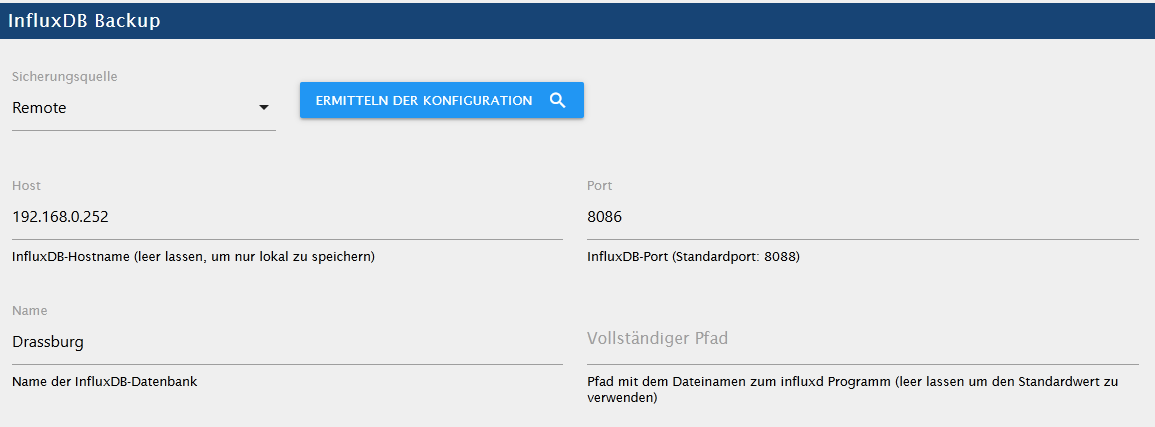
        3078e817-5097-4653-a638-77b83b667f3e-grafik.png
        am liebsten würd ich ja influx neu insten, aber auf der VM ist auch Grafana und TasmoAdmin drauf.
        das schaut mir irgendwie nicht ganz sauber aus...
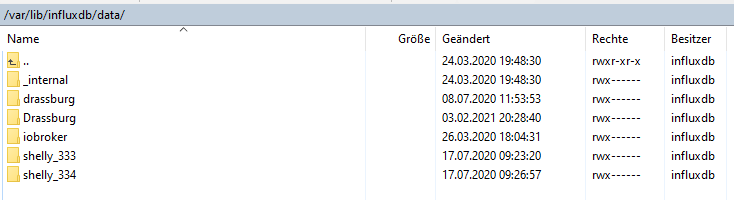
        f47c23da-d510-417c-9264-27bb0be8a191-grafik.png
        Drassburg ist eigentlich als default eingestellt... klugscheiss.gif

        gruß vom Woody
        HAPPINESS is not a DESTINATION, it's a WAY of LIFE!

        simatecS 1 Reply Last reply
        0
        • da_WoodyD da_Woody

          @simatec said in Betatester für Backitup 2.0.0 gesucht:

          @da_woody Falschen Benutzerdaten oder Api-Key falsch
          Grafana ist erreichbar (siehe Status 200)

          ehjo, da ist bei apikey was in den string gegangen, anscheinend beim einfügen tastenpreller, war zu lang. klappert... wieder was gelernt.
          dafür ist mir jetzt influx ins auge gesprungen... :fearful:

          [DEBUG] [influxDB] - Start InfluxDB Backup ...
          [DEBUG] [influxDB] - InfluxDB Backup tmp directory created 
          [DEBUG] [influxDB] - Try deleting the InfluxDB tmp directory
          [DEBUG] [influxDB] - InfluxDB tmp directory was successfully deleted
          [ERROR] [influxDB] - [IGNORED] Error: Command failed: influxd backup -portable -database Drassburg -host 192.168.0.252:8086 "/opt/iobroker/backups/influxDB_2021_02_03-20_08_30_backupiobroker"
          /bin/sh: 1: influxd: not found
          

          die config stimmt eigentlich, nur die letzte zeile sagt mir nichts.
          3078e817-5097-4653-a638-77b83b667f3e-grafik.png
          am liebsten würd ich ja influx neu insten, aber auf der VM ist auch Grafana und TasmoAdmin drauf.
          das schaut mir irgendwie nicht ganz sauber aus...
          f47c23da-d510-417c-9264-27bb0be8a191-grafik.png
          Drassburg ist eigentlich als default eingestellt... klugscheiss.gif

          simatecS Online
          simatecS Online
          simatec
          Developer Most Active
          wrote on last edited by
          #124

          @da_woody
          Hast du denn auf deinem iobroker System influxd laufen?
          Des Weiteren stimmt der Port nicht. Remote zur infludb findet über Port 8088 statt.

          Hier die Erklärung in der Doku
          https://github.com/simatec/ioBroker.backitup/blob/master/docs/de/backitup.md#InfluxDB-Backup

          Also in der Config auf dem Server „bind“ ändern danach den Server neustarten.
          Influxd auf dem iobroker System als reinen Daemon laufen lassen und den Port in der backitup Config auf 8088 ändern

          • Besuche meine Github Seite
          • Beitrag hat geholfen oder willst du mich unterstützen
          • HowTo Restore ioBroker
          da_WoodyD 1 Reply Last reply
          0
          • simatecS simatec

            @da_woody
            Hast du denn auf deinem iobroker System influxd laufen?
            Des Weiteren stimmt der Port nicht. Remote zur infludb findet über Port 8088 statt.

            Hier die Erklärung in der Doku
            https://github.com/simatec/ioBroker.backitup/blob/master/docs/de/backitup.md#InfluxDB-Backup

            Also in der Config auf dem Server „bind“ ändern danach den Server neustarten.
            Influxd auf dem iobroker System als reinen Daemon laufen lassen und den Port in der backitup Config auf 8088 ändern

            da_WoodyD Offline
            da_WoodyD Offline
            da_Woody
            wrote on last edited by da_Woody
            #125

            @simatec 8086 stimmt schon 8088 wird wo anders verwendet. hat ja geklappt.

            42663858-ff5e-4676-9b43-f8975fdef305-grafik.png

            Hast du denn auf deinem iobroker System influxd laufen?

            ioBroker hab ich vor kurzem neu aufgesetzt und ein backup eingespielt. was, wie kann ich da nachschauen? eventuell installen, starten.
            mann, linux bringt mich noch ins grab... wut.gif
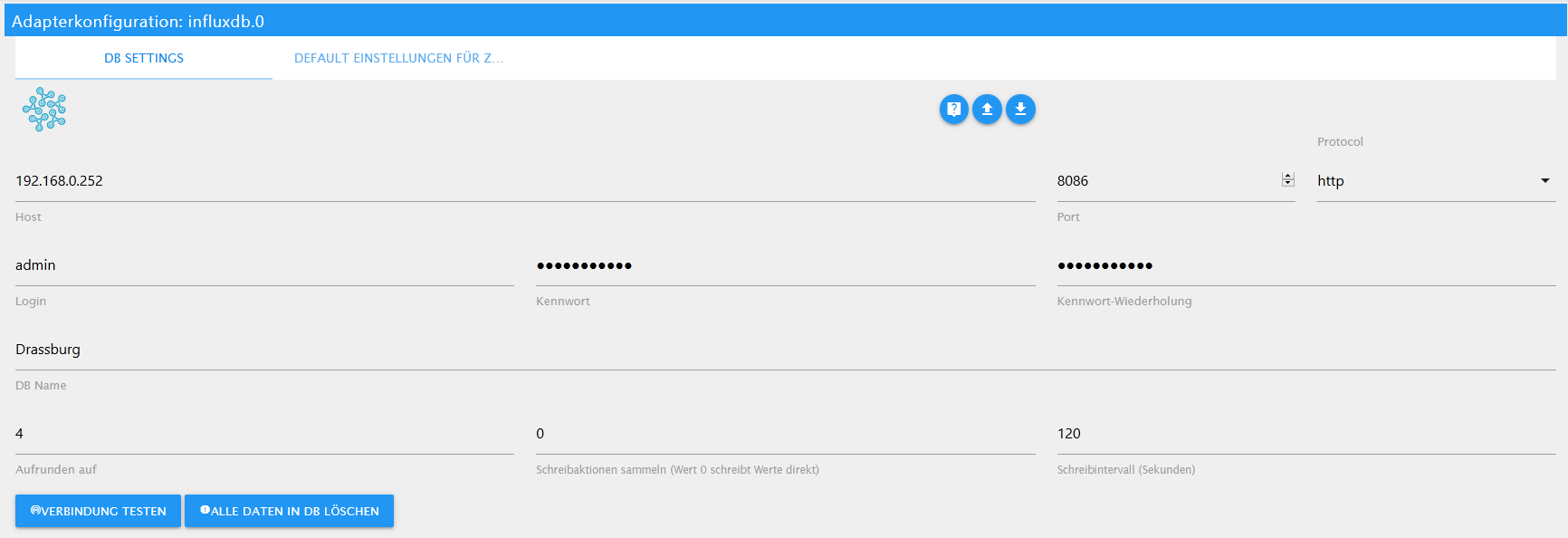
            9b1ba433-2135-4072-9949-b4b6fa9753a2-grafik.png der adapter läuft...

            gruß vom Woody
            HAPPINESS is not a DESTINATION, it's a WAY of LIFE!

            simatecS 2 Replies Last reply
            0
            • da_WoodyD da_Woody

              @simatec 8086 stimmt schon 8088 wird wo anders verwendet. hat ja geklappt.
              42663858-ff5e-4676-9b43-f8975fdef305-grafik.png

              Hast du denn auf deinem iobroker System influxd laufen?

              ioBroker hab ich vor kurzem neu aufgesetzt und ein backup eingespielt. was, wie kann ich da nachschauen? eventuell installen, starten.
              mann, linux bringt mich noch ins grab... wut.gif
              9b1ba433-2135-4072-9949-b4b6fa9753a2-grafik.png der adapter läuft...

              simatecS Online
              simatecS Online
              simatec
              Developer Most Active
              wrote on last edited by simatec
              #126

              @da_woody
              Nein da verstehst du etwas falsch. Remotezugriff für das Backup ist Port 8088 und nicht 8086.
              das eine hat mit dem anderen nix zu tun.
              Wenn bei dir der Port 8088 bereits belegt ist, dann musst du in der Influx conf auf deinem Server bind anpassen.

              bind <server-ip>:8088
              

              8088 musst du dir dann anpassen und in der Conf von Backitup muss dann dieser Port rein.
              Auf keinen Fall die 8086

              • Besuche meine Github Seite
              • Beitrag hat geholfen oder willst du mich unterstützen
              • HowTo Restore ioBroker
              da_WoodyD 1 Reply Last reply
              0
              • da_WoodyD da_Woody

                @simatec 8086 stimmt schon 8088 wird wo anders verwendet. hat ja geklappt.
                42663858-ff5e-4676-9b43-f8975fdef305-grafik.png

                Hast du denn auf deinem iobroker System influxd laufen?

                ioBroker hab ich vor kurzem neu aufgesetzt und ein backup eingespielt. was, wie kann ich da nachschauen? eventuell installen, starten.
                mann, linux bringt mich noch ins grab... wut.gif
                9b1ba433-2135-4072-9949-b4b6fa9753a2-grafik.png der adapter läuft...

                simatecS Online
                simatecS Online
                simatec
                Developer Most Active
                wrote on last edited by
                #127

                @da_woody

                https://docs.influxdata.com/influxdb/v1.8/administration/config/#bind-address-127-0-0-1-8088

                • Besuche meine Github Seite
                • Beitrag hat geholfen oder willst du mich unterstützen
                • HowTo Restore ioBroker
                1 Reply Last reply
                0
                • simatecS simatec

                  @da_woody
                  Nein da verstehst du etwas falsch. Remotezugriff für das Backup ist Port 8088 und nicht 8086.
                  das eine hat mit dem anderen nix zu tun.
                  Wenn bei dir der Port 8088 bereits belegt ist, dann musst du in der Influx conf auf deinem Server bind anpassen.

                  bind <server-ip>:8088
                  

                  8088 musst du dir dann anpassen und in der Conf von Backitup muss dann dieser Port rein.
                  Auf keinen Fall die 8086

                  da_WoodyD Offline
                  da_WoodyD Offline
                  da_Woody
                  wrote on last edited by da_Woody
                  #128

                  @simatec einfach zu dämlich...
                  hab jetzt in der influxdb.conf den port geändert.

                  
                  ### Welcome to the InfluxDB configuration file.
                  
                  # The values in this file override the default values used by the system if
                  # a config option is not specified. The commented out lines are the configuration
                  # field and the default value used. Uncommenting a line and changing the value
                  # will change the value used at runtime when the process is restarted.
                  
                  # Once every 24 hours InfluxDB will report usage data to usage.influxdata.com
                  # The data includes a random ID, os, arch, version, the number of series and other
                  # usage data. No data from user databases is ever transmitted.
                  # Change this option to true to disable reporting.
                  # reporting-disabled = false
                  
                  # Bind address to use for the RPC service for backup and restore.
                  bind-address = "192.168.0.252:8088"
                  
                  ###
                  ### [meta]
                  ###


                  in backitup auf 8088, ergebniss das selbe...

                  [DEBUG] [influxDB] - Start InfluxDB Backup ...
                  [DEBUG] [influxDB] - InfluxDB Backup tmp directory created 
                  [DEBUG] [influxDB] - Try deleting the InfluxDB tmp directory
                  [DEBUG] [influxDB] - InfluxDB tmp directory was successfully deleted
                  [ERROR] [influxDB] - [IGNORED] Error: Command failed: influxd backup -portable -database Drassburg -host 192.168.0.252:8088 "/opt/iobroker/backups/influxDB_2021_02_03-21_53_17_backupiobroker"
                  /bin/sh: 1: influxd: not found
                  

                  gruß vom Woody
                  HAPPINESS is not a DESTINATION, it's a WAY of LIFE!

                  simatecS 1 Reply Last reply
                  0
                  • da_WoodyD da_Woody

                    @simatec einfach zu dämlich...
                    hab jetzt in der influxdb.conf den port geändert.

                    
                    ### Welcome to the InfluxDB configuration file.
                    
                    # The values in this file override the default values used by the system if
                    # a config option is not specified. The commented out lines are the configuration
                    # field and the default value used. Uncommenting a line and changing the value
                    # will change the value used at runtime when the process is restarted.
                    
                    # Once every 24 hours InfluxDB will report usage data to usage.influxdata.com
                    # The data includes a random ID, os, arch, version, the number of series and other
                    # usage data. No data from user databases is ever transmitted.
                    # Change this option to true to disable reporting.
                    # reporting-disabled = false
                    
                    # Bind address to use for the RPC service for backup and restore.
                    bind-address = "192.168.0.252:8088"
                    
                    ###
                    ### [meta]
                    ###


                    in backitup auf 8088, ergebniss das selbe...

                    [DEBUG] [influxDB] - Start InfluxDB Backup ...
                    [DEBUG] [influxDB] - InfluxDB Backup tmp directory created 
                    [DEBUG] [influxDB] - Try deleting the InfluxDB tmp directory
                    [DEBUG] [influxDB] - InfluxDB tmp directory was successfully deleted
                    [ERROR] [influxDB] - [IGNORED] Error: Command failed: influxd backup -portable -database Drassburg -host 192.168.0.252:8088 "/opt/iobroker/backups/influxDB_2021_02_03-21_53_17_backupiobroker"
                    /bin/sh: 1: influxd: not found
                    
                    simatecS Online
                    simatecS Online
                    simatec
                    Developer Most Active
                    wrote on last edited by
                    #129

                    @da_woody
                    Auf deinem iobroker System, von dem aus du das Backup startest, fehlt noch immer influxd
                    Du muss da Influx laufen haben.
                    Ohne User und Datenbanken. Einfach nur als Daemon

                    • Besuche meine Github Seite
                    • Beitrag hat geholfen oder willst du mich unterstützen
                    • HowTo Restore ioBroker
                    da_WoodyD NegaleinN 2 Replies Last reply
                    0
                    • simatecS simatec

                      @da_woody
                      Auf deinem iobroker System, von dem aus du das Backup startest, fehlt noch immer influxd
                      Du muss da Influx laufen haben.
                      Ohne User und Datenbanken. Einfach nur als Daemon

                      da_WoodyD Offline
                      da_WoodyD Offline
                      da_Woody
                      wrote on last edited by
                      #130

                      @simatec darum frug ich ja so dämlich:

                      was, wie kann ich da nachschauen? eventuell installen, starten.

                      penguin is not my buddy... :D

                      gruß vom Woody
                      HAPPINESS is not a DESTINATION, it's a WAY of LIFE!

                      simatecS 1 Reply Last reply
                      0
                      • da_WoodyD da_Woody

                        @simatec darum frug ich ja so dämlich:

                        was, wie kann ich da nachschauen? eventuell installen, starten.

                        penguin is not my buddy... :D

                        simatecS Online
                        simatecS Online
                        simatec
                        Developer Most Active
                        wrote on last edited by
                        #131

                        @da_woody
                        https://docs.influxdata.com/influxdb/v1.8/introduction/install/#installing-influxdb-oss

                        • Besuche meine Github Seite
                        • Beitrag hat geholfen oder willst du mich unterstützen
                        • HowTo Restore ioBroker
                        da_WoodyD 1 Reply Last reply
                        0
                        • simatecS simatec

                          @da_woody
                          Auf deinem iobroker System, von dem aus du das Backup startest, fehlt noch immer influxd
                          Du muss da Influx laufen haben.
                          Ohne User und Datenbanken. Einfach nur als Daemon

                          NegaleinN Offline
                          NegaleinN Offline
                          Negalein
                          Global Moderator
                          wrote on last edited by
                          #132

                          @simatec sagte in Betatester für Backitup 2.0.0 gesucht:

                          Auf deinem iobroker System, von dem aus du das Backup startest, fehlt noch immer influxd
                          Du muss da Influx laufen haben.
                          Ohne User und Datenbanken. Einfach nur als Daemon

                          bei mir dann quasi auch so?

                          influxDB: Error: Command failed: influxd backup -portable -database iobroker -host 10.0.1.22:8088 "/opt/iobroker/backups/influxDB_2021_02_03-23_01_33_Standard_backupiobroker"
                          /bin/sh: 1: influxd: not found
                          

                          https://docs.influxdata.com/influxdb/v1.8/introduction/install/#installing-influxdb-oss

                          Ich betreib ioBroker im Docker auf einer Synology.
                          Soll ich mich an in dieser Anleitung an Ubuntu oder Debian halten?

                          ° Node.js & System Update ---> sudo apt update, iob stop, sudo apt full-upgrade
                          ° Node.js Fixer ---> iob nodejs-update
                          ° Fixer ---> iob fix

                          simatecS D 2 Replies Last reply
                          0
                          • simatecS simatec

                            @da_woody
                            https://docs.influxdata.com/influxdb/v1.8/introduction/install/#installing-influxdb-oss

                            da_WoodyD Offline
                            da_WoodyD Offline
                            da_Woody
                            wrote on last edited by
                            #133

                            @simatec wenn ich mir das so durchlese und interpretiere muss ich auf der ioBroker VM

                            sudo apt-get update && sudo apt-get install influxdb
                            sudo systemctl unmask influxdb.service
                            sudo systemctl start influxdb
                            

                            tun am sein und das is es?

                            gruß vom Woody
                            HAPPINESS is not a DESTINATION, it's a WAY of LIFE!

                            1 Reply Last reply
                            0
                            • NegaleinN Negalein

                              @simatec sagte in Betatester für Backitup 2.0.0 gesucht:

                              Auf deinem iobroker System, von dem aus du das Backup startest, fehlt noch immer influxd
                              Du muss da Influx laufen haben.
                              Ohne User und Datenbanken. Einfach nur als Daemon

                              bei mir dann quasi auch so?

                              influxDB: Error: Command failed: influxd backup -portable -database iobroker -host 10.0.1.22:8088 "/opt/iobroker/backups/influxDB_2021_02_03-23_01_33_Standard_backupiobroker"
                              /bin/sh: 1: influxd: not found
                              

                              https://docs.influxdata.com/influxdb/v1.8/introduction/install/#installing-influxdb-oss

                              Ich betreib ioBroker im Docker auf einer Synology.
                              Soll ich mich an in dieser Anleitung an Ubuntu oder Debian halten?

                              simatecS Online
                              simatecS Online
                              simatec
                              Developer Most Active
                              wrote on last edited by
                              #134

                              @negalein Bei Docker kann ich das leider nicht beantworten.
                              Aber sicher gibt es hier oder bei Google auch Anleitungen dafür

                              • Besuche meine Github Seite
                              • Beitrag hat geholfen oder willst du mich unterstützen
                              • HowTo Restore ioBroker
                              1 Reply Last reply
                              0
                              • NegaleinN Negalein

                                @simatec sagte in Betatester für Backitup 2.0.0 gesucht:

                                Auf deinem iobroker System, von dem aus du das Backup startest, fehlt noch immer influxd
                                Du muss da Influx laufen haben.
                                Ohne User und Datenbanken. Einfach nur als Daemon

                                bei mir dann quasi auch so?

                                influxDB: Error: Command failed: influxd backup -portable -database iobroker -host 10.0.1.22:8088 "/opt/iobroker/backups/influxDB_2021_02_03-23_01_33_Standard_backupiobroker"
                                /bin/sh: 1: influxd: not found
                                

                                https://docs.influxdata.com/influxdb/v1.8/introduction/install/#installing-influxdb-oss

                                Ich betreib ioBroker im Docker auf einer Synology.
                                Soll ich mich an in dieser Anleitung an Ubuntu oder Debian halten?

                                D Offline
                                D Offline
                                darkiop
                                Most Active
                                wrote on last edited by
                                #135

                                @negalein Das Docker image von @andre ? Das basiert auf Debian Buster.

                                Du könntest, über die ENV

                                PACKAGES
                                

                                die InfluxDB im Container installieren - oder die InfluxDB in einen eigenen Container auslagern.

                                Mittels

                                nmap -p- <IP>
                                

                                kannst du nach der Installation dann auch mal schauen welche Ports offen sind.

                                Proxmox-ioBroker-Redis-HA Doku: https://forum.iobroker.net/topic/47478/dokumentation-einer-proxmox-iobroker-redis-ha-umgebung

                                NegaleinN andreA 2 Replies Last reply
                                0
                                • D darkiop

                                  @negalein Das Docker image von @andre ? Das basiert auf Debian Buster.

                                  Du könntest, über die ENV

                                  PACKAGES
                                  

                                  die InfluxDB im Container installieren - oder die InfluxDB in einen eigenen Container auslagern.

                                  Mittels

                                  nmap -p- <IP>
                                  

                                  kannst du nach der Installation dann auch mal schauen welche Ports offen sind.

                                  NegaleinN Offline
                                  NegaleinN Offline
                                  Negalein
                                  Global Moderator
                                  wrote on last edited by Negalein
                                  #136

                                  @darkiop sagte in Betatester für Backitup 2.0.0 gesucht:

                                  oder die InfluxDB in einen eigenen Container auslagern

                                  Influx läuft als eigener Container.
                                  Wie bring ich das dann Backitup bei?
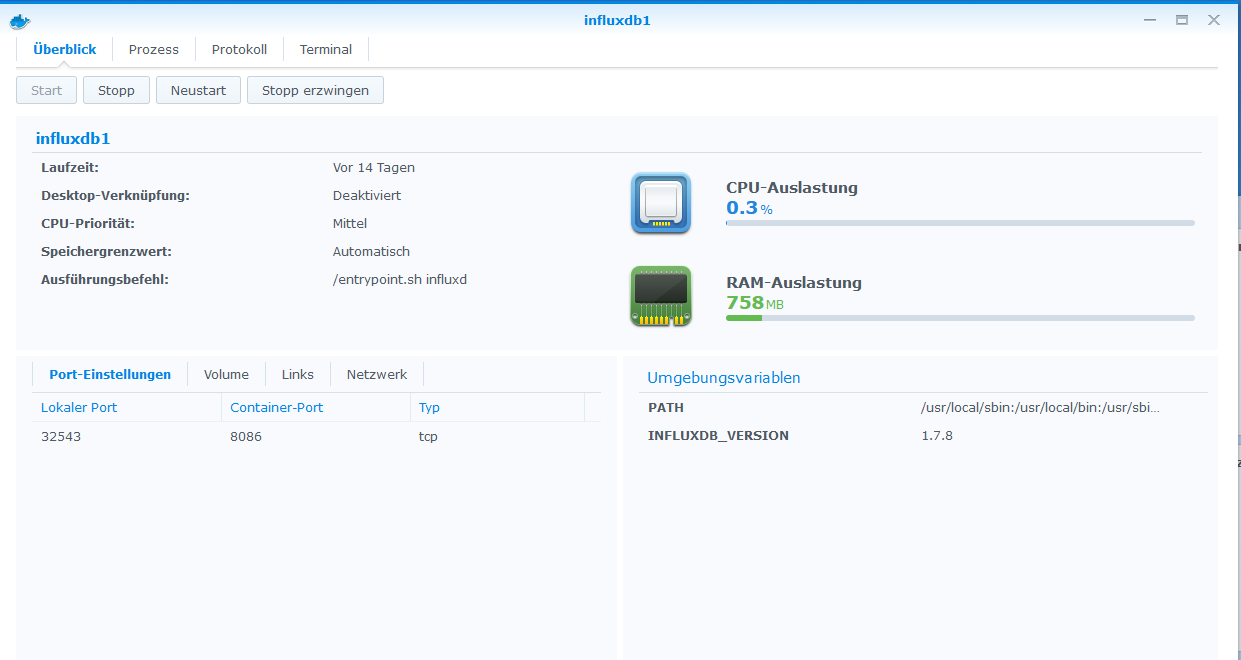
                                  Screenshot 2021-02-04 150454.png

                                  ° Node.js & System Update ---> sudo apt update, iob stop, sudo apt full-upgrade
                                  ° Node.js Fixer ---> iob nodejs-update
                                  ° Fixer ---> iob fix

                                  D 1 Reply Last reply
                                  0
                                  • D darkiop

                                    @negalein Das Docker image von @andre ? Das basiert auf Debian Buster.

                                    Du könntest, über die ENV

                                    PACKAGES
                                    

                                    die InfluxDB im Container installieren - oder die InfluxDB in einen eigenen Container auslagern.

                                    Mittels

                                    nmap -p- <IP>
                                    

                                    kannst du nach der Installation dann auch mal schauen welche Ports offen sind.

                                    andreA Offline
                                    andreA Offline
                                    andre
                                    Developer
                                    wrote on last edited by
                                    #137

                                    @darkiop sagte in Betatester für Backitup 2.0.0 gesucht:

                                    die InfluxDB im Container installieren - oder die InfluxDB in einen eigenen Container auslagern.

                                    Bitte nicht die InfluxDB im Container installieren... Macht es lieber nach dem "oder".

                                    Ggf. muss im Container ein Dienst/ CLI installiert und konfiguriert werden, damit die "externe" Datenbank gesichert werden kann. Erfahrungswerte habe ich da zwar nicht, aber wenn die reine Installation z.B. eines CLI Tools per "PACKAGES" nicht reicht, kann man über die user defined startup scripts eigentlich alles für die Einrichtung scripten...

                                    MfG,
                                    André

                                    Bitte keine Support-Fragen per PN! Nutzt die öffentliche Kanäle damit auch andere von den Antworten profitieren können!

                                    1 Reply Last reply
                                    0
                                    • NegaleinN Negalein

                                      @darkiop sagte in Betatester für Backitup 2.0.0 gesucht:

                                      oder die InfluxDB in einen eigenen Container auslagern

                                      Influx läuft als eigener Container.
                                      Wie bring ich das dann Backitup bei?
                                      Screenshot 2021-02-04 150454.png

                                      D Offline
                                      D Offline
                                      darkiop
                                      Most Active
                                      wrote on last edited by
                                      #138

                                      @negalein sagte in Betatester für Backitup 2.0.0 gesucht:

                                      Wie bring ich das dann Backitup bei?

                                      IP + Port von der InfluxDB vom Container bzw. Dockerhost. Teste doch mal mit nmap was offen ist bzw. schau mal in deiner Container Config wie du die Ports gemappt hast bzw. in welchen Netz der Container läuft.

                                      @andre sagte in Betatester für Backitup 2.0.0 gesucht:

                                      Bitte nicht die InfluxDB im Container installieren... Macht es lieber nach dem "oder".

                                      Absolut ... ich hätte noch dazu schreiben sollen, dass das vor dem oder nicht dem Container Prinzip entspricht :)

                                      Proxmox-ioBroker-Redis-HA Doku: https://forum.iobroker.net/topic/47478/dokumentation-einer-proxmox-iobroker-redis-ha-umgebung

                                      NegaleinN 1 Reply Last reply
                                      0
                                      • D darkiop

                                        @negalein sagte in Betatester für Backitup 2.0.0 gesucht:

                                        Wie bring ich das dann Backitup bei?

                                        IP + Port von der InfluxDB vom Container bzw. Dockerhost. Teste doch mal mit nmap was offen ist bzw. schau mal in deiner Container Config wie du die Ports gemappt hast bzw. in welchen Netz der Container läuft.

                                        @andre sagte in Betatester für Backitup 2.0.0 gesucht:

                                        Bitte nicht die InfluxDB im Container installieren... Macht es lieber nach dem "oder".

                                        Absolut ... ich hätte noch dazu schreiben sollen, dass das vor dem oder nicht dem Container Prinzip entspricht :)

                                        NegaleinN Offline
                                        NegaleinN Offline
                                        Negalein
                                        Global Moderator
                                        wrote on last edited by
                                        #139

                                        @darkiop sagte in Betatester für Backitup 2.0.0 gesucht:

                                        IP + Port von der InfluxDB vom Container bzw. Dockerhost. Teste doch mal mit nmap was offen ist bzw. schau mal in deiner Container Config wie du die Ports gemappt hast bzw. in welchen Netz der Container läuft.

                                        IP + Port passen

                                        Kenne jetzt den Fehler.
                                        Backitup hat beim Update auf 2.0.0 den Port von 32543 auf den Standardport geändert. Ist mir erst jetzt aufgefallen.

                                        ° Node.js & System Update ---> sudo apt update, iob stop, sudo apt full-upgrade
                                        ° Node.js Fixer ---> iob nodejs-update
                                        ° Fixer ---> iob fix

                                        simatecS 1 Reply Last reply
                                        0
                                        • NegaleinN Negalein

                                          @darkiop sagte in Betatester für Backitup 2.0.0 gesucht:

                                          IP + Port von der InfluxDB vom Container bzw. Dockerhost. Teste doch mal mit nmap was offen ist bzw. schau mal in deiner Container Config wie du die Ports gemappt hast bzw. in welchen Netz der Container läuft.

                                          IP + Port passen

                                          Kenne jetzt den Fehler.
                                          Backitup hat beim Update auf 2.0.0 den Port von 32543 auf den Standardport geändert. Ist mir erst jetzt aufgefallen.

                                          simatecS Online
                                          simatecS Online
                                          simatec
                                          Developer Most Active
                                          wrote on last edited by
                                          #140

                                          @negalein
                                          Danke für den Hinweis. Schaue ich mir an und wird gefixt

                                          • Besuche meine Github Seite
                                          • Beitrag hat geholfen oder willst du mich unterstützen
                                          • HowTo Restore ioBroker
                                          da_WoodyD NegaleinN 2 Replies Last reply
                                          0
                                          Reply
                                          • Reply as topic
                                          Log in to reply
                                          • Oldest to Newest
                                          • Newest to Oldest
                                          • Most Votes


                                          Support us

                                          ioBroker
                                          Community Adapters
                                          Donate

                                          281

                                          Online

                                          32.7k

                                          Users

                                          82.5k

                                          Topics

                                          1.3m

                                          Posts
                                          Community
                                          Impressum | Datenschutz-Bestimmungen | Nutzungsbedingungen | Einwilligungseinstellungen
                                          ioBroker Community 2014-2025
                                          logo
                                          • Login

                                          • Don't have an account? Register

                                          • Login or register to search.
                                          • First post
                                            Last post
                                          0
                                          • Home
                                          • Recent
                                          • Tags
                                          • Unread 0
                                          • Categories
                                          • Unreplied
                                          • Popular
                                          • GitHub
                                          • Docu
                                          • Hilfe