
NEWS




JS-Controller Update, danach Admin und Web nicht erreichbar
-
@Homoran sagte in JS-Controller Update, danach Admin und Web nicht erreichbar:
@MichMein sagte in JS-Controller Update, danach Admin und Web nicht erreichbar:
Das funktioniert bei mir leider nicht
wo bist du denn da?
Wenn du vorher nicht ins Installationsvereichnis (üblicherweise /opt/iobroker) wechselst kann es nicht helfen, eher noch weiteren Schaden anrichten
Hi,
ich bin hierpi@raspberrypi:/opt/iobroker $ npm i iobroker.js-controller@3.1.6 --production npm WARN deprecated request@2.88.2: request has been deprecated, see https://github.com/request/request/issues/3142 > iobroker.js-controller@3.1.6 preinstall /opt/iobroker/node_modules/iobroker.js-controller > node lib/preinstallCheck.js NPM version: 6.14.10 > canvas@2.6.1 install /opt/iobroker/node_modules/canvas > node-pre-gyp install --fallback-to-build node-pre-gyp WARN Using request for node-pre-gyp https download node-pre-gyp WARN Tried to download(404): https://github.com/node-gfx/node-canvas-prebuilt/releases/download/v2.6.1/canvas-v2.6.1-node-v72-linux-glibc-arm.tar.gz node-pre-gyp WARN Pre-built binaries not found for canvas@2.6.1 and node@12.20.0 (node-v72 ABI, glibc) (falling back to source compile with node-gyp) Package pixman-1 was not found in the pkg-config search path. Perhaps you should add the directory containing `pixman-1.pc' to the PKG_CONFIG_PATH environment variable No package 'pixman-1' found gyp: Call to 'pkg-config pixman-1 --libs' returned exit status 1 while in binding.gyp. while trying to load binding.gyp gyp ERR! configure error gyp ERR! stack Error: `gyp` failed with exit code: 1 gyp ERR! stack at ChildProcess.onCpExit (/usr/lib/node_modules/npm/node_modules/node-gyp/lib/configure.js:351:16) gyp ERR! stack at ChildProcess.emit (events.js:314:20) gyp ERR! stack at Process.ChildProcess._handle.onexit (internal/child_process.js:276:12) gyp ERR! System Linux 5.4.79-v7l+ gyp ERR! command "/usr/bin/node" "/usr/lib/node_modules/npm/node_modules/node-gyp/bin/node-gyp.js" "configure" "--fallback-to-build" "--module=/opt/iobroker/node_modules/canvas/build/Release/canvas.node" "--module_name=canvas" "--module_path=/opt/iobroker/node_modules/canvas/build/Release" "--napi_version=7" "--node_abi_napi=napi" "--napi_build_version=0" "--node_napi_label=node-v72" gyp ERR! cwd /opt/iobroker/node_modules/canvas gyp ERR! node -v v12.20.0 gyp ERR! node-gyp -v v5.1.0 gyp ERR! not ok node-pre-gyp ERR! build error node-pre-gyp ERR! stack Error: Failed to execute '/usr/bin/node /usr/lib/node_modules/npm/node_modules/node-gyp/bin/node-gyp.js configure --fallback-to-build --module=/opt/iobroker/node_modules/canvas/build/Release/canvas.node --module_name=canvas --module_path=/opt/iobroker/node_modules/canvas/build/Release --napi_version=7 --node_abi_napi=napi --napi_build_version=0 --node_napi_label=node-v72' (1) node-pre-gyp ERR! stack at ChildProcess.<anonymous> (/opt/iobroker/node_modules/canvas/node_modules/node-pre-gyp/lib/util/compile.js:83:29) node-pre-gyp ERR! stack at ChildProcess.emit (events.js:314:20) node-pre-gyp ERR! stack at maybeClose (internal/child_process.js:1022:16) node-pre-gyp ERR! stack at Process.ChildProcess._handle.onexit (internal/child_process.js:287:5) node-pre-gyp ERR! System Linux 5.4.79-v7l+ node-pre-gyp ERR! command "/usr/bin/node" "/opt/iobroker/node_modules/canvas/node_modules/.bin/node-pre-gyp" "install" "--fallback-to-build" node-pre-gyp ERR! cwd /opt/iobroker/node_modules/canvas node-pre-gyp ERR! node -v v12.20.0 node-pre-gyp ERR! node-pre-gyp -v v0.11.0 node-pre-gyp ERR! not ok Failed to execute '/usr/bin/node /usr/lib/node_modules/npm/node_modules/node-gyp/bin/node-gyp.js configure --fallback-to-build --module=/opt/iobroker/node_modules/canvas/build/Release/canvas.node --module_name=canvas --module_path=/opt/iobroker/node_modules/canvas/build/Release --napi_version=7 --node_abi_napi=napi --napi_build_version=0 --node_napi_label=node-v72' (1) > iobroker.js-controller@3.1.6 install /opt/iobroker/node_modules/iobroker.js-controller > node iobroker.js setup first Existing earlier generated certificate is invalid (too old, validity longer then 345 days or keylength too short). Generating new Certificate! object system.certificates updated The following notifications happened during sync: - Ignoring Directory "admin" because officially not created as meta object. Please remove directory! - Ignoring Directory "cloud.admin" because officially not created as meta object. Please remove directory! - Ignoring Directory "coronavirus-statistics.admin" because officially not created as meta object. Please remove directory! - Ignoring Directory "energymanager.admin" because officially not created as meta object. Please remove directory! - Ignoring Directory "lovelace.admin" because officially not created as meta object. Please remove directory! - Ignoring Directory "mobile" because officially not created as meta object. Please remove directory! - Ignoring Directory "mobile.admin" because officially not created as meta object. Please remove directory! - Ignoring Directory "terminal" because officially not created as meta object. Please remove directory! - Ignoring Directory "terminal.admin" because officially not created as meta object. Please remove directory! - Ignoring Directory "tr-064.admin" because officially not created as meta object. Please remove directory! - Ignoring Directory "weishaupt-wem.admin" because officially not created as meta object. Please remove directory! npm WARN optional SKIPPING OPTIONAL DEPENDENCY: fsevents@~2.1.2 (node_modules/chokidar/node_modules/fsevents): npm WARN notsup SKIPPING OPTIONAL DEPENDENCY: Unsupported platform for fsevents@2.1.3: wanted {"os":"darwin","arch":"any"} (current: {"os":"linux","arch":"arm"}) npm WARN optional SKIPPING OPTIONAL DEPENDENCY: osx-temperature-sensor@^1.0.7 (node_modules/iobroker.info/node_modules/osx-temperature-sensor): npm WARN notsup SKIPPING OPTIONAL DEPENDENCY: Unsupported platform for osx-temperature-sensor@1.0.7: wanted {"os":"darwin","arch":"any"} (current: {"os":"linux","arch":"arm"}) npm WARN svg-inline-react@1.0.3 requires a peer of react@^0.14.0 || ^15.0.0 but none is installed. You must install peer dependencies yourself. npm WARN optional SKIPPING OPTIONAL DEPENDENCY: canvas@2.6.1 (node_modules/canvas): npm WARN optional SKIPPING OPTIONAL DEPENDENCY: canvas@2.6.1 install: `node-pre-gyp install --fallback-to-build` npm WARN optional SKIPPING OPTIONAL DEPENDENCY: Exit status 1 + iobroker.js-controller@3.1.6 updated 2 packages in 45.689s 12 packages are looking for funding run `npm fund` for details pi@raspberrypi:/opt/iobroker $Danach bleibt alles beim anderen, leider.
Wie komme ich zurück auf 3.1.6?
-
@Homoran sagte in JS-Controller Update, danach Admin und Web nicht erreichbar:
@MichMein sagte in JS-Controller Update, danach Admin und Web nicht erreichbar:
Das funktioniert bei mir leider nicht
wo bist du denn da?
Wenn du vorher nicht ins Installationsvereichnis (üblicherweise /opt/iobroker) wechselst kann es nicht helfen, eher noch weiteren Schaden anrichten
Hi,
ich bin hierpi@raspberrypi:/opt/iobroker $ npm i iobroker.js-controller@3.1.6 --production npm WARN deprecated request@2.88.2: request has been deprecated, see https://github.com/request/request/issues/3142 > iobroker.js-controller@3.1.6 preinstall /opt/iobroker/node_modules/iobroker.js-controller > node lib/preinstallCheck.js NPM version: 6.14.10 > canvas@2.6.1 install /opt/iobroker/node_modules/canvas > node-pre-gyp install --fallback-to-build node-pre-gyp WARN Using request for node-pre-gyp https download node-pre-gyp WARN Tried to download(404): https://github.com/node-gfx/node-canvas-prebuilt/releases/download/v2.6.1/canvas-v2.6.1-node-v72-linux-glibc-arm.tar.gz node-pre-gyp WARN Pre-built binaries not found for canvas@2.6.1 and node@12.20.0 (node-v72 ABI, glibc) (falling back to source compile with node-gyp) Package pixman-1 was not found in the pkg-config search path. Perhaps you should add the directory containing `pixman-1.pc' to the PKG_CONFIG_PATH environment variable No package 'pixman-1' found gyp: Call to 'pkg-config pixman-1 --libs' returned exit status 1 while in binding.gyp. while trying to load binding.gyp gyp ERR! configure error gyp ERR! stack Error: `gyp` failed with exit code: 1 gyp ERR! stack at ChildProcess.onCpExit (/usr/lib/node_modules/npm/node_modules/node-gyp/lib/configure.js:351:16) gyp ERR! stack at ChildProcess.emit (events.js:314:20) gyp ERR! stack at Process.ChildProcess._handle.onexit (internal/child_process.js:276:12) gyp ERR! System Linux 5.4.79-v7l+ gyp ERR! command "/usr/bin/node" "/usr/lib/node_modules/npm/node_modules/node-gyp/bin/node-gyp.js" "configure" "--fallback-to-build" "--module=/opt/iobroker/node_modules/canvas/build/Release/canvas.node" "--module_name=canvas" "--module_path=/opt/iobroker/node_modules/canvas/build/Release" "--napi_version=7" "--node_abi_napi=napi" "--napi_build_version=0" "--node_napi_label=node-v72" gyp ERR! cwd /opt/iobroker/node_modules/canvas gyp ERR! node -v v12.20.0 gyp ERR! node-gyp -v v5.1.0 gyp ERR! not ok node-pre-gyp ERR! build error node-pre-gyp ERR! stack Error: Failed to execute '/usr/bin/node /usr/lib/node_modules/npm/node_modules/node-gyp/bin/node-gyp.js configure --fallback-to-build --module=/opt/iobroker/node_modules/canvas/build/Release/canvas.node --module_name=canvas --module_path=/opt/iobroker/node_modules/canvas/build/Release --napi_version=7 --node_abi_napi=napi --napi_build_version=0 --node_napi_label=node-v72' (1) node-pre-gyp ERR! stack at ChildProcess.<anonymous> (/opt/iobroker/node_modules/canvas/node_modules/node-pre-gyp/lib/util/compile.js:83:29) node-pre-gyp ERR! stack at ChildProcess.emit (events.js:314:20) node-pre-gyp ERR! stack at maybeClose (internal/child_process.js:1022:16) node-pre-gyp ERR! stack at Process.ChildProcess._handle.onexit (internal/child_process.js:287:5) node-pre-gyp ERR! System Linux 5.4.79-v7l+ node-pre-gyp ERR! command "/usr/bin/node" "/opt/iobroker/node_modules/canvas/node_modules/.bin/node-pre-gyp" "install" "--fallback-to-build" node-pre-gyp ERR! cwd /opt/iobroker/node_modules/canvas node-pre-gyp ERR! node -v v12.20.0 node-pre-gyp ERR! node-pre-gyp -v v0.11.0 node-pre-gyp ERR! not ok Failed to execute '/usr/bin/node /usr/lib/node_modules/npm/node_modules/node-gyp/bin/node-gyp.js configure --fallback-to-build --module=/opt/iobroker/node_modules/canvas/build/Release/canvas.node --module_name=canvas --module_path=/opt/iobroker/node_modules/canvas/build/Release --napi_version=7 --node_abi_napi=napi --napi_build_version=0 --node_napi_label=node-v72' (1) > iobroker.js-controller@3.1.6 install /opt/iobroker/node_modules/iobroker.js-controller > node iobroker.js setup first Existing earlier generated certificate is invalid (too old, validity longer then 345 days or keylength too short). Generating new Certificate! object system.certificates updated The following notifications happened during sync: - Ignoring Directory "admin" because officially not created as meta object. Please remove directory! - Ignoring Directory "cloud.admin" because officially not created as meta object. Please remove directory! - Ignoring Directory "coronavirus-statistics.admin" because officially not created as meta object. Please remove directory! - Ignoring Directory "energymanager.admin" because officially not created as meta object. Please remove directory! - Ignoring Directory "lovelace.admin" because officially not created as meta object. Please remove directory! - Ignoring Directory "mobile" because officially not created as meta object. Please remove directory! - Ignoring Directory "mobile.admin" because officially not created as meta object. Please remove directory! - Ignoring Directory "terminal" because officially not created as meta object. Please remove directory! - Ignoring Directory "terminal.admin" because officially not created as meta object. Please remove directory! - Ignoring Directory "tr-064.admin" because officially not created as meta object. Please remove directory! - Ignoring Directory "weishaupt-wem.admin" because officially not created as meta object. Please remove directory! npm WARN optional SKIPPING OPTIONAL DEPENDENCY: fsevents@~2.1.2 (node_modules/chokidar/node_modules/fsevents): npm WARN notsup SKIPPING OPTIONAL DEPENDENCY: Unsupported platform for fsevents@2.1.3: wanted {"os":"darwin","arch":"any"} (current: {"os":"linux","arch":"arm"}) npm WARN optional SKIPPING OPTIONAL DEPENDENCY: osx-temperature-sensor@^1.0.7 (node_modules/iobroker.info/node_modules/osx-temperature-sensor): npm WARN notsup SKIPPING OPTIONAL DEPENDENCY: Unsupported platform for osx-temperature-sensor@1.0.7: wanted {"os":"darwin","arch":"any"} (current: {"os":"linux","arch":"arm"}) npm WARN svg-inline-react@1.0.3 requires a peer of react@^0.14.0 || ^15.0.0 but none is installed. You must install peer dependencies yourself. npm WARN optional SKIPPING OPTIONAL DEPENDENCY: canvas@2.6.1 (node_modules/canvas): npm WARN optional SKIPPING OPTIONAL DEPENDENCY: canvas@2.6.1 install: `node-pre-gyp install --fallback-to-build` npm WARN optional SKIPPING OPTIONAL DEPENDENCY: Exit status 1 + iobroker.js-controller@3.1.6 updated 2 packages in 45.689s 12 packages are looking for funding run `npm fund` for details pi@raspberrypi:/opt/iobroker $Danach bleibt alles beim anderen, leider.
Wie komme ich zurück auf 3.1.6?
@MichMein sagte in JS-Controller Update, danach Admin und Web nicht erreichbar:
No package 'pixman-1' found gyp: Call to 'pkg-config pixman-1 --libs' returned exit status 1 while in binding.gyp. while trying to load binding.gyp gyp ERR! configure error
Dann fehlt dir das Paket!
Such mal bitte nach der Meldung (pixman) und der lösung - ist mehrfach hier im Forum vorhanden -
@Homoran sagte in JS-Controller Update, danach Admin und Web nicht erreichbar:
@MichMein sagte in JS-Controller Update, danach Admin und Web nicht erreichbar:
Das funktioniert bei mir leider nicht
wo bist du denn da?
Wenn du vorher nicht ins Installationsvereichnis (üblicherweise /opt/iobroker) wechselst kann es nicht helfen, eher noch weiteren Schaden anrichten
Hi,
ich bin hierpi@raspberrypi:/opt/iobroker $ npm i iobroker.js-controller@3.1.6 --production npm WARN deprecated request@2.88.2: request has been deprecated, see https://github.com/request/request/issues/3142 > iobroker.js-controller@3.1.6 preinstall /opt/iobroker/node_modules/iobroker.js-controller > node lib/preinstallCheck.js NPM version: 6.14.10 > canvas@2.6.1 install /opt/iobroker/node_modules/canvas > node-pre-gyp install --fallback-to-build node-pre-gyp WARN Using request for node-pre-gyp https download node-pre-gyp WARN Tried to download(404): https://github.com/node-gfx/node-canvas-prebuilt/releases/download/v2.6.1/canvas-v2.6.1-node-v72-linux-glibc-arm.tar.gz node-pre-gyp WARN Pre-built binaries not found for canvas@2.6.1 and node@12.20.0 (node-v72 ABI, glibc) (falling back to source compile with node-gyp) Package pixman-1 was not found in the pkg-config search path. Perhaps you should add the directory containing `pixman-1.pc' to the PKG_CONFIG_PATH environment variable No package 'pixman-1' found gyp: Call to 'pkg-config pixman-1 --libs' returned exit status 1 while in binding.gyp. while trying to load binding.gyp gyp ERR! configure error gyp ERR! stack Error: `gyp` failed with exit code: 1 gyp ERR! stack at ChildProcess.onCpExit (/usr/lib/node_modules/npm/node_modules/node-gyp/lib/configure.js:351:16) gyp ERR! stack at ChildProcess.emit (events.js:314:20) gyp ERR! stack at Process.ChildProcess._handle.onexit (internal/child_process.js:276:12) gyp ERR! System Linux 5.4.79-v7l+ gyp ERR! command "/usr/bin/node" "/usr/lib/node_modules/npm/node_modules/node-gyp/bin/node-gyp.js" "configure" "--fallback-to-build" "--module=/opt/iobroker/node_modules/canvas/build/Release/canvas.node" "--module_name=canvas" "--module_path=/opt/iobroker/node_modules/canvas/build/Release" "--napi_version=7" "--node_abi_napi=napi" "--napi_build_version=0" "--node_napi_label=node-v72" gyp ERR! cwd /opt/iobroker/node_modules/canvas gyp ERR! node -v v12.20.0 gyp ERR! node-gyp -v v5.1.0 gyp ERR! not ok node-pre-gyp ERR! build error node-pre-gyp ERR! stack Error: Failed to execute '/usr/bin/node /usr/lib/node_modules/npm/node_modules/node-gyp/bin/node-gyp.js configure --fallback-to-build --module=/opt/iobroker/node_modules/canvas/build/Release/canvas.node --module_name=canvas --module_path=/opt/iobroker/node_modules/canvas/build/Release --napi_version=7 --node_abi_napi=napi --napi_build_version=0 --node_napi_label=node-v72' (1) node-pre-gyp ERR! stack at ChildProcess.<anonymous> (/opt/iobroker/node_modules/canvas/node_modules/node-pre-gyp/lib/util/compile.js:83:29) node-pre-gyp ERR! stack at ChildProcess.emit (events.js:314:20) node-pre-gyp ERR! stack at maybeClose (internal/child_process.js:1022:16) node-pre-gyp ERR! stack at Process.ChildProcess._handle.onexit (internal/child_process.js:287:5) node-pre-gyp ERR! System Linux 5.4.79-v7l+ node-pre-gyp ERR! command "/usr/bin/node" "/opt/iobroker/node_modules/canvas/node_modules/.bin/node-pre-gyp" "install" "--fallback-to-build" node-pre-gyp ERR! cwd /opt/iobroker/node_modules/canvas node-pre-gyp ERR! node -v v12.20.0 node-pre-gyp ERR! node-pre-gyp -v v0.11.0 node-pre-gyp ERR! not ok Failed to execute '/usr/bin/node /usr/lib/node_modules/npm/node_modules/node-gyp/bin/node-gyp.js configure --fallback-to-build --module=/opt/iobroker/node_modules/canvas/build/Release/canvas.node --module_name=canvas --module_path=/opt/iobroker/node_modules/canvas/build/Release --napi_version=7 --node_abi_napi=napi --napi_build_version=0 --node_napi_label=node-v72' (1) > iobroker.js-controller@3.1.6 install /opt/iobroker/node_modules/iobroker.js-controller > node iobroker.js setup first Existing earlier generated certificate is invalid (too old, validity longer then 345 days or keylength too short). Generating new Certificate! object system.certificates updated The following notifications happened during sync: - Ignoring Directory "admin" because officially not created as meta object. Please remove directory! - Ignoring Directory "cloud.admin" because officially not created as meta object. Please remove directory! - Ignoring Directory "coronavirus-statistics.admin" because officially not created as meta object. Please remove directory! - Ignoring Directory "energymanager.admin" because officially not created as meta object. Please remove directory! - Ignoring Directory "lovelace.admin" because officially not created as meta object. Please remove directory! - Ignoring Directory "mobile" because officially not created as meta object. Please remove directory! - Ignoring Directory "mobile.admin" because officially not created as meta object. Please remove directory! - Ignoring Directory "terminal" because officially not created as meta object. Please remove directory! - Ignoring Directory "terminal.admin" because officially not created as meta object. Please remove directory! - Ignoring Directory "tr-064.admin" because officially not created as meta object. Please remove directory! - Ignoring Directory "weishaupt-wem.admin" because officially not created as meta object. Please remove directory! npm WARN optional SKIPPING OPTIONAL DEPENDENCY: fsevents@~2.1.2 (node_modules/chokidar/node_modules/fsevents): npm WARN notsup SKIPPING OPTIONAL DEPENDENCY: Unsupported platform for fsevents@2.1.3: wanted {"os":"darwin","arch":"any"} (current: {"os":"linux","arch":"arm"}) npm WARN optional SKIPPING OPTIONAL DEPENDENCY: osx-temperature-sensor@^1.0.7 (node_modules/iobroker.info/node_modules/osx-temperature-sensor): npm WARN notsup SKIPPING OPTIONAL DEPENDENCY: Unsupported platform for osx-temperature-sensor@1.0.7: wanted {"os":"darwin","arch":"any"} (current: {"os":"linux","arch":"arm"}) npm WARN svg-inline-react@1.0.3 requires a peer of react@^0.14.0 || ^15.0.0 but none is installed. You must install peer dependencies yourself. npm WARN optional SKIPPING OPTIONAL DEPENDENCY: canvas@2.6.1 (node_modules/canvas): npm WARN optional SKIPPING OPTIONAL DEPENDENCY: canvas@2.6.1 install: `node-pre-gyp install --fallback-to-build` npm WARN optional SKIPPING OPTIONAL DEPENDENCY: Exit status 1 + iobroker.js-controller@3.1.6 updated 2 packages in 45.689s 12 packages are looking for funding run `npm fund` for details pi@raspberrypi:/opt/iobroker $Danach bleibt alles beim anderen, leider.
Wie komme ich zurück auf 3.1.6?
-
@MichMein
nein bleibt es nicht, es wird schlimmer ;)
falsches Verzeichnis, da NPM nix im IOBroker Verzeichnis zu suchen hat. -
-
@MichMein
Man weiß auch nicht was da jetzt noch alles versaut wurde und wann sich das dann negativ auswirkt ;)NPM ist Bestandteil von Node und Node eben kein Bestandteil von IOBroker. Somit ist alles was Du dann im IOBroker Verzeichnis macht falsch.
-
-
@ErRi sagte in JS-Controller Update, danach Admin und Web nicht erreichbar:
@Jan1 Was muss man tun damit es wieder läuft?
Bei mir hat es damit geklappt
npm i iobroker.js-controller@3.1.6 --productionallerdings irgendwie nicht beim ersten mal und dann auch noch fälscherweise im /opt/iobroker Verzeichnis. Dies soll man nach Aussage von @Jan1 aber NICHT machen.
Gruß Michael
Sofern Beiträge hilfreich für Dich sind, nutze das Voting unten rechts. -
@ErRi sagte in JS-Controller Update, danach Admin und Web nicht erreichbar:
@Jan1 Was muss man tun damit es wieder läuft?
Bei mir hat es damit geklappt
npm i iobroker.js-controller@3.1.6 --productionallerdings irgendwie nicht beim ersten mal und dann auch noch fälscherweise im /opt/iobroker Verzeichnis. Dies soll man nach Aussage von @Jan1 aber NICHT machen.
@MichMein sagte in JS-Controller Update, danach Admin und Web nicht erreichbar:
fälscherweise im /opt/iobroker Verzeichnis. Dies soll man nach Aussage von @Jan1 aber NICHT machen.
nein, das ist genau das, was ich falsch gelesen hatte!
Befehle um über npm etwas bei iobroker zu installieren müssen im ioBroker-Verzeichnis ausgeführt werdenBefehle um npm zu installieren jedoch nicht
kein Support per PN! - Fragen im Forum stellen - es gibt fast nichts, was nicht auch für andere interessant ist.
Benutzt das Voting rechts unten im Beitrag wenn er euch geholfen hat.
der Installationsfixer: curl -fsL https://iobroker.net/fix.sh | bash -
-
@MichMein sagte in JS-Controller Update, danach Admin und Web nicht erreichbar:
fälscherweise im /opt/iobroker Verzeichnis. Dies soll man nach Aussage von @Jan1 aber NICHT machen.
nein, das ist genau das, was ich falsch gelesen hatte!
Befehle um über npm etwas bei iobroker zu installieren müssen im ioBroker-Verzeichnis ausgeführt werdenBefehle um npm zu installieren jedoch nicht
-
@MichMein sagte in JS-Controller Update, danach Admin und Web nicht erreichbar:
fälscherweise im /opt/iobroker Verzeichnis. Dies soll man nach Aussage von @Jan1 aber NICHT machen.
nein, das ist genau das, was ich falsch gelesen hatte!
Befehle um über npm etwas bei iobroker zu installieren müssen im ioBroker-Verzeichnis ausgeführt werdenBefehle um npm zu installieren jedoch nicht
-
Ich bin jetzt ganz durcheinander von wegen was in opt/iobroker gehört und was nicht.
Bei mir sieht der Ordnerinhalt so aus, ist das ok?
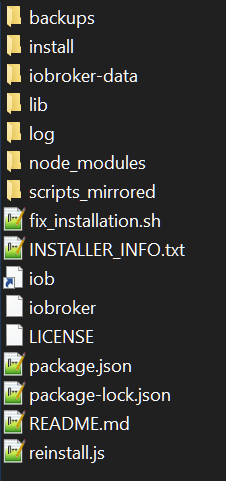
-
Wie kann ich den prüfen wo was ist installiert ist und ob alles an seinem richtigen Ort ist ? Bei mir geht aktuell gar nix mehr ich weis auch leider nicht was ich weiter machen muss.
Da aus irgendewelchen günden meine Backups bis auf das was heute morgen gemacht worden ist weg sind.
Und das an Weihnachten.
Wer kann mir weiter helfen ??
-
Ich bin jetzt ganz durcheinander von wegen was in opt/iobroker gehört und was nicht.
Bei mir sieht der Ordnerinhalt so aus, ist das ok?
-
@Flopsi
Na das Backup von heute morgen ist doch auch genau das richtige. Warum machst nicht damit einfach ein Restor. -
Ich bin jetzt ganz durcheinander von wegen was in opt/iobroker gehört und was nicht.
Bei mir sieht der Ordnerinhalt so aus, ist das ok?
-
habe das durchlaufen lassen selben problem wie vorher deswegen wunder ich mich ja
oder ich mache was falsch
oder meinst du alles neu machen !


Support us
722
Online32.6k
Users82.2k
Topics1.3m
Posts