Skip to content
  • Home
  • Recent
  • Tags
  • 0 Unread 0
  • Categories
  • Unreplied
  • Popular
  • GitHub
  • Docu
  • Hilfe
Skins
  • Light
  • Brite
  • Cerulean
  • Cosmo
  • Flatly
  • Journal
  • Litera
  • Lumen
  • Lux
  • Materia
  • Minty
  • Morph
  • Pulse
  • Sandstone
  • Simplex
  • Sketchy
  • Spacelab
  • United
  • Yeti
  • Zephyr
  • Dark
  • Cyborg
  • Darkly
  • Quartz
  • Slate
  • Solar
  • Superhero
  • Vapor

  • Default (No Skin)
  • No Skin
Collapse
ioBroker Logo

Community Forum

donate donate
  1. ioBroker Community Home
  2. Deutsch
  3. ioBroker Allgemein
  4. Diskussion zum HowTo nodejs-Installation und upgrade

NEWS

  • Jahresrückblick 2025 – unser neuer Blogbeitrag ist online! ✨
    BluefoxB
    Bluefox
    16
    1
    1.9k

  • Neuer Blogbeitrag: Monatsrückblick - Dezember 2025 🎄
    BluefoxB
    Bluefox
    13
    1
    917

  • Weihnachtsangebot 2025! 🎄
    BluefoxB
    Bluefox
    25
    1
    2.2k

Diskussion zum HowTo nodejs-Installation und upgrade

Scheduled Pinned Locked Moved ioBroker Allgemein
nodejs
844 Posts 91 Posters 247.0k Views 63 Watching
  • Oldest to Newest
  • Newest to Oldest
  • Most Votes
Reply
  • Reply as topic
Log in to reply
This topic has been deleted. Only users with topic management privileges can see it.
  • D djsirius

    @thomas-braun

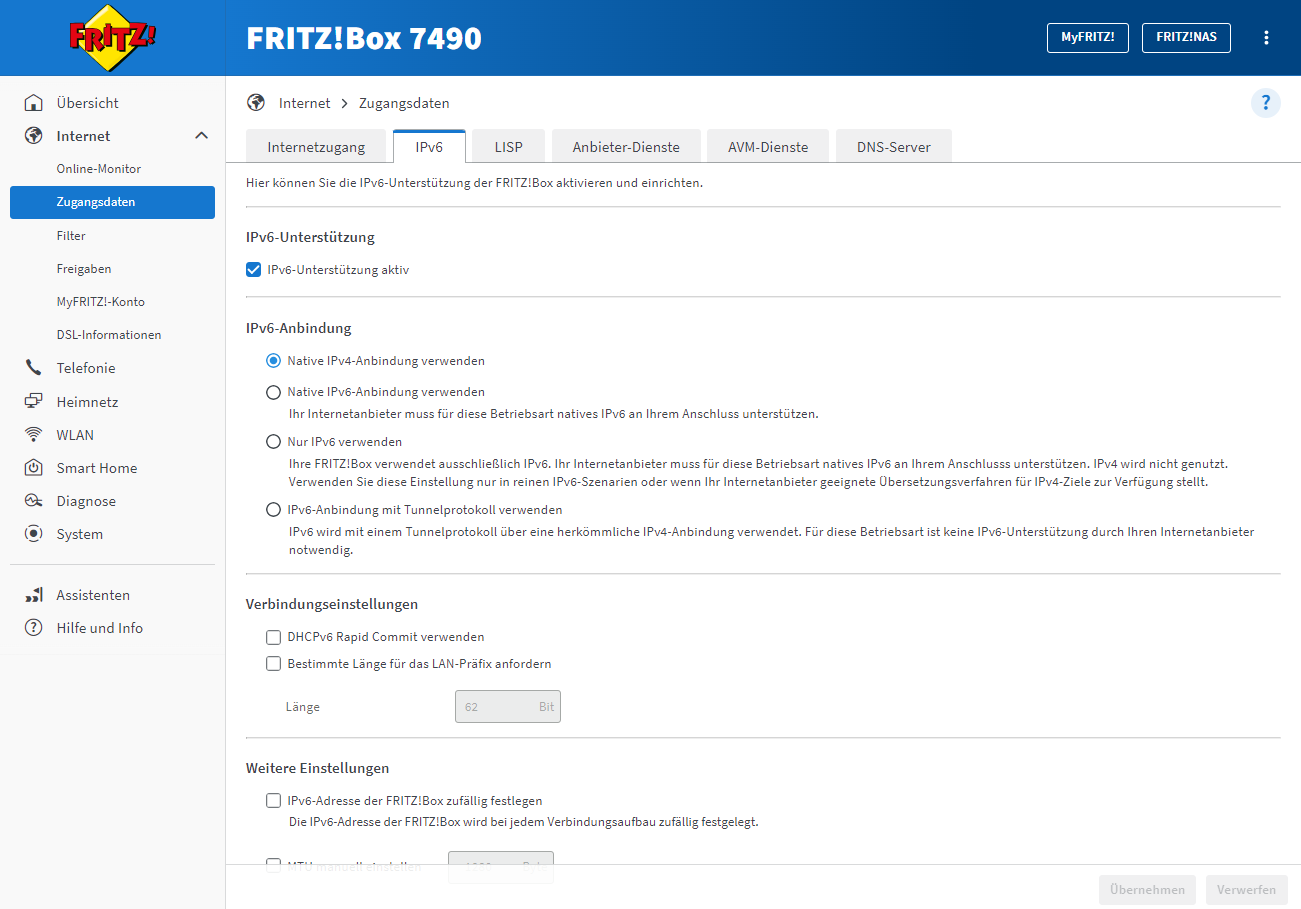
    Ich habe einen Anschluß von NetCologne 100 Mbit

    3358f9aa-353e-4723-ac1b-349a7e39ad53-image.png

    Thomas BraunT Online
    Thomas BraunT Online
    Thomas Braun
    Most Active
    wrote on last edited by Thomas Braun
    #758

    @djsirius

    Das muss mit höchster Sicherheit auf 'IPv6 nativ' umgestellt werden.

    Mit deiner jetzigen Einstellung passiert nämlich genau das, was du jetzt beobachtest:

    Der Hostname wird zu einer IPv6 aufgelöst, die Adresse kann aber nicht angefahren werden, weil es da kein Routing hin gibt.

    Linux-Werkzeugkasten:
    https://forum.iobroker.net/topic/42952/der-kleine-iobroker-linux-werkzeugkasten
    NodeJS Fixer Skript:
    https://forum.iobroker.net/topic/68035/iob-node-fix-skript
    iob_diag: curl -sLf -o diag.sh https://iobroker.net/diag.sh && bash diag.sh

    D 1 Reply Last reply
    0
    • Thomas BraunT Thomas Braun

      @djsirius

      Das muss mit höchster Sicherheit auf 'IPv6 nativ' umgestellt werden.

      Mit deiner jetzigen Einstellung passiert nämlich genau das, was du jetzt beobachtest:

      Der Hostname wird zu einer IPv6 aufgelöst, die Adresse kann aber nicht angefahren werden, weil es da kein Routing hin gibt.

      D Offline
      D Offline
      djsirius
      wrote on last edited by
      #759

      @thomas-braun

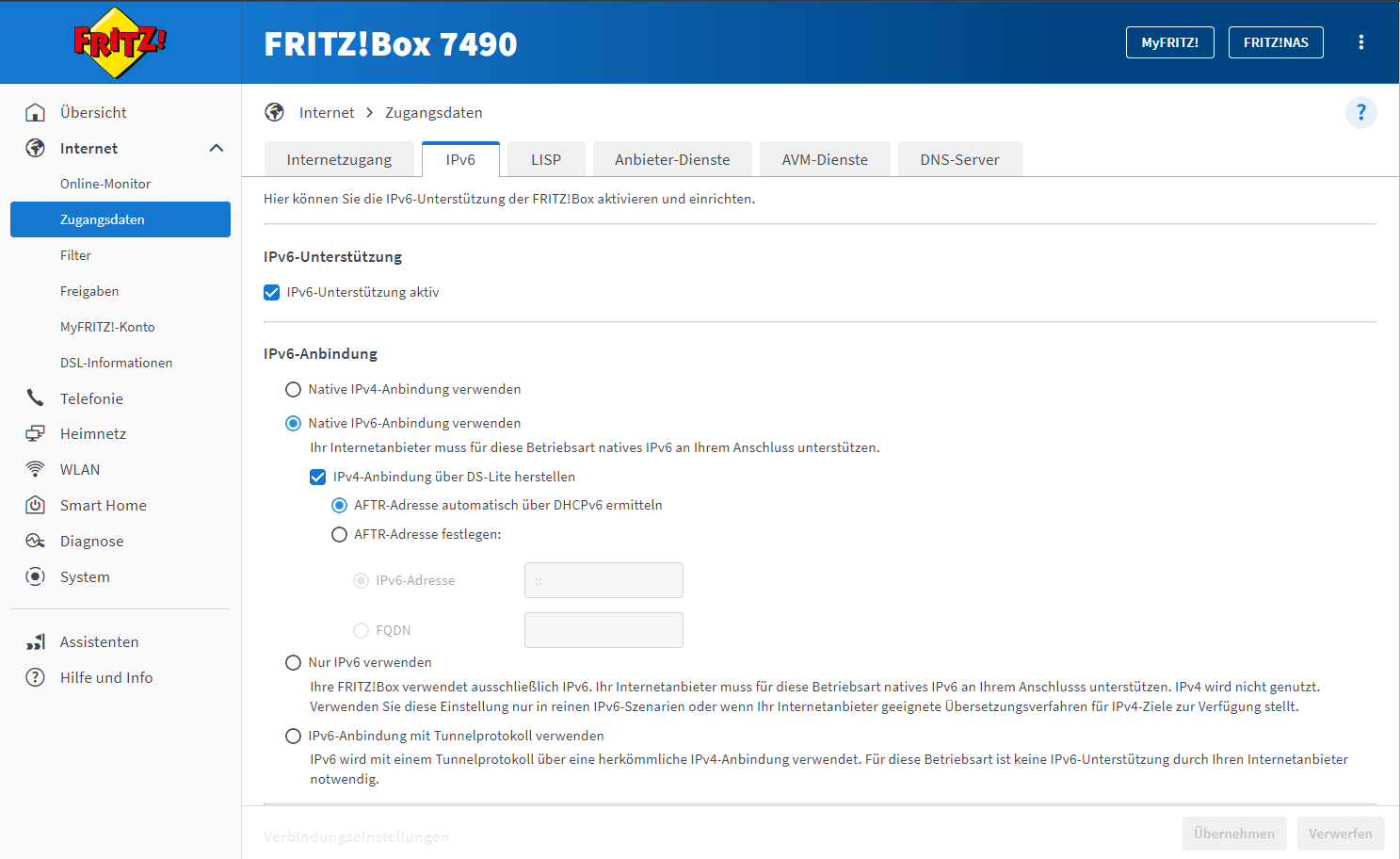
      Ich habe es jetzt so eingestellt:

      7d06c86f-5325-4dbc-8c5e-bd5dd3f35b10-image.png

      Muss man danach die Server neustarten?

      Gruß

      djsirius

      Thomas BraunT 2 Replies Last reply
      0
      • D djsirius

        @thomas-braun

        Ich habe es jetzt so eingestellt:

        7d06c86f-5325-4dbc-8c5e-bd5dd3f35b10-image.png

        Muss man danach die Server neustarten?

        Thomas BraunT Online
        Thomas BraunT Online
        Thomas Braun
        Most Active
        wrote on last edited by
        #760

        @djsirius sagte in Diskussion zum HowTo nodejs-Installation und upgrade:

        Muss man danach die Server neustarten?

        Ausprobieren.
        Kannst auch nur das Netzwerkinterface neustarten, wenn es nicht von alleine funktioniert. Die Fritzbox würde ich aber mal neustarten.

        Linux-Werkzeugkasten:
        https://forum.iobroker.net/topic/42952/der-kleine-iobroker-linux-werkzeugkasten
        NodeJS Fixer Skript:
        https://forum.iobroker.net/topic/68035/iob-node-fix-skript
        iob_diag: curl -sLf -o diag.sh https://iobroker.net/diag.sh && bash diag.sh

        1 Reply Last reply
        0
        • D djsirius

          @thomas-braun

          Ich habe es jetzt so eingestellt:

          7d06c86f-5325-4dbc-8c5e-bd5dd3f35b10-image.png

          Muss man danach die Server neustarten?

          Thomas BraunT Online
          Thomas BraunT Online
          Thomas Braun
          Most Active
          wrote on last edited by
          #761

          @djsirius

          Wichtig! Um eine Internetverbindung herstellen zu können, aktiviere bitte die IPv6-Unterstützung deines WLAN-Routers. Stelle deinen WLAN-Router so ein, dass eine native IPv6-Anbindung für den Internetzugang verwendet, die IPv4-Verbindung über DS-Lite hergestellt und die AFTR-Adresse automatisch über DHCPv6 ermittelt wird.

          Quelle:
          https://www.netcologne.de/privatkunden/hilfe/eigenen-router-einrichten/vdsl/

          Deine Fritzbox war/ist also falsch eingestellt.

          Linux-Werkzeugkasten:
          https://forum.iobroker.net/topic/42952/der-kleine-iobroker-linux-werkzeugkasten
          NodeJS Fixer Skript:
          https://forum.iobroker.net/topic/68035/iob-node-fix-skript
          iob_diag: curl -sLf -o diag.sh https://iobroker.net/diag.sh && bash diag.sh

          D 1 Reply Last reply
          0
          • Marc BergM Marc Berg

            @djsirius sagte in Diskussion zum HowTo nodejs-Installation und upgrade:

            Wenn noch jemand eine Idee hat, bitte her damit.

            mach mal auf master und slave jeweils:

            ping registry.npmjs.org
            ping -4 registry.npmjs.org
            ping -6 registry.npmjs.org
            
            D Offline
            D Offline
            djsirius
            wrote on last edited by djsirius
            #762

            So ich habe die Fritzbox jetzt wie im Screenshot eingestellt. Alles neu gestartet.

            ping registry.npmjs.org -> funktioniert nicht
            ping -4 registry.npmjs.org -> funktioniert
            ping -6 registry.npmjs.org -> funktioniert nicht

            nslookup registry.npmjs.org
            Server:         192.168.1.1
            Address:        192.168.1.1#53
            
            Non-authoritative answer:
            Name:   registry.npmjs.org
            Address: 104.16.28.34
            Name:   registry.npmjs.org
            Address: 104.16.24.34
            Name:   registry.npmjs.org
            Address: 104.16.1.35
            Name:   registry.npmjs.org
            Address: 104.16.31.34
            Name:   registry.npmjs.org
            Address: 104.16.0.35
            Name:   registry.npmjs.org
            Address: 104.16.3.35
            Name:   registry.npmjs.org
            Address: 104.16.2.35
            Name:   registry.npmjs.org
            Address: 104.16.29.34
            Name:   registry.npmjs.org
            Address: 104.16.26.34
            Name:   registry.npmjs.org
            Address: 104.16.25.34
            Name:   registry.npmjs.org
            Address: 104.16.30.34
            Name:   registry.npmjs.org
            Address: 104.16.27.34
            Name:   registry.npmjs.org
            Address: 2606:4700::6810:1c22
            Name:   registry.npmjs.org
            Address: 2606:4700::6810:1f22
            Name:   registry.npmjs.org
            Address: 2606:4700::6810:1a22
            Name:   registry.npmjs.org
            Address: 2606:4700::6810:23
            Name:   registry.npmjs.org
            Address: 2606:4700::6810:1822
            Name:   registry.npmjs.org
            Address: 2606:4700::6810:323
            Name:   registry.npmjs.org
            Address: 2606:4700::6810:1922
            Name:   registry.npmjs.org
            Address: 2606:4700::6810:123
            Name:   registry.npmjs.org
            Address: 2606:4700::6810:223
            Name:   registry.npmjs.org
            Address: 2606:4700::6810:1b22
            Name:   registry.npmjs.org
            Address: 2606:4700::6810:1e22
            Name:   registry.npmjs.org
            Address: 2606:4700::6810:1d22
            

            :shrug:

            Gruß

            djsirius

            Thomas BraunT 1 Reply Last reply
            0
            • D djsirius

              So ich habe die Fritzbox jetzt wie im Screenshot eingestellt. Alles neu gestartet.

              ping registry.npmjs.org -> funktioniert nicht
              ping -4 registry.npmjs.org -> funktioniert
              ping -6 registry.npmjs.org -> funktioniert nicht

              nslookup registry.npmjs.org
              Server:         192.168.1.1
              Address:        192.168.1.1#53
              
              Non-authoritative answer:
              Name:   registry.npmjs.org
              Address: 104.16.28.34
              Name:   registry.npmjs.org
              Address: 104.16.24.34
              Name:   registry.npmjs.org
              Address: 104.16.1.35
              Name:   registry.npmjs.org
              Address: 104.16.31.34
              Name:   registry.npmjs.org
              Address: 104.16.0.35
              Name:   registry.npmjs.org
              Address: 104.16.3.35
              Name:   registry.npmjs.org
              Address: 104.16.2.35
              Name:   registry.npmjs.org
              Address: 104.16.29.34
              Name:   registry.npmjs.org
              Address: 104.16.26.34
              Name:   registry.npmjs.org
              Address: 104.16.25.34
              Name:   registry.npmjs.org
              Address: 104.16.30.34
              Name:   registry.npmjs.org
              Address: 104.16.27.34
              Name:   registry.npmjs.org
              Address: 2606:4700::6810:1c22
              Name:   registry.npmjs.org
              Address: 2606:4700::6810:1f22
              Name:   registry.npmjs.org
              Address: 2606:4700::6810:1a22
              Name:   registry.npmjs.org
              Address: 2606:4700::6810:23
              Name:   registry.npmjs.org
              Address: 2606:4700::6810:1822
              Name:   registry.npmjs.org
              Address: 2606:4700::6810:323
              Name:   registry.npmjs.org
              Address: 2606:4700::6810:1922
              Name:   registry.npmjs.org
              Address: 2606:4700::6810:123
              Name:   registry.npmjs.org
              Address: 2606:4700::6810:223
              Name:   registry.npmjs.org
              Address: 2606:4700::6810:1b22
              Name:   registry.npmjs.org
              Address: 2606:4700::6810:1e22
              Name:   registry.npmjs.org
              Address: 2606:4700::6810:1d22
              

              :shrug:

              Thomas BraunT Online
              Thomas BraunT Online
              Thomas Braun
              Most Active
              wrote on last edited by
              #763

              @djsirius

              Namensauflösung funktionert, das Routing klemmt noch.

              traceroute6  heise.de
              traceroute  heise.de
              traceroute6  npmjs.org
              traceroute  npmjs.org
              

              sagt?

              Linux-Werkzeugkasten:
              https://forum.iobroker.net/topic/42952/der-kleine-iobroker-linux-werkzeugkasten
              NodeJS Fixer Skript:
              https://forum.iobroker.net/topic/68035/iob-node-fix-skript
              iob_diag: curl -sLf -o diag.sh https://iobroker.net/diag.sh && bash diag.sh

              Marc BergM D 2 Replies Last reply
              0
              • Thomas BraunT Thomas Braun

                @djsirius

                Namensauflösung funktionert, das Routing klemmt noch.

                traceroute6  heise.de
                traceroute  heise.de
                traceroute6  npmjs.org
                traceroute  npmjs.org
                

                sagt?

                Marc BergM Offline
                Marc BergM Offline
                Marc Berg
                Most Active
                wrote on last edited by Marc Berg
                #764

                @thomas-braun sagte in Diskussion zum HowTo nodejs-Installation und upgrade:

                traceroute npmjs.org
                sagt?

                und bitte noch:

                route -A inet6
                

                Entscheidend ist die Zeile mit

                [::]/0 
                

                am Anfang.

                NUC10I3+Ubuntu+Docker+ioBroker+influxDB2+Node Red+EMQX+Grafana

                Pi-hole, Traefik, Checkmk, Conbee II+Zigbee2MQTT, ESPSomfy-RTS, LoRaWAN, Arduino, KiCad

                Benutzt das Voting im Beitrag, wenn er euch geholfen hat.

                1 Reply Last reply
                0
                • Thomas BraunT Thomas Braun

                  @djsirius

                  Namensauflösung funktionert, das Routing klemmt noch.

                  traceroute6  heise.de
                  traceroute  heise.de
                  traceroute6  npmjs.org
                  traceroute  npmjs.org
                  

                  sagt?

                  D Offline
                  D Offline
                  djsirius
                  wrote on last edited by
                  #765

                  traceroute6 heise.de

                  iobroker@debian:~$ traceroute6  heise.de
                  traceroute to heise.de (2a02:2e0:3fe:1001:302::), 30 hops max, 80 byte packets
                   1  fritz.box (2a0a:a541:42c1:0:7eff:4dff:fe27:b137)  4.604 ms  4.565 ms  4.538 ms
                   2  * * *
                   3  * * *
                   4  * * *
                   5  * * *
                   6  * * *
                   7  * * *
                   8  * * *
                   9  * * *
                  10  * * *
                  11  * * *
                  12  * * *
                  13  * * *
                  14  * * *
                  15  * * *
                  16  * * *
                  17  * * *
                  18  * * *
                  19  * * *
                  20  * * *
                  21  * * *
                  22  * * *
                  23  * * *
                  24  * * *
                  25  * * *
                  26  * * *
                  27  * * *
                  28  * * *
                  29  * * *
                  30  * * *


                  traceroute heise.de

                  iobroker@debian:~$ traceroute  heise.de
                  traceroute to heise.de (193.99.144.80), 30 hops max, 60 byte packets
                   1  fritz.box (192.168.1.1)  0.740 ms  0.712 ms  0.896 ms
                   2  bras-vc4.netcologne.de (195.14.226.160)  9.716 ms  10.229 ms  10.494 ms
                   3  ip-core-eup1-ae14.netcologne.de (195.14.215.17)  10.805 ms ip-core-sto1-ae14.netcologne.de (195.14.215.25)  11.776 ms ip-core-sto2-ae14.netcologne.de (195.14.215.29)  12.198 ms
                   4  bdr-eup1-ae2.netcologne.de (195.14.195.54)  12.677 ms  12.914 ms bdr-sto1-ae1.netcologne.de (81.173.192.114)  16.697 ms
                   5  be100.c350.f.de.plusline.net (80.81.193.132)  18.122 ms  18.101 ms  20.864 ms
                   6  te2-2.c301.f.de.plusline.net (82.98.102.1)  20.841 ms  11.561 ms 82.98.102.79 (82.98.102.79)  12.234 ms
                   7  82.98.103.3 (82.98.103.3)  12.745 ms  12.704 ms  13.082 ms
                   8  82.98.102.65 (82.98.102.65)  13.437 ms  13.891 ms  13.863 ms
                   9  212.19.61.13 (212.19.61.13)  11.222 ms !X * *


                  traceroute6 npmjs.org

                  iobroker@debian:~$ traceroute6  npmjs.org
                  traceroute to npmjs.org (2606:4700::6810:1822), 30 hops max, 80 byte packets
                   1  fritz.box (2a0a:a541:42c1:0:7eff:4dff:fe27:b137)  1.352 ms  1.493 ms  1.827 ms
                   2  * * *
                   3  * * *
                   4  * * *
                   5  * * *
                   6  * * *
                   7  * * *
                   8  * * *
                   9  * * *
                  10  * * *
                  11  * * *
                  12  * * *
                  13  * * *
                  14  * * *
                  15  * * *
                  16  * * *
                  17  * * *
                  18  * * *
                  19  * * *
                  20  * * *
                  21  * * *
                  22  * * *
                  23  * * *
                  24  * * *
                  25  * * *
                  26  * * *
                  27  * * *
                  28  * * *
                  29  * * *
                  30  * * *
                  

                  traceroute npmjs.org

                  iobroker@debian:~$ traceroute  npmjs.org
                  traceroute to npmjs.org (104.16.27.34), 30 hops max, 60 byte packets
                   1  fritz.box (192.168.1.1)  0.471 ms  0.691 ms  0.896 ms
                   2  bras-vc4.netcologne.de (195.14.226.160)  9.782 ms  10.282 ms  10.703 ms
                   3  ip-core-eup2-ae14.netcologne.de (195.14.215.21)  12.308 ms ip-core-sto1-ae14          .netcologne.de (195.14.215.25)  11.332 ms  11.754 ms
                   4  ip-core-net1-et2-2-1.netcologne.de (89.1.86.1)  13.161 ms ip-core-net1-et2-2          -2.netcologne.de (89.1.86.33)  13.522 ms ip-core-net1-et9-2-2.netcologne.de (89.          1.86.37)  13.750 ms
                   5  bdr-net1-ae1.netcologne.de (81.173.192.2)  14.168 ms bdr-net1-ae2.netcologne          .de (81.173.192.6)  14.857 ms  15.252 ms
                   6  * as13335.dusseldorf.megaport.com (194.146.118.139)  44.076 ms *
                   7  104.16.27.34 (104.16.27.34)  10.819 ms  11.468 ms  11.884 ms


                  route -A inet6

                  iobroker@debian:~$ sudo route -A inet6
                  Kernel-IPv6-Routentabelle
                  Destination                    Next Hop                   Flag Met Ref Use If
                  localhost/128                  [::]                       U    256 2     0 lo
                  2a0a:a541:42c1::/64            [::]                       U    100 4     0 eno1
                  2a0a:a541:42c1::/48            fe80::7eff:4dff:fe27:b137  UG   100 1     0 eno1
                  fe80::/64                      [::]                       U    100 1     0 eno1
                  [::]/0                         fe80::7eff:4dff:fe27:b137  UG   100 5     0 eno1
                  localhost/128                  [::]                       Un   0   7     0 lo
                  debian.fritz.box/128           [::]                       Un   0   2     0 eno1
                  debian.fritz.box/128           [::]                       Un   0   4     0 eno1
                  fe80::ca9c:dcff:feec:fbbc/128  [::]                       Un   0   3     0 eno1
                  ff00::/8                       [::]                       U    256 6     0 eno1
                  [::]/0                         [::]                       !n   -1  1     0 lo
                  

                  Gruß

                  djsirius

                  Marc BergM 1 Reply Last reply
                  0
                  • D djsirius

                    traceroute6 heise.de

                    iobroker@debian:~$ traceroute6  heise.de
                    traceroute to heise.de (2a02:2e0:3fe:1001:302::), 30 hops max, 80 byte packets
                     1  fritz.box (2a0a:a541:42c1:0:7eff:4dff:fe27:b137)  4.604 ms  4.565 ms  4.538 ms
                     2  * * *
                     3  * * *
                     4  * * *
                     5  * * *
                     6  * * *
                     7  * * *
                     8  * * *
                     9  * * *
                    10  * * *
                    11  * * *
                    12  * * *
                    13  * * *
                    14  * * *
                    15  * * *
                    16  * * *
                    17  * * *
                    18  * * *
                    19  * * *
                    20  * * *
                    21  * * *
                    22  * * *
                    23  * * *
                    24  * * *
                    25  * * *
                    26  * * *
                    27  * * *
                    28  * * *
                    29  * * *
                    30  * * *


                    traceroute heise.de

                    iobroker@debian:~$ traceroute  heise.de
                    traceroute to heise.de (193.99.144.80), 30 hops max, 60 byte packets
                     1  fritz.box (192.168.1.1)  0.740 ms  0.712 ms  0.896 ms
                     2  bras-vc4.netcologne.de (195.14.226.160)  9.716 ms  10.229 ms  10.494 ms
                     3  ip-core-eup1-ae14.netcologne.de (195.14.215.17)  10.805 ms ip-core-sto1-ae14.netcologne.de (195.14.215.25)  11.776 ms ip-core-sto2-ae14.netcologne.de (195.14.215.29)  12.198 ms
                     4  bdr-eup1-ae2.netcologne.de (195.14.195.54)  12.677 ms  12.914 ms bdr-sto1-ae1.netcologne.de (81.173.192.114)  16.697 ms
                     5  be100.c350.f.de.plusline.net (80.81.193.132)  18.122 ms  18.101 ms  20.864 ms
                     6  te2-2.c301.f.de.plusline.net (82.98.102.1)  20.841 ms  11.561 ms 82.98.102.79 (82.98.102.79)  12.234 ms
                     7  82.98.103.3 (82.98.103.3)  12.745 ms  12.704 ms  13.082 ms
                     8  82.98.102.65 (82.98.102.65)  13.437 ms  13.891 ms  13.863 ms
                     9  212.19.61.13 (212.19.61.13)  11.222 ms !X * *


                    traceroute6 npmjs.org

                    iobroker@debian:~$ traceroute6  npmjs.org
                    traceroute to npmjs.org (2606:4700::6810:1822), 30 hops max, 80 byte packets
                     1  fritz.box (2a0a:a541:42c1:0:7eff:4dff:fe27:b137)  1.352 ms  1.493 ms  1.827 ms
                     2  * * *
                     3  * * *
                     4  * * *
                     5  * * *
                     6  * * *
                     7  * * *
                     8  * * *
                     9  * * *
                    10  * * *
                    11  * * *
                    12  * * *
                    13  * * *
                    14  * * *
                    15  * * *
                    16  * * *
                    17  * * *
                    18  * * *
                    19  * * *
                    20  * * *
                    21  * * *
                    22  * * *
                    23  * * *
                    24  * * *
                    25  * * *
                    26  * * *
                    27  * * *
                    28  * * *
                    29  * * *
                    30  * * *
                    

                    traceroute npmjs.org

                    iobroker@debian:~$ traceroute  npmjs.org
                    traceroute to npmjs.org (104.16.27.34), 30 hops max, 60 byte packets
                     1  fritz.box (192.168.1.1)  0.471 ms  0.691 ms  0.896 ms
                     2  bras-vc4.netcologne.de (195.14.226.160)  9.782 ms  10.282 ms  10.703 ms
                     3  ip-core-eup2-ae14.netcologne.de (195.14.215.21)  12.308 ms ip-core-sto1-ae14          .netcologne.de (195.14.215.25)  11.332 ms  11.754 ms
                     4  ip-core-net1-et2-2-1.netcologne.de (89.1.86.1)  13.161 ms ip-core-net1-et2-2          -2.netcologne.de (89.1.86.33)  13.522 ms ip-core-net1-et9-2-2.netcologne.de (89.          1.86.37)  13.750 ms
                     5  bdr-net1-ae1.netcologne.de (81.173.192.2)  14.168 ms bdr-net1-ae2.netcologne          .de (81.173.192.6)  14.857 ms  15.252 ms
                     6  * as13335.dusseldorf.megaport.com (194.146.118.139)  44.076 ms *
                     7  104.16.27.34 (104.16.27.34)  10.819 ms  11.468 ms  11.884 ms


                    route -A inet6

                    iobroker@debian:~$ sudo route -A inet6
                    Kernel-IPv6-Routentabelle
                    Destination                    Next Hop                   Flag Met Ref Use If
                    localhost/128                  [::]                       U    256 2     0 lo
                    2a0a:a541:42c1::/64            [::]                       U    100 4     0 eno1
                    2a0a:a541:42c1::/48            fe80::7eff:4dff:fe27:b137  UG   100 1     0 eno1
                    fe80::/64                      [::]                       U    100 1     0 eno1
                    [::]/0                         fe80::7eff:4dff:fe27:b137  UG   100 5     0 eno1
                    localhost/128                  [::]                       Un   0   7     0 lo
                    debian.fritz.box/128           [::]                       Un   0   2     0 eno1
                    debian.fritz.box/128           [::]                       Un   0   4     0 eno1
                    fe80::ca9c:dcff:feec:fbbc/128  [::]                       Un   0   3     0 eno1
                    ff00::/8                       [::]                       U    256 6     0 eno1
                    [::]/0                         [::]                       !n   -1  1     0 lo
                    
                    Marc BergM Offline
                    Marc BergM Offline
                    Marc Berg
                    Most Active
                    wrote on last edited by Marc Berg
                    #766

                    @djsirius

                    Aus meiner Sicht alles okay bis zum Router. Könnte es sein, dass dein Anschluss kein IPv6 unterstützt?

                    NUC10I3+Ubuntu+Docker+ioBroker+influxDB2+Node Red+EMQX+Grafana

                    Pi-hole, Traefik, Checkmk, Conbee II+Zigbee2MQTT, ESPSomfy-RTS, LoRaWAN, Arduino, KiCad

                    Benutzt das Voting im Beitrag, wenn er euch geholfen hat.

                    1 Reply Last reply
                    0
                    • Thomas BraunT Thomas Braun

                      @djsirius

                      Wichtig! Um eine Internetverbindung herstellen zu können, aktiviere bitte die IPv6-Unterstützung deines WLAN-Routers. Stelle deinen WLAN-Router so ein, dass eine native IPv6-Anbindung für den Internetzugang verwendet, die IPv4-Verbindung über DS-Lite hergestellt und die AFTR-Adresse automatisch über DHCPv6 ermittelt wird.

                      Quelle:
                      https://www.netcologne.de/privatkunden/hilfe/eigenen-router-einrichten/vdsl/

                      Deine Fritzbox war/ist also falsch eingestellt.

                      D Offline
                      D Offline
                      djsirius
                      wrote on last edited by
                      #767

                      @thomas-braun said in Diskussion zum HowTo nodejs-Installation und upgrade:

                      Quelle:
                      https://www.netcologne.de/privatkunden/hilfe/eigenen-router-einrichten/vdsl/
                      Deine Fritzbox war/ist also falsch eingestellt.

                      Wenn man danach geht dann schon, oder?

                      Auf Netcologne steht: Gut zu wissen: Hier bei NetCologne erfolgt die Umstellung von IPv4 auf IPv6 für Sie selbstverständlich vollautomatisch.

                      Gruß

                      djsirius

                      Thomas BraunT 1 Reply Last reply
                      0
                      • D djsirius

                        @thomas-braun said in Diskussion zum HowTo nodejs-Installation und upgrade:

                        Quelle:
                        https://www.netcologne.de/privatkunden/hilfe/eigenen-router-einrichten/vdsl/
                        Deine Fritzbox war/ist also falsch eingestellt.

                        Wenn man danach geht dann schon, oder?

                        Auf Netcologne steht: Gut zu wissen: Hier bei NetCologne erfolgt die Umstellung von IPv4 auf IPv6 für Sie selbstverständlich vollautomatisch.

                        Thomas BraunT Online
                        Thomas BraunT Online
                        Thomas Braun
                        Most Active
                        wrote on last edited by Thomas Braun
                        #768

                        @djsirius sagte in Diskussion zum HowTo nodejs-Installation und upgrade:

                        Auf Netcologne steht: Gut zu wissen: Hier bei NetCologne erfolgt die Umstellung von IPv4 auf IPv6 für Sie selbstverständlich vollautomatisch.

                        Der Router muss aber dennoch richtig eingestellt sein/werden.
                        Ich vermute, auf Leihgeräten von NetCologne ist das auch schon der Fall, wenn du da eigene Hardware einsetzt musst du das machen.

                        Evtl. sieht NetCologne da auch die Fernwartung per TR-064 vor. Aber auch das müsste dann auf der Fritzbox aktiv sein, damit das funktionieren kann.

                        Linux-Werkzeugkasten:
                        https://forum.iobroker.net/topic/42952/der-kleine-iobroker-linux-werkzeugkasten
                        NodeJS Fixer Skript:
                        https://forum.iobroker.net/topic/68035/iob-node-fix-skript
                        iob_diag: curl -sLf -o diag.sh https://iobroker.net/diag.sh && bash diag.sh

                        D 1 Reply Last reply
                        0
                        • Thomas BraunT Thomas Braun

                          @djsirius sagte in Diskussion zum HowTo nodejs-Installation und upgrade:

                          Auf Netcologne steht: Gut zu wissen: Hier bei NetCologne erfolgt die Umstellung von IPv4 auf IPv6 für Sie selbstverständlich vollautomatisch.

                          Der Router muss aber dennoch richtig eingestellt sein/werden.
                          Ich vermute, auf Leihgeräten von NetCologne ist das auch schon der Fall, wenn du da eigene Hardware einsetzt musst du das machen.

                          Evtl. sieht NetCologne da auch die Fernwartung per TR-064 vor. Aber auch das müsste dann auf der Fritzbox aktiv sein, damit das funktionieren kann.

                          D Offline
                          D Offline
                          djsirius
                          wrote on last edited by
                          #769

                          Nur kurz zur Info, ich habe es endlich geschafft! Ich hatte meinen DSL-Anschluss damals, als ich die Fritzbox getauscht habe, übernommen. Dort war der Anschluß falsch konfiguriert. Nun funktioniert IPv6 und somit auch Nodejs und Npm.

                          Vielen Dank an alle, die mir geholfen haben! :+1: :+1: :+1:

                          Gruß

                          djsirius

                          R Thomas BraunT 2 Replies Last reply
                          0
                          • D djsirius

                            Nur kurz zur Info, ich habe es endlich geschafft! Ich hatte meinen DSL-Anschluss damals, als ich die Fritzbox getauscht habe, übernommen. Dort war der Anschluß falsch konfiguriert. Nun funktioniert IPv6 und somit auch Nodejs und Npm.

                            Vielen Dank an alle, die mir geholfen haben! :+1: :+1: :+1:

                            R Offline
                            R Offline
                            reutli
                            wrote on last edited by
                            #770

                            @djsirius

                            Dann wäre es für andere. die nach einer Lösung suchen, schön, wenn Du die effektive Lösung hier posten würdest.
                            Je konkreter desto besser.

                            BITTE BEACHTET DOCH DAS: https://forum.iobroker.net/topic/51555/hinweise-für-gute-forenbeiträge
                            iobroker in Debian-VM auf Proxmox Server (Ryzen 7 / 32GB / 1TB NVMe SSD) als Master - mehrere Raspberry Pis (3+4) als Slaves. InfluxDB V2 und Grafana auf LXC.

                            *Wer freundlich ist, dem wird freundlich geholfen *

                            1 Reply Last reply
                            0
                            • D djsirius

                              Nur kurz zur Info, ich habe es endlich geschafft! Ich hatte meinen DSL-Anschluss damals, als ich die Fritzbox getauscht habe, übernommen. Dort war der Anschluß falsch konfiguriert. Nun funktioniert IPv6 und somit auch Nodejs und Npm.

                              Vielen Dank an alle, die mir geholfen haben! :+1: :+1: :+1:

                              Thomas BraunT Online
                              Thomas BraunT Online
                              Thomas Braun
                              Most Active
                              wrote on last edited by
                              #771

                              @djsirius sagte in Diskussion zum HowTo nodejs-Installation und upgrade:

                              Dort war der Anschluß falsch konfiguriert.

                              Hab ich doch gleich gesagt... ;-)

                              Linux-Werkzeugkasten:
                              https://forum.iobroker.net/topic/42952/der-kleine-iobroker-linux-werkzeugkasten
                              NodeJS Fixer Skript:
                              https://forum.iobroker.net/topic/68035/iob-node-fix-skript
                              iob_diag: curl -sLf -o diag.sh https://iobroker.net/diag.sh && bash diag.sh

                              1 Reply Last reply
                              0
                              • F Offline
                                F Offline
                                flubb
                                wrote on last edited by
                                #772

                                Hallo zusammen,

                                habe mein System seit langem auch mal wieder auf Stand gebracht, nur leider kann ich nachdem ich jetzt node-js und den js-controller geupdatet hab, keinerlei Adapter mehr aktualisieren. Hier mal die aktuelle Fehlermeldung:

                                Would you like to upgrade zigbee from @1.8.13 to @1.10.3 now? [(y)es, (n)o]: y
                                Update zigbee from @1.8.13 to @1.10.3
                                NPM version: 10.5.0
                                Installing iobroker.zigbee@1.10.3... (System call)
                                
                                <--- Last few GCs --->
                                
                                [2217:0x604ca00]   258911 ms: Mark-sweep 235.4 (249.0) -> 233.7 (249.0) MB, 1313.8 / 0.0 ms  (average mu = 0.350, current mu = 0.174) allocation failure; scavenge might not succeed
                                [2217:0x604ca00]   260629 ms: Mark-sweep 235.4 (249.0) -> 234.0 (249.3) MB, 1443.9 / 0.0 ms  (average mu = 0.256, current mu = 0.160) allocation failure; GC in old space requested
                                
                                
                                <--- JS stacktrace --->
                                
                                FATAL ERROR: Reached heap limit Allocation failed - JavaScript heap out of memory
                                host.raspberrypi Cannot install iobroker.zigbee@1.10.3: undefined
                                

                                Ist mein Raspberry mit 1GB RAM das Problem? Schaut ja nach einem Arbeitsspeicherproblem aus, oder? Gibt es irgendein Workaround?

                                Thomas BraunT D 2 Replies Last reply
                                0
                                • F flubb

                                  Hallo zusammen,

                                  habe mein System seit langem auch mal wieder auf Stand gebracht, nur leider kann ich nachdem ich jetzt node-js und den js-controller geupdatet hab, keinerlei Adapter mehr aktualisieren. Hier mal die aktuelle Fehlermeldung:

                                  Would you like to upgrade zigbee from @1.8.13 to @1.10.3 now? [(y)es, (n)o]: y
                                  Update zigbee from @1.8.13 to @1.10.3
                                  NPM version: 10.5.0
                                  Installing iobroker.zigbee@1.10.3... (System call)
                                  
                                  <--- Last few GCs --->
                                  
                                  [2217:0x604ca00]   258911 ms: Mark-sweep 235.4 (249.0) -> 233.7 (249.0) MB, 1313.8 / 0.0 ms  (average mu = 0.350, current mu = 0.174) allocation failure; scavenge might not succeed
                                  [2217:0x604ca00]   260629 ms: Mark-sweep 235.4 (249.0) -> 234.0 (249.3) MB, 1443.9 / 0.0 ms  (average mu = 0.256, current mu = 0.160) allocation failure; GC in old space requested
                                  
                                  
                                  <--- JS stacktrace --->
                                  
                                  FATAL ERROR: Reached heap limit Allocation failed - JavaScript heap out of memory
                                  host.raspberrypi Cannot install iobroker.zigbee@1.10.3: undefined
                                  

                                  Ist mein Raspberry mit 1GB RAM das Problem? Schaut ja nach einem Arbeitsspeicherproblem aus, oder? Gibt es irgendein Workaround?

                                  Thomas BraunT Online
                                  Thomas BraunT Online
                                  Thomas Braun
                                  Most Active
                                  wrote on last edited by
                                  #773

                                  @flubb sagte in Diskussion zum HowTo nodejs-Installation und upgrade:

                                  Ist mein Raspberry mit 1GB RAM das Problem?

                                  Ja, mit ziemlicher Sicherheit ist das mittlerweile zu wenig.

                                  Linux-Werkzeugkasten:
                                  https://forum.iobroker.net/topic/42952/der-kleine-iobroker-linux-werkzeugkasten
                                  NodeJS Fixer Skript:
                                  https://forum.iobroker.net/topic/68035/iob-node-fix-skript
                                  iob_diag: curl -sLf -o diag.sh https://iobroker.net/diag.sh && bash diag.sh

                                  1 Reply Last reply
                                  0
                                  • F flubb

                                    Hallo zusammen,

                                    habe mein System seit langem auch mal wieder auf Stand gebracht, nur leider kann ich nachdem ich jetzt node-js und den js-controller geupdatet hab, keinerlei Adapter mehr aktualisieren. Hier mal die aktuelle Fehlermeldung:

                                    Would you like to upgrade zigbee from @1.8.13 to @1.10.3 now? [(y)es, (n)o]: y
                                    Update zigbee from @1.8.13 to @1.10.3
                                    NPM version: 10.5.0
                                    Installing iobroker.zigbee@1.10.3... (System call)
                                    
                                    <--- Last few GCs --->
                                    
                                    [2217:0x604ca00]   258911 ms: Mark-sweep 235.4 (249.0) -> 233.7 (249.0) MB, 1313.8 / 0.0 ms  (average mu = 0.350, current mu = 0.174) allocation failure; scavenge might not succeed
                                    [2217:0x604ca00]   260629 ms: Mark-sweep 235.4 (249.0) -> 234.0 (249.3) MB, 1443.9 / 0.0 ms  (average mu = 0.256, current mu = 0.160) allocation failure; GC in old space requested
                                    
                                    
                                    <--- JS stacktrace --->
                                    
                                    FATAL ERROR: Reached heap limit Allocation failed - JavaScript heap out of memory
                                    host.raspberrypi Cannot install iobroker.zigbee@1.10.3: undefined
                                    

                                    Ist mein Raspberry mit 1GB RAM das Problem? Schaut ja nach einem Arbeitsspeicherproblem aus, oder? Gibt es irgendein Workaround?

                                    D Offline
                                    D Offline
                                    DPO99
                                    wrote on last edited by
                                    #774

                                    @flubb Der Raspberry PI 5 (8GB) ist doch aktuell gut verfügbar. Da würde ich direkt mal zuschlagen ;)

                                    1 Reply Last reply
                                    0
                                    • madjack84M Offline
                                      madjack84M Offline
                                      madjack84
                                      wrote on last edited by madjack84
                                      #775

                                      Hello, ich habe nach der Anleitung node js aktualisiert

                                      iob nodejs-update

                                      mit folgendem Text:

                                      ioBroker nodejs fixer 2024-05-23
                                      
                                      Recommended nodejs-version is: 18.20.3
                                      Checking your installation now. Please be patient!
                                      
                                      Your current setup is:
                                      /usr/bin/node 		v16.19.0
                                      /usr/bin/npm 		8.19.3
                                      /usr/bin/npx 		8.19.3
                                      /usr/bin/corepack 	0.15.1
                                      
                                      We found these nodejs versions available for installation:
                                      
                                      nodejs:
                                        Installed: 16.19.0-deb-1nodesource1
                                        Candidate: 16.20.2-deb-1nodesource1
                                        Version table:
                                           16.20.2-deb-1nodesource1 500
                                              500 https://deb.nodesource.com/node_16.x focal/main amd64 Packages
                                       *** 16.19.0-deb-1nodesource1 100
                                              100 /var/lib/dpkg/status
                                           10.19.0~dfsg-3ubuntu1.6 500
                                              500 http://de.archive.ubuntu.com/ubuntu focal-updates/universe amd64 Packages
                                              500 http://de.archive.ubuntu.com/ubuntu focal-security/universe amd64 Packages
                                           10.19.0~dfsg-3ubuntu1 500
                                              500 http://de.archive.ubuntu.com/ubuntu focal/universe amd64 Packages


                                      Nothing to do - Your installation is using the correct paths.
                                      
                                      You are running nodejs v16.19.0. Do you want to install recommended version 18.20.3? 
                                      
                                      Press <y> to continue or any other key to quit
                                      Trying to fix your installation now. Please be patient.
                                      

                                      nun ist allerdings 20.14 installiert und ich erhalte bei jedem Adapter Upgradeversuch einen npm error

                                      npm error code EBADENGINE

                                      laut Host Info ist Npm 10.7 nun installiert...

                                      Habt ihr da Ideen dazu? welche logs braucht ihr?

                                      nuc i3, Proxmox, raspimatic (PI3), 15 shellies, shelly 4pro/25/RGB, wled sonoff, 7x xiaomi sensoren, 4xEchos, 4 Tasmota Steckdosen, motionEye, nspanel, Ring, hoymiles usw

                                      DJMarc75D Thomas BraunT 3 Replies Last reply
                                      0
                                      • madjack84M madjack84

                                        Hello, ich habe nach der Anleitung node js aktualisiert

                                        iob nodejs-update

                                        mit folgendem Text:

                                        ioBroker nodejs fixer 2024-05-23
                                        
                                        Recommended nodejs-version is: 18.20.3
                                        Checking your installation now. Please be patient!
                                        
                                        Your current setup is:
                                        /usr/bin/node 		v16.19.0
                                        /usr/bin/npm 		8.19.3
                                        /usr/bin/npx 		8.19.3
                                        /usr/bin/corepack 	0.15.1
                                        
                                        We found these nodejs versions available for installation:
                                        
                                        nodejs:
                                          Installed: 16.19.0-deb-1nodesource1
                                          Candidate: 16.20.2-deb-1nodesource1
                                          Version table:
                                             16.20.2-deb-1nodesource1 500
                                                500 https://deb.nodesource.com/node_16.x focal/main amd64 Packages
                                         *** 16.19.0-deb-1nodesource1 100
                                                100 /var/lib/dpkg/status
                                             10.19.0~dfsg-3ubuntu1.6 500
                                                500 http://de.archive.ubuntu.com/ubuntu focal-updates/universe amd64 Packages
                                                500 http://de.archive.ubuntu.com/ubuntu focal-security/universe amd64 Packages
                                             10.19.0~dfsg-3ubuntu1 500
                                                500 http://de.archive.ubuntu.com/ubuntu focal/universe amd64 Packages


                                        Nothing to do - Your installation is using the correct paths.
                                        
                                        You are running nodejs v16.19.0. Do you want to install recommended version 18.20.3? 
                                        
                                        Press <y> to continue or any other key to quit
                                        Trying to fix your installation now. Please be patient.
                                        

                                        nun ist allerdings 20.14 installiert und ich erhalte bei jedem Adapter Upgradeversuch einen npm error

                                        npm error code EBADENGINE

                                        laut Host Info ist Npm 10.7 nun installiert...

                                        Habt ihr da Ideen dazu? welche logs braucht ihr?

                                        DJMarc75D Offline
                                        DJMarc75D Offline
                                        DJMarc75
                                        wrote on last edited by
                                        #776

                                        @madjack84
                                        bitte die langfassung von

                                        iob diag
                                        

                                        zeigen

                                        Lehrling seit 1975 !!!
                                        Beitrag geholfen ? dann gerne ein upvote rechts unten im Beitrag klicken ;)
                                        https://forum.iobroker.net/topic/51555/hinweise-f%C3%BCr-gute-forenbeitr%C3%A4ge

                                        madjack84M 1 Reply Last reply
                                        0
                                        • madjack84M madjack84

                                          Hello, ich habe nach der Anleitung node js aktualisiert

                                          iob nodejs-update

                                          mit folgendem Text:

                                          ioBroker nodejs fixer 2024-05-23
                                          
                                          Recommended nodejs-version is: 18.20.3
                                          Checking your installation now. Please be patient!
                                          
                                          Your current setup is:
                                          /usr/bin/node 		v16.19.0
                                          /usr/bin/npm 		8.19.3
                                          /usr/bin/npx 		8.19.3
                                          /usr/bin/corepack 	0.15.1
                                          
                                          We found these nodejs versions available for installation:
                                          
                                          nodejs:
                                            Installed: 16.19.0-deb-1nodesource1
                                            Candidate: 16.20.2-deb-1nodesource1
                                            Version table:
                                               16.20.2-deb-1nodesource1 500
                                                  500 https://deb.nodesource.com/node_16.x focal/main amd64 Packages
                                           *** 16.19.0-deb-1nodesource1 100
                                                  100 /var/lib/dpkg/status
                                               10.19.0~dfsg-3ubuntu1.6 500
                                                  500 http://de.archive.ubuntu.com/ubuntu focal-updates/universe amd64 Packages
                                                  500 http://de.archive.ubuntu.com/ubuntu focal-security/universe amd64 Packages
                                               10.19.0~dfsg-3ubuntu1 500
                                                  500 http://de.archive.ubuntu.com/ubuntu focal/universe amd64 Packages


                                          Nothing to do - Your installation is using the correct paths.
                                          
                                          You are running nodejs v16.19.0. Do you want to install recommended version 18.20.3? 
                                          
                                          Press <y> to continue or any other key to quit
                                          Trying to fix your installation now. Please be patient.
                                          

                                          nun ist allerdings 20.14 installiert und ich erhalte bei jedem Adapter Upgradeversuch einen npm error

                                          npm error code EBADENGINE

                                          laut Host Info ist Npm 10.7 nun installiert...

                                          Habt ihr da Ideen dazu? welche logs braucht ihr?

                                          Thomas BraunT Online
                                          Thomas BraunT Online
                                          Thomas Braun
                                          Most Active
                                          wrote on last edited by Thomas Braun
                                          #777

                                          @madjack84 sagte in Diskussion zum HowTo nodejs-Installation und upgrade:

                                          nun ist allerdings 20.14 installiert

                                          Das ist richtig, nodejs@20 ist nämlich die aktuelle Empfehlung für ioBroker. (Auch wenn da noch 18 angezeigt wird...)

                                          ich erhalte bei jedem Adapter Upgradeversuch einen npm error

                                          Mehr Kontext... Mit der einen Zeile kann man nix anfangen.
                                          Linux-Werkzeugkasten:
                                          https://forum.iobroker.net/topic/42952/der-kleine-iobroker-linux-werkzeugkasten
                                          NodeJS Fixer Skript:
                                          https://forum.iobroker.net/topic/68035/iob-node-fix-skript
                                          iob_diag: curl -sLf -o diag.sh https://iobroker.net/diag.sh && bash diag.sh

                                          1 Reply Last reply
                                          0
                                          Reply
                                          • Reply as topic
                                          Log in to reply
                                          • Oldest to Newest
                                          • Newest to Oldest
                                          • Most Votes


                                          Support us

                                          ioBroker
                                          Community Adapters
                                          Donate
                                          FAQ Cloud / IOT
                                          HowTo: Node.js-Update
                                          HowTo: Backup/Restore
                                          Downloads
                                          BLOG

                                          502

                                          Online

                                          32.6k

                                          Users

                                          82.2k

                                          Topics

                                          1.3m

                                          Posts
                                          Community
                                          Impressum | Datenschutz-Bestimmungen | Nutzungsbedingungen | Einwilligungseinstellungen
                                          ioBroker Community 2014-2025
                                          logo
                                          • Login

                                          • Don't have an account? Register

                                          • Login or register to search.
                                          • First post
                                            Last post
                                          0
                                          • Home
                                          • Recent
                                          • Tags
                                          • Unread 0
                                          • Categories
                                          • Unreplied
                                          • Popular
                                          • GitHub
                                          • Docu
                                          • Hilfe