Skip to content
  • Home
  • Recent
  • Tags
  • 0 Unread 0
  • Categories
  • Unreplied
  • Popular
  • GitHub
  • Docu
  • Hilfe
Skins
  • Light
  • Brite
  • Cerulean
  • Cosmo
  • Flatly
  • Journal
  • Litera
  • Lumen
  • Lux
  • Materia
  • Minty
  • Morph
  • Pulse
  • Sandstone
  • Simplex
  • Sketchy
  • Spacelab
  • United
  • Yeti
  • Zephyr
  • Dark
  • Cyborg
  • Darkly
  • Quartz
  • Slate
  • Solar
  • Superhero
  • Vapor

  • Default (No Skin)
  • No Skin
Collapse
ioBroker Logo

Community Forum

donate donate
  1. ioBroker Community Home
  2. Deutsch
  3. Tester
  4. Test eCharts Adapter

NEWS

  • UPDATE 31.10.: Amazon Alexa - ioBroker Skill läuft aus ?
    apollon77A
    apollon77
    48
    3
    8.8k

  • Monatsrückblick – September 2025
    BluefoxB
    Bluefox
    13
    1
    2.2k

  • Neues Video "KI im Smart Home" - ioBroker plus n8n
    BluefoxB
    Bluefox
    16
    1
    3.2k

Test eCharts Adapter

Scheduled Pinned Locked Moved Tester
echarts
663 Posts 107 Posters 186.8k Views 83 Watching
  • Oldest to Newest
  • Newest to Oldest
  • Most Votes
Reply
  • Reply as topic
Log in to reply
This topic has been deleted. Only users with topic management privileges can see it.
  • HomoranH Homoran

    Nachdem es bei mir Dank Bluefox' unermüdlichem Einsatz auch auf dem alten Cubietruck wieder läuft und jetzt die 0.4.9 da ist, habe ich mich mal wieder etwas mit dem Adapter beschäftigt.

    Auch bei mir sind es einige Luxus"probleme".

    • Bei Aufruf eines Datenpunktes ohne preset ist die Form des Graphen immer Linie, egal was man oben einstellt
    • Ebenso ist das Datum dann immer anscheinend US-Format AM/PM ohne dass dieses angezeigt wird. Eben nur 3:48
    • Im preset lässt sich dann alles korrekt einstellen, wobei bei Standard-Zeitformat auch 3:49 angezeigt wird
    • Wenn man gezoomt hat fehlt mir der resetbutton aus flot
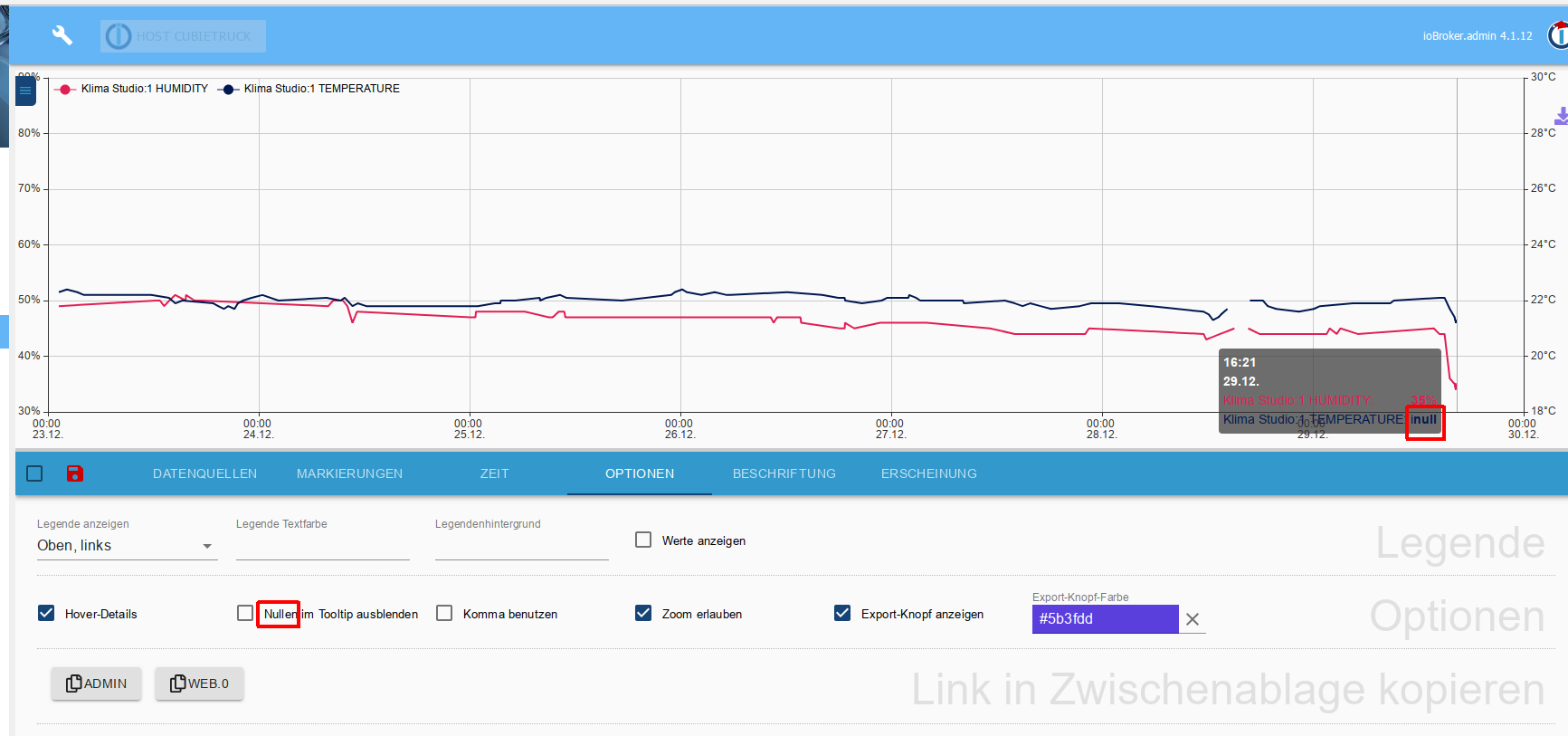
    • In den Einstellungen der Optionen steht Nullen ausblenden
      • gemeint sind sicher null-Werte, zumindest verschwinden diese
        echarts_NULL.png
    • besteht die Möglichkeit im Tooltip -ähnlich der Legende- einen Color-Dot zu nehmen und den Text in einer "lesbaren" Farbe, wie bei der Zeit?
    • kann man die Legende ggf. auch mehrspaltig anzeigen?

    Wie gesagt - alles Luxusproblem!

    :fireworks: guten Rutsch! :fireworks:

    falke69F Offline
    falke69F Offline
    falke69
    wrote on last edited by
    #41

    @Bluefox , @all

    Guten Morgen,

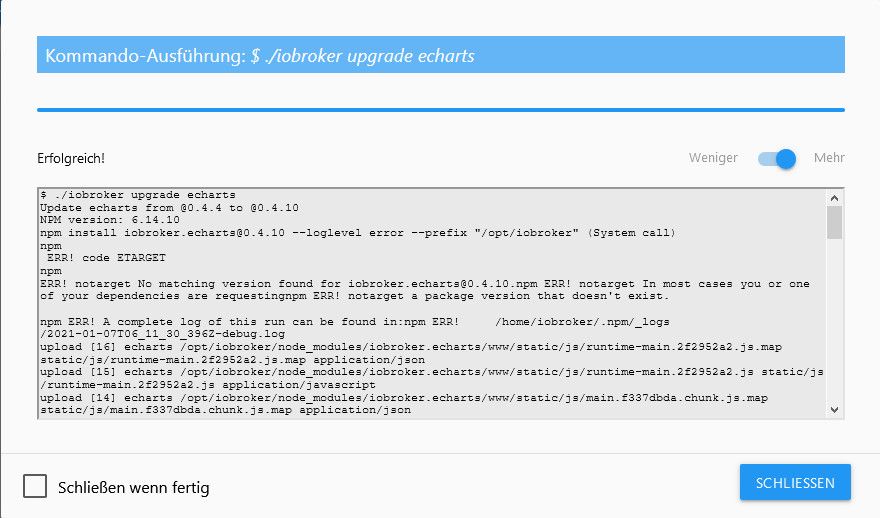
    heute gab es ein Update auf die 0.4.10. Das System zeigt mir an, das der Adapter erfolgreich aktuallisiert wurde.
    2021-01-07_071208.jpg

    $ ./iobroker upgrade echarts
    Update echarts from @0.4.4 to @0.4.10
    NPM version: 6.14.10
    npm install iobroker.echarts@0.4.10 --loglevel error --prefix "/opt/iobroker" (System call)
    npm
    ERR! code ETARGET
    npm 
    ERR! notarget No matching version found for iobroker.echarts@0.4.10.npm ERR! notarget In most cases you or one of your dependencies are requestingnpm ERR! notarget a package version that doesn't exist.
    
    npm ERR! A complete log of this run can be found in:npm ERR!     /home/iobroker/.npm/_logs/2021-01-07T06_11_30_396Z-debug.log
    upload [16] echarts /opt/iobroker/node_modules/iobroker.echarts/www/static/js/runtime-main.2f2952a2.js.map static/js/runtime-main.2f2952a2.js.map application/json
    upload [15] echarts /opt/iobroker/node_modules/iobroker.echarts/www/static/js/runtime-main.2f2952a2.js static/js/runtime-main.2f2952a2.js application/javascript
    upload [14] echarts /opt/iobroker/node_modules/iobroker.echarts/www/static/js/main.f337dbda.chunk.js.map static/js/main.f337dbda.chunk.js.map application/json
    upload [13] echarts /opt/iobroker/node_modules/iobroker.echarts/www/static/js/main.f337dbda.chunk.js static/js/main.f337dbda.chunk.js application/javascript
    upload [12] echarts /opt/iobroker/node_modules/iobroker.echarts/www/static/js/2.5ede6d20.chunk.js.map static/js/2.5ede6d20.chunk.js.map application/json
    upload [30] echarts.admin /opt/iobroker/node_modules/iobroker.echarts/admin/static/js/main.9d6214f3.chunk.js static/js/main.9d6214f3.chunk.js application/javascript
    upload [11] echarts /opt/iobroker/node_modules/iobroker.echarts/www/static/js/2.5ede6d20.chunk.js.LICENSE.txt static/js/2.5ede6d20.chunk.js.LICENSE.txt text/plain
    upload [10] echarts /opt/iobroker/node_modules/iobroker.echarts/www/static/js/2.5ede6d20.chunk.js static/js/2.5ede6d20.chunk.js application/javascript
    upload [9] echarts /opt/iobroker/node_modules/iobroker.echarts/www/static/css/main.9eecf1f6.chunk.css.map static/css/main.9eecf1f6.chunk.css.map application/json
    upload [8] echarts /opt/iobroker/node_modules/iobroker.echarts/www/static/css/main.9eecf1f6.chunk.css static/css/main.9eecf1f6.chunk.css text/css
    upload [7] echarts /opt/iobroker/node_modules/iobroker.echarts/www/static/css/2.0d046f6c.chunk.css.map static/css/2.0d046f6c.chunk.css.map application/json
    upload [6] echarts /opt/iobroker/node_modules/iobroker.echarts/www/static/css/2.0d046f6c.chunk.css static/css/2.0d046f6c.chunk.css text/css
    upload [5] echarts /opt/iobroker/node_modules/iobroker.echarts/www/service-worker.js service-worker.js application/javascript
    upload [20] echarts.admin /opt/iobroker/node_modules/iobroker.echarts/admin/manifest.json manifest.json application/json
    upload [4] echarts /opt/iobroker/node_modules/iobroker.echarts/www/precache-manifest.77f55cd625feef97fe87c94ec3286181.js precache-manifest.77f55cd625feef97fe87c94ec3286181.js application/javascript
    upload [19] echarts.admin /opt/iobroker/node_modules/iobroker.echarts/admin/favicon.ico favicon.ico image/vnd.microsoft.iconupload [3] echarts /opt/iobroker/node_modules/iobroker.echarts/www/manifest.json manifest.json application/json
    upload [2] echarts /opt/iobroker/node_modules/iobroker.echarts/www/index.html index.html text/html
    upload [18] echarts.admin /opt/iobroker/node_modules/iobroker.echarts/admin/echarts.png echarts.png image/png
    upload [1] echarts /opt/iobroker/node_modules/iobroker.echarts/www/favicon.ico favicon.ico image/vnd.microsoft.icon
    upload [17] echarts.admin /opt/iobroker/node_modules/iobroker.echarts/admin/chart/static/js/runtime-main.2f2952a2.js.map chart/static/js/runtime-main.2f2952a2.js.map application/json
    upload [16] echarts.admin /opt/iobroker/node_modules/iobroker.echarts/admin/chart/static/js/runtime-main.2f2952a2.js chart/static/js/runtime-main.2f2952a2.js application/javascript
    upload [0] echarts /opt/iobroker/node_modules/iobroker.echarts/www/asset-manifest.json asset-manifest.json application/json
    upload [15] echarts.admin /opt/iobroker/node_modules/iobroker.echarts/admin/chart/static/js/main.f337dbda.chunk.js.map chart/static/js/main.f337dbda.chunk.js.map application/json
    upload [14] echarts.admin /opt/iobroker/node_modules/iobroker.echarts/admin/chart/static/js/main.f337dbda.chunk.js chart/static/js/main.f337dbda.chunk.js application/javascript
    Update "system.adapter.echarts.0"
    upload [13] echarts.admin /opt/iobroker/node_modules/iobroker.echarts/admin/chart/static/js/2.5ede6d20.chunk.js.map chart/static/js/2.5ede6d20.chunk.js.map application/json
    upload [12] echarts.admin /opt/iobroker/node_modules/iobroker.echarts/admin/chart/static/js/2.5ede6d20.chunk.js.LICENSE.txt chart/static/js/2.5ede6d20.chunk.js.LICENSE.txt text/plain
    upload [11] echarts.admin /opt/iobroker/node_modules/iobroker.echarts/admin/chart/static/js/2.5ede6d20.chunk.js chart/static/js/2.5ede6d20.chunk.js application/javascript
    upload [10] echarts.admin /opt/iobroker/node_modules/iobroker.echarts/admin/chart/static/css/main.9eecf1f6.chunk.css.map chart/static/css/main.9eecf1f6.chunk.css.map application/json
    upload [9] echarts.admin /opt/iobroker/node_modules/iobroker.echarts/admin/chart/static/css/main.9eecf1f6.chunk.css chart/static/css/main.9eecf1f6.chunk.css text/css
    upload [8] echarts.admin /opt/iobroker/node_modules/iobroker.echarts/admin/chart/static/css/2.0d046f6c.chunk.css.map chart/static/css/2.0d046f6c.chunk.css.map application/json
    upload [7] echarts.admin /opt/iobroker/node_modules/iobroker.echarts/admin/chart/static/css/2.0d046f6c.chunk.css chart/static/css/2.0d046f6c.chunk.css text/css
    upload [6] echarts.admin /opt/iobroker/node_modules/iobroker.echarts/admin/chart/service-worker.js chart/service-worker.js application/javascript
    upload [5] echarts.admin /opt/iobroker/node_modules/iobroker.echarts/admin/chart/precache-manifest.77f55cd625feef97fe87c94ec3286181.js chart/precache-manifest.77f55cd625feef97fe87c94ec3286181.js application/javascript
    upload [4] echarts.admin /opt/iobroker/node_modules/iobroker.echarts/admin/chart/manifest.json chart/manifest.json application/json
    upload [3] echarts.admin /opt/iobroker/node_modules/iobroker.echarts/admin/chart/index.html chart/index.html text/html
    upload [2] echarts.admin /opt/iobroker/node_modules/iobroker.echarts/admin/chart/favicon.ico chart/favicon.ico image/vnd.microsoft.icon
    upload [1] echarts.admin /opt/iobroker/node_modules/iobroker.echarts/admin/chart/asset-manifest.json chart/asset-manifest.json application/json
    upload [0] echarts.admin /opt/iobroker/node_modules/iobroker.echarts/admin/asset-manifest.json asset-manifest.json application/json
    Adapter "echarts" updated
    process exited with code 0
    

    Im Anschluss wird mir aber weiterhin das Update angezeigt.
    Das System wurde bereits einmal komplett durchgestartet.

    Jemand eine Idee?

    lobomauL 1 Reply Last reply
    0
    • HomoranH Do not disturb
      HomoranH Do not disturb
      Homoran
      Global Moderator Administrators
      wrote on last edited by Homoran
      #42

      Habe gerade eben auf einem weiteren Testsystem eCharts installieren wollen und dort den selben Fehler erhalten:

      $ ./iobroker add echarts  --host raspberrypi
      NPM version: 6.14.4
      npm install iobroker.echarts@0.4.10 --loglevel error --prefix "/opt/iobroker" (System call)
      npm
       ERR! code ETARGET
      npm ERR! notarget No matching version found for iobroker.echarts@0.4.10.npm ERR! notarget In most cases you or one of your dependencies are requestingnpm ERR! notarget a package version that doesn't exist.
      
      npm ERR! A complete log of this run can be found in:npm ERR!     /home/iobroker/.npm/_logs/2021-01-07T10_48_23_634Z-debug.log
      ERROR: host.raspberrypi Cannot install iobroker.echarts@0.4.10: 1
      ERROR: process exited with code 25
      

      Allerdings läuft es bei mir nicht durch

      Das npm log sieht so aus:

      0 info it worked if it ends with ok
      1 verbose cli [ '/usr/bin/node',
      1 verbose cli   '/usr/bin/npm',
      1 verbose cli   'install',
      1 verbose cli   'iobroker.echarts@0.4.10',
      1 verbose cli   '--loglevel',
      1 verbose cli   'error',
      1 verbose cli   '--prefix',
      1 verbose cli   '/opt/iobroker' ]
      2 info using npm@6.14.4
      3 info using node@v10.21.0
      4 verbose npm-session dbd94f739da18c9d
      5 silly install loadCurrentTree
      6 silly install readLocalPackageData
      7 http fetch GET 200 https://registry.npmjs.org/iobroker.echarts 289ms
      8 silly fetchPackageMetaData error for iobroker.echarts@0.4.10 No matching version found for iobroker.echarts@0.4.10.
      9 timing stage:rollbackFailedOptional Completed in 1ms
      10 timing stage:runTopLevelLifecycles Completed in 5163ms
      11 verbose type version
      12 verbose stack iobroker.echarts: No matching version found for iobroker.echarts@0.4.10.
      12 verbose stack     at pickManifest (/usr/lib/node_modules/npm/node_modules/npm-pick-manifest/index.js:122:13)
      12 verbose stack     at fetchPackument.then.packument (/usr/lib/node_modules/npm/node_modules/pacote/lib/fetchers/registry/manifest.js:24:14)
      12 verbose stack     at tryCatcher (/usr/lib/node_modules/npm/node_modules/bluebird/js/release/util.js:16:23)
      12 verbose stack     at Promise._settlePromiseFromHandler (/usr/lib/node_modules/npm/node_modules/bluebird/js/release/promise.js:517:31)
      12 verbose stack     at Promise._settlePromise (/usr/lib/node_modules/npm/node_modules/bluebird/js/release/promise.js:574:18)
      12 verbose stack     at Promise._settlePromise0 (/usr/lib/node_modules/npm/node_modules/bluebird/js/release/promise.js:619:10)
      12 verbose stack     at Promise._settlePromises (/usr/lib/node_modules/npm/node_modules/bluebird/js/release/promise.js:699:18)
      12 verbose stack     at _drainQueueStep (/usr/lib/node_modules/npm/node_modules/bluebird/js/release/async.js:138:12)
      12 verbose stack     at _drainQueue (/usr/lib/node_modules/npm/node_modules/bluebird/js/release/async.js:131:9)
      12 verbose stack     at Async._drainQueues (/usr/lib/node_modules/npm/node_modules/bluebird/js/release/async.js:147:5)
      12 verbose stack     at Immediate.Async.drainQueues [as _onImmediate] (/usr/lib/node_modules/npm/node_modules/bluebird/js/release/async.js:17:14)
      12 verbose stack     at runCallback (timers.js:705:18)
      12 verbose stack     at tryOnImmediate (timers.js:676:5)
      12 verbose stack     at processImmediate (timers.js:658:5)
      13 verbose cwd /opt/iobroker
      14 verbose Linux 4.19.118-v7l+
      15 verbose argv "/usr/bin/node" "/usr/bin/npm" "install" "iobroker.echarts@0.4.10" "--loglevel" "error" "--prefix" "/opt/iobroker"
      16 verbose node v10.21.0
      17 verbose npm  v6.14.4
      18 error code ETARGET
      19 error notarget No matching version found for iobroker.echarts@0.4.10.
      20 error notarget In most cases you or one of your dependencies are requesting
      20 error notarget a package version that doesn't exist.
      21 verbose exit [ 1, true ]
      

      kein Support per PN! - Fragen im Forum stellen - es gibt fast nichts, was nicht auch für andere interessant ist.

      Benutzt das Voting rechts unten im Beitrag wenn er euch geholfen hat.

      der Installationsfixer: curl -fsL https://iobroker.net/fix.sh | bash -

      1 Reply Last reply
      0
      • falke69F falke69

        @Bluefox , @all

        Guten Morgen,

        heute gab es ein Update auf die 0.4.10. Das System zeigt mir an, das der Adapter erfolgreich aktuallisiert wurde.

        2021-01-07_071208.jpg

        $ ./iobroker upgrade echarts
        Update echarts from @0.4.4 to @0.4.10
        NPM version: 6.14.10
        npm install iobroker.echarts@0.4.10 --loglevel error --prefix "/opt/iobroker" (System call)
        npm
        ERR! code ETARGET
        npm 
        ERR! notarget No matching version found for iobroker.echarts@0.4.10.npm ERR! notarget In most cases you or one of your dependencies are requestingnpm ERR! notarget a package version that doesn't exist.
        
        npm ERR! A complete log of this run can be found in:npm ERR!     /home/iobroker/.npm/_logs/2021-01-07T06_11_30_396Z-debug.log
        upload [16] echarts /opt/iobroker/node_modules/iobroker.echarts/www/static/js/runtime-main.2f2952a2.js.map static/js/runtime-main.2f2952a2.js.map application/json
        upload [15] echarts /opt/iobroker/node_modules/iobroker.echarts/www/static/js/runtime-main.2f2952a2.js static/js/runtime-main.2f2952a2.js application/javascript
        upload [14] echarts /opt/iobroker/node_modules/iobroker.echarts/www/static/js/main.f337dbda.chunk.js.map static/js/main.f337dbda.chunk.js.map application/json
        upload [13] echarts /opt/iobroker/node_modules/iobroker.echarts/www/static/js/main.f337dbda.chunk.js static/js/main.f337dbda.chunk.js application/javascript
        upload [12] echarts /opt/iobroker/node_modules/iobroker.echarts/www/static/js/2.5ede6d20.chunk.js.map static/js/2.5ede6d20.chunk.js.map application/json
        upload [30] echarts.admin /opt/iobroker/node_modules/iobroker.echarts/admin/static/js/main.9d6214f3.chunk.js static/js/main.9d6214f3.chunk.js application/javascript
        upload [11] echarts /opt/iobroker/node_modules/iobroker.echarts/www/static/js/2.5ede6d20.chunk.js.LICENSE.txt static/js/2.5ede6d20.chunk.js.LICENSE.txt text/plain
        upload [10] echarts /opt/iobroker/node_modules/iobroker.echarts/www/static/js/2.5ede6d20.chunk.js static/js/2.5ede6d20.chunk.js application/javascript
        upload [9] echarts /opt/iobroker/node_modules/iobroker.echarts/www/static/css/main.9eecf1f6.chunk.css.map static/css/main.9eecf1f6.chunk.css.map application/json
        upload [8] echarts /opt/iobroker/node_modules/iobroker.echarts/www/static/css/main.9eecf1f6.chunk.css static/css/main.9eecf1f6.chunk.css text/css
        upload [7] echarts /opt/iobroker/node_modules/iobroker.echarts/www/static/css/2.0d046f6c.chunk.css.map static/css/2.0d046f6c.chunk.css.map application/json
        upload [6] echarts /opt/iobroker/node_modules/iobroker.echarts/www/static/css/2.0d046f6c.chunk.css static/css/2.0d046f6c.chunk.css text/css
        upload [5] echarts /opt/iobroker/node_modules/iobroker.echarts/www/service-worker.js service-worker.js application/javascript
        upload [20] echarts.admin /opt/iobroker/node_modules/iobroker.echarts/admin/manifest.json manifest.json application/json
        upload [4] echarts /opt/iobroker/node_modules/iobroker.echarts/www/precache-manifest.77f55cd625feef97fe87c94ec3286181.js precache-manifest.77f55cd625feef97fe87c94ec3286181.js application/javascript
        upload [19] echarts.admin /opt/iobroker/node_modules/iobroker.echarts/admin/favicon.ico favicon.ico image/vnd.microsoft.iconupload [3] echarts /opt/iobroker/node_modules/iobroker.echarts/www/manifest.json manifest.json application/json
        upload [2] echarts /opt/iobroker/node_modules/iobroker.echarts/www/index.html index.html text/html
        upload [18] echarts.admin /opt/iobroker/node_modules/iobroker.echarts/admin/echarts.png echarts.png image/png
        upload [1] echarts /opt/iobroker/node_modules/iobroker.echarts/www/favicon.ico favicon.ico image/vnd.microsoft.icon
        upload [17] echarts.admin /opt/iobroker/node_modules/iobroker.echarts/admin/chart/static/js/runtime-main.2f2952a2.js.map chart/static/js/runtime-main.2f2952a2.js.map application/json
        upload [16] echarts.admin /opt/iobroker/node_modules/iobroker.echarts/admin/chart/static/js/runtime-main.2f2952a2.js chart/static/js/runtime-main.2f2952a2.js application/javascript
        upload [0] echarts /opt/iobroker/node_modules/iobroker.echarts/www/asset-manifest.json asset-manifest.json application/json
        upload [15] echarts.admin /opt/iobroker/node_modules/iobroker.echarts/admin/chart/static/js/main.f337dbda.chunk.js.map chart/static/js/main.f337dbda.chunk.js.map application/json
        upload [14] echarts.admin /opt/iobroker/node_modules/iobroker.echarts/admin/chart/static/js/main.f337dbda.chunk.js chart/static/js/main.f337dbda.chunk.js application/javascript
        Update "system.adapter.echarts.0"
        upload [13] echarts.admin /opt/iobroker/node_modules/iobroker.echarts/admin/chart/static/js/2.5ede6d20.chunk.js.map chart/static/js/2.5ede6d20.chunk.js.map application/json
        upload [12] echarts.admin /opt/iobroker/node_modules/iobroker.echarts/admin/chart/static/js/2.5ede6d20.chunk.js.LICENSE.txt chart/static/js/2.5ede6d20.chunk.js.LICENSE.txt text/plain
        upload [11] echarts.admin /opt/iobroker/node_modules/iobroker.echarts/admin/chart/static/js/2.5ede6d20.chunk.js chart/static/js/2.5ede6d20.chunk.js application/javascript
        upload [10] echarts.admin /opt/iobroker/node_modules/iobroker.echarts/admin/chart/static/css/main.9eecf1f6.chunk.css.map chart/static/css/main.9eecf1f6.chunk.css.map application/json
        upload [9] echarts.admin /opt/iobroker/node_modules/iobroker.echarts/admin/chart/static/css/main.9eecf1f6.chunk.css chart/static/css/main.9eecf1f6.chunk.css text/css
        upload [8] echarts.admin /opt/iobroker/node_modules/iobroker.echarts/admin/chart/static/css/2.0d046f6c.chunk.css.map chart/static/css/2.0d046f6c.chunk.css.map application/json
        upload [7] echarts.admin /opt/iobroker/node_modules/iobroker.echarts/admin/chart/static/css/2.0d046f6c.chunk.css chart/static/css/2.0d046f6c.chunk.css text/css
        upload [6] echarts.admin /opt/iobroker/node_modules/iobroker.echarts/admin/chart/service-worker.js chart/service-worker.js application/javascript
        upload [5] echarts.admin /opt/iobroker/node_modules/iobroker.echarts/admin/chart/precache-manifest.77f55cd625feef97fe87c94ec3286181.js chart/precache-manifest.77f55cd625feef97fe87c94ec3286181.js application/javascript
        upload [4] echarts.admin /opt/iobroker/node_modules/iobroker.echarts/admin/chart/manifest.json chart/manifest.json application/json
        upload [3] echarts.admin /opt/iobroker/node_modules/iobroker.echarts/admin/chart/index.html chart/index.html text/html
        upload [2] echarts.admin /opt/iobroker/node_modules/iobroker.echarts/admin/chart/favicon.ico chart/favicon.ico image/vnd.microsoft.icon
        upload [1] echarts.admin /opt/iobroker/node_modules/iobroker.echarts/admin/chart/asset-manifest.json chart/asset-manifest.json application/json
        upload [0] echarts.admin /opt/iobroker/node_modules/iobroker.echarts/admin/asset-manifest.json asset-manifest.json application/json
        Adapter "echarts" updated
        process exited with code 0
        

        Im Anschluss wird mir aber weiterhin das Update angezeigt.
        Das System wurde bereits einmal komplett durchgestartet.

        Jemand eine Idee?

        lobomauL Offline
        lobomauL Offline
        lobomau
        wrote on last edited by lobomau
        #43

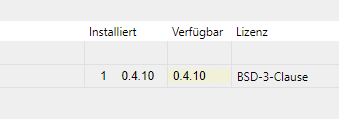
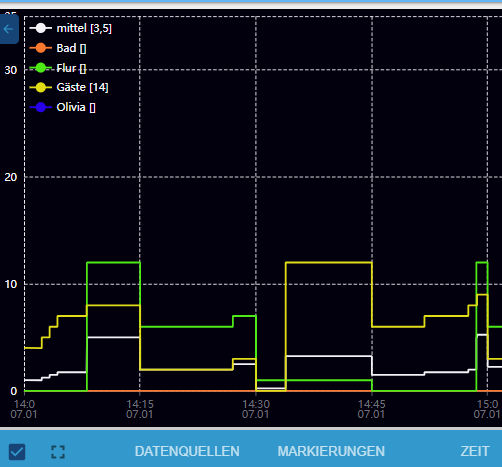
        @falke69 ich hatte das gleich Problem. Habe dann nochmal über github probiert. Hat nun funktioniert:
        ff520487-6f01-483f-8863-d3a7ad0b5af0-image.png

        eb1f53df-59d1-46c6-bd66-cf1044f5bed6-image.png
        :+1:

        Host: NUC8i3 mit Proxmox:

        • ioBroker CT Debian 13, npm 10.9.4, nodejs 22.21.0
        • Slave: Pi4
        falke69F 1 Reply Last reply
        0
        • lobomauL lobomau

          @falke69 ich hatte das gleich Problem. Habe dann nochmal über github probiert. Hat nun funktioniert:
          ff520487-6f01-483f-8863-d3a7ad0b5af0-image.png

          eb1f53df-59d1-46c6-bd66-cf1044f5bed6-image.png
          :+1:

          falke69F Offline
          falke69F Offline
          falke69
          wrote on last edited by
          #44

          @lobomau

          Danke!

          hat funktioniert. :-)

          BluefoxB 1 Reply Last reply
          0
          • falke69F falke69

            @lobomau

            Danke!

            hat funktioniert. :-)

            BluefoxB Offline
            BluefoxB Offline
            Bluefox
            wrote on last edited by
            #45

            @falke69 Das ist ein Fehler gewesen. Die richtige Version ist 0.4.9 und bald wird in Repo ersetzt

            1 Reply Last reply
            1
            • S Offline
              S Offline
              sourex
              wrote on last edited by
              #46

              Super Adapter ! Besten Dank Blue !!
              Endlich keine Probleme mehr mit Grafana das die Charts alle paar Monate aus irgendwelchen Gründen nicht mehr funktionieren und zusätzlich eine VM oder Container gespart.
              Wenn man mit Flow oder Graf schon gearbeitet hat braucht man auch keine Einarbeitungszeit, ist alles wirklich selbsterklärend und meine Charts waren waren schnell erstellt.

              Zwei Fragen habe ich dennoch ? eine wurde schon als Issue gemeldet, jedoch ohne Antwort.
              Ist es möglich den Hintergrund vom Tooltip zu ändern ?

              Bringt das Widget zufällig einen Vorteil ? bspw Hintergrundbilder oder ähnliches ?
              Ich habe mein System uptoDate jedoch habe ich das Widget nicht. Lies sich aber auch super über IFrame einbinden.

              1 Reply Last reply
              0
              • K Online
                K Online
                Kueppert
                wrote on last edited by Kueppert
                #47

                hm...also der Adapter sieht sehr easy aus - allerdings finde ich entweder die entsprechende Einstellung nicht, oder ich überlese sie immer.
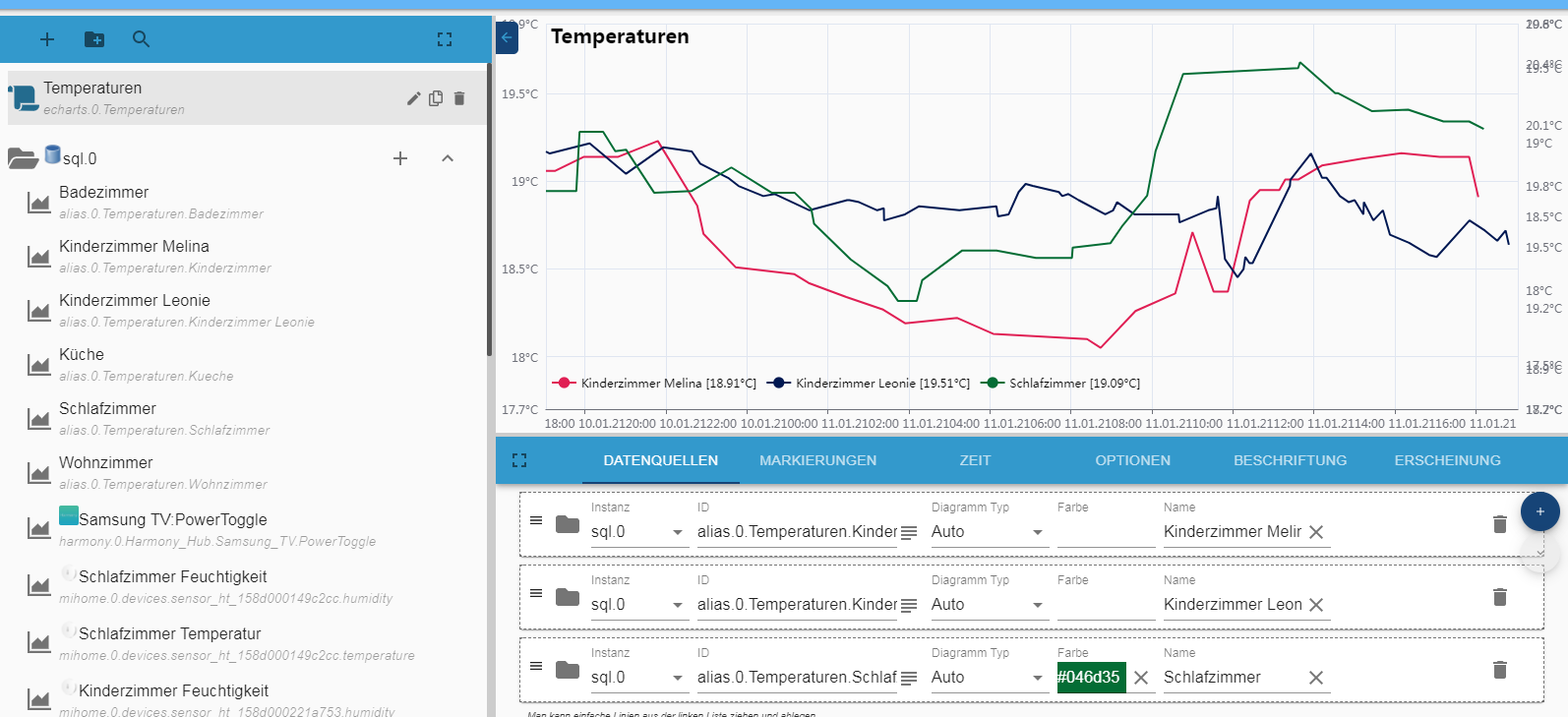
                Warum zum Teufel hab ich da rechts auch Zahlen stehen? Die stimmen in gerader Linie nicht mal mit denen links überein??
                86baaff6-e16a-4f25-923d-d786b939d7a5-image.png

                UDM Pro, Intel NUC - ioBroker in Proxmox-VM, PiHole+Grafana&Influx+TasmoAdmin in LXCs, Raspberry Pi3 (als CCU), Zigbee-Stick Sonoff, Synology DS918+

                HomoranH 1 Reply Last reply
                0
                • K Kueppert

                  hm...also der Adapter sieht sehr easy aus - allerdings finde ich entweder die entsprechende Einstellung nicht, oder ich überlese sie immer.
                  Warum zum Teufel hab ich da rechts auch Zahlen stehen? Die stimmen in gerader Linie nicht mal mit denen links überein??
                  86baaff6-e16a-4f25-923d-d786b939d7a5-image.png

                  HomoranH Do not disturb
                  HomoranH Do not disturb
                  Homoran
                  Global Moderator Administrators
                  wrote on last edited by
                  #48

                  @Kueppert sagte in Test eCharts Adapter:

                  Warum zum Teufel hab ich da rechts auch Zahlen stehen?

                  weil du die wahrscheinlich (wie bei flot) in der Datenreihe definiert hast

                  @Kueppert sagte in Test eCharts Adapter:

                  Die stimmen in gerader Linie nicht mal mit denen links überein??

                  Müssen sie auch nicht, wenn die Datenreihen der beiden Achsen unterschiedliche Werte haben.

                  kein Support per PN! - Fragen im Forum stellen - es gibt fast nichts, was nicht auch für andere interessant ist.

                  Benutzt das Voting rechts unten im Beitrag wenn er euch geholfen hat.

                  der Installationsfixer: curl -fsL https://iobroker.net/fix.sh | bash -

                  K 1 Reply Last reply
                  0
                  • HomoranH Homoran

                    @Kueppert sagte in Test eCharts Adapter:

                    Warum zum Teufel hab ich da rechts auch Zahlen stehen?

                    weil du die wahrscheinlich (wie bei flot) in der Datenreihe definiert hast

                    @Kueppert sagte in Test eCharts Adapter:

                    Die stimmen in gerader Linie nicht mal mit denen links überein??

                    Müssen sie auch nicht, wenn die Datenreihen der beiden Achsen unterschiedliche Werte haben.

                    K Online
                    K Online
                    Kueppert
                    wrote on last edited by
                    #49

                    @Homoran ach Mensch...da ist ein ganz schwer erkennbarer kleiner Pfeil nach unten unter dem "+" O.o den hab ich gerade durch Zufall gesehen hahaha. Dann mach ich mal weiter wie gehabt Danke dir :)

                    UDM Pro, Intel NUC - ioBroker in Proxmox-VM, PiHole+Grafana&Influx+TasmoAdmin in LXCs, Raspberry Pi3 (als CCU), Zigbee-Stick Sonoff, Synology DS918+

                    lobomauL 1 Reply Last reply
                    1
                    • K Kueppert

                      @Homoran ach Mensch...da ist ein ganz schwer erkennbarer kleiner Pfeil nach unten unter dem "+" O.o den hab ich gerade durch Zufall gesehen hahaha. Dann mach ich mal weiter wie gehabt Danke dir :)

                      lobomauL Offline
                      lobomauL Offline
                      lobomau
                      wrote on last edited by
                      #50

                      ich habe nicht die Möglichkeit gefunden wie man die Legende und die Beschriftungen der Achsen anpassen kann.

                      https://github.com/ioBroker/ioBroker.echarts/issues/29

                      Host: NUC8i3 mit Proxmox:

                      • ioBroker CT Debian 13, npm 10.9.4, nodejs 22.21.0
                      • Slave: Pi4
                      HomoranH 1 Reply Last reply
                      0
                      • lobomauL lobomau

                        ich habe nicht die Möglichkeit gefunden wie man die Legende und die Beschriftungen der Achsen anpassen kann.

                        https://github.com/ioBroker/ioBroker.echarts/issues/29

                        HomoranH Do not disturb
                        HomoranH Do not disturb
                        Homoran
                        Global Moderator Administrators
                        wrote on last edited by
                        #51

                        @lobomau said in Test eCharts Adapter:

                        wie man die Legende und die Beschriftungen der Achsen anpassen kann.

                        was meinst du mit anpassen?

                        Legende habe ich horizontal und senkrecht, Textfarbe und Hintergrund, sowie die aktuellen Werte anzeigen
                        x-Achse kann das Datumsformat und bei der y-Achse min und max eingegeben werden

                        kein Support per PN! - Fragen im Forum stellen - es gibt fast nichts, was nicht auch für andere interessant ist.

                        Benutzt das Voting rechts unten im Beitrag wenn er euch geholfen hat.

                        der Installationsfixer: curl -fsL https://iobroker.net/fix.sh | bash -

                        lobomauL P 2 Replies Last reply
                        0
                        • HomoranH Homoran

                          @lobomau said in Test eCharts Adapter:

                          wie man die Legende und die Beschriftungen der Achsen anpassen kann.

                          was meinst du mit anpassen?

                          Legende habe ich horizontal und senkrecht, Textfarbe und Hintergrund, sowie die aktuellen Werte anzeigen
                          x-Achse kann das Datumsformat und bei der y-Achse min und max eingegeben werden

                          lobomauL Offline
                          lobomauL Offline
                          lobomau
                          wrote on last edited by
                          #52

                          @homoran kann man die Schriftgröße des Textes in der Legende anpassen?

                          Host: NUC8i3 mit Proxmox:

                          • ioBroker CT Debian 13, npm 10.9.4, nodejs 22.21.0
                          • Slave: Pi4
                          HomoranH 1 Reply Last reply
                          0
                          • lobomauL lobomau

                            @homoran kann man die Schriftgröße des Textes in der Legende anpassen?

                            HomoranH Do not disturb
                            HomoranH Do not disturb
                            Homoran
                            Global Moderator Administrators
                            wrote on last edited by
                            #53

                            @lobomau said in Test eCharts Adapter:

                            @homoran kann man die Schriftgröße des Textes in der Legende anpassen?

                            Hab ich noch nicht gefunden.
                            Aber gerade die Schriftfarbe für die Achsen ;-)

                            kein Support per PN! - Fragen im Forum stellen - es gibt fast nichts, was nicht auch für andere interessant ist.

                            Benutzt das Voting rechts unten im Beitrag wenn er euch geholfen hat.

                            der Installationsfixer: curl -fsL https://iobroker.net/fix.sh | bash -

                            lobomauL 1 Reply Last reply
                            0
                            • HomoranH Homoran

                              @lobomau said in Test eCharts Adapter:

                              @homoran kann man die Schriftgröße des Textes in der Legende anpassen?

                              Hab ich noch nicht gefunden.
                              Aber gerade die Schriftfarbe für die Achsen ;-)

                              lobomauL Offline
                              lobomauL Offline
                              lobomau
                              wrote on last edited by
                              #54

                              @homoran ja, hast Recht... ich hatte auch von der Farbe geschrieben. Habe den issue angepasst.

                              Host: NUC8i3 mit Proxmox:

                              • ioBroker CT Debian 13, npm 10.9.4, nodejs 22.21.0
                              • Slave: Pi4
                              1 Reply Last reply
                              0
                              • HomoranH Do not disturb
                                HomoranH Do not disturb
                                Homoran
                                Global Moderator Administrators
                                wrote on last edited by Homoran
                                #55

                                Ich habe auch noch ein paar Kleinigkeiten:
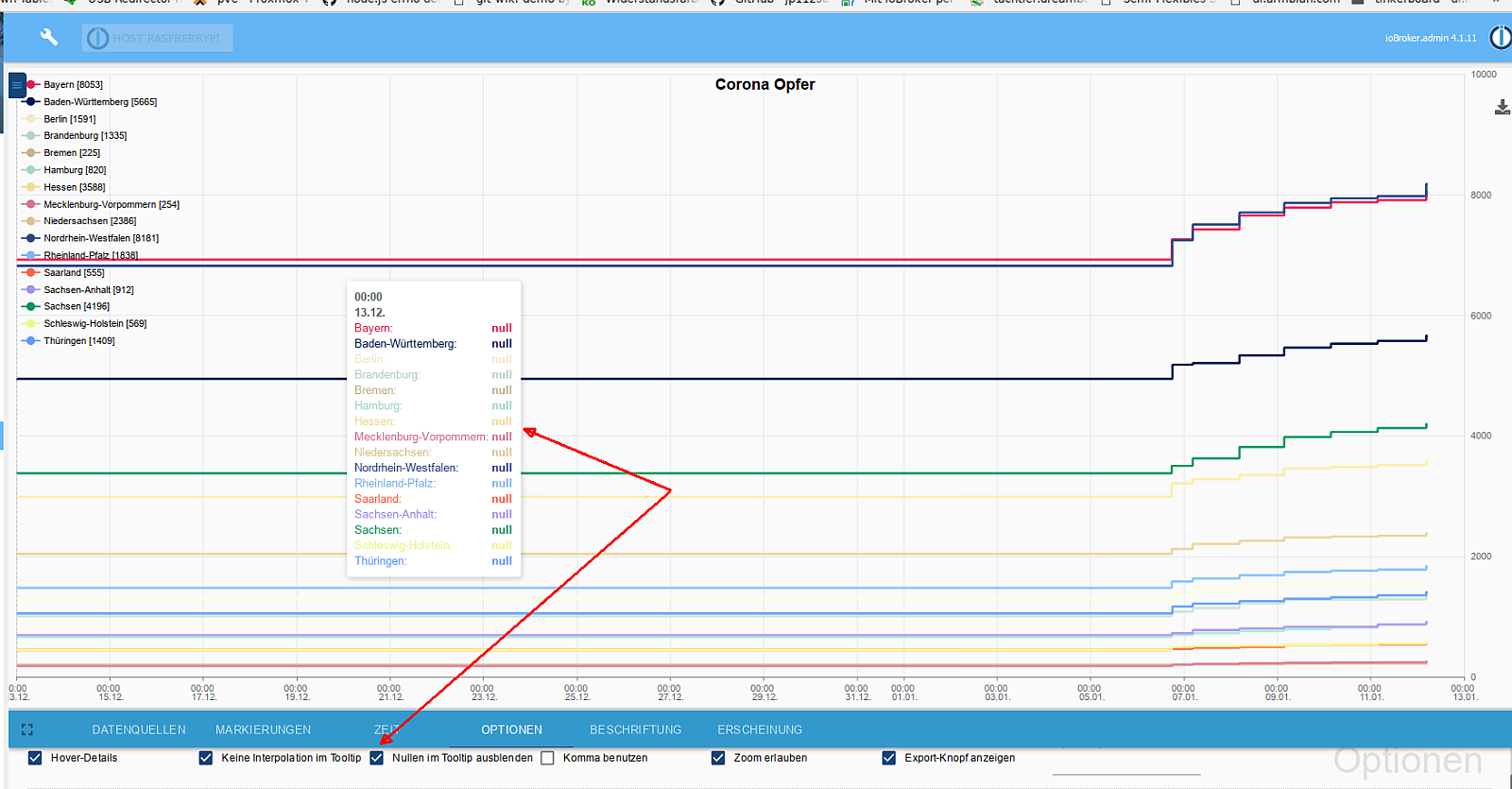
                                1.)
                                NULL_echarts.png
                                Wenn NULL(en) im tooltip nicht anzeigen aktiviert ist, werden trotzdem NULL angezeigt, wenn alle Linien NULL sind

                                2.)
                                msec_echarts.png
                                der coronavirus-Adapter beschreibt die States mit einigen Millisekunden Abstand.

                                Dadurch (?) erscheinen nicht mehr alle Datenpunkte in dem Tooltip. Noch "schlimmer", ich schaffe es gar nicht diese Werte anzeigen zu lassen, es erscheint immer der Wert der untersten Datenlinie, ganz manchmal auch der, der zweituntersten Linie, aber niemals die anderen.
                                Unten bezieht sich auf die Reihenfolge der Datenreihen - nicht der Werte

                                kein Support per PN! - Fragen im Forum stellen - es gibt fast nichts, was nicht auch für andere interessant ist.

                                Benutzt das Voting rechts unten im Beitrag wenn er euch geholfen hat.

                                der Installationsfixer: curl -fsL https://iobroker.net/fix.sh | bash -

                                lobomauL 1 Reply Last reply
                                0
                                • HomoranH Homoran

                                  Ich habe auch noch ein paar Kleinigkeiten:
                                  1.)
                                  NULL_echarts.png
                                  Wenn NULL(en) im tooltip nicht anzeigen aktiviert ist, werden trotzdem NULL angezeigt, wenn alle Linien NULL sind

                                  2.)
                                  msec_echarts.png
                                  der coronavirus-Adapter beschreibt die States mit einigen Millisekunden Abstand.

                                  Dadurch (?) erscheinen nicht mehr alle Datenpunkte in dem Tooltip. Noch "schlimmer", ich schaffe es gar nicht diese Werte anzeigen zu lassen, es erscheint immer der Wert der untersten Datenlinie, ganz manchmal auch der, der zweituntersten Linie, aber niemals die anderen.
                                  Unten bezieht sich auf die Reihenfolge der Datenreihen - nicht der Werte

                                  lobomauL Offline
                                  lobomauL Offline
                                  lobomau
                                  wrote on last edited by
                                  #56

                                  gibt es die Möglichkeit eine dritte (vierte) Y-Achse besser anzeigen zu können? Also die Zahlen etwas in die x-Richtung verschieben, damit sie nicht übereinander stehen?
                                  Hier mal bei der linken Y-Achse dargestellt:

                                  2021_01_18_00_00_chart.svg

                                  Im Vergleich mit flot:
                                  c0c062fe-d4f0-402d-b1ee-cd88857c46c8-image.png

                                  Host: NUC8i3 mit Proxmox:

                                  • ioBroker CT Debian 13, npm 10.9.4, nodejs 22.21.0
                                  • Slave: Pi4
                                  1 Reply Last reply
                                  1
                                  • S Offline
                                    S Offline
                                    Saschag
                                    wrote on last edited by
                                    #57

                                    Hallo zusammen,

                                    kann ich bzw. Wo? die Füllfarbe vom Chart einstellen?

                                    Danke

                                    HomoranH 1 Reply Last reply
                                    0
                                    • S Saschag

                                      Hallo zusammen,

                                      kann ich bzw. Wo? die Füllfarbe vom Chart einstellen?

                                      Danke

                                      HomoranH Do not disturb
                                      HomoranH Do not disturb
                                      Homoran
                                      Global Moderator Administrators
                                      wrote on last edited by
                                      #58

                                      @saschag sagte in Test eCharts Adapter:

                                      die Füllfarbe vom Chart

                                      meinst du den Hintergrund?

                                      kein Support per PN! - Fragen im Forum stellen - es gibt fast nichts, was nicht auch für andere interessant ist.

                                      Benutzt das Voting rechts unten im Beitrag wenn er euch geholfen hat.

                                      der Installationsfixer: curl -fsL https://iobroker.net/fix.sh | bash -

                                      1 Reply Last reply
                                      0
                                      • S Offline
                                        S Offline
                                        Saschag
                                        wrote on last edited by Saschag
                                        #59

                                        @homoran

                                        Jaein, den Hintergrund unterhalb des Graphs. Wie beim MDW:

                                        B44F40B3-C59F-4D49-9253-E690E10D2C1E.jpeg

                                        HomoranH S 2 Replies Last reply
                                        0
                                        • S Saschag

                                          @homoran

                                          Jaein, den Hintergrund unterhalb des Graphs. Wie beim MDW:

                                          B44F40B3-C59F-4D49-9253-E690E10D2C1E.jpeg

                                          HomoranH Do not disturb
                                          HomoranH Do not disturb
                                          Homoran
                                          Global Moderator Administrators
                                          wrote on last edited by Homoran
                                          #60

                                          @saschag sagte in Test eCharts Adapter:

                                          Wie beim MDW:

                                          was ist das?
                                          Ich kenne NDW und MDF

                                          EDIT:
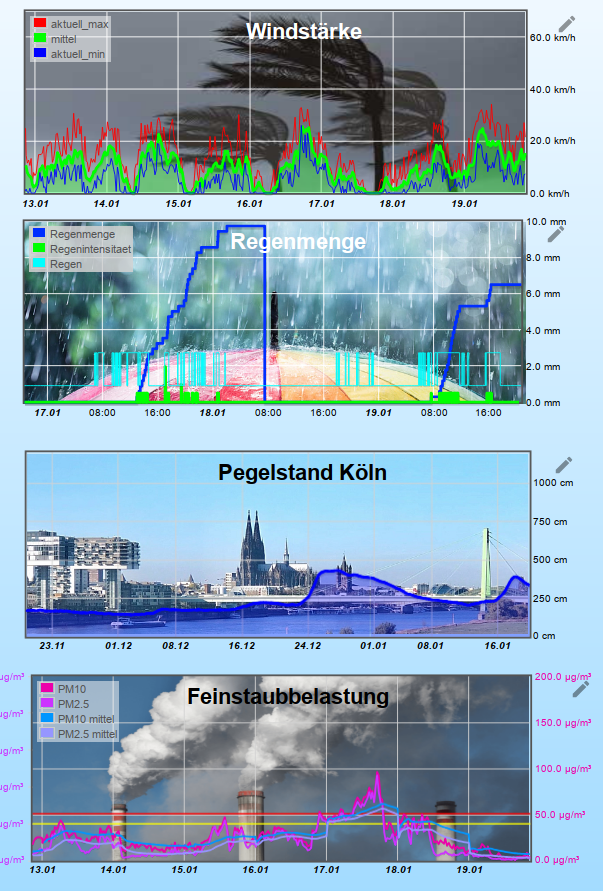
                                          Aber jetzt glaube ich was du meinst: Die Fläche unter der Kurve
                                          Integral.png

                                          so wie hier bei Wind (grün) und Pegel (blau)

                                          Hab ich bei eCharts noch nicht gefunden

                                          kein Support per PN! - Fragen im Forum stellen - es gibt fast nichts, was nicht auch für andere interessant ist.

                                          Benutzt das Voting rechts unten im Beitrag wenn er euch geholfen hat.

                                          der Installationsfixer: curl -fsL https://iobroker.net/fix.sh | bash -

                                          S 1 Reply Last reply
                                          0
                                          Reply
                                          • Reply as topic
                                          Log in to reply
                                          • Oldest to Newest
                                          • Newest to Oldest
                                          • Most Votes


                                          Support us

                                          ioBroker
                                          Community Adapters
                                          Donate

                                          914

                                          Online

                                          32.4k

                                          Users

                                          81.5k

                                          Topics

                                          1.3m

                                          Posts
                                          Community
                                          Impressum | Datenschutz-Bestimmungen | Nutzungsbedingungen | Einwilligungseinstellungen
                                          ioBroker Community 2014-2025
                                          logo
                                          • Login

                                          • Don't have an account? Register

                                          • Login or register to search.
                                          • First post
                                            Last post
                                          0
                                          • Home
                                          • Recent
                                          • Tags
                                          • Unread 0
                                          • Categories
                                          • Unreplied
                                          • Popular
                                          • GitHub
                                          • Docu
                                          • Hilfe