



Skip to content
  • Home
  • Recent
  • Tags
  • 0 Unread 0
  • Categories
  • Unreplied
  • Popular
  • GitHub
  • Docu
  • Hilfe
Skins
  • Light
  • Brite
  • Cerulean
  • Cosmo
  • Flatly
  • Journal
  • Litera
  • Lumen
  • Lux
  • Materia
  • Minty
  • Morph
  • Pulse
  • Sandstone
  • Simplex
  • Sketchy
  • Spacelab
  • United
  • Yeti
  • Zephyr
  • Dark
  • Cyborg
  • Darkly
  • Quartz
  • Slate
  • Solar
  • Superhero
  • Vapor

  • Default (No Skin)
  • No Skin
Collapse
ioBroker Logo

Community Forum

donate donate
  1. ioBroker Community Home
  2. Deutsch
  3. ioBroker Allgemein
  4. Pegelwerte Fritzbox 6490 Cable auslesen?

NEWS

  • Monatsrückblick Januar/Februar 2026 ist online!
    BluefoxB
    Bluefox
    17
    1
    377

  • Jahresrückblick 2025 – unser neuer Blogbeitrag ist online! ✨
    BluefoxB
    Bluefox
    17
    1
    4.9k

  • Neuer Blogbeitrag: Monatsrückblick - Dezember 2025 🎄
    BluefoxB
    Bluefox
    13
    1
    1.3k

Pegelwerte Fritzbox 6490 Cable auslesen?

Scheduled Pinned Locked Moved ioBroker Allgemein
199 Posts 20 Posters 50.8k Views 21 Watching
  • Oldest to Newest
  • Newest to Oldest
  • Most Votes
Reply
  • Reply as topic
Log in to reply
This topic has been deleted. Only users with topic management privileges can see it.
  • MartinPM MartinP

    @wollerosekaufe Nutzt noch jemand dieses Script?

    die hier veröffentlichten Versionen nutzen ja auch das vermaledeite "request", was seit ein paar Wochen nicht mehr funktioniert ...

    Bevor ich das Rad neu erfinde: Hat da jemand schon die Korrekturen auf Http Get vorgenommen?

    I Offline
    I Offline
    ichderarnd
    wrote on last edited by
    #160

    @martinp sagte in Pegelwerte Fritzbox 6490 Cable auslesen?:

    @wollerosekaufe Nutzt noch jemand dieses Script?

    Ja, sicher.
    Mein Vodafone Kabelanschluss ist weiterhin katastrophal (mehrstündige Komplettausfälle an drei Tagen diese Woche) und wird durch das Script dokumentiert. Und das request muss ich wohl mal endlich umschreiben…

    1 Reply Last reply
    0
    • I ichderarnd

      @wolfshunter
      Ich sehe in Deinem Log, dass Deine Fritzbox 32 DOCSIS 3.0 Downstream-Kanäle hat. Bisher hat das Script nur 31 Kanäle unterstützt.
      Ich habe das Script daher angepasst. Probier bitte mal, ob die Meldungen im Log daher kommen.

      @MartinP
      Negative Werte sollten jetzt nicht mehr auftreten. Probier bitte mal.

      DocsisInfoV2.1.zip

      D Offline
      D Offline
      DasKind91
      wrote on last edited by
      #161

      @ichderarnd

      Ich habe das Script aus diesem Post benutzt und die Logindaten sowie die Adresse geändert, halt von fritz.box auf meine IP.

      Mein Problem ist, dass ich mit allen Skripten die hier im Post stehen nur folgende Fehler bekomme:

      javascript.0	19:48:41.806	error	script.js.common.Netzwerk.Kabel-Werte: ReferenceError: request is not defined
      javascript.0	19:48:41.806	error	at loginAndGetSID (script.js.common.Netzwerk.Kabel-Werte:163:5)
      javascript.0	19:48:41.806	error	at script.js.common.Netzwerk.Kabel-Werte:448:1
      javascript.0	19:48:41.806	error	at script.js.common.Netzwerk.Kabel-Werte:472:3
      

      Ich habe eine Fritz Box 6660 Cable mit Fritz OS 7.57

      Ich hoffe du oder jemand anderes kann mir helfen, Javascript ist noch nicht so meins....

      Vielen Dank!

      I 1 Reply Last reply
      0
      • D DasKind91

        @ichderarnd

        Ich habe das Script aus diesem Post benutzt und die Logindaten sowie die Adresse geändert, halt von fritz.box auf meine IP.

        Mein Problem ist, dass ich mit allen Skripten die hier im Post stehen nur folgende Fehler bekomme:

        javascript.0	19:48:41.806	error	script.js.common.Netzwerk.Kabel-Werte: ReferenceError: request is not defined
        javascript.0	19:48:41.806	error	at loginAndGetSID (script.js.common.Netzwerk.Kabel-Werte:163:5)
        javascript.0	19:48:41.806	error	at script.js.common.Netzwerk.Kabel-Werte:448:1
        javascript.0	19:48:41.806	error	at script.js.common.Netzwerk.Kabel-Werte:472:3
        

        Ich habe eine Fritz Box 6660 Cable mit Fritz OS 7.57

        Ich hoffe du oder jemand anderes kann mir helfen, Javascript ist noch nicht so meins....

        Vielen Dank!

        I Offline
        I Offline
        ichderarnd
        wrote on last edited by
        #162

        @daskind91
        Das hängt offensichtlich mit dem etwas weiter oben beschriebenen "request" zusammen, dass von neueren Javascript Versionen nicht mehr unterstützt wird. Ich stelle das gerade auf die axios Library um und werde die aktualisierte Version hier posten.

        D MartinPM 2 Replies Last reply
        0
        • I ichderarnd

          @daskind91
          Das hängt offensichtlich mit dem etwas weiter oben beschriebenen "request" zusammen, dass von neueren Javascript Versionen nicht mehr unterstützt wird. Ich stelle das gerade auf die axios Library um und werde die aktualisierte Version hier posten.

          D Offline
          D Offline
          DasKind91
          wrote on last edited by
          #163

          @ichderarnd

          Okay, perfekt vielen Dank für deine Bemühungen

          1 Reply Last reply
          0
          • I ichderarnd

            @daskind91
            Das hängt offensichtlich mit dem etwas weiter oben beschriebenen "request" zusammen, dass von neueren Javascript Versionen nicht mehr unterstützt wird. Ich stelle das gerade auf die axios Library um und werde die aktualisierte Version hier posten.

            MartinPM Online
            MartinPM Online
            MartinP
            wrote on last edited by MartinP
            #164

            @ichderarnd

            Habe schon angefangen, nur mit dem httpPost in getCableModemChannelInfosV2()
            gibt es Probleme Auskommentiert der Request, und darunter der httpPost...

            //    var options = {
            //        url: docsisURL,
            //        method: 'POST',
            //        headers: {
            //            'Content-Type': 'application/x-www-form-urlencoded'
            //        },
            //        body: 'xhr=1&sid=' + sid + '&lang=de&page=docInfo&xhrId=all&no_sidrenew='
            //    }
            //    request(options, function(error, response, body) {
                  httpPost(docsisURL, 
                    {
                        title : 'channels',
                        body: 'xhr=1&sid=' + sid + '&lang=de&page=docInfo&xhrId=all&no_sidrenew=',
                        user_id : '1'
                    }, 
                    {
            
                        timeout: 2000,
                        headers: {
                           'Content-Type': 'application/x-www-form-urlencoded'
                        },
                    },
                    (error, response) => {
                    if (!error && response.statusCode == 200) {
                        log ('status ' + response.statusCode);
                        log ('headers ' + response.headers);
                        log ('data: ' + response.data);
                        const body = response.data;
                        tableData = JSON.parse(body);
                        if(tableData){


            Intel(R) Celeron(R) CPU N3000 @ 1.04GHz 8G RAM 480G SSD
            Virtualization : unprivileged lxc container (debian 13) on Proxmox 9.1.5)
            Linux pve 6.17.9-1-pve
            6 GByte RAM für den Container
            Fritzbox 6591 FW 8.20 (Vodafone Leih-Box)
            Remote-Access über Wireguard der Fritzbox

            MartinPM F 2 Replies Last reply
            0
            • MartinPM MartinP

              @ichderarnd

              Habe schon angefangen, nur mit dem httpPost in getCableModemChannelInfosV2()
              gibt es Probleme Auskommentiert der Request, und darunter der httpPost...

              //    var options = {
              //        url: docsisURL,
              //        method: 'POST',
              //        headers: {
              //            'Content-Type': 'application/x-www-form-urlencoded'
              //        },
              //        body: 'xhr=1&sid=' + sid + '&lang=de&page=docInfo&xhrId=all&no_sidrenew='
              //    }
              //    request(options, function(error, response, body) {
                    httpPost(docsisURL, 
                      {
                          title : 'channels',
                          body: 'xhr=1&sid=' + sid + '&lang=de&page=docInfo&xhrId=all&no_sidrenew=',
                          user_id : '1'
                      }, 
                      {
              
                          timeout: 2000,
                          headers: {
                             'Content-Type': 'application/x-www-form-urlencoded'
                          },
                      },
                      (error, response) => {
                      if (!error && response.statusCode == 200) {
                          log ('status ' + response.statusCode);
                          log ('headers ' + response.headers);
                          log ('data: ' + response.data);
                          const body = response.data;
                          tableData = JSON.parse(body);
                          if(tableData){
              
              
              MartinPM Online
              MartinPM Online
              MartinP
              wrote on last edited by
              #165

              @martinp Noch eine Frage.

              Ich habe mich vor längerer Zeit sozusagen "geforkt" vom Quellcode hier...

              Bei den Experimenten habe ich festgestellt. dass der Schedule, der am Ende des Script-Codes aufgerufen wird anscheinend weiter aufgerufen wird, auch wenn man das Script selber gestoppt hat ...

              Startet man das Script nach Änderungen erneut, wird ein weiterer Schedule erzeugt ....

              
              schedule("* * * * *", function() {                          // Zu jeder vollen Minute die Fritzbox DOCSIS-Daten abfragen
                  getCableModemChannelInfosV2();
              });


              Intel(R) Celeron(R) CPU N3000 @ 1.04GHz 8G RAM 480G SSD
              Virtualization : unprivileged lxc container (debian 13) on Proxmox 9.1.5)
              Linux pve 6.17.9-1-pve
              6 GByte RAM für den Container
              Fritzbox 6591 FW 8.20 (Vodafone Leih-Box)
              Remote-Access über Wireguard der Fritzbox

              1 Reply Last reply
              0
              • MartinPM MartinP

                @ichderarnd

                Habe schon angefangen, nur mit dem httpPost in getCableModemChannelInfosV2()
                gibt es Probleme Auskommentiert der Request, und darunter der httpPost...

                //    var options = {
                //        url: docsisURL,
                //        method: 'POST',
                //        headers: {
                //            'Content-Type': 'application/x-www-form-urlencoded'
                //        },
                //        body: 'xhr=1&sid=' + sid + '&lang=de&page=docInfo&xhrId=all&no_sidrenew='
                //    }
                //    request(options, function(error, response, body) {
                      httpPost(docsisURL, 
                        {
                            title : 'channels',
                            body: 'xhr=1&sid=' + sid + '&lang=de&page=docInfo&xhrId=all&no_sidrenew=',
                            user_id : '1'
                        }, 
                        {
                
                            timeout: 2000,
                            headers: {
                               'Content-Type': 'application/x-www-form-urlencoded'
                            },
                        },
                        (error, response) => {
                        if (!error && response.statusCode == 200) {
                            log ('status ' + response.statusCode);
                            log ('headers ' + response.headers);
                            log ('data: ' + response.data);
                            const body = response.data;
                            tableData = JSON.parse(body);
                            if(tableData){
                
                
                F Offline
                F Offline
                fastfoot
                wrote on last edited by
                #166

                @martinp es könnte helfen body: durch data: zu ersetzen

                iobroker läuft unter Docker auf QNAP TS-451+
                SkriptRecovery: https://forum.iobroker.net/post/930558

                MartinPM 1 Reply Last reply
                0
                • F fastfoot

                  @martinp es könnte helfen body: durch data: zu ersetzen

                  MartinPM Online
                  MartinPM Online
                  MartinP
                  wrote on last edited by
                  #167

                  @fastfoot Das hat auch nicht geholfen ...

                  2024-07-04 07:22:00.197 - info: javascript.0 (33499) script.js.Fritzbox.DOCSISV01: status 200
                  2024-07-04 07:22:00.198 - info: javascript.0 (33499) script.js.Fritzbox.DOCSISV01: headers cache-control: no-cache, no-cache, no-store, must-revalidate
                  connection: close
                  content-type: text/html; charset=utf-8
                  date: Thu, 04 Jul 2024 05:22:00 GMT
                  expires: -1
                  pragma: no-cache
                  x-frame-options: SAMEORIGIN
                  x-xss-protection: 1; mode=block
                  x-content-type-options: nosniff
                  content-security-policy: default-src 'none'; connect-src 'self'; font-src 'self'; frame-src https://service.avm.de https://fritzhelp.avm.de/help/ https://help.avm.de https://www.avm.de https://avm.de https://assets.avm.de https://clickonce.avm.de http://clickonce.avm.de http://download.avm.de https://download.avm.de 'self'; img-src 'self' https://tv.avm.de https://help.avm.de/images/ http://help.avm.de/images/ data:; script-src 'self' 'unsafe-inline'; style-src 'self' 'unsafe-inline'; frame-ancestors 'self'; media-src 'self'
                  2024-07-04 07:22:00.199 - info: javascript.0 (33499) script.js.Fritzbox.DOCSISV01: data:
                  2024-07-04 07:22:00.204 - error: javascript.0 (33499) Error in callback: SyntaxError: Unexpected token '<', ")
                  2024-07-04 07:22:00.205 - error: javascript.0 (33499) at Object. (script.js.Fritzbox.DOCSISV01:292:30)
                  2024-07-04 07:22:00.205 - error: javascript.0 (33499) at /opt/iobroker/node_modules/iobroker.javascript/lib/sandbox.js:1242:38
                  2024-07-04 07:22:00.206 - error: javascript.0 (33499) at processTicksAndRejections (node:internal/process/task_queues:95:5)


                  Intel(R) Celeron(R) CPU N3000 @ 1.04GHz 8G RAM 480G SSD
                  Virtualization : unprivileged lxc container (debian 13) on Proxmox 9.1.5)
                  Linux pve 6.17.9-1-pve
                  6 GByte RAM für den Container
                  Fritzbox 6591 FW 8.20 (Vodafone Leih-Box)
                  Remote-Access über Wireguard der Fritzbox

                  MartinPM 1 Reply Last reply
                  0
                  • MartinPM MartinP

                    @fastfoot Das hat auch nicht geholfen ...

                    2024-07-04 07:22:00.197 - info: javascript.0 (33499) script.js.Fritzbox.DOCSISV01: status 200
                    2024-07-04 07:22:00.198 - info: javascript.0 (33499) script.js.Fritzbox.DOCSISV01: headers cache-control: no-cache, no-cache, no-store, must-revalidate
                    connection: close
                    content-type: text/html; charset=utf-8
                    date: Thu, 04 Jul 2024 05:22:00 GMT
                    expires: -1
                    pragma: no-cache
                    x-frame-options: SAMEORIGIN
                    x-xss-protection: 1; mode=block
                    x-content-type-options: nosniff
                    content-security-policy: default-src 'none'; connect-src 'self'; font-src 'self'; frame-src https://service.avm.de https://fritzhelp.avm.de/help/ https://help.avm.de https://www.avm.de https://avm.de https://assets.avm.de https://clickonce.avm.de http://clickonce.avm.de http://download.avm.de https://download.avm.de 'self'; img-src 'self' https://tv.avm.de https://help.avm.de/images/ http://help.avm.de/images/ data:; script-src 'self' 'unsafe-inline'; style-src 'self' 'unsafe-inline'; frame-ancestors 'self'; media-src 'self'
                    2024-07-04 07:22:00.199 - info: javascript.0 (33499) script.js.Fritzbox.DOCSISV01: data:
                    2024-07-04 07:22:00.204 - error: javascript.0 (33499) Error in callback: SyntaxError: Unexpected token '<', ")
                    2024-07-04 07:22:00.205 - error: javascript.0 (33499) at Object. (script.js.Fritzbox.DOCSISV01:292:30)
                    2024-07-04 07:22:00.205 - error: javascript.0 (33499) at /opt/iobroker/node_modules/iobroker.javascript/lib/sandbox.js:1242:38
                    2024-07-04 07:22:00.206 - error: javascript.0 (33499) at processTicksAndRejections (node:internal/process/task_queues:95:5)
                    
                    
                    MartinPM Online
                    MartinPM Online
                    MartinP
                    wrote on last edited by MartinP
                    #168

                    Das ist der httpPost

                    script.js.Fritzbox.DOCSISV01: httpPost(config={"method":"post","url":"http://192.168.2.1/data.lua","responseType":"text","responseEncoding":"utf8","timeout":2000,"headers":{"User-Agent":"Mozilla/5.0 (X11; Linux i686; rv:109.0) Gecko/20100101 Firefox/121.0","Content-Type":"application/x-www-form-urlencoded"},"data":{"title":"channels","body":"xhr=1&sid=4........................&lang=de&page=docInfo&xhrId=all&no_sidrenew=","user_id":"1"}}, data=[object Object])
                    

                    Auch das geht nicht:

                    	script.js.Fritzbox.DOCSISV01: httpPost(config={"method":"post","url":"http://192.168.2.1/data.lua","responseType":"text","responseEncoding":"utf8","timeout":2000,"headers":{"User-Agent":"Mozilla/5.0 (X11; Linux i686; rv:109.0) Gecko/20100101 Firefox/121.0","Content-Type":"application/x-www-form-urlencoded","Authorization":"Bearer ae..............b"},"data":{"title":"channels","body":"xhr=1&sid=ae................b&lang=de&page=docInfo&xhrId=all&no_sidrenew=","user_id":"1"}}, data=[object Object])
                    

                    Intel(R) Celeron(R) CPU N3000 @ 1.04GHz 8G RAM 480G SSD
                    Virtualization : unprivileged lxc container (debian 13) on Proxmox 9.1.5)
                    Linux pve 6.17.9-1-pve
                    6 GByte RAM für den Container
                    Fritzbox 6591 FW 8.20 (Vodafone Leih-Box)
                    Remote-Access über Wireguard der Fritzbox

                    MartinPM 1 Reply Last reply
                    0
                    • MartinPM MartinP

                      Das ist der httpPost

                      script.js.Fritzbox.DOCSISV01: httpPost(config={"method":"post","url":"http://192.168.2.1/data.lua","responseType":"text","responseEncoding":"utf8","timeout":2000,"headers":{"User-Agent":"Mozilla/5.0 (X11; Linux i686; rv:109.0) Gecko/20100101 Firefox/121.0","Content-Type":"application/x-www-form-urlencoded"},"data":{"title":"channels","body":"xhr=1&sid=4........................&lang=de&page=docInfo&xhrId=all&no_sidrenew=","user_id":"1"}}, data=[object Object])
                      

                      Auch das geht nicht:

                      	script.js.Fritzbox.DOCSISV01: httpPost(config={"method":"post","url":"http://192.168.2.1/data.lua","responseType":"text","responseEncoding":"utf8","timeout":2000,"headers":{"User-Agent":"Mozilla/5.0 (X11; Linux i686; rv:109.0) Gecko/20100101 Firefox/121.0","Content-Type":"application/x-www-form-urlencoded","Authorization":"Bearer ae..............b"},"data":{"title":"channels","body":"xhr=1&sid=ae................b&lang=de&page=docInfo&xhrId=all&no_sidrenew=","user_id":"1"}}, data=[object Object])
                      
                      MartinPM Online
                      MartinPM Online
                      MartinP
                      wrote on last edited by
                      #169

                      Da kann man ja manisch werden, bei dieser Bastelei... ziemlich sperrig die neuen Funktionen ...

                      Das ist das, was zwischen Firefox und Fritzbox beim httpPost ausgetauscht wird ...
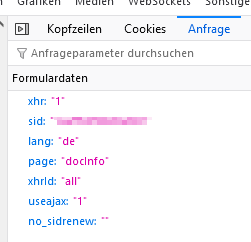
                      02ee9ac1-2030-4889-9805-3a77d148b8b4-grafik.png

                      Intel(R) Celeron(R) CPU N3000 @ 1.04GHz 8G RAM 480G SSD
                      Virtualization : unprivileged lxc container (debian 13) on Proxmox 9.1.5)
                      Linux pve 6.17.9-1-pve
                      6 GByte RAM für den Container
                      Fritzbox 6591 FW 8.20 (Vodafone Leih-Box)
                      Remote-Access über Wireguard der Fritzbox

                      F 1 Reply Last reply
                      0
                      • MartinPM MartinP

                        Da kann man ja manisch werden, bei dieser Bastelei... ziemlich sperrig die neuen Funktionen ...

                        Das ist das, was zwischen Firefox und Fritzbox beim httpPost ausgetauscht wird ...

                        02ee9ac1-2030-4889-9805-3a77d148b8b4-grafik.png

                        F Offline
                        F Offline
                        fastfoot
                        wrote on last edited by
                        #170

                        @martinp ich mag diese httpGet und httpPost nicht sonderlich, obwohl die Idee dahinter schon sehr gut ist. Mir fehlen da die Async Functionen um die awaiten zu können. Deshalb bevorzuge ich axios direkt, schon wegen der Doku. Anyway, hier sind zwei simple Wrapper die du verwenden kannst, wenn es dir nur um den reinen Aufruf geht dann nimmst du nur die innersten Aufrufe. Ist getestet.

                        const httpGetAsync = (url, options) => {
                            return new Promise((resolve) => {
                                httpGet(url, options, (err, res) => {
                                    if (res.statusCode === 200) {
                                        resolve(res)
                                    };
                                })
                            })
                        }
                        const httpPostAsync = (url, data, options) => {
                            return new Promise((resolve) => {
                                httpPost(url, data, options, (err, res) => {
                                    if (res.statusCode === 200) {
                                        resolve(res)
                                    };
                                })
                            })
                        }
                        // url und data können aus den Options extrahiert werden
                        

                        iobroker läuft unter Docker auf QNAP TS-451+
                        SkriptRecovery: https://forum.iobroker.net/post/930558

                        MartinPM 1 Reply Last reply
                        0
                        • F fastfoot

                          @martinp ich mag diese httpGet und httpPost nicht sonderlich, obwohl die Idee dahinter schon sehr gut ist. Mir fehlen da die Async Functionen um die awaiten zu können. Deshalb bevorzuge ich axios direkt, schon wegen der Doku. Anyway, hier sind zwei simple Wrapper die du verwenden kannst, wenn es dir nur um den reinen Aufruf geht dann nimmst du nur die innersten Aufrufe. Ist getestet.

                          const httpGetAsync = (url, options) => {
                              return new Promise((resolve) => {
                                  httpGet(url, options, (err, res) => {
                                      if (res.statusCode === 200) {
                                          resolve(res)
                                      };
                                  })
                              })
                          }
                          const httpPostAsync = (url, data, options) => {
                              return new Promise((resolve) => {
                                  httpPost(url, data, options, (err, res) => {
                                      if (res.statusCode === 200) {
                                          resolve(res)
                                      };
                                  })
                              })
                          }
                          // url und data können aus den Options extrahiert werden
                          
                          MartinPM Online
                          MartinPM Online
                          MartinP
                          wrote on last edited by
                          #171

                          @fastfoot Die Fritzbox schickt ja schon etwas zurück - das ist aber nicht die JSON-Tabelle, die ich erwarten würde ...

                          Ich vermute ja noch immer, dass da irgendetwas in dem, was ich dem httpPost() übergebe nicht korrekt ist... Werde das aber trotzdem mal probieren

                          Intel(R) Celeron(R) CPU N3000 @ 1.04GHz 8G RAM 480G SSD
                          Virtualization : unprivileged lxc container (debian 13) on Proxmox 9.1.5)
                          Linux pve 6.17.9-1-pve
                          6 GByte RAM für den Container
                          Fritzbox 6591 FW 8.20 (Vodafone Leih-Box)
                          Remote-Access über Wireguard der Fritzbox

                          F 1 Reply Last reply
                          0
                          • MartinPM MartinP

                            @fastfoot Die Fritzbox schickt ja schon etwas zurück - das ist aber nicht die JSON-Tabelle, die ich erwarten würde ...

                            Ich vermute ja noch immer, dass da irgendetwas in dem, was ich dem httpPost() übergebe nicht korrekt ist... Werde das aber trotzdem mal probieren

                            F Offline
                            F Offline
                            fastfoot
                            wrote on last edited by
                            #172

                            @martinp das ist mit der FB getestet :-)

                            iobroker läuft unter Docker auf QNAP TS-451+
                            SkriptRecovery: https://forum.iobroker.net/post/930558

                            MartinPM 1 Reply Last reply
                            0
                            • F fastfoot

                              @martinp das ist mit der FB getestet :-)

                              MartinPM Online
                              MartinPM Online
                              MartinP
                              wrote on last edited by MartinP
                              #173

                              @fastfoot den Status 200 habe ich ja auch schon hinbekommen, nur war der Rest des Ergebnisses zwar VIEL, aber völlig unbrauchbar .....Hilfstexte von AVM usw ...

                              	script.js.Fritzbox.DOCSISV01: data: <!DOCTYPE html> <html lang="de"> <head> <meta http-equiv=content-type content="text/html; charset=utf-8" /> <meta http-equiv="Cache-Control" content="private, no-transform" /> <meta http-equiv="X-UA-Compatible" content="IE=edge" /> <meta name="format-detection" content="telephone=no" /> <meta http-equiv="x-rim-auto-match" content="none" /> <meta name="viewport" content="width=device-width, initial-scale=1.0, user-scalable=yes, minimal-ui" /> <meta name="mobile-web-app-capable" content="yes" /> <meta name="apple-mobile-web-app-capable" content="yes" /> <meta name="apple-mobile-web-app-status-bar-style" content="black-translucent" /> <meta http-equiv="cleartype" content="on"> <link rel="icon" href="/favicon.ico" size="16x16"/> <link rel="icon" href="/icon.svg" type="image/svg+xml"/> <link rel="icon" href="/icon.png" type="image/png"/> <link rel="apple-touch-icon" href="/apple-touch-icon.png" /> <link rel="apple-touch-startup-image" href="/apple-touch-icon.png" /> <style> /*@font-face { font-family: 'Source Sans Pro'; font-style: italic; font-stretch: normal; font-weight: 400; src: url('/assets/fonts/SourceSansPro-Italic.woff2') format('woff2'); }*/ @font-face { font-family: 'Source Sans Pro'; font-style: normal; font-stretch: normal; font-weight: 400; src: url('/assets/fonts/source-sans-pro-v11-latin-ext_latin-regular.woff2') format('woff2'); } @font-face { font-family: 'Source Sans Pro'; font-style: normal; font-stretch: normal; font-weight: 600; src: url('/assets/fonts/source-sans-pro-v11-latin-ext_latin-600.woff2') format('woff2'); } @font-face { font-family: 'Source Sans Pro'; font-style: normal; font-stretch: normal; font-weight: 900; src: url('/assets/fonts/SourceSansPro-Black.woff2') format('woff2'); } html, input, textarea, keygen, select, button { font-family: 'Source Sans Pro', Arial, sans-serif; font-size: 100%; } </style> <link rel="stylesheet" type="text/css" href="/css/box.css"> <link rel='stylesheet' type='text/css' href="/css/rd/login.css"/> <title> FRITZ!Box </title> </head> <body> <script> var gNbc = false; </script> <script src="/js/browser.js"></script> <script src="/js/vendor.js"></script> <script src="/js/box-login.js"></script> <script type="module"> import { setConfig } from "/js/config.js"; import login from "/js/login.js"; setConfig({"ZIGBEE":false,"GUI_IS_POWERLINE":false,"isDebug":false,"gu_type":"release","WLAN":{"is_double_wlan":false},"GUI_IS_REPEATER":false,"GUI_IS_GATEWAY":false,"language":"de","GUI_HIDE_TEASER":false}); const data = {"firstTenMin":fa
                              

                              Intel(R) Celeron(R) CPU N3000 @ 1.04GHz 8G RAM 480G SSD
                              Virtualization : unprivileged lxc container (debian 13) on Proxmox 9.1.5)
                              Linux pve 6.17.9-1-pve
                              6 GByte RAM für den Container
                              Fritzbox 6591 FW 8.20 (Vodafone Leih-Box)
                              Remote-Access über Wireguard der Fritzbox

                              F 1 Reply Last reply
                              0
                              • MartinPM MartinP

                                @fastfoot den Status 200 habe ich ja auch schon hinbekommen, nur war der Rest des Ergebnisses zwar VIEL, aber völlig unbrauchbar .....Hilfstexte von AVM usw ...

                                	script.js.Fritzbox.DOCSISV01: data: <!DOCTYPE html> <html lang="de"> <head> <meta http-equiv=content-type content="text/html; charset=utf-8" /> <meta http-equiv="Cache-Control" content="private, no-transform" /> <meta http-equiv="X-UA-Compatible" content="IE=edge" /> <meta name="format-detection" content="telephone=no" /> <meta http-equiv="x-rim-auto-match" content="none" /> <meta name="viewport" content="width=device-width, initial-scale=1.0, user-scalable=yes, minimal-ui" /> <meta name="mobile-web-app-capable" content="yes" /> <meta name="apple-mobile-web-app-capable" content="yes" /> <meta name="apple-mobile-web-app-status-bar-style" content="black-translucent" /> <meta http-equiv="cleartype" content="on"> <link rel="icon" href="/favicon.ico" size="16x16"/> <link rel="icon" href="/icon.svg" type="image/svg+xml"/> <link rel="icon" href="/icon.png" type="image/png"/> <link rel="apple-touch-icon" href="/apple-touch-icon.png" /> <link rel="apple-touch-startup-image" href="/apple-touch-icon.png" /> <style> /*@font-face { font-family: 'Source Sans Pro'; font-style: italic; font-stretch: normal; font-weight: 400; src: url('/assets/fonts/SourceSansPro-Italic.woff2') format('woff2'); }*/ @font-face { font-family: 'Source Sans Pro'; font-style: normal; font-stretch: normal; font-weight: 400; src: url('/assets/fonts/source-sans-pro-v11-latin-ext_latin-regular.woff2') format('woff2'); } @font-face { font-family: 'Source Sans Pro'; font-style: normal; font-stretch: normal; font-weight: 600; src: url('/assets/fonts/source-sans-pro-v11-latin-ext_latin-600.woff2') format('woff2'); } @font-face { font-family: 'Source Sans Pro'; font-style: normal; font-stretch: normal; font-weight: 900; src: url('/assets/fonts/SourceSansPro-Black.woff2') format('woff2'); } html, input, textarea, keygen, select, button { font-family: 'Source Sans Pro', Arial, sans-serif; font-size: 100%; } </style> <link rel="stylesheet" type="text/css" href="/css/box.css"> <link rel='stylesheet' type='text/css' href="/css/rd/login.css"/> <title> FRITZ!Box </title> </head> <body> <script> var gNbc = false; </script> <script src="/js/browser.js"></script> <script src="/js/vendor.js"></script> <script src="/js/box-login.js"></script> <script type="module"> import { setConfig } from "/js/config.js"; import login from "/js/login.js"; setConfig({"ZIGBEE":false,"GUI_IS_POWERLINE":false,"isDebug":false,"gu_type":"release","WLAN":{"is_double_wlan":false},"GUI_IS_REPEATER":false,"GUI_IS_GATEWAY":false,"language":"de","GUI_HIDE_TEASER":false}); const data = {"firstTenMin":fa
                                
                                F Offline
                                F Offline
                                fastfoot
                                wrote on last edited by fastfoot
                                #174

                                @martinp options und Aufruf?

                                Edit: Wenn wie weiter oben dann mal mit meinem Aufruf vergleichen!

                                iobroker läuft unter Docker auf QNAP TS-451+
                                SkriptRecovery: https://forum.iobroker.net/post/930558

                                MartinPM 1 Reply Last reply
                                0
                                • F fastfoot

                                  @martinp options und Aufruf?

                                  Edit: Wenn wie weiter oben dann mal mit meinem Aufruf vergleichen!

                                  MartinPM Online
                                  MartinPM Online
                                  MartinP
                                  wrote on last edited by
                                  #175

                                  @fastfoot

                                  Das hatte ich als Gedächtnisstütze für die vorherige Version auskommentiert behalten

                                  //    var options = {
                                  //        url: docsisURL, 
                                  //        method: 'POST',
                                  //        headers: {
                                  //            'Content-Type': 'application/x-www-form-urlencoded'
                                  //        },
                                  //        body: 'xhr=1&sid=' + sid + '&lang=de&page=docInfo&xhrId=all&no_sidrenew='
                                  //    };toString
                                  //    request(options, function(error, response, body) 
                                  

                                  Da der Beginn der Auswerteroutine - mit viel Logging aktuell -

                                        httpPost(docsisURL, 
                                          {
                                  //            title : 'channels',
                                              body: 'xhr=1&sid=' + sid + '&lang=de&page=docinfo&xhrId=all&no_sidrenew=',
                                  //            user_id : '1'
                                          }, 
                                          {
                                  
                                              timeout: 2000,
                                              // responseType: 'arraybuffer',
                                  //            bearerAuth: sid,
                                              headers: {
                                                 'Content-Type': 'application/x-www-form-urlencoded'
                                              },
                                          },
                                          (error, response) => {
                                          if (!error && response.statusCode == 200) {
                                              log ('status ' + response.statusCode);
                                              log ('headers ' + response.headers);
                                              log ('data: ' + response.data);
                                              const body = response.data;
                                              // tableData = JSON.parse(body);
                                              tableData = response.data;
                                              if(tableData){
                                  

                                  Intel(R) Celeron(R) CPU N3000 @ 1.04GHz 8G RAM 480G SSD
                                  Virtualization : unprivileged lxc container (debian 13) on Proxmox 9.1.5)
                                  Linux pve 6.17.9-1-pve
                                  6 GByte RAM für den Container
                                  Fritzbox 6591 FW 8.20 (Vodafone Leih-Box)
                                  Remote-Access über Wireguard der Fritzbox

                                  F 2 Replies Last reply
                                  0
                                  • MartinPM MartinP

                                    @fastfoot

                                    Das hatte ich als Gedächtnisstütze für die vorherige Version auskommentiert behalten

                                    //    var options = {
                                    //        url: docsisURL, 
                                    //        method: 'POST',
                                    //        headers: {
                                    //            'Content-Type': 'application/x-www-form-urlencoded'
                                    //        },
                                    //        body: 'xhr=1&sid=' + sid + '&lang=de&page=docInfo&xhrId=all&no_sidrenew='
                                    //    };toString
                                    //    request(options, function(error, response, body) 
                                    

                                    Da der Beginn der Auswerteroutine - mit viel Logging aktuell -

                                          httpPost(docsisURL, 
                                            {
                                    //            title : 'channels',
                                                body: 'xhr=1&sid=' + sid + '&lang=de&page=docinfo&xhrId=all&no_sidrenew=',
                                    //            user_id : '1'
                                            }, 
                                            {
                                    
                                                timeout: 2000,
                                                // responseType: 'arraybuffer',
                                    //            bearerAuth: sid,
                                                headers: {
                                                   'Content-Type': 'application/x-www-form-urlencoded'
                                                },
                                            },
                                            (error, response) => {
                                            if (!error && response.statusCode == 200) {
                                                log ('status ' + response.statusCode);
                                                log ('headers ' + response.headers);
                                                log ('data: ' + response.data);
                                                const body = response.data;
                                                // tableData = JSON.parse(body);
                                                tableData = response.data;
                                                if(tableData){
                                    
                                    F Offline
                                    F Offline
                                    fastfoot
                                    wrote on last edited by
                                    #176

                                    @martinp

                                    httpPost(url,options.body, options,callback)
                                    

                                    der zweite Parameter muss ein String sein und options wie im Original.

                                    iobroker läuft unter Docker auf QNAP TS-451+
                                    SkriptRecovery: https://forum.iobroker.net/post/930558

                                    1 Reply Last reply
                                    0
                                    • MartinPM MartinP

                                      @fastfoot

                                      Das hatte ich als Gedächtnisstütze für die vorherige Version auskommentiert behalten

                                      //    var options = {
                                      //        url: docsisURL, 
                                      //        method: 'POST',
                                      //        headers: {
                                      //            'Content-Type': 'application/x-www-form-urlencoded'
                                      //        },
                                      //        body: 'xhr=1&sid=' + sid + '&lang=de&page=docInfo&xhrId=all&no_sidrenew='
                                      //    };toString
                                      //    request(options, function(error, response, body) 
                                      

                                      Da der Beginn der Auswerteroutine - mit viel Logging aktuell -

                                            httpPost(docsisURL, 
                                              {
                                      //            title : 'channels',
                                                  body: 'xhr=1&sid=' + sid + '&lang=de&page=docinfo&xhrId=all&no_sidrenew=',
                                      //            user_id : '1'
                                              }, 
                                              {
                                      
                                                  timeout: 2000,
                                                  // responseType: 'arraybuffer',
                                      //            bearerAuth: sid,
                                                  headers: {
                                                     'Content-Type': 'application/x-www-form-urlencoded'
                                                  },
                                              },
                                              (error, response) => {
                                              if (!error && response.statusCode == 200) {
                                                  log ('status ' + response.statusCode);
                                                  log ('headers ' + response.headers);
                                                  log ('data: ' + response.data);
                                                  const body = response.data;
                                                  // tableData = JSON.parse(body);
                                                  tableData = response.data;
                                                  if(tableData){
                                      
                                      F Offline
                                      F Offline
                                      fastfoot
                                      wrote on last edited by
                                      #177

                                      @martinp oder ganz konkret:

                                      let data = `xhr=1&sid=${SID}&lang=de&page=${page}&xhrId=all`
                                      let url = docsisURL;
                                      let options = {
                                          headers: {
                                              "Content-Type": "application/x-www-form-urlencoded",
                                          },
                                      }
                                      httpPost(url, data, options, (err, res) => {
                                          if (res.statusCode === 200) {
                                              let fbData = JSON.parse(res.data); // nur wenn ein JSON erwartet wird, 
                                          }
                                      })

                                      

                                      iobroker läuft unter Docker auf QNAP TS-451+
                                      SkriptRecovery: https://forum.iobroker.net/post/930558

                                      MartinPM 1 Reply Last reply
                                      0
                                      • F fastfoot

                                        @martinp oder ganz konkret:

                                        let data = `xhr=1&sid=${SID}&lang=de&page=${page}&xhrId=all`
                                        let url = docsisURL;
                                        let options = {
                                            headers: {
                                                "Content-Type": "application/x-www-form-urlencoded",
                                            },
                                        }
                                        httpPost(url, data, options, (err, res) => {
                                            if (res.statusCode === 200) {
                                                let fbData = JSON.parse(res.data); // nur wenn ein JSON erwartet wird, 
                                            }
                                        })
                                        
                                        MartinPM Online
                                        MartinPM Online
                                        MartinP
                                        wrote on last edited by
                                        #178

                                        @fastfoot Wollte doch gerade zum Abendbrot gehen, aber jetzt juckt es in den Fingern ;-)

                                        Intel(R) Celeron(R) CPU N3000 @ 1.04GHz 8G RAM 480G SSD
                                        Virtualization : unprivileged lxc container (debian 13) on Proxmox 9.1.5)
                                        Linux pve 6.17.9-1-pve
                                        6 GByte RAM für den Container
                                        Fritzbox 6591 FW 8.20 (Vodafone Leih-Box)
                                        Remote-Access über Wireguard der Fritzbox

                                        F 1 Reply Last reply
                                        0
                                        • MartinPM MartinP

                                          @fastfoot Wollte doch gerade zum Abendbrot gehen, aber jetzt juckt es in den Fingern ;-)

                                          F Offline
                                          F Offline
                                          fastfoot
                                          wrote on last edited by fastfoot
                                          #179

                                          @martinp ein simpler Test wäre dann console.log(fbData.timeTillLogout)). Sollte 1200 zeigen. Die eigentlichen Kanal-Daten finden sich in fbbData.data

                                          iobroker läuft unter Docker auf QNAP TS-451+
                                          SkriptRecovery: https://forum.iobroker.net/post/930558

                                          1 Reply Last reply
                                          0
                                          Reply
                                          • Reply as topic
                                          Log in to reply
                                          • Oldest to Newest
                                          • Newest to Oldest
                                          • Most Votes


                                          Support us

                                          ioBroker
                                          Community Adapters
                                          Donate
                                          FAQ Cloud / IOT
                                          HowTo: Node.js-Update
                                          HowTo: Backup/Restore
                                          Downloads
                                          BLOG

                                          301

                                          Online

                                          32.7k

                                          Users

                                          82.5k

                                          Topics

                                          1.3m

                                          Posts
                                          Community
                                          Impressum | Datenschutz-Bestimmungen | Nutzungsbedingungen | Einwilligungseinstellungen
                                          ioBroker Community 2014-2025
                                          logo
                                          • Login

                                          • Don't have an account? Register

                                          • Login or register to search.
                                          • First post
                                            Last post
                                          0
                                          • Home
                                          • Recent
                                          • Tags
                                          • Unread 0
                                          • Categories
                                          • Unreplied
                                          • Popular
                                          • GitHub
                                          • Docu
                                          • Hilfe