Skip to content
  • Home
  • Recent
  • Tags
  • 0 Unread 0
  • Categories
  • Unreplied
  • Popular
  • GitHub
  • Docu
  • Hilfe
Skins
  • Light
  • Brite
  • Cerulean
  • Cosmo
  • Flatly
  • Journal
  • Litera
  • Lumen
  • Lux
  • Materia
  • Minty
  • Morph
  • Pulse
  • Sandstone
  • Simplex
  • Sketchy
  • Spacelab
  • United
  • Yeti
  • Zephyr
  • Dark
  • Cyborg
  • Darkly
  • Quartz
  • Slate
  • Solar
  • Superhero
  • Vapor

  • Default (No Skin)
  • No Skin
Collapse
ioBroker Logo

Community Forum

donate donate
  1. ioBroker Community Home
  2. Deutsch
  3. Tester
  4. Test Adapter Linux Control v1.x.x

NEWS

  • Jahresrückblick 2025 – unser neuer Blogbeitrag ist online! ✨
    BluefoxB
    Bluefox
    16
    1
    1.9k

  • Neuer Blogbeitrag: Monatsrückblick - Dezember 2025 🎄
    BluefoxB
    Bluefox
    13
    1
    905

  • Weihnachtsangebot 2025! 🎄
    BluefoxB
    Bluefox
    25
    1
    2.2k

Test Adapter Linux Control v1.x.x

Scheduled Pinned Locked Moved Tester
adaptercontrolhardwarelinuxsteuern
715 Posts 73 Posters 183.2k Views 66 Watching
  • Oldest to Newest
  • Newest to Oldest
  • Most Votes
Reply
  • Reply as topic
Log in to reply
This topic has been deleted. Only users with topic management privileges can see it.
  • HomoranH Homoran

    @Thomas-Braun
    @Scrounger

    Habe noch "ein wenig" rumgespielt.

    Auch wenn ich auf der Konsole als user den Befehl sudo -S du -sk /opt/iobroker/iobroker-data | awk '{ print $1 /1024 }' ausführen will, kommt der Hinweis, dass der User nicht berechtigt ist....

    Führe ich ihn jedoch ohne sudo -S aus klappt es :scream:

    Habe dann in der Konfiguration der Instanz, den Haken bei "verwende sudo" herausgenommen.
    Dann fliegen dem Adapter die richtig bösen Fehlermeldungen schon vorher um die Ohren, weil die anderen Befehle nicht abgearbeitet werden können :cry:

    Aus lauter Verzweiflung habe ich dann das System noch mit apt update && apt upgrade auf den neuesten Stand gebracht - ohne Erfolg

    Werde jetzt mal der Instanz den Zugriff als root erlauben :rolling_on_the_floor_laughing:

    EDIT:
    Als Root klappt es:
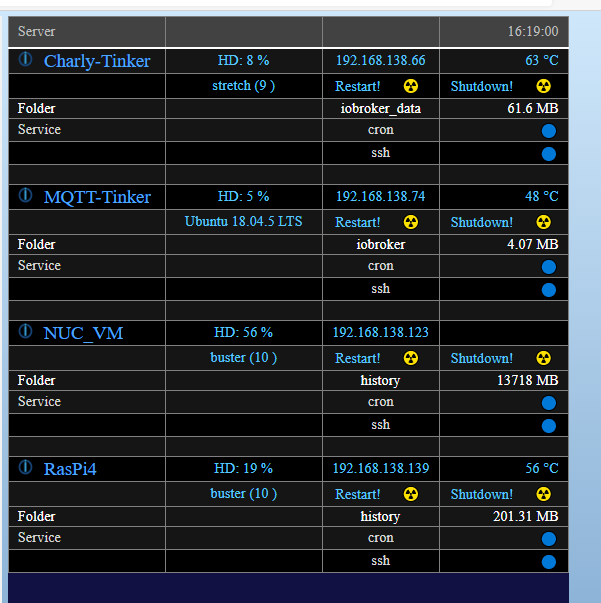
    Tinker_als_root.png

    Ist aber für mich kein Dauerzustand
    PS der Tinker wurde umbenannt -> MQTT-Tinker

    ScroungerS Offline
    ScroungerS Offline
    Scrounger
    Developer
    wrote on last edited by
    #84

    @Homoran sagte in Test Adapter Linux Control v0.x.x:

    Auch wenn ich auf der Konsole als user den Befehl sudo -S du -sk /opt/iobroker/iobroker-data | awk '{ print $1 /1024 }' ausführen will, kommt der Hinweis, dass der User nicht berechtigt ist....

    Führe ich ihn jedoch ohne sudo -S aus klappt es :scream:

    Habe dann in der Konfiguration der Instanz, den Haken bei "verwende sudo" herausgenommen.
    Dann fliegen dem Adapter die richtig bösen Fehlermeldungen schon vorher um die Ohren, weil die anderen Befehle nicht abgearbeitet werden können :cry:

    Mhh da bin ich dann auch ratlos. Dann mach die Folder abfragen als eigene Befehle, kannst hier ja die gleiche Strutkur verwenden. Oder - siehe unten ;-)

    EDIT:
    Als Root klappt es:
    Tinker_als_root.png

    Ist aber für mich kein Dauerzustand
    PS der Tinker wurde umbenannt -> MQTT-Tinker

    Dann geh doch per root mit rsa key drauf, das ist auch ausreichend sicher, solange du den key nicht weiter gibts. Eine gute Anleitung wie man das einrichtet findest du hier:
    https://www.howtoforge.de/anleitung/key-basierte-ssh-logins-mit-putty/

    HomoranH 1 Reply Last reply
    0
    • ScroungerS Scrounger

      @Homoran sagte in Test Adapter Linux Control v0.x.x:

      Auch wenn ich auf der Konsole als user den Befehl sudo -S du -sk /opt/iobroker/iobroker-data | awk '{ print $1 /1024 }' ausführen will, kommt der Hinweis, dass der User nicht berechtigt ist....

      Führe ich ihn jedoch ohne sudo -S aus klappt es :scream:

      Habe dann in der Konfiguration der Instanz, den Haken bei "verwende sudo" herausgenommen.
      Dann fliegen dem Adapter die richtig bösen Fehlermeldungen schon vorher um die Ohren, weil die anderen Befehle nicht abgearbeitet werden können :cry:

      Mhh da bin ich dann auch ratlos. Dann mach die Folder abfragen als eigene Befehle, kannst hier ja die gleiche Strutkur verwenden. Oder - siehe unten ;-)

      EDIT:
      Als Root klappt es:
      Tinker_als_root.png

      Ist aber für mich kein Dauerzustand
      PS der Tinker wurde umbenannt -> MQTT-Tinker

      Dann geh doch per root mit rsa key drauf, das ist auch ausreichend sicher, solange du den key nicht weiter gibts. Eine gute Anleitung wie man das einrichtet findest du hier:
      https://www.howtoforge.de/anleitung/key-basierte-ssh-logins-mit-putty/

      HomoranH Do not disturb
      HomoranH Do not disturb
      Homoran
      Global Moderator Administrators
      wrote on last edited by
      #85

      @Scrounger sagte in Test Adapter Linux Control v0.x.x:

      Eine gute Anleitung wie man das einrichtet findest du hier:

      Danke!

      kein Support per PN! - Fragen im Forum stellen - es gibt fast nichts, was nicht auch für andere interessant ist.

      Benutzt das Voting rechts unten im Beitrag wenn er euch geholfen hat.

      der Installationsfixer: curl -fsL https://iobroker.net/fix.sh | bash -

      1 Reply Last reply
      0
      • HomoranH Do not disturb
        HomoranH Do not disturb
        Homoran
        Global Moderator Administrators
        wrote on last edited by Homoran
        #86

        Bitte nicht hauen, ich habe mal das nächste unmögliche Ding losgetreten.

        Ich hatte erwartet, dass es da "Probleme" geben wird und da @Scrounger zu Recht nur Debian und Ubuntu LTS Versionen unterstützen will, ist dies nur eine kleine Randbemerkung über das was mal jemand -in diesem Falle ich- mit dem Adapter probiert hat:
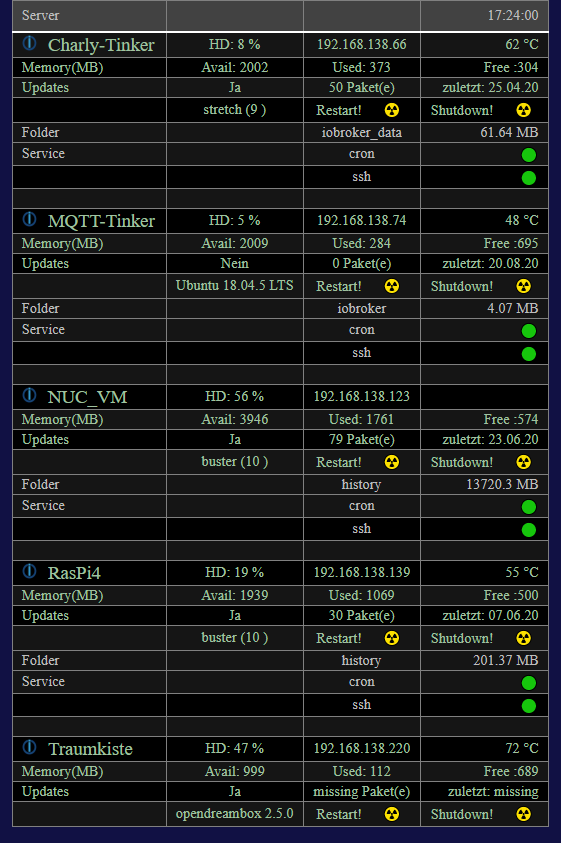
        Traumkiste.png

        Im letzten Block werden einige Daten von der Dreambox geholt.
        Wie zu erwarten hagelte es Fehler im log, wegen der anderen Befehle, die das OS der DM920 nicht beherrschte.

        Aber die Infos sind auch schon mal brauchbar.

        kein Support per PN! - Fragen im Forum stellen - es gibt fast nichts, was nicht auch für andere interessant ist.

        Benutzt das Voting rechts unten im Beitrag wenn er euch geholfen hat.

        der Installationsfixer: curl -fsL https://iobroker.net/fix.sh | bash -

        ScroungerS 1 Reply Last reply
        0
        • HomoranH Homoran

          Bitte nicht hauen, ich habe mal das nächste unmögliche Ding losgetreten.

          Ich hatte erwartet, dass es da "Probleme" geben wird und da @Scrounger zu Recht nur Debian und Ubuntu LTS Versionen unterstützen will, ist dies nur eine kleine Randbemerkung über das was mal jemand -in diesem Falle ich- mit dem Adapter probiert hat:

          Traumkiste.png

          Im letzten Block werden einige Daten von der Dreambox geholt.
          Wie zu erwarten hagelte es Fehler im log, wegen der anderen Befehle, die das OS der DM920 nicht beherrschte.

          Aber die Infos sind auch schon mal brauchbar.

          ScroungerS Offline
          ScroungerS Offline
          Scrounger
          Developer
          wrote on last edited by Scrounger
          #87

          @Homoran
          Hehe nice :grin: für meine vu gibt's zum Glück schon nen Adapter.
          Hab sowas mit meinem Unifi UDMPro - UbiOs gemacht und lese damit die vpn l2tp Verbindungen aus.

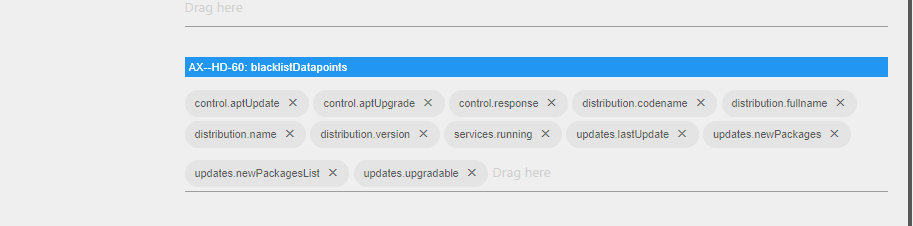
          Tipp: Allen Datenpunkte des Host (DreamBox) auf die Blacklist ziehen, dann hast auch keine Fehlermeldung mehr.

          liv-in-skyL 1 Reply Last reply
          0
          • liv-in-skyL liv-in-sky

            @Homoran sagte in Test Adapter Linux Control v0.x.x:

            Dannbleiben wir hier bei dem Thema!
            müssen die alten states gelöscht werden?
            der neue state heisst is-online, die alten isOnline!

            adpter stop - den linux-control.0 ordner löschen - adapter start

            und script stoppen

            ChaotC Offline
            ChaotC Offline
            Chaot
            wrote on last edited by
            #88

            @liv-in-sky
            Ich habe eine Fehlermeldung auf einem Container:

            linux-control.0	2020-08-20 20:44:22.050	info	(11390) successful received data from Jukebox (192.168.8.57:22)
            linux-control.0	2020-08-20 20:44:21.856	error	(11390) [cmdAptUpdate] Jukebox (192.168.8.57:22): error: Cannot read property 'toString' of undefined, stack: TypeError: Cannot read property 'toString' of undefined at Converter.fromString (/opt/
            linux-control.0	2020-08-20 20:44:21.814	error	(11390) [cmdAptUpdate] Jukebox (192.168.8.57:22): response error: [cmdAptUpdate] Jukebox (192.168.8.57:22): perl: warning: Setting locale failed. perl: warning: Please check that your locale settings:
            linux-control.0	2020-08-20 20:44:04.997	info	(11390) getting data from Jukebox (192.168.8.57:22)
            

            System ist ubuntu 20.04

            ioBroker auf NUC unter Proxmox; VIS: 12" Touchscreen und 17" Touch; Lichtsteuerung, Thermometer und Sensoren: Tasmota (39); Ambiente Beleuchtung: WLED (9); Heizung: DECT Thermostate (9) an Fritz 6690; EMS-ESP; 1 Echo V2; 3 Echo DOT; 1 Echo Connect; 2 Echo Show 5; Unifi Ap-Ac Lite.

            Thomas BraunT 1 Reply Last reply
            0
            • ChaotC Chaot

              @liv-in-sky
              Ich habe eine Fehlermeldung auf einem Container:

              linux-control.0	2020-08-20 20:44:22.050	info	(11390) successful received data from Jukebox (192.168.8.57:22)
              linux-control.0	2020-08-20 20:44:21.856	error	(11390) [cmdAptUpdate] Jukebox (192.168.8.57:22): error: Cannot read property 'toString' of undefined, stack: TypeError: Cannot read property 'toString' of undefined at Converter.fromString (/opt/
              linux-control.0	2020-08-20 20:44:21.814	error	(11390) [cmdAptUpdate] Jukebox (192.168.8.57:22): response error: [cmdAptUpdate] Jukebox (192.168.8.57:22): perl: warning: Setting locale failed. perl: warning: Please check that your locale settings:
              linux-control.0	2020-08-20 20:44:04.997	info	(11390) getting data from Jukebox (192.168.8.57:22)
              

              System ist ubuntu 20.04

              Thomas BraunT Online
              Thomas BraunT Online
              Thomas Braun
              Most Active
              wrote on last edited by
              #89

              @Chaot locale gesetzt?

              Linux-Werkzeugkasten:
              https://forum.iobroker.net/topic/42952/der-kleine-iobroker-linux-werkzeugkasten
              NodeJS Fixer Skript:
              https://forum.iobroker.net/topic/68035/iob-node-fix-skript
              iob_diag: curl -sLf -o diag.sh https://iobroker.net/diag.sh && bash diag.sh

              ChaotC 1 Reply Last reply
              0
              • Thomas BraunT Thomas Braun

                @Chaot locale gesetzt?

                ChaotC Offline
                ChaotC Offline
                Chaot
                wrote on last edited by Chaot
                #90

                @Thomas-Braun ???
                Sorry, dazu habe ich von Linux viel zu wenig Ahnung.
                Was ist das und wie geht das?

                Ok, habe ich auf de_DE geändert. Scheint zu klappen.

                DANKE

                ioBroker auf NUC unter Proxmox; VIS: 12" Touchscreen und 17" Touch; Lichtsteuerung, Thermometer und Sensoren: Tasmota (39); Ambiente Beleuchtung: WLED (9); Heizung: DECT Thermostate (9) an Fritz 6690; EMS-ESP; 1 Echo V2; 3 Echo DOT; 1 Echo Connect; 2 Echo Show 5; Unifi Ap-Ac Lite.

                1 Reply Last reply
                0
                • ScroungerS Scrounger

                  @Homoran
                  Hehe nice :grin: für meine vu gibt's zum Glück schon nen Adapter.
                  Hab sowas mit meinem Unifi UDMPro - UbiOs gemacht und lese damit die vpn l2tp Verbindungen aus.

                  Tipp: Allen Datenpunkte des Host (DreamBox) auf die Blacklist ziehen, dann hast auch keine Fehlermeldung mehr.

                  liv-in-skyL Offline
                  liv-in-skyL Offline
                  liv-in-sky
                  wrote on last edited by
                  #91

                  @Scrounger sagte in Test Adapter Linux Control v0.x.x:

                  @Homoran
                  Hehe nice :grin: für meine vu gibt's zum Glück schon nen Adapter.
                  Hab sowas mit meinem Unifi UDMPro - UbiOs gemacht und lese damit die vpn l2tp Verbindungen aus.

                  Tipp: Allen Datenpunkte des Host (DreamBox) auf die Blacklist ziehen, dann hast auch keine Fehlermeldung mehr.

                  wollte nur mal fragen - absolut keine prio - habe meine axhd60 ( enigma-receiver) eingebunden
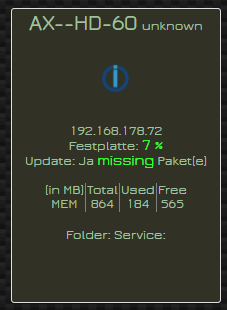
                  Image 1.png

                  habe alle datenpunkte entfernt außer ip, is-online, restart und shutdown. 2 befehle sind noch drin - werden auch angezeigt

                  Image 2.png

                  ich bekomme leider fehler, obwohl ich die daten dazu nicht abfrage (systemctl, os release)

                  
                  linux-control.0	2020-08-21 07:21:32.593	error	at runMicrotasks (<anonymous>)
                  linux-control.0	2020-08-21 07:21:32.593	error	at LinuxControl.sendCommand (/opt/iobroker/node_modules/iobroker.linux-control/main.js:749:26)
                  linux-control.0	2020-08-21 07:21:32.593	error	(24951) [servicesInfo] AX--HD-60 (192.168.178.72:22): response error: [servicesInfo] AX--HD-60 (192.168.178.72:22): bash: systemctl: command not found, stack: ResponseError: [servicesInfo] AX--HD-60
                  linux-control.0	2020-08-21 07:21:32.578	error	at LinuxControl.refreshHost (/opt/iobroker/node_modules/iobroker.linux-control/main.js:71:5)
                  linux-control.0	2020-08-21 07:21:32.578	error	at LinuxControl.updateInfos (/opt/iobroker/node_modules/iobroker.linux-control/main.js:512:5)
                  linux-control.0	2020-08-21 07:21:32.578	error	at LinuxControl.cmdAptUpdate (/opt/iobroker/node_modules/iobroker.linux-control/main.js:609:21)
                  linux-control.0	2020-08-21 07:21:32.578	error	at processTicksAndRejections (internal/process/task_queues.js:97:5)
                  linux-control.0	2020-08-21 07:21:32.578	error	at runMicrotasks (<anonymous>)
                  linux-control.0	2020-08-21 07:21:32.578	error	at LinuxControl.sendCommand (/opt/iobroker/node_modules/iobroker.linux-control/main.js:749:26)
                  linux-control.0	2020-08-21 07:21:32.578	error	(24951) [cmdAptUpdate] AX--HD-60 (192.168.178.72:22): response error: [cmdAptUpdate] AX--HD-60 (192.168.178.72:22): bash: apt-get: command not found, stack: ResponseError: [cmdAptUpdate] AX--HD-60 (1
                  linux-control.0	2020-08-21 07:21:32.565	error	at LinuxControl.refreshHost (/opt/iobroker/node_modules/iobroker.linux-control/main.js:70:5)
                  linux-control.0	2020-08-21 07:21:32.565	error	at LinuxControl.distributionInfo (/opt/iobroker/node_modules/iobroker.linux-control/main.js:458:21)
                  linux-control.0	2020-08-21 07:21:32.565	error	at processTicksAndRejections (internal/process/task_queues.js:97:5)
                  linux-control.0	2020-08-21 07:21:32.565	error	at runMicrotasks (<anonymous>)
                  linux-control.0	2020-08-21 07:21:32.565	error	at LinuxControl.sendCommand (/opt/iobroker/node_modules/iobroker.linux-control/main.js:749:26)
                  linux-control.0	2020-08-21 07:21:32.565	error	(24951) [distributionInfo] AX--HD-60 (192.168.178.72:22): response error: [distributionInfo] AX--HD-60 (192.168.178.72:22): cat: can't open '/etc/os-release': No such file or directory, stack: Respon
                  linux-control.0	2020-08-21 07:20:32.431	error	at LinuxControl.refreshHost (/opt/iobroker/node_modules/iobroker.linux-control/main.js:72:5)
                  linux-control.0	2020-08-21 07:20:32.431	error	at LinuxControl.servicesInfo (/opt/iobroker/node_modules/iobroker.linux-control/main.js:392:21)
                  linux-control.0	2020-08-21 07:20:32.431	error	at processTicksAndRejections (internal/process/task_queues.js:97:5)
                  linux-control.0	2020-08-21 07:20:32.431	error	at runMicrotasks (<anonymous>)
                  linux-control.0	2020-08-21 07:20:32.431	error	at LinuxControl.sendCommand (/opt/iobroker/node_modules/iobroker.linux-control/main.js:749:26)
                  linux-control.0	2020-08-21 07:20:32.431	error	(24951) [servicesInfo] AX--HD-60 (192.168.178.72:22): response error: [servicesInfo] AX--HD-60 (192.168.178.72:22): bash: systemctl: command not found, stack: ResponseError: [servicesInfo] AX--HD-60
                  linux-control.0	2020-08-21 07:20:32.399	error	at LinuxControl.refreshHost (/opt/iobroker/node_modules/iobroker.linux-control/main.js:71:5)
                  linux-control.0	2020-08-21 07:20:32.399	error	at LinuxControl.updateInfos (/opt/iobroker/node_modules/iobroker.linux-control/main.js:512:5)
                  linux-control.0	2020-08-21 07:20:32.399	error	at LinuxControl.cmdAptUpdate (/opt/iobroker/node_modules/iobroker.linux-control/main.js:609:21)
                  linux-control.0	2020-08-21 07:20:32.399	error	at processTicksAndRejections (internal/process/task_queues.js:97:5)
                  linux-control.0	2020-08-21 07:20:32.399	error	at runMicrotasks (<anonymous>)
                  linux-control.0	2020-08-21 07:20:32.399	error	at LinuxControl.sendCommand (/opt/iobroker/node_modules/iobroker.linux-control/main.js:749:26)
                  linux-control.0	2020-08-21 07:20:32.399	error	(24951) [cmdAptUpdate] AX--HD-60 (192.168.178.72:22): response error: [cmdAptUpdate] AX--HD-60 (192.168.178.72:22): bash: apt-get: command not found, stack: ResponseError: [cmdAptUpdate] AX--HD-60 (1
                  linux-control.0	2020-08-21 07:20:32.386	error	at LinuxControl.refreshHost (/opt/iobroker/node_modules/iobroker.linux-control/main.js:70:5)
                  linux-control.0	2020-08-21 07:20:32.386	error	at LinuxControl.distributionInfo (/opt/iobroker/node_modules/iobroker.linux-control/main.js:458:21)
                  linux-control.0	2020-08-21 07:20:32.386	error	at processTicksAndRejections (internal/process/task_queues.js:97:5)
                  linux-control.0	2020-08-21 07:20:32.386	error	at runMicrotasks (<anonymous>)
                  linux-control.0	2020-08-21 07:20:32.386	error	at LinuxControl.sendCommand (/opt/iobroker/node_modules/iobroker.linux-control/main.js:749:26)
                  linux-control.0	2020-08-21 07:20:32.386	error	(24951) [distributionInfo] AX--HD-60 (192.168.178.72:22): response error: [distributionInfo] AX--HD-60 (192.168.178.72:22): cat: can't open '/etc/os-release': No such file or directory, stack: Respon
                  linux-control.0	2020-08-21 07:19:32.061	error	at LinuxControl.refreshHost (/opt/iobroker/node_modules/iobroker.linux-control/main.js:72:5)
                  linux-control.0	2020-08-21 07:19:32.061	error	at LinuxControl.servicesInfo (/opt/iobroker/node_modules/iobroker.linux-control/main.js:392:21)
                  linux-control.0	2020-08-21 07:19:32.061	error	at processTicksAndRejections (internal/process/task_queues.js:97:5)
                  linux-control.0	2020-08-21 07:19:32.061	error	at runMicrotasks (<anonymous>)
                  linux-control.0	2020-08-21 07:19:32.061	error	at LinuxControl.sendCommand (/opt/iobroker/node_modules/iobroker.linux-control/main.js:749:26)
                  linux-control.0	2020-08-21 07:19:32.061	error	(24951) [servicesInfo] AX--HD-60 (192.168.178.72:22): response error: [servicesInfo] AX--HD-60 (192.168.178.72:22): bash: systemctl: command not found, stack: ResponseError: [servicesInfo] AX--HD-60
                  linux-control.0	2020-08-21 07:19:32.044	error	at LinuxControl.refreshHost (/opt/iobroker/node_modules/iobroker.linux-control/main.js:71:5)
                  linux-control.0	2020-08-21 07:19:32.044	error	at LinuxControl.updateInfos (/opt/iobroker/node_modules/iobroker.linux-control/main.js:512:5)
                  linux-control.0	2020-08-21 07:19:32.044	error	at LinuxControl.cmdAptUpdate (/opt/iobroker/node_modules/iobroker.linux-control/main.js:609:21)
                  linux-control.0	2020-08-21 07:19:32.044	error	at processTicksAndRejections (internal/process/task_queues.js:97:5)
                  linux-control.0	2020-08-21 07:19:32.044	error	at runMicrotasks (<anonymous>)
                  linux-control.0	2020-08-21 07:19:32.044	error	at LinuxControl.sendCommand (/opt/iobroker/node_modules/iobroker.linux-control/main.js:749:26)
                  linux-control.0	2020-08-21 07:19:32.044	error	(24951) [cmdAptUpdate] AX--HD-60 (192.168.178.72:22): response error: [cmdAptUpdate] AX--HD-60 (192.168.178.72:22): bash: apt-get: command not found, stack: ResponseError: [cmdAptUpdate] AX--HD-60 (1
                  linux-control.0	2020-08-21 07:19:32.024	error	at LinuxControl.refreshHost (/opt/iobroker/node_modules/iobroker.linux-control/main.js:70:5)
                  linux-control.0	2020-08-21 07:19:32.024	error	at LinuxControl.distributionInfo (/opt/iobroker/node_modules/iobroker.linux-control/main.js:458:21)
                  linux-control.0	2020-08-21 07:19:32.024	error	at processTicksAndRejections (internal/process/task_queues.js:97:5)
                  linux-control.0	2020-08-21 07:19:32.024	error	at runMicrotasks (<anonymous>)
                  linux-control.0	2020-08-21 07:19:32.024	error	at LinuxControl.sendCommand (/opt/iobroker/node_modules/iobroker.linux-control/main.js:749:26)
                  linux-control.0	2020-08-21 07:19:32.024	error	(24951) [distributionInfo] AX--HD-60 (192.168.178.72:22): response error: [distributionInfo] AX--HD-60 (192.168.178.72:22): cat: can't open '/etc/os-release': No such file or directory, stack: Respon
                  linux-control.0	2020-08-21 07:18:31.755	error	at LinuxControl.refreshHost (/opt/iobroker/node_modules/iobroker.linux-control/main.js:72:5)
                  linux-control.0	2020-08-21 07:18:31.755	error	at LinuxControl.servicesInfo (/opt/iobroker/node_modules/iobroker.linux-control/main.js:392:21)
                  linux-control.0	2020-08-21 07:18:31.755	error	at processTicksAndRejections (internal/process/task_queues.js:97:5)
                  linux-control.0	2020-08-21 07:18:31.755	error	at runMicrotasks (<anonymous>)
                  linux-control.0	2020-08-21 07:18:31.755	error	at LinuxControl.sendCommand (/opt/iobroker/node_modules/iobroker.linux-control/main.js:749:26)
                  linux-control.0	2020-08-21 07:18:31.755	error	(24951) [servicesInfo] AX--HD-60 (192.168.178.72:22): response error: [servicesInfo] AX--HD-60 (192.168.178.72:22): bash: systemctl: command not found, stack: ResponseError: [servicesInfo] AX--HD-60
                  linux-control.0	2020-08-21 07:18:31.725	error	at LinuxControl.refreshHost (/opt/iobroker/node_modules/iobroker.linux-control/main.js:71:5)
                  linux-control.0	2020-08-21 07:18:31.725	error	at LinuxControl.updateInfos (/opt/iobroker/node_modules/iobroker.linux-control/main.js:512:5)
                  linux-control.0	2020-08-21 07:18:31.725	error	at LinuxControl.cmdAptUpdate (/opt/iobroker/node_modules/iobroker.linux-control/main.js:609:21)
                  linux-control.0	2020-08-21 07:18:31.725	error	at processTicksAndRejections (internal/process/task_queues.js:97:5)
                  linux-control.0	2020-08-21 07:18:31.725	error	at runMicrotasks (<anonymous>)
                  linux-control.0	2020-08-21 07:18:31.725	error	at LinuxControl.sendCommand (/opt/iobroker/node_modules/iobroker.linux-control/main.js:749:26)
                  linux-control.0	2020-08-21 07:18:31.725	error	(24951) [cmdAptUpdate] AX--HD-60 (192.168.178.72:22): response error: [cmdAptUpdate] AX--HD-60 (192.168.178.72:22): bash: apt-get: command not found, stack: ResponseError: [cmdAptUpdate] AX--HD-60 (1
                  linux-control.0	2020-08-21 07:18:31.619	error	at LinuxControl.refreshHost (/opt/iobroker/node_modules/iobroker.linux-control/main.js:70:5)
                  linux-control.0	2020-08-21 07:18:31.619	error	at LinuxControl.distributionInfo (/opt/iobroker/node_modules/iobroker.linux-control/main.js:458:21)
                  linux-control.0	2020-08-21 07:18:31.619	error	at processTicksAndRejections (internal/process/task_queues.js:97:5)
                  linux-control.0	2020-08-21 07:18:31.619	error	at runMicrotasks (<anonymous>)
                  linux-control.0	2020-08-21 07:18:31.619	error	at LinuxControl.sendCommand (/opt/iobroker/node_modules/iobroker.linux-control/main.js:749:26)
                  linux-control.0	2020-08-21 07:18:31.619	error	(24951) [distributionInfo] AX--HD-60 (192.168.178.72:22): response error: [distributionInfo] AX--HD-60 (192.168.178.72:22): cat: can't open '/etc/os-release': No such file or directory, stack: Respon
                  

                  hast du eine idee dazu ?

                  nach einem gelösten Thread wäre es sinnvoll dies in der Überschrift des ersten Posts einzutragen [gelöst]-... Bitte benutzt das Voting rechts unten im Beitrag wenn er euch geholfen hat. Forum-Tools: PicPick https://picpick.app/en/download/ und ScreenToGif https://www.screentogif.com/downloads.html

                  ScroungerS 1 Reply Last reply
                  0
                  • liv-in-skyL liv-in-sky

                    @Scrounger sagte in Test Adapter Linux Control v0.x.x:

                    @Homoran
                    Hehe nice :grin: für meine vu gibt's zum Glück schon nen Adapter.
                    Hab sowas mit meinem Unifi UDMPro - UbiOs gemacht und lese damit die vpn l2tp Verbindungen aus.

                    Tipp: Allen Datenpunkte des Host (DreamBox) auf die Blacklist ziehen, dann hast auch keine Fehlermeldung mehr.

                    wollte nur mal fragen - absolut keine prio - habe meine axhd60 ( enigma-receiver) eingebunden

                    Image 1.png

                    habe alle datenpunkte entfernt außer ip, is-online, restart und shutdown. 2 befehle sind noch drin - werden auch angezeigt

                    Image 2.png

                    ich bekomme leider fehler, obwohl ich die daten dazu nicht abfrage (systemctl, os release)

                    
                    linux-control.0	2020-08-21 07:21:32.593	error	at runMicrotasks (<anonymous>)
                    linux-control.0	2020-08-21 07:21:32.593	error	at LinuxControl.sendCommand (/opt/iobroker/node_modules/iobroker.linux-control/main.js:749:26)
                    linux-control.0	2020-08-21 07:21:32.593	error	(24951) [servicesInfo] AX--HD-60 (192.168.178.72:22): response error: [servicesInfo] AX--HD-60 (192.168.178.72:22): bash: systemctl: command not found, stack: ResponseError: [servicesInfo] AX--HD-60
                    linux-control.0	2020-08-21 07:21:32.578	error	at LinuxControl.refreshHost (/opt/iobroker/node_modules/iobroker.linux-control/main.js:71:5)
                    linux-control.0	2020-08-21 07:21:32.578	error	at LinuxControl.updateInfos (/opt/iobroker/node_modules/iobroker.linux-control/main.js:512:5)
                    linux-control.0	2020-08-21 07:21:32.578	error	at LinuxControl.cmdAptUpdate (/opt/iobroker/node_modules/iobroker.linux-control/main.js:609:21)
                    linux-control.0	2020-08-21 07:21:32.578	error	at processTicksAndRejections (internal/process/task_queues.js:97:5)
                    linux-control.0	2020-08-21 07:21:32.578	error	at runMicrotasks (<anonymous>)
                    linux-control.0	2020-08-21 07:21:32.578	error	at LinuxControl.sendCommand (/opt/iobroker/node_modules/iobroker.linux-control/main.js:749:26)
                    linux-control.0	2020-08-21 07:21:32.578	error	(24951) [cmdAptUpdate] AX--HD-60 (192.168.178.72:22): response error: [cmdAptUpdate] AX--HD-60 (192.168.178.72:22): bash: apt-get: command not found, stack: ResponseError: [cmdAptUpdate] AX--HD-60 (1
                    linux-control.0	2020-08-21 07:21:32.565	error	at LinuxControl.refreshHost (/opt/iobroker/node_modules/iobroker.linux-control/main.js:70:5)
                    linux-control.0	2020-08-21 07:21:32.565	error	at LinuxControl.distributionInfo (/opt/iobroker/node_modules/iobroker.linux-control/main.js:458:21)
                    linux-control.0	2020-08-21 07:21:32.565	error	at processTicksAndRejections (internal/process/task_queues.js:97:5)
                    linux-control.0	2020-08-21 07:21:32.565	error	at runMicrotasks (<anonymous>)
                    linux-control.0	2020-08-21 07:21:32.565	error	at LinuxControl.sendCommand (/opt/iobroker/node_modules/iobroker.linux-control/main.js:749:26)
                    linux-control.0	2020-08-21 07:21:32.565	error	(24951) [distributionInfo] AX--HD-60 (192.168.178.72:22): response error: [distributionInfo] AX--HD-60 (192.168.178.72:22): cat: can't open '/etc/os-release': No such file or directory, stack: Respon
                    linux-control.0	2020-08-21 07:20:32.431	error	at LinuxControl.refreshHost (/opt/iobroker/node_modules/iobroker.linux-control/main.js:72:5)
                    linux-control.0	2020-08-21 07:20:32.431	error	at LinuxControl.servicesInfo (/opt/iobroker/node_modules/iobroker.linux-control/main.js:392:21)
                    linux-control.0	2020-08-21 07:20:32.431	error	at processTicksAndRejections (internal/process/task_queues.js:97:5)
                    linux-control.0	2020-08-21 07:20:32.431	error	at runMicrotasks (<anonymous>)
                    linux-control.0	2020-08-21 07:20:32.431	error	at LinuxControl.sendCommand (/opt/iobroker/node_modules/iobroker.linux-control/main.js:749:26)
                    linux-control.0	2020-08-21 07:20:32.431	error	(24951) [servicesInfo] AX--HD-60 (192.168.178.72:22): response error: [servicesInfo] AX--HD-60 (192.168.178.72:22): bash: systemctl: command not found, stack: ResponseError: [servicesInfo] AX--HD-60
                    linux-control.0	2020-08-21 07:20:32.399	error	at LinuxControl.refreshHost (/opt/iobroker/node_modules/iobroker.linux-control/main.js:71:5)
                    linux-control.0	2020-08-21 07:20:32.399	error	at LinuxControl.updateInfos (/opt/iobroker/node_modules/iobroker.linux-control/main.js:512:5)
                    linux-control.0	2020-08-21 07:20:32.399	error	at LinuxControl.cmdAptUpdate (/opt/iobroker/node_modules/iobroker.linux-control/main.js:609:21)
                    linux-control.0	2020-08-21 07:20:32.399	error	at processTicksAndRejections (internal/process/task_queues.js:97:5)
                    linux-control.0	2020-08-21 07:20:32.399	error	at runMicrotasks (<anonymous>)
                    linux-control.0	2020-08-21 07:20:32.399	error	at LinuxControl.sendCommand (/opt/iobroker/node_modules/iobroker.linux-control/main.js:749:26)
                    linux-control.0	2020-08-21 07:20:32.399	error	(24951) [cmdAptUpdate] AX--HD-60 (192.168.178.72:22): response error: [cmdAptUpdate] AX--HD-60 (192.168.178.72:22): bash: apt-get: command not found, stack: ResponseError: [cmdAptUpdate] AX--HD-60 (1
                    linux-control.0	2020-08-21 07:20:32.386	error	at LinuxControl.refreshHost (/opt/iobroker/node_modules/iobroker.linux-control/main.js:70:5)
                    linux-control.0	2020-08-21 07:20:32.386	error	at LinuxControl.distributionInfo (/opt/iobroker/node_modules/iobroker.linux-control/main.js:458:21)
                    linux-control.0	2020-08-21 07:20:32.386	error	at processTicksAndRejections (internal/process/task_queues.js:97:5)
                    linux-control.0	2020-08-21 07:20:32.386	error	at runMicrotasks (<anonymous>)
                    linux-control.0	2020-08-21 07:20:32.386	error	at LinuxControl.sendCommand (/opt/iobroker/node_modules/iobroker.linux-control/main.js:749:26)
                    linux-control.0	2020-08-21 07:20:32.386	error	(24951) [distributionInfo] AX--HD-60 (192.168.178.72:22): response error: [distributionInfo] AX--HD-60 (192.168.178.72:22): cat: can't open '/etc/os-release': No such file or directory, stack: Respon
                    linux-control.0	2020-08-21 07:19:32.061	error	at LinuxControl.refreshHost (/opt/iobroker/node_modules/iobroker.linux-control/main.js:72:5)
                    linux-control.0	2020-08-21 07:19:32.061	error	at LinuxControl.servicesInfo (/opt/iobroker/node_modules/iobroker.linux-control/main.js:392:21)
                    linux-control.0	2020-08-21 07:19:32.061	error	at processTicksAndRejections (internal/process/task_queues.js:97:5)
                    linux-control.0	2020-08-21 07:19:32.061	error	at runMicrotasks (<anonymous>)
                    linux-control.0	2020-08-21 07:19:32.061	error	at LinuxControl.sendCommand (/opt/iobroker/node_modules/iobroker.linux-control/main.js:749:26)
                    linux-control.0	2020-08-21 07:19:32.061	error	(24951) [servicesInfo] AX--HD-60 (192.168.178.72:22): response error: [servicesInfo] AX--HD-60 (192.168.178.72:22): bash: systemctl: command not found, stack: ResponseError: [servicesInfo] AX--HD-60
                    linux-control.0	2020-08-21 07:19:32.044	error	at LinuxControl.refreshHost (/opt/iobroker/node_modules/iobroker.linux-control/main.js:71:5)
                    linux-control.0	2020-08-21 07:19:32.044	error	at LinuxControl.updateInfos (/opt/iobroker/node_modules/iobroker.linux-control/main.js:512:5)
                    linux-control.0	2020-08-21 07:19:32.044	error	at LinuxControl.cmdAptUpdate (/opt/iobroker/node_modules/iobroker.linux-control/main.js:609:21)
                    linux-control.0	2020-08-21 07:19:32.044	error	at processTicksAndRejections (internal/process/task_queues.js:97:5)
                    linux-control.0	2020-08-21 07:19:32.044	error	at runMicrotasks (<anonymous>)
                    linux-control.0	2020-08-21 07:19:32.044	error	at LinuxControl.sendCommand (/opt/iobroker/node_modules/iobroker.linux-control/main.js:749:26)
                    linux-control.0	2020-08-21 07:19:32.044	error	(24951) [cmdAptUpdate] AX--HD-60 (192.168.178.72:22): response error: [cmdAptUpdate] AX--HD-60 (192.168.178.72:22): bash: apt-get: command not found, stack: ResponseError: [cmdAptUpdate] AX--HD-60 (1
                    linux-control.0	2020-08-21 07:19:32.024	error	at LinuxControl.refreshHost (/opt/iobroker/node_modules/iobroker.linux-control/main.js:70:5)
                    linux-control.0	2020-08-21 07:19:32.024	error	at LinuxControl.distributionInfo (/opt/iobroker/node_modules/iobroker.linux-control/main.js:458:21)
                    linux-control.0	2020-08-21 07:19:32.024	error	at processTicksAndRejections (internal/process/task_queues.js:97:5)
                    linux-control.0	2020-08-21 07:19:32.024	error	at runMicrotasks (<anonymous>)
                    linux-control.0	2020-08-21 07:19:32.024	error	at LinuxControl.sendCommand (/opt/iobroker/node_modules/iobroker.linux-control/main.js:749:26)
                    linux-control.0	2020-08-21 07:19:32.024	error	(24951) [distributionInfo] AX--HD-60 (192.168.178.72:22): response error: [distributionInfo] AX--HD-60 (192.168.178.72:22): cat: can't open '/etc/os-release': No such file or directory, stack: Respon
                    linux-control.0	2020-08-21 07:18:31.755	error	at LinuxControl.refreshHost (/opt/iobroker/node_modules/iobroker.linux-control/main.js:72:5)
                    linux-control.0	2020-08-21 07:18:31.755	error	at LinuxControl.servicesInfo (/opt/iobroker/node_modules/iobroker.linux-control/main.js:392:21)
                    linux-control.0	2020-08-21 07:18:31.755	error	at processTicksAndRejections (internal/process/task_queues.js:97:5)
                    linux-control.0	2020-08-21 07:18:31.755	error	at runMicrotasks (<anonymous>)
                    linux-control.0	2020-08-21 07:18:31.755	error	at LinuxControl.sendCommand (/opt/iobroker/node_modules/iobroker.linux-control/main.js:749:26)
                    linux-control.0	2020-08-21 07:18:31.755	error	(24951) [servicesInfo] AX--HD-60 (192.168.178.72:22): response error: [servicesInfo] AX--HD-60 (192.168.178.72:22): bash: systemctl: command not found, stack: ResponseError: [servicesInfo] AX--HD-60
                    linux-control.0	2020-08-21 07:18:31.725	error	at LinuxControl.refreshHost (/opt/iobroker/node_modules/iobroker.linux-control/main.js:71:5)
                    linux-control.0	2020-08-21 07:18:31.725	error	at LinuxControl.updateInfos (/opt/iobroker/node_modules/iobroker.linux-control/main.js:512:5)
                    linux-control.0	2020-08-21 07:18:31.725	error	at LinuxControl.cmdAptUpdate (/opt/iobroker/node_modules/iobroker.linux-control/main.js:609:21)
                    linux-control.0	2020-08-21 07:18:31.725	error	at processTicksAndRejections (internal/process/task_queues.js:97:5)
                    linux-control.0	2020-08-21 07:18:31.725	error	at runMicrotasks (<anonymous>)
                    linux-control.0	2020-08-21 07:18:31.725	error	at LinuxControl.sendCommand (/opt/iobroker/node_modules/iobroker.linux-control/main.js:749:26)
                    linux-control.0	2020-08-21 07:18:31.725	error	(24951) [cmdAptUpdate] AX--HD-60 (192.168.178.72:22): response error: [cmdAptUpdate] AX--HD-60 (192.168.178.72:22): bash: apt-get: command not found, stack: ResponseError: [cmdAptUpdate] AX--HD-60 (1
                    linux-control.0	2020-08-21 07:18:31.619	error	at LinuxControl.refreshHost (/opt/iobroker/node_modules/iobroker.linux-control/main.js:70:5)
                    linux-control.0	2020-08-21 07:18:31.619	error	at LinuxControl.distributionInfo (/opt/iobroker/node_modules/iobroker.linux-control/main.js:458:21)
                    linux-control.0	2020-08-21 07:18:31.619	error	at processTicksAndRejections (internal/process/task_queues.js:97:5)
                    linux-control.0	2020-08-21 07:18:31.619	error	at runMicrotasks (<anonymous>)
                    linux-control.0	2020-08-21 07:18:31.619	error	at LinuxControl.sendCommand (/opt/iobroker/node_modules/iobroker.linux-control/main.js:749:26)
                    linux-control.0	2020-08-21 07:18:31.619	error	(24951) [distributionInfo] AX--HD-60 (192.168.178.72:22): response error: [distributionInfo] AX--HD-60 (192.168.178.72:22): cat: can't open '/etc/os-release': No such file or directory, stack: Respon
                    

                    hast du eine idee dazu ?

                    ScroungerS Offline
                    ScroungerS Offline
                    Scrounger
                    Developer
                    wrote on last edited by Scrounger
                    #92

                    @liv-in-sky
                    Mach mal bitte screenshots von allen Einstellungen des axhd60 im Adapter

                    liv-in-skyL 1 Reply Last reply
                    0
                    • ScroungerS Scrounger

                      @liv-in-sky
                      Mach mal bitte screenshots von allen Einstellungen des axhd60 im Adapter

                      liv-in-skyL Offline
                      liv-in-skyL Offline
                      liv-in-sky
                      wrote on last edited by
                      #93

                      @Scrounger -

                      keine ordner definiert!
                      service nur: control-restart
                      control shutdown
                      info: is-online
                      ip


                      Image 3.png
                      Image 6.png
                      Image 5.png
                      Image 4.png

                      nach einem gelösten Thread wäre es sinnvoll dies in der Überschrift des ersten Posts einzutragen [gelöst]-... Bitte benutzt das Voting rechts unten im Beitrag wenn er euch geholfen hat. Forum-Tools: PicPick https://picpick.app/en/download/ und ScreenToGif https://www.screentogif.com/downloads.html

                      coyoteC ScroungerS 2 Replies Last reply
                      0
                      • liv-in-skyL liv-in-sky

                        @Scrounger -

                        keine ordner definiert!
                        service nur: control-restart
                        control shutdown
                        info: is-online
                        ip
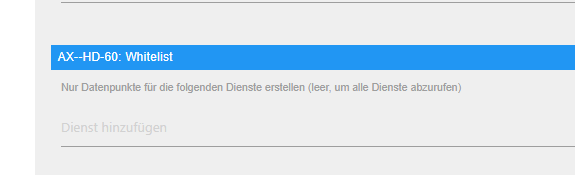
                        Image 3.png
                        Image 6.png
                        Image 5.png
                        Image 4.png

                        coyoteC Offline
                        coyoteC Offline
                        coyote
                        Most Active
                        wrote on last edited by
                        #94

                        Ich würde gerne ein Script mit dem Adapter ersetzen.
                        Wie kann ich den diesen Befehl aus dem Script: "ssh.execCommand("bash /home/coyote/Downloads/nichtdimmen.sh");
                        im Adapter starten über einen Button?

                        So habe ich schon probiert, kommt aber Fehler:

                        linux.JPG

                        linux-control.0	2020-08-21 09:09:38.405	error	at process._tickCallback (internal/process/next_tick.js:68:7)
                        linux-control.0	2020-08-21 09:09:38.405	error	at LinuxControl.sendCommand (/opt/iobroker/node_modules/iobroker.linux-control/main.js:749:26)
                        linux-control.0	2020-08-21 09:09:38.405	error	(4177) [send userCommand] MintTab (192.168.XXX.XXX:22) - voll_dimmen: response error: [send userCommand] MintTab (192.168.XXX.XXX:22) - voll_dimmen: /home/coyote/Downloads/volldimmen.sh: Zeile 13: 770
                        
                        liv-in-skyL 1 Reply Last reply
                        0
                        • coyoteC coyote

                          Ich würde gerne ein Script mit dem Adapter ersetzen.
                          Wie kann ich den diesen Befehl aus dem Script: "ssh.execCommand("bash /home/coyote/Downloads/nichtdimmen.sh");
                          im Adapter starten über einen Button?

                          So habe ich schon probiert, kommt aber Fehler:

                          linux.JPG

                          linux-control.0	2020-08-21 09:09:38.405	error	at process._tickCallback (internal/process/next_tick.js:68:7)
                          linux-control.0	2020-08-21 09:09:38.405	error	at LinuxControl.sendCommand (/opt/iobroker/node_modules/iobroker.linux-control/main.js:749:26)
                          linux-control.0	2020-08-21 09:09:38.405	error	(4177) [send userCommand] MintTab (192.168.XXX.XXX:22) - voll_dimmen: response error: [send userCommand] MintTab (192.168.XXX.XXX:22) - voll_dimmen: /home/coyote/Downloads/volldimmen.sh: Zeile 13: 770
                          
                          liv-in-skyL Offline
                          liv-in-skyL Offline
                          liv-in-sky
                          wrote on last edited by
                          #95

                          @coyote evtl ist in zeile 13 dieses scripts ein befehl , der einen pfad braucht - was steht in zeile 13?

                          nach einem gelösten Thread wäre es sinnvoll dies in der Überschrift des ersten Posts einzutragen [gelöst]-... Bitte benutzt das Voting rechts unten im Beitrag wenn er euch geholfen hat. Forum-Tools: PicPick https://picpick.app/en/download/ und ScreenToGif https://www.screentogif.com/downloads.html

                          coyoteC 1 Reply Last reply
                          0
                          • liv-in-skyL liv-in-sky

                            @coyote evtl ist in zeile 13 dieses scripts ein befehl , der einen pfad braucht - was steht in zeile 13?

                            coyoteC Offline
                            coyoteC Offline
                            coyote
                            Most Active
                            wrote on last edited by
                            #96

                            @liv-in-sky wie meinst du? In dem volldimmen.sh Script Zeile 13?

                            So, führe ich den Befehl momentan in Javascript aus:

                             node_ssh = require('node-ssh').NodeSSH;
                            ssh = new node_ssh();
                            ssh.connect({
                              host: '192.168.XXX.XXX',   //MintTab VM
                              username: 'coyote',
                              password: 'pwd'
                            }).then(() => {
                              ssh.execCommand("bash /home/coyote/Downloads/nichtdimmen.sh");
                            });   
                            }
                            
                            liv-in-skyL 1 Reply Last reply
                            0
                            • coyoteC coyote

                              @liv-in-sky wie meinst du? In dem volldimmen.sh Script Zeile 13?

                              So, führe ich den Befehl momentan in Javascript aus:

                               node_ssh = require('node-ssh').NodeSSH;
                              ssh = new node_ssh();
                              ssh.connect({
                                host: '192.168.XXX.XXX',   //MintTab VM
                                username: 'coyote',
                                password: 'pwd'
                              }).then(() => {
                                ssh.execCommand("bash /home/coyote/Downloads/nichtdimmen.sh");
                              });   
                              }
                              
                              liv-in-skyL Offline
                              liv-in-skyL Offline
                              liv-in-sky
                              wrote on last edited by
                              #97

                              @coyote ich meinte das script volldimmen auf linux ebene - da kommt die fehlermeldung- poste mal das ganze script

                              nach einem gelösten Thread wäre es sinnvoll dies in der Überschrift des ersten Posts einzutragen [gelöst]-... Bitte benutzt das Voting rechts unten im Beitrag wenn er euch geholfen hat. Forum-Tools: PicPick https://picpick.app/en/download/ und ScreenToGif https://www.screentogif.com/downloads.html

                              coyoteC 1 Reply Last reply
                              0
                              • liv-in-skyL liv-in-sky

                                @coyote ich meinte das script volldimmen auf linux ebene - da kommt die fehlermeldung- poste mal das ganze script

                                coyoteC Offline
                                coyoteC Offline
                                coyote
                                Most Active
                                wrote on last edited by
                                #98

                                @liv-in-sky hier:

                                #!/bin/bash
                                
                                pkill nichtdimmen
                                pkill python3
                                
                                # While the user is not logged in == until the $DISPLAY variable is unset or empty
                                unset DISPLAY
                                while [ -z "$DISPLAY" ] || [ "$DISPLAY" == "" ]; do
                                        DISPLAY=$(w "$(id -un)" | awk 'NF > 7 && $2 ~ /tty[0-9]+/ {print $3; exit}' 2>/dev/null)
                                        if [ "$DISPLAY" == "" ]; then sleep 30; else export DISPLAY="$DISPLAY"; fi
                                done
                                
                                /bin/bash -c "python3 /home/coyote/Downloads/dimscreens.py 30 0.2"
                                
                                1 Reply Last reply
                                0
                                • liv-in-skyL Offline
                                  liv-in-skyL Offline
                                  liv-in-sky
                                  wrote on last edited by liv-in-sky
                                  #99

                                  @coyote - da fällt mir nix ein - ohne zu wissen warum, würde ich mal testen, was passiert wenn in zeile 13 nur das phyton aufgerufen wird - evtl geht das so nicht aber probieren kann man ja

                                  #!/bin/bash
                                  pkill nichtdimmen
                                  pkill python3
                                   
                                  # While the user is not logged in == until the $DISPLAY variable is unset or empty
                                  unset DISPLAY
                                  while [ -z "$DISPLAY" ] || [ "$DISPLAY" == "" ]; do
                                          DISPLAY=$(w "$(id -un)" | awk 'NF > 7 && $2 ~ /tty[0-9]+/ {print $3; exit}' 2>/dev/null)
                                          if [ "$DISPLAY" == "" ]; then sleep 30; else export DISPLAY="$DISPLAY"; fi
                                  done
                                   
                                  # /bin/bash -c "python3 /home/coyote/Downloads/dimscreens.py 30 0.2"
                                  python3 /home/coyote/Downloads/dimscreens.py 30 0.2
                                  

                                  @Thomas-Braun

                                  hast du eine idee dazu, warum die zeile 13 ein problem macht ?

                                  nach einem gelösten Thread wäre es sinnvoll dies in der Überschrift des ersten Posts einzutragen [gelöst]-... Bitte benutzt das Voting rechts unten im Beitrag wenn er euch geholfen hat. Forum-Tools: PicPick https://picpick.app/en/download/ und ScreenToGif https://www.screentogif.com/downloads.html

                                  coyoteC Thomas BraunT 2 Replies Last reply
                                  0
                                  • liv-in-skyL liv-in-sky

                                    @coyote - da fällt mir nix ein - ohne zu wissen warum, würde ich mal testen, was passiert wenn in zeile 13 nur das phyton aufgerufen wird - evtl geht das so nicht aber probieren kann man ja

                                    #!/bin/bash
                                    pkill nichtdimmen
                                    pkill python3
                                     
                                    # While the user is not logged in == until the $DISPLAY variable is unset or empty
                                    unset DISPLAY
                                    while [ -z "$DISPLAY" ] || [ "$DISPLAY" == "" ]; do
                                            DISPLAY=$(w "$(id -un)" | awk 'NF > 7 && $2 ~ /tty[0-9]+/ {print $3; exit}' 2>/dev/null)
                                            if [ "$DISPLAY" == "" ]; then sleep 30; else export DISPLAY="$DISPLAY"; fi
                                    done
                                     
                                    # /bin/bash -c "python3 /home/coyote/Downloads/dimscreens.py 30 0.2"
                                    python3 /home/coyote/Downloads/dimscreens.py 30 0.2
                                    

                                    @Thomas-Braun

                                    hast du eine idee dazu, warum die zeile 13 ein problem macht ?

                                    coyoteC Offline
                                    coyoteC Offline
                                    coyote
                                    Most Active
                                    wrote on last edited by
                                    #100

                                    @liv-in-sky kommt leider der gleiche Fehler

                                    1 Reply Last reply
                                    0
                                    • liv-in-skyL liv-in-sky

                                      @coyote - da fällt mir nix ein - ohne zu wissen warum, würde ich mal testen, was passiert wenn in zeile 13 nur das phyton aufgerufen wird - evtl geht das so nicht aber probieren kann man ja

                                      #!/bin/bash
                                      pkill nichtdimmen
                                      pkill python3
                                       
                                      # While the user is not logged in == until the $DISPLAY variable is unset or empty
                                      unset DISPLAY
                                      while [ -z "$DISPLAY" ] || [ "$DISPLAY" == "" ]; do
                                              DISPLAY=$(w "$(id -un)" | awk 'NF > 7 && $2 ~ /tty[0-9]+/ {print $3; exit}' 2>/dev/null)
                                              if [ "$DISPLAY" == "" ]; then sleep 30; else export DISPLAY="$DISPLAY"; fi
                                      done
                                       
                                      # /bin/bash -c "python3 /home/coyote/Downloads/dimscreens.py 30 0.2"
                                      python3 /home/coyote/Downloads/dimscreens.py 30 0.2
                                      

                                      @Thomas-Braun

                                      hast du eine idee dazu, warum die zeile 13 ein problem macht ?

                                      Thomas BraunT Online
                                      Thomas BraunT Online
                                      Thomas Braun
                                      Most Active
                                      wrote on last edited by
                                      #101

                                      @liv-in-sky Keine Ahnung von python. Aber was sind denn das für Optionen da am Ende? Das sieht komisch aus.

                                      Linux-Werkzeugkasten:
                                      https://forum.iobroker.net/topic/42952/der-kleine-iobroker-linux-werkzeugkasten
                                      NodeJS Fixer Skript:
                                      https://forum.iobroker.net/topic/68035/iob-node-fix-skript
                                      iob_diag: curl -sLf -o diag.sh https://iobroker.net/diag.sh && bash diag.sh

                                      coyoteC 1 Reply Last reply
                                      0
                                      • Thomas BraunT Thomas Braun

                                        @liv-in-sky Keine Ahnung von python. Aber was sind denn das für Optionen da am Ende? Das sieht komisch aus.

                                        coyoteC Offline
                                        coyoteC Offline
                                        coyote
                                        Most Active
                                        wrote on last edited by
                                        #102

                                        @Thomas-Braun damit wird das Display gedimmt, hier z.b. nach 30sec auf 20%, daher die 30 0,2

                                        Thomas BraunT 1 Reply Last reply
                                        0
                                        • coyoteC coyote

                                          @Thomas-Braun damit wird das Display gedimmt, hier z.b. nach 30sec auf 20%, daher die 30 0,2

                                          Thomas BraunT Online
                                          Thomas BraunT Online
                                          Thomas Braun
                                          Most Active
                                          wrote on last edited by
                                          #103

                                          @coyote

                                          ls -la /home/coyote/Downloads/dimscreens.py

                                          

                                          Linux-Werkzeugkasten:
                                          https://forum.iobroker.net/topic/42952/der-kleine-iobroker-linux-werkzeugkasten
                                          NodeJS Fixer Skript:
                                          https://forum.iobroker.net/topic/68035/iob-node-fix-skript
                                          iob_diag: curl -sLf -o diag.sh https://iobroker.net/diag.sh && bash diag.sh

                                          coyoteC 1 Reply Last reply
                                          0
                                          Reply
                                          • Reply as topic
                                          Log in to reply
                                          • Oldest to Newest
                                          • Newest to Oldest
                                          • Most Votes


                                          Support us

                                          ioBroker
                                          Community Adapters
                                          Donate

                                          310

                                          Online

                                          32.6k

                                          Users

                                          82.2k

                                          Topics

                                          1.3m

                                          Posts
                                          Community
                                          Impressum | Datenschutz-Bestimmungen | Nutzungsbedingungen | Einwilligungseinstellungen
                                          ioBroker Community 2014-2025
                                          logo
                                          • Login

                                          • Don't have an account? Register

                                          • Login or register to search.
                                          • First post
                                            Last post
                                          0
                                          • Home
                                          • Recent
                                          • Tags
                                          • Unread 0
                                          • Categories
                                          • Unreplied
                                          • Popular
                                          • GitHub
                                          • Docu
                                          • Hilfe