Skip to content
  • Home
  • Recent
  • Tags
  • 0 Unread 0
  • Categories
  • Unreplied
  • Popular
  • GitHub
  • Docu
  • Hilfe
Skins
  • Light
  • Brite
  • Cerulean
  • Cosmo
  • Flatly
  • Journal
  • Litera
  • Lumen
  • Lux
  • Materia
  • Minty
  • Morph
  • Pulse
  • Sandstone
  • Simplex
  • Sketchy
  • Spacelab
  • United
  • Yeti
  • Zephyr
  • Dark
  • Cyborg
  • Darkly
  • Quartz
  • Slate
  • Solar
  • Superhero
  • Vapor

  • Default (No Skin)
  • No Skin
Collapse
ioBroker Logo

Community Forum

donate donate
  1. ioBroker Community Home
  2. Deutsch
  3. Tester
  4. Test Adapter Linux Control v1.x.x

NEWS

  • Jahresrückblick 2025 – unser neuer Blogbeitrag ist online! ✨
    BluefoxB
    Bluefox
    16
    1
    1.9k

  • Neuer Blogbeitrag: Monatsrückblick - Dezember 2025 🎄
    BluefoxB
    Bluefox
    13
    1
    901

  • Weihnachtsangebot 2025! 🎄
    BluefoxB
    Bluefox
    25
    1
    2.2k

Test Adapter Linux Control v1.x.x

Scheduled Pinned Locked Moved Tester
adaptercontrolhardwarelinuxsteuern
715 Posts 73 Posters 183.1k Views 66 Watching
  • Oldest to Newest
  • Newest to Oldest
  • Most Votes
Reply
  • Reply as topic
Log in to reply
This topic has been deleted. Only users with topic management privileges can see it.
  • gelberlemmyG gelberlemmy

    @liv-in-sky sagte in Test Adapter Linux Control v1.x.x:

    sudo apt install iputils-ping

    Ja ist die 1.1.4

    Und alles installiert

    Ubuntu 21.10 IOBroker-Proxmox tty1
    
    IOBroker-Proxmox login: root
    Password: 
    Welcome to Ubuntu 21.10 (GNU/Linux 5.13.19-2-pve x86_64)
    
     * Documentation:  https://help.ubuntu.com
     * Management:     https://landscape.canonical.com
     * Support:        https://ubuntu.com/advantage
    Last login: Mon Apr 18 09:17:00 UTC 2022 on tty1
    root@IOBroker-Proxmox:~# apt install iputils-ping
    Reading package lists... Done
    Building dependency tree... Done
    Reading state information... Done
    iputils-ping is already the newest version (3:20210202-1).
    0 upgraded, 0 newly installed, 0 to remove and 19 not upgraded.
    root@IOBroker-Proxmox:~# 
    

    Hat das eventuell damit zu tun, weil IOBroker auf Proxmox installiert ist ?

    liv-in-skyL Offline
    liv-in-skyL Offline
    liv-in-sky
    wrote on last edited by
    #405

    @gelberlemmy eher nicht - habe auch proxmox server und container

    nach einem gelösten Thread wäre es sinnvoll dies in der Überschrift des ersten Posts einzutragen [gelöst]-... Bitte benutzt das Voting rechts unten im Beitrag wenn er euch geholfen hat. Forum-Tools: PicPick https://picpick.app/en/download/ und ScreenToGif https://www.screentogif.com/downloads.html

    1 Reply Last reply
    0
    • gelberlemmyG gelberlemmy

      @liv-in-sky sagte in Test Adapter Linux Control v1.x.x:

      sudo apt install iputils-ping

      Ja ist die 1.1.4

      Und alles installiert

      Ubuntu 21.10 IOBroker-Proxmox tty1
      
      IOBroker-Proxmox login: root
      Password: 
      Welcome to Ubuntu 21.10 (GNU/Linux 5.13.19-2-pve x86_64)
      
       * Documentation:  https://help.ubuntu.com
       * Management:     https://landscape.canonical.com
       * Support:        https://ubuntu.com/advantage
      Last login: Mon Apr 18 09:17:00 UTC 2022 on tty1
      root@IOBroker-Proxmox:~# apt install iputils-ping
      Reading package lists... Done
      Building dependency tree... Done
      Reading state information... Done
      iputils-ping is already the newest version (3:20210202-1).
      0 upgraded, 0 newly installed, 0 to remove and 19 not upgraded.
      root@IOBroker-Proxmox:~# 
      

      Hat das eventuell damit zu tun, weil IOBroker auf Proxmox installiert ist ?

      liv-in-skyL Offline
      liv-in-skyL Offline
      liv-in-sky
      wrote on last edited by
      #406

      @gelberlemmy

      da müssen wir auf @Scrounger warten - in github steht noch

      Due to the many different Linux distributions this feature is only tested with Debian 10, Ubuntu 18 / 20 LTS!

      keine ahnung ob das was macht ?

      nach einem gelösten Thread wäre es sinnvoll dies in der Überschrift des ersten Posts einzutragen [gelöst]-... Bitte benutzt das Voting rechts unten im Beitrag wenn er euch geholfen hat. Forum-Tools: PicPick https://picpick.app/en/download/ und ScreenToGif https://www.screentogif.com/downloads.html

      1 Reply Last reply
      0
      • liv-in-skyL liv-in-sky

        @gelberlemmy

        sudo apt install iputils-ping
        

        falls du diesen hinweis brauchst :-)

        crunchipC Away
        crunchipC Away
        crunchip
        Forum Testing Most Active
        wrote on last edited by
        #407

        @liv-in-sky sagte in Test Adapter Linux Control v1.x.x:

        @gelberlemmy

        sudo apt install iputils-ping
        

        falls du diesen hinweis brauchst :-)

        @gelberlemmy sagte in Test Adapter Linux Control v1.x.x:

        Und alles installiert

        check if iputils-ping is correct installed on client
        

        client ist doch dann dein PI

        umgestiegen von Proxmox auf Unraid

        1 Reply Last reply
        0
        • gelberlemmyG gelberlemmy

          @liv-in-sky sagte in Test Adapter Linux Control v1.x.x:

          sudo apt install iputils-ping

          Ja ist die 1.1.4

          Und alles installiert

          Ubuntu 21.10 IOBroker-Proxmox tty1
          
          IOBroker-Proxmox login: root
          Password: 
          Welcome to Ubuntu 21.10 (GNU/Linux 5.13.19-2-pve x86_64)
          
           * Documentation:  https://help.ubuntu.com
           * Management:     https://landscape.canonical.com
           * Support:        https://ubuntu.com/advantage
          Last login: Mon Apr 18 09:17:00 UTC 2022 on tty1
          root@IOBroker-Proxmox:~# apt install iputils-ping
          Reading package lists... Done
          Building dependency tree... Done
          Reading state information... Done
          iputils-ping is already the newest version (3:20210202-1).
          0 upgraded, 0 newly installed, 0 to remove and 19 not upgraded.
          root@IOBroker-Proxmox:~# 
          

          Hat das eventuell damit zu tun, weil IOBroker auf Proxmox installiert ist ?

          ScroungerS Offline
          ScroungerS Offline
          Scrounger
          Developer
          wrote on last edited by Scrounger
          #408

          @gelberlemmy
          Fuhr Mal Reinstall iputils mit force aus. Steht auch irgendwo weiter oben. Manchmal muss man das machen damit Ping korrekt funktioniert.

          Und Firewall darf das natürlich nicht blocken.

          gelberlemmyG 3 Replies Last reply
          1
          • ScroungerS Scrounger

            @gelberlemmy
            Fuhr Mal Reinstall iputils mit force aus. Steht auch irgendwo weiter oben. Manchmal muss man das machen damit Ping korrekt funktioniert.

            Und Firewall darf das natürlich nicht blocken.

            gelberlemmyG Offline
            gelberlemmyG Offline
            gelberlemmy
            wrote on last edited by
            #409

            @scrounger alles klar danke. Probiere ich aus

            1 Reply Last reply
            0
            • ScroungerS Scrounger

              @gelberlemmy
              Fuhr Mal Reinstall iputils mit force aus. Steht auch irgendwo weiter oben. Manchmal muss man das machen damit Ping korrekt funktioniert.

              Und Firewall darf das natürlich nicht blocken.

              gelberlemmyG Offline
              gelberlemmyG Offline
              gelberlemmy
              wrote on last edited by
              #410

              @scrounger sagte in Test Adapter Linux Control v1.x.x:

              @gelberlemmy
              Fuhr Mal Reinstall iputils mit force aus. Steht auch irgendwo weiter oben. Manchmal muss man das machen damit Ping korrekt funktioniert.

              Und Firewall darf das natürlich nicht blocken.

              Ich habe auch schon gegoogelt. Magst Du mir einmal den Befehl kurz mitteilen ?

              crunchipC 1 Reply Last reply
              0
              • gelberlemmyG gelberlemmy

                @scrounger sagte in Test Adapter Linux Control v1.x.x:

                @gelberlemmy
                Fuhr Mal Reinstall iputils mit force aus. Steht auch irgendwo weiter oben. Manchmal muss man das machen damit Ping korrekt funktioniert.

                Und Firewall darf das natürlich nicht blocken.

                Ich habe auch schon gegoogelt. Magst Du mir einmal den Befehl kurz mitteilen ?

                crunchipC Away
                crunchipC Away
                crunchip
                Forum Testing Most Active
                wrote on last edited by
                #411

                @gelberlemmy

                sudo apt-get install iputils-ping --reinstall
                

                umgestiegen von Proxmox auf Unraid

                gelberlemmyG 1 Reply Last reply
                1
                • crunchipC crunchip

                  @gelberlemmy

                  sudo apt-get install iputils-ping --reinstall
                  
                  gelberlemmyG Offline
                  gelberlemmyG Offline
                  gelberlemmy
                  wrote on last edited by
                  #412

                  @crunchip sagte in Test Adapter Linux Control v1.x.x:

                  sudo apt-get install iputils-ping --reinstall

                  danke werde das jetzt mal ausprobieren

                  1 Reply Last reply
                  0
                  • ScroungerS Scrounger

                    @gelberlemmy
                    Fuhr Mal Reinstall iputils mit force aus. Steht auch irgendwo weiter oben. Manchmal muss man das machen damit Ping korrekt funktioniert.

                    Und Firewall darf das natürlich nicht blocken.

                    gelberlemmyG Offline
                    gelberlemmyG Offline
                    gelberlemmy
                    wrote on last edited by
                    #413

                    @scrounger sagte in Test Adapter Linux Control v1.x.x:

                    @gelberlemmy
                    Fuhr Mal Reinstall iputils mit force aus. Steht auch irgendwo weiter oben. Manchmal muss man das machen damit Ping korrekt funktioniert.

                    Und Firewall darf das natürlich nicht blocken.

                    Leute Ihr seit die Besten !!!!! Jetzt läuft es. Ein großes DANKE

                    1 Reply Last reply
                    0
                    • Basti97B Offline
                      Basti97B Offline
                      Basti97
                      Most Active
                      wrote on last edited by
                      #414

                      Ich bin gerade über den Adapter gestoßen und finde ihn super gerade wenn es darum geht meine Raspberrys neuzustarten. :)
                      Hat jemand von euch eine schöne vis wo man ping Zustand, Herunterfahren, Neustart und Linux Version darstellen kann.
                      Euch einen schönen Sonntag.

                      Iobroker läuft als VM auf Proxmoxserver x folgende Hersteller im Einsatz Sonoff, Gosund, Siemens x Aofo über Tasmota x Zigbee x das Smarthome wächst und wächst

                      Meister MopperM 1 Reply Last reply
                      0
                      • Basti97B Basti97

                        Ich bin gerade über den Adapter gestoßen und finde ihn super gerade wenn es darum geht meine Raspberrys neuzustarten. :)
                        Hat jemand von euch eine schöne vis wo man ping Zustand, Herunterfahren, Neustart und Linux Version darstellen kann.
                        Euch einen schönen Sonntag.

                        Meister MopperM Online
                        Meister MopperM Online
                        Meister Mopper
                        wrote on last edited by
                        #415

                        @basti97
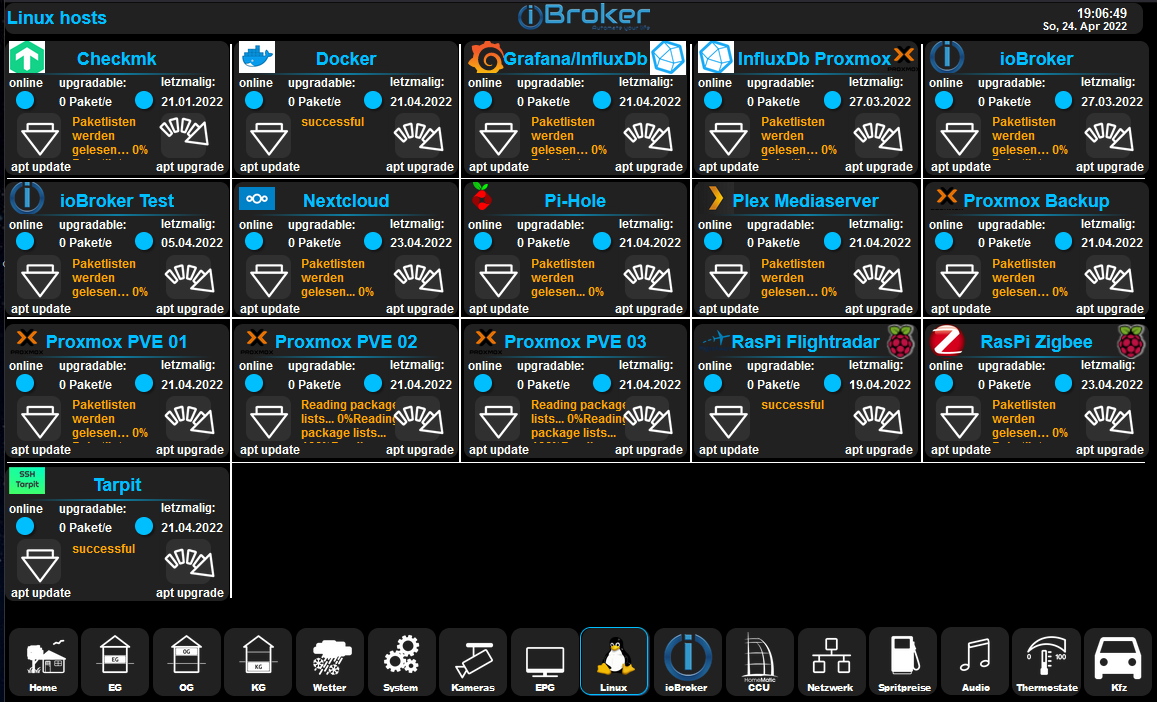
                        Ich habe sowas.


                        79f6bfbf-1acb-4f6d-86b2-87d13439800e-grafik.png

                        Linux-Version und Neustart benötige ich nicht. Wird eh immer alles aktuell gehalten.

                        Proxmox und HA

                        Basti97B crunchipC 2 Replies Last reply
                        1
                        • Meister MopperM Meister Mopper

                          @basti97
                          Ich habe sowas.


                          79f6bfbf-1acb-4f6d-86b2-87d13439800e-grafik.png

                          Linux-Version und Neustart benötige ich nicht. Wird eh immer alles aktuell gehalten.

                          Basti97B Offline
                          Basti97B Offline
                          Basti97
                          Most Active
                          wrote on last edited by
                          #416

                          @meister-mopper Genau so stelle ich mir das vor. Wo hast du die Bilder und Symbole her.
                          Lässt du das ganze auf einen Tablet anzeigen?

                          Iobroker läuft als VM auf Proxmoxserver x folgende Hersteller im Einsatz Sonoff, Gosund, Siemens x Aofo über Tasmota x Zigbee x das Smarthome wächst und wächst

                          1 Reply Last reply
                          0
                          • Meister MopperM Meister Mopper

                            @basti97
                            Ich habe sowas.


                            79f6bfbf-1acb-4f6d-86b2-87d13439800e-grafik.png

                            Linux-Version und Neustart benötige ich nicht. Wird eh immer alles aktuell gehalten.

                            crunchipC Away
                            crunchipC Away
                            crunchip
                            Forum Testing Most Active
                            wrote on last edited by crunchip
                            #417

                            @meister-mopper sagte in Test Adapter Linux Control v1.x.x:

                            Neustart benötige ich nicht

                            proxmox macht man aber ein dist-upgrade und bei einem neuen Kernel, braucht es auch einen Neustart.

                            daher passt dann die Aussage

                            @meister-mopper sagte in Test Adapter Linux Control v1.x.x:

                            Wird eh immer alles aktuell gehalten.

                            nicht

                            zumal ich sowas nicht einfach von der Vis aus anstoßen würde, da sitz ich lieber direkt davor

                            umgestiegen von Proxmox auf Unraid

                            Meister MopperM 1 Reply Last reply
                            2
                            • crunchipC crunchip

                              @meister-mopper sagte in Test Adapter Linux Control v1.x.x:

                              Neustart benötige ich nicht

                              proxmox macht man aber ein dist-upgrade und bei einem neuen Kernel, braucht es auch einen Neustart.

                              daher passt dann die Aussage

                              @meister-mopper sagte in Test Adapter Linux Control v1.x.x:

                              Wird eh immer alles aktuell gehalten.

                              nicht

                              zumal ich sowas nicht einfach von der Vis aus anstoßen würde, da sitz ich lieber direkt davor

                              Meister MopperM Online
                              Meister MopperM Online
                              Meister Mopper
                              wrote on last edited by
                              #418

                              @crunchip sagte in Test Adapter Linux Control v1.x.x:

                              proxmox macht man aber ein dist-upgrade

                              Ja klar, an solch sensible Server gehe ich auch selbst ran (auch mit dist-upgrade und reboot nach Kernelupdate und erst dann autoremove) :wink: .

                              Hauptsächlich nutze ich die Visu, um einen Überblick über vorhandene Updates zu haben. Meistens geht's dann mit ssh weiter.

                              @Basti97
                              Die Symbole stammen von dem icons-mfd-png Adapter und werden mit diesem widget bedient:

                              [{"tpl":"tplHqButton","data":{"oid":"linux-control.0.checkmk.control.aptUpdate","min":"false","max":"true","timeAsInterval":"true","infoLeftFontSize":"12","infoFontRightSize":"12","gestures-offsetX":0,"gestures-offsetY":0,"signals-cond-0":"==","signals-val-0":"true","signals-icon-0":"/icons-mfd-png/control_arrow_down.png","signals-icon-size-0":"90","signals-blink-0":false,"signals-horz-0":"-38","signals-vert-0":"-50","signals-hide-edit-0":false,"signals-cond-1":"==","signals-val-1":"false","signals-icon-1":"/icons-mfd-png/control_arrow_down.png","signals-icon-size-1":"90","signals-blink-1":false,"signals-horz-1":"-38","signals-vert-1":"-50","signals-hide-edit-1":false,"signals-cond-2":"==","signals-val-2":true,"signals-icon-2":"/vis.0/projektx/lowbattery.png","signals-icon-size-2":0,"signals-blink-2":false,"signals-horz-2":"0","signals-vert-2":0,"signals-hide-edit-2":false,"pushButton":false,"usejQueryStyle":false,"g_visibility":false,"styleActive":"hq-button-no-background","name":"Restart_Icon","infoLeftPaddingLeft":"15","infoLeftPaddingRight":"50","infoRightPaddingRight":"15","gestures-swipeLeft-limit":"-1","gestures-rotateLeft-limit":"2","styleNormal":"hq-button-no-background","testActive":false,"lc-type":"last-change","lc-is-interval":true,"lc-is-moment":false,"lc-format":"","lc-position-vert":"top","lc-position-horz":"right","lc-offset-vert":0,"lc-offset-horz":0,"lc-font-size":"12px","lc-font-family":"","lc-font-style":"","lc-bkg-color":"","lc-color":"","lc-border-width":"0","lc-border-style":"","lc-border-color":"","lc-border-radius":10,"lc-zindex":0,"descriptionLeft":"Side brush lifetime reset","descriptionLeftDisabled":true,"visibility-cond":"==","visibility-val":1,"visibility-groups-action":"hide","signals-oid-0":"linux-control.0.checkmk.info.is_online","signals-oid-1":"linux-control.0.checkmk.info.is_online","g_center":true,"iconName":"","btIconWidth":"56","offsetAuto":"true","leftOffset":"15","topOffset":"55"},"style":{"left":"13px","top":"81px","width":"50px","height":"50px","border-width":"2px","border-style":"hidden","border-color":"#212121","border-radius":"10px","z-index":1,"text-align":"center","font-size":"small","box-shadow":"","background":"#303030","background-color":"#303030"},"widgetSet":"hqwidgets"}]
                              

                              Proxmox und HA

                              1 Reply Last reply
                              0
                              • R Offline
                                R Offline
                                Rushmed
                                Most Active
                                wrote on last edited by
                                #419

                                Hallo,

                                ich bekomme im LOG immer den folgenden Fehler:

                                
                                linux-control.0
                                2022-05-18 18:20:48.635	error	[cmdAptUpdate] UDM_Pro (192.168.178.1:22): response error: grep: /var/log/dpkg.log: No such file or directory, stack: ResponseError: [cmdAptUpdate] UDM_Pro (192.168.178.1:22): grep: /var/log/dpkg.log: No such file or directory at LinuxControl.sendCommand (/opt/iobroker/node_modules/iobroker.linux-control/main.js:872:26) at runMicrotasks (<anonymous>) at processTicksAndRejections (internal/process/task_queues.js:95:5) at LinuxControl.cmdAptUpdate (/opt/iobroker/node_modules/iobroker.linux-control/main.js:780:19) at LinuxControl.updateInfos (/opt/iobroker/node_modules/iobroker.linux-control/main.js:607:5) at LinuxControl.refreshHost (/opt/iobroker/node_modules/iobroker.linux-control/main.js:79:5)
                                
                                linux-control.0
                                2022-05-18 18:20:48.621	error	[cmdAptUpdate] UDM_Pro (192.168.178.1:22): response error: sh: dpkg-query: not found, stack: ResponseError: [cmdAptUpdate] UDM_Pro (192.168.178.1:22): sh: dpkg-query: not found at LinuxControl.sendCommand (/opt/iobroker/node_modules/iobroker.linux-control/main.js:872:26) at runMicrotasks (<anonymous>) at processTicksAndRejections (internal/process/task_queues.js:95:5) at LinuxControl.cmdAptUpdate (/opt/iobroker/node_modules/iobroker.linux-control/main.js:770:18) at LinuxControl.updateInfos (/opt/iobroker/node_modules/iobroker.linux-control/main.js:607:5) at LinuxControl.refreshHost (/opt/iobroker/node_modules/iobroker.linux-control/main.js:79:5)
                                
                                linux-control.0
                                2022-05-18 18:20:48.608	error	[cmdAptUpdate] UDM_Pro (192.168.178.1:22): response error: sh: apt-get: not found, stack: ResponseError: [cmdAptUpdate] UDM_Pro (192.168.178.1:22): sh: apt-get: not found at LinuxControl.sendCommand (/opt/iobroker/node_modules/iobroker.linux-control/main.js:872:26) at runMicrotasks (<anonymous>) at processTicksAndRejections (internal/process/task_queues.js:95:5) at LinuxControl.cmdAptUpdate (/opt/iobroker/node_modules/iobroker.linux-control/main.js:704:21) at LinuxControl.updateInfos (/opt/iobroker/node_modules/iobroker.linux-control/main.js:607:5) at LinuxControl.refreshHost (/opt/iobroker/node_modules/iobroker.linux-control/main.js:79:5)
                                

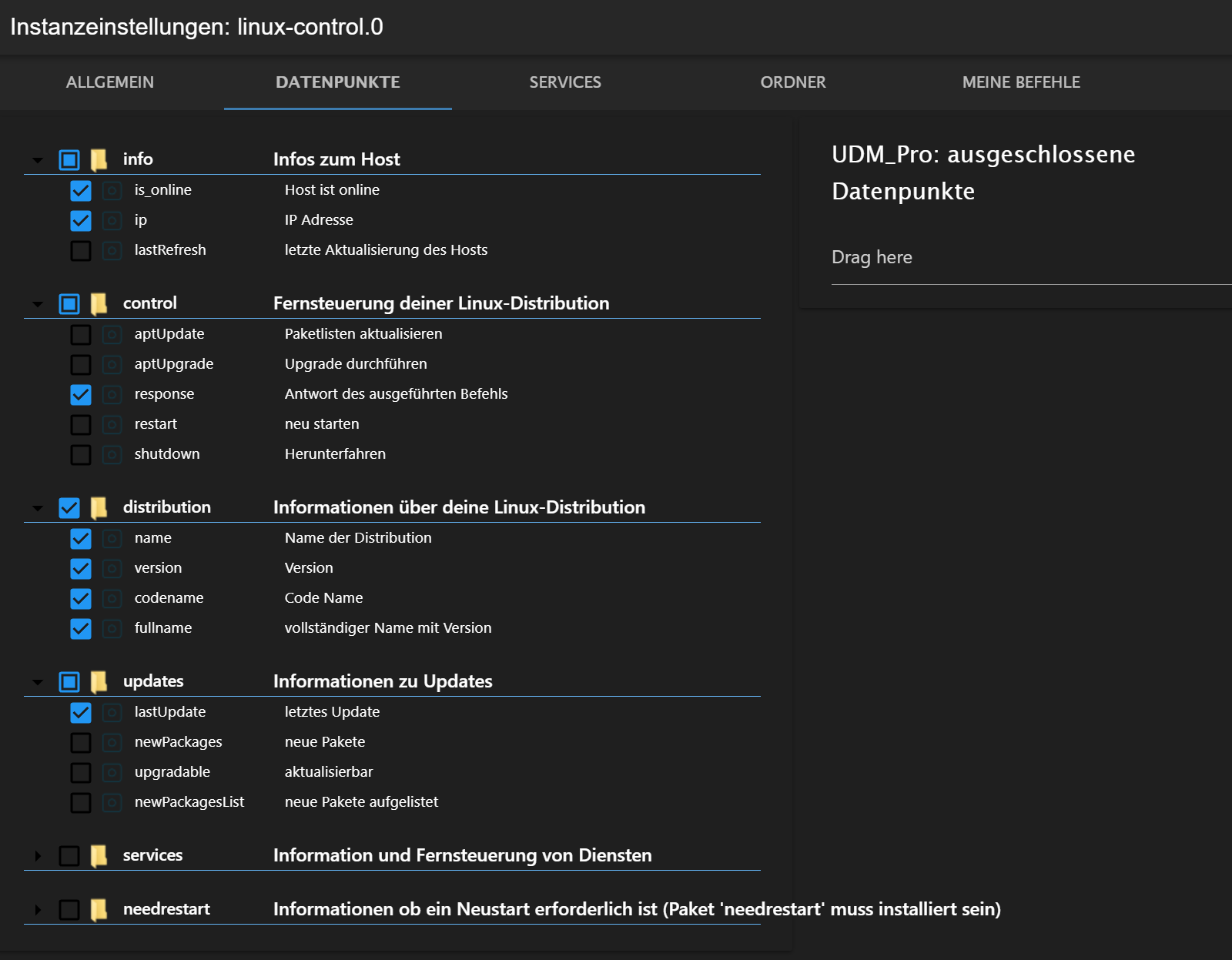
                                Einstellungen:
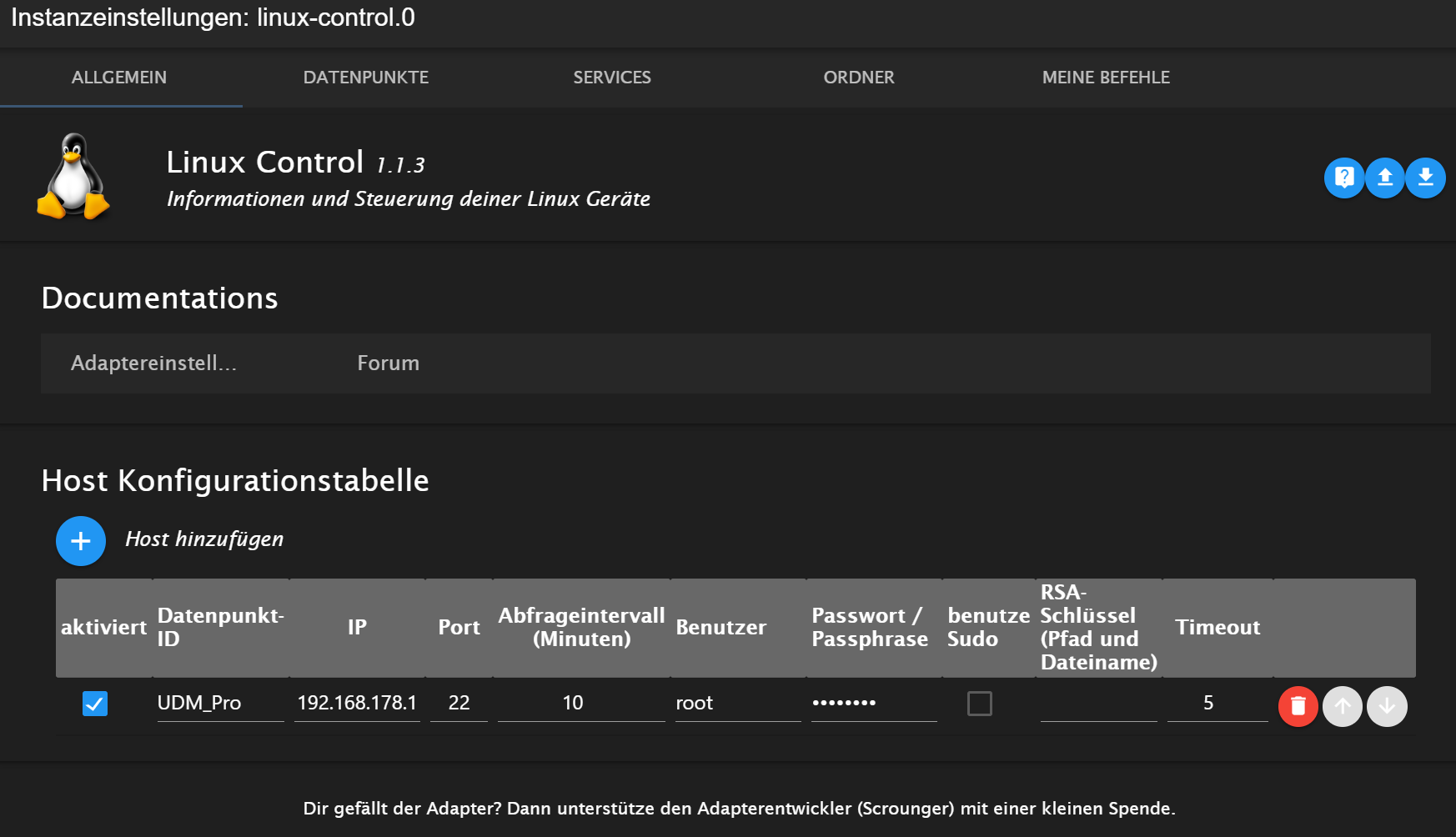
                                3541bdaf-5a3f-408f-9239-d318861cc859-grafik.png

                                7253dcfd-2145-4018-8ca1-9015858bc475-grafik.png

                                Keine Services, Ordner oder Befehle eingetragen.

                                Was kann das bedeuten?

                                Thomas BraunT 1 Reply Last reply
                                0
                                • R Rushmed

                                  Hallo,

                                  ich bekomme im LOG immer den folgenden Fehler:

                                  
                                  linux-control.0
                                  2022-05-18 18:20:48.635	error	[cmdAptUpdate] UDM_Pro (192.168.178.1:22): response error: grep: /var/log/dpkg.log: No such file or directory, stack: ResponseError: [cmdAptUpdate] UDM_Pro (192.168.178.1:22): grep: /var/log/dpkg.log: No such file or directory at LinuxControl.sendCommand (/opt/iobroker/node_modules/iobroker.linux-control/main.js:872:26) at runMicrotasks (<anonymous>) at processTicksAndRejections (internal/process/task_queues.js:95:5) at LinuxControl.cmdAptUpdate (/opt/iobroker/node_modules/iobroker.linux-control/main.js:780:19) at LinuxControl.updateInfos (/opt/iobroker/node_modules/iobroker.linux-control/main.js:607:5) at LinuxControl.refreshHost (/opt/iobroker/node_modules/iobroker.linux-control/main.js:79:5)
                                  
                                  linux-control.0
                                  2022-05-18 18:20:48.621	error	[cmdAptUpdate] UDM_Pro (192.168.178.1:22): response error: sh: dpkg-query: not found, stack: ResponseError: [cmdAptUpdate] UDM_Pro (192.168.178.1:22): sh: dpkg-query: not found at LinuxControl.sendCommand (/opt/iobroker/node_modules/iobroker.linux-control/main.js:872:26) at runMicrotasks (<anonymous>) at processTicksAndRejections (internal/process/task_queues.js:95:5) at LinuxControl.cmdAptUpdate (/opt/iobroker/node_modules/iobroker.linux-control/main.js:770:18) at LinuxControl.updateInfos (/opt/iobroker/node_modules/iobroker.linux-control/main.js:607:5) at LinuxControl.refreshHost (/opt/iobroker/node_modules/iobroker.linux-control/main.js:79:5)
                                  
                                  linux-control.0
                                  2022-05-18 18:20:48.608	error	[cmdAptUpdate] UDM_Pro (192.168.178.1:22): response error: sh: apt-get: not found, stack: ResponseError: [cmdAptUpdate] UDM_Pro (192.168.178.1:22): sh: apt-get: not found at LinuxControl.sendCommand (/opt/iobroker/node_modules/iobroker.linux-control/main.js:872:26) at runMicrotasks (<anonymous>) at processTicksAndRejections (internal/process/task_queues.js:95:5) at LinuxControl.cmdAptUpdate (/opt/iobroker/node_modules/iobroker.linux-control/main.js:704:21) at LinuxControl.updateInfos (/opt/iobroker/node_modules/iobroker.linux-control/main.js:607:5) at LinuxControl.refreshHost (/opt/iobroker/node_modules/iobroker.linux-control/main.js:79:5)
                                  

                                  Einstellungen:
                                  3541bdaf-5a3f-408f-9239-d318861cc859-grafik.png

                                  7253dcfd-2145-4018-8ca1-9015858bc475-grafik.png

                                  Keine Services, Ordner oder Befehle eingetragen.

                                  Was kann das bedeuten?

                                  Thomas BraunT Online
                                  Thomas BraunT Online
                                  Thomas Braun
                                  Most Active
                                  wrote on last edited by
                                  #420

                                  @rushmed

                                  Welche Distribution läuft auf dem Host? dpkg ist was aus der Debian-Ecke.
                                  Kein Debian = Kein dpkg.

                                  Linux-Werkzeugkasten:
                                  https://forum.iobroker.net/topic/42952/der-kleine-iobroker-linux-werkzeugkasten
                                  NodeJS Fixer Skript:
                                  https://forum.iobroker.net/topic/68035/iob-node-fix-skript
                                  iob_diag: curl -sLf -o diag.sh https://iobroker.net/diag.sh && bash diag.sh

                                  R 1 Reply Last reply
                                  0
                                  • Thomas BraunT Thomas Braun

                                    @rushmed

                                    Welche Distribution läuft auf dem Host? dpkg ist was aus der Debian-Ecke.
                                    Kein Debian = Kein dpkg.

                                    R Offline
                                    R Offline
                                    Rushmed
                                    Most Active
                                    wrote on last edited by
                                    #421

                                    @thomas-braun Hab nen Raspi mit PiOS64. Basiert das nicht auf Debian?

                                    Thomas BraunT 1 Reply Last reply
                                    0
                                    • R Rushmed

                                      @thomas-braun Hab nen Raspi mit PiOS64. Basiert das nicht auf Debian?

                                      Thomas BraunT Online
                                      Thomas BraunT Online
                                      Thomas Braun
                                      Most Active
                                      wrote on last edited by
                                      #422

                                      @rushmed sagte in Test Adapter Linux Control v1.x.x:

                                      Doch.

                                      Linux-Werkzeugkasten:
                                      https://forum.iobroker.net/topic/42952/der-kleine-iobroker-linux-werkzeugkasten
                                      NodeJS Fixer Skript:
                                      https://forum.iobroker.net/topic/68035/iob-node-fix-skript
                                      iob_diag: curl -sLf -o diag.sh https://iobroker.net/diag.sh && bash diag.sh

                                      R 1 Reply Last reply
                                      0
                                      • Thomas BraunT Thomas Braun

                                        @rushmed sagte in Test Adapter Linux Control v1.x.x:

                                        Doch.

                                        R Offline
                                        R Offline
                                        Rushmed
                                        Most Active
                                        wrote on last edited by
                                        #423

                                        @thomas-braun Ok, kann ich die Fehlermeldung dennoch irgendwie loswerden?

                                        Thomas BraunT 1 Reply Last reply
                                        0
                                        • R Rushmed

                                          @thomas-braun Ok, kann ich die Fehlermeldung dennoch irgendwie loswerden?

                                          Thomas BraunT Online
                                          Thomas BraunT Online
                                          Thomas Braun
                                          Most Active
                                          wrote on last edited by
                                          #424

                                          @rushmed

                                          Du fragst doch offenbar da UDM Pro ab.
                                          Da läuft mit Sicherheit kein (vollständiges) Debian drauf. Die Abfrage läuft da ins Leere.

                                          Linux-Werkzeugkasten:
                                          https://forum.iobroker.net/topic/42952/der-kleine-iobroker-linux-werkzeugkasten
                                          NodeJS Fixer Skript:
                                          https://forum.iobroker.net/topic/68035/iob-node-fix-skript
                                          iob_diag: curl -sLf -o diag.sh https://iobroker.net/diag.sh && bash diag.sh

                                          R 1 Reply Last reply
                                          0
                                          Reply
                                          • Reply as topic
                                          Log in to reply
                                          • Oldest to Newest
                                          • Newest to Oldest
                                          • Most Votes


                                          Support us

                                          ioBroker
                                          Community Adapters
                                          Donate

                                          553

                                          Online

                                          32.6k

                                          Users

                                          82.2k

                                          Topics

                                          1.3m

                                          Posts
                                          Community
                                          Impressum | Datenschutz-Bestimmungen | Nutzungsbedingungen | Einwilligungseinstellungen
                                          ioBroker Community 2014-2025
                                          logo
                                          • Login

                                          • Don't have an account? Register

                                          • Login or register to search.
                                          • First post
                                            Last post
                                          0
                                          • Home
                                          • Recent
                                          • Tags
                                          • Unread 0
                                          • Categories
                                          • Unreplied
                                          • Popular
                                          • GitHub
                                          • Docu
                                          • Hilfe