Skip to content
  • Home
  • Recent
  • Tags
  • 0 Unread 0
  • Categories
  • Unreplied
  • Popular
  • GitHub
  • Docu
  • Hilfe
Skins
  • Light
  • Brite
  • Cerulean
  • Cosmo
  • Flatly
  • Journal
  • Litera
  • Lumen
  • Lux
  • Materia
  • Minty
  • Morph
  • Pulse
  • Sandstone
  • Simplex
  • Sketchy
  • Spacelab
  • United
  • Yeti
  • Zephyr
  • Dark
  • Cyborg
  • Darkly
  • Quartz
  • Slate
  • Solar
  • Superhero
  • Vapor

  • Default (No Skin)
  • No Skin
Collapse
ioBroker Logo

Community Forum

donate donate
  1. ioBroker Community Home
  2. Deutsch
  3. ioBroker Allgemein
  4. Wunsch: Adapter für Panasonic Viera Smart TV Steuerung

NEWS

  • Neuer ioBroker-Blog online: Monatsrückblick März/April 2026
    BluefoxB
    Bluefox
    5
    1
    109

  • Verwendung von KI bitte immer deutlich kennzeichnen
    HomoranH
    Homoran
    8
    1
    152

  • Monatsrückblick Januar/Februar 2026 ist online!
    BluefoxB
    Bluefox
    18
    1
    865

Wunsch: Adapter für Panasonic Viera Smart TV Steuerung

Scheduled Pinned Locked Moved ioBroker Allgemein
175 Posts 47 Posters 40.3k Views 17 Watching
  • Oldest to Newest
  • Newest to Oldest
  • Most Votes
Reply
  • Reply as topic
Log in to reply
This topic has been deleted. Only users with topic management privileges can see it.
  • N Offline
    N Offline
    newBroker
    wrote on last edited by
    #116

    @jack99n
    Ich würde gerne die Hardwaretasten für Laut / Leise benutzen :-)

    Hast du eine Hilfestellung für mich?

    Gruß

    J 1 Reply Last reply
    0
    • N newBroker

      @jack99n
      Ich würde gerne die Hardwaretasten für Laut / Leise benutzen :-)

      Hast du eine Hilfestellung für mich?

      Gruß

      J Offline
      J Offline
      jack99n
      wrote on last edited by
      #117

      @newbroker Hast du die Fernbedienung schon auf deinem IOS Gerät und kannst sie benutzen?

      N 1 Reply Last reply
      0
      • J jack99n

        @newbroker Hast du die Fernbedienung schon auf deinem IOS Gerät und kannst sie benutzen?

        N Offline
        N Offline
        newBroker
        wrote on last edited by
        #118

        @jack99n
        ja, ähh... nein... es funktioniert leider nicht mehr...

        aber es funktionierte bis vor kurzem.

        gruß

        1 Reply Last reply
        0
        • I imsadi

          Hi,

          bei meinem Panasonic TX-EXW584 funktioniert der Adapter ebenfalls.

          Folgende Objekte sind bei mir vorhanden:
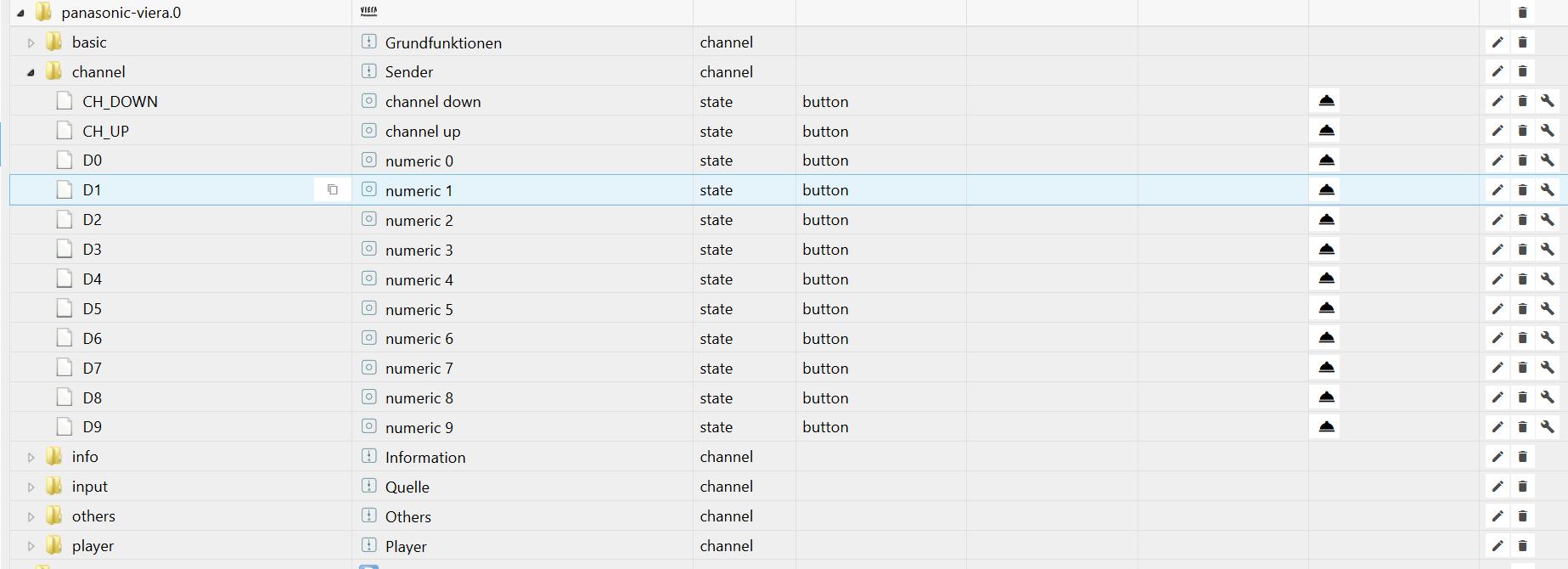
          12827_objekte.jpg
          Wobei mir noch nicht ganz klar ist, wie ich die Programme einstelle, die mit 10 und höher anfangen,

          denn bis 9 wurde diese automatisch hinzugefügt. Ein manuelles Anlegen oberhalb 10 funktioniert nicht.

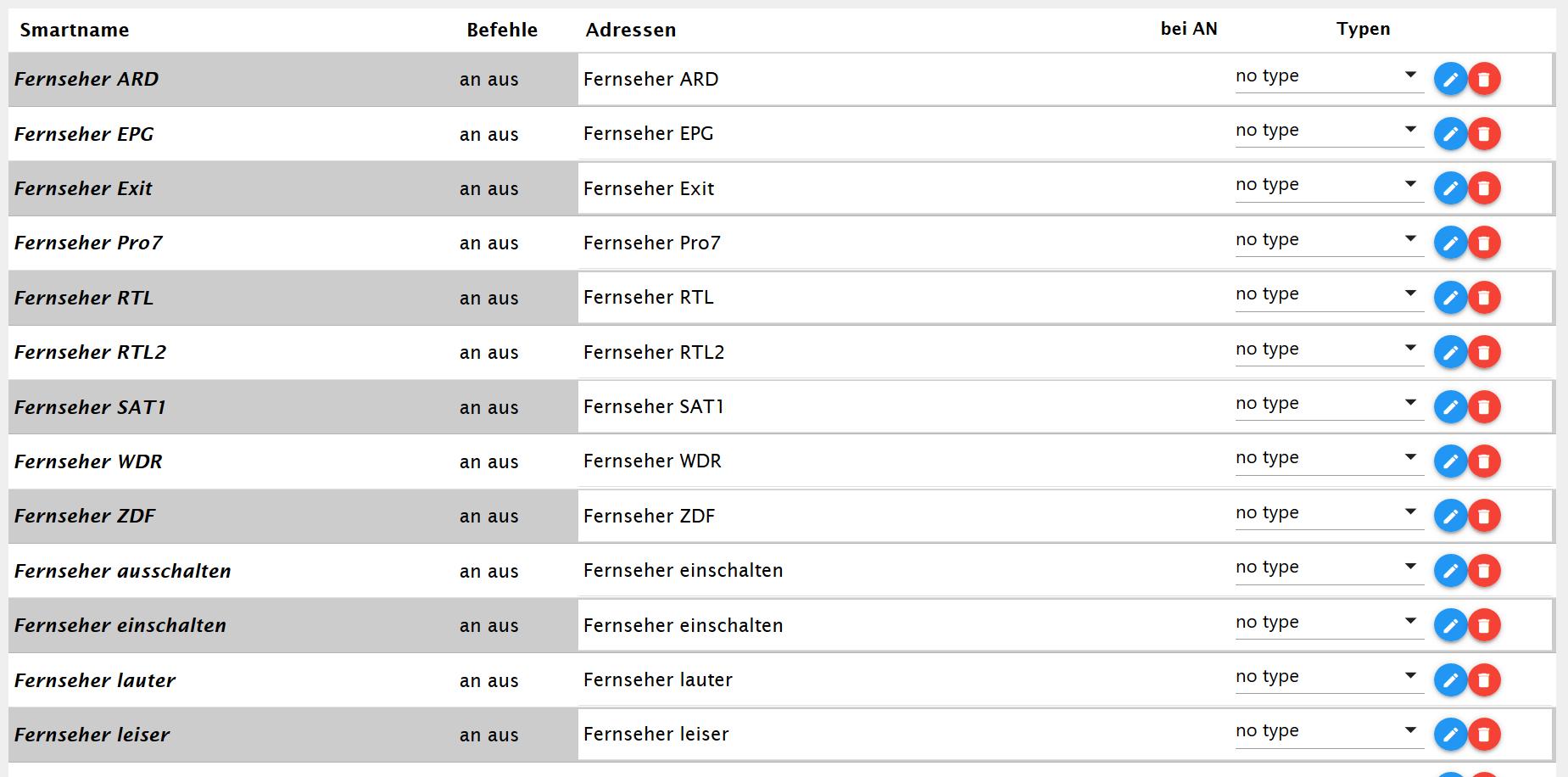
          Instanzen:

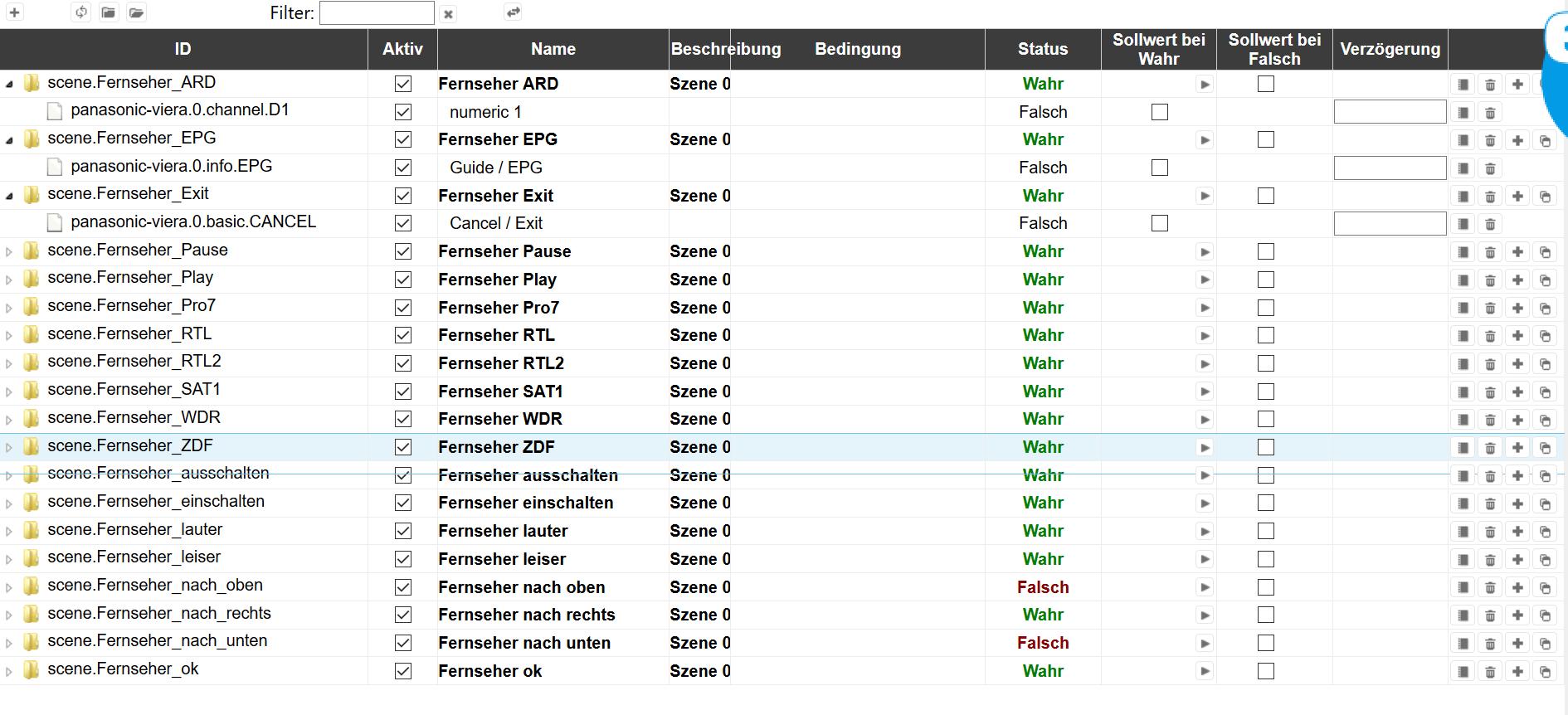
          Die Instanzen musste ich noch manuell anlegen, wie auch die Szenen unten.
          12827_instanzen.jpg

          Szenen:
          12827_szenen.jpg

          Damit geht auch bspw. ein Einschalten mit "Alexa Fernseher einschalten an", oder "Alexa Fernseher Ard an".

          Dieses "an" am Ende nervt ein bischen, läßt sich zur Zeit aber wohl nicht ändern.

          T Offline
          T Offline
          thomke67
          wrote on last edited by thomke67
          #119

          @imsadi Hi, ich grabe mal eine Antwort aus....
          https://forum.iobroker.net/post/207603
          Ich bekomme den Panasonic 65DX780 nicht eingeschaltet. Egal, ob ich im ioBroker über die Datenpunkte in den Objekten oder über Scenen gehe. Ausschalten geht einwandfrei, sowohl über die Datenpunkte in den Objekten des Adapters als auch über die Scenen. Umschalten, wenn der TV an ist geht auch. Auch sonst funktionieren alle Datenpunkte. Nur das Einschalten geht halt nicht. Die Fernbedienung benötigt auch keinen langen Klick auf Einschalten. Und über die Fernbedienung kann ich auch direkt über einen Kanal einschalten. Nur halt nicht über ioBroker.
          Mache ich was falsch oder geht das einfach nicht?

          Gruß,
          Thomas

          J 1 Reply Last reply
          0
          • T thomke67

            @imsadi Hi, ich grabe mal eine Antwort aus....
            https://forum.iobroker.net/post/207603
            Ich bekomme den Panasonic 65DX780 nicht eingeschaltet. Egal, ob ich im ioBroker über die Datenpunkte in den Objekten oder über Scenen gehe. Ausschalten geht einwandfrei, sowohl über die Datenpunkte in den Objekten des Adapters als auch über die Scenen. Umschalten, wenn der TV an ist geht auch. Auch sonst funktionieren alle Datenpunkte. Nur das Einschalten geht halt nicht. Die Fernbedienung benötigt auch keinen langen Klick auf Einschalten. Und über die Fernbedienung kann ich auch direkt über einen Kanal einschalten. Nur halt nicht über ioBroker.
            Mache ich was falsch oder geht das einfach nicht?

            J Offline
            J Offline
            jack99n
            wrote on last edited by
            #120

            @thomke67 Hast du unter Netzerk -> TV Remote Einstellungen -> TV Remote Ein und Einschalten per App Ein und Network Standby Aus eingestellt?

            T 1 Reply Last reply
            0
            • J jack99n

              @thomke67 Hast du unter Netzerk -> TV Remote Einstellungen -> TV Remote Ein und Einschalten per App Ein und Network Standby Aus eingestellt?

              T Offline
              T Offline
              thomke67
              wrote on last edited by
              #121

              @jack99n Oh man, man sollte echt alles lesen......
              Vielen Dank. Es funktioniert!
              Ich habe noch den Verbrauch mit einer HM-IP Messsteckdose kontrolliert. Der Verbrauch steigt vom normalen Stand-by von 7,2 Watt auf 7,7 Watt. Die ca. 1,30€/Jahr ist mir der Spaß wert....

              Gruß,
              Thomas

              1 Reply Last reply
              0
              • J Offline
                J Offline
                jack99n
                wrote on last edited by
                #122

                @thomke67 Sehr schön das es jetzt läuft.

                
                panasonic-viera.0	2021-02-04 08:56:18.327	warn	(32759) State "panasonic-viera.0.mute" has no existing object, this might lead to an error in future versions
                panasonic-viera.0	2021-02-04 08:56:18.324	warn	(32759) State "panasonic-viera.0.volume" has no existing object, this might lead to an error in future versions


                Diese Warnung im Log bekommt ihr weg indem ihr im Ordner Panasonic-Viera.0 und nicht in einen unter Ordner 2 Datenpunkte anlegt! Einmal volume Typ Zahl und einmal mute Typ Logikwert.

                1 Reply Last reply
                0
                • J jack99n

                  @Vumer

                  git clone https://github.com/florianholzapfel/panasonic-viera.git
                  cd panasonic-viera
                  pip install -r requirements.txt
                  python panasonic_viera/main.py

                  alternativ kannst Du die Bibliothek mit dem Paketmanager pip installieren: pip install panasonic-viera

                  Anschließend kannst Du das Skript aus der README.md verwenden:

                  import panasonic_viera
                  rc = panasonic_viera.RemoteControl("<HOST>")

                  Make the TV display a pairing pin code

                  rc.request_pin_code()

                  Interactively ask the user for the pin code

                  pin = raw_input("Enter the displayed pin code: ")

                  Authorize the pin code with the TV

                  rc.authorize_pin_code(pincode=pin)

                  Display credentials (application ID and encryption key)

                  print rc._app_id
                  print rc._enc_key

                  We can now start communicating with our TV

                  Send EPG key

                  rc.send_key(panasonic_viera.Keys.epg)

                  M Offline
                  M Offline
                  MarkA
                  wrote on last edited by
                  #123

                  @jack99n said in Wunsch: Adapter für Panasonic Viera Smart TV Steuerung:

                  @Vumer

                  git clone https://github.com/florianholzapfel/panasonic-viera.git
                  cd panasonic-viera
                  pip install -r requirements.txt
                  python panasonic_viera/main.py

                  alternativ kannst Du die Bibliothek mit dem Paketmanager pip installieren: pip install panasonic-viera

                  Anschließend kannst Du das Skript aus der README.md verwenden:

                  import panasonic_viera
                  rc = panasonic_viera.RemoteControl("<HOST>")

                  Make the TV display a pairing pin code

                  rc.request_pin_code()

                  Interactively ask the user for the pin code

                  pin = raw_input("Enter the displayed pin code: ")

                  Authorize the pin code with the TV

                  rc.authorize_pin_code(pincode=pin)

                  Display credentials (application ID and encryption key)

                  print rc._app_id
                  print rc._enc_key

                  We can now start communicating with our TV

                  Send EPG key

                  rc.send_key(panasonic_viera.Keys.epg)

                  Hallo,

                  ich bekomme es leider nicht hin.

                   python panasonic_viera/__main__.py
                  Traceback (most recent call last):
                    File "panasonic_viera/__main__.py", line 12, in <module>
                      import panasonic_viera
                    File "/home/user/.local/lib/python2.7/site-packages/panasonic_viera/__init__.py", line 479
                      "HOST": f"{self._host}:{self._port}",
                                                         ^
                  SyntaxError: invalid syntax


                  Was muss ich anders machen?

                  Gruß Mark

                  M 1 Reply Last reply
                  0
                  • M MarkA

                    @jack99n said in Wunsch: Adapter für Panasonic Viera Smart TV Steuerung:

                    @Vumer

                    git clone https://github.com/florianholzapfel/panasonic-viera.git
                    cd panasonic-viera
                    pip install -r requirements.txt
                    python panasonic_viera/main.py

                    alternativ kannst Du die Bibliothek mit dem Paketmanager pip installieren: pip install panasonic-viera

                    Anschließend kannst Du das Skript aus der README.md verwenden:

                    import panasonic_viera
                    rc = panasonic_viera.RemoteControl("<HOST>")

                    Make the TV display a pairing pin code

                    rc.request_pin_code()

                    Interactively ask the user for the pin code

                    pin = raw_input("Enter the displayed pin code: ")

                    Authorize the pin code with the TV

                    rc.authorize_pin_code(pincode=pin)

                    Display credentials (application ID and encryption key)

                    print rc._app_id
                    print rc._enc_key

                    We can now start communicating with our TV

                    Send EPG key

                    rc.send_key(panasonic_viera.Keys.epg)

                    Hallo,

                    ich bekomme es leider nicht hin.

                     python panasonic_viera/__main__.py
                    Traceback (most recent call last):
                      File "panasonic_viera/__main__.py", line 12, in <module>
                        import panasonic_viera
                      File "/home/user/.local/lib/python2.7/site-packages/panasonic_viera/__init__.py", line 479
                        "HOST": f"{self._host}:{self._port}",
                                                           ^
                    SyntaxError: invalid syntax


                    Was muss ich anders machen?

                    Gruß Mark

                    M Offline
                    M Offline
                    MarkA
                    wrote on last edited by
                    #124

                    Hat niemand eine Idee?

                    1 Reply Last reply
                    0
                    • VumerV Offline
                      VumerV Offline
                      Vumer
                      wrote on last edited by Vumer
                      #125

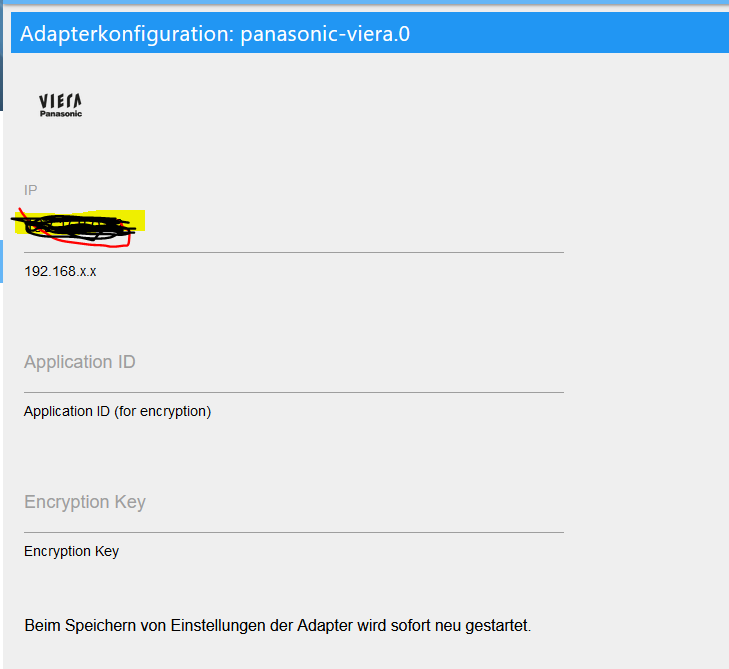
                      es gibt im latest v 2.0

                      2.0.0 (2021-05-09)
                      (jens-maus) added support to set Application and Encryption Key in adapter admin
                      (jens-maus) changed adapter to use node-panasonic-viera to support modern TV models
                      f4245e75-f7a9-490b-8700-d80b0013bfb1-grafik.png

                      Was Ist Application ID und wo bekomme ich die hier?

                      J 1 Reply Last reply
                      0
                      • VumerV Vumer

                        es gibt im latest v 2.0

                        2.0.0 (2021-05-09)
                        (jens-maus) added support to set Application and Encryption Key in adapter admin
                        (jens-maus) changed adapter to use node-panasonic-viera to support modern TV models

                        f4245e75-f7a9-490b-8700-d80b0013bfb1-grafik.png

                        Was Ist Application ID und wo bekomme ich die hier?

                        J Offline
                        J Offline
                        jack99n
                        wrote on last edited by
                        #126

                        @vumer An den Key und die ID bin ich über das Python Skript gekommen was ich hier auf der Seite schon mal verlinkt habe.

                        Die Verbindung zum TV kann mit dem Update vom Adapter jetzt hergestellt werden, leider Funktionieren die VolumeUp, VolumeDown, und Control Left Befehle nicht.

                        VumerV 1 Reply Last reply
                        0
                        • J jack99n

                          @vumer An den Key und die ID bin ich über das Python Skript gekommen was ich hier auf der Seite schon mal verlinkt habe.

                          Die Verbindung zum TV kann mit dem Update vom Adapter jetzt hergestellt werden, leider Funktionieren die VolumeUp, VolumeDown, und Control Left Befehle nicht.

                          VumerV Offline
                          VumerV Offline
                          Vumer
                          wrote on last edited by
                          #127

                          @jack99n
                          komme mit dem Python nicht klar 🙄 .
                          root@iobroker:~/panasonic-viera# pip install -r requirements.txt
                          You must give at least one requirement to install (see "pip help install")
                          root@iobroker:~/panasonic-viera#

                          mus Python auf dem gleichen mit ioBroker CT laufen ?

                          VumerV 1 Reply Last reply
                          0
                          • VumerV Vumer

                            @jack99n
                            komme mit dem Python nicht klar 🙄 .
                            root@iobroker:~/panasonic-viera# pip install -r requirements.txt
                            You must give at least one requirement to install (see "pip help install")
                            root@iobroker:~/panasonic-viera#

                            mus Python auf dem gleichen mit ioBroker CT laufen ?

                            VumerV Offline
                            VumerV Offline
                            Vumer
                            wrote on last edited by
                            #128

                            mit pip install panasonic-viera wurde irgendwas installiert ;)
                            aber
                            root@python:~/panasonic-viera# import panasonic_viera
                            -bash: import: command not found

                            J 1 Reply Last reply
                            0
                            • VumerV Vumer

                              mit pip install panasonic-viera wurde irgendwas installiert ;)
                              aber
                              root@python:~/panasonic-viera# import panasonic_viera
                              -bash: import: command not found

                              J Offline
                              J Offline
                              jack99n
                              wrote on last edited by
                              #129

                              @vumer Es ist schon eine ganze Weile her wo ich das gemacht habe. Nein es muss nicht auf dem System gemacht werden wo IOBroker läuft, und probiere es mal mit Python 3.

                              VumerV 2 Replies Last reply
                              0
                              • J jack99n

                                @vumer Es ist schon eine ganze Weile her wo ich das gemacht habe. Nein es muss nicht auf dem System gemacht werden wo IOBroker läuft, und probiere es mal mit Python 3.

                                VumerV Offline
                                VumerV Offline
                                Vumer
                                wrote on last edited by
                                #130

                                komme einfach nicht weiter

                                Python 3.7.3 (default, Jan 22 2021, 20:04:44)
                                [GCC 8.3.0] on linux
                                Type "help", "copyright", "credits" or "license" for more information.

                                import panasonic_viera
                                Traceback (most recent call last):
                                File "<stdin>", line 1, in <module>
                                File "/usr/local/lib/python3.7/dist-packages/panasonic_viera/init.py", line 15, in <module>
                                import aiohttp.web
                                ModuleNotFoundError: No module named 'aiohttp'

                                1 Reply Last reply
                                0
                                • J jack99n

                                  @vumer Es ist schon eine ganze Weile her wo ich das gemacht habe. Nein es muss nicht auf dem System gemacht werden wo IOBroker läuft, und probiere es mal mit Python 3.

                                  VumerV Offline
                                  VumerV Offline
                                  Vumer
                                  wrote on last edited by Vumer
                                  #131

                                  @jack99n
                                  weißt du noch welche Python du hattest? Frage weil raw_input existiert in Python 3 nicht mehr und aiohttp gibt es erst ab Python 3

                                  1 Reply Last reply
                                  0
                                  • VumerV Offline
                                    VumerV Offline
                                    Vumer
                                    wrote on last edited by Vumer
                                    #132

                                    Habs hin bekommen.
                                    Benötigt wird Python3. Ich habe im Proxmox einen CT erstellt und Python 2 deinstalliert.

                                    sudo apt purge -y python2.7-minimal
                                    sudo ln -s /usr/bin/python3 /usr/bin/python
                                    sudo apt install -y python3-pip
                                    sudo ln -s /usr/bin/pip3 /usr/bin/pip
                                    

                                    unter

                                    python --version
                                    

                                    sollte jetzt Python3.x auftauchen

                                    aiohttp wird noch benötigt

                                    pip install aiohttp
                                    

                                    jetzt kann man die Bibliothek installieren

                                    pip install panasonic-viera
                                    

                                    und los geht's

                                    root@viera:~# python
                                    Python 3.7.3 (default, Jan 22 2021, 20:04:44) 
                                    [GCC 8.3.0] on linux
                                    Type "help", "copyright", "credits" or "license" for more information.
                                    >>> import panasonic_viera
                                    >>> rc = panasonic_viera.RemoteControl("192.168.xxx.xxx")
                                    >>> rc.request_pin_code()
                                    >>> pin = input("Enter the displayed pin code: ")
                                    Enter the displayed pin code: 1111
                                    >>> rc.authorize_pin_code(pincode=pin)
                                    >>> print (rc.app_id)
                                    A***********
                                    >>> print (rc.enc_key)
                                    D****************
                                    >>> rc.send_key(panasonic_viera.Keys.epg)
                                    >>> Strg + D

                                    
                                    J 2 Replies Last reply
                                    0
                                    • VumerV Vumer

                                      Habs hin bekommen.
                                      Benötigt wird Python3. Ich habe im Proxmox einen CT erstellt und Python 2 deinstalliert.

                                      sudo apt purge -y python2.7-minimal
                                      sudo ln -s /usr/bin/python3 /usr/bin/python
                                      sudo apt install -y python3-pip
                                      sudo ln -s /usr/bin/pip3 /usr/bin/pip
                                      

                                      unter

                                      python --version
                                      

                                      sollte jetzt Python3.x auftauchen

                                      aiohttp wird noch benötigt

                                      pip install aiohttp
                                      

                                      jetzt kann man die Bibliothek installieren

                                      pip install panasonic-viera
                                      

                                      und los geht's

                                      root@viera:~# python
                                      Python 3.7.3 (default, Jan 22 2021, 20:04:44) 
                                      [GCC 8.3.0] on linux
                                      Type "help", "copyright", "credits" or "license" for more information.
                                      >>> import panasonic_viera
                                      >>> rc = panasonic_viera.RemoteControl("192.168.xxx.xxx")
                                      >>> rc.request_pin_code()
                                      >>> pin = input("Enter the displayed pin code: ")
                                      Enter the displayed pin code: 1111
                                      >>> rc.authorize_pin_code(pincode=pin)
                                      >>> print (rc.app_id)
                                      A***********
                                      >>> print (rc.enc_key)
                                      D****************
                                      >>> rc.send_key(panasonic_viera.Keys.epg)
                                      >>> Strg + D
                                      
                                      J Offline
                                      J Offline
                                      jack99n
                                      wrote on last edited by
                                      #133

                                      @vumer Schön das du es doch noch hinbekommen hast, ich hatte noch irgendwas in Erinnerung mit Python3. Wie gesagt ich hatte das einmal gemacht und hatte somit ja die Daten. Jetzt sollten es ja auch andere hinbekommen!

                                      1 Reply Last reply
                                      0
                                      • VumerV Vumer

                                        Habs hin bekommen.
                                        Benötigt wird Python3. Ich habe im Proxmox einen CT erstellt und Python 2 deinstalliert.

                                        sudo apt purge -y python2.7-minimal
                                        sudo ln -s /usr/bin/python3 /usr/bin/python
                                        sudo apt install -y python3-pip
                                        sudo ln -s /usr/bin/pip3 /usr/bin/pip
                                        

                                        unter

                                        python --version
                                        

                                        sollte jetzt Python3.x auftauchen

                                        aiohttp wird noch benötigt

                                        pip install aiohttp
                                        

                                        jetzt kann man die Bibliothek installieren

                                        pip install panasonic-viera
                                        

                                        und los geht's

                                        root@viera:~# python
                                        Python 3.7.3 (default, Jan 22 2021, 20:04:44) 
                                        [GCC 8.3.0] on linux
                                        Type "help", "copyright", "credits" or "license" for more information.
                                        >>> import panasonic_viera
                                        >>> rc = panasonic_viera.RemoteControl("192.168.xxx.xxx")
                                        >>> rc.request_pin_code()
                                        >>> pin = input("Enter the displayed pin code: ")
                                        Enter the displayed pin code: 1111
                                        >>> rc.authorize_pin_code(pincode=pin)
                                        >>> print (rc.app_id)
                                        A***********
                                        >>> print (rc.enc_key)
                                        D****************
                                        >>> rc.send_key(panasonic_viera.Keys.epg)
                                        >>> Strg + D
                                        
                                        J Offline
                                        J Offline
                                        jack99n
                                        wrote on last edited by
                                        #134

                                        @vumer Funktionieren die VolumeUp, VolumeDown, und Control Left Befehle bei dir?

                                        1 Reply Last reply
                                        0
                                        • VumerV Offline
                                          VumerV Offline
                                          Vumer
                                          wrote on last edited by
                                          #135

                                          @jack99n
                                          nein, bei mir auch nicht.

                                          J 1 Reply Last reply
                                          0

                                          Hello! It looks like you're interested in this conversation, but you don't have an account yet.

                                          Getting fed up of having to scroll through the same posts each visit? When you register for an account, you'll always come back to exactly where you were before, and choose to be notified of new replies (either via email, or push notification). You'll also be able to save bookmarks and upvote posts to show your appreciation to other community members.

                                          With your input, this post could be even better 💗

                                          Register Login
                                          Reply
                                          • Reply as topic
                                          Log in to reply
                                          • Oldest to Newest
                                          • Newest to Oldest
                                          • Most Votes


                                          Support us

                                          ioBroker
                                          Community Adapters
                                          Donate
                                          FAQ Cloud / IOT
                                          HowTo: Node.js-Update
                                          HowTo: Backup/Restore
                                          Downloads
                                          BLOG

                                          497

                                          Online

                                          32.8k

                                          Users

                                          82.7k

                                          Topics

                                          1.3m

                                          Posts
                                          Community
                                          Impressum | Datenschutz-Bestimmungen | Nutzungsbedingungen | Einwilligungseinstellungen
                                          ioBroker Community 2014-2025
                                          logo
                                          • Login

                                          • Don't have an account? Register

                                          • Login or register to search.
                                          • First post
                                            Last post
                                          0
                                          • Home
                                          • Recent
                                          • Tags
                                          • Unread 0
                                          • Categories
                                          • Unreplied
                                          • Popular
                                          • GitHub
                                          • Docu
                                          • Hilfe