Skip to content
  • Home
  • Recent
  • Tags
  • 0 Unread 0
  • Categories
  • Unreplied
  • Popular
  • GitHub
  • Docu
  • Hilfe
Skins
  • Light
  • Brite
  • Cerulean
  • Cosmo
  • Flatly
  • Journal
  • Litera
  • Lumen
  • Lux
  • Materia
  • Minty
  • Morph
  • Pulse
  • Sandstone
  • Simplex
  • Sketchy
  • Spacelab
  • United
  • Yeti
  • Zephyr
  • Dark
  • Cyborg
  • Darkly
  • Quartz
  • Slate
  • Solar
  • Superhero
  • Vapor

  • Default (No Skin)
  • No Skin
Collapse
ioBroker Logo

Community Forum

donate donate
  1. ioBroker Community Home
  2. Deutsch
  3. ioBroker Allgemein
  4. BackItUp für InfluxDB

NEWS

  • Monatsrückblick Januar/Februar 2026 ist online!
    BluefoxB
    Bluefox
    12
    1
    125

  • Jahresrückblick 2025 – unser neuer Blogbeitrag ist online! ✨
    BluefoxB
    Bluefox
    17
    1
    4.3k

  • Neuer Blogbeitrag: Monatsrückblick - Dezember 2025 🎄
    BluefoxB
    Bluefox
    13
    1
    1.2k

BackItUp für InfluxDB

Scheduled Pinned Locked Moved ioBroker Allgemein
backitup influxdb
273 Posts 32 Posters 58.2k Views 28 Watching
  • Oldest to Newest
  • Newest to Oldest
  • Most Votes
Reply
  • Reply as topic
Log in to reply
This topic has been deleted. Only users with topic management privileges can see it.
  • simatecS simatec

    @markus84
    Guter Gedanke .. Ich überlege mir da mal etwas

    M Offline
    M Offline
    Markus84
    wrote on last edited by
    #51

    @simatec

    Leider erhalte ich noch Fehlermeldungen im Log. Influx ist auf dem ioBroker RPI installiert, das Binding ist eingetragen in der influxdb.conf auf meinem Grafana/Influxdb RPI. Neu gestartet habe ich auch.

    Bezüglich Grafana: Trotz Fehlermeldung wurde ein Grafana Backup gespeichert. Ob es sich restoren lassen würde habe ich allerdings nicht getestet.

    Started iobroker ...
    [DEBUG] [iobroker] - host.iobroker 9480 states saved
    
    [DEBUG] [iobroker] - host.iobroker 10222 objects saved
    
    [DEBUG] [iobroker] - Backup created: /opt/iobroker/backups/iobroker_2021_02_03-05_31_29_backupiobroker.tar.gz
    
    [DEBUG] [iobroker] - done
    [DEBUG] [influxDB] - Start InfluxDB Backup ...
    [DEBUG] [influxDB] - InfluxDB Backup tmp directory created 
    [DEBUG] [influxDB] - Try deleting the InfluxDB tmp directory
    [DEBUG] [influxDB] - InfluxDB tmp directory was successfully deleted
    [ERROR] [influxDB] - [IGNORED] Error: Command failed: influxd backup -portable -database iobroker -host 192.168.100.12:8088 "/opt/iobroker/backups/influxDB_2021_02_03-05_31_47_backupiobroker"
    2021/02/03 05:31:47 Download shard 0 failed dial tcp 192.168.100.12:8088: connect: connection refused.  Waiting 2s and retrying (0)...
    2021/02/03 05:31:49 Download shard 0 failed dial tcp 192.168.100.12:8088: connect: connection refused.  Waiting 2s and retrying (1)...
    2021/02/03 05:31:51 Download shard 0 failed dial tcp 192.168.100.12:8088: connect: connection refused.  Waiting 2s and retrying (2)...
    2021/02/03 05:31:53 Download shard 0 failed dial tcp 192.168.100.12:8088: connect: connection refused.  Waiting 2s and retrying (3)...
    2021/02/03 05:31:55 Download shard 0 failed dial tcp 192.168.100.12:8088: connect: connection refused.  Waiting 2s and retrying (4)...
    2021/02/03 05:31:57 Download shard 0 failed dial tcp 192.168.100.12:8088: connect: connection refused.  Waiting 2s and retrying (5)...
    2021/02/03 05:31:59 Download shard 0 failed dial tcp 192.168.100.12:8088: connect: connection refused.  Waiting 3.01s and retrying (6)...
    2021/02/03 05:32:02 Download shard 0 failed dial tcp 192.168.100.12:8088: connect: connection refused.  Waiting 11.441s and retrying (7)...
    2021/02/03 05:32:13 Download shard 0 failed dial tcp 192.168.100.12:8088: connect: connection refused.  Waiting 43.477s and retrying (8)...
    2021/02/03 05:32:57 Download shard 0 failed dial tcp 192.168.100.12:8088: connect: connection refused.  Waiting 2m45.216s and retrying (9)...
    backup: dial tcp 192.168.100.12:8088: connect: connection refused
    
    [DEBUG] [grafana] - Start Grafana Backup ...
    [DEBUG] [grafana] - Created grafana_tmp directory
    [DEBUG] [grafana] - Created dashboard directory
    [DEBUG] [grafana] - Created dashboards_manually_restore directory
    [DEBUG] [grafana] - Created datasource directory
    [DEBUG] [grafana] - start Grafana request ...
    [DEBUG] [grafana] - Grafana is available ... Status: 200
    [DEBUG] [grafana] - Error on Grafana Dashoard Request: Error: Request failed with status code 401
    [DEBUG] [grafana] - start Grafana backup compress ...
    [DEBUG] [grafana] - Backup created: /opt/iobroker/backups/grafana_2021_02_03-05_35_43_backupiobroker.tar.gz
    [DEBUG] [grafana] - Try deleting the Grafana tmp directory: "/opt/iobroker/backups/grafana_tmp"
    [DEBUG] [grafana] - Grafana tmp directory "/opt/iobroker/backups/grafana_tmp" successfully deleted
    [DEBUG] [grafana] - done
    [DEBUG] [googledrive] - Google Drive: Copy iobroker_2021_02_03-05_31_29_backupiobroker.tar.gz...
    [ERROR] [googledrive] - Google Drive: File "/opt/iobroker/backups/influxDB_2021_02_03-05_31_47_backupiobroker.tar.gz" not found
    [DEBUG] [googledrive] - Google Drive: Copy grafana_2021_02_03-05_35_43_backupiobroker.tar.gz...
    [DEBUG] [googledrive] - done
    [ERROR] [clean] - Backup files not deleted from /opt/iobroker/backups because some errors.
    [DEBUG] [clean] - done
    [DEBUG] [pushover] - done
    [DEBUG] [historyHTML] - new history html values created
    [DEBUG] [historyHTML] - done
    [DEBUG] [historyJSON] - new history json values created
    [DEBUG] [historyJSON] - done
    [EXIT] 0
    
    simatecS 1 Reply Last reply
    0
    • M Markus84

      @simatec

      Leider erhalte ich noch Fehlermeldungen im Log. Influx ist auf dem ioBroker RPI installiert, das Binding ist eingetragen in der influxdb.conf auf meinem Grafana/Influxdb RPI. Neu gestartet habe ich auch.

      Bezüglich Grafana: Trotz Fehlermeldung wurde ein Grafana Backup gespeichert. Ob es sich restoren lassen würde habe ich allerdings nicht getestet.

      Started iobroker ...
      [DEBUG] [iobroker] - host.iobroker 9480 states saved
      
      [DEBUG] [iobroker] - host.iobroker 10222 objects saved
      
      [DEBUG] [iobroker] - Backup created: /opt/iobroker/backups/iobroker_2021_02_03-05_31_29_backupiobroker.tar.gz
      
      [DEBUG] [iobroker] - done
      [DEBUG] [influxDB] - Start InfluxDB Backup ...
      [DEBUG] [influxDB] - InfluxDB Backup tmp directory created 
      [DEBUG] [influxDB] - Try deleting the InfluxDB tmp directory
      [DEBUG] [influxDB] - InfluxDB tmp directory was successfully deleted
      [ERROR] [influxDB] - [IGNORED] Error: Command failed: influxd backup -portable -database iobroker -host 192.168.100.12:8088 "/opt/iobroker/backups/influxDB_2021_02_03-05_31_47_backupiobroker"
      2021/02/03 05:31:47 Download shard 0 failed dial tcp 192.168.100.12:8088: connect: connection refused.  Waiting 2s and retrying (0)...
      2021/02/03 05:31:49 Download shard 0 failed dial tcp 192.168.100.12:8088: connect: connection refused.  Waiting 2s and retrying (1)...
      2021/02/03 05:31:51 Download shard 0 failed dial tcp 192.168.100.12:8088: connect: connection refused.  Waiting 2s and retrying (2)...
      2021/02/03 05:31:53 Download shard 0 failed dial tcp 192.168.100.12:8088: connect: connection refused.  Waiting 2s and retrying (3)...
      2021/02/03 05:31:55 Download shard 0 failed dial tcp 192.168.100.12:8088: connect: connection refused.  Waiting 2s and retrying (4)...
      2021/02/03 05:31:57 Download shard 0 failed dial tcp 192.168.100.12:8088: connect: connection refused.  Waiting 2s and retrying (5)...
      2021/02/03 05:31:59 Download shard 0 failed dial tcp 192.168.100.12:8088: connect: connection refused.  Waiting 3.01s and retrying (6)...
      2021/02/03 05:32:02 Download shard 0 failed dial tcp 192.168.100.12:8088: connect: connection refused.  Waiting 11.441s and retrying (7)...
      2021/02/03 05:32:13 Download shard 0 failed dial tcp 192.168.100.12:8088: connect: connection refused.  Waiting 43.477s and retrying (8)...
      2021/02/03 05:32:57 Download shard 0 failed dial tcp 192.168.100.12:8088: connect: connection refused.  Waiting 2m45.216s and retrying (9)...
      backup: dial tcp 192.168.100.12:8088: connect: connection refused
      
      [DEBUG] [grafana] - Start Grafana Backup ...
      [DEBUG] [grafana] - Created grafana_tmp directory
      [DEBUG] [grafana] - Created dashboard directory
      [DEBUG] [grafana] - Created dashboards_manually_restore directory
      [DEBUG] [grafana] - Created datasource directory
      [DEBUG] [grafana] - start Grafana request ...
      [DEBUG] [grafana] - Grafana is available ... Status: 200
      [DEBUG] [grafana] - Error on Grafana Dashoard Request: Error: Request failed with status code 401
      [DEBUG] [grafana] - start Grafana backup compress ...
      [DEBUG] [grafana] - Backup created: /opt/iobroker/backups/grafana_2021_02_03-05_35_43_backupiobroker.tar.gz
      [DEBUG] [grafana] - Try deleting the Grafana tmp directory: "/opt/iobroker/backups/grafana_tmp"
      [DEBUG] [grafana] - Grafana tmp directory "/opt/iobroker/backups/grafana_tmp" successfully deleted
      [DEBUG] [grafana] - done
      [DEBUG] [googledrive] - Google Drive: Copy iobroker_2021_02_03-05_31_29_backupiobroker.tar.gz...
      [ERROR] [googledrive] - Google Drive: File "/opt/iobroker/backups/influxDB_2021_02_03-05_31_47_backupiobroker.tar.gz" not found
      [DEBUG] [googledrive] - Google Drive: Copy grafana_2021_02_03-05_35_43_backupiobroker.tar.gz...
      [DEBUG] [googledrive] - done
      [ERROR] [clean] - Backup files not deleted from /opt/iobroker/backups because some errors.
      [DEBUG] [clean] - done
      [DEBUG] [pushover] - done
      [DEBUG] [historyHTML] - new history html values created
      [DEBUG] [historyHTML] - done
      [DEBUG] [historyJSON] - new history json values created
      [DEBUG] [historyJSON] - done
      [EXIT] 0
      
      simatecS Online
      simatecS Online
      simatec
      Developer Most Active
      wrote on last edited by
      #52

      @markus84
      Zeige mal bitte deine influxdb.conf
      Hast du Influx nach Änderung der bind neugestartet?

      Zu Grafana. Hast du einen API-Key in Grafana erzeugt und diesen auch in Backitup eingetragen?
      Stimmen deine Grafana User-Daten?

      Zeige mal bitte den Inhalt des Grafana Backups. Einfach mal mit 7Zip entpacken

      • Besuche meine Github Seite
      • Beitrag hat geholfen oder willst du mich unterstützen
      • HowTo Restore ioBroker
      M 1 Reply Last reply
      0
      • simatecS simatec

        @markus84
        Zeige mal bitte deine influxdb.conf
        Hast du Influx nach Änderung der bind neugestartet?

        Zu Grafana. Hast du einen API-Key in Grafana erzeugt und diesen auch in Backitup eingetragen?
        Stimmen deine Grafana User-Daten?

        Zeige mal bitte den Inhalt des Grafana Backups. Einfach mal mit 7Zip entpacken

        M Offline
        M Offline
        Markus84
        wrote on last edited by
        #53

        @simatec

        Hat sich erledigt. Nach einem Neustart aller Systeme geht es. Der Adapter war schon immer klasse aber jetzt ist er nahezu perfekt!

        1 Reply Last reply
        1
        • MassiveAttackM Online
          MassiveAttackM Online
          MassiveAttack
          wrote on last edited by
          #54

          remote backup aufs nas funktioniert für iobroker & grafana. für die influxdb bekomme ich aber einen fehler:

          [DEBUG] [iobroker] - done
          [DEBUG] [influxDB] - Start InfluxDB Backup ...
          [DEBUG] [influxDB] - InfluxDB Backup tmp directory created 
          [DEBUG] [influxDB] - Try deleting the InfluxDB tmp directory
          [DEBUG] [influxDB] - InfluxDB tmp directory was successfully deleted
          [ERROR] [influxDB] - [IGNORED] Error: Command failed: influxd backup -portable -database iobroker -host 192.168.0.80:8086 "/opt/iobroker/backups/influxDB_2021_02_03-10_57_37_backupiobroker"
          /bin/sh: 1: influxd: not found
          

          Zur Info, die influx läuft bei mir als container direkt am nas, der iobroker aber am pi

          simatecS F 2 Replies Last reply
          0
          • simatecS simatec

            @passuff sagte in BackItUp für InfluxDB:

            192.168.1.10; bind 0.0.0.0:8088

            Trage mal bitte als remote bind folgendes ein und starte im Anschluss influxdb oder besser dein komplettes System mal neu

            bind 192.168.1.10:8088
            

            Zeige hier mal bitte die influxdb.conf

            P Offline
            P Offline
            passuff
            wrote on last edited by
            #55

            @simatec sagte in BackItUp für InfluxDB:

            @passuff sagte in BackItUp für InfluxDB:

            192.168.1.10; bind 0.0.0.0:8088

            Trage mal bitte als remote bind folgendes ein und starte im Anschluss influxdb oder besser dein komplettes System mal neu

            bind 192.168.1.10:8088
            

            Zeige hier mal bitte die influxdb.conf

            So funktioniert es perfekt. Danke Dir! :)

            1 Reply Last reply
            0
            • MassiveAttackM MassiveAttack

              remote backup aufs nas funktioniert für iobroker & grafana. für die influxdb bekomme ich aber einen fehler:

              [DEBUG] [iobroker] - done
              [DEBUG] [influxDB] - Start InfluxDB Backup ...
              [DEBUG] [influxDB] - InfluxDB Backup tmp directory created 
              [DEBUG] [influxDB] - Try deleting the InfluxDB tmp directory
              [DEBUG] [influxDB] - InfluxDB tmp directory was successfully deleted
              [ERROR] [influxDB] - [IGNORED] Error: Command failed: influxd backup -portable -database iobroker -host 192.168.0.80:8086 "/opt/iobroker/backups/influxDB_2021_02_03-10_57_37_backupiobroker"
              /bin/sh: 1: influxd: not found
              

              Zur Info, die influx läuft bei mir als container direkt am nas, der iobroker aber am pi

              simatecS Online
              simatecS Online
              simatec
              Developer Most Active
              wrote on last edited by
              #56

              @massiveattack
              Bitte die Anleitung beachten ...
              https://github.com/simatec/ioBroker.backitup/blob/master/docs/de/backitup.md#InfluxDB-Backup

              • Besuche meine Github Seite
              • Beitrag hat geholfen oder willst du mich unterstützen
              • HowTo Restore ioBroker
              MassiveAttackM FreunderNachtF 2 Replies Last reply
              1
              • simatecS simatec

                @massiveattack
                Bitte die Anleitung beachten ...
                https://github.com/simatec/ioBroker.backitup/blob/master/docs/de/backitup.md#InfluxDB-Backup

                MassiveAttackM Online
                MassiveAttackM Online
                MassiveAttack
                wrote on last edited by
                #57

                @simatec
                danke, genau das habe ich gesucht.

                wie kann ich den influx daemon am pi installieren? brauche ich dazu wirkich die ganze instanz? sprich sudo apt install influxdb

                simatecS 1 Reply Last reply
                0
                • MassiveAttackM MassiveAttack

                  @simatec
                  danke, genau das habe ich gesucht.

                  wie kann ich den influx daemon am pi installieren? brauche ich dazu wirkich die ganze instanz? sprich sudo apt install influxdb

                  simatecS Online
                  simatecS Online
                  simatec
                  Developer Most Active
                  wrote on last edited by
                  #58

                  @massiveattack
                  Soweit ich weiß, gibt es da keinen anderen Weg. Allerdings ist die Auslastung au meinen Testsystemen minimal, da keine Datenbanken laufen.

                  • Besuche meine Github Seite
                  • Beitrag hat geholfen oder willst du mich unterstützen
                  • HowTo Restore ioBroker
                  MassiveAttackM 1 Reply Last reply
                  0
                  • simatecS simatec

                    @massiveattack
                    Soweit ich weiß, gibt es da keinen anderen Weg. Allerdings ist die Auslastung au meinen Testsystemen minimal, da keine Datenbanken laufen.

                    MassiveAttackM Online
                    MassiveAttackM Online
                    MassiveAttack
                    wrote on last edited by
                    #59

                    @simatec

                    danke, werde ich mal testen.
                    besten dank :)

                    1 Reply Last reply
                    0
                    • simatecS simatec

                      @massiveattack
                      Bitte die Anleitung beachten ...
                      https://github.com/simatec/ioBroker.backitup/blob/master/docs/de/backitup.md#InfluxDB-Backup

                      FreunderNachtF Offline
                      FreunderNachtF Offline
                      FreunderNacht
                      wrote on last edited by
                      #60

                      @simatec
                      Hallo simatec,
                      eine kurze Frage, bei der Anleitung für das Grafana Backup steht:

                      "Um ein Grafana-Backup erstellen zu können, wird der Benutzername und das Passwort des Grafana-Servers benötigt."

                      Ist das Passwort und Benutzer des eigentlichen Servers gemeint, oder nur von Grafana selbst.
                      Welche Rechte benötigen der Benutzer, root?

                      Vielen Dank
                      MfG

                      Freund der Nacht

                      Intel NUC mit Proxmox
                      IO Broker (Homematic IP / CCU3 / Shelly / Tasmota / Zigbee)
                      Influx DB
                      Grafana
                      PiHole
                      PiVPN

                      MassiveAttackM simatecS 2 Replies Last reply
                      0
                      • FreunderNachtF FreunderNacht

                        @simatec
                        Hallo simatec,
                        eine kurze Frage, bei der Anleitung für das Grafana Backup steht:

                        "Um ein Grafana-Backup erstellen zu können, wird der Benutzername und das Passwort des Grafana-Servers benötigt."

                        Ist das Passwort und Benutzer des eigentlichen Servers gemeint, oder nur von Grafana selbst.
                        Welche Rechte benötigen der Benutzer, root?

                        Vielen Dank
                        MfG

                        Freund der Nacht

                        MassiveAttackM Online
                        MassiveAttackM Online
                        MassiveAttack
                        wrote on last edited by
                        #61

                        @freundernacht

                        ja, credentials vom grafana service, habe bei mir meinen admin account genommen.

                        außerdem brauchst du einen von dir generierten api key (kannst du unter configuration - api keys) erstellen. zB: role admin, expires 10y

                        FreunderNachtF 1 Reply Last reply
                        1
                        • MassiveAttackM MassiveAttack

                          @freundernacht

                          ja, credentials vom grafana service, habe bei mir meinen admin account genommen.

                          außerdem brauchst du einen von dir generierten api key (kannst du unter configuration - api keys) erstellen. zB: role admin, expires 10y

                          FreunderNachtF Offline
                          FreunderNachtF Offline
                          FreunderNacht
                          wrote on last edited by
                          #62

                          @massiveattack
                          Alles klar, danke

                          Intel NUC mit Proxmox
                          IO Broker (Homematic IP / CCU3 / Shelly / Tasmota / Zigbee)
                          Influx DB
                          Grafana
                          PiHole
                          PiVPN

                          1 Reply Last reply
                          0
                          • FreunderNachtF FreunderNacht

                            @simatec
                            Hallo simatec,
                            eine kurze Frage, bei der Anleitung für das Grafana Backup steht:

                            "Um ein Grafana-Backup erstellen zu können, wird der Benutzername und das Passwort des Grafana-Servers benötigt."

                            Ist das Passwort und Benutzer des eigentlichen Servers gemeint, oder nur von Grafana selbst.
                            Welche Rechte benötigen der Benutzer, root?

                            Vielen Dank
                            MfG

                            Freund der Nacht

                            simatecS Online
                            simatecS Online
                            simatec
                            Developer Most Active
                            wrote on last edited by
                            #63

                            @freundernacht sagte in BackItUp für InfluxDB:

                            "Um ein Grafana-Backup erstellen zu können, wird der Benutzername und das Passwort des Grafana-Servers benötigt."
                            Ist das Passwort und Benutzer des eigentlichen Servers gemeint, oder nur von Grafana selbst.

                            Werde ich nochmal etwas eindeutiger schreiben

                            • Besuche meine Github Seite
                            • Beitrag hat geholfen oder willst du mich unterstützen
                            • HowTo Restore ioBroker
                            P 1 Reply Last reply
                            0
                            • simatecS simatec

                              @freundernacht sagte in BackItUp für InfluxDB:

                              "Um ein Grafana-Backup erstellen zu können, wird der Benutzername und das Passwort des Grafana-Servers benötigt."
                              Ist das Passwort und Benutzer des eigentlichen Servers gemeint, oder nur von Grafana selbst.

                              Werde ich nochmal etwas eindeutiger schreiben

                              P Offline
                              P Offline
                              passuff
                              wrote on last edited by passuff
                              #64

                              @simatec
                              so gut das manuelle Backup funktioniert hat - das Automatische ist heute Nach mit folgender Fehlermeldung gescheitert:

                              BackItUp:
                              Your backup was not completely created. Please check the errors!!
                              
                              clean: Error: EISDIR: illegal operation on a directory, unlink '/opt/iobroker/backups/influxDB_2020_12_11-02_12_22_backupiobroker'
                              

                              Wobei das Backup an sich korrekt abgelegt wurde. Es scheint jedoch so, als ob die tmp Datei nicht gelöscht werden konnte.

                              EDIT: So sieht es im benannten Verzeichnis aus:
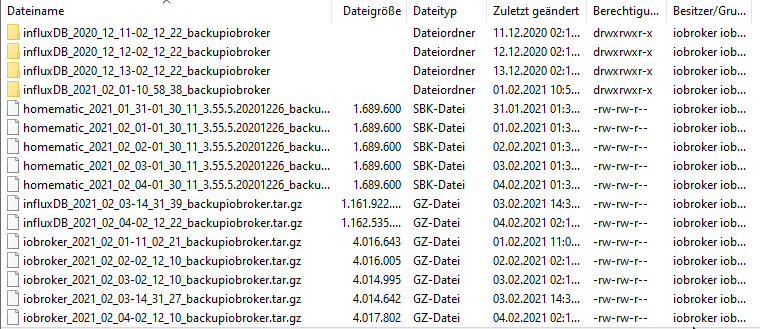
                              backups.png

                              simatecS 1 Reply Last reply
                              0
                              • P passuff

                                @simatec
                                so gut das manuelle Backup funktioniert hat - das Automatische ist heute Nach mit folgender Fehlermeldung gescheitert:

                                BackItUp:
                                Your backup was not completely created. Please check the errors!!
                                
                                clean: Error: EISDIR: illegal operation on a directory, unlink '/opt/iobroker/backups/influxDB_2020_12_11-02_12_22_backupiobroker'
                                

                                Wobei das Backup an sich korrekt abgelegt wurde. Es scheint jedoch so, als ob die tmp Datei nicht gelöscht werden konnte.

                                EDIT: So sieht es im benannten Verzeichnis aus:

                                backups.png

                                simatecS Online
                                simatecS Online
                                simatec
                                Developer Most Active
                                wrote on last edited by
                                #65

                                @passuff Lösche mal die Ordner Leichen von alten Influx Backups

                                • Besuche meine Github Seite
                                • Beitrag hat geholfen oder willst du mich unterstützen
                                • HowTo Restore ioBroker
                                1 Reply Last reply
                                0
                                • keksnK Offline
                                  keksnK Offline
                                  keksn
                                  wrote on last edited by
                                  #66

                                  Hallo,

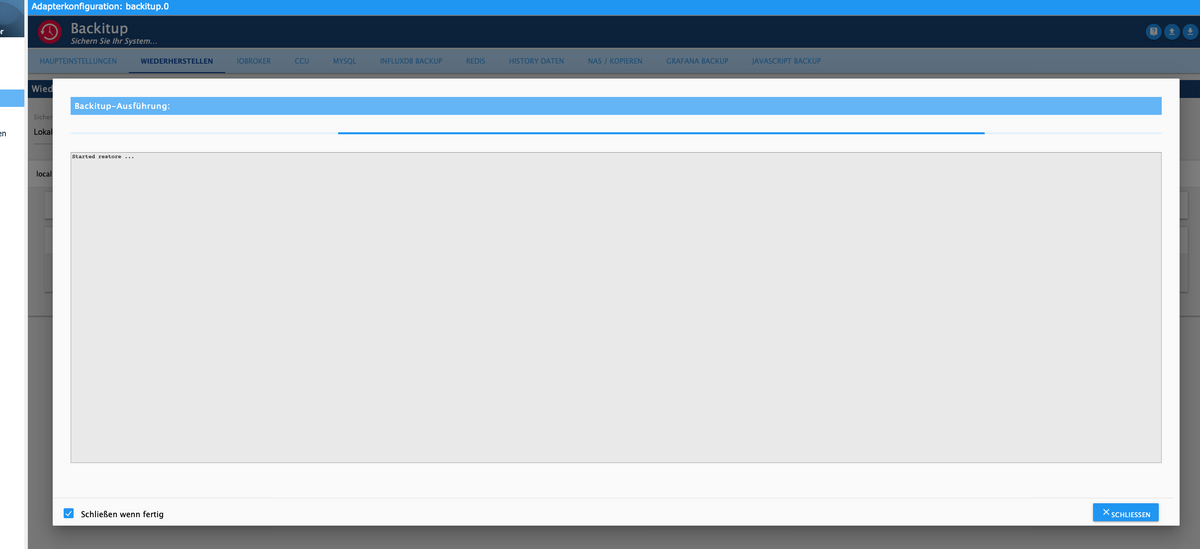
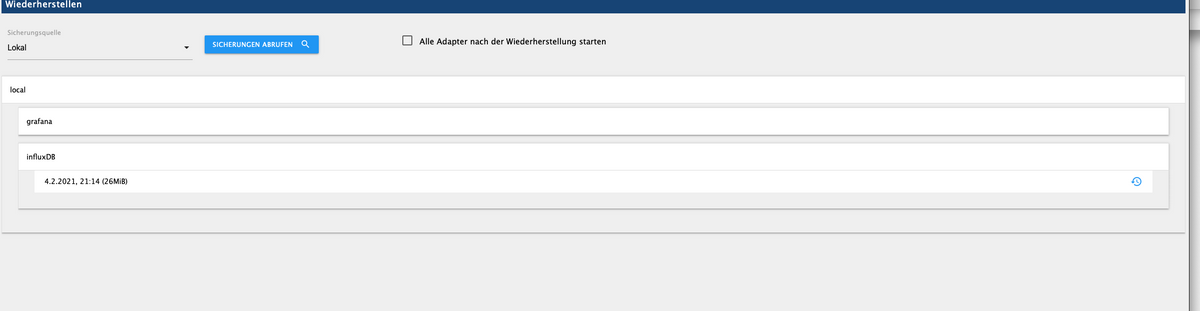
                                  ich kann das InfluxDB Backup nicht wiederherstellen.......erstellen ist kein Problem. Ich verwende die Version 2.0.0.beta2
                                  Es ist alle auf einem Raspberry installiert..

                                  Hat wer einem Tipp für mich?

                                  Danke

                                  LG
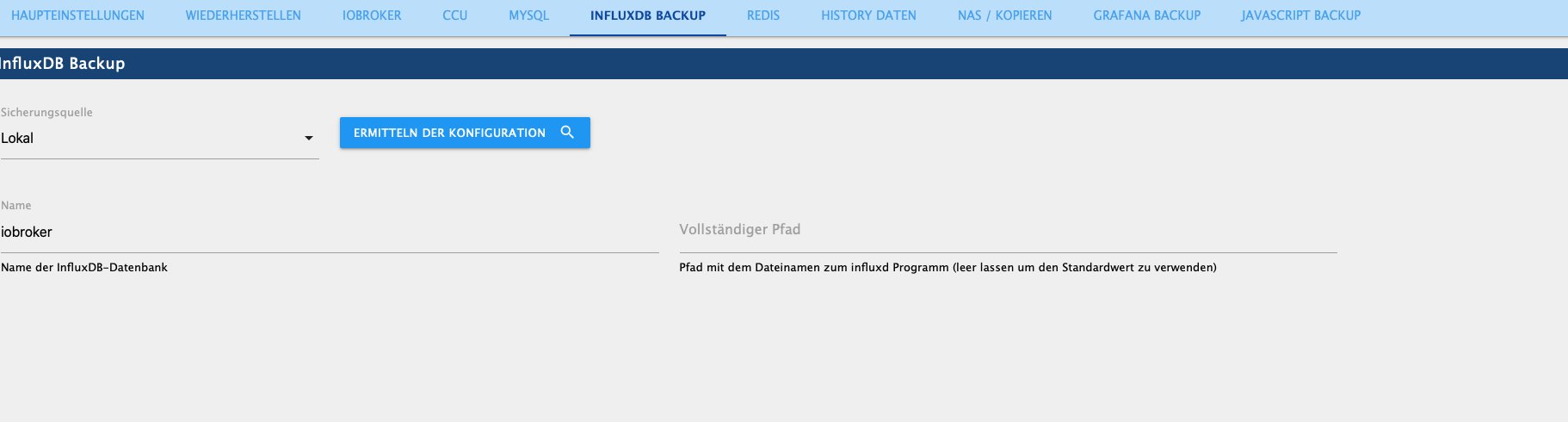
                                  Bildschirmfoto 2021-02-05 um 12.45.38.png Bildschirmfoto 2021-02-05 um 12.45.29.png Bildschirmfoto 2021-02-05 um 12.44.01.png Bildschirmfoto 2021-02-05 um 12.43.35.png

                                  simatecS 1 Reply Last reply
                                  0
                                  • keksnK keksn

                                    Hallo,

                                    ich kann das InfluxDB Backup nicht wiederherstellen.......erstellen ist kein Problem. Ich verwende die Version 2.0.0.beta2
                                    Es ist alle auf einem Raspberry installiert..

                                    Hat wer einem Tipp für mich?

                                    Danke

                                    LG
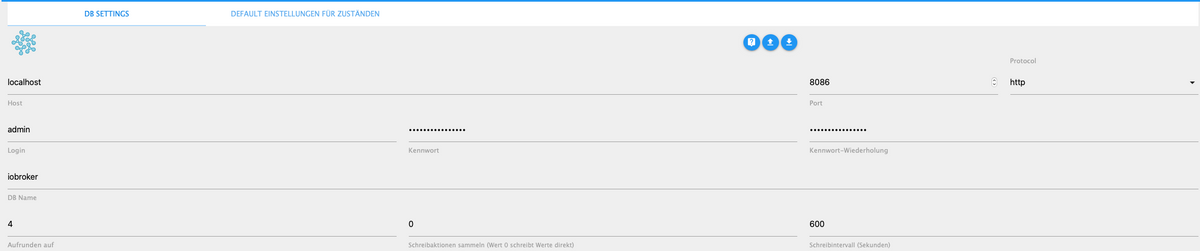
                                    Bildschirmfoto 2021-02-05 um 12.45.38.png Bildschirmfoto 2021-02-05 um 12.45.29.png Bildschirmfoto 2021-02-05 um 12.44.01.png Bildschirmfoto 2021-02-05 um 12.43.35.png

                                    simatecS Online
                                    simatecS Online
                                    simatec
                                    Developer Most Active
                                    wrote on last edited by
                                    #67

                                    @keksn
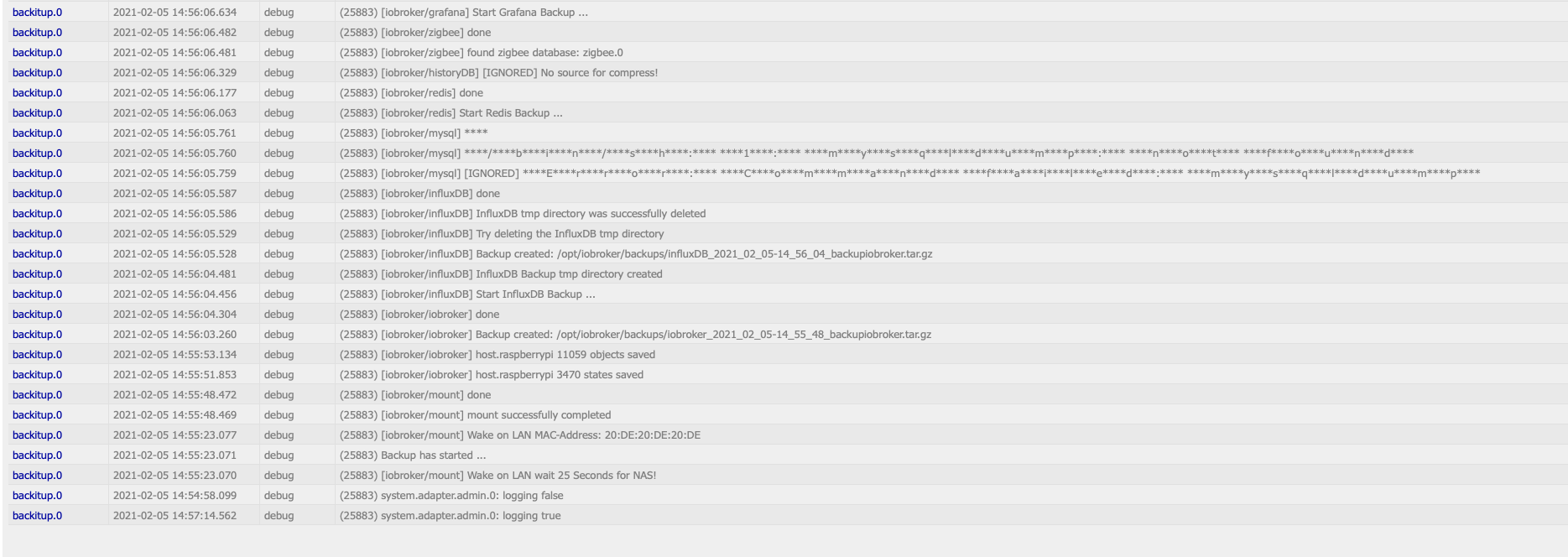
                                    Stelle Backitup mal in den Instanzen auf debug und poste mir bitte mal den Log vom restore

                                    • Besuche meine Github Seite
                                    • Beitrag hat geholfen oder willst du mich unterstützen
                                    • HowTo Restore ioBroker
                                    keksnK 2 Replies Last reply
                                    0
                                    • simatecS simatec

                                      @keksn
                                      Stelle Backitup mal in den Instanzen auf debug und poste mir bitte mal den Log vom restore

                                      keksnK Offline
                                      keksnK Offline
                                      keksn
                                      wrote on last edited by
                                      #68

                                      @simatec
                                      Hallo...danke für Deine Hilfe!! Toller Adapter!!

                                      Erstellen

                                      Bildschirmfoto 2021-02-05 um 14.57.56.png

                                      Backup aus dem alten Raspi....retour. ...
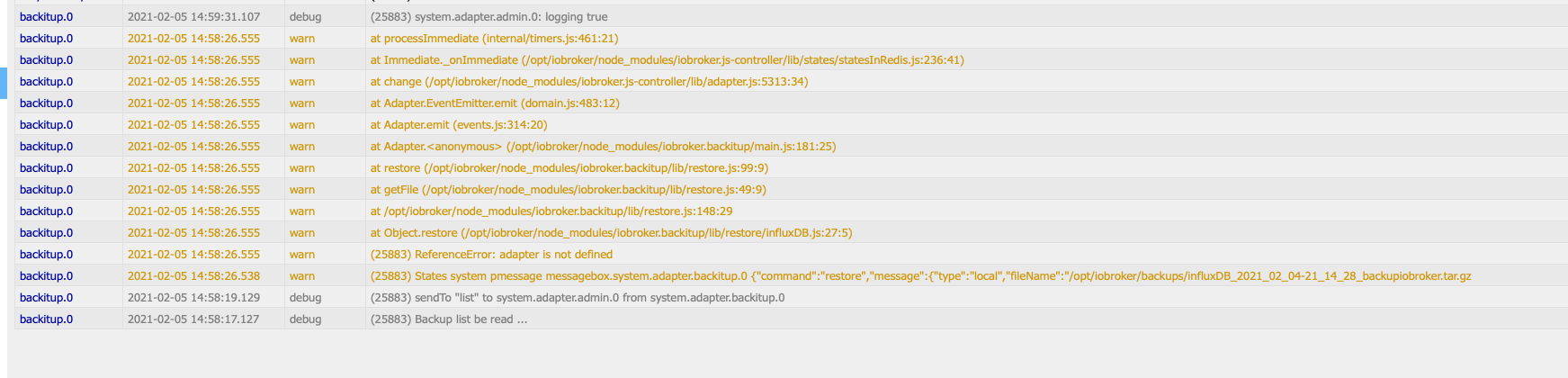
                                      Bildschirmfoto 2021-02-05 um 15.02.00.png

                                      simatecS 1 Reply Last reply
                                      0
                                      • simatecS simatec

                                        @keksn
                                        Stelle Backitup mal in den Instanzen auf debug und poste mir bitte mal den Log vom restore

                                        keksnK Offline
                                        keksnK Offline
                                        keksn
                                        wrote on last edited by
                                        #69

                                        @simatec

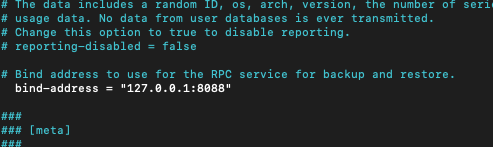
                                        0.0.0.0.:8088 geht auch nicht

                                        Bildschirmfoto 2021-02-05 um 15.06.03.png

                                        1 Reply Last reply
                                        0
                                        • keksnK keksn

                                          @simatec
                                          Hallo...danke für Deine Hilfe!! Toller Adapter!!

                                          Erstellen

                                          Bildschirmfoto 2021-02-05 um 14.57.56.png

                                          Backup aus dem alten Raspi....retour. ...

                                          Bildschirmfoto 2021-02-05 um 15.02.00.png

                                          simatecS Online
                                          simatecS Online
                                          simatec
                                          Developer Most Active
                                          wrote on last edited by
                                          #70

                                          @keksn
                                          Hab den Fehler schon gesehen. Fixe es nachher und pushe dann die Beta 3

                                          • Besuche meine Github Seite
                                          • Beitrag hat geholfen oder willst du mich unterstützen
                                          • HowTo Restore ioBroker
                                          keksnK 1 Reply Last reply
                                          0
                                          Reply
                                          • Reply as topic
                                          Log in to reply
                                          • Oldest to Newest
                                          • Newest to Oldest
                                          • Most Votes


                                          Support us

                                          ioBroker
                                          Community Adapters
                                          Donate
                                          FAQ Cloud / IOT
                                          HowTo: Node.js-Update
                                          HowTo: Backup/Restore
                                          Downloads
                                          BLOG

                                          587

                                          Online

                                          32.7k

                                          Users

                                          82.4k

                                          Topics

                                          1.3m

                                          Posts
                                          Community
                                          Impressum | Datenschutz-Bestimmungen | Nutzungsbedingungen | Einwilligungseinstellungen
                                          ioBroker Community 2014-2025
                                          logo
                                          • Login

                                          • Don't have an account? Register

                                          • Login or register to search.
                                          • First post
                                            Last post
                                          0
                                          • Home
                                          • Recent
                                          • Tags
                                          • Unread 0
                                          • Categories
                                          • Unreplied
                                          • Popular
                                          • GitHub
                                          • Docu
                                          • Hilfe