Skip to content
  • Home
  • Aktuell
  • Tags
  • 0 Ungelesen 0
  • Kategorien
  • Unreplied
  • Beliebt
  • GitHub
  • Docu
  • Hilfe
Skins
  • Light
  • Brite
  • Cerulean
  • Cosmo
  • Flatly
  • Journal
  • Litera
  • Lumen
  • Lux
  • Materia
  • Minty
  • Morph
  • Pulse
  • Sandstone
  • Simplex
  • Sketchy
  • Spacelab
  • United
  • Yeti
  • Zephyr
  • Dark
  • Cyborg
  • Darkly
  • Quartz
  • Slate
  • Solar
  • Superhero
  • Vapor

  • Standard: (Kein Skin)
  • Kein Skin
Einklappen
ioBroker Logo

Community Forum

donate donate
  1. ioBroker Community Home
  2. Deutsch
  3. ioBroker Allgemein
  4. BackItUp für InfluxDB

NEWS

  • UPDATE 31.10.: Amazon Alexa - ioBroker Skill läuft aus ?
    apollon77A
    apollon77
    48
    3
    8.8k

  • Monatsrückblick – September 2025
    BluefoxB
    Bluefox
    13
    1
    2.2k

  • Neues Video "KI im Smart Home" - ioBroker plus n8n
    BluefoxB
    Bluefox
    16
    1
    3.3k

BackItUp für InfluxDB

Geplant Angeheftet Gesperrt Verschoben ioBroker Allgemein
backitup influxdb
273 Beiträge 32 Kommentatoren 53.9k Aufrufe 28 Watching
  • Älteste zuerst
  • Neuste zuerst
  • Meiste Stimmen
Antworten
  • In einem neuen Thema antworten
Anmelden zum Antworten
Dieses Thema wurde gelöscht. Nur Nutzer mit entsprechenden Rechten können es sehen.
  • smileS Offline
    smileS Offline
    smile
    schrieb am zuletzt editiert von
    #27

    Ich habe mich gerade riesig gefreut als ich gesehen hab dass influxDB Backup mit integriert ist. Großes Dankeschön dafür!
    Als ich bei mir das Backup machen wollte, konnte ich jedoch den Reiter influxDB nicht sehen.
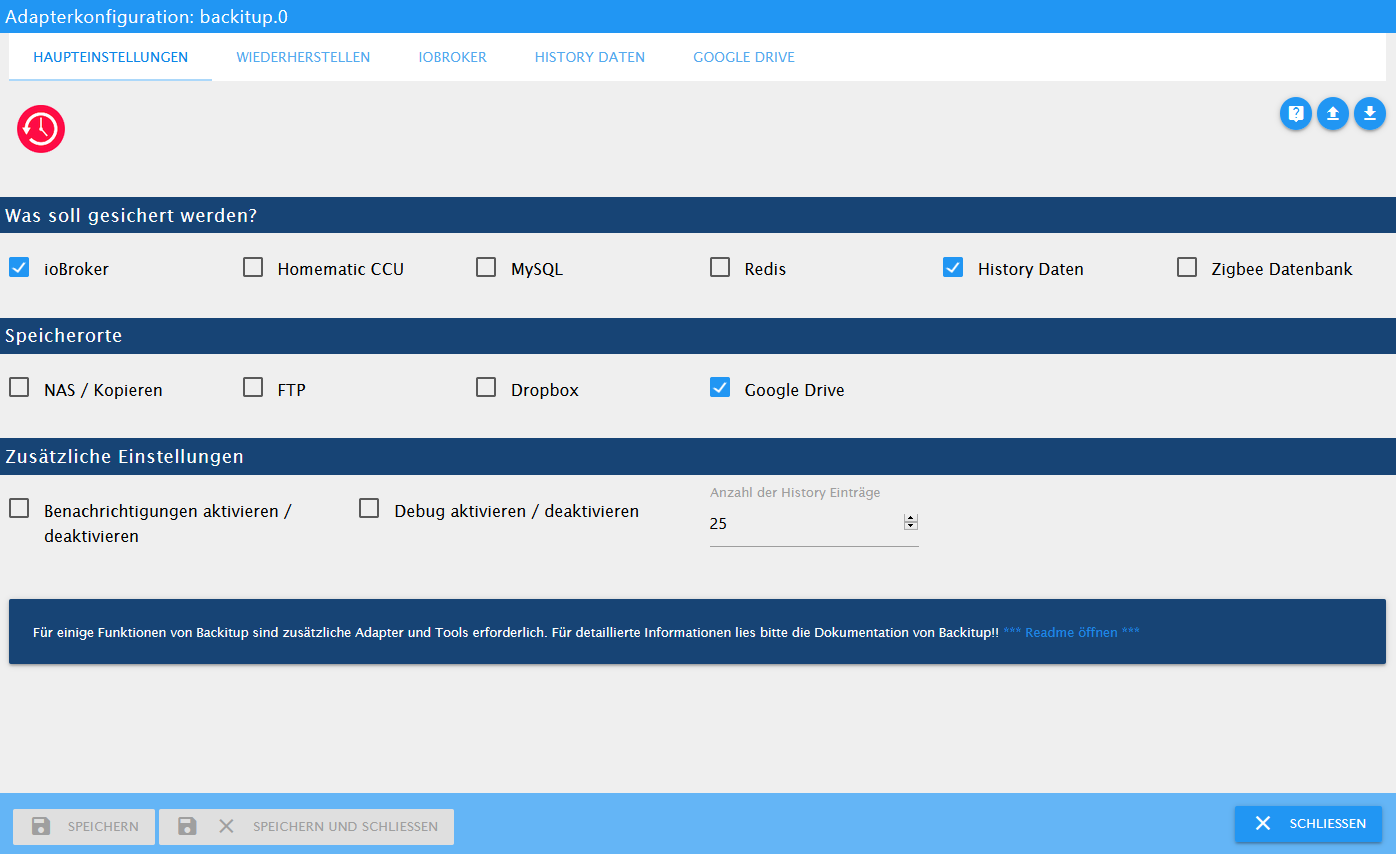
    instances - ioBroker - Mozilla Firefox 2021-01-06 13.21.02.png

    influxDB läuft bei mir auf dem gleichen System (Windows 10) zusammen mit dem iobroker.


    io.broker @ debian @ virtualbox @ Windows 10 Pro / Node 18.17.1, npm 9.6.7 / CCU3 / IR.Trans Server / Daslight 4 / Mobotix IP Cams / Qnap NAS / Sonos /

    Mein Rolladen - Blockly: https://forum.iobroker.net/topic/6442/das-ultimative-markisen-rolladen-blockly-script

    FreunderNachtF 1 Antwort Letzte Antwort
    0
    • smileS smile

      Ich habe mich gerade riesig gefreut als ich gesehen hab dass influxDB Backup mit integriert ist. Großes Dankeschön dafür!
      Als ich bei mir das Backup machen wollte, konnte ich jedoch den Reiter influxDB nicht sehen.
      instances - ioBroker - Mozilla Firefox 2021-01-06 13.21.02.png

      influxDB läuft bei mir auf dem gleichen System (Windows 10) zusammen mit dem iobroker.

      FreunderNachtF Offline
      FreunderNachtF Offline
      FreunderNacht
      schrieb am zuletzt editiert von
      #28

      @smile
      Hallo,
      hast du die neuste Version des Adapters auf deinem System?

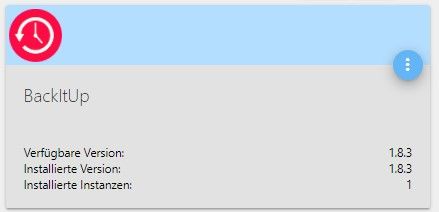
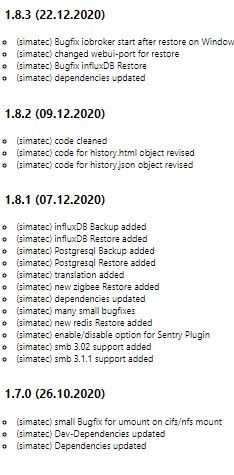
      Bei mir ist es die Version 1.8.3.

      BackitUp.jpg

      Änderungsprotokoll.jpg
      Läuft allerdings unter Linux, könnte sein, das es da unterschiede gibt.

      Gruß

      Freund der Nacht

      Intel NUC mit Proxmox
      IO Broker (Homematic IP / CCU3 / Shelly / Tasmota / Zigbee)
      Influx DB
      Grafana
      PiHole
      PiVPN

      smileS 1 Antwort Letzte Antwort
      0
      • FreunderNachtF FreunderNacht

        @smile
        Hallo,
        hast du die neuste Version des Adapters auf deinem System?

        Bei mir ist es die Version 1.8.3.

        BackitUp.jpg

        Änderungsprotokoll.jpg
        Läuft allerdings unter Linux, könnte sein, das es da unterschiede gibt.

        Gruß

        Freund der Nacht

        smileS Offline
        smileS Offline
        smile
        schrieb am zuletzt editiert von
        #29

        @FreunderNacht Oh, interessant, bei mir ist Version 1.7 drauf und die 1.8 steht mir auch nicht zur Installation zur Verfügung. Kann es daran liegen dass node und nom nicht auf dem neusten Stand sind? 10.17.0 und npm 6.11.3 Sowie Admin auf 3.7.8

        Ja könnte aber natürlich auch an dem Linux Unterschied liegen.


        io.broker @ debian @ virtualbox @ Windows 10 Pro / Node 18.17.1, npm 9.6.7 / CCU3 / IR.Trans Server / Daslight 4 / Mobotix IP Cams / Qnap NAS / Sonos /

        Mein Rolladen - Blockly: https://forum.iobroker.net/topic/6442/das-ultimative-markisen-rolladen-blockly-script

        GlasfaserG 1 Antwort Letzte Antwort
        0
        • smileS smile

          @FreunderNacht Oh, interessant, bei mir ist Version 1.7 drauf und die 1.8 steht mir auch nicht zur Installation zur Verfügung. Kann es daran liegen dass node und nom nicht auf dem neusten Stand sind? 10.17.0 und npm 6.11.3 Sowie Admin auf 3.7.8

          Ja könnte aber natürlich auch an dem Linux Unterschied liegen.

          GlasfaserG Offline
          GlasfaserG Offline
          Glasfaser
          schrieb am zuletzt editiert von
          #30

          @smile sagte in BackItUp für InfluxDB:

          Ja könnte aber natürlich auch an dem Linux Unterschied liegen.

          Nö ... am Verwahrungsort im ioBroker.

          1.JPG

          Synology 918+ 16GB - ioBroker in Docker v9 , VISO auf Trekstor Primebook C13 13,3" , Hikvision Domkameras mit Surveillance Station .. CCU RaspberryMatic in Synology VM .. Zigbee CC2538+CC2592 .. Sonoff .. KNX .. Modbus ..

          FreunderNachtF 1 Antwort Letzte Antwort
          1
          • GlasfaserG Glasfaser

            @smile sagte in BackItUp für InfluxDB:

            Ja könnte aber natürlich auch an dem Linux Unterschied liegen.

            Nö ... am Verwahrungsort im ioBroker.

            1.JPG

            FreunderNachtF Offline
            FreunderNachtF Offline
            FreunderNacht
            schrieb am zuletzt editiert von
            #31

            @Glasfaser
            Stimmt, ich hatte vergessen, das ich die Version aus "latest" installiert hatte.

            Ich glaube aber oben in einem Post von @simatec gelesen zu haben, dass die Version 1.8.3 bald in den "stabel" kommt.

            Intel NUC mit Proxmox
            IO Broker (Homematic IP / CCU3 / Shelly / Tasmota / Zigbee)
            Influx DB
            Grafana
            PiHole
            PiVPN

            1 Antwort Letzte Antwort
            1
            • simatecS simatec

              @Segway
              Danke die kommt in den nächsten Wochen ins stable.
              Pro Instanz von Backitup kann aktuell eine Datenbank von Influx gesichert werden

              FreunderNachtF Offline
              FreunderNachtF Offline
              FreunderNacht
              schrieb am zuletzt editiert von
              #32

              @simatec sagte in BackItUp für InfluxDB:

              @Segway
              Danke die kommt in den nächsten Wochen ins stable.
              Pro Instanz von Backitup kann aktuell eine Datenbank von Influx gesichert werden

              Jepp, da stehts.

              Intel NUC mit Proxmox
              IO Broker (Homematic IP / CCU3 / Shelly / Tasmota / Zigbee)
              Influx DB
              Grafana
              PiHole
              PiVPN

              1 Antwort Letzte Antwort
              0
              • D Offline
                D Offline
                DF612
                schrieb am zuletzt editiert von
                #33

                Hallo,

                bei mir will der Restore der InfluxDB nicht klappen.
                Influx ist in der Version 1.8.3 installiert und funktioniert auch.
                Backitup läuft in Version 1.8.5

                Wiederhergestellt werden soll eine ca. 140MB große Datenbank, welche auf einem NAS über FTP abgerufen wird. Die Datei wird auch im Wiederherstellen Menü gefunden und kann ausgewählt werden.
                Sobald ich die Datei anklicke werde ich darauf hingewiesen, dass der IBroker neustarten wird und die kleine Uhr neben dem Datensatz verschwindet.
                Ab diesem Punkt gibt es kein weiteres Feedback.

                Nach ein paar Minuten lässt sich über die Konsole überprüfen, dass in InfluxDB die Datenbank und die Measurements angelegt wurden, allerdings sind in den Measurements keine Datenpunkte.
                Im Log sehe ich ebenfalls nichts.

                Hat jemand eine Idee wo hier das Problem liegen könnte?

                simatecS 1 Antwort Letzte Antwort
                0
                • D DF612

                  Hallo,

                  bei mir will der Restore der InfluxDB nicht klappen.
                  Influx ist in der Version 1.8.3 installiert und funktioniert auch.
                  Backitup läuft in Version 1.8.5

                  Wiederhergestellt werden soll eine ca. 140MB große Datenbank, welche auf einem NAS über FTP abgerufen wird. Die Datei wird auch im Wiederherstellen Menü gefunden und kann ausgewählt werden.
                  Sobald ich die Datei anklicke werde ich darauf hingewiesen, dass der IBroker neustarten wird und die kleine Uhr neben dem Datensatz verschwindet.
                  Ab diesem Punkt gibt es kein weiteres Feedback.

                  Nach ein paar Minuten lässt sich über die Konsole überprüfen, dass in InfluxDB die Datenbank und die Measurements angelegt wurden, allerdings sind in den Measurements keine Datenpunkte.
                  Im Log sehe ich ebenfalls nichts.

                  Hat jemand eine Idee wo hier das Problem liegen könnte?

                  simatecS Offline
                  simatecS Offline
                  simatec
                  Developer Most Active
                  schrieb am zuletzt editiert von
                  #34

                  @df612
                  Versuche es bitte lokal zu restoren.

                  • Besuche meine Github Seite
                  • Beitrag hat geholfen oder willst du mich unterstützen
                  • HowTo Restore ioBroker
                  P 1 Antwort Letzte Antwort
                  0
                  • simatecS simatec

                    @df612
                    Versuche es bitte lokal zu restoren.

                    P Offline
                    P Offline
                    passuff
                    schrieb am zuletzt editiert von passuff
                    #35

                    @simatec
                    Folgende Konfig:

                    Server 1: iobroker
                    Server 2. influxdb mit datenbank (läuft seit Jahren)

                    Ich habe nun auf Server 1 influxdb nachinstalliert. Ich verstehe es zwar nicht, habe es aber dennoch einfach mal getan. Ich habe weder eine db noch einen Benutzer angelegt. Zusätzlich habe ich nun auf Server 2 ein bind auf 0.0.0.0:8088 eingerichtet. Vermutlich ergibt das alles keinen Sinn und der Grund warum das backup nicht funktioniert ist offensichtlich - ich verstehe hier leider nur Bahnhof:

                    influxDB: Error: Command failed: influxd backup -portable -database iobroker -host 192.168.1.10:8088 "/opt/iobroker/backups/influxDB_2021_02_01-11_02_37_backupiobroker"
                    2021/02/01 11:02:37 Download shard 0 failed dial tcp 192.168.1.10:8088: connect: connection refused.  Waiting 2s and retrying (0)...
                    2021/02/01 11:02:39 Download shard 0 failed dial tcp 192.168.1.10:8088: connect: connection refused.  Waiting 2s and retrying (1)...
                    2021/02/01 11:02:41 Download shard 0 failed dial tcp 192.168.1.10:8088: connect: connection refused.  Waiting 2s and retrying (2)...
                    2021/02/01 11:02:43 Download shard 0 failed dial tcp 192.168.1.10:8088: connect: connection refused.  Waiting 2s and retrying (3)...
                    2021/02/01 11:02:45 Download shard 0 failed dial tcp 192.168.1.10:8088: connect: connection refused.  Waiting 2s and retrying (4)...
                    2021/02/01 11:02:47 Download shard 0 failed dial tcp 192.168.1.10:8088: connect: connection refused.  Waiting 2s and retrying (5)...
                    2021/02/01 11:02:49 Download shard 0 failed dial tcp 192.168.1.10:8088: connect: connection refused.  Waiting 3.01s and retrying (6)...
                    2021/02/01 11:02:52 Download shard 0 failed dial tcp 192.168.1.10:8088: connect: connection refused.  Waiting 11.441s and retrying (7)...
                    2021/02/01 11:03:04 Download shard 0 failed dial tcp 192.168.1.10:8088: connect: connection refused.  Waiting 43.477s and retrying (8)...
                    2021/02/01 11:03:47 Download shard 0 failed dial tcp 192.168.1.10:8088: connect: connection refused.  Waiting 2m45.216s and retrying (9)...
                    backup: dial tcp 192.168.1.10:8088: connect: connection refused
                    

                    Meine adapter settings zeigen auf die aktive db auf Server2.

                    simatecS 2 Antworten Letzte Antwort
                    0
                    • P passuff

                      @simatec
                      Folgende Konfig:

                      Server 1: iobroker
                      Server 2. influxdb mit datenbank (läuft seit Jahren)

                      Ich habe nun auf Server 1 influxdb nachinstalliert. Ich verstehe es zwar nicht, habe es aber dennoch einfach mal getan. Ich habe weder eine db noch einen Benutzer angelegt. Zusätzlich habe ich nun auf Server 2 ein bind auf 0.0.0.0:8088 eingerichtet. Vermutlich ergibt das alles keinen Sinn und der Grund warum das backup nicht funktioniert ist offensichtlich - ich verstehe hier leider nur Bahnhof:

                      influxDB: Error: Command failed: influxd backup -portable -database iobroker -host 192.168.1.10:8088 "/opt/iobroker/backups/influxDB_2021_02_01-11_02_37_backupiobroker"
                      2021/02/01 11:02:37 Download shard 0 failed dial tcp 192.168.1.10:8088: connect: connection refused.  Waiting 2s and retrying (0)...
                      2021/02/01 11:02:39 Download shard 0 failed dial tcp 192.168.1.10:8088: connect: connection refused.  Waiting 2s and retrying (1)...
                      2021/02/01 11:02:41 Download shard 0 failed dial tcp 192.168.1.10:8088: connect: connection refused.  Waiting 2s and retrying (2)...
                      2021/02/01 11:02:43 Download shard 0 failed dial tcp 192.168.1.10:8088: connect: connection refused.  Waiting 2s and retrying (3)...
                      2021/02/01 11:02:45 Download shard 0 failed dial tcp 192.168.1.10:8088: connect: connection refused.  Waiting 2s and retrying (4)...
                      2021/02/01 11:02:47 Download shard 0 failed dial tcp 192.168.1.10:8088: connect: connection refused.  Waiting 2s and retrying (5)...
                      2021/02/01 11:02:49 Download shard 0 failed dial tcp 192.168.1.10:8088: connect: connection refused.  Waiting 3.01s and retrying (6)...
                      2021/02/01 11:02:52 Download shard 0 failed dial tcp 192.168.1.10:8088: connect: connection refused.  Waiting 11.441s and retrying (7)...
                      2021/02/01 11:03:04 Download shard 0 failed dial tcp 192.168.1.10:8088: connect: connection refused.  Waiting 43.477s and retrying (8)...
                      2021/02/01 11:03:47 Download shard 0 failed dial tcp 192.168.1.10:8088: connect: connection refused.  Waiting 2m45.216s and retrying (9)...
                      backup: dial tcp 192.168.1.10:8088: connect: connection refused
                      

                      Meine adapter settings zeigen auf die aktive db auf Server2.

                      simatecS Offline
                      simatecS Offline
                      simatec
                      Developer Most Active
                      schrieb am zuletzt editiert von
                      #36

                      @passuff sagte in BackItUp für InfluxDB:

                      bind auf 0.0.0.0:8088

                      Hast du Influx auf Server 2 mit "bind auf 0.0.0.0:8088" geändert?
                      Wurde im Anschluss an die Änderungen Influx auf Server 2 neugestartet?

                      • Besuche meine Github Seite
                      • Beitrag hat geholfen oder willst du mich unterstützen
                      • HowTo Restore ioBroker
                      P 1 Antwort Letzte Antwort
                      0
                      • simatecS simatec

                        @passuff sagte in BackItUp für InfluxDB:

                        bind auf 0.0.0.0:8088

                        Hast du Influx auf Server 2 mit "bind auf 0.0.0.0:8088" geändert?
                        Wurde im Anschluss an die Änderungen Influx auf Server 2 neugestartet?

                        P Offline
                        P Offline
                        passuff
                        schrieb am zuletzt editiert von
                        #37

                        @simatec sagte in BackItUp für InfluxDB:

                        nflux auf Server 2 mit "bind auf 0.0.0.0:8088"

                        beides korrekt.

                        1 Antwort Letzte Antwort
                        0
                        • P passuff

                          @simatec
                          Folgende Konfig:

                          Server 1: iobroker
                          Server 2. influxdb mit datenbank (läuft seit Jahren)

                          Ich habe nun auf Server 1 influxdb nachinstalliert. Ich verstehe es zwar nicht, habe es aber dennoch einfach mal getan. Ich habe weder eine db noch einen Benutzer angelegt. Zusätzlich habe ich nun auf Server 2 ein bind auf 0.0.0.0:8088 eingerichtet. Vermutlich ergibt das alles keinen Sinn und der Grund warum das backup nicht funktioniert ist offensichtlich - ich verstehe hier leider nur Bahnhof:

                          influxDB: Error: Command failed: influxd backup -portable -database iobroker -host 192.168.1.10:8088 "/opt/iobroker/backups/influxDB_2021_02_01-11_02_37_backupiobroker"
                          2021/02/01 11:02:37 Download shard 0 failed dial tcp 192.168.1.10:8088: connect: connection refused.  Waiting 2s and retrying (0)...
                          2021/02/01 11:02:39 Download shard 0 failed dial tcp 192.168.1.10:8088: connect: connection refused.  Waiting 2s and retrying (1)...
                          2021/02/01 11:02:41 Download shard 0 failed dial tcp 192.168.1.10:8088: connect: connection refused.  Waiting 2s and retrying (2)...
                          2021/02/01 11:02:43 Download shard 0 failed dial tcp 192.168.1.10:8088: connect: connection refused.  Waiting 2s and retrying (3)...
                          2021/02/01 11:02:45 Download shard 0 failed dial tcp 192.168.1.10:8088: connect: connection refused.  Waiting 2s and retrying (4)...
                          2021/02/01 11:02:47 Download shard 0 failed dial tcp 192.168.1.10:8088: connect: connection refused.  Waiting 2s and retrying (5)...
                          2021/02/01 11:02:49 Download shard 0 failed dial tcp 192.168.1.10:8088: connect: connection refused.  Waiting 3.01s and retrying (6)...
                          2021/02/01 11:02:52 Download shard 0 failed dial tcp 192.168.1.10:8088: connect: connection refused.  Waiting 11.441s and retrying (7)...
                          2021/02/01 11:03:04 Download shard 0 failed dial tcp 192.168.1.10:8088: connect: connection refused.  Waiting 43.477s and retrying (8)...
                          2021/02/01 11:03:47 Download shard 0 failed dial tcp 192.168.1.10:8088: connect: connection refused.  Waiting 2m45.216s and retrying (9)...
                          backup: dial tcp 192.168.1.10:8088: connect: connection refused
                          

                          Meine adapter settings zeigen auf die aktive db auf Server2.

                          simatecS Offline
                          simatecS Offline
                          simatec
                          Developer Most Active
                          schrieb am zuletzt editiert von
                          #38

                          @passuff
                          Zeige mal bitte deine Config der Influx und deine IP-Adressen der Server

                          • Besuche meine Github Seite
                          • Beitrag hat geholfen oder willst du mich unterstützen
                          • HowTo Restore ioBroker
                          P 1 Antwort Letzte Antwort
                          0
                          • simatecS simatec

                            @passuff
                            Zeige mal bitte deine Config der Influx und deine IP-Adressen der Server

                            P Offline
                            P Offline
                            passuff
                            schrieb am zuletzt editiert von
                            #39

                            @simatec

                            Server 1 (iobroker; 192.168.1.19; influxdb ohne db/user/etc.)
                            Server 2 (influxdb; 192.168.1.10; bind 0.0.0.0:8088)
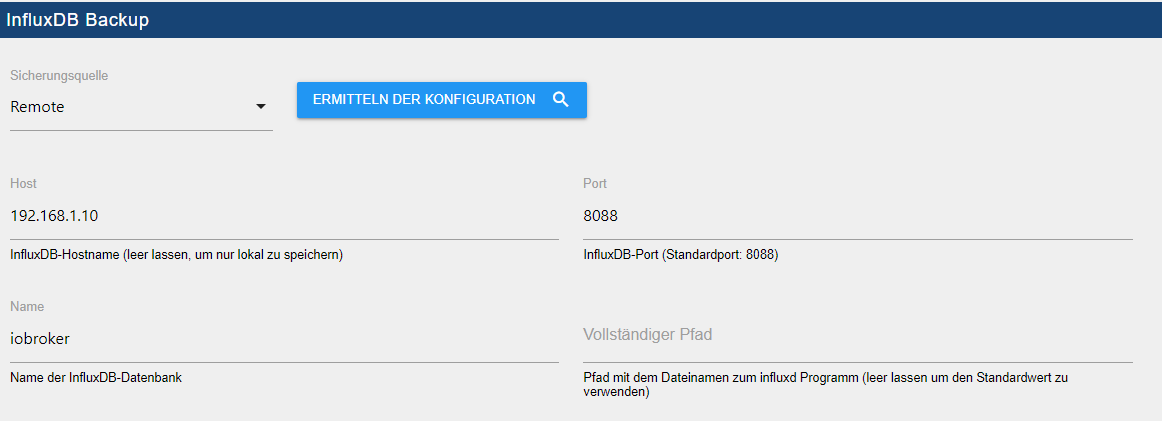
                            influx.png
                            backitup_influx.png

                            simatecS 1 Antwort Letzte Antwort
                            0
                            • P passuff

                              @simatec

                              Server 1 (iobroker; 192.168.1.19; influxdb ohne db/user/etc.)
                              Server 2 (influxdb; 192.168.1.10; bind 0.0.0.0:8088)

                              influx.png
                              backitup_influx.png

                              simatecS Offline
                              simatecS Offline
                              simatec
                              Developer Most Active
                              schrieb am zuletzt editiert von simatec
                              #40

                              @passuff sagte in BackItUp für InfluxDB:

                              192.168.1.10; bind 0.0.0.0:8088

                              Trage mal bitte als remote bind folgendes ein und starte im Anschluss influxdb oder besser dein komplettes System mal neu

                              bind 192.168.1.10:8088
                              

                              Zeige hier mal bitte die influxdb.conf

                              • Besuche meine Github Seite
                              • Beitrag hat geholfen oder willst du mich unterstützen
                              • HowTo Restore ioBroker
                              P 2 Antworten Letzte Antwort
                              0
                              • simatecS simatec

                                @passuff sagte in BackItUp für InfluxDB:

                                192.168.1.10; bind 0.0.0.0:8088

                                Trage mal bitte als remote bind folgendes ein und starte im Anschluss influxdb oder besser dein komplettes System mal neu

                                bind 192.168.1.10:8088
                                

                                Zeige hier mal bitte die influxdb.conf

                                P Offline
                                P Offline
                                passuff
                                schrieb am zuletzt editiert von
                                #41

                                @simatec

                                welche influxdb.conf soll ich ändern bzw zeigen? Es gibt ja zwei:

                                • Server 1 (ioboker + influxdb)
                                • ListenpunktServer 2 (influxdb - aktive db)
                                simatecS 1 Antwort Letzte Antwort
                                0
                                • P passuff

                                  @simatec

                                  welche influxdb.conf soll ich ändern bzw zeigen? Es gibt ja zwei:

                                  • Server 1 (ioboker + influxdb)
                                  • ListenpunktServer 2 (influxdb - aktive db)
                                  simatecS Offline
                                  simatecS Offline
                                  simatec
                                  Developer Most Active
                                  schrieb am zuletzt editiert von
                                  #42

                                  @passuff
                                  Nur die von Server 2. Server 1 ist egal ... Da wird nur die influxd zur Backupausführung benötigt

                                  • Besuche meine Github Seite
                                  • Beitrag hat geholfen oder willst du mich unterstützen
                                  • HowTo Restore ioBroker
                                  M 1 Antwort Letzte Antwort
                                  0
                                  • simatecS simatec

                                    @passuff
                                    Nur die von Server 2. Server 1 ist egal ... Da wird nur die influxd zur Backupausführung benötigt

                                    M Offline
                                    M Offline
                                    Markus84
                                    schrieb am zuletzt editiert von
                                    #43

                                    @simatec Ich habe leider auch einen Fehler beim backup der Influx-Datenbank und weiß nicht so recht wo ich anfangen muss den Fehler zu suchen:

                                    Started...
                                    [DEBUG] [iobroker] - host.iobroker 9481 states saved
                                    
                                    [DEBUG] [iobroker] - host.iobroker 10225 objects saved
                                    
                                    [DEBUG] [iobroker] - Backup created: /opt/iobroker/backups/iobroker_2021_02_02-14_19_01_backupiobroker.tar.gz
                                    
                                    [DEBUG] [iobroker] - done
                                    [DEBUG] [influxDB] - Start infulxDB Backup ...
                                    [DEBUG] [influxDB] - Created InfuxDB Backup dir
                                    [DEBUG] [influxDB] - exec: influxd backup -portable -database iobroker -host 192.168.100.12:8088 /opt/iobroker/backups/influxDB_2021_02_02-14_19_19_backupiobroker
                                    [DEBUG] [influxDB] - Try deleting the InfluxDB tmp directory
                                    [DEBUG] [influxDB] - InfluxDB tmp directory was successfully deleted
                                    [ERROR] [influxDB] - [IGNORED] Error: Command failed: influxd backup -portable -database iobroker -host 192.168.100.12:8088 /opt/iobroker/backups/influxDB_2021_02_02-14_19_19_backupiobroker
                                    /bin/sh: 1: influxd: not found
                                    
                                    [DEBUG] [googledrive] - Google Drive: Copy iobroker_2021_02_02-14_19_01_backupiobroker.tar.gz...
                                    [ERROR] [googledrive] - Google Drive: File "/opt/iobroker/backups/influxDB_2021_02_02-14_19_19_backupiobroker.tar.gz" not found
                                    [DEBUG] [googledrive] - done
                                    [DEBUG] [clean] - done
                                    [DEBUG] [pushover] - done
                                    [DEBUG] [historyHTML] - new history html values created
                                    [DEBUG] [historyHTML] - done
                                    [DEBUG] [historyJSON] - new history json values created
                                    [DEBUG] [historyJSON] - done
                                    [EXIT] 0
                                    

                                    Kannst du hier helfen?

                                    simatecS 1 Antwort Letzte Antwort
                                    0
                                    • M Markus84

                                      @simatec Ich habe leider auch einen Fehler beim backup der Influx-Datenbank und weiß nicht so recht wo ich anfangen muss den Fehler zu suchen:

                                      Started...
                                      [DEBUG] [iobroker] - host.iobroker 9481 states saved
                                      
                                      [DEBUG] [iobroker] - host.iobroker 10225 objects saved
                                      
                                      [DEBUG] [iobroker] - Backup created: /opt/iobroker/backups/iobroker_2021_02_02-14_19_01_backupiobroker.tar.gz
                                      
                                      [DEBUG] [iobroker] - done
                                      [DEBUG] [influxDB] - Start infulxDB Backup ...
                                      [DEBUG] [influxDB] - Created InfuxDB Backup dir
                                      [DEBUG] [influxDB] - exec: influxd backup -portable -database iobroker -host 192.168.100.12:8088 /opt/iobroker/backups/influxDB_2021_02_02-14_19_19_backupiobroker
                                      [DEBUG] [influxDB] - Try deleting the InfluxDB tmp directory
                                      [DEBUG] [influxDB] - InfluxDB tmp directory was successfully deleted
                                      [ERROR] [influxDB] - [IGNORED] Error: Command failed: influxd backup -portable -database iobroker -host 192.168.100.12:8088 /opt/iobroker/backups/influxDB_2021_02_02-14_19_19_backupiobroker
                                      /bin/sh: 1: influxd: not found
                                      
                                      [DEBUG] [googledrive] - Google Drive: Copy iobroker_2021_02_02-14_19_01_backupiobroker.tar.gz...
                                      [ERROR] [googledrive] - Google Drive: File "/opt/iobroker/backups/influxDB_2021_02_02-14_19_19_backupiobroker.tar.gz" not found
                                      [DEBUG] [googledrive] - done
                                      [DEBUG] [clean] - done
                                      [DEBUG] [pushover] - done
                                      [DEBUG] [historyHTML] - new history html values created
                                      [DEBUG] [historyHTML] - done
                                      [DEBUG] [historyJSON] - new history json values created
                                      [DEBUG] [historyJSON] - done
                                      [EXIT] 0
                                      

                                      Kannst du hier helfen?

                                      simatecS Offline
                                      simatecS Offline
                                      simatec
                                      Developer Most Active
                                      schrieb am zuletzt editiert von simatec
                                      #44

                                      @markus84
                                      Bitte mach ein Update auf die Version 1.8.5 oder auf die Github-Version 2.0.0-beta.2
                                      Des Weiteren muss Influx auf dem ioboker System laufen, wobei die Datenbank auf einem anderen Server liegen kann.
                                      In der Conf von Influx "bind auf 0.0.0.0:8088" anpassen

                                      • Besuche meine Github Seite
                                      • Beitrag hat geholfen oder willst du mich unterstützen
                                      • HowTo Restore ioBroker
                                      M 1 Antwort Letzte Antwort
                                      0
                                      • simatecS simatec

                                        @markus84
                                        Bitte mach ein Update auf die Version 1.8.5 oder auf die Github-Version 2.0.0-beta.2
                                        Des Weiteren muss Influx auf dem ioboker System laufen, wobei die Datenbank auf einem anderen Server liegen kann.
                                        In der Conf von Influx "bind auf 0.0.0.0:8088" anpassen

                                        M Offline
                                        M Offline
                                        Markus84
                                        schrieb am zuletzt editiert von
                                        #45

                                        @simatec Ich habe über Github die aktuelle Beta installiert. Leider erhalte ich die gleiche Fehlermeldung:

                                        Started iobroker ...
                                        [DEBUG] [iobroker] - host.iobroker 9475 states saved
                                        
                                        [DEBUG] [iobroker] - host.iobroker 10224 objects saved
                                        
                                        [DEBUG] [iobroker] - Backup created: /opt/iobroker/backups/iobroker_2021_02_02-14_49_49_backupiobroker.tar.gz
                                        
                                        [DEBUG] [iobroker] - done
                                        [DEBUG] [influxDB] - Start InfluxDB Backup ...
                                        [DEBUG] [influxDB] - InfluxDB Backup tmp directory created 
                                        [DEBUG] [influxDB] - Try deleting the InfluxDB tmp directory
                                        [DEBUG] [influxDB] - InfluxDB tmp directory was successfully deleted
                                        [ERROR] [influxDB] - [IGNORED] Error: Command failed: influxd backup -portable -database iobroker -host 192.168.100.12:8088 "/opt/iobroker/backups/influxDB_2021_02_02-14_50_06_backupiobroker"
                                        /bin/sh: 1: influxd: not found
                                        
                                        [DEBUG] [googledrive] - Google Drive: Copy iobroker_2021_02_02-14_49_49_backupiobroker.tar.gz...
                                        [ERROR] [googledrive] - Google Drive: File "/opt/iobroker/backups/influxDB_2021_02_02-14_50_06_backupiobroker.tar.gz" not found
                                        [DEBUG] [googledrive] - done
                                        [ERROR] [clean] - Backup files not deleted from /opt/iobroker/backups because some errors.
                                        [DEBUG] [clean] - done
                                        [DEBUG] [pushover] - done
                                        [DEBUG] [historyHTML] - new history html values created
                                        [DEBUG] [historyHTML] - done
                                        [DEBUG] [historyJSON] - new history json values created
                                        [DEBUG] [historyJSON] - done
                                        [EXIT] 0
                                        
                                        simatecS 1 Antwort Letzte Antwort
                                        0
                                        • M Markus84

                                          @simatec Ich habe über Github die aktuelle Beta installiert. Leider erhalte ich die gleiche Fehlermeldung:

                                          Started iobroker ...
                                          [DEBUG] [iobroker] - host.iobroker 9475 states saved
                                          
                                          [DEBUG] [iobroker] - host.iobroker 10224 objects saved
                                          
                                          [DEBUG] [iobroker] - Backup created: /opt/iobroker/backups/iobroker_2021_02_02-14_49_49_backupiobroker.tar.gz
                                          
                                          [DEBUG] [iobroker] - done
                                          [DEBUG] [influxDB] - Start InfluxDB Backup ...
                                          [DEBUG] [influxDB] - InfluxDB Backup tmp directory created 
                                          [DEBUG] [influxDB] - Try deleting the InfluxDB tmp directory
                                          [DEBUG] [influxDB] - InfluxDB tmp directory was successfully deleted
                                          [ERROR] [influxDB] - [IGNORED] Error: Command failed: influxd backup -portable -database iobroker -host 192.168.100.12:8088 "/opt/iobroker/backups/influxDB_2021_02_02-14_50_06_backupiobroker"
                                          /bin/sh: 1: influxd: not found
                                          
                                          [DEBUG] [googledrive] - Google Drive: Copy iobroker_2021_02_02-14_49_49_backupiobroker.tar.gz...
                                          [ERROR] [googledrive] - Google Drive: File "/opt/iobroker/backups/influxDB_2021_02_02-14_50_06_backupiobroker.tar.gz" not found
                                          [DEBUG] [googledrive] - done
                                          [ERROR] [clean] - Backup files not deleted from /opt/iobroker/backups because some errors.
                                          [DEBUG] [clean] - done
                                          [DEBUG] [pushover] - done
                                          [DEBUG] [historyHTML] - new history html values created
                                          [DEBUG] [historyHTML] - done
                                          [DEBUG] [historyJSON] - new history json values created
                                          [DEBUG] [historyJSON] - done
                                          [EXIT] 0
                                          
                                          simatecS Offline
                                          simatecS Offline
                                          simatec
                                          Developer Most Active
                                          schrieb am zuletzt editiert von
                                          #46

                                          @markus84 sagte in BackItUp für InfluxDB:

                                          in/sh: 1: influxd: not found

                                          Du musst Influx auf deinem iobroker System installiert haben.
                                          In der influxdb.conf auf deinem Influx-Server muss in den Remote-Einstellungen dann folgendes geändert werden

                                          bind <IP des Servers>:8088
                                          

                                          oder

                                          bind 0.0.0.0:8088
                                          

                                          Im Anschluss Influx neustarten

                                          • Besuche meine Github Seite
                                          • Beitrag hat geholfen oder willst du mich unterstützen
                                          • HowTo Restore ioBroker
                                          M 1 Antwort Letzte Antwort
                                          0
                                          Antworten
                                          • In einem neuen Thema antworten
                                          Anmelden zum Antworten
                                          • Älteste zuerst
                                          • Neuste zuerst
                                          • Meiste Stimmen


                                          Support us

                                          ioBroker
                                          Community Adapters
                                          Donate
                                          FAQ Cloud / IOT
                                          HowTo: Node.js-Update
                                          HowTo: Backup/Restore
                                          Downloads
                                          BLOG

                                          808

                                          Online

                                          32.4k

                                          Benutzer

                                          81.5k

                                          Themen

                                          1.3m

                                          Beiträge
                                          Community
                                          Impressum | Datenschutz-Bestimmungen | Nutzungsbedingungen | Einwilligungseinstellungen
                                          ioBroker Community 2014-2025
                                          logo
                                          • Anmelden

                                          • Du hast noch kein Konto? Registrieren

                                          • Anmelden oder registrieren, um zu suchen
                                          • Erster Beitrag
                                            Letzter Beitrag
                                          0
                                          • Home
                                          • Aktuell
                                          • Tags
                                          • Ungelesen 0
                                          • Kategorien
                                          • Unreplied
                                          • Beliebt
                                          • GitHub
                                          • Docu
                                          • Hilfe