Skip to content
  • Home
  • Recent
  • Tags
  • 0 Unread 0
  • Categories
  • Unreplied
  • Popular
  • GitHub
  • Docu
  • Hilfe
Skins
  • Light
  • Brite
  • Cerulean
  • Cosmo
  • Flatly
  • Journal
  • Litera
  • Lumen
  • Lux
  • Materia
  • Minty
  • Morph
  • Pulse
  • Sandstone
  • Simplex
  • Sketchy
  • Spacelab
  • United
  • Yeti
  • Zephyr
  • Dark
  • Cyborg
  • Darkly
  • Quartz
  • Slate
  • Solar
  • Superhero
  • Vapor

  • Default (No Skin)
  • No Skin
Collapse
ioBroker Logo

Community Forum

donate donate
  1. ioBroker Community Home
  2. Deutsch
  3. Tester
  4. Test Adapter time-switch v2.0.x GitHub/Latest

NEWS

  • Jahresrückblick 2025 – unser neuer Blogbeitrag ist online! ✨
    BluefoxB
    Bluefox
    17
    1
    3.5k

  • Neuer Blogbeitrag: Monatsrückblick - Dezember 2025 🎄
    BluefoxB
    Bluefox
    13
    1
    1.1k

  • Weihnachtsangebot 2025! 🎄
    BluefoxB
    Bluefox
    25
    1
    2.5k

Test Adapter time-switch v2.0.x GitHub/Latest

Scheduled Pinned Locked Moved Tester
adaptertesttimeswitchzeitschaltuhrvis
481 Posts 75 Posters 126.0k Views 87 Watching
  • Oldest to Newest
  • Newest to Oldest
  • Most Votes
Reply
  • Reply as topic
Log in to reply
This topic has been deleted. Only users with topic management privileges can see it.
  • walli545W walli545

    @intruder7 gibt nun unter https://github.com/walli545/ioBroker.time-switch/tarball/30-astro-trigger eine neue Version (2.1.0-pre.3), dort habe ich den Bug mit dem Material Design von Uhula behoben. Könntest du ausprobieren, ob es bei dir nun geht?

    Beim Updaten wieder die gewohnten Schritte ausführen.

    I Online
    I Online
    intruder7
    wrote on last edited by
    #254

    @walli545
    Nabend, mir ist da noch etwas aufgefallen.
    Jedesmal wenn es Fehler gibt, scheint sich der Adapter zu verabschieden.
    Hier mal ein Log Auszug

    2020-06-15 19:51:44.662 - info: time-switch.0 (22684) starting. Version 2.1.0-pre.3 in /opt/iobroker/node_modules/iobroker.time-switch, node: v10.19.0, js-controller: 3.1.5
    2020-06-15 19:52:04.646 - error: time-switch.0 (22684) Error: No schedule found for state time-switch.0.onoff.13.data
    at MessageService. (/opt/iobroker/node_modules/iobroker.time-switch/build/services/MessageService.js:43:23)
    at Generator.next ()
    at /opt/iobroker/node_modules/iobroker.time-switch/build/services/MessageService.js:8:71
    at new Promise ()
    at __awaiter (/opt/iobroker/node_modules/iobroker.time-switch/build/services/MessageService.js:4:12)
    at MessageService.handleMessage (/opt/iobroker/node_modules/iobroker.time-switch/build/services/MessageService.js:32:16)
    at TimeSwitch. (/opt/iobroker/node_modules/iobroker.time-switch/build/main.js:153:47)
    at Generator.next ()
    at /opt/iobroker/node_modules/iobroker.time-switch/build/main.js:8:71
    at new Promise ()
    2020-06-15 19:52:04.648 - error: time-switch.0 (22684) No schedule found for state time-switch.0.onoff.13.data
    2020-06-15 19:52:04.649 - error: time-switch.0 (22684) Error
    2020-06-15 19:52:04.651 - error: time-switch.0 (22684) Could not handle message:
    

    Danach muss der Adapter neugestartet werden damit die Widgets funktionieren. Also die Schalter gehen aber einen Schaltpunkt zuügen oder löschen geht nicht mehr
    Allgemein scheint das Fehlerhandling noch ziemlich anfällig zu sein.

    Grüße

    walli545W 2 Replies Last reply
    0
    • I intruder7

      @walli545
      Nabend, mir ist da noch etwas aufgefallen.
      Jedesmal wenn es Fehler gibt, scheint sich der Adapter zu verabschieden.
      Hier mal ein Log Auszug

      2020-06-15 19:51:44.662 - info: time-switch.0 (22684) starting. Version 2.1.0-pre.3 in /opt/iobroker/node_modules/iobroker.time-switch, node: v10.19.0, js-controller: 3.1.5
      2020-06-15 19:52:04.646 - error: time-switch.0 (22684) Error: No schedule found for state time-switch.0.onoff.13.data
      at MessageService. (/opt/iobroker/node_modules/iobroker.time-switch/build/services/MessageService.js:43:23)
      at Generator.next ()
      at /opt/iobroker/node_modules/iobroker.time-switch/build/services/MessageService.js:8:71
      at new Promise ()
      at __awaiter (/opt/iobroker/node_modules/iobroker.time-switch/build/services/MessageService.js:4:12)
      at MessageService.handleMessage (/opt/iobroker/node_modules/iobroker.time-switch/build/services/MessageService.js:32:16)
      at TimeSwitch. (/opt/iobroker/node_modules/iobroker.time-switch/build/main.js:153:47)
      at Generator.next ()
      at /opt/iobroker/node_modules/iobroker.time-switch/build/main.js:8:71
      at new Promise ()
      2020-06-15 19:52:04.648 - error: time-switch.0 (22684) No schedule found for state time-switch.0.onoff.13.data
      2020-06-15 19:52:04.649 - error: time-switch.0 (22684) Error
      2020-06-15 19:52:04.651 - error: time-switch.0 (22684) Could not handle message:
      

      Danach muss der Adapter neugestartet werden damit die Widgets funktionieren. Also die Schalter gehen aber einen Schaltpunkt zuügen oder löschen geht nicht mehr
      Allgemein scheint das Fehlerhandling noch ziemlich anfällig zu sein.

      Grüße

      walli545W Offline
      walli545W Offline
      walli545
      wrote on last edited by
      #255

      @intruder7 stimmt, das sollte ich noch ändern, ist mir auch schon aufgefallen :+1:

      1 Reply Last reply
      0
      • I intruder7

        @walli545
        Nabend, mir ist da noch etwas aufgefallen.
        Jedesmal wenn es Fehler gibt, scheint sich der Adapter zu verabschieden.
        Hier mal ein Log Auszug

        2020-06-15 19:51:44.662 - info: time-switch.0 (22684) starting. Version 2.1.0-pre.3 in /opt/iobroker/node_modules/iobroker.time-switch, node: v10.19.0, js-controller: 3.1.5
        2020-06-15 19:52:04.646 - error: time-switch.0 (22684) Error: No schedule found for state time-switch.0.onoff.13.data
        at MessageService. (/opt/iobroker/node_modules/iobroker.time-switch/build/services/MessageService.js:43:23)
        at Generator.next ()
        at /opt/iobroker/node_modules/iobroker.time-switch/build/services/MessageService.js:8:71
        at new Promise ()
        at __awaiter (/opt/iobroker/node_modules/iobroker.time-switch/build/services/MessageService.js:4:12)
        at MessageService.handleMessage (/opt/iobroker/node_modules/iobroker.time-switch/build/services/MessageService.js:32:16)
        at TimeSwitch. (/opt/iobroker/node_modules/iobroker.time-switch/build/main.js:153:47)
        at Generator.next ()
        at /opt/iobroker/node_modules/iobroker.time-switch/build/main.js:8:71
        at new Promise ()
        2020-06-15 19:52:04.648 - error: time-switch.0 (22684) No schedule found for state time-switch.0.onoff.13.data
        2020-06-15 19:52:04.649 - error: time-switch.0 (22684) Error
        2020-06-15 19:52:04.651 - error: time-switch.0 (22684) Could not handle message:
        

        Danach muss der Adapter neugestartet werden damit die Widgets funktionieren. Also die Schalter gehen aber einen Schaltpunkt zuügen oder löschen geht nicht mehr
        Allgemein scheint das Fehlerhandling noch ziemlich anfällig zu sein.

        Grüße

        walli545W Offline
        walli545W Offline
        walli545
        wrote on last edited by
        #256

        @intruder7 unter demselben Link gibt es nun 2.1.0-pre.4, dort habe ich eine Option in den Widget-Einstellungen hinzugefügt, mit der man, anstatt des Textes bei den Astrotriggern, Icons aktivieren kann.

        1 Reply Last reply
        1
        • T Offline
          T Offline
          toki1973
          wrote on last edited by
          #257

          Ich habe den Adapter über die "Katze" von Github geladen. Lt. Log sieht es eigentlich gut aus, aber ich sehe die Instanz nicht.

          $ ./iobroker url "https://github.com/walli545/ioBroker.time-switch" --debug
          install https://github.com/walli545/ioBroker.time-switch/tarball/bc176c62ccfaebc63ccc8d117f45ac2f5d0a1922
          NPM version: 6.13.4
          npm install https://github.com/walli545/ioBroker.time-switch/tarball/bc176c62ccfaebc63ccc8d117f45ac2f5d0a1922 --loglevel error --prefix "/opt/iobroker" (System call)
          + iobroker.time-switch@2.1.0updated 1 package in 53.852s
          68 packages are looking for funding  run `npm fund` for details
          upload [15] time-switch.admin /opt/iobroker/node_modules/iobroker.time-switch/admin/words.js words.js application/javascript
          upload [14] time-switch.admin /opt/iobroker/node_modules/iobroker.time-switch/admin/tsconfig.json tsconfig.json application/json
          upload [13] time-switch.admin /opt/iobroker/node_modules/iobroker.time-switch/admin/time-switch.png time-switch.png image/png
          upload [12] time-switch.admin /opt/iobroker/node_modules/iobroker.time-switch/admin/style.css style.css text/css
          upload [11] time-switch.admin /opt/iobroker/node_modules/iobroker.time-switch/admin/index_m.html index_m.html text/html
          upload [10] time-switch.admin /opt/iobroker/node_modules/iobroker.time-switch/admin/i18n/zh-cn/translations.json i18n/zh-cn/translations.json application/json
          upload [9] time-switch.admin /opt/iobroker/node_modules/iobroker.time-switch/admin/i18n/ru/translations.json i18n/ru/translations.json application/json
          upload [8] time-switch.admin /opt/iobroker/node_modules/iobroker.time-switch/admin/i18n/pt/translations.json i18n/pt/translations.json application/json
          upload [7] time-switch.admin /opt/iobroker/node_modules/iobroker.time-switch/admin/i18n/pl/translations.json i18n/pl/translations.json application/json
          upload [6] time-switch.admin /opt/iobroker/node_modules/iobroker.time-switch/admin/i18n/nl/translations.json i18n/nl/translations.json application/json
          upload [5] time-switch.admin /opt/iobroker/node_modules/iobroker.time-switch/admin/i18n/it/translations.json i18n/it/translations.json application/json
          upload [4] time-switch.admin /opt/iobroker/node_modules/iobroker.time-switch/admin/i18n/fr/translations.json i18n/fr/translations.json application/json
          upload [3] time-switch.admin /opt/iobroker/node_modules/iobroker.time-switch/admin/i18n/es/translations.json i18n/es/translations.json application/json
          upload [2] time-switch.admin /opt/iobroker/node_modules/iobroker.time-switch/admin/i18n/en/translations.json i18n/en/translations.json application/json
          upload [1] time-switch.admin /opt/iobroker/node_modules/iobroker.time-switch/admin/i18n/de/translations.json i18n/de/translations.json application/json
          upload [0] time-switch.admin /opt/iobroker/node_modules/iobroker.time-switch/admin/admin.d.ts admin.d.ts video/mp2t
          Adapter "system.adapter.vis.0" restarted.
          process exited with code 0
          

          NUC, PROXMOX, Grafana, Influx, Unify

          liv-in-skyL 1 Reply Last reply
          1
          • T toki1973

            Ich habe den Adapter über die "Katze" von Github geladen. Lt. Log sieht es eigentlich gut aus, aber ich sehe die Instanz nicht.

            $ ./iobroker url "https://github.com/walli545/ioBroker.time-switch" --debug
            install https://github.com/walli545/ioBroker.time-switch/tarball/bc176c62ccfaebc63ccc8d117f45ac2f5d0a1922
            NPM version: 6.13.4
            npm install https://github.com/walli545/ioBroker.time-switch/tarball/bc176c62ccfaebc63ccc8d117f45ac2f5d0a1922 --loglevel error --prefix "/opt/iobroker" (System call)
            + iobroker.time-switch@2.1.0updated 1 package in 53.852s
            68 packages are looking for funding  run `npm fund` for details
            upload [15] time-switch.admin /opt/iobroker/node_modules/iobroker.time-switch/admin/words.js words.js application/javascript
            upload [14] time-switch.admin /opt/iobroker/node_modules/iobroker.time-switch/admin/tsconfig.json tsconfig.json application/json
            upload [13] time-switch.admin /opt/iobroker/node_modules/iobroker.time-switch/admin/time-switch.png time-switch.png image/png
            upload [12] time-switch.admin /opt/iobroker/node_modules/iobroker.time-switch/admin/style.css style.css text/css
            upload [11] time-switch.admin /opt/iobroker/node_modules/iobroker.time-switch/admin/index_m.html index_m.html text/html
            upload [10] time-switch.admin /opt/iobroker/node_modules/iobroker.time-switch/admin/i18n/zh-cn/translations.json i18n/zh-cn/translations.json application/json
            upload [9] time-switch.admin /opt/iobroker/node_modules/iobroker.time-switch/admin/i18n/ru/translations.json i18n/ru/translations.json application/json
            upload [8] time-switch.admin /opt/iobroker/node_modules/iobroker.time-switch/admin/i18n/pt/translations.json i18n/pt/translations.json application/json
            upload [7] time-switch.admin /opt/iobroker/node_modules/iobroker.time-switch/admin/i18n/pl/translations.json i18n/pl/translations.json application/json
            upload [6] time-switch.admin /opt/iobroker/node_modules/iobroker.time-switch/admin/i18n/nl/translations.json i18n/nl/translations.json application/json
            upload [5] time-switch.admin /opt/iobroker/node_modules/iobroker.time-switch/admin/i18n/it/translations.json i18n/it/translations.json application/json
            upload [4] time-switch.admin /opt/iobroker/node_modules/iobroker.time-switch/admin/i18n/fr/translations.json i18n/fr/translations.json application/json
            upload [3] time-switch.admin /opt/iobroker/node_modules/iobroker.time-switch/admin/i18n/es/translations.json i18n/es/translations.json application/json
            upload [2] time-switch.admin /opt/iobroker/node_modules/iobroker.time-switch/admin/i18n/en/translations.json i18n/en/translations.json application/json
            upload [1] time-switch.admin /opt/iobroker/node_modules/iobroker.time-switch/admin/i18n/de/translations.json i18n/de/translations.json application/json
            upload [0] time-switch.admin /opt/iobroker/node_modules/iobroker.time-switch/admin/admin.d.ts admin.d.ts video/mp2t
            Adapter "system.adapter.vis.0" restarted.
            process exited with code 0
            
            liv-in-skyL Offline
            liv-in-skyL Offline
            liv-in-sky
            wrote on last edited by
            #258

            @toki1973 wenn du über die katze installierst, musst du die instanz "von hand" hinzufügen

            Image 1.png

            nach einem gelösten Thread wäre es sinnvoll dies in der Überschrift des ersten Posts einzutragen [gelöst]-... Bitte benutzt das Voting rechts unten im Beitrag wenn er euch geholfen hat. Forum-Tools: PicPick https://picpick.app/en/download/ und ScreenToGif https://www.screentogif.com/downloads.html

            T 1 Reply Last reply
            0
            • liv-in-skyL liv-in-sky

              @toki1973 wenn du über die katze installierst, musst du die instanz "von hand" hinzufügen

              Image 1.png

              T Offline
              T Offline
              toki1973
              wrote on last edited by
              #259

              @liv-in-sky
              :face_palm: Vielen Dank! Ich hatte das vorher noch nicht gemacht - nun sehe ich ihn :)

              NUC, PROXMOX, Grafana, Influx, Unify

              1 Reply Last reply
              1
              • T Offline
                T Offline
                toki1973
                wrote on last edited by
                #260

                Nun bekomme ich das Widget nicht mehr in der VIS angezeigt. Ich starte die VIS dann erscheint es kurz und dann wird das Widget als Strin (unescaped)

                NUC, PROXMOX, Grafana, Influx, Unify

                walli545W 1 Reply Last reply
                0
                • T toki1973

                  Nun bekomme ich das Widget nicht mehr in der VIS angezeigt. Ich starte die VIS dann erscheint es kurz und dann wird das Widget als Strin (unescaped)

                  walli545W Offline
                  walli545W Offline
                  walli545
                  wrote on last edited by
                  #261

                  @toki1973 Hallo, könntest du bitte noch genauer beschreiben was du machst und was passiert? Bitte auch noch einen Log der Browser Konsole mitgeben (F12 -> Console)

                  @all Ich arbeite aktuell an den bedingten Triggern. In der Adapter Logik habe ich diese bereits umgesetzt und getestet, muss nur noch das Widget anpassen.

                  1 Reply Last reply
                  0
                  • T Offline
                    T Offline
                    toki1973
                    wrote on last edited by
                    #262

                    Beim Laden der VIS sehe ich das Widget - dann aber wird es nicht mehr dargestellt

                    ![alt text](a1756915-ed2e-451a-afe2-fb053c4dbd71-image.png image url)

                    NUC, PROXMOX, Grafana, Influx, Unify

                    walli545W arteckA 2 Replies Last reply
                    0
                    • T toki1973

                      Beim Laden der VIS sehe ich das Widget - dann aber wird es nicht mehr dargestellt

                      ![alt text](a1756915-ed2e-451a-afe2-fb053c4dbd71-image.png image url)

                      walli545W Offline
                      walli545W Offline
                      walli545
                      wrote on last edited by
                      #263

                      @toki1973 bitte noch den Browser log anfügen (F12 -> Konsole) und folgende Fragen beantworten:

                      • Welche Version ist installiert (link)?
                      • Hast du in den Instanzeinstellungen (Admin) Schedules angelegt?
                      • Gibt es Fehler im Log von time-switch (Admin)?
                      • Kannst du auf das Widget im Editor klicken und dann Einstellungen vornehmen?
                      1 Reply Last reply
                      0
                      • T toki1973

                        Beim Laden der VIS sehe ich das Widget - dann aber wird es nicht mehr dargestellt

                        ![alt text](a1756915-ed2e-451a-afe2-fb053c4dbd71-image.png image url)

                        arteckA Offline
                        arteckA Offline
                        arteck
                        Developer Most Active
                        wrote on last edited by
                        #264

                        @toki1973 z-index angepasst.. ich wette nich

                        zigbee hab ich, zwave auch, nuc's genauso und HA auch

                        1 Reply Last reply
                        0
                        • K GrünK Offline
                          K GrünK Offline
                          K Grün
                          wrote on last edited by
                          #265

                          Hallo,
                          bei mir taucht kein Widget im VIS auf.
                          Bin ich wirklich der einzige bei dem das so ist ?

                          Habe Iobroker , vis neu gestartet . Cache gelöscht usw. instanz ist da.

                          Hab ich irgendwas überlesen ?

                          K GrünK 1 Reply Last reply
                          0
                          • K GrünK K Grün

                            Hallo,
                            bei mir taucht kein Widget im VIS auf.
                            Bin ich wirklich der einzige bei dem das so ist ?

                            Habe Iobroker , vis neu gestartet . Cache gelöscht usw. instanz ist da.

                            Hab ich irgendwas überlesen ?

                            K GrünK Offline
                            K GrünK Offline
                            K Grün
                            wrote on last edited by
                            #266

                            @K-Grün said in Test Adapter time-switch v2.0.x GitHub/Latest:

                            Hallo,
                            bei mir taucht kein Widget im VIS auf.
                            Bin ich wirklich der einzige bei dem das so ist ?

                            Habe Iobroker , vis neu gestartet . Cache gelöscht usw. instanz ist da.

                            Hab ich irgendwas überlesen ?

                            AH nochmal
                            iobroker upload time-switch

                            nu gehts. doch was überlesen

                            A 1 Reply Last reply
                            0
                            • K GrünK K Grün

                              @K-Grün said in Test Adapter time-switch v2.0.x GitHub/Latest:

                              Hallo,
                              bei mir taucht kein Widget im VIS auf.
                              Bin ich wirklich der einzige bei dem das so ist ?

                              Habe Iobroker , vis neu gestartet . Cache gelöscht usw. instanz ist da.

                              Hab ich irgendwas überlesen ?

                              AH nochmal
                              iobroker upload time-switch

                              nu gehts. doch was überlesen

                              A Offline
                              A Offline
                              AndreasW63
                              wrote on last edited by
                              #267

                              Hallo,

                              ich bin neuer Anwender des ioBroker.
                              Bisher bin ich mit der Konfiguration bzw. Einrichtung ganz gut vorangekommen.

                              Zunächst ein großes Lob an die Tester und Entwickler des Time-Switch.
                              Der Time-Switch ist eine Anwendung nach meinem Geschmack.
                              Das die Einbindung in das System vielleicht noch etwas hakelig ist, stört mich bei dem jungen Produkt nicht.

                              Allerdings habe ich mit dem Handling ein Problem bei dem ich nicht so recht weiter komme.

                              Die ersten "Schaltuhren" habe ich zum Testen auf einer separaten Seite meiner ioBroker Seite erstellt.
                              Rufe ich die Seite direkt aus dem Vis Editor auf, werden die Einträge korrekt dargestellt.
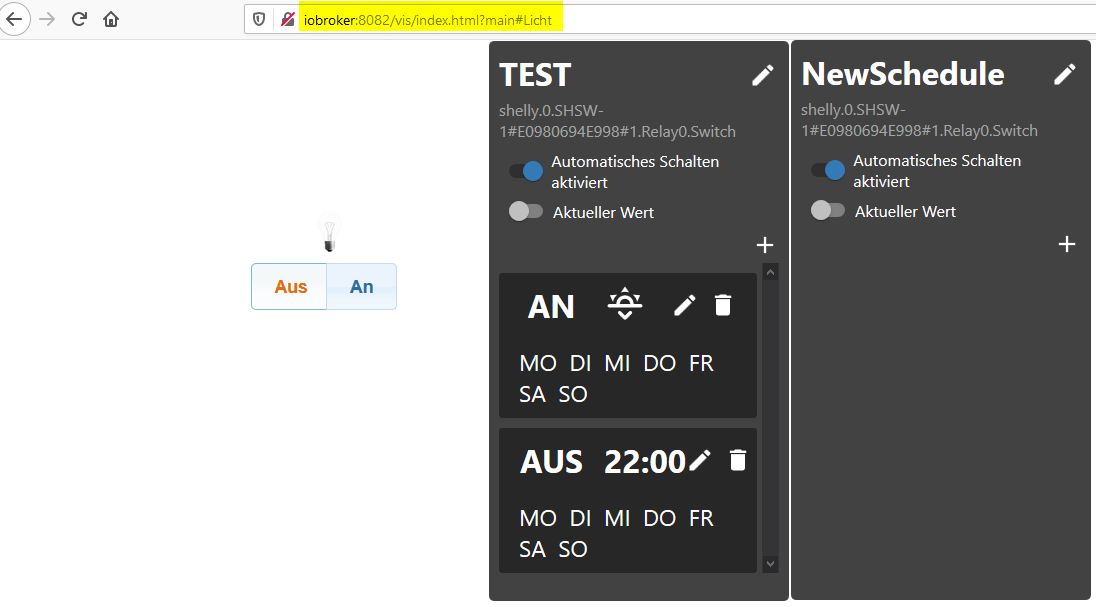
                              Ansicht time-switch - ohne Slider Tabs.png
                              Rufe ich die Seite über die SliderTabs auf sieht es aus wie folgt:
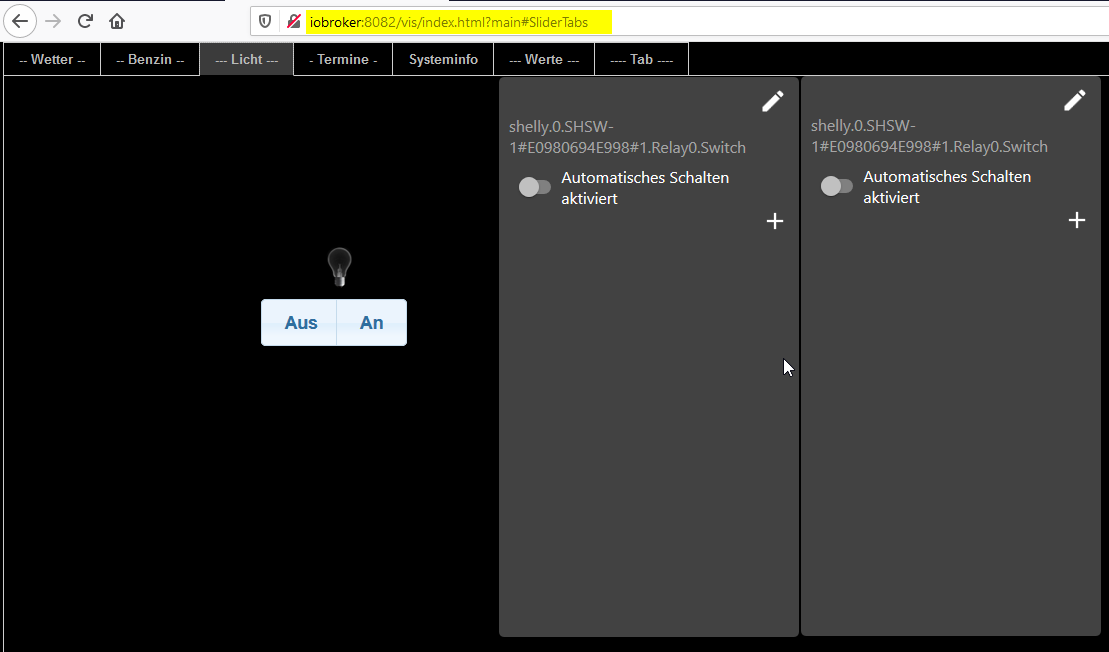
                              Ansicht time-switch - Slider Tabs.png

                              Wo kann ich ansetzen ?

                              Gruß Andreas

                              Raspberry 4 4GB RAM
                              PRETTY_NAME="Raspbian GNU/Linux 10 (buster)"
                              NAME="Raspbian GNU/Linux"
                              VERSION_ID="10"
                              VERSION="10 (buster)"
                              Node.js v12.18.3
                              NPM 6.14.6
                              Admin 4.0.10
                              WEB Server 3.0.12
                              Visualisation 1.2.11

                              walli545W 1 Reply Last reply
                              0
                              • sigi234S sigi234

                                @walli545 sagte in Test Adapter time-switch v2.0.x GitHub/Latest:

                                Bitte mal testen ob die Trigger dann auch wirklich schalten. Habe bis jetzt nur Unit Tests, in der wirklichen ioBroker Umgebung bin ich bis jetzt noch nicht dazu gekommen.

                                Jupp, hat geschaltet
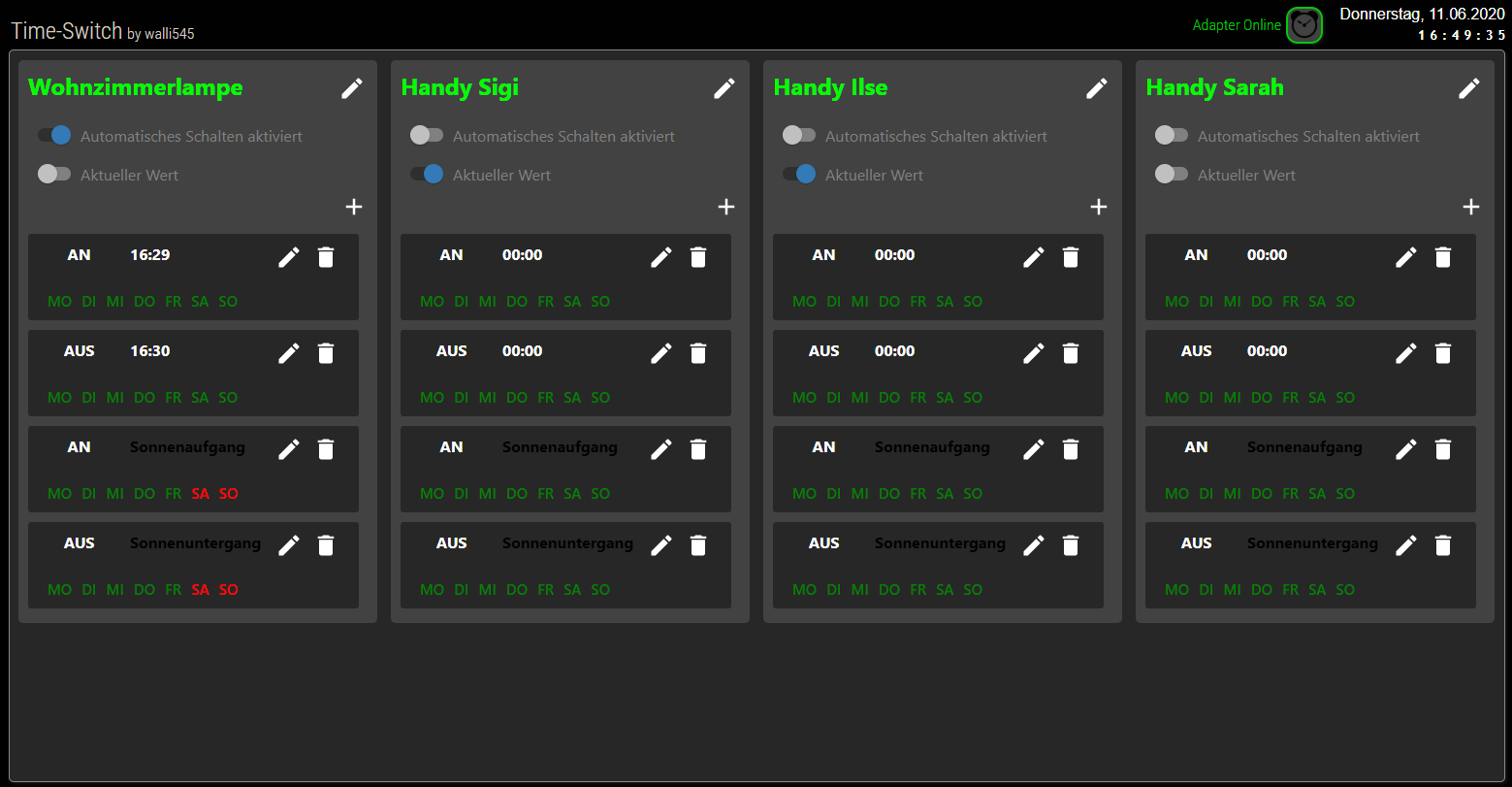
                                Screenshot (36).png

                                Stephan SchleichS Offline
                                Stephan SchleichS Offline
                                Stephan Schleich
                                wrote on last edited by Stephan Schleich
                                #268

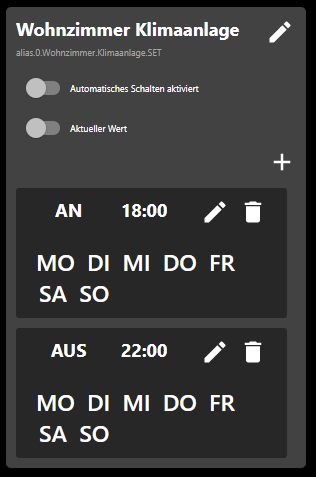
                                @sigi234 Sigi wie hast du die Größe der Wochentage verändert und die farblichen Kennzeichnungen?
                                Bei mir wird nur die Überschrift kleiner
                                9bdd7d7a-9aaa-4c1c-92a6-b0a19913686f-image.png

                                Edit: Habs gefunden, gibt CSS Customs - vllt magst deine ja mal teilen

                                sigi234S 1 Reply Last reply
                                0
                                • Stephan SchleichS Stephan Schleich

                                  @sigi234 Sigi wie hast du die Größe der Wochentage verändert und die farblichen Kennzeichnungen?
                                  Bei mir wird nur die Überschrift kleiner

                                  9bdd7d7a-9aaa-4c1c-92a6-b0a19913686f-image.png

                                  Edit: Habs gefunden, gibt CSS Customs - vllt magst deine ja mal teilen

                                  sigi234S Online
                                  sigi234S Online
                                  sigi234
                                  Forum Testing Most Active
                                  wrote on last edited by
                                  #269

                                  @Stephan-Schleich sagte in Test Adapter time-switch v2.0.x GitHub/Latest:

                                  Edit: Habs gefunden, gibt CSS Customs - vllt magst deine ja mal teilen

                                  Ist Online:

                                  https://forum.iobroker.net/topic/28717/vis-von-sigi234/432

                                  Bitte benutzt das Voting rechts unten im Beitrag wenn er euch geholfen hat.
                                  Immer Daten sichern!

                                  Stephan SchleichS 1 Reply Last reply
                                  1
                                  • sigi234S sigi234

                                    @Stephan-Schleich sagte in Test Adapter time-switch v2.0.x GitHub/Latest:

                                    Edit: Habs gefunden, gibt CSS Customs - vllt magst deine ja mal teilen

                                    Ist Online:

                                    https://forum.iobroker.net/topic/28717/vis-von-sigi234/432

                                    Stephan SchleichS Offline
                                    Stephan SchleichS Offline
                                    Stephan Schleich
                                    wrote on last edited by Stephan Schleich
                                    #270

                                    @sigi234 Ich meinte die CSS Settings fürs Widget im Vis Editor :)

                                    sigi234S 1 Reply Last reply
                                    0
                                    • Stephan SchleichS Stephan Schleich

                                      @sigi234 Ich meinte die CSS Settings fürs Widget im Vis Editor :)

                                      sigi234S Online
                                      sigi234S Online
                                      sigi234
                                      Forum Testing Most Active
                                      wrote on last edited by sigi234
                                      #271

                                      @Stephan-Schleich sagte in Test Adapter time-switch v2.0.x GitHub/Latest:

                                      @sigi234 Ich meinte die CSS Settings fürs Widget im Vis Editor :)

                                      app-on-off-schedule-widget {
                                          /* Primary color (button background, toggle switch color) */
                                          --ts-widget-primary-color: #337ab7;
                                      
                                          /* Background color of the widget */
                                          --ts-widget-bg-color: #424242;
                                          /* Background color of the triggers */
                                          --ts-widget-trigger-bg-color: #272727;
                                      
                                          /* Foreground color (font color and scrollbar color) */
                                          --ts-widget-fg-color: white;
                                          /* Font color of the switched states id */
                                          --ts-widget-oid-fg-color: #a5a5a5;
                                          /* Font color in buttons */
                                          --ts-widget-btn-fg-color: white;
                                          /* Font color of a disabled weekday */
                                          --ts-widget-weekdays-disabled-fg-color: #5D5D5D;
                                          /* Font color of an enabled weekday */
                                          --ts-widget-weekdays-enabled-fg-color: white;
                                          /* Font color of the name of the widget (defaults to --ts-widget-fg-color) */
                                          --ts-widget-name-fg-color: white;
                                          /* Font color of switched time (defaults to --ts-widget-fg-color) */
                                          --ts-widget-switched-time-fg-color: white;
                                          /* Font color of switched value (defaults to --ts-widget-fg-color)*/
                                          --ts-widget-switched-value-fg-color: white;
                                          /* Font color of the astro time (defaults to --ts-widget-fg-color) */
                                          --ts-widget-astro-time-fg-color: black;
                                          /* Font color of the astro time's shift */
                                          --ts-widget-astro-shift-fg-color: #5d5d5d;
                                      
                                          /* Font family used in the whole widget */
                                          --ts-widget-font-family: 'Roboto', 'Segoe UI', BlinkMacSystemFont, system-ui, -apple-system;
                                          /* Font size of the name of the widget */
                                          --ts-widget-name-font-size: 2em;
                                          /* Font size of the switched oid */
                                          --ts-widget-oid-font-size: 30px;
                                      
                                          /* Applies a filter to icons used in buttons (safe, edit, remove, cancel), for
                                             white use invert(1) and for black invert(0) */
                                          --ts-widget-img-btn-filter: invert(1);
                                          
                                          /* Add trigger dropdown background color */
                                          --ts-widget-add-trigger-dropdown-bg-color: #f1f1f1;
                                          /* Add trigger dropdown font color */
                                          --ts-widget-add-trigger-dropdown-fg-color: black;
                                          /* Add trigger dropdown hover background color */
                                          --ts-widget-add-trigger-dropdown-hover-bg-color: #ddd;
                                      
                                          /* ! Changing these may break the layout, change at your own risk */
                                      
                                          /* Font size of weekdays */
                                          --ts-widget-weekdays-font-size: 23px;
                                          /* Font size of switched value (on/off) */
                                          --ts-widget-switched-value-font-size: 2em;
                                          /* Font size of switched time */
                                          --ts-widget-switched-time-font-size: 2em;
                                          /* Font size of the astro time (e.g. Sunrise, ...) */
                                          --ts-widget-astro-time-font-size: 1.5em;
                                          /* Font size of the astro time's shift */
                                          --ts-widget-astro-shift-font-size: 1em;
                                      }
                                      

                                      Bitte benutzt das Voting rechts unten im Beitrag wenn er euch geholfen hat.
                                      Immer Daten sichern!

                                      Stephan SchleichS 1 Reply Last reply
                                      1
                                      • sigi234S sigi234

                                        @Stephan-Schleich sagte in Test Adapter time-switch v2.0.x GitHub/Latest:

                                        @sigi234 Ich meinte die CSS Settings fürs Widget im Vis Editor :)

                                        app-on-off-schedule-widget {
                                            /* Primary color (button background, toggle switch color) */
                                            --ts-widget-primary-color: #337ab7;
                                        
                                            /* Background color of the widget */
                                            --ts-widget-bg-color: #424242;
                                            /* Background color of the triggers */
                                            --ts-widget-trigger-bg-color: #272727;
                                        
                                            /* Foreground color (font color and scrollbar color) */
                                            --ts-widget-fg-color: white;
                                            /* Font color of the switched states id */
                                            --ts-widget-oid-fg-color: #a5a5a5;
                                            /* Font color in buttons */
                                            --ts-widget-btn-fg-color: white;
                                            /* Font color of a disabled weekday */
                                            --ts-widget-weekdays-disabled-fg-color: #5D5D5D;
                                            /* Font color of an enabled weekday */
                                            --ts-widget-weekdays-enabled-fg-color: white;
                                            /* Font color of the name of the widget (defaults to --ts-widget-fg-color) */
                                            --ts-widget-name-fg-color: white;
                                            /* Font color of switched time (defaults to --ts-widget-fg-color) */
                                            --ts-widget-switched-time-fg-color: white;
                                            /* Font color of switched value (defaults to --ts-widget-fg-color)*/
                                            --ts-widget-switched-value-fg-color: white;
                                            /* Font color of the astro time (defaults to --ts-widget-fg-color) */
                                            --ts-widget-astro-time-fg-color: black;
                                            /* Font color of the astro time's shift */
                                            --ts-widget-astro-shift-fg-color: #5d5d5d;
                                        
                                            /* Font family used in the whole widget */
                                            --ts-widget-font-family: 'Roboto', 'Segoe UI', BlinkMacSystemFont, system-ui, -apple-system;
                                            /* Font size of the name of the widget */
                                            --ts-widget-name-font-size: 2em;
                                            /* Font size of the switched oid */
                                            --ts-widget-oid-font-size: 30px;
                                        
                                            /* Applies a filter to icons used in buttons (safe, edit, remove, cancel), for
                                               white use invert(1) and for black invert(0) */
                                            --ts-widget-img-btn-filter: invert(1);
                                            
                                            /* Add trigger dropdown background color */
                                            --ts-widget-add-trigger-dropdown-bg-color: #f1f1f1;
                                            /* Add trigger dropdown font color */
                                            --ts-widget-add-trigger-dropdown-fg-color: black;
                                            /* Add trigger dropdown hover background color */
                                            --ts-widget-add-trigger-dropdown-hover-bg-color: #ddd;
                                        
                                            /* ! Changing these may break the layout, change at your own risk */
                                        
                                            /* Font size of weekdays */
                                            --ts-widget-weekdays-font-size: 23px;
                                            /* Font size of switched value (on/off) */
                                            --ts-widget-switched-value-font-size: 2em;
                                            /* Font size of switched time */
                                            --ts-widget-switched-time-font-size: 2em;
                                            /* Font size of the astro time (e.g. Sunrise, ...) */
                                            --ts-widget-astro-time-font-size: 1.5em;
                                            /* Font size of the astro time's shift */
                                            --ts-widget-astro-shift-font-size: 1em;
                                        }
                                        
                                        Stephan SchleichS Offline
                                        Stephan SchleichS Offline
                                        Stephan Schleich
                                        wrote on last edited by Stephan Schleich
                                        #272

                                        @sigi234 komisch, sieht damit nicht so wie auf deim letzten Bild aus, die Wochentage sind gleich groß geblieben und haben auch keine farbe, muss ich mich mal spielen, aber Vielen Dank :+1:

                                        /** Time-Switch Widget **/
                                        app-on-off-schedule-widget {
                                            /* Primary color (button background, toggle switch color) */
                                            --ts-widget-primary-color: #337ab7;
                                        
                                            /* Background color of the widget */
                                            --ts-widget-bg-color: #424242;
                                            /* Background color of the triggers */
                                            --ts-widget-trigger-bg-color: #272727;
                                        
                                            /* Foreground color (font color and scrollbar color) */
                                            --ts-widget-fg-color: white;
                                            /* Font color of the switched states id */
                                            --ts-widget-oid-fg-color: #a5a5a5;
                                            /* Font color in buttons */
                                            --ts-widget-btn-fg-color: white;
                                            /* Font color of a disabled weekday */
                                            --ts-widget-weekdays-disabled-fg-color: red;
                                            /* Font color of an enabled weekday */
                                            --ts-widget-weekdays-enabled-fg-color: green;
                                            /* Font color of the name of the widget (defaults to --ts-widget-fg-color) */
                                            --ts-widget-name-fg-color: white;
                                            /* Font color of switched time (defaults to --ts-widget-fg-color) */
                                            --ts-widget-switched-time-fg-color: white;
                                            /* Font color of switched value (defaults to --ts-widget-fg-color)*/
                                            --ts-widget-switched-value-fg-color: white;
                                            /* Font color of the astro time (defaults to --ts-widget-fg-color) */
                                            --ts-widget-astro-time-fg-color: black;
                                            /* Font color of the astro time's shift */
                                            --ts-widget-astro-shift-fg-color: #5d5d5d;
                                        
                                            /* Font family used in the whole widget */
                                            --ts-widget-font-family: 'Roboto', 'Segoe UI', BlinkMacSystemFont, system-ui, -apple-system;
                                            /* Font size of the name of the widget */
                                            --ts-widget-name-font-size: 2em;
                                            /* Font size of the switched oid */
                                            --ts-widget-oid-font-size: 12px;
                                        
                                            /* Applies a filter to icons used in buttons (safe, edit, remove, cancel), for
                                               white use invert(1) and for black invert(0) */
                                            --ts-widget-img-btn-filter: invert(1);
                                            
                                            /* Add trigger dropdown background color */
                                            --ts-widget-add-trigger-dropdown-bg-color: #f1f1f1;
                                            /* Add trigger dropdown font color */
                                            --ts-widget-add-trigger-dropdown-fg-color: black;
                                            /* Add trigger dropdown hover background color */
                                            --ts-widget-add-trigger-dropdown-hover-bg-color: #ddd;
                                        
                                            /* ! Changing these may break the layout, change at your own risk */
                                        
                                            /* Font size of weekdays */
                                            --ts-widget-weekdays-font-size: 16px;
                                            /* Font size of switched value (on/off) */
                                            --ts-widget-switched-value-font-size: 2em;
                                            /* Font size of switched time */
                                            --ts-widget-switched-time-font-size: 2em;
                                            /* Font size of the astro time (e.g. Sunrise, ...) */
                                            --ts-widget-astro-time-font-size: 1.5em;
                                            /* Font size of the astro time's shift */
                                            --ts-widget-astro-shift-font-size: 1em;
                                        }
                                        
                                        sigi234S 1 Reply Last reply
                                        0
                                        • Stephan SchleichS Stephan Schleich

                                          @sigi234 komisch, sieht damit nicht so wie auf deim letzten Bild aus, die Wochentage sind gleich groß geblieben und haben auch keine farbe, muss ich mich mal spielen, aber Vielen Dank :+1:

                                          /** Time-Switch Widget **/
                                          app-on-off-schedule-widget {
                                              /* Primary color (button background, toggle switch color) */
                                              --ts-widget-primary-color: #337ab7;
                                          
                                              /* Background color of the widget */
                                              --ts-widget-bg-color: #424242;
                                              /* Background color of the triggers */
                                              --ts-widget-trigger-bg-color: #272727;
                                          
                                              /* Foreground color (font color and scrollbar color) */
                                              --ts-widget-fg-color: white;
                                              /* Font color of the switched states id */
                                              --ts-widget-oid-fg-color: #a5a5a5;
                                              /* Font color in buttons */
                                              --ts-widget-btn-fg-color: white;
                                              /* Font color of a disabled weekday */
                                              --ts-widget-weekdays-disabled-fg-color: red;
                                              /* Font color of an enabled weekday */
                                              --ts-widget-weekdays-enabled-fg-color: green;
                                              /* Font color of the name of the widget (defaults to --ts-widget-fg-color) */
                                              --ts-widget-name-fg-color: white;
                                              /* Font color of switched time (defaults to --ts-widget-fg-color) */
                                              --ts-widget-switched-time-fg-color: white;
                                              /* Font color of switched value (defaults to --ts-widget-fg-color)*/
                                              --ts-widget-switched-value-fg-color: white;
                                              /* Font color of the astro time (defaults to --ts-widget-fg-color) */
                                              --ts-widget-astro-time-fg-color: black;
                                              /* Font color of the astro time's shift */
                                              --ts-widget-astro-shift-fg-color: #5d5d5d;
                                          
                                              /* Font family used in the whole widget */
                                              --ts-widget-font-family: 'Roboto', 'Segoe UI', BlinkMacSystemFont, system-ui, -apple-system;
                                              /* Font size of the name of the widget */
                                              --ts-widget-name-font-size: 2em;
                                              /* Font size of the switched oid */
                                              --ts-widget-oid-font-size: 12px;
                                          
                                              /* Applies a filter to icons used in buttons (safe, edit, remove, cancel), for
                                                 white use invert(1) and for black invert(0) */
                                              --ts-widget-img-btn-filter: invert(1);
                                              
                                              /* Add trigger dropdown background color */
                                              --ts-widget-add-trigger-dropdown-bg-color: #f1f1f1;
                                              /* Add trigger dropdown font color */
                                              --ts-widget-add-trigger-dropdown-fg-color: black;
                                              /* Add trigger dropdown hover background color */
                                              --ts-widget-add-trigger-dropdown-hover-bg-color: #ddd;
                                          
                                              /* ! Changing these may break the layout, change at your own risk */
                                          
                                              /* Font size of weekdays */
                                              --ts-widget-weekdays-font-size: 16px;
                                              /* Font size of switched value (on/off) */
                                              --ts-widget-switched-value-font-size: 2em;
                                              /* Font size of switched time */
                                              --ts-widget-switched-time-font-size: 2em;
                                              /* Font size of the astro time (e.g. Sunrise, ...) */
                                              --ts-widget-astro-time-font-size: 1.5em;
                                              /* Font size of the astro time's shift */
                                              --ts-widget-astro-shift-font-size: 1em;
                                          }
                                          
                                          sigi234S Online
                                          sigi234S Online
                                          sigi234
                                          Forum Testing Most Active
                                          wrote on last edited by
                                          #273

                                          @Stephan-Schleich

                                          So, das Richtige!

                                          Bitte benutzt das Voting rechts unten im Beitrag wenn er euch geholfen hat.
                                          Immer Daten sichern!

                                          Stephan SchleichS 1 Reply Last reply
                                          1
                                          Reply
                                          • Reply as topic
                                          Log in to reply
                                          • Oldest to Newest
                                          • Newest to Oldest
                                          • Most Votes


                                          Support us

                                          ioBroker
                                          Community Adapters
                                          Donate

                                          686

                                          Online

                                          32.7k

                                          Users

                                          82.4k

                                          Topics

                                          1.3m

                                          Posts
                                          Community
                                          Impressum | Datenschutz-Bestimmungen | Nutzungsbedingungen | Einwilligungseinstellungen
                                          ioBroker Community 2014-2025
                                          logo
                                          • Login

                                          • Don't have an account? Register

                                          • Login or register to search.
                                          • First post
                                            Last post
                                          0
                                          • Home
                                          • Recent
                                          • Tags
                                          • Unread 0
                                          • Categories
                                          • Unreplied
                                          • Popular
                                          • GitHub
                                          • Docu
                                          • Hilfe