Skip to content
  • Home
  • Recent
  • Tags
  • 0 Unread 0
  • Categories
  • Unreplied
  • Popular
  • GitHub
  • Docu
  • Hilfe
Skins
  • Light
  • Brite
  • Cerulean
  • Cosmo
  • Flatly
  • Journal
  • Litera
  • Lumen
  • Lux
  • Materia
  • Minty
  • Morph
  • Pulse
  • Sandstone
  • Simplex
  • Sketchy
  • Spacelab
  • United
  • Yeti
  • Zephyr
  • Dark
  • Cyborg
  • Darkly
  • Quartz
  • Slate
  • Solar
  • Superhero
  • Vapor

  • Default (No Skin)
  • No Skin
Collapse
ioBroker Logo

Community Forum

donate donate
  1. ioBroker Community Home
  2. Deutsch
  3. ioBroker Allgemein
  4. backitup auf NAS nfs oder cifs?

NEWS

  • Jahresrückblick 2025 – unser neuer Blogbeitrag ist online! ✨
    BluefoxB
    Bluefox
    17
    1
    3.7k

  • Neuer Blogbeitrag: Monatsrückblick - Dezember 2025 🎄
    BluefoxB
    Bluefox
    13
    1
    1.2k

  • Weihnachtsangebot 2025! 🎄
    BluefoxB
    Bluefox
    25
    1
    2.5k

backitup auf NAS nfs oder cifs?

Scheduled Pinned Locked Moved ioBroker Allgemein
backitup
36 Posts 9 Posters 8.6k Views 8 Watching
  • Oldest to Newest
  • Newest to Oldest
  • Most Votes
Reply
  • Reply as topic
Log in to reply
This topic has been deleted. Only users with topic management privileges can see it.
  • HomoranH Homoran

    @saeft_2003 sagte in backitup auf NAS nfs oder cifs?:

    ich finde nur das!?

    dann nimm mal das volume1/ aus deinem Pfad in der konfig raus

    S Offline
    S Offline
    saeft_2003
    Most Active
    wrote on last edited by
    #16

    @Homoran

    Ok hab ich gemacht. Jetzt crasht der Adapter nicht mehr. Dafür hab ich jetzt den error im log. Sieht komisch aus .....106:/homes/......

    backitup.0	2020-02-22 21:12:30.553	error	(14137) Error: Command failed: sudo mount 192.168.178.106:/homes/Patrick/Drive/Backitup_iobroker /opt/iobroker/backups mount.nfs: access denied by server while mounting 192.168.178.106:/homes/Patrick/
    
    GlasfaserG HomoranH 2 Replies Last reply
    0
    • S saeft_2003

      @Homoran

      Ok hab ich gemacht. Jetzt crasht der Adapter nicht mehr. Dafür hab ich jetzt den error im log. Sieht komisch aus .....106:/homes/......

      backitup.0	2020-02-22 21:12:30.553	error	(14137) Error: Command failed: sudo mount 192.168.178.106:/homes/Patrick/Drive/Backitup_iobroker /opt/iobroker/backups mount.nfs: access denied by server while mounting 192.168.178.106:/homes/Patrick/
      
      GlasfaserG Offline
      GlasfaserG Offline
      Glasfaser
      wrote on last edited by Glasfaser
      #17

      @saeft_2003

      So !!

      homes/Patrick/Drive/Backitup_iobroker
      

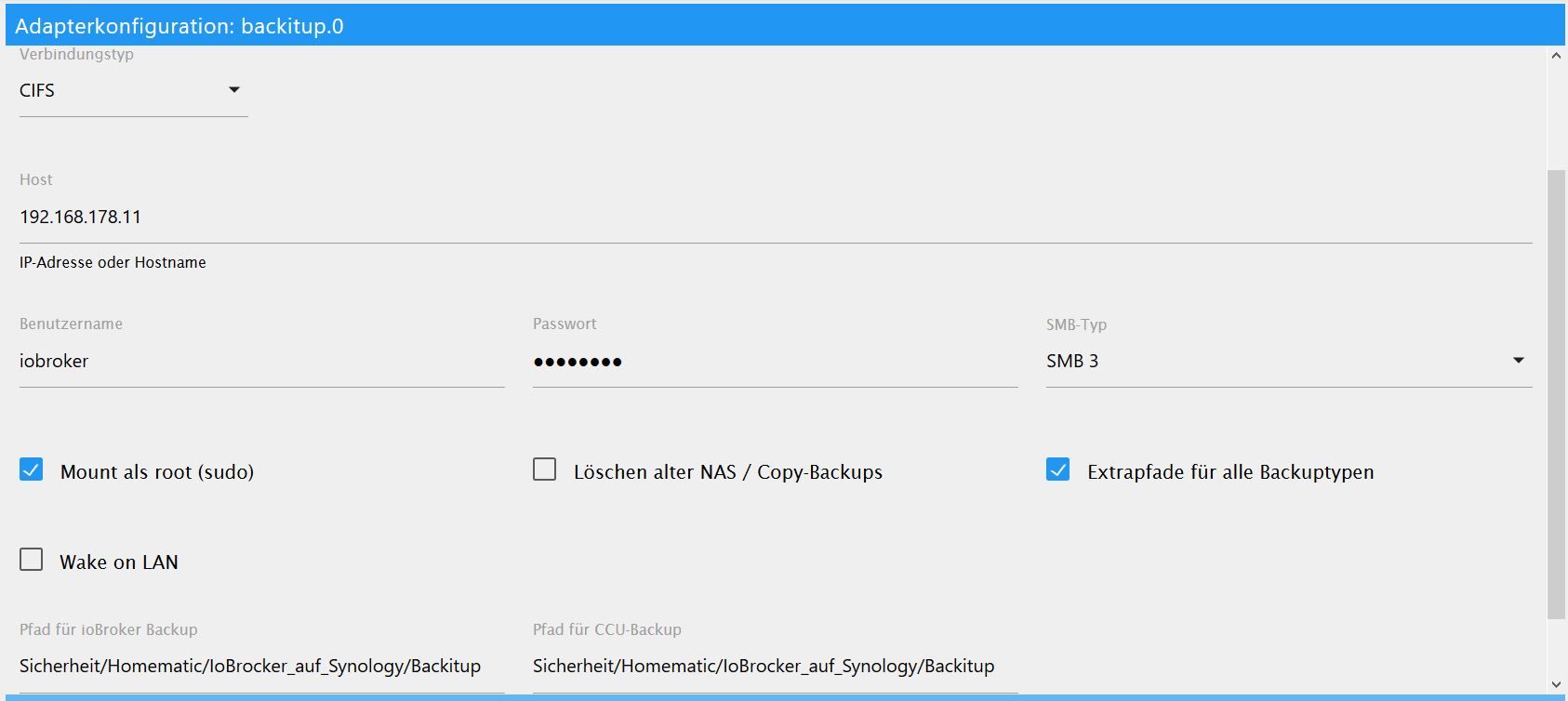
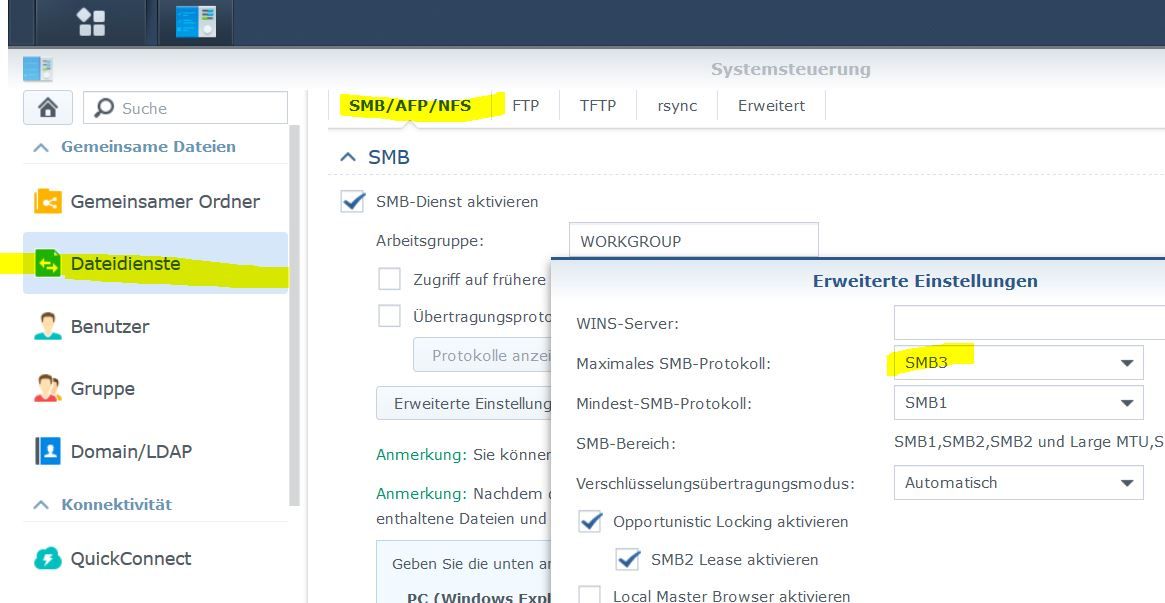
      Hier mal meine Einstelungen mit cifs:

      1.JPG

      2.JPG

      Synology 918+ 16GB - ioBroker in Docker v9 , VISO auf Trekstor Primebook C13 13,3" , Hikvision Domkameras mit Surveillance Station .. CCU RaspberryMatic in Synology VM .. Zigbee CC2538+CC2592 .. Sonoff .. KNX .. Modbus ..

      S 2 Replies Last reply
      1
      • S saeft_2003

        @Homoran

        Ok hab ich gemacht. Jetzt crasht der Adapter nicht mehr. Dafür hab ich jetzt den error im log. Sieht komisch aus .....106:/homes/......

        backitup.0	2020-02-22 21:12:30.553	error	(14137) Error: Command failed: sudo mount 192.168.178.106:/homes/Patrick/Drive/Backitup_iobroker /opt/iobroker/backups mount.nfs: access denied by server while mounting 192.168.178.106:/homes/Patrick/
        
        HomoranH Do not disturb
        HomoranH Do not disturb
        Homoran
        Global Moderator Administrators
        wrote on last edited by
        #18

        @saeft_2003 du hast noch den slash / drin sollte auch raus!

        hast du mount as sroot (sudo) angehakt?

        kein Support per PN! - Fragen im Forum stellen - es gibt fast nichts, was nicht auch für andere interessant ist.

        Benutzt das Voting rechts unten im Beitrag wenn er euch geholfen hat.

        der Installationsfixer: curl -fsL https://iobroker.net/fix.sh | bash -

        S 1 Reply Last reply
        0
        • HomoranH Homoran

          @saeft_2003 du hast noch den slash / drin sollte auch raus!

          hast du mount as sroot (sudo) angehakt?

          S Offline
          S Offline
          saeft_2003
          Most Active
          wrote on last edited by
          #19

          @Homoran

          / hab ich rausgemacht und mount as root ist angehakt. Jetzt kommt der Fehler....

          backitup.0	2020-02-22 21:16:56.418	error	mount.nfs: access denied by server while mounting 192.168.178.106:/homes/Patrick/Drive/Backitup_iobroker
          backitup.0	2020-02-22 21:16:56.418	error	(14470) Error: Command failed: sudo mount 192.168.178.106:/homes/Patrick/Drive/Backitup_iobroker /opt/iobroker/backups
          
          HomoranH 1 Reply Last reply
          0
          • GlasfaserG Glasfaser

            @saeft_2003

            So !!

            homes/Patrick/Drive/Backitup_iobroker
            

            Hier mal meine Einstelungen mit cifs:

            1.JPG

            2.JPG

            S Offline
            S Offline
            saeft_2003
            Most Active
            wrote on last edited by
            #20

            @Glasfaser

            Danke falls es mit nfs nicht klappen sollte, teste ich cifs mal. Benutzer und PW sind das die von der Diskstation anmeldung?

            HomoranH 1 Reply Last reply
            0
            • S saeft_2003

              @Glasfaser

              Danke falls es mit nfs nicht klappen sollte, teste ich cifs mal. Benutzer und PW sind das die von der Diskstation anmeldung?

              HomoranH Do not disturb
              HomoranH Do not disturb
              Homoran
              Global Moderator Administrators
              wrote on last edited by
              #21

              @saeft_2003 sagte in backitup auf NAS nfs oder cifs?:

              sind das die von der Diskstation anmeldung?

              Ja, oder besser von einem extra User für ioBroker

              kein Support per PN! - Fragen im Forum stellen - es gibt fast nichts, was nicht auch für andere interessant ist.

              Benutzt das Voting rechts unten im Beitrag wenn er euch geholfen hat.

              der Installationsfixer: curl -fsL https://iobroker.net/fix.sh | bash -

              GlasfaserG 1 Reply Last reply
              0
              • S saeft_2003

                @Homoran

                / hab ich rausgemacht und mount as root ist angehakt. Jetzt kommt der Fehler....

                backitup.0	2020-02-22 21:16:56.418	error	mount.nfs: access denied by server while mounting 192.168.178.106:/homes/Patrick/Drive/Backitup_iobroker
                backitup.0	2020-02-22 21:16:56.418	error	(14470) Error: Command failed: sudo mount 192.168.178.106:/homes/Patrick/Drive/Backitup_iobroker /opt/iobroker/backups
                
                HomoranH Do not disturb
                HomoranH Do not disturb
                Homoran
                Global Moderator Administrators
                wrote on last edited by
                #22

                @saeft_2003 sagte in backitup auf NAS nfs oder cifs?:

                Jetzt kommt der Fehler....

                Die Frage ist ob du überhaupt auf /homes/ zugreifen darfst.

                Nimm mal lieber einen neuen share "backups" oder so.

                in /homes/ liegen die Privatverzeichnisse der USer

                kein Support per PN! - Fragen im Forum stellen - es gibt fast nichts, was nicht auch für andere interessant ist.

                Benutzt das Voting rechts unten im Beitrag wenn er euch geholfen hat.

                der Installationsfixer: curl -fsL https://iobroker.net/fix.sh | bash -

                1 Reply Last reply
                0
                • HomoranH Homoran

                  @saeft_2003 sagte in backitup auf NAS nfs oder cifs?:

                  sind das die von der Diskstation anmeldung?

                  Ja, oder besser von einem extra User für ioBroker

                  GlasfaserG Offline
                  GlasfaserG Offline
                  Glasfaser
                  wrote on last edited by
                  #23

                  @saeft_2003

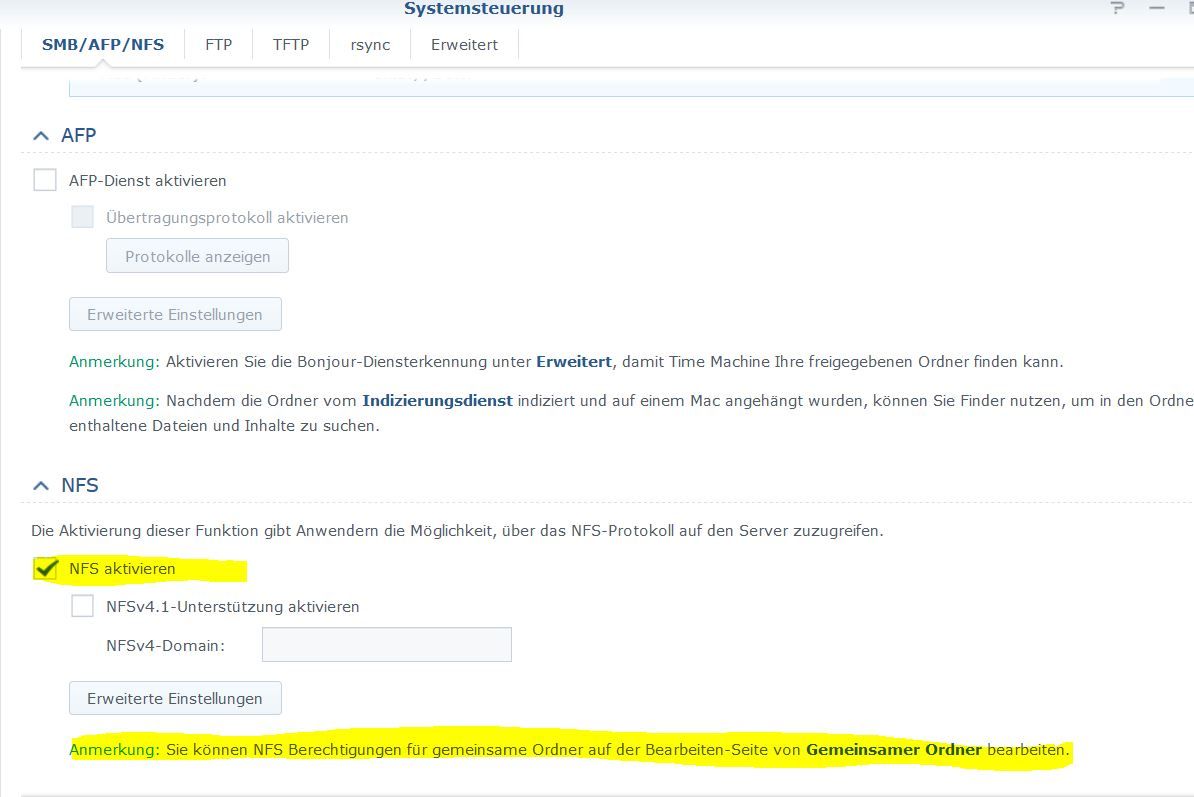
                  Hast du das Freigegeben .

                  1.JPG

                  Synology 918+ 16GB - ioBroker in Docker v9 , VISO auf Trekstor Primebook C13 13,3" , Hikvision Domkameras mit Surveillance Station .. CCU RaspberryMatic in Synology VM .. Zigbee CC2538+CC2592 .. Sonoff .. KNX .. Modbus ..

                  1 Reply Last reply
                  0
                  • S Offline
                    S Offline
                    saeft_2003
                    Most Active
                    wrote on last edited by
                    #24

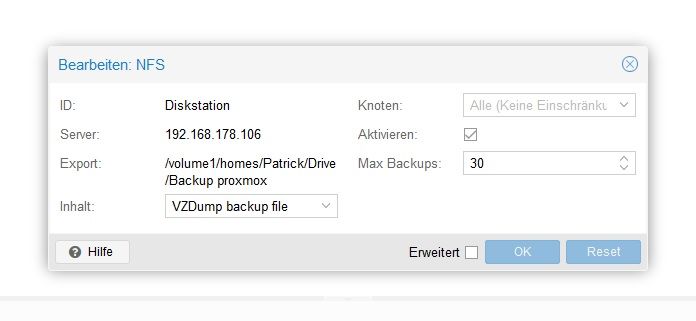
                    Ja NFS geht da proxmox die ganzen backups auf die syno speichert...
                    syno.jpg

                    GlasfaserG 1 Reply Last reply
                    0
                    • S saeft_2003

                      Ja NFS geht da proxmox die ganzen backups auf die syno speichert...

                      syno.jpg

                      GlasfaserG Offline
                      GlasfaserG Offline
                      Glasfaser
                      wrote on last edited by
                      #25

                      @saeft_2003
                      Bei NFS kann ich dir nicht helfen , da schon immer CIFS genutzt habe !

                      Synology 918+ 16GB - ioBroker in Docker v9 , VISO auf Trekstor Primebook C13 13,3" , Hikvision Domkameras mit Surveillance Station .. CCU RaspberryMatic in Synology VM .. Zigbee CC2538+CC2592 .. Sonoff .. KNX .. Modbus ..

                      1 Reply Last reply
                      0
                      • GlasfaserG Glasfaser

                        @saeft_2003

                        So !!

                        homes/Patrick/Drive/Backitup_iobroker
                        

                        Hier mal meine Einstelungen mit cifs:

                        1.JPG

                        2.JPG

                        S Offline
                        S Offline
                        saeft_2003
                        Most Active
                        wrote on last edited by
                        #26

                        @Glasfaser

                        Ha!!! :grin:

                        CIFS geht auf anhieb, ich hab alles so eingestellt wie dus gesagt hast....

                        1 Reply Last reply
                        0
                        • HomoranH Homoran

                          @saeft_2003 und ich cifs

                          GlasfaserG Offline
                          GlasfaserG Offline
                          Glasfaser
                          wrote on last edited by Glasfaser
                          #27

                          Dann höre demnächst auf den Rat von :

                          @Homoran sagte in backitup auf NAS nfs oder cifs?:

                          @saeft_2003 und ich cifs

                          Vor 4 Stunden ... :grinning: :sunglasses:

                          Synology 918+ 16GB - ioBroker in Docker v9 , VISO auf Trekstor Primebook C13 13,3" , Hikvision Domkameras mit Surveillance Station .. CCU RaspberryMatic in Synology VM .. Zigbee CC2538+CC2592 .. Sonoff .. KNX .. Modbus ..

                          1 Reply Last reply
                          0
                          • S Offline
                            S Offline
                            saeft_2003
                            Most Active
                            wrote on last edited by
                            #28

                            Nutzt jemand von euch auch noch die dropbox als speicherort?

                            GlasfaserG 1 Reply Last reply
                            0
                            • S saeft_2003

                              Nutzt jemand von euch auch noch die dropbox als speicherort?

                              GlasfaserG Offline
                              GlasfaserG Offline
                              Glasfaser
                              wrote on last edited by
                              #29

                              @saeft_2003

                              Nö ....

                              Synology 918+ 16GB - ioBroker in Docker v9 , VISO auf Trekstor Primebook C13 13,3" , Hikvision Domkameras mit Surveillance Station .. CCU RaspberryMatic in Synology VM .. Zigbee CC2538+CC2592 .. Sonoff .. KNX .. Modbus ..

                              S 1 Reply Last reply
                              0
                              • ? Offline
                                ? Offline
                                A Former User
                                wrote on last edited by
                                #30

                                Ich hab auch NFS am laufen und unter den NFS Einstellungen hab ich bei Squash: Root zu Admin zuordnen eingestellt ab da ging's.

                                S 1 Reply Last reply
                                0
                                • GlasfaserG Glasfaser

                                  @saeft_2003

                                  Nö ....

                                  S Offline
                                  S Offline
                                  saeft_2003
                                  Most Active
                                  wrote on last edited by
                                  #31

                                  @Glasfaser

                                  Dropbox funktioniert bei mir jetzt auch. Weil wenn im schlimmsten Fall z.B. ein Blitz (trotz Überspannungsschutz) oder sogar ein Feuer, mein NAS und NUC zerstört stehe ich blöd da. Da bietet sich die cloud natürlich an...

                                  Ich ziehe sogar ca. einmal im Monat meine VM backups in meine icloud (da habe ich 200 GB), weil wenn ich überlege im schlimmsten Fall noch mal neu anfangen zu müssen... ohh Gott 🙈

                                  1 Reply Last reply
                                  0
                                  • ? A Former User

                                    Ich hab auch NFS am laufen und unter den NFS Einstellungen hab ich bei Squash: Root zu Admin zuordnen eingestellt ab da ging's.

                                    S Offline
                                    S Offline
                                    saeft_2003
                                    Most Active
                                    wrote on last edited by saeft_2003
                                    #32

                                    @Brainbug

                                    Ok danke. Ich bleibe jetzt bei cifs. Never change a running system 🤪

                                    M 1 Reply Last reply
                                    0
                                    • S saeft_2003

                                      @Brainbug

                                      Ok danke. Ich bleibe jetzt bei cifs. Never change a running system 🤪

                                      M Offline
                                      M Offline
                                      megaron
                                      wrote on last edited by megaron
                                      #33

                                      @saeft_2003

                                      Hallo, hab das selbe Problem wie du. Bin Umsteiger vom Raspi auf IntelNuc mit Proxmox und Lxc Container (Debian/IoBroker). Auf dem Raspi läuft das Backup unter cifs ohne Probleme. Mit der exakt selben Einstellungen bekomme ich keine Verbindung (Mount) zur Synology.

                                      Log Auszug:
                                      [DEBUG] [mount] - first mount attempt with smb option failed. try next mount attempt without smb option ...
                                      [ERROR] [mount] - [undefined Error: Command failed: sudo mount -t cifs -o username=Xxxxxx,password=****,rw,file_mode=0777,dir_mode=0777 //192.168.178.22/backup/Intel_Nuc/IoBroker /opt/iobroker/backups
                                      mount error(1): Operation not permitted
                                      Refer to the mount.cifs(8) manual page (e.g. man mount.cifs)

                                      [ERROR] [mount] - [IGNORED] Error: Command failed: sudo mount -t cifs -o username=Xxxxxx,password=****,rw,file_mode=0777,dir_mode=0777 //192.168.178.22/backup/Intel_Nuc/IoBroker /opt/iobroker/backups
                                      mount error(1): Operation not permitted
                                      Refer to the mount.cifs(8) manual page (e.g. man mount.cifs)

                                      „sudo apt-get install cifs-utils“ hat auch nicht geholfen.

                                      Ein Update des Adapters auf V 1.8.3 (über Gifthub) hat auch nichts gebracht. Ich denke mal das es an internen Einstellungen von Debian liegt.

                                      Kannst du Evtl weiterhelfen?

                                      Viele Grüße

                                      Viele Grüße megaron

                                      J 1 Reply Last reply
                                      0
                                      • M megaron

                                        @saeft_2003

                                        Hallo, hab das selbe Problem wie du. Bin Umsteiger vom Raspi auf IntelNuc mit Proxmox und Lxc Container (Debian/IoBroker). Auf dem Raspi läuft das Backup unter cifs ohne Probleme. Mit der exakt selben Einstellungen bekomme ich keine Verbindung (Mount) zur Synology.

                                        Log Auszug:
                                        [DEBUG] [mount] - first mount attempt with smb option failed. try next mount attempt without smb option ...
                                        [ERROR] [mount] - [undefined Error: Command failed: sudo mount -t cifs -o username=Xxxxxx,password=****,rw,file_mode=0777,dir_mode=0777 //192.168.178.22/backup/Intel_Nuc/IoBroker /opt/iobroker/backups
                                        mount error(1): Operation not permitted
                                        Refer to the mount.cifs(8) manual page (e.g. man mount.cifs)

                                        [ERROR] [mount] - [IGNORED] Error: Command failed: sudo mount -t cifs -o username=Xxxxxx,password=****,rw,file_mode=0777,dir_mode=0777 //192.168.178.22/backup/Intel_Nuc/IoBroker /opt/iobroker/backups
                                        mount error(1): Operation not permitted
                                        Refer to the mount.cifs(8) manual page (e.g. man mount.cifs)

                                        „sudo apt-get install cifs-utils“ hat auch nicht geholfen.

                                        Ein Update des Adapters auf V 1.8.3 (über Gifthub) hat auch nichts gebracht. Ich denke mal das es an internen Einstellungen von Debian liegt.

                                        Kannst du Evtl weiterhelfen?

                                        Viele Grüße

                                        J Offline
                                        J Offline
                                        jensus11
                                        wrote on last edited by jensus11
                                        #34

                                        @megaron

                                        läuft es bei dir mittlerweile?

                                        Meister MopperM 1 Reply Last reply
                                        0
                                        • J jensus11

                                          @megaron

                                          läuft es bei dir mittlerweile?

                                          Meister MopperM Online
                                          Meister MopperM Online
                                          Meister Mopper
                                          wrote on last edited by
                                          #35

                                          @jensus11 Ich vermute mal, dass Du dasselbe Problem hast.

                                          In Proxmox ist die Funktionalität abhängig davon, ob Du einen privileged (nfs/cifs funktioniert) oder unprivileged Container (nfs/cifs funktioniert nicht ohne weiteres) betreibst.

                                          Unprevileged ist ein Sicherheitsfeature von Proxmox. Nach meinem rudimentären Verständnis wird damit der direkte Zugriff auf den kernel erschwert.


                                          Proxmox und HA

                                          1 Reply Last reply
                                          0
                                          Reply
                                          • Reply as topic
                                          Log in to reply
                                          • Oldest to Newest
                                          • Newest to Oldest
                                          • Most Votes


                                          Support us

                                          ioBroker
                                          Community Adapters
                                          Donate
                                          FAQ Cloud / IOT
                                          HowTo: Node.js-Update
                                          HowTo: Backup/Restore
                                          Downloads
                                          BLOG

                                          700

                                          Online

                                          32.7k

                                          Users

                                          82.4k

                                          Topics

                                          1.3m

                                          Posts
                                          Community
                                          Impressum | Datenschutz-Bestimmungen | Nutzungsbedingungen | Einwilligungseinstellungen
                                          ioBroker Community 2014-2025
                                          logo
                                          • Login

                                          • Don't have an account? Register

                                          • Login or register to search.
                                          • First post
                                            Last post
                                          0
                                          • Home
                                          • Recent
                                          • Tags
                                          • Unread 0
                                          • Categories
                                          • Unreplied
                                          • Popular
                                          • GitHub
                                          • Docu
                                          • Hilfe