




Test Adapter mihome-vacuum v2.0.x
-
Aktuelle Test Version 2.0.1 Veröffentlichungsdatum xx.xx.xxxx Github Link https://github.com/iobroker-community-adapters/ioBroker.mihome-vacuum ich habe soeben die version 2.0.1 hochgeladen. Testen und feedback gewünscht!!!
was gibt es neues?
- Cloud login zum besorgen des token bis lang china oder de server
- Option zum aktivieren der Karte, diese wird als Canvas und png gespeicher
- außerdem wird das neue Kartenformat mit rooms unterstützt
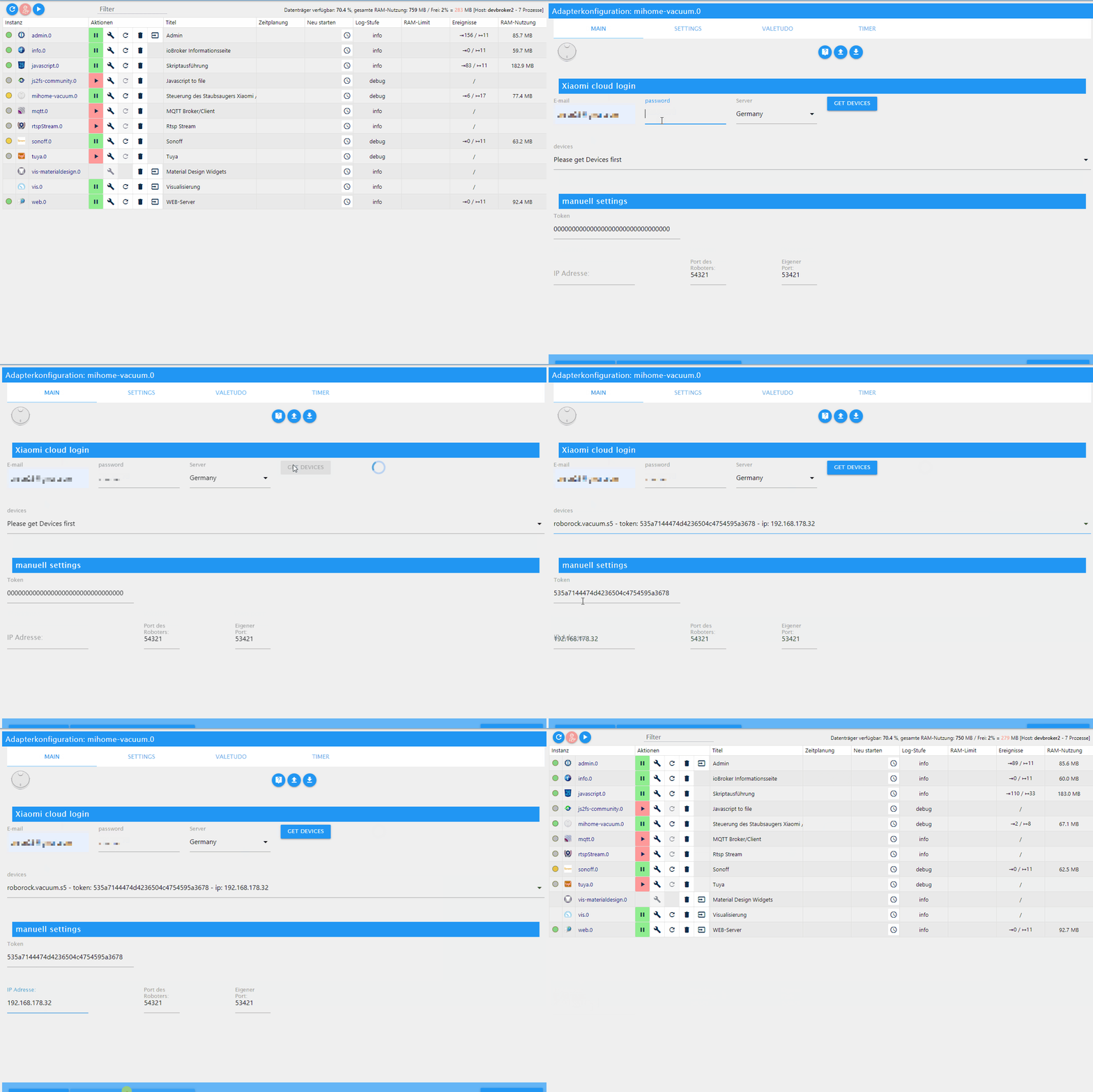
@Bluefox @Meistertr @dirkhe
Version 2.1.1 läuft hier auch, hat sich nach dem Update und Upload nicht neu gestartet, die 4 Instanzen standen auf rot und ich musste sie stoppen und neu starten, dann gings... siehe log:2020-07-16 08:51:44.503 - info: host.iobroker iobroker upgrade mihome-vacuum 2020-07-16 08:51:46.214 - info: host.iobroker iobroker Update mihome-vacuum from @2.1.0 to @2.1.1 2020-07-16 08:51:46.578 - info: host.iobroker iobroker npm install iobroker.mihome-vacuum@2.1.1 --loglevel error --prefix "/opt/iobroker" (System call) 2020-07-16 08:52:37.832 - info: host.iobroker iobroker upload [11] mihome-vacuum.admin /opt/iobroker/node_modules/iobroker.mihome-vacuum/admin/words.js words.js application/javascript 2020-07-16 08:52:37.975 - info: host.iobroker iobroker upload [10] mihome-vacuum.admin /opt/iobroker/node_modules/iobroker.mihome-vacuum/admin/valetudo_logo_small.svg valetudo_logo_small.svg image/svg+xml 2020-07-16 08:52:38.030 - info: host.iobroker iobroker upload [9] mihome-vacuum.admin /opt/iobroker/node_modules/iobroker.mihome-vacuum/admin/valetudo_conf.png valetudo_conf.png image/png 2020-07-16 08:52:38.092 - info: host.iobroker iobroker upload [8] mihome-vacuum.admin /opt/iobroker/node_modules/iobroker.mihome-vacuum/admin/tank.png tank.png image/png 2020-07-16 08:52:38.152 - info: host.iobroker iobroker upload [7] mihome-vacuum.admin /opt/iobroker/node_modules/iobroker.mihome-vacuum/admin/spaceship.png spaceship.png image/png 2020-07-16 08:52:38.206 - info: host.iobroker iobroker upload [6] mihome-vacuum.admin /opt/iobroker/node_modules/iobroker.mihome-vacuum/admin/root/howto.md root/howto.md text/markdown 2020-07-16 08:52:38.254 - info: host.iobroker iobroker Update "system.adapter.mihome-vacuum.3" 2020-07-16 08:52:38.259 - info: host.iobroker iobroker Update "system.adapter.mihome-vacuum.2" 2020-07-16 08:52:38.272 - info: host.iobroker iobroker Update "system.adapter.mihome-vacuum.1" 2020-07-16 08:52:38.276 - info: host.iobroker iobroker Update "system.adapter.mihome-vacuum.0" 2020-07-16 08:52:38.310 - info: host.iobroker stopInstance system.adapter.mihome-vacuum.3 (force=false, process=true) 2020-07-16 08:52:38.312 - info: host.iobroker iobroker upload [5] mihome-vacuum.admin /opt/iobroker/node_modules/iobroker.mihome-vacuum/admin/robot1.png robot1.png image/png 2020-07-16 08:52:38.328 - info: host.iobroker stopInstance system.adapter.mihome-vacuum.3 send kill signal 2020-07-16 08:52:38.330 - info: mihome-vacuum.3 (24467) Got terminate signal TERMINATE_YOURSELF 2020-07-16 08:52:38.333 - info: mihome-vacuum.3 (24467) terminating 2020-07-16 08:52:38.334 - info: mihome-vacuum.3 (24467) Terminated (ADAPTER_REQUESTED_TERMINATION): Without reason 2020-07-16 08:52:38.342 - info: host.iobroker stopInstance system.adapter.mihome-vacuum.2 (force=false, process=true) 2020-07-16 08:52:38.345 - info: host.iobroker stopInstance system.adapter.mihome-vacuum.1 (force=false, process=true) 2020-07-16 08:52:38.347 - info: host.iobroker stopInstance system.adapter.mihome-vacuum.0 (force=false, process=true) 2020-07-16 08:52:38.351 - info: mihome-vacuum.2 (24473) Got terminate signal TERMINATE_YOURSELF 2020-07-16 08:52:38.354 - info: mihome-vacuum.2 (24473) terminating 2020-07-16 08:52:38.355 - info: mihome-vacuum.2 (24473) Terminated (ADAPTER_REQUESTED_TERMINATION): Without reason 2020-07-16 08:52:38.349 - info: host.iobroker stopInstance system.adapter.mihome-vacuum.2 send kill signal 2020-07-16 08:52:38.365 - info: host.iobroker stopInstance system.adapter.mihome-vacuum.1 send kill signal 2020-07-16 08:52:38.366 - info: host.iobroker stopInstance system.adapter.mihome-vacuum.0 send kill signal 2020-07-16 08:52:38.367 - info: mihome-vacuum.0 (24482) Got terminate signal TERMINATE_YOURSELF 2020-07-16 08:52:38.371 - info: mihome-vacuum.1 (24480) Got terminate signal TERMINATE_YOURSELF 2020-07-16 08:52:38.375 - info: mihome-vacuum.0 (24482) terminating 2020-07-16 08:52:38.376 - info: mihome-vacuum.0 (24482) Terminated (ADAPTER_REQUESTED_TERMINATION): Without reason 2020-07-16 08:52:38.375 - info: mihome-vacuum.1 (24480) terminating 2020-07-16 08:52:38.377 - info: mihome-vacuum.1 (24480) Terminated (ADAPTER_REQUESTED_TERMINATION): Without reason 2020-07-16 08:52:38.389 - info: host.iobroker iobroker upload [4] mihome-vacuum.admin /opt/iobroker/node_modules/iobroker.mihome-vacuum/admin/robot.png robot.png image/png 2020-07-16 08:52:38.444 - info: host.iobroker iobroker upload [3] mihome-vacuum.admin /opt/iobroker/node_modules/iobroker.mihome-vacuum/admin/mihome-vacuum.png mihome-vacuum.png image/png 2020-07-16 08:52:38.499 - info: host.iobroker iobroker upload [2] mihome-vacuum.admin /opt/iobroker/node_modules/iobroker.mihome-vacuum/admin/index_m.html index_m.html text/html 2020-07-16 08:52:38.553 - info: host.iobroker iobroker upload [1] mihome-vacuum.admin /opt/iobroker/node_modules/iobroker.mihome-vacuum/admin/index.html index.html text/html 2020-07-16 08:52:38.607 - info: host.iobroker iobroker upload [0] mihome-vacuum.admin /opt/iobroker/node_modules/iobroker.mihome-vacuum/admin/S5.png S5.png image/png 2020-07-16 08:52:38.661 - info: host.iobroker iobroker Adapter "mihome-vacuum" updated 2020-07-16 08:52:41.334 - warn: host.iobroker instance system.adapter.mihome-vacuum.3 still running with pid 24467 2020-07-16 08:52:41.365 - warn: host.iobroker instance system.adapter.mihome-vacuum.2 still running with pid 24473 2020-07-16 08:52:41.366 - warn: host.iobroker instance system.adapter.mihome-vacuum.1 still running with pid 24480 2020-07-16 08:52:41.367 - warn: host.iobroker instance system.adapter.mihome-vacuum.0 still running with pid 24482 2020-07-16 08:52:41.437 - error: host.iobroker instance system.adapter.mihome-vacuum.3 terminated by request of the instance itself and will not be restarted, before user restarts it. 2020-07-16 08:52:41.438 - info: host.iobroker Do not restart adapter system.adapter.mihome-vacuum.3 because desired by instance 2020-07-16 08:52:41.443 - error: host.iobroker instance system.adapter.mihome-vacuum.2 terminated by request of the instance itself and will not be restarted, before user restarts it. 2020-07-16 08:52:41.444 - info: host.iobroker Do not restart adapter system.adapter.mihome-vacuum.2 because desired by instance 2020-07-16 08:52:41.445 - error: host.iobroker instance system.adapter.mihome-vacuum.0 terminated by request of the instance itself and will not be restarted, before user restarts it. 2020-07-16 08:52:41.445 - info: host.iobroker Do not restart adapter system.adapter.mihome-vacuum.0 because desired by instance 2020-07-16 08:52:41.455 - error: host.iobroker instance system.adapter.mihome-vacuum.1 terminated by request of the instance itself and will not be restarted, before user restarts it. 2020-07-16 08:52:41.456 - info: host.iobroker Do not restart adapter system.adapter.mihome-vacuum.1 because desired by instance 2020-07-16 08:56:48.862 - info: host.iobroker "system.adapter.mihome-vacuum.0" disabled 2020-07-16 08:56:48.906 - info: host.iobroker "system.adapter.mihome-vacuum.1" disabled 2020-07-16 08:57:01.893 - info: host.iobroker "system.adapter.mihome-vacuum.2" disabled 2020-07-16 08:57:01.952 - info: host.iobroker "system.adapter.mihome-vacuum.3" disabled 2020-07-16 08:57:06.904 - info: host.iobroker "system.adapter.mihome-vacuum.0" enabled 2020-07-16 08:57:06.975 - info: host.iobroker instance system.adapter.mihome-vacuum.0 started with pid 22812 2020-07-16 08:57:08.206 - info: mihome-vacuum.0 (22812) starting. Version 2.1.1 in /opt/iobroker/node_modules/iobroker.mihome-vacuum, node: v12.18.2, js-controller: 3.1.6 2020-07-16 08:57:08.816 - info: mihome-vacuum.0 (22812) Expert mode enabled, states created 2020-07-16 08:57:08.817 - info: mihome-vacuum.0 (22812) Cloud control disabled 2020-07-16 08:57:08.859 - info: mihome-vacuum.0 (22812) change states from State control.fan_power 2020-07-16 08:57:08.860 - info: mihome-vacuum.0 (22812) extend state mop for State control.fan_power 2020-07-16 08:57:08.871 - warn: mihome-vacuum.0 (22812) Time difference between Mihome Vacuum and ioBroker: 12 sec 2020-07-16 08:57:08.871 - info: mihome-vacuum.0 (22812) connecting, this can take up to 10 minutes ... 2020-07-16 08:57:08.951 - info: mihome-vacuum.0 (22812) Connected 2020-07-16 08:57:09.918 - info: mihome-vacuum.0 (22812) set nächster Timer: Nicht verfügbar 2020-07-16 08:57:09.969 - info: mihome-vacuum.0 (22812) create state for carpet_mode 2020-07-16 08:57:10.300 - info: host.iobroker "system.adapter.mihome-vacuum.1" enabled 2020-07-16 08:57:10.317 - info: host.iobroker instance system.adapter.mihome-vacuum.1 started with pid 22827 2020-07-16 08:57:11.218 - info: mihome-vacuum.1 (22827) starting. Version 2.1.1 in /opt/iobroker/node_modules/iobroker.mihome-vacuum, node: v12.18.2, js-controller: 3.1.6 2020-07-16 08:57:11.267 - info: mihome-vacuum.1 (22827) Expert mode enabled, states created 2020-07-16 08:57:11.268 - info: mihome-vacuum.1 (22827) Cloud control disabled 2020-07-16 08:57:11.292 - info: mihome-vacuum.1 (22827) change states from State control.fan_power 2020-07-16 08:57:11.292 - info: mihome-vacuum.1 (22827) extend state mop for State control.fan_power 2020-07-16 08:57:11.293 - info: mihome-vacuum.1 (22827) New generation or new fw(3.5.7,002008) detected, create new states goto and zoneclean 2020-07-16 08:57:11.309 - warn: mihome-vacuum.1 (22827) Time difference between Mihome Vacuum and ioBroker: 11 sec 2020-07-16 08:57:11.310 - info: mihome-vacuum.1 (22827) connecting, this can take up to 10 minutes ... 2020-07-16 08:57:11.387 - info: mihome-vacuum.1 (22827) Connected 2020-07-16 08:57:11.460 - info: host.iobroker "system.adapter.mihome-vacuum.2" enabled 2020-07-16 08:57:11.487 - info: host.iobroker instance system.adapter.mihome-vacuum.2 started with pid 22842 2020-07-16 08:57:12.243 - info: host.iobroker "system.adapter.mihome-vacuum.3" enabled 2020-07-16 08:57:12.284 - info: host.iobroker instance system.adapter.mihome-vacuum.3 started with pid 22853 2020-07-16 08:57:12.418 - info: mihome-vacuum.1 (22827) set nächster Timer: Nicht verfügbar 2020-07-16 08:57:12.420 - info: mihome-vacuum.1 (22827) create state for carpet_mode 2020-07-16 08:57:12.479 - info: mihome-vacuum.2 (22842) starting. Version 2.1.1 in /opt/iobroker/node_modules/iobroker.mihome-vacuum, node: v12.18.2, js-controller: 3.1.6 2020-07-16 08:57:12.545 - info: mihome-vacuum.2 (22842) Expert mode enabled, states created 2020-07-16 08:57:12.546 - info: mihome-vacuum.2 (22842) Cloud control disabled 2020-07-16 08:57:12.576 - info: mihome-vacuum.2 (22842) change states from State control.fan_power 2020-07-16 08:57:12.576 - info: mihome-vacuum.2 (22842) extend state mop for State control.fan_power 2020-07-16 08:57:12.577 - info: mihome-vacuum.2 (22842) New generation or new fw(3.5.7,002008) detected, create new states goto and zoneclean 2020-07-16 08:57:12.641 - warn: mihome-vacuum.2 (22842) Time difference between Mihome Vacuum and ioBroker: 12 sec 2020-07-16 08:57:12.642 - info: mihome-vacuum.2 (22842) connecting, this can take up to 10 minutes ... 2020-07-16 08:57:12.657 - info: mihome-vacuum.2 (22842) Connected 2020-07-16 08:57:13.382 - info: mihome-vacuum.3 (22853) starting. Version 2.1.1 in /opt/iobroker/node_modules/iobroker.mihome-vacuum, node: v12.18.2, js-controller: 3.1.6 2020-07-16 08:57:13.503 - info: mihome-vacuum.3 (22853) Expert mode enabled, states created 2020-07-16 08:57:13.504 - info: mihome-vacuum.3 (22853) Cloud control disabled 2020-07-16 08:57:13.538 - info: mihome-vacuum.3 (22853) change states from State control.fan_power 2020-07-16 08:57:13.538 - info: mihome-vacuum.3 (22853) extend state mop for State control.fan_power 2020-07-16 08:57:13.539 - info: mihome-vacuum.3 (22853) New generation or new fw(3.5.7,002008) detected, create new states goto and zoneclean 2020-07-16 08:57:13.548 - warn: mihome-vacuum.3 (22853) Time difference between Mihome Vacuum and ioBroker: 11 sec 2020-07-16 08:57:13.549 - info: mihome-vacuum.3 (22853) connecting, this can take up to 10 minutes ... 2020-07-16 08:57:13.587 - info: mihome-vacuum.3 (22853) Connected 2020-07-16 08:57:13.664 - info: mihome-vacuum.2 (22842) create state for carpet_mode 2020-07-16 08:57:13.889 - info: mihome-vacuum.2 (22842) set nächster Timer: Nicht verfügbar 2020-07-16 08:57:14.597 - info: mihome-vacuum.3 (22853) create state for carpet_mode 2020-07-16 08:57:14.742 - info: mihome-vacuum.3 (22853) set nächster Timer: Nicht verfügbar 2020-07-16 08:57:31.336 - info: mihome-vacuum.1 (22827) create states for water box 2020-07-16 08:57:31.338 - info: mihome-vacuum.1 (22827) create states for water box filter 2020-07-16 08:57:32.562 - info: mihome-vacuum.2 (22842) create states for water box 2020-07-16 08:57:32.563 - info: mihome-vacuum.2 (22842) create states for water box filter 2020-07-16 08:57:33.522 - info: mihome-vacuum.3 (22853) create states for water box 2020-07-16 08:57:33.523 - info: mihome-vacuum.3 (22853) create states for water box filter 2020-07-16 08:57:54.167 - info: mihome-vacuum.1 (22827) trigger cleaning all 2020-07-16 09:00:00.381 - info: mihome-vacuum.0 (22812) trigger cleaning allDie Karte wird aktualisiert, sonst keine Anomalien festgestellt. ( hab das log auch nur auf info stehen)
-
Funktioniert bei jemandem der Datenpunkt water_box (Wischeinheit installiert) unter info? Der steht bei mir immer auf false - egal, ob die Wischeinheit eingeklickt ist oder nicht.
Habe einen S5 mit Firmware 3.5.7_002008 -
2.1.1 mit neuster Firmware läuft perfekt. Beide Stockwerke gesaugt. Keine Fehler im log(s6)
Sehr geil. Danke!
Konnte mittlerweile einer herausfinden wie man über einen command die maps wiederherstellt? Bzw. die andere oder 2. map?
geht aber seit dem multifloor nicht mehr -
@Meistertr Auch bei meinem 1S kommt mit der neuen 2.1 nun wieder die Karte.
Danke für euer Engagement @Meistertr @dirkhe @Bluefox ! -
@Bluefox ach quatsch! ohne Dich wär das ganze hier gar nicht entstanden und ohne Deine viele Arbeit lange nicht so weit, wie es heute ist!
Lass Dich wegen n paar Bugs nicht runterziehen, die gehören dazu wie die Nacht zum Tag... :-)
WIR haben zu Danken! Ich habe fertig.
:-) -
@Bluefox sagte in Test Adapter mihome-vacuum v2.0.x:
Ich habe nur kaputt gemacht...
Völlig egal, das gehört dazu und steht in keinem Verhältnis zu dem was aufgebaut wurde! :)
-
@Meistertr
Bei der Version 2.1.1 wird keine Karte mehr von Valetudo 0.9.1 angezeigt. Der MAP Eintrag bleibt leer.
-
Guten Tag zusammen,
bei mir ist die Karte seit einiger Zeit, also auch vor der version 2.1.1 eingefroren. Keine Aktualisierung mehr.
Beim Button drücken tut sich nichts... hab auch mal den ganzen Ordner gelöscht, aber es passiert nichts. Es bleibt immer die selbe Ansicht..
Hat jemand eine idee?
Danke
Sonos, Intel Nuc, Iobroker Pro, Proxmox, IPad Air (Wand), Vis, Xiaomi, Devolo, Bose, Philips Hue, Instar, Synology
-
Guten Tag zusammen,
bei mir ist die Karte seit einiger Zeit, also auch vor der version 2.1.1 eingefroren. Keine Aktualisierung mehr.
Beim Button drücken tut sich nichts... hab auch mal den ganzen Ordner gelöscht, aber es passiert nichts. Es bleibt immer die selbe Ansicht..
Hat jemand eine idee?
Danke
-
@xADDRx Logfile? :-)
-
@Sneaker75 hat der s5 nicht
@Meistertr Habe heute auch mal versucht meinen S6 einzubinden. Bin an folgendener Fehlermeldung mit der github Version 2.1.1 gescheitert:
mihome-vacuum.0	2020-07-21 11:30:46.808	info	(1943) discover HTTP error when getting token cookie
mihome-vacuum.0	2020-07-21 11:30:46.808	error	(1943) HTTP error when getting token cookie{}
Mein iobroker läuft ansonsten aus dem stable Repo, evtl. spielt das eine Rolle?
Installierte node, nodejs, npm Versionen:node -v = v10.21.0 nodejs -v = v10.21.0 npm -v = 6.14.4Jemand eine Idee dazu?
-
gleiches Problem bei Roborock S5 und S6
Karte wird nicht geladen.
Adapter Version 2.1.1
Weiterhin glaube ich das das Reinigen mehrer Räume hintereinander nicht mehr funktioniert. Ich wähle mehrere Räume aus, nach dem ersten Raum bricht er dann aber ab und fährt zurück in die Ladestation.
Keine Fehler im Log.
-
@Meistertr Habe heute auch mal versucht meinen S6 einzubinden. Bin an folgendener Fehlermeldung mit der github Version 2.1.1 gescheitert:
mihome-vacuum.0	2020-07-21 11:30:46.808	info	(1943) discover HTTP error when getting token cookie
mihome-vacuum.0	2020-07-21 11:30:46.808	error	(1943) HTTP error when getting token cookie{}
Mein iobroker läuft ansonsten aus dem stable Repo, evtl. spielt das eine Rolle?
Installierte node, nodejs, npm Versionen:node -v = v10.21.0 nodejs -v = v10.21.0 npm -v = 6.14.4Jemand eine Idee dazu?
-
gleiches Problem bei Roborock S5 und S6
Karte wird nicht geladen.
Adapter Version 2.1.1
Weiterhin glaube ich das das Reinigen mehrer Räume hintereinander nicht mehr funktioniert. Ich wähle mehrere Räume aus, nach dem ersten Raum bricht er dann aber ab und fährt zurück in die Ladestation.
Keine Fehler im Log.
-
@Sweatchuck ohne debug Log wird hier keinem geholfen, schlichtweg, weil es keiner kann. Nur anhand der debug Logs können wir feststellen, was ggf falsch läuft, bzw. Wo er aussteigt
-
Moin,
ich bekomme plötzlich eine Fehlermeldung:
mihome-vacuum.0 2020-07-26 15:44:02.160 debug (5109) sendMsg[1] >>> {"id":3,"method":"get_status"} mihome-vacuum.0 2020-07-26 15:44:02.154 debug (5109) sendTo "getStatus" to system.adapter.mihome-vacuum.0 from system.adapter.mihome-vacuum.0 mihome-vacuum.0 2020-07-26 15:44:02.153 info (5109) connecting, this can take up to 10 minutes ... mihome-vacuum.0 2020-07-26 15:44:02.153 debug (5109) Receive <<< Helo <<< 213100200000000007082f8d5f1d88a1ffffffffffffffffffffffffffffffff mihome-vacuum.0 2020-07-26 15:43:57.169 debug (5109) sendTo "getStatus" to system.adapter.mihome-vacuum.0 from system.adapter.mihome-vacuum.0 mihome-vacuum.0 2020-07-26 15:43:57.168 debug (5109) no answer for id:2 received, giving up mihome-vacuum.0 2020-07-26 15:43:52.167 debug (5109) sendMsg[3] >>> {"id":2,"method":"get_status"} mihome-vacuum.0 2020-07-26 15:43:47.164 debug (5109) sendMsg[2] >>> {"id":2,"method":"get_status"} mihome-vacuum.0 2020-07-26 15:43:42.161 debug (5109) sendMsg[1] >>> {"id":2,"method":"get_status"} mihome-vacuum.0 2020-07-26 15:43:42.157 debug (5109) sendTo "getStatus" to system.adapter.mihome-vacuum.0 from system.adapter.mihome-vacuum.0 mihome-vacuum.0 2020-07-26 15:43:42.156 info (5109) connecting, this can take up to 10 minutes ... mihome-vacuum.0 2020-07-26 15:43:42.155 debug (5109) Receive <<< Helo <<< 213100200000000007082f8d5f1d888dffffffffffffffffffffffffffffffff mihome-vacuum.0 2020-07-26 15:43:37.272 debug (5109) sendTo "getStatus" to system.adapter.mihome-vacuum.0 from system.adapter.mihome-vacuum.0 mihome-vacuum.0 2020-07-26 15:43:37.270 debug (5109) no answer for id:1 received, giving up mihome-vacuum.0 2020-07-26 15:43:32.269 debug (5109) sendMsg[3] >>> {"id":1,"method":"get_status"} mihome-vacuum.0 2020-07-26 15:43:27.266 debug (5109) sendMsg[2] >>> {"id":1,"method":"get_status"} mihome-vacuum.0 2020-07-26 15:43:24.194 debug (5109) Xiaomi Cloud: Login successful mihome-vacuum.0 2020-07-26 15:43:22.667 info (5109) set nächster Timer: Nicht verfügbar mihome-vacuum.0 2020-07-26 15:43:22.264 debug (5109) sendMsg[1] >>> {"id":1,"method":"get_status"} mihome-vacuum.0 2020-07-26 15:43:22.230 debug (5109) sendTo "getStatus" to system.adapter.mihome-vacuum.0 from system.adapter.mihome-vacuum.0 mihome-vacuum.0 2020-07-26 15:43:22.225 info (5109) connecting, this can take up to 10 minutes ... mihome-vacuum.0 2020-07-26 15:43:22.220 debug (5109) Receive <<< Helo <<< 213100200000000007082f8d5f1d8879ffffffffffffffffffffffffffffffff mihome-vacuum.0 2020-07-26 15:43:22.200 debug (5109) No suitable Lua script, fallback to keys!: function(doc) { if (doc.type === 'state') emit(doc._id, doc) } mihome-vacuum.0 2020-07-26 15:43:22.152 debug (5109) server started on 0.0.0.0:53421 mihome-vacuum.0 2020-07-26 15:43:22.134 info (5109) Create state clean_home for controlling by cloud adapter mihome-vacuum.0 2020-07-26 15:43:22.132 info (5109) Expert mode enabled, states created mihome-vacuum.0 2020-07-26 15:43:22.121 debug (5109) Xiaomi Cloud: Logging in mihome-vacuum.0 2020-07-26 15:43:22.118 debug (5109) load Map creator... false mihome-vacuum.0 2020-07-26 15:43:22.062 info (5109) starting. Version 2.1.1 in /opt/iobroker/node_modules/iobroker.mihome-vacuum, node: v12.16.3, js-controller: 3.1.6 mihome-vacuum.0 2020-07-26 15:43:19.515 debug (5109) statesDB connected mihome-vacuum.0 2020-07-26 15:43:19.513 debug (5109) States connected to redis: 127.0.0.1:9000 mihome-vacuum.0 2020-07-26 15:43:19.498 debug (5109) States create System PubSub Client mihome-vacuum.0 2020-07-26 15:43:19.495 debug (5109) States create User PubSub Client mihome-vacuum.0 2020-07-26 15:43:19.484 debug (5109) Redis States: Use Redis connection: 127.0.0.1:9000 mihome-vacuum.0 2020-07-26 15:43:19.481 debug (5109) objectDB connected mihome-vacuum.0 2020-07-26 15:43:19.475 debug (5109) Objects connected to redis: 127.0.0.1:9001 mihome-vacuum.0 2020-07-26 15:43:19.444 debug (5109) Objects client initialize lua scripts mihome-vacuum.0 2020-07-26 15:43:19.434 debug (5109) Objects create User PubSub Client mihome-vacuum.0 2020-07-26 15:43:19.433 debug (5109) Objects create System PubSub Client mihome-vacuum.0 2020-07-26 15:43:19.428 debug (5109) Objects client ready ... initialize now mihome-vacuum.0 2020-07-26 15:43:19.378 debug (5109) Redis Objects: Use Redis connection: 127.0.0.1:9001 -
Moin,
ich bekomme plötzlich eine Fehlermeldung:
mihome-vacuum.0 2020-07-26 15:44:02.160 debug (5109) sendMsg[1] >>> {"id":3,"method":"get_status"} mihome-vacuum.0 2020-07-26 15:44:02.154 debug (5109) sendTo "getStatus" to system.adapter.mihome-vacuum.0 from system.adapter.mihome-vacuum.0 mihome-vacuum.0 2020-07-26 15:44:02.153 info (5109) connecting, this can take up to 10 minutes ... mihome-vacuum.0 2020-07-26 15:44:02.153 debug (5109) Receive <<< Helo <<< 213100200000000007082f8d5f1d88a1ffffffffffffffffffffffffffffffff mihome-vacuum.0 2020-07-26 15:43:57.169 debug (5109) sendTo "getStatus" to system.adapter.mihome-vacuum.0 from system.adapter.mihome-vacuum.0 mihome-vacuum.0 2020-07-26 15:43:57.168 debug (5109) no answer for id:2 received, giving up mihome-vacuum.0 2020-07-26 15:43:52.167 debug (5109) sendMsg[3] >>> {"id":2,"method":"get_status"} mihome-vacuum.0 2020-07-26 15:43:47.164 debug (5109) sendMsg[2] >>> {"id":2,"method":"get_status"} mihome-vacuum.0 2020-07-26 15:43:42.161 debug (5109) sendMsg[1] >>> {"id":2,"method":"get_status"} mihome-vacuum.0 2020-07-26 15:43:42.157 debug (5109) sendTo "getStatus" to system.adapter.mihome-vacuum.0 from system.adapter.mihome-vacuum.0 mihome-vacuum.0 2020-07-26 15:43:42.156 info (5109) connecting, this can take up to 10 minutes ... mihome-vacuum.0 2020-07-26 15:43:42.155 debug (5109) Receive <<< Helo <<< 213100200000000007082f8d5f1d888dffffffffffffffffffffffffffffffff mihome-vacuum.0 2020-07-26 15:43:37.272 debug (5109) sendTo "getStatus" to system.adapter.mihome-vacuum.0 from system.adapter.mihome-vacuum.0 mihome-vacuum.0 2020-07-26 15:43:37.270 debug (5109) no answer for id:1 received, giving up mihome-vacuum.0 2020-07-26 15:43:32.269 debug (5109) sendMsg[3] >>> {"id":1,"method":"get_status"} mihome-vacuum.0 2020-07-26 15:43:27.266 debug (5109) sendMsg[2] >>> {"id":1,"method":"get_status"} mihome-vacuum.0 2020-07-26 15:43:24.194 debug (5109) Xiaomi Cloud: Login successful mihome-vacuum.0 2020-07-26 15:43:22.667 info (5109) set nächster Timer: Nicht verfügbar mihome-vacuum.0 2020-07-26 15:43:22.264 debug (5109) sendMsg[1] >>> {"id":1,"method":"get_status"} mihome-vacuum.0 2020-07-26 15:43:22.230 debug (5109) sendTo "getStatus" to system.adapter.mihome-vacuum.0 from system.adapter.mihome-vacuum.0 mihome-vacuum.0 2020-07-26 15:43:22.225 info (5109) connecting, this can take up to 10 minutes ... mihome-vacuum.0 2020-07-26 15:43:22.220 debug (5109) Receive <<< Helo <<< 213100200000000007082f8d5f1d8879ffffffffffffffffffffffffffffffff mihome-vacuum.0 2020-07-26 15:43:22.200 debug (5109) No suitable Lua script, fallback to keys!: function(doc) { if (doc.type === 'state') emit(doc._id, doc) } mihome-vacuum.0 2020-07-26 15:43:22.152 debug (5109) server started on 0.0.0.0:53421 mihome-vacuum.0 2020-07-26 15:43:22.134 info (5109) Create state clean_home for controlling by cloud adapter mihome-vacuum.0 2020-07-26 15:43:22.132 info (5109) Expert mode enabled, states created mihome-vacuum.0 2020-07-26 15:43:22.121 debug (5109) Xiaomi Cloud: Logging in mihome-vacuum.0 2020-07-26 15:43:22.118 debug (5109) load Map creator... false mihome-vacuum.0 2020-07-26 15:43:22.062 info (5109) starting. Version 2.1.1 in /opt/iobroker/node_modules/iobroker.mihome-vacuum, node: v12.16.3, js-controller: 3.1.6 mihome-vacuum.0 2020-07-26 15:43:19.515 debug (5109) statesDB connected mihome-vacuum.0 2020-07-26 15:43:19.513 debug (5109) States connected to redis: 127.0.0.1:9000 mihome-vacuum.0 2020-07-26 15:43:19.498 debug (5109) States create System PubSub Client mihome-vacuum.0 2020-07-26 15:43:19.495 debug (5109) States create User PubSub Client mihome-vacuum.0 2020-07-26 15:43:19.484 debug (5109) Redis States: Use Redis connection: 127.0.0.1:9000 mihome-vacuum.0 2020-07-26 15:43:19.481 debug (5109) objectDB connected mihome-vacuum.0 2020-07-26 15:43:19.475 debug (5109) Objects connected to redis: 127.0.0.1:9001 mihome-vacuum.0 2020-07-26 15:43:19.444 debug (5109) Objects client initialize lua scripts mihome-vacuum.0 2020-07-26 15:43:19.434 debug (5109) Objects create User PubSub Client mihome-vacuum.0 2020-07-26 15:43:19.433 debug (5109) Objects create System PubSub Client mihome-vacuum.0 2020-07-26 15:43:19.428 debug (5109) Objects client ready ... initialize now mihome-vacuum.0 2020-07-26 15:43:19.378 debug (5109) Redis Objects: Use Redis connection: 127.0.0.1:9001 -
@xADDRx ist aktuell nicht connected. Entweder mal die WLAN verbBindung checken oder auch mal kurz in die mihome App gehen. Oder mal abwarten, steht ja auch im log




Support us
262
Online32.7k
Users82.5k
Topics1.3m
Posts