




Test Adapter mihome-vacuum v2.0.x
-
Hallo,
weiß niemand was?
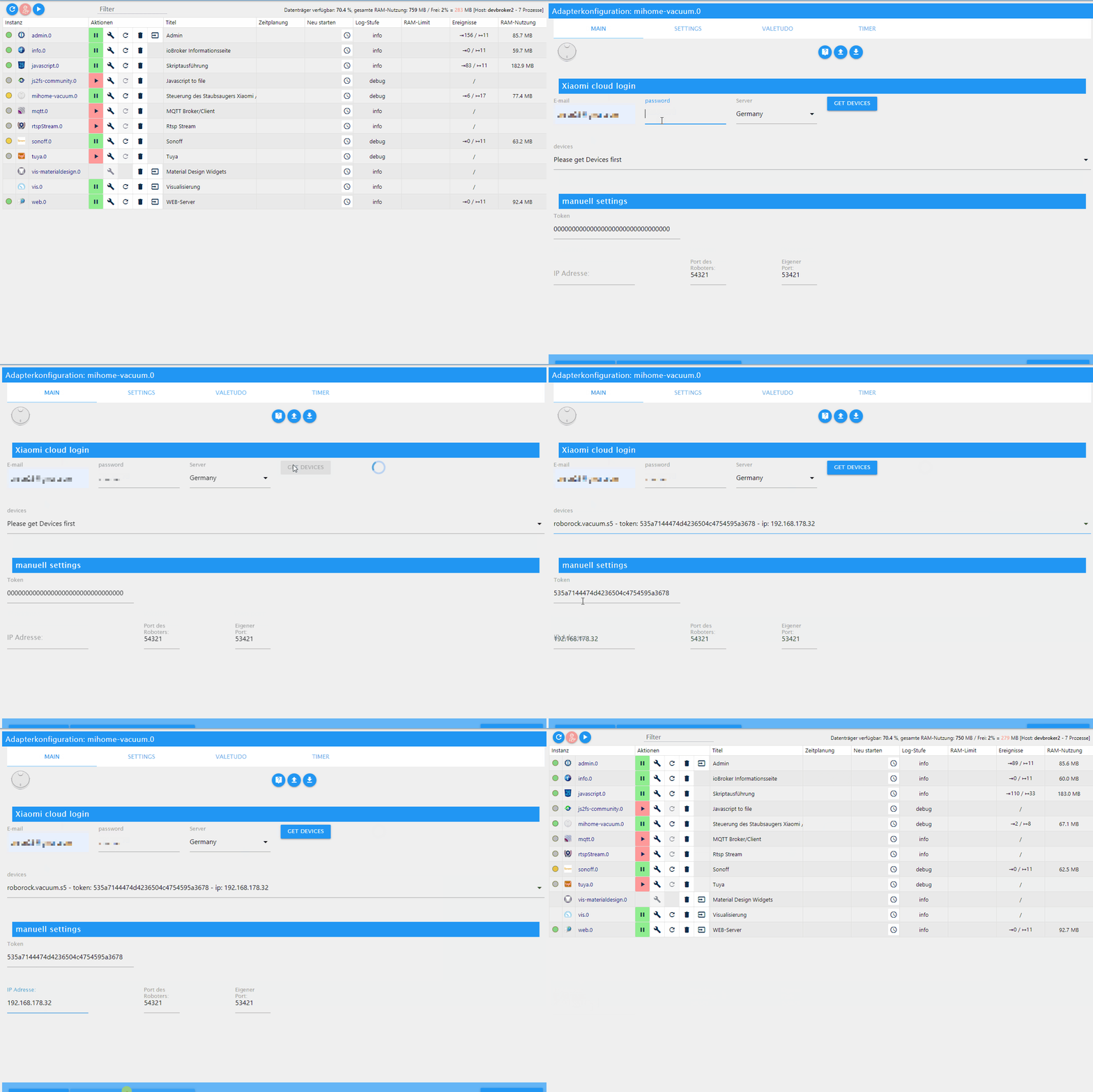
Ist halt immer wieder das gleiche, siehe Bild.
Adapter immer gelb, "Vebunden mit mihome-vacuum: falsch" die anderen beiden sind grün "wahr"
Muss den Roboter dann immer manuell neustarten...
Was ist da los bzw. was kann das sein und was kann ich da tun?
-
Hallo,
weiß niemand was?
Ist halt immer wieder das gleiche, siehe Bild.
Adapter immer gelb, "Vebunden mit mihome-vacuum: falsch" die anderen beiden sind grün "wahr"
Muss den Roboter dann immer manuell neustarten...
Was ist da los bzw. was kann das sein und was kann ich da tun?
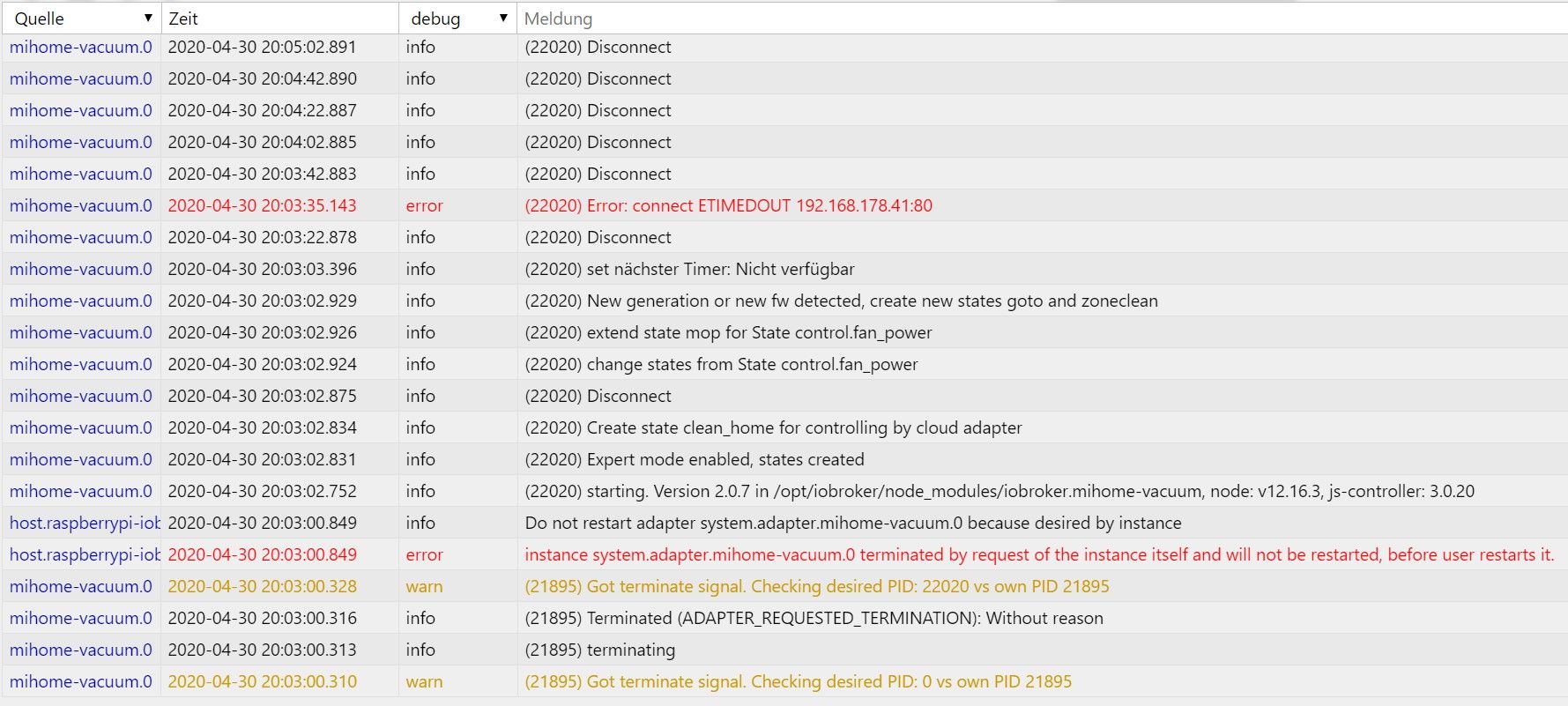
@BlackRed nimm erstmal den aktuellen aus dem git. Aber wenn er immer Disconnect sagt, hört sich das so an, als wenn er den Roboter per ip nicht erreichen kann.
-
@BlackRed nimm erstmal den aktuellen aus dem git. Aber wenn er immer Disconnect sagt, hört sich das so an, als wenn er den Roboter per ip nicht erreichen kann.
@dirkhe sagte in Test Adapter mihome-vacuum v2.0.x:
@BlackRed nimm erstmal den aktuellen aus dem git. Aber wenn er immer Disconnect sagt, hört sich das so an, als wenn er den Roboter per ip nicht erreichen kann.
Github Version bzw. 2.0.9 ist nun drauf, kein Unterschied, immer noch gleich alles.
Ja, aber warum bzw. was kann ich da machen ?
Die Webseite von Valetudo also http://192.168.178.41/#map.html ist immer ohne Probleme erreichbar...
-
Hi,
weiß jemand woran es liegen könnte das die Karte nach einem Reinigungsvorgang nicht wieder die Karte komplett farblich darstellt?
Bei mir ist es so das die Karte, nach der Reinigung immer den letzten gereinigten Raum farblich anzeigt und die anderen Weiß.
Einmal hat es nach einem Neustart des Adapters funktioniert das ich die Komplette Mappe farblich sehe, aber ein zweites mal hat es nicht funktioniert.
Ich führe immer nur einfache "Raumreinigungen" durch.
Über den Datenpunkt "x-send-command" habe ich mal folgende zwei befehle getestet
get_fresh_map_v1 > retry
get_map_v1 > "robomay%2F26...."Hat aber auch nichts geholfen.
Verwende Version 2.0.7 mit dem Roborock S5, Server DE, ansonsten funktioniert der Adapter bis jetzt so wie er soll.
Habe keine Fehlermeldungen oder ähnliches.Gruß
Eddy -
@dirkhe sagte in Test Adapter mihome-vacuum v2.0.x:
@BlackRed nimm erstmal den aktuellen aus dem git. Aber wenn er immer Disconnect sagt, hört sich das so an, als wenn er den Roboter per ip nicht erreichen kann.
Github Version bzw. 2.0.9 ist nun drauf, kein Unterschied, immer noch gleich alles.
Ja, aber warum bzw. was kann ich da machen ?
Die Webseite von Valetudo also http://192.168.178.41/#map.html ist immer ohne Probleme erreichbar...
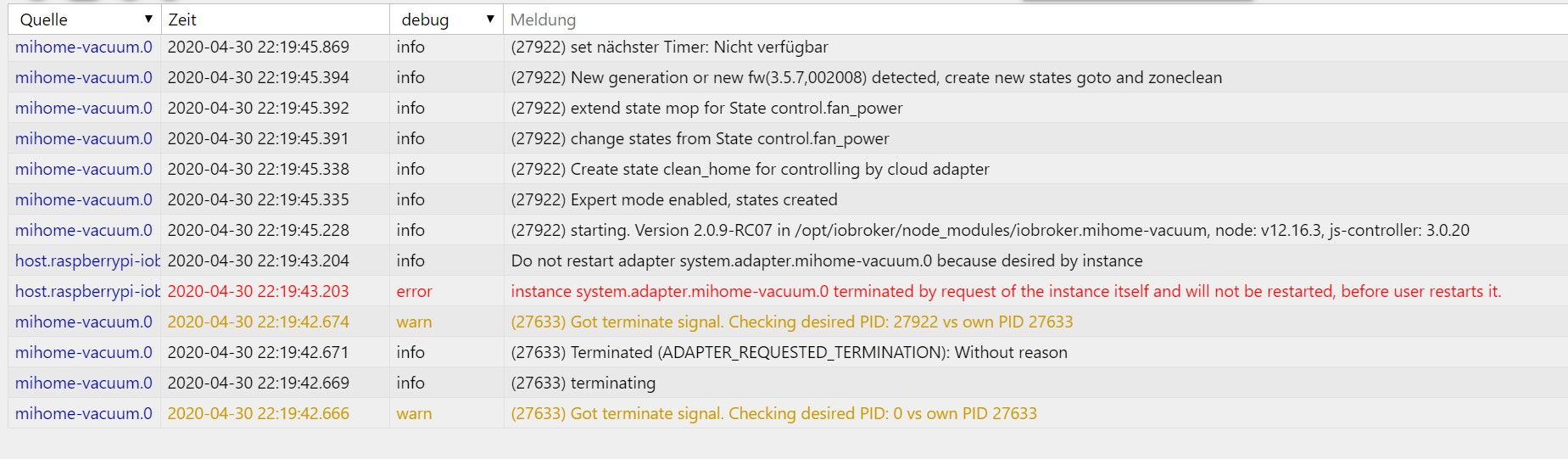
@BlackRed stell mal den adapter auf debug und poste den mal hier
-
Hi zusammen,
ich beobachte, dass ich die Button der Datenpunkte "Go Home" usw. leider nicht mehr benutzen kann. Weder über Vis noch direkt in den Objekten. Gibt es dazu eine Lösung?
VG -
Hi, nachdem ich Valetudo reflashen musste kriege ich keine Verbindung zu meinem Saugrobotr hin. Das neue Token habe ich eingetragen, und auch die Valetudo Option im Adapter habe ich zum Testen mal deaktiviert...
Log sagt nur folgendes:mihome-vacuum.0 2020-05-02 12:37:18.922 debug (17715) Receive <<< Helo <<< 213100200000000004edc4965ead4d60ffffffffffffffffffffffffffffffff mihome-vacuum.0 2020-05-02 12:36:53.920 debug (17715) sendTo "getStatus" to system.adapter.mihome-vacuum.0 from system.adapter.mihome-vacuum.0 mihome-vacuum.0 2020-05-02 12:36:53.920 debug (17715) no answer for undefined(id:1) received, giving up mihome-vacuum.0 2020-05-02 12:36:48.919 debug (17715) sendMsg[3] >>> {"id":1,"method":"get_status"} mihome-vacuum.0 2020-05-02 12:36:43.917 debug (17715) sendMsg[2] >>> {"id":1,"method":"get_status"} mihome-vacuum.0 2020-05-02 12:36:39.376 info (17715) set nächster Timer: Nicht verfügbar mihome-vacuum.0 2020-05-02 12:36:38.916 debug (17715) sendMsg[1] >>> {"id":1,"method":"get_status"} mihome-vacuum.0 2020-05-02 12:36:38.887 debug (17715) sendTo "getStatus" to system.adapter.mihome-vacuum.0 from system.adapter.mihome-vacuum.0 mihome-vacuum.0 2020-05-02 12:36:38.887 info (17715) connecting, this can take up to 10 minutes ... mihome-vacuum.0 2020-05-02 12:36:38.886 warn (17715) Time difference between Mihome Vacuum and ioBroker: 2 secVor dem reflashen hat alles wunderbar funktioniert....
Edit: Der Token war nicht mehr aktuell... Wäre es möglich hier eine entsprechende Fehlermeldung zu generieren?
-
Und ich habe gerade noch das entdeckt:
mihome-vacuum.1 2020-05-02 15:05:38.129 error (4074) TypeError: mapCreator.CanvasMap is not a function mihome-vacuum.1 2020-05-02 15:04:06.799 warn (4074) This object will not be created in future versions. Please report this to the developer. mihome-vacuum.1 2020-05-02 15:04:06.797 warn (4074) Object mihome-vacuum.1.info.dnd is invalid: obj.common.type has an invalid value (switch) but has to be one of number, string, boolean, array, object, mixed, file, json -
@dirkhe sagte in Test Adapter mihome-vacuum v2.0.x:
@BlackRed stell mal den adapter auf debug und poste den mal hier
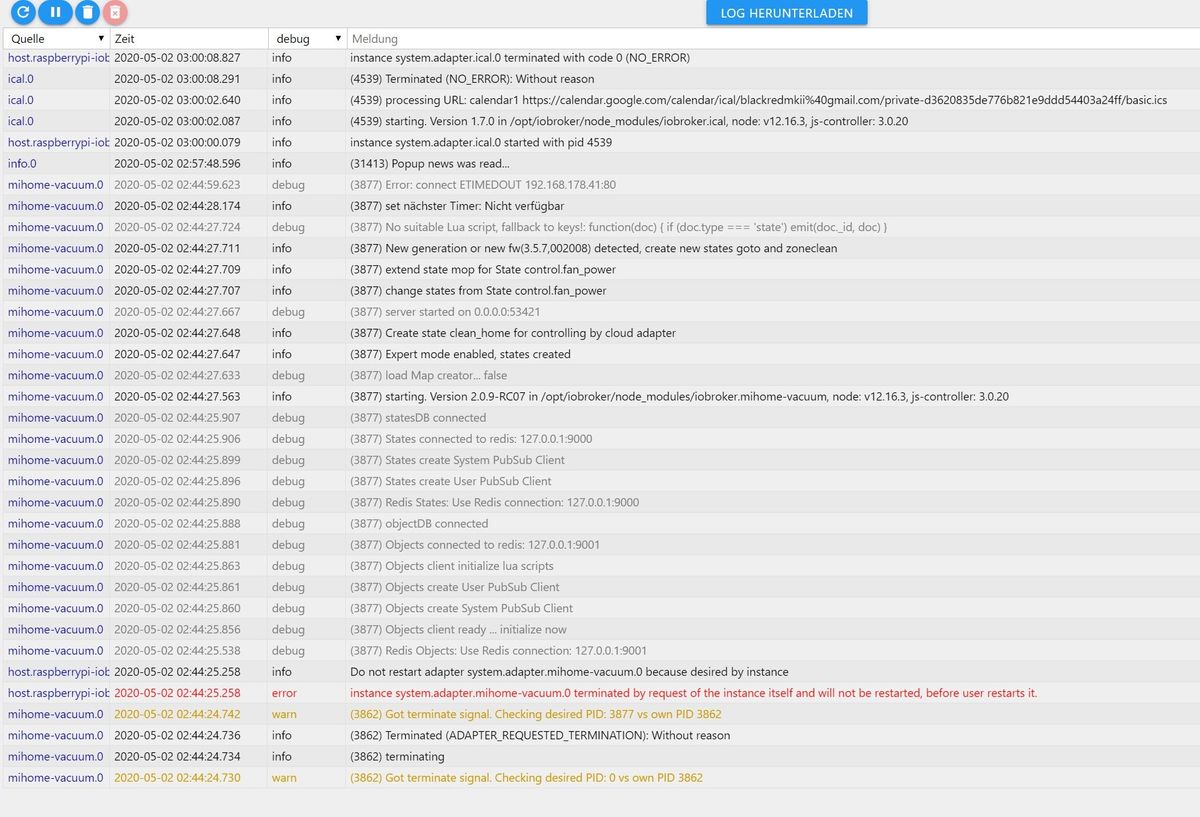
@BlackRed dein robbi ist übers netzt nicht erreichbar, der Adapter bekommt keine Antwort
-
Und ich habe gerade noch das entdeckt:
mihome-vacuum.1 2020-05-02 15:05:38.129 error (4074) TypeError: mapCreator.CanvasMap is not a function mihome-vacuum.1 2020-05-02 15:04:06.799 warn (4074) This object will not be created in future versions. Please report this to the developer. mihome-vacuum.1 2020-05-02 15:04:06.797 warn (4074) Object mihome-vacuum.1.info.dnd is invalid: obj.common.type has an invalid value (switch) but has to be one of number, string, boolean, array, object, mixed, file, json@Coffeelover ist im git bereits gefixt
-
Hi zusammen,
ich beobachte, dass ich die Button der Datenpunkte "Go Home" usw. leider nicht mehr benutzen kann. Weder über Vis noch direkt in den Objekten. Gibt es dazu eine Lösung?
VG@Coffeelover was passiert im Log (debug)?
-
Hi, nachdem ich Valetudo reflashen musste kriege ich keine Verbindung zu meinem Saugrobotr hin. Das neue Token habe ich eingetragen, und auch die Valetudo Option im Adapter habe ich zum Testen mal deaktiviert...
Log sagt nur folgendes:mihome-vacuum.0 2020-05-02 12:37:18.922 debug (17715) Receive <<< Helo <<< 213100200000000004edc4965ead4d60ffffffffffffffffffffffffffffffff mihome-vacuum.0 2020-05-02 12:36:53.920 debug (17715) sendTo "getStatus" to system.adapter.mihome-vacuum.0 from system.adapter.mihome-vacuum.0 mihome-vacuum.0 2020-05-02 12:36:53.920 debug (17715) no answer for undefined(id:1) received, giving up mihome-vacuum.0 2020-05-02 12:36:48.919 debug (17715) sendMsg[3] >>> {"id":1,"method":"get_status"} mihome-vacuum.0 2020-05-02 12:36:43.917 debug (17715) sendMsg[2] >>> {"id":1,"method":"get_status"} mihome-vacuum.0 2020-05-02 12:36:39.376 info (17715) set nächster Timer: Nicht verfügbar mihome-vacuum.0 2020-05-02 12:36:38.916 debug (17715) sendMsg[1] >>> {"id":1,"method":"get_status"} mihome-vacuum.0 2020-05-02 12:36:38.887 debug (17715) sendTo "getStatus" to system.adapter.mihome-vacuum.0 from system.adapter.mihome-vacuum.0 mihome-vacuum.0 2020-05-02 12:36:38.887 info (17715) connecting, this can take up to 10 minutes ... mihome-vacuum.0 2020-05-02 12:36:38.886 warn (17715) Time difference between Mihome Vacuum and ioBroker: 2 secVor dem reflashen hat alles wunderbar funktioniert....
Edit: Der Token war nicht mehr aktuell... Wäre es möglich hier eine entsprechende Fehlermeldung zu generieren?
@schdief ich meine, ich hätte schon mal geschaut, aber er sagt uns nicht, dass der Token falsch ist
-
@dirkhe sagte in Test Adapter mihome-vacuum v2.0.x:
@BlackRed dein robbi ist übers netzt nicht erreichbar, der Adapter bekommt keine Antwort
Hallo,
In der fritz.box Config "Roborock 2,4 GHz→72 Mbit/s" besteht eine Verbindung.
Die Adresse bzw. IP übers Internet ist auch ohne Probleme erreichbar 192.168.178.41
Was soll da nicht erreichbar sein?
-
@Coffeelover was passiert im Log (debug)?
@dirkhe Meine Fehler sind durch das Update von Github behoben. Vielen Dank.
-
Hallo zusammen,
bei mir bricht das Update auf die neuste Version mit Code 25 ab.
Ich wollte das Update machen, weil er anscheinend die Verbindung verliert, nach einen Neustart ist der Status auf grün, einige Zeit später gelb.$ ./iobroker url "https://github.com/iobroker-community-adapters/ioBroker.mihome-vacuum/tarball/master" mihome-vacuum install https://github.com/iobroker-community-adapters/ioBroker.mihome-vacuum/tarball/master NPM version: 6.14.4 npm install https://github.com/iobroker-community-adapters/ioBroker.mihome-vacuum/tarball/master --loglevel error --prefix "/opt/iobroker" (System call) Package pixman-1 was not found in the pkg-config search path.Perhaps you should add the directory containing `pixman-1.pc'to the PKG_CONFIG_PATH environment variableNo package 'pixman-1' found gyp: Call to 'pkg-config pixman-1 --libs' returned exit status 1 while in binding.gyp. while trying to load binding.gyp gyp ERR! configure error gyp ERR! stack Error: `gyp` failed with exit code: 1gyp ERR! stack at ChildProcess.onCpExit (/usr/lib/node_modules/npm/node_modules/node-gyp/lib/configure.js:351:16)gyp ERR! stack at ChildProcess.emit (events.js:310:20)gyp ERR! stack at Process.ChildProcess._handle.onexit (internal/child_process.js:275:12)gyp ERR! System Linux 4.19.97-v7l+gyp ERR! command "/usr/bin/node" "/usr/lib/node_modules/npm/node_modules/node-gyp/bin/node-gyp.js" "configure" "--fallback-to-build" "--module=/opt/iobroker/node_modules/canvas/build/Release/canvas.node" "--module_name=canvas" "--module_path=/opt/iobroker/node_modules/canvas/build/Release" "--napi_version=5" "--node_abi_napi=napi" "--napi_build_version=0" "--node_napi_label=node-v72"gyp ERR! cwd /opt/iobroker/node_modules/canvasgyp ERR! node -v v12.16.2 gyp ERR! node-gyp -v v5.1.0gyp ERR! not ok node-pre-gyp ERR! build error node-pre-gyp ERR! stack Error: Failed to execute '/usr/bin/node /usr/lib/node_modules/npm/node_modules/node-gyp/bin/node-gyp.js configure --fallback-to-build --module=/opt/iobroker/node_modules/canvas/build/Release/canvas.node --module_name=canvas --module_path=/opt/iobroker/node_modules/canvas/build/Release --napi_version=5 --node_abi_napi=napi --napi_build_version=0 --node_napi_label=node-v72' (1)node-pre-gyp ERR! stack at ChildProcess.<anonymous> (/opt/iobroker/node_modules/node-pre-gyp/lib/util/compile.js:83:29)node-pre-gyp ERR! stack at ChildProcess.emit (events.js:310:20)node-pre-gyp ERR! stack at maybeClose (internal/child_process.js:1021:16)node-pre-gyp ERR! stack at Process.ChildProcess._handle.onexit (internal/child_process.js:286:5)node-pre-gyp ERR! System Linux 4.19.97-v7l+node-pre-gyp ERR! command "/usr/bin/node" "/opt/iobroker/node_modules/.bin/node-pre-gyp" "install" "--fallback-to-build"node-pre-gyp ERR! cwd /opt/iobroker/node_modules/canvasnode-pre-gyp ERR! node -v v12.16.2node-pre-gyp ERR! node-pre-gyp -v v0.11.0node-pre-gyp ERR! not ok npm ERR! code ELIFECYCLEnpm ERR! errno 1npm ERR! canvas@2.6.1 install: `node-pre-gyp install --fallback-to-build`npm ERR! Exit status 1npm ERR! npm ERR! Failed at the canvas@2.6.1 install script.npm ERR! This is probably not a problem with npm. There is likely additional logging output above. npm ERR! A complete log of this run can be found in:npm ERR! /home/iobroker/.npm/_logs/2020-05-05T18_36_14_076Z-debug.log ERROR: host.raspberrypi Cannot install https://github.com/iobroker-community-adapters/ioBroker.mihome-vacuum/tarball/master: 1 ERROR: process exited with code 25Danke und viele Grüße
-
Hallo zusammen,
bei mir bricht das Update auf die neuste Version mit Code 25 ab.
Ich wollte das Update machen, weil er anscheinend die Verbindung verliert, nach einen Neustart ist der Status auf grün, einige Zeit später gelb.$ ./iobroker url "https://github.com/iobroker-community-adapters/ioBroker.mihome-vacuum/tarball/master" mihome-vacuum install https://github.com/iobroker-community-adapters/ioBroker.mihome-vacuum/tarball/master NPM version: 6.14.4 npm install https://github.com/iobroker-community-adapters/ioBroker.mihome-vacuum/tarball/master --loglevel error --prefix "/opt/iobroker" (System call) Package pixman-1 was not found in the pkg-config search path.Perhaps you should add the directory containing `pixman-1.pc'to the PKG_CONFIG_PATH environment variableNo package 'pixman-1' found gyp: Call to 'pkg-config pixman-1 --libs' returned exit status 1 while in binding.gyp. while trying to load binding.gyp gyp ERR! configure error gyp ERR! stack Error: `gyp` failed with exit code: 1gyp ERR! stack at ChildProcess.onCpExit (/usr/lib/node_modules/npm/node_modules/node-gyp/lib/configure.js:351:16)gyp ERR! stack at ChildProcess.emit (events.js:310:20)gyp ERR! stack at Process.ChildProcess._handle.onexit (internal/child_process.js:275:12)gyp ERR! System Linux 4.19.97-v7l+gyp ERR! command "/usr/bin/node" "/usr/lib/node_modules/npm/node_modules/node-gyp/bin/node-gyp.js" "configure" "--fallback-to-build" "--module=/opt/iobroker/node_modules/canvas/build/Release/canvas.node" "--module_name=canvas" "--module_path=/opt/iobroker/node_modules/canvas/build/Release" "--napi_version=5" "--node_abi_napi=napi" "--napi_build_version=0" "--node_napi_label=node-v72"gyp ERR! cwd /opt/iobroker/node_modules/canvasgyp ERR! node -v v12.16.2 gyp ERR! node-gyp -v v5.1.0gyp ERR! not ok node-pre-gyp ERR! build error node-pre-gyp ERR! stack Error: Failed to execute '/usr/bin/node /usr/lib/node_modules/npm/node_modules/node-gyp/bin/node-gyp.js configure --fallback-to-build --module=/opt/iobroker/node_modules/canvas/build/Release/canvas.node --module_name=canvas --module_path=/opt/iobroker/node_modules/canvas/build/Release --napi_version=5 --node_abi_napi=napi --napi_build_version=0 --node_napi_label=node-v72' (1)node-pre-gyp ERR! stack at ChildProcess.<anonymous> (/opt/iobroker/node_modules/node-pre-gyp/lib/util/compile.js:83:29)node-pre-gyp ERR! stack at ChildProcess.emit (events.js:310:20)node-pre-gyp ERR! stack at maybeClose (internal/child_process.js:1021:16)node-pre-gyp ERR! stack at Process.ChildProcess._handle.onexit (internal/child_process.js:286:5)node-pre-gyp ERR! System Linux 4.19.97-v7l+node-pre-gyp ERR! command "/usr/bin/node" "/opt/iobroker/node_modules/.bin/node-pre-gyp" "install" "--fallback-to-build"node-pre-gyp ERR! cwd /opt/iobroker/node_modules/canvasnode-pre-gyp ERR! node -v v12.16.2node-pre-gyp ERR! node-pre-gyp -v v0.11.0node-pre-gyp ERR! not ok npm ERR! code ELIFECYCLEnpm ERR! errno 1npm ERR! canvas@2.6.1 install: `node-pre-gyp install --fallback-to-build`npm ERR! Exit status 1npm ERR! npm ERR! Failed at the canvas@2.6.1 install script.npm ERR! This is probably not a problem with npm. There is likely additional logging output above. npm ERR! A complete log of this run can be found in:npm ERR! /home/iobroker/.npm/_logs/2020-05-05T18_36_14_076Z-debug.log ERROR: host.raspberrypi Cannot install https://github.com/iobroker-community-adapters/ioBroker.mihome-vacuum/tarball/master: 1 ERROR: process exited with code 25Danke und viele Grüße
@Bratwurst
Wenn das klemmt dann brauchst du wohlsudo apt-get install build-essential libcairo2-dev libpango1.0-dev libjpeg-dev libgif-dev librsvg2-dev libpixman-1-0[Edit:] Quatsch gelöscht.
-
@Bratwurst Warst du erfolgreich?

Support us
334
Online32.7k
Users82.4k
Topics1.3m
Posts