
NEWS




Beta-Test js-controller 2.2.x GitHub
-
@apollon77 said in Beta-Test js-controller 2.2.x GitHub:
So krasses hätte ich keine Idee
Auch bei mir waren es nach dem Update von Admin und JS-Controller, über 300MB weniger.
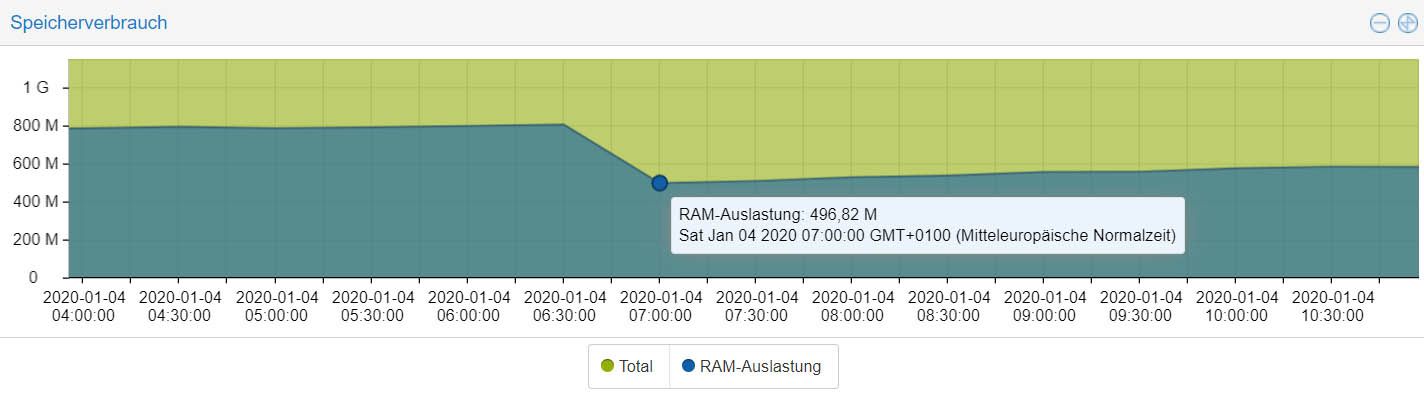
Seither steigt der Verbrauch wieder leicht an. Ich vermute als Ursache den IOBroker Neustart. Werde morgen früh nochmal nachsehen, ob ich wieder bei 800MB bin. -
Da scheint vllt. doch etwas nicht zu stimmen mit der 2.2.7.
Zuerst hatte ich dies dem Crash des Containers zugeordnet aber nachdem mir,
wie sagt man, die Hutschnur gerissen ist :-) und ich den Snapshot von heute Morgen
eingespielt habe mit js-controller 2.2.6 funktionieren auch diverse Blocklys
und Scripte wieder. Denn ich konnte machen was ich wollte bei der 2.2.7, einige
Blocklys/Scripte wollten einfach nicht mehr.
Oder lag es Admin 3.7.6 den ich zwar zurückgesetzt hatte auf 3.7.5, aber der vllt was
hinterlassen hat und es gar nicht an js-controller liegt.
Ich habe leider keine Ahnung, bin nur Anwender, also was für dich @apollon77 :-)Gruß Ralf
Mir egal, wer Dein Vater ist! Wenn ich hier angel, wird nicht übers Wasser gelaufen!!Benutzt das Voting rechts unten im Beitrag wenn er euch geholfen hat.
-
Da scheint vllt. doch etwas nicht zu stimmen mit der 2.2.7.
Zuerst hatte ich dies dem Crash des Containers zugeordnet aber nachdem mir,
wie sagt man, die Hutschnur gerissen ist :-) und ich den Snapshot von heute Morgen
eingespielt habe mit js-controller 2.2.6 funktionieren auch diverse Blocklys
und Scripte wieder. Denn ich konnte machen was ich wollte bei der 2.2.7, einige
Blocklys/Scripte wollten einfach nicht mehr.
Oder lag es Admin 3.7.6 den ich zwar zurückgesetzt hatte auf 3.7.5, aber der vllt was
hinterlassen hat und es gar nicht an js-controller liegt.
Ich habe leider keine Ahnung, bin nur Anwender, also was für dich @apollon77 :-)@Nashra Damit Apollon das Einschätzen kann braucht er auf jedenfall mal die Logs aus dem Zeitraum. Am besten hier im Forum posten.
Proxmox-ioBroker-Redis-HA Doku: https://forum.iobroker.net/topic/47478/dokumentation-einer-proxmox-iobroker-redis-ha-umgebung
-
@Nashra Damit Apollon das Einschätzen kann braucht er auf jedenfall mal die Logs aus dem Zeitraum. Am besten hier im Forum posten.
@darkiop sagte in Beta-Test js-controller 2.2.x GitHub:
@Nashra Damit Apollon das Einschätzen kann braucht er auf jedenfall mal die Logs aus dem Zeitraum. Am besten hier im Forum posten.
Wenn ich mit einem Snapshot den Container zurückgesetzt habe sind da die Logs von vorher nicht mehr drin.
Sorry, war so sauer wegen einigen Sachen das ich es auch vergessen habe die Logs zu sichern :-( -
@apollon77 said in Beta-Test js-controller 2.2.x GitHub:
So krasses hätte ich keine Idee
Auch bei mir waren es nach dem Update von Admin und JS-Controller, über 300MB weniger.
Seither steigt der Verbrauch wieder leicht an. Ich vermute als Ursache den IOBroker Neustart. Werde morgen früh nochmal nachsehen, ob ich wieder bei 800MB bin.@Einstein67 Ahhso ... ja na klar ... mit Neustart ist ja erstmal alles leer.
Der Ram können zB Files sein die per web/vis abgeholt werden ... die sind zuerst nicht im RAM und werden dann pö a pö im controller und teilweise web Adapter gecached und so .... -
Da scheint vllt. doch etwas nicht zu stimmen mit der 2.2.7.
Zuerst hatte ich dies dem Crash des Containers zugeordnet aber nachdem mir,
wie sagt man, die Hutschnur gerissen ist :-) und ich den Snapshot von heute Morgen
eingespielt habe mit js-controller 2.2.6 funktionieren auch diverse Blocklys
und Scripte wieder. Denn ich konnte machen was ich wollte bei der 2.2.7, einige
Blocklys/Scripte wollten einfach nicht mehr.
Oder lag es Admin 3.7.6 den ich zwar zurückgesetzt hatte auf 3.7.5, aber der vllt was
hinterlassen hat und es gar nicht an js-controller liegt.
Ich habe leider keine Ahnung, bin nur Anwender, also was für dich @apollon77 :-)@Nashra Also Du wärst der erste der von Probleme mit Skripten oder so berichtet von den testern hier. Admin 3.7.6 hat nur den Fix drin wegen Customs entfernen ...
Also da brauche ich jetzt details ...
Beitrag hat geholfen? Votet rechts unten im Beitrag :-) https://paypal.me/Apollon77 / https://github.com/sponsors/Apollon77
- Debug-Log für Instanz einschalten? Admin -> Instanzen -> Expertenmodus -> Instanz aufklappen - Loglevel ändern
- Logfiles auf Platte /opt/iobroker/log/… nutzen, Admin schneidet Zeilen ab
-
@Nashra Also Du wärst der erste der von Probleme mit Skripten oder so berichtet von den testern hier. Admin 3.7.6 hat nur den Fix drin wegen Customs entfernen ...
Also da brauche ich jetzt details ...
@apollon77 da ich keinen separaten offiziellen Thread zwecks Admin gefunden habe, eben hier.
@apollon77 sagte in Beta-Test js-controller 2.2.x GitHub:
Admin 3.7.6 hat nur den Fix drin wegen Customs entfernen ...
ich bzw der ein oder andere haben dieses Problem mit dem Admin.
Bin noch auf Js-2.1.1
Nodejs ist auch noch 10.17.0
NPM 6.11.3
und gleich noch ein weiteres Phänomen, gerade nachgesehen, laut Host, ist 2.2.4 installiert?? Der Versuch JS upzudaten scheiterte ja, siehe https://forum.iobroker.net/post/348371umgestiegen von Proxmox auf Unraid
-
@apollon77 da ich keinen separaten offiziellen Thread zwecks Admin gefunden habe, eben hier.
@apollon77 sagte in Beta-Test js-controller 2.2.x GitHub:
Admin 3.7.6 hat nur den Fix drin wegen Customs entfernen ...
ich bzw der ein oder andere haben dieses Problem mit dem Admin.
Bin noch auf Js-2.1.1
Nodejs ist auch noch 10.17.0
NPM 6.11.3
und gleich noch ein weiteres Phänomen, gerade nachgesehen, laut Host, ist 2.2.4 installiert?? Der Versuch JS upzudaten scheiterte ja, siehe https://forum.iobroker.net/post/348371@crunchip Dann bitte Admin Issue afuf machen
Beitrag hat geholfen? Votet rechts unten im Beitrag :-) https://paypal.me/Apollon77 / https://github.com/sponsors/Apollon77
- Debug-Log für Instanz einschalten? Admin -> Instanzen -> Expertenmodus -> Instanz aufklappen - Loglevel ändern
- Logfiles auf Platte /opt/iobroker/log/… nutzen, Admin schneidet Zeilen ab
-
@apollon77 js-controller angehoben auf 2.2.7
erst mal Frage 1, ist das so ok?iobroker.js-controller@2.2.7 preinstall /opt/iobroker/node_modules/iobroker.js-controller > node lib/preinstallCheck.js NPM version: 6.13.4 > iobroker.js-controller@2.2.7 install /opt/iobroker/node_modules/iobroker.js-controller > node iobroker.js setup first The following notifications happened during sync: - Ignoring Directory "cloud.admin" because officially not created as meta object. Please remove directory! - Ignoring Directory "icons-material-svg" because officially not created as meta object. Please remove directory! - Ignoring Directory "icons-material-svg.admin" because officially not created as meta object. Please remove directory! - Ignoring Directory "icons-mfd-svg" because officially not created as meta object. Please remove directory! - Ignoring Directory "icons-mfd-svg.admin" because officially not created as meta object. Please remove directory! - Ignoring Directory "iobroker.admin.admin" because officially not created as meta object. Please remove directory! - Ignoring Directory "iobroker.discovery.admin" because officially not created as meta object. Please remove directory! - Ignoring Directory "multicast.admin" because officially not created as meta object. Please remove directory! - Ignoring Directory "nightscout.admin" because officially not created as meta object. Please remove directory! - Ignoring Directory "sayit.0" because officially not created as meta object. Please remove directory! npm WARN ajv-keywords@2.1.1 requires a peer of ajv@^5.0.0 but none is installed. You must install peer dependencies yourself. npm WARN optional SKIPPING OPTIONAL DEPENDENCY: osx-temperature-sensor@1.0.4 (node_modules/osx-temperature-sensor): npm WARN notsup SKIPPING OPTIONAL DEPENDENCY: Unsupported platform for osx-temperature-sensor@1.0.4: wanted {"os":"darwin","arch":"any"} (current: {"os":"linux","arch":"x64"}) npm WARN optional SKIPPING OPTIONAL DEPENDENCY: fsevents@2.1.2 (node_modules/fsevents): npm WARN notsup SKIPPING OPTIONAL DEPENDENCY: Unsupported platform for fsevents@2.1.2: wanted {"os":"darwin","arch":"any"} (current: {"os":"linux","arch":"x64"}) + iobroker.js-controller@2.2.7 added 112 packages from 485 contributors, removed 1 package and updated 6 packages in 502.517s 2 packages are looking for funding run `npm fund` for details root@IoBroker:/opt/iobroker# iobroker start root@IoBroker:/opt/iobroker# npm fund iobroker.inst@2.0.3 ├─┬ ansi-styles@4.2.1 │ └── url: https://github.com/chalk/ansi-styles?sponsor=1 └─┬ sinon@8.0.2 ├── type: opencollective └── url: https://opencollective.com/sinonzum Problem, nach iobroker start
ein Auszug aus dem log2020-01-04 23:16:46.889 - info: radar2.0 (15100) radar2 initialization started... 2020-01-04 23:16:46.891 - info: radar2.0 (15100) radar2 starting main... 2020-01-04 23:16:46.912 - info: radar2.0 (15100) found and will use 'node-bluetooth scan' 2020-01-04 23:16:47.124 - info: radar2.0 (15100) found and will use '@abandonware/noble' 2020-01-04 23:16:47.147 - info: radar2.0 (15100) net-ping not available! Will try to use normal ping! 2020-01-04 23:16:47.155 - info: radar2.0 (15100) radar2 set to flag items away if they are not seen for 2 minutes 2020-01-04 23:16:47.161 - info: radar2.0 (15100) use known BT list: [ 'xxxxxxxxxxxxxxxxxxxxxxxxxxxxxxxxxxxxxxxxxxxxxxxxxxxxx' ] 2020-01-04 23:16:47.162 - info: radar2.0 (15100) use known IP list: [] 2020-01-04 23:16:47.163 - info: radar2.0 (15100) arp-scan will use the following interfaces: [ 'ens18' ] 2020-01-04 23:16:47.163 - info: radar2.0 (15100) radar2 set to scan every 30 seconds and printers every 720 minutes. 2020-01-04 23:16:47.195 - error: radar2.0 (15100) uncaught exception: bind EACCES 0.0.0.0:67 2020-01-04 23:16:47.196 - error: radar2.0 (15100) Error: bind EACCES 0.0.0.0:67 at state.handle.lookup (dgram.js:242:18) at process._tickCallback (internal/process/next_tick.js:63:19) 2020-01-04 23:16:47.198 - info: radar2.0 (15100) Adapter disconnected and stopped with dostop(false) and callback(true) 2020-01-04 23:16:47.213 - warn: radar2.0 (15100) Adapter will exit in latest 1 sec with code false! 2020-01-04 23:16:47.308 - info: radar2.0 (15100) Will try to scan BT devices: true 2020-01-04 23:16:47.329 - info: radar2.0 (15100) terminating 2020-01-04 23:16:47.331 - info: radar2.0 (15100) Terminated (NO_ERROR): Without reason 2020-01-04 23:16:47.725 - info: roadtraffic.0 (15116) starting. Version 0.2.0 in /opt/iobroker/node_modules/iobroker.roadtraffic, node: v10.18.0 2020-01-04 23:16:47.881 - error: host.IoBroker Caught by controller[0]: { Error: bind EACCES 0.0.0.0:67 2020-01-04 23:16:47.882 - error: host.IoBroker Caught by controller[0]: at state.handle.lookup (dgram.js:242:18) 2020-01-04 23:16:47.882 - error: host.IoBroker Caught by controller[0]: at process._tickCallback (internal/process/next_tick.js:63:19) 2020-01-04 23:16:47.882 - error: host.IoBroker Caught by controller[0]: errno: 'EACCES', 2020-01-04 23:16:47.882 - error: host.IoBroker Caught by controller[0]: code: 'EACCES', 2020-01-04 23:16:47.883 - error: host.IoBroker Caught by controller[0]: syscall: 'bind', 2020-01-04 23:16:47.883 - error: host.IoBroker Caught by controller[0]: address: '0.0.0.0', 2020-01-04 23:16:47.883 - error: host.IoBroker Caught by controller[0]: port: 67 } 2020-01-04 23:16:47.883 - info: host.IoBroker instance system.adapter.radar2.0 terminated with code 0 (NO_ERROR) 2020-01-04 23:16:47.883 - info: host.IoBroker Restart adapter system.adapter.radar2.0 because enabled2020-01-04 23:16:54.594 - info: amazon-dash.0 (15158) starting. Version 0.3.1 in /opt/iobroker/node_modules/iobroker.amazon-dash, node: v10.18.0 2020-01-04 23:16:54.627 - info: amazon-dash.0 (15158) starting pcap session on default interface 2020-01-04 23:16:54.642 - error: amazon-dash.0 (15158) uncaught exception: socket: Operation not permitted 2020-01-04 23:16:54.642 - error: amazon-dash.0 (15158) Error: socket: Operation not permitted at new PcapSession (/opt/iobroker/node_modules/pcap/pcap.js:49:39) at Object.exports.createSession (/opt/iobroker/node_modules/pcap/pcap.js:123:12) at main (/opt/iobroker/node_modules/iobroker.amazon-dash/main.js:78:29) at Adapter. (/opt/iobroker/node_modules/iobroker.amazon-dash/main.js:43:5)2020-01-04 23:16:54.994 - info: radar2.0 (15147) radar2 initialization started... 2020-01-04 23:16:54.996 - info: radar2.0 (15147) radar2 starting main... 2020-01-04 23:16:55.016 - info: radar2.0 (15147) found and will use 'node-bluetooth scan' 2020-01-04 23:16:55.302 - info: radar2.0 (15147) found and will use '@abandonware/noble' 2020-01-04 23:16:55.322 - info: radar2.0 (15147) net-ping not available! Will try to use normal ping! 2020-01-04 23:16:55.331 - info: radar2.0 (15147) radar2 set to flag items away if they are not seen for 2 minutes 2020-01-04 23:16:55.340 - info: radar2.0 (15147) use known BT list: [ 'xxxxxxxxxxxxxxxxxxxxxxxxxxxxxxxxxxxxxxxxxxxxxxxxxxxxx' ] 2020-01-04 23:16:55.340 - info: radar2.0 (15147) use known IP list: [] 2020-01-04 23:16:55.342 - info: radar2.0 (15147) arp-scan will use the following interfaces: [ 'ens18' ] 2020-01-04 23:16:55.342 - info: radar2.0 (15147) radar2 set to scan every 30 seconds and printers every 720 minutes. 2020-01-04 23:16:55.419 - error: radar2.0 (15147) uncaught exception: bind EACCES 0.0.0.0:67 2020-01-04 23:16:55.420 - error: radar2.0 (15147) Error: bind EACCES 0.0.0.0:67 at state.handle.lookup (dgram.js:242:18) at process._tickCallback (internal/process/next_tick.js:63:19) 2020-01-04 23:16:55.422 - info: radar2.0 (15147) Adapter disconnected and stopped with dostop(false) and callback(true) 2020-01-04 23:16:55.434 - warn: radar2.0 (15147) Adapter will exit in latest 1 sec with code false! 2020-01-04 23:16:55.524 - info: radar2.0 (15147) Will try to scan BT devices: true 2020-01-04 23:16:55.570 - error: host.IoBroker Caught by controller[0]: Error: socket: Operation not permitted 2020-01-04 23:16:55.580 - info: simple-api.0 (15177) starting. Version 2.3.2 in /opt/iobroker/node_modules/iobroker.simple-api, node: v10.18.0 2020-01-04 23:16:55.571 - error: host.IoBroker Caught by controller[0]: at new PcapSession (/opt/iobroker/node_modules/pcap/pcap.js:49:39) 2020-01-04 23:16:55.571 - error: host.IoBroker Caught by controller[0]: at Object.exports.createSession (/opt/iobroker/node_modules/pcap/pcap.js:123:12) 2020-01-04 23:16:55.571 - error: host.IoBroker Caught by controller[0]: at main (/opt/iobroker/node_modules/iobroker.amazon-dash/main.js:78:29) 2020-01-04 23:16:55.571 - error: host.IoBroker Caught by controller[0]: at Adapter. (/opt/iobroker/node_modules/iobroker.amazon-dash/main.js:43:5) 2020-01-04 23:16:55.572 - error: host.IoBroker Caught by controller[0]: at Adapter.emit (events.js:198:13) 2020-01-04 23:16:55.572 - error: host.IoBroker Caught by controller[0]: at initLogging (/opt/iobroker/node_modules/iobroker.js-controller/lib/adapter.js:7115:22) 2020-01-04 23:16:55.572 - error: host.IoBroker Caught by controller[0]: at states.getKeys (/opt/iobroker/node_modules/iobroker.js-controller/lib/adapter.js:6812:25) 2020-01-04 23:16:55.572 - error: host.IoBroker Caught by controller[0]: at client.keys (/opt/iobroker/node_modules/iobroker.js-controller/lib/states/statesInRedis.js:685:17) 2020-01-04 23:16:55.572 - error: host.IoBroker Caught by controller[0]: at tryCatcher (/opt/iobroker/node_modules/standard-as-callback/built/utils.js:11:23) 2020-01-04 23:16:55.572 - error: host.IoBroker Caught by controller[0]: at promise.then (/opt/iobroker/node_modules/standard-as-callback/built/index.js:19:49) 2020-01-04 23:16:55.573 - info: host.IoBroker instance system.adapter.amazon-dash.0 terminated with code 0 (NO_ERROR) 2020-01-04 23:16:55.573 - info: host.IoBroker Restart adapter system.adapter.amazon-dash.0 because enabled 2020-01-04 23:16:55.674 - info: simple-api.0 (15177) simpleAPI server listening on port 8087 2020-01-04 23:16:55.676 - info: simple-api.0 (15177) Allow states only when user is owner: false 2020-01-04 23:16:55.687 - info: simple-api.0 (15177) http server listening on port 8087 2020-01-04 23:16:55.796 - info: radar2.0 (15147) terminating 2020-01-04 23:16:55.799 - info: radar2.0 (15147) Terminated (NO_ERROR): Without reason 2020-01-04 23:16:56.347 - error: host.IoBroker Caught by controller[0]: { Error: bind EACCES 0.0.0.0:67 2020-01-04 23:16:56.348 - error: host.IoBroker Caught by controller[0]: at state.handle.lookup (dgram.js:242:18) 2020-01-04 23:16:56.348 - error: host.IoBroker Caught by controller[0]: at process._tickCallback (internal/process/next_tick.js:63:19) 2020-01-04 23:16:56.348 - error: host.IoBroker Caught by controller[0]: errno: 'EACCES', 2020-01-04 23:16:56.349 - error: host.IoBroker Caught by controller[0]: code: 'EACCES', 2020-01-04 23:16:56.349 - error: host.IoBroker Caught by controller[0]: syscall: 'bind', 2020-01-04 23:16:56.349 - error: host.IoBroker Caught by controller[0]: address: '0.0.0.0', 2020-01-04 23:16:56.349 - error: host.IoBroker Caught by controller[0]: port: 67 } 2020-01-04 23:16:56.349 - info: host.IoBroker instance system.adapter.radar2.0 terminated with code 0 (NO_ERROR) 2020-01-04 23:16:56.349 - info: host.IoBroker Restart adapter system.adapter.radar2.0 because enabled2020-01-04 23:17:39.364 - info: radar2.0 (15452) radar2 initialization started... 2020-01-04 23:17:39.367 - info: radar2.0 (15452) radar2 starting main... 2020-01-04 23:17:39.384 - info: radar2.0 (15452) found and will use 'node-bluetooth scan' 2020-01-04 23:17:39.655 - info: radar2.0 (15452) found and will use '@abandonware/noble' 2020-01-04 23:17:39.673 - info: radar2.0 (15452) net-ping not available! Will try to use normal ping! 2020-01-04 23:17:39.680 - info: radar2.0 (15452) radar2 set to flag items away if they are not seen for 2 minutes 2020-01-04 23:17:39.686 - info: radar2.0 (15452) use known BT list: [ 'xxxxxxxxxxxxxxxxxxxxxxxxxxxxxxxxxxxxxxxxxxxxxxxxxxx' ] 2020-01-04 23:17:39.687 - info: radar2.0 (15452) use known IP list: [] 2020-01-04 23:17:39.688 - info: radar2.0 (15452) arp-scan will use the following interfaces: [ 'ens18' ] 2020-01-04 23:17:39.689 - info: radar2.0 (15452) radar2 set to scan every 30 seconds and printers every 720 minutes. 2020-01-04 23:17:39.722 - error: radar2.0 (15452) uncaught exception: bind EACCES 0.0.0.0:67 2020-01-04 23:17:39.723 - error: radar2.0 (15452) Error: bind EACCES 0.0.0.0:67 at state.handle.lookup (dgram.js:242:18) at process._tickCallback (internal/process/next_tick.js:63:19) 2020-01-04 23:17:39.724 - info: radar2.0 (15452) Adapter disconnected and stopped with dostop(false) and callback(true) 2020-01-04 23:17:39.739 - warn: radar2.0 (15452) Adapter will exit in latest 1 sec with code false! 2020-01-04 23:17:39.834 - info: radar2.0 (15452) Will try to scan BT devices: true 2020-01-04 23:17:40.647 - info: radar2.0 (15452) Terminated (ADAPTER_REQUESTED_TERMINATION): Without reason 2020-01-04 23:17:41.274 - error: host.IoBroker instance system.adapter.radar2.0 terminated by request of the instance itself and will not be restarted, before user restarts it. 2020-01-04 23:17:41.276 - info: host.IoBroker Do not restart adapter system.adapter.radar2.0 because desired by instance2020-01-04 23:18:00.474 - info: host.IoBroker instance system.adapter.amazon-dash.0 started with pid 15591 2020-01-04 23:18:00.882 - info: host.IoBroker instance system.adapter.fullcalendar.0 started with pid 15598 2020-01-04 23:18:03.556 - info: amazon-dash.0 (15591) starting. Version 0.3.1 in /opt/iobroker/node_modules/iobroker.amazon-dash, node: v10.18.0 2020-01-04 23:18:03.606 - info: amazon-dash.0 (15591) starting pcap session on default interface 2020-01-04 23:18:03.621 - error: amazon-dash.0 (15591) uncaught exception: socket: Operation not permitted 2020-01-04 23:18:03.621 - error: amazon-dash.0 (15591) Error: socket: Operation not permitted at new PcapSession (/opt/iobroker/node_modules/pcap/pcap.js:49:39) at Object.exports.createSession (/opt/iobroker/node_modules/pcap/pcap.js:123:12) at main (/opt/iobroker/node_modules/iobroker.amazon-dash/main.js:78:29) at Adapter. (/opt/iobroker/node_modules/iobroker.amazon-dash/main.js:43:5) at Adapter.emit (events.js:198:13) at initLogging (/opt/iobroker/node_modules/iobroker.js-controller/lib/adapter.js:7115:22) at states.getKeys (/opt/iobroker/node_modules/iobroker.js-controller/lib/adapter.js:6812:25) at client.keys (/opt/iobroker/node_modules/iobroker.js-controller/lib/states/statesInRedis.js:685:17) at tryCatcher (/opt/iobroker/node_modules/standard-as-callback/built/utils.js:11:23) at promise.then (/opt/iobroker/node_modules/standard-as-callback/built/index.js:19:49) 2020-01-04 23:18:03.623 - info: amazon-dash.0 (15591) cleaned everything up... 2020-01-04 23:18:03.696 - info: amazon-dash.0 (15591) terminating 2020-01-04 23:18:03.698 - info: amazon-dash.0 (15591) Terminated (NO_ERROR): Without reason 2020-01-04 23:18:04.118 - info: web.0 (15560) ==>Connected system.user.admin from ::ffff:10.1.1.97 2020-01-04 23:18:04.312 - info: web.0 (15560) <==Disconnect system.user.admin from ::ffff:10.1.1.97 vis.0 2020-01-04 23:18:04.321 - error: host.IoBroker Caught by controller[0]: Error: socket: Operation not permitted 2020-01-04 23:18:04.322 - error: host.IoBroker Caught by controller[0]: at new PcapSession (/opt/iobroker/node_modules/pcap/pcap.js:49:39) 2020-01-04 23:18:04.322 - error: host.IoBroker Caught by controller[0]: at Object.exports.createSession (/opt/iobroker/node_modules/pcap/pcap.js:123:12) 2020-01-04 23:18:04.322 - error: host.IoBroker Caught by controller[0]: at main (/opt/iobroker/node_modules/iobroker.amazon-dash/main.js:78:29) 2020-01-04 23:18:04.322 - error: host.IoBroker Caught by controller[0]: at Adapter. (/opt/iobroker/node_modules/iobroker.amazon-dash/main.js:43:5) 2020-01-04 23:18:04.322 - error: host.IoBroker Caught by controller[0]: at Adapter.emit (events.js:198:13) 2020-01-04 23:18:04.323 - error: host.IoBroker Caught by controller[0]: at initLogging (/opt/iobroker/node_modules/iobroker.js-controller/lib/adapter.js:7115:22) 2020-01-04 23:18:04.323 - error: host.IoBroker Caught by controller[0]: at states.getKeys (/opt/iobroker/node_modules/iobroker.js-controller/lib/adapter.js:6812:25) 2020-01-04 23:18:04.323 - error: host.IoBroker Caught by controller[0]: at client.keys (/opt/iobroker/node_modules/iobroker.js-controller/lib/states/statesInRedis.js:685:17) 2020-01-04 23:18:04.323 - error: host.IoBroker Caught by controller[0]: at tryCatcher (/opt/iobroker/node_modules/standard-as-callback/built/utils.js:11:23) 2020-01-04 23:18:04.323 - error: host.IoBroker Caught by controller[0]: at promise.then (/opt/iobroker/node_modules/standard-as-callback/built/index.js:19:49) 2020-01-04 23:18:04.323 - info: host.IoBroker instance system.adapter.amazon-dash.0 terminated with code 0 (NO_ERROR) 2020-01-04 23:18:04.324 - info: host.IoBroker Restart adapter system.adapter.amazon-dash.0 because enabledumgestiegen von Proxmox auf Unraid
-
@apollon77 js-controller angehoben auf 2.2.7
erst mal Frage 1, ist das so ok?iobroker.js-controller@2.2.7 preinstall /opt/iobroker/node_modules/iobroker.js-controller > node lib/preinstallCheck.js NPM version: 6.13.4 > iobroker.js-controller@2.2.7 install /opt/iobroker/node_modules/iobroker.js-controller > node iobroker.js setup first The following notifications happened during sync: - Ignoring Directory "cloud.admin" because officially not created as meta object. Please remove directory! - Ignoring Directory "icons-material-svg" because officially not created as meta object. Please remove directory! - Ignoring Directory "icons-material-svg.admin" because officially not created as meta object. Please remove directory! - Ignoring Directory "icons-mfd-svg" because officially not created as meta object. Please remove directory! - Ignoring Directory "icons-mfd-svg.admin" because officially not created as meta object. Please remove directory! - Ignoring Directory "iobroker.admin.admin" because officially not created as meta object. Please remove directory! - Ignoring Directory "iobroker.discovery.admin" because officially not created as meta object. Please remove directory! - Ignoring Directory "multicast.admin" because officially not created as meta object. Please remove directory! - Ignoring Directory "nightscout.admin" because officially not created as meta object. Please remove directory! - Ignoring Directory "sayit.0" because officially not created as meta object. Please remove directory! npm WARN ajv-keywords@2.1.1 requires a peer of ajv@^5.0.0 but none is installed. You must install peer dependencies yourself. npm WARN optional SKIPPING OPTIONAL DEPENDENCY: osx-temperature-sensor@1.0.4 (node_modules/osx-temperature-sensor): npm WARN notsup SKIPPING OPTIONAL DEPENDENCY: Unsupported platform for osx-temperature-sensor@1.0.4: wanted {"os":"darwin","arch":"any"} (current: {"os":"linux","arch":"x64"}) npm WARN optional SKIPPING OPTIONAL DEPENDENCY: fsevents@2.1.2 (node_modules/fsevents): npm WARN notsup SKIPPING OPTIONAL DEPENDENCY: Unsupported platform for fsevents@2.1.2: wanted {"os":"darwin","arch":"any"} (current: {"os":"linux","arch":"x64"}) + iobroker.js-controller@2.2.7 added 112 packages from 485 contributors, removed 1 package and updated 6 packages in 502.517s 2 packages are looking for funding run `npm fund` for details root@IoBroker:/opt/iobroker# iobroker start root@IoBroker:/opt/iobroker# npm fund iobroker.inst@2.0.3 ├─┬ ansi-styles@4.2.1 │ └── url: https://github.com/chalk/ansi-styles?sponsor=1 └─┬ sinon@8.0.2 ├── type: opencollective └── url: https://opencollective.com/sinonzum Problem, nach iobroker start
ein Auszug aus dem log2020-01-04 23:16:46.889 - info: radar2.0 (15100) radar2 initialization started... 2020-01-04 23:16:46.891 - info: radar2.0 (15100) radar2 starting main... 2020-01-04 23:16:46.912 - info: radar2.0 (15100) found and will use 'node-bluetooth scan' 2020-01-04 23:16:47.124 - info: radar2.0 (15100) found and will use '@abandonware/noble' 2020-01-04 23:16:47.147 - info: radar2.0 (15100) net-ping not available! Will try to use normal ping! 2020-01-04 23:16:47.155 - info: radar2.0 (15100) radar2 set to flag items away if they are not seen for 2 minutes 2020-01-04 23:16:47.161 - info: radar2.0 (15100) use known BT list: [ 'xxxxxxxxxxxxxxxxxxxxxxxxxxxxxxxxxxxxxxxxxxxxxxxxxxxxx' ] 2020-01-04 23:16:47.162 - info: radar2.0 (15100) use known IP list: [] 2020-01-04 23:16:47.163 - info: radar2.0 (15100) arp-scan will use the following interfaces: [ 'ens18' ] 2020-01-04 23:16:47.163 - info: radar2.0 (15100) radar2 set to scan every 30 seconds and printers every 720 minutes. 2020-01-04 23:16:47.195 - error: radar2.0 (15100) uncaught exception: bind EACCES 0.0.0.0:67 2020-01-04 23:16:47.196 - error: radar2.0 (15100) Error: bind EACCES 0.0.0.0:67 at state.handle.lookup (dgram.js:242:18) at process._tickCallback (internal/process/next_tick.js:63:19) 2020-01-04 23:16:47.198 - info: radar2.0 (15100) Adapter disconnected and stopped with dostop(false) and callback(true) 2020-01-04 23:16:47.213 - warn: radar2.0 (15100) Adapter will exit in latest 1 sec with code false! 2020-01-04 23:16:47.308 - info: radar2.0 (15100) Will try to scan BT devices: true 2020-01-04 23:16:47.329 - info: radar2.0 (15100) terminating 2020-01-04 23:16:47.331 - info: radar2.0 (15100) Terminated (NO_ERROR): Without reason 2020-01-04 23:16:47.725 - info: roadtraffic.0 (15116) starting. Version 0.2.0 in /opt/iobroker/node_modules/iobroker.roadtraffic, node: v10.18.0 2020-01-04 23:16:47.881 - error: host.IoBroker Caught by controller[0]: { Error: bind EACCES 0.0.0.0:67 2020-01-04 23:16:47.882 - error: host.IoBroker Caught by controller[0]: at state.handle.lookup (dgram.js:242:18) 2020-01-04 23:16:47.882 - error: host.IoBroker Caught by controller[0]: at process._tickCallback (internal/process/next_tick.js:63:19) 2020-01-04 23:16:47.882 - error: host.IoBroker Caught by controller[0]: errno: 'EACCES', 2020-01-04 23:16:47.882 - error: host.IoBroker Caught by controller[0]: code: 'EACCES', 2020-01-04 23:16:47.883 - error: host.IoBroker Caught by controller[0]: syscall: 'bind', 2020-01-04 23:16:47.883 - error: host.IoBroker Caught by controller[0]: address: '0.0.0.0', 2020-01-04 23:16:47.883 - error: host.IoBroker Caught by controller[0]: port: 67 } 2020-01-04 23:16:47.883 - info: host.IoBroker instance system.adapter.radar2.0 terminated with code 0 (NO_ERROR) 2020-01-04 23:16:47.883 - info: host.IoBroker Restart adapter system.adapter.radar2.0 because enabled2020-01-04 23:16:54.594 - info: amazon-dash.0 (15158) starting. Version 0.3.1 in /opt/iobroker/node_modules/iobroker.amazon-dash, node: v10.18.0 2020-01-04 23:16:54.627 - info: amazon-dash.0 (15158) starting pcap session on default interface 2020-01-04 23:16:54.642 - error: amazon-dash.0 (15158) uncaught exception: socket: Operation not permitted 2020-01-04 23:16:54.642 - error: amazon-dash.0 (15158) Error: socket: Operation not permitted at new PcapSession (/opt/iobroker/node_modules/pcap/pcap.js:49:39) at Object.exports.createSession (/opt/iobroker/node_modules/pcap/pcap.js:123:12) at main (/opt/iobroker/node_modules/iobroker.amazon-dash/main.js:78:29) at Adapter. (/opt/iobroker/node_modules/iobroker.amazon-dash/main.js:43:5)2020-01-04 23:16:54.994 - info: radar2.0 (15147) radar2 initialization started... 2020-01-04 23:16:54.996 - info: radar2.0 (15147) radar2 starting main... 2020-01-04 23:16:55.016 - info: radar2.0 (15147) found and will use 'node-bluetooth scan' 2020-01-04 23:16:55.302 - info: radar2.0 (15147) found and will use '@abandonware/noble' 2020-01-04 23:16:55.322 - info: radar2.0 (15147) net-ping not available! Will try to use normal ping! 2020-01-04 23:16:55.331 - info: radar2.0 (15147) radar2 set to flag items away if they are not seen for 2 minutes 2020-01-04 23:16:55.340 - info: radar2.0 (15147) use known BT list: [ 'xxxxxxxxxxxxxxxxxxxxxxxxxxxxxxxxxxxxxxxxxxxxxxxxxxxxx' ] 2020-01-04 23:16:55.340 - info: radar2.0 (15147) use known IP list: [] 2020-01-04 23:16:55.342 - info: radar2.0 (15147) arp-scan will use the following interfaces: [ 'ens18' ] 2020-01-04 23:16:55.342 - info: radar2.0 (15147) radar2 set to scan every 30 seconds and printers every 720 minutes. 2020-01-04 23:16:55.419 - error: radar2.0 (15147) uncaught exception: bind EACCES 0.0.0.0:67 2020-01-04 23:16:55.420 - error: radar2.0 (15147) Error: bind EACCES 0.0.0.0:67 at state.handle.lookup (dgram.js:242:18) at process._tickCallback (internal/process/next_tick.js:63:19) 2020-01-04 23:16:55.422 - info: radar2.0 (15147) Adapter disconnected and stopped with dostop(false) and callback(true) 2020-01-04 23:16:55.434 - warn: radar2.0 (15147) Adapter will exit in latest 1 sec with code false! 2020-01-04 23:16:55.524 - info: radar2.0 (15147) Will try to scan BT devices: true 2020-01-04 23:16:55.570 - error: host.IoBroker Caught by controller[0]: Error: socket: Operation not permitted 2020-01-04 23:16:55.580 - info: simple-api.0 (15177) starting. Version 2.3.2 in /opt/iobroker/node_modules/iobroker.simple-api, node: v10.18.0 2020-01-04 23:16:55.571 - error: host.IoBroker Caught by controller[0]: at new PcapSession (/opt/iobroker/node_modules/pcap/pcap.js:49:39) 2020-01-04 23:16:55.571 - error: host.IoBroker Caught by controller[0]: at Object.exports.createSession (/opt/iobroker/node_modules/pcap/pcap.js:123:12) 2020-01-04 23:16:55.571 - error: host.IoBroker Caught by controller[0]: at main (/opt/iobroker/node_modules/iobroker.amazon-dash/main.js:78:29) 2020-01-04 23:16:55.571 - error: host.IoBroker Caught by controller[0]: at Adapter. (/opt/iobroker/node_modules/iobroker.amazon-dash/main.js:43:5) 2020-01-04 23:16:55.572 - error: host.IoBroker Caught by controller[0]: at Adapter.emit (events.js:198:13) 2020-01-04 23:16:55.572 - error: host.IoBroker Caught by controller[0]: at initLogging (/opt/iobroker/node_modules/iobroker.js-controller/lib/adapter.js:7115:22) 2020-01-04 23:16:55.572 - error: host.IoBroker Caught by controller[0]: at states.getKeys (/opt/iobroker/node_modules/iobroker.js-controller/lib/adapter.js:6812:25) 2020-01-04 23:16:55.572 - error: host.IoBroker Caught by controller[0]: at client.keys (/opt/iobroker/node_modules/iobroker.js-controller/lib/states/statesInRedis.js:685:17) 2020-01-04 23:16:55.572 - error: host.IoBroker Caught by controller[0]: at tryCatcher (/opt/iobroker/node_modules/standard-as-callback/built/utils.js:11:23) 2020-01-04 23:16:55.572 - error: host.IoBroker Caught by controller[0]: at promise.then (/opt/iobroker/node_modules/standard-as-callback/built/index.js:19:49) 2020-01-04 23:16:55.573 - info: host.IoBroker instance system.adapter.amazon-dash.0 terminated with code 0 (NO_ERROR) 2020-01-04 23:16:55.573 - info: host.IoBroker Restart adapter system.adapter.amazon-dash.0 because enabled 2020-01-04 23:16:55.674 - info: simple-api.0 (15177) simpleAPI server listening on port 8087 2020-01-04 23:16:55.676 - info: simple-api.0 (15177) Allow states only when user is owner: false 2020-01-04 23:16:55.687 - info: simple-api.0 (15177) http server listening on port 8087 2020-01-04 23:16:55.796 - info: radar2.0 (15147) terminating 2020-01-04 23:16:55.799 - info: radar2.0 (15147) Terminated (NO_ERROR): Without reason 2020-01-04 23:16:56.347 - error: host.IoBroker Caught by controller[0]: { Error: bind EACCES 0.0.0.0:67 2020-01-04 23:16:56.348 - error: host.IoBroker Caught by controller[0]: at state.handle.lookup (dgram.js:242:18) 2020-01-04 23:16:56.348 - error: host.IoBroker Caught by controller[0]: at process._tickCallback (internal/process/next_tick.js:63:19) 2020-01-04 23:16:56.348 - error: host.IoBroker Caught by controller[0]: errno: 'EACCES', 2020-01-04 23:16:56.349 - error: host.IoBroker Caught by controller[0]: code: 'EACCES', 2020-01-04 23:16:56.349 - error: host.IoBroker Caught by controller[0]: syscall: 'bind', 2020-01-04 23:16:56.349 - error: host.IoBroker Caught by controller[0]: address: '0.0.0.0', 2020-01-04 23:16:56.349 - error: host.IoBroker Caught by controller[0]: port: 67 } 2020-01-04 23:16:56.349 - info: host.IoBroker instance system.adapter.radar2.0 terminated with code 0 (NO_ERROR) 2020-01-04 23:16:56.349 - info: host.IoBroker Restart adapter system.adapter.radar2.0 because enabled2020-01-04 23:17:39.364 - info: radar2.0 (15452) radar2 initialization started... 2020-01-04 23:17:39.367 - info: radar2.0 (15452) radar2 starting main... 2020-01-04 23:17:39.384 - info: radar2.0 (15452) found and will use 'node-bluetooth scan' 2020-01-04 23:17:39.655 - info: radar2.0 (15452) found and will use '@abandonware/noble' 2020-01-04 23:17:39.673 - info: radar2.0 (15452) net-ping not available! Will try to use normal ping! 2020-01-04 23:17:39.680 - info: radar2.0 (15452) radar2 set to flag items away if they are not seen for 2 minutes 2020-01-04 23:17:39.686 - info: radar2.0 (15452) use known BT list: [ 'xxxxxxxxxxxxxxxxxxxxxxxxxxxxxxxxxxxxxxxxxxxxxxxxxxx' ] 2020-01-04 23:17:39.687 - info: radar2.0 (15452) use known IP list: [] 2020-01-04 23:17:39.688 - info: radar2.0 (15452) arp-scan will use the following interfaces: [ 'ens18' ] 2020-01-04 23:17:39.689 - info: radar2.0 (15452) radar2 set to scan every 30 seconds and printers every 720 minutes. 2020-01-04 23:17:39.722 - error: radar2.0 (15452) uncaught exception: bind EACCES 0.0.0.0:67 2020-01-04 23:17:39.723 - error: radar2.0 (15452) Error: bind EACCES 0.0.0.0:67 at state.handle.lookup (dgram.js:242:18) at process._tickCallback (internal/process/next_tick.js:63:19) 2020-01-04 23:17:39.724 - info: radar2.0 (15452) Adapter disconnected and stopped with dostop(false) and callback(true) 2020-01-04 23:17:39.739 - warn: radar2.0 (15452) Adapter will exit in latest 1 sec with code false! 2020-01-04 23:17:39.834 - info: radar2.0 (15452) Will try to scan BT devices: true 2020-01-04 23:17:40.647 - info: radar2.0 (15452) Terminated (ADAPTER_REQUESTED_TERMINATION): Without reason 2020-01-04 23:17:41.274 - error: host.IoBroker instance system.adapter.radar2.0 terminated by request of the instance itself and will not be restarted, before user restarts it. 2020-01-04 23:17:41.276 - info: host.IoBroker Do not restart adapter system.adapter.radar2.0 because desired by instance2020-01-04 23:18:00.474 - info: host.IoBroker instance system.adapter.amazon-dash.0 started with pid 15591 2020-01-04 23:18:00.882 - info: host.IoBroker instance system.adapter.fullcalendar.0 started with pid 15598 2020-01-04 23:18:03.556 - info: amazon-dash.0 (15591) starting. Version 0.3.1 in /opt/iobroker/node_modules/iobroker.amazon-dash, node: v10.18.0 2020-01-04 23:18:03.606 - info: amazon-dash.0 (15591) starting pcap session on default interface 2020-01-04 23:18:03.621 - error: amazon-dash.0 (15591) uncaught exception: socket: Operation not permitted 2020-01-04 23:18:03.621 - error: amazon-dash.0 (15591) Error: socket: Operation not permitted at new PcapSession (/opt/iobroker/node_modules/pcap/pcap.js:49:39) at Object.exports.createSession (/opt/iobroker/node_modules/pcap/pcap.js:123:12) at main (/opt/iobroker/node_modules/iobroker.amazon-dash/main.js:78:29) at Adapter. (/opt/iobroker/node_modules/iobroker.amazon-dash/main.js:43:5) at Adapter.emit (events.js:198:13) at initLogging (/opt/iobroker/node_modules/iobroker.js-controller/lib/adapter.js:7115:22) at states.getKeys (/opt/iobroker/node_modules/iobroker.js-controller/lib/adapter.js:6812:25) at client.keys (/opt/iobroker/node_modules/iobroker.js-controller/lib/states/statesInRedis.js:685:17) at tryCatcher (/opt/iobroker/node_modules/standard-as-callback/built/utils.js:11:23) at promise.then (/opt/iobroker/node_modules/standard-as-callback/built/index.js:19:49) 2020-01-04 23:18:03.623 - info: amazon-dash.0 (15591) cleaned everything up... 2020-01-04 23:18:03.696 - info: amazon-dash.0 (15591) terminating 2020-01-04 23:18:03.698 - info: amazon-dash.0 (15591) Terminated (NO_ERROR): Without reason 2020-01-04 23:18:04.118 - info: web.0 (15560) ==>Connected system.user.admin from ::ffff:10.1.1.97 2020-01-04 23:18:04.312 - info: web.0 (15560) <==Disconnect system.user.admin from ::ffff:10.1.1.97 vis.0 2020-01-04 23:18:04.321 - error: host.IoBroker Caught by controller[0]: Error: socket: Operation not permitted 2020-01-04 23:18:04.322 - error: host.IoBroker Caught by controller[0]: at new PcapSession (/opt/iobroker/node_modules/pcap/pcap.js:49:39) 2020-01-04 23:18:04.322 - error: host.IoBroker Caught by controller[0]: at Object.exports.createSession (/opt/iobroker/node_modules/pcap/pcap.js:123:12) 2020-01-04 23:18:04.322 - error: host.IoBroker Caught by controller[0]: at main (/opt/iobroker/node_modules/iobroker.amazon-dash/main.js:78:29) 2020-01-04 23:18:04.322 - error: host.IoBroker Caught by controller[0]: at Adapter. (/opt/iobroker/node_modules/iobroker.amazon-dash/main.js:43:5) 2020-01-04 23:18:04.322 - error: host.IoBroker Caught by controller[0]: at Adapter.emit (events.js:198:13) 2020-01-04 23:18:04.323 - error: host.IoBroker Caught by controller[0]: at initLogging (/opt/iobroker/node_modules/iobroker.js-controller/lib/adapter.js:7115:22) 2020-01-04 23:18:04.323 - error: host.IoBroker Caught by controller[0]: at states.getKeys (/opt/iobroker/node_modules/iobroker.js-controller/lib/adapter.js:6812:25) 2020-01-04 23:18:04.323 - error: host.IoBroker Caught by controller[0]: at client.keys (/opt/iobroker/node_modules/iobroker.js-controller/lib/states/statesInRedis.js:685:17) 2020-01-04 23:18:04.323 - error: host.IoBroker Caught by controller[0]: at tryCatcher (/opt/iobroker/node_modules/standard-as-callback/built/utils.js:11:23) 2020-01-04 23:18:04.323 - error: host.IoBroker Caught by controller[0]: at promise.then (/opt/iobroker/node_modules/standard-as-callback/built/index.js:19:49) 2020-01-04 23:18:04.323 - info: host.IoBroker instance system.adapter.amazon-dash.0 terminated with code 0 (NO_ERROR) 2020-01-04 23:18:04.324 - info: host.IoBroker Restart adapter system.adapter.amazon-dash.0 because enabled@crunchip 1.) Die Anmerkungen beim installieren zu "file storage Verzeichnisse" die bei Dir existieren aber nicht offiziell bekannt sind. Kannst Du ignorieren oder überlegen woher es kommt.
Rest sind "permission" Probleme. Installation FIxer laufen lassen
Beitrag hat geholfen? Votet rechts unten im Beitrag :-) https://paypal.me/Apollon77 / https://github.com/sponsors/Apollon77
- Debug-Log für Instanz einschalten? Admin -> Instanzen -> Expertenmodus -> Instanz aufklappen - Loglevel ändern
- Logfiles auf Platte /opt/iobroker/log/… nutzen, Admin schneidet Zeilen ab
-
@crunchip 1.) Die Anmerkungen beim installieren zu "file storage Verzeichnisse" die bei Dir existieren aber nicht offiziell bekannt sind. Kannst Du ignorieren oder überlegen woher es kommt.
Rest sind "permission" Probleme. Installation FIxer laufen lassen
@apollon77
zu 1.
nightscout, multicast und cloud, waren kürzlich installiert, sind aber eigentlich deinstalliert, der Rest ist am laufen(auch der sayit, discovery)hast du noch ne Idee was es mit dem auf sich hat? kann damit nix anfangen
root@IoBroker:/opt/iobroker# npm fund
iobroker.inst@2.0.3
├─┬ ansi-styles@4.2.1
│ └── url: https://github.com/chalk/ansi-styles?sponsor=1
└─┬ sinon@8.0.2
  ├── type: opencollective
  └── url: https://opencollective.com/sinon
der Rest läuft erstmal wieder, dann teste ich nun den Admin
umgestiegen von Proxmox auf Unraid
-
@apollon77
zu 1.
nightscout, multicast und cloud, waren kürzlich installiert, sind aber eigentlich deinstalliert, der Rest ist am laufen(auch der sayit, discovery)hast du noch ne Idee was es mit dem auf sich hat? kann damit nix anfangen
root@IoBroker:/opt/iobroker# npm fund
iobroker.inst@2.0.3
├─┬ ansi-styles@4.2.1
│ └── url: https://github.com/chalk/ansi-styles?sponsor=1
└─┬ sinon@8.0.2
  ├── type: opencollective
  └── url: https://opencollective.com/sinon
der Rest läuft erstmal wieder, dann teste ich nun den Admin
@crunchip sagte in Beta-Test js-controller 2.2.x GitHub:
1.) Mag sein das die Ihre FOlder nicht klar definiert angelegt haben. Kannst Du erstmal ignorieren2.)
2 packages are looking for funding
runnpm fundfor detailsfundig = Spenden ...
Beitrag hat geholfen? Votet rechts unten im Beitrag :-) https://paypal.me/Apollon77 / https://github.com/sponsors/Apollon77
- Debug-Log für Instanz einschalten? Admin -> Instanzen -> Expertenmodus -> Instanz aufklappen - Loglevel ändern
- Logfiles auf Platte /opt/iobroker/log/… nutzen, Admin schneidet Zeilen ab
-
@crunchip sagte in Beta-Test js-controller 2.2.x GitHub:
1.) Mag sein das die Ihre FOlder nicht klar definiert angelegt haben. Kannst Du erstmal ignorieren2.)
2 packages are looking for funding
runnpm fundfor detailsfundig = Spenden ...
@apollon77 ok, danke für die Rückmeldung
hab auch etwas positives zu vermelden
Admin funktioniert nun:+1: -
-
@apollon77 kann/soll ichs schliessen?
-
Es gibt gerade noch ein Admin Update was Dinge in de 3.7.6 fixt. Please check.
Beitrag hat geholfen? Votet rechts unten im Beitrag :-) https://paypal.me/Apollon77 / https://github.com/sponsors/Apollon77
- Debug-Log für Instanz einschalten? Admin -> Instanzen -> Expertenmodus -> Instanz aufklappen - Loglevel ändern
- Logfiles auf Platte /opt/iobroker/log/… nutzen, Admin schneidet Zeilen ab
-
@apollon77 läuft :+1:
-
So, ab ins Latest :-)
--> https://forum.iobroker.net/topic/28557/js-controller-2-2-jetzt-im-latestDie 2.2.7 im Latest Repo entspricht der 2.2.7 vom GitHub von vor ein paar Tagen.
Ich lasse den Thread hier noch ein paar Tage offen ...



Support us
855
Online32.5k
Users81.7k
Topics1.3m
Posts