Skip to content
  • Home
  • Recent
  • Tags
  • 0 Unread 0
  • Categories
  • Unreplied
  • Popular
  • GitHub
  • Docu
  • Hilfe
Skins
  • Light
  • Brite
  • Cerulean
  • Cosmo
  • Flatly
  • Journal
  • Litera
  • Lumen
  • Lux
  • Materia
  • Minty
  • Morph
  • Pulse
  • Sandstone
  • Simplex
  • Sketchy
  • Spacelab
  • United
  • Yeti
  • Zephyr
  • Dark
  • Cyborg
  • Darkly
  • Quartz
  • Slate
  • Solar
  • Superhero
  • Vapor

  • Default (No Skin)
  • No Skin
Collapse
ioBroker Logo

Community Forum

donate donate
  1. ioBroker Community Home
  2. Deutsch
  3. Tester
  4. Test Adapter TrashSchedule

NEWS

  • Jahresrückblick 2025 – unser neuer Blogbeitrag ist online! ✨
    BluefoxB
    Bluefox
    17
    1
    3.5k

  • Neuer Blogbeitrag: Monatsrückblick - Dezember 2025 🎄
    BluefoxB
    Bluefox
    13
    1
    1.1k

  • Weihnachtsangebot 2025! 🎄
    BluefoxB
    Bluefox
    25
    1
    2.5k

Test Adapter TrashSchedule

Scheduled Pinned Locked Moved Tester
adaptercalendaricalkalendermülltrash
1.4k Posts 186 Posters 533.8k Views 171 Watching
  • Oldest to Newest
  • Newest to Oldest
  • Most Votes
Reply
  • Reply as topic
Log in to reply
This topic has been deleted. Only users with topic management privileges can see it.
  • G G4l4h4d

    @Homoran Welche Ansicht hättest du den gerne?

    ChaotC Offline
    ChaotC Offline
    Chaot
    wrote on last edited by
    #183

    @G4l4h4d Gesucht ist was unter den Objekten bei ical.X.data.htmlsteht

    ioBroker auf NUC unter Proxmox; VIS: 12" Touchscreen und 17" Touch; Lichtsteuerung, Thermometer und Sensoren: Tasmota (39); Ambiente Beleuchtung: WLED (9); Heizung: DECT Thermostate (9) an Fritz 6690; EMS-ESP; 1 Echo V2; 3 Echo DOT; 1 Echo Connect; 2 Echo Show 5; Unifi Ap-Ac Lite.

    1 Reply Last reply
    0
    • G Offline
      G Offline
      G4l4h4d
      wrote on last edited by Negalein
      #184
      <span style="font-weight: bold; color: white"><span class="icalNormal iCal-Abfallkalender_2020">03.01.2020 08:00-09:00</span></span><span style="font-weight: normal; color: white"><span class='icalNormal2 iCal-Abfallkalender_20202'> Restabfallbehaelter </span></span><br/><span style="font-weight: bold; color: white"><span class="icalNormal iCal-Abfallkalender_2020">04.01.2020 08:00-09:00</span></span><span style="font-weight: normal; color: white"><span class='icalNormal2 iCal-Abfallkalender_20202'> Papierbehaelter </span></span><br/><span style="font-weight: bold; color: white"><span class="icalNormal iCal-Abfallkalender_2020">09.01.2020 08:00-09:00</span></span><span style="font-weight: normal; color: white"><span class='icalNormal2 iCal-Abfallkalender_20202'> Gelber Sack </span></span><br/><span style="font-weight: bold; color: white"><span class="icalNormal iCal-Abfallkalender_2020">14.01.2020 08:00-09:00</span></span><span style="font-weight: normal; color: white"><span class='icalNormal2 iCal-Abfallkalender_20202'> Bioabfallbehaelter </span></span><br/><span style="font-weight: bold; color: white"><span class="icalNormal iCal-Abfallkalender_2020">16.01.2020 08:00-09:00</span></span><span style="font-weight: normal; color: white"><span class='icalNormal2 iCal-Abfallkalender_20202'> Restabfallbehaelter </span></span><br/><span style="font-weight: bold; color: white"><span class="icalNormal iCal-Abfallkalender_2020">28.01.2020 08:00-09:00</span></span><span style="font-weight: normal; color: white"><span class='icalNormal2 iCal-Abfallkalender_20202'> Bioabfallbehaelter </span></span><br/><span style="font-weight: bold; color: white"><span class="icalNormal iCal-Abfallkalender_2020">30.01.2020 08:00-09:00</span></span><span style="font-weight: normal; color: white"><span class='icalNormal2 iCal-Abfallkalender_20202'> Restabfallbehaelter </span></span><br/><span style="font-weight: bold; color: white"><span class="icalNormal iCal-Abfallkalender_2020">31.01.2020 08:00-09:00</span></span><span style="font-weight: normal; color: white"><span class='icalNormal2 iCal-Abfallkalender_20202'> Papierbehaelter </span></span><br/><span style="font-weight: bold; color: white"><span class="icalNormal iCal-Abfallkalender_2020">06.02.2020 08:00-09:00</span></span><span style="font-weight: normal; color: white"><span class='icalNormal2 iCal-Abfallkalender_20202'> Gelber Sack </span></span><br/><span style="font-weight: bold; color: white"><span class="icalNormal iCal-Abfallkalender_2020">11.02.2020 08:00-09:00</span></span><span style="font-weight: normal; color: white"><span class='icalNormal2 iCal-Abfallkalender_20202'> Bioabfallbehaelter </span></span><br/><span style="font-weight: bold; color: white"><span class="icalNormal iCal-Abfallkalender_2020">13.02.2020 08:00-09:00</span></span><span style="font-weight: normal; color: white"><span class='icalNormal2 iCal-Abfallkalender_20202'> Restabfallbehaelter </span></span><br/><span style="font-weight: bold; color: white"><span class="icalNormal iCal-Abfallkalender_2020">25.02.2020 08:00-09:00</span></span><span style="font-weight: normal; color: white"><span class='icalNormal2 iCal-Abfallkalender_20202'> Bioabfallbehaelter </span></span><br/><span style="font-weight: bold; color: white"><span class="icalNormal iCal-Abfallkalender_2020">27.02.2020 08:00-09:00</span></span><span style="font-weight: normal; color: white"><span class='icalNormal2 iCal-Abfallkalender_20202'> Restabfallbehaelter </span></span><br/><span style="font-weight: bold; color: white"><span class="icalNormal iCal-Abfallkalender_2020">28.02.2020 08:00-09:00</span></span><span style="font-weight: normal; color: white"><span class='icalNormal2 iCal-Abfallkalender_20202'> Papierbehaelter </span></span><br/><span style="font-weight: bold; color: white"><span class="icalNormal iCal-Abfallkalender_2020">05.03.2020 08:00-09:00</span></span><span style="font-weight: normal; color: white"><span class='icalNormal2 iCal-Abfallkalender_20202'> Gelber Sack </span></span><br/><span style="font-weight: bold; color: white"><span class="icalNormal iCal-Abfallkalender_2020">09.03.2020 08:00-09:00</span></span><span style="font-weight: normal; color: white"><span class='icalNormal2 iCal-Abfallkalender_20202'> Gruensperrmuell </span></span><br/><span style="font-weight: bold; color: white"><span class="icalNormal iCal-Abfallkalender_2020">10.03.2020 08:00-09:00</span></span><span style="font-weight: normal; color: white"><span class='icalNormal2 iCal-Abfallkalender_20202'> Bioabfallbehaelter </span></span><br/><span style="font-weight: bold; color: white"><span class="icalNormal iCal-Abfallkalender_2020">12.03.2020 08:00-09:00</span></span><span style="font-weight: normal; color: white"><span class='icalNormal2 iCal-Abfallkalender_20202'> Restabfallbehaelter </span></span><br/><span style="font-weight: bold; color: white"><span class="icalNormal iCal-Abfallkalender_2020">24.03.2020 08:00-09:00</span></span><span style="font-weight: normal; color: white"><span class='icalNormal2 iCal-Abfallkalender_20202'> Bioabfallbehaelter </span></span><br/><span style="font-weight: bold; color: white"><span class="icalNormal iCal-Abfallkalender_2020">26.03.2020 08:00-09:00</span></span><span style="font-weight: normal; color: white"><span class='icalNormal2 iCal-Abfallkalender_20202'> Restabfallbehaelter </span></span><br/><span style="font-weight: bold; color: white"><span class="icalNormal iCal-Abfallkalender_2020">27.03.2020 08:00-09:00</span></span><span style="font-weight: normal; color: white"><span class='icalNormal2 iCal-Abfallkalender_20202'> Papierbehaelter </span></span><br/><span style="font-weight: bold; color: white"><span class="icalNormal iCal-Abfallkalender_2020">02.04.2020 08:00-09:00</span></span><span style="font-weight: normal; color: white"><span class='icalNormal2 iCal-Abfallkalender_20202'> Gelber Sack </span></span>
      

      Mod-Edit: Code/Log in Code Tags gepackt. Bitte benutzt die Code Tags Funktion -> </>
      Hier gehts zur Hilfe.

      ChaotC HomoranH 2 Replies Last reply
      0
      • G G4l4h4d
        <span style="font-weight: bold; color: white"><span class="icalNormal iCal-Abfallkalender_2020">03.01.2020 08:00-09:00</span></span><span style="font-weight: normal; color: white"><span class='icalNormal2 iCal-Abfallkalender_20202'> Restabfallbehaelter </span></span><br/><span style="font-weight: bold; color: white"><span class="icalNormal iCal-Abfallkalender_2020">04.01.2020 08:00-09:00</span></span><span style="font-weight: normal; color: white"><span class='icalNormal2 iCal-Abfallkalender_20202'> Papierbehaelter </span></span><br/><span style="font-weight: bold; color: white"><span class="icalNormal iCal-Abfallkalender_2020">09.01.2020 08:00-09:00</span></span><span style="font-weight: normal; color: white"><span class='icalNormal2 iCal-Abfallkalender_20202'> Gelber Sack </span></span><br/><span style="font-weight: bold; color: white"><span class="icalNormal iCal-Abfallkalender_2020">14.01.2020 08:00-09:00</span></span><span style="font-weight: normal; color: white"><span class='icalNormal2 iCal-Abfallkalender_20202'> Bioabfallbehaelter </span></span><br/><span style="font-weight: bold; color: white"><span class="icalNormal iCal-Abfallkalender_2020">16.01.2020 08:00-09:00</span></span><span style="font-weight: normal; color: white"><span class='icalNormal2 iCal-Abfallkalender_20202'> Restabfallbehaelter </span></span><br/><span style="font-weight: bold; color: white"><span class="icalNormal iCal-Abfallkalender_2020">28.01.2020 08:00-09:00</span></span><span style="font-weight: normal; color: white"><span class='icalNormal2 iCal-Abfallkalender_20202'> Bioabfallbehaelter </span></span><br/><span style="font-weight: bold; color: white"><span class="icalNormal iCal-Abfallkalender_2020">30.01.2020 08:00-09:00</span></span><span style="font-weight: normal; color: white"><span class='icalNormal2 iCal-Abfallkalender_20202'> Restabfallbehaelter </span></span><br/><span style="font-weight: bold; color: white"><span class="icalNormal iCal-Abfallkalender_2020">31.01.2020 08:00-09:00</span></span><span style="font-weight: normal; color: white"><span class='icalNormal2 iCal-Abfallkalender_20202'> Papierbehaelter </span></span><br/><span style="font-weight: bold; color: white"><span class="icalNormal iCal-Abfallkalender_2020">06.02.2020 08:00-09:00</span></span><span style="font-weight: normal; color: white"><span class='icalNormal2 iCal-Abfallkalender_20202'> Gelber Sack </span></span><br/><span style="font-weight: bold; color: white"><span class="icalNormal iCal-Abfallkalender_2020">11.02.2020 08:00-09:00</span></span><span style="font-weight: normal; color: white"><span class='icalNormal2 iCal-Abfallkalender_20202'> Bioabfallbehaelter </span></span><br/><span style="font-weight: bold; color: white"><span class="icalNormal iCal-Abfallkalender_2020">13.02.2020 08:00-09:00</span></span><span style="font-weight: normal; color: white"><span class='icalNormal2 iCal-Abfallkalender_20202'> Restabfallbehaelter </span></span><br/><span style="font-weight: bold; color: white"><span class="icalNormal iCal-Abfallkalender_2020">25.02.2020 08:00-09:00</span></span><span style="font-weight: normal; color: white"><span class='icalNormal2 iCal-Abfallkalender_20202'> Bioabfallbehaelter </span></span><br/><span style="font-weight: bold; color: white"><span class="icalNormal iCal-Abfallkalender_2020">27.02.2020 08:00-09:00</span></span><span style="font-weight: normal; color: white"><span class='icalNormal2 iCal-Abfallkalender_20202'> Restabfallbehaelter </span></span><br/><span style="font-weight: bold; color: white"><span class="icalNormal iCal-Abfallkalender_2020">28.02.2020 08:00-09:00</span></span><span style="font-weight: normal; color: white"><span class='icalNormal2 iCal-Abfallkalender_20202'> Papierbehaelter </span></span><br/><span style="font-weight: bold; color: white"><span class="icalNormal iCal-Abfallkalender_2020">05.03.2020 08:00-09:00</span></span><span style="font-weight: normal; color: white"><span class='icalNormal2 iCal-Abfallkalender_20202'> Gelber Sack </span></span><br/><span style="font-weight: bold; color: white"><span class="icalNormal iCal-Abfallkalender_2020">09.03.2020 08:00-09:00</span></span><span style="font-weight: normal; color: white"><span class='icalNormal2 iCal-Abfallkalender_20202'> Gruensperrmuell </span></span><br/><span style="font-weight: bold; color: white"><span class="icalNormal iCal-Abfallkalender_2020">10.03.2020 08:00-09:00</span></span><span style="font-weight: normal; color: white"><span class='icalNormal2 iCal-Abfallkalender_20202'> Bioabfallbehaelter </span></span><br/><span style="font-weight: bold; color: white"><span class="icalNormal iCal-Abfallkalender_2020">12.03.2020 08:00-09:00</span></span><span style="font-weight: normal; color: white"><span class='icalNormal2 iCal-Abfallkalender_20202'> Restabfallbehaelter </span></span><br/><span style="font-weight: bold; color: white"><span class="icalNormal iCal-Abfallkalender_2020">24.03.2020 08:00-09:00</span></span><span style="font-weight: normal; color: white"><span class='icalNormal2 iCal-Abfallkalender_20202'> Bioabfallbehaelter </span></span><br/><span style="font-weight: bold; color: white"><span class="icalNormal iCal-Abfallkalender_2020">26.03.2020 08:00-09:00</span></span><span style="font-weight: normal; color: white"><span class='icalNormal2 iCal-Abfallkalender_20202'> Restabfallbehaelter </span></span><br/><span style="font-weight: bold; color: white"><span class="icalNormal iCal-Abfallkalender_2020">27.03.2020 08:00-09:00</span></span><span style="font-weight: normal; color: white"><span class='icalNormal2 iCal-Abfallkalender_20202'> Papierbehaelter </span></span><br/><span style="font-weight: bold; color: white"><span class="icalNormal iCal-Abfallkalender_2020">02.04.2020 08:00-09:00</span></span><span style="font-weight: normal; color: white"><span class='icalNormal2 iCal-Abfallkalender_20202'> Gelber Sack </span></span>
        

        Mod-Edit: Code/Log in Code Tags gepackt. Bitte benutzt die Code Tags Funktion -> </>
        Hier gehts zur Hilfe.

        ChaotC Offline
        ChaotC Offline
        Chaot
        wrote on last edited by Chaot
        #185

        Edit - war Blödsinn

        ioBroker auf NUC unter Proxmox; VIS: 12" Touchscreen und 17" Touch; Lichtsteuerung, Thermometer und Sensoren: Tasmota (39); Ambiente Beleuchtung: WLED (9); Heizung: DECT Thermostate (9) an Fritz 6690; EMS-ESP; 1 Echo V2; 3 Echo DOT; 1 Echo Connect; 2 Echo Show 5; Unifi Ap-Ac Lite.

        1 Reply Last reply
        0
        • G G4l4h4d
          <span style="font-weight: bold; color: white"><span class="icalNormal iCal-Abfallkalender_2020">03.01.2020 08:00-09:00</span></span><span style="font-weight: normal; color: white"><span class='icalNormal2 iCal-Abfallkalender_20202'> Restabfallbehaelter </span></span><br/><span style="font-weight: bold; color: white"><span class="icalNormal iCal-Abfallkalender_2020">04.01.2020 08:00-09:00</span></span><span style="font-weight: normal; color: white"><span class='icalNormal2 iCal-Abfallkalender_20202'> Papierbehaelter </span></span><br/><span style="font-weight: bold; color: white"><span class="icalNormal iCal-Abfallkalender_2020">09.01.2020 08:00-09:00</span></span><span style="font-weight: normal; color: white"><span class='icalNormal2 iCal-Abfallkalender_20202'> Gelber Sack </span></span><br/><span style="font-weight: bold; color: white"><span class="icalNormal iCal-Abfallkalender_2020">14.01.2020 08:00-09:00</span></span><span style="font-weight: normal; color: white"><span class='icalNormal2 iCal-Abfallkalender_20202'> Bioabfallbehaelter </span></span><br/><span style="font-weight: bold; color: white"><span class="icalNormal iCal-Abfallkalender_2020">16.01.2020 08:00-09:00</span></span><span style="font-weight: normal; color: white"><span class='icalNormal2 iCal-Abfallkalender_20202'> Restabfallbehaelter </span></span><br/><span style="font-weight: bold; color: white"><span class="icalNormal iCal-Abfallkalender_2020">28.01.2020 08:00-09:00</span></span><span style="font-weight: normal; color: white"><span class='icalNormal2 iCal-Abfallkalender_20202'> Bioabfallbehaelter </span></span><br/><span style="font-weight: bold; color: white"><span class="icalNormal iCal-Abfallkalender_2020">30.01.2020 08:00-09:00</span></span><span style="font-weight: normal; color: white"><span class='icalNormal2 iCal-Abfallkalender_20202'> Restabfallbehaelter </span></span><br/><span style="font-weight: bold; color: white"><span class="icalNormal iCal-Abfallkalender_2020">31.01.2020 08:00-09:00</span></span><span style="font-weight: normal; color: white"><span class='icalNormal2 iCal-Abfallkalender_20202'> Papierbehaelter </span></span><br/><span style="font-weight: bold; color: white"><span class="icalNormal iCal-Abfallkalender_2020">06.02.2020 08:00-09:00</span></span><span style="font-weight: normal; color: white"><span class='icalNormal2 iCal-Abfallkalender_20202'> Gelber Sack </span></span><br/><span style="font-weight: bold; color: white"><span class="icalNormal iCal-Abfallkalender_2020">11.02.2020 08:00-09:00</span></span><span style="font-weight: normal; color: white"><span class='icalNormal2 iCal-Abfallkalender_20202'> Bioabfallbehaelter </span></span><br/><span style="font-weight: bold; color: white"><span class="icalNormal iCal-Abfallkalender_2020">13.02.2020 08:00-09:00</span></span><span style="font-weight: normal; color: white"><span class='icalNormal2 iCal-Abfallkalender_20202'> Restabfallbehaelter </span></span><br/><span style="font-weight: bold; color: white"><span class="icalNormal iCal-Abfallkalender_2020">25.02.2020 08:00-09:00</span></span><span style="font-weight: normal; color: white"><span class='icalNormal2 iCal-Abfallkalender_20202'> Bioabfallbehaelter </span></span><br/><span style="font-weight: bold; color: white"><span class="icalNormal iCal-Abfallkalender_2020">27.02.2020 08:00-09:00</span></span><span style="font-weight: normal; color: white"><span class='icalNormal2 iCal-Abfallkalender_20202'> Restabfallbehaelter </span></span><br/><span style="font-weight: bold; color: white"><span class="icalNormal iCal-Abfallkalender_2020">28.02.2020 08:00-09:00</span></span><span style="font-weight: normal; color: white"><span class='icalNormal2 iCal-Abfallkalender_20202'> Papierbehaelter </span></span><br/><span style="font-weight: bold; color: white"><span class="icalNormal iCal-Abfallkalender_2020">05.03.2020 08:00-09:00</span></span><span style="font-weight: normal; color: white"><span class='icalNormal2 iCal-Abfallkalender_20202'> Gelber Sack </span></span><br/><span style="font-weight: bold; color: white"><span class="icalNormal iCal-Abfallkalender_2020">09.03.2020 08:00-09:00</span></span><span style="font-weight: normal; color: white"><span class='icalNormal2 iCal-Abfallkalender_20202'> Gruensperrmuell </span></span><br/><span style="font-weight: bold; color: white"><span class="icalNormal iCal-Abfallkalender_2020">10.03.2020 08:00-09:00</span></span><span style="font-weight: normal; color: white"><span class='icalNormal2 iCal-Abfallkalender_20202'> Bioabfallbehaelter </span></span><br/><span style="font-weight: bold; color: white"><span class="icalNormal iCal-Abfallkalender_2020">12.03.2020 08:00-09:00</span></span><span style="font-weight: normal; color: white"><span class='icalNormal2 iCal-Abfallkalender_20202'> Restabfallbehaelter </span></span><br/><span style="font-weight: bold; color: white"><span class="icalNormal iCal-Abfallkalender_2020">24.03.2020 08:00-09:00</span></span><span style="font-weight: normal; color: white"><span class='icalNormal2 iCal-Abfallkalender_20202'> Bioabfallbehaelter </span></span><br/><span style="font-weight: bold; color: white"><span class="icalNormal iCal-Abfallkalender_2020">26.03.2020 08:00-09:00</span></span><span style="font-weight: normal; color: white"><span class='icalNormal2 iCal-Abfallkalender_20202'> Restabfallbehaelter </span></span><br/><span style="font-weight: bold; color: white"><span class="icalNormal iCal-Abfallkalender_2020">27.03.2020 08:00-09:00</span></span><span style="font-weight: normal; color: white"><span class='icalNormal2 iCal-Abfallkalender_20202'> Papierbehaelter </span></span><br/><span style="font-weight: bold; color: white"><span class="icalNormal iCal-Abfallkalender_2020">02.04.2020 08:00-09:00</span></span><span style="font-weight: normal; color: white"><span class='icalNormal2 iCal-Abfallkalender_20202'> Gelber Sack </span></span>
          

          Mod-Edit: Code/Log in Code Tags gepackt. Bitte benutzt die Code Tags Funktion -> </>
          Hier gehts zur Hilfe.

          HomoranH Do not disturb
          HomoranH Do not disturb
          Homoran
          Global Moderator Administrators
          wrote on last edited by
          #186

          @G4l4h4d
          Danke - das wollte ich sehen!

          Leider hast du deine Einstellungen bei der ical-Instanz nicht gepostet.

          In dem Kalender ist die nächste Leerung des Restabfallbehaelters am 16.01.2020

          • kann das sein?
            • wenn ja, hast du eine Vorlaufzeit von 23 Tagen eingestellt?

          kein Support per PN! - Fragen im Forum stellen - es gibt fast nichts, was nicht auch für andere interessant ist.

          Benutzt das Voting rechts unten im Beitrag wenn er euch geholfen hat.

          der Installationsfixer: curl -fsL https://iobroker.net/fix.sh | bash -

          G 1 Reply Last reply
          0
          • HomoranH Homoran

            @G4l4h4d
            Danke - das wollte ich sehen!

            Leider hast du deine Einstellungen bei der ical-Instanz nicht gepostet.

            In dem Kalender ist die nächste Leerung des Restabfallbehaelters am 16.01.2020

            • kann das sein?
              • wenn ja, hast du eine Vorlaufzeit von 23 Tagen eingestellt?
            G Offline
            G Offline
            G4l4h4d
            wrote on last edited by
            #187

            @Homoran
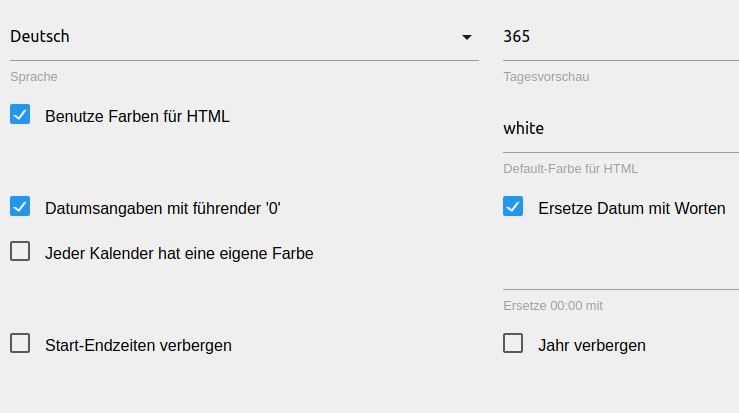
            Nein die nächste Leerung ist am 03.01.2020. Vorlaufzeit habe ich jetzt auf 365 Tage gestellt und nun bekomme ich alles angezeigt.

            Bildschirmfoto vom 2019-12-25 21-59-44.png

            Bildschirmfoto vom 2019-12-25 21-55-39.png

            HomoranH 1 Reply Last reply
            0
            • G G4l4h4d

              @Homoran
              Nein die nächste Leerung ist am 03.01.2020. Vorlaufzeit habe ich jetzt auf 365 Tage gestellt und nun bekomme ich alles angezeigt.
              Bildschirmfoto vom 2019-12-25 21-59-44.png

              Bildschirmfoto vom 2019-12-25 21-55-39.png

              HomoranH Do not disturb
              HomoranH Do not disturb
              Homoran
              Global Moderator Administrators
              wrote on last edited by
              #188

              @G4l4h4d sagte in Test Adapter TrashSchedule v0.0.x:

              Nein die nächste Leerung ist am 03.01.2020

              War aber bisher in deinem Datenpunkt nicht drin

              @G4l4h4d sagte in Test Adapter TrashSchedule v0.0.x:

              Vorlaufzeit habe ich jetzt auf 365 Tage gestellt

              und wie war es vorher?

              kein Support per PN! - Fragen im Forum stellen - es gibt fast nichts, was nicht auch für andere interessant ist.

              Benutzt das Voting rechts unten im Beitrag wenn er euch geholfen hat.

              der Installationsfixer: curl -fsL https://iobroker.net/fix.sh | bash -

              G 1 Reply Last reply
              0
              • sigi234S sigi234

                @haus-automatisierung

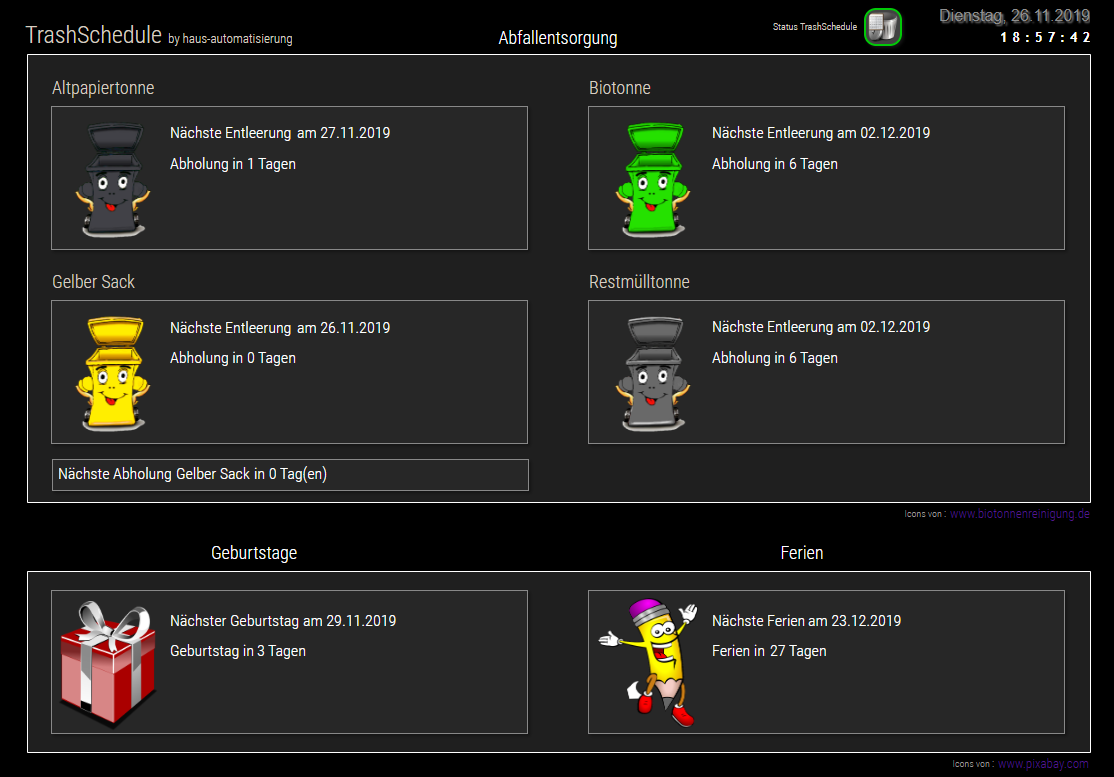
                Habe mal eine View erstellt, ist noch in Bearbeitung. Icons sind von einen User im Forum.
                Icons Link eingefügt.
                Schriftart von ioBroker.vis-google-fonts
                View an eurer View und System anpassen!
                Screenshot (721).png

                VIEW_TrashSchedule.txt

                Icons_TrashSchedule.zip

                Edit 26.11.2019:
                Widget erweitert und angepasst.
                Icons aktualisiert und erweitert
                Bindig eingebaut, Danke an @SBorg

                Edit 20.02.2020:
                Widget angepasst

                ? Offline
                ? Offline
                A Former User
                wrote on last edited by
                #189

                @sigi234

                Hallo Sigi,

                ich habe deine Trash-Icons genutzt: Nur eine kosmetische Frage: Ich habe sie eingefügt und der hintergrund hat so leichte Karomuster. Kann ich den auf die Hintergrundfarbe der View setzen? Danke

                ? 1 Reply Last reply
                0
                • ? A Former User

                  @sigi234

                  Hallo Sigi,

                  ich habe deine Trash-Icons genutzt: Nur eine kosmetische Frage: Ich habe sie eingefügt und der hintergrund hat so leichte Karomuster. Kann ich den auf die Hintergrundfarbe der View setzen? Danke

                  ? Offline
                  ? Offline
                  A Former User
                  wrote on last edited by
                  #190

                  @Alina @sigi234

                  Hat sich erledigt: Ist nur im Editor so :)

                  1 Reply Last reply
                  0
                  • HomoranH Homoran

                    @G4l4h4d sagte in Test Adapter TrashSchedule v0.0.x:

                    Nein die nächste Leerung ist am 03.01.2020

                    War aber bisher in deinem Datenpunkt nicht drin

                    @G4l4h4d sagte in Test Adapter TrashSchedule v0.0.x:

                    Vorlaufzeit habe ich jetzt auf 365 Tage gestellt

                    und wie war es vorher?

                    G Offline
                    G Offline
                    G4l4h4d
                    wrote on last edited by
                    #191

                    @Homoran Vorher hatte ich diverse Werte zwischen 20 und 60 probiert. Aber erst bei 365Tagen habe ich eine vollständige Anzeige in den Datenpunkten.

                    1 Reply Last reply
                    0
                    • 0 Offline
                      0 Offline
                      0018
                      wrote on last edited by
                      #192

                      @SBorg danke für die Binding, habe diese auch erfolgreich implementiert. Leider ist es nun so das die Widgets mit den Bindings sich in meiner vis nicht automatisch aktualisieren, sondern nur nach einem Reload der Seite neue Werte anzeigen. Benutze denn Fully Browser auf einem Samsung Tab.

                      Hast du eine Idee woran das liegen könnte?

                      Mfg
                      0018

                      SBorgS 1 Reply Last reply
                      0
                      • 0 0018

                        @SBorg danke für die Binding, habe diese auch erfolgreich implementiert. Leider ist es nun so das die Widgets mit den Bindings sich in meiner vis nicht automatisch aktualisieren, sondern nur nach einem Reload der Seite neue Werte anzeigen. Benutze denn Fully Browser auf einem Samsung Tab.

                        Hast du eine Idee woran das liegen könnte?

                        SBorgS Offline
                        SBorgS Offline
                        SBorg
                        Forum Testing Most Active
                        wrote on last edited by
                        #193

                        @0018 Hast du beim HTML-Widget eine Updatezeit eingestellt? Die steht per "default" auf 0ms = nie updaten (außer halt beim reload der Seite). Beispiel für 5 Minuten Updateintervall: 5min x 60Sekunden x 1000ms = 300000ms

                        LG SBorg ( SBorg auf GitHub)
                        Projekte: Lebensmittelwarnung.de | WLAN-Wetterstation | PimpMyStation

                        1 Reply Last reply
                        0
                        • K Offline
                          K Offline
                          ktsalti
                          wrote on last edited by
                          #194

                          Guten Abend,

                          ich möchte per html-binding gerne "Morgen" und "Heute" angezeigt haben. Ich habe es mit folgenden Code versucht, aber da ist wohl noch ein Fehler :(

                          {tage:trashschedule.0.type.Gelbe Tonne.daysleft;tage > 1 ? "in "+tage+" Tagen" :: tage = 1 ? "Morgen" :: "Heute"}
                          

                          kann jemand helfen?

                          Vielen Dank im Voraus!
                          Marcus

                          SBorgS 0 2 Replies Last reply
                          0
                          • K ktsalti

                            Guten Abend,

                            ich möchte per html-binding gerne "Morgen" und "Heute" angezeigt haben. Ich habe es mit folgenden Code versucht, aber da ist wohl noch ein Fehler :(

                            {tage:trashschedule.0.type.Gelbe Tonne.daysleft;tage > 1 ? "in "+tage+" Tagen" :: tage = 1 ? "Morgen" :: "Heute"}
                            

                            kann jemand helfen?

                            Vielen Dank im Voraus!
                            Marcus

                            SBorgS Offline
                            SBorgS Offline
                            SBorg
                            Forum Testing Most Active
                            wrote on last edited by
                            #195

                            @ktsalti sagte in Test Adapter TrashSchedule v0.0.x:

                            ...Gelbe Tonne...

                            Der [SPACE] geht da IMHO nicht. Du müsstest den Datenpunkt zB. in "GelbeTonne" oder "Gelbe_Tonne" umbenennen.
                            Aber der Hauptfehler: "tage = 1" ist keine gültige Abfrage in JS, sondern eine Zuweisung. Du setzt also tage auf den Wert "1".
                            Korrekt ist tage == 1

                            LG SBorg ( SBorg auf GitHub)
                            Projekte: Lebensmittelwarnung.de | WLAN-Wetterstation | PimpMyStation

                            K 1 Reply Last reply
                            0
                            • K ktsalti

                              Guten Abend,

                              ich möchte per html-binding gerne "Morgen" und "Heute" angezeigt haben. Ich habe es mit folgenden Code versucht, aber da ist wohl noch ein Fehler :(

                              {tage:trashschedule.0.type.Gelbe Tonne.daysleft;tage > 1 ? "in "+tage+" Tagen" :: tage = 1 ? "Morgen" :: "Heute"}
                              

                              kann jemand helfen?

                              Vielen Dank im Voraus!
                              Marcus

                              0 Offline
                              0 Offline
                              0018
                              wrote on last edited by
                              #196

                              @ktsalti ich habe es bei mir so gelöst:

                              {tage:trashschedule.0.type.Papier.daysleft; tage == 0 ? "Heute" :: tage == 1 ? "Morgen" :: "in "+tage+" Tagen am: " } 
                              

                              Mfg
                              0018

                              1 Reply Last reply
                              0
                              • A Offline
                                A Offline
                                andi2055
                                wrote on last edited by
                                #197

                                Super Adapter!
                                Würde ich nun auch verwenden für andere periodische Erinnerungen wie z.B. "Filter wechseln" / "Filter reinigen" / Wartung XY usw. in x Tagen durchführen

                                Daher über den Namen TRASHSchedule nochmal nachdenken. Der kann ja mehr!

                                Ich habe nun die Einheit manuell von "Days" in "Tage" umbenannt für alle Datenpunkte. Wäre schön wenn man das zentral konfigurieren könnte.

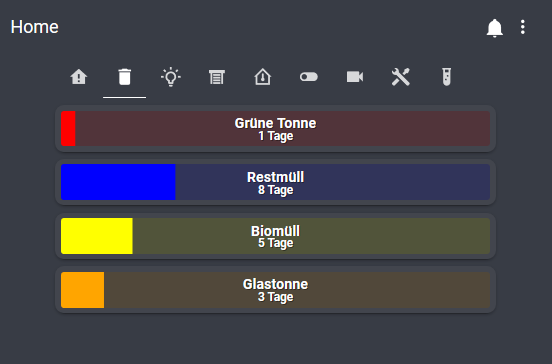
                                So sieht das bei mir in Lovelace aus - je nach Restdauer haben die Balken unterschiedliche Farben. Auf der Startseite gibt es zusätzlich auch noch eine Erinnerung bei Müllabfuhr am nächsten Tag.
                                f2c7e36c-b539-4ad3-97d7-e8f4e5421a9a-grafik.png

                                Danke für den Adapter!

                                M ChaotC 2 Replies Last reply
                                1
                                • SBorgS SBorg

                                  @ktsalti sagte in Test Adapter TrashSchedule v0.0.x:

                                  ...Gelbe Tonne...

                                  Der [SPACE] geht da IMHO nicht. Du müsstest den Datenpunkt zB. in "GelbeTonne" oder "Gelbe_Tonne" umbenennen.
                                  Aber der Hauptfehler: "tage = 1" ist keine gültige Abfrage in JS, sondern eine Zuweisung. Du setzt also tage auf den Wert "1".
                                  Korrekt ist tage == 1

                                  K Offline
                                  K Offline
                                  ktsalti
                                  wrote on last edited by
                                  #198

                                  Danke euch @SBorg und @0018 !!
                                  Das == war der springende Punkt - so funktioniert es jetzt (sogar mit Leerzeichen).

                                  Viele Grüße!

                                  1 Reply Last reply
                                  0
                                  • A andi2055

                                    Super Adapter!
                                    Würde ich nun auch verwenden für andere periodische Erinnerungen wie z.B. "Filter wechseln" / "Filter reinigen" / Wartung XY usw. in x Tagen durchführen

                                    Daher über den Namen TRASHSchedule nochmal nachdenken. Der kann ja mehr!

                                    Ich habe nun die Einheit manuell von "Days" in "Tage" umbenannt für alle Datenpunkte. Wäre schön wenn man das zentral konfigurieren könnte.

                                    So sieht das bei mir in Lovelace aus - je nach Restdauer haben die Balken unterschiedliche Farben. Auf der Startseite gibt es zusätzlich auch noch eine Erinnerung bei Müllabfuhr am nächsten Tag.
                                    f2c7e36c-b539-4ad3-97d7-e8f4e5421a9a-grafik.png

                                    Danke für den Adapter!

                                    M Offline
                                    M Offline
                                    Machinima
                                    wrote on last edited by
                                    #199

                                    @andi2055
                                    Wow, sieht gut aus! Wie hast du das genau mit der Darstellung realisiert?

                                    A 1 Reply Last reply
                                    0
                                    • A andi2055

                                      Super Adapter!
                                      Würde ich nun auch verwenden für andere periodische Erinnerungen wie z.B. "Filter wechseln" / "Filter reinigen" / Wartung XY usw. in x Tagen durchführen

                                      Daher über den Namen TRASHSchedule nochmal nachdenken. Der kann ja mehr!

                                      Ich habe nun die Einheit manuell von "Days" in "Tage" umbenannt für alle Datenpunkte. Wäre schön wenn man das zentral konfigurieren könnte.

                                      So sieht das bei mir in Lovelace aus - je nach Restdauer haben die Balken unterschiedliche Farben. Auf der Startseite gibt es zusätzlich auch noch eine Erinnerung bei Müllabfuhr am nächsten Tag.
                                      f2c7e36c-b539-4ad3-97d7-e8f4e5421a9a-grafik.png

                                      Danke für den Adapter!

                                      ChaotC Offline
                                      ChaotC Offline
                                      Chaot
                                      wrote on last edited by
                                      #200

                                      @andi2055
                                      Ihr habt ne Glastonne? Wow!

                                      ioBroker auf NUC unter Proxmox; VIS: 12" Touchscreen und 17" Touch; Lichtsteuerung, Thermometer und Sensoren: Tasmota (39); Ambiente Beleuchtung: WLED (9); Heizung: DECT Thermostate (9) an Fritz 6690; EMS-ESP; 1 Echo V2; 3 Echo DOT; 1 Echo Connect; 2 Echo Show 5; Unifi Ap-Ac Lite.

                                      M 1 Reply Last reply
                                      0
                                      • M Machinima

                                        @andi2055
                                        Wow, sieht gut aus! Wie hast du das genau mit der Darstellung realisiert?

                                        A Offline
                                        A Offline
                                        andi2055
                                        wrote on last edited by
                                        #201

                                        @Machinima
                                        Das ist der Lovelace Visualisierung Adapter
                                        https://forum.iobroker.net/topic/22781/test-adapter-lovelace-v0-2-x

                                        Code für Lovelace (custom Adapter custom:bar-card muss zuvor installiert sein)


                                        type: vertical-stack
                                        title: Müll
                                        cards:

                                        • type: 'custom:bar-card'
                                          title: Grüne Tonne
                                          entity: sensor.Trash_Grüne_Tonne_daysleft
                                          min: 0
                                          max: 30
                                          title_position: inside
                                          show_label: true
                                          title_style:
                                          color: white
                                          font-size: 16px
                                          severity:
                                          • value: 1
                                            color: red
                                          • value: 3
                                            color: orange
                                          • value: 7
                                            color: yellow
                                          • value: 30
                                            color: blue
                                        • type: 'custom:bar-card'
                                          title: Restmüll
                                          entity: sensor.Trash_Restmüll_daysleft
                                          min: 0
                                          max: 30
                                          title_position: inside
                                          show_label: true
                                          title_style:
                                          color: white
                                          font-size: 16px
                                          severity:
                                          • value: 1
                                            color: red
                                          • value: 3
                                            color: orange
                                          • value: 7
                                            color: yellow
                                          • value: 30
                                            color: blue
                                        • type: 'custom:bar-card'
                                          title: Biomüll
                                          entity: sensor.Trash_Biomüll_daysleft
                                          min: 0
                                          max: 30
                                          title_position: inside
                                          show_label: true
                                          title_style:
                                          color: white
                                          font-size: 16px
                                          severity:
                                          • value: 1
                                            color: red
                                          • value: 3
                                            color: orange
                                          • value: 7
                                            color: yellow
                                          • value: 30
                                            color: blue
                                        • type: 'custom:bar-card'
                                          title: Glastonne
                                          entity: sensor.Trash_Glasbox_daysleft
                                          min: 0
                                          max: 30
                                          title_position: inside
                                          show_label: true
                                          title_style:
                                          color: white
                                          font-size: 16px
                                          severity:
                                          • value: 1
                                            color: red
                                          • value: 3
                                            color: orange
                                          • value: 7
                                            color: yellow
                                          • value: 30
                                            color: blue

                                        @Chaot
                                        Naja Glasbox/Korb ist passender. Wird aber abgeholt alle 4 Wochen :)

                                        ChaotC 1 Reply Last reply
                                        0
                                        • A andi2055

                                          @Machinima
                                          Das ist der Lovelace Visualisierung Adapter
                                          https://forum.iobroker.net/topic/22781/test-adapter-lovelace-v0-2-x

                                          Code für Lovelace (custom Adapter custom:bar-card muss zuvor installiert sein)


                                          type: vertical-stack
                                          title: Müll
                                          cards:

                                          • type: 'custom:bar-card'
                                            title: Grüne Tonne
                                            entity: sensor.Trash_Grüne_Tonne_daysleft
                                            min: 0
                                            max: 30
                                            title_position: inside
                                            show_label: true
                                            title_style:
                                            color: white
                                            font-size: 16px
                                            severity:
                                            • value: 1
                                              color: red
                                            • value: 3
                                              color: orange
                                            • value: 7
                                              color: yellow
                                            • value: 30
                                              color: blue
                                          • type: 'custom:bar-card'
                                            title: Restmüll
                                            entity: sensor.Trash_Restmüll_daysleft
                                            min: 0
                                            max: 30
                                            title_position: inside
                                            show_label: true
                                            title_style:
                                            color: white
                                            font-size: 16px
                                            severity:
                                            • value: 1
                                              color: red
                                            • value: 3
                                              color: orange
                                            • value: 7
                                              color: yellow
                                            • value: 30
                                              color: blue
                                          • type: 'custom:bar-card'
                                            title: Biomüll
                                            entity: sensor.Trash_Biomüll_daysleft
                                            min: 0
                                            max: 30
                                            title_position: inside
                                            show_label: true
                                            title_style:
                                            color: white
                                            font-size: 16px
                                            severity:
                                            • value: 1
                                              color: red
                                            • value: 3
                                              color: orange
                                            • value: 7
                                              color: yellow
                                            • value: 30
                                              color: blue
                                          • type: 'custom:bar-card'
                                            title: Glastonne
                                            entity: sensor.Trash_Glasbox_daysleft
                                            min: 0
                                            max: 30
                                            title_position: inside
                                            show_label: true
                                            title_style:
                                            color: white
                                            font-size: 16px
                                            severity:
                                            • value: 1
                                              color: red
                                            • value: 3
                                              color: orange
                                            • value: 7
                                              color: yellow
                                            • value: 30
                                              color: blue

                                          @Chaot
                                          Naja Glasbox/Korb ist passender. Wird aber abgeholt alle 4 Wochen :)

                                          ChaotC Offline
                                          ChaotC Offline
                                          Chaot
                                          wrote on last edited by
                                          #202

                                          @andi2055
                                          Ok,das ist ein Service.
                                          Ich muss immer zum Glascontainer.
                                          Andererseits bleibt uns wenigstens derzeit noch die Biotonne erspart.

                                          ioBroker auf NUC unter Proxmox; VIS: 12" Touchscreen und 17" Touch; Lichtsteuerung, Thermometer und Sensoren: Tasmota (39); Ambiente Beleuchtung: WLED (9); Heizung: DECT Thermostate (9) an Fritz 6690; EMS-ESP; 1 Echo V2; 3 Echo DOT; 1 Echo Connect; 2 Echo Show 5; Unifi Ap-Ac Lite.

                                          1 Reply Last reply
                                          0
                                          Reply
                                          • Reply as topic
                                          Log in to reply
                                          • Oldest to Newest
                                          • Newest to Oldest
                                          • Most Votes


                                          Support us

                                          ioBroker
                                          Community Adapters
                                          Donate

                                          558

                                          Online

                                          32.7k

                                          Users

                                          82.4k

                                          Topics

                                          1.3m

                                          Posts
                                          Community
                                          Impressum | Datenschutz-Bestimmungen | Nutzungsbedingungen | Einwilligungseinstellungen
                                          ioBroker Community 2014-2025
                                          logo
                                          • Login

                                          • Don't have an account? Register

                                          • Login or register to search.
                                          • First post
                                            Last post
                                          0
                                          • Home
                                          • Recent
                                          • Tags
                                          • Unread 0
                                          • Categories
                                          • Unreplied
                                          • Popular
                                          • GitHub
                                          • Docu
                                          • Hilfe