




Beim Installieren von Zigbee Adapter abgestürzt!!!
-
Hi!
Beim Versuch den Zigbee Adapter zu installieren schmiert mir immer wieder der IOBroker ab.
Jetzt bekomme ich gleich die Krise.
Ich kann nicht mehr auf meinen Pi zugreifen und die IP Adresse ist nicht mehr auffindbar!
Mehrere Neustarts ergebnislos!
Vielleicht kann mir wer helfen in einfachen Schritten wie ich dieses Problem löse?!
Danke!
Liebe Grüße
Jürgen -
@jwedenig
So weit würde ich noch nicht gehen. Allerdings wirst du (wenn du kein backup hast) die Skripte manuell von der SD Karte lesen müssen - sofern das noch geht.Ich gehe aber davon aus. Die Karte ist ja nicht generell unlesbar, sondern nur in Bereichen die beim Boot erforderlich sind.
A.
-
@jwedenig
So weit würde ich noch nicht gehen. Allerdings wirst du (wenn du kein backup hast) die Skripte manuell von der SD Karte lesen müssen - sofern das noch geht.Ich gehe aber davon aus. Die Karte ist ja nicht generell unlesbar, sondern nur in Bereichen die beim Boot erforderlich sind.
A.
@Asgothian
buh, wie immer das alles auch geht!
d.h. ich muss eine neue Sd Karte kaufen und IObroker von der Pike neu installieren?
Da brauch ich ein Monat, bis dass alles wieder spielt:-(
Bin leider ein purer Anwender:-( -
@Asgothian
buh, wie immer das alles auch geht!
d.h. ich muss eine neue Sd Karte kaufen und IObroker von der Pike neu installieren?
Da brauch ich ein Monat, bis dass alles wieder spielt:-(
Bin leider ein purer Anwender:-(- Neue SD-Karte: Ja - am besten 2 (Grund: siehe unten)
- Aus Image neu aufsetzen: Ja.
- Frage: hast du den Backup Adapter laufen ?
Dann beginnt der Versuch einer Rekonstruktion. Ich kann bei mir die SD-Karten am PC einstecken und lesen. Allerdings benutze ich kein Windows - da weiss ich nicht ob das geht. Wenn bei Dir der Backup adapter läuft kannst du versuchen die Backup Datei von der defekten Karte zu lesen und das Backup dann auf dem neu installierten ioBroker einspielen.
Wenn nicht kannst du versuchen das Verzeichnis /opt/iobroker von der defekten Karte zu lesen und auf die neue Karte zu übertragen. Da solltest du dann alle Skripte und Einstellungen sowie alle installierten Adapter haben.
Ich würde zur Sicherheit allerdings vorher zumindest die bei Dir installierten Adapter vorher auf dem ioBroker installieren.
Als letztes: Wenn alles soweit aufgesetzt ist wie du es laufen haben willst - Karte ziehen, Karte klonen, geklonte Karte bei Seite legen.
A.
Nachtrag: Dieser Artikel listet 2 Programme für Windows, die in der Lage sein sollten auf Daten der defekten Karte zuzugreifen.
-
hey super, danke erstmals, werde heute Abend mal alles versuchen und dann weiter berichten!
Danke Dir vorerst
Liebe Grüße
Jürgen -
Hi! Bin leider beim Neuinstallieren und habe alles nach Anleitung gemacht, leider lässt sich Iobroker nicht starten.
Irgend wer eine Idee?
Hier mal ein Auszug vom Terminal:ioBroker was installed successfully
Open http://192.168.1.232:8081 in a browser and start configuring!==========================================================================
You need to re-login before doing anything else on the console!
root@raspberrypi:~# ssh root@192.168.1.232
The authenticity of host '192.168.1.232 (192.168.1.232)' can't be established.
ECDSA key fingerprint is SHA256:tT6L/H1YSEyQ1/TvNJ6L8w5xO8XWPGw+Es6R3lMRtiM.
Are you sure you want to continue connecting (yes/no)? yes
Warning: Permanently added '192.168.1.232' (ECDSA) to the list of known hosts.
root@192.168.1.232's password:
Linux raspberrypi 4.19.66-v7+ #1253 SMP Thu Aug 15 11:49:46 BST 2019 armv7lThe programs included with the Debian GNU/Linux system are free software;
the exact distribution terms for each program are described in the
individual files in /usr/share/doc/*/copyright.Debian GNU/Linux comes with ABSOLUTELY NO WARRANTY, to the extent
permitted by applicable law.
Last login: Tue Oct 1 08:57:35 2019 from 192.168.1.159
root@raspberrypi:~# reboot
Connection to 192.168.1.232 closed by remote host.
Connection to 192.168.1.232 closed.
Wedls-MacBook-Pro:~ wedl$ ssh root@192.168.1.232
root@192.168.1.232's password:
Linux raspberrypi 4.19.66-v7+ #1253 SMP Thu Aug 15 11:49:46 BST 2019 armv7lThe programs included with the Debian GNU/Linux system are free software;
the exact distribution terms for each program are described in the
individual files in /usr/share/doc/*/copyright.Debian GNU/Linux comes with ABSOLUTELY NO WARRANTY, to the extent
permitted by applicable law.
Last login: Tue Oct 1 09:01:25 2019 from 192.168.1.232 -
Hi! Bin leider beim Neuinstallieren und habe alles nach Anleitung gemacht, leider lässt sich Iobroker nicht starten.
Irgend wer eine Idee?
Hier mal ein Auszug vom Terminal:ioBroker was installed successfully
Open http://192.168.1.232:8081 in a browser and start configuring!==========================================================================
You need to re-login before doing anything else on the console!
root@raspberrypi:~# ssh root@192.168.1.232
The authenticity of host '192.168.1.232 (192.168.1.232)' can't be established.
ECDSA key fingerprint is SHA256:tT6L/H1YSEyQ1/TvNJ6L8w5xO8XWPGw+Es6R3lMRtiM.
Are you sure you want to continue connecting (yes/no)? yes
Warning: Permanently added '192.168.1.232' (ECDSA) to the list of known hosts.
root@192.168.1.232's password:
Linux raspberrypi 4.19.66-v7+ #1253 SMP Thu Aug 15 11:49:46 BST 2019 armv7lThe programs included with the Debian GNU/Linux system are free software;
the exact distribution terms for each program are described in the
individual files in /usr/share/doc/*/copyright.Debian GNU/Linux comes with ABSOLUTELY NO WARRANTY, to the extent
permitted by applicable law.
Last login: Tue Oct 1 08:57:35 2019 from 192.168.1.159
root@raspberrypi:~# reboot
Connection to 192.168.1.232 closed by remote host.
Connection to 192.168.1.232 closed.
Wedls-MacBook-Pro:~ wedl$ ssh root@192.168.1.232
root@192.168.1.232's password:
Linux raspberrypi 4.19.66-v7+ #1253 SMP Thu Aug 15 11:49:46 BST 2019 armv7lThe programs included with the Debian GNU/Linux system are free software;
the exact distribution terms for each program are described in the
individual files in /usr/share/doc/*/copyright.Debian GNU/Linux comes with ABSOLUTELY NO WARRANTY, to the extent
permitted by applicable law.
Last login: Tue Oct 1 09:01:25 2019 from 192.168.1.232@jwedenig sagte in Beim Installieren von Zigbee Adapter abgestürzt!!!:
act distribution terms for each program are described in the
individual files in /usr/share/doc/*/copyright.
Debian GNU/Linux comes with ABSOLUTELY NO WARRANTY, to the extent
permitted by applicable law.
Last login: Tue Oct 1 08:57:35 2019 from 192.168.1.159
root@raspberrypi:~# reboot
Connection to 192.168.1.232 closed by remote host.
Connection to 192.168.1.232 closed.könntest du bitte den Log im code tag packen..
-
ioBroker was installed successfully Open http://192.168.1.232:8081 in a browser and start configuring! ========================================================================== You need to re-login before doing anything else on the console! root@raspberrypi:~# ssh root@192.168.1.232 The authenticity of host '192.168.1.232 (192.168.1.232)' can't be established. ECDSA key fingerprint is SHA256:tT6L/H1YSEyQ1/TvNJ6L8w5xO8XWPGw+Es6R3lMRtiM. Are you sure you want to continue connecting (yes/no)? yes Warning: Permanently added '192.168.1.232' (ECDSA) to the list of known hosts. root@192.168.1.232's password: Linux raspberrypi 4.19.66-v7+ #1253 SMP Thu Aug 15 11:49:46 BST 2019 armv7l The programs included with the Debian GNU/Linux system are free software; the exact distribution terms for each program are described in the individual files in /usr/share/doc/*/copyright. Debian GNU/Linux comes with ABSOLUTELY NO WARRANTY, to the extent permitted by applicable law. Last login: Tue Oct 1 08:57:35 2019 from 192.168.1.159 root@raspberrypi:~# reboot Connection to 192.168.1.232 closed by remote host. Connection to 192.168.1.232 closed. Wedls-MacBook-Pro:~ wedl$ ssh root@192.168.1.232 root@192.168.1.232's password: Linux raspberrypi 4.19.66-v7+ #1253 SMP Thu Aug 15 11:49:46 BST 2019 armv7l The programs included with the Debian GNU/Linux system are free software; the exact distribution terms for each program are described in the individual files in /usr/share/doc/*/copyright. Debian GNU/Linux comes with ABSOLUTELY NO WARRANTY, to the extent permitted by applicable law. Last login: Tue Oct 1 09:01:25 2019 from 192.168.1.232 -
Hi! Bin leider beim Neuinstallieren und habe alles nach Anleitung gemacht, leider lässt sich Iobroker nicht starten.
Irgend wer eine Idee?
Hier mal ein Auszug vom Terminal:ioBroker was installed successfully
Open http://192.168.1.232:8081 in a browser and start configuring!==========================================================================
You need to re-login before doing anything else on the console!
root@raspberrypi:~# ssh root@192.168.1.232
The authenticity of host '192.168.1.232 (192.168.1.232)' can't be established.
ECDSA key fingerprint is SHA256:tT6L/H1YSEyQ1/TvNJ6L8w5xO8XWPGw+Es6R3lMRtiM.
Are you sure you want to continue connecting (yes/no)? yes
Warning: Permanently added '192.168.1.232' (ECDSA) to the list of known hosts.
root@192.168.1.232's password:
Linux raspberrypi 4.19.66-v7+ #1253 SMP Thu Aug 15 11:49:46 BST 2019 armv7lThe programs included with the Debian GNU/Linux system are free software;
the exact distribution terms for each program are described in the
individual files in /usr/share/doc/*/copyright.Debian GNU/Linux comes with ABSOLUTELY NO WARRANTY, to the extent
permitted by applicable law.
Last login: Tue Oct 1 08:57:35 2019 from 192.168.1.159
root@raspberrypi:~# reboot
Connection to 192.168.1.232 closed by remote host.
Connection to 192.168.1.232 closed.
Wedls-MacBook-Pro:~ wedl$ ssh root@192.168.1.232
root@192.168.1.232's password:
Linux raspberrypi 4.19.66-v7+ #1253 SMP Thu Aug 15 11:49:46 BST 2019 armv7lThe programs included with the Debian GNU/Linux system are free software;
the exact distribution terms for each program are described in the
individual files in /usr/share/doc/*/copyright.Debian GNU/Linux comes with ABSOLUTELY NO WARRANTY, to the extent
permitted by applicable law.
Last login: Tue Oct 1 09:01:25 2019 from 192.168.1.232@jwedenig sagte in Beim Installieren von Zigbee Adapter abgestürzt!!!:
Hi! Bin leider beim Neuinstallieren und habe alles nach Anleitung gemacht, leider lässt sich Iobroker nicht starten.
der läuft doch schon... ssh ist nur nicht aktiviert
rufmal im Borwser
http://192.168.1.232:8081 -
nö, habe keine Verbindung!
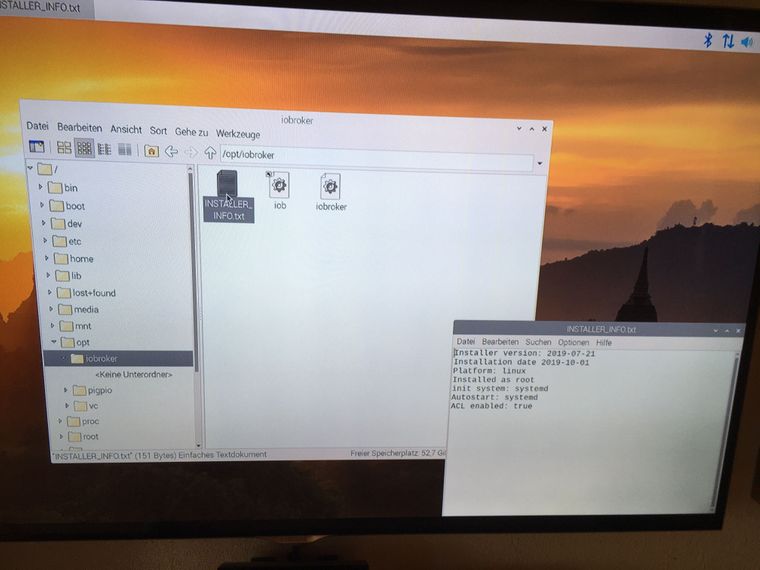
das habe ich auch noch, passt da alles?
-
habe alles so gemacht :
sudo nano /etc/ssh/sshd_config zur Zeile gehen: #PermitRootlogin usw. die Raute löschen und nach Login mit Abstand yes schreiben dann ctrl-O speichern Enter dann ctrl-x verlassen sudo /etc/init.d/ssh restart sudo su passwd reboot jetzt mit ssh root@192.168.1.232 einloggen sudo apt-get update && sudo apt-get upgrade -y dauert 20 min apt-get --purge remove node apt-get --purge remove nodejs apt-get autoremove reboot 1 curl -sL https://deb.nodesource.com/setup_8.x | sudo -E bash - 2 sudo apt-get install -y build-essential libavahi-compat-libdnssd-dev libudev-dev libpam0g-dev nodejs 3 sudo reboot wieder einloggen! dann node -v nun IOBroker installieren: curl -sL https://iobroker.net/install.sh | bash - -
Habe node und nodejs neu installiert ich glaube beim npm happerts:
sorry, kenn mich nicht aus:root@192.168.1.232's password: Linux raspberrypi 4.19.66-v7+ #1253 SMP Thu Aug 15 11:49:46 BST 2019 armv7l The programs included with the Debian GNU/Linux system are free software; the exact distribution terms for each program are described in the individual files in /usr/share/doc/*/copyright. Debian GNU/Linux comes with ABSOLUTELY NO WARRANTY, to the extent permitted by applicable law. Last login: Tue Oct 1 10:07:31 2019 from 192.168.1.159 root@raspberrypi:~# node -v v10.15.2 root@raspberrypi:~# nodejs -v v10.15.2 root@raspberrypi:~# npm -v -bash: npm: Kommando nicht gefunden. root@raspberrypi:~# sudo -H npm install -g npm@6 sudo: npm: Befehl nicht gefunden root@raspberrypi:~# sudo npm install -g npm@4 sudo: npm: Befehl nicht gefunden root@raspberrypi:~# -
habe alles so gemacht :
sudo nano /etc/ssh/sshd_config zur Zeile gehen: #PermitRootlogin usw. die Raute löschen und nach Login mit Abstand yes schreiben dann ctrl-O speichern Enter dann ctrl-x verlassen sudo /etc/init.d/ssh restart sudo su passwd reboot jetzt mit ssh root@192.168.1.232 einloggen sudo apt-get update && sudo apt-get upgrade -y dauert 20 min apt-get --purge remove node apt-get --purge remove nodejs apt-get autoremove reboot 1 curl -sL https://deb.nodesource.com/setup_8.x | sudo -E bash - 2 sudo apt-get install -y build-essential libavahi-compat-libdnssd-dev libudev-dev libpam0g-dev nodejs 3 sudo reboot wieder einloggen! dann node -v nun IOBroker installieren: curl -sL https://iobroker.net/install.sh | bash - -
@jwedenig na jetzt vermischen wir aber 2 themen ... von zigbee adapter geht nicht zu installation von iobroker
laut deinem screenshot ist nix installiert.
-
@arteck
ja, sorry, bin in dem Thread geblieben, weil meine SD Karte abgeschmiert ist.
Aber warum kann ich npm nicht installieren?Oder muss ich nun ein neues Thema erstellen damit ich Hilfe bekomme?
Sag Bescheid!
Danke -
@jwedenig gaaaaannz ruhig...
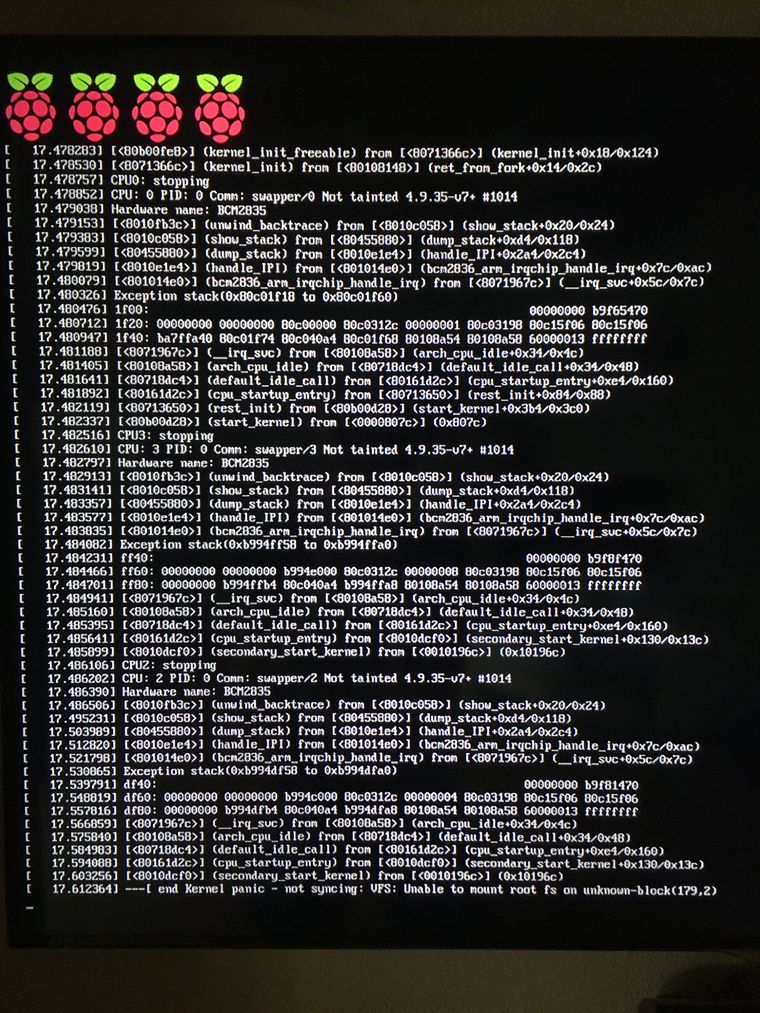
wo versuchst du gerade zu installieren Hardware ??.. und welches Betriebssystem ??


Hey! Du scheinst an dieser Unterhaltung interessiert zu sein, hast aber noch kein Konto.
Hast du es satt, bei jedem Besuch durch die gleichen Beiträge zu scrollen? Wenn du dich für ein Konto anmeldest, kommst du immer genau dorthin zurück, wo du zuvor warst, und kannst dich über neue Antworten benachrichtigen lassen (entweder per E-Mail oder Push-Benachrichtigung). Du kannst auch Lesezeichen speichern und Beiträge positiv bewerten, um anderen Community-Mitgliedern deine Wertschätzung zu zeigen.
Mit deinem Input könnte dieser Beitrag noch besser werden 💗
Registrieren Anmelden184
Online33.0k
Benutzende83.7k
Themen1.3m
Beiträge