



Skip to content
  • Home
  • Recent
  • Tags
  • 0 Unread 0
  • Categories
  • Unreplied
  • Popular
  • GitHub
  • Docu
  • Hilfe
Skins
  • Light
  • Brite
  • Cerulean
  • Cosmo
  • Flatly
  • Journal
  • Litera
  • Lumen
  • Lux
  • Materia
  • Minty
  • Morph
  • Pulse
  • Sandstone
  • Simplex
  • Sketchy
  • Spacelab
  • United
  • Yeti
  • Zephyr
  • Dark
  • Cyborg
  • Darkly
  • Quartz
  • Slate
  • Solar
  • Superhero
  • Vapor

  • Default (No Skin)
  • No Skin
Collapse
ioBroker Logo

Community Forum

donate donate
  1. ioBroker Community Home
  2. English
  3. ioBroker general
  4. Z-Wave does not work after reboot

NEWS

  • Jahresrückblick 2025 – unser neuer Blogbeitrag ist online! ✨
    BluefoxB
    Bluefox
    16
    1
    1.8k

  • Neuer Blogbeitrag: Monatsrückblick - Dezember 2025 🎄
    BluefoxB
    Bluefox
    13
    1
    891

  • Weihnachtsangebot 2025! 🎄
    BluefoxB
    Bluefox
    25
    1
    2.1k

Z-Wave does not work after reboot

Scheduled Pinned Locked Moved ioBroker general
z wavez-wave
12 Posts 5 Posters 1.1k Views 3 Watching
  • Oldest to Newest
  • Newest to Oldest
  • Most Votes
Reply
  • Reply as topic
Log in to reply
This topic has been deleted. Only users with topic management privileges can see it.
  • A Offline
    A Offline
    ap2017
    wrote on last edited by Negalein
    #1

    I had fully working Z-Wave adapter on X64 Intel Platform with 12 nodes. After reboot, z-wave adapter is no longer working, continuously trying to start, but having the following ,messages:

    host.ap-OptiPlex-390	2019-07-27 21:10:47.661	error	instance system.adapter.zwave.0 terminated with code null ()
    host.ap-OptiPlex-390	2019-07-27 21:10:47.661	warn	instance system.adapter.zwave.0 terminated due to SIGSEGV
    zwave.0	2019-07-27 21:10:22.134	info	starting. Version 1.5.0 in /opt/iobroker/node_modules/iobroker.zwave, node: v10.16.0
    host.ap-OptiPlex-390	2019-07-27 21:10:21.849	info	instance system.adapter.zwave.0 started with pid 8008
    host.ap-OptiPlex-390	2019-07-27 21:09:51.842	info	Restart adapter system.adapter.zwave.0 because enabled
    host.ap-OptiPlex-390	2019-07-27 21:09:51.842	error	instance system.adapter.zwave.0 terminated with code null ()
    host.ap-OptiPlex-390	2019-07-27 21:09:51.842	warn	instance system.adapter.zwave.0 terminated due to SIGSEGV
    zwave.0	2019-07-27 21:09:26.319	info	starting. Version 1.5.0 in /opt/iobroker/node_modules/iobroker.zwave, node: v10.16.0
    host.ap-OptiPlex-390	2019-07-27 21:09:26.029	info	instance system.adapter.zwave.0 started with pid 6542
    host.ap-OptiPlex-390	2019-07-27 21:08:56.023	info	Restart adapter system.adapter.zwave.0 because enabled
    host.ap-OptiPlex-390	2019-07-27 21:08:56.023	error	instance system.adapter.zwave.0 terminated with code null ()
    host.ap-OptiPlex-390	2019-07-27 21:08:56.023	warn	instance system.adapter.zwave.0 terminated due to SIGSEGV
    zwave.0	2019-07-27 21:08:30.506	info	starting. Version 1.5.0 in /opt/iobroker/node_modules/iobroker.zwave, node: v10.16.0
    host.ap-OptiPlex-390	2019-07-27 21:08:30.218	info	instance system.adapter.zwave.0 started with pid 5091
    host.ap-OptiPlex-390	2019-07-27 21:08:00.211	info	Restart adapter system.adapter.zwave.0 because enabled
    host.ap-OptiPlex-390	2019-07-27 21:08:00.211	error	instance system.adapter.zwave.0 terminated with code null ()
    host.ap-OptiPlex-390	2019-07-27 21:08:00.211	warn	instance system.adapter.zwave.0 terminated due to SIGSEGV
    

    I also noticed that it does not show COM port that I previously used. After some struggle I was able to save COM configuration /dev/ttyACM0 but adapter still does not work

    I found this discussion, but don't see there a clean solution.
    https://github.com/ioBroker/ioBroker.zwave/issues/43

    A 1 Reply Last reply
    0
    • arteckA Offline
      arteckA Offline
      arteck
      Developer Most Active
      wrote on last edited by
      #2

      which system .. windows or linux ??

      zigbee hab ich, zwave auch, nuc's genauso und HA auch

      AlCalzoneA A 2 Replies Last reply
      0
      • arteckA arteck

        which system .. windows or linux ??

        AlCalzoneA Offline
        AlCalzoneA Offline
        AlCalzone
        Developer
        wrote on last edited by
        #3

        @arteck Pretty sure /opt/iobroker and /dev/ttyACM0 means Linux ;)

        Warum `sudo` böse ist: https://forum.iobroker.net/post/17109

        arteckA 1 Reply Last reply
        0
        • AlCalzoneA AlCalzone

          @arteck Pretty sure /opt/iobroker and /dev/ttyACM0 means Linux ;)

          arteckA Offline
          arteckA Offline
          arteck
          Developer Most Active
          wrote on last edited by arteck
          #4

          @AlCalzone i know but look

          "I also noticed that it does not show COM port that I previously used"

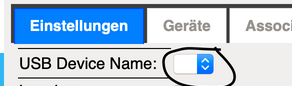
          COM = windows

          the combobox has USB Device Name as title
          2ff8969c-fd07-4121-ad27-4d28ed47ede4-grafik.png

          but you're right /opt/iobroker/ is for linux

          zigbee hab ich, zwave auch, nuc's genauso und HA auch

          1 Reply Last reply
          0
          • arteckA arteck

            which system .. windows or linux ??

            A Offline
            A Offline
            ap2017
            wrote on last edited by
            #5

            @arteck Linux

            1 Reply Last reply
            0
            • arteckA Offline
              arteckA Offline
              arteck
              Developer Most Active
              wrote on last edited by
              #6

              more infos plz

              adapter -> debug option -> log ??

              zigbee hab ich, zwave auch, nuc's genauso und HA auch

              1 Reply Last reply
              0
              • A Offline
                A Offline
                ap2017
                wrote on last edited by
                #7

                Connecting Z-Wave USB stick to a different USB port solved the problem. System accepted port as /dev/ttyACM0 and I am able to see all my Z-Wave devices. I am afraid to reboot, but eventually will have to do it to troubleshoot another ongoing trouble with ASTRO Blockly function.

                1 Reply Last reply
                0
                • A Offline
                  A Offline
                  ap2017
                  wrote on last edited by
                  #8

                  ...
                  Continue to struggle with same issue - after reboot Z-Wave does not work, see log. I am running 64bit Intel platform with all latest modules (ioBroker, Node, ZWave adapter. Please help

                  ZWave 8-17-19.txt

                  AlCalzoneA 1 Reply Last reply
                  0
                  • A ap2017

                    ...
                    Continue to struggle with same issue - after reboot Z-Wave does not work, see log. I am running 64bit Intel platform with all latest modules (ioBroker, Node, ZWave adapter. Please help

                    ZWave 8-17-19.txt

                    AlCalzoneA Offline
                    AlCalzoneA Offline
                    AlCalzone
                    Developer
                    wrote on last edited by
                    #9

                    @ap2017 sagte in Z-Wave does not work after reboot:

                    libopenzwave.so.1.6: cannot open shared object file: No such file or directory

                    Did you follow the instructions under known issues?

                    Warum `sudo` böse ist: https://forum.iobroker.net/post/17109

                    A 1 Reply Last reply
                    0
                    • AlCalzoneA AlCalzone

                      @ap2017 sagte in Z-Wave does not work after reboot:

                      libopenzwave.so.1.6: cannot open shared object file: No such file or directory

                      Did you follow the instructions under known issues?

                      A Offline
                      A Offline
                      ap2017
                      wrote on last edited by
                      #10

                      @AlCalzone Sorry, forgot about this fix, I though that in new version of Z-Wave adapter 1.5.1 this issue is fixed, but I guess this is not an adapter issue.
                      The "sudo ldconfig /usr/local/lib64" worked and fixed the issue. Thank you!

                      1 Reply Last reply
                      0
                      • A ap2017

                        I had fully working Z-Wave adapter on X64 Intel Platform with 12 nodes. After reboot, z-wave adapter is no longer working, continuously trying to start, but having the following ,messages:

                        host.ap-OptiPlex-390	2019-07-27 21:10:47.661	error	instance system.adapter.zwave.0 terminated with code null ()
                        host.ap-OptiPlex-390	2019-07-27 21:10:47.661	warn	instance system.adapter.zwave.0 terminated due to SIGSEGV
                        zwave.0	2019-07-27 21:10:22.134	info	starting. Version 1.5.0 in /opt/iobroker/node_modules/iobroker.zwave, node: v10.16.0
                        host.ap-OptiPlex-390	2019-07-27 21:10:21.849	info	instance system.adapter.zwave.0 started with pid 8008
                        host.ap-OptiPlex-390	2019-07-27 21:09:51.842	info	Restart adapter system.adapter.zwave.0 because enabled
                        host.ap-OptiPlex-390	2019-07-27 21:09:51.842	error	instance system.adapter.zwave.0 terminated with code null ()
                        host.ap-OptiPlex-390	2019-07-27 21:09:51.842	warn	instance system.adapter.zwave.0 terminated due to SIGSEGV
                        zwave.0	2019-07-27 21:09:26.319	info	starting. Version 1.5.0 in /opt/iobroker/node_modules/iobroker.zwave, node: v10.16.0
                        host.ap-OptiPlex-390	2019-07-27 21:09:26.029	info	instance system.adapter.zwave.0 started with pid 6542
                        host.ap-OptiPlex-390	2019-07-27 21:08:56.023	info	Restart adapter system.adapter.zwave.0 because enabled
                        host.ap-OptiPlex-390	2019-07-27 21:08:56.023	error	instance system.adapter.zwave.0 terminated with code null ()
                        host.ap-OptiPlex-390	2019-07-27 21:08:56.023	warn	instance system.adapter.zwave.0 terminated due to SIGSEGV
                        zwave.0	2019-07-27 21:08:30.506	info	starting. Version 1.5.0 in /opt/iobroker/node_modules/iobroker.zwave, node: v10.16.0
                        host.ap-OptiPlex-390	2019-07-27 21:08:30.218	info	instance system.adapter.zwave.0 started with pid 5091
                        host.ap-OptiPlex-390	2019-07-27 21:08:00.211	info	Restart adapter system.adapter.zwave.0 because enabled
                        host.ap-OptiPlex-390	2019-07-27 21:08:00.211	error	instance system.adapter.zwave.0 terminated with code null ()
                        host.ap-OptiPlex-390	2019-07-27 21:08:00.211	warn	instance system.adapter.zwave.0 terminated due to SIGSEGV
                        

                        I also noticed that it does not show COM port that I previously used. After some struggle I was able to save COM configuration /dev/ttyACM0 but adapter still does not work

                        I found this discussion, but don't see there a clean solution.
                        https://github.com/ioBroker/ioBroker.zwave/issues/43

                        A Offline
                        A Offline
                        Anthon1y
                        wrote on last edited by Anthon1y
                        #11

                        I'm also having the same problem as the others!

                        HomoranH 1 Reply Last reply
                        0
                        • A Anthon1y

                          I'm also having the same problem as the others!

                          HomoranH Do not disturb
                          HomoranH Do not disturb
                          Homoran
                          Global Moderator Administrators
                          wrote on last edited by
                          #12

                          @Anthon1y sagte in Z-Wave does not work after reboot:

                          I'm also having the same problem as the others!

                          please specify!

                          kein Support per PN! - Fragen im Forum stellen - es gibt fast nichts, was nicht auch für andere interessant ist.

                          Benutzt das Voting rechts unten im Beitrag wenn er euch geholfen hat.

                          der Installationsfixer: curl -fsL https://iobroker.net/fix.sh | bash -

                          1 Reply Last reply
                          0
                          Reply
                          • Reply as topic
                          Log in to reply
                          • Oldest to Newest
                          • Newest to Oldest
                          • Most Votes


                          Support us

                          ioBroker
                          Community Adapters
                          Donate

                          727

                          Online

                          32.6k

                          Users

                          82.1k

                          Topics

                          1.3m

                          Posts
                          Community
                          Impressum | Datenschutz-Bestimmungen | Nutzungsbedingungen | Einwilligungseinstellungen
                          ioBroker Community 2014-2025
                          logo
                          • Login

                          • Don't have an account? Register

                          • Login or register to search.
                          • First post
                            Last post
                          0
                          • Home
                          • Recent
                          • Tags
                          • Unread 0
                          • Categories
                          • Unreplied
                          • Popular
                          • GitHub
                          • Docu
                          • Hilfe

