



Weiter zum Inhalt
  • Home
  • Aktuell
  • Tags
  • 0 Ungelesen 0
  • Kategorien
  • Unreplied
  • Beliebt
  • GitHub
  • Docu
  • Hilfe
Skins
  • Hell
  • Brite
  • Cerulean
  • Cosmo
  • Flatly
  • Journal
  • Litera
  • Lumen
  • Lux
  • Materia
  • Minty
  • Morph
  • Pulse
  • Sandstone
  • Simplex
  • Sketchy
  • Spacelab
  • United
  • Yeti
  • Zephyr
  • Dunkel
  • Cyborg
  • Darkly
  • Quartz
  • Slate
  • Solar
  • Superhero
  • Vapor

  • Standard: (Kein Skin)
  • Kein Skin
Einklappen
ioBroker Logo

Community Forum

donate donate
  1. ioBroker Community Home
  2. English
  3. ioBroker general
  4. Z-Wave does not work after reboot

NEWS

  • Monatsrückblick Januar/Februar 2026 ist online!
    BluefoxB
    Bluefox
    18
    1
    725

  • Jahresrückblick 2025 – unser neuer Blogbeitrag ist online! ✨
    BluefoxB
    Bluefox
    18
    1
    5.9k

  • Neuer Blogbeitrag: Monatsrückblick - Dezember 2025 🎄
    BluefoxB
    Bluefox
    13
    1
    1.5k

Z-Wave does not work after reboot

Geplant Angeheftet Gesperrt Verschoben ioBroker general
z wavez-wave
12 Beiträge 5 Kommentatoren 1.2k Aufrufe 3 Beobachtet
  • Älteste zuerst
  • Neuste zuerst
  • Meiste Stimmen
Antworten
  • In einem neuen Thema antworten
Anmelden zum Antworten
Dieses Thema wurde gelöscht. Nur Nutzer mit entsprechenden Rechten können es sehen.
  • A Offline
    A Offline
    ap2017
    schrieb am zuletzt editiert von Negalein
    #1

    I had fully working Z-Wave adapter on X64 Intel Platform with 12 nodes. After reboot, z-wave adapter is no longer working, continuously trying to start, but having the following ,messages:

    host.ap-OptiPlex-390	2019-07-27 21:10:47.661	error	instance system.adapter.zwave.0 terminated with code null ()
    host.ap-OptiPlex-390	2019-07-27 21:10:47.661	warn	instance system.adapter.zwave.0 terminated due to SIGSEGV
    zwave.0	2019-07-27 21:10:22.134	info	starting. Version 1.5.0 in /opt/iobroker/node_modules/iobroker.zwave, node: v10.16.0
    host.ap-OptiPlex-390	2019-07-27 21:10:21.849	info	instance system.adapter.zwave.0 started with pid 8008
    host.ap-OptiPlex-390	2019-07-27 21:09:51.842	info	Restart adapter system.adapter.zwave.0 because enabled
    host.ap-OptiPlex-390	2019-07-27 21:09:51.842	error	instance system.adapter.zwave.0 terminated with code null ()
    host.ap-OptiPlex-390	2019-07-27 21:09:51.842	warn	instance system.adapter.zwave.0 terminated due to SIGSEGV
    zwave.0	2019-07-27 21:09:26.319	info	starting. Version 1.5.0 in /opt/iobroker/node_modules/iobroker.zwave, node: v10.16.0
    host.ap-OptiPlex-390	2019-07-27 21:09:26.029	info	instance system.adapter.zwave.0 started with pid 6542
    host.ap-OptiPlex-390	2019-07-27 21:08:56.023	info	Restart adapter system.adapter.zwave.0 because enabled
    host.ap-OptiPlex-390	2019-07-27 21:08:56.023	error	instance system.adapter.zwave.0 terminated with code null ()
    host.ap-OptiPlex-390	2019-07-27 21:08:56.023	warn	instance system.adapter.zwave.0 terminated due to SIGSEGV
    zwave.0	2019-07-27 21:08:30.506	info	starting. Version 1.5.0 in /opt/iobroker/node_modules/iobroker.zwave, node: v10.16.0
    host.ap-OptiPlex-390	2019-07-27 21:08:30.218	info	instance system.adapter.zwave.0 started with pid 5091
    host.ap-OptiPlex-390	2019-07-27 21:08:00.211	info	Restart adapter system.adapter.zwave.0 because enabled
    host.ap-OptiPlex-390	2019-07-27 21:08:00.211	error	instance system.adapter.zwave.0 terminated with code null ()
    host.ap-OptiPlex-390	2019-07-27 21:08:00.211	warn	instance system.adapter.zwave.0 terminated due to SIGSEGV
    

    I also noticed that it does not show COM port that I previously used. After some struggle I was able to save COM configuration /dev/ttyACM0 but adapter still does not work

    I found this discussion, but don't see there a clean solution.
    https://github.com/ioBroker/ioBroker.zwave/issues/43

    A 1 Antwort Letzte Antwort
    0
    • arteckA Offline
      arteckA Offline
      arteck
      Developer Most Active
      schrieb am zuletzt editiert von
      #2

      which system .. windows or linux ??

      zigbee hab ich, zwave auch, nuc's genauso und HA auch

      AlCalzoneA A 2 Antworten Letzte Antwort
      0
      • arteckA arteck

        which system .. windows or linux ??

        AlCalzoneA Offline
        AlCalzoneA Offline
        AlCalzone
        Developer
        schrieb am zuletzt editiert von
        #3

        @arteck Pretty sure /opt/iobroker and /dev/ttyACM0 means Linux ;)

        Warum `sudo` böse ist: https://forum.iobroker.net/post/17109

        arteckA 1 Antwort Letzte Antwort
        0
        • AlCalzoneA AlCalzone

          @arteck Pretty sure /opt/iobroker and /dev/ttyACM0 means Linux ;)

          arteckA Offline
          arteckA Offline
          arteck
          Developer Most Active
          schrieb am zuletzt editiert von arteck
          #4

          @AlCalzone i know but look

          "I also noticed that it does not show COM port that I previously used"

          COM = windows

          the combobox has USB Device Name as title
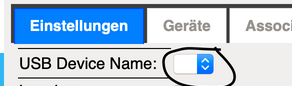
          2ff8969c-fd07-4121-ad27-4d28ed47ede4-grafik.png

          but you're right /opt/iobroker/ is for linux

          zigbee hab ich, zwave auch, nuc's genauso und HA auch

          1 Antwort Letzte Antwort
          0
          • arteckA arteck

            which system .. windows or linux ??

            A Offline
            A Offline
            ap2017
            schrieb am zuletzt editiert von
            #5

            @arteck Linux

            1 Antwort Letzte Antwort
            0
            • arteckA Offline
              arteckA Offline
              arteck
              Developer Most Active
              schrieb am zuletzt editiert von
              #6

              more infos plz

              adapter -> debug option -> log ??

              zigbee hab ich, zwave auch, nuc's genauso und HA auch

              1 Antwort Letzte Antwort
              0
              • A Offline
                A Offline
                ap2017
                schrieb am zuletzt editiert von
                #7

                Connecting Z-Wave USB stick to a different USB port solved the problem. System accepted port as /dev/ttyACM0 and I am able to see all my Z-Wave devices. I am afraid to reboot, but eventually will have to do it to troubleshoot another ongoing trouble with ASTRO Blockly function.

                1 Antwort Letzte Antwort
                0
                • A Offline
                  A Offline
                  ap2017
                  schrieb am zuletzt editiert von
                  #8

                  ...
                  Continue to struggle with same issue - after reboot Z-Wave does not work, see log. I am running 64bit Intel platform with all latest modules (ioBroker, Node, ZWave adapter. Please help

                  ZWave 8-17-19.txt

                  AlCalzoneA 1 Antwort Letzte Antwort
                  0
                  • A ap2017

                    ...
                    Continue to struggle with same issue - after reboot Z-Wave does not work, see log. I am running 64bit Intel platform with all latest modules (ioBroker, Node, ZWave adapter. Please help

                    ZWave 8-17-19.txt

                    AlCalzoneA Offline
                    AlCalzoneA Offline
                    AlCalzone
                    Developer
                    schrieb am zuletzt editiert von
                    #9

                    @ap2017 sagte in Z-Wave does not work after reboot:

                    libopenzwave.so.1.6: cannot open shared object file: No such file or directory

                    Did you follow the instructions under known issues?

                    Warum `sudo` böse ist: https://forum.iobroker.net/post/17109

                    A 1 Antwort Letzte Antwort
                    0
                    • AlCalzoneA AlCalzone

                      @ap2017 sagte in Z-Wave does not work after reboot:

                      libopenzwave.so.1.6: cannot open shared object file: No such file or directory

                      Did you follow the instructions under known issues?

                      A Offline
                      A Offline
                      ap2017
                      schrieb am zuletzt editiert von
                      #10

                      @AlCalzone Sorry, forgot about this fix, I though that in new version of Z-Wave adapter 1.5.1 this issue is fixed, but I guess this is not an adapter issue.
                      The "sudo ldconfig /usr/local/lib64" worked and fixed the issue. Thank you!

                      1 Antwort Letzte Antwort
                      0
                      • A ap2017

                        I had fully working Z-Wave adapter on X64 Intel Platform with 12 nodes. After reboot, z-wave adapter is no longer working, continuously trying to start, but having the following ,messages:

                        host.ap-OptiPlex-390	2019-07-27 21:10:47.661	error	instance system.adapter.zwave.0 terminated with code null ()
                        host.ap-OptiPlex-390	2019-07-27 21:10:47.661	warn	instance system.adapter.zwave.0 terminated due to SIGSEGV
                        zwave.0	2019-07-27 21:10:22.134	info	starting. Version 1.5.0 in /opt/iobroker/node_modules/iobroker.zwave, node: v10.16.0
                        host.ap-OptiPlex-390	2019-07-27 21:10:21.849	info	instance system.adapter.zwave.0 started with pid 8008
                        host.ap-OptiPlex-390	2019-07-27 21:09:51.842	info	Restart adapter system.adapter.zwave.0 because enabled
                        host.ap-OptiPlex-390	2019-07-27 21:09:51.842	error	instance system.adapter.zwave.0 terminated with code null ()
                        host.ap-OptiPlex-390	2019-07-27 21:09:51.842	warn	instance system.adapter.zwave.0 terminated due to SIGSEGV
                        zwave.0	2019-07-27 21:09:26.319	info	starting. Version 1.5.0 in /opt/iobroker/node_modules/iobroker.zwave, node: v10.16.0
                        host.ap-OptiPlex-390	2019-07-27 21:09:26.029	info	instance system.adapter.zwave.0 started with pid 6542
                        host.ap-OptiPlex-390	2019-07-27 21:08:56.023	info	Restart adapter system.adapter.zwave.0 because enabled
                        host.ap-OptiPlex-390	2019-07-27 21:08:56.023	error	instance system.adapter.zwave.0 terminated with code null ()
                        host.ap-OptiPlex-390	2019-07-27 21:08:56.023	warn	instance system.adapter.zwave.0 terminated due to SIGSEGV
                        zwave.0	2019-07-27 21:08:30.506	info	starting. Version 1.5.0 in /opt/iobroker/node_modules/iobroker.zwave, node: v10.16.0
                        host.ap-OptiPlex-390	2019-07-27 21:08:30.218	info	instance system.adapter.zwave.0 started with pid 5091
                        host.ap-OptiPlex-390	2019-07-27 21:08:00.211	info	Restart adapter system.adapter.zwave.0 because enabled
                        host.ap-OptiPlex-390	2019-07-27 21:08:00.211	error	instance system.adapter.zwave.0 terminated with code null ()
                        host.ap-OptiPlex-390	2019-07-27 21:08:00.211	warn	instance system.adapter.zwave.0 terminated due to SIGSEGV
                        

                        I also noticed that it does not show COM port that I previously used. After some struggle I was able to save COM configuration /dev/ttyACM0 but adapter still does not work

                        I found this discussion, but don't see there a clean solution.
                        https://github.com/ioBroker/ioBroker.zwave/issues/43

                        A Offline
                        A Offline
                        Anthon1y
                        schrieb am zuletzt editiert von Anthon1y
                        #11

                        I'm also having the same problem as the others!

                        HomoranH 1 Antwort Letzte Antwort
                        0
                        • A Anthon1y

                          I'm also having the same problem as the others!

                          HomoranH Nicht stören
                          HomoranH Nicht stören
                          Homoran
                          Global Moderator Administrators
                          schrieb am zuletzt editiert von
                          #12

                          @Anthon1y sagte in Z-Wave does not work after reboot:

                          I'm also having the same problem as the others!

                          please specify!

                          kein Support per PN! - Fragen im Forum stellen -
                          Benutzt das Voting rechts unten im Beitrag wenn er euch geholfen hat.
                          Das Forum freut sich über eine Spende. Benutzt dazu den Spendenbutton oben rechts. Danke!
                          der Installationsfixer: curl -fsL https://iobroker.net/fix.sh | bash -

                          1 Antwort Letzte Antwort
                          0

                          Hey! Du scheinst an dieser Unterhaltung interessiert zu sein, hast aber noch kein Konto.

                          Hast du es satt, bei jedem Besuch durch die gleichen Beiträge zu scrollen? Wenn du dich für ein Konto anmeldest, kommst du immer genau dorthin zurück, wo du zuvor warst, und kannst dich über neue Antworten benachrichtigen lassen (entweder per E-Mail oder Push-Benachrichtigung). Du kannst auch Lesezeichen speichern und Beiträge positiv bewerten, um anderen Community-Mitgliedern deine Wertschätzung zu zeigen.

                          Mit deinem Input könnte dieser Beitrag noch besser werden 💗

                          Registrieren Anmelden
                          Antworten
                          • In einem neuen Thema antworten
                          Anmelden zum Antworten
                          • Älteste zuerst
                          • Neuste zuerst
                          • Meiste Stimmen


                          Support us

                          ioBroker
                          Community Adapters
                          Donate

                          534

                          Online

                          32.8k

                          Benutzer

                          82.6k

                          Themen

                          1.3m

                          Beiträge
                          Community
                          Impressum | Datenschutz-Bestimmungen | Nutzungsbedingungen | Einwilligungseinstellungen
                          ioBroker Community 2014-2025
                          logo
                          • Anmelden

                          • Du hast noch kein Konto? Registrieren

                          • Anmelden oder registrieren, um zu suchen
                          • Erster Beitrag
                            Letzter Beitrag
                          0
                          • Home
                          • Aktuell
                          • Tags
                          • Ungelesen 0
                          • Kategorien
                          • Unreplied
                          • Beliebt
                          • GitHub
                          • Docu
                          • Hilfe
