




Nach Installation Admin keine Web-Site mehr erreichbar
-
@AlCalzone
Die Datei sieht bei mir so aus{ "name": "iobroker.core", "version": "0.1.0", "private": true, "dependencies": { "iobroker.admin": "^3.6.2", "iobroker.alexa2": "https://github.com/Apollon77/ioBroker.alexa2/tarball/master", "iobroker.amazon-dash": "^0.3.1", "iobroker.cloud": "^2.6.2", "iobroker.daswetter": "^2.8.0", "iobroker.dwd": "^2.4.3", "iobroker.flot": "^1.9.2", "iobroker.history": "^1.8.6", "iobroker.hm-rega": "^2.3.3", "iobroker.hm-rpc": "^1.9.11", "iobroker.ical": "^1.7.0", "iobroker.icons-open-icon-library-png": "https://github.com/ioBroker/ioBroker.icons-open-icon-library-png/tarball/master", "iobroker.iot": "^0.3.1", "iobroker.javascript": "^4.1.12", "iobroker.js-controller": "^1.5.11", "iobroker.mobile": "^0.5.0", "iobroker.owntracks": "^0.6.2", "iobroker.plexconnect": "0.0.7", "iobroker.rickshaw": "^1.0.0", "iobroker.sayit": "^1.7.0", "iobroker.scenes": "^1.1.0", "iobroker.shelly": "^2.2.0", "iobroker.simple-api": "^2.0.0", "iobroker.socketio": "^2.1.1", "iobroker.telegram": "^1.4.3", "iobroker.text2command": "^1.2.5", "iobroker.tr-064": "^0.4.18", "iobroker.vis": "^1.1.10", "iobroker.vis-hqwidgets": "^1.1.2", "iobroker.vis-jqui-mfd": "^1.0.12", "iobroker.vis-map": "^1.0.2", "iobroker.weatherunderground": "^3.0.9", "iobroker.web": "^2.4.1" } }Wie lädt man eigentlich Dateien in den Beitrag hoch?
Deinen Vorschlag probier ich heute abend gleich aus.
Gruss Ralf@derrapf Das sieht doch relativ vollständig aus. Bevor du
npm iausführst, am besten noch Daten sichern (/opt/iobroker/iobroker-datakopieren oderiobroker backup).Wie lädt man eigentlich Dateien in den Beitrag hoch?
Drag & Drop ins Textfeld
-
@derrapf Das sieht doch relativ vollständig aus. Bevor du
npm iausführst, am besten noch Daten sichern (/opt/iobroker/iobroker-datakopieren oderiobroker backup).Wie lädt man eigentlich Dateien in den Beitrag hoch?
Drag & Drop ins Textfeld
@AlCalzone sagte in Nach Installation Admin keine Web-Site mehr erreichbar:
Drag & Drop ins Textfeld
Ok. Das war zu einfach ;-)
PS: Ich konnte es nicht lassen und bin von der Arbeit per VPN auf den rock64:
root@ioBroker-Rock64:/opt/iobroker# npm i --production --unsafe-perm
npm WARN enoent ENOENT: no such file or directory, open '/opt/iobroker/node_modules/express/package.json'

added 18 packages from 31 contributors, updated 2 packages and audited 4699 packages in 110.385s
found 82 vulnerabilities (51 low, 2 moderate, 29 high)
  run `npm audit fix` to fix them, or `npm audit` for details
root@ioBroker-Rock64:/opt/iobroker#
Log ist leider zu gross um es hier anzuhängen...Gruss Ralf
-
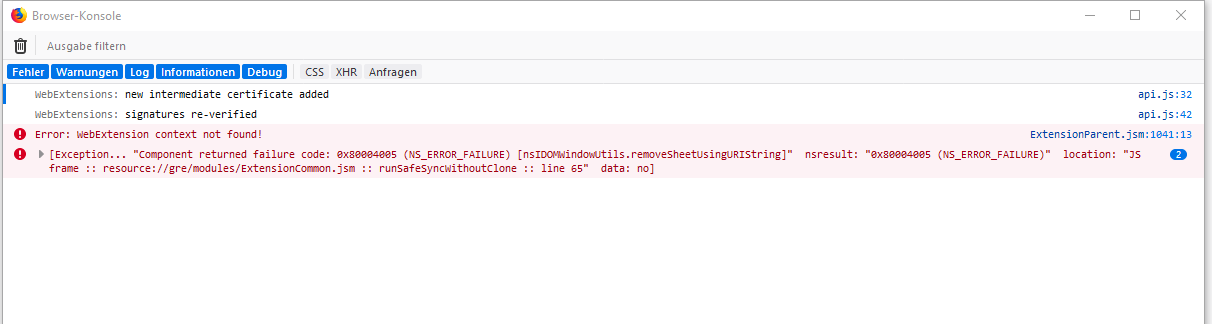
Wenn Du admin per "npm i iobroker.admin --production" nochmal drüber installierst? Bzw schau mal in der Browser-Konsole.Steht da irgendwas an Fehlern?
@apollon77 sagte in Nach Installation Admin keine Web-Site mehr erreichbar:
Wenn Du admin per "npm i iobroker.admin --production" nochmal drüber installierst? Bzw schau mal in der Browser-Konsole.Steht da irgendwas an Fehlern?
Wenn ich das mache sieht das Ergbnis so aus:
root@ioBroker-Rock64:~# cd /opt/iobroker/
root@ioBroker-Rock64:/opt/iobroker# npm i iobroker.admin --production
npm WARN enoent ENOENT: no such file or directory, open '/opt/iobroker/node_modules/express/package.json'

+ iobroker.admin@3.6.3
added 3 packages from 3 contributors, removed 12 packages, updated 1 package, moved 1 package and audited 4715 packages in 144.664s
found 86 vulnerabilities (51 low, 4 moderate, 31 high)
  run `npm audit fix` to fix them, or `npm audit` for details


   ╭───────────────────────────────────────────────────────────────╮
   │                                                               │
   │      New minor version of npm available! 6.4.1 -> 6.9.0       │
   │   Changelog: https://github.com/npm/cli/releases/tag/v6.9.0   │
   │               Run npm install -g npm to update!               │
   │                                                               │
   ╰───────────────────────────────────────────────────────────────╯
Gruss Ralf -
@AlCalzone sagte in Nach Installation Admin keine Web-Site mehr erreichbar:
Drag & Drop ins Textfeld
Ok. Das war zu einfach ;-)
PS: Ich konnte es nicht lassen und bin von der Arbeit per VPN auf den rock64:
root@ioBroker-Rock64:/opt/iobroker# npm i --production --unsafe-perm
npm WARN enoent ENOENT: no such file or directory, open '/opt/iobroker/node_modules/express/package.json'

added 18 packages from 31 contributors, updated 2 packages and audited 4699 packages in 110.385s
found 82 vulnerabilities (51 low, 2 moderate, 29 high)
  run `npm audit fix` to fix them, or `npm audit` for details
root@ioBroker-Rock64:/opt/iobroker#
Log ist leider zu gross um es hier anzuhängen...Gruss Ralf
-
@apollon77 sagte in Nach Installation Admin keine Web-Site mehr erreichbar:
Interessant. mal nen anderen Browser versucht? Mal alle browser-Caches und so gelöscht?
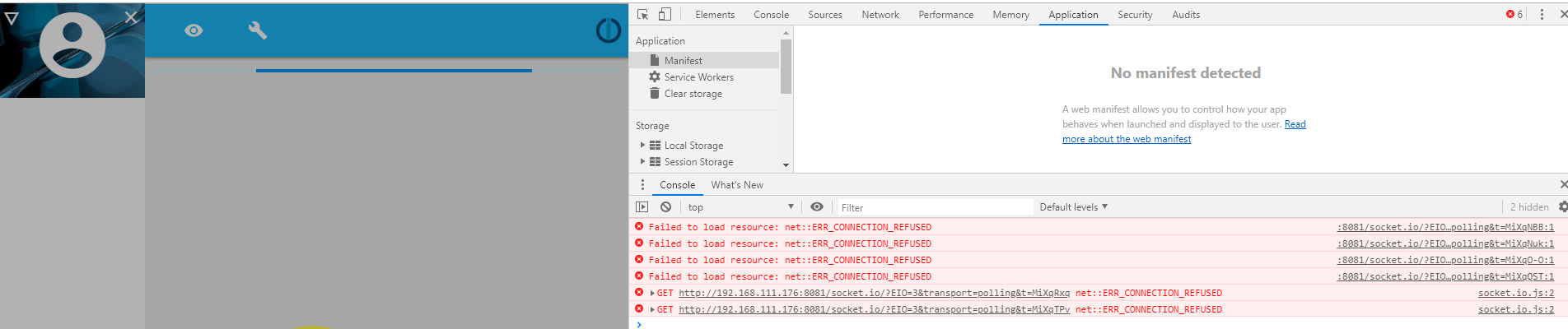
Bin mal in den Chrome, habe die Browserdaten gelöscht und die IOBroker Website aufgerufen. Hier kommt:
Anbei das gezippte Log von gestern.
Das iobroker.2019-06-03.log.zip
Gruss Ralf -
@apollon77 sagte in Nach Installation Admin keine Web-Site mehr erreichbar:
Interessant. mal nen anderen Browser versucht? Mal alle browser-Caches und so gelöscht?
Bin mal in den Chrome, habe die Browserdaten gelöscht und die IOBroker Website aufgerufen. Hier kommt:
Anbei das gezippte Log von gestern.
Das iobroker.2019-06-03.log.zip
Gruss Ralf@derrapf Dein Log enthält in einer Endlosschleife den Versuch, den Admin-Adapter zu starten. Da gibts scheinbar ein Berechtigungsproblem. Was ist die Ausgabe von
ls -la /opt/iobroker/node_modules/iobroker.js-controller?Und hattest du schon mal den Inhalt von
/opt/iobroker/INSTALLER_INFO.txtgepostet? -
@derrapf Dein Log enthält in einer Endlosschleife den Versuch, den Admin-Adapter zu starten. Da gibts scheinbar ein Berechtigungsproblem. Was ist die Ausgabe von
ls -la /opt/iobroker/node_modules/iobroker.js-controller?Und hattest du schon mal den Inhalt von
/opt/iobroker/INSTALLER_INFO.txtgepostet?@AlCalzone sagte in Nach Installation Admin keine Web-Site mehr erreichbar:
Was ist die Ausgabe von
ls -la /opt/iobroker/node_modules/iobroker.js-controller ?Da kommt folgendes:
root@ioBroker-Rock64:~# ls -la /opt/iobroker/node_modules/iobroker.js-controller
total 268
drwxr-xr--+   6 root     root       4096 Jun  2 14:38 .
drwxrwxrwx+ 624 iobroker iobroker  20480 Jun  4 01:52 ..
-rw-r--r--+   1 root     root      32575 Okt 26  1985 CHANGELOG.md
drwxr-xr--+   2 root     root       4096 Jun  2 14:37 conf
-rw-r--r--+   1 root     root     121216 Okt 26  1985 controller.js
-rw-r--r--+   1 root     root         57 Okt 26  1985 iob
-rw-r--r--+   1 root     root         40 Okt 26  1985 iob.bat
-rwxr-xr-x+   1 root     root         47 Okt 26  1985 iobroker.js
-rw-r--r--+   1 root     root      26666 Okt 26  1985 io-package.json
drwxr-xr--+   9 root     root       4096 Jun  2 14:37 lib
-rw-r--r--+   1 root     root       1157 Okt 26  1985 LICENSE
drwxr-xr--+  46 root     root       4096 Jun  4 01:52 node_modules
-rw-r--r--+   1 root     root       5030 Jun  2 14:37 package.json
-rw-r--r--+   1 root     root       4632 Okt 26  1985 README.md
-rw-r--r--+   1 root     root       5868 Okt 26  1985 reinstall.js
drwxrwxrw-+   2 root     root       4096 Jun  2 14:38 tmp
-rw-r--r--+   1 root     root       4728 Okt 26  1985 tsconfig.json
root@ioBroker-Rock64:~#
Die installer_info.txt sieht so aus:
Fixer version: 2019-03-05
Fix date 2019-03-05
ACL enabled: true
init system: systemd
Autostart: systemd
Gruss Ralf
-
@AlCalzone sagte in Nach Installation Admin keine Web-Site mehr erreichbar:
Was ist die Ausgabe von
ls -la /opt/iobroker/node_modules/iobroker.js-controller ?Da kommt folgendes:
root@ioBroker-Rock64:~# ls -la /opt/iobroker/node_modules/iobroker.js-controller
total 268
drwxr-xr--+   6 root     root       4096 Jun  2 14:38 .
drwxrwxrwx+ 624 iobroker iobroker  20480 Jun  4 01:52 ..
-rw-r--r--+   1 root     root      32575 Okt 26  1985 CHANGELOG.md
drwxr-xr--+   2 root     root       4096 Jun  2 14:37 conf
-rw-r--r--+   1 root     root     121216 Okt 26  1985 controller.js
-rw-r--r--+   1 root     root         57 Okt 26  1985 iob
-rw-r--r--+   1 root     root         40 Okt 26  1985 iob.bat
-rwxr-xr-x+   1 root     root         47 Okt 26  1985 iobroker.js
-rw-r--r--+   1 root     root      26666 Okt 26  1985 io-package.json
drwxr-xr--+   9 root     root       4096 Jun  2 14:37 lib
-rw-r--r--+   1 root     root       1157 Okt 26  1985 LICENSE
drwxr-xr--+  46 root     root       4096 Jun  4 01:52 node_modules
-rw-r--r--+   1 root     root       5030 Jun  2 14:37 package.json
-rw-r--r--+   1 root     root       4632 Okt 26  1985 README.md
-rw-r--r--+   1 root     root       5868 Okt 26  1985 reinstall.js
drwxrwxrw-+   2 root     root       4096 Jun  2 14:38 tmp
-rw-r--r--+   1 root     root       4728 Okt 26  1985 tsconfig.json
root@ioBroker-Rock64:~#
Die installer_info.txt sieht so aus:
Fixer version: 2019-03-05
Fix date 2019-03-05
ACL enabled: true
init system: systemd
Autostart: systemd
Gruss Ralf
@derrapf Das sieht eigentlich erst mal gut aus. Es scheint auch als müsste der User
iobrokerZugriff haben. Was gibt
getfacl /opt/iobroker/node_modules/iobroker.js-controller
aus?
Ansonsten könnte evtl auch ein erneutes Ausführen des Fixers helfen. -
@derrapf Das sieht eigentlich erst mal gut aus. Es scheint auch als müsste der User
iobrokerZugriff haben. Was gibt
getfacl /opt/iobroker/node_modules/iobroker.js-controller
aus?
Ansonsten könnte evtl auch ein erneutes Ausführen des Fixers helfen.@AlCalzone sagte in Nach Installation Admin keine Web-Site mehr erreichbar:
Was gibt
getfacl /opt/iobroker/node_modules/iobroker.js-controller
aus?Da kommt
root@ioBroker-Rock64:~# getfacl /opt/iobroker/node_modules/iobroker.js-controlle                                        r
getfacl: Removing leading '/' from absolute path names
# file: opt/iobroker/node_modules/iobroker.js-controller
# owner: root
# group: root
user::rwx
group::rw-                      #effective:r--
group:iobroker:rwx              #effective:r-x
mask::r-x
other::r--
default:user::rwx
default:group::rw-
default:group:iobroker:rwx
default:mask::rwx
default:other::rw-

root@ioBroker-Rock64:~#
Ich führe gleich nochmal den fixer aus.
edit: So er ist gelaufen:
root@ioBroker-Rock64:~# curl -sL https://iobroker.net/fix.sh | bash -

==========================================================================

    Welcome to the ioBroker installation fixer!
    Script version: 2019-05-14

    You might need to enter your password a couple of times.

==========================================================================


==========================================================================
    Installing prerequisites (1/3)
==========================================================================


==========================================================================
    Checking ioBroker user and directory permissions (2/3)
==========================================================================

Created /etc/sudoers.d/iobroker
Fixing directory permissions...

==========================================================================
    Checking autostart (3/3)
==========================================================================

Enabling autostart...
Autostart enabled!

==========================================================================

    Your installation was fixed successfully
    Run iobroker start to start ioBroker again!

==========================================================================

root@ioBroker-Rock64:~#
Neustart
root@ioBroker-Rock64:~# iobroker start
root@ioBroker-Rock64:~# iobroker status
events.js:183
      throw er; // Unhandled 'error' event
      ^

Error: listen EADDRINUSE 127.0.0.1:9001
    at Server.setupListenHandle [as _listen2] (net.js:1360:14)
    at listenInCluster (net.js:1401:12)
    at doListen (net.js:1510:7)
    at _combinedTickCallback (internal/process/next_tick.js:142:11)
    at process._tickCallback (internal/process/next_tick.js:181:9)
root@ioBroker-Rock64:~#
Buäh. Sieht ungesund aus.
ABER!
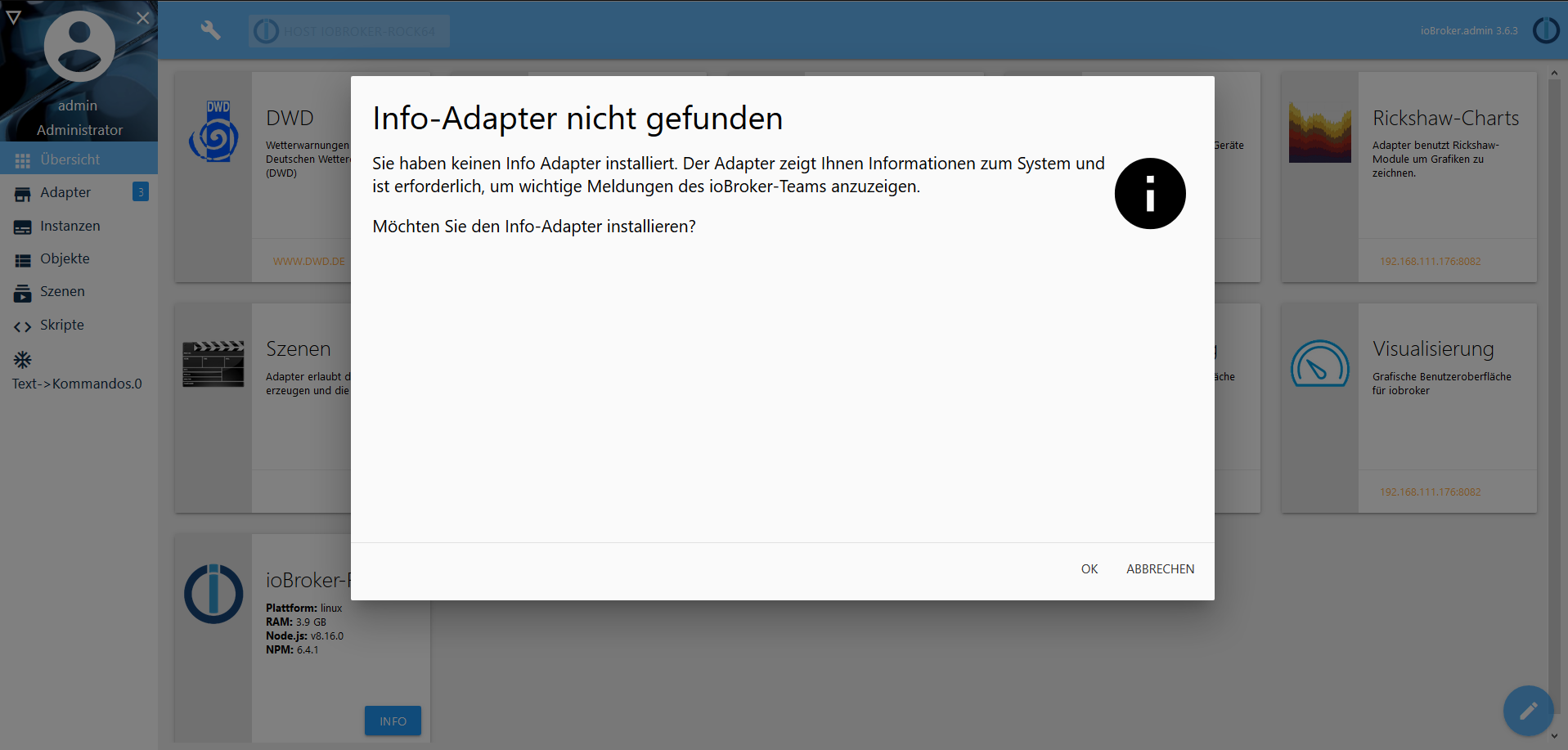
Ich würde fast "Yippieh" sagen, aber was ist ein Info-Adapter und weshalb braucht der den?Und: Kann sich jemand erklären was da bei mir schief gegangen ist?
Ich trau mich ja jetzt kaum noch einen Adapter zu aktualisieren....nochmal edit:
Habe den Infoadapte rinstalliert; jetzt kommt auf einmal
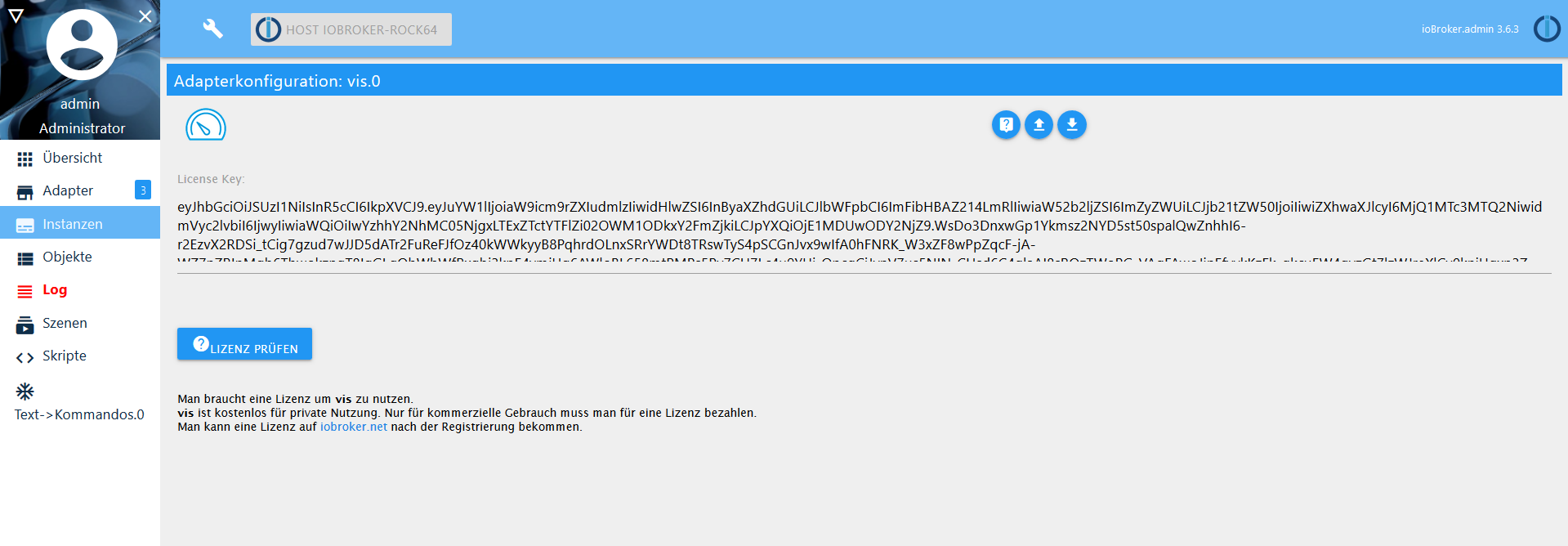
Wobei die Prüfung wenigstens OK ergeben hat.
Jetzt prbiere ich mal weiter. Vielleicht war's das ja.
Wenn ja dann vielen vielen Dank an alle die mir hier geholfen haben.
Gruss Ralf -
Die Website sieht gut aus, aber das Log ist voll von solchen Meldungen:
host.ioBroker-Rock64 2019-06-05 23:52:21.232 info Restart adapter system.adapter.tr-064.0 because enabled host.ioBroker-Rock64 2019-06-05 23:52:21.232 error instance system.adapter.tr-064.0 terminated with code 1 () host.ioBroker-Rock64 2019-06-05 23:52:21.231 error Caught by controller[0]: at bootstrap_node.js:625:3 host.ioBroker-Rock64 2019-06-05 23:52:21.231 error Caught by controller[0]: at startup (bootstrap_node.js:204:16) host.ioBroker-Rock64 2019-06-05 23:52:21.230 error Caught by controller[0]: at Function.Module.runMain (module.js:694:10) host.ioBroker-Rock64 2019-06-05 23:52:21.230 error Caught by controller[0]: at Function.Module._load (module.js:498:3) host.ioBroker-Rock64 2019-06-05 23:52:21.229 error Caught by controller[0]: at tryModuleLoad (module.js:506:12) host.ioBroker-Rock64 2019-06-05 23:52:21.229 error Caught by controller[0]: at Module.load (module.js:566:32) host.ioBroker-Rock64 2019-06-05 23:52:21.228 error Caught by controller[0]: at Object.Module._extensions..js (module.js:664:10) host.ioBroker-Rock64 2019-06-05 23:52:21.228 error Caught by controller[0]: at Module._compile (module.js:653:30) host.ioBroker-Rock64 2019-06-05 23:52:21.228 error Caught by controller[0]: at Object.<anonymous> (/opt/iobroker/node_modules/iobroker.tr-064/tr-064.js:16:20) host.ioBroker-Rock64 2019-06-05 23:52:21.227 error Caught by controller[0]: at Object.exports.Adapter (/opt/iobroker/node_modules/soef/soef.js:1383:23) host.ioBroker-Rock64 2019-06-05 23:52:21.227 error Caught by controller[0]: TypeError: fns.adapter is not a function host.ioBroker-Rock64 2019-06-05 23:52:21.226 error Caught by controller[0]: ^ host.ioBroker-Rock64 2019-06-05 23:52:21.226 error Caught by controller[0]: fns.adapter = fns.adapter(options); host.ioBroker-Rock64 2019-06-05 23:52:21.225 error Caught by controller[0]: /opt/iobroker/node_modules/soef/soef.js:1383 javascript.0 2019-06-05 23:52:20.812 info script.js.common.Statusansagen: TempUnter. in der Werkstatt:21.6 host.ioBroker-Rock64 2019-06-05 23:52:19.798 info instance system.adapter.tr-064.0 started with pid 4039 host.ioBroker-Rock64 2019-06-05 23:51:49.743 info Restart adapter system.adapter.tr-064.0 because enabled Mist Gruss Ralf -
Die Website sieht gut aus, aber das Log ist voll von solchen Meldungen:
host.ioBroker-Rock64 2019-06-05 23:52:21.232 info Restart adapter system.adapter.tr-064.0 because enabled host.ioBroker-Rock64 2019-06-05 23:52:21.232 error instance system.adapter.tr-064.0 terminated with code 1 () host.ioBroker-Rock64 2019-06-05 23:52:21.231 error Caught by controller[0]: at bootstrap_node.js:625:3 host.ioBroker-Rock64 2019-06-05 23:52:21.231 error Caught by controller[0]: at startup (bootstrap_node.js:204:16) host.ioBroker-Rock64 2019-06-05 23:52:21.230 error Caught by controller[0]: at Function.Module.runMain (module.js:694:10) host.ioBroker-Rock64 2019-06-05 23:52:21.230 error Caught by controller[0]: at Function.Module._load (module.js:498:3) host.ioBroker-Rock64 2019-06-05 23:52:21.229 error Caught by controller[0]: at tryModuleLoad (module.js:506:12) host.ioBroker-Rock64 2019-06-05 23:52:21.229 error Caught by controller[0]: at Module.load (module.js:566:32) host.ioBroker-Rock64 2019-06-05 23:52:21.228 error Caught by controller[0]: at Object.Module._extensions..js (module.js:664:10) host.ioBroker-Rock64 2019-06-05 23:52:21.228 error Caught by controller[0]: at Module._compile (module.js:653:30) host.ioBroker-Rock64 2019-06-05 23:52:21.228 error Caught by controller[0]: at Object.<anonymous> (/opt/iobroker/node_modules/iobroker.tr-064/tr-064.js:16:20) host.ioBroker-Rock64 2019-06-05 23:52:21.227 error Caught by controller[0]: at Object.exports.Adapter (/opt/iobroker/node_modules/soef/soef.js:1383:23) host.ioBroker-Rock64 2019-06-05 23:52:21.227 error Caught by controller[0]: TypeError: fns.adapter is not a function host.ioBroker-Rock64 2019-06-05 23:52:21.226 error Caught by controller[0]: ^ host.ioBroker-Rock64 2019-06-05 23:52:21.226 error Caught by controller[0]: fns.adapter = fns.adapter(options); host.ioBroker-Rock64 2019-06-05 23:52:21.225 error Caught by controller[0]: /opt/iobroker/node_modules/soef/soef.js:1383 javascript.0 2019-06-05 23:52:20.812 info script.js.common.Statusansagen: TempUnter. in der Werkstatt:21.6 host.ioBroker-Rock64 2019-06-05 23:52:19.798 info instance system.adapter.tr-064.0 started with pid 4039 host.ioBroker-Rock64 2019-06-05 23:51:49.743 info Restart adapter system.adapter.tr-064.0 because enabled Mist Gruss Ralf@derrapf sagte in Nach Installation Admin keine Web-Site mehr erreichbar:
Die Website sieht gut aus, aber das Log ist voll von solchen Meldungen:
Mist
Gruss Ralfnpm i soef --production --prefix /opt/iobroker/node_modules/iobroker.tr-064
https://forum.iobroker.net/topic/22782/aufruf-test-community-version-vom-tr-064-adapter
-
@derrapf sagte in Nach Installation Admin keine Web-Site mehr erreichbar:
Die Website sieht gut aus, aber das Log ist voll von solchen Meldungen:
Mist
Gruss Ralfnpm i soef --production --prefix /opt/iobroker/node_modules/iobroker.tr-064
https://forum.iobroker.net/topic/22782/aufruf-test-community-version-vom-tr-064-adapter
-
@AlCalzone sagte in Nach Installation Admin keine Web-Site mehr erreichbar:
Was gibt
getfacl /opt/iobroker/node_modules/iobroker.js-controller
aus?Da kommt
root@ioBroker-Rock64:~# getfacl /opt/iobroker/node_modules/iobroker.js-controlle                                        r
getfacl: Removing leading '/' from absolute path names
# file: opt/iobroker/node_modules/iobroker.js-controller
# owner: root
# group: root
user::rwx
group::rw-                      #effective:r--
group:iobroker:rwx              #effective:r-x
mask::r-x
other::r--
default:user::rwx
default:group::rw-
default:group:iobroker:rwx
default:mask::rwx
default:other::rw-

root@ioBroker-Rock64:~#
Ich führe gleich nochmal den fixer aus.
edit: So er ist gelaufen:
root@ioBroker-Rock64:~# curl -sL https://iobroker.net/fix.sh | bash -

==========================================================================

    Welcome to the ioBroker installation fixer!
    Script version: 2019-05-14

    You might need to enter your password a couple of times.

==========================================================================


==========================================================================
    Installing prerequisites (1/3)
==========================================================================


==========================================================================
    Checking ioBroker user and directory permissions (2/3)
==========================================================================

Created /etc/sudoers.d/iobroker
Fixing directory permissions...

==========================================================================
    Checking autostart (3/3)
==========================================================================

Enabling autostart...
Autostart enabled!

==========================================================================

    Your installation was fixed successfully
    Run iobroker start to start ioBroker again!

==========================================================================

root@ioBroker-Rock64:~#
Neustart
root@ioBroker-Rock64:~# iobroker start
root@ioBroker-Rock64:~# iobroker status
events.js:183
      throw er; // Unhandled 'error' event
      ^

Error: listen EADDRINUSE 127.0.0.1:9001
    at Server.setupListenHandle [as _listen2] (net.js:1360:14)
    at listenInCluster (net.js:1401:12)
    at doListen (net.js:1510:7)
    at _combinedTickCallback (internal/process/next_tick.js:142:11)
    at process._tickCallback (internal/process/next_tick.js:181:9)
root@ioBroker-Rock64:~#
Buäh. Sieht ungesund aus.
ABER!
Ich würde fast "Yippieh" sagen, aber was ist ein Info-Adapter und weshalb braucht der den?Und: Kann sich jemand erklären was da bei mir schief gegangen ist?
Ich trau mich ja jetzt kaum noch einen Adapter zu aktualisieren....nochmal edit:
Habe den Infoadapte rinstalliert; jetzt kommt auf einmal
Wobei die Prüfung wenigstens OK ergeben hat.
Jetzt prbiere ich mal weiter. Vielleicht war's das ja.
Wenn ja dann vielen vielen Dank an alle die mir hier geholfen haben.
Gruss Ralf@derrapf sagte in Nach Installation Admin keine Web-Site mehr erreichbar:
mask::r-x
Hast du in der Vergangenheit mal chmod 755 oder ähnliches auf das ioBroker-Verzeichnis ausgeführt? Wenn nicht, haben wir ggf. noch eine Kleinigkeit gefunden, die man im Fixer anpassen könnte.
-
Puuh ... Gute Frage
Kann schon gut sein, dass ich das mal gemacht habe. Eben weil ich immer beim Update von Adaptern diese Probleme mit den Inhalten der .bin Verzeichnisse hatte.Gruss Ralf
@derrapf diese Probleme mit den .bin files Omen woanders her. Entweder npm hat mal Blödsinn gemacht oder Module wurden nur lokal installiert oder du hast mal das ganze node-modules verzeichnis „falsch“ kopiert und damit die symbolischen Links durch echte files ersetzt. Das mag er nicht. Und meckert.
Also ggf wäre mal eine frische Neuinstallation (siehe aktueller „wie nodejs richtig updaten „ Thread) angebracht.



Hello! It looks like you're interested in this conversation, but you don't have an account yet.
Getting fed up of having to scroll through the same posts each visit? When you register for an account, you'll always come back to exactly where you were before, and choose to be notified of new replies (either via email, or push notification). You'll also be able to save bookmarks and upvote posts to show your appreciation to other community members.
With your input, this post could be even better 💗
Register Login301
Online32.7k
Users82.6k
Topics1.3m
Posts