Skip to content
  • Home
  • Recent
  • Tags
  • 0 Unread 0
  • Categories
  • Unreplied
  • Popular
  • GitHub
  • Docu
  • Hilfe
Skins
  • Light
  • Brite
  • Cerulean
  • Cosmo
  • Flatly
  • Journal
  • Litera
  • Lumen
  • Lux
  • Materia
  • Minty
  • Morph
  • Pulse
  • Sandstone
  • Simplex
  • Sketchy
  • Spacelab
  • United
  • Yeti
  • Zephyr
  • Dark
  • Cyborg
  • Darkly
  • Quartz
  • Slate
  • Solar
  • Superhero
  • Vapor

  • Default (No Skin)
  • No Skin
Collapse
ioBroker Logo

Community Forum

donate donate
  1. ioBroker Community Home
  2. Deutsch
  3. ioBroker Allgemein
  4. [How-to] Node.js für ioBroker richtig updaten

NEWS

  • Monatsrückblick Januar/Februar 2026 ist online!
    BluefoxB
    Bluefox
    17
    1
    505

  • Jahresrückblick 2025 – unser neuer Blogbeitrag ist online! ✨
    BluefoxB
    Bluefox
    17
    1
    5.2k

  • Neuer Blogbeitrag: Monatsrückblick - Dezember 2025 🎄
    BluefoxB
    Bluefox
    13
    1
    1.4k

[How-to] Node.js für ioBroker richtig updaten

Scheduled Pinned Locked Moved ioBroker Allgemein
installationlinuxnodenode.jsnodejswindows
1.1k Posts 106 Posters 773.6k Views 112 Watching
  • Oldest to Newest
  • Newest to Oldest
  • Most Votes
Reply
  • Reply as topic
Log in to reply
This topic has been deleted. Only users with topic management privileges can see it.
  • S Stefan_1969

    @Thomas-Braun :confounded:
    ... wir haben ja ein verregnetes Wochenende ...

    HomoranH Do not disturb
    HomoranH Do not disturb
    Homoran
    Global Moderator Administrators
    wrote on last edited by
    #603

    @Stefan_1969
    Backup machen
    VM mit debian Netinstall AMD64 image (parallel) neu ausetzen
    Backup zurückspielen
    nach einer halben Stunde könntest du fertig sein

    kein Support per PN! - Fragen im Forum stellen -
    Benutzt das Voting rechts unten im Beitrag wenn er euch geholfen hat.
    Das Forum freut sich über eine Spende. Benutzt dazu den Spendenbutton im Header. Danke!
    der Installationsfixer: curl -fsL https://iobroker.net/fix.sh | bash -

    Thomas BraunT 1 Reply Last reply
    0
    • J Jan1

      @Stefan_1969
      Ne neue Linux Installation ist in ner guten Stunde erledigt, so lange solls nicht regnen ;-)

      S Offline
      S Offline
      Stefan_1969
      wrote on last edited by
      #604

      @Jan1
      Das nicht :blush:
      aber bis wieder alles läuft ...


      ioBroker, grafana, influx, mariaDB, pihole, MotionEye auf proxmox
      Geräte: Homematic, Shelly, Sonoff, Gosund, WEMOS

      1 Reply Last reply
      1
      • HomoranH Homoran

        @Stefan_1969
        Backup machen
        VM mit debian Netinstall AMD64 image (parallel) neu ausetzen
        Backup zurückspielen
        nach einer halben Stunde könntest du fertig sein

        Thomas BraunT Online
        Thomas BraunT Online
        Thomas Braun
        Most Active
        wrote on last edited by
        #605

        @Homoran @Jan1
        Wenn das alles auf der selben Maschinen läuft:
        ioBroker, grafana, influx, mariaDB, pihole, MotionEye auf proxmox

        ist das schon etwas mehr Aufwand.

        Linux-Werkzeugkasten:
        https://forum.iobroker.net/topic/42952/der-kleine-iobroker-linux-werkzeugkasten
        NodeJS Fixer Skript:
        https://forum.iobroker.net/topic/68035/iob-node-fix-skript
        iob_diag: curl -sLf -o diag.sh https://iobroker.net/diag.sh && bash diag.sh

        HomoranH S 2 Replies Last reply
        0
        • Thomas BraunT Thomas Braun

          @Homoran @Jan1
          Wenn das alles auf der selben Maschinen läuft:
          ioBroker, grafana, influx, mariaDB, pihole, MotionEye auf proxmox

          ist das schon etwas mehr Aufwand.

          HomoranH Do not disturb
          HomoranH Do not disturb
          Homoran
          Global Moderator Administrators
          wrote on last edited by
          #606

          @Thomas-Braun Stimmt - ich war nur von ioBroker ausgegangen.
          Das kann man aber trotzden sukzessive in eine parallele VM umziehen - wenn man keine Probleme mit den IPs bekommt

          kein Support per PN! - Fragen im Forum stellen -
          Benutzt das Voting rechts unten im Beitrag wenn er euch geholfen hat.
          Das Forum freut sich über eine Spende. Benutzt dazu den Spendenbutton im Header. Danke!
          der Installationsfixer: curl -fsL https://iobroker.net/fix.sh | bash -

          Thomas BraunT 1 Reply Last reply
          0
          • HomoranH Homoran

            @Thomas-Braun Stimmt - ich war nur von ioBroker ausgegangen.
            Das kann man aber trotzden sukzessive in eine parallele VM umziehen - wenn man keine Probleme mit den IPs bekommt

            Thomas BraunT Online
            Thomas BraunT Online
            Thomas Braun
            Most Active
            wrote on last edited by
            #607

            @Homoran
            Ich glaube, das würde ich machen. Eine zweite VM mit einem 64bit-OS aufsetzen und dann die einzelnen Dienste rüberschubsen...

            Linux-Werkzeugkasten:
            https://forum.iobroker.net/topic/42952/der-kleine-iobroker-linux-werkzeugkasten
            NodeJS Fixer Skript:
            https://forum.iobroker.net/topic/68035/iob-node-fix-skript
            iob_diag: curl -sLf -o diag.sh https://iobroker.net/diag.sh && bash diag.sh

            1 Reply Last reply
            0
            • Thomas BraunT Thomas Braun

              @Homoran @Jan1
              Wenn das alles auf der selben Maschinen läuft:
              ioBroker, grafana, influx, mariaDB, pihole, MotionEye auf proxmox

              ist das schon etwas mehr Aufwand.

              S Offline
              S Offline
              Stefan_1969
              wrote on last edited by
              #608

              @Thomas-Braun
              Sind zum Glück verschiedene VMs, teils Container.

              Wollte eben anfangen und habe diese noch vorhandenen ISOs bei mir gefunden:
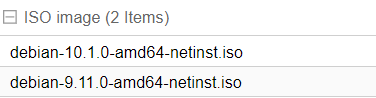
              3239ca1d-ec2a-4348-a2d1-69fd3d56fb85-image.png

              Das sind doch 64-Bit-Versionen


              ioBroker, grafana, influx, mariaDB, pihole, MotionEye auf proxmox
              Geräte: Homematic, Shelly, Sonoff, Gosund, WEMOS

              HomoranH Thomas BraunT 2 Replies Last reply
              0
              • S Stefan_1969

                @Thomas-Braun
                Sind zum Glück verschiedene VMs, teils Container.

                Wollte eben anfangen und habe diese noch vorhandenen ISOs bei mir gefunden:
                3239ca1d-ec2a-4348-a2d1-69fd3d56fb85-image.png

                Das sind doch 64-Bit-Versionen

                HomoranH Do not disturb
                HomoranH Do not disturb
                Homoran
                Global Moderator Administrators
                wrote on last edited by
                #609

                @Stefan_1969 sagte in [How-to] Node.js für ioBroker richtig updaten:

                Das sind doch 64-Bit-Versionen

                Jepp

                @Homoran sagte in [How-to] Node.js für ioBroker richtig updaten:

                debian Netinstall AMD64 image

                kein Support per PN! - Fragen im Forum stellen -
                Benutzt das Voting rechts unten im Beitrag wenn er euch geholfen hat.
                Das Forum freut sich über eine Spende. Benutzt dazu den Spendenbutton im Header. Danke!
                der Installationsfixer: curl -fsL https://iobroker.net/fix.sh | bash -

                1 Reply Last reply
                0
                • S Stefan_1969

                  @Thomas-Braun
                  Sind zum Glück verschiedene VMs, teils Container.

                  Wollte eben anfangen und habe diese noch vorhandenen ISOs bei mir gefunden:
                  3239ca1d-ec2a-4348-a2d1-69fd3d56fb85-image.png

                  Das sind doch 64-Bit-Versionen

                  Thomas BraunT Online
                  Thomas BraunT Online
                  Thomas Braun
                  Most Active
                  wrote on last edited by Thomas Braun
                  #610

                  @Stefan_1969 Das ist 64bit.
                  Wobei ich die VM/Proxmox in meinem Fall eh nicht als 'kvm64' sondern als 'host' aufsetzen würde:

                  If you want an exact match, you can set the CPU type to host in which case the VM will have exactly the same CPU flags as your host system.
                  This has a downside though. If you want to do a live migration of VMs between different hosts, your VM might end up on a new system with a different CPU type. If the CPU flags passed to the guest are missing, the qemu process will stop. To remedy this Qemu has also its own CPU type kvm64, that Proxmox VE uses by defaults. kvm64 is a Pentium 4 look a like CPU type, which has a reduced CPU flags set, but is guaranteed to work everywhere.

                  Kommt halt drauf an, ob du die VMs auch auf andere Hardware (einen anderen Prozessortyp) verschieben willst.

                  Linux-Werkzeugkasten:
                  https://forum.iobroker.net/topic/42952/der-kleine-iobroker-linux-werkzeugkasten
                  NodeJS Fixer Skript:
                  https://forum.iobroker.net/topic/68035/iob-node-fix-skript
                  iob_diag: curl -sLf -o diag.sh https://iobroker.net/diag.sh && bash diag.sh

                  S 2 Replies Last reply
                  0
                  • Thomas BraunT Thomas Braun

                    @Stefan_1969 Das ist 64bit.
                    Wobei ich die VM/Proxmox in meinem Fall eh nicht als 'kvm64' sondern als 'host' aufsetzen würde:

                    If you want an exact match, you can set the CPU type to host in which case the VM will have exactly the same CPU flags as your host system.
                    This has a downside though. If you want to do a live migration of VMs between different hosts, your VM might end up on a new system with a different CPU type. If the CPU flags passed to the guest are missing, the qemu process will stop. To remedy this Qemu has also its own CPU type kvm64, that Proxmox VE uses by defaults. kvm64 is a Pentium 4 look a like CPU type, which has a reduced CPU flags set, but is guaranteed to work everywhere.

                    Kommt halt drauf an, ob du die VMs auch auf andere Hardware (einen anderen Prozessortyp) verschieben willst.

                    S Offline
                    S Offline
                    Stefan_1969
                    wrote on last edited by
                    #611

                    @Thomas-Braun
                    Im Falle eines Totalausfalls ja. Nachts werden von den VMs ein Backup auf ein externes NAS gemacht. Ein zweiter identischer Rechner steht cold-standby parat. Hat sich auch schon bewähren müssen nach dem ein Rechner einen Hitzschlag bekommen hat.

                    Leider ist mein Wissen und Können mit der ganzen von mir eingesetzten Technik nicht so tief und mehr Try-and-Error. Und jetzt bin ich nicht mehr weiter gekommen.

                    Ich werde jetzt eine neue VM mit dem 10er Image aufsetzen mit Prozessorarchitektur host
                    iobroker neu installieren und auf node 12.x hoffen
                    Die neue Instanz bekommt dann die gleiche IP, die aktuelle VM wird gestoppt.
                    Das ioBroker-Backup einspielen, warten und freuen.


                    ioBroker, grafana, influx, mariaDB, pihole, MotionEye auf proxmox
                    Geräte: Homematic, Shelly, Sonoff, Gosund, WEMOS

                    HomoranH 1 Reply Last reply
                    0
                    • S Stefan_1969

                      @Thomas-Braun
                      Im Falle eines Totalausfalls ja. Nachts werden von den VMs ein Backup auf ein externes NAS gemacht. Ein zweiter identischer Rechner steht cold-standby parat. Hat sich auch schon bewähren müssen nach dem ein Rechner einen Hitzschlag bekommen hat.

                      Leider ist mein Wissen und Können mit der ganzen von mir eingesetzten Technik nicht so tief und mehr Try-and-Error. Und jetzt bin ich nicht mehr weiter gekommen.

                      Ich werde jetzt eine neue VM mit dem 10er Image aufsetzen mit Prozessorarchitektur host
                      iobroker neu installieren und auf node 12.x hoffen
                      Die neue Instanz bekommt dann die gleiche IP, die aktuelle VM wird gestoppt.
                      Das ioBroker-Backup einspielen, warten und freuen.

                      HomoranH Do not disturb
                      HomoranH Do not disturb
                      Homoran
                      Global Moderator Administrators
                      wrote on last edited by
                      #612

                      @Stefan_1969 sagte in [How-to] Node.js für ioBroker richtig updaten:

                      Die neue Instanz bekommt dann die gleiche IP, die aktuelle VM wird gestoppt.
                      Das ioBroker-Backup einspielen, warten und freuen.

                      klingt gut!

                      kein Support per PN! - Fragen im Forum stellen -
                      Benutzt das Voting rechts unten im Beitrag wenn er euch geholfen hat.
                      Das Forum freut sich über eine Spende. Benutzt dazu den Spendenbutton im Header. Danke!
                      der Installationsfixer: curl -fsL https://iobroker.net/fix.sh | bash -

                      1 Reply Last reply
                      0
                      • DiginixD Offline
                        DiginixD Offline
                        Diginix
                        wrote on last edited by Diginix
                        #613

                        Hab nun auch das Update auf node 12 gewagt, leider mit einigen Problemen.

                        radar2 findet bisher keine BT Geräte. Bis node 10 ging es mit noble was er auch findet:

                        radar2.0	2020-05-23 20:21:30.788	warn	(11795) node-bluetooth not found!
                        radar2.0	2020-05-23 20:21:37.606	info	(11795) found and will use '@abandonware/noble'
                        radar2.0	2020-05-23 20:21:37.738	info	(11795) Will try to scan BT devices: false
                        

                        Aber node-bluetooth wird wahrs. auch benötigt. Habe im iobroker.radar2 Ordner schon das probiert:

                        npm install node-pre-gyp 
                        npm install @abandonware/bluetooth-hci-socket 
                        npm install node-bluetooth
                        

                        Aber node-bluetooth wird nicht installiert.
                        npm Log:
                        2020-05-23T18_35_44_502Z-debug.log

                        ..:: So long! Tom ::..

                        NUC7i3 (Ubuntu Proxmox VM) | Echo Dots 2+3. Gen | Xiaomi Sensoren | Mi Robot 1S | Yeelight | Sonoff | Shelly | H801 RGB | Gosund SP1 | NodeMCU+ESP32 | Kostal Plenticore PV+BYD | openWB

                        apollon77A 2 Replies Last reply
                        0
                        • DiginixD Diginix

                          Hab nun auch das Update auf node 12 gewagt, leider mit einigen Problemen.

                          radar2 findet bisher keine BT Geräte. Bis node 10 ging es mit noble was er auch findet:

                          radar2.0	2020-05-23 20:21:30.788	warn	(11795) node-bluetooth not found!
                          radar2.0	2020-05-23 20:21:37.606	info	(11795) found and will use '@abandonware/noble'
                          radar2.0	2020-05-23 20:21:37.738	info	(11795) Will try to scan BT devices: false
                          

                          Aber node-bluetooth wird wahrs. auch benötigt. Habe im iobroker.radar2 Ordner schon das probiert:

                          npm install node-pre-gyp 
                          npm install @abandonware/bluetooth-hci-socket 
                          npm install node-bluetooth
                          

                          Aber node-bluetooth wird nicht installiert.
                          npm Log:
                          2020-05-23T18_35_44_502Z-debug.log

                          apollon77A Offline
                          apollon77A Offline
                          apollon77
                          wrote on last edited by
                          #614

                          @Diginix du musst nach dem node Update diese ganzen setcap Befehle aus der Radar2 Doku neu ausführen!!

                          Beitrag hat geholfen? Votet rechts unten im Beitrag :-) https://paypal.me/Apollon77 / https://github.com/sponsors/Apollon77

                          • Debug-Log für Instanz einschalten? Admin -> Instanzen -> Expertenmodus -> Instanz aufklappen - Loglevel ändern
                          • Logfiles auf Platte /opt/iobroker/log/… nutzen, Admin schneidet Zeilen ab
                          DiginixD 1 Reply Last reply
                          0
                          • DiginixD Diginix

                            Hab nun auch das Update auf node 12 gewagt, leider mit einigen Problemen.

                            radar2 findet bisher keine BT Geräte. Bis node 10 ging es mit noble was er auch findet:

                            radar2.0	2020-05-23 20:21:30.788	warn	(11795) node-bluetooth not found!
                            radar2.0	2020-05-23 20:21:37.606	info	(11795) found and will use '@abandonware/noble'
                            radar2.0	2020-05-23 20:21:37.738	info	(11795) Will try to scan BT devices: false
                            

                            Aber node-bluetooth wird wahrs. auch benötigt. Habe im iobroker.radar2 Ordner schon das probiert:

                            npm install node-pre-gyp 
                            npm install @abandonware/bluetooth-hci-socket 
                            npm install node-bluetooth
                            

                            Aber node-bluetooth wird nicht installiert.
                            npm Log:
                            2020-05-23T18_35_44_502Z-debug.log

                            apollon77A Offline
                            apollon77A Offline
                            apollon77
                            wrote on last edited by
                            #615

                            @Diginix node-Bluetooth gibts nicht. Wo hast du er das das gebraucht wird?

                            Beitrag hat geholfen? Votet rechts unten im Beitrag :-) https://paypal.me/Apollon77 / https://github.com/sponsors/Apollon77

                            • Debug-Log für Instanz einschalten? Admin -> Instanzen -> Expertenmodus -> Instanz aufklappen - Loglevel ändern
                            • Logfiles auf Platte /opt/iobroker/log/… nutzen, Admin schneidet Zeilen ab
                            1 Reply Last reply
                            0
                            • apollon77A apollon77

                              @Diginix du musst nach dem node Update diese ganzen setcap Befehle aus der Radar2 Doku neu ausführen!!

                              DiginixD Offline
                              DiginixD Offline
                              Diginix
                              wrote on last edited by Diginix
                              #616

                              @apollon77 Die habe ich schon mehrfach ausgeführt:

                              sudo apt-get -y install libcap2-bin arp-scan bluetooth bluez libbluetooth-dev libudev-dev net-tools
                              sudo setcap cap_net_admin,cap_net_raw,cap_net_bind_service=+eip $(eval readlink -f `which arp-scan`)
                              sudo setcap cap_net_admin,cap_net_raw,cap_net_bind_service=+eip $(eval readlink -f `which node`)
                              sudo setcap cap_net_admin,cap_net_raw,cap_net_bind_service=+eip $(eval readlink -f `which arp`)
                              sudo setcap cap_net_admin,cap_net_raw,cap_net_bind_service=+eip $(eval readlink -f `which hcitool`)
                              sudo setcap cap_net_admin,cap_net_raw,cap_net_bind_service=+eip $(eval readlink -f `which hciconfig`)
                              sudo setcap cap_net_admin,cap_net_raw,cap_net_bind_service=+eip $(eval readlink -f `which l2ping`)


                              Na im Log steht dass er node-bluetooth nicht findet. Daher dachte ich es wird benötigt. Zumindest findet radar2 mit nodejs 12 bei mir keine BT Geräte mehr. Weder BLE noch normale.
                              In der Kommandozeile klappt es mit hcitool scan und hcitool lescan.
                              Aber bei radar2 musste ich schon unter node 8 und 10 immer noble nehmen statt hci.

                              ..:: So long! Tom ::..

                              NUC7i3 (Ubuntu Proxmox VM) | Echo Dots 2+3. Gen | Xiaomi Sensoren | Mi Robot 1S | Yeelight | Sonoff | Shelly | H801 RGB | Gosund SP1 | NodeMCU+ESP32 | Kostal Plenticore PV+BYD | openWB

                              crunchipC 1 Reply Last reply
                              1
                              • DiginixD Diginix

                                @apollon77 Die habe ich schon mehrfach ausgeführt:

                                sudo apt-get -y install libcap2-bin arp-scan bluetooth bluez libbluetooth-dev libudev-dev net-tools
                                sudo setcap cap_net_admin,cap_net_raw,cap_net_bind_service=+eip $(eval readlink -f `which arp-scan`)
                                sudo setcap cap_net_admin,cap_net_raw,cap_net_bind_service=+eip $(eval readlink -f `which node`)
                                sudo setcap cap_net_admin,cap_net_raw,cap_net_bind_service=+eip $(eval readlink -f `which arp`)
                                sudo setcap cap_net_admin,cap_net_raw,cap_net_bind_service=+eip $(eval readlink -f `which hcitool`)
                                sudo setcap cap_net_admin,cap_net_raw,cap_net_bind_service=+eip $(eval readlink -f `which hciconfig`)
                                sudo setcap cap_net_admin,cap_net_raw,cap_net_bind_service=+eip $(eval readlink -f `which l2ping`)


                                Na im Log steht dass er node-bluetooth nicht findet. Daher dachte ich es wird benötigt. Zumindest findet radar2 mit nodejs 12 bei mir keine BT Geräte mehr. Weder BLE noch normale.
                                In der Kommandozeile klappt es mit hcitool scan und hcitool lescan.
                                Aber bei radar2 musste ich schon unter node 8 und 10 immer noble nehmen statt hci.

                                crunchipC Away
                                crunchipC Away
                                crunchip
                                Forum Testing Most Active
                                wrote on last edited by crunchip
                                #617

                                @Diginix wurde doch im neuen Update entfernt
                                https://forum.iobroker.net/post/435884

                                umgestiegen von Proxmox auf Unraid

                                DiginixD 1 Reply Last reply
                                0
                                • crunchipC crunchip

                                  @Diginix wurde doch im neuen Update entfernt
                                  https://forum.iobroker.net/post/435884

                                  DiginixD Offline
                                  DiginixD Offline
                                  Diginix
                                  wrote on last edited by Diginix
                                  #618

                                  @crunchip Oh, ok das Update ging an mir vorbei!
                                  Aber nach einem weiteren Reboot findet radar2 1.2.5 nun auch wieder meine Geräte.
                                  Werde aber mal das Update auf v2 testen.

                                  Edit: radar2 1.9.9 funktioniert.

                                  ..:: So long! Tom ::..

                                  NUC7i3 (Ubuntu Proxmox VM) | Echo Dots 2+3. Gen | Xiaomi Sensoren | Mi Robot 1S | Yeelight | Sonoff | Shelly | H801 RGB | Gosund SP1 | NodeMCU+ESP32 | Kostal Plenticore PV+BYD | openWB

                                  1 Reply Last reply
                                  0
                                  • MathiasJM Offline
                                    MathiasJM Offline
                                    MathiasJ
                                    wrote on last edited by
                                    #619

                                    habe heute den Slave auf Node 12.17.0 upgedatet.
                                    gibt#s was neus zum Fixer oder ist der immer noch der gleiche?

                                    Als ich den ausgeführt habe:

                                    curl -sL https://raw.githubusercontent.com/ioBroker/ioBroker/stable-installer/fix_installation.sh | bash -
                                    

                                    bekam ich folgende Meldung:

                                    Unbenannt2.JPG

                                    Gruß,
                                    Mathias

                                    IObroker auf dem NUC als VM.
                                    Da ich noch keine Aktoren habe, wird momentan via Radar nur der AB der Fritzbox ein- und ausgeschaltet.
                                    Welches Smarthome-System es letztendlich wird, weiß ich noch nicht. Vielleicht kommen auch nur Zigbee-Geräte ins Haus.

                                    J 1 Reply Last reply
                                    0
                                    • MathiasJM MathiasJ

                                      habe heute den Slave auf Node 12.17.0 upgedatet.
                                      gibt#s was neus zum Fixer oder ist der immer noch der gleiche?

                                      Als ich den ausgeführt habe:

                                      curl -sL https://raw.githubusercontent.com/ioBroker/ioBroker/stable-installer/fix_installation.sh | bash -
                                      

                                      bekam ich folgende Meldung:

                                      Unbenannt2.JPG

                                      Gruß,
                                      Mathias

                                      J Offline
                                      J Offline
                                      Jan1
                                      wrote on last edited by
                                      #620

                                      @MathiasJ
                                      Also Dein Aufruf ist sehr alt, der neuere sieht so aus:

                                      curl -sL https://iobroker.net/fix.sh | bash -
                                      

                                      wobei das mittlerweile schon vollkommen reicht:

                                      iobroker fix

                                      
                                      MathiasJM 1 Reply Last reply
                                      0
                                      • J Jan1

                                        @MathiasJ
                                        Also Dein Aufruf ist sehr alt, der neuere sieht so aus:

                                        curl -sL https://iobroker.net/fix.sh | bash -
                                        

                                        wobei das mittlerweile schon vollkommen reicht:

                                        iobroker fix
                                        
                                        MathiasJM Offline
                                        MathiasJM Offline
                                        MathiasJ
                                        wrote on last edited by
                                        #621

                                        @Jan1
                                        danke, probiere ich gleich mal.

                                        IObroker auf dem NUC als VM.
                                        Da ich noch keine Aktoren habe, wird momentan via Radar nur der AB der Fritzbox ein- und ausgeschaltet.
                                        Welches Smarthome-System es letztendlich wird, weiß ich noch nicht. Vielleicht kommen auch nur Zigbee-Geräte ins Haus.

                                        J 1 Reply Last reply
                                        0
                                        • MathiasJM MathiasJ

                                          @Jan1
                                          danke, probiere ich gleich mal.

                                          J Offline
                                          J Offline
                                          Jan1
                                          wrote on last edited by
                                          #622

                                          @MathiasJ
                                          Das funktioniert, gerade gestern nach Node Update nötig gewesen ;-)

                                          MathiasJM 1 Reply Last reply
                                          0
                                          Reply
                                          • Reply as topic
                                          Log in to reply
                                          • Oldest to Newest
                                          • Newest to Oldest
                                          • Most Votes


                                          Support us

                                          ioBroker
                                          Community Adapters
                                          Donate
                                          FAQ Cloud / IOT
                                          HowTo: Node.js-Update
                                          HowTo: Backup/Restore
                                          Downloads
                                          BLOG

                                          658

                                          Online

                                          32.7k

                                          Users

                                          82.5k

                                          Topics

                                          1.3m

                                          Posts
                                          Community
                                          Impressum | Datenschutz-Bestimmungen | Nutzungsbedingungen | Einwilligungseinstellungen
                                          ioBroker Community 2014-2025
                                          logo
                                          • Login

                                          • Don't have an account? Register

                                          • Login or register to search.
                                          • First post
                                            Last post
                                          0
                                          • Home
                                          • Recent
                                          • Tags
                                          • Unread 0
                                          • Categories
                                          • Unreplied
                                          • Popular
                                          • GitHub
                                          • Docu
                                          • Hilfe