Skip to content
  • Home
  • Aktuell
  • Tags
  • 0 Ungelesen 0
  • Kategorien
  • Unreplied
  • Beliebt
  • GitHub
  • Docu
  • Hilfe
Skins
  • Light
  • Brite
  • Cerulean
  • Cosmo
  • Flatly
  • Journal
  • Litera
  • Lumen
  • Lux
  • Materia
  • Minty
  • Morph
  • Pulse
  • Sandstone
  • Simplex
  • Sketchy
  • Spacelab
  • United
  • Yeti
  • Zephyr
  • Dark
  • Cyborg
  • Darkly
  • Quartz
  • Slate
  • Solar
  • Superhero
  • Vapor

  • Standard: (Kein Skin)
  • Kein Skin
Einklappen
ioBroker Logo

Community Forum

donate donate
  1. ioBroker Community Home
  2. Deutsch
  3. ioBroker Allgemein
  4. [How-to] Node.js für ioBroker richtig updaten

NEWS

  • UPDATE 31.10.: Amazon Alexa - ioBroker Skill läuft aus ?
    apollon77A
    apollon77
    48
    3
    8.7k

  • Monatsrückblick – September 2025
    BluefoxB
    Bluefox
    13
    1
    2.2k

  • Neues Video "KI im Smart Home" - ioBroker plus n8n
    BluefoxB
    Bluefox
    16
    1
    3.1k

[How-to] Node.js für ioBroker richtig updaten

Geplant Angeheftet Gesperrt Verschoben ioBroker Allgemein
installationlinuxnodenode.jsnodejswindows
1.1k Beiträge 106 Kommentatoren 740.8k Aufrufe 112 Watching
  • Älteste zuerst
  • Neuste zuerst
  • Meiste Stimmen
Antworten
  • In einem neuen Thema antworten
Anmelden zum Antworten
Dieses Thema wurde gelöscht. Nur Nutzer mit entsprechenden Rechten können es sehen.
  • S skokarl

    @Jan1 sagte in [How-to] Node.js für ioBroker richtig updaten:

    @Dalmatino
    Es ist wieder Glaskugel Tag, meine ist gerade in der Inspektion, sorry.

    Das ist genau die Aussage die ein Anfänger bei seinem ersten Beitrag braucht. Respekt.

    J Offline
    J Offline
    Jan1
    schrieb am zuletzt editiert von Jan1
    #578

    @skokarl
    ich will mehr sehen und schreib das auch, lesen :-)

    S 1 Antwort Letzte Antwort
    0
    • J Jan1

      @skokarl
      ich will mehr sehen und schreib das auch, lesen :-)

      S Offline
      S Offline
      skokarl
      schrieb am zuletzt editiert von
      #579

      @Jan1 sagte in [How-to] Node.js für ioBroker richtig updaten:

      @skokarl
      ich will mehr sehen und schreib das auch, lesen :-)

      du hast ja recht, du kannst ihm auch vermutlich helfen, aber schreibs einfach mal nett.

      IOBroker mit Proxmox auf Celeron Nuc mit 16 GB und Debian11, Sonos API, Echo Show 15 als Wandtablet, Homematic IP, HUE, Sonos, Echos, DS718+ als Backup

      J 1 Antwort Letzte Antwort
      0
      • S skokarl

        @Jan1 sagte in [How-to] Node.js für ioBroker richtig updaten:

        @skokarl
        ich will mehr sehen und schreib das auch, lesen :-)

        du hast ja recht, du kannst ihm auch vermutlich helfen, aber schreibs einfach mal nett.

        J Offline
        J Offline
        Jan1
        schrieb am zuletzt editiert von
        #580

        @skokarl
        das war nett, Du kennst mich nur nicht ;-)

        1 Antwort Letzte Antwort
        1
        • DalmatinoD Dalmatino

          Hallo zusammen,

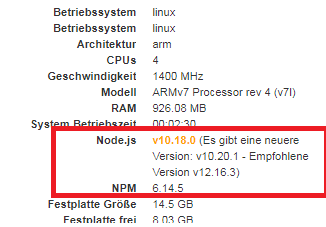
          Ich wollte meine Node Version nach dem Tutorial updaten (von 10 auf 12).. wenn ich nachdem update in der Konsole "node -v" eingebe kommt noch immer v10.18.0 obwohl ich auf v12 geupdatet habe. Bei "nodejs -v" kommt jedoch die v12.16.3.

          Weiss jemand woran das liegt? Besten Dank
          Systeminfo.png

          Thomas BraunT Online
          Thomas BraunT Online
          Thomas Braun
          Most Active
          schrieb am zuletzt editiert von
          #581

          @Dalmatino
          Vollständige Konsolenausgabe (inkl. Loginprompt) von

          nodejs -v && node -v && npm -v
          which nodejs && which node && which npm
          apt policy nodejs
          

          Bitte als Text in </> Code Tags, nicht als screenshot

          Linux-Werkzeugkasten:
          https://forum.iobroker.net/topic/42952/der-kleine-iobroker-linux-werkzeugkasten
          NodeJS Fixer Skript:
          https://forum.iobroker.net/topic/68035/iob-node-fix-skript
          iob_diag: curl -sLf -o diag.sh https://iobroker.net/diag.sh && bash diag.sh

          1 Antwort Letzte Antwort
          0
          • DalmatinoD Offline
            DalmatinoD Offline
            Dalmatino
            schrieb am zuletzt editiert von Dalmatino
            #582

            Hallo zusammen,

            Sorry, dass ich keinen Log bzw. zu wenig Daten publiziert habe :-1:
            Ja Anfänger trifft es gut, oder besser gesagt ein heimlicher Mitleser :hugging_face: . Nachdem ich mal fast alle Beiträge aus diesem Thread gelesen habe, konnte ich es selber mit "wagemutigen" Zügen lösen :v:

            Mein Vorgehen war wie folgt:

            which node -v
            which nodejs -v
            

            Die Pfade, welche es mir ergeben hat habe ich dann mit einem Remove Befehl gelöscht

            Anschliessend bin ich in den root Modus (Soll aber nicht empfehlenswert sein?) und habe noch mal alles neu installiert.. Das Ergebnis war erfolgreich:
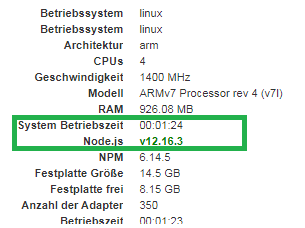
            systeminfo2.png

            Bis jetzt läuft eigentlich alles einwandfrei.

            @Jan1
            Jeder macht doch mal erste Schritte haha.. seid doch nicht so hart zu mir

            @skokarl
            Danke für dein Verständnis :+1:

            @Thomas-Braun
            Anbei der Code, ich hoffe trotz meines Vorgehens, dass noch alles i.O. ist?

            pi@SmartPuntamika:~ $ nodejs -v && node -v && npm -v
            v12.16.3
            v12.16.3
            6.14.5
            pi@SmartPuntamika:~ $ which nodejs && which node && which npm
            /usr/bin/nodejs
            /usr/bin/node
            /usr/bin/npm
            pi@SmartPuntamika:~ $ apt policy nodejs
            nodejs:
              Installiert:           12.16.3-1nodesource1
              Installationskandidat: 12.16.3-1nodesource1
              Versionstabelle:
             *** 12.16.3-1nodesource1 500
                    500 https://deb.nodesource.com/node_12.x stretch/main armhf Packages
                    100 /var/lib/dpkg/status
                 8.11.1~dfsg-2~bpo9+1 500
                    500 http://archive.raspberrypi.org/debian stretch/main armhf Packages
                 4.8.2~dfsg-1 500
                    500 http://raspbian.raspberrypi.org/raspbian stretch/main armhf Packages


            P.S. Tolles Forum, sehr rasche Reaktionszeiten und das Produkt ist super!:+1:

            Thomas BraunT 1 Antwort Letzte Antwort
            0
            • DalmatinoD Dalmatino

              Hallo zusammen,

              Sorry, dass ich keinen Log bzw. zu wenig Daten publiziert habe :-1:
              Ja Anfänger trifft es gut, oder besser gesagt ein heimlicher Mitleser :hugging_face: . Nachdem ich mal fast alle Beiträge aus diesem Thread gelesen habe, konnte ich es selber mit "wagemutigen" Zügen lösen :v:

              Mein Vorgehen war wie folgt:

              which node -v
              which nodejs -v
              

              Die Pfade, welche es mir ergeben hat habe ich dann mit einem Remove Befehl gelöscht

              Anschliessend bin ich in den root Modus (Soll aber nicht empfehlenswert sein?) und habe noch mal alles neu installiert.. Das Ergebnis war erfolgreich:
              systeminfo2.png

              Bis jetzt läuft eigentlich alles einwandfrei.

              @Jan1
              Jeder macht doch mal erste Schritte haha.. seid doch nicht so hart zu mir

              @skokarl
              Danke für dein Verständnis :+1:

              @Thomas-Braun
              Anbei der Code, ich hoffe trotz meines Vorgehens, dass noch alles i.O. ist?

              pi@SmartPuntamika:~ $ nodejs -v && node -v && npm -v
              v12.16.3
              v12.16.3
              6.14.5
              pi@SmartPuntamika:~ $ which nodejs && which node && which npm
              /usr/bin/nodejs
              /usr/bin/node
              /usr/bin/npm
              pi@SmartPuntamika:~ $ apt policy nodejs
              nodejs:
                Installiert:           12.16.3-1nodesource1
                Installationskandidat: 12.16.3-1nodesource1
                Versionstabelle:
               *** 12.16.3-1nodesource1 500
                      500 https://deb.nodesource.com/node_12.x stretch/main armhf Packages
                      100 /var/lib/dpkg/status
                   8.11.1~dfsg-2~bpo9+1 500
                      500 http://archive.raspberrypi.org/debian stretch/main armhf Packages
                   4.8.2~dfsg-1 500
                      500 http://raspbian.raspberrypi.org/raspbian stretch/main armhf Packages


              P.S. Tolles Forum, sehr rasche Reaktionszeiten und das Produkt ist super!:+1:

              Thomas BraunT Online
              Thomas BraunT Online
              Thomas Braun
              Most Active
              schrieb am zuletzt editiert von
              #583

              @Dalmatino Ja, schaut gut aus.

              Linux-Werkzeugkasten:
              https://forum.iobroker.net/topic/42952/der-kleine-iobroker-linux-werkzeugkasten
              NodeJS Fixer Skript:
              https://forum.iobroker.net/topic/68035/iob-node-fix-skript
              iob_diag: curl -sLf -o diag.sh https://iobroker.net/diag.sh && bash diag.sh

              1 Antwort Letzte Antwort
              0
              • Thomas BraunT Thomas Braun

                @Stefan_1969
                Nicht als root anmelden...

                Installiert ist jetzt 10.19.0 auf Buster.

                Aber die Version von Debian, nicht das Paket von nodesource. Und das wollen wir.

                Als user:

                iobroker stop
                sudo apt remove node
                curl -sL https://deb.nodesource.com/setup_12.x | sudo -E bash -
                sudo apt update
                sudo apt dist-upgrade
                iobroker start
                
                S Offline
                S Offline
                Stefan_1969
                schrieb am zuletzt editiert von
                #584

                @Thomas-Braun
                Bin leider erst jetzt dazu gekommen. Leider ist danach der Stand immer noch auf 10.19.0

                Ich verstehe nicht warum das bei mir nicht funktioniert?


                ioBroker, grafana, influx, mariaDB, pihole, MotionEye auf proxmox
                Geräte: Homematic, Shelly, Sonoff, Gosund, WEMOS

                Thomas BraunT 1 Antwort Letzte Antwort
                0
                • S Stefan_1969

                  @Thomas-Braun
                  Bin leider erst jetzt dazu gekommen. Leider ist danach der Stand immer noch auf 10.19.0

                  Ich verstehe nicht warum das bei mir nicht funktioniert?

                  Thomas BraunT Online
                  Thomas BraunT Online
                  Thomas Braun
                  Most Active
                  schrieb am zuletzt editiert von Thomas Braun
                  #585

                  @Stefan_1969
                  Du musst mich noch mal abholen...

                  lsb_release -a
                  apt policy nodejs
                  nodejs -v && node -v && npm -v
                  which nodejs  && which node && which npm
                  

                  [Edit:] Typo.

                  Linux-Werkzeugkasten:
                  https://forum.iobroker.net/topic/42952/der-kleine-iobroker-linux-werkzeugkasten
                  NodeJS Fixer Skript:
                  https://forum.iobroker.net/topic/68035/iob-node-fix-skript
                  iob_diag: curl -sLf -o diag.sh https://iobroker.net/diag.sh && bash diag.sh

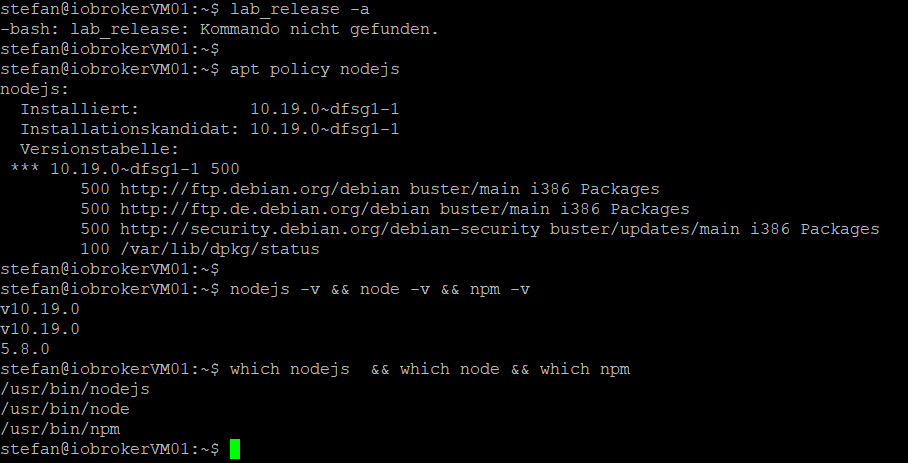
                  S 1 Antwort Letzte Antwort
                  0
                  • Thomas BraunT Thomas Braun

                    @Stefan_1969
                    Du musst mich noch mal abholen...

                    lsb_release -a
                    apt policy nodejs
                    nodejs -v && node -v && npm -v
                    which nodejs  && which node && which npm
                    

                    [Edit:] Typo.

                    S Offline
                    S Offline
                    Stefan_1969
                    schrieb am zuletzt editiert von
                    #586

                    @Thomas-Braun

                    d3b9108e-36c4-46d4-8f66-df76228edc3b-image.png


                    ioBroker, grafana, influx, mariaDB, pihole, MotionEye auf proxmox
                    Geräte: Homematic, Shelly, Sonoff, Gosund, WEMOS

                    Thomas BraunT 2 Antworten Letzte Antwort
                    0
                    • S Stefan_1969

                      @Thomas-Braun

                      d3b9108e-36c4-46d4-8f66-df76228edc3b-image.png

                      Thomas BraunT Online
                      Thomas BraunT Online
                      Thomas Braun
                      Most Active
                      schrieb am zuletzt editiert von
                      #587

                      @Stefan_1969 Bitte keine Screenshots, Textausgaben
                      hier mit </> Code Tags rein.

                      Linux-Werkzeugkasten:
                      https://forum.iobroker.net/topic/42952/der-kleine-iobroker-linux-werkzeugkasten
                      NodeJS Fixer Skript:
                      https://forum.iobroker.net/topic/68035/iob-node-fix-skript
                      iob_diag: curl -sLf -o diag.sh https://iobroker.net/diag.sh && bash diag.sh

                      S 1 Antwort Letzte Antwort
                      0
                      • S Stefan_1969

                        @Thomas-Braun

                        d3b9108e-36c4-46d4-8f66-df76228edc3b-image.png

                        Thomas BraunT Online
                        Thomas BraunT Online
                        Thomas Braun
                        Most Active
                        schrieb am zuletzt editiert von Thomas Braun
                        #588

                        @Stefan_1969

                        curl -sL https://deb.nodesource.com/setup_12.x | sudo -E bash -
                        sudo apt update 
                        sudo apt dist-upgrade
                        sudo apt remove nodejs node npm
                        sudo apt install nodejs


                        Linux-Werkzeugkasten:
                        https://forum.iobroker.net/topic/42952/der-kleine-iobroker-linux-werkzeugkasten
                        NodeJS Fixer Skript:
                        https://forum.iobroker.net/topic/68035/iob-node-fix-skript
                        iob_diag: curl -sLf -o diag.sh https://iobroker.net/diag.sh && bash diag.sh

                        S 1 Antwort Letzte Antwort
                        0
                        • Thomas BraunT Thomas Braun

                          @Stefan_1969 Bitte keine Screenshots, Textausgaben
                          hier mit </> Code Tags rein.

                          S Offline
                          S Offline
                          Stefan_1969
                          schrieb am zuletzt editiert von
                          #589

                          @Thomas-Braun

                          stefan@iobrokerVM01:~$ lsb_release -a
                          No LSB modules are available.
                          Distributor ID: Debian
                          Description:    Debian GNU/Linux 10 (buster)
                          Release:        10
                          Codename:       buster
                          stefan@iobrokerVM01:~$ apt policy nodejs
                          nodejs:
                            Installiert:           10.19.0~dfsg1-1
                            Installationskandidat: 10.19.0~dfsg1-1
                            Versionstabelle:
                           *** 10.19.0~dfsg1-1 500
                                  500 http://ftp.debian.org/debian buster/main i386 Packages
                                  500 http://ftp.de.debian.org/debian buster/main i386 Packages
                                  500 http://security.debian.org/debian-security buster/updates/main i386 Packages
                                  100 /var/lib/dpkg/status
                          stefan@iobrokerVM01:~$ nodejs -v && node -v && npm -v
                          v10.19.0
                          v10.19.0
                          5.8.0
                          stefan@iobrokerVM01:~$ which nodejs  && which node && which npm
                          /usr/bin/nodejs
                          /usr/bin/node
                          /usr/bin/npm
                          stefan@iobrokerVM01:~$


                          ioBroker, grafana, influx, mariaDB, pihole, MotionEye auf proxmox
                          Geräte: Homematic, Shelly, Sonoff, Gosund, WEMOS

                          1 Antwort Letzte Antwort
                          0
                          • Thomas BraunT Thomas Braun

                            @Stefan_1969

                            curl -sL https://deb.nodesource.com/setup_12.x | sudo -E bash -
                            sudo apt update 
                            sudo apt dist-upgrade
                            sudo apt remove nodejs node npm
                            sudo apt install nodejs
                            
                            
                            S Offline
                            S Offline
                            Stefan_1969
                            schrieb am zuletzt editiert von
                            #590

                            @Thomas-Braun sagte in [How-to] Node.js für ioBroker richtig updaten:

                            sudo apt remove nodejs node npm

                            stefan@iobrokerVM01:~$ sudo apt remove nodejs node npm
                            Paketlisten werden gelesen... Fertig
                            Abh▒ngigkeitsbaum wird aufgebaut.
                            Statusinformationen werden eingelesen.... Fertig
                            E: Paket node kann nicht gefunden werden.


                            ioBroker, grafana, influx, mariaDB, pihole, MotionEye auf proxmox
                            Geräte: Homematic, Shelly, Sonoff, Gosund, WEMOS

                            Thomas BraunT 1 Antwort Letzte Antwort
                            0
                            • S Stefan_1969

                              @Thomas-Braun sagte in [How-to] Node.js für ioBroker richtig updaten:

                              sudo apt remove nodejs node npm

                              stefan@iobrokerVM01:~$ sudo apt remove nodejs node npm
                              Paketlisten werden gelesen... Fertig
                              Abh▒ngigkeitsbaum wird aufgebaut.
                              Statusinformationen werden eingelesen.... Fertig
                              E: Paket node kann nicht gefunden werden.
                              
                              
                              Thomas BraunT Online
                              Thomas BraunT Online
                              Thomas Braun
                              Most Active
                              schrieb am zuletzt editiert von
                              #591

                              @Stefan_1969
                              Okay, versuch den mal

                              sudo apt update
                              apt policy nodejs
                              

                              dann.

                              Linux-Werkzeugkasten:
                              https://forum.iobroker.net/topic/42952/der-kleine-iobroker-linux-werkzeugkasten
                              NodeJS Fixer Skript:
                              https://forum.iobroker.net/topic/68035/iob-node-fix-skript
                              iob_diag: curl -sLf -o diag.sh https://iobroker.net/diag.sh && bash diag.sh

                              S 1 Antwort Letzte Antwort
                              0
                              • Thomas BraunT Thomas Braun

                                @Stefan_1969
                                Okay, versuch den mal

                                sudo apt update
                                apt policy nodejs
                                

                                dann.

                                S Offline
                                S Offline
                                Stefan_1969
                                schrieb am zuletzt editiert von
                                #592

                                @Thomas-Braun sagte in [How-to] Node.js für ioBroker richtig updaten:

                                sudo apt update apt policy nodejs

                                stefan@iobrokerVM01:~$ sudo apt update
                                OK:1 http://ftp.de.debian.org/debian buster InRelease
                                OK:2 http://security.debian.org/debian-security buster/updates InRelease
                                OK:3 http://ftp.de.debian.org/debian buster-updates InRelease
                                OK:4 https://deb.nodesource.com/node_12.x buster InRelease
                                OK:5 http://ftp.debian.org/debian buster InRelease
                                Paketlisten werden gelesen... Fertig
                                Abh▒ngigkeitsbaum wird aufgebaut.
                                Statusinformationen werden eingelesen.... Fertig
                                Alle Pakete sind aktuell.
                                stefan@iobrokerVM01:~$ apt policy nodejs
                                nodejs:
                                  Installiert:           10.19.0~dfsg1-1
                                  Installationskandidat: 10.19.0~dfsg1-1
                                  Versionstabelle:
                                 *** 10.19.0~dfsg1-1 500
                                        500 http://ftp.debian.org/debian buster/main i386 Packages
                                        500 http://ftp.de.debian.org/debian buster/main i386 Packages
                                        500 http://security.debian.org/debian-security buster/updates/main i386 Packages
                                        100 /var/lib/dpkg/status
                                stefan@iobrokerVM01:~$


                                ioBroker, grafana, influx, mariaDB, pihole, MotionEye auf proxmox
                                Geräte: Homematic, Shelly, Sonoff, Gosund, WEMOS

                                Thomas BraunT 1 Antwort Letzte Antwort
                                0
                                • S Stefan_1969

                                  @Thomas-Braun sagte in [How-to] Node.js für ioBroker richtig updaten:

                                  sudo apt update apt policy nodejs

                                  stefan@iobrokerVM01:~$ sudo apt update
                                  OK:1 http://ftp.de.debian.org/debian buster InRelease
                                  OK:2 http://security.debian.org/debian-security buster/updates InRelease
                                  OK:3 http://ftp.de.debian.org/debian buster-updates InRelease
                                  OK:4 https://deb.nodesource.com/node_12.x buster InRelease
                                  OK:5 http://ftp.debian.org/debian buster InRelease
                                  Paketlisten werden gelesen... Fertig
                                  Abh▒ngigkeitsbaum wird aufgebaut.
                                  Statusinformationen werden eingelesen.... Fertig
                                  Alle Pakete sind aktuell.
                                  stefan@iobrokerVM01:~$ apt policy nodejs
                                  nodejs:
                                    Installiert:           10.19.0~dfsg1-1
                                    Installationskandidat: 10.19.0~dfsg1-1
                                    Versionstabelle:
                                   *** 10.19.0~dfsg1-1 500
                                          500 http://ftp.debian.org/debian buster/main i386 Packages
                                          500 http://ftp.de.debian.org/debian buster/main i386 Packages
                                          500 http://security.debian.org/debian-security buster/updates/main i386 Packages
                                          100 /var/lib/dpkg/status
                                  stefan@iobrokerVM01:~$
                                  
                                  
                                  Thomas BraunT Online
                                  Thomas BraunT Online
                                  Thomas Braun
                                  Most Active
                                  schrieb am zuletzt editiert von Thomas Braun
                                  #593

                                  @Stefan_1969

                                  cat /etc/apt/sources.list.d/nodesource.list
                                  uname -a
                                  

                                  Das System läuft in einer VM, oder? Kann es sein, dass du der nur 32bit / i386 als Virtualisierte Prozessorarchitektur mitgegeben hast? Ich vermute nämlich ganz stark dass nodesource dafür keine Pakete mehr baut, weil die eigentlich auch keiner mehr wirklich verwendet.

                                  Linux-Werkzeugkasten:
                                  https://forum.iobroker.net/topic/42952/der-kleine-iobroker-linux-werkzeugkasten
                                  NodeJS Fixer Skript:
                                  https://forum.iobroker.net/topic/68035/iob-node-fix-skript
                                  iob_diag: curl -sLf -o diag.sh https://iobroker.net/diag.sh && bash diag.sh

                                  S 1 Antwort Letzte Antwort
                                  0
                                  • Thomas BraunT Thomas Braun

                                    @Stefan_1969

                                    cat /etc/apt/sources.list.d/nodesource.list
                                    uname -a
                                    

                                    Das System läuft in einer VM, oder? Kann es sein, dass du der nur 32bit / i386 als Virtualisierte Prozessorarchitektur mitgegeben hast? Ich vermute nämlich ganz stark dass nodesource dafür keine Pakete mehr baut, weil die eigentlich auch keiner mehr wirklich verwendet.

                                    S Offline
                                    S Offline
                                    Stefan_1969
                                    schrieb am zuletzt editiert von Stefan_1969
                                    #594

                                    @Thomas-Braun sagte in [How-to] Node.js für ioBroker richtig updaten:

                                    cat /etc/apt/sources.list.d/nodesource.list
                                    uname -a

                                    stefan@iobrokerVM01:~$ cat /etc/apt/sources.list.d/nodesource.list
                                    deb https://deb.nodesource.com/node_12.x buster main
                                    deb-src https://deb.nodesource.com/node_12.x buster main
                                    stefan@iobrokerVM01:~$ uname -a
                                    Linux iobrokerVM01 4.19.0-8-686-pae #1 SMP Debian 4.19.98-1+deb10u1 (2020-04-27) i686 GNU/Linux
                                    stefan@iobrokerVM01:~$


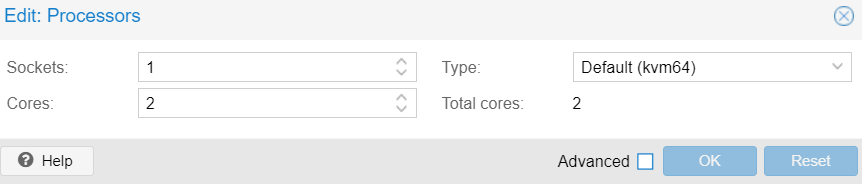
                                    ioBroker läuft in einer VM unter Proxmox 6.0-4
                                    50ef496e-6e4f-4978-b9a2-8d4f89ccac1d-image.png


                                    ioBroker, grafana, influx, mariaDB, pihole, MotionEye auf proxmox
                                    Geräte: Homematic, Shelly, Sonoff, Gosund, WEMOS

                                    Thomas BraunT 1 Antwort Letzte Antwort
                                    0
                                    • S Stefan_1969

                                      @Thomas-Braun sagte in [How-to] Node.js für ioBroker richtig updaten:

                                      cat /etc/apt/sources.list.d/nodesource.list
                                      uname -a

                                      stefan@iobrokerVM01:~$ cat /etc/apt/sources.list.d/nodesource.list
                                      deb https://deb.nodesource.com/node_12.x buster main
                                      deb-src https://deb.nodesource.com/node_12.x buster main
                                      stefan@iobrokerVM01:~$ uname -a
                                      Linux iobrokerVM01 4.19.0-8-686-pae #1 SMP Debian 4.19.98-1+deb10u1 (2020-04-27) i686 GNU/Linux
                                      stefan@iobrokerVM01:~$


                                      ioBroker läuft in einer VM unter Proxmox 6.0-4
                                      50ef496e-6e4f-4978-b9a2-8d4f89ccac1d-image.png

                                      Thomas BraunT Online
                                      Thomas BraunT Online
                                      Thomas Braun
                                      Most Active
                                      schrieb am zuletzt editiert von
                                      #595

                                      @Stefan_1969
                                      Ja, da läuft ein 32bit-System.
                                      Da bekommst du die für 64bit-gebauten nodesource-Pakete nicht rein.

                                      Linux-Werkzeugkasten:
                                      https://forum.iobroker.net/topic/42952/der-kleine-iobroker-linux-werkzeugkasten
                                      NodeJS Fixer Skript:
                                      https://forum.iobroker.net/topic/68035/iob-node-fix-skript
                                      iob_diag: curl -sLf -o diag.sh https://iobroker.net/diag.sh && bash diag.sh

                                      S 1 Antwort Letzte Antwort
                                      0
                                      • Thomas BraunT Thomas Braun

                                        @Stefan_1969
                                        Ja, da läuft ein 32bit-System.
                                        Da bekommst du die für 64bit-gebauten nodesource-Pakete nicht rein.

                                        S Offline
                                        S Offline
                                        Stefan_1969
                                        schrieb am zuletzt editiert von
                                        #596

                                        @Thomas-Braun
                                        ... ich dachte kvm64 wäre 64-Bit

                                        Woran hast Du das erkannt?!


                                        ioBroker, grafana, influx, mariaDB, pihole, MotionEye auf proxmox
                                        Geräte: Homematic, Shelly, Sonoff, Gosund, WEMOS

                                        J Thomas BraunT 2 Antworten Letzte Antwort
                                        0
                                        • S Stefan_1969

                                          @Thomas-Braun
                                          ... ich dachte kvm64 wäre 64-Bit

                                          Woran hast Du das erkannt?!

                                          J Offline
                                          J Offline
                                          Jan1
                                          schrieb am zuletzt editiert von Jan1
                                          #597

                                          @Stefan_1969
                                          ich denke daran:

                                          Linux iobrokerVM01 4.19.0-8-686-pae #1 SMP Debian 4.19.98-1+deb10u1 (2020-04-27) **i686** GNU/Linux
                                          

                                          Bei 64 Bit steht immer irgendwo 64 dabei

                                          1 Antwort Letzte Antwort
                                          0
                                          Antworten
                                          • In einem neuen Thema antworten
                                          Anmelden zum Antworten
                                          • Älteste zuerst
                                          • Neuste zuerst
                                          • Meiste Stimmen


                                          Support us

                                          ioBroker
                                          Community Adapters
                                          Donate
                                          FAQ Cloud / IOT
                                          HowTo: Node.js-Update
                                          HowTo: Backup/Restore
                                          Downloads
                                          BLOG

                                          559

                                          Online

                                          32.4k

                                          Benutzer

                                          81.5k

                                          Themen

                                          1.3m

                                          Beiträge
                                          Community
                                          Impressum | Datenschutz-Bestimmungen | Nutzungsbedingungen | Einwilligungseinstellungen
                                          ioBroker Community 2014-2025
                                          logo
                                          • Anmelden

                                          • Du hast noch kein Konto? Registrieren

                                          • Anmelden oder registrieren, um zu suchen
                                          • Erster Beitrag
                                            Letzter Beitrag
                                          0
                                          • Home
                                          • Aktuell
                                          • Tags
                                          • Ungelesen 0
                                          • Kategorien
                                          • Unreplied
                                          • Beliebt
                                          • GitHub
                                          • Docu
                                          • Hilfe