
NEWS




Daten PV Anlage Envertech Wechselrichter
-
Hallo mike2712,
hast du inzwischen eine Lösung gefunden? Ich hab das selbe Problem, behelfe mir mit einer FritzDect Steckdose, die die Leistung mißt. Das funktioniert problemlos.
Ich finde es sehr ärgerlich, daß Envertech so unkommunikativ ist.
Edit:
ich habe gerade 2 interessante Seiten dazu gefunden:
Solar Auswertung - mit Envertech und Python Programm
www.envertertecportal.com V2 – Daten auslesenIch hab es nur überflogen. Es scheint also machbar zu sein. Ob meine Kenntnisse dazu ausreichen, weiß ich nicht. Kenne mich mit Python nicht aus. Muß ich mir noch mal in Ruhe anschauen.
Edit2:
Vielleicht würde das EVB300 unser Problem lösen: "Locally storing Data" -
Hi Zusammen,
ist an dem Thema noch jemand dran? Ich würde auch zu gerne meine Envertech-Anlage auslesen. Alternativ scheint es bei dem 2. Link auf der Website auch eine Anleitung für eine CCU2 zu geben - darüber könnte man ja theoretisch die Daten in iobroker bekommen. -
Hallo mike2712,
hast du inzwischen eine Lösung gefunden? Ich hab das selbe Problem, behelfe mir mit einer FritzDect Steckdose, die die Leistung mißt. Das funktioniert problemlos.
Ich finde es sehr ärgerlich, daß Envertech so unkommunikativ ist.
Edit:
ich habe gerade 2 interessante Seiten dazu gefunden:
Solar Auswertung - mit Envertech und Python Programm
www.envertertecportal.com V2 – Daten auslesenIch hab es nur überflogen. Es scheint also machbar zu sein. Ob meine Kenntnisse dazu ausreichen, weiß ich nicht. Kenne mich mit Python nicht aus. Muß ich mir noch mal in Ruhe anschauen.
Edit2:
Vielleicht würde das EVB300 unser Problem lösen: "Locally storing Data"@Onkel-Fritz wenn es mit der FritzboxDect klappt, warum nicht mit einer gosund/blitzwolf Messsteckdose? Ich war heute schon daran meine Blitzwolf dafür auszuprobieren. Habe es zeitlich dann leider nicht mehr geschafft. Vielleicht die Tage mal..
-
falls nochmal jemand auf dieses Thema in der Zukunft stoßt:
Web Daten auslesen mit IoBroker
-
falls nochmal jemand auf dieses Thema in der Zukunft stoßt:
Web Daten auslesen mit IoBroker
@adcrafter27
wird der adapter noch weiter entwickelt? -
@adcrafter27
wird der adapter noch weiter entwickelt?@jackdaniel
bekomme Ihn nicht installiert.$ iobroker url https://github.com/adcrafter27/ioBroker.envertech-pv.git --host iobroker --debug install adcrafter27/ioBroker.envertech-pv#17e658f9aed59c663da796229b2783f1aaf93c7a NPM version: 6.14.14 npm install adcrafter27/ioBroker.envertech-pv#17e658f9aed59c663da796229b2783f1aaf93c7a --prefix "/opt/iobroker" (System call) > node-aead-crypto@2.2.1 preinstall /opt/iobroker/node_modules/node-aead-crypto> node lib/preinstall.js node-aead-crypto not needed on this system, since all ciphers are natively supported npm WARN optional SKIPPING OPTIONAL DEPENDENCY: fsevents@2.3.2 (node_modules/fsevents):npm WARN notsup SKIPPING OPTIONAL DEPENDENCY: Unsupported platform for fsevents@2.3.2: wanted {"os":"darwin","arch":"any"} (current: {"os":"linux","arch":"x64"}) npm WARN optional SKIPPING OPTIONAL DEPENDENCY: osx-temperature-sensor@1.0.7 (node_modules/osx-temperature-sensor): npm WARN notsup SKIPPING OPTIONAL DEPENDENCY: Unsupported platform for osx-temperature-sensor@1.0.7: wanted {"os":"darwin","arch":"any"} (current: {"os":"linux","arch":"x64"}) npm WARN optional SKIPPING OPTIONAL DEPENDENCY: node-aead-crypto@2.2.1 (node_modules/node-aead-crypto):npm WARN optional SKIPPING OPTIONAL DEPENDENCY: node-aead-crypto@2.2.1 preinstall: `node lib/preinstall.js` npm WARN optional SKIPPING OPTIONAL DEPENDENCY: Exit status 1 + iobroker.envertech-pv@0.0.7updated 1 package in 22.236s 42 packages are looking for funding run `npm fund` for details upload [4] envertech-pv.admin /opt/iobroker/node_modules/iobroker.envertech-pv/admin/words.js words.js application/javascript upload [3] envertech-pv.admin /opt/iobroker/node_modules/iobroker.envertech-pv/admin/style.css style.css text/css upload [2] envertech-pv.admin /opt/iobroker/node_modules/iobroker.envertech-pv/admin/index_m.html index_m.html text/html upload [1] envertech-pv.admin /opt/iobroker/node_modules/iobroker.envertech-pv/admin/envertech.png envertech.png image/png upload [0] envertech-pv.admin /opt/iobroker/node_modules/iobroker.envertech-pv/admin/admin.d.ts admin.d.ts video/mp2t Process exited with code 0Hat jemand eine Idee woran das liegen könnte?
Lg MikeioBroker im Docker auf Qnap TS-453A 16GB Ram 4-Bay
-
@jackdaniel
bekomme Ihn nicht installiert.$ iobroker url https://github.com/adcrafter27/ioBroker.envertech-pv.git --host iobroker --debug install adcrafter27/ioBroker.envertech-pv#17e658f9aed59c663da796229b2783f1aaf93c7a NPM version: 6.14.14 npm install adcrafter27/ioBroker.envertech-pv#17e658f9aed59c663da796229b2783f1aaf93c7a --prefix "/opt/iobroker" (System call) > node-aead-crypto@2.2.1 preinstall /opt/iobroker/node_modules/node-aead-crypto> node lib/preinstall.js node-aead-crypto not needed on this system, since all ciphers are natively supported npm WARN optional SKIPPING OPTIONAL DEPENDENCY: fsevents@2.3.2 (node_modules/fsevents):npm WARN notsup SKIPPING OPTIONAL DEPENDENCY: Unsupported platform for fsevents@2.3.2: wanted {"os":"darwin","arch":"any"} (current: {"os":"linux","arch":"x64"}) npm WARN optional SKIPPING OPTIONAL DEPENDENCY: osx-temperature-sensor@1.0.7 (node_modules/osx-temperature-sensor): npm WARN notsup SKIPPING OPTIONAL DEPENDENCY: Unsupported platform for osx-temperature-sensor@1.0.7: wanted {"os":"darwin","arch":"any"} (current: {"os":"linux","arch":"x64"}) npm WARN optional SKIPPING OPTIONAL DEPENDENCY: node-aead-crypto@2.2.1 (node_modules/node-aead-crypto):npm WARN optional SKIPPING OPTIONAL DEPENDENCY: node-aead-crypto@2.2.1 preinstall: `node lib/preinstall.js` npm WARN optional SKIPPING OPTIONAL DEPENDENCY: Exit status 1 + iobroker.envertech-pv@0.0.7updated 1 package in 22.236s 42 packages are looking for funding run `npm fund` for details upload [4] envertech-pv.admin /opt/iobroker/node_modules/iobroker.envertech-pv/admin/words.js words.js application/javascript upload [3] envertech-pv.admin /opt/iobroker/node_modules/iobroker.envertech-pv/admin/style.css style.css text/css upload [2] envertech-pv.admin /opt/iobroker/node_modules/iobroker.envertech-pv/admin/index_m.html index_m.html text/html upload [1] envertech-pv.admin /opt/iobroker/node_modules/iobroker.envertech-pv/admin/envertech.png envertech.png image/png upload [0] envertech-pv.admin /opt/iobroker/node_modules/iobroker.envertech-pv/admin/admin.d.ts admin.d.ts video/mp2t Process exited with code 0Hat jemand eine Idee woran das liegen könnte?
Lg Mike@mike2712 sagte in Daten PV Anlage Envertech Wechselrichter:
bekomme Ihn nicht installiert.
wieso nicht?
@mike2712 sagte in Daten PV Anlage Envertech Wechselrichter:
Process exited with code 0
= erfolgreich installiert
-
Wurde der Adapter von Github installiert? Dann hilft oftmals der upload button und dann die Instanz per + manuell installieren
-
Wurde der Adapter von Github installiert? Dann hilft oftmals der upload button und dann die Instanz per + manuell installieren
Hallo, vielen Dank für die Hilfe.
Ja irgendwie hatte ich da etwas falsch verstanden,
nach dem ich den von Github geladen habe war der Adapter lediglich zum installieren verfügbar, ich habe gedacht das es schon die Installation gewesen ist.
Offensichtlich ist das dann nur die Verfügbarkeit zur Installation des Adapters?
Aber dann war dieser unter den Adapter sichtbar und lies sich auch ohne Probleme installieren.
Aber nach dem ersten Installation, wie oben beschrieben ist kein Adapter unter den Instanzen gewesen.
Lg MikeioBroker im Docker auf Qnap TS-453A 16GB Ram 4-Bay
-
Hallo, vielen Dank für die Hilfe.
Ja irgendwie hatte ich da etwas falsch verstanden,
nach dem ich den von Github geladen habe war der Adapter lediglich zum installieren verfügbar, ich habe gedacht das es schon die Installation gewesen ist.
Offensichtlich ist das dann nur die Verfügbarkeit zur Installation des Adapters?
Aber dann war dieser unter den Adapter sichtbar und lies sich auch ohne Probleme installieren.
Aber nach dem ersten Installation, wie oben beschrieben ist kein Adapter unter den Instanzen gewesen.
Lg Mike@mike2712 bitte die Begriffe Installation, Adapter, Instanzen nicht vermischen
https://www.iobroker.net/#de/documentation/tutorial/adapter.md -
Hallo
Ich wolte den adapter auch installieren bekomme bei der Installation einen Fehler Medlung
C:\iobroker>iobroker url https://github.com/adcrafter27/ioBroker.envertech-pv.git
C:\iobroker>node node_modules/iobroker.js-controller/iobroker.js url https://github.com/adcrafter27/ioBroker.envertech-pv.git
install adcrafter27/ioBroker.envertech-pv#46284699d12834e862402428e0153f1150a2b307
NPM version: 6.14.15
npm install adcrafter27/ioBroker.envertech-pv#46284699d12834e862402428e0153f1150a2b307 --loglevel error (System call)
npm ERR! code ENOENT
npm ERR! syscall spawn git
npm ERR! path git
npm ERR! errno -4058
npm ERR! enoent Error while executing:
npm ERR! enoent undefined ls-remote -h -t ssh://git@github.com/adcrafter27/ioBroker.envertech-pv.git
npm ERR! enoent
npm ERR! enoent
npm ERR! enoent spawn git ENOENT
npm ERR! enoent This is related to npm not being able to find a file.
npm ERR! enoentnpm ERR! A complete log of this run can be found in:
npm ERR! C:\Users\adminsys\AppData\Roaming\npm-cache_logs\2022-03-23T22_57_17_862Z-debug.log
host.SioBroker1 Cannot install adcrafter27/ioBroker.envertech-pv#46284699d12834e862402428e0153f1150a2b307: 4294963238 -
keine ahnung von einem windows system
wenn ich etwas aus dem git installieren dann über die "katze" -
Ich habe Windows und den Adapter gerade probeweise installiert
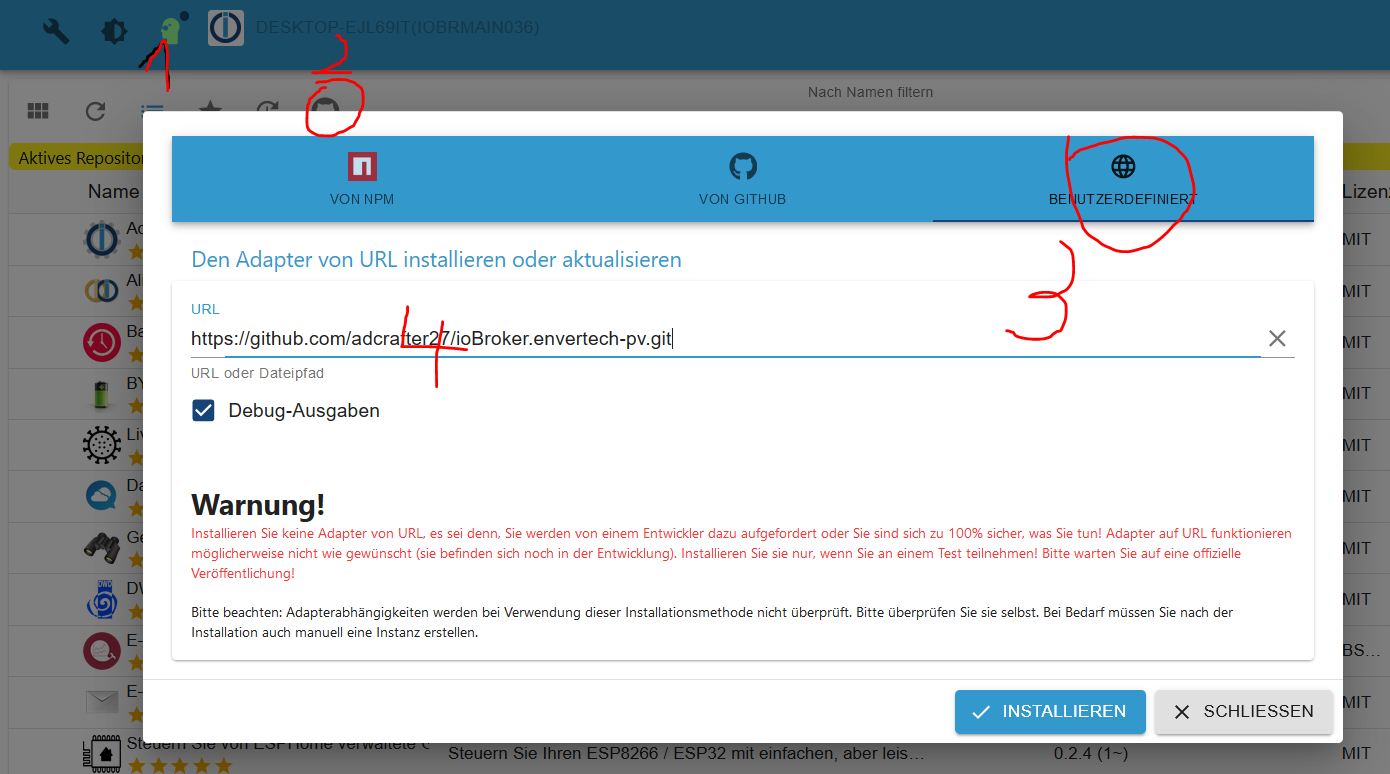
-
Expertenkopf
-
Githubs Katzenpolyp
-
Tab Benutzerdefiniert
-
Url eintragen
-
Installieren
Der erste Installationsversuch endet mit Error 25.
Das ist bei mir aber leider so üblich.
Dann einfach nochmals installieren. Wird mit code 0 ok beendet$ iobroker url https://github.com/adcrafter27/ioBroker.envertech-pv.git --host DESKTOPT(ioBrMain036) --debug install adcrafter27/ioBroker.envertech-pv#46284699d12834e862402428e0153f1150a2b307 NPM version: 6.14.15 npm install adcrafter27/ioBroker.envertech-pv#46284699d12834e862402428e0153f1150a2b307 (System call) npm WARN deprecated request@2.88.2: request has been deprecated, see https://github.com/request/request/issues/3142 npm WARN jscs-loader@0.3.0 requires a peer of jscs@^3.0.3 but none is installed. You must install peer dependencies yourself. + iobroker.envertech-pv@0.0.8 added 4 packages from 4 contributors, removed 1 package, moved 2 packages and audited 2798 packages in 84.925s 151 packages are looking for funding run `npm fund` for details found 228 vulnerabilities (25 low, 72 moderate, 122 high, 9 critical) run `npm audit fix` to fix them, or `npm audit` for details upload [4] envertech-pv.admin C:/Program Files/iobroker/ioBrMain036/node_modules/iobroker.envertech-pv/admin/words.js words.js application/javascript upload [3] envertech-pv.admin C:/Program Files/iobroker/ioBrMain036/node_modules/iobroker.envertech-pv/admin/style.css style.css text/css upload [2] envertech-pv.admin C:/Program Files/iobroker/ioBrMain036/node_modules/iobroker.envertech-pv/admin/index_m.html index_m.html text/html upload [1] envertech-pv.admin C:/Program Files/iobroker/ioBrMain036/node_modules/iobroker.envertech-pv/admin/envertech.png envertech.png image/png upload [0] envertech-pv.admin C:/Program Files/iobroker/ioBrMain036/node_modules/iobroker.envertech-pv/admin/admin.d.ts admin.d.ts video/mp2t Process exited with code 0Dann Datenupload drücken. Braucht man bei Spezialinstallation von git

Auch das wird mit Code 0 erfolgreich beendet
$ iobroker upload envertech-pv

upload [4] envertech-pv.admin C:/Program Files/iobroker/ioBrMain036/node_modules/iobroker.envertech-pv/admin/words.js words.js application/javascript

upload [3] envertech-pv.admin C:/Program Files/iobroker/ioBrMain036/node_modules/iobroker.envertech-pv/admin/style.css style.css text/css

upload [2] envertech-pv.admin C:/Program Files/iobroker/ioBrMain036/node_modules/iobroker.envertech-pv/admin/index_m.html index_m.html text/html

upload [1] envertech-pv.admin C:/Program Files/iobroker/ioBrMain036/node_modules/iobroker.envertech-pv/admin/envertech.png envertech.png image/png

upload [0] envertech-pv.admin C:/Program Files/iobroker/ioBrMain036/node_modules/iobroker.envertech-pv/admin/admin.d.ts admin.d.ts video/mp2t

Process exited with code 0
Dann noch eine Instanz anlegen mit dem +

Auch das geht
$ iobroker add envertech-pv auto --host DESKTOP-IT(ioBrMain036)

host.DESKTOP-T(ioBrMain036) create instance envertech-pv

host.DESKTOP-T(ioBrMain036) object system.adapter.envertech-pv.0.logLevel created

host.DESKTOP-T(ioBrMain036) object system.adapter.envertech-pv.0.sigKill created

host.DESKTOP-T(ioBrMain036) object system.adapter.envertech-pv.0.eventLoopLag created

host.DESKTOP-T(ioBrMain036) object system.adapter.envertech-pv.0.outputCount created

host.DESKTOP-T(ioBrMain036) object system.adapter.envertech-pv.0.inputCount created

host.DESKTOP-T(ioBrMain036) object system.adapter.envertech-pv.0.uptime created

host.DESKTOP-T(ioBrMain036) object system.adapter.envertech-pv.0.memRss created

host.DESKTOP-T(ioBrMain036) object system.adapter.envertech-pv.0.memHeapTotal created

host.DESKTOPT(ioBrMain036) object system.adapter.envertech-pv.0.memHeapUsed created

host.DESKTOP-T(ioBrMain036) object system.adapter.envertech-pv.0.cputime created

host.DESKTOP-E(ioBrMain036) object system.adapter.envertech-pv.0.cpu created

host.DESKTOP-T(ioBrMain036) object system.adapter.envertech-pv.0.compactMode created

host.DESKTOP-T(ioBrMain036) object system.adapter.envertech-pv.0.connected created

host.DESKTOP-(ioBrMain036) object system.adapter.envertech-pv.0.alive created

host.DESKTOP-T(ioBrMain036) object system.adapter.envertech-pv.0 created

Process exited with code 0
Und die Instanz ist da
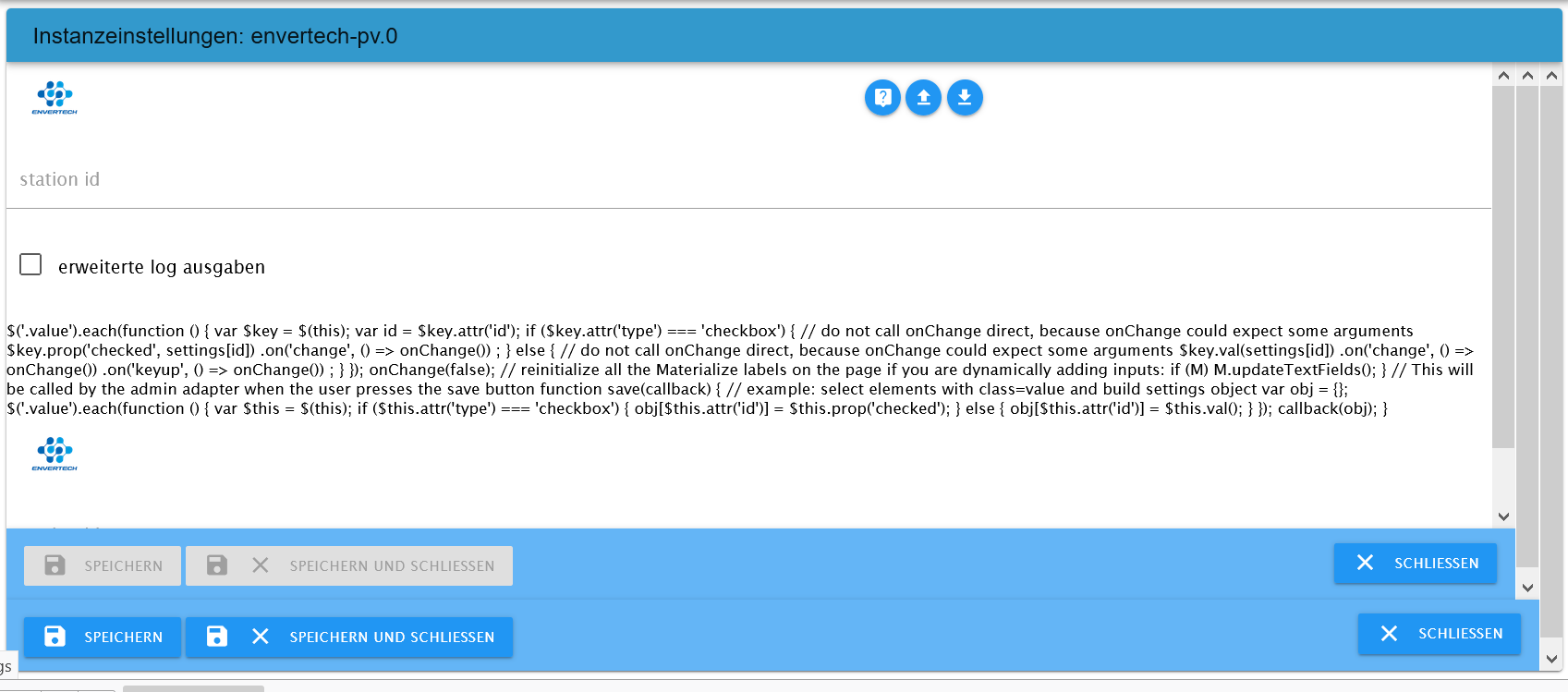
Weiter komme ich nicht, habe keinen Envertech.
Aber gezeigt, daß es auch unter Win installierbar ist.
Github Installationen sind umfangreicher, einige manuelle Schritte -




Support us
770
Online32.5k
Users81.6k
Topics1.3m
Posts