Skip to content
  • Home
  • Recent
  • Tags
  • 0 Unread 0
  • Categories
  • Unreplied
  • Popular
  • GitHub
  • Docu
  • Hilfe
Skins
  • Light
  • Brite
  • Cerulean
  • Cosmo
  • Flatly
  • Journal
  • Litera
  • Lumen
  • Lux
  • Materia
  • Minty
  • Morph
  • Pulse
  • Sandstone
  • Simplex
  • Sketchy
  • Spacelab
  • United
  • Yeti
  • Zephyr
  • Dark
  • Cyborg
  • Darkly
  • Quartz
  • Slate
  • Solar
  • Superhero
  • Vapor

  • Default (No Skin)
  • No Skin
Collapse
ioBroker Logo

Community Forum

donate donate
  1. ioBroker Community Home
  2. Deutsch
  3. ioBroker Allgemein
  4. [Testing] Material UI Adapter

NEWS

  • Jahresrückblick 2025 – unser neuer Blogbeitrag ist online! ✨
    BluefoxB
    Bluefox
    17
    1
    2.0k

  • Neuer Blogbeitrag: Monatsrückblick - Dezember 2025 🎄
    BluefoxB
    Bluefox
    13
    1
    925

  • Weihnachtsangebot 2025! 🎄
    BluefoxB
    Bluefox
    25
    1
    2.2k

[Testing] Material UI Adapter

Scheduled Pinned Locked Moved ioBroker Allgemein
227 Posts 54 Posters 48.5k Views 21 Watching
  • Oldest to Newest
  • Newest to Oldest
  • Most Votes
Reply
  • Reply as topic
Log in to reply
This topic has been deleted. Only users with topic management privileges can see it.
  • S southparkler

    Kann mir jmd. sagen wie ich Material UI wieder installiert bekomme?

    pi@ioBroker-Pi:/opt/iobroker $ npm install iobroker.material
    npm WARN bl@0.7.0 requires a peer of stream-browserify@* but none is installed. You must install peer dependencies yourself.
    
    npm ERR! path /opt/iobroker/node_modules/.staging/@firebase
    npm ERR! code EACCES
    npm ERR! errno -13
    npm ERR! syscall rmdir
    npm ERR! Error: EACCES: permission denied, rmdir '/opt/iobroker/node_modules/.staging/@firebase'
    npm ERR!  { Error: EACCES: permission denied, rmdir '/opt/iobroker/node_modules/.staging/@firebase'
    npm ERR!   stack: 'Error: EACCES: permission denied, rmdir \'/opt/iobroker/node_modules/.staging/@firebase\'',
    npm ERR!   errno: -13,
    npm ERR!   code: 'EACCES',
    npm ERR!   syscall: 'rmdir',
    npm ERR!   path: '/opt/iobroker/node_modules/.staging/@firebase' }
    npm ERR!
    npm ERR! The operation was rejected by your operating system.
    npm ERR! It is likely you do not have the permissions to access this file as the current user
    npm ERR!
    npm ERR! If you believe this might be a permissions issue, please double-check the
    npm ERR! permissions of the file and its containing directories, or try running
    npm ERR! the command again as root/Administrator (though this is not recommended).
    
    npm ERR! A complete log of this run can be found in:
    npm ERR!     /home/pi/.npm/_logs/2019-07-07T10_58_58_712Z-debug.log
    pi@ioBroker-Pi:/opt/iobroker $ ^C
    pi@ioBroker-Pi:/opt/iobroker $
    
    
    sigi234S Online
    sigi234S Online
    sigi234
    Forum Testing Most Active
    wrote on last edited by
    #195

    @southparkler sagte in [Testing] Material UI Adapter:

    Kann mir jmd. sagen wie ich Material UI wieder installiert bekomme?

    pi@ioBroker-Pi:/opt/iobroker $ npm install iobroker.material
    npm WARN bl@0.7.0 requires a peer of stream-browserify@* but none is installed. You must install peer dependencies yourself.
    
    npm ERR! path /opt/iobroker/node_modules/.staging/@firebase
    npm ERR! code EACCES
    npm ERR! errno -13
    npm ERR! syscall rmdir
    npm ERR! Error: EACCES: permission denied, rmdir '/opt/iobroker/node_modules/.staging/@firebase'
    npm ERR!  { Error: EACCES: permission denied, rmdir '/opt/iobroker/node_modules/.staging/@firebase'
    npm ERR!   stack: 'Error: EACCES: permission denied, rmdir \'/opt/iobroker/node_modules/.staging/@firebase\'',
    npm ERR!   errno: -13,
    npm ERR!   code: 'EACCES',
    npm ERR!   syscall: 'rmdir',
    npm ERR!   path: '/opt/iobroker/node_modules/.staging/@firebase' }
    npm ERR!
    npm ERR! The operation was rejected by your operating system.
    npm ERR! It is likely you do not have the permissions to access this file as the current user
    npm ERR!
    npm ERR! If you believe this might be a permissions issue, please double-check the
    npm ERR! permissions of the file and its containing directories, or try running
    npm ERR! the command again as root/Administrator (though this is not recommended).
    
    npm ERR! A complete log of this run can be found in:
    npm ERR!     /home/pi/.npm/_logs/2019-07-07T10_58_58_712Z-debug.log
    pi@ioBroker-Pi:/opt/iobroker $ ^C
    pi@ioBroker-Pi:/opt/iobroker $


    Du hast keine Schreibrechte! Hast du den Fixer ausgeführt?

    Bitte benutzt das Voting rechts unten im Beitrag wenn er euch geholfen hat.
    Immer Daten sichern!

    S 1 Reply Last reply
    0
    • sigi234S sigi234

      @southparkler sagte in [Testing] Material UI Adapter:

      Kann mir jmd. sagen wie ich Material UI wieder installiert bekomme?

      pi@ioBroker-Pi:/opt/iobroker $ npm install iobroker.material
      npm WARN bl@0.7.0 requires a peer of stream-browserify@* but none is installed. You must install peer dependencies yourself.
      
      npm ERR! path /opt/iobroker/node_modules/.staging/@firebase
      npm ERR! code EACCES
      npm ERR! errno -13
      npm ERR! syscall rmdir
      npm ERR! Error: EACCES: permission denied, rmdir '/opt/iobroker/node_modules/.staging/@firebase'
      npm ERR!  { Error: EACCES: permission denied, rmdir '/opt/iobroker/node_modules/.staging/@firebase'
      npm ERR!   stack: 'Error: EACCES: permission denied, rmdir \'/opt/iobroker/node_modules/.staging/@firebase\'',
      npm ERR!   errno: -13,
      npm ERR!   code: 'EACCES',
      npm ERR!   syscall: 'rmdir',
      npm ERR!   path: '/opt/iobroker/node_modules/.staging/@firebase' }
      npm ERR!
      npm ERR! The operation was rejected by your operating system.
      npm ERR! It is likely you do not have the permissions to access this file as the current user
      npm ERR!
      npm ERR! If you believe this might be a permissions issue, please double-check the
      npm ERR! permissions of the file and its containing directories, or try running
      npm ERR! the command again as root/Administrator (though this is not recommended).
      
      npm ERR! A complete log of this run can be found in:
      npm ERR!     /home/pi/.npm/_logs/2019-07-07T10_58_58_712Z-debug.log
      pi@ioBroker-Pi:/opt/iobroker $ ^C
      pi@ioBroker-Pi:/opt/iobroker $


      Du hast keine Schreibrechte! Hast du den Fixer ausgeführt?

      S Offline
      S Offline
      southparkler
      wrote on last edited by southparkler
      #196

      @sigi234
      Ach verdammt, ich hab sudo vergessen...

      iBroker läuft auf Raspi 3B über Gbit Lan

      Geräte:

      Licht: Hue Lampen mit Bridge, Osram Smart Plug, Tradfri Lampen über Hue, Yeelight Lampen

      Sensoren: Xiaomi Aqara Sensoren (Zigbee Stick)

      Heizung: Fritz!D…

      sigi234S 1 Reply Last reply
      0
      • S southparkler

        @sigi234
        Ach verdammt, ich hab sudo vergessen...

        sigi234S Online
        sigi234S Online
        sigi234
        Forum Testing Most Active
        wrote on last edited by
        #197

        @southparkler sagte in [Testing] Material UI Adapter:

        @sigi234
        Ach verdammt, ich hab sudo vergessen...

        Ja, das hilft............:smirk:

        Bitte benutzt das Voting rechts unten im Beitrag wenn er euch geholfen hat.
        Immer Daten sichern!

        1 Reply Last reply
        0
        • S Offline
          S Offline
          southparkler
          wrote on last edited by southparkler
          #198

          Geht leider nicht, hab immer noch diese Meldung.
          Installations Fixer hab ich auch schon durch.

          Es gibt danach keinen Eintrag unter Instanzen für Material UI.

          Linux ioBroker-Pi 4.19.42-v7+ #1219 SMP Tue May 14 21:20:58 BST 2019 armv7l
          
          The programs included with the Debian GNU/Linux system are free software;
          the exact distribution terms for each program are described in the
          individual files in /usr/share/doc/*/copyright.
          
          Debian GNU/Linux comes with ABSOLUTELY NO WARRANTY, to the extent
          permitted by applicable law.
          Last login: Sun Jul  7 20:15:51 2019 from 192.168.2.109
          pi@ioBroker-Pi:~ $ cd /opt/iobroker
          pi@ioBroker-Pi:/opt/iobroker $ sudo npm install iobroker.material
          npm WARN bl@0.7.0 requires a peer of stream-browserify@* but none is installed. You must install peer dependencies yourself.
          
          + iobroker.material@0.10.6
          updated 1 package and audited 18090 packages in 96.896s
          found 59 vulnerabilities (40 low, 3 moderate, 16 high)
            run `npm audit fix` to fix them, or `npm audit` for details
          pi@ioBroker-Pi:/opt/iobroker $`

          iBroker läuft auf Raspi 3B über Gbit Lan

          Geräte:

          Licht: Hue Lampen mit Bridge, Osram Smart Plug, Tradfri Lampen über Hue, Yeelight Lampen

          Sensoren: Xiaomi Aqara Sensoren (Zigbee Stick)

          Heizung: Fritz!D…

          thewhoboxT 1 Reply Last reply
          0
          • S southparkler

            Geht leider nicht, hab immer noch diese Meldung.
            Installations Fixer hab ich auch schon durch.

            Es gibt danach keinen Eintrag unter Instanzen für Material UI.

            Linux ioBroker-Pi 4.19.42-v7+ #1219 SMP Tue May 14 21:20:58 BST 2019 armv7l
            
            The programs included with the Debian GNU/Linux system are free software;
            the exact distribution terms for each program are described in the
            individual files in /usr/share/doc/*/copyright.
            
            Debian GNU/Linux comes with ABSOLUTELY NO WARRANTY, to the extent
            permitted by applicable law.
            Last login: Sun Jul  7 20:15:51 2019 from 192.168.2.109
            pi@ioBroker-Pi:~ $ cd /opt/iobroker
            pi@ioBroker-Pi:/opt/iobroker $ sudo npm install iobroker.material
            npm WARN bl@0.7.0 requires a peer of stream-browserify@* but none is installed. You must install peer dependencies yourself.
            
            + iobroker.material@0.10.6
            updated 1 package and audited 18090 packages in 96.896s
            found 59 vulnerabilities (40 low, 3 moderate, 16 high)
              run `npm audit fix` to fix them, or `npm audit` for details
            pi@ioBroker-Pi:/opt/iobroker $`
            thewhoboxT Offline
            thewhoboxT Offline
            thewhobox
            wrote on last edited by
            #199

            @southparkler wenn du Adapter per commandozeile installierst, musst du die Instanzen selbst hinzufügen.

            Meine Adapter: emby | discovery
            Benutzt das Voting rechts unten im Beitrag wenn er euch geholfen hat.

            S 1 Reply Last reply
            0
            • thewhoboxT thewhobox

              @southparkler wenn du Adapter per commandozeile installierst, musst du die Instanzen selbst hinzufügen.

              S Offline
              S Offline
              southparkler
              wrote on last edited by
              #200

              @thewhobox

              Hab ich gemacht, beim Aufruf kommt dann folgende Meldung

              File 0.10.6/index.html not found: Not exists``

              iBroker läuft auf Raspi 3B über Gbit Lan

              Geräte:

              Licht: Hue Lampen mit Bridge, Osram Smart Plug, Tradfri Lampen über Hue, Yeelight Lampen

              Sensoren: Xiaomi Aqara Sensoren (Zigbee Stick)

              Heizung: Fritz!D…

              1 Reply Last reply
              0
              • smileS Offline
                smileS Offline
                smile
                wrote on last edited by
                #201

                Hi zusammen. Ich wollte ebenfalls gerne den Material UI Adapter testen. Leider lässt er sich nicht installieren.
                Wenn ich im Latest Repository den Adapter über die Admin Oberfläche installieren will, dann schließt sich das Installationsfenster recht schnell.
                Schaue ich dann unter "Instanzen", so findet sich folgendes Bild:
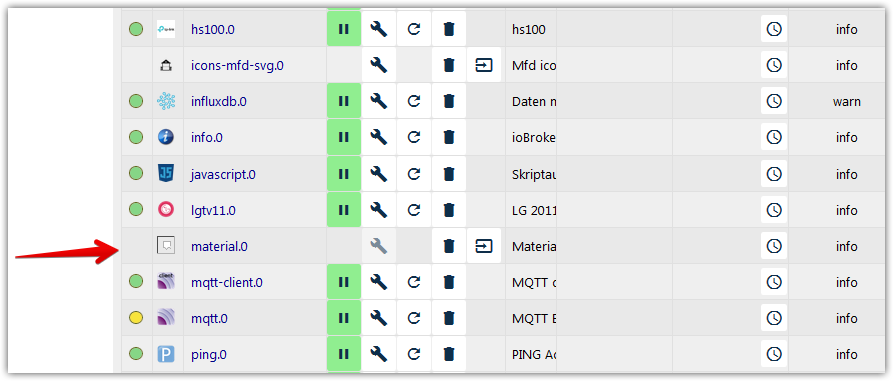
                instances - ioBroker - Mozilla Firefox 2019-07-18 19.12.03.png

                Wenn ich versuche die Webseite des Material Adapters aufzurufen, kommt folgender Fehler: File 0.10.6/index.html not found: Not exists

                Meine Web-Server Version ist 2.4.1; iobroker etc. siehe Signatur. Hat jemand ein ähnliches Problem?


                io.broker @ debian @ virtualbox @ Windows 10 Pro / Node 18.17.1, npm 9.6.7 / CCU3 / IR.Trans Server / Daslight 4 / Mobotix IP Cams / Qnap NAS / Sonos /

                Mein Rolladen - Blockly: https://forum.iobroker.net/topic/6442/das-ultimative-markisen-rolladen-blockly-script

                crunchipC 1 Reply Last reply
                0
                • S Offline
                  S Offline
                  southparkler
                  wrote on last edited by
                  #202

                  Mein Problem ist identisch.

                  Hab schon alles versucht, auch ein downgrade läuft nicht. Werd mir jetzt dann was anderes suchen...

                  iBroker läuft auf Raspi 3B über Gbit Lan

                  Geräte:

                  Licht: Hue Lampen mit Bridge, Osram Smart Plug, Tradfri Lampen über Hue, Yeelight Lampen

                  Sensoren: Xiaomi Aqara Sensoren (Zigbee Stick)

                  Heizung: Fritz!D…

                  1 Reply Last reply
                  0
                  • smileS smile

                    Hi zusammen. Ich wollte ebenfalls gerne den Material UI Adapter testen. Leider lässt er sich nicht installieren.
                    Wenn ich im Latest Repository den Adapter über die Admin Oberfläche installieren will, dann schließt sich das Installationsfenster recht schnell.
                    Schaue ich dann unter "Instanzen", so findet sich folgendes Bild:
                    instances - ioBroker - Mozilla Firefox 2019-07-18 19.12.03.png

                    Wenn ich versuche die Webseite des Material Adapters aufzurufen, kommt folgender Fehler: File 0.10.6/index.html not found: Not exists

                    Meine Web-Server Version ist 2.4.1; iobroker etc. siehe Signatur. Hat jemand ein ähnliches Problem?

                    crunchipC Offline
                    crunchipC Offline
                    crunchip
                    Forum Testing Most Active
                    wrote on last edited by
                    #203

                    @smile bei der Installation kannst du unten links Schliessen wenn fertig ausschalten, dann bleibt dein Fenster geöffnet

                    umgestiegen von Proxmox auf Unraid

                    smileS 1 Reply Last reply
                    0
                    • crunchipC crunchip

                      @smile bei der Installation kannst du unten links Schliessen wenn fertig ausschalten, dann bleibt dein Fenster geöffnet

                      smileS Offline
                      smileS Offline
                      smile
                      wrote on last edited by
                      #204

                      @crunchip Ja das weiß ich, das behebt nur leider den Fehler nicht.


                      io.broker @ debian @ virtualbox @ Windows 10 Pro / Node 18.17.1, npm 9.6.7 / CCU3 / IR.Trans Server / Daslight 4 / Mobotix IP Cams / Qnap NAS / Sonos /

                      Mein Rolladen - Blockly: https://forum.iobroker.net/topic/6442/das-ultimative-markisen-rolladen-blockly-script

                      crunchipC 1 Reply Last reply
                      0
                      • smileS smile

                        @crunchip Ja das weiß ich, das behebt nur leider den Fehler nicht.

                        crunchipC Offline
                        crunchipC Offline
                        crunchip
                        Forum Testing Most Active
                        wrote on last edited by
                        #205

                        @smile aber man kann lesen welcher Fehler da steht und vllt hier rein schreiben, denn deine frage war, ob jemand ein ähnliches Problem hat.
                        Ohne zu wissen welche Meldungen erscheinen, kann auch niemand diese Frage beantworten:wink:

                        umgestiegen von Proxmox auf Unraid

                        smileS 1 Reply Last reply
                        0
                        • crunchipC crunchip

                          @smile aber man kann lesen welcher Fehler da steht und vllt hier rein schreiben, denn deine frage war, ob jemand ein ähnliches Problem hat.
                          Ohne zu wissen welche Meldungen erscheinen, kann auch niemand diese Frage beantworten:wink:

                          smileS Offline
                          smileS Offline
                          smile
                          wrote on last edited by Jey Cee
                          #206

                          @crunchip Da gebe ich dir natürlich vollkommen Recht :-) Leider steht da gefühlt für mich nicht viel nützliches drin:

                          $ ./iobroker add material  --host DJ-Server
                          host.DJ-Server create instance material
                          host.DJ-Server object material.0 created
                          host.DJ-Server object system.adapter.material.upload created
                          host.DJ-Server object system.adapter.material.0 created
                          process exited with code 0
                          

                          MOD Edit Jey Cee: Code/Log in Code Tags gepackt. Bitte benutzt die Code Tags Funktion -> </>


                          io.broker @ debian @ virtualbox @ Windows 10 Pro / Node 18.17.1, npm 9.6.7 / CCU3 / IR.Trans Server / Daslight 4 / Mobotix IP Cams / Qnap NAS / Sonos /

                          Mein Rolladen - Blockly: https://forum.iobroker.net/topic/6442/das-ultimative-markisen-rolladen-blockly-script

                          crunchipC 1 Reply Last reply
                          0
                          • smileS smile

                            @crunchip Da gebe ich dir natürlich vollkommen Recht :-) Leider steht da gefühlt für mich nicht viel nützliches drin:

                            $ ./iobroker add material  --host DJ-Server
                            host.DJ-Server create instance material
                            host.DJ-Server object material.0 created
                            host.DJ-Server object system.adapter.material.upload created
                            host.DJ-Server object system.adapter.material.0 created
                            process exited with code 0
                            

                            MOD Edit Jey Cee: Code/Log in Code Tags gepackt. Bitte benutzt die Code Tags Funktion -> </>

                            crunchipC Offline
                            crunchipC Offline
                            crunchip
                            Forum Testing Most Active
                            wrote on last edited by
                            #207

                            @smile das ist aber nicht die komplette Meldung der Installation

                            umgestiegen von Proxmox auf Unraid

                            1 Reply Last reply
                            0
                            • smileS Offline
                              smileS Offline
                              smile
                              wrote on last edited by
                              #208

                              Hm gibt es noch einen anderen Weg die Meldung zu bekommen oder eine Art erweiterte Meldung? Mir wäre nur nicht bekannt wie?
                              So sieht das bei mir aus:
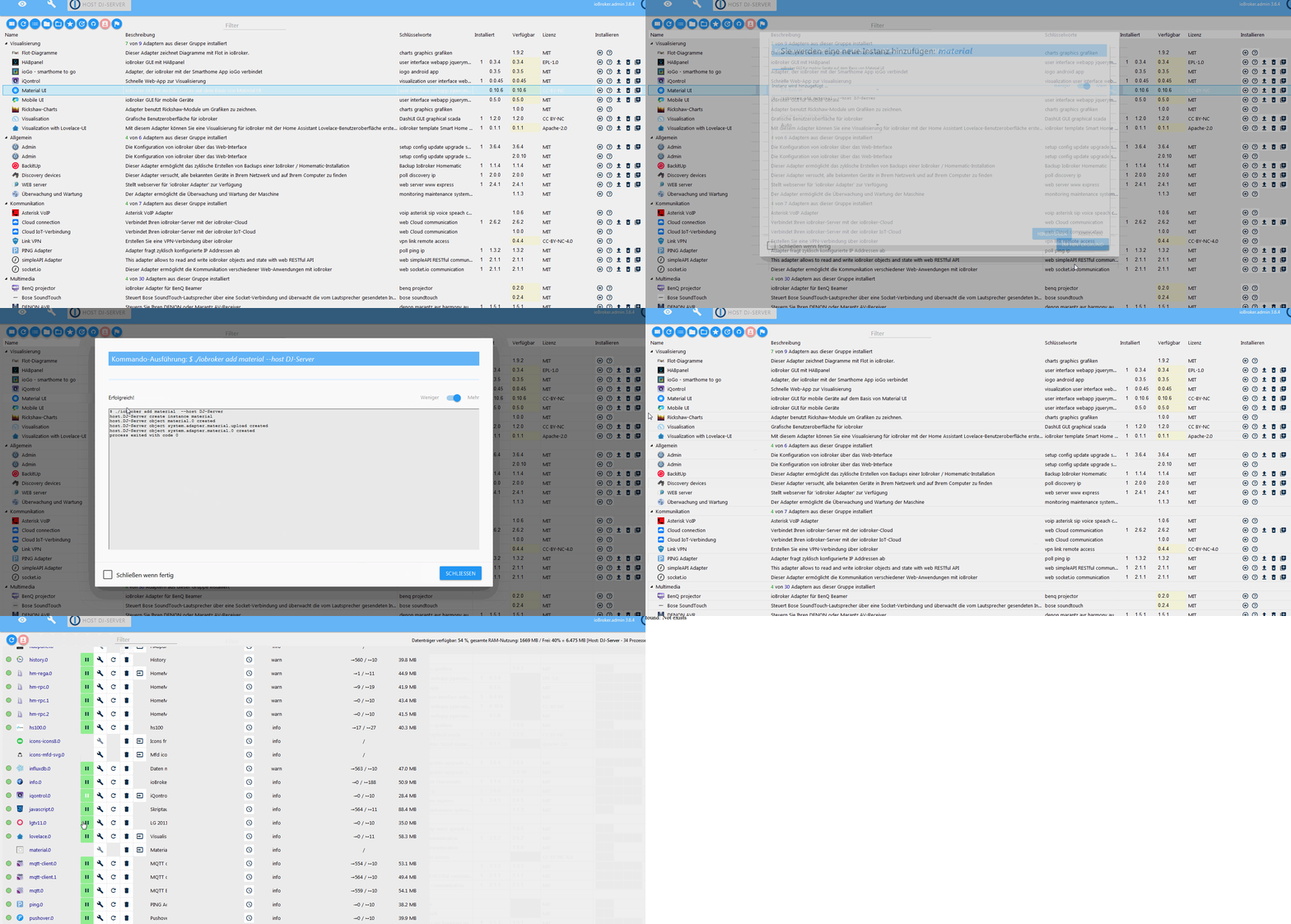
                              iobroker material.ui adapter.gif

                              Ich würde zu gerne den Adapter nutzen und testen.


                              io.broker @ debian @ virtualbox @ Windows 10 Pro / Node 18.17.1, npm 9.6.7 / CCU3 / IR.Trans Server / Daslight 4 / Mobotix IP Cams / Qnap NAS / Sonos /

                              Mein Rolladen - Blockly: https://forum.iobroker.net/topic/6442/das-ultimative-markisen-rolladen-blockly-script

                              crunchipC 1 Reply Last reply
                              0
                              • smileS smile

                                Hm gibt es noch einen anderen Weg die Meldung zu bekommen oder eine Art erweiterte Meldung? Mir wäre nur nicht bekannt wie?
                                So sieht das bei mir aus:
                                iobroker material.ui adapter.gif

                                Ich würde zu gerne den Adapter nutzen und testen.

                                crunchipC Offline
                                crunchipC Offline
                                crunchip
                                Forum Testing Most Active
                                wrote on last edited by crunchip
                                #209

                                @smile du installierst ja auch nicht den Adapter, sondern fügst nur die Instanz hinzu
                                lösch den Adapter nochmal und installiere neu, die Instanz sollte dann automatisch erstellt werden

                                umgestiegen von Proxmox auf Unraid

                                smileS 1 Reply Last reply
                                0
                                • crunchipC crunchip

                                  @smile du installierst ja auch nicht den Adapter, sondern fügst nur die Instanz hinzu
                                  lösch den Adapter nochmal und installiere neu, die Instanz sollte dann automatisch erstellt werden

                                  smileS Offline
                                  smileS Offline
                                  smile
                                  wrote on last edited by
                                  #210

                                  @crunchip Was ist da der Unterschied? So installiere ich jeden Adapter.
                                  Den Adapter deinstalliert und neu Installiert habe ich vermutlich schon 10 mal. :cry:


                                  io.broker @ debian @ virtualbox @ Windows 10 Pro / Node 18.17.1, npm 9.6.7 / CCU3 / IR.Trans Server / Daslight 4 / Mobotix IP Cams / Qnap NAS / Sonos /

                                  Mein Rolladen - Blockly: https://forum.iobroker.net/topic/6442/das-ultimative-markisen-rolladen-blockly-script

                                  crunchipC 1 Reply Last reply
                                  0
                                  • smileS smile

                                    @crunchip Was ist da der Unterschied? So installiere ich jeden Adapter.
                                    Den Adapter deinstalliert und neu Installiert habe ich vermutlich schon 10 mal. :cry:

                                    crunchipC Offline
                                    crunchipC Offline
                                    crunchip
                                    Forum Testing Most Active
                                    wrote on last edited by
                                    #211

                                    @smile das was du hier zeigst, ist das hinzufügen einer Instanz, aber nicht die Installation des Adapter selbst

                                    umgestiegen von Proxmox auf Unraid

                                    smileS 1 Reply Last reply
                                    0
                                    • crunchipC crunchip

                                      @smile das was du hier zeigst, ist das hinzufügen einer Instanz, aber nicht die Installation des Adapter selbst

                                      smileS Offline
                                      smileS Offline
                                      smile
                                      wrote on last edited by
                                      #212

                                      @crunchip Hier habe ich nun nochmal etwas mehr Log bekommen nach dem Versuch das ganze über die Konsole zu installieren:

                                      C:\ioBroker>npm install iobroker.material
                                      
                                      > authenticate-pam@1.0.2 install C:\ioBroker\node_modules\authenticate-pam
                                      > node-gyp rebuild
                                      
                                      
                                      C:\ioBroker\node_modules\authenticate-pam>if not defined npm_config_node_gyp (node "C:\Users\DJ-Server\AppData\Roaming\npm\node_modules\npm\node_modules\npm-lifecycle\node-gyp-bin\\..\..\node_modules\node-gyp\bin\node-gyp.js" rebuild )  else (node "C:\Users\DJ-Server\AppData\Roaming\npm\node_modules\npm\node_modules\node-gyp\bin\node-gyp.js" rebuild )
                                      Die Projekte in dieser Projektmappe werden nacheinander erstellt. Um eine parallele Erstellung zu ermöglichen, müssen Sie den Schalter "/m" hinzufügen.
                                        authenticate_pam.cc
                                        win_delay_load_hook.cc
                                      c:\iobroker\node_modules\authenticate-pam\authenticate_pam.cc(24): fatal error C1083: Datei (Include) kann nicht geöffn
                                      et werden: "unistd.h": No such file or directory [C:\ioBroker\node_modules\authenticate-pam\build\authenticate_pam.vcxp
                                      roj]
                                      gyp ERR! build error
                                      gyp ERR! stack Error: `C:\Program Files (x86)\Microsoft Visual Studio\2017\BuildTools\MSBuild\15.0\Bin\MSBuild.exe` failed with exit code: 1
                                      gyp ERR! stack     at ChildProcess.onExit (C:\Users\DJ-Server\AppData\Roaming\npm\node_modules\npm\node_modules\node-gyp\lib\build.js:262:23)
                                      gyp ERR! stack     at ChildProcess.emit (events.js:198:13)
                                      gyp ERR! stack     at Process.ChildProcess._handle.onexit (internal/child_process.js:248:12)
                                      gyp ERR! System Windows_NT 10.0.17763
                                      gyp ERR! command "C:\\Program Files\\nodejs\\node.exe" "C:\\Users\\DJ-Server\\AppData\\Roaming\\npm\\node_modules\\npm\\node_modules\\node-gyp\\bin\\node-gyp.js" "rebuild"
                                      gyp ERR! cwd C:\ioBroker\node_modules\authenticate-pam
                                      gyp ERR! node -v v10.16.0
                                      gyp ERR! node-gyp -v v3.8.0
                                      gyp ERR! not ok
                                      
                                      > mdns@2.5.0 install C:\ioBroker\node_modules\mdns
                                      > node-gyp rebuild
                                      
                                      
                                      C:\ioBroker\node_modules\mdns>if not defined npm_config_node_gyp (node "C:\Users\DJ-Server\AppData\Roaming\npm\node_modules\npm\node_modules\npm-lifecycle\node-gyp-bin\\..\..\node_modules\node-gyp\bin\node-gyp.js" rebuild )  else (node "C:\Users\DJ-Server\AppData\Roaming\npm\node_modules\npm\node_modules\node-gyp\bin\node-gyp.js" rebuild )
                                      Die Projekte in dieser Projektmappe werden nacheinander erstellt. Um eine parallele Erstellung zu ermöglichen, müssen Sie den Schalter "/m" hinzufügen.
                                        dns_sd.cpp
                                        dns_service_browse.cpp
                                        dns_service_enumerate_domains.cpp
                                        dns_service_get_addr_info.cpp
                                      c:\iobroker\node_modules\mdns\src\mdns.hpp(32): fatal error C1083: Datei (Include) kann nicht geöffnet werden: "dns_sd.
                                      h": No such file or directory (Quelldatei wird kompiliert ..\src\dns_service_enumerate_domains.cpp) [C:\ioBroker\node_m
                                      odules\mdns\build\dns_sd_bindings.vcxproj]
                                        dns_service_process_result.cpp
                                      c:\iobroker\node_modules\mdns\src\mdns.hpp(32): fatal error C1083: Datei (Include) kann nicht geöffnet werden: "dns_sd.
                                      h": No such file or directory (Quelldatei wird kompiliert ..\src\dns_service_browse.cpp) [C:\ioBroker\node_modules\mdns
                                      \build\dns_sd_bindings.vcxproj]
                                      c:\iobroker\node_modules\mdns\src\mdns.hpp(32): fatal error C1083: Datei (Include) kann nicht geöffnet werden: "dns_sd.
                                      h": No such file or directory (Quelldatei wird kompiliert ..\src\dns_sd.cpp) [C:\ioBroker\node_modules\mdns\build\dns_s
                                      d_bindings.vcxproj]
                                        dns_service_ref.cpp
                                        dns_service_ref_deallocate.cpp
                                      c:\iobroker\node_modules\mdns\src\mdns.hpp(32): fatal error C1083: Datei (Include) kann nicht geöffnet werden: "dns_sd.
                                      h": No such file or directory (Quelldatei wird kompiliert ..\src\dns_service_get_addr_info.cpp) [C:\ioBroker\node_modul
                                      es\mdns\build\dns_sd_bindings.vcxproj]
                                        dns_service_ref_sock_fd.cpp
                                      c:\iobroker\node_modules\mdns\src\mdns.hpp(32): fatal error C1083: Datei (Include) kann nicht geöffnet werden: "dns_sd.
                                      h": No such file or directory (Quelldatei wird kompiliert ..\src\dns_service_ref_deallocate.cpp) [C:\ioBroker\node_modu
                                      les\mdns\build\dns_sd_bindings.vcxproj]
                                      c:\iobroker\node_modules\mdns\src\mdns.hpp(32): fatal error C1083: Datei (Include) kann nicht geöffnet werden: "dns_sd.
                                      h": No such file or directory (Quelldatei wird kompiliert ..\src\dns_service_ref.cpp) [C:\ioBroker\node_modules\mdns\bu
                                      ild\dns_sd_bindings.vcxproj]
                                        dns_service_register.cpp
                                        dns_service_resolve.cpp
                                      c:\iobroker\node_modules\mdns\src\mdns.hpp(32): fatal error C1083: Datei (Include) kann nicht geöffnet werden: "dns_sd.
                                      h": No such file or directory (Quelldatei wird kompiliert ..\src\dns_service_process_result.cpp) [C:\ioBroker\node_modu
                                      les\mdns\build\dns_sd_bindings.vcxproj]
                                      c:\iobroker\node_modules\mdns\src\mdns.hpp(32): fatal error C1083: Datei (Include) kann nicht geöffnet werden: "dns_sd.
                                      h": No such file or directory (Quelldatei wird kompiliert ..\src\dns_service_ref_sock_fd.cpp) [C:\ioBroker\node_modules
                                      \mdns\build\dns_sd_bindings.vcxproj]
                                        dns_service_update_record.cpp
                                        mdns_utils.cpp
                                      c:\iobroker\node_modules\mdns\src\mdns.hpp(32): fatal error C1083: Datei (Include) kann nicht geöffnet werden: "dns_sd.
                                      h": No such file or directory (Quelldatei wird kompiliert ..\src\dns_service_register.cpp) [C:\ioBroker\node_modules\md
                                      ns\build\dns_sd_bindings.vcxproj]
                                        network_interface.cpp
                                      c:\iobroker\node_modules\mdns\src\mdns.hpp(32): fatal error C1083: Datei (Include) kann nicht geöffnet werden: "dns_sd.
                                      h": No such file or directory (Quelldatei wird kompiliert ..\src\dns_service_resolve.cpp) [C:\ioBroker\node_modules\mdn
                                      s\build\dns_sd_bindings.vcxproj]
                                        socket_watcher.cpp
                                      c:\iobroker\node_modules\mdns\src\mdns.hpp(32): fatal error C1083: Datei (Include) kann nicht geöffnet werden: "dns_sd.
                                      h": No such file or directory (Quelldatei wird kompiliert ..\src\dns_service_update_record.cpp) [C:\ioBroker\node_modul
                                      es\mdns\build\dns_sd_bindings.vcxproj]
                                      c:\iobroker\node_modules\mdns\src\mdns.hpp(32): fatal error C1083: Datei (Include) kann nicht geöffnet werden: "dns_sd.
                                      h": No such file or directory (Quelldatei wird kompiliert ..\src\mdns_utils.cpp) [C:\ioBroker\node_modules\mdns\build\d
                                      ns_sd_bindings.vcxproj]
                                        txt_record_ref.cpp
                                        txt_record_create.cpp
                                      c:\iobroker\node_modules\mdns\src\mdns.hpp(32): fatal error C1083: Datei (Include) kann nicht geöffnet werden: "dns_sd.
                                      h": No such file or directory (Quelldatei wird kompiliert ..\src\socket_watcher.cpp) [C:\ioBroker\node_modules\mdns\bui
                                      ld\dns_sd_bindings.vcxproj]
                                      c:\iobroker\node_modules\mdns\src\mdns.hpp(32): fatal error C1083: Datei (Include) kann nicht geöffnet werden: "dns_sd.
                                      h": No such file or directory (Quelldatei wird kompiliert ..\src\network_interface.cpp) [C:\ioBroker\node_modules\mdns\
                                      build\dns_sd_bindings.vcxproj]
                                        txt_record_deallocate.cpp
                                        txt_record_set_value.cpp
                                      c:\iobroker\node_modules\mdns\src\mdns.hpp(32): fatal error C1083: Datei (Include) kann nicht geöffnet werden: "dns_sd.
                                      h": No such file or directory (Quelldatei wird kompiliert ..\src\txt_record_ref.cpp) [C:\ioBroker\node_modules\mdns\bui
                                      ld\dns_sd_bindings.vcxproj]
                                        txt_record_get_length.cpp
                                      c:\iobroker\node_modules\mdns\src\mdns.hpp(32): fatal error C1083: Datei (Include) kann nicht geöffnet werden: "dns_sd.
                                      h": No such file or directory (Quelldatei wird kompiliert ..\src\txt_record_create.cpp) [C:\ioBroker\node_modules\mdns\
                                      build\dns_sd_bindings.vcxproj]
                                        txt_record_buffer_to_object.cpp
                                      c:\iobroker\node_modules\mdns\src\mdns.hpp(32): fatal error C1083: Datei (Include) kann nicht geöffnet werden: "dns_sd.
                                      h": No such file or directory (Quelldatei wird kompiliert ..\src\txt_record_deallocate.cpp) [C:\ioBroker\node_modules\m
                                      dns\build\dns_sd_bindings.vcxproj]
                                        win_delay_load_hook.cc
                                      c:\iobroker\node_modules\mdns\src\mdns.hpp(32): fatal error C1083: Datei (Include) kann nicht geöffnet werden: "dns_sd.
                                      h": No such file or directory (Quelldatei wird kompiliert ..\src\txt_record_set_value.cpp) [C:\ioBroker\node_modules\md
                                      ns\build\dns_sd_bindings.vcxproj]
                                      c:\iobroker\node_modules\mdns\src\mdns.hpp(32): fatal error C1083: Datei (Include) kann nicht geöffnet werden: "dns_sd.
                                      h": No such file or directory (Quelldatei wird kompiliert ..\src\txt_record_get_length.cpp) [C:\ioBroker\node_modules\m
                                      dns\build\dns_sd_bindings.vcxproj]
                                      c:\iobroker\node_modules\mdns\src\mdns.hpp(32): fatal error C1083: Datei (Include) kann nicht geöffnet werden: "dns_sd.
                                      h": No such file or directory (Quelldatei wird kompiliert ..\src\txt_record_buffer_to_object.cpp) [C:\ioBroker\node_mod
                                      ules\mdns\build\dns_sd_bindings.vcxproj]
                                      gyp ERR! build error
                                      gyp ERR! stack Error: `C:\Program Files (x86)\Microsoft Visual Studio\2017\BuildTools\MSBuild\15.0\Bin\MSBuild.exe` failed with exit code: 1
                                      gyp ERR! stack     at ChildProcess.onExit (C:\Users\DJ-Server\AppData\Roaming\npm\node_modules\npm\node_modules\node-gyp\lib\build.js:262:23)
                                      gyp ERR! stack     at ChildProcess.emit (events.js:198:13)
                                      gyp ERR! stack     at Process.ChildProcess._handle.onexit (internal/child_process.js:248:12)
                                      gyp ERR! System Windows_NT 10.0.17763
                                      gyp ERR! command "C:\\Program Files\\nodejs\\node.exe" "C:\\Users\\DJ-Server\\AppData\\Roaming\\npm\\node_modules\\npm\\node_modules\\node-gyp\\bin\\node-gyp.js" "rebuild"
                                      gyp ERR! cwd C:\ioBroker\node_modules\mdns
                                      gyp ERR! node -v v10.16.0
                                      gyp ERR! node-gyp -v v3.8.0
                                      gyp ERR! not ok
                                      
                                      > unix-dgram@0.2.3 install C:\ioBroker\node_modules\unix-dgram
                                      > node-gyp rebuild
                                      
                                      
                                      C:\ioBroker\node_modules\unix-dgram>if not defined npm_config_node_gyp (node "C:\Users\DJ-Server\AppData\Roaming\npm\node_modules\npm\node_modules\npm-lifecycle\node-gyp-bin\\..\..\node_modules\node-gyp\bin\node-gyp.js" rebuild )  else (node "C:\Users\DJ-Server\AppData\Roaming\npm\node_modules\npm\node_modules\node-gyp\bin\node-gyp.js" rebuild )
                                      Die Projekte in dieser Projektmappe werden nacheinander erstellt. Um eine parallele Erstellung zu ermöglichen, müssen Sie den Schalter "/m" hinzufügen.
                                        unix_dgram.cc
                                        win_delay_load_hook.cc
                                      c:\iobroker\node_modules\unix-dgram\node_modules\nan\nan_maybe_43_inl.h(88): error C2039: "ForceSet": Ist kein Element
                                      von "v8::Object" (Quelldatei wird kompiliert ..\src\unix_dgram.cc) [C:\ioBroker\node_modules\unix-dgram\build\unix_dgra
                                      m.vcxproj]
                                        c:\users\dj-server\.node-gyp\10.16.0\include\node\v8.h(3243): note: Siehe Deklaration von "v8::Object" (Quelldatei wi
                                        rd kompiliert ..\src\unix_dgram.cc)
                                      c:\iobroker\node_modules\unix-dgram\node_modules\nan\nan.h(816): warning C4996: 'node::MakeCallback': wurde als veralte
                                      t deklariert (Quelldatei wird kompiliert ..\src\unix_dgram.cc) [C:\ioBroker\node_modules\unix-dgram\build\unix_dgram.vc
                                      xproj]
                                        c:\users\dj-server\.node-gyp\10.16.0\include\node\node.h(176): note: Siehe Deklaration von "node::MakeCallback" (Quel
                                        ldatei wird kompiliert ..\src\unix_dgram.cc)
                                      c:\iobroker\node_modules\unix-dgram\node_modules\nan\nan.h(830): warning C4996: 'node::MakeCallback': wurde als veralte
                                      t deklariert (Quelldatei wird kompiliert ..\src\unix_dgram.cc) [C:\ioBroker\node_modules\unix-dgram\build\unix_dgram.vc
                                      xproj]
                                        c:\users\dj-server\.node-gyp\10.16.0\include\node\node.h(169): note: Siehe Deklaration von "node::MakeCallback" (Quel
                                        ldatei wird kompiliert ..\src\unix_dgram.cc)
                                      c:\iobroker\node_modules\unix-dgram\node_modules\nan\nan.h(844): warning C4996: 'node::MakeCallback': wurde als veralte
                                      t deklariert (Quelldatei wird kompiliert ..\src\unix_dgram.cc) [C:\ioBroker\node_modules\unix-dgram\build\unix_dgram.vc
                                      xproj]
                                        c:\users\dj-server\.node-gyp\10.16.0\include\node\node.h(162): note: Siehe Deklaration von "node::MakeCallback" (Quel
                                        ldatei wird kompiliert ..\src\unix_dgram.cc)
                                      c:\iobroker\node_modules\unix-dgram\node_modules\nan\nan.h(1457): warning C4996: 'node::MakeCallback': wurde als veralt
                                      et deklariert (Quelldatei wird kompiliert ..\src\unix_dgram.cc) [C:\ioBroker\node_modules\unix-dgram\build\unix_dgram.v
                                      cxproj]
                                        c:\users\dj-server\.node-gyp\10.16.0\include\node\node.h(176): note: Siehe Deklaration von "node::MakeCallback" (Quel
                                        ldatei wird kompiliert ..\src\unix_dgram.cc)
                                      c:\iobroker\node_modules\unix-dgram\src\unix_dgram.cc(9): fatal error C1083: Datei (Include) kann nicht geöffnet werden
                                      : "unistd.h": No such file or directory [C:\ioBroker\node_modules\unix-dgram\build\unix_dgram.vcxproj]
                                      gyp ERR! build error
                                      gyp ERR! stack Error: `C:\Program Files (x86)\Microsoft Visual Studio\2017\BuildTools\MSBuild\15.0\Bin\MSBuild.exe` failed with exit code: 1
                                      gyp ERR! stack     at ChildProcess.onExit (C:\Users\DJ-Server\AppData\Roaming\npm\node_modules\npm\node_modules\node-gyp\lib\build.js:262:23)
                                      gyp ERR! stack     at ChildProcess.emit (events.js:198:13)
                                      gyp ERR! stack     at Process.ChildProcess._handle.onexit (internal/child_process.js:248:12)
                                      gyp ERR! System Windows_NT 10.0.17763
                                      gyp ERR! command "C:\\Program Files\\nodejs\\node.exe" "C:\\Users\\DJ-Server\\AppData\\Roaming\\npm\\node_modules\\npm\\node_modules\\node-gyp\\bin\\node-gyp.js" "rebuild"
                                      gyp ERR! cwd C:\ioBroker\node_modules\unix-dgram
                                      gyp ERR! node -v v10.16.0
                                      gyp ERR! node-gyp -v v3.8.0
                                      gyp ERR! not ok
                                      npm WARN optional SKIPPING OPTIONAL DEPENDENCY: osx-temperature-sensor@1.0.3 (node_modules\osx-temperature-sensor):
                                      npm WARN notsup SKIPPING OPTIONAL DEPENDENCY: Unsupported platform for osx-temperature-sensor@1.0.3: wanted {"os":"darwin","arch":"any"} (current: {"os":"win32","arch":"x64"})
                                      npm WARN optional SKIPPING OPTIONAL DEPENDENCY: authenticate-pam@1.0.2 (node_modules\authenticate-pam):
                                      npm WARN optional SKIPPING OPTIONAL DEPENDENCY: authenticate-pam@1.0.2 install: `node-gyp rebuild`
                                      npm WARN optional SKIPPING OPTIONAL DEPENDENCY: Exit status 1
                                      npm WARN optional SKIPPING OPTIONAL DEPENDENCY: mdns@2.5.0 (node_modules\mdns):
                                      npm WARN optional SKIPPING OPTIONAL DEPENDENCY: mdns@2.5.0 install: `node-gyp rebuild`
                                      npm WARN optional SKIPPING OPTIONAL DEPENDENCY: Exit status 1
                                      npm WARN optional SKIPPING OPTIONAL DEPENDENCY: unix-dgram@0.2.3 (node_modules\unix-dgram):
                                      npm WARN optional SKIPPING OPTIONAL DEPENDENCY: unix-dgram@0.2.3 install: `node-gyp rebuild`
                                      npm WARN optional SKIPPING OPTIONAL DEPENDENCY: Exit status 1
                                      
                                      + iobroker.material@0.10.6
                                      updated 1 package and audited 83 packages in 101.096s
                                      found 0 vulnerabilities


                                         ╭────────────────────────────────────────────────────────────────╮
                                         │                                                                │
                                         │      New minor version of npm available! 6.9.0 -> 6.10.1       │
                                         │   Changelog: https://github.com/npm/cli/releases/tag/v6.10.1   │
                                         │               Run npm install -g npm to update!                │
                                         │                                                                │
                                         ╰────────────────────────────────────────────────────────────────╯
                                      
                                      
                                      C:\ioBroker>
                                      

                                      Ergebnis ist leider dasselbe.


                                      io.broker @ debian @ virtualbox @ Windows 10 Pro / Node 18.17.1, npm 9.6.7 / CCU3 / IR.Trans Server / Daslight 4 / Mobotix IP Cams / Qnap NAS / Sonos /

                                      Mein Rolladen - Blockly: https://forum.iobroker.net/topic/6442/das-ultimative-markisen-rolladen-blockly-script

                                      crunchipC 1 Reply Last reply
                                      0
                                      • smileS smile

                                        @crunchip Hier habe ich nun nochmal etwas mehr Log bekommen nach dem Versuch das ganze über die Konsole zu installieren:

                                        C:\ioBroker>npm install iobroker.material
                                        
                                        > authenticate-pam@1.0.2 install C:\ioBroker\node_modules\authenticate-pam
                                        > node-gyp rebuild
                                        
                                        
                                        C:\ioBroker\node_modules\authenticate-pam>if not defined npm_config_node_gyp (node "C:\Users\DJ-Server\AppData\Roaming\npm\node_modules\npm\node_modules\npm-lifecycle\node-gyp-bin\\..\..\node_modules\node-gyp\bin\node-gyp.js" rebuild )  else (node "C:\Users\DJ-Server\AppData\Roaming\npm\node_modules\npm\node_modules\node-gyp\bin\node-gyp.js" rebuild )
                                        Die Projekte in dieser Projektmappe werden nacheinander erstellt. Um eine parallele Erstellung zu ermöglichen, müssen Sie den Schalter "/m" hinzufügen.
                                          authenticate_pam.cc
                                          win_delay_load_hook.cc
                                        c:\iobroker\node_modules\authenticate-pam\authenticate_pam.cc(24): fatal error C1083: Datei (Include) kann nicht geöffn
                                        et werden: "unistd.h": No such file or directory [C:\ioBroker\node_modules\authenticate-pam\build\authenticate_pam.vcxp
                                        roj]
                                        gyp ERR! build error
                                        gyp ERR! stack Error: `C:\Program Files (x86)\Microsoft Visual Studio\2017\BuildTools\MSBuild\15.0\Bin\MSBuild.exe` failed with exit code: 1
                                        gyp ERR! stack     at ChildProcess.onExit (C:\Users\DJ-Server\AppData\Roaming\npm\node_modules\npm\node_modules\node-gyp\lib\build.js:262:23)
                                        gyp ERR! stack     at ChildProcess.emit (events.js:198:13)
                                        gyp ERR! stack     at Process.ChildProcess._handle.onexit (internal/child_process.js:248:12)
                                        gyp ERR! System Windows_NT 10.0.17763
                                        gyp ERR! command "C:\\Program Files\\nodejs\\node.exe" "C:\\Users\\DJ-Server\\AppData\\Roaming\\npm\\node_modules\\npm\\node_modules\\node-gyp\\bin\\node-gyp.js" "rebuild"
                                        gyp ERR! cwd C:\ioBroker\node_modules\authenticate-pam
                                        gyp ERR! node -v v10.16.0
                                        gyp ERR! node-gyp -v v3.8.0
                                        gyp ERR! not ok
                                        
                                        > mdns@2.5.0 install C:\ioBroker\node_modules\mdns
                                        > node-gyp rebuild
                                        
                                        
                                        C:\ioBroker\node_modules\mdns>if not defined npm_config_node_gyp (node "C:\Users\DJ-Server\AppData\Roaming\npm\node_modules\npm\node_modules\npm-lifecycle\node-gyp-bin\\..\..\node_modules\node-gyp\bin\node-gyp.js" rebuild )  else (node "C:\Users\DJ-Server\AppData\Roaming\npm\node_modules\npm\node_modules\node-gyp\bin\node-gyp.js" rebuild )
                                        Die Projekte in dieser Projektmappe werden nacheinander erstellt. Um eine parallele Erstellung zu ermöglichen, müssen Sie den Schalter "/m" hinzufügen.
                                          dns_sd.cpp
                                          dns_service_browse.cpp
                                          dns_service_enumerate_domains.cpp
                                          dns_service_get_addr_info.cpp
                                        c:\iobroker\node_modules\mdns\src\mdns.hpp(32): fatal error C1083: Datei (Include) kann nicht geöffnet werden: "dns_sd.
                                        h": No such file or directory (Quelldatei wird kompiliert ..\src\dns_service_enumerate_domains.cpp) [C:\ioBroker\node_m
                                        odules\mdns\build\dns_sd_bindings.vcxproj]
                                          dns_service_process_result.cpp
                                        c:\iobroker\node_modules\mdns\src\mdns.hpp(32): fatal error C1083: Datei (Include) kann nicht geöffnet werden: "dns_sd.
                                        h": No such file or directory (Quelldatei wird kompiliert ..\src\dns_service_browse.cpp) [C:\ioBroker\node_modules\mdns
                                        \build\dns_sd_bindings.vcxproj]
                                        c:\iobroker\node_modules\mdns\src\mdns.hpp(32): fatal error C1083: Datei (Include) kann nicht geöffnet werden: "dns_sd.
                                        h": No such file or directory (Quelldatei wird kompiliert ..\src\dns_sd.cpp) [C:\ioBroker\node_modules\mdns\build\dns_s
                                        d_bindings.vcxproj]
                                          dns_service_ref.cpp
                                          dns_service_ref_deallocate.cpp
                                        c:\iobroker\node_modules\mdns\src\mdns.hpp(32): fatal error C1083: Datei (Include) kann nicht geöffnet werden: "dns_sd.
                                        h": No such file or directory (Quelldatei wird kompiliert ..\src\dns_service_get_addr_info.cpp) [C:\ioBroker\node_modul
                                        es\mdns\build\dns_sd_bindings.vcxproj]
                                          dns_service_ref_sock_fd.cpp
                                        c:\iobroker\node_modules\mdns\src\mdns.hpp(32): fatal error C1083: Datei (Include) kann nicht geöffnet werden: "dns_sd.
                                        h": No such file or directory (Quelldatei wird kompiliert ..\src\dns_service_ref_deallocate.cpp) [C:\ioBroker\node_modu
                                        les\mdns\build\dns_sd_bindings.vcxproj]
                                        c:\iobroker\node_modules\mdns\src\mdns.hpp(32): fatal error C1083: Datei (Include) kann nicht geöffnet werden: "dns_sd.
                                        h": No such file or directory (Quelldatei wird kompiliert ..\src\dns_service_ref.cpp) [C:\ioBroker\node_modules\mdns\bu
                                        ild\dns_sd_bindings.vcxproj]
                                          dns_service_register.cpp
                                          dns_service_resolve.cpp
                                        c:\iobroker\node_modules\mdns\src\mdns.hpp(32): fatal error C1083: Datei (Include) kann nicht geöffnet werden: "dns_sd.
                                        h": No such file or directory (Quelldatei wird kompiliert ..\src\dns_service_process_result.cpp) [C:\ioBroker\node_modu
                                        les\mdns\build\dns_sd_bindings.vcxproj]
                                        c:\iobroker\node_modules\mdns\src\mdns.hpp(32): fatal error C1083: Datei (Include) kann nicht geöffnet werden: "dns_sd.
                                        h": No such file or directory (Quelldatei wird kompiliert ..\src\dns_service_ref_sock_fd.cpp) [C:\ioBroker\node_modules
                                        \mdns\build\dns_sd_bindings.vcxproj]
                                          dns_service_update_record.cpp
                                          mdns_utils.cpp
                                        c:\iobroker\node_modules\mdns\src\mdns.hpp(32): fatal error C1083: Datei (Include) kann nicht geöffnet werden: "dns_sd.
                                        h": No such file or directory (Quelldatei wird kompiliert ..\src\dns_service_register.cpp) [C:\ioBroker\node_modules\md
                                        ns\build\dns_sd_bindings.vcxproj]
                                          network_interface.cpp
                                        c:\iobroker\node_modules\mdns\src\mdns.hpp(32): fatal error C1083: Datei (Include) kann nicht geöffnet werden: "dns_sd.
                                        h": No such file or directory (Quelldatei wird kompiliert ..\src\dns_service_resolve.cpp) [C:\ioBroker\node_modules\mdn
                                        s\build\dns_sd_bindings.vcxproj]
                                          socket_watcher.cpp
                                        c:\iobroker\node_modules\mdns\src\mdns.hpp(32): fatal error C1083: Datei (Include) kann nicht geöffnet werden: "dns_sd.
                                        h": No such file or directory (Quelldatei wird kompiliert ..\src\dns_service_update_record.cpp) [C:\ioBroker\node_modul
                                        es\mdns\build\dns_sd_bindings.vcxproj]
                                        c:\iobroker\node_modules\mdns\src\mdns.hpp(32): fatal error C1083: Datei (Include) kann nicht geöffnet werden: "dns_sd.
                                        h": No such file or directory (Quelldatei wird kompiliert ..\src\mdns_utils.cpp) [C:\ioBroker\node_modules\mdns\build\d
                                        ns_sd_bindings.vcxproj]
                                          txt_record_ref.cpp
                                          txt_record_create.cpp
                                        c:\iobroker\node_modules\mdns\src\mdns.hpp(32): fatal error C1083: Datei (Include) kann nicht geöffnet werden: "dns_sd.
                                        h": No such file or directory (Quelldatei wird kompiliert ..\src\socket_watcher.cpp) [C:\ioBroker\node_modules\mdns\bui
                                        ld\dns_sd_bindings.vcxproj]
                                        c:\iobroker\node_modules\mdns\src\mdns.hpp(32): fatal error C1083: Datei (Include) kann nicht geöffnet werden: "dns_sd.
                                        h": No such file or directory (Quelldatei wird kompiliert ..\src\network_interface.cpp) [C:\ioBroker\node_modules\mdns\
                                        build\dns_sd_bindings.vcxproj]
                                          txt_record_deallocate.cpp
                                          txt_record_set_value.cpp
                                        c:\iobroker\node_modules\mdns\src\mdns.hpp(32): fatal error C1083: Datei (Include) kann nicht geöffnet werden: "dns_sd.
                                        h": No such file or directory (Quelldatei wird kompiliert ..\src\txt_record_ref.cpp) [C:\ioBroker\node_modules\mdns\bui
                                        ld\dns_sd_bindings.vcxproj]
                                          txt_record_get_length.cpp
                                        c:\iobroker\node_modules\mdns\src\mdns.hpp(32): fatal error C1083: Datei (Include) kann nicht geöffnet werden: "dns_sd.
                                        h": No such file or directory (Quelldatei wird kompiliert ..\src\txt_record_create.cpp) [C:\ioBroker\node_modules\mdns\
                                        build\dns_sd_bindings.vcxproj]
                                          txt_record_buffer_to_object.cpp
                                        c:\iobroker\node_modules\mdns\src\mdns.hpp(32): fatal error C1083: Datei (Include) kann nicht geöffnet werden: "dns_sd.
                                        h": No such file or directory (Quelldatei wird kompiliert ..\src\txt_record_deallocate.cpp) [C:\ioBroker\node_modules\m
                                        dns\build\dns_sd_bindings.vcxproj]
                                          win_delay_load_hook.cc
                                        c:\iobroker\node_modules\mdns\src\mdns.hpp(32): fatal error C1083: Datei (Include) kann nicht geöffnet werden: "dns_sd.
                                        h": No such file or directory (Quelldatei wird kompiliert ..\src\txt_record_set_value.cpp) [C:\ioBroker\node_modules\md
                                        ns\build\dns_sd_bindings.vcxproj]
                                        c:\iobroker\node_modules\mdns\src\mdns.hpp(32): fatal error C1083: Datei (Include) kann nicht geöffnet werden: "dns_sd.
                                        h": No such file or directory (Quelldatei wird kompiliert ..\src\txt_record_get_length.cpp) [C:\ioBroker\node_modules\m
                                        dns\build\dns_sd_bindings.vcxproj]
                                        c:\iobroker\node_modules\mdns\src\mdns.hpp(32): fatal error C1083: Datei (Include) kann nicht geöffnet werden: "dns_sd.
                                        h": No such file or directory (Quelldatei wird kompiliert ..\src\txt_record_buffer_to_object.cpp) [C:\ioBroker\node_mod
                                        ules\mdns\build\dns_sd_bindings.vcxproj]
                                        gyp ERR! build error
                                        gyp ERR! stack Error: `C:\Program Files (x86)\Microsoft Visual Studio\2017\BuildTools\MSBuild\15.0\Bin\MSBuild.exe` failed with exit code: 1
                                        gyp ERR! stack     at ChildProcess.onExit (C:\Users\DJ-Server\AppData\Roaming\npm\node_modules\npm\node_modules\node-gyp\lib\build.js:262:23)
                                        gyp ERR! stack     at ChildProcess.emit (events.js:198:13)
                                        gyp ERR! stack     at Process.ChildProcess._handle.onexit (internal/child_process.js:248:12)
                                        gyp ERR! System Windows_NT 10.0.17763
                                        gyp ERR! command "C:\\Program Files\\nodejs\\node.exe" "C:\\Users\\DJ-Server\\AppData\\Roaming\\npm\\node_modules\\npm\\node_modules\\node-gyp\\bin\\node-gyp.js" "rebuild"
                                        gyp ERR! cwd C:\ioBroker\node_modules\mdns
                                        gyp ERR! node -v v10.16.0
                                        gyp ERR! node-gyp -v v3.8.0
                                        gyp ERR! not ok
                                        
                                        > unix-dgram@0.2.3 install C:\ioBroker\node_modules\unix-dgram
                                        > node-gyp rebuild
                                        
                                        
                                        C:\ioBroker\node_modules\unix-dgram>if not defined npm_config_node_gyp (node "C:\Users\DJ-Server\AppData\Roaming\npm\node_modules\npm\node_modules\npm-lifecycle\node-gyp-bin\\..\..\node_modules\node-gyp\bin\node-gyp.js" rebuild )  else (node "C:\Users\DJ-Server\AppData\Roaming\npm\node_modules\npm\node_modules\node-gyp\bin\node-gyp.js" rebuild )
                                        Die Projekte in dieser Projektmappe werden nacheinander erstellt. Um eine parallele Erstellung zu ermöglichen, müssen Sie den Schalter "/m" hinzufügen.
                                          unix_dgram.cc
                                          win_delay_load_hook.cc
                                        c:\iobroker\node_modules\unix-dgram\node_modules\nan\nan_maybe_43_inl.h(88): error C2039: "ForceSet": Ist kein Element
                                        von "v8::Object" (Quelldatei wird kompiliert ..\src\unix_dgram.cc) [C:\ioBroker\node_modules\unix-dgram\build\unix_dgra
                                        m.vcxproj]
                                          c:\users\dj-server\.node-gyp\10.16.0\include\node\v8.h(3243): note: Siehe Deklaration von "v8::Object" (Quelldatei wi
                                          rd kompiliert ..\src\unix_dgram.cc)
                                        c:\iobroker\node_modules\unix-dgram\node_modules\nan\nan.h(816): warning C4996: 'node::MakeCallback': wurde als veralte
                                        t deklariert (Quelldatei wird kompiliert ..\src\unix_dgram.cc) [C:\ioBroker\node_modules\unix-dgram\build\unix_dgram.vc
                                        xproj]
                                          c:\users\dj-server\.node-gyp\10.16.0\include\node\node.h(176): note: Siehe Deklaration von "node::MakeCallback" (Quel
                                          ldatei wird kompiliert ..\src\unix_dgram.cc)
                                        c:\iobroker\node_modules\unix-dgram\node_modules\nan\nan.h(830): warning C4996: 'node::MakeCallback': wurde als veralte
                                        t deklariert (Quelldatei wird kompiliert ..\src\unix_dgram.cc) [C:\ioBroker\node_modules\unix-dgram\build\unix_dgram.vc
                                        xproj]
                                          c:\users\dj-server\.node-gyp\10.16.0\include\node\node.h(169): note: Siehe Deklaration von "node::MakeCallback" (Quel
                                          ldatei wird kompiliert ..\src\unix_dgram.cc)
                                        c:\iobroker\node_modules\unix-dgram\node_modules\nan\nan.h(844): warning C4996: 'node::MakeCallback': wurde als veralte
                                        t deklariert (Quelldatei wird kompiliert ..\src\unix_dgram.cc) [C:\ioBroker\node_modules\unix-dgram\build\unix_dgram.vc
                                        xproj]
                                          c:\users\dj-server\.node-gyp\10.16.0\include\node\node.h(162): note: Siehe Deklaration von "node::MakeCallback" (Quel
                                          ldatei wird kompiliert ..\src\unix_dgram.cc)
                                        c:\iobroker\node_modules\unix-dgram\node_modules\nan\nan.h(1457): warning C4996: 'node::MakeCallback': wurde als veralt
                                        et deklariert (Quelldatei wird kompiliert ..\src\unix_dgram.cc) [C:\ioBroker\node_modules\unix-dgram\build\unix_dgram.v
                                        cxproj]
                                          c:\users\dj-server\.node-gyp\10.16.0\include\node\node.h(176): note: Siehe Deklaration von "node::MakeCallback" (Quel
                                          ldatei wird kompiliert ..\src\unix_dgram.cc)
                                        c:\iobroker\node_modules\unix-dgram\src\unix_dgram.cc(9): fatal error C1083: Datei (Include) kann nicht geöffnet werden
                                        : "unistd.h": No such file or directory [C:\ioBroker\node_modules\unix-dgram\build\unix_dgram.vcxproj]
                                        gyp ERR! build error
                                        gyp ERR! stack Error: `C:\Program Files (x86)\Microsoft Visual Studio\2017\BuildTools\MSBuild\15.0\Bin\MSBuild.exe` failed with exit code: 1
                                        gyp ERR! stack     at ChildProcess.onExit (C:\Users\DJ-Server\AppData\Roaming\npm\node_modules\npm\node_modules\node-gyp\lib\build.js:262:23)
                                        gyp ERR! stack     at ChildProcess.emit (events.js:198:13)
                                        gyp ERR! stack     at Process.ChildProcess._handle.onexit (internal/child_process.js:248:12)
                                        gyp ERR! System Windows_NT 10.0.17763
                                        gyp ERR! command "C:\\Program Files\\nodejs\\node.exe" "C:\\Users\\DJ-Server\\AppData\\Roaming\\npm\\node_modules\\npm\\node_modules\\node-gyp\\bin\\node-gyp.js" "rebuild"
                                        gyp ERR! cwd C:\ioBroker\node_modules\unix-dgram
                                        gyp ERR! node -v v10.16.0
                                        gyp ERR! node-gyp -v v3.8.0
                                        gyp ERR! not ok
                                        npm WARN optional SKIPPING OPTIONAL DEPENDENCY: osx-temperature-sensor@1.0.3 (node_modules\osx-temperature-sensor):
                                        npm WARN notsup SKIPPING OPTIONAL DEPENDENCY: Unsupported platform for osx-temperature-sensor@1.0.3: wanted {"os":"darwin","arch":"any"} (current: {"os":"win32","arch":"x64"})
                                        npm WARN optional SKIPPING OPTIONAL DEPENDENCY: authenticate-pam@1.0.2 (node_modules\authenticate-pam):
                                        npm WARN optional SKIPPING OPTIONAL DEPENDENCY: authenticate-pam@1.0.2 install: `node-gyp rebuild`
                                        npm WARN optional SKIPPING OPTIONAL DEPENDENCY: Exit status 1
                                        npm WARN optional SKIPPING OPTIONAL DEPENDENCY: mdns@2.5.0 (node_modules\mdns):
                                        npm WARN optional SKIPPING OPTIONAL DEPENDENCY: mdns@2.5.0 install: `node-gyp rebuild`
                                        npm WARN optional SKIPPING OPTIONAL DEPENDENCY: Exit status 1
                                        npm WARN optional SKIPPING OPTIONAL DEPENDENCY: unix-dgram@0.2.3 (node_modules\unix-dgram):
                                        npm WARN optional SKIPPING OPTIONAL DEPENDENCY: unix-dgram@0.2.3 install: `node-gyp rebuild`
                                        npm WARN optional SKIPPING OPTIONAL DEPENDENCY: Exit status 1
                                        
                                        + iobroker.material@0.10.6
                                        updated 1 package and audited 83 packages in 101.096s
                                        found 0 vulnerabilities


                                           ╭────────────────────────────────────────────────────────────────╮
                                           │                                                                │
                                           │      New minor version of npm available! 6.9.0 -> 6.10.1       │
                                           │   Changelog: https://github.com/npm/cli/releases/tag/v6.10.1   │
                                           │               Run npm install -g npm to update!                │
                                           │                                                                │
                                           ╰────────────────────────────────────────────────────────────────╯
                                        
                                        
                                        C:\ioBroker>
                                        

                                        Ergebnis ist leider dasselbe.

                                        crunchipC Offline
                                        crunchipC Offline
                                        crunchip
                                        Forum Testing Most Active
                                        wrote on last edited by
                                        #213

                                        @smile

                                        @smile sagte in [Testing] Material UI Adapter:

                                        Ergebnis ist leider dasselbe.

                                        nö, denn jetzt sieht man wenigstens woran es scheitert, vllt kann da @Stabilostick mal ein Auge drauf werfen

                                        umgestiegen von Proxmox auf Unraid

                                        1 Reply Last reply
                                        0
                                        • marcusklM marcuskl

                                          Wie funktioniert es das der Adapter so aussieht ?
                                          144_material_01.png

                                          M Offline
                                          M Offline
                                          monarc
                                          wrote on last edited by
                                          #214

                                          @marcuskl
                                          Das würde mich auch sehr interessieren. Ich tippe mal das bekommt man irgendwie über die Rolle unter Objekte hin, oder?
                                          Hast du in der Zwischenzeit schon was raus finden können, oder kann jemand anders Licht ins dunkle bringen?

                                          marcusklM 1 Reply Last reply
                                          0
                                          Reply
                                          • Reply as topic
                                          Log in to reply
                                          • Oldest to Newest
                                          • Newest to Oldest
                                          • Most Votes


                                          Support us

                                          ioBroker
                                          Community Adapters
                                          Donate
                                          FAQ Cloud / IOT
                                          HowTo: Node.js-Update
                                          HowTo: Backup/Restore
                                          Downloads
                                          BLOG

                                          469

                                          Online

                                          32.6k

                                          Users

                                          82.2k

                                          Topics

                                          1.3m

                                          Posts
                                          Community
                                          Impressum | Datenschutz-Bestimmungen | Nutzungsbedingungen | Einwilligungseinstellungen
                                          ioBroker Community 2014-2025
                                          logo
                                          • Login

                                          • Don't have an account? Register

                                          • Login or register to search.
                                          • First post
                                            Last post
                                          0
                                          • Home
                                          • Recent
                                          • Tags
                                          • Unread 0
                                          • Categories
                                          • Unreplied
                                          • Popular
                                          • GitHub
                                          • Docu
                                          • Hilfe