Skip to content
  • Home
  • Aktuell
  • Tags
  • 0 Ungelesen 0
  • Kategorien
  • Unreplied
  • Beliebt
  • GitHub
  • Docu
  • Hilfe
Skins
  • Light
  • Brite
  • Cerulean
  • Cosmo
  • Flatly
  • Journal
  • Litera
  • Lumen
  • Lux
  • Materia
  • Minty
  • Morph
  • Pulse
  • Sandstone
  • Simplex
  • Sketchy
  • Spacelab
  • United
  • Yeti
  • Zephyr
  • Dark
  • Cyborg
  • Darkly
  • Quartz
  • Slate
  • Solar
  • Superhero
  • Vapor

  • Standard: (Kein Skin)
  • Kein Skin
Einklappen
ioBroker Logo

Community Forum

donate donate
  1. ioBroker Community Home
  2. Deutsch
  3. ioBroker Allgemein
  4. [Testing] Material UI Adapter
NEWS

  • UPDATE 31.10.: Amazon Alexa - ioBroker Skill läuft aus ?
    apollon77A
    apollon77
    48
    3
    8.9k

  • Monatsrückblick – September 2025
    BluefoxB
    Bluefox
    13
    1
    2.3k

  • Neues Video "KI im Smart Home" - ioBroker plus n8n
    BluefoxB
    Bluefox
    16
    1
    3.6k

[Testing] Material UI Adapter

Geplant Angeheftet Gesperrt Verschoben ioBroker Allgemein
227 Beiträge 54 Kommentatoren 46.5k Aufrufe 21 Watching
  • Älteste zuerst
  • Neuste zuerst
  • Meiste Stimmen
Antworten
  • In einem neuen Thema antworten
Anmelden zum Antworten
Dieses Thema wurde gelöscht. Nur Nutzer mit entsprechenden Rechten können es sehen.
  • F Offline
    F Offline
    Fox1985
    schrieb am zuletzt editiert von
    #177

    Hallo,

    ich versuche schon länger meine Tradfri (nur weiß Töne) über Material UI zu bedienen. Sie wird mir aber warum auch immer nicht angezeigt.

    Kann mir einer von euch helfen?

    Viele Grüße

    Stefan
    7070_unbenannt.jpg

    1 Antwort Letzte Antwort
    0
    • LausiDL Offline
      LausiDL Offline
      LausiD
      schrieb am zuletzt editiert von
      #178

      Hallo Stefan,

      auswendig gesagt musst du dem Objekt state statt Role level die Role switch oder switch.light geben.

      Rolle bei Device kann entfernt werden.

      Probier mal aus :-)

      Gruß

      LausiD

      Doku zum FHEM Adapter
      Aktuelles zum FHEM Adapter
      Test FHEM Adapter

      1 Antwort Letzte Antwort
      0
      • F Offline
        F Offline
        Fox1985
        schrieb am zuletzt editiert von
        #179

        Habe es gerade mal ausprobiert mit beiden Rollen. Leider noch immer nichts zu sehen.

        Woran kann es nur liegen?

        Viele Grüße ~~![](</s><URL url=)<link_text text="https://uploads.tapatalk-cdn.com/201902 ... 7ace1c.jpg">https://uploads.tapatalk-cdn.com/20190202/9db4ea74894ef2fe915f75a1337ace1c.jpg</link_text>" />

        Gesendet von meinem MI 8 mit Tapatalk~~

        1 Antwort Letzte Antwort
        0
        • LausiDL Offline
          LausiDL Offline
          LausiD
          schrieb am zuletzt editiert von
          #180

          Material UI hast du aktualisiert?

          Oben rechts Zahnrad und danach links daneben den Pfeil im Kreis.

          Damit werden die Objekte neu eingelesen

          Doku zum FHEM Adapter
          Aktuelles zum FHEM Adapter
          Test FHEM Adapter

          1 Antwort Letzte Antwort
          0
          • F Offline
            F Offline
            Fox1985
            schrieb am zuletzt editiert von
            #181

            Ja das habe ich mehrmals gemacht.

            Gesendet von meinem MI 8 mit Tapatalk

            1 Antwort Letzte Antwort
            0
            • LausiDL Offline
              LausiDL Offline
              LausiD
              schrieb am zuletzt editiert von
              #182

              Ok, colortemp mit Value 3 Zahlen durch Komma getrennt sieht komisch aus.

              Ersetzte Rolle level.color.temperature mal mit state.

              Objekt state hat Art=Logikwert?

              Objekt brightness benötigt Art=Zahl und min/max Wert zB min=0 max=100?

              Danach nochmal Material UI aktualisieren….sollte zumindest ein/aus und dimmen gehen

              Doku zum FHEM Adapter
              Aktuelles zum FHEM Adapter
              Test FHEM Adapter

              1 Antwort Letzte Antwort
              0
              • marcusklM Offline
                marcusklM Offline
                marcuskl
                schrieb am zuletzt editiert von
                #183

                @Daniel_N:

                @marcuskl:

                @Daniel_N:

                Zeig mal dazugehörigen Objekte

                Gesendet von meinem SM-G950F mit Tapatalk ` Hier bitte~~![](</s><URL url=)<link_text text="https://uploads.tapatalk-cdn.com/201901 ... fb0615.jpg">https://uploads.tapatalk-cdn.com/20190119/54a81a8bfe2a4f2971c93d946dfb0615.jpg</link_text>" />

                Gesendet von meinem SM-G950F mit Tapatalk~~ ` ~~Probiere mal bei einem Objekt statt Button einen switch und dann lade mal den Material ui neu und schau ob es dann geht.

                Kacheln neu anordnen geht eigentlich im Edit Modus rechts oben…

                Gesendet von meinem SM-G950F mit Tapatalk~~ ` ~~Für alle, die das selbe Problem wie ich hatten, ich habe einfach in den Einstellungen vom Objekt den Haken von "Lesen erlaubt" weg gemacht.

                Danach konnten man es als Button im Material benutzen.~~![](</s><URL url=)<link_text text="https://uploads.tapatalk-cdn.com/201902 ... 718038.jpg">https://uploads.tapatalk-cdn.com/20190205/57d2f28902837f4842ada39d7b718038.jpg</link_text>" />

                Gesendet von meinem SM-G950F mit Tapatalk~~~~

                Host: Intel Nuc6cayh (16GB Ram, 240GB SSD) mit Proxmox.

                Iobroker VM, InfluxDB LXC, Pihole LXC, Tasmoadmin LXC, Easy2connect VM

                1 Antwort Letzte Antwort
                0
                • marcusklM Offline
                  marcusklM Offline
                  marcuskl
                  schrieb am zuletzt editiert von
                  #184

                  Neue Frage:

                  Kann man die Kacheln verkleinern ?

                  Gesendet von meinem SM-G950F mit Tapatalk

                  Host: Intel Nuc6cayh (16GB Ram, 240GB SSD) mit Proxmox.

                  Iobroker VM, InfluxDB LXC, Pihole LXC, Tasmoadmin LXC, Easy2connect VM

                  1 Antwort Letzte Antwort
                  0
                  • Daniel_ND Offline
                    Daniel_ND Offline
                    Daniel_N
                    schrieb am zuletzt editiert von
                    #185

                    Ich glaube in der Grösse sind sie nicht zu verändern. Nur in der Anordnung. Maximal die Bezeichnung ändern falls diese zu lang ist…

                    Gesendet von meinem SM-G950F mit Tapatalk

                    1 Antwort Letzte Antwort
                    0
                    • marcusklM Offline
                      marcusklM Offline
                      marcuskl
                      schrieb am zuletzt editiert von
                      #186

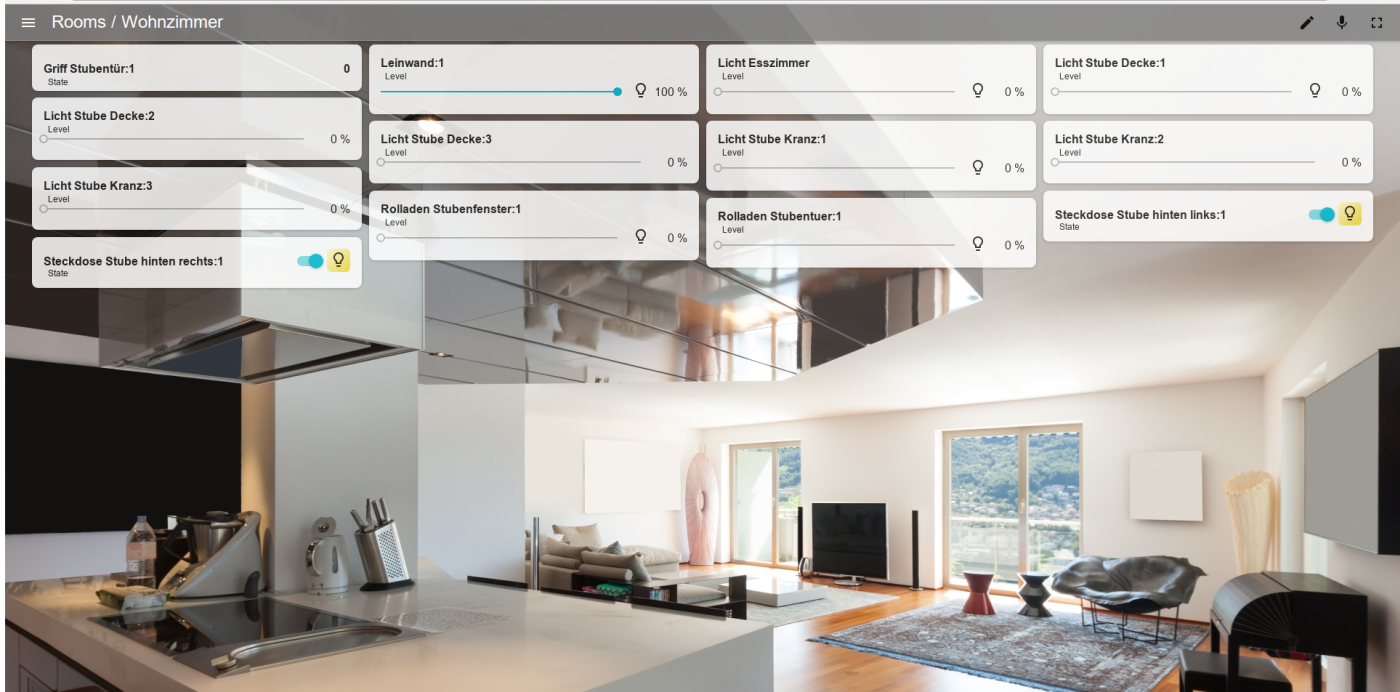
                      Wie funktioniert es das der Adapter so aussieht ?
                      144_material_01.png

                      Host: Intel Nuc6cayh (16GB Ram, 240GB SSD) mit Proxmox.

                      Iobroker VM, InfluxDB LXC, Pihole LXC, Tasmoadmin LXC, Easy2connect VM

                      G M 3 Antworten Letzte Antwort
                      0
                      • marcusklM marcuskl

                        Wie funktioniert es das der Adapter so aussieht ?
                        144_material_01.png

                        G Offline
                        G Offline
                        gosund
                        schrieb am zuletzt editiert von gosund
                        #187

                        @marcuskl
                        Das wüßte ich auch gerne. Bei Dimmern ist bei mir kein Slider auf der Kachel, egal ob einfache oder doppete Breite. Stattdessen muß ich die Kachel clicken, dann erscheint ein slider über die volle Höhe der Seite.
                        Die aqara/xiaomi Temperatursensoren sind auf drei Kacheln (Temp/Hum/Pressure) verteilt.
                        Und es wäre toll, wenn ich irgendwie Datum/Uhrzeit vom letzten Update sehe, insbesondere bei den Sensoren!

                        1 Antwort Letzte Antwort
                        2
                        • marcusklM Offline
                          marcusklM Offline
                          marcuskl
                          schrieb am zuletzt editiert von
                          #188

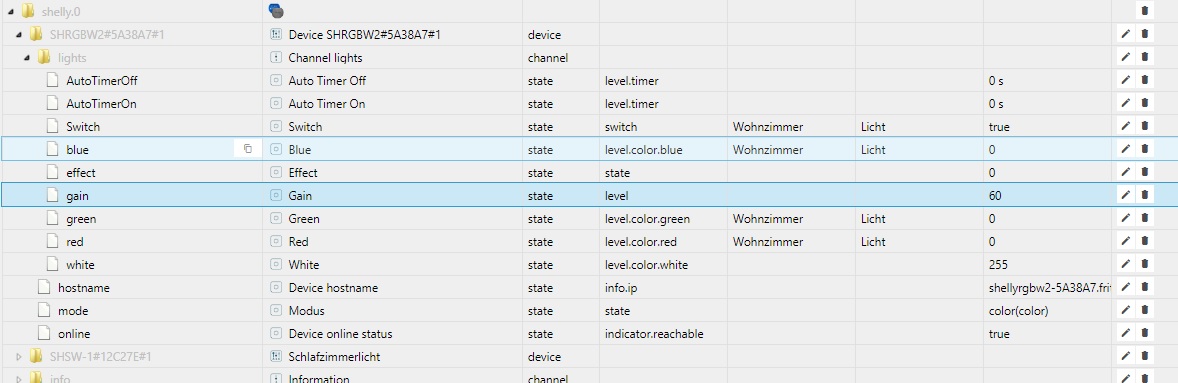
                          Wie kann ich meine Shelly RGB im Material Adapter einbinden ?
                          Dass ich dann eine Farbpalette habe zum ändern der Farbe und dimmen ?
                          rgb.jpg

                          Host: Intel Nuc6cayh (16GB Ram, 240GB SSD) mit Proxmox.

                          Iobroker VM, InfluxDB LXC, Pihole LXC, Tasmoadmin LXC, Easy2connect VM

                          1 Antwort Letzte Antwort
                          0
                          • LausiDL Offline
                            LausiDL Offline
                            LausiD
                            schrieb am zuletzt editiert von
                            #189

                            Für Funktion Dimmen benötigst du ein Objekt mit der Rolle level.dimmer und Art Zahl.
                            Gruß
                            LausiD

                            Doku zum FHEM Adapter
                            Aktuelles zum FHEM Adapter
                            Test FHEM Adapter

                            1 Antwort Letzte Antwort
                            0
                            • marcusklM Offline
                              marcusklM Offline
                              marcuskl
                              schrieb am zuletzt editiert von
                              #190

                              Und wie kann ich diese Objekte am besten im Material Ui einbinden ?

                              Host: Intel Nuc6cayh (16GB Ram, 240GB SSD) mit Proxmox.

                              Iobroker VM, InfluxDB LXC, Pihole LXC, Tasmoadmin LXC, Easy2connect VM

                              marcusklM 1 Antwort Letzte Antwort
                              0
                              • liv-in-skyL Offline
                                liv-in-skyL Offline
                                liv-in-sky
                                schrieb am zuletzt editiert von
                                #191

                                darf ich kurz mal zwischenfragen - ich wollte eigene symbole für einen switch hochladen - leider geht das nur mit bestimmten dateien - ich finde aber nicht heraus, welche bilder gehen oder nicht - hat diese problem noch jmd anders.

                                weder die größe noch das format scheinen einfluss zu nehmen - das eine geht das andere nicht

                                nach einem gelösten Thread wäre es sinnvoll dies in der Überschrift des ersten Posts einzutragen [gelöst]-... Bitte benutzt das Voting rechts unten im Beitrag wenn er euch geholfen hat. Forum-Tools: PicPick https://picpick.app/en/download/ und ScreenToGif https://www.screentogif.com/downloads.html

                                1 Antwort Letzte Antwort
                                0
                                • marcusklM marcuskl

                                  Und wie kann ich diese Objekte am besten im Material Ui einbinden ?

                                  marcusklM Offline
                                  marcusklM Offline
                                  marcuskl
                                  schrieb am zuletzt editiert von
                                  #192

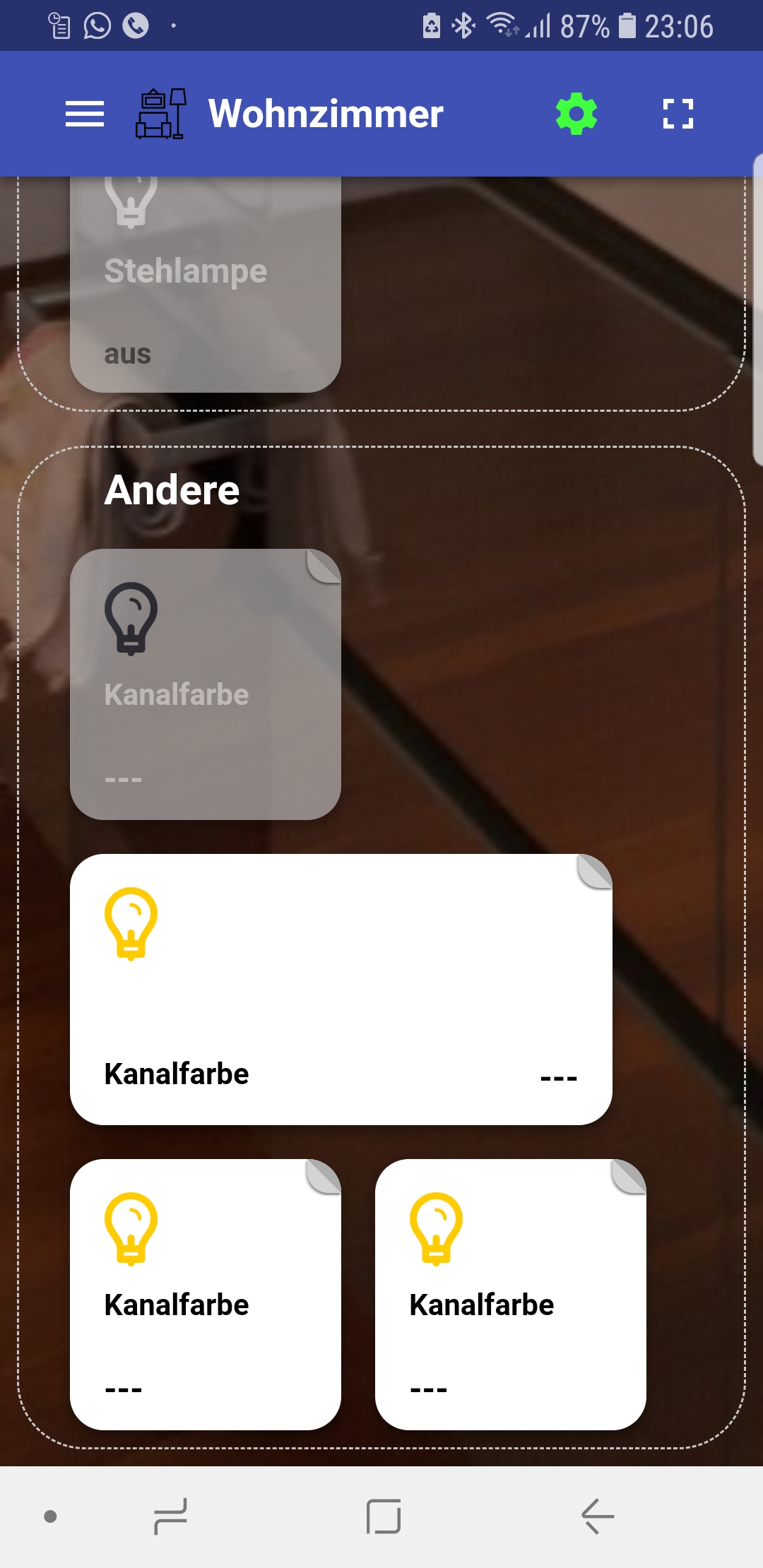
                                  @marcuskl sagte in [Testing] Material UI Adapter:

                                  Und wie kann ich diese Objekte am besten im Material Ui einbinden ?

                                  Screenshot_20190225-230637_Chrome.jpg

                                  Habe keinen Color Picker ? Wie geht das?

                                  Host: Intel Nuc6cayh (16GB Ram, 240GB SSD) mit Proxmox.

                                  Iobroker VM, InfluxDB LXC, Pihole LXC, Tasmoadmin LXC, Easy2connect VM

                                  1 Antwort Letzte Antwort
                                  0
                                  • marcusklM Offline
                                    marcusklM Offline
                                    marcuskl
                                    schrieb am zuletzt editiert von
                                    #193

                                    Kann mir niemand helfen ??

                                    Host: Intel Nuc6cayh (16GB Ram, 240GB SSD) mit Proxmox.

                                    Iobroker VM, InfluxDB LXC, Pihole LXC, Tasmoadmin LXC, Easy2connect VM

                                    1 Antwort Letzte Antwort
                                    0
                                    • S Offline
                                      S Offline
                                      southparkler
                                      schrieb am zuletzt editiert von
                                      #194

                                      Kann mir jmd. sagen wie ich Material UI wieder installiert bekomme?

                                      pi@ioBroker-Pi:/opt/iobroker $ npm install iobroker.material
                                      npm WARN bl@0.7.0 requires a peer of stream-browserify@* but none is installed. You must install peer dependencies yourself.
                                      
                                      npm ERR! path /opt/iobroker/node_modules/.staging/@firebase
                                      npm ERR! code EACCES
                                      npm ERR! errno -13
                                      npm ERR! syscall rmdir
                                      npm ERR! Error: EACCES: permission denied, rmdir '/opt/iobroker/node_modules/.staging/@firebase'
                                      npm ERR!  { Error: EACCES: permission denied, rmdir '/opt/iobroker/node_modules/.staging/@firebase'
                                      npm ERR!   stack: 'Error: EACCES: permission denied, rmdir \'/opt/iobroker/node_modules/.staging/@firebase\'',
                                      npm ERR!   errno: -13,
                                      npm ERR!   code: 'EACCES',
                                      npm ERR!   syscall: 'rmdir',
                                      npm ERR!   path: '/opt/iobroker/node_modules/.staging/@firebase' }
                                      npm ERR!
                                      npm ERR! The operation was rejected by your operating system.
                                      npm ERR! It is likely you do not have the permissions to access this file as the current user
                                      npm ERR!
                                      npm ERR! If you believe this might be a permissions issue, please double-check the
                                      npm ERR! permissions of the file and its containing directories, or try running
                                      npm ERR! the command again as root/Administrator (though this is not recommended).
                                      
                                      npm ERR! A complete log of this run can be found in:
                                      npm ERR!     /home/pi/.npm/_logs/2019-07-07T10_58_58_712Z-debug.log
                                      pi@ioBroker-Pi:/opt/iobroker $ ^C
                                      pi@ioBroker-Pi:/opt/iobroker $


                                      iBroker läuft auf Raspi 3B über Gbit Lan

                                      Geräte:

                                      Licht: Hue Lampen mit Bridge, Osram Smart Plug, Tradfri Lampen über Hue, Yeelight Lampen

                                      Sensoren: Xiaomi Aqara Sensoren (Zigbee Stick)

                                      Heizung: Fritz!D…

                                      sigi234S 1 Antwort Letzte Antwort
                                      0
                                      • S southparkler

                                        Kann mir jmd. sagen wie ich Material UI wieder installiert bekomme?

                                        pi@ioBroker-Pi:/opt/iobroker $ npm install iobroker.material
                                        npm WARN bl@0.7.0 requires a peer of stream-browserify@* but none is installed. You must install peer dependencies yourself.
                                        
                                        npm ERR! path /opt/iobroker/node_modules/.staging/@firebase
                                        npm ERR! code EACCES
                                        npm ERR! errno -13
                                        npm ERR! syscall rmdir
                                        npm ERR! Error: EACCES: permission denied, rmdir '/opt/iobroker/node_modules/.staging/@firebase'
                                        npm ERR!  { Error: EACCES: permission denied, rmdir '/opt/iobroker/node_modules/.staging/@firebase'
                                        npm ERR!   stack: 'Error: EACCES: permission denied, rmdir \'/opt/iobroker/node_modules/.staging/@firebase\'',
                                        npm ERR!   errno: -13,
                                        npm ERR!   code: 'EACCES',
                                        npm ERR!   syscall: 'rmdir',
                                        npm ERR!   path: '/opt/iobroker/node_modules/.staging/@firebase' }
                                        npm ERR!
                                        npm ERR! The operation was rejected by your operating system.
                                        npm ERR! It is likely you do not have the permissions to access this file as the current user
                                        npm ERR!
                                        npm ERR! If you believe this might be a permissions issue, please double-check the
                                        npm ERR! permissions of the file and its containing directories, or try running
                                        npm ERR! the command again as root/Administrator (though this is not recommended).
                                        
                                        npm ERR! A complete log of this run can be found in:
                                        npm ERR!     /home/pi/.npm/_logs/2019-07-07T10_58_58_712Z-debug.log
                                        pi@ioBroker-Pi:/opt/iobroker $ ^C
                                        pi@ioBroker-Pi:/opt/iobroker $
                                        
                                        
                                        sigi234S Online
                                        sigi234S Online
                                        sigi234
                                        Forum Testing Most Active
                                        schrieb am zuletzt editiert von
                                        #195

                                        @southparkler sagte in [Testing] Material UI Adapter:

                                        Kann mir jmd. sagen wie ich Material UI wieder installiert bekomme?

                                        pi@ioBroker-Pi:/opt/iobroker $ npm install iobroker.material
                                        npm WARN bl@0.7.0 requires a peer of stream-browserify@* but none is installed. You must install peer dependencies yourself.
                                        
                                        npm ERR! path /opt/iobroker/node_modules/.staging/@firebase
                                        npm ERR! code EACCES
                                        npm ERR! errno -13
                                        npm ERR! syscall rmdir
                                        npm ERR! Error: EACCES: permission denied, rmdir '/opt/iobroker/node_modules/.staging/@firebase'
                                        npm ERR!  { Error: EACCES: permission denied, rmdir '/opt/iobroker/node_modules/.staging/@firebase'
                                        npm ERR!   stack: 'Error: EACCES: permission denied, rmdir \'/opt/iobroker/node_modules/.staging/@firebase\'',
                                        npm ERR!   errno: -13,
                                        npm ERR!   code: 'EACCES',
                                        npm ERR!   syscall: 'rmdir',
                                        npm ERR!   path: '/opt/iobroker/node_modules/.staging/@firebase' }
                                        npm ERR!
                                        npm ERR! The operation was rejected by your operating system.
                                        npm ERR! It is likely you do not have the permissions to access this file as the current user
                                        npm ERR!
                                        npm ERR! If you believe this might be a permissions issue, please double-check the
                                        npm ERR! permissions of the file and its containing directories, or try running
                                        npm ERR! the command again as root/Administrator (though this is not recommended).
                                        
                                        npm ERR! A complete log of this run can be found in:
                                        npm ERR!     /home/pi/.npm/_logs/2019-07-07T10_58_58_712Z-debug.log
                                        pi@ioBroker-Pi:/opt/iobroker $ ^C
                                        pi@ioBroker-Pi:/opt/iobroker $


                                        Du hast keine Schreibrechte! Hast du den Fixer ausgeführt?

                                        Bitte benutzt das Voting rechts unten im Beitrag wenn er euch geholfen hat.
                                        Immer Daten sichern!

                                        S 1 Antwort Letzte Antwort
                                        0
                                        • sigi234S sigi234

                                          @southparkler sagte in [Testing] Material UI Adapter:

                                          Kann mir jmd. sagen wie ich Material UI wieder installiert bekomme?

                                          pi@ioBroker-Pi:/opt/iobroker $ npm install iobroker.material
                                          npm WARN bl@0.7.0 requires a peer of stream-browserify@* but none is installed. You must install peer dependencies yourself.
                                          
                                          npm ERR! path /opt/iobroker/node_modules/.staging/@firebase
                                          npm ERR! code EACCES
                                          npm ERR! errno -13
                                          npm ERR! syscall rmdir
                                          npm ERR! Error: EACCES: permission denied, rmdir '/opt/iobroker/node_modules/.staging/@firebase'
                                          npm ERR!  { Error: EACCES: permission denied, rmdir '/opt/iobroker/node_modules/.staging/@firebase'
                                          npm ERR!   stack: 'Error: EACCES: permission denied, rmdir \'/opt/iobroker/node_modules/.staging/@firebase\'',
                                          npm ERR!   errno: -13,
                                          npm ERR!   code: 'EACCES',
                                          npm ERR!   syscall: 'rmdir',
                                          npm ERR!   path: '/opt/iobroker/node_modules/.staging/@firebase' }
                                          npm ERR!
                                          npm ERR! The operation was rejected by your operating system.
                                          npm ERR! It is likely you do not have the permissions to access this file as the current user
                                          npm ERR!
                                          npm ERR! If you believe this might be a permissions issue, please double-check the
                                          npm ERR! permissions of the file and its containing directories, or try running
                                          npm ERR! the command again as root/Administrator (though this is not recommended).
                                          
                                          npm ERR! A complete log of this run can be found in:
                                          npm ERR!     /home/pi/.npm/_logs/2019-07-07T10_58_58_712Z-debug.log
                                          pi@ioBroker-Pi:/opt/iobroker $ ^C
                                          pi@ioBroker-Pi:/opt/iobroker $


                                          Du hast keine Schreibrechte! Hast du den Fixer ausgeführt?

                                          S Offline
                                          S Offline
                                          southparkler
                                          schrieb am zuletzt editiert von southparkler
                                          #196

                                          @sigi234
                                          Ach verdammt, ich hab sudo vergessen...

                                          iBroker läuft auf Raspi 3B über Gbit Lan

                                          Geräte:

                                          Licht: Hue Lampen mit Bridge, Osram Smart Plug, Tradfri Lampen über Hue, Yeelight Lampen

                                          Sensoren: Xiaomi Aqara Sensoren (Zigbee Stick)

                                          Heizung: Fritz!D…

                                          sigi234S 1 Antwort Letzte Antwort
                                          0
                                          Antworten
                                          • In einem neuen Thema antworten
                                          Anmelden zum Antworten
                                          • Älteste zuerst
                                          • Neuste zuerst
                                          • Meiste Stimmen


                                          Support us

                                          ioBroker
                                          Community Adapters
                                          Donate
                                          FAQ Cloud / IOT
                                          HowTo: Node.js-Update
                                          HowTo: Backup/Restore
                                          Downloads
                                          BLOG

                                          676

                                          Online

                                          32.5k

                                          Benutzer

                                          81.6k

                                          Themen

                                          1.3m

                                          Beiträge
                                          Community
                                          Impressum | Datenschutz-Bestimmungen | Nutzungsbedingungen | Einwilligungseinstellungen
                                          ioBroker Community 2014-2025
                                          logo
                                          • Anmelden

                                          • Du hast noch kein Konto? Registrieren

                                          • Anmelden oder registrieren, um zu suchen
                                          • Erster Beitrag
                                            Letzter Beitrag
                                          0
                                          • Home
                                          • Aktuell
                                          • Tags
                                          • Ungelesen 0
                                          • Kategorien
                                          • Unreplied
                                          • Beliebt
                                          • GitHub
                                          • Docu
                                          • Hilfe