
NEWS




Adapter WM-Bus / Kampstrup Multical 21
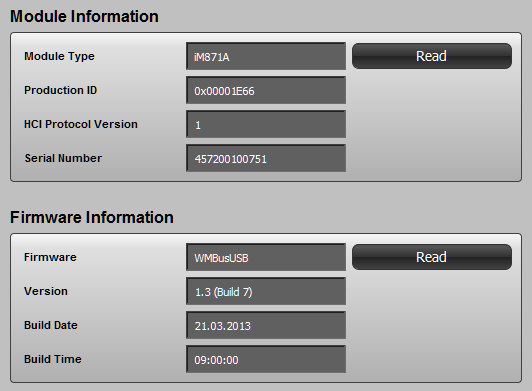
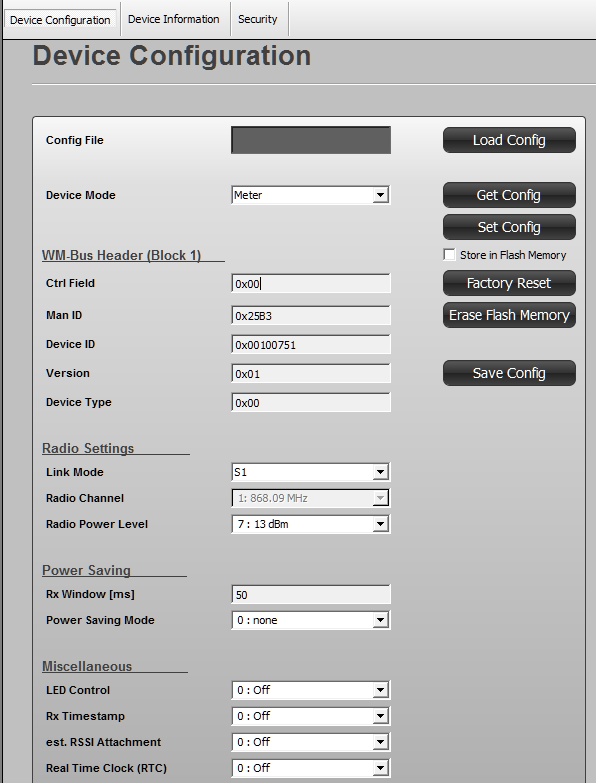
-
Wie die meisten Pakete auch:
sudo apt install <Paketname>sudo apt install librtlsdr-devalso. Kann aber sein dass da auch noch anderes fehlt.
Danke!
Das sind aber genau die Punkte, an denen ich immer hängen bleibe. Für Leute, die das 1000 mal gemacht haben, ist das klar, mir hilft die Zeile mit dem Befehl aber enorm. -
Danke!
Das sind aber genau die Punkte, an denen ich immer hängen bleibe. Für Leute, die das 1000 mal gemacht haben, ist das klar, mir hilft die Zeile mit dem Befehl aber enorm.librtlsdr-dev habe ich noch nie installiert. 😆
-
librtlsdr-dev habe ich noch nie installiert. 😆
OK, nächstes Paket das fehlt:
g++ -O0 -ggdb -fsanitize=address -fno-omit-frame-pointer -fprofile-arcs -ftest-coverage -fPIC -std=c++11 -Wall -Werror=format-security -Ibuild_debug src/admin.cc -c -E > build_debug/admin.o.src
In file included from src/admin.cc:26:
src/ui.h:22:9: fatal error: curses.h: Datei oder Verzeichnis nicht gefunden
 #include<curses.h>
         ^~~~~~~~~~
compilation terminated.
Woher hast Du beim ersten mal gewusst, dass da librtlsdr-dev fehlt und was fehlt diesmal?
-
OK, nächstes Paket das fehlt:
g++ -O0 -ggdb -fsanitize=address -fno-omit-frame-pointer -fprofile-arcs -ftest-coverage -fPIC -std=c++11 -Wall -Werror=format-security -Ibuild_debug src/admin.cc -c -E > build_debug/admin.o.src
In file included from src/admin.cc:26:
src/ui.h:22:9: fatal error: curses.h: Datei oder Verzeichnis nicht gefunden
 #include<curses.h>
         ^~~~~~~~~~
compilation terminated.
Woher hast Du beim ersten mal gewusst, dass da librtlsdr-dev fehlt und was fehlt diesmal?
-
Danke!
-
@wolfgangfb
wmbusmeters habe ich aus den Sourcen installiert:
cd ~
wget https://github.com/weetmuts/wmbusmeters/archive/master.zip
alternativ geht auch der Download
wget https://github.com/weetmuts/wmbusmeters/archive/refs/heads/master.zip
unzip master.zip
cd wmbusmeters-master/
sudo make DEBUG=true // geht auch alternativ "sudo make"
sudo make installViel Glück
So, ich denke wmbusmeters läuft jetzt (sieht zumindest grün aus).
pi@raspberrypi4:/var/log/wmbusmeters/meter_readings $ systemctl status wmbusmeters
● wmbusmeters.service - "wmbusmeters service"
   Loaded: loaded (/lib/systemd/system/wmbusmeters.service; disabled; vendor preset: enabled)
   Active: active (running) since Tue 2021-07-13 23:12:55 CEST; 3s ago
     Docs: https://github.com/weetmuts/wmbusmeters
           man:wmbusmeters(1)
  Process: 12466 ExecStartPre=/bin/mkdir -p /var/log/wmbusmeters/meter_readings (code=exited, status=0/SUCCESS)
  Process: 12467 ExecStartPre=/bin/chown -R wmbusmeters:wmbusmeters /var/log/wmbusmeters (code=exited, status=0/SUCCESS)
  Process: 12468 ExecStartPre=/bin/mkdir -p /run/wmbusmeters (code=exited, status=0/SUCCESS)
  Process: 12469 ExecStartPre=/bin/chown -R wmbusmeters:wmbusmeters /run/wmbusmeters (code=exited, status=0/SUCCESS)
  Process: 12470 ExecStart=/usr/sbin/wmbusmetersd /run/wmbusmeters/wmbusmeters.pid (code=exited, status=0/SUCCESS)
 Main PID: 12471 (wmbusmetersd)
    Tasks: 3 (limit: 4915)
   CGroup: /system.slice/wmbusmeters.service
           └─12471 /usr/sbin/wmbusmetersd /run/wmbusmeters/wmbusmeters.pid

Jul 13 23:12:55 raspberrypi4 systemd[1]: Starting "wmbusmeters service"...
Jul 13 23:12:55 raspberrypi4 wmbusmetersd[12470]: (wmbusmeters) started /run/wmbusmeters/wmbusmeters.pid
Jul 13 23:12:55 raspberrypi4 systemd[1]: Started "wmbusmeters service".
pi@raspberrypi4:/var/log/wmbusmeters/meter_readings $
was mich stört ist
pi@raspberrypi4:/var/log/wmbusmeters/meter_readings $
pi@raspberrypi4:/var/log/wmbusmeters/meter_readings $ more /var/log/wmbusmeters/wmbusmeters.log
(wmbusmeters) logging started 2021-07-13 22:40:08 using _
(wmbusmeters) logging started 2021-07-13 23:12:55 using _
[2021-07-13_23:12:56] Started config im871a[00100776] on /dev/ttyUSB0 listening on none
[2021-07-13_23:12:56] Warning! Desired link modes none cannot be set for device /dev/ttyUSB0:im871a[00100776]
(wmbusmeters) waiting for telegrams
[2021-07-13_23:12:58] (memory) rss 2048000 peak 1.95 MiB
pi@raspberrypi4:/var/log/wmbusmeters/meter_readings $ lsusb Bus 002 Device 001: ID 1d6b:0003 Linux Foundation 3.0 root hub Bus 001 Device 006: ID 0458:0007 KYE Systems Corp. (Mouse Systems) Bus 001 Device 005: ID 046d:c534 Logitech, Inc. Unifying Receiver Bus 001 Device 004: ID 0451:16a8 Texas Instruments, Inc. Bus 001 Device 003: ID 10c4:ea60 Cygnal Integrated Products, Inc. CP2102/CP2109 UART Bridge Controller [CP210x family] Bus 001 Device 002: ID 2109:3431 VIA Labs, Inc. Hub Bus 001 Device 001: ID 1d6b:0002 Linux Foundation 2.0 root hubpi@raspberrypi4:/var/log/wmbusmeters/meter_readings $ ls -l /dev/serial/by-id insgesamt 0 lrwxrwxrwx 1 root root 13 Jun 16 14:34 usb-Silicon_Labs_WiMOD_iM871A-usb_00919907-if00-port0 -> ../../ttyUSB0 lrwxrwxrwx 1 root root 13 Jun 16 14:34 usb-Texas_Instruments_TI_CC2531_USB_CDC___0X00124B001CD40626-if00 -> ../../ttyACM0mosquitto scheint prinzipiell auch zu laufen:
pi@raspberrypi4:/var/log/wmbusmeters/meter_readings $ mosquitto
1626210924: mosquitto version 1.5.7 starting
1626210924: Using default config.
1626210924: Opening ipv4 listen socket on port 1883.
1626210924: Error: Address already in use
Aber was ist mit dem Error "Address already in use"? gemeint?
Im IO-Broker bleibt der mqtt Adapter rot (im Logfile steht nichts)
-
So, ich denke wmbusmeters läuft jetzt (sieht zumindest grün aus).
pi@raspberrypi4:/var/log/wmbusmeters/meter_readings $ systemctl status wmbusmeters
● wmbusmeters.service - "wmbusmeters service"
   Loaded: loaded (/lib/systemd/system/wmbusmeters.service; disabled; vendor preset: enabled)
   Active: active (running) since Tue 2021-07-13 23:12:55 CEST; 3s ago
     Docs: https://github.com/weetmuts/wmbusmeters
           man:wmbusmeters(1)
  Process: 12466 ExecStartPre=/bin/mkdir -p /var/log/wmbusmeters/meter_readings (code=exited, status=0/SUCCESS)
  Process: 12467 ExecStartPre=/bin/chown -R wmbusmeters:wmbusmeters /var/log/wmbusmeters (code=exited, status=0/SUCCESS)
  Process: 12468 ExecStartPre=/bin/mkdir -p /run/wmbusmeters (code=exited, status=0/SUCCESS)
  Process: 12469 ExecStartPre=/bin/chown -R wmbusmeters:wmbusmeters /run/wmbusmeters (code=exited, status=0/SUCCESS)
  Process: 12470 ExecStart=/usr/sbin/wmbusmetersd /run/wmbusmeters/wmbusmeters.pid (code=exited, status=0/SUCCESS)
 Main PID: 12471 (wmbusmetersd)
    Tasks: 3 (limit: 4915)
   CGroup: /system.slice/wmbusmeters.service
           └─12471 /usr/sbin/wmbusmetersd /run/wmbusmeters/wmbusmeters.pid

Jul 13 23:12:55 raspberrypi4 systemd[1]: Starting "wmbusmeters service"...
Jul 13 23:12:55 raspberrypi4 wmbusmetersd[12470]: (wmbusmeters) started /run/wmbusmeters/wmbusmeters.pid
Jul 13 23:12:55 raspberrypi4 systemd[1]: Started "wmbusmeters service".
pi@raspberrypi4:/var/log/wmbusmeters/meter_readings $
was mich stört ist
pi@raspberrypi4:/var/log/wmbusmeters/meter_readings $
pi@raspberrypi4:/var/log/wmbusmeters/meter_readings $ more /var/log/wmbusmeters/wmbusmeters.log
(wmbusmeters) logging started 2021-07-13 22:40:08 using _
(wmbusmeters) logging started 2021-07-13 23:12:55 using _
[2021-07-13_23:12:56] Started config im871a[00100776] on /dev/ttyUSB0 listening on none
[2021-07-13_23:12:56] Warning! Desired link modes none cannot be set for device /dev/ttyUSB0:im871a[00100776]
(wmbusmeters) waiting for telegrams
[2021-07-13_23:12:58] (memory) rss 2048000 peak 1.95 MiB
pi@raspberrypi4:/var/log/wmbusmeters/meter_readings $ lsusb Bus 002 Device 001: ID 1d6b:0003 Linux Foundation 3.0 root hub Bus 001 Device 006: ID 0458:0007 KYE Systems Corp. (Mouse Systems) Bus 001 Device 005: ID 046d:c534 Logitech, Inc. Unifying Receiver Bus 001 Device 004: ID 0451:16a8 Texas Instruments, Inc. Bus 001 Device 003: ID 10c4:ea60 Cygnal Integrated Products, Inc. CP2102/CP2109 UART Bridge Controller [CP210x family] Bus 001 Device 002: ID 2109:3431 VIA Labs, Inc. Hub Bus 001 Device 001: ID 1d6b:0002 Linux Foundation 2.0 root hubpi@raspberrypi4:/var/log/wmbusmeters/meter_readings $ ls -l /dev/serial/by-id insgesamt 0 lrwxrwxrwx 1 root root 13 Jun 16 14:34 usb-Silicon_Labs_WiMOD_iM871A-usb_00919907-if00-port0 -> ../../ttyUSB0 lrwxrwxrwx 1 root root 13 Jun 16 14:34 usb-Texas_Instruments_TI_CC2531_USB_CDC___0X00124B001CD40626-if00 -> ../../ttyACM0mosquitto scheint prinzipiell auch zu laufen:
pi@raspberrypi4:/var/log/wmbusmeters/meter_readings $ mosquitto
1626210924: mosquitto version 1.5.7 starting
1626210924: Using default config.
1626210924: Opening ipv4 listen socket on port 1883.
1626210924: Error: Address already in use
Aber was ist mit dem Error "Address already in use"? gemeint?
Im IO-Broker bleibt der mqtt Adapter rot (im Logfile steht nichts)
@wolfgangfb: das ist korrekt - die "Fehlermeldung" kommt bei mir auch. Ist aber das "falsche" Kommando, weil der wmbusmeters-Treiber laut Konfig-Zeile das Programm /usr/local/bin/mosquitto_pub aufruft - wenn das bei Dir auch so in der /etc/wmbusmeters.conf steht.
Du siehst den Erfolg nur in den Logfiles, wenn da was steht, passt es! -
@wolfgangfb: das ist korrekt - die "Fehlermeldung" kommt bei mir auch. Ist aber das "falsche" Kommando, weil der wmbusmeters-Treiber laut Konfig-Zeile das Programm /usr/local/bin/mosquitto_pub aufruft - wenn das bei Dir auch so in der /etc/wmbusmeters.conf steht.
Du siehst den Erfolg nur in den Logfiles, wenn da was steht, passt es!Hallo
In dem Logfile steht leider nichts gutes:
pi@raspberrypi4:/var/log/wmbusmeters $ more wmbusmeters.log (wmbusmeters) logging started 2021-07-13 22:40:08 using _ (wmbusmeters) logging started 2021-07-13 23:12:55 using _ [2021-07-13_23:12:56] Started config im871a[00100776] on /dev/ttyUSB0 listening on none [2021-07-13_23:12:56] Warning! Desired link modes none cannot be set for device /dev/ttyUSB0:im871a[00100776] (wmbusmeters) waiting for telegrams [2021-07-13_23:12:58] (memory) rss 2048000 peak 1.95 MiB [2021-07-14_00:12:56] [ALARM DeviceInactivity] 3600 seconds of inactivity resetting /dev/ttyUSB0 im871a (timeout 3600s expected mon-s un(00-23) now 2021-07-14 00:12) [2021-07-14_00:12:56] (shell) /bin/sh exited with non-zero return code: 127 [2021-07-14_00:12:56] (wmbus) resetting /dev/ttyUSB0 [2021-07-14_00:12:59] (wmbus) successfully reset wmbus device [2021-07-14_01:12:56] [ALARM DeviceInactivity] 3600 seconds of inactivity resetting /dev/ttyUSB0 im871a (timeout 3600s expected mon-s un(00-23) now 2021-07-14 01:12) [2021-07-14_01:12:56] (shell) /bin/sh exited with non-zero return code: 127 [2021-07-14_01:12:56] (wmbus) resetting /dev/ttyUSB0 [2021-07-14_01:12:59] (wmbus) successfully reset wmbus device [2021-07-14_02:12:56] [ALARM DeviceInactivity] 3600 seconds of inactivity resetting /dev/ttyUSB0 im871a (timeout 3600s expected mon-s un(00-23) now 2021-07-14 02:12) -
Hallo
In dem Logfile steht leider nichts gutes:
pi@raspberrypi4:/var/log/wmbusmeters $ more wmbusmeters.log (wmbusmeters) logging started 2021-07-13 22:40:08 using _ (wmbusmeters) logging started 2021-07-13 23:12:55 using _ [2021-07-13_23:12:56] Started config im871a[00100776] on /dev/ttyUSB0 listening on none [2021-07-13_23:12:56] Warning! Desired link modes none cannot be set for device /dev/ttyUSB0:im871a[00100776] (wmbusmeters) waiting for telegrams [2021-07-13_23:12:58] (memory) rss 2048000 peak 1.95 MiB [2021-07-14_00:12:56] [ALARM DeviceInactivity] 3600 seconds of inactivity resetting /dev/ttyUSB0 im871a (timeout 3600s expected mon-s un(00-23) now 2021-07-14 00:12) [2021-07-14_00:12:56] (shell) /bin/sh exited with non-zero return code: 127 [2021-07-14_00:12:56] (wmbus) resetting /dev/ttyUSB0 [2021-07-14_00:12:59] (wmbus) successfully reset wmbus device [2021-07-14_01:12:56] [ALARM DeviceInactivity] 3600 seconds of inactivity resetting /dev/ttyUSB0 im871a (timeout 3600s expected mon-s un(00-23) now 2021-07-14 01:12) [2021-07-14_01:12:56] (shell) /bin/sh exited with non-zero return code: 127 [2021-07-14_01:12:56] (wmbus) resetting /dev/ttyUSB0 [2021-07-14_01:12:59] (wmbus) successfully reset wmbus device [2021-07-14_02:12:56] [ALARM DeviceInactivity] 3600 seconds of inactivity resetting /dev/ttyUSB0 im871a (timeout 3600s expected mon-s un(00-23) now 2021-07-14 02:12)@wolfgangfb said in Adapter WM-Bus / Kampstrup Multical 21:
Warning! Desired link modes none cannot be set for device /dev/ttyUSB0:im871a[00100776]
Dieses Warning ist komisch!? Ich habe bei mir die Datagramme im T1-Mode.
Dann müsste in der /etc/wmbusmeters.conf
die Zeile so stehen:
device=/dev/ttyUSB0:im871a:t1
ggfs. kann man hinten das :t1 weglassen - müsste man versuchen.Dann ist noch wichtig, den AES-Key hier zu hinterlegen:
/etc/wmbusmeters.d/MyTapWater
key=xxxxxxxxxxxxxxxxxxxViel Glück
-
@wolfgangfb said in Adapter WM-Bus / Kampstrup Multical 21:
Warning! Desired link modes none cannot be set for device /dev/ttyUSB0:im871a[00100776]
Dieses Warning ist komisch!? Ich habe bei mir die Datagramme im T1-Mode.
Dann müsste in der /etc/wmbusmeters.conf
die Zeile so stehen:
device=/dev/ttyUSB0:im871a:t1
ggfs. kann man hinten das :t1 weglassen - müsste man versuchen.Dann ist noch wichtig, den AES-Key hier zu hinterlegen:
/etc/wmbusmeters.d/MyTapWater
key=xxxxxxxxxxxxxxxxxxxViel Glück
@matze-dev
Die Warning ist jetzt zumindest weg, mal sehn ob innerhalb der nächsten Stunde was ankommt.(wmbusmeters) shutting down (wmbusmeters) logging started 2021-07-14 16:46:20 using _ [2021-07-14_16:46:20] Started config im871a[00100776] on /dev/ttyUSB0 listening on t1 (wmbusmeters) waiting for telegrams [2021-07-14_16:46:22] (memory) rss 1953792 peak 1.86 MiB pi@raspberrypi4:/var/log/wmbusmeters $ -
@matze-dev
Die Warning ist jetzt zumindest weg, mal sehn ob innerhalb der nächsten Stunde was ankommt.(wmbusmeters) shutting down (wmbusmeters) logging started 2021-07-14 16:46:20 using _ [2021-07-14_16:46:20] Started config im871a[00100776] on /dev/ttyUSB0 listening on t1 (wmbusmeters) waiting for telegrams [2021-07-14_16:46:22] (memory) rss 1953792 peak 1.86 MiB pi@raspberrypi4:/var/log/wmbusmeters $@wolfgangfb einfach die Daten mitlesen
tail -f /var/log/wmbusmeters/wmbusmeters.logViel Glück
-
@wolfgangfb einfach die Daten mitlesen
tail -f /var/log/wmbusmeters/wmbusmeters.logViel Glück
da kommt nichts
pi@raspberrypi4:/var/log/wmbusmeters $ tail -f /var/log/wmbusmeters/wmbusmeters.log [2021-07-14_16:13:00] (wmbus) successfully reset wmbus device (wmbusmeters) shutting down (wmbusmeters) logging started 2021-07-14 16:46:20 using _ [2021-07-14_16:46:20] Started config im871a[00100776] on /dev/ttyUSB0 listening on t1 (wmbusmeters) waiting for telegrams [2021-07-14_16:46:22] (memory) rss 1953792 peak 1.86 MiB [2021-07-14_17:46:20] [ALARM DeviceInactivity] 3600 seconds of inactivity resetting /dev/ttyUSB0 im871a (timeout 3600s expected mon-sun(00-23) now 2021-07-14 17:46) [2021-07-14_17:46:20] (shell) /bin/sh exited with non-zero return code: 127 [2021-07-14_17:46:20] (wmbus) resetting /dev/ttyUSB0 [2021-07-14_17:46:23] (wmbus) successfully reset wmbus device -
da kommt nichts
pi@raspberrypi4:/var/log/wmbusmeters $ tail -f /var/log/wmbusmeters/wmbusmeters.log [2021-07-14_16:13:00] (wmbus) successfully reset wmbus device (wmbusmeters) shutting down (wmbusmeters) logging started 2021-07-14 16:46:20 using _ [2021-07-14_16:46:20] Started config im871a[00100776] on /dev/ttyUSB0 listening on t1 (wmbusmeters) waiting for telegrams [2021-07-14_16:46:22] (memory) rss 1953792 peak 1.86 MiB [2021-07-14_17:46:20] [ALARM DeviceInactivity] 3600 seconds of inactivity resetting /dev/ttyUSB0 im871a (timeout 3600s expected mon-sun(00-23) now 2021-07-14 17:46) [2021-07-14_17:46:20] (shell) /bin/sh exited with non-zero return code: 127 [2021-07-14_17:46:20] (wmbus) resetting /dev/ttyUSB0 [2021-07-14_17:46:23] (wmbus) successfully reset wmbus device@wolfgangfb ja, da scheint nichts anzukommen. Ausserdem macht er ein Reset. Das ist ungewöhnlich.
Was sagt denn
journalctl -f
dmesg? -
@wolfgangfb ja, da scheint nichts anzukommen. Ausserdem macht er ein Reset. Das ist ungewöhnlich.
Was sagt denn
journalctl -f
dmesg?pi@raspberrypi4:/var/log/wmbusmeters $ journalctl -f -- Logs begin at Thu 2019-02-14 11:11:59 CET. -- Jul 14 19:48:06 raspberrypi4 kernel: Bluetooth: hci0: Frame reassembly failed (-84) Jul 14 19:48:06 raspberrypi4 kernel: Bluetooth: hci0: Frame reassembly failed (-84) Jul 14 19:48:07 raspberrypi4 kernel: Bluetooth: hci0: Frame reassembly failed (-84) Jul 14 19:48:07 raspberrypi4 kernel: Bluetooth: hci0: Frame reassembly failed (-84) Jul 14 19:48:08 raspberrypi4 kernel: Bluetooth: hci0: Frame reassembly failed (-84) Jul 14 19:48:09 raspberrypi4 kernel: Bluetooth: hci0: Frame reassembly failed (-84) Jul 14 19:48:10 raspberrypi4 kernel: Bluetooth: hci0: Frame reassembly failed (-84) Jul 14 19:48:10 raspberrypi4 kernel: Bluetooth: hci0: Frame reassembly failed (-84) Jul 14 19:48:10 raspberrypi4 kernel: Bluetooth: hci0: Frame reassembly failed (-84) Jul 14 19:48:12 raspberrypi4 kernel: Bluetooth: hci0: Frame reassembly failed (-84) Jul 14 19:48:12 raspberrypi4 kernel: Bluetooth: hci0: Frame reassembly failed (-84) Jul 14 19:48:13 raspberrypi4 kernel: Bluetooth: hci0: Frame reassembly failed (-84) Jul 14 19:48:13 raspberrypi4 kernel: Bluetooth: hci0: Frame reassembly failed (-84) Jul 14 19:48:14 raspberrypi4 kernel: Bluetooth: hci0: Frame reassembly failed (-84) Jul 14 19:48:15 raspberrypi4 kernel: Bluetooth: hci0: Frame reassembly failed (-84) Jul 14 19:48:16 raspberrypi4 kernel: Bluetooth: hci0: Frame reassembly failed (-84) Jul 14 19:48:17 raspberrypi4 kernel: Bluetooth: hci0: Frame reassembly failed (-84) Jul 14 19:48:17 raspberrypi4 kernel: Bluetooth: hci0: Frame reassembly failed (-84) Jul 14 19:48:18 raspberrypi4 kernel: Bluetooth: hci0: Frame reassembly failed (-84) Jul 14 19:48:18 raspberrypi4 kernel: Bluetooth: hci0: Frame reassembly failed (-84) Jul 14 19:48:18 raspberrypi4 kernel: Bluetooth: hci0: Frame reassembly failed (-84) Jul 14 19:48:19 raspberrypi4 kernel: Bluetooth: hci0: Frame reassembly failed (-84) Jul 14 19:48:19 raspberrypi4 kernel: Bluetooth: hci0: Frame reassembly failed (-84)demesg [204619.514651] Bluetooth: hci0: Frame reassembly failed (-84) [204620.459730] Bluetooth: hci0: Frame reassembly failed (-84) [204620.930504] Bluetooth: hci0: Frame reassembly failed (-84) [204620.953443] Bluetooth: hci0: Frame reassembly failed (-84) [204621.105377] Bluetooth: hci0: Frame reassembly failed (-84) [204622.176851] Bluetooth: hci0: Frame reassembly failed (-84) [204622.275958] Bluetooth: hci0: Frame reassembly failed (-84) [204622.470953] Bluetooth: hci0: Frame reassembly failed (-84) [204622.830382] Bluetooth: hci0: Frame reassembly failed (-84) [204623.600358] Bluetooth: hci0: Frame reassembly failed (-84) [204624.175987] Bluetooth: hci0: Frame reassembly failed (-84) [204625.402258] Bluetooth: hci0: Frame reassembly failed (-84) [204627.417943] Bluetooth: hci0: Frame reassembly failed (-84) -
pi@raspberrypi4:/var/log/wmbusmeters $   journalctl -f
-- Logs begin at Thu 2019-02-14 11:11:59 CET. --
Jul 14 19:48:06 raspberrypi4 kernel: Bluetooth: hci0: Frame reassembly failed (-84)
Jul 14 19:48:06 raspberrypi4 kernel: Bluetooth: hci0: Frame reassembly failed (-84)
Jul 14 19:48:07 raspberrypi4 kernel: Bluetooth: hci0: Frame reassembly failed (-84)
Jul 14 19:48:07 raspberrypi4 kernel: Bluetooth: hci0: Frame reassembly failed (-84)
Jul 14 19:48:08 raspberrypi4 kernel: Bluetooth: hci0: Frame reassembly failed (-84)
Jul 14 19:48:09 raspberrypi4 kernel: Bluetooth: hci0: Frame reassembly failed (-84)
Jul 14 19:48:10 raspberrypi4 kernel: Bluetooth: hci0: Frame reassembly failed (-84)
Jul 14 19:48:10 raspberrypi4 kernel: Bluetooth: hci0: Frame reassembly failed (-84)
Jul 14 19:48:10 raspberrypi4 kernel: Bluetooth: hci0: Frame reassembly failed (-84)
Jul 14 19:48:12 raspberrypi4 kernel: Bluetooth: hci0: Frame reassembly failed (-84)
Jul 14 19:48:12 raspberrypi4 kernel: Bluetooth: hci0: Frame reassembly failed (-84)
Jul 14 19:48:13 raspberrypi4 kernel: Bluetooth: hci0: Frame reassembly failed (-84)
Jul 14 19:48:13 raspberrypi4 kernel: Bluetooth: hci0: Frame reassembly failed (-84)
Jul 14 19:48:14 raspberrypi4 kernel: Bluetooth: hci0: Frame reassembly failed (-84)
Jul 14 19:48:15 raspberrypi4 kernel: Bluetooth: hci0: Frame reassembly failed (-84)
Jul 14 19:48:16 raspberrypi4 kernel: Bluetooth: hci0: Frame reassembly failed (-84)
Jul 14 19:48:17 raspberrypi4 kernel: Bluetooth: hci0: Frame reassembly failed (-84)
Jul 14 19:48:17 raspberrypi4 kernel: Bluetooth: hci0: Frame reassembly failed (-84)
Jul 14 19:48:18 raspberrypi4 kernel: Bluetooth: hci0: Frame reassembly failed (-84)
Jul 14 19:48:18 raspberrypi4 kernel: Bluetooth: hci0: Frame reassembly failed (-84)
Jul 14 19:48:18 raspberrypi4 kernel: Bluetooth: hci0: Frame reassembly failed (-84)
Jul 14 19:48:19 raspberrypi4 kernel: Bluetooth: hci0: Frame reassembly failed (-84)
Jul 14 19:48:19 raspberrypi4 kernel: Bluetooth: hci0: Frame reassembly failed (-84)
demesg [204619.514651] Bluetooth: hci0: Frame reassembly failed (-84) [204620.459730] Bluetooth: hci0: Frame reassembly failed (-84) [204620.930504] Bluetooth: hci0: Frame reassembly failed (-84) [204620.953443] Bluetooth: hci0: Frame reassembly failed (-84) [204621.105377] Bluetooth: hci0: Frame reassembly failed (-84) [204622.176851] Bluetooth: hci0: Frame reassembly failed (-84) [204622.275958] Bluetooth: hci0: Frame reassembly failed (-84) [204622.470953] Bluetooth: hci0: Frame reassembly failed (-84) [204622.830382] Bluetooth: hci0: Frame reassembly failed (-84) [204623.600358] Bluetooth: hci0: Frame reassembly failed (-84) [204624.175987] Bluetooth: hci0: Frame reassembly failed (-84) [204625.402258] Bluetooth: hci0: Frame reassembly failed (-84) [204627.417943] Bluetooth: hci0: Frame reassembly failed (-84)@wolfgangfb würde vorschlagen, den Stick einmal ziehen und dann wieder stecken. Dabei dmesg laufen lassen. Was erzeugt er für Meldungen?
-
@wolfgangfb würde vorschlagen, den Stick einmal ziehen und dann wieder stecken. Dabei dmesg laufen lassen. Was erzeugt er für Meldungen?
[208168.253155] usb 1-1.1: USB disconnect, device number 3
[208168.253617] cp210x ttyUSB0: failed set request 0x12 status: -19
[208168.253640] cp210x ttyUSB0: failed set request 0x0 status: -19
[208168.254215] cp210x ttyUSB0: cp210x converter now disconnected from ttyUSB0
[208168.254736] cp210x 1-1.1:1.0: device disconnected
[208168.408590] Bluetooth: hci0: Frame reassembly failed (-84)
[208168.426653] Bluetooth: hci0: Frame reassembly failed (-84)
[208169.204104] Bluetooth: hci0: Frame reassembly failed (-84)
[208170.015942] Bluetooth: hci0: Frame reassembly failed (-84)
[208170.212190] Bluetooth: hci0: Frame reassembly failed (-84)
[208170.281565] Bluetooth: hci0: Frame reassembly failed (-84)
[208170.603152] usb 1-1.1: new full-speed USB device number 7 using xhci_hcd
[208170.612186] Bluetooth: hci0: Frame reassembly failed (-84)
[208170.741010] usb 1-1.1: New USB device found, idVendor=10c4, idProduct=ea60, bcdDevice= 1.00
[208170.741028] usb 1-1.1: New USB device strings: Mfr=1, Product=2, SerialNumber=3
[208170.741041] usb 1-1.1: Product: WiMOD iM871A-usb
[208170.741053] usb 1-1.1: Manufacturer: Silicon Labs
[208170.741065] usb 1-1.1: SerialNumber: 00919907
[208170.747222] cp210x 1-1.1:1.0: cp210x converter detected
[208170.755693] usb 1-1.1: cp210x converter now attached to ttyUSB0
[
[2021-07-14_20:48:38] Lost /dev/ttyUSB0 closing im871a[00100776] No wmbus device detected, waiting for a device to be plugged in. [2021-07-14_20:48:38] [ALARM SpecifiedDeviceNotFound] the device /dev/ttyUSB0:im871a:t1 is not working [2021-07-14_20:48:38] (shell) /bin/sh exited with non-zero return code: 127 [2021-07-14_20:48:40] Started config im871a[00100776] on /dev/ttyUSB0 listening on t1 (wmbusmeters) shutting down (wmbusmeters) logging started 2021-07-14 20:50:06 using _ [2021-07-14_20:50:06] Started config im871a[00100776] on /dev/ttyUSB0 listening on t1 (wmbusmeters) waiting for telegrams [2021-07-14_20:50:08] (memory) rss 1929216 peak 1.83 MiB -
[208168.253155] usb 1-1.1: USB disconnect, device number 3
[208168.253617] cp210x ttyUSB0: failed set request 0x12 status: -19
[208168.253640] cp210x ttyUSB0: failed set request 0x0 status: -19
[208168.254215] cp210x ttyUSB0: cp210x converter now disconnected from ttyUSB0
[208168.254736] cp210x 1-1.1:1.0: device disconnected
[208168.408590] Bluetooth: hci0: Frame reassembly failed (-84)
[208168.426653] Bluetooth: hci0: Frame reassembly failed (-84)
[208169.204104] Bluetooth: hci0: Frame reassembly failed (-84)
[208170.015942] Bluetooth: hci0: Frame reassembly failed (-84)
[208170.212190] Bluetooth: hci0: Frame reassembly failed (-84)
[208170.281565] Bluetooth: hci0: Frame reassembly failed (-84)
[208170.603152] usb 1-1.1: new full-speed USB device number 7 using xhci_hcd
[208170.612186] Bluetooth: hci0: Frame reassembly failed (-84)
[208170.741010] usb 1-1.1: New USB device found, idVendor=10c4, idProduct=ea60, bcdDevice= 1.00
[208170.741028] usb 1-1.1: New USB device strings: Mfr=1, Product=2, SerialNumber=3
[208170.741041] usb 1-1.1: Product: WiMOD iM871A-usb
[208170.741053] usb 1-1.1: Manufacturer: Silicon Labs
[208170.741065] usb 1-1.1: SerialNumber: 00919907
[208170.747222] cp210x 1-1.1:1.0: cp210x converter detected
[208170.755693] usb 1-1.1: cp210x converter now attached to ttyUSB0
[
[2021-07-14_20:48:38] Lost /dev/ttyUSB0 closing im871a[00100776] No wmbus device detected, waiting for a device to be plugged in. [2021-07-14_20:48:38] [ALARM SpecifiedDeviceNotFound] the device /dev/ttyUSB0:im871a:t1 is not working [2021-07-14_20:48:38] (shell) /bin/sh exited with non-zero return code: 127 [2021-07-14_20:48:40] Started config im871a[00100776] on /dev/ttyUSB0 listening on t1 (wmbusmeters) shutting down (wmbusmeters) logging started 2021-07-14 20:50:06 using _ [2021-07-14_20:50:06] Started config im871a[00100776] on /dev/ttyUSB0 listening on t1 (wmbusmeters) waiting for telegrams [2021-07-14_20:50:08] (memory) rss 1929216 peak 1.83 MiB@wolfgangfb bei mir sieht dmesg so aus:

und beim journalctl:
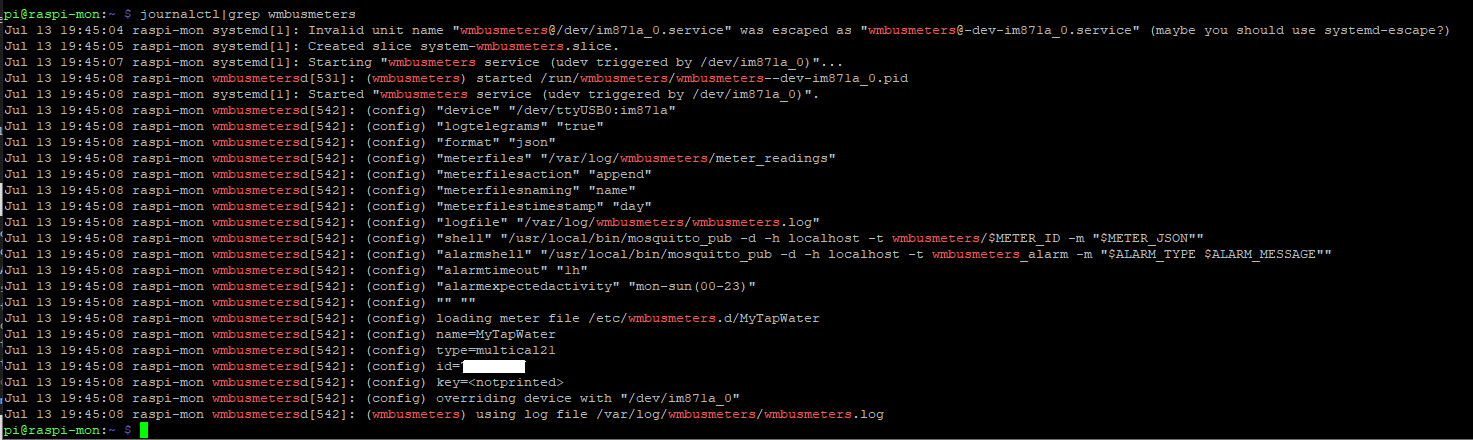
-
@wolfgangfb bei mir sieht dmesg so aus:
und beim journalctl:
Ich habe jetzt nochmal eine jungfräuliche SD Karte genommen, ein neues Image installiert
pi@raspberrypi:~ $ lsb_release -a
No LSB modules are available.
Distributor ID: Raspbian
Description:    Raspbian GNU/Linux 10 (buster)
Release:        10
Codename:       buster
mosqutto installiert
sudo apt-get install mosquittopi@raspberrypi:~ $ apt policy mosquitto mosquitto: Installiert: 1.5.7-1+deb10u1 Installationskandidat: 1.5.7-1+deb10u1 Versionstabelle: *** 1.5.7-1+deb10u1 500 500 http://raspbian.raspberrypi.org/raspbian buster/main armhf Packages 100 /var/lib/dpkg/statusund den wmbusmeters aus den Quellen installiert
pi@raspberrypi:~ $ more /etc/wmbusmeters.conf
loglevel=debug
device=/dev/ttyUSB0:im871a:t1
logtelegrams=true
format=json
meterfiles=/var/log/wmbusmeters/meter_readings
meterfilesaction=append
meterfilesnaming=name
meterfilestimestamp=day
logfile=/var/log/wmbusmeters/wmbusmeters.log
shell=/usr/local/bin/mosquitto_pub -d -h localhost -t wmbusmeters/$METER_ID -m "$METER_JSON"
alarmshell=/usr/local/bin/mosquitto_pub -d -h localhost -t wmbusmeters_alarm -m "$ALARM_TYPE $ALARM_MESSAGE"
alarmtimeout=1h
alarmexpectedactivity=mon-sun(00-23)
pi@raspberrypi:~ $ more /etc/wmbusmeters.d/MyTapWater name=MyTapWater type=multical21 id=57813696 key=E4E7EAF6FD17EAFB9587BC2996783C63pi@raspberrypi:~ $ sudo systemctl status wmbusmeters ● wmbusmeters.service - "wmbusmeters service" Loaded: loaded (/lib/systemd/system/wmbusmeters.service; disabled; vendor preset: enabled) Active: active (running) since Sat 2021-07-17 16:14:49 CEST; 9min ago Docs: https://github.com/weetmuts/wmbusmeters man:wmbusmeters(1) Process: 2774 ExecStartPre=/bin/mkdir -p /var/log/wmbusmeters/meter_readings (code=exited, status=0/SUCCESS) Process: 2775 ExecStartPre=/bin/chown -R wmbusmeters:wmbusmeters /var/log/wmbusmeters (code=exited, status=0/SUCCESS) Process: 2776 ExecStartPre=/bin/mkdir -p /run/wmbusmeters (code=exited, status=0/SUCCESS) Process: 2777 ExecStartPre=/bin/chown -R wmbusmeters:wmbusmeters /run/wmbusmeters (code=exited, status=0/SUCCESS) Process: 2778 ExecStart=/usr/sbin/wmbusmetersd /run/wmbusmeters/wmbusmeters.pid (code=exited, status=0/SUCCESS) Main PID: 2779 (wmbusmetersd) Tasks: 3 (limit: 4915) CGroup: /system.slice/wmbusmeters.service └─2779 /usr/sbin/wmbusmetersd /run/wmbusmeters/wmbusmeters.pid Jul 17 16:14:49 raspberrypi wmbusmetersd[2779]: (config) "alarmshell" "/usr/local/bin/mosquitto_pub -d -h localhost -t w Jul 17 16:14:49 raspberrypi wmbusmetersd[2779]: (config) "alarmtimeout" "1h" Jul 17 16:14:49 raspberrypi wmbusmetersd[2779]: (config) "alarmexpectedactivity" "mon-sun(00-23)" Jul 17 16:14:49 raspberrypi wmbusmetersd[2779]: (config) "" "" Jul 17 16:14:49 raspberrypi wmbusmetersd[2779]: (config) loading meter file /etc/wmbusmeters.d/MyTapWater Jul 17 16:14:49 raspberrypi wmbusmetersd[2779]: (config) name=MyTapWater Jul 17 16:14:49 raspberrypi wmbusmetersd[2779]: (config) type=multical21 Jul 17 16:14:49 raspberrypi wmbusmetersd[2779]: (config) id=57813696 Jul 17 16:14:49 raspberrypi wmbusmetersd[2779]: (config) key=<notprinted> Jul 17 16:14:49 raspberrypi wmbusmetersd[2779]: (wmbusmeters) using log file /var/log/wmbusmeters/wmbusmeters.log pi@raspberrypi:~ $pi@raspberrypi:~ $ more /var/log/wmbusmeters/wmbusmeters.log (serial) stopping manager (serial) EVENT thread interrupted (serial) event loop stopped! (serial) TIMER thread interrupted (wmbusmeters) shutting down (wmbusmeters) logging started 2021-07-17 16:31:43 using _ (wmbusmeters) version: _ (config) store meter files in: "/var/log/wmbusmeters/meter_readings" (config) using device: /dev/ttyUSB0:im871a:t1 (config) number of meters: 1 [2021-07-17_16:31:43] [ALARM SpecifiedDeviceNotFound] the device /dev/ttyUSB0:im871a:t1 is not working (shell) exec "/bin/sh" (shell) arg "-c" (shell) arg "/usr/local/bin/mosquitto_pub -d -h localhost -t wmbusmeters_alarm -m "$ALARM_TYPE $ALARM_MESSAGE"" (shell) env "ALARM_TYPE=SpecifiedDeviceNotFound" (shell) env "ALARM_MESSAGE=[ALARM SpecifiedDeviceNotFound] the device /dev/ttyUSB0:im871a:t1 is not working" (shell) waiting for child 7033 to complete. (shell) /bin/sh: return code 127 [2021-07-17_16:31:44] (shell) /bin/sh exited with non-zero return code: 127 (serial) EVENT thread interrupted No wmbus device detected, waiting for a device to be plugged in. (shell) exec (capture output) "/bin/pidof" (shell) arg "wmbusmetersd" (shell) output: >>>7030 <<< (serial) EVENT thread interrupted (shell) return code 0 (shell) 7035 exited (shell) exec (capture output) "/bin/pidof" (shell) arg "wmbusmeters" (shell) output: >>>652 <<< (serial) EVENT thread interrupted (shell) return code 0 (shell) 7036 exited Notice! Other wmbusmeters (pid 652) is running and it might hog any wmbus devices. (serial) registered regular callback HOT_PLUG_DETECTOR(0) every 2 seconds (wmbusmeters) waiting for telegrams (serial) waiting for stop (serial) EVENT thread interrupted (serial) TIMER thread interrupted [2021-07-17_16:31:46] (memory) rss 2818048 peak 2.68 MiB pi@raspberrypi:~ $Hier sieht es für mich so aus, als ob der USB Stick nicht erkannt wird. Muss man da evtl. einen Treiber installieren?
pi@raspberrypi:~ $ lsusb Bus 002 Device 001: ID 1d6b:0003 Linux Foundation 3.0 root hub Bus 001 Device 003: ID 10c4:ea60 Cygnal Integrated Products, Inc. CP2102/CP2109 UART Bridge Controller [CP210x family] Bus 001 Device 002: ID 2109:3431 VIA Labs, Inc. Hub Bus 001 Device 001: ID 1d6b:0002 Linux Foundation 2.0 root hub pi@raspberrypi:~ $ ls -l /dev/serial/by-id insgesamt 0 lrwxrwxrwx 1 root root 13 Jul 17 16:06 usb-Silicon_Labs_WiMOD_iM871A-usb_00919907-if00-port0 -> ../../ttyUSB0 pi@raspberrypi:~ $ -
Ich habe jetzt nochmal eine jungfräuliche SD Karte genommen, ein neues Image installiert
pi@raspberrypi:~ $ lsb_release -a
No LSB modules are available.
Distributor ID: Raspbian
Description:    Raspbian GNU/Linux 10 (buster)
Release:        10
Codename:       buster
mosqutto installiert
sudo apt-get install mosquittopi@raspberrypi:~ $ apt policy mosquitto mosquitto: Installiert: 1.5.7-1+deb10u1 Installationskandidat: 1.5.7-1+deb10u1 Versionstabelle: *** 1.5.7-1+deb10u1 500 500 http://raspbian.raspberrypi.org/raspbian buster/main armhf Packages 100 /var/lib/dpkg/statusund den wmbusmeters aus den Quellen installiert
pi@raspberrypi:~ $ more /etc/wmbusmeters.conf
loglevel=debug
device=/dev/ttyUSB0:im871a:t1
logtelegrams=true
format=json
meterfiles=/var/log/wmbusmeters/meter_readings
meterfilesaction=append
meterfilesnaming=name
meterfilestimestamp=day
logfile=/var/log/wmbusmeters/wmbusmeters.log
shell=/usr/local/bin/mosquitto_pub -d -h localhost -t wmbusmeters/$METER_ID -m "$METER_JSON"
alarmshell=/usr/local/bin/mosquitto_pub -d -h localhost -t wmbusmeters_alarm -m "$ALARM_TYPE $ALARM_MESSAGE"
alarmtimeout=1h
alarmexpectedactivity=mon-sun(00-23)
pi@raspberrypi:~ $ more /etc/wmbusmeters.d/MyTapWater name=MyTapWater type=multical21 id=57813696 key=E4E7EAF6FD17EAFB9587BC2996783C63pi@raspberrypi:~ $ sudo systemctl status wmbusmeters ● wmbusmeters.service - "wmbusmeters service" Loaded: loaded (/lib/systemd/system/wmbusmeters.service; disabled; vendor preset: enabled) Active: active (running) since Sat 2021-07-17 16:14:49 CEST; 9min ago Docs: https://github.com/weetmuts/wmbusmeters man:wmbusmeters(1) Process: 2774 ExecStartPre=/bin/mkdir -p /var/log/wmbusmeters/meter_readings (code=exited, status=0/SUCCESS) Process: 2775 ExecStartPre=/bin/chown -R wmbusmeters:wmbusmeters /var/log/wmbusmeters (code=exited, status=0/SUCCESS) Process: 2776 ExecStartPre=/bin/mkdir -p /run/wmbusmeters (code=exited, status=0/SUCCESS) Process: 2777 ExecStartPre=/bin/chown -R wmbusmeters:wmbusmeters /run/wmbusmeters (code=exited, status=0/SUCCESS) Process: 2778 ExecStart=/usr/sbin/wmbusmetersd /run/wmbusmeters/wmbusmeters.pid (code=exited, status=0/SUCCESS) Main PID: 2779 (wmbusmetersd) Tasks: 3 (limit: 4915) CGroup: /system.slice/wmbusmeters.service └─2779 /usr/sbin/wmbusmetersd /run/wmbusmeters/wmbusmeters.pid Jul 17 16:14:49 raspberrypi wmbusmetersd[2779]: (config) "alarmshell" "/usr/local/bin/mosquitto_pub -d -h localhost -t w Jul 17 16:14:49 raspberrypi wmbusmetersd[2779]: (config) "alarmtimeout" "1h" Jul 17 16:14:49 raspberrypi wmbusmetersd[2779]: (config) "alarmexpectedactivity" "mon-sun(00-23)" Jul 17 16:14:49 raspberrypi wmbusmetersd[2779]: (config) "" "" Jul 17 16:14:49 raspberrypi wmbusmetersd[2779]: (config) loading meter file /etc/wmbusmeters.d/MyTapWater Jul 17 16:14:49 raspberrypi wmbusmetersd[2779]: (config) name=MyTapWater Jul 17 16:14:49 raspberrypi wmbusmetersd[2779]: (config) type=multical21 Jul 17 16:14:49 raspberrypi wmbusmetersd[2779]: (config) id=57813696 Jul 17 16:14:49 raspberrypi wmbusmetersd[2779]: (config) key=<notprinted> Jul 17 16:14:49 raspberrypi wmbusmetersd[2779]: (wmbusmeters) using log file /var/log/wmbusmeters/wmbusmeters.log pi@raspberrypi:~ $pi@raspberrypi:~ $ more /var/log/wmbusmeters/wmbusmeters.log (serial) stopping manager (serial) EVENT thread interrupted (serial) event loop stopped! (serial) TIMER thread interrupted (wmbusmeters) shutting down (wmbusmeters) logging started 2021-07-17 16:31:43 using _ (wmbusmeters) version: _ (config) store meter files in: "/var/log/wmbusmeters/meter_readings" (config) using device: /dev/ttyUSB0:im871a:t1 (config) number of meters: 1 [2021-07-17_16:31:43] [ALARM SpecifiedDeviceNotFound] the device /dev/ttyUSB0:im871a:t1 is not working (shell) exec "/bin/sh" (shell) arg "-c" (shell) arg "/usr/local/bin/mosquitto_pub -d -h localhost -t wmbusmeters_alarm -m "$ALARM_TYPE $ALARM_MESSAGE"" (shell) env "ALARM_TYPE=SpecifiedDeviceNotFound" (shell) env "ALARM_MESSAGE=[ALARM SpecifiedDeviceNotFound] the device /dev/ttyUSB0:im871a:t1 is not working" (shell) waiting for child 7033 to complete. (shell) /bin/sh: return code 127 [2021-07-17_16:31:44] (shell) /bin/sh exited with non-zero return code: 127 (serial) EVENT thread interrupted No wmbus device detected, waiting for a device to be plugged in. (shell) exec (capture output) "/bin/pidof" (shell) arg "wmbusmetersd" (shell) output: >>>7030 <<< (serial) EVENT thread interrupted (shell) return code 0 (shell) 7035 exited (shell) exec (capture output) "/bin/pidof" (shell) arg "wmbusmeters" (shell) output: >>>652 <<< (serial) EVENT thread interrupted (shell) return code 0 (shell) 7036 exited Notice! Other wmbusmeters (pid 652) is running and it might hog any wmbus devices. (serial) registered regular callback HOT_PLUG_DETECTOR(0) every 2 seconds (wmbusmeters) waiting for telegrams (serial) waiting for stop (serial) EVENT thread interrupted (serial) TIMER thread interrupted [2021-07-17_16:31:46] (memory) rss 2818048 peak 2.68 MiB pi@raspberrypi:~ $Hier sieht es für mich so aus, als ob der USB Stick nicht erkannt wird. Muss man da evtl. einen Treiber installieren?
pi@raspberrypi:~ $ lsusb Bus 002 Device 001: ID 1d6b:0003 Linux Foundation 3.0 root hub Bus 001 Device 003: ID 10c4:ea60 Cygnal Integrated Products, Inc. CP2102/CP2109 UART Bridge Controller [CP210x family] Bus 001 Device 002: ID 2109:3431 VIA Labs, Inc. Hub Bus 001 Device 001: ID 1d6b:0002 Linux Foundation 2.0 root hub pi@raspberrypi:~ $ ls -l /dev/serial/by-id insgesamt 0 lrwxrwxrwx 1 root root 13 Jul 17 16:06 usb-Silicon_Labs_WiMOD_iM871A-usb_00919907-if00-port0 -> ../../ttyUSB0 pi@raspberrypi:~ $@wolfgangfb hallo, gibt's die Datei /etc/wmbusmeters.d/MyTapWater, wie oben beschrieben?
-
Ja, habe ich ja mit
more /etc/wmbusmeters.d/MyTapWaterangezeigt, dann muss es sie ja auch geben.
Darin sehe ich aber nichts was mir die Meldung im wmbusmeters.log (DeviceNotFound) erklären würde.Wie sieht den Dein wmbusmeters.log aus?

439
Online32.6k
Users82.2k
Topics1.3m
Posts