Skip to content
  • Home
  • Recent
  • Tags
  • 0 Unread 0
  • Categories
  • Unreplied
  • Popular
  • GitHub
  • Docu
  • Hilfe
Skins
  • Light
  • Brite
  • Cerulean
  • Cosmo
  • Flatly
  • Journal
  • Litera
  • Lumen
  • Lux
  • Materia
  • Minty
  • Morph
  • Pulse
  • Sandstone
  • Simplex
  • Sketchy
  • Spacelab
  • United
  • Yeti
  • Zephyr
  • Dark
  • Cyborg
  • Darkly
  • Quartz
  • Slate
  • Solar
  • Superhero
  • Vapor

  • Default (No Skin)
  • No Skin
Collapse
ioBroker Logo

Community Forum

donate donate
  1. ioBroker Community Home
  2. Deutsch
  3. ioBroker Allgemein
  4. [gelöst] Installation iobroker auf QNAP 251+ in docker
NEWS

  • Jahresrückblick 2025 – unser neuer Blogbeitrag ist online! ✨
    BluefoxB
    Bluefox
    17
    1
    2.5k

  • Neuer Blogbeitrag: Monatsrückblick - Dezember 2025 🎄
    BluefoxB
    Bluefox
    13
    1
    993

  • Weihnachtsangebot 2025! 🎄
    BluefoxB
    Bluefox
    25
    1
    2.3k

[gelöst] Installation iobroker auf QNAP 251+ in docker
Scheduled Pinned Locked Moved ioBroker Allgemein
94 Posts 13 Posters 22.6k Views 8 Watching
  • Oldest to Newest
  • Newest to Oldest
  • Most Votes
Reply
  • Reply as topic
Log in to reply
This topic has been deleted. Only users with topic management privileges can see it.
  • P Offline
    P Offline
    piccobello
    wrote on last edited by
    #59

    @Glasfaser said in [gelöst] Installation iobroker auf QNAP 251+ in docker:

    ls -la /dev/ttyACM0

    /$ chmod 777 /dev/ttyACM0
    /$ ls -la /dev/ttyACM0
    crwxrwxrwx 1 admin 20 166, 0 Nov 20 12:37 /dev/ttyACM0
    
    GlasfaserG 1 Reply Last reply
    0
    • P piccobello

      @Glasfaser said in [gelöst] Installation iobroker auf QNAP 251+ in docker:

      ls -la /dev/ttyACM0

      /$ chmod 777 /dev/ttyACM0
      /$ ls -la /dev/ttyACM0
      crwxrwxrwx 1 admin 20 166, 0 Nov 20 12:37 /dev/ttyACM0
      
      GlasfaserG Offline
      GlasfaserG Offline
      Glasfaser
      wrote on last edited by
      #60

      @piccobello

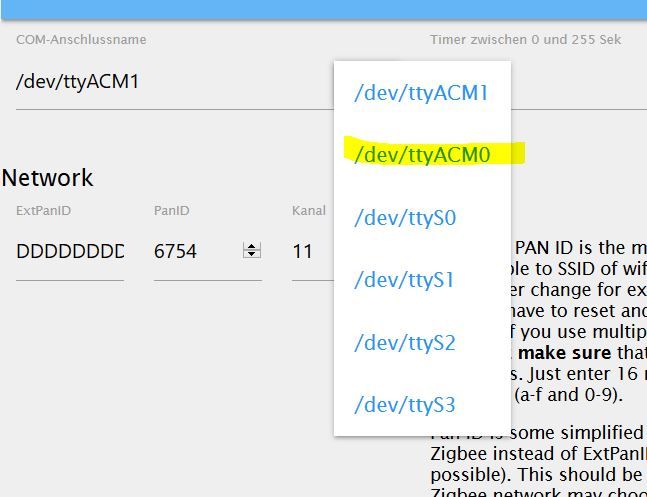
      und jetzt den Zigbee mit dem Port ttyACM0
      neu Starten

      Synology 918+ 16GB - ioBroker in Docker v9 , VISO auf Trekstor Primebook C13 13,3" , Hikvision Domkameras mit Surveillance Station .. CCU RaspberryMatic in Synology VM .. Zigbee CC2538+CC2592 .. Sonoff .. KNX .. Modbus ..

      1 Reply Last reply
      0
      • P Offline
        P Offline
        piccobello
        wrote on last edited by
        #61

        777 /dev/ttyACM0 so ??

        GlasfaserG 1 Reply Last reply
        0
        • P piccobello

          777 /dev/ttyACM0 so ??

          GlasfaserG Offline
          GlasfaserG Offline
          Glasfaser
          wrote on last edited by Glasfaser
          #62

          @piccobello

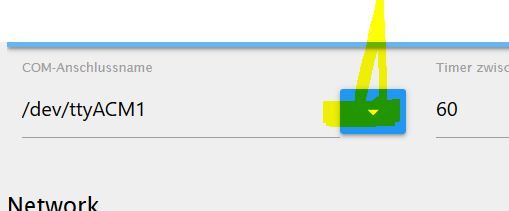
          Du hast doch ein Auswahlmenue dafür :

          2.JPG
          .

          1.JPG

          Synology 918+ 16GB - ioBroker in Docker v9 , VISO auf Trekstor Primebook C13 13,3" , Hikvision Domkameras mit Surveillance Station .. CCU RaspberryMatic in Synology VM .. Zigbee CC2538+CC2592 .. Sonoff .. KNX .. Modbus ..

          1 Reply Last reply
          0
          • P Offline
            P Offline
            piccobello
            wrote on last edited by
            #63

            wieder error

            zigbee.0	2019-11-20 21:06:13.407	error	(1443) Error while starting zigbee-shepherd!. Error: Error: No such file or directory, cannot open /dev/ttyACM0
            zigbee.0	2019-11-20 21:06:13.398	info	(1443) Starting zigbee-shepherd
            zigbee.0	2019-11-20 21:05:13.395	info	(1443) Error while starting zigbee-shepherd, attempting to fix... (takes 60 seconds)
            zigbee.0	2019-11-20 21:05:13.365	info	(1443) Reset coordinator
            zigbee.0	2019-11-20 21:05:13.320	info	(1443) Queue is: true
            zigbee.0	2019-11-20 21:05:13.319	info	(1443) Start on port: /dev/ttyACM0 channel 11
            zigbee.0	2019-11-20 21:05:13.277	info	(1443) starting. Version 0.11.5 in /opt/iobroker/node_modules/iobroker.zigbee, node: v10.17.0
            host.8862f2d30733	2019-11-20 21:05:11.356	info	instance system.adapter.zigbee.0 started with pid 1443
            host.8862f2d30733	2019-11-20 21:05:09.352	info	instance system.adapter.zigbee.0 terminated with code 156 (156)
            zigbee.0	2019-11-20 21:05:08.833	info	(1404) Terminated (START_IMMEDIATELY_AFTER_STOP): Without reason
            zigbee.0	2019-11-20 21:05:08.832	info	(1404) terminating
            zigbee.0	2019-11-20 21:05:08.828	info	(1404) Got terminate signal TERMINATE_YOURSELF
            host.8862f2d30733	2019-11-20 21:05:08.824	info	stopInstance system.adapter.zigbee.0 send kill signal
            host.8862f2d30733	2019-11-20 21:05:08.821	info	stopInstance system.adapter.zigbee.0 (force=false, process=true)
            info.0	2019-11-20 20:50:32.271	info	(431) Popup news was read...
            
            GlasfaserG 1 Reply Last reply
            0
            • P piccobello

              wieder error

              zigbee.0	2019-11-20 21:06:13.407	error	(1443) Error while starting zigbee-shepherd!. Error: Error: No such file or directory, cannot open /dev/ttyACM0
              zigbee.0	2019-11-20 21:06:13.398	info	(1443) Starting zigbee-shepherd
              zigbee.0	2019-11-20 21:05:13.395	info	(1443) Error while starting zigbee-shepherd, attempting to fix... (takes 60 seconds)
              zigbee.0	2019-11-20 21:05:13.365	info	(1443) Reset coordinator
              zigbee.0	2019-11-20 21:05:13.320	info	(1443) Queue is: true
              zigbee.0	2019-11-20 21:05:13.319	info	(1443) Start on port: /dev/ttyACM0 channel 11
              zigbee.0	2019-11-20 21:05:13.277	info	(1443) starting. Version 0.11.5 in /opt/iobroker/node_modules/iobroker.zigbee, node: v10.17.0
              host.8862f2d30733	2019-11-20 21:05:11.356	info	instance system.adapter.zigbee.0 started with pid 1443
              host.8862f2d30733	2019-11-20 21:05:09.352	info	instance system.adapter.zigbee.0 terminated with code 156 (156)
              zigbee.0	2019-11-20 21:05:08.833	info	(1404) Terminated (START_IMMEDIATELY_AFTER_STOP): Without reason
              zigbee.0	2019-11-20 21:05:08.832	info	(1404) terminating
              zigbee.0	2019-11-20 21:05:08.828	info	(1404) Got terminate signal TERMINATE_YOURSELF
              host.8862f2d30733	2019-11-20 21:05:08.824	info	stopInstance system.adapter.zigbee.0 send kill signal
              host.8862f2d30733	2019-11-20 21:05:08.821	info	stopInstance system.adapter.zigbee.0 (force=false, process=true)
              info.0	2019-11-20 20:50:32.271	info	(431) Popup news was read...
              
              GlasfaserG Offline
              GlasfaserG Offline
              Glasfaser
              wrote on last edited by
              #64

              @piccobello

              Letzer Versuch, im Container den Befehl durchführen :

              chmod 777 /dev/ttyACM0
              

              Synology 918+ 16GB - ioBroker in Docker v9 , VISO auf Trekstor Primebook C13 13,3" , Hikvision Domkameras mit Surveillance Station .. CCU RaspberryMatic in Synology VM .. Zigbee CC2538+CC2592 .. Sonoff .. KNX .. Modbus ..

              1 Reply Last reply
              0
              • P Offline
                P Offline
                piccobello
                wrote on last edited by
                #65

                im Container macht er das

                chmod: Zugriff auf '/dev/ttyACM0' nicht möglich: Datei oder Verzeichnis nicht gefunden      
                
                GlasfaserG 1 Reply Last reply
                0
                • P piccobello

                  im Container macht er das

                  chmod: Zugriff auf '/dev/ttyACM0' nicht möglich: Datei oder Verzeichnis nicht gefunden      
                  
                  GlasfaserG Offline
                  GlasfaserG Offline
                  Glasfaser
                  wrote on last edited by
                  #66

                  @piccobello

                  Leider kenne ich den Qnap - Container nicht ,
                  da kann ich dir leider nicht mehr weiterhelfen … Sorry :relieved:

                  Da fällt mir noch etwas ein :
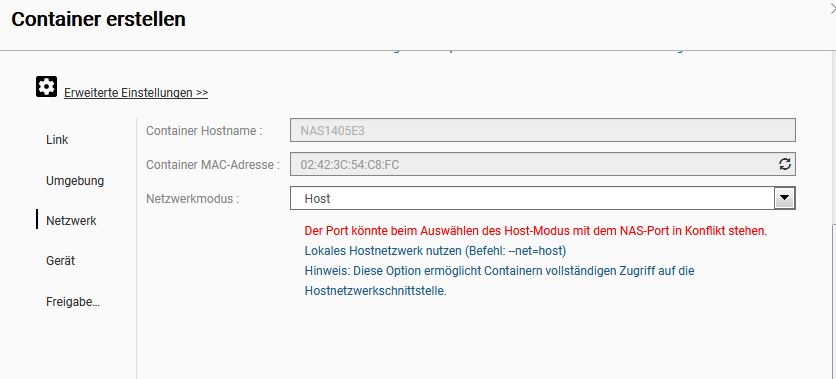
                  Vielleicht muss man es weiterreichen , gibt es soetwas bei dir !?

                  1.JPG

                  Synology 918+ 16GB - ioBroker in Docker v9 , VISO auf Trekstor Primebook C13 13,3" , Hikvision Domkameras mit Surveillance Station .. CCU RaspberryMatic in Synology VM .. Zigbee CC2538+CC2592 .. Sonoff .. KNX .. Modbus ..

                  1 Reply Last reply
                  0
                  • P Offline
                    P Offline
                    piccobello
                    wrote on last edited by
                    #67

                    leicht nur so was

                    ![alt text](2cf27c43-5684-4ef6-8207-94870c134209-imagem.png image url)

                    GlasfaserG 1 Reply Last reply
                    0
                    • P Offline
                      P Offline
                      piccobello
                      wrote on last edited by
                      #68

                      ![alt text](5bcbfe31-d14b-4eec-acc5-54977bb83587-imagem.png image url)

                      1 Reply Last reply
                      0
                      • P piccobello

                        leicht nur so was

                        ![alt text](2cf27c43-5684-4ef6-8207-94870c134209-imagem.png image url)

                        GlasfaserG Offline
                        GlasfaserG Offline
                        Glasfaser
                        wrote on last edited by
                        #69

                        @piccobello

                        Gib mal das im Container ein :

                        insmod /usr/local/modules/cdc-acm.ko


                        und dann die Ausgabe im Container

                        ls -la /dev/ttyACM0
                        

                        Synology 918+ 16GB - ioBroker in Docker v9 , VISO auf Trekstor Primebook C13 13,3" , Hikvision Domkameras mit Surveillance Station .. CCU RaspberryMatic in Synology VM .. Zigbee CC2538+CC2592 .. Sonoff .. KNX .. Modbus ..

                        1 Reply Last reply
                        0
                        • P Offline
                          P Offline
                          piccobello
                          wrote on last edited by
                          #70

                          @Glasfaser said in [gelöst] Installation iobroker auf QNAP 251+ in docker:

                          insmod /usr/local/modules/cdc-acm.ko

                          oci runtime error: exec failed: container_linux.go:265: starting container process caused "exec: \"insmod\": executable file not found in $PATH"
                          
                          GlasfaserG 1 Reply Last reply
                          0
                          • P Offline
                            P Offline
                            piccobello
                            wrote on last edited by
                            #71

                            warum kann ich den stick mit winscp es finden und mit den Container nicht?

                            1 Reply Last reply
                            0
                            • P piccobello

                              @Glasfaser said in [gelöst] Installation iobroker auf QNAP 251+ in docker:

                              insmod /usr/local/modules/cdc-acm.ko

                              oci runtime error: exec failed: container_linux.go:265: starting container process caused "exec: \"insmod\": executable file not found in $PATH"
                              
                              GlasfaserG Offline
                              GlasfaserG Offline
                              Glasfaser
                              wrote on last edited by
                              #72

                              @piccobello

                              …. mehr kann ich dir nicht helfen , da ich keine QNAP habe .. Sorry :thinking_face:

                              Synology 918+ 16GB - ioBroker in Docker v9 , VISO auf Trekstor Primebook C13 13,3" , Hikvision Domkameras mit Surveillance Station .. CCU RaspberryMatic in Synology VM .. Zigbee CC2538+CC2592 .. Sonoff .. KNX .. Modbus ..

                              P 1 Reply Last reply
                              0
                              • P Offline
                                P Offline
                                piccobello
                                wrote on last edited by
                                #73

                                lsusb mit Container

                                oci runtime error: exec failed: container_linux.go:265: starting container process caused "exec: \"lsusb\": executable file not found in $PATH" 
                                

                                mit winscp

                                /$ lsusb
                                Bus 002 Device 001: ID 1d6b:0003 Linux Foundation 3.0 root hub
                                Bus 001 Device 005: ID 0451:16a8 Texas Instruments, Inc. 
                                Bus 001 Device 001: ID 1d6b:0002 Linux Foundation 2.0 root hub
                                
                                
                                1 Reply Last reply
                                0
                                • GlasfaserG Glasfaser

                                  @piccobello

                                  …. mehr kann ich dir nicht helfen , da ich keine QNAP habe .. Sorry :thinking_face:

                                  P Offline
                                  P Offline
                                  piccobello
                                  wrote on last edited by
                                  #74

                                  @Glasfaser ok danke aus Portugal

                                  GlasfaserG 1 Reply Last reply
                                  0
                                  • P piccobello

                                    @Glasfaser ok danke aus Portugal

                                    GlasfaserG Offline
                                    GlasfaserG Offline
                                    Glasfaser
                                    wrote on last edited by
                                    #75

                                    @a200
                                    Kannst du vielleicht @piccobello helfen, ich komme leider nicht weiter !?

                                    Synology 918+ 16GB - ioBroker in Docker v9 , VISO auf Trekstor Primebook C13 13,3" , Hikvision Domkameras mit Surveillance Station .. CCU RaspberryMatic in Synology VM .. Zigbee CC2538+CC2592 .. Sonoff .. KNX .. Modbus ..

                                    1 Reply Last reply
                                    0
                                    • a200A Offline
                                      a200A Offline
                                      a200
                                      wrote on last edited by a200
                                      #76

                                      @piccobello Ich kann mal versuchen. Bitte folgendes prüfen.

                                      1. privileged mode. Der Hacken muss gesetzt sein.
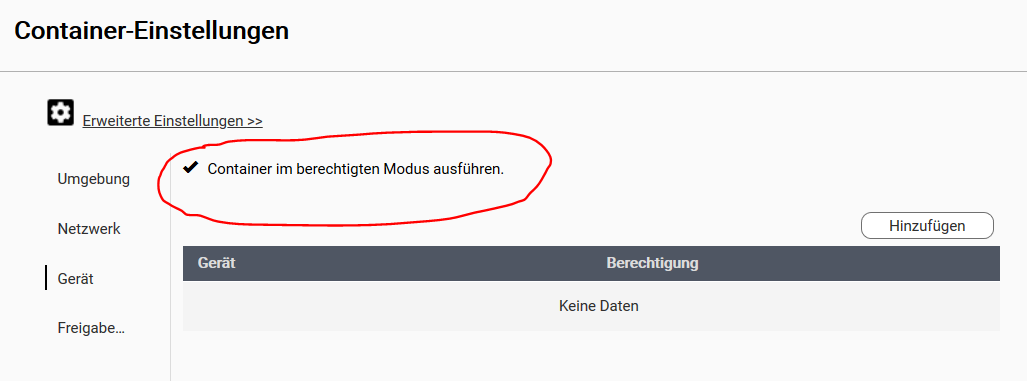
                                        001.PNG

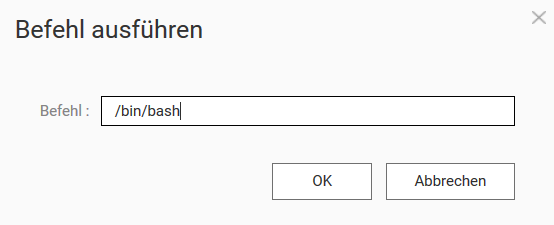
                                      2. Ich vermute, dass du bei winscp auf die shell der QNAP zugreifst, nicht auf den Container. Also auf das Terminal-Icon klicken, und in das Feld

                                      /bin/bash
                                      

                                      eingeben.
                                      002.PNG
                                      Dann in der Shell des Containers:

                                      dmesg | grep usb   
                                      

                                      eingeben und die komplette Ausgabe hier posten. Mal sehen ob dein Stick von Container erkannt wird.

                                      IoBroker auf QNAP TS-451, Raspi und NUC

                                      A 1 Reply Last reply
                                      0
                                      • P Offline
                                        P Offline
                                        piccobello
                                        wrote on last edited by
                                        #77

                                        guten abend habe alles noch mal neue installiert . und sudo chmod 777 /dev/ttyACM0 gemacht und dann war :blush: grün :blush: dank a200 und Glasfaser

                                        1 Reply Last reply
                                        0
                                        • P Offline
                                          P Offline
                                          piccobello
                                          wrote on last edited by
                                          #78

                                          Problem ist, dass bei jedem Neustart der Qnap der chmod neu durchgeführt werden muss....

                                          crw------- 1 root root 166, 0 Nov 22 01:09 /dev/ttyACM0  


                                          was kann ich machen mit die recht bleiben .....??

                                          a200A 1 Reply Last reply
                                          0
                                          Reply
                                          • Reply as topic
                                          Log in to reply
                                          • Oldest to Newest
                                          • Newest to Oldest
                                          • Most Votes


                                          Support us

                                          ioBroker
                                          Community Adapters
                                          Donate
                                          FAQ Cloud / IOT
                                          HowTo: Node.js-Update
                                          HowTo: Backup/Restore
                                          Downloads
                                          BLOG

                                          716

                                          Online

                                          32.6k

                                          Users

                                          82.3k

                                          Topics

                                          1.3m

                                          Posts
                                          Community
                                          Impressum | Datenschutz-Bestimmungen | Nutzungsbedingungen | Einwilligungseinstellungen
                                          ioBroker Community 2014-2025
                                          logo
                                          • Login

                                          • Don't have an account? Register

                                          • Login or register to search.
                                          • First post
                                            Last post
                                          0
                                          • Home
                                          • Recent
                                          • Tags
                                          • Unread 0
                                          • Categories
                                          • Unreplied
                                          • Popular
                                          • GitHub
                                          • Docu
                                          • Hilfe