Weiter zum Inhalt
  • Home
  • Aktuell
  • Tags
  • 0 Ungelesen 0
  • Kategorien
  • Unreplied
  • Beliebt
  • GitHub
  • Docu
  • Hilfe
Skins
  • Hell
  • Brite
  • Cerulean
  • Cosmo
  • Flatly
  • Journal
  • Litera
  • Lumen
  • Lux
  • Materia
  • Minty
  • Morph
  • Pulse
  • Sandstone
  • Simplex
  • Sketchy
  • Spacelab
  • United
  • Yeti
  • Zephyr
  • Dunkel
  • Cyborg
  • Darkly
  • Quartz
  • Slate
  • Solar
  • Superhero
  • Vapor

  • Standard: (Kein Skin)
  • Kein Skin
Einklappen
ioBroker Logo

Community Forum

donate donate
  1. ioBroker Community Home
  2. Deutsch
  3. ioBroker Allgemein
  4. [gelöst] Installation iobroker auf QNAP 251+ in docker
NEWS

  • Neuer ioBroker-Blog online: Monatsrückblick März/April 2026
    BluefoxB
    Bluefox
    8
    1
    471

  • Verwendung von KI bitte immer deutlich kennzeichnen
    HomoranH
    Homoran
    10
    1
    390

  • Monatsrückblick Januar/Februar 2026 ist online!
    BluefoxB
    Bluefox
    18
    1
    978

[gelöst] Installation iobroker auf QNAP 251+ in docker
Geplant Angeheftet Gesperrt Verschoben ioBroker Allgemein
94 Beiträge 13 Kommentatoren 23.6k Aufrufe 8 Beobachtet
  • Älteste zuerst
  • Neuste zuerst
  • Meiste Stimmen
Antworten
  • In einem neuen Thema antworten
Anmelden zum Antworten
Dieses Thema wurde gelöscht. Nur Nutzer mit entsprechenden Rechten können es sehen.
  • P piccobello
    zigbee.0	2019-11-20 20:15:27.818	error	(1388) Error while starting zigbee-shepherd!. Error: request timeout
    zigbee.0	2019-11-20 20:15:20.800	info	(1388) Starting zigbee-shepherd
    zigbee.0	2019-11-20 20:14:20.798	info	(1388) Error while starting zigbee-shepherd, attempting to fix... (takes 60 seconds)
    zigbee.0	2019-11-20 20:14:13.737	info	(1388) Reset coordinator
    zigbee.0	2019-11-20 20:14:13.692	info	(1388) Queue is: true
    zigbee.0	2019-11-20 20:14:13.691	info	(1388) Start on port: /dev/tty channel 11
    zigbee.0	2019-11-20 20:14:13.646	info	(1388) starting. Version 0.11.5 in /opt/iobroker/node_modules/iobroker.zigbee, node: v10.17.0
    host.8862f2d30733	2019-11-20 20:14:11.329	info	instance system.adapter.zigbee.0 started with pid 1388
    host.8862f2d30733	2019-11-20 20:14:11.314	info	"system.adapter.zigbee.0" enabled
    host.8862f2d30733	2019-11-20 20:14:01.209	info	instance system.adapter.zigbee.0 terminated with code 156 (156)
    host.8862f2d30733	2019-11-20 20:14:00.676	info	stopInstance system.adapter.zigbee.0 send kill signal
    zigbee.0	2019-11-20 20:14:00.682	info	(1372) Terminated (START_IMMEDIATELY_AFTER_STOP): Without reason
    zigbee.0	2019-11-20 20:14:00.681	info	(1372) terminating
    zigbee.0	2019-11-20 20:14:00.678	info	(1372) Got terminate signal TERMINATE_YOURSELF
    host.8862f2d30733	2019-11-20 20:14:00.676	info	stopInstance system.adapter.zigbee.0 (force=false, process=true)
    host.8862f2d30733	2019-11-20 20:14:00.675	info	"system.adapter.zigbee.0" disabled
    
    GlasfaserG Offline
    GlasfaserG Offline
    Glasfaser
    schrieb am zuletzt editiert von
    #46

    @piccobello

    Versuche mal im Zigbee

    /dev/ttyACM0
    

    Synology 918+ 16GB - ioBroker in Docker v9 , VISO auf Trekstor Primebook C13 13,3" , Hikvision Domkameras mit Surveillance Station .. CCU RaspberryMatic in Synology VM .. Zigbee CC2538+CC2592 .. Sonoff .. KNX .. Modbus ..

    1 Antwort Letzte Antwort
    0
    • P Offline
      P Offline
      piccobello
      schrieb am zuletzt editiert von
      #47

      geht auch nicht

      zigbee.0	2019-11-20 20:21:31.321	error	(1404) Error while starting zigbee-shepherd!. Error: Error: No such file or directory, cannot open /dev/ttyACM0
      zigbee.0	2019-11-20 20:21:31.310	info	(1404) Starting zigbee-shepherd
      info.0	2019-11-20 20:20:32.256	info	(431) Popup news was read...
      zigbee.0	2019-11-20 20:20:31.309	info	(1404) Error while starting zigbee-shepherd, attempting to fix... (takes 60 seconds)
      zigbee.0	2019-11-20 20:20:31.293	info	(1404) Reset coordinator
      zigbee.0	2019-11-20 20:20:31.249	info	(1404) Queue is: true
      zigbee.0	2019-11-20 20:20:31.248	info	(1404) Start on port: /dev/ttyACM0 channel 11
      zigbee.0	2019-11-20 20:20:31.202	info	(1404) starting. Version 0.11.5 in /opt/iobroker/node_modules/iobroker.zigbee, node: v10.17.0
      host.8862f2d30733	2019-11-20 20:20:29.117	info	instance system.adapter.zigbee.0 started with pid 1404
      host.8862f2d30733	2019-11-20 20:20:27.153	info	instance system.adapter.zigbee.0 terminated with code 156 (156)
      zigbee.0	2019-11-20 20:20:26.623	info	(1388) Terminated (START_IMMEDIATELY_AFTER_STOP): Without reason
      zigbee.0	2019-11-20 20:20:26.622	info	(1388) terminating
      zigbee.0	2019-11-20 20:20:26.614	info	(1388) Got terminate signal TERMINATE_YOURSELF
      host.8862f2d30733	2019-11-20 20:20:26.604	info	stopInstance system.adapter.zigbee.0 send kill signal
      host.8862f2d30733	2019-11-20 20:20:26.603	info	stopInstance system.adapter.zigbee.0 (force=false, process=true)
      
      GlasfaserG 1 Antwort Letzte Antwort
      0
      • P Offline
        P Offline
        piccobello
        schrieb am zuletzt editiert von
        #48

        wen ich das im terminal an gebe kommt das raus ls -la /dev/

        insgesamt 4                                                                                                                                                                                                                                                                     
        drwxr-xr-x 5 root root    360 Nov 20 15:42 .                                                                                                                                                                                                                                    
        drwxr-xr-x 1 root root   4096 Nov 20 15:42 ..                                                                                                                                                                                                                                   
        crw--w---- 1 root tty  136, 0 Nov 20 20:14 console                                                                                                                                                                                                                              
        lrwxrwxrwx 1 root root     11 Nov 20 15:42 core -> /proc/kcore                                                                                                                                                                                                                  
        lrwxrwxrwx 1 root root     13 Nov 20 15:42 fd -> /proc/self/fd                                                                                                                                                                                                                  
        crw-rw-rw- 1 root root   1, 7 Nov 20 15:42 full                                                                                                                                                                                                                                 
        drwxrwxrwt 2 root root     40 Nov 20 15:42 mqueue                                                                                                                                                                                                                               
        crw-rw-rw- 1 root root   1, 3 Nov 20 15:42 null                                                                                                                                                                                                                                 
        lrwxrwxrwx 1 root root      8 Nov 20 15:42 ptmx -> pts/ptmx                                                                                                                                                                                                                     
        drwxr-xr-x 2 root root      0 Nov 20 15:42 pts                                                                                                                                                                                                                                  
        crw-rw-rw- 1 root root   1, 8 Nov 20 15:42 random                                                                                                                                                                                                                               
        drwxrwxrwt 2 root root     40 Nov 20 15:42 shm                                                                                                                                                                                                                                  
        lrwxrwxrwx 1 root root     15 Nov 20 15:42 stderr -> /proc/self/fd/2                                                                                                                                                                                                            
        lrwxrwxrwx 1 root root     15 Nov 20 15:42 stdin -> /proc/self/fd/0                                                                                                                                                                                                             
        lrwxrwxrwx 1 root root     15 Nov 20 15:42 stdout -> /proc/self/fd/1                                                                                                                                                                                                            
        crwxrwxrwx 1 root root   5, 0 Nov 20 20:15 tty                                                                                                                                                                                                                                  
        crw-rw-rw- 1 root root   1, 9 Nov 20 15:42 urandom                                                                                                                                                                                                                              
        crw-rw-rw- 1 root root   1, 5 Nov 20 15:42 zero     
        
        1 Antwort Letzte Antwort
        0
        • P piccobello

          geht auch nicht

          zigbee.0	2019-11-20 20:21:31.321	error	(1404) Error while starting zigbee-shepherd!. Error: Error: No such file or directory, cannot open /dev/ttyACM0
          zigbee.0	2019-11-20 20:21:31.310	info	(1404) Starting zigbee-shepherd
          info.0	2019-11-20 20:20:32.256	info	(431) Popup news was read...
          zigbee.0	2019-11-20 20:20:31.309	info	(1404) Error while starting zigbee-shepherd, attempting to fix... (takes 60 seconds)
          zigbee.0	2019-11-20 20:20:31.293	info	(1404) Reset coordinator
          zigbee.0	2019-11-20 20:20:31.249	info	(1404) Queue is: true
          zigbee.0	2019-11-20 20:20:31.248	info	(1404) Start on port: /dev/ttyACM0 channel 11
          zigbee.0	2019-11-20 20:20:31.202	info	(1404) starting. Version 0.11.5 in /opt/iobroker/node_modules/iobroker.zigbee, node: v10.17.0
          host.8862f2d30733	2019-11-20 20:20:29.117	info	instance system.adapter.zigbee.0 started with pid 1404
          host.8862f2d30733	2019-11-20 20:20:27.153	info	instance system.adapter.zigbee.0 terminated with code 156 (156)
          zigbee.0	2019-11-20 20:20:26.623	info	(1388) Terminated (START_IMMEDIATELY_AFTER_STOP): Without reason
          zigbee.0	2019-11-20 20:20:26.622	info	(1388) terminating
          zigbee.0	2019-11-20 20:20:26.614	info	(1388) Got terminate signal TERMINATE_YOURSELF
          host.8862f2d30733	2019-11-20 20:20:26.604	info	stopInstance system.adapter.zigbee.0 send kill signal
          host.8862f2d30733	2019-11-20 20:20:26.603	info	stopInstance system.adapter.zigbee.0 (force=false, process=true)
          
          GlasfaserG Offline
          GlasfaserG Offline
          Glasfaser
          schrieb am zuletzt editiert von
          #49

          @piccobello
          Zeige mal :

          ls -l /dev/serial/by-id
          

          Synology 918+ 16GB - ioBroker in Docker v9 , VISO auf Trekstor Primebook C13 13,3" , Hikvision Domkameras mit Surveillance Station .. CCU RaspberryMatic in Synology VM .. Zigbee CC2538+CC2592 .. Sonoff .. KNX .. Modbus ..

          1 Antwort Letzte Antwort
          0
          • P Offline
            P Offline
            piccobello
            schrieb am zuletzt editiert von
            #50

            @Glasfaser said in [gelöst] Installation iobroker auf QNAP 251+ in docker:

            ls -l /dev/serial/by-id

            ls: Zugriff auf '/dev/serial/by-id' nicht möglich: Datei oder Verzeichnis nicht gefunden  
            
            
            GlasfaserG 1 Antwort Letzte Antwort
            0
            • P piccobello

              @Glasfaser said in [gelöst] Installation iobroker auf QNAP 251+ in docker:

              ls -l /dev/serial/by-id

              ls: Zugriff auf '/dev/serial/by-id' nicht möglich: Datei oder Verzeichnis nicht gefunden  
              
              
              GlasfaserG Offline
              GlasfaserG Offline
              Glasfaser
              schrieb am zuletzt editiert von
              #51

              @piccobello

              Sorry

              ls -la /dev/serial/by-id/
              

              Synology 918+ 16GB - ioBroker in Docker v9 , VISO auf Trekstor Primebook C13 13,3" , Hikvision Domkameras mit Surveillance Station .. CCU RaspberryMatic in Synology VM .. Zigbee CC2538+CC2592 .. Sonoff .. KNX .. Modbus ..

              1 Antwort Letzte Antwort
              0
              • P Offline
                P Offline
                piccobello
                schrieb am zuletzt editiert von
                #52

                ls -la /dev/serial/by-id/

                ls: Zugriff auf '/dev/serial/by-id/' nicht möglich: Datei oder Verzeichnis nicht gefunden  
                
                GlasfaserG 1 Antwort Letzte Antwort
                0
                • P piccobello

                  ls -la /dev/serial/by-id/

                  ls: Zugriff auf '/dev/serial/by-id/' nicht möglich: Datei oder Verzeichnis nicht gefunden  
                  
                  GlasfaserG Offline
                  GlasfaserG Offline
                  Glasfaser
                  schrieb am zuletzt editiert von
                  #53

                  @piccobello

                  Das mußt du mir mal erklären !????
                  ...

                  1.JPG

                  Synology 918+ 16GB - ioBroker in Docker v9 , VISO auf Trekstor Primebook C13 13,3" , Hikvision Domkameras mit Surveillance Station .. CCU RaspberryMatic in Synology VM .. Zigbee CC2538+CC2592 .. Sonoff .. KNX .. Modbus ..

                  1 Antwort Letzte Antwort
                  0
                  • P Offline
                    P Offline
                    piccobello
                    schrieb am zuletzt editiert von
                    #54

                    mit winscp geht das (aber mit terminal von qnap geht das nicht)

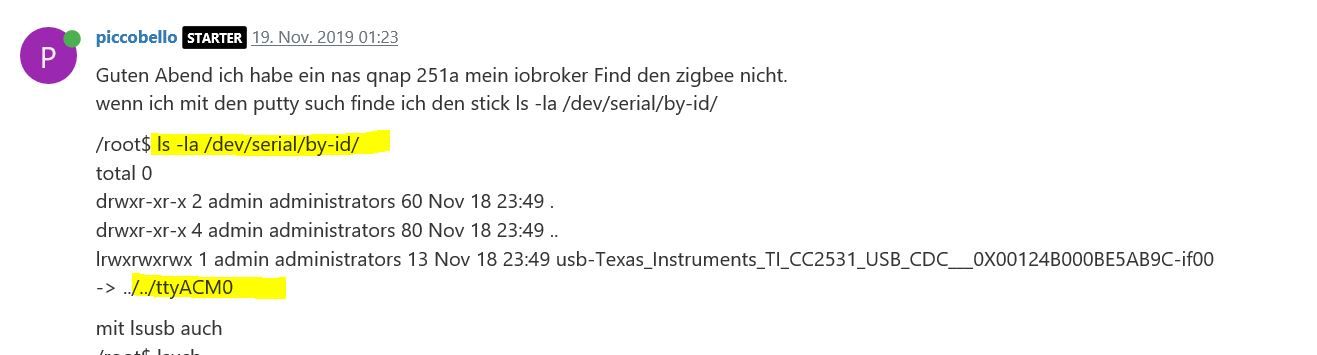
                    /$ ls -la /dev/serial/by-id/
                    total 0
                    drwxr-xr-x 2 admin administrators 60 Nov 20 12:37 .
                    drwxr-xr-x 4 admin administrators 80 Nov 20 12:37 ..
                    lrwxrwxrwx 1 admin administrators 13 Nov 20 12:37 usb-Texas_Instruments_TI_CC2531_USB_CDC___0X00124B000BE5AB9C-if00 -> ../../ttyACM0
                    
                    GlasfaserG 1 Antwort Letzte Antwort
                    0
                    • P piccobello

                      mit winscp geht das (aber mit terminal von qnap geht das nicht)

                      /$ ls -la /dev/serial/by-id/
                      total 0
                      drwxr-xr-x 2 admin administrators 60 Nov 20 12:37 .
                      drwxr-xr-x 4 admin administrators 80 Nov 20 12:37 ..
                      lrwxrwxrwx 1 admin administrators 13 Nov 20 12:37 usb-Texas_Instruments_TI_CC2531_USB_CDC___0X00124B000BE5AB9C-if00 -> ../../ttyACM0
                      
                      GlasfaserG Offline
                      GlasfaserG Offline
                      Glasfaser
                      schrieb am zuletzt editiert von
                      #55

                      @piccobello

                      und was kommt bei

                      ls -la /dev/ttyACM0
                      

                      Synology 918+ 16GB - ioBroker in Docker v9 , VISO auf Trekstor Primebook C13 13,3" , Hikvision Domkameras mit Surveillance Station .. CCU RaspberryMatic in Synology VM .. Zigbee CC2538+CC2592 .. Sonoff .. KNX .. Modbus ..

                      1 Antwort Letzte Antwort
                      0
                      • P Offline
                        P Offline
                        piccobello
                        schrieb am zuletzt editiert von
                        #56

                        @piccobello said in [gelöst] Installation iobroker auf QNAP 251+ in docker:

                        ls -la /dev/serial/by-id/

                        ![alt text](cb1c43b2-368e-4b8a-9974-b756e2f4e49e-imagem.png image url)

                        da geht das nicht

                        1 Antwort Letzte Antwort
                        0
                        • P Offline
                          P Offline
                          piccobello
                          schrieb am zuletzt editiert von
                          #57
                          /$ ls -la /dev/ttyACM0
                          crw-rw---- 1 admin 20 166, 0 Nov 20 12:37 /dev/ttyACM0
                          
                          GlasfaserG 1 Antwort Letzte Antwort
                          0
                          • P piccobello
                            /$ ls -la /dev/ttyACM0
                            crw-rw---- 1 admin 20 166, 0 Nov 20 12:37 /dev/ttyACM0
                            
                            GlasfaserG Offline
                            GlasfaserG Offline
                            Glasfaser
                            schrieb am zuletzt editiert von
                            #58

                            @piccobello

                            mache nochmal :

                            chmod 777 /dev/ttyACM0
                            

                            und dann die Ausgabe nochmal

                            ls -la /dev/ttyACM0
                            

                            Synology 918+ 16GB - ioBroker in Docker v9 , VISO auf Trekstor Primebook C13 13,3" , Hikvision Domkameras mit Surveillance Station .. CCU RaspberryMatic in Synology VM .. Zigbee CC2538+CC2592 .. Sonoff .. KNX .. Modbus ..

                            1 Antwort Letzte Antwort
                            0
                            • P Offline
                              P Offline
                              piccobello
                              schrieb am zuletzt editiert von
                              #59

                              @Glasfaser said in [gelöst] Installation iobroker auf QNAP 251+ in docker:

                              ls -la /dev/ttyACM0

                              /$ chmod 777 /dev/ttyACM0
                              /$ ls -la /dev/ttyACM0
                              crwxrwxrwx 1 admin 20 166, 0 Nov 20 12:37 /dev/ttyACM0
                              
                              GlasfaserG 1 Antwort Letzte Antwort
                              0
                              • P piccobello

                                @Glasfaser said in [gelöst] Installation iobroker auf QNAP 251+ in docker:

                                ls -la /dev/ttyACM0

                                /$ chmod 777 /dev/ttyACM0
                                /$ ls -la /dev/ttyACM0
                                crwxrwxrwx 1 admin 20 166, 0 Nov 20 12:37 /dev/ttyACM0
                                
                                GlasfaserG Offline
                                GlasfaserG Offline
                                Glasfaser
                                schrieb am zuletzt editiert von
                                #60

                                @piccobello

                                und jetzt den Zigbee mit dem Port ttyACM0
                                neu Starten

                                Synology 918+ 16GB - ioBroker in Docker v9 , VISO auf Trekstor Primebook C13 13,3" , Hikvision Domkameras mit Surveillance Station .. CCU RaspberryMatic in Synology VM .. Zigbee CC2538+CC2592 .. Sonoff .. KNX .. Modbus ..

                                1 Antwort Letzte Antwort
                                0
                                • P Offline
                                  P Offline
                                  piccobello
                                  schrieb am zuletzt editiert von
                                  #61

                                  777 /dev/ttyACM0 so ??

                                  GlasfaserG 1 Antwort Letzte Antwort
                                  0
                                  • P piccobello

                                    777 /dev/ttyACM0 so ??

                                    GlasfaserG Offline
                                    GlasfaserG Offline
                                    Glasfaser
                                    schrieb am zuletzt editiert von Glasfaser
                                    #62

                                    @piccobello

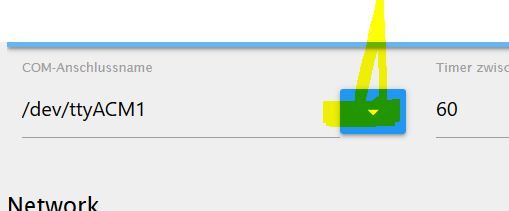
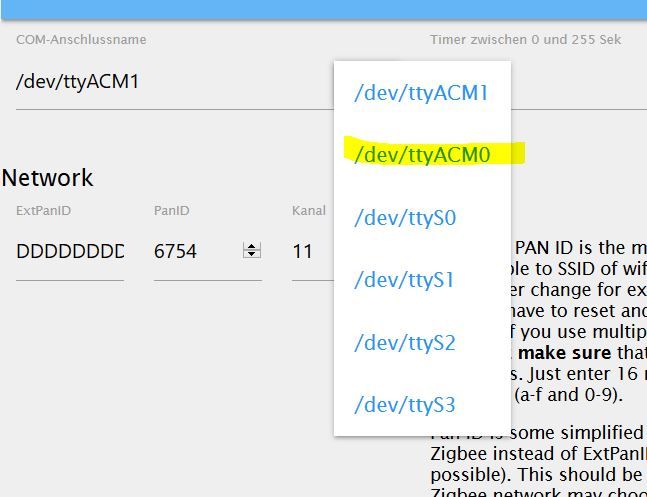
                                    Du hast doch ein Auswahlmenue dafür :

                                    2.JPG
                                    .

                                    1.JPG

                                    Synology 918+ 16GB - ioBroker in Docker v9 , VISO auf Trekstor Primebook C13 13,3" , Hikvision Domkameras mit Surveillance Station .. CCU RaspberryMatic in Synology VM .. Zigbee CC2538+CC2592 .. Sonoff .. KNX .. Modbus ..

                                    1 Antwort Letzte Antwort
                                    0
                                    • P Offline
                                      P Offline
                                      piccobello
                                      schrieb am zuletzt editiert von
                                      #63

                                      wieder error

                                      zigbee.0	2019-11-20 21:06:13.407	error	(1443) Error while starting zigbee-shepherd!. Error: Error: No such file or directory, cannot open /dev/ttyACM0
                                      zigbee.0	2019-11-20 21:06:13.398	info	(1443) Starting zigbee-shepherd
                                      zigbee.0	2019-11-20 21:05:13.395	info	(1443) Error while starting zigbee-shepherd, attempting to fix... (takes 60 seconds)
                                      zigbee.0	2019-11-20 21:05:13.365	info	(1443) Reset coordinator
                                      zigbee.0	2019-11-20 21:05:13.320	info	(1443) Queue is: true
                                      zigbee.0	2019-11-20 21:05:13.319	info	(1443) Start on port: /dev/ttyACM0 channel 11
                                      zigbee.0	2019-11-20 21:05:13.277	info	(1443) starting. Version 0.11.5 in /opt/iobroker/node_modules/iobroker.zigbee, node: v10.17.0
                                      host.8862f2d30733	2019-11-20 21:05:11.356	info	instance system.adapter.zigbee.0 started with pid 1443
                                      host.8862f2d30733	2019-11-20 21:05:09.352	info	instance system.adapter.zigbee.0 terminated with code 156 (156)
                                      zigbee.0	2019-11-20 21:05:08.833	info	(1404) Terminated (START_IMMEDIATELY_AFTER_STOP): Without reason
                                      zigbee.0	2019-11-20 21:05:08.832	info	(1404) terminating
                                      zigbee.0	2019-11-20 21:05:08.828	info	(1404) Got terminate signal TERMINATE_YOURSELF
                                      host.8862f2d30733	2019-11-20 21:05:08.824	info	stopInstance system.adapter.zigbee.0 send kill signal
                                      host.8862f2d30733	2019-11-20 21:05:08.821	info	stopInstance system.adapter.zigbee.0 (force=false, process=true)
                                      info.0	2019-11-20 20:50:32.271	info	(431) Popup news was read...
                                      
                                      GlasfaserG 1 Antwort Letzte Antwort
                                      0
                                      • P piccobello

                                        wieder error

                                        zigbee.0	2019-11-20 21:06:13.407	error	(1443) Error while starting zigbee-shepherd!. Error: Error: No such file or directory, cannot open /dev/ttyACM0
                                        zigbee.0	2019-11-20 21:06:13.398	info	(1443) Starting zigbee-shepherd
                                        zigbee.0	2019-11-20 21:05:13.395	info	(1443) Error while starting zigbee-shepherd, attempting to fix... (takes 60 seconds)
                                        zigbee.0	2019-11-20 21:05:13.365	info	(1443) Reset coordinator
                                        zigbee.0	2019-11-20 21:05:13.320	info	(1443) Queue is: true
                                        zigbee.0	2019-11-20 21:05:13.319	info	(1443) Start on port: /dev/ttyACM0 channel 11
                                        zigbee.0	2019-11-20 21:05:13.277	info	(1443) starting. Version 0.11.5 in /opt/iobroker/node_modules/iobroker.zigbee, node: v10.17.0
                                        host.8862f2d30733	2019-11-20 21:05:11.356	info	instance system.adapter.zigbee.0 started with pid 1443
                                        host.8862f2d30733	2019-11-20 21:05:09.352	info	instance system.adapter.zigbee.0 terminated with code 156 (156)
                                        zigbee.0	2019-11-20 21:05:08.833	info	(1404) Terminated (START_IMMEDIATELY_AFTER_STOP): Without reason
                                        zigbee.0	2019-11-20 21:05:08.832	info	(1404) terminating
                                        zigbee.0	2019-11-20 21:05:08.828	info	(1404) Got terminate signal TERMINATE_YOURSELF
                                        host.8862f2d30733	2019-11-20 21:05:08.824	info	stopInstance system.adapter.zigbee.0 send kill signal
                                        host.8862f2d30733	2019-11-20 21:05:08.821	info	stopInstance system.adapter.zigbee.0 (force=false, process=true)
                                        info.0	2019-11-20 20:50:32.271	info	(431) Popup news was read...
                                        
                                        GlasfaserG Offline
                                        GlasfaserG Offline
                                        Glasfaser
                                        schrieb am zuletzt editiert von
                                        #64

                                        @piccobello

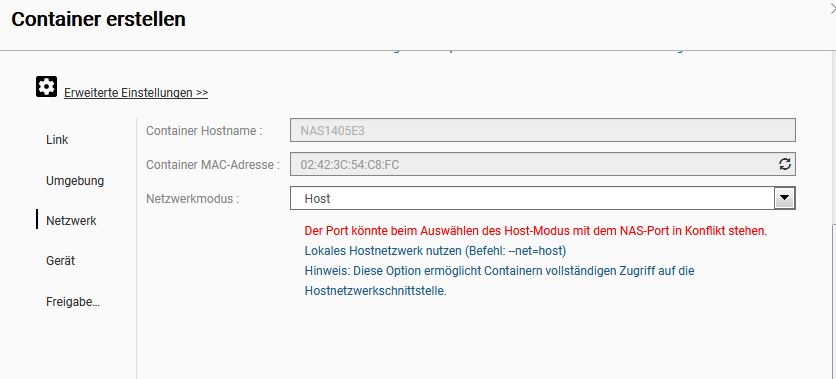
                                        Letzer Versuch, im Container den Befehl durchführen :

                                        chmod 777 /dev/ttyACM0
                                        

                                        Synology 918+ 16GB - ioBroker in Docker v9 , VISO auf Trekstor Primebook C13 13,3" , Hikvision Domkameras mit Surveillance Station .. CCU RaspberryMatic in Synology VM .. Zigbee CC2538+CC2592 .. Sonoff .. KNX .. Modbus ..

                                        1 Antwort Letzte Antwort
                                        0
                                        • P Offline
                                          P Offline
                                          piccobello
                                          schrieb am zuletzt editiert von
                                          #65

                                          im Container macht er das

                                          chmod: Zugriff auf '/dev/ttyACM0' nicht möglich: Datei oder Verzeichnis nicht gefunden      

                                          
                                          GlasfaserG 1 Antwort Letzte Antwort
                                          0

                                          Hey! Du scheinst an dieser Unterhaltung interessiert zu sein, hast aber noch kein Konto.

                                          Hast du es satt, bei jedem Besuch durch die gleichen Beiträge zu scrollen? Wenn du dich für ein Konto anmeldest, kommst du immer genau dorthin zurück, wo du zuvor warst, und kannst dich über neue Antworten benachrichtigen lassen (entweder per E-Mail oder Push-Benachrichtigung). Du kannst auch Lesezeichen speichern und Beiträge positiv bewerten, um anderen Community-Mitgliedern deine Wertschätzung zu zeigen.

                                          Mit deinem Input könnte dieser Beitrag noch besser werden 💗

                                          Registrieren Anmelden
                                          Antworten
                                          • In einem neuen Thema antworten
                                          Anmelden zum Antworten
                                          • Älteste zuerst
                                          • Neuste zuerst
                                          • Meiste Stimmen


                                          Support us

                                          ioBroker
                                          Community Adapters
                                          Donate
                                          FAQ Cloud / IOT
                                          HowTo: Node.js-Update
                                          HowTo: Backup/Restore
                                          Downloads
                                          BLOG

                                          577

                                          Online

                                          32.8k

                                          Benutzer

                                          82.8k

                                          Themen

                                          1.3m

                                          Beiträge
                                          Community
                                          Impressum | Datenschutz-Bestimmungen | Nutzungsbedingungen | Einwilligungseinstellungen
                                          ioBroker Community 2014-2025
                                          logo
                                          • Anmelden

                                          • Du hast noch kein Konto? Registrieren

                                          • Anmelden oder registrieren, um zu suchen
                                          • Erster Beitrag
                                            Letzter Beitrag
                                          0
                                          • Home
                                          • Aktuell
                                          • Tags
                                          • Ungelesen 0
                                          • Kategorien
                                          • Unreplied
                                          • Beliebt
                                          • GitHub
                                          • Docu
                                          • Hilfe