




ioBroker stürzt ab, startet neu
-
@snupy sagte in ioBroker stürzt ab, startet neu:
das ihm jedem Tag zur selben Zeit das RAM ausgeht, ist doch unwahrscheinlich ? oder mache ich da einen Denkfehler ?
Jein - gerade Wetter und dwd Adapter laufen ja nicht permanent und werden nur zyklisch angeschmissen.
Wenn es wirklich so knapp mit dem Speicher ist, dann kannst Du auch mal Deine swap Datei vergrössern. Die ist bei Dir nur 99MB groß und voll. Ich habe die auf 1 GB - also 1024 MB vergrößert.
free -h gesamt benutzt frei gemns. Puffer/Cache verfügbar Speicher: 3,7Gi 2,5Gi 157Mi 63Mi 1,0Gi 1,0Gi Swap: 1,0Gi 744Mi 279Mi@mickym sagte in ioBroker stürzt ab, startet neu:
Wenn es wirklich so knapp mit dem Speicher ist, dann kannst Du auch mal Deine swap Datei vergrössern. Die ist bei Dir nur 99MB groß und voll. Ich habe die auf 1 GB - also 1024 MB vergrößert.
nein und nein!
der Swap ist eine Notfallreserve und sollte nicht benutzt werden müssen.
Zusätzlich würde das bei langsamen SD-Karten erst recht zu langsamen I/O und damit "langsame Verbindung" sowie ansteigender Load average führen. Ist also kontraproduktiv.
kein Support per PN! - Fragen im Forum stellen -
Benutzt das Voting rechts unten im Beitrag wenn er euch geholfen hat.
Das Forum freut sich über eine Spende. Benutzt dazu den Spendenbutton oben rechts. Danke!
der Installationsfixer: curl -fsL https://iobroker.net/fix.sh | bash - -
@mickym sagte in ioBroker stürzt ab, startet neu:
Wenn es wirklich so knapp mit dem Speicher ist, dann kannst Du auch mal Deine swap Datei vergrössern. Die ist bei Dir nur 99MB groß und voll. Ich habe die auf 1 GB - also 1024 MB vergrößert.
nein und nein!
der Swap ist eine Notfallreserve und sollte nicht benutzt werden müssen.
Zusätzlich würde das bei langsamen SD-Karten erst recht zu langsamen I/O und damit "langsame Verbindung" sowie ansteigender Load average führen. Ist also kontraproduktiv.
*** BASE SYSTEM *** Model : Raspberry Pi 4 Model B Rev 1.4 Architecture : aarch64 Docker : false Virtualization : none Distributor ID: Debian Description: Debian GNU/Linux 11 (bullseye) Release: 11 Codename: bullseye PRETTY_NAME="Debian GNU/Linux 11 (bullseye)" NAME="Debian GNU/Linux" VERSION_ID="11" VERSION="11 (bullseye)" VERSION_CODENAME=bullseye ID=debian HOME_URL="https://www.debian.org/" SUPPORT_URL="https://www.debian.org/support" BUG_REPORT_URL="https://bugs.debian.org/" Systemuptime and Load: 17:57:03 up 22 days, 7:34, 1 user, load average: 2.02, 2.51, 2.50 CPU threads: 4 Raspberry only: throttled=0x0 Other values than 0x0 hint to temperature/voltage problems temp=59.4'C volt=0.9160V *** Time and Time Zones *** Local time: Fri 2023-05-12 17:57:03 CEST Universal time: Fri 2023-05-12 15:57:03 UTC RTC time: n/a Time zone: Europe/Berlin (CEST, +0200) System clock synchronized: yes NTP service: active RTC in local TZ: no *** User and Groups *** pi /home/pi pi adm dialout cdrom sudo audio video plugdev games users input render netdev gpio i2c spi iobroker *** X-Server-Setup *** X-Server: false Desktop: Terminal: tty Boot Target: multi-user.target *** MEMORY *** total used free shared buff/cache available Mem: 3.8G 2.5G 939M 0.0K 346M 1.2G Swap: 99M 90M 9.0M Total: 3.9G 2.6G 948M 3794 M total memory 2508 M used memory 431 M active memory 2248 M inactive memory 939 M free memory 40 M buffer memory 305 M swap cache 99 M total swap 90 M used swap 9 M free swap Raspberry only: oom events: 0 lifetime oom required: 0 Mbytes total time in oom handler: 0 ms max time spent in oom handler: 0 ms *** FILESYSTEM *** Filesystem Type Size Used Avail Use% Mounted on /dev/root ext4 59G 4.4G 52G 8% / devtmpfs devtmpfs 1.7G 0 1.7G 0% /dev tmpfs tmpfs 1.9G 16K 1.9G 1% /dev/shm tmpfs tmpfs 759M 1.2M 758M 1% /run tmpfs tmpfs 5.0M 4.0K 5.0M 1% /run/lock /dev/mmcblk0p1 vfat 255M 31M 225M 12% /boot tmpfs tmpfs 380M 0 380M 0% /run/user/1000 Messages concerning ext4 filesystem in dmesg: Show mounted filesystems (real ones only): TARGET SOURCE FSTYPE OPTIONS / /dev/mmcblk0p2 ext4 rw,noatime `-/boot /dev/mmcblk0p1 vfat rw,relatime,fmask=0022,dmask=0022,codepage=437,iocharset=ascii,shortname=mixed,errors=remount-ro Files in neuralgic directories: /var: 632M /var/ 289M /var/cache 283M /var/cache/apt 183M /var/cache/apt/archives 152M /var/lib Archived and active journals take up 88.0M in the file system. /opt/iobroker/backups: 48M /opt/iobroker/backups/ /opt/iobroker/iobroker-data: 603M /opt/iobroker/iobroker-data/ 298M /opt/iobroker/iobroker-data/history 182M /opt/iobroker/iobroker-data/files 85M /opt/iobroker/iobroker-data/backup-objects 51M /opt/iobroker/iobroker-data/files/javascript.admin The five largest files in iobroker-data are: 30M /opt/iobroker/iobroker-data/objects.jsonl 15M /opt/iobroker/iobroker-data/files/telegram.admin/rules/static/js/vendors-node_modules_iobroker_adapter-react-v5_assets_devices_parseNames_d_ts-node_modules_io-1d9f06.44fe4a3f.chunk.js.map 8.5M /opt/iobroker/iobroker-data/states.jsonl 7.2M /opt/iobroker/iobroker-data/files/telegram.admin/rules/static/js/vendors-node_modules_iobroker_adapter-react-v5_assets_devices_parseNames_d_ts-node_modules_io-1d9f06.44fe4a3f.chunk.js 6.9M /opt/iobroker/iobroker-data/files/telegram.admin/custom/static/js/vendors-node_modules_mui_icons-material_esm_index_js.8fdf8cb7.chunk.js.map *** NodeJS-Installation *** /usr/bin/nodejs v18.16.0 /usr/bin/node v18.16.0 /usr/bin/npm 9.5.1 /usr/bin/npx 9.5.1 nodejs: Installed: 18.16.0-deb-1nodesource1 Candidate: 18.16.0-deb-1nodesource1 Version table: *** 18.16.0-deb-1nodesource1 500 500 https://deb.nodesource.com/node_18.x bullseye/main arm64 Packages 100 /var/lib/dpkg/status 12.22.12~dfsg-1~deb11u4 500 500 http://security.debian.org/debian-security bullseye-security/main arm64 Packages 12.22.12~dfsg-1~deb11u3 500 500 http://deb.debian.org/debian bullseye/main arm64 Packages Temp directories causing npm8 problem: 0 No problems detected *** ioBroker-Installation *** ioBroker Status iobroker is running on this host. Objects type: jsonl States type: jsonl MULTIHOSTSERVICE/enabled: false Core adapters versions js-controller: 4.0.24 admin: 6.3.5 javascript: 6.1.4 Adapters from github: 3 Adapter State + system.adapter.admin.0 : admin : raspberrypi - enabled, port: 8081, bind: 0.0.0.0, run as: admin + system.adapter.alexa2.0 : alexa2 : raspberrypi - enabled + system.adapter.backitup.0 : backitup : raspberrypi - enabled + system.adapter.broadlink2.0 : broadlink2 : raspberrypi - enabled system.adapter.daswetter.0 : daswetter : raspberrypi - disabled + system.adapter.discovery.0 : discovery : raspberrypi - enabled system.adapter.dwd.0 : dwd : raspberrypi - disabled system.adapter.flot.0 : flot : raspberrypi - disabled + system.adapter.fritzdect.0 : fritzdect : raspberrypi - enabled + system.adapter.history.0 : history : raspberrypi - enabled system.adapter.ical.0 : ical : raspberrypi - enabled + system.adapter.info.0 : info : raspberrypi - enabled + system.adapter.javascript.0 : javascript : raspberrypi - enabled + system.adapter.mihome-vacuum.0 : mihome-vacuum : raspberrypi - enabled, port: 54321 + system.adapter.mqtt.0 : mqtt : raspberrypi - enabled, port: 1884, bind: 0.0.0.0 + system.adapter.mqtt.1 : mqtt : raspberrypi - enabled, port: 1888, bind: 0.0.0.0 + system.adapter.mytime.0 : mytime : raspberrypi - enabled + system.adapter.ping.0 : ping : raspberrypi - enabled + system.adapter.ping.1 : ping : raspberrypi - enabled + system.adapter.shelly.0 : shelly : raspberrypi - enabled, port: 1886, bind: 0.0.0.0 + system.adapter.sonoff.0 : sonoff : raspberrypi - enabled, port: 1883, bind: 0.0.0.0 + system.adapter.sourceanalytix.0 : sourceanalytix : raspberrypi - enabled + system.adapter.sourceanalytix.1 : sourceanalytix : raspberrypi - enabled + system.adapter.sourceanalytix.2 : sourceanalytix : raspberrypi - enabled + system.adapter.telegram.0 : telegram : raspberrypi - enabled, port: 8443, bind: 0.0.0.0 + system.adapter.telegram.1 : telegram : raspberrypi - enabled, port: 8443, bind: 0.0.0.0 + system.adapter.telegram.2 : telegram : raspberrypi - enabled, port: 8443, bind: 0.0.0.0 + system.adapter.telegram.3 : telegram : raspberrypi - enabled, port: 8443, bind: 0.0.0.0 + system.adapter.telegram.4 : telegram : raspberrypi - enabled, port: 8443, bind: 0.0.0.0 + system.adapter.telegram.5 : telegram : raspberrypi - enabled, port: 8443, bind: 0.0.0.0 + system.adapter.text2command.0 : text2command : raspberrypi - enabled + system.adapter.tr-064.0 : tr-064 : raspberrypi - enabled + system.adapter.tr-064.1 : tr-064 : raspberrypi - enabled system.adapter.vis-bars.0 : vis-bars : raspberrypi - disabled system.adapter.vis-history.0 : vis-history : raspberrypi - disabled system.adapter.vis-hqwidgets.0 : vis-hqwidgets : raspberrypi - disabled system.adapter.vis-jqui-mfd.0 : vis-jqui-mfd : raspberrypi - disabled system.adapter.vis-justgage.0 : vis-justgage : raspberrypi - disabled system.adapter.vis-materialdesign.0 : vis-materialdesign : raspberrypi - enabled system.adapter.vis-metro.0 : vis-metro : raspberrypi - disabled system.adapter.vis-rgraph.0 : vis-rgraph : raspberrypi - disabled system.adapter.vis-timeandweather.0 : vis-timeandweather : raspberrypi - disabled system.adapter.vis.0 : vis : raspberrypi - enabled + system.adapter.web.0 : web : raspberrypi - enabled, port: 8082, bind: 0.0.0.0, run as: admin + system.adapter.whatsapp-cmb.0 : whatsapp-cmb : raspberrypi - enabled + system.adapter.worx.0 : worx : raspberrypi - enabled + instance is alive Enabled adapters with bindings + system.adapter.admin.0 : admin : raspberrypi - enabled, port: 8081, bind: 0.0.0.0, run as: admin + system.adapter.mihome-vacuum.0 : mihome-vacuum : raspberrypi - enabled, port: 54321 + system.adapter.mqtt.0 : mqtt : raspberrypi - enabled, port: 1884, bind: 0.0.0.0 + system.adapter.mqtt.1 : mqtt : raspberrypi - enabled, port: 1888, bind: 0.0.0.0 + system.adapter.shelly.0 : shelly : raspberrypi - enabled, port: 1886, bind: 0.0.0.0 + system.adapter.sonoff.0 : sonoff : raspberrypi - enabled, port: 1883, bind: 0.0.0.0 + system.adapter.telegram.0 : telegram : raspberrypi - enabled, port: 8443, bind: 0.0.0.0 + system.adapter.telegram.1 : telegram : raspberrypi - enabled, port: 8443, bind: 0.0.0.0 + system.adapter.telegram.2 : telegram : raspberrypi - enabled, port: 8443, bind: 0.0.0.0 + system.adapter.telegram.3 : telegram : raspberrypi - enabled, port: 8443, bind: 0.0.0.0 + system.adapter.telegram.4 : telegram : raspberrypi - enabled, port: 8443, bind: 0.0.0.0 + system.adapter.telegram.5 : telegram : raspberrypi - enabled, port: 8443, bind: 0.0.0.0 + system.adapter.web.0 : web : raspberrypi - enabled, port: 8082, bind: 0.0.0.0, run as: admin ioBroker-Repositories stable : http://download.iobroker.net/sources-dist.json beta : http://download.iobroker.net/sources-dist-latest.json Active repo(s): stable Installed ioBroker-Instances Used repository: stable Adapter "admin" : 6.3.5 , installed 6.3.5 Adapter "alexa2" : 3.23.2 , installed 3.23.2 Adapter "backitup" : 2.6.19 , installed 2.6.16 [Updatable] Adapter "broadlink2" : 2.1.5 , installed 2.0.3 [Updatable] Adapter "daswetter" : 3.1.8 , installed 3.1.8 Adapter "discovery" : 3.1.0 , installed 3.1.0 Adapter "dwd" : 2.8.3 , installed 2.8.3 Adapter "flot" : 1.11.0 , installed 1.11.0 Adapter "fritzdect" : 2.2.6 , installed 2.2.6 Adapter "history" : 2.2.4 , installed 2.2.4 Adapter "ical" : 1.13.2 , installed 1.11.2 [Updatable] Adapter "info" : 1.9.26 , installed 1.9.19 [Updatable] Adapter "javascript" : 6.1.4 , installed 6.1.4 Controller "js-controller": 4.0.24 , installed 4.0.24 Adapter "mihome-vacuum": 3.9.5 , installed 3.8.8 [Updatable] Adapter "mqtt" : 4.0.7 , installed 4.0.7 Adapter "ping" : 1.5.3 , installed 1.5.3 Adapter "shelly" : 6.3.1 , installed 6.3.1 Adapter "simple-api" : 2.7.2 , installed 2.7.2 Adapter "socketio" : 4.2.0 , installed 4.2.0 Adapter "sonoff" : 2.5.1 , installed 2.5.1 Adapter "telegram" : 1.15.2 , installed 1.15.2 Adapter "text2command" : 2.3.0 , installed 2.1.1 [Updatable] Adapter "tr-064" : 4.2.18 , installed 4.2.18 Adapter "vis" : 1.4.16 , installed 1.4.16 Adapter "vis-bars" : 0.1.4 , installed 0.1.4 Adapter "vis-history" : 1.0.0 , installed 1.0.0 Adapter "vis-hqwidgets": 1.3.0 , installed 1.3.0 Adapter "vis-jqui-mfd" : 1.0.12 , installed 1.0.12 Adapter "vis-justgage" : 1.0.2 , installed 1.0.2 Adapter "vis-metro" : 1.2.0 , installed 1.1.2 [Updatable] Adapter "vis-rgraph" : 0.0.2 , installed 0.0.2 Adapter "vis-timeandweather": 1.2.2, installed 1.2.2 Adapter "web" : 4.3.0 , installed 4.3.0 Adapter "whatsapp-cmb" : 0.2.3 , installed 0.2.3 Adapter "worx" : 2.1.3 , installed 2.1.3 Adapter "ws" : 1.3.0 , installed 1.3.0 Objects and States Please stand by - This may take a while Objects: 9607 States: 12235 *** OS-Repositories and Updates *** Hit:1 http://security.debian.org/debian-security bullseye-security InRelease Hit:2 http://deb.debian.org/debian bullseye InRelease Hit:3 http://deb.debian.org/debian bullseye-updates InRelease Hit:4 http://archive.raspberrypi.org/debian bullseye InRelease Hit:5 https://deb.nodesource.com/node_18.x bullseye InRelease Reading package lists... Pending Updates: 60 *** Listening Ports *** Active Internet connections (only servers) Proto Recv-Q Send-Q Local Address Foreign Address State User Inode PID/Program name tcp 0 0 127.0.0.1:9001 0.0.0.0:* LISTEN 1001 25983884 2099868/iobroker.js tcp 0 0 127.0.0.1:9000 0.0.0.0:* LISTEN 1001 25985332 2099868/iobroker.js tcp 0 0 0.0.0.0:1888 0.0.0.0:* LISTEN 1001 25986709 2100409/io.mqtt.1 tcp 0 0 0.0.0.0:1883 0.0.0.0:* LISTEN 1001 25988410 2100472/io.sonoff.0 tcp 0 0 0.0.0.0:1884 0.0.0.0:* LISTEN 1001 25985889 2100364/io.mqtt.0 tcp 0 0 0.0.0.0:1886 0.0.0.0:* LISTEN 1001 25986889 2100479/io.shelly.0 tcp 0 0 127.0.0.1:7999 0.0.0.0:* LISTEN 0 15576057 1143174/motion tcp 0 0 0.0.0.0:8765 0.0.0.0:* LISTEN 0 401684 38002/python2 tcp 0 0 0.0.0.0:22 0.0.0.0:* LISTEN 0 13495 536/sshd: /usr/sbin tcp 0 0 0.0.0.0:4530 0.0.0.0:* LISTEN 0 15576052 1143174/motion tcp 0 0 0.0.0.0:4531 0.0.0.0:* LISTEN 0 15576053 1143174/motion tcp 0 0 0.0.0.0:4532 0.0.0.0:* LISTEN 0 15576054 1143174/motion tcp 0 0 0.0.0.0:4533 0.0.0.0:* LISTEN 0 15576055 1143174/motion tcp 0 0 0.0.0.0:4534 0.0.0.0:* LISTEN 0 15576056 1143174/motion tcp6 0 0 :::8081 :::* LISTEN 1001 25986233 2099981/io.admin.0 tcp6 0 0 :::8082 :::* LISTEN 1001 25988846 2100846/io.web.0 tcp6 0 0 :::22 :::* LISTEN 0 13497 536/sshd: /usr/sbin udp 0 0 0.0.0.0:15001 0.0.0.0:* 1001 25985970 2100563/io.broadlin udp 0 0 0.0.0.0:39698 0.0.0.0:* 1001 25986855 2100563/io.broadlin udp 0 0 0.0.0.0:54321 0.0.0.0:* 1001 25985888 2100357/io.mihome-v udp 0 0 0.0.0.0:5353 0.0.0.0:* 108 11069 392/avahi-daemon: r udp 0 0 0.0.0.0:68 0.0.0.0:* 0 10050 674/dhcpcd udp 0 0 0.0.0.0:32982 0.0.0.0:* 108 11071 392/avahi-daemon: r udp6 0 0 :::5353 :::* 108 11070 392/avahi-daemon: r udp6 0 0 :::44521 :::* 108 11072 392/avahi-daemon: r udp6 0 0 :::546 :::* 0 23610508 674/dhcpcd *** Log File - Last 25 Lines *** 2023-05-12 17:38:47.587 - error: host.raspberrypi system.adapter.daswetter.0 schedule attribute missing 2023-05-12 17:38:54.914 - info: host.raspberrypi stopInstance system.adapter.dwd.0 (force=false, process=false) 2023-05-12 17:38:54.916 - info: host.raspberrypi stopInstance canceled schedule system.adapter.dwd.0 2023-05-12 17:38:58.025 - error: host.raspberrypi system.adapter.dwd.0 schedule attribute missing 2023-05-12 17:39:08.388 - info: admin.0 (2099981) <== Disconnect system.user.admin from ::ffff:192.168.0.148 admin 2023-05-12 17:39:09.048 - info: admin.0 (2099981) ==> Connected system.user.admin from ::ffff:192.168.0.148 2023-05-12 17:39:30.009 - info: host.raspberrypi stopInstance system.adapter.ical.0 (force=false, process=false) 2023-05-12 17:39:30.015 - info: host.raspberrypi stopInstance canceled schedule system.adapter.ical.0 2023-05-12 17:39:33.130 - error: host.raspberrypi system.adapter.ical.0 schedule attribute missing 2023-05-12 17:39:33.258 - info: admin.0 (2099981) <== Disconnect system.user.admin from ::ffff:192.168.0.148 admin 2023-05-12 17:39:33.611 - info: admin.0 (2099981) ==> Connected system.user.admin from ::ffff:192.168.0.148 2023-05-12 17:39:47.689 - info: host.raspberrypi stopInstance system.adapter.daswetter.0 (force=false, process=false) 2023-05-12 17:39:50.785 - error: host.raspberrypi system.adapter.daswetter.0 schedule attribute missing 2023-05-12 17:39:57.997 - info: admin.0 (2099981) <== Disconnect system.user.admin from ::ffff:192.168.0.148 admin 2023-05-12 17:39:58.564 - info: admin.0 (2099981) ==> Connected system.user.admin from ::ffff:192.168.0.148 2023-05-12 17:40:11.427 - info: host.raspberrypi "system.adapter.daswetter.0" disabled 2023-05-12 17:40:11.428 - info: host.raspberrypi stopInstance system.adapter.daswetter.0 (force=false, process=false) 2023-05-12 17:40:16.907 - info: host.raspberrypi "system.adapter.dwd.0" disabled 2023-05-12 17:40:16.907 - info: host.raspberrypi stopInstance system.adapter.dwd.0 (force=false, process=false) 2023-05-12 17:40:24.900 - info: admin.0 (2099981) <== Disconnect system.user.admin from ::ffff:192.168.0.148 admin 2023-05-12 17:40:25.242 - info: admin.0 (2099981) ==> Connected system.user.admin from ::ffff:192.168.0.148 2023-05-12 17:42:43.276 - info: web.0 (2100846) <== Disconnect system.user.admin from ::ffff:192.168.0.49 vis.0 2023-05-12 17:42:57.023 - info: web.0 (2100846) ==> Connected system.user.admin from ::ffff:192.168.0.49 2023-05-12 17:52:43.258 - info: web.0 (2100846) <== Disconnect system.user.admin from ::ffff:192.168.0.49 vis.0 2023-05-12 17:53:01.409 - info: web.0 (2100846) ==> Connected system.user.admin from ::ffff:192.168.0.49 -
@mickym sagte in ioBroker stürzt ab, startet neu:
Wenn es wirklich so knapp mit dem Speicher ist, dann kannst Du auch mal Deine swap Datei vergrössern. Die ist bei Dir nur 99MB groß und voll. Ich habe die auf 1 GB - also 1024 MB vergrößert.
nein und nein!
der Swap ist eine Notfallreserve und sollte nicht benutzt werden müssen.
Zusätzlich würde das bei langsamen SD-Karten erst recht zu langsamen I/O und damit "langsame Verbindung" sowie ansteigender Load average führen. Ist also kontraproduktiv.
@homoran sagte in ioBroker stürzt ab, startet neu:
der Swap ist eine Notfallreserve und sollte nicht benutzt werden müssen.
Sorry - aber das stimmt so nicht. Das System entscheidet das selbstständig und wie Du siehst ist bei mir schon einiges drin. Das Betriebssystem lagert aus, was nicht oft gebraucht wird - das heißt aber nicht automatisch, dass dauernd in den Swap-Bereich geschrieben wird. Wenn nicht mehr RAM zur Verfügung steht und ich diese Adapter brauche, ist es 10 mal besser eine größere Swap-Datei zu machen, als das System abstürzen zu lassen. Dafür ist schließlich eine Swap Datei da. Und eine Swap-Datei von 100 MB ist einfach lächerlich bei 4 GB RAM. Das stammt noch aus uralter Zeit diese Voreinstellung. Da kann ich das Swappen gleich ausschalten.
Der Swap-Speicher WIRD nicht nur im Notfall genutzt - sondern es werden inaktive Prozesse ausgelagert.
Jeder Flow bzw. jedes Script, das ich hier poste implementiert jeder auf eigene Gefahr. Flows und Scripts können Fehler aufweisen und weder der Seitenbetreiber noch ich persönlich können hierfür haftbar gemacht werden. Das gleiche gilt für Empfehlungen aller Art.
-
*** BASE SYSTEM *** Model : Raspberry Pi 4 Model B Rev 1.4 Architecture : aarch64 Docker : false Virtualization : none Distributor ID: Debian Description: Debian GNU/Linux 11 (bullseye) Release: 11 Codename: bullseye PRETTY_NAME="Debian GNU/Linux 11 (bullseye)" NAME="Debian GNU/Linux" VERSION_ID="11" VERSION="11 (bullseye)" VERSION_CODENAME=bullseye ID=debian HOME_URL="https://www.debian.org/" SUPPORT_URL="https://www.debian.org/support" BUG_REPORT_URL="https://bugs.debian.org/" Systemuptime and Load: 17:57:03 up 22 days, 7:34, 1 user, load average: 2.02, 2.51, 2.50 CPU threads: 4 Raspberry only: throttled=0x0 Other values than 0x0 hint to temperature/voltage problems temp=59.4'C volt=0.9160V *** Time and Time Zones *** Local time: Fri 2023-05-12 17:57:03 CEST Universal time: Fri 2023-05-12 15:57:03 UTC RTC time: n/a Time zone: Europe/Berlin (CEST, +0200) System clock synchronized: yes NTP service: active RTC in local TZ: no *** User and Groups *** pi /home/pi pi adm dialout cdrom sudo audio video plugdev games users input render netdev gpio i2c spi iobroker *** X-Server-Setup *** X-Server: false Desktop: Terminal: tty Boot Target: multi-user.target *** MEMORY *** total used free shared buff/cache available Mem: 3.8G 2.5G 939M 0.0K 346M 1.2G Swap: 99M 90M 9.0M Total: 3.9G 2.6G 948M 3794 M total memory 2508 M used memory 431 M active memory 2248 M inactive memory 939 M free memory 40 M buffer memory 305 M swap cache 99 M total swap 90 M used swap 9 M free swap Raspberry only: oom events: 0 lifetime oom required: 0 Mbytes total time in oom handler: 0 ms max time spent in oom handler: 0 ms *** FILESYSTEM *** Filesystem Type Size Used Avail Use% Mounted on /dev/root ext4 59G 4.4G 52G 8% / devtmpfs devtmpfs 1.7G 0 1.7G 0% /dev tmpfs tmpfs 1.9G 16K 1.9G 1% /dev/shm tmpfs tmpfs 759M 1.2M 758M 1% /run tmpfs tmpfs 5.0M 4.0K 5.0M 1% /run/lock /dev/mmcblk0p1 vfat 255M 31M 225M 12% /boot tmpfs tmpfs 380M 0 380M 0% /run/user/1000 Messages concerning ext4 filesystem in dmesg: Show mounted filesystems (real ones only): TARGET SOURCE FSTYPE OPTIONS / /dev/mmcblk0p2 ext4 rw,noatime `-/boot /dev/mmcblk0p1 vfat rw,relatime,fmask=0022,dmask=0022,codepage=437,iocharset=ascii,shortname=mixed,errors=remount-ro Files in neuralgic directories: /var: 632M /var/ 289M /var/cache 283M /var/cache/apt 183M /var/cache/apt/archives 152M /var/lib Archived and active journals take up 88.0M in the file system. /opt/iobroker/backups: 48M /opt/iobroker/backups/ /opt/iobroker/iobroker-data: 603M /opt/iobroker/iobroker-data/ 298M /opt/iobroker/iobroker-data/history 182M /opt/iobroker/iobroker-data/files 85M /opt/iobroker/iobroker-data/backup-objects 51M /opt/iobroker/iobroker-data/files/javascript.admin The five largest files in iobroker-data are: 30M /opt/iobroker/iobroker-data/objects.jsonl 15M /opt/iobroker/iobroker-data/files/telegram.admin/rules/static/js/vendors-node_modules_iobroker_adapter-react-v5_assets_devices_parseNames_d_ts-node_modules_io-1d9f06.44fe4a3f.chunk.js.map 8.5M /opt/iobroker/iobroker-data/states.jsonl 7.2M /opt/iobroker/iobroker-data/files/telegram.admin/rules/static/js/vendors-node_modules_iobroker_adapter-react-v5_assets_devices_parseNames_d_ts-node_modules_io-1d9f06.44fe4a3f.chunk.js 6.9M /opt/iobroker/iobroker-data/files/telegram.admin/custom/static/js/vendors-node_modules_mui_icons-material_esm_index_js.8fdf8cb7.chunk.js.map *** NodeJS-Installation *** /usr/bin/nodejs v18.16.0 /usr/bin/node v18.16.0 /usr/bin/npm 9.5.1 /usr/bin/npx 9.5.1 nodejs: Installed: 18.16.0-deb-1nodesource1 Candidate: 18.16.0-deb-1nodesource1 Version table: *** 18.16.0-deb-1nodesource1 500 500 https://deb.nodesource.com/node_18.x bullseye/main arm64 Packages 100 /var/lib/dpkg/status 12.22.12~dfsg-1~deb11u4 500 500 http://security.debian.org/debian-security bullseye-security/main arm64 Packages 12.22.12~dfsg-1~deb11u3 500 500 http://deb.debian.org/debian bullseye/main arm64 Packages Temp directories causing npm8 problem: 0 No problems detected *** ioBroker-Installation *** ioBroker Status iobroker is running on this host. Objects type: jsonl States type: jsonl MULTIHOSTSERVICE/enabled: false Core adapters versions js-controller: 4.0.24 admin: 6.3.5 javascript: 6.1.4 Adapters from github: 3 Adapter State + system.adapter.admin.0 : admin : raspberrypi - enabled, port: 8081, bind: 0.0.0.0, run as: admin + system.adapter.alexa2.0 : alexa2 : raspberrypi - enabled + system.adapter.backitup.0 : backitup : raspberrypi - enabled + system.adapter.broadlink2.0 : broadlink2 : raspberrypi - enabled system.adapter.daswetter.0 : daswetter : raspberrypi - disabled + system.adapter.discovery.0 : discovery : raspberrypi - enabled system.adapter.dwd.0 : dwd : raspberrypi - disabled system.adapter.flot.0 : flot : raspberrypi - disabled + system.adapter.fritzdect.0 : fritzdect : raspberrypi - enabled + system.adapter.history.0 : history : raspberrypi - enabled system.adapter.ical.0 : ical : raspberrypi - enabled + system.adapter.info.0 : info : raspberrypi - enabled + system.adapter.javascript.0 : javascript : raspberrypi - enabled + system.adapter.mihome-vacuum.0 : mihome-vacuum : raspberrypi - enabled, port: 54321 + system.adapter.mqtt.0 : mqtt : raspberrypi - enabled, port: 1884, bind: 0.0.0.0 + system.adapter.mqtt.1 : mqtt : raspberrypi - enabled, port: 1888, bind: 0.0.0.0 + system.adapter.mytime.0 : mytime : raspberrypi - enabled + system.adapter.ping.0 : ping : raspberrypi - enabled + system.adapter.ping.1 : ping : raspberrypi - enabled + system.adapter.shelly.0 : shelly : raspberrypi - enabled, port: 1886, bind: 0.0.0.0 + system.adapter.sonoff.0 : sonoff : raspberrypi - enabled, port: 1883, bind: 0.0.0.0 + system.adapter.sourceanalytix.0 : sourceanalytix : raspberrypi - enabled + system.adapter.sourceanalytix.1 : sourceanalytix : raspberrypi - enabled + system.adapter.sourceanalytix.2 : sourceanalytix : raspberrypi - enabled + system.adapter.telegram.0 : telegram : raspberrypi - enabled, port: 8443, bind: 0.0.0.0 + system.adapter.telegram.1 : telegram : raspberrypi - enabled, port: 8443, bind: 0.0.0.0 + system.adapter.telegram.2 : telegram : raspberrypi - enabled, port: 8443, bind: 0.0.0.0 + system.adapter.telegram.3 : telegram : raspberrypi - enabled, port: 8443, bind: 0.0.0.0 + system.adapter.telegram.4 : telegram : raspberrypi - enabled, port: 8443, bind: 0.0.0.0 + system.adapter.telegram.5 : telegram : raspberrypi - enabled, port: 8443, bind: 0.0.0.0 + system.adapter.text2command.0 : text2command : raspberrypi - enabled + system.adapter.tr-064.0 : tr-064 : raspberrypi - enabled + system.adapter.tr-064.1 : tr-064 : raspberrypi - enabled system.adapter.vis-bars.0 : vis-bars : raspberrypi - disabled system.adapter.vis-history.0 : vis-history : raspberrypi - disabled system.adapter.vis-hqwidgets.0 : vis-hqwidgets : raspberrypi - disabled system.adapter.vis-jqui-mfd.0 : vis-jqui-mfd : raspberrypi - disabled system.adapter.vis-justgage.0 : vis-justgage : raspberrypi - disabled system.adapter.vis-materialdesign.0 : vis-materialdesign : raspberrypi - enabled system.adapter.vis-metro.0 : vis-metro : raspberrypi - disabled system.adapter.vis-rgraph.0 : vis-rgraph : raspberrypi - disabled system.adapter.vis-timeandweather.0 : vis-timeandweather : raspberrypi - disabled system.adapter.vis.0 : vis : raspberrypi - enabled + system.adapter.web.0 : web : raspberrypi - enabled, port: 8082, bind: 0.0.0.0, run as: admin + system.adapter.whatsapp-cmb.0 : whatsapp-cmb : raspberrypi - enabled + system.adapter.worx.0 : worx : raspberrypi - enabled + instance is alive Enabled adapters with bindings + system.adapter.admin.0 : admin : raspberrypi - enabled, port: 8081, bind: 0.0.0.0, run as: admin + system.adapter.mihome-vacuum.0 : mihome-vacuum : raspberrypi - enabled, port: 54321 + system.adapter.mqtt.0 : mqtt : raspberrypi - enabled, port: 1884, bind: 0.0.0.0 + system.adapter.mqtt.1 : mqtt : raspberrypi - enabled, port: 1888, bind: 0.0.0.0 + system.adapter.shelly.0 : shelly : raspberrypi - enabled, port: 1886, bind: 0.0.0.0 + system.adapter.sonoff.0 : sonoff : raspberrypi - enabled, port: 1883, bind: 0.0.0.0 + system.adapter.telegram.0 : telegram : raspberrypi - enabled, port: 8443, bind: 0.0.0.0 + system.adapter.telegram.1 : telegram : raspberrypi - enabled, port: 8443, bind: 0.0.0.0 + system.adapter.telegram.2 : telegram : raspberrypi - enabled, port: 8443, bind: 0.0.0.0 + system.adapter.telegram.3 : telegram : raspberrypi - enabled, port: 8443, bind: 0.0.0.0 + system.adapter.telegram.4 : telegram : raspberrypi - enabled, port: 8443, bind: 0.0.0.0 + system.adapter.telegram.5 : telegram : raspberrypi - enabled, port: 8443, bind: 0.0.0.0 + system.adapter.web.0 : web : raspberrypi - enabled, port: 8082, bind: 0.0.0.0, run as: admin ioBroker-Repositories stable : http://download.iobroker.net/sources-dist.json beta : http://download.iobroker.net/sources-dist-latest.json Active repo(s): stable Installed ioBroker-Instances Used repository: stable Adapter "admin" : 6.3.5 , installed 6.3.5 Adapter "alexa2" : 3.23.2 , installed 3.23.2 Adapter "backitup" : 2.6.19 , installed 2.6.16 [Updatable] Adapter "broadlink2" : 2.1.5 , installed 2.0.3 [Updatable] Adapter "daswetter" : 3.1.8 , installed 3.1.8 Adapter "discovery" : 3.1.0 , installed 3.1.0 Adapter "dwd" : 2.8.3 , installed 2.8.3 Adapter "flot" : 1.11.0 , installed 1.11.0 Adapter "fritzdect" : 2.2.6 , installed 2.2.6 Adapter "history" : 2.2.4 , installed 2.2.4 Adapter "ical" : 1.13.2 , installed 1.11.2 [Updatable] Adapter "info" : 1.9.26 , installed 1.9.19 [Updatable] Adapter "javascript" : 6.1.4 , installed 6.1.4 Controller "js-controller": 4.0.24 , installed 4.0.24 Adapter "mihome-vacuum": 3.9.5 , installed 3.8.8 [Updatable] Adapter "mqtt" : 4.0.7 , installed 4.0.7 Adapter "ping" : 1.5.3 , installed 1.5.3 Adapter "shelly" : 6.3.1 , installed 6.3.1 Adapter "simple-api" : 2.7.2 , installed 2.7.2 Adapter "socketio" : 4.2.0 , installed 4.2.0 Adapter "sonoff" : 2.5.1 , installed 2.5.1 Adapter "telegram" : 1.15.2 , installed 1.15.2 Adapter "text2command" : 2.3.0 , installed 2.1.1 [Updatable] Adapter "tr-064" : 4.2.18 , installed 4.2.18 Adapter "vis" : 1.4.16 , installed 1.4.16 Adapter "vis-bars" : 0.1.4 , installed 0.1.4 Adapter "vis-history" : 1.0.0 , installed 1.0.0 Adapter "vis-hqwidgets": 1.3.0 , installed 1.3.0 Adapter "vis-jqui-mfd" : 1.0.12 , installed 1.0.12 Adapter "vis-justgage" : 1.0.2 , installed 1.0.2 Adapter "vis-metro" : 1.2.0 , installed 1.1.2 [Updatable] Adapter "vis-rgraph" : 0.0.2 , installed 0.0.2 Adapter "vis-timeandweather": 1.2.2, installed 1.2.2 Adapter "web" : 4.3.0 , installed 4.3.0 Adapter "whatsapp-cmb" : 0.2.3 , installed 0.2.3 Adapter "worx" : 2.1.3 , installed 2.1.3 Adapter "ws" : 1.3.0 , installed 1.3.0 Objects and States Please stand by - This may take a while Objects: 9607 States: 12235 *** OS-Repositories and Updates *** Hit:1 http://security.debian.org/debian-security bullseye-security InRelease Hit:2 http://deb.debian.org/debian bullseye InRelease Hit:3 http://deb.debian.org/debian bullseye-updates InRelease Hit:4 http://archive.raspberrypi.org/debian bullseye InRelease Hit:5 https://deb.nodesource.com/node_18.x bullseye InRelease Reading package lists... Pending Updates: 60 *** Listening Ports *** Active Internet connections (only servers) Proto Recv-Q Send-Q Local Address Foreign Address State User Inode PID/Program name tcp 0 0 127.0.0.1:9001 0.0.0.0:* LISTEN 1001 25983884 2099868/iobroker.js tcp 0 0 127.0.0.1:9000 0.0.0.0:* LISTEN 1001 25985332 2099868/iobroker.js tcp 0 0 0.0.0.0:1888 0.0.0.0:* LISTEN 1001 25986709 2100409/io.mqtt.1 tcp 0 0 0.0.0.0:1883 0.0.0.0:* LISTEN 1001 25988410 2100472/io.sonoff.0 tcp 0 0 0.0.0.0:1884 0.0.0.0:* LISTEN 1001 25985889 2100364/io.mqtt.0 tcp 0 0 0.0.0.0:1886 0.0.0.0:* LISTEN 1001 25986889 2100479/io.shelly.0 tcp 0 0 127.0.0.1:7999 0.0.0.0:* LISTEN 0 15576057 1143174/motion tcp 0 0 0.0.0.0:8765 0.0.0.0:* LISTEN 0 401684 38002/python2 tcp 0 0 0.0.0.0:22 0.0.0.0:* LISTEN 0 13495 536/sshd: /usr/sbin tcp 0 0 0.0.0.0:4530 0.0.0.0:* LISTEN 0 15576052 1143174/motion tcp 0 0 0.0.0.0:4531 0.0.0.0:* LISTEN 0 15576053 1143174/motion tcp 0 0 0.0.0.0:4532 0.0.0.0:* LISTEN 0 15576054 1143174/motion tcp 0 0 0.0.0.0:4533 0.0.0.0:* LISTEN 0 15576055 1143174/motion tcp 0 0 0.0.0.0:4534 0.0.0.0:* LISTEN 0 15576056 1143174/motion tcp6 0 0 :::8081 :::* LISTEN 1001 25986233 2099981/io.admin.0 tcp6 0 0 :::8082 :::* LISTEN 1001 25988846 2100846/io.web.0 tcp6 0 0 :::22 :::* LISTEN 0 13497 536/sshd: /usr/sbin udp 0 0 0.0.0.0:15001 0.0.0.0:* 1001 25985970 2100563/io.broadlin udp 0 0 0.0.0.0:39698 0.0.0.0:* 1001 25986855 2100563/io.broadlin udp 0 0 0.0.0.0:54321 0.0.0.0:* 1001 25985888 2100357/io.mihome-v udp 0 0 0.0.0.0:5353 0.0.0.0:* 108 11069 392/avahi-daemon: r udp 0 0 0.0.0.0:68 0.0.0.0:* 0 10050 674/dhcpcd udp 0 0 0.0.0.0:32982 0.0.0.0:* 108 11071 392/avahi-daemon: r udp6 0 0 :::5353 :::* 108 11070 392/avahi-daemon: r udp6 0 0 :::44521 :::* 108 11072 392/avahi-daemon: r udp6 0 0 :::546 :::* 0 23610508 674/dhcpcd *** Log File - Last 25 Lines *** 2023-05-12 17:38:47.587 - error: host.raspberrypi system.adapter.daswetter.0 schedule attribute missing 2023-05-12 17:38:54.914 - info: host.raspberrypi stopInstance system.adapter.dwd.0 (force=false, process=false) 2023-05-12 17:38:54.916 - info: host.raspberrypi stopInstance canceled schedule system.adapter.dwd.0 2023-05-12 17:38:58.025 - error: host.raspberrypi system.adapter.dwd.0 schedule attribute missing 2023-05-12 17:39:08.388 - info: admin.0 (2099981) <== Disconnect system.user.admin from ::ffff:192.168.0.148 admin 2023-05-12 17:39:09.048 - info: admin.0 (2099981) ==> Connected system.user.admin from ::ffff:192.168.0.148 2023-05-12 17:39:30.009 - info: host.raspberrypi stopInstance system.adapter.ical.0 (force=false, process=false) 2023-05-12 17:39:30.015 - info: host.raspberrypi stopInstance canceled schedule system.adapter.ical.0 2023-05-12 17:39:33.130 - error: host.raspberrypi system.adapter.ical.0 schedule attribute missing 2023-05-12 17:39:33.258 - info: admin.0 (2099981) <== Disconnect system.user.admin from ::ffff:192.168.0.148 admin 2023-05-12 17:39:33.611 - info: admin.0 (2099981) ==> Connected system.user.admin from ::ffff:192.168.0.148 2023-05-12 17:39:47.689 - info: host.raspberrypi stopInstance system.adapter.daswetter.0 (force=false, process=false) 2023-05-12 17:39:50.785 - error: host.raspberrypi system.adapter.daswetter.0 schedule attribute missing 2023-05-12 17:39:57.997 - info: admin.0 (2099981) <== Disconnect system.user.admin from ::ffff:192.168.0.148 admin 2023-05-12 17:39:58.564 - info: admin.0 (2099981) ==> Connected system.user.admin from ::ffff:192.168.0.148 2023-05-12 17:40:11.427 - info: host.raspberrypi "system.adapter.daswetter.0" disabled 2023-05-12 17:40:11.428 - info: host.raspberrypi stopInstance system.adapter.daswetter.0 (force=false, process=false) 2023-05-12 17:40:16.907 - info: host.raspberrypi "system.adapter.dwd.0" disabled 2023-05-12 17:40:16.907 - info: host.raspberrypi stopInstance system.adapter.dwd.0 (force=false, process=false) 2023-05-12 17:40:24.900 - info: admin.0 (2099981) <== Disconnect system.user.admin from ::ffff:192.168.0.148 admin 2023-05-12 17:40:25.242 - info: admin.0 (2099981) ==> Connected system.user.admin from ::ffff:192.168.0.148 2023-05-12 17:42:43.276 - info: web.0 (2100846) <== Disconnect system.user.admin from ::ffff:192.168.0.49 vis.0 2023-05-12 17:42:57.023 - info: web.0 (2100846) ==> Connected system.user.admin from ::ffff:192.168.0.49 2023-05-12 17:52:43.258 - info: web.0 (2100846) <== Disconnect system.user.admin from ::ffff:192.168.0.49 vis.0 2023-05-12 17:53:01.409 - info: web.0 (2100846) ==> Connected system.user.admin from ::ffff:192.168.0.49@snupy warum hast du bei einigen Adaptern mehrere Instanzen, vor allem
sourceanalytix
da macht man nur eine Instanz
und generell, jede Instanz verbraucht Ramwann startet denn dein backup immer?
-
@snupy warum hast du bei einigen Adaptern mehrere Instanzen, vor allem
sourceanalytix
da macht man nur eine Instanz
und generell, jede Instanz verbraucht Ramwann startet denn dein backup immer?
-
@homoran sagte in ioBroker stürzt ab, startet neu:
der Swap ist eine Notfallreserve und sollte nicht benutzt werden müssen.
Sorry - aber das stimmt so nicht. Das System entscheidet das selbstständig und wie Du siehst ist bei mir schon einiges drin. Das Betriebssystem lagert aus, was nicht oft gebraucht wird - das heißt aber nicht automatisch, dass dauernd in den Swap-Bereich geschrieben wird. Wenn nicht mehr RAM zur Verfügung steht und ich diese Adapter brauche, ist es 10 mal besser eine größere Swap-Datei zu machen, als das System abstürzen zu lassen. Dafür ist schließlich eine Swap Datei da. Und eine Swap-Datei von 100 MB ist einfach lächerlich bei 4 GB RAM. Das stammt noch aus uralter Zeit diese Voreinstellung. Da kann ich das Swappen gleich ausschalten.
Der Swap-Speicher WIRD nicht nur im Notfall genutzt - sondern es werden inaktive Prozesse ausgelagert.
@mickym sagte in ioBroker stürzt ab, startet neu:
Wenn nicht mehr RAM zur Verfügung steht
tut es aber
@snupy sagte in ioBroker stürzt ab, startet neu:
available 1.2G
kein Support per PN! - Fragen im Forum stellen -
Benutzt das Voting rechts unten im Beitrag wenn er euch geholfen hat.
Das Forum freut sich über eine Spende. Benutzt dazu den Spendenbutton oben rechts. Danke!
der Installationsfixer: curl -fsL https://iobroker.net/fix.sh | bash - -
@mickym sagte in ioBroker stürzt ab, startet neu:
Wenn nicht mehr RAM zur Verfügung steht
tut es aber
@snupy sagte in ioBroker stürzt ab, startet neu:
available 1.2G
-
@mickym sagte in ioBroker stürzt ab, startet neu:
Wenn nicht mehr RAM zur Verfügung steht
tut es aber
@snupy sagte in ioBroker stürzt ab, startet neu:
available 1.2G
@homoran said in ioBroker stürzt ab, startet neu:
@snupy sagte in ioBroker stürzt ab, startet neu:
available 1.2G
du meinst das ist zu wenig ?
wenn das zu wenig ist ... bleibt mir doch gar nix anderes wie den SWAP zu vergrößern ?
-
@homoran said in ioBroker stürzt ab, startet neu:
@snupy sagte in ioBroker stürzt ab, startet neu:
available 1.2G
du meinst das ist zu wenig ?
wenn das zu wenig ist ... bleibt mir doch gar nix anderes wie den SWAP zu vergrößern ?
@snupy sagte in ioBroker stürzt ab, startet neu:
@homoran said in ioBroker stürzt ab, startet neu:
@snupy sagte in ioBroker stürzt ab, startet neu:
available 1.2G
du meinst das ist zu wenig ?
nein, ich nicht.
-
@snupy sagte in ioBroker stürzt ab, startet neu:
@homoran said in ioBroker stürzt ab, startet neu:
@snupy sagte in ioBroker stürzt ab, startet neu:
available 1.2G
du meinst das ist zu wenig ?
nein, ich nicht.
-
*** BASE SYSTEM *** Model : Raspberry Pi 4 Model B Rev 1.4 Architecture : aarch64 Docker : false Virtualization : none Distributor ID: Debian Description: Debian GNU/Linux 11 (bullseye) Release: 11 Codename: bullseye PRETTY_NAME="Debian GNU/Linux 11 (bullseye)" NAME="Debian GNU/Linux" VERSION_ID="11" VERSION="11 (bullseye)" VERSION_CODENAME=bullseye ID=debian HOME_URL="https://www.debian.org/" SUPPORT_URL="https://www.debian.org/support" BUG_REPORT_URL="https://bugs.debian.org/" Systemuptime and Load: 17:57:03 up 22 days, 7:34, 1 user, load average: 2.02, 2.51, 2.50 CPU threads: 4 Raspberry only: throttled=0x0 Other values than 0x0 hint to temperature/voltage problems temp=59.4'C volt=0.9160V *** Time and Time Zones *** Local time: Fri 2023-05-12 17:57:03 CEST Universal time: Fri 2023-05-12 15:57:03 UTC RTC time: n/a Time zone: Europe/Berlin (CEST, +0200) System clock synchronized: yes NTP service: active RTC in local TZ: no *** User and Groups *** pi /home/pi pi adm dialout cdrom sudo audio video plugdev games users input render netdev gpio i2c spi iobroker *** X-Server-Setup *** X-Server: false Desktop: Terminal: tty Boot Target: multi-user.target *** MEMORY *** total used free shared buff/cache available Mem: 3.8G 2.5G 939M 0.0K 346M 1.2G Swap: 99M 90M 9.0M Total: 3.9G 2.6G 948M 3794 M total memory 2508 M used memory 431 M active memory 2248 M inactive memory 939 M free memory 40 M buffer memory 305 M swap cache 99 M total swap 90 M used swap 9 M free swap Raspberry only: oom events: 0 lifetime oom required: 0 Mbytes total time in oom handler: 0 ms max time spent in oom handler: 0 ms *** FILESYSTEM *** Filesystem Type Size Used Avail Use% Mounted on /dev/root ext4 59G 4.4G 52G 8% / devtmpfs devtmpfs 1.7G 0 1.7G 0% /dev tmpfs tmpfs 1.9G 16K 1.9G 1% /dev/shm tmpfs tmpfs 759M 1.2M 758M 1% /run tmpfs tmpfs 5.0M 4.0K 5.0M 1% /run/lock /dev/mmcblk0p1 vfat 255M 31M 225M 12% /boot tmpfs tmpfs 380M 0 380M 0% /run/user/1000 Messages concerning ext4 filesystem in dmesg: Show mounted filesystems (real ones only): TARGET SOURCE FSTYPE OPTIONS / /dev/mmcblk0p2 ext4 rw,noatime `-/boot /dev/mmcblk0p1 vfat rw,relatime,fmask=0022,dmask=0022,codepage=437,iocharset=ascii,shortname=mixed,errors=remount-ro Files in neuralgic directories: /var: 632M /var/ 289M /var/cache 283M /var/cache/apt 183M /var/cache/apt/archives 152M /var/lib Archived and active journals take up 88.0M in the file system. /opt/iobroker/backups: 48M /opt/iobroker/backups/ /opt/iobroker/iobroker-data: 603M /opt/iobroker/iobroker-data/ 298M /opt/iobroker/iobroker-data/history 182M /opt/iobroker/iobroker-data/files 85M /opt/iobroker/iobroker-data/backup-objects 51M /opt/iobroker/iobroker-data/files/javascript.admin The five largest files in iobroker-data are: 30M /opt/iobroker/iobroker-data/objects.jsonl 15M /opt/iobroker/iobroker-data/files/telegram.admin/rules/static/js/vendors-node_modules_iobroker_adapter-react-v5_assets_devices_parseNames_d_ts-node_modules_io-1d9f06.44fe4a3f.chunk.js.map 8.5M /opt/iobroker/iobroker-data/states.jsonl 7.2M /opt/iobroker/iobroker-data/files/telegram.admin/rules/static/js/vendors-node_modules_iobroker_adapter-react-v5_assets_devices_parseNames_d_ts-node_modules_io-1d9f06.44fe4a3f.chunk.js 6.9M /opt/iobroker/iobroker-data/files/telegram.admin/custom/static/js/vendors-node_modules_mui_icons-material_esm_index_js.8fdf8cb7.chunk.js.map *** NodeJS-Installation *** /usr/bin/nodejs v18.16.0 /usr/bin/node v18.16.0 /usr/bin/npm 9.5.1 /usr/bin/npx 9.5.1 nodejs: Installed: 18.16.0-deb-1nodesource1 Candidate: 18.16.0-deb-1nodesource1 Version table: *** 18.16.0-deb-1nodesource1 500 500 https://deb.nodesource.com/node_18.x bullseye/main arm64 Packages 100 /var/lib/dpkg/status 12.22.12~dfsg-1~deb11u4 500 500 http://security.debian.org/debian-security bullseye-security/main arm64 Packages 12.22.12~dfsg-1~deb11u3 500 500 http://deb.debian.org/debian bullseye/main arm64 Packages Temp directories causing npm8 problem: 0 No problems detected *** ioBroker-Installation *** ioBroker Status iobroker is running on this host. Objects type: jsonl States type: jsonl MULTIHOSTSERVICE/enabled: false Core adapters versions js-controller: 4.0.24 admin: 6.3.5 javascript: 6.1.4 Adapters from github: 3 Adapter State + system.adapter.admin.0 : admin : raspberrypi - enabled, port: 8081, bind: 0.0.0.0, run as: admin + system.adapter.alexa2.0 : alexa2 : raspberrypi - enabled + system.adapter.backitup.0 : backitup : raspberrypi - enabled + system.adapter.broadlink2.0 : broadlink2 : raspberrypi - enabled system.adapter.daswetter.0 : daswetter : raspberrypi - disabled + system.adapter.discovery.0 : discovery : raspberrypi - enabled system.adapter.dwd.0 : dwd : raspberrypi - disabled system.adapter.flot.0 : flot : raspberrypi - disabled + system.adapter.fritzdect.0 : fritzdect : raspberrypi - enabled + system.adapter.history.0 : history : raspberrypi - enabled system.adapter.ical.0 : ical : raspberrypi - enabled + system.adapter.info.0 : info : raspberrypi - enabled + system.adapter.javascript.0 : javascript : raspberrypi - enabled + system.adapter.mihome-vacuum.0 : mihome-vacuum : raspberrypi - enabled, port: 54321 + system.adapter.mqtt.0 : mqtt : raspberrypi - enabled, port: 1884, bind: 0.0.0.0 + system.adapter.mqtt.1 : mqtt : raspberrypi - enabled, port: 1888, bind: 0.0.0.0 + system.adapter.mytime.0 : mytime : raspberrypi - enabled + system.adapter.ping.0 : ping : raspberrypi - enabled + system.adapter.ping.1 : ping : raspberrypi - enabled + system.adapter.shelly.0 : shelly : raspberrypi - enabled, port: 1886, bind: 0.0.0.0 + system.adapter.sonoff.0 : sonoff : raspberrypi - enabled, port: 1883, bind: 0.0.0.0 + system.adapter.sourceanalytix.0 : sourceanalytix : raspberrypi - enabled + system.adapter.sourceanalytix.1 : sourceanalytix : raspberrypi - enabled + system.adapter.sourceanalytix.2 : sourceanalytix : raspberrypi - enabled + system.adapter.telegram.0 : telegram : raspberrypi - enabled, port: 8443, bind: 0.0.0.0 + system.adapter.telegram.1 : telegram : raspberrypi - enabled, port: 8443, bind: 0.0.0.0 + system.adapter.telegram.2 : telegram : raspberrypi - enabled, port: 8443, bind: 0.0.0.0 + system.adapter.telegram.3 : telegram : raspberrypi - enabled, port: 8443, bind: 0.0.0.0 + system.adapter.telegram.4 : telegram : raspberrypi - enabled, port: 8443, bind: 0.0.0.0 + system.adapter.telegram.5 : telegram : raspberrypi - enabled, port: 8443, bind: 0.0.0.0 + system.adapter.text2command.0 : text2command : raspberrypi - enabled + system.adapter.tr-064.0 : tr-064 : raspberrypi - enabled + system.adapter.tr-064.1 : tr-064 : raspberrypi - enabled system.adapter.vis-bars.0 : vis-bars : raspberrypi - disabled system.adapter.vis-history.0 : vis-history : raspberrypi - disabled system.adapter.vis-hqwidgets.0 : vis-hqwidgets : raspberrypi - disabled system.adapter.vis-jqui-mfd.0 : vis-jqui-mfd : raspberrypi - disabled system.adapter.vis-justgage.0 : vis-justgage : raspberrypi - disabled system.adapter.vis-materialdesign.0 : vis-materialdesign : raspberrypi - enabled system.adapter.vis-metro.0 : vis-metro : raspberrypi - disabled system.adapter.vis-rgraph.0 : vis-rgraph : raspberrypi - disabled system.adapter.vis-timeandweather.0 : vis-timeandweather : raspberrypi - disabled system.adapter.vis.0 : vis : raspberrypi - enabled + system.adapter.web.0 : web : raspberrypi - enabled, port: 8082, bind: 0.0.0.0, run as: admin + system.adapter.whatsapp-cmb.0 : whatsapp-cmb : raspberrypi - enabled + system.adapter.worx.0 : worx : raspberrypi - enabled + instance is alive Enabled adapters with bindings + system.adapter.admin.0 : admin : raspberrypi - enabled, port: 8081, bind: 0.0.0.0, run as: admin + system.adapter.mihome-vacuum.0 : mihome-vacuum : raspberrypi - enabled, port: 54321 + system.adapter.mqtt.0 : mqtt : raspberrypi - enabled, port: 1884, bind: 0.0.0.0 + system.adapter.mqtt.1 : mqtt : raspberrypi - enabled, port: 1888, bind: 0.0.0.0 + system.adapter.shelly.0 : shelly : raspberrypi - enabled, port: 1886, bind: 0.0.0.0 + system.adapter.sonoff.0 : sonoff : raspberrypi - enabled, port: 1883, bind: 0.0.0.0 + system.adapter.telegram.0 : telegram : raspberrypi - enabled, port: 8443, bind: 0.0.0.0 + system.adapter.telegram.1 : telegram : raspberrypi - enabled, port: 8443, bind: 0.0.0.0 + system.adapter.telegram.2 : telegram : raspberrypi - enabled, port: 8443, bind: 0.0.0.0 + system.adapter.telegram.3 : telegram : raspberrypi - enabled, port: 8443, bind: 0.0.0.0 + system.adapter.telegram.4 : telegram : raspberrypi - enabled, port: 8443, bind: 0.0.0.0 + system.adapter.telegram.5 : telegram : raspberrypi - enabled, port: 8443, bind: 0.0.0.0 + system.adapter.web.0 : web : raspberrypi - enabled, port: 8082, bind: 0.0.0.0, run as: admin ioBroker-Repositories stable : http://download.iobroker.net/sources-dist.json beta : http://download.iobroker.net/sources-dist-latest.json Active repo(s): stable Installed ioBroker-Instances Used repository: stable Adapter "admin" : 6.3.5 , installed 6.3.5 Adapter "alexa2" : 3.23.2 , installed 3.23.2 Adapter "backitup" : 2.6.19 , installed 2.6.16 [Updatable] Adapter "broadlink2" : 2.1.5 , installed 2.0.3 [Updatable] Adapter "daswetter" : 3.1.8 , installed 3.1.8 Adapter "discovery" : 3.1.0 , installed 3.1.0 Adapter "dwd" : 2.8.3 , installed 2.8.3 Adapter "flot" : 1.11.0 , installed 1.11.0 Adapter "fritzdect" : 2.2.6 , installed 2.2.6 Adapter "history" : 2.2.4 , installed 2.2.4 Adapter "ical" : 1.13.2 , installed 1.11.2 [Updatable] Adapter "info" : 1.9.26 , installed 1.9.19 [Updatable] Adapter "javascript" : 6.1.4 , installed 6.1.4 Controller "js-controller": 4.0.24 , installed 4.0.24 Adapter "mihome-vacuum": 3.9.5 , installed 3.8.8 [Updatable] Adapter "mqtt" : 4.0.7 , installed 4.0.7 Adapter "ping" : 1.5.3 , installed 1.5.3 Adapter "shelly" : 6.3.1 , installed 6.3.1 Adapter "simple-api" : 2.7.2 , installed 2.7.2 Adapter "socketio" : 4.2.0 , installed 4.2.0 Adapter "sonoff" : 2.5.1 , installed 2.5.1 Adapter "telegram" : 1.15.2 , installed 1.15.2 Adapter "text2command" : 2.3.0 , installed 2.1.1 [Updatable] Adapter "tr-064" : 4.2.18 , installed 4.2.18 Adapter "vis" : 1.4.16 , installed 1.4.16 Adapter "vis-bars" : 0.1.4 , installed 0.1.4 Adapter "vis-history" : 1.0.0 , installed 1.0.0 Adapter "vis-hqwidgets": 1.3.0 , installed 1.3.0 Adapter "vis-jqui-mfd" : 1.0.12 , installed 1.0.12 Adapter "vis-justgage" : 1.0.2 , installed 1.0.2 Adapter "vis-metro" : 1.2.0 , installed 1.1.2 [Updatable] Adapter "vis-rgraph" : 0.0.2 , installed 0.0.2 Adapter "vis-timeandweather": 1.2.2, installed 1.2.2 Adapter "web" : 4.3.0 , installed 4.3.0 Adapter "whatsapp-cmb" : 0.2.3 , installed 0.2.3 Adapter "worx" : 2.1.3 , installed 2.1.3 Adapter "ws" : 1.3.0 , installed 1.3.0 Objects and States Please stand by - This may take a while Objects: 9607 States: 12235 *** OS-Repositories and Updates *** Hit:1 http://security.debian.org/debian-security bullseye-security InRelease Hit:2 http://deb.debian.org/debian bullseye InRelease Hit:3 http://deb.debian.org/debian bullseye-updates InRelease Hit:4 http://archive.raspberrypi.org/debian bullseye InRelease Hit:5 https://deb.nodesource.com/node_18.x bullseye InRelease Reading package lists... Pending Updates: 60 *** Listening Ports *** Active Internet connections (only servers) Proto Recv-Q Send-Q Local Address Foreign Address State User Inode PID/Program name tcp 0 0 127.0.0.1:9001 0.0.0.0:* LISTEN 1001 25983884 2099868/iobroker.js tcp 0 0 127.0.0.1:9000 0.0.0.0:* LISTEN 1001 25985332 2099868/iobroker.js tcp 0 0 0.0.0.0:1888 0.0.0.0:* LISTEN 1001 25986709 2100409/io.mqtt.1 tcp 0 0 0.0.0.0:1883 0.0.0.0:* LISTEN 1001 25988410 2100472/io.sonoff.0 tcp 0 0 0.0.0.0:1884 0.0.0.0:* LISTEN 1001 25985889 2100364/io.mqtt.0 tcp 0 0 0.0.0.0:1886 0.0.0.0:* LISTEN 1001 25986889 2100479/io.shelly.0 tcp 0 0 127.0.0.1:7999 0.0.0.0:* LISTEN 0 15576057 1143174/motion tcp 0 0 0.0.0.0:8765 0.0.0.0:* LISTEN 0 401684 38002/python2 tcp 0 0 0.0.0.0:22 0.0.0.0:* LISTEN 0 13495 536/sshd: /usr/sbin tcp 0 0 0.0.0.0:4530 0.0.0.0:* LISTEN 0 15576052 1143174/motion tcp 0 0 0.0.0.0:4531 0.0.0.0:* LISTEN 0 15576053 1143174/motion tcp 0 0 0.0.0.0:4532 0.0.0.0:* LISTEN 0 15576054 1143174/motion tcp 0 0 0.0.0.0:4533 0.0.0.0:* LISTEN 0 15576055 1143174/motion tcp 0 0 0.0.0.0:4534 0.0.0.0:* LISTEN 0 15576056 1143174/motion tcp6 0 0 :::8081 :::* LISTEN 1001 25986233 2099981/io.admin.0 tcp6 0 0 :::8082 :::* LISTEN 1001 25988846 2100846/io.web.0 tcp6 0 0 :::22 :::* LISTEN 0 13497 536/sshd: /usr/sbin udp 0 0 0.0.0.0:15001 0.0.0.0:* 1001 25985970 2100563/io.broadlin udp 0 0 0.0.0.0:39698 0.0.0.0:* 1001 25986855 2100563/io.broadlin udp 0 0 0.0.0.0:54321 0.0.0.0:* 1001 25985888 2100357/io.mihome-v udp 0 0 0.0.0.0:5353 0.0.0.0:* 108 11069 392/avahi-daemon: r udp 0 0 0.0.0.0:68 0.0.0.0:* 0 10050 674/dhcpcd udp 0 0 0.0.0.0:32982 0.0.0.0:* 108 11071 392/avahi-daemon: r udp6 0 0 :::5353 :::* 108 11070 392/avahi-daemon: r udp6 0 0 :::44521 :::* 108 11072 392/avahi-daemon: r udp6 0 0 :::546 :::* 0 23610508 674/dhcpcd *** Log File - Last 25 Lines *** 2023-05-12 17:38:47.587 - error: host.raspberrypi system.adapter.daswetter.0 schedule attribute missing 2023-05-12 17:38:54.914 - info: host.raspberrypi stopInstance system.adapter.dwd.0 (force=false, process=false) 2023-05-12 17:38:54.916 - info: host.raspberrypi stopInstance canceled schedule system.adapter.dwd.0 2023-05-12 17:38:58.025 - error: host.raspberrypi system.adapter.dwd.0 schedule attribute missing 2023-05-12 17:39:08.388 - info: admin.0 (2099981) <== Disconnect system.user.admin from ::ffff:192.168.0.148 admin 2023-05-12 17:39:09.048 - info: admin.0 (2099981) ==> Connected system.user.admin from ::ffff:192.168.0.148 2023-05-12 17:39:30.009 - info: host.raspberrypi stopInstance system.adapter.ical.0 (force=false, process=false) 2023-05-12 17:39:30.015 - info: host.raspberrypi stopInstance canceled schedule system.adapter.ical.0 2023-05-12 17:39:33.130 - error: host.raspberrypi system.adapter.ical.0 schedule attribute missing 2023-05-12 17:39:33.258 - info: admin.0 (2099981) <== Disconnect system.user.admin from ::ffff:192.168.0.148 admin 2023-05-12 17:39:33.611 - info: admin.0 (2099981) ==> Connected system.user.admin from ::ffff:192.168.0.148 2023-05-12 17:39:47.689 - info: host.raspberrypi stopInstance system.adapter.daswetter.0 (force=false, process=false) 2023-05-12 17:39:50.785 - error: host.raspberrypi system.adapter.daswetter.0 schedule attribute missing 2023-05-12 17:39:57.997 - info: admin.0 (2099981) <== Disconnect system.user.admin from ::ffff:192.168.0.148 admin 2023-05-12 17:39:58.564 - info: admin.0 (2099981) ==> Connected system.user.admin from ::ffff:192.168.0.148 2023-05-12 17:40:11.427 - info: host.raspberrypi "system.adapter.daswetter.0" disabled 2023-05-12 17:40:11.428 - info: host.raspberrypi stopInstance system.adapter.daswetter.0 (force=false, process=false) 2023-05-12 17:40:16.907 - info: host.raspberrypi "system.adapter.dwd.0" disabled 2023-05-12 17:40:16.907 - info: host.raspberrypi stopInstance system.adapter.dwd.0 (force=false, process=false) 2023-05-12 17:40:24.900 - info: admin.0 (2099981) <== Disconnect system.user.admin from ::ffff:192.168.0.148 admin 2023-05-12 17:40:25.242 - info: admin.0 (2099981) ==> Connected system.user.admin from ::ffff:192.168.0.148 2023-05-12 17:42:43.276 - info: web.0 (2100846) <== Disconnect system.user.admin from ::ffff:192.168.0.49 vis.0 2023-05-12 17:42:57.023 - info: web.0 (2100846) ==> Connected system.user.admin from ::ffff:192.168.0.49 2023-05-12 17:52:43.258 - info: web.0 (2100846) <== Disconnect system.user.admin from ::ffff:192.168.0.49 vis.0 2023-05-12 17:53:01.409 - info: web.0 (2100846) ==> Connected system.user.admin from ::ffff:192.168.0.49@snupy sagte in ioBroker stürzt ab, startet neu:
0 127.0.0.1:7999 0.0.0.0:* LISTEN 0 15576057 1143174/motion tcp 0 0 0.0.0.0:8765 0.0.0.0:* LISTEN 0 401684 38002/python2
da läuft doch noch zusätzlich motioneye auf dem Pi
-
Kiste aktuell halten, danach einen Reboot, da wird ein aktueller Kernel installiert werden.
Dann in das journal zum relevanten Zeitraum schauen.
-
@snupy sagte in ioBroker stürzt ab, startet neu:
0 127.0.0.1:7999 0.0.0.0:* LISTEN 0 15576057 1143174/motion tcp 0 0 0.0.0.0:8765 0.0.0.0:* LISTEN 0 401684 38002/python2
da läuft doch noch zusätzlich motioneye auf dem Pi
-
ja ... hatte ich schon auf einem anderem Raspy 3 ... der Fehler blieb aber
dumme Frage, für daswetter.0 und dwd.0 muß explizit ein Zeitplan aktiviert sein ?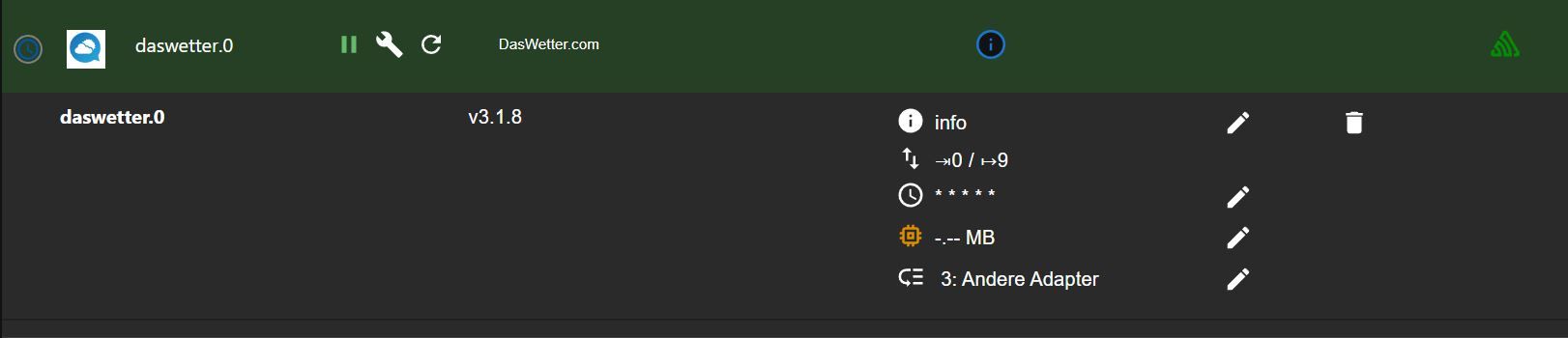
-
@snupy Ja muss. Diese Adapter sind inaktiv und rufen nur zu bestimmten Zeiten - die Infos aus dem Netz ab.
-
@snupy Je nach Bedarf - ich würde halt das Interval unterschiedlich zum dwd Adapter nehmen, damit diese nicht immer beide gleichzeitig losstarten. Der dwd läuft standardmässig immer um viertel, halb, dreiviertel und voller Stunde los. Du könntest also den Wetter Adapter um 25 und 55 laufen lassen:
25,55 * * * * -
Kiste aktuell halten, danach einen Reboot, da wird ein aktueller Kernel installiert werden.
Dann in das journal zum relevanten Zeitraum schauen.
@thomas-braun said in ioBroker stürzt ab, startet neu:
Kiste aktuell halten, danach einen Reboot, da wird ein aktueller Kernel installiert werden.
Dann in das journal zum relevanten Zeitraum schauen.
du meinst damit Bullseye auf dem aktuellem Stand halten ?
-
@thomas-braun said in ioBroker stürzt ab, startet neu:
Kiste aktuell halten, danach einen Reboot, da wird ein aktueller Kernel installiert werden.
Dann in das journal zum relevanten Zeitraum schauen.
du meinst damit Bullseye auf dem aktuellem Stand halten ?
Selbstverständlich.
-
@thomas-braun said in ioBroker stürzt ab, startet neu:
Kiste aktuell halten, danach einen Reboot, da wird ein aktueller Kernel installiert werden.
Dann in das journal zum relevanten Zeitraum schauen.
du meinst damit Bullseye auf dem aktuellem Stand halten ?
@snupy sagte in ioBroker stürzt ab, startet neu:
du meinst damit
@homoran sagte in ioBroker stürzt ab, startet neu:
@snupy sagte in ioBroker stürzt ab, startet neu:
Pending OS-Updates: 60
nachholen!
@snupy sagte in ioBroker stürzt ab, startet neu:
Pending iob updates: 7
dito
-
@snupy sagte in ioBroker stürzt ab, startet neu:
du meinst damit
@homoran sagte in ioBroker stürzt ab, startet neu:
@snupy sagte in ioBroker stürzt ab, startet neu:
Pending OS-Updates: 60
nachholen!
@snupy sagte in ioBroker stürzt ab, startet neu:
Pending iob updates: 7
dito
so ... drei Tage sind in's Land gegangen, bisher ist kein Absturtz mehr gefolgt :)
was habe ich gemacht ...
- bullseye Update (incl. Kernel)
- swap vergrößert
- die Zeiten von dasWetter.0 dwd.0 und ical.0 unterschiedlich eingestellt
- Sourceanalytix, eine Instanz gelöscht, eine zweite Instanz in die erste "verschoben", somit habe ich jetzt nur noch eine Instanz
ich hoffe die Zeit der Abstürze ist damit vorbei ...
Danke euch !




Hey! Du scheinst an dieser Unterhaltung interessiert zu sein, hast aber noch kein Konto.
Hast du es satt, bei jedem Besuch durch die gleichen Beiträge zu scrollen? Wenn du dich für ein Konto anmeldest, kommst du immer genau dorthin zurück, wo du zuvor warst, und kannst dich über neue Antworten benachrichtigen lassen (entweder per E-Mail oder Push-Benachrichtigung). Du kannst auch Lesezeichen speichern und Beiträge positiv bewerten, um anderen Community-Mitgliedern deine Wertschätzung zu zeigen.
Mit deinem Input könnte dieser Beitrag noch besser werden 💗
Registrieren Anmelden384
Online33.0k
Benutzer83.5k
Themen1.3m
Beiträge