




iobroker lässt sich nicht mehr starten
-
@balu67 sagte in iobroker lässt sich nicht mehr starten:
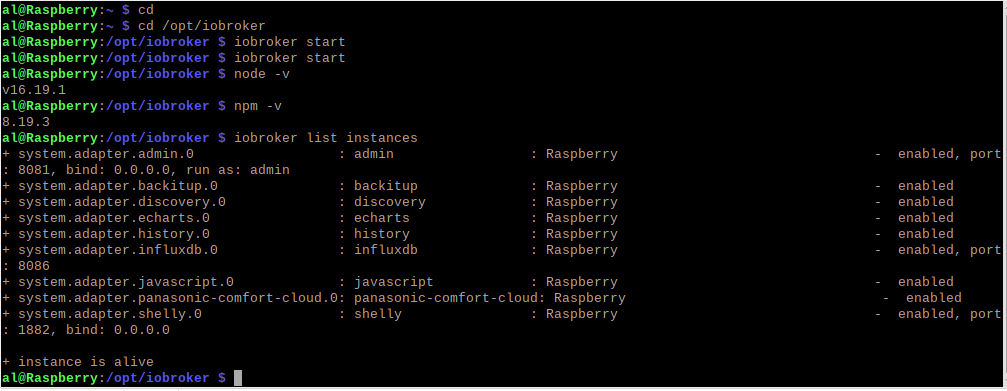
Run iobroker start to start ioBroker again
hast du das eingegeben?
@crunchip said in iobroker lässt sich nicht mehr starten:
hast du das eingegeben?
ja, hab ich, kommt aber nur das
-
@crunchip said in iobroker lässt sich nicht mehr starten:
hast du das eingegeben?
ja, hab ich, kommt aber nur das
-
@balu67 sagte in iobroker lässt sich nicht mehr starten:
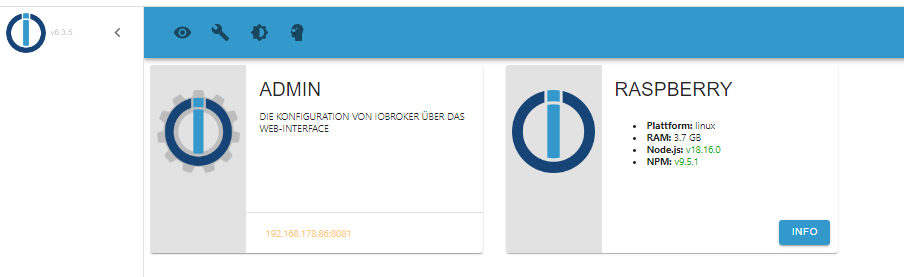
leider keine Veränderung, nur das intro kommt
bei
iob diag?@homoran said in iobroker lässt sich nicht mehr starten:
bei iob diag?
Skript v.2023-04-16 *** BASE SYSTEM *** Model : Raspberry Pi 4 Model B Rev 1.5 Architecture : aarch64 Docker : false Virtualization : none Distributor ID: Debian Description: Debian GNU/Linux 11 (bullseye) Release: 11 Codename: bullseye PRETTY_NAME="Debian GNU/Linux 11 (bullseye)" NAME="Debian GNU/Linux" VERSION_ID="11" VERSION="11 (bullseye)" VERSION_CODENAME=bullseye ID=debian HOME_URL="https://www.debian.org/" SUPPORT_URL="https://www.debian.org/support" BUG_REPORT_URL="https://bugs.debian.org/" Systemuptime and Load: 14:51:31 up 4:26, 2 users, load average: 0.68, 0.49, 0.21 CPU threads: 4 Raspberry only: throttled=0x0 Other values than 0x0 hint to temperature/voltage problems temp=42.8'C volt=0.9460V *** Time and Time Zones *** Local time: Mon 2023-04-24 14:51:31 CEST Universal time: Mon 2023-04-24 12:51:31 UTC RTC time: n/a Time zone: Europe/Berlin (CEST, +0200) System clock synchronized: yes NTP service: active RTC in local TZ: no *** User and Groups *** al /home/al al adm dialout cdrom sudo audio video plugdev games users input render netdev lpadmin gpio i2c spi iobroker *** X-Server-Setup *** X-Server: true Desktop: LXDE-pi Terminal: x11 Boot Target: graphical.target *** MEMORY *** total used free shared buff/cache available Mem: 3.8G 950M 1.5G 41M 1.3G 2.8G Swap: 99M 0B 99M Total: 3.9G 950M 1.6G 3794 M total memory 950 M used memory 1447 M active memory 590 M inactive memory 1525 M free memory 135 M buffer memory 1183 M swap cache 99 M total swap 0 M used swap 99 M free swap Raspberry only: oom events: 0 lifetime oom required: 0 Mbytes total time in oom handler: 0 ms max time spent in oom handler: 0 ms *** FILESYSTEM *** Filesystem Type Size Used Avail Use% Mounted on /dev/root ext4 29G 9.6G 19G 35% / devtmpfs devtmpfs 1.7G 0 1.7G 0% /dev tmpfs tmpfs 1.9G 0 1.9G 0% /dev/shm tmpfs tmpfs 759M 1.3M 758M 1% /run tmpfs tmpfs 5.0M 4.0K 5.0M 1% /run/lock /dev/mmcblk0p1 vfat 255M 31M 225M 13% /boot tmpfs tmpfs 380M 20K 380M 1% /run/user/1000 Messages concerning ext4 filesystem in dmesg: [Mon Apr 24 10:25:07 2023] Kernel command line: coherent_pool=1M 8250.nr_uarts=0 snd_bcm2835.enable_headphones=0 snd_bcm2835.enable_headphones=1 snd_bcm2835.enable_hdmi=1 snd_bcm2835.enable_hdmi=0 smsc95xx.macaddr=E4:5F:01:FD:FE:39 vc_mem.mem_base=0x3ec00000 vc_mem.mem_size=0x40000000 console=ttyS0,115200 console=tty1 root=PARTUUID=9be8b122-02 rootfstype=ext4 fsck.repair=yes rootwait quiet splash plymouth.ignore-serial-consoles [Mon Apr 24 10:25:08 2023] EXT4-fs (mmcblk0p2): mounted filesystem with ordered data mode. Quota mode: none. [Mon Apr 24 10:25:08 2023] VFS: Mounted root (ext4 filesystem) readonly on device 179:2. [Mon Apr 24 10:25:10 2023] EXT4-fs (mmcblk0p2): re-mounted. Quota mode: none. Show mounted filesystems (real ones only): TARGET SOURCE FSTYPE OPTIONS / /dev/mmcblk0p2 ext4 rw,noatime `-/boot /dev/mmcblk0p1 vfat rw,relatime,fmask=0022,dmask=0022,codepage=437,iocharset=ascii,shortname=mixed,errors=remount-ro Files in neuralgic directories: /var: 4.0G /var/ 3.4G /var/log 3.0G /var/log/journal/20caf098a3be48108459316835c16c60 3.0G /var/log/journal 304M /var/cache Archived and active journals take up 2.9G in the file system. /opt/iobroker/backups: 24M /opt/iobroker/backups/ /opt/iobroker/iobroker-data: 580M /opt/iobroker/iobroker-data/ 447M /opt/iobroker/iobroker-data/history 99M /opt/iobroker/iobroker-data/files 59M /opt/iobroker/iobroker-data/history/20230328 58M /opt/iobroker/iobroker-data/history/20230329 The five largest files in iobroker-data are: 9.4M /opt/iobroker/iobroker-data/history/20230401/history.shelly.0.SHEM#244CAB418C05#1.Emeter0.Power.json 9.3M /opt/iobroker/iobroker-data/history/20230406/history.shelly.0.SHEM#244CAB418C05#1.Emeter0.Power.json 9.3M /opt/iobroker/iobroker-data/history/20230405/history.shelly.0.SHEM#244CAB418C05#1.Emeter0.Power.json 9.3M /opt/iobroker/iobroker-data/history/20230404/history.shelly.0.SHEM#244CAB418C05#1.Emeter0.Power.json 9.3M /opt/iobroker/iobroker-data/history/20230402/history.shelly.0.SHEM#244CAB418C05#1.Emeter0.Power.json *** NodeJS-Installation *** /usr/bin/nodejs v18.16.0 /usr/bin/node v18.16.0 /usr/bin/npm 9.5.1 /usr/bin/npx 9.5.1 nodejs: Installed: 18.16.0-deb-1nodesource1 Candidate: 18.16.0-deb-1nodesource1 Version table: *** 18.16.0-deb-1nodesource1 500 500 https://deb.nodesource.com/node_18.x bullseye/main arm64 Packages 100 /var/lib/dpkg/status 12.22.12~dfsg-1~deb11u3 500 500 http://security.debian.org/debian-security bullseye-security/main arm64 Packages 12.22.5~dfsg-2~11u1 500 500 http://deb.debian.org/debian bullseye/main arm64 Packages Temp directories causing npm8 problem: 0 No problems detected *** ioBroker-Installation *** ioBroker Status iobroker is running on this host. Objects type: jsonl States type: jsonl MULTIHOSTSERVICE/enabled: false Core adapters versions js-controller: 4.0.24 admin: 6.3.5 javascript: 6.1.4 Adapters from github: 0 Adapter State + system.adapter.admin.0 : admin : Raspberry - enabled, port: 8081, bind: 0.0.0.0, run as: admin + system.adapter.backitup.0 : backitup : Raspberry - enabled + system.adapter.discovery.0 : discovery : Raspberry - enabled + system.adapter.echarts.0 : echarts : Raspberry - enabled + system.adapter.history.0 : history : Raspberry - enabled + system.adapter.influxdb.0 : influxdb : Raspberry - enabled, port: 8086 + system.adapter.javascript.0 : javascript : Raspberry - enabled + system.adapter.panasonic-comfort-cloud.0: panasonic-comfort-cloud: Raspberry - enabled + system.adapter.shelly.0 : shelly : Raspberry - enabled, port: 1882, bind: 0.0.0.0 + instance is alive Enabled adapters with bindings + system.adapter.admin.0 : admin : Raspberry - enabled, port: 8081, bind: 0.0.0.0, run as: admin + system.adapter.influxdb.0 : influxdb : Raspberry - enabled, port: 8086 + system.adapter.shelly.0 : shelly : Raspberry - enabled, port: 1882, bind: 0.0.0.0 ioBroker-Repositories stable : http://download.iobroker.net/sources-dist.json beta : http://download.iobroker.net/sources-dist-latest.json Active repo(s): stable Installed ioBroker-Instances Used repository: stable Adapter "admin" : 6.3.5 , installed 6.3.5 Adapter "backitup" : 2.6.16 , installed 2.5.12 [Updatable] Adapter "discovery" : 3.1.0 , installed 3.1.0 Adapter "echarts" : 1.0.12 , installed 1.0.12 Adapter "history" : 2.2.4 , installed 2.2.4 Adapter "influxdb" : 3.2.0 , installed 3.2.0 Adapter "javascript" : 6.1.4 , installed 6.1.4 Controller "js-controller": 4.0.24 , installed 4.0.24 Adapter "panasonic-comfort-cloud": 2.1.0, installed 2.1.0 Adapter "shelly" : 6.3.1 , installed 6.3.1 Objects and States Please stand by - This may take a while Objects: 548 States: 426 *** OS-Repositories and Updates *** Hit:1 http://security.debian.org/debian-security bullseye-security InRelease Hit:2 https://packages.grafana.com/oss/deb stable InRelease Hit:3 https://deb.nodesource.com/node_18.x bullseye InRelease Hit:4 http://deb.debian.org/debian bullseye InRelease Hit:5 http://archive.raspberrypi.org/debian bullseye InRelease Hit:6 http://deb.debian.org/debian bullseye-updates InRelease Hit:7 https://repos.influxdata.com/debian stable InRelease Reading package lists... Pending Updates: 0 *** Listening Ports *** Active Internet connections (only servers) Proto Recv-Q Send-Q Local Address Foreign Address State User Inode PID/Program name tcp 0 0 127.0.0.1:631 0.0.0.0:* LISTEN 0 15485 534/cupsd tcp 0 0 127.0.0.1:9000 0.0.0.0:* LISTEN 1001 123254 6824/iobroker.js-co tcp 0 0 127.0.0.1:9001 0.0.0.0:* LISTEN 1001 123247 6824/iobroker.js-co tcp 0 0 0.0.0.0:22 0.0.0.0:* LISTEN 0 14033 583/sshd: /usr/sbin tcp 0 0 127.0.0.1:8088 0.0.0.0:* LISTEN 116 1848 554/influxd tcp 0 0 0.0.0.0:1882 0.0.0.0:* LISTEN 1001 122473 6917/io.shelly.0 tcp 0 0 0.0.0.0:5900 0.0.0.0:* LISTEN 0 15495 567/vncserver-x11-c tcp6 0 0 :::3000 :::* LISTEN 117 15946 542/grafana tcp6 0 0 :::22 :::* LISTEN 0 14044 583/sshd: /usr/sbin tcp6 0 0 :::5900 :::* LISTEN 0 15494 567/vncserver-x11-c tcp6 0 0 ::1:631 :::* LISTEN 0 15484 534/cupsd tcp6 0 0 :::8086 :::* LISTEN 116 15042 554/influxd tcp6 0 0 :::8081 :::* LISTEN 1001 121728 6842/io.admin.0 udp 0 0 0.0.0.0:45059 0.0.0.0:* 108 13969 403/avahi-daemon: r udp 0 0 0.0.0.0:68 0.0.0.0:* 0 15531 477/dhcpcd udp 0 0 0.0.0.0:631 0.0.0.0:* 0 15522 616/cups-browsed udp 0 0 0.0.0.0:5353 0.0.0.0:* 108 13967 403/avahi-daemon: r udp6 0 0 :::546 :::* 0 15550 477/dhcpcd udp6 0 0 :::35639 :::* 108 13970 403/avahi-daemon: r udp6 0 0 :::5353 :::* 108 13968 403/avahi-daemon: r *** Log File - Last 25 Lines *** 2023-04-24 14:47:28.051 - info: javascript.0 (6902) requesting all objects 2023-04-24 14:47:28.425 - info: javascript.0 (6902) received all objects 2023-04-24 14:47:28.467 - info: javascript.0 (6902) received all states 2023-04-24 14:47:28.494 - info: host.Raspberry instance system.adapter.shelly.0 started with pid 6917 2023-04-24 14:47:28.567 - info: javascript.0 (6902) Start javascript script.js.Test 2023-04-24 14:47:28.632 - info: javascript.0 (6902) script.js.Test: registered 1 subscription, 0 schedules, 0 messages, 0 logs and 0 file subscriptions 2023-04-24 14:47:30.990 - info: shelly.0 (6917) starting. Version 6.3.1 in /opt/iobroker/node_modules/iobroker.shelly, node: v18.16.0, js-controller: 4.0.24 2023-04-24 14:47:31.209 - info: shelly.0 (6917) Starting in MQTT mode. Listening on 0.0.0.0:1882 (QoS 0) 2023-04-24 14:47:32.475 - info: host.Raspberry instance system.adapter.discovery.0 started with pid 6932 2023-04-24 14:47:34.385 - info: discovery.0 (6932) starting. Version 3.1.0 in /opt/iobroker/node_modules/iobroker.discovery, node: v18.16.0, js-controller: 4.0.24 2023-04-24 14:47:36.472 - info: host.Raspberry instance system.adapter.backitup.0 started with pid 6947 2023-04-24 14:47:38.590 - info: backitup.0 (6947) starting. Version 2.5.12 in /opt/iobroker/node_modules/iobroker.backitup, node: v18.16.0, js-controller: 4.0.24 2023-04-24 14:47:38.700 - info: backitup.0 (6947) [iobroker] backup was activated at 02:40 every 1 day(s) 2023-04-24 14:47:39.424 - info: shelly.0 (6917) [MQTT] Device with client id "shellyem-244CAB418C05" connected! 2023-04-24 14:47:40.479 - info: host.Raspberry instance system.adapter.echarts.0 started with pid 6962 2023-04-24 14:47:42.480 - info: echarts.0 (6962) starting. Version 1.0.12 in /opt/iobroker/node_modules/iobroker.echarts, node: v18.16.0, js-controller: 4.0.24 2023-04-24 14:47:43.124 - info: shelly.0 (6917) [MQTT] Device with client id "shellyplug-s-4022D880D8D8" connected! 2023-04-24 14:47:44.472 - info: host.Raspberry instance system.adapter.panasonic-comfort-cloud.0 started with pid 6977 2023-04-24 14:47:46.305 - info: panasonic-comfort-cloud.0 (6977) starting. Version 2.1.0 in /opt/iobroker/node_modules/iobroker.panasonic-comfort-cloud, node: v18.16.0, js-controller: 4.0.24 2023-04-24 14:47:46.514 - info: panasonic-comfort-cloud.0 (6977) state panasonic-comfort-cloud.0.info.connection changed: false (ack = true) 2023-04-24 14:47:48.970 - info: shelly.0 (6917) [MQTT] Device with client id "shellyplus1pm-a8032ab5f934" connected! 2023-04-24 14:47:51.127 - info: panasonic-comfort-cloud.0 (6977) Login successful. 2023-04-24 14:47:51.145 - info: panasonic-comfort-cloud.0 (6977) state panasonic-comfort-cloud.0.info.connection changed: true (ack = true) 2023-04-24 14:50:28.444 - info: admin.0 (6842) ==> Connected system.user.admin from ::ffff:192.168.178.28 2023-04-24 14:52:20.614 - info: admin.0 (6842) <== Disconnect system.user.admin from ::ffff:192.168.178.28 admin -
@homoran said in iobroker lässt sich nicht mehr starten:
bei iob diag?
Skript v.2023-04-16 *** BASE SYSTEM *** Model : Raspberry Pi 4 Model B Rev 1.5 Architecture : aarch64 Docker : false Virtualization : none Distributor ID: Debian Description: Debian GNU/Linux 11 (bullseye) Release: 11 Codename: bullseye PRETTY_NAME="Debian GNU/Linux 11 (bullseye)" NAME="Debian GNU/Linux" VERSION_ID="11" VERSION="11 (bullseye)" VERSION_CODENAME=bullseye ID=debian HOME_URL="https://www.debian.org/" SUPPORT_URL="https://www.debian.org/support" BUG_REPORT_URL="https://bugs.debian.org/" Systemuptime and Load: 14:51:31 up 4:26, 2 users, load average: 0.68, 0.49, 0.21 CPU threads: 4 Raspberry only: throttled=0x0 Other values than 0x0 hint to temperature/voltage problems temp=42.8'C volt=0.9460V *** Time and Time Zones *** Local time: Mon 2023-04-24 14:51:31 CEST Universal time: Mon 2023-04-24 12:51:31 UTC RTC time: n/a Time zone: Europe/Berlin (CEST, +0200) System clock synchronized: yes NTP service: active RTC in local TZ: no *** User and Groups *** al /home/al al adm dialout cdrom sudo audio video plugdev games users input render netdev lpadmin gpio i2c spi iobroker *** X-Server-Setup *** X-Server: true Desktop: LXDE-pi Terminal: x11 Boot Target: graphical.target *** MEMORY *** total used free shared buff/cache available Mem: 3.8G 950M 1.5G 41M 1.3G 2.8G Swap: 99M 0B 99M Total: 3.9G 950M 1.6G 3794 M total memory 950 M used memory 1447 M active memory 590 M inactive memory 1525 M free memory 135 M buffer memory 1183 M swap cache 99 M total swap 0 M used swap 99 M free swap Raspberry only: oom events: 0 lifetime oom required: 0 Mbytes total time in oom handler: 0 ms max time spent in oom handler: 0 ms *** FILESYSTEM *** Filesystem Type Size Used Avail Use% Mounted on /dev/root ext4 29G 9.6G 19G 35% / devtmpfs devtmpfs 1.7G 0 1.7G 0% /dev tmpfs tmpfs 1.9G 0 1.9G 0% /dev/shm tmpfs tmpfs 759M 1.3M 758M 1% /run tmpfs tmpfs 5.0M 4.0K 5.0M 1% /run/lock /dev/mmcblk0p1 vfat 255M 31M 225M 13% /boot tmpfs tmpfs 380M 20K 380M 1% /run/user/1000 Messages concerning ext4 filesystem in dmesg: [Mon Apr 24 10:25:07 2023] Kernel command line: coherent_pool=1M 8250.nr_uarts=0 snd_bcm2835.enable_headphones=0 snd_bcm2835.enable_headphones=1 snd_bcm2835.enable_hdmi=1 snd_bcm2835.enable_hdmi=0 smsc95xx.macaddr=E4:5F:01:FD:FE:39 vc_mem.mem_base=0x3ec00000 vc_mem.mem_size=0x40000000 console=ttyS0,115200 console=tty1 root=PARTUUID=9be8b122-02 rootfstype=ext4 fsck.repair=yes rootwait quiet splash plymouth.ignore-serial-consoles [Mon Apr 24 10:25:08 2023] EXT4-fs (mmcblk0p2): mounted filesystem with ordered data mode. Quota mode: none. [Mon Apr 24 10:25:08 2023] VFS: Mounted root (ext4 filesystem) readonly on device 179:2. [Mon Apr 24 10:25:10 2023] EXT4-fs (mmcblk0p2): re-mounted. Quota mode: none. Show mounted filesystems (real ones only): TARGET SOURCE FSTYPE OPTIONS / /dev/mmcblk0p2 ext4 rw,noatime `-/boot /dev/mmcblk0p1 vfat rw,relatime,fmask=0022,dmask=0022,codepage=437,iocharset=ascii,shortname=mixed,errors=remount-ro Files in neuralgic directories: /var: 4.0G /var/ 3.4G /var/log 3.0G /var/log/journal/20caf098a3be48108459316835c16c60 3.0G /var/log/journal 304M /var/cache Archived and active journals take up 2.9G in the file system. /opt/iobroker/backups: 24M /opt/iobroker/backups/ /opt/iobroker/iobroker-data: 580M /opt/iobroker/iobroker-data/ 447M /opt/iobroker/iobroker-data/history 99M /opt/iobroker/iobroker-data/files 59M /opt/iobroker/iobroker-data/history/20230328 58M /opt/iobroker/iobroker-data/history/20230329 The five largest files in iobroker-data are: 9.4M /opt/iobroker/iobroker-data/history/20230401/history.shelly.0.SHEM#244CAB418C05#1.Emeter0.Power.json 9.3M /opt/iobroker/iobroker-data/history/20230406/history.shelly.0.SHEM#244CAB418C05#1.Emeter0.Power.json 9.3M /opt/iobroker/iobroker-data/history/20230405/history.shelly.0.SHEM#244CAB418C05#1.Emeter0.Power.json 9.3M /opt/iobroker/iobroker-data/history/20230404/history.shelly.0.SHEM#244CAB418C05#1.Emeter0.Power.json 9.3M /opt/iobroker/iobroker-data/history/20230402/history.shelly.0.SHEM#244CAB418C05#1.Emeter0.Power.json *** NodeJS-Installation *** /usr/bin/nodejs v18.16.0 /usr/bin/node v18.16.0 /usr/bin/npm 9.5.1 /usr/bin/npx 9.5.1 nodejs: Installed: 18.16.0-deb-1nodesource1 Candidate: 18.16.0-deb-1nodesource1 Version table: *** 18.16.0-deb-1nodesource1 500 500 https://deb.nodesource.com/node_18.x bullseye/main arm64 Packages 100 /var/lib/dpkg/status 12.22.12~dfsg-1~deb11u3 500 500 http://security.debian.org/debian-security bullseye-security/main arm64 Packages 12.22.5~dfsg-2~11u1 500 500 http://deb.debian.org/debian bullseye/main arm64 Packages Temp directories causing npm8 problem: 0 No problems detected *** ioBroker-Installation *** ioBroker Status iobroker is running on this host. Objects type: jsonl States type: jsonl MULTIHOSTSERVICE/enabled: false Core adapters versions js-controller: 4.0.24 admin: 6.3.5 javascript: 6.1.4 Adapters from github: 0 Adapter State + system.adapter.admin.0 : admin : Raspberry - enabled, port: 8081, bind: 0.0.0.0, run as: admin + system.adapter.backitup.0 : backitup : Raspberry - enabled + system.adapter.discovery.0 : discovery : Raspberry - enabled + system.adapter.echarts.0 : echarts : Raspberry - enabled + system.adapter.history.0 : history : Raspberry - enabled + system.adapter.influxdb.0 : influxdb : Raspberry - enabled, port: 8086 + system.adapter.javascript.0 : javascript : Raspberry - enabled + system.adapter.panasonic-comfort-cloud.0: panasonic-comfort-cloud: Raspberry - enabled + system.adapter.shelly.0 : shelly : Raspberry - enabled, port: 1882, bind: 0.0.0.0 + instance is alive Enabled adapters with bindings + system.adapter.admin.0 : admin : Raspberry - enabled, port: 8081, bind: 0.0.0.0, run as: admin + system.adapter.influxdb.0 : influxdb : Raspberry - enabled, port: 8086 + system.adapter.shelly.0 : shelly : Raspberry - enabled, port: 1882, bind: 0.0.0.0 ioBroker-Repositories stable : http://download.iobroker.net/sources-dist.json beta : http://download.iobroker.net/sources-dist-latest.json Active repo(s): stable Installed ioBroker-Instances Used repository: stable Adapter "admin" : 6.3.5 , installed 6.3.5 Adapter "backitup" : 2.6.16 , installed 2.5.12 [Updatable] Adapter "discovery" : 3.1.0 , installed 3.1.0 Adapter "echarts" : 1.0.12 , installed 1.0.12 Adapter "history" : 2.2.4 , installed 2.2.4 Adapter "influxdb" : 3.2.0 , installed 3.2.0 Adapter "javascript" : 6.1.4 , installed 6.1.4 Controller "js-controller": 4.0.24 , installed 4.0.24 Adapter "panasonic-comfort-cloud": 2.1.0, installed 2.1.0 Adapter "shelly" : 6.3.1 , installed 6.3.1 Objects and States Please stand by - This may take a while Objects: 548 States: 426 *** OS-Repositories and Updates *** Hit:1 http://security.debian.org/debian-security bullseye-security InRelease Hit:2 https://packages.grafana.com/oss/deb stable InRelease Hit:3 https://deb.nodesource.com/node_18.x bullseye InRelease Hit:4 http://deb.debian.org/debian bullseye InRelease Hit:5 http://archive.raspberrypi.org/debian bullseye InRelease Hit:6 http://deb.debian.org/debian bullseye-updates InRelease Hit:7 https://repos.influxdata.com/debian stable InRelease Reading package lists... Pending Updates: 0 *** Listening Ports *** Active Internet connections (only servers) Proto Recv-Q Send-Q Local Address Foreign Address State User Inode PID/Program name tcp 0 0 127.0.0.1:631 0.0.0.0:* LISTEN 0 15485 534/cupsd tcp 0 0 127.0.0.1:9000 0.0.0.0:* LISTEN 1001 123254 6824/iobroker.js-co tcp 0 0 127.0.0.1:9001 0.0.0.0:* LISTEN 1001 123247 6824/iobroker.js-co tcp 0 0 0.0.0.0:22 0.0.0.0:* LISTEN 0 14033 583/sshd: /usr/sbin tcp 0 0 127.0.0.1:8088 0.0.0.0:* LISTEN 116 1848 554/influxd tcp 0 0 0.0.0.0:1882 0.0.0.0:* LISTEN 1001 122473 6917/io.shelly.0 tcp 0 0 0.0.0.0:5900 0.0.0.0:* LISTEN 0 15495 567/vncserver-x11-c tcp6 0 0 :::3000 :::* LISTEN 117 15946 542/grafana tcp6 0 0 :::22 :::* LISTEN 0 14044 583/sshd: /usr/sbin tcp6 0 0 :::5900 :::* LISTEN 0 15494 567/vncserver-x11-c tcp6 0 0 ::1:631 :::* LISTEN 0 15484 534/cupsd tcp6 0 0 :::8086 :::* LISTEN 116 15042 554/influxd tcp6 0 0 :::8081 :::* LISTEN 1001 121728 6842/io.admin.0 udp 0 0 0.0.0.0:45059 0.0.0.0:* 108 13969 403/avahi-daemon: r udp 0 0 0.0.0.0:68 0.0.0.0:* 0 15531 477/dhcpcd udp 0 0 0.0.0.0:631 0.0.0.0:* 0 15522 616/cups-browsed udp 0 0 0.0.0.0:5353 0.0.0.0:* 108 13967 403/avahi-daemon: r udp6 0 0 :::546 :::* 0 15550 477/dhcpcd udp6 0 0 :::35639 :::* 108 13970 403/avahi-daemon: r udp6 0 0 :::5353 :::* 108 13968 403/avahi-daemon: r *** Log File - Last 25 Lines *** 2023-04-24 14:47:28.051 - info: javascript.0 (6902) requesting all objects 2023-04-24 14:47:28.425 - info: javascript.0 (6902) received all objects 2023-04-24 14:47:28.467 - info: javascript.0 (6902) received all states 2023-04-24 14:47:28.494 - info: host.Raspberry instance system.adapter.shelly.0 started with pid 6917 2023-04-24 14:47:28.567 - info: javascript.0 (6902) Start javascript script.js.Test 2023-04-24 14:47:28.632 - info: javascript.0 (6902) script.js.Test: registered 1 subscription, 0 schedules, 0 messages, 0 logs and 0 file subscriptions 2023-04-24 14:47:30.990 - info: shelly.0 (6917) starting. Version 6.3.1 in /opt/iobroker/node_modules/iobroker.shelly, node: v18.16.0, js-controller: 4.0.24 2023-04-24 14:47:31.209 - info: shelly.0 (6917) Starting in MQTT mode. Listening on 0.0.0.0:1882 (QoS 0) 2023-04-24 14:47:32.475 - info: host.Raspberry instance system.adapter.discovery.0 started with pid 6932 2023-04-24 14:47:34.385 - info: discovery.0 (6932) starting. Version 3.1.0 in /opt/iobroker/node_modules/iobroker.discovery, node: v18.16.0, js-controller: 4.0.24 2023-04-24 14:47:36.472 - info: host.Raspberry instance system.adapter.backitup.0 started with pid 6947 2023-04-24 14:47:38.590 - info: backitup.0 (6947) starting. Version 2.5.12 in /opt/iobroker/node_modules/iobroker.backitup, node: v18.16.0, js-controller: 4.0.24 2023-04-24 14:47:38.700 - info: backitup.0 (6947) [iobroker] backup was activated at 02:40 every 1 day(s) 2023-04-24 14:47:39.424 - info: shelly.0 (6917) [MQTT] Device with client id "shellyem-244CAB418C05" connected! 2023-04-24 14:47:40.479 - info: host.Raspberry instance system.adapter.echarts.0 started with pid 6962 2023-04-24 14:47:42.480 - info: echarts.0 (6962) starting. Version 1.0.12 in /opt/iobroker/node_modules/iobroker.echarts, node: v18.16.0, js-controller: 4.0.24 2023-04-24 14:47:43.124 - info: shelly.0 (6917) [MQTT] Device with client id "shellyplug-s-4022D880D8D8" connected! 2023-04-24 14:47:44.472 - info: host.Raspberry instance system.adapter.panasonic-comfort-cloud.0 started with pid 6977 2023-04-24 14:47:46.305 - info: panasonic-comfort-cloud.0 (6977) starting. Version 2.1.0 in /opt/iobroker/node_modules/iobroker.panasonic-comfort-cloud, node: v18.16.0, js-controller: 4.0.24 2023-04-24 14:47:46.514 - info: panasonic-comfort-cloud.0 (6977) state panasonic-comfort-cloud.0.info.connection changed: false (ack = true) 2023-04-24 14:47:48.970 - info: shelly.0 (6917) [MQTT] Device with client id "shellyplus1pm-a8032ab5f934" connected! 2023-04-24 14:47:51.127 - info: panasonic-comfort-cloud.0 (6977) Login successful. 2023-04-24 14:47:51.145 - info: panasonic-comfort-cloud.0 (6977) state panasonic-comfort-cloud.0.info.connection changed: true (ack = true) 2023-04-24 14:50:28.444 - info: admin.0 (6842) ==> Connected system.user.admin from ::ffff:192.168.178.28 2023-04-24 14:52:20.614 - info: admin.0 (6842) <== Disconnect system.user.admin from ::ffff:192.168.178.28 adminund noch das summary
======================= SUMMARY ======================= v.2023-04-16 Operatingsystem: Debian GNU/Linux 11 (bullseye) Kernel: 6.1.21-v8+ Installation: Native Timezone: Europe/Berlin (CEST, +0200) User-ID: 1000 X-Server: true Boot Target: graphical.target Pending OS-Updates: 0 Pending iob updates: 1 Nodejs-Installation: /usr/bin/nodejs v18.16.0 /usr/bin/node v18.16.0 /usr/bin/npm 9.5.1 /usr/bin/npx 9.5.1 Recommended versions are nodejs 18.x.y and npm 9.x.y Your nodejs installation is correct MEMORY: total used free shared buff/cache available Mem: 3.8G 961M 1.5G 35M 1.3G 2.8G Swap: 99M 0B 99M Total: 3.9G 961M 1.6G Active iob-Instances: 10 Active repo(s): stable ioBroker Core: js-controller 4.0.24 admin 6.3.5 ioBroker Status: iobroker is running on this host. Objects type: jsonl States type: jsonl Status admin and web instance: + system.adapter.admin.0 : admin : Raspberry - enabled, port: 8081, bind: 0.0.0.0, run as: admin Objects: 548 States: 426 Size of iob-Database: 7.3M /opt/iobroker/iobroker-data/objects.jsonl 296K /opt/iobroker/iobroker-data/states.jsonl =================== END OF SUMMARY ==================== -
@crunchip said in iobroker lässt sich nicht mehr starten:
hast du das eingegeben?
ja, hab ich, kommt aber nur das
@balu67 sieht mir eher nach nem Browsercache Fehler aus
-
@homoran said in iobroker lässt sich nicht mehr starten:
bei iob diag?
Skript v.2023-04-16 *** BASE SYSTEM *** Model : Raspberry Pi 4 Model B Rev 1.5 Architecture : aarch64 Docker : false Virtualization : none Distributor ID: Debian Description: Debian GNU/Linux 11 (bullseye) Release: 11 Codename: bullseye PRETTY_NAME="Debian GNU/Linux 11 (bullseye)" NAME="Debian GNU/Linux" VERSION_ID="11" VERSION="11 (bullseye)" VERSION_CODENAME=bullseye ID=debian HOME_URL="https://www.debian.org/" SUPPORT_URL="https://www.debian.org/support" BUG_REPORT_URL="https://bugs.debian.org/" Systemuptime and Load: 14:51:31 up 4:26, 2 users, load average: 0.68, 0.49, 0.21 CPU threads: 4 Raspberry only: throttled=0x0 Other values than 0x0 hint to temperature/voltage problems temp=42.8'C volt=0.9460V *** Time and Time Zones *** Local time: Mon 2023-04-24 14:51:31 CEST Universal time: Mon 2023-04-24 12:51:31 UTC RTC time: n/a Time zone: Europe/Berlin (CEST, +0200) System clock synchronized: yes NTP service: active RTC in local TZ: no *** User and Groups *** al /home/al al adm dialout cdrom sudo audio video plugdev games users input render netdev lpadmin gpio i2c spi iobroker *** X-Server-Setup *** X-Server: true Desktop: LXDE-pi Terminal: x11 Boot Target: graphical.target *** MEMORY *** total used free shared buff/cache available Mem: 3.8G 950M 1.5G 41M 1.3G 2.8G Swap: 99M 0B 99M Total: 3.9G 950M 1.6G 3794 M total memory 950 M used memory 1447 M active memory 590 M inactive memory 1525 M free memory 135 M buffer memory 1183 M swap cache 99 M total swap 0 M used swap 99 M free swap Raspberry only: oom events: 0 lifetime oom required: 0 Mbytes total time in oom handler: 0 ms max time spent in oom handler: 0 ms *** FILESYSTEM *** Filesystem Type Size Used Avail Use% Mounted on /dev/root ext4 29G 9.6G 19G 35% / devtmpfs devtmpfs 1.7G 0 1.7G 0% /dev tmpfs tmpfs 1.9G 0 1.9G 0% /dev/shm tmpfs tmpfs 759M 1.3M 758M 1% /run tmpfs tmpfs 5.0M 4.0K 5.0M 1% /run/lock /dev/mmcblk0p1 vfat 255M 31M 225M 13% /boot tmpfs tmpfs 380M 20K 380M 1% /run/user/1000 Messages concerning ext4 filesystem in dmesg: [Mon Apr 24 10:25:07 2023] Kernel command line: coherent_pool=1M 8250.nr_uarts=0 snd_bcm2835.enable_headphones=0 snd_bcm2835.enable_headphones=1 snd_bcm2835.enable_hdmi=1 snd_bcm2835.enable_hdmi=0 smsc95xx.macaddr=E4:5F:01:FD:FE:39 vc_mem.mem_base=0x3ec00000 vc_mem.mem_size=0x40000000 console=ttyS0,115200 console=tty1 root=PARTUUID=9be8b122-02 rootfstype=ext4 fsck.repair=yes rootwait quiet splash plymouth.ignore-serial-consoles [Mon Apr 24 10:25:08 2023] EXT4-fs (mmcblk0p2): mounted filesystem with ordered data mode. Quota mode: none. [Mon Apr 24 10:25:08 2023] VFS: Mounted root (ext4 filesystem) readonly on device 179:2. [Mon Apr 24 10:25:10 2023] EXT4-fs (mmcblk0p2): re-mounted. Quota mode: none. Show mounted filesystems (real ones only): TARGET SOURCE FSTYPE OPTIONS / /dev/mmcblk0p2 ext4 rw,noatime `-/boot /dev/mmcblk0p1 vfat rw,relatime,fmask=0022,dmask=0022,codepage=437,iocharset=ascii,shortname=mixed,errors=remount-ro Files in neuralgic directories: /var: 4.0G /var/ 3.4G /var/log 3.0G /var/log/journal/20caf098a3be48108459316835c16c60 3.0G /var/log/journal 304M /var/cache Archived and active journals take up 2.9G in the file system. /opt/iobroker/backups: 24M /opt/iobroker/backups/ /opt/iobroker/iobroker-data: 580M /opt/iobroker/iobroker-data/ 447M /opt/iobroker/iobroker-data/history 99M /opt/iobroker/iobroker-data/files 59M /opt/iobroker/iobroker-data/history/20230328 58M /opt/iobroker/iobroker-data/history/20230329 The five largest files in iobroker-data are: 9.4M /opt/iobroker/iobroker-data/history/20230401/history.shelly.0.SHEM#244CAB418C05#1.Emeter0.Power.json 9.3M /opt/iobroker/iobroker-data/history/20230406/history.shelly.0.SHEM#244CAB418C05#1.Emeter0.Power.json 9.3M /opt/iobroker/iobroker-data/history/20230405/history.shelly.0.SHEM#244CAB418C05#1.Emeter0.Power.json 9.3M /opt/iobroker/iobroker-data/history/20230404/history.shelly.0.SHEM#244CAB418C05#1.Emeter0.Power.json 9.3M /opt/iobroker/iobroker-data/history/20230402/history.shelly.0.SHEM#244CAB418C05#1.Emeter0.Power.json *** NodeJS-Installation *** /usr/bin/nodejs v18.16.0 /usr/bin/node v18.16.0 /usr/bin/npm 9.5.1 /usr/bin/npx 9.5.1 nodejs: Installed: 18.16.0-deb-1nodesource1 Candidate: 18.16.0-deb-1nodesource1 Version table: *** 18.16.0-deb-1nodesource1 500 500 https://deb.nodesource.com/node_18.x bullseye/main arm64 Packages 100 /var/lib/dpkg/status 12.22.12~dfsg-1~deb11u3 500 500 http://security.debian.org/debian-security bullseye-security/main arm64 Packages 12.22.5~dfsg-2~11u1 500 500 http://deb.debian.org/debian bullseye/main arm64 Packages Temp directories causing npm8 problem: 0 No problems detected *** ioBroker-Installation *** ioBroker Status iobroker is running on this host. Objects type: jsonl States type: jsonl MULTIHOSTSERVICE/enabled: false Core adapters versions js-controller: 4.0.24 admin: 6.3.5 javascript: 6.1.4 Adapters from github: 0 Adapter State + system.adapter.admin.0 : admin : Raspberry - enabled, port: 8081, bind: 0.0.0.0, run as: admin + system.adapter.backitup.0 : backitup : Raspberry - enabled + system.adapter.discovery.0 : discovery : Raspberry - enabled + system.adapter.echarts.0 : echarts : Raspberry - enabled + system.adapter.history.0 : history : Raspberry - enabled + system.adapter.influxdb.0 : influxdb : Raspberry - enabled, port: 8086 + system.adapter.javascript.0 : javascript : Raspberry - enabled + system.adapter.panasonic-comfort-cloud.0: panasonic-comfort-cloud: Raspberry - enabled + system.adapter.shelly.0 : shelly : Raspberry - enabled, port: 1882, bind: 0.0.0.0 + instance is alive Enabled adapters with bindings + system.adapter.admin.0 : admin : Raspberry - enabled, port: 8081, bind: 0.0.0.0, run as: admin + system.adapter.influxdb.0 : influxdb : Raspberry - enabled, port: 8086 + system.adapter.shelly.0 : shelly : Raspberry - enabled, port: 1882, bind: 0.0.0.0 ioBroker-Repositories stable : http://download.iobroker.net/sources-dist.json beta : http://download.iobroker.net/sources-dist-latest.json Active repo(s): stable Installed ioBroker-Instances Used repository: stable Adapter "admin" : 6.3.5 , installed 6.3.5 Adapter "backitup" : 2.6.16 , installed 2.5.12 [Updatable] Adapter "discovery" : 3.1.0 , installed 3.1.0 Adapter "echarts" : 1.0.12 , installed 1.0.12 Adapter "history" : 2.2.4 , installed 2.2.4 Adapter "influxdb" : 3.2.0 , installed 3.2.0 Adapter "javascript" : 6.1.4 , installed 6.1.4 Controller "js-controller": 4.0.24 , installed 4.0.24 Adapter "panasonic-comfort-cloud": 2.1.0, installed 2.1.0 Adapter "shelly" : 6.3.1 , installed 6.3.1 Objects and States Please stand by - This may take a while Objects: 548 States: 426 *** OS-Repositories and Updates *** Hit:1 http://security.debian.org/debian-security bullseye-security InRelease Hit:2 https://packages.grafana.com/oss/deb stable InRelease Hit:3 https://deb.nodesource.com/node_18.x bullseye InRelease Hit:4 http://deb.debian.org/debian bullseye InRelease Hit:5 http://archive.raspberrypi.org/debian bullseye InRelease Hit:6 http://deb.debian.org/debian bullseye-updates InRelease Hit:7 https://repos.influxdata.com/debian stable InRelease Reading package lists... Pending Updates: 0 *** Listening Ports *** Active Internet connections (only servers) Proto Recv-Q Send-Q Local Address Foreign Address State User Inode PID/Program name tcp 0 0 127.0.0.1:631 0.0.0.0:* LISTEN 0 15485 534/cupsd tcp 0 0 127.0.0.1:9000 0.0.0.0:* LISTEN 1001 123254 6824/iobroker.js-co tcp 0 0 127.0.0.1:9001 0.0.0.0:* LISTEN 1001 123247 6824/iobroker.js-co tcp 0 0 0.0.0.0:22 0.0.0.0:* LISTEN 0 14033 583/sshd: /usr/sbin tcp 0 0 127.0.0.1:8088 0.0.0.0:* LISTEN 116 1848 554/influxd tcp 0 0 0.0.0.0:1882 0.0.0.0:* LISTEN 1001 122473 6917/io.shelly.0 tcp 0 0 0.0.0.0:5900 0.0.0.0:* LISTEN 0 15495 567/vncserver-x11-c tcp6 0 0 :::3000 :::* LISTEN 117 15946 542/grafana tcp6 0 0 :::22 :::* LISTEN 0 14044 583/sshd: /usr/sbin tcp6 0 0 :::5900 :::* LISTEN 0 15494 567/vncserver-x11-c tcp6 0 0 ::1:631 :::* LISTEN 0 15484 534/cupsd tcp6 0 0 :::8086 :::* LISTEN 116 15042 554/influxd tcp6 0 0 :::8081 :::* LISTEN 1001 121728 6842/io.admin.0 udp 0 0 0.0.0.0:45059 0.0.0.0:* 108 13969 403/avahi-daemon: r udp 0 0 0.0.0.0:68 0.0.0.0:* 0 15531 477/dhcpcd udp 0 0 0.0.0.0:631 0.0.0.0:* 0 15522 616/cups-browsed udp 0 0 0.0.0.0:5353 0.0.0.0:* 108 13967 403/avahi-daemon: r udp6 0 0 :::546 :::* 0 15550 477/dhcpcd udp6 0 0 :::35639 :::* 108 13970 403/avahi-daemon: r udp6 0 0 :::5353 :::* 108 13968 403/avahi-daemon: r *** Log File - Last 25 Lines *** 2023-04-24 14:47:28.051 - info: javascript.0 (6902) requesting all objects 2023-04-24 14:47:28.425 - info: javascript.0 (6902) received all objects 2023-04-24 14:47:28.467 - info: javascript.0 (6902) received all states 2023-04-24 14:47:28.494 - info: host.Raspberry instance system.adapter.shelly.0 started with pid 6917 2023-04-24 14:47:28.567 - info: javascript.0 (6902) Start javascript script.js.Test 2023-04-24 14:47:28.632 - info: javascript.0 (6902) script.js.Test: registered 1 subscription, 0 schedules, 0 messages, 0 logs and 0 file subscriptions 2023-04-24 14:47:30.990 - info: shelly.0 (6917) starting. Version 6.3.1 in /opt/iobroker/node_modules/iobroker.shelly, node: v18.16.0, js-controller: 4.0.24 2023-04-24 14:47:31.209 - info: shelly.0 (6917) Starting in MQTT mode. Listening on 0.0.0.0:1882 (QoS 0) 2023-04-24 14:47:32.475 - info: host.Raspberry instance system.adapter.discovery.0 started with pid 6932 2023-04-24 14:47:34.385 - info: discovery.0 (6932) starting. Version 3.1.0 in /opt/iobroker/node_modules/iobroker.discovery, node: v18.16.0, js-controller: 4.0.24 2023-04-24 14:47:36.472 - info: host.Raspberry instance system.adapter.backitup.0 started with pid 6947 2023-04-24 14:47:38.590 - info: backitup.0 (6947) starting. Version 2.5.12 in /opt/iobroker/node_modules/iobroker.backitup, node: v18.16.0, js-controller: 4.0.24 2023-04-24 14:47:38.700 - info: backitup.0 (6947) [iobroker] backup was activated at 02:40 every 1 day(s) 2023-04-24 14:47:39.424 - info: shelly.0 (6917) [MQTT] Device with client id "shellyem-244CAB418C05" connected! 2023-04-24 14:47:40.479 - info: host.Raspberry instance system.adapter.echarts.0 started with pid 6962 2023-04-24 14:47:42.480 - info: echarts.0 (6962) starting. Version 1.0.12 in /opt/iobroker/node_modules/iobroker.echarts, node: v18.16.0, js-controller: 4.0.24 2023-04-24 14:47:43.124 - info: shelly.0 (6917) [MQTT] Device with client id "shellyplug-s-4022D880D8D8" connected! 2023-04-24 14:47:44.472 - info: host.Raspberry instance system.adapter.panasonic-comfort-cloud.0 started with pid 6977 2023-04-24 14:47:46.305 - info: panasonic-comfort-cloud.0 (6977) starting. Version 2.1.0 in /opt/iobroker/node_modules/iobroker.panasonic-comfort-cloud, node: v18.16.0, js-controller: 4.0.24 2023-04-24 14:47:46.514 - info: panasonic-comfort-cloud.0 (6977) state panasonic-comfort-cloud.0.info.connection changed: false (ack = true) 2023-04-24 14:47:48.970 - info: shelly.0 (6917) [MQTT] Device with client id "shellyplus1pm-a8032ab5f934" connected! 2023-04-24 14:47:51.127 - info: panasonic-comfort-cloud.0 (6977) Login successful. 2023-04-24 14:47:51.145 - info: panasonic-comfort-cloud.0 (6977) state panasonic-comfort-cloud.0.info.connection changed: true (ack = true) 2023-04-24 14:50:28.444 - info: admin.0 (6842) ==> Connected system.user.admin from ::ffff:192.168.178.28 2023-04-24 14:52:20.614 - info: admin.0 (6842) <== Disconnect system.user.admin from ::ffff:192.168.178.28 admin@balu67 sagte in iobroker lässt sich nicht mehr starten:
X-Server: true Desktop: LXDE-pi
Keinen Desktop!
-
@crunchip said in iobroker lässt sich nicht mehr starten:
@balu67 sieht mir eher nach nem Browsercache Fehler aus
was kann ich noch machen?
-
@balu67 sagte in iobroker lässt sich nicht mehr starten:
X-Server: true Desktop: LXDE-pi
Keinen Desktop!
@thomas-braun said in iobroker lässt sich nicht mehr starten:
Keinen Desktop!
den brauch ich, da ich sonst gar nichts machen kann......nicht mal nach Dateien sehen oder......
-
@thomas-braun said in iobroker lässt sich nicht mehr starten:
Keinen Desktop!
den brauch ich, da ich sonst gar nichts machen kann......nicht mal nach Dateien sehen oder......
Macht man natürlich im Terminal.
-
@crunchip said in iobroker lässt sich nicht mehr starten:
@balu67 sieht mir eher nach nem Browsercache Fehler aus
was kann ich noch machen?
@balu67 sagte in iobroker lässt sich nicht mehr starten:
@crunchip said in iobroker lässt sich nicht mehr starten:
@balu67 sieht mir eher nach nem Browsercache Fehler auswas kann ich noch machen?
STRG-F5
und was kommt Jetzt als Meldung?
-
@thomas-braun said in iobroker lässt sich nicht mehr starten:
Keinen Desktop!
den brauch ich, da ich sonst gar nichts machen kann......nicht mal nach Dateien sehen oder......
@balu67 das kannst du z.b mit WinSCP von deinem Rechner aus, falls es unbedingt sein muss
umgestiegen von Proxmox auf Unraid
-
@balu67 das kannst du z.b mit WinSCP von deinem Rechner aus, falls es unbedingt sein muss
@crunchip sagte in iobroker lässt sich nicht mehr starten:
@balu67 das kannst du z.b mit WinSCP von deinem Rechner aus, falls es unbedingt sein muss
aber nur mit dem richtigen user und Editor (wenn benutzt)
-
Macht man natürlich im Terminal.
@thomas-braun said in iobroker lässt sich nicht mehr starten:
Macht man natürlich im Terminal.
das kann ich leider nicht bedienen. Bin froh, dass ich eure Vorgaben eingeben konnte
-
@thomas-braun said in iobroker lässt sich nicht mehr starten:
Macht man natürlich im Terminal.
das kann ich leider nicht bedienen. Bin froh, dass ich eure Vorgaben eingeben konnte
@balu67 was ist jetzt mit dem Browser?
-
@thomas-braun said in iobroker lässt sich nicht mehr starten:
Macht man natürlich im Terminal.
das kann ich leider nicht bedienen. Bin froh, dass ich eure Vorgaben eingeben konnte
Dann nimm halt WinSCP oder sowas her. Jedenfalls tust du dir selber keinen Gefallen mit dem mitgeschleppten vollen Desktop.
Das halbe Dutzend Befehle für die Navigation durch das Dateisystem und sonstige Operationen man sich aber auch drauf schaffen, denke ich.
-
@balu67 sagte in iobroker lässt sich nicht mehr starten:
@crunchip said in iobroker lässt sich nicht mehr starten:
@balu67 sieht mir eher nach nem Browsercache Fehler auswas kann ich noch machen?
STRG-F5
und was kommt Jetzt als Meldung?
@homoran said in iobroker lässt sich nicht mehr starten:
@balu67 sagte in iobroker lässt sich nicht mehr starten:
@crunchip said in iobroker lässt sich nicht mehr starten:
@balu67 sieht mir eher nach nem Browsercache Fehler auswas kann ich noch machen?
STRG-F5
und was kommt Jetzt als Meldung?
keine Meldung kommt nur

-
@homoran said in iobroker lässt sich nicht mehr starten:
@balu67 sagte in iobroker lässt sich nicht mehr starten:
@crunchip said in iobroker lässt sich nicht mehr starten:
@balu67 sieht mir eher nach nem Browsercache Fehler auswas kann ich noch machen?
STRG-F5
und was kommt Jetzt als Meldung?
keine Meldung kommt nur
@balu67 im Browser nicht in der Konsole
dein Browserfenster anklicken wo dir die Iobroker startseite angezeigt wird und F5 drücken, damit die Seite neu geladen wird -
@crunchip said in iobroker lässt sich nicht mehr starten:
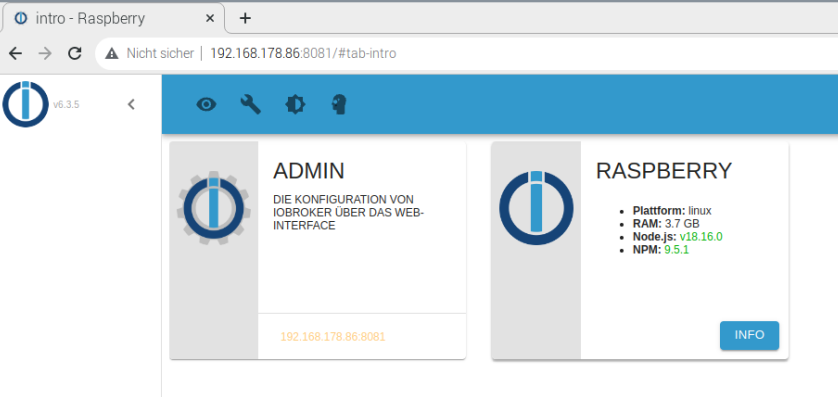
dein Browserfenster anklicken wo dir die Iobroker startseite angezeigt wird und F5 drücken, damit die Seite neu geladen wird
dann wird der iobroker nur neu geladen, aber wieder mit Ergebnis
-
@crunchip said in iobroker lässt sich nicht mehr starten:
dein Browserfenster anklicken wo dir die Iobroker startseite angezeigt wird und F5 drücken, damit die Seite neu geladen wird
dann wird der iobroker nur neu geladen, aber wieder mit Ergebnis
@balu67 ok dann drück mal F12 oder ctrl + shift + c und zeig mal die Browserconsole
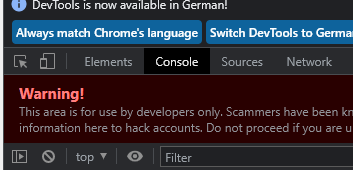
oder hast du noch nen anderen Browser zur Verfügung mit dem du mal die iobrokerseite aufrufst, zur Not mal mit dem Handy?
-
@crunchip sagte in iobroker lässt sich nicht mehr starten:
@balu67 das kannst du z.b mit WinSCP von deinem Rechner aus, falls es unbedingt sein muss
aber nur mit dem richtigen user und Editor (wenn benutzt)


Hey! Du scheinst an dieser Unterhaltung interessiert zu sein, hast aber noch kein Konto.
Hast du es satt, bei jedem Besuch durch die gleichen Beiträge zu scrollen? Wenn du dich für ein Konto anmeldest, kommst du immer genau dorthin zurück, wo du zuvor warst, und kannst dich über neue Antworten benachrichtigen lassen (entweder per E-Mail oder Push-Benachrichtigung). Du kannst auch Lesezeichen speichern und Beiträge positiv bewerten, um anderen Community-Mitgliedern deine Wertschätzung zu zeigen.
Mit deinem Input könnte dieser Beitrag noch besser werden 💗
Registrieren AnmeldenSupport us
487
Online33.0k
Benutzer83.6k
Themen1.3m
Beiträge