




ioBroker Backup wieder einspielen
-
@glasfaser said in ioBroker Backup wieder einspielen:
@federal sagte in ioBroker Backup wieder einspielen:
so wie ich es verstehe, wurden nur 5 Adapter gestartet.
Du hast doch ein Backup/Restore eingespielt ... und das dauert
Aber :
durch den krasch werden die anderen Adapter nicht mehr nachinstalliert .Wie soll ich weiter vorgehen?
Neues Backup/Restore einspielen .
habe ein Backup eigespielt
System successfully restored!
pi@raspberrypi:/opt/iobroker/backups $ iobroker start all
The adapter "history.0" was started.
The adapter "javascript.0" was started.
The adapter "scenes.0" was started.
The adapter "telegram.0" was started.
The adapter "chromecast.0" was started.
The adapter "hmip.0" was started.
The adapter "ical.0" was started.
The adapter "netatmo.0" was started.
The adapter "ping.0" was started.
The adapter "shelly.0" was started.
The adapter "sonoff.0" was started.
The adapter "tuya.0" was started.
The adapter "weatherunderground.0" was started.
The adapter "zigbee.0" was started.
The adapter "broadlink2.0" was started.
The adapter "cloud.0" was started.
The adapter "discovery.0" was started.
The adapter "echarts.0" was started.
The adapter "fb-checkpresence.0" was started.
The adapter "feiertage.0" was started.
The adapter "fullybrowser.0" was started.
The adapter "harmony.0" was started.
The adapter "info.0" was started.
The adapter "iot.0" was started.
The adapter "panasonic-comfort-cloud.0" was started.
The adapter "sayit.0" was started.
The adapter "sayit.1" was started.
The adapter "sayit.2" was started.
The adapter "sayit.3" was started.
The adapter "tado.0" was started.
The adapter "tankerkoenig.0" was started.
The adapter "text2command.1" was started.
The adapter "trashschedule.0" was started.
The adapter "vis-inventwo.0" was started.
The adapter "vis-timeandweather.0" was started.
The adapter "vis.0" was started.
The adapter "web.0" was started.
The adapter "worx.0" was started.
pi@raspberrypi:/opt/iobroker/backups $ iobroker start
kann aber nach wie vor nicht auf iob zugreifen
@federal sagte in ioBroker Backup wieder einspielen:
kann aber nach wie vor nicht auf iob zugreifen
@homoran sagte in ioBroker Backup wieder einspielen:
admin als https konfiguriert?
@homoran sagte in ioBroker Backup wieder einspielen:
und deaktiviert
-
@federal sagte in ioBroker Backup wieder einspielen:
Temp directories causing npm8 problem: 894
Hast du da mal als root herumgehampelt?
Das sollte deriob fixnämlich eigentlich bereinigen.find "/opt/iobroker/node_modules" -type d -iname ".*-????????" ! -iname ".local-chromium" -exec rm -rf "{}" \;bringt?
@thomas-braun said in ioBroker Backup wieder einspielen:
@federal sagte in ioBroker Backup wieder einspielen:
Temp directories causing npm8 problem: 894
Hast du da mal als root herumgehampelt?
Das sollte deriob fixnämlich eigentlich bereinigen.wenn, dann unbewusst
-
@thomas-braun said in ioBroker Backup wieder einspielen:
@federal sagte in ioBroker Backup wieder einspielen:
Temp directories causing npm8 problem: 894
Hast du da mal als root herumgehampelt?
Das sollte deriob fixnämlich eigentlich bereinigen.wenn, dann unbewusst
-
@federal sagte in ioBroker Backup wieder einspielen:
kann aber nach wie vor nicht auf iob zugreifen
@homoran sagte in ioBroker Backup wieder einspielen:
admin als https konfiguriert?
@homoran sagte in ioBroker Backup wieder einspielen:
und deaktiviert
@homoran said in ioBroker Backup wieder einspielen:
@federal sagte in ioBroker Backup wieder einspielen:
kann aber nach wie vor nicht auf iob zugreifen
@homoran sagte in ioBroker Backup wieder einspielen:
admin als https konfiguriert?
@homoran sagte in ioBroker Backup wieder einspielen:
und deaktiviert
https war eingerichtet. Wie kann ich es deaktivieren?
-
@homoran sagte in ioBroker Backup wieder einspielen:
@federal sagte in ioBroker Backup wieder einspielen:
load average: 2.40, 2.64, 2.80
hat auch gut zu rödeln!
ich werde anscheinend ignoriert
kein Support per PN! - Fragen im Forum stellen - Benutzt das Voting rechts unten im Beitrag wenn er euch geholfen hat.
Das Forum freut sich über eine Spende. Benutzt dazu den Spendenbutton oben rechts. Danke!
der Installationsfixer: curl -fsL https://iobroker.net/fix.sh | bash - -
@homoran sagte in ioBroker Backup wieder einspielen:
@federal sagte in ioBroker Backup wieder einspielen:
load average: 2.40, 2.64, 2.80
hat auch gut zu rödeln!
ich werde anscheinend ignoriert
@homoran sagte in ioBroker Backup wieder einspielen:
ich werde anscheinend ignoriert
<4 ist doch i.O.
-
@homoran sagte in ioBroker Backup wieder einspielen:
ich werde anscheinend ignoriert
<4 ist doch i.O.
@thomas-braun aber nicht, wenn angeblich nichts läuft
-
@thomas-braun said in ioBroker Backup wieder einspielen:
Der admin läuft nicht.
iob start adminHast du zwischenzeitlich den
iob fixausgeführt?
leider unverändert
    Your installation was fixed successfully
    Run iobroker start to start ioBroker again!

==========================================================================

pi@raspberrypi:/opt/iobroker/backups $ iob start
pi@raspberrypi:/opt/iobroker/backups $ iob start admin
The adapter "admin.0" was started.
pi@raspberrypi:/opt/iobroker/backups $ iob list instances
  system.adapter.admin.0                  : admin                 : raspberrypi                              -  enabled, port: 8081, bind: 0.0.0.0 (SSL), run as: admin
  system.adapter.backitup.0               : backitup              : raspberrypi                              - disabled
  system.adapter.broadlink2.0             : broadlink2            : raspberrypi                              -  enabled
  system.adapter.chromecast.0             : chromecast            : raspberrypi                              -  enabled
+ system.adapter.cloud.0                  : cloud                 : raspberrypi                              -  enabled
  system.adapter.discovery.0              : discovery             : raspberrypi                              -  enabled
  system.adapter.echarts.0                : echarts               : raspberrypi                              -  enabled
  system.adapter.fb-checkpresence.0       : fb-checkpresence      : raspberrypi                              - disabled
  system.adapter.feiertage.0              : feiertage             : raspberrypi                              -  enabled
  system.adapter.fullybrowser.0           : fullybrowser          : raspberrypi                              -  enabled
  system.adapter.harmony.0                : harmony               : raspberrypi                              -  enabled
+ system.adapter.history.0                : history               : raspberrypi                              -  enabled
+ system.adapter.hmip.0                   : hmip                  : raspberrypi                              -  enabled
  system.adapter.ical.0                   : ical                  : raspberrypi                              -  enabled
  system.adapter.info.0                   : info                  : raspberrypi                              -  enabled
  system.adapter.iot.0                    : iot                   : raspberrypi                              -  enabled
+ system.adapter.javascript.0             : javascript            : raspberrypi                              -  enabled
+ system.adapter.netatmo.0                : netatmo               : raspberrypi                              -  enabled
  system.adapter.panasonic-comfort-cloud.0: panasonic-comfort-cloud: raspberrypi                              -  enabled
+ system.adapter.ping.0                   : ping                  : raspberrypi                              -  enabled
  system.adapter.sayit.0                  : sayit                 : raspberrypi                              -  enabled, port: 0
  system.adapter.sayit.1                  : sayit                 : raspberrypi                              -  enabled, port: 0
  system.adapter.sayit.2                  : sayit                 : raspberrypi                              -  enabled, port: 0
  system.adapter.sayit.3                  : sayit                 : raspberrypi                              -  enabled, port: 0
+ system.adapter.scenes.0                 : scenes                : raspberrypi                              -  enabled
+ system.adapter.shelly.0                 : shelly                : raspberrypi                              -  enabled, port: 1882, bind: 0.0.0.0
+ system.adapter.sonoff.0                 : sonoff                : raspberrypi                              -  enabled, port: 1883, bind: 0.0.0.0
  system.adapter.tado.0                   : tado                  : raspberrypi                              -  enabled
  system.adapter.tankerkoenig.0           : tankerkoenig          : raspberrypi                              -  enabled
+ system.adapter.telegram.0               : telegram              : raspberrypi                              -  enabled, port: 8443, bind: 0.0.0.0
  system.adapter.text2command.1           : text2command          : raspberrypi                              -  enabled
  system.adapter.trashschedule.0          : trashschedule         : raspberrypi                              -  enabled
+ system.adapter.tuya.0                   : tuya                  : raspberrypi                              -  enabled
  system.adapter.vis-inventwo.0           : vis-inventwo          : raspberrypi                              -  enabled
  system.adapter.vis-timeandweather.0     : vis-timeandweather    : raspberrypi                              -  enabled
  system.adapter.vis.0                    : vis                   : raspberrypi                              -  enabled
+ system.adapter.weatherunderground.0     : weatherunderground    : raspberrypi                              -  enabled
  system.adapter.web.0                    : web                   : raspberrypi                              -  enabled, port: 8082, bind: 0.0.0.0, run as: admin
  system.adapter.worx.0                   : worx                  : raspberrypi                              -  enabled
+ system.adapter.zigbee.0                 : zigbee                : raspberrypi                              -  enabled, port: /dev/serial/by-id/usb-Texas_Instruments_TI_CC2531_USB_CDC___0X00124B0014D8F906-if00

+ instance is alive
pi@raspberrypi:/opt/iobroker/backups $
unter iobroker logs --watch läuft was
@federal said in ioBroker Backup wieder einspielen:
@thomas-braun said in ioBroker Backup wieder einspielen:
Der admin läuft nicht.
iob start adminHast du zwischenzeitlich den
iob fixunter iobroker logs --watch läuft was
habe mal ein Ausschnitt gemacht
2023-04-03 20:15:16.039 - error: host.raspberrypi Caught by controller[0]: at close (/opt/iobroker/node_modules/ioredis/built/redis/event_handler.js:184:25 ) 2023-04-03 20:15:16.039 - error: host.raspberrypi Caught by controller[0]: at Socket.<anonymous> (/opt/iobroker/node_modules/ioredis/built/redis/event_hand ler.js:151:20) 2023-04-03 20:15:16.040 - error: host.raspberrypi Caught by controller[0]: at Object.onceWrapper (node:events:628:26) 2023-04-03 20:15:16.040 - error: host.raspberrypi Caught by controller[0]: at Socket.emit (node:events:513:28) 2023-04-03 20:15:16.040 - error: host.raspberrypi Caught by controller[0]: at Socket.emit (node:domain:489:12) 2023-04-03 20:15:16.041 - error: host.raspberrypi Caught by controller[0]: at TCP.<anonymous> (node:net:301:12) 2023-04-03 20:15:16.041 - warn: host.raspberrypi instance system.adapter.shelly .0 terminated due to SIGTERM 2023-04-03 20:15:16.042 - info: host.raspberrypi instance system.adapter.shelly .0 terminated with code null () 2023-04-03 20:15:16.107 - warn: host.raspberrypi instance system.adapter.sonoff .0 terminated due to SIGTERM 2023-04-03 20:15:16.108 - info: host.raspberrypi instance system.adapter.sonoff .0 terminated with code null () 2023-04-03 20:15:16.201 - info: host.raspberrypi instance system.adapter.histor y.0 terminated with code 156 (START_IMMEDIATELY_AFTER_STOP) 2023-04-03 20:15:16.209 - info: tuya.0 (634) Terminated (START_IMMEDIATELY_AFTE R_STOP): Without reason 2023-04-03 20:15:16.889 - info: host.raspberrypi instance system.adapter.tuya.0 terminated with code 156 (START_IMMEDIATELY_AFTER_STOP) 2023-04-03 20:15:16.891 - info: host.raspberrypi All instances are stopped. 2023-04-03 20:15:16.889 - info: host.raspberrypi instance system.adapter.tuya.0 terminated with code 156 (START_IMMEDIATELY_AFTER_STOP) 2023-04-03 20:15:16.891 - info: host.raspberrypi All instances are stopped. 2023-04-03 20:15:19.754 - error: host.raspberrypi Cannot find view "system" for search "instance" : Connection is closed. 2023-04-03 20:15:19.756 - warn: host.raspberrypi instance system.adapter.zigbee .0 terminated due to SIGTERM 2023-04-03 20:15:19.756 - info: host.raspberrypi instance system.adapter.zigbee .0 terminated with code null () 2023-04-03 20:15:19.757 - info: host.raspberrypi All instances are stopped. 2023-04-03 20:15:19.754 - error: host.raspberrypi Cannot find view "system" for search "instance" : Connection is closed. 2023-04-03 20:15:19.756 - warn: host.raspberrypi instance system.adapter.zigbee .0 terminated due to SIGTERM 2023-04-03 20:15:19.756 - info: host.raspberrypi instance system.adapter.zigbee .0 terminated with code null () 2023-04-03 20:15:19.757 - info: host.raspberrypi All instances are stopped. 2023-04-03 20:15:25.061 - info: host.raspberrypi terminated 2023-04-03 20:15:25.061 - info: host.raspberrypi terminated -
@federal said in ioBroker Backup wieder einspielen:
@thomas-braun said in ioBroker Backup wieder einspielen:
Der admin läuft nicht.
iob start adminHast du zwischenzeitlich den
iob fixunter iobroker logs --watch läuft was
habe mal ein Ausschnitt gemacht
2023-04-03 20:15:16.039 - error: host.raspberrypi Caught by controller[0]: at close (/opt/iobroker/node_modules/ioredis/built/redis/event_handler.js:184:25 ) 2023-04-03 20:15:16.039 - error: host.raspberrypi Caught by controller[0]: at Socket.<anonymous> (/opt/iobroker/node_modules/ioredis/built/redis/event_hand ler.js:151:20) 2023-04-03 20:15:16.040 - error: host.raspberrypi Caught by controller[0]: at Object.onceWrapper (node:events:628:26) 2023-04-03 20:15:16.040 - error: host.raspberrypi Caught by controller[0]: at Socket.emit (node:events:513:28) 2023-04-03 20:15:16.040 - error: host.raspberrypi Caught by controller[0]: at Socket.emit (node:domain:489:12) 2023-04-03 20:15:16.041 - error: host.raspberrypi Caught by controller[0]: at TCP.<anonymous> (node:net:301:12) 2023-04-03 20:15:16.041 - warn: host.raspberrypi instance system.adapter.shelly .0 terminated due to SIGTERM 2023-04-03 20:15:16.042 - info: host.raspberrypi instance system.adapter.shelly .0 terminated with code null () 2023-04-03 20:15:16.107 - warn: host.raspberrypi instance system.adapter.sonoff .0 terminated due to SIGTERM 2023-04-03 20:15:16.108 - info: host.raspberrypi instance system.adapter.sonoff .0 terminated with code null () 2023-04-03 20:15:16.201 - info: host.raspberrypi instance system.adapter.histor y.0 terminated with code 156 (START_IMMEDIATELY_AFTER_STOP) 2023-04-03 20:15:16.209 - info: tuya.0 (634) Terminated (START_IMMEDIATELY_AFTE R_STOP): Without reason 2023-04-03 20:15:16.889 - info: host.raspberrypi instance system.adapter.tuya.0 terminated with code 156 (START_IMMEDIATELY_AFTER_STOP) 2023-04-03 20:15:16.891 - info: host.raspberrypi All instances are stopped. 2023-04-03 20:15:16.889 - info: host.raspberrypi instance system.adapter.tuya.0 terminated with code 156 (START_IMMEDIATELY_AFTER_STOP) 2023-04-03 20:15:16.891 - info: host.raspberrypi All instances are stopped. 2023-04-03 20:15:19.754 - error: host.raspberrypi Cannot find view "system" for search "instance" : Connection is closed. 2023-04-03 20:15:19.756 - warn: host.raspberrypi instance system.adapter.zigbee .0 terminated due to SIGTERM 2023-04-03 20:15:19.756 - info: host.raspberrypi instance system.adapter.zigbee .0 terminated with code null () 2023-04-03 20:15:19.757 - info: host.raspberrypi All instances are stopped. 2023-04-03 20:15:19.754 - error: host.raspberrypi Cannot find view "system" for search "instance" : Connection is closed. 2023-04-03 20:15:19.756 - warn: host.raspberrypi instance system.adapter.zigbee .0 terminated due to SIGTERM 2023-04-03 20:15:19.756 - info: host.raspberrypi instance system.adapter.zigbee .0 terminated with code null () 2023-04-03 20:15:19.757 - info: host.raspberrypi All instances are stopped. 2023-04-03 20:15:25.061 - info: host.raspberrypi terminated 2023-04-03 20:15:25.061 - info: host.raspberrypi terminated -
@thomas-braun said in ioBroker Backup wieder einspielen:
Starte die Kiste mal durch...
Sauber!sudo rebootjetzt bin ich wieder am Anfang von heute
pi@raspberrypi:~ $ iobroker status node:internal/modules/cjs/loader:1024 throw err; Error: Cannot find module 'buffer-equal-constant-time' Require stack: - /opt/iobroker/node_modules/jwa/index.js - /opt/iobroker/node_modules/jws/lib/sign-stream.js - /opt/iobroker/node_modules/jws/index.js - /opt/iobroker/node_modules/jsonwebtoken/decode.js - /opt/iobroker/node_modules/jsonwebtoken/index.js - /opt/iobroker/node_modules/@iobroker/js-controller-common/lib/common/tools.js - /opt/iobroker/node_modules/@iobroker/js-controller-common/index.js - /opt/iobroker/node_modules/iobroker.js-controller/lib/setup.js - /opt/iobroker/node_modules/iobroker.js-controller/iobroker.js at Function.Module._resolveFilename (node:internal/modules/cjs/loader:1021:15) at Function.Module._load (node:internal/modules/cjs/loader:866:27) at Module.require (node:internal/modules/cjs/loader:1093:19) at require (node:internal/modules/cjs/helpers:108:18) at Object.<anonymous> (/opt/iobroker/node_modules/jwa/index.js:1:19) at Module._compile (node:internal/modules/cjs/loader:1191:14) at Object.Module._extensions..js (node:internal/modules/cjs/loader:1245:10) at Module.load (node:internal/modules/cjs/loader:1069:32) at Function.Module._load (node:internal/modules/cjs/loader:904:12) at Module.require (node:internal/modules/cjs/loader:1093:19) { code: 'MODULE_NOT_FOUND', requireStack: [ '/opt/iobroker/node_modules/jwa/index.js', '/opt/iobroker/node_modules/jws/lib/sign-stream.js', '/opt/iobroker/node_modules/jws/index.js', '/opt/iobroker/node_modules/jsonwebtoken/decode.js', '/opt/iobroker/node_modules/jsonwebtoken/index.js', '/opt/iobroker/node_modules/@iobroker/js-controller-common/lib/common/tools.js', '/opt/iobroker/node_modules/@iobroker/js-controller-common/index.js', '/opt/iobroker/node_modules/iobroker.js-controller/lib/setup.js', '/opt/iobroker/node_modules/iobroker.js-controller/iobroker.js' -
@thomas-braun said in ioBroker Backup wieder einspielen:
load average: 12.11, 9.94, 6.40Was ist denn da los? Bei 4 ist die Kiste eigentlich dicht.
ich verstehe es leider nicht
-
@federal sagte in ioBroker Backup wieder einspielen:
ich verstehe es leider nicht
Ich auch nicht.
Die drei Zahlen sind die Auslastung der CPU im Moment, der letzten 5 und der letzten 15 Minuten. 1 ist dabei ein Kern, da dein RPI derer 4 hat ist 4 halt = 100%.
Irgendwas zieht da bei dir massiv Ressourcen, insbesondere da da vom iobroker her eigentlich nicht viel läuft macht das stutzig.Mit
topschauen was da los ist.
Edit: Mal zum Vergleich mein Rpi 4 / 8 GB:
echad@chet:~ $ uptime 20:42:40 up 8 days, 20:36, 2 users, load average: 0.42, 0.37, 0.35 -
@federal sagte in ioBroker Backup wieder einspielen:
ich verstehe es leider nicht
Ich auch nicht.
Die drei Zahlen sind die Auslastung der CPU im Moment, der letzten 5 und der letzten 15 Minuten. 1 ist dabei ein Kern, da dein RPI derer 4 hat ist 4 halt = 100%.
Irgendwas zieht da bei dir massiv Ressourcen, insbesondere da da vom iobroker her eigentlich nicht viel läuft macht das stutzig.Mit
topschauen was da los ist.
Edit: Mal zum Vergleich mein Rpi 4 / 8 GB:
echad@chet:~ $ uptime 20:42:40 up 8 days, 20:36, 2 users, load average: 0.42, 0.37, 0.35@thomas-braun said in ioBroker Backup wieder einspielen:
@federal sagte in ioBroker Backup wieder einspielen:
ich verstehe es leider nicht
Ich auch nicht.
Die drei Zahlen sind die Auslastung der CPU im Moment, der letzten 5 und der letzten 15 Minuten. 1 ist dabei ein Kern, da dein RPI derer 4 hat ist 4 halt = 100%.
Irgendwas zieht da bei dir massiv Ressourcen, insbesondere da da vom iobroker her eigentlich nicht viel läuft macht das stutzig.Mit
topschauen was da los ist.
Edit: Mal zum Vergleich mein Rpi 4 / 8 GB:
echad@chet:~ $ uptime
 20:42:40 up 8 days, 20:36,  2 users,  load average: 0.42, 0.37, 0.35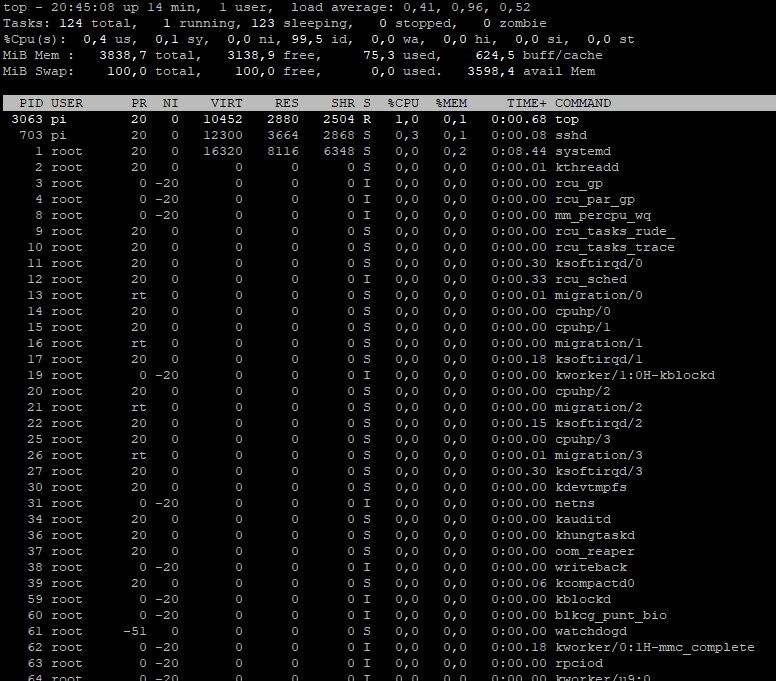
-
@thomas-braun said in ioBroker Backup wieder einspielen:
@federal sagte in ioBroker Backup wieder einspielen:
ich verstehe es leider nicht
Ich auch nicht.
Die drei Zahlen sind die Auslastung der CPU im Moment, der letzten 5 und der letzten 15 Minuten. 1 ist dabei ein Kern, da dein RPI derer 4 hat ist 4 halt = 100%.
Irgendwas zieht da bei dir massiv Ressourcen, insbesondere da da vom iobroker her eigentlich nicht viel läuft macht das stutzig.Mit
topschauen was da los ist.
Edit: Mal zum Vergleich mein Rpi 4 / 8 GB:
echad@chet:~ $ uptime 20:42:40 up 8 days, 20:36, 2 users, load average: 0.42, 0.37, 0.35Nach dem reboot schaut es gesünder aus.
-
Nach dem reboot schaut es gesünder aus.
@thomas-braun said in ioBroker Backup wieder einspielen:
Nach dem reboot schaut es gesünder aus.
iob ist immer noch nicht erreichbar.
Ich muss mich ausklinken. Danke an alle. -
@thomas-braun said in ioBroker Backup wieder einspielen:
Nach dem reboot schaut es gesünder aus.
iob ist immer noch nicht erreichbar.
Ich muss mich ausklinken. Danke an alle.@federal sagte in ioBroker Backup wieder einspielen:
iob ist immer noch nicht erreichbar.
Er läuft ja auch nicht.
-
@federal sagte in ioBroker Backup wieder einspielen:
iob ist immer noch nicht erreichbar.
Er läuft ja auch nicht.
@thomas-braun said in ioBroker Backup wieder einspielen:
@federal sagte in ioBroker Backup wieder einspielen:
iob ist immer noch nicht erreichbar.
Er läuft ja auch nicht.
lässt sich auch nicht starten. Was kann ich noch tun?
das zeigt die Statusanzeige
pi@raspberrypi:~ $ iobroker status node:internal/modules/cjs/loader:1024 throw err; ^ Error: Cannot find module 'buffer-equal-constant-time' Require stack: - /opt/iobroker/node_modules/jwa/index.js - /opt/iobroker/node_modules/jws/lib/sign-stream.js - /opt/iobroker/node_modules/jws/index.js - /opt/iobroker/node_modules/jsonwebtoken/decode.js - /opt/iobroker/node_modules/jsonwebtoken/index.js - /opt/iobroker/node_modules/@iobroker/js-controller-common/lib/common/tools.js - /opt/iobroker/node_modules/@iobroker/js-controller-common/index.js - /opt/iobroker/node_modules/iobroker.js-controller/lib/setup.js - /opt/iobroker/node_modules/iobroker.js-controller/iobroker.js at Function.Module._resolveFilename (node:internal/modules/cjs/loader:1021:15) at Function.Module._load (node:internal/modules/cjs/loader:866:27) at Module.require (node:internal/modules/cjs/loader:1093:19) at require (node:internal/modules/cjs/helpers:108:18) at Object.<anonymous> (/opt/iobroker/node_modules/jwa/index.js:1:19) at Module._compile (node:internal/modules/cjs/loader:1191:14) at Object.Module._extensions..js (node:internal/modules/cjs/loader:1245:10) at Module.load (node:internal/modules/cjs/loader:1069:32) at Function.Module._load (node:internal/modules/cjs/loader:904:12) at Module.require (node:internal/modules/cjs/loader:1093:19) { code: 'MODULE_NOT_FOUND', requireStack: [ '/opt/iobroker/node_modules/jwa/index.js', '/opt/iobroker/node_modules/jws/lib/sign-stream.js', '/opt/iobroker/node_modules/jws/index.js', '/opt/iobroker/node_modules/jsonwebtoken/decode.js', '/opt/iobroker/node_modules/jsonwebtoken/index.js', '/opt/iobroker/node_modules/@iobroker/js-controller-common/lib/common/tools.js', '/opt/iobroker/node_modules/@iobroker/js-controller-common/index.js', '/opt/iobroker/node_modules/iobroker.js-controller/lib/setup.js', '/opt/iobroker/node_modules/iobroker.js-controller/iobroker.js' -
@thomas-braun said in ioBroker Backup wieder einspielen:
@federal sagte in ioBroker Backup wieder einspielen:
iob ist immer noch nicht erreichbar.
Er läuft ja auch nicht.
lässt sich auch nicht starten. Was kann ich noch tun?
das zeigt die Statusanzeige
pi@raspberrypi:~ $ iobroker status node:internal/modules/cjs/loader:1024 throw err; ^ Error: Cannot find module 'buffer-equal-constant-time' Require stack: - /opt/iobroker/node_modules/jwa/index.js - /opt/iobroker/node_modules/jws/lib/sign-stream.js - /opt/iobroker/node_modules/jws/index.js - /opt/iobroker/node_modules/jsonwebtoken/decode.js - /opt/iobroker/node_modules/jsonwebtoken/index.js - /opt/iobroker/node_modules/@iobroker/js-controller-common/lib/common/tools.js - /opt/iobroker/node_modules/@iobroker/js-controller-common/index.js - /opt/iobroker/node_modules/iobroker.js-controller/lib/setup.js - /opt/iobroker/node_modules/iobroker.js-controller/iobroker.js at Function.Module._resolveFilename (node:internal/modules/cjs/loader:1021:15) at Function.Module._load (node:internal/modules/cjs/loader:866:27) at Module.require (node:internal/modules/cjs/loader:1093:19) at require (node:internal/modules/cjs/helpers:108:18) at Object.<anonymous> (/opt/iobroker/node_modules/jwa/index.js:1:19) at Module._compile (node:internal/modules/cjs/loader:1191:14) at Object.Module._extensions..js (node:internal/modules/cjs/loader:1245:10) at Module.load (node:internal/modules/cjs/loader:1069:32) at Function.Module._load (node:internal/modules/cjs/loader:904:12) at Module.require (node:internal/modules/cjs/loader:1093:19) { code: 'MODULE_NOT_FOUND', requireStack: [ '/opt/iobroker/node_modules/jwa/index.js', '/opt/iobroker/node_modules/jws/lib/sign-stream.js', '/opt/iobroker/node_modules/jws/index.js', '/opt/iobroker/node_modules/jsonwebtoken/decode.js', '/opt/iobroker/node_modules/jsonwebtoken/index.js', '/opt/iobroker/node_modules/@iobroker/js-controller-common/lib/common/tools.js', '/opt/iobroker/node_modules/@iobroker/js-controller-common/index.js', '/opt/iobroker/node_modules/iobroker.js-controller/lib/setup.js', '/opt/iobroker/node_modules/iobroker.js-controller/iobroker.js'Last login: Tue Apr 4 15:43:58 2023 from 100.75.198.95 echad@chet:~ $ cd /opt/iobroker/ echad@chet:/opt/iobroker $ npm ls buffer-equal-constant-time iobroker.inst@3.0.0 /opt/iobroker ├─┬ iobroker.backitup@2.6.16 │ └─┬ google-auth-library@8.7.0 │ └─┬ jws@4.0.0 │ └─┬ jwa@2.0.0 │ └── buffer-equal-constant-time@1.0.1 └─┬ iobroker.js-controller@5.0.1-alpha.0-20230403-fd495c2e └─┬ jsonwebtoken@9.0.0 └─┬ jws@3.2.2 └─┬ jwa@1.4.1 └── buffer-equal-constant-time@1.0.1 deduped echad@chet:/opt/iobroker $Ich würde den js-controller nochmal installieren.
-
Last login: Tue Apr  4 15:43:58 2023 from 100.75.198.95
echad@chet:~ $ cd /opt/iobroker/
echad@chet:/opt/iobroker $ npm ls buffer-equal-constant-time
iobroker.inst@3.0.0 /opt/iobroker
├─┬ iobroker.backitup@2.6.16
│ └─┬ google-auth-library@8.7.0
│   └─┬ jws@4.0.0
│     └─┬ jwa@2.0.0
│       └── buffer-equal-constant-time@1.0.1
└─┬ iobroker.js-controller@5.0.1-alpha.0-20230403-fd495c2e
  └─┬ jsonwebtoken@9.0.0
    └─┬ jws@3.2.2
      └─┬ jwa@1.4.1
        └── buffer-equal-constant-time@1.0.1 deduped

echad@chet:/opt/iobroker $
Ich würde den js-controller nochmal installieren.
@thomas-braun said in ioBroker Backup wieder einspielen:
Last login: Tue Apr  4 15:43:58 2023 from 100.75.198.95
echad@chet:~ $ cd /opt/iobroker/
echad@chet:/opt/iobroker $ npm ls buffer-equal-constant-time
iobroker.inst@3.0.0 /opt/iobroker
├─┬ iobroker.backitup@2.6.16
│ └─┬ google-auth-library@8.7.0
│   └─┬ jws@4.0.0
│     └─┬ jwa@2.0.0
│       └── buffer-equal-constant-time@1.0.1
└─┬ iobroker.js-controller@5.0.1-alpha.0-20230403-fd495c2e
  └─┬ jsonwebtoken@9.0.0
    └─┬ jws@3.2.2
      └─┬ jwa@1.4.1
        └── buffer-equal-constant-time@1.0.1 deduped

echad@chet:/opt/iobroker $
Ich würde den js-controller nochmal installieren.
wie mache ich das?
-
@thomas-braun said in ioBroker Backup wieder einspielen:
Last login: Tue Apr  4 15:43:58 2023 from 100.75.198.95
echad@chet:~ $ cd /opt/iobroker/
echad@chet:/opt/iobroker $ npm ls buffer-equal-constant-time
iobroker.inst@3.0.0 /opt/iobroker
├─┬ iobroker.backitup@2.6.16
│ └─┬ google-auth-library@8.7.0
│   └─┬ jws@4.0.0
│     └─┬ jwa@2.0.0
│       └── buffer-equal-constant-time@1.0.1
└─┬ iobroker.js-controller@5.0.1-alpha.0-20230403-fd495c2e
  └─┬ jsonwebtoken@9.0.0
    └─┬ jws@3.2.2
      └─┬ jwa@1.4.1
        └── buffer-equal-constant-time@1.0.1 deduped

echad@chet:/opt/iobroker $
Ich würde den js-controller nochmal installieren.
wie mache ich das?
@federal sagte in ioBroker Backup wieder einspielen:
wie mache ich das?


Hey! Du scheinst an dieser Unterhaltung interessiert zu sein, hast aber noch kein Konto.
Hast du es satt, bei jedem Besuch durch die gleichen Beiträge zu scrollen? Wenn du dich für ein Konto anmeldest, kommst du immer genau dorthin zurück, wo du zuvor warst, und kannst dich über neue Antworten benachrichtigen lassen (entweder per E-Mail oder Push-Benachrichtigung). Du kannst auch Lesezeichen speichern und Beiträge positiv bewerten, um anderen Community-Mitgliedern deine Wertschätzung zu zeigen.
Mit deinem Input könnte dieser Beitrag noch besser werden 💗
Registrieren AnmeldenSupport us
498
Online33.0k
Benutzer83.6k
Themen1.3m
Beiträge