Skip to content
  • Home
  • Aktuell
  • Tags
  • 0 Ungelesen 0
  • Kategorien
  • Unreplied
  • Beliebt
  • GitHub
  • Docu
  • Hilfe
Skins
  • Light
  • Brite
  • Cerulean
  • Cosmo
  • Flatly
  • Journal
  • Litera
  • Lumen
  • Lux
  • Materia
  • Minty
  • Morph
  • Pulse
  • Sandstone
  • Simplex
  • Sketchy
  • Spacelab
  • United
  • Yeti
  • Zephyr
  • Dark
  • Cyborg
  • Darkly
  • Quartz
  • Slate
  • Solar
  • Superhero
  • Vapor

  • Standard: (Kein Skin)
  • Kein Skin
Einklappen
ioBroker Logo

Community Forum

donate donate
  1. ioBroker Community Home
  2. Deutsch
  3. Tester
  4. Test Adapter OpenDTU
NEWS

  • UPDATE 31.10.: Amazon Alexa - ioBroker Skill läuft aus ?
    apollon77A
    apollon77
    48
    3
    8.9k

  • Monatsrückblick – September 2025
    BluefoxB
    Bluefox
    13
    1
    2.3k

  • Neues Video "KI im Smart Home" - ioBroker plus n8n
    BluefoxB
    Bluefox
    16
    1
    3.6k

Test Adapter OpenDTU

Geplant Angeheftet Gesperrt Verschoben Tester
dtuhoymilesopendtusolar
457 Beiträge 47 Kommentatoren 136.9k Aufrufe 42 Watching
  • Älteste zuerst
  • Neuste zuerst
  • Meiste Stimmen
Antworten
  • In einem neuen Thema antworten
Anmelden zum Antworten
Dieses Thema wurde gelöscht. Nur Nutzer mit entsprechenden Rechten können es sehen.
  • andabrahaA Offline
    andabrahaA Offline
    andabraha
    schrieb am zuletzt editiert von
    #35

    So seit dem nodejs Update auf die Version 16, gab es keinen einzigen Abbruch mehr, sehr sehr schön!

    Allerdings habe ich jeden Tag das Phänomen, dass unter "total" der Wert yieldday auf 0 stehen bleibt (manueller Instanz Neustart behebt das Thema)
    Bei den anderen Werten hab ich das so noch nicht gehabt.

    crunchipC 1 Antwort Letzte Antwort
    0
    • andabrahaA andabraha

      So seit dem nodejs Update auf die Version 16, gab es keinen einzigen Abbruch mehr, sehr sehr schön!

      Allerdings habe ich jeden Tag das Phänomen, dass unter "total" der Wert yieldday auf 0 stehen bleibt (manueller Instanz Neustart behebt das Thema)
      Bei den anderen Werten hab ich das so noch nicht gehabt.

      crunchipC Abwesend
      crunchipC Abwesend
      crunchip
      Forum Testing Most Active
      schrieb am zuletzt editiert von
      #36

      @andre1980hb mit der aktuellen Git Version?

      umgestiegen von Proxmox auf Unraid

      andabrahaA 1 Antwort Letzte Antwort
      0
      • crunchipC crunchip

        @andre1980hb mit der aktuellen Git Version?

        andabrahaA Offline
        andabrahaA Offline
        andabraha
        schrieb am zuletzt editiert von
        #37

        @crunchip

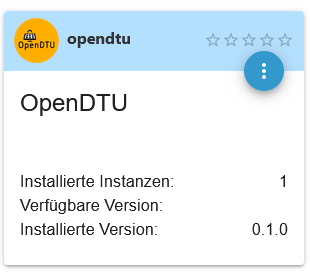
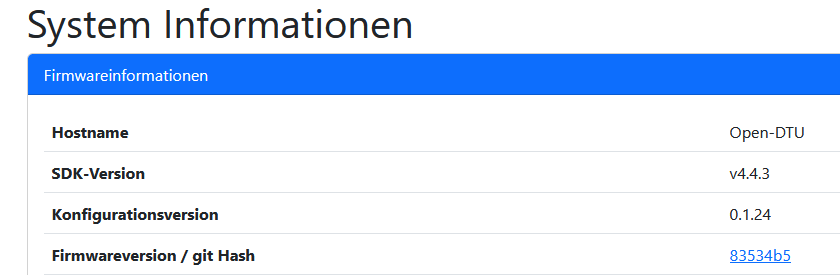
        derzeitig genutzte Versionen:

        5cc68a03-f0d4-43e1-90f5-0eb519fc2299-grafik.png

        3e5df623-a6fe-496b-afc2-3d1ec7afcb6c-grafik.png

        1 Antwort Letzte Antwort
        0
        • andabrahaA Offline
          andabrahaA Offline
          andabraha
          schrieb am zuletzt editiert von
          #38

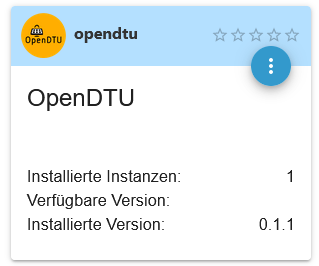
          Habe soeben ein Update durchgeführt:
          84feb633-e32c-4934-862f-635791f4117d-grafik.png

          Ich beobachte das mal weiter

          1 Antwort Letzte Antwort
          0
          • L Offline
            L Offline
            Laser
            schrieb am zuletzt editiert von
            #39

            @andre1980hb
            Kann ich den Adapter über die Admin Oberfläche installieren (da finde ich Ihn nicht) oder manuell über die Konsole?

            andabrahaA 1 Antwort Letzte Antwort
            0
            • L Laser

              @andre1980hb
              Kann ich den Adapter über die Admin Oberfläche installieren (da finde ich Ihn nicht) oder manuell über die Konsole?

              andabrahaA Offline
              andabrahaA Offline
              andabraha
              schrieb am zuletzt editiert von andabraha
              #40

              Irrtum bei der URL behoben (danke IdleBit)

              @laser
              Im iobroker Menü auf "Adapter" (ExpertenModus an) auf das github Symbol klicken:
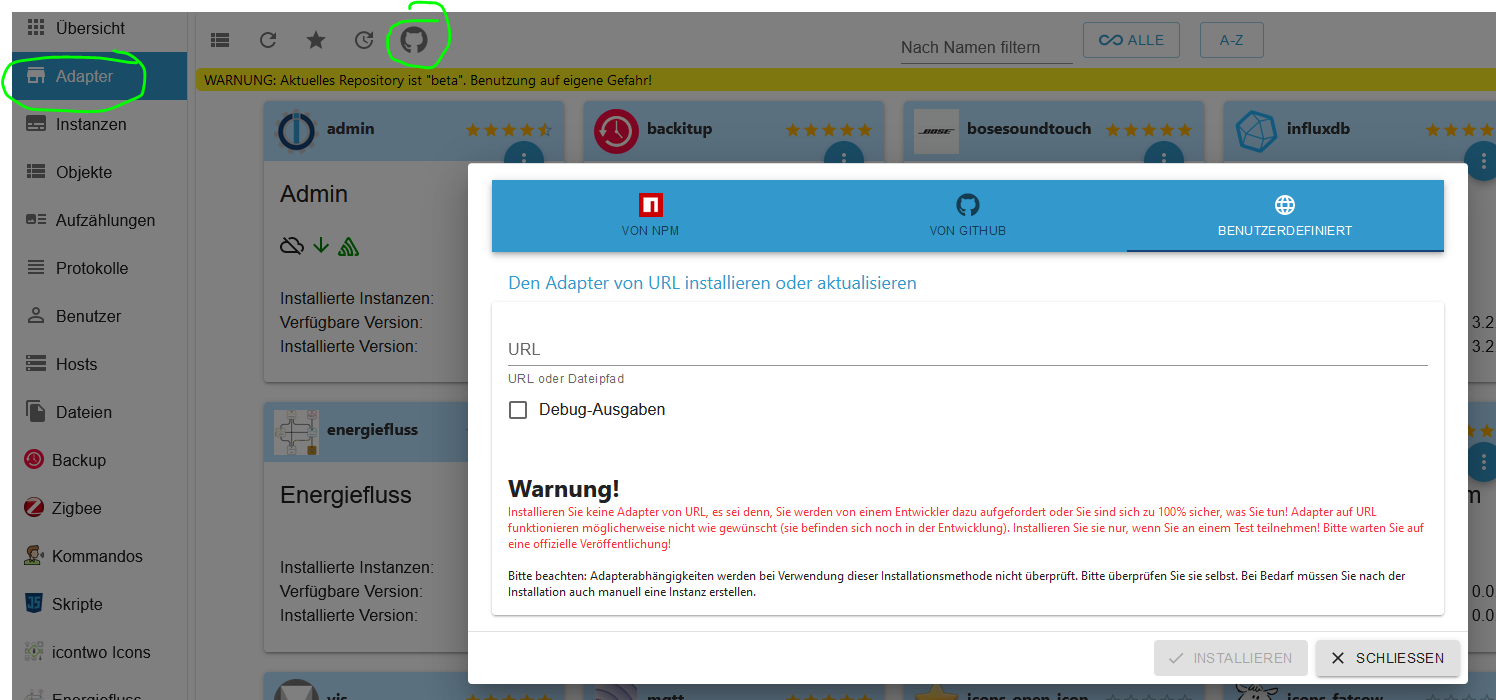
              df0267ca-7a31-47f6-bbf1-1622c6119194-grafik.png

              Dort dann die github URL eingeben:
              https://github.com/o0shojo0o/ioBroker.opendtu

              L 1 Antwort Letzte Antwort
              2
              • andabrahaA andabraha

                Irrtum bei der URL behoben (danke IdleBit)

                @laser
                Im iobroker Menü auf "Adapter" (ExpertenModus an) auf das github Symbol klicken:
                df0267ca-7a31-47f6-bbf1-1622c6119194-grafik.png

                Dort dann die github URL eingeben:
                https://github.com/o0shojo0o/ioBroker.opendtu

                L Offline
                L Offline
                Laser
                schrieb am zuletzt editiert von Laser
                #41

                @andre1980hb sagte in Test Adapter OpenDTU:

                https://github.com/tbnobody/OpenDTU.git

                OK. Danke! Allerdings noch ein Problem:

                ERROR: Process exited with code 25
                weniger
                mehr
                $ iobroker url https://github.com/tbnobody/OpenDTU.git --host raspberrypi --debug
                
                install tbnobody/OpenDTU#b42fff8d5f9c800ec2d5666987d406f4840b8db2
                
                NPM version: 9.6.0
                
                Installing tbnobody/OpenDTU#b42fff8d5f9c800ec2d5666987d406f4840b8db2... (System call)
                
                npm WARN tarball tarball data for github:tbnobody/OpenDTU#b42fff8d5f9c800ec2d5666987d406f4840b8db2 (null) seems to be corrupted. Trying again.
                
                npm WARN tarball tarball data for github:tbnobody/OpenDTU#b42fff8d5f9c800ec2d5666987d406f4840b8db2 (null) seems to be corrupted. Trying again.
                
                npm ERR! code ENOENTnpm ERR! syscall opennpm ERR! path /home/iobroker/.npm/_cacache/tmp/git-clonejAoLRI/package.json
                
                npm ERR! errno -2
                
                npm ERR! enoent ENOENT: no such file or directory, open '/home/iobroker/.npm/_cacache/tmp/git-clonejAoLRI/package.json'
                
                npm ERR! enoent This is related to npm not being able to find a file.npm ERR! enoent
                
                npm ERR! A complete log of this run can be found in:npm ERR! /home/iobroker/.npm/_logs/2023-03-02T16_14_57_795Z-debug-0.log
                
                host.raspberrypi Cannot install tbnobody/OpenDTU#b42fff8d5f9c800ec2d5666987d406f4840b8db2: 254
                
                ERROR: Process exited with code 25
                

                Ich hatte den Adapter schon mal manuell installiert, bekomme ich aber nicht mehr hin!

                IdleBitI 1 Antwort Letzte Antwort
                0
                • L Laser

                  @andre1980hb sagte in Test Adapter OpenDTU:

                  https://github.com/tbnobody/OpenDTU.git

                  OK. Danke! Allerdings noch ein Problem:

                  ERROR: Process exited with code 25
                  weniger
                  mehr
                  $ iobroker url https://github.com/tbnobody/OpenDTU.git --host raspberrypi --debug
                  
                  install tbnobody/OpenDTU#b42fff8d5f9c800ec2d5666987d406f4840b8db2
                  
                  NPM version: 9.6.0
                  
                  Installing tbnobody/OpenDTU#b42fff8d5f9c800ec2d5666987d406f4840b8db2... (System call)
                  
                  npm WARN tarball tarball data for github:tbnobody/OpenDTU#b42fff8d5f9c800ec2d5666987d406f4840b8db2 (null) seems to be corrupted. Trying again.
                  
                  npm WARN tarball tarball data for github:tbnobody/OpenDTU#b42fff8d5f9c800ec2d5666987d406f4840b8db2 (null) seems to be corrupted. Trying again.
                  
                  npm ERR! code ENOENTnpm ERR! syscall opennpm ERR! path /home/iobroker/.npm/_cacache/tmp/git-clonejAoLRI/package.json
                  
                  npm ERR! errno -2
                  
                  npm ERR! enoent ENOENT: no such file or directory, open '/home/iobroker/.npm/_cacache/tmp/git-clonejAoLRI/package.json'
                  
                  npm ERR! enoent This is related to npm not being able to find a file.npm ERR! enoent
                  
                  npm ERR! A complete log of this run can be found in:npm ERR! /home/iobroker/.npm/_logs/2023-03-02T16_14_57_795Z-debug-0.log
                  
                  host.raspberrypi Cannot install tbnobody/OpenDTU#b42fff8d5f9c800ec2d5666987d406f4840b8db2: 254
                  
                  ERROR: Process exited with code 25
                  

                  Ich hatte den Adapter schon mal manuell installiert, bekomme ich aber nicht mehr hin!

                  IdleBitI Offline
                  IdleBitI Offline
                  IdleBit
                  schrieb am zuletzt editiert von
                  #42

                  @laser Die URL -> https://github.com/o0shojo0o/ioBroker.opendtu
                  Da hat sich der @andre1980hb vertan ;)

                  andabrahaA 1 Antwort Letzte Antwort
                  0
                  • L Offline
                    L Offline
                    Laser
                    schrieb am zuletzt editiert von Laser
                    #43

                    @idlebit sagte in Test Adapter OpenDTU:

                    https://github.com/o0shojo0o/ioBroker.opendtu

                    Das sieht es schon mal anders aus!

                    install
                    
                    NPM version: 9.6.0
                    Installing ... (System call)
                    ERROR: Process exited with code 33
                    

                    Die Anwahl ist auch nicht "Github" sondern "benutzerdefiniert"?

                    GlasfaserG Thomas BraunT 2 Antworten Letzte Antwort
                    0
                    • L Laser

                      @idlebit sagte in Test Adapter OpenDTU:

                      https://github.com/o0shojo0o/ioBroker.opendtu

                      Das sieht es schon mal anders aus!

                      install
                      
                      NPM version: 9.6.0
                      Installing ... (System call)
                      ERROR: Process exited with code 33
                      

                      Die Anwahl ist auch nicht "Github" sondern "benutzerdefiniert"?

                      GlasfaserG Offline
                      GlasfaserG Offline
                      Glasfaser
                      schrieb am zuletzt editiert von Glasfaser
                      #44

                      @laser sagte in Test Adapter OpenDTU:

                      NPM version: 9.6.0

                      Dein System ist krumm , wie kommst du an NPM 9..

                      Empfehlung ist Nodejs 16 ... mit NPM 8 ...

                      siehe hier ... richte es erstmal :
                      https://forum.iobroker.net/topic/35090/howto-nodejs-installation-und-upgrades-unter-debian

                      Synology 918+ 16GB - ioBroker in Docker v9 , VISO auf Trekstor Primebook C13 13,3" , Hikvision Domkameras mit Surveillance Station .. CCU RaspberryMatic in Synology VM .. Zigbee CC2538+CC2592 .. Sonoff .. KNX .. Modbus ..

                      L 1 Antwort Letzte Antwort
                      0
                      • GlasfaserG Glasfaser

                        @laser sagte in Test Adapter OpenDTU:

                        NPM version: 9.6.0

                        Dein System ist krumm , wie kommst du an NPM 9..

                        Empfehlung ist Nodejs 16 ... mit NPM 8 ...

                        siehe hier ... richte es erstmal :
                        https://forum.iobroker.net/topic/35090/howto-nodejs-installation-und-upgrades-unter-debian

                        L Offline
                        L Offline
                        Laser
                        schrieb am zuletzt editiert von Laser
                        #45

                        @glasfaser
                        Habe ich heute frisch installiert. Debian neu und IOBroker mit Installationsscript
                        Jetzt geht es (zumindest die Installation, die Instanz sehe ich immer noch nicht):

                        Process exited with code 0
                        weniger
                        mehr
                        $ iobroker url https://github.com/o0shojo0o/ioBroker.opendtu --host raspberrypi --debug
                        
                        install o0shojo0o/ioBroker.opendtu#7b83e31ed9ffcebd9f5ee778b903ab6a4a07a61d
                        
                        NPM version: 8.19.3
                        
                        Installing o0shojo0o/ioBroker.opendtu#7b83e31ed9ffcebd9f5ee778b903ab6a4a07a61d... (System call)
                        
                        npm WARN skipping integrity check for git dependency ssh://git@github.com/o0shojo0o/ioBroker.opendtu.git
                        
                        52 packages are looking for funding
                        
                        run `npm fund` for details
                        
                        upload [12] opendtu.admin /opt/iobroker/node_modules/iobroker.opendtu/admin/i18n/de/translations.json i18n/de/translations.json application/json
                        
                        upload [11] opendtu.admin /opt/iobroker/node_modules/iobroker.opendtu/admin/i18n/en/translations.json i18n/en/translations.json application/json
                        
                        upload [10] opendtu.admin /opt/iobroker/node_modules/iobroker.opendtu/admin/i18n/es/translations.json i18n/es/translations.json application/json
                        
                        upload [9] opendtu.admin /opt/iobroker/node_modules/iobroker.opendtu/admin/i18n/fr/translations.json i18n/fr/translations.json application/json
                        
                        upload [8] opendtu.admin /opt/iobroker/node_modules/iobroker.opendtu/admin/i18n/it/translations.json i18n/it/translations.json application/json
                        
                        upload [7] opendtu.admin /opt/iobroker/node_modules/iobroker.opendtu/admin/i18n/nl/translations.json i18n/nl/translations.json application/json
                        
                        upload [6] opendtu.admin /opt/iobroker/node_modules/iobroker.opendtu/admin/i18n/pl/translations.json i18n/pl/translations.json application/json
                        
                        upload [5] opendtu.admin /opt/iobroker/node_modules/iobroker.opendtu/admin/i18n/pt/translations.json i18n/pt/translations.json application/json
                        
                        upload [4] opendtu.admin /opt/iobroker/node_modules/iobroker.opendtu/admin/i18n/ru/translations.json i18n/ru/translations.json application/json
                        
                        upload [3] opendtu.admin /opt/iobroker/node_modules/iobroker.opendtu/admin/i18n/uk/translations.json i18n/uk/translations.json application/json
                        
                        upload [2] opendtu.admin /opt/iobroker/node_modules/iobroker.opendtu/admin/i18n/zh-cn/translations.json i18n/zh-cn/translations.json application/json
                        
                        upload [1] opendtu.admin /opt/iobroker/node_modules/iobroker.opendtu/admin/jsonConfig.json jsonConfig.json application/json
                        
                        upload [0] opendtu.admin /opt/iobroker/node_modules/iobroker.opendtu/admin/opendtu.png opendtu.png image/png
                        
                        Process exited with code 0
                        
                        Thomas BraunT 1 Antwort Letzte Antwort
                        0
                        • L Laser

                          @glasfaser
                          Habe ich heute frisch installiert. Debian neu und IOBroker mit Installationsscript
                          Jetzt geht es (zumindest die Installation, die Instanz sehe ich immer noch nicht):

                          Process exited with code 0
                          weniger
                          mehr
                          $ iobroker url https://github.com/o0shojo0o/ioBroker.opendtu --host raspberrypi --debug
                          
                          install o0shojo0o/ioBroker.opendtu#7b83e31ed9ffcebd9f5ee778b903ab6a4a07a61d
                          
                          NPM version: 8.19.3
                          
                          Installing o0shojo0o/ioBroker.opendtu#7b83e31ed9ffcebd9f5ee778b903ab6a4a07a61d... (System call)
                          
                          npm WARN skipping integrity check for git dependency ssh://git@github.com/o0shojo0o/ioBroker.opendtu.git
                          
                          52 packages are looking for funding
                          
                          run `npm fund` for details
                          
                          upload [12] opendtu.admin /opt/iobroker/node_modules/iobroker.opendtu/admin/i18n/de/translations.json i18n/de/translations.json application/json
                          
                          upload [11] opendtu.admin /opt/iobroker/node_modules/iobroker.opendtu/admin/i18n/en/translations.json i18n/en/translations.json application/json
                          
                          upload [10] opendtu.admin /opt/iobroker/node_modules/iobroker.opendtu/admin/i18n/es/translations.json i18n/es/translations.json application/json
                          
                          upload [9] opendtu.admin /opt/iobroker/node_modules/iobroker.opendtu/admin/i18n/fr/translations.json i18n/fr/translations.json application/json
                          
                          upload [8] opendtu.admin /opt/iobroker/node_modules/iobroker.opendtu/admin/i18n/it/translations.json i18n/it/translations.json application/json
                          
                          upload [7] opendtu.admin /opt/iobroker/node_modules/iobroker.opendtu/admin/i18n/nl/translations.json i18n/nl/translations.json application/json
                          
                          upload [6] opendtu.admin /opt/iobroker/node_modules/iobroker.opendtu/admin/i18n/pl/translations.json i18n/pl/translations.json application/json
                          
                          upload [5] opendtu.admin /opt/iobroker/node_modules/iobroker.opendtu/admin/i18n/pt/translations.json i18n/pt/translations.json application/json
                          
                          upload [4] opendtu.admin /opt/iobroker/node_modules/iobroker.opendtu/admin/i18n/ru/translations.json i18n/ru/translations.json application/json
                          
                          upload [3] opendtu.admin /opt/iobroker/node_modules/iobroker.opendtu/admin/i18n/uk/translations.json i18n/uk/translations.json application/json
                          
                          upload [2] opendtu.admin /opt/iobroker/node_modules/iobroker.opendtu/admin/i18n/zh-cn/translations.json i18n/zh-cn/translations.json application/json
                          
                          upload [1] opendtu.admin /opt/iobroker/node_modules/iobroker.opendtu/admin/jsonConfig.json jsonConfig.json application/json
                          
                          upload [0] opendtu.admin /opt/iobroker/node_modules/iobroker.opendtu/admin/opendtu.png opendtu.png image/png
                          
                          Process exited with code 0
                          
                          Thomas BraunT Online
                          Thomas BraunT Online
                          Thomas Braun
                          Most Active
                          schrieb am zuletzt editiert von
                          #46

                          @laser sagte in Test Adapter OpenDTU:

                          Instanz sehe ich immer noch nicht):

                          Instanzen müssen bei händischer Installation aus dem GitHub auch manuell hinzugefügt werden.

                          Linux-Werkzeugkasten:
                          https://forum.iobroker.net/topic/42952/der-kleine-iobroker-linux-werkzeugkasten
                          NodeJS Fixer Skript:
                          https://forum.iobroker.net/topic/68035/iob-node-fix-skript
                          iob_diag: curl -sLf -o diag.sh https://iobroker.net/diag.sh && bash diag.sh

                          1 Antwort Letzte Antwort
                          0
                          • L Laser

                            @idlebit sagte in Test Adapter OpenDTU:

                            https://github.com/o0shojo0o/ioBroker.opendtu

                            Das sieht es schon mal anders aus!

                            install
                            
                            NPM version: 9.6.0
                            Installing ... (System call)
                            ERROR: Process exited with code 33
                            

                            Die Anwahl ist auch nicht "Github" sondern "benutzerdefiniert"?

                            Thomas BraunT Online
                            Thomas BraunT Online
                            Thomas Braun
                            Most Active
                            schrieb am zuletzt editiert von
                            #47

                            @laser sagte in Test Adapter OpenDTU:

                            Und dafür, dass du ja ein unspaßiges stabiles System mit hohem WAF benötigst bist du mit

                            install NPM version: 9.6.0

                            wieder sehr originell spaßig im äußersten Versionsorbit unterwegs. Im Upstream von nodejs@19 ist die noch nichtmal dazugepackt worden. Da ist 9.5 vorgesehen.

                            Linux-Werkzeugkasten:
                            https://forum.iobroker.net/topic/42952/der-kleine-iobroker-linux-werkzeugkasten
                            NodeJS Fixer Skript:
                            https://forum.iobroker.net/topic/68035/iob-node-fix-skript
                            iob_diag: curl -sLf -o diag.sh https://iobroker.net/diag.sh && bash diag.sh

                            L 1 Antwort Letzte Antwort
                            0
                            • Thomas BraunT Thomas Braun

                              @laser sagte in Test Adapter OpenDTU:

                              Und dafür, dass du ja ein unspaßiges stabiles System mit hohem WAF benötigst bist du mit

                              install NPM version: 9.6.0

                              wieder sehr originell spaßig im äußersten Versionsorbit unterwegs. Im Upstream von nodejs@19 ist die noch nichtmal dazugepackt worden. Da ist 9.5 vorgesehen.

                              L Offline
                              L Offline
                              Laser
                              schrieb am zuletzt editiert von
                              #48

                              @thomas-braun
                              Und, wie ist die NPM Version da reingekommen?

                              Thomas BraunT 1 Antwort Letzte Antwort
                              0
                              • L Laser

                                @thomas-braun
                                Und, wie ist die NPM Version da reingekommen?

                                Thomas BraunT Online
                                Thomas BraunT Online
                                Thomas Braun
                                Most Active
                                schrieb am zuletzt editiert von
                                #49

                                @laser sagte in Test Adapter OpenDTU:

                                Und, wie ist die NPM Version da reingekommen?

                                Nicht über ein ordentliches Update. Das musst du da selber reingedübelt haben.
                                Die Frage kannst du dir also nur selber beantworten.

                                Linux-Werkzeugkasten:
                                https://forum.iobroker.net/topic/42952/der-kleine-iobroker-linux-werkzeugkasten
                                NodeJS Fixer Skript:
                                https://forum.iobroker.net/topic/68035/iob-node-fix-skript
                                iob_diag: curl -sLf -o diag.sh https://iobroker.net/diag.sh && bash diag.sh

                                L 1 Antwort Letzte Antwort
                                0
                                • Thomas BraunT Thomas Braun

                                  @laser sagte in Test Adapter OpenDTU:

                                  Und, wie ist die NPM Version da reingekommen?

                                  Nicht über ein ordentliches Update. Das musst du da selber reingedübelt haben.
                                  Die Frage kannst du dir also nur selber beantworten.

                                  L Offline
                                  L Offline
                                  Laser
                                  schrieb am zuletzt editiert von
                                  #50

                                  @thomas-braun
                                  "selber reingedübelt" - ich habe heute noch nichts geraucht!

                                  Thomas BraunT 1 Antwort Letzte Antwort
                                  0
                                  • L Laser

                                    @thomas-braun
                                    "selber reingedübelt" - ich habe heute noch nichts geraucht!

                                    Thomas BraunT Online
                                    Thomas BraunT Online
                                    Thomas Braun
                                    Most Active
                                    schrieb am zuletzt editiert von
                                    #51

                                    @laser

                                    Ist mir auch schnuppe, ob und was da konsumiert wird.

                                    Linux-Werkzeugkasten:
                                    https://forum.iobroker.net/topic/42952/der-kleine-iobroker-linux-werkzeugkasten
                                    NodeJS Fixer Skript:
                                    https://forum.iobroker.net/topic/68035/iob-node-fix-skript
                                    iob_diag: curl -sLf -o diag.sh https://iobroker.net/diag.sh && bash diag.sh

                                    L 1 Antwort Letzte Antwort
                                    0
                                    • Thomas BraunT Thomas Braun

                                      @laser

                                      Ist mir auch schnuppe, ob und was da konsumiert wird.

                                      L Offline
                                      L Offline
                                      Laser
                                      schrieb am zuletzt editiert von
                                      #52

                                      @thomas-braun
                                      im übrigen habe ich den NPM drin:

                                      $ iobroker url o0shojo0o/ioBroker.opendtu --host raspberrypi --debug
                                      
                                      install o0shojo0o/ioBroker.opendtu
                                      
                                      NPM version: 8.19.3
                                      
                                      Thomas BraunT GlasfaserG 2 Antworten Letzte Antwort
                                      0
                                      • hollywootH Offline
                                        hollywootH Offline
                                        hollywoot
                                        schrieb am zuletzt editiert von
                                        #53

                                        Hier ist ja ne Stimmung 😃

                                        1 Antwort Letzte Antwort
                                        0
                                        • L Laser

                                          @thomas-braun
                                          im übrigen habe ich den NPM drin:

                                          $ iobroker url o0shojo0o/ioBroker.opendtu --host raspberrypi --debug
                                          
                                          install o0shojo0o/ioBroker.opendtu
                                          
                                          NPM version: 8.19.3
                                          
                                          Thomas BraunT Online
                                          Thomas BraunT Online
                                          Thomas Braun
                                          Most Active
                                          schrieb am zuletzt editiert von
                                          #54

                                          @laser

                                          Zuvor hast du aber was mit npm 9.6.0 gepostet.
                                          Halluzinationen?

                                          Linux-Werkzeugkasten:
                                          https://forum.iobroker.net/topic/42952/der-kleine-iobroker-linux-werkzeugkasten
                                          NodeJS Fixer Skript:
                                          https://forum.iobroker.net/topic/68035/iob-node-fix-skript
                                          iob_diag: curl -sLf -o diag.sh https://iobroker.net/diag.sh && bash diag.sh

                                          L 1 Antwort Letzte Antwort
                                          0
                                          Antworten
                                          • In einem neuen Thema antworten
                                          Anmelden zum Antworten
                                          • Älteste zuerst
                                          • Neuste zuerst
                                          • Meiste Stimmen


                                          Support us

                                          ioBroker
                                          Community Adapters
                                          Donate

                                          818

                                          Online

                                          32.5k

                                          Benutzer

                                          81.6k

                                          Themen

                                          1.3m

                                          Beiträge
                                          Community
                                          Impressum | Datenschutz-Bestimmungen | Nutzungsbedingungen | Einwilligungseinstellungen
                                          ioBroker Community 2014-2025
                                          logo
                                          • Anmelden

                                          • Du hast noch kein Konto? Registrieren

                                          • Anmelden oder registrieren, um zu suchen
                                          • Erster Beitrag
                                            Letzter Beitrag
                                          0
                                          • Home
                                          • Aktuell
                                          • Tags
                                          • Ungelesen 0
                                          • Kategorien
                                          • Unreplied
                                          • Beliebt
                                          • GitHub
                                          • Docu
                                          • Hilfe