



Skip to content
  • Home
  • Aktuell
  • Tags
  • 0 Ungelesen 0
  • Kategorien
  • Unreplied
  • Beliebt
  • GitHub
  • Docu
  • Hilfe
Skins
  • Light
  • Brite
  • Cerulean
  • Cosmo
  • Flatly
  • Journal
  • Litera
  • Lumen
  • Lux
  • Materia
  • Minty
  • Morph
  • Pulse
  • Sandstone
  • Simplex
  • Sketchy
  • Spacelab
  • United
  • Yeti
  • Zephyr
  • Dark
  • Cyborg
  • Darkly
  • Quartz
  • Slate
  • Solar
  • Superhero
  • Vapor

  • Standard: (Kein Skin)
  • Kein Skin
Einklappen
ioBroker Logo

Community Forum

donate donate
  1. ioBroker Community Home
  2. Deutsch
  3. Einsteigerfragen
  4. Installation
  5. 2 mal ioBoker installieren unter Proxmox

NEWS

  • UPDATE 31.10.: Amazon Alexa - ioBroker Skill läuft aus ?
    apollon77A
    apollon77
    48
    3
    8.8k

  • Monatsrückblick – September 2025
    BluefoxB
    Bluefox
    13
    1
    2.2k

  • Neues Video "KI im Smart Home" - ioBroker plus n8n
    BluefoxB
    Bluefox
    16
    1
    3.2k

2 mal ioBoker installieren unter Proxmox

Geplant Angeheftet Gesperrt Verschoben Installation
51 Beiträge 6 Kommentatoren 3.4k Aufrufe 6 Watching
  • Älteste zuerst
  • Neuste zuerst
  • Meiste Stimmen
Antworten
  • In einem neuen Thema antworten
Anmelden zum Antworten
Dieses Thema wurde gelöscht. Nur Nutzer mit entsprechenden Rechten können es sehen.
  • W Wolfshunter

    @wendy2702

    Also es kommen soweit keine Fehlermeldungen beim abarbeiten der Anleitung.

    Hiermal die Ergebnisse im Host (proxmox):

    root@proxmox:~# lsusb
    Bus 001 Device 004: ID 0bda:a725 Realtek Semiconductor Corp. Bluetooth Radio
    Bus 001 Device 002: ID 0438:7900 Advanced Micro Devices, Inc. Root Hub
    Bus 001 Device 001: ID 1d6b:0002 Linux Foundation 2.0 root hub
    Bus 003 Device 001: ID 1d6b:0003 Linux Foundation 3.0 root hub
    Bus 002 Device 001: ID 1d6b:0002 Linux Foundation 2.0 root hub
    
    root@proxmox:~# hciconfig
    hci0:   Type: Primary  Bus: USB
            BD Address: 00:00:00:00:00:00  ACL MTU: 0:0  SCO MTU: 0:0
            DOWN 
            RX bytes:21 acl:0 sco:0 events:2 errors:0
            TX bytes:6 acl:0 sco:0 commands:2 errors:0
    

    Hier die Config für meinen LXC:

    lxc.cgroup2.devices.allow: c 189:* rwm
    lxc.mount.entry: /dev/bus/usb/001/004/ dev/bus/usb/001/004 none bind,optional,create=file
    

    Hier dann was ich im LXC Container bekomme:

    root@iobroker:~# lsusb
    Bus 001 Device 004: ID 0bda:a725 Realtek Semiconductor Corp. Bluetooth Radio
    Bus 001 Device 002: ID 0438:7900 Advanced Micro Devices, Inc. Root Hub
    Bus 001 Device 001: ID 1d6b:0002 Linux Foundation 2.0 root hub
    Bus 003 Device 001: ID 1d6b:0003 Linux Foundation 3.0 root hub
    Bus 002 Device 001: ID 1d6b:0002 Linux Foundation 2.0 root hub
    
    root@iobroker:~# hciconfig
    Can't open HCI socket.: Address family not supported by protocol
    

    Hoffe das hilft bei der Fehlersuche. Denke wirklich das es wohl daran liegt das der
    Proxmox an LXC keinen USB BT weiterreichen kann.

    wendy2702W Online
    wendy2702W Online
    wendy2702
    schrieb am zuletzt editiert von
    #8

    @wolfshunter ok.

    Ich denke es geht wirklich nicht. Steht auch in der Anleitung

    
    In der Anleitung wird das Einbinden eines Texas Instruments Inc. CC2531 Zigbee Stick beschrieben, dieselben Schritte können aber analog für andere Zigbee Sticks (ConBee, CC2652P etc.) oder für andere USB-Geräte mit der Ausnahme von USB Netzwerk Geräten (Bluetooth/Wlan) verwendet werden.


    Dann vielleicht ne VM anstelle LXC für den Sonderfall.

    Bitte keine Fragen per PN, die gehören ins Forum!

    Benutzt das Voting rechts unten im Beitrag wenn er euch geholfen hat.

    W 1 Antwort Letzte Antwort
    0
    • wendy2702W wendy2702

      @wolfshunter ok.

      Ich denke es geht wirklich nicht. Steht auch in der Anleitung

      
      In der Anleitung wird das Einbinden eines Texas Instruments Inc. CC2531 Zigbee Stick beschrieben, dieselben Schritte können aber analog für andere Zigbee Sticks (ConBee, CC2652P etc.) oder für andere USB-Geräte mit der Ausnahme von USB Netzwerk Geräten (Bluetooth/Wlan) verwendet werden.


      Dann vielleicht ne VM anstelle LXC für den Sonderfall.

      W Offline
      W Offline
      Wolfshunter
      schrieb am zuletzt editiert von
      #9

      @wendy2702

      ok das könnte ich dann mal testen. Wenn es dann nicht klappt kann ich die VM ja wieder löschen.
      Sollte ich dann ein Ubuntu nutzen oder besser ein sauberes kleines Debian?

      wendy2702W 1 Antwort Letzte Antwort
      0
      • W Wolfshunter

        @wendy2702

        Ja es ist ein externer USB Bluetooth Stick.

        crunchipC Abwesend
        crunchipC Abwesend
        crunchip
        Forum Testing Most Active
        schrieb am zuletzt editiert von
        #10

        @wolfshunter und hiermit?

        umgestiegen von Proxmox auf Unraid

        1 Antwort Letzte Antwort
        0
        • W Wolfshunter

          @wendy2702

          ok das könnte ich dann mal testen. Wenn es dann nicht klappt kann ich die VM ja wieder löschen.
          Sollte ich dann ein Ubuntu nutzen oder besser ein sauberes kleines Debian?

          wendy2702W Online
          wendy2702W Online
          wendy2702
          schrieb am zuletzt editiert von
          #11

          @wolfshunter sagte in 2 mal ioBoker installieren unter Proxmox:

          @wendy2702

          ok das könnte ich dann mal testen. Wenn es dann nicht klappt kann ich die VM ja wieder löschen.
          Sollte ich dann ein Ubuntu nutzen oder besser ein sauberes kleines Debian?

          Ich wäre bei Debian bullseye

          Bitte keine Fragen per PN, die gehören ins Forum!

          Benutzt das Voting rechts unten im Beitrag wenn er euch geholfen hat.

          1 Antwort Letzte Antwort
          0
          • W Wolfshunter

            @wendy2702

            Also es kommen soweit keine Fehlermeldungen beim abarbeiten der Anleitung.

            Hiermal die Ergebnisse im Host (proxmox):

            root@proxmox:~# lsusb
            Bus 001 Device 004: ID 0bda:a725 Realtek Semiconductor Corp. Bluetooth Radio
            Bus 001 Device 002: ID 0438:7900 Advanced Micro Devices, Inc. Root Hub
            Bus 001 Device 001: ID 1d6b:0002 Linux Foundation 2.0 root hub
            Bus 003 Device 001: ID 1d6b:0003 Linux Foundation 3.0 root hub
            Bus 002 Device 001: ID 1d6b:0002 Linux Foundation 2.0 root hub
            
            root@proxmox:~# hciconfig
            hci0:   Type: Primary  Bus: USB
                    BD Address: 00:00:00:00:00:00  ACL MTU: 0:0  SCO MTU: 0:0
                    DOWN 
                    RX bytes:21 acl:0 sco:0 events:2 errors:0
                    TX bytes:6 acl:0 sco:0 commands:2 errors:0
            

            Hier die Config für meinen LXC:

            lxc.cgroup2.devices.allow: c 189:* rwm
            lxc.mount.entry: /dev/bus/usb/001/004/ dev/bus/usb/001/004 none bind,optional,create=file
            

            Hier dann was ich im LXC Container bekomme:

            root@iobroker:~# lsusb
            Bus 001 Device 004: ID 0bda:a725 Realtek Semiconductor Corp. Bluetooth Radio
            Bus 001 Device 002: ID 0438:7900 Advanced Micro Devices, Inc. Root Hub
            Bus 001 Device 001: ID 1d6b:0002 Linux Foundation 2.0 root hub
            Bus 003 Device 001: ID 1d6b:0003 Linux Foundation 3.0 root hub
            Bus 002 Device 001: ID 1d6b:0002 Linux Foundation 2.0 root hub
            
            root@iobroker:~# hciconfig
            Can't open HCI socket.: Address family not supported by protocol
            

            Hoffe das hilft bei der Fehlersuche. Denke wirklich das es wohl daran liegt das der
            Proxmox an LXC keinen USB BT weiterreichen kann.

            ? Offline
            ? Offline
            Ein ehemaliger Benutzer
            schrieb am zuletzt editiert von Ein ehemaliger Benutzer
            #12

            @wolfshunter sagte in 2 mal ioBoker installieren unter Proxmox:

            Moin,

            dein Stick läuft schon im Proxmox nicht korrekt, siehe Dein Output:

            root@proxmox:~# hciconfig
            hci0:   Type: Primary  Bus: USB
                    BD Address: 00:00:00:00:00:00  ACL MTU: 0:0  SCO MTU: 0:0
                    DOWN                                                                                           <------------------------------------- 
                    RX bytes:21 acl:0 sco:0 events:2 errors:0
                    TX bytes:6 acl:0 sco:0 commands:2 errors:0
            

            So sieht das bei mir aus, wenn ich einen Bluetooth Stick nachträglich einstecke

            root@pve:~# hciconfig 
            hci0:   Type: Primary  Bus: USB
                    BD Address: 00:0A:3A:6E:32:F0  ACL MTU: 1017:8  SCO MTU: 64:8
                    UP RUNNING INQUIRY                                                                <---------------------------------
                    RX bytes:635 acl:0 sco:0 events:32 errors:0
                    TX bytes:843 acl:0 sco:0 commands:26 errors:0
            

            Was sagt denn bei Dir der Service?

            # systemctl status bluetooth.service
            und/oder
            # systemctl status bluetooth.target
            

            Schon mal geschaut, ob der Stick Linux kompatibel ist?
            Wird das Kernel Device geladen, bei dir etwas mit rtl?

            lsmod | grep -i 'rtl'
            

            Auf dieser Seite werden Boards und Distros aufgelistet, in ob unterstützt oder nicht.
            Rtl-Semiconductor

            Ansonsten ist das Durchreichen von USB immer gleich, habe ich so mit Zigbee und mit Zwave gemacht.

            VG
            Bernd

            W 1 Antwort Letzte Antwort
            0
            • ? Ein ehemaliger Benutzer

              @wolfshunter sagte in 2 mal ioBoker installieren unter Proxmox:

              Moin,

              dein Stick läuft schon im Proxmox nicht korrekt, siehe Dein Output:

              root@proxmox:~# hciconfig
              hci0:   Type: Primary  Bus: USB
                      BD Address: 00:00:00:00:00:00  ACL MTU: 0:0  SCO MTU: 0:0
                      DOWN                                                                                           <------------------------------------- 
                      RX bytes:21 acl:0 sco:0 events:2 errors:0
                      TX bytes:6 acl:0 sco:0 commands:2 errors:0
              

              So sieht das bei mir aus, wenn ich einen Bluetooth Stick nachträglich einstecke

              root@pve:~# hciconfig 
              hci0:   Type: Primary  Bus: USB
                      BD Address: 00:0A:3A:6E:32:F0  ACL MTU: 1017:8  SCO MTU: 64:8
                      UP RUNNING INQUIRY                                                                <---------------------------------
                      RX bytes:635 acl:0 sco:0 events:32 errors:0
                      TX bytes:843 acl:0 sco:0 commands:26 errors:0
              

              Was sagt denn bei Dir der Service?

              # systemctl status bluetooth.service
              und/oder
              # systemctl status bluetooth.target
              

              Schon mal geschaut, ob der Stick Linux kompatibel ist?
              Wird das Kernel Device geladen, bei dir etwas mit rtl?

              lsmod | grep -i 'rtl'
              

              Auf dieser Seite werden Boards und Distros aufgelistet, in ob unterstützt oder nicht.
              Rtl-Semiconductor

              Ansonsten ist das Durchreichen von USB immer gleich, habe ich so mit Zigbee und mit Zwave gemacht.

              VG
              Bernd

              W Offline
              W Offline
              Wolfshunter
              schrieb am zuletzt editiert von
              #13

              @dp20eic
              Systemctl:

              root@proxmox:~# systemctl status bluetooth.service 
              ● bluetooth.service - Bluetooth service
                   Loaded: loaded (/lib/systemd/system/bluetooth.service; enabled; vendor preset: enabled)
                   Active: active (running) since Thu 2023-02-16 17:41:21 CET; 1 day 18h ago
                     Docs: man:bluetoothd(8)
                 Main PID: 9451 (bluetoothd)
                   Status: "Running"
                    Tasks: 1 (limit: 27512)
                   Memory: 812.0K
                      CPU: 24ms
                   CGroup: /system.slice/bluetooth.service
                           └─9451 /usr/libexec/bluetooth/bluetoothd
              
              Feb 16 17:41:20 proxmox systemd[1]: Starting Bluetooth service...
              Feb 16 17:41:21 proxmox bluetoothd[9451]: Bluetooth daemon 5.55
              Feb 16 17:41:21 proxmox systemd[1]: Started Bluetooth service.
              Feb 16 17:41:21 proxmox bluetoothd[9451]: Starting SDP server
              Feb 16 17:41:21 proxmox bluetoothd[9451]: Bluetooth management interface 1.21 initialized
              
              root@proxmox:~# systemctl status bluetooth.target 
              ● bluetooth.target - Bluetooth
                   Loaded: loaded (/lib/systemd/system/bluetooth.target; static)
                   Active: active since Thu 2023-02-16 17:42:55 CET; 1 day 18h ago
                     Docs: man:systemd.special(7)
              
              Feb 16 17:42:55 proxmox systemd[1]: Reached target Bluetooth.
              

              LSMOD:

              root@proxmox:~# lsmod | grep -i 'rtl'
              btrtl                  24576  1 btusb
              bluetooth             692224  12 btrtl,btintel,btbcm,bnep,btusb
              
              ? 1 Antwort Letzte Antwort
              0
              • W Wolfshunter

                @dp20eic
                Systemctl:

                root@proxmox:~# systemctl status bluetooth.service 
                ● bluetooth.service - Bluetooth service
                     Loaded: loaded (/lib/systemd/system/bluetooth.service; enabled; vendor preset: enabled)
                     Active: active (running) since Thu 2023-02-16 17:41:21 CET; 1 day 18h ago
                       Docs: man:bluetoothd(8)
                   Main PID: 9451 (bluetoothd)
                     Status: "Running"
                      Tasks: 1 (limit: 27512)
                     Memory: 812.0K
                        CPU: 24ms
                     CGroup: /system.slice/bluetooth.service
                             └─9451 /usr/libexec/bluetooth/bluetoothd
                
                Feb 16 17:41:20 proxmox systemd[1]: Starting Bluetooth service...
                Feb 16 17:41:21 proxmox bluetoothd[9451]: Bluetooth daemon 5.55
                Feb 16 17:41:21 proxmox systemd[1]: Started Bluetooth service.
                Feb 16 17:41:21 proxmox bluetoothd[9451]: Starting SDP server
                Feb 16 17:41:21 proxmox bluetoothd[9451]: Bluetooth management interface 1.21 initialized
                
                root@proxmox:~# systemctl status bluetooth.target 
                ● bluetooth.target - Bluetooth
                     Loaded: loaded (/lib/systemd/system/bluetooth.target; static)
                     Active: active since Thu 2023-02-16 17:42:55 CET; 1 day 18h ago
                       Docs: man:systemd.special(7)
                
                Feb 16 17:42:55 proxmox systemd[1]: Reached target Bluetooth.
                

                LSMOD:

                root@proxmox:~# lsmod | grep -i 'rtl'
                btrtl                  24576  1 btusb
                bluetooth             692224  12 btrtl,btintel,btbcm,bnep,btusb
                
                ? Offline
                ? Offline
                Ein ehemaliger Benutzer
                schrieb am zuletzt editiert von
                #14

                @wolfshunter

                Moin,

                ok, habe jetzt nicht alles gelesen, aber hier hat wohl jemand eine Lösung für das Realtek Device
                [GELÖST] Bluetooth-Stick mit Chip Realtek RTL8761B <- ob das auch dein Chip ist kann ich nicht sagen, ist aber mal ein Ansatz zum suchen.

                Dann ist da noch, mal vielleicht das Paket rfkill auf dem Proxmox zu istallieren

                # apt install rfkill
                

                Und schauen ob dein Stick unblocked ist

                root@pve:~# rfkill
                ID TYPE      DEVICE      SOFT      HARD
                 0 bluetooth hci0   unblocked unblocked
                

                Dann gibt es noch bluetoothctl

                root@pve:~# bluetoothctl 
                Agent registered
                [CHG] Controller 00:0A:3A:6E:32:F0 Pairable: yes
                [bluetooth]# help
                Menu main:
                Available commands:
                -------------------
                advertise                                         Advertise Options Submenu
                scan                                              Scan Options Submenu
                gatt                                              Generic Attribute Submenu
                list                                              List available controllers
                show [ctrl]                                       Controller information
                select <ctrl>                                     Select default controller
                devices                                           List available devices
                paired-devices                                    List paired devices
                system-alias <name>                               Set controller alias
                reset-alias                                       Reset controller alias
                power <on/off>                                    Set controller power
                pairable <on/off>                                 Set controller pairable mode
                discoverable <on/off>                             Set controller discoverable mode
                discoverable-timeout [value]                      Set discoverable timeout
                agent <on/off/capability>                         Enable/disable agent with given capability
                default-agent                                     Set agent as the default one
                advertise <on/off/type>                           Enable/disable advertising with given type
                set-alias <alias>                                 Set device alias
                scan <on/off>                                     Scan for devices
                info [dev]                                        Device information
                pair [dev]                                        Pair with device
                cancel-pairing [dev]                              Cancel pairing with device
                trust [dev]                                       Trust device
                untrust [dev]                                     Untrust device
                block [dev]                                       Block device
                unblock [dev]                                     Unblock device
                remove <dev>                                      Remove device
                connect <dev>                                     Connect device
                disconnect [dev]                                  Disconnect device
                menu <name>                                       Select submenu
                version                                           Display version
                quit                                              Quit program
                exit                                              Quit program
                help                                              Display help about this program
                export                                            Print environment variables
                [bluetooth]# list
                Controller 00:0A:3A:6E:32:F0 pve [default]
                [bluetooth]# show
                Controller 00:0A:3A:6E:32:F0 (public)
                        Name: pve
                        Alias: pve
                        Class: 0x00000104
                        Powered: yes
                        Discoverable: no
                        DiscoverableTimeout: 0x000000b4
                        Pairable: yes
                        UUID: PnP Information           (00001200-0000-1000-8000-00805f9b34fb)
                        UUID: A/V Remote Control Target (0000110c-0000-1000-8000-00805f9b34fb)
                        UUID: A/V Remote Control        (0000110e-0000-1000-8000-00805f9b34fb)
                        Modalias: usb:v1D6Bp0246d0537
                        Discovering: yes
                

                VG
                Bernd

                W 1 Antwort Letzte Antwort
                0
                • ? Ein ehemaliger Benutzer

                  @wolfshunter

                  Moin,

                  ok, habe jetzt nicht alles gelesen, aber hier hat wohl jemand eine Lösung für das Realtek Device
                  [GELÖST] Bluetooth-Stick mit Chip Realtek RTL8761B <- ob das auch dein Chip ist kann ich nicht sagen, ist aber mal ein Ansatz zum suchen.

                  Dann ist da noch, mal vielleicht das Paket rfkill auf dem Proxmox zu istallieren

                  # apt install rfkill
                  

                  Und schauen ob dein Stick unblocked ist

                  root@pve:~# rfkill
                  ID TYPE      DEVICE      SOFT      HARD
                   0 bluetooth hci0   unblocked unblocked
                  

                  Dann gibt es noch bluetoothctl

                  root@pve:~# bluetoothctl 
                  Agent registered
                  [CHG] Controller 00:0A:3A:6E:32:F0 Pairable: yes
                  [bluetooth]# help
                  Menu main:
                  Available commands:
                  -------------------
                  advertise                                         Advertise Options Submenu
                  scan                                              Scan Options Submenu
                  gatt                                              Generic Attribute Submenu
                  list                                              List available controllers
                  show [ctrl]                                       Controller information
                  select <ctrl>                                     Select default controller
                  devices                                           List available devices
                  paired-devices                                    List paired devices
                  system-alias <name>                               Set controller alias
                  reset-alias                                       Reset controller alias
                  power <on/off>                                    Set controller power
                  pairable <on/off>                                 Set controller pairable mode
                  discoverable <on/off>                             Set controller discoverable mode
                  discoverable-timeout [value]                      Set discoverable timeout
                  agent <on/off/capability>                         Enable/disable agent with given capability
                  default-agent                                     Set agent as the default one
                  advertise <on/off/type>                           Enable/disable advertising with given type
                  set-alias <alias>                                 Set device alias
                  scan <on/off>                                     Scan for devices
                  info [dev]                                        Device information
                  pair [dev]                                        Pair with device
                  cancel-pairing [dev]                              Cancel pairing with device
                  trust [dev]                                       Trust device
                  untrust [dev]                                     Untrust device
                  block [dev]                                       Block device
                  unblock [dev]                                     Unblock device
                  remove <dev>                                      Remove device
                  connect <dev>                                     Connect device
                  disconnect [dev]                                  Disconnect device
                  menu <name>                                       Select submenu
                  version                                           Display version
                  quit                                              Quit program
                  exit                                              Quit program
                  help                                              Display help about this program
                  export                                            Print environment variables
                  [bluetooth]# list
                  Controller 00:0A:3A:6E:32:F0 pve [default]
                  [bluetooth]# show
                  Controller 00:0A:3A:6E:32:F0 (public)
                          Name: pve
                          Alias: pve
                          Class: 0x00000104
                          Powered: yes
                          Discoverable: no
                          DiscoverableTimeout: 0x000000b4
                          Pairable: yes
                          UUID: PnP Information           (00001200-0000-1000-8000-00805f9b34fb)
                          UUID: A/V Remote Control Target (0000110c-0000-1000-8000-00805f9b34fb)
                          UUID: A/V Remote Control        (0000110e-0000-1000-8000-00805f9b34fb)
                          Modalias: usb:v1D6Bp0246d0537
                          Discovering: yes
                  

                  VG
                  Bernd

                  W Offline
                  W Offline
                  Wolfshunter
                  schrieb am zuletzt editiert von
                  #15

                  @dp20eic

                  oot@proxmox:~# rfkill
                  ID TYPE      DEVICE      SOFT      HARD
                   1 bluetooth hci0   unblocked unblocked
                  
                  root@proxmox:~# bluetoothctl
                  Agent registered
                  [bluetooth]# help
                  Menu main:
                  Available commands:
                  -------------------
                  advertise                                         Advertise Options Submenu
                  scan                                              Scan Options Submenu
                  gatt                                              Generic Attribute Submenu
                  list                                              List available controllers
                  show [ctrl]                                       Controller information
                  select <ctrl>                                     Select default controller
                  devices                                           List available devices
                  paired-devices                                    List paired devices
                  system-alias <name>                               Set controller alias
                  reset-alias                                       Reset controller alias
                  power <on/off>                                    Set controller power
                  pairable <on/off>                                 Set controller pairable mode
                  discoverable <on/off>                             Set controller discoverable mode
                  discoverable-timeout [value]                      Set discoverable timeout
                  agent <on/off/capability>                         Enable/disable agent with given capability
                  default-agent                                     Set agent as the default one
                  advertise <on/off/type>                           Enable/disable advertising with given type
                  set-alias <alias>                                 Set device alias
                  scan <on/off>                                     Scan for devices
                  info [dev]                                        Device information
                  pair [dev]                                        Pair with device
                  cancel-pairing [dev]                              Cancel pairing with device
                  trust [dev]                                       Trust device
                  untrust [dev]                                     Untrust device
                  block [dev]                                       Block device
                  unblock [dev]                                     Unblock device
                  remove <dev>                                      Remove device
                  connect <dev>                                     Connect device
                  disconnect [dev]                                  Disconnect device
                  menu <name>                                       Select submenu
                  version                                           Display version
                  quit                                              Quit program
                  exit                                              Quit program
                  help                                              Display help about this program
                  export                                            Print environment variables
                  
                  wendy2702W 1 Antwort Letzte Antwort
                  0
                  • W Wolfshunter

                    @dp20eic

                    oot@proxmox:~# rfkill
                    ID TYPE      DEVICE      SOFT      HARD
                     1 bluetooth hci0   unblocked unblocked
                    
                    root@proxmox:~# bluetoothctl
                    Agent registered
                    [bluetooth]# help
                    Menu main:
                    Available commands:
                    -------------------
                    advertise                                         Advertise Options Submenu
                    scan                                              Scan Options Submenu
                    gatt                                              Generic Attribute Submenu
                    list                                              List available controllers
                    show [ctrl]                                       Controller information
                    select <ctrl>                                     Select default controller
                    devices                                           List available devices
                    paired-devices                                    List paired devices
                    system-alias <name>                               Set controller alias
                    reset-alias                                       Reset controller alias
                    power <on/off>                                    Set controller power
                    pairable <on/off>                                 Set controller pairable mode
                    discoverable <on/off>                             Set controller discoverable mode
                    discoverable-timeout [value]                      Set discoverable timeout
                    agent <on/off/capability>                         Enable/disable agent with given capability
                    default-agent                                     Set agent as the default one
                    advertise <on/off/type>                           Enable/disable advertising with given type
                    set-alias <alias>                                 Set device alias
                    scan <on/off>                                     Scan for devices
                    info [dev]                                        Device information
                    pair [dev]                                        Pair with device
                    cancel-pairing [dev]                              Cancel pairing with device
                    trust [dev]                                       Trust device
                    untrust [dev]                                     Untrust device
                    block [dev]                                       Block device
                    unblock [dev]                                     Unblock device
                    remove <dev>                                      Remove device
                    connect <dev>                                     Connect device
                    disconnect [dev]                                  Disconnect device
                    menu <name>                                       Select submenu
                    version                                           Display version
                    quit                                              Quit program
                    exit                                              Quit program
                    help                                              Display help about this program
                    export                                            Print environment variables
                    
                    wendy2702W Online
                    wendy2702W Online
                    wendy2702
                    schrieb am zuletzt editiert von
                    #16

                    @wolfshunter Sieht so aus als wenn der Chipsatz nicht erkannt wird da immer noch keine Adresse vom Device ausgegeben wird.

                    Bitte keine Fragen per PN, die gehören ins Forum!

                    Benutzt das Voting rechts unten im Beitrag wenn er euch geholfen hat.

                    W 1 Antwort Letzte Antwort
                    0
                    • wendy2702W wendy2702

                      @wolfshunter Sieht so aus als wenn der Chipsatz nicht erkannt wird da immer noch keine Adresse vom Device ausgegeben wird.

                      W Offline
                      W Offline
                      Wolfshunter
                      schrieb am zuletzt editiert von
                      #17

                      @wendy2702

                      ist der Stick vielleicht def. oder nicht Linux kompatible

                      wendy2702W ? 2 Antworten Letzte Antwort
                      0
                      • W Wolfshunter

                        @wendy2702

                        ist der Stick vielleicht def. oder nicht Linux kompatible

                        wendy2702W Online
                        wendy2702W Online
                        wendy2702
                        schrieb am zuletzt editiert von
                        #18

                        @wolfshunter Denke eher nicht „kompatibel“ aber wie @dp20eic geschrieben hat solltest du dem Link mal nachgehen den er gepostet hat.

                        Bitte keine Fragen per PN, die gehören ins Forum!

                        Benutzt das Voting rechts unten im Beitrag wenn er euch geholfen hat.

                        W 1 Antwort Letzte Antwort
                        0
                        • wendy2702W wendy2702

                          @wolfshunter Denke eher nicht „kompatibel“ aber wie @dp20eic geschrieben hat solltest du dem Link mal nachgehen den er gepostet hat.

                          W Offline
                          W Offline
                          Wolfshunter
                          schrieb am zuletzt editiert von
                          #19

                          @wendy2702

                          Ok ich werde das mal testen. Und mich dann wieder melden.

                          1 Antwort Letzte Antwort
                          0
                          • W Wolfshunter

                            Hallo,

                            ich haabe mal eine Frage. Da es Probleme gibt mit den durchreichen von BT an einen LXC Container
                            gibt, überlege ich das ich folgendes mache:

                            • Proxmox installieren
                            • LXC Container mit ioBroker installieren und konfigurieren
                            • ioBroker direkt auf dem Proxmox Server installieren (So das ich BT nutzen kann)

                            Dann Multi-Hosting (Cluster) nutzen um so BT unter dem ioBroker nutzen zu können.

                            Hat das schon mal jemand gemacht? Würdet Ihr das auch so machen oder sollte man das nicht tun.
                            Achja, ich möchte schon den Proxmox nutzen da ich auch überlege noch einen weiteren Client zu
                            nutzen für das Nutzen einer IP Cam in Zukunft.

                            Solltet ihr noch Infos brauchtén fragt mich. Hoffe das ihr mir hier den einen oder andeen Tip geben könnt.

                            da_WoodyD Offline
                            da_WoodyD Offline
                            da_Woody
                            schrieb am zuletzt editiert von
                            #20

                            @wolfshunter vllt versteh ich dein prob nicht...
                            proxmox, ioB in eine VM, andere von mir aus in LXC wenn du dort nichts durchreichen musst.

                            gruß vom Woody
                            HAPPINESS is not a DESTINATION, it's a WAY of LIFE!

                            wendy2702W 1 Antwort Letzte Antwort
                            0
                            • da_WoodyD da_Woody

                              @wolfshunter vllt versteh ich dein prob nicht...
                              proxmox, ioB in eine VM, andere von mir aus in LXC wenn du dort nichts durchreichen musst.

                              wendy2702W Online
                              wendy2702W Online
                              wendy2702
                              schrieb am zuletzt editiert von
                              #21

                              @da_woody ER will einen Bluetooth USB Stick durchreichen.

                              Der wird aber aktuell nichtmal unter Proxmox richtig erkannt.

                              Bitte keine Fragen per PN, die gehören ins Forum!

                              Benutzt das Voting rechts unten im Beitrag wenn er euch geholfen hat.

                              W da_WoodyD 2 Antworten Letzte Antwort
                              0
                              • wendy2702W wendy2702

                                @da_woody ER will einen Bluetooth USB Stick durchreichen.

                                Der wird aber aktuell nichtmal unter Proxmox richtig erkannt.

                                W Offline
                                W Offline
                                Wolfshunter
                                schrieb am zuletzt editiert von
                                #22

                                @wendy2702

                                ich glaube da muß ich aktuell aufgeben. Scheint so das ich den Kernel anpassen soll. Bin nicht so Linux Fit das ich das ohne Probleme hinbekomme.

                                Habe mit dmesg folgendes gefunden:

                                [  239.145207] usb 1-1.2: New USB device strings: Mfr=1, Product=2, SerialNumber=3
                                [  239.145211] usb 1-1.2: Product: Bluetooth Radio
                                [  239.145213] usb 1-1.2: Manufacturer: Realtek
                                [  239.145215] usb 1-1.2: SerialNumber: 00E04C239987
                                [  239.147219] Bluetooth: hci0: RTL: examining hci_ver=0a hci_rev=000b lmp_ver=0a lmp_subver=8761
                                [  239.149017] Bluetooth: hci0: RTL: rom_version status=0 version=1
                                [  239.149033] Bluetooth: hci0: RTL: loading rtl_bt/rtl8761bu_fw.bin
                                [  239.149132] bluetooth hci0: Direct firmware load for rtl_bt/rtl8761bu_fw.bin failed with error -2
                                [  239.149139] Bluetooth: hci0: RTL: firmware file rtl_bt/rtl8761bu_fw.bin not found
                                root@proxmox:~# 
                                
                                wendy2702W Thomas BraunT 2 Antworten Letzte Antwort
                                0
                                • wendy2702W wendy2702

                                  @da_woody ER will einen Bluetooth USB Stick durchreichen.

                                  Der wird aber aktuell nichtmal unter Proxmox richtig erkannt.

                                  da_WoodyD Offline
                                  da_WoodyD Offline
                                  da_Woody
                                  schrieb am zuletzt editiert von
                                  #23

                                  @wendy2702 schon verstanden, aber wie kann man auf seine idea kommen?

                                  gruß vom Woody
                                  HAPPINESS is not a DESTINATION, it's a WAY of LIFE!

                                  1 Antwort Letzte Antwort
                                  0
                                  • W Wolfshunter

                                    @wendy2702

                                    ich glaube da muß ich aktuell aufgeben. Scheint so das ich den Kernel anpassen soll. Bin nicht so Linux Fit das ich das ohne Probleme hinbekomme.

                                    Habe mit dmesg folgendes gefunden:

                                    [  239.145207] usb 1-1.2: New USB device strings: Mfr=1, Product=2, SerialNumber=3
                                    [  239.145211] usb 1-1.2: Product: Bluetooth Radio
                                    [  239.145213] usb 1-1.2: Manufacturer: Realtek
                                    [  239.145215] usb 1-1.2: SerialNumber: 00E04C239987
                                    [  239.147219] Bluetooth: hci0: RTL: examining hci_ver=0a hci_rev=000b lmp_ver=0a lmp_subver=8761
                                    [  239.149017] Bluetooth: hci0: RTL: rom_version status=0 version=1
                                    [  239.149033] Bluetooth: hci0: RTL: loading rtl_bt/rtl8761bu_fw.bin
                                    [  239.149132] bluetooth hci0: Direct firmware load for rtl_bt/rtl8761bu_fw.bin failed with error -2
                                    [  239.149139] Bluetooth: hci0: RTL: firmware file rtl_bt/rtl8761bu_fw.bin not found
                                    root@proxmox:~# 
                                    
                                    wendy2702W Online
                                    wendy2702W Online
                                    wendy2702
                                    schrieb am zuletzt editiert von
                                    #24

                                    @wolfshunter OK.

                                    Muss zugeben das ich den Kernel jetzt unter Proxmox auch nicht neubauen würde. Könnte zu unschönen Nebeneffekten kommen.

                                    Kannst noch VM probieren oder für paar € neuen Stick besorgen.

                                    Bitte keine Fragen per PN, die gehören ins Forum!

                                    Benutzt das Voting rechts unten im Beitrag wenn er euch geholfen hat.

                                    W 1 Antwort Letzte Antwort
                                    1
                                    • wendy2702W wendy2702

                                      @wolfshunter OK.

                                      Muss zugeben das ich den Kernel jetzt unter Proxmox auch nicht neubauen würde. Könnte zu unschönen Nebeneffekten kommen.

                                      Kannst noch VM probieren oder für paar € neuen Stick besorgen.

                                      W Offline
                                      W Offline
                                      Wolfshunter
                                      schrieb am zuletzt editiert von Wolfshunter
                                      #25

                                      @wendy2702

                                      ich hab ja eine VM doch dort sehe ich den erst garnicht.

                                      Vielleicht sollte ich mir eine WLAN Karte mit passenden Antennen holen. Das hat beim anderen funktioniert.

                                      da_WoodyD 1 Antwort Letzte Antwort
                                      0
                                      • W Wolfshunter

                                        @wendy2702

                                        ich glaube da muß ich aktuell aufgeben. Scheint so das ich den Kernel anpassen soll. Bin nicht so Linux Fit das ich das ohne Probleme hinbekomme.

                                        Habe mit dmesg folgendes gefunden:

                                        [  239.145207] usb 1-1.2: New USB device strings: Mfr=1, Product=2, SerialNumber=3
                                        [  239.145211] usb 1-1.2: Product: Bluetooth Radio
                                        [  239.145213] usb 1-1.2: Manufacturer: Realtek
                                        [  239.145215] usb 1-1.2: SerialNumber: 00E04C239987
                                        [  239.147219] Bluetooth: hci0: RTL: examining hci_ver=0a hci_rev=000b lmp_ver=0a lmp_subver=8761
                                        [  239.149017] Bluetooth: hci0: RTL: rom_version status=0 version=1
                                        [  239.149033] Bluetooth: hci0: RTL: loading rtl_bt/rtl8761bu_fw.bin
                                        [  239.149132] bluetooth hci0: Direct firmware load for rtl_bt/rtl8761bu_fw.bin failed with error -2
                                        [  239.149139] Bluetooth: hci0: RTL: firmware file rtl_bt/rtl8761bu_fw.bin not found
                                        root@proxmox:~# 
                                        
                                        Thomas BraunT Online
                                        Thomas BraunT Online
                                        Thomas Braun
                                        Most Active
                                        schrieb am zuletzt editiert von Thomas Braun
                                        #26

                                        @wolfshunter

                                        Da fehlt die Firmware für den Stick
                                        Gibt es meist als Paket in non-free oder so.
                                        Paket nennt sich firmware-realtek
                                        Aber ob und wie das bei Proxmox geht? Keine Ahnung.

                                        Linux-Werkzeugkasten:
                                        https://forum.iobroker.net/topic/42952/der-kleine-iobroker-linux-werkzeugkasten
                                        NodeJS Fixer Skript:
                                        https://forum.iobroker.net/topic/68035/iob-node-fix-skript
                                        iob_diag: curl -sLf -o diag.sh https://iobroker.net/diag.sh && bash diag.sh

                                        1 Antwort Letzte Antwort
                                        0
                                        • W Wolfshunter

                                          @wendy2702

                                          ich hab ja eine VM doch dort sehe ich den erst garnicht.

                                          Vielleicht sollte ich mir eine WLAN Karte mit passenden Antennen holen. Das hat beim anderen funktioniert.

                                          da_WoodyD Offline
                                          da_WoodyD Offline
                                          da_Woody
                                          schrieb am zuletzt editiert von
                                          #27

                                          @wolfshunter eventuell ein config prob in der VM?
                                          hast du da USB überhaupt aktiv? hab sowas nicht, aber hier
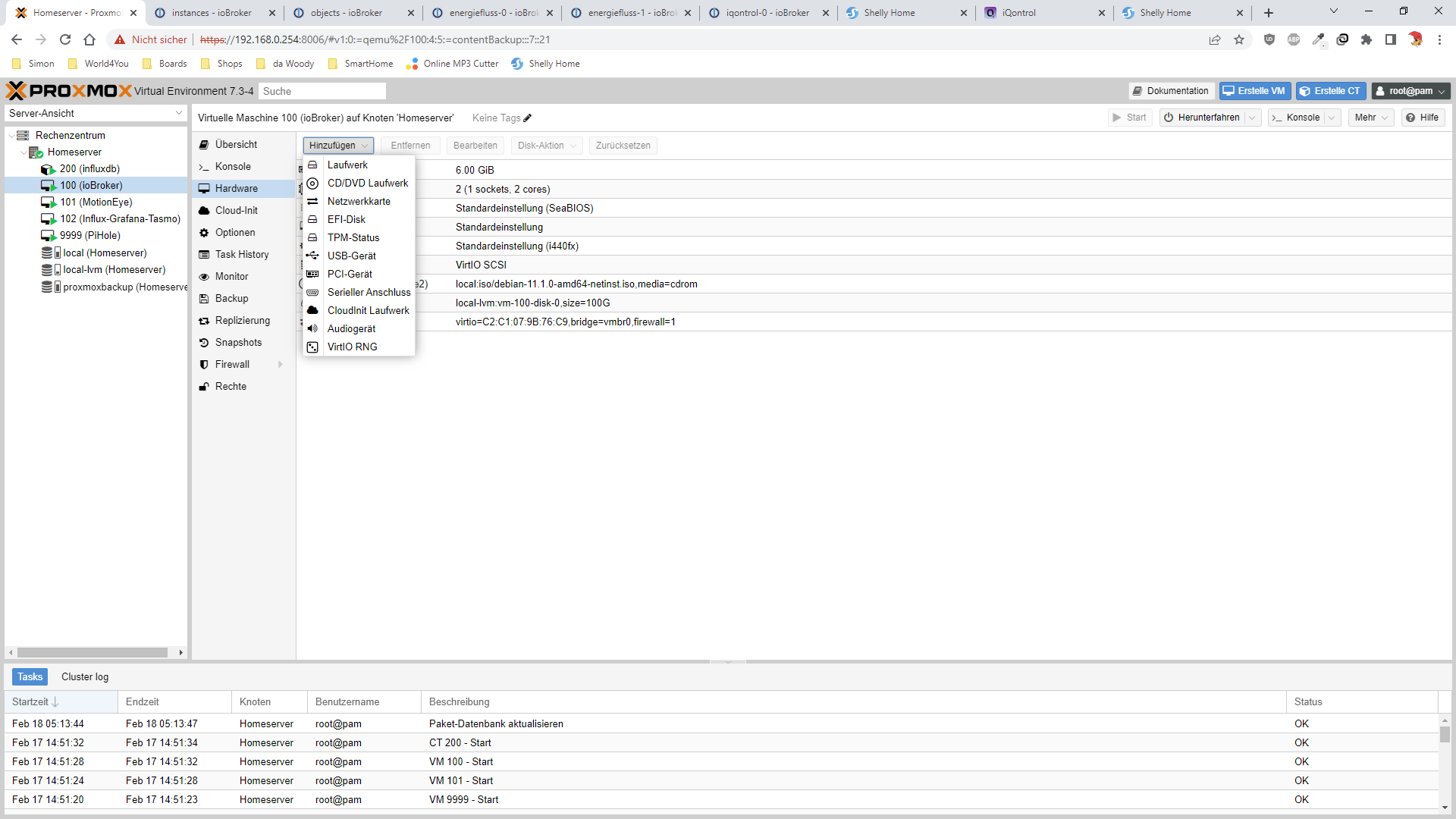
                                          8683b942-3c93-4338-8f3e-8281bc4523c1-grafik.png
                                          kannst du USB über hinzufürgen einbinden.

                                          gruß vom Woody
                                          HAPPINESS is not a DESTINATION, it's a WAY of LIFE!

                                          ? W 2 Antworten Letzte Antwort
                                          0
                                          Antworten
                                          • In einem neuen Thema antworten
                                          Anmelden zum Antworten
                                          • Älteste zuerst
                                          • Neuste zuerst
                                          • Meiste Stimmen


                                          Support us

                                          ioBroker
                                          Community Adapters
                                          Donate

                                          917

                                          Online

                                          32.4k

                                          Benutzer

                                          81.5k

                                          Themen

                                          1.3m

                                          Beiträge
                                          Community
                                          Impressum | Datenschutz-Bestimmungen | Nutzungsbedingungen | Einwilligungseinstellungen
                                          ioBroker Community 2014-2025
                                          logo
                                          • Anmelden

                                          • Du hast noch kein Konto? Registrieren

                                          • Anmelden oder registrieren, um zu suchen
                                          • Erster Beitrag
                                            Letzter Beitrag
                                          0
                                          • Home
                                          • Aktuell
                                          • Tags
                                          • Ungelesen 0
                                          • Kategorien
                                          • Unreplied
                                          • Beliebt
                                          • GitHub
                                          • Docu
                                          • Hilfe

