




[Gelöst] MQTT Adapter fehler nach upgrade auf Bullseye
-
@zanabria sagte in MQTT Adapter fehler nach upgrade auf Bullseye:
@wendy2702
hi, habe von Buster auf Bullseye upgedatet.Container?
VM?
NATIV?
PI?
PROXMOX?
.
.
.@wendy2702
Sorry,
raspberrypi arm CPUs 4
Modell ARMv7 Processor rev 3 (v7l)
RAM 3.75 GB
Node.js v16.19.0
NPM 8.19.3
Datenträgergröße 28.9 GB
freier Festplattenspeicher 11.14 GB
Aktive Instanzen 18
Weg /opt/iobroker/
Hostname raspberrypi -
@wendy2702 sagte in MQTT Adapter fehler nach upgrade auf Bullseye:
Vollständiges Debug Log vom Adapter zeigen.
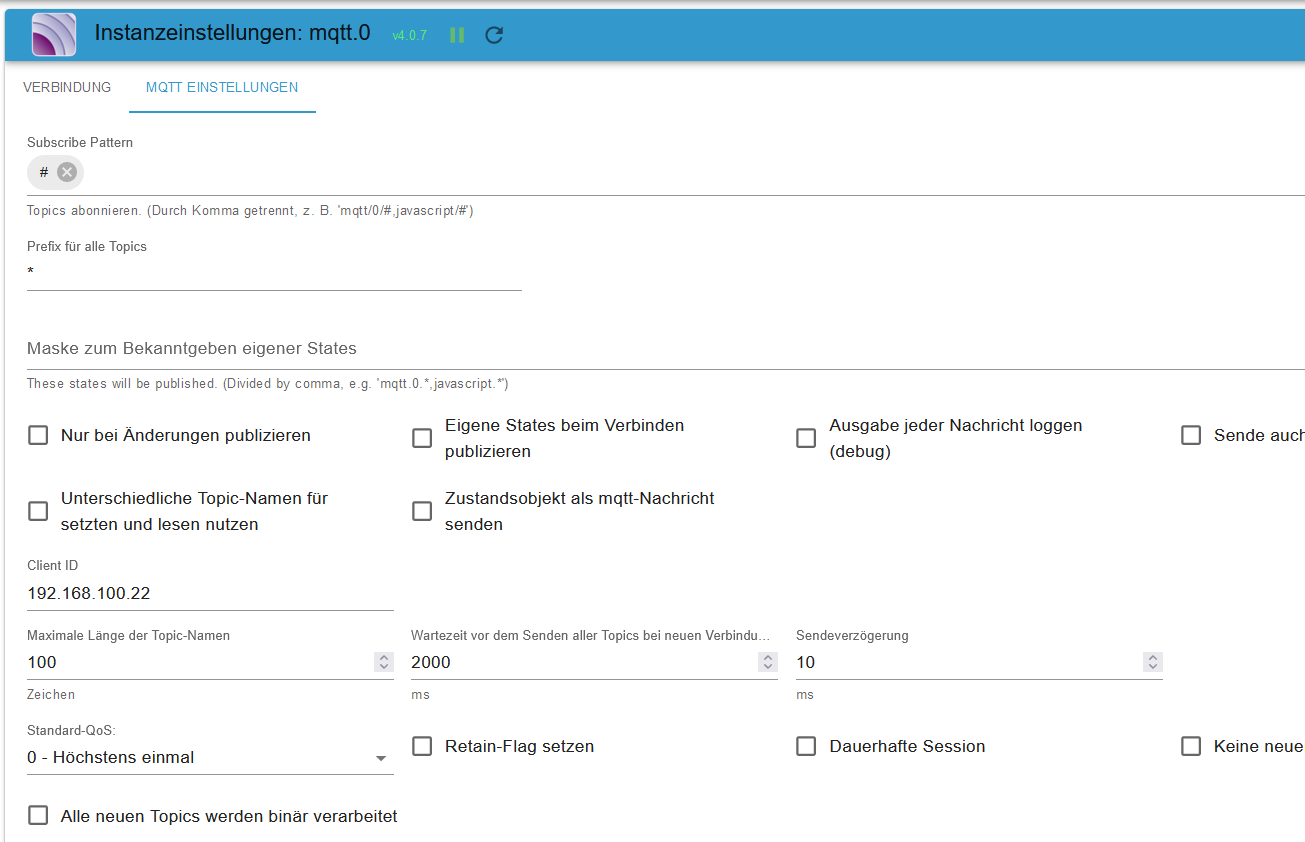
Kannst du das denn bitte mal Zeigen und Screenshots der Adapter Config.
Und welches Gerät hat diese IP: 192.168.100.22
Ist das noch erreichbar?
-
@wendy2702 sagte in MQTT Adapter fehler nach upgrade auf Bullseye:
Vollständiges Debug Log vom Adapter zeigen.
Kannst du das denn bitte mal Zeigen und Screenshots der Adapter Config.
Und welches Gerät hat diese IP: 192.168.100.22
Ist das noch erreichbar?
@wendy2702
Der Pi ist diese ,,,22
alle Adapter laufen ausser
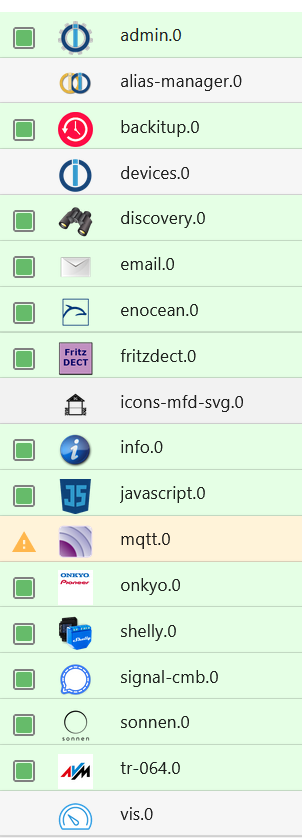
hier ein Ausschnitt davon -
@wendy2702 sagte in MQTT Adapter fehler nach upgrade auf Bullseye:
Vollständiges Debug Log vom Adapter zeigen.
Kannst du das denn bitte mal Zeigen und Screenshots der Adapter Config.
Und welches Gerät hat diese IP: 192.168.100.22
Ist das noch erreichbar?
-
@zanabria das Feld client id hab ich gar nicht
Edit
Achso du hast den auf client stehen -
@wendy2702
hat keine Veränderung gebracht. -
@bananajoe
hi, hat leider nichts gebracht.
Wenn ich Benutzer und Passwörter eingebe kommt kein speichern Button, also angeblich alles gut@zanabria sagte in MQTT Adapter fehler nach upgrade auf Bullseye:
@bananajoe
hi, hat leider nichts gebracht.
Wenn ich Benutzer und Passwörter eingebe kommt kein speichern Button, also angeblich alles gutund der Rest? läuft dein MQTT Broker überhaupt?
-
@wendy2702
```pi@raspberrypi:~ $ ip a 1: lo: <LOOPBACK,UP,LOWER_UP> mtu 65536 qdisc noqueue state UNKNOWN group defaul t qlen 1000 link/loopback 00:00:00:00:00:00 brd 00:00:00:00:00:00 inet 127.0.0.1/8 scope host lo valid_lft forever preferred_lft forever inet6 ::1/128 scope host valid_lft forever preferred_lft forever 2: eth0: <BROADCAST,MULTICAST,DYNAMIC,UP,LOWER_UP> mtu 1500 qdisc mq state UP gr oup default qlen 1000 link/ether dc:a6:32:98:d1:5d brd ff:ff:ff:ff:ff:ff inet 192.168.100.22/24 brd 192.168.100.255 scope global dynamic eth0 valid_lft 845841sec preferred_lft 845841sec inet6 fe80::6ad3:6b2a:ded3:b487/64 scope link noprefixroute valid_lft forever preferred_lft forever 3: wlan0: <BROADCAST,MULTICAST> mtu 1500 qdisc noop state DOWN group default qle n 1000 link/ether 12:20:df:95:b2:08 brd ff:ff:ff:ff:ff:ff permaddr dc:a6:32:98:d1:5 e pi@raspberrypi:~ $ netstat -tulp (Es konnten nicht alle Prozesse identifiziert werden; Informationen über nicht-eigene Processe werden nicht angezeigt; Root kann sie anzeigen.) Aktive Internetverbindungen (Nur Server) Proto Recv-Q Send-Q Local Address Foreign Address State PID/Program name tcp 0 0 0.0.0.0:domain 0.0.0.0:* LISTEN - tcp 0 0 localhost:9001 0.0.0.0:* LISTEN - tcp 0 0 localhost:9000 0.0.0.0:* LISTEN - tcp 0 0 localhost:1883 0.0.0.0:* LISTEN - tcp 0 0 0.0.0.0:1882 0.0.0.0:* LISTEN - tcp 0 0 localhost:ipp 0.0.0.0:* LISTEN - tcp 0 0 0.0.0.0:1955 0.0.0.0:* LISTEN - tcp6 0 0 localhost:1883 [::]:* LISTEN - tcp6 0 0 [::]:domain [::]:* LISTEN - tcp6 0 0 localhost:ipp [::]:* LISTEN - tcp6 0 0 [::]:epmd [::]:* LISTEN - tcp6 0 0 [::]:1955 [::]:* LISTEN - tcp6 0 0 [::]:tproxy [::]:* LISTEN - tcp6 0 0 [::]:8082 [::]:* LISTEN - udp 0 0 0.0.0.0:48169 0.0.0.0:* - udp 0 0 0.0.0.0:domain 0.0.0.0:* - udp 0 0 0.0.0.0:631 0.0.0.0:* - udp 0 0 0.0.0.0:mdns 0.0.0.0:* - udp 0 0 0.0.0.0:56175 0.0.0.0:* - udp6 0 0 [::]:domain [::]:* - udp6 0 0 [::]:mdns [::]:* - udp6 0 0 [::]:40378 [::]:* ``` -
@zanabria sagte in MQTT Adapter fehler nach upgrade auf Bullseye:
@bananajoe
hi, hat leider nichts gebracht.
Wenn ich Benutzer und Passwörter eingebe kommt kein speichern Button, also angeblich alles gutund der Rest? läuft dein MQTT Broker überhaupt?
-
@bananajoe
genau der läuft nicht.
Alles andere läuftsudo netstat -tulpen -
Hier die Daten aus Buster-Zeiten.
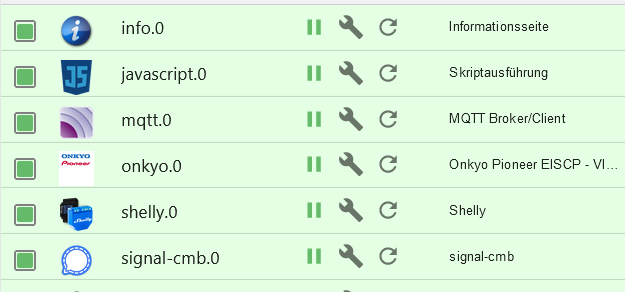
pi@raspberrypi:~ $ sudo netstat -tulpen Aktive Internetverbindungen (Nur Server) Proto Recv-Q Send-Q Local Address Foreign Address State Benutzer Inode PID/Program name tcp 0 0 0.0.0.0:53 0.0.0.0:* LISTEN 0 15250 578/dnsmasq tcp 0 0 127.0.0.1:631 0.0.0.0:* LISTEN 0 19367 1028/cupsd tcp 0 0 0.0.0.0:1882 0.0.0.0:* LISTEN 1002 25612 1159/io.shelly.0 tcp 0 0 0.0.0.0:1883 0.0.0.0:* LISTEN 0 18389 795/mosquitto tcp 0 0 0.0.0.0:1955 0.0.0.0:* LISTEN 0 17307 568/sshd tcp 0 0 127.0.0.1:9000 0.0.0.0:* LISTEN 1002 20974 535/iobroker.js-con tcp 0 0 127.0.0.1:9001 0.0.0.0:* LISTEN 1002 18820 535/iobroker.js-con tcp6 0 0 :::8081 :::* LISTEN 1002 20256 733/io.admin.0 tcp6 0 0 :::8082 :::* LISTEN 1002 27727 1486/io.web.0 tcp6 0 0 :::53 :::* LISTEN 0 15252 578/dnsmasq tcp6 0 0 ::1:631 :::* LISTEN 0 19366 1028/cupsd tcp6 0 0 :::1883 :::* LISTEN 0 18390 795/mosquitto tcp6 0 0 :::1955 :::* LISTEN 0 17317 568/sshd udp 0 0 0.0.0.0:53 0.0.0.0:* 0 15249 578/dnsmasq udp 0 0 0.0.0.0:68 0.0.0.0:* 0 20973 695/dhclient udp 0 0 0.0.0.0:68 0.0.0.0:* 0 19814 479/dhcpcd udp 0 0 0.0.0.0:59982 0.0.0.0:* 108 16067 411/avahi-daemon: r udp 0 0 0.0.0.0:631 0.0.0.0:* 0 19396 1029/cups-browsed udp 0 0 0.0.0.0:5353 0.0.0.0:* 108 16065 411/avahi-daemon: r udp6 0 0 :::53 :::* 0 15251 578/dnsmasq udp6 0 0 :::49374 :::* 108 16068 411/avahi-daemon: r udp6 0 0 :::5353 :::* 108 16066 411/avahi-daemon: r -
sudo netstat -tulpen@thomas-braun sagte in MQTT Adapter fehler nach upgrade auf Bullseye:
sudo netstat -tulpen
Hier mit deinem Befehl aus Bullseyepi@raspberrypi:~ $ sudo netstat -tulpen Aktive Internetverbindungen (Nur Server) Proto Recv-Q Send-Q Local Address Foreign Address State Benutzer Inode PID/Program name tcp 0 0 0.0.0.0:53 0.0.0.0:* LISTEN 0 11789 611/dnsmasq tcp 0 0 127.0.0.1:631 0.0.0.0:* LISTEN 0 11812 549/cupsd tcp 0 0 0.0.0.0:1882 0.0.0.0:* LISTEN 1002 25740 1807/io.shelly.0 tcp 0 0 127.0.0.1:9000 0.0.0.0:* LISTEN 1002 16622 552/iobroker.js-con tcp 0 0 127.0.0.1:9001 0.0.0.0:* LISTEN 1002 17433 552/iobroker.js-con tcp 0 0 0.0.0.0:1955 0.0.0.0:* LISTEN 0 11691 589/sshd: /usr/sbin tcp 0 0 127.0.0.1:1883 0.0.0.0:* LISTEN 111 14587 577/mosquitto tcp6 0 0 :::53 :::* LISTEN 0 11791 611/dnsmasq tcp6 0 0 ::1:631 :::* LISTEN 0 11811 549/cupsd tcp6 0 0 :::4369 :::* LISTEN 0 11480 1/init tcp6 0 0 ::1:1883 :::* LISTEN 111 14588 577/mosquitto tcp6 0 0 :::1955 :::* LISTEN 0 11693 589/sshd: /usr/sbin tcp6 0 0 :::8082 :::* LISTEN 1002 32436 2585/io.web.0 tcp6 0 0 :::8081 :::* LISTEN 1002 18699 1089/io.admin.0 udp 0 0 0.0.0.0:53 0.0.0.0:* 0 11788 611/dnsmasq udp 0 0 0.0.0.0:53850 0.0.0.0:* 0 19714 405/connmand udp 0 0 0.0.0.0:631 0.0.0.0:* 0 13266 616/cups-browsed udp 0 0 0.0.0.0:50394 0.0.0.0:* 108 13621 402/avahi-daemon: r udp 0 0 0.0.0.0:5353 0.0.0.0:* 108 13619 402/avahi-daemon: r udp6 0 0 :::53 :::* 0 11790 611/dnsmasq udp6 0 0 :::57526 :::* 108 13622 402/avahi-daemon: r udp6 0 0 :::5353 :::* 108 13620 402/avahi-daemon: r -
@thomas-braun sagte in MQTT Adapter fehler nach upgrade auf Bullseye:
sudo netstat -tulpen
Hier mit deinem Befehl aus Bullseyepi@raspberrypi:~ $ sudo netstat -tulpen Aktive Internetverbindungen (Nur Server) Proto Recv-Q Send-Q Local Address Foreign Address State Benutzer Inode PID/Program name tcp 0 0 0.0.0.0:53 0.0.0.0:* LISTEN 0 11789 611/dnsmasq tcp 0 0 127.0.0.1:631 0.0.0.0:* LISTEN 0 11812 549/cupsd tcp 0 0 0.0.0.0:1882 0.0.0.0:* LISTEN 1002 25740 1807/io.shelly.0 tcp 0 0 127.0.0.1:9000 0.0.0.0:* LISTEN 1002 16622 552/iobroker.js-con tcp 0 0 127.0.0.1:9001 0.0.0.0:* LISTEN 1002 17433 552/iobroker.js-con tcp 0 0 0.0.0.0:1955 0.0.0.0:* LISTEN 0 11691 589/sshd: /usr/sbin tcp 0 0 127.0.0.1:1883 0.0.0.0:* LISTEN 111 14587 577/mosquitto tcp6 0 0 :::53 :::* LISTEN 0 11791 611/dnsmasq tcp6 0 0 ::1:631 :::* LISTEN 0 11811 549/cupsd tcp6 0 0 :::4369 :::* LISTEN 0 11480 1/init tcp6 0 0 ::1:1883 :::* LISTEN 111 14588 577/mosquitto tcp6 0 0 :::1955 :::* LISTEN 0 11693 589/sshd: /usr/sbin tcp6 0 0 :::8082 :::* LISTEN 1002 32436 2585/io.web.0 tcp6 0 0 :::8081 :::* LISTEN 1002 18699 1089/io.admin.0 udp 0 0 0.0.0.0:53 0.0.0.0:* 0 11788 611/dnsmasq udp 0 0 0.0.0.0:53850 0.0.0.0:* 0 19714 405/connmand udp 0 0 0.0.0.0:631 0.0.0.0:* 0 13266 616/cups-browsed udp 0 0 0.0.0.0:50394 0.0.0.0:* 108 13621 402/avahi-daemon: r udp 0 0 0.0.0.0:5353 0.0.0.0:* 108 13619 402/avahi-daemon: r udp6 0 0 :::53 :::* 0 11790 611/dnsmasq udp6 0 0 :::57526 :::* 108 13622 402/avahi-daemon: r udp6 0 0 :::5353 :::* 108 13620 402/avahi-daemon: rDa läuft doch der mosquitto.
Und vermutlich auch ein Desktop. Ausschalten. -
Wofür lässt man zwei MQTT auf demselben rechner laufen?
Im Adapter dann vermutlich auch PORT 1883 ?
Bin jetzt nicht der MQTT Experte aber zwei Prozesse mit gleicher IP und gleichem PORT.
Bitte keine Fragen per PN, die gehören ins Forum!
Benutzt das Voting rechts unten im Beitrag wenn er euch geholfen hat.
-
Wofür lässt man zwei MQTT auf demselben rechner laufen?
Im Adapter dann vermutlich auch PORT 1883 ?
Bin jetzt nicht der MQTT Experte aber zwei Prozesse mit gleicher IP und gleichem PORT.
@wendy2702 sagte in MQTT Adapter fehler nach upgrade auf Bullseye:
Wofür lässt man zwei MQTT auf demselben rechner laufen?
Da läuft nur ein Prozess (PID 577), das eine läuft über IPv6, das andere über IPv4. Kein Problem.
-
@thomas-braun sagte in MQTT Adapter fehler nach upgrade auf Bullseye:
sudo netstat -tulpen
Hier mit deinem Befehl aus Bullseyepi@raspberrypi:~ $ sudo netstat -tulpen Aktive Internetverbindungen (Nur Server) Proto Recv-Q Send-Q Local Address Foreign Address State Benutzer Inode PID/Program name tcp 0 0 0.0.0.0:53 0.0.0.0:* LISTEN 0 11789 611/dnsmasq tcp 0 0 127.0.0.1:631 0.0.0.0:* LISTEN 0 11812 549/cupsd tcp 0 0 0.0.0.0:1882 0.0.0.0:* LISTEN 1002 25740 1807/io.shelly.0 tcp 0 0 127.0.0.1:9000 0.0.0.0:* LISTEN 1002 16622 552/iobroker.js-con tcp 0 0 127.0.0.1:9001 0.0.0.0:* LISTEN 1002 17433 552/iobroker.js-con tcp 0 0 0.0.0.0:1955 0.0.0.0:* LISTEN 0 11691 589/sshd: /usr/sbin tcp 0 0 127.0.0.1:1883 0.0.0.0:* LISTEN 111 14587 577/mosquitto tcp6 0 0 :::53 :::* LISTEN 0 11791 611/dnsmasq tcp6 0 0 ::1:631 :::* LISTEN 0 11811 549/cupsd tcp6 0 0 :::4369 :::* LISTEN 0 11480 1/init tcp6 0 0 ::1:1883 :::* LISTEN 111 14588 577/mosquitto tcp6 0 0 :::1955 :::* LISTEN 0 11693 589/sshd: /usr/sbin tcp6 0 0 :::8082 :::* LISTEN 1002 32436 2585/io.web.0 tcp6 0 0 :::8081 :::* LISTEN 1002 18699 1089/io.admin.0 udp 0 0 0.0.0.0:53 0.0.0.0:* 0 11788 611/dnsmasq udp 0 0 0.0.0.0:53850 0.0.0.0:* 0 19714 405/connmand udp 0 0 0.0.0.0:631 0.0.0.0:* 0 13266 616/cups-browsed udp 0 0 0.0.0.0:50394 0.0.0.0:* 108 13621 402/avahi-daemon: r udp 0 0 0.0.0.0:5353 0.0.0.0:* 108 13619 402/avahi-daemon: r udp6 0 0 :::53 :::* 0 11790 611/dnsmasq udp6 0 0 :::57526 :::* 108 13622 402/avahi-daemon: r udp6 0 0 :::5353 :::* 108 13620 402/avahi-daemon: r -
@thomas-braun sagte in MQTT Adapter fehler nach upgrade auf Bullseye:
systemctl status mqttd
pi@raspberrypi:~ $ systemctl status mqttd Unit mqttd.service could not be found. -
@thomas-braun sagte in MQTT Adapter fehler nach upgrade auf Bullseye:
systemctl status mqttd
pi@raspberrypi:~ $ systemctl status mqttd Unit mqttd.service could not be found.War nur geraten, ich weiß nicht genau wie der Service heißt. Vielleicht kann das mal jemand nachschauen.
systemctl status mosquitto.servicekönnte das auch lauten.




Hey! Du scheinst an dieser Unterhaltung interessiert zu sein, hast aber noch kein Konto.
Hast du es satt, bei jedem Besuch durch die gleichen Beiträge zu scrollen? Wenn du dich für ein Konto anmeldest, kommst du immer genau dorthin zurück, wo du zuvor warst, und kannst dich über neue Antworten benachrichtigen lassen (entweder per E-Mail oder Push-Benachrichtigung). Du kannst auch Lesezeichen speichern und Beiträge positiv bewerten, um anderen Community-Mitgliedern deine Wertschätzung zu zeigen.
Mit deinem Input könnte dieser Beitrag noch besser werden 💗
Registrieren Anmelden453
Online33.0k
Benutzer83.5k
Themen1.3m
Beiträge