




ERROR: Process exited with code 25 NPM Update usw
-
@glasfaser said in ERROR: Process exited with code 25 NPM Update usw:
@n811e sagte in ERROR: Process exited with code 25 NPM Update usw:
Oder habe ich etwas falsch verstanden?
Das meint @Homoran
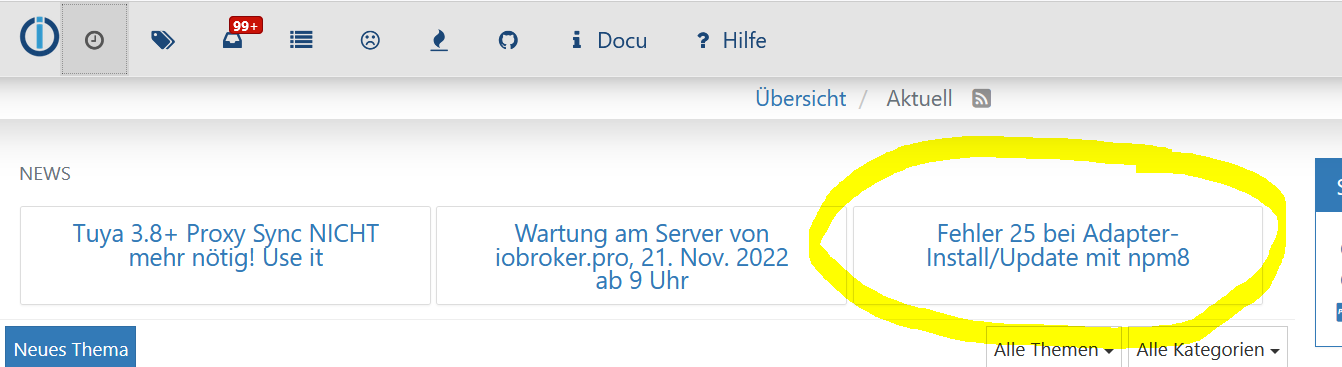
Ja, dass ist doch das, was ich versuche abzuarbeiten. Aber da steht doch nur das mit dem --debug drin.
Danach wird es so kryptisch, dass ich kein Wort verstehe geschweige denn umzusetzen. -
@n811e sagte in ERROR: Process exited with code 25 NPM Update usw:
Oder habe ich etwas falsch verstanden?
was definierst du mit falsch!
der Befehl mit angehängtem
--debugist ja nur dazu da, um die mögliche Ursache zu finden, indem detailliertere Fehlermeldungen ausgeworfen werden.Dies ist z.B. die Info mit ENOTEMPTY und der dazu gehörenden Aufforderung, ein Verzeichnis mit einer kryptischen Bezeichnung umzubenennen.
üblicherweise käme jetzt noch der ERROR25, bei dir aber der 217
@homoran said in ERROR: Process exited with code 25 NPM Update usw:
@n811e sagte in ERROR: Process exited with code 25 NPM Update usw:
Oder habe ich etwas falsch verstanden?
was definierst du mit falsch!
der Befehl mit angehängtem
--debugist ja nur dazu da, um die mögliche Ursache zu finden, indem detailliertere Fehlermeldungen ausgeworfen werden.Dies ist z.B. die Info mit ENOTEMPTY und der dazu gehörenden Aufforderung, ein Verzeichnis mit einer kryptischen Bezeichnung umzubenennen.
üblicherweise käme jetzt noch der ERROR25, bei dir aber der 217
Naja, mit falsch definiere ich, ob ich irgendwo einen Fehler mache.
Ich kann dieser Anleitung außer --debug (was ich jetzt gelern habe, dass das hinter iobroker upgrade adapterName kommt) nicht weiter folgen. -
@homoran said in ERROR: Process exited with code 25 NPM Update usw:
@n811e sagte in ERROR: Process exited with code 25 NPM Update usw:
Oder habe ich etwas falsch verstanden?
was definierst du mit falsch!
der Befehl mit angehängtem
--debugist ja nur dazu da, um die mögliche Ursache zu finden, indem detailliertere Fehlermeldungen ausgeworfen werden.Dies ist z.B. die Info mit ENOTEMPTY und der dazu gehörenden Aufforderung, ein Verzeichnis mit einer kryptischen Bezeichnung umzubenennen.
üblicherweise käme jetzt noch der ERROR25, bei dir aber der 217
Naja, mit falsch definiere ich, ob ich irgendwo einen Fehler mache.
Ich kann dieser Anleitung außer --debug (was ich jetzt gelern habe, dass das hinter iobroker upgrade adapterName kommt) nicht weiter folgen. -
Nimm doch einmal diesen Befehl :
for i in $(find /opt/iobroker/node_modules -type d -iname ".*-????????" ! -iname ".local-chromium"); do rm -rf ${i%%/}; done@glasfaser said in ERROR: Process exited with code 25 NPM Update usw:
Nimm doch einmal diesen Befehl :
for i in $(find /opt/iobroker/node_modules -type d -iname ".*-????????" ! -iname ".local-chromium"); do rm -rf ${i%%/}; doneDas habe ich jetzt probiert, im Terminal sehe ich keine Regung. Muss da etwas passieren? Zugriff auf das Webinterface habe ich dadurch auch nicht erhalten.
An dem Befehl muss ich nichts ändern?
-
@glasfaser said in ERROR: Process exited with code 25 NPM Update usw:
Nimm doch einmal diesen Befehl :
for i in $(find /opt/iobroker/node_modules -type d -iname ".*-????????" ! -iname ".local-chromium"); do rm -rf ${i%%/}; doneDas habe ich jetzt probiert, im Terminal sehe ich keine Regung. Muss da etwas passieren? Zugriff auf das Webinterface habe ich dadurch auch nicht erhalten.
An dem Befehl muss ich nichts ändern?
-
@glasfaser said in ERROR: Process exited with code 25 NPM Update usw:
Nimm doch einmal diesen Befehl :
for i in $(find /opt/iobroker/node_modules -type d -iname ".*-????????" ! -iname ".local-chromium"); do rm -rf ${i%%/}; doneDas habe ich jetzt probiert, im Terminal sehe ich keine Regung. Muss da etwas passieren? Zugriff auf das Webinterface habe ich dadurch auch nicht erhalten.
An dem Befehl muss ich nichts ändern?
@n811e sagte in ERROR: Process exited with code 25 NPM Update usw:
Zugriff auf das Webinterface habe ich dadurch auch nicht erhalten.
so weit sind wir noch nicht, bitte keine operative Hektik
https://forum.iobroker.net/post/884324was kommt jetzt bei
iobroker upgrade wasauchimmer --debug?? -
@glasfaser said in ERROR: Process exited with code 25 NPM Update usw:
Nimm doch einmal diesen Befehl :
for i in $(find /opt/iobroker/node_modules -type d -iname ".*-????????" ! -iname ".local-chromium"); do rm -rf ${i%%/}; doneDas habe ich jetzt probiert, im Terminal sehe ich keine Regung. Muss da etwas passieren? Zugriff auf das Webinterface habe ich dadurch auch nicht erhalten.
An dem Befehl muss ich nichts ändern?
-
@n811e sagte in ERROR: Process exited with code 25 NPM Update usw:
Zugriff auf das Webinterface habe ich dadurch auch nicht erhalten.
so weit sind wir noch nicht, bitte keine operative Hektik
https://forum.iobroker.net/post/884324was kommt jetzt bei
iobroker upgrade wasauchimmer --debug??@homoran said in ERROR: Process exited with code 25 NPM Update usw:
@n811e sagte in ERROR: Process exited with code 25 NPM Update usw:
Zugriff auf das Webinterface habe ich dadurch auch nicht erhalten.
so weit sind wir noch nicht, bitte keine operative Hektik
https://forum.iobroker.net/post/884324was kommt jetzt bei
iobroker upgrade wasauchimmer --debug??jetzt kommt das:
pi@raspberrypi:~ $ iobroker upgrade device-watcher --debug This upgrade of "device-watcher" will introduce the following changes: ========================================================================== -> 2.0.2: added status to battery list batt devices which are offline are now still included in the battery list small improvements of translations offline time settings: you can use 0 instead of -1 (it will be the new standard) improvements of adaptername fixed issues [#66](https://github.com/ciddi89/ioBroker.device-watcher/issues/66) & [#67](https://github.com/ciddi89/ioBroker.device-watcher/issues/67) repaired blacklist notifications added handling for blacklist object -> 2.0.1: If the device is offline, set signal strength to '0%' If the device is offline, set battery to ' - ' repair some small issues in the lists -> 2.0.0: added Lupusec, HS100 adapter, Zigbee2MQTT and MaxCube changed name of Homematic to HM-RPC made a completly makeover of the blacklist clean up the code and shorten some -> 1.1.0: removed indicatoren for daily sent messages changed selector for shelly devices added Zigbee2MQTT adapter added cron function to use own time for daily overview messages -> 1.0.1: added WLED, Ikea Tradfri, Roomba, HmIp, Tado, Netatmo, Yeelight-2, Unifi, Nut and Meross adapter fixed battery message corrected and repaired some issues of last contact time added support for old HM devices some small refactoring of code changed shelly selector from dp rssi to dp online ========================================================================== BE CAREFUL: THIS IS A MAJOR UPGRADE, WHICH WILL MOST LIKELY INTRODUCE BREAKING CHANGES! Would you like to upgrade device-watcher from @1.0.0 to @2.0.2 now? [(y)es, (n)o]: y Update device-watcher from @1.0.0 to @2.0.2 NPM version: 8.19.2 Installing iobroker.device-watcher@2.0.2... (System call) added 7 packages, removed 1508 packages, and changed 7 packages in 28s 36 packages are looking for funding run `npm fund` for details Update "system.adapter.device-watcher.0" upload [19] device-watcher.admin /opt/iobroker/node_modules/iobroker.device-watcher/admin/device-watcher.png device-watcher.png image/png upload [18] device-watcher.admin /opt/iobroker/node_modules/iobroker.device-watcher/admin/i18n/de/translations.json i18n/de/translations.json application/json upload [17] device-watcher.admin /opt/iobroker/node_modules/iobroker.device-watcher/admin/i18n/en/translations.json i18n/en/translations.json application/json upload [16] device-watcher.admin /opt/iobroker/node_modules/iobroker.device-watcher/admin/i18n/es/translations.json i18n/es/translations.json application/json upload [15] device-watcher.admin /opt/iobroker/node_modules/iobroker.device-watcher/admin/i18n/fr/translations.json i18n/fr/translations.json application/json upload [14] device-watcher.admin /opt/iobroker/node_modules/iobroker.device-watcher/admin/i18n/it/translations.json i18n/it/translations.json application/json upload [13] device-watcher.admin /opt/iobroker/node_modules/iobroker.device-watcher/admin/i18n/nl/translations.json i18n/nl/translations.json application/json upload [12] device-watcher.admin /opt/iobroker/node_modules/iobroker.device-watcher/admin/i18n/pl/translations.json i18n/pl/translations.json application/json upload [11] device-watcher.admin /opt/iobroker/node_modules/iobroker.device-watcher/admin/i18n/pt/translations.json i18n/pt/translations.json application/json upload [10] device-watcher.admin /opt/iobroker/node_modules/iobroker.device-watcher/admin/i18n/ru/translations.json i18n/ru/translations.json application/json upload [9] device-watcher.admin /opt/iobroker/node_modules/iobroker.device-watcher/admin/i18n/uk/translations.json i18n/uk/translations.json application/json upload [8] device-watcher.admin /opt/iobroker/node_modules/iobroker.device-watcher/admin/i18n/zh-cn/translations.json i18n/zh-cn/translations.json application/json upload [7] device-watcher.admin /opt/iobroker/node_modules/iobroker.device-watcher/admin/images/add_blacklist.png images/add_blacklist.png image/png upload [6] device-watcher.admin /opt/iobroker/node_modules/iobroker.device-watcher/admin/images/list1.png images/list1.png image/png upload [5] device-watcher.admin /opt/iobroker/node_modules/iobroker.device-watcher/admin/images/list2.png images/list2.png image/png upload [4] device-watcher.admin /opt/iobroker/node_modules/iobroker.device-watcher/admin/images/list3.png images/list3.png image/png upload [3] device-watcher.admin /opt/iobroker/node_modules/iobroker.device-watcher/admin/index_m.html index_m.html text/html upload [2] device-watcher.admin /opt/iobroker/node_modules/iobroker.device-watcher/admin/jsonConfig.json jsonConfig.json application/json upload [1] device-watcher.admin /opt/iobroker/node_modules/iobroker.device-watcher/admin/style.css style.css text/css upload [0] device-watcher.admin /opt/iobroker/node_modules/iobroker.device-watcher/admin/words.js words.js application/javascript pi@raspberrypi:~ $ -
@homoran said in ERROR: Process exited with code 25 NPM Update usw:
@n811e sagte in ERROR: Process exited with code 25 NPM Update usw:
Zugriff auf das Webinterface habe ich dadurch auch nicht erhalten.
so weit sind wir noch nicht, bitte keine operative Hektik
https://forum.iobroker.net/post/884324was kommt jetzt bei
iobroker upgrade wasauchimmer --debug??jetzt kommt das:
pi@raspberrypi:~ $ iobroker upgrade device-watcher --debug This upgrade of "device-watcher" will introduce the following changes: ========================================================================== -> 2.0.2: added status to battery list batt devices which are offline are now still included in the battery list small improvements of translations offline time settings: you can use 0 instead of -1 (it will be the new standard) improvements of adaptername fixed issues [#66](https://github.com/ciddi89/ioBroker.device-watcher/issues/66) & [#67](https://github.com/ciddi89/ioBroker.device-watcher/issues/67) repaired blacklist notifications added handling for blacklist object -> 2.0.1: If the device is offline, set signal strength to '0%' If the device is offline, set battery to ' - ' repair some small issues in the lists -> 2.0.0: added Lupusec, HS100 adapter, Zigbee2MQTT and MaxCube changed name of Homematic to HM-RPC made a completly makeover of the blacklist clean up the code and shorten some -> 1.1.0: removed indicatoren for daily sent messages changed selector for shelly devices added Zigbee2MQTT adapter added cron function to use own time for daily overview messages -> 1.0.1: added WLED, Ikea Tradfri, Roomba, HmIp, Tado, Netatmo, Yeelight-2, Unifi, Nut and Meross adapter fixed battery message corrected and repaired some issues of last contact time added support for old HM devices some small refactoring of code changed shelly selector from dp rssi to dp online ========================================================================== BE CAREFUL: THIS IS A MAJOR UPGRADE, WHICH WILL MOST LIKELY INTRODUCE BREAKING CHANGES! Would you like to upgrade device-watcher from @1.0.0 to @2.0.2 now? [(y)es, (n)o]: y Update device-watcher from @1.0.0 to @2.0.2 NPM version: 8.19.2 Installing iobroker.device-watcher@2.0.2... (System call) added 7 packages, removed 1508 packages, and changed 7 packages in 28s 36 packages are looking for funding run `npm fund` for details Update "system.adapter.device-watcher.0" upload [19] device-watcher.admin /opt/iobroker/node_modules/iobroker.device-watcher/admin/device-watcher.png device-watcher.png image/png upload [18] device-watcher.admin /opt/iobroker/node_modules/iobroker.device-watcher/admin/i18n/de/translations.json i18n/de/translations.json application/json upload [17] device-watcher.admin /opt/iobroker/node_modules/iobroker.device-watcher/admin/i18n/en/translations.json i18n/en/translations.json application/json upload [16] device-watcher.admin /opt/iobroker/node_modules/iobroker.device-watcher/admin/i18n/es/translations.json i18n/es/translations.json application/json upload [15] device-watcher.admin /opt/iobroker/node_modules/iobroker.device-watcher/admin/i18n/fr/translations.json i18n/fr/translations.json application/json upload [14] device-watcher.admin /opt/iobroker/node_modules/iobroker.device-watcher/admin/i18n/it/translations.json i18n/it/translations.json application/json upload [13] device-watcher.admin /opt/iobroker/node_modules/iobroker.device-watcher/admin/i18n/nl/translations.json i18n/nl/translations.json application/json upload [12] device-watcher.admin /opt/iobroker/node_modules/iobroker.device-watcher/admin/i18n/pl/translations.json i18n/pl/translations.json application/json upload [11] device-watcher.admin /opt/iobroker/node_modules/iobroker.device-watcher/admin/i18n/pt/translations.json i18n/pt/translations.json application/json upload [10] device-watcher.admin /opt/iobroker/node_modules/iobroker.device-watcher/admin/i18n/ru/translations.json i18n/ru/translations.json application/json upload [9] device-watcher.admin /opt/iobroker/node_modules/iobroker.device-watcher/admin/i18n/uk/translations.json i18n/uk/translations.json application/json upload [8] device-watcher.admin /opt/iobroker/node_modules/iobroker.device-watcher/admin/i18n/zh-cn/translations.json i18n/zh-cn/translations.json application/json upload [7] device-watcher.admin /opt/iobroker/node_modules/iobroker.device-watcher/admin/images/add_blacklist.png images/add_blacklist.png image/png upload [6] device-watcher.admin /opt/iobroker/node_modules/iobroker.device-watcher/admin/images/list1.png images/list1.png image/png upload [5] device-watcher.admin /opt/iobroker/node_modules/iobroker.device-watcher/admin/images/list2.png images/list2.png image/png upload [4] device-watcher.admin /opt/iobroker/node_modules/iobroker.device-watcher/admin/images/list3.png images/list3.png image/png upload [3] device-watcher.admin /opt/iobroker/node_modules/iobroker.device-watcher/admin/index_m.html index_m.html text/html upload [2] device-watcher.admin /opt/iobroker/node_modules/iobroker.device-watcher/admin/jsonConfig.json jsonConfig.json application/json upload [1] device-watcher.admin /opt/iobroker/node_modules/iobroker.device-watcher/admin/style.css style.css text/css upload [0] device-watcher.admin /opt/iobroker/node_modules/iobroker.device-watcher/admin/words.js words.js application/javascript pi@raspberrypi:~ $@n811e sagte in ERROR: Process exited with code 25 NPM Update usw:
jetzt kommt das:
sieht das aus wie
@n811e sagte in ERROR: Process exited with code 25 NPM Update usw:
sehe ich keine Regung.
Ist doch jetzt alles gefixt.
-
@homoran said in ERROR: Process exited with code 25 NPM Update usw:
@n811e sagte in ERROR: Process exited with code 25 NPM Update usw:
Zugriff auf das Webinterface habe ich dadurch auch nicht erhalten.
so weit sind wir noch nicht, bitte keine operative Hektik
https://forum.iobroker.net/post/884324was kommt jetzt bei
iobroker upgrade wasauchimmer --debug??jetzt kommt das:
pi@raspberrypi:~ $ iobroker upgrade device-watcher --debug This upgrade of "device-watcher" will introduce the following changes: ========================================================================== -> 2.0.2: added status to battery list batt devices which are offline are now still included in the battery list small improvements of translations offline time settings: you can use 0 instead of -1 (it will be the new standard) improvements of adaptername fixed issues [#66](https://github.com/ciddi89/ioBroker.device-watcher/issues/66) & [#67](https://github.com/ciddi89/ioBroker.device-watcher/issues/67) repaired blacklist notifications added handling for blacklist object -> 2.0.1: If the device is offline, set signal strength to '0%' If the device is offline, set battery to ' - ' repair some small issues in the lists -> 2.0.0: added Lupusec, HS100 adapter, Zigbee2MQTT and MaxCube changed name of Homematic to HM-RPC made a completly makeover of the blacklist clean up the code and shorten some -> 1.1.0: removed indicatoren for daily sent messages changed selector for shelly devices added Zigbee2MQTT adapter added cron function to use own time for daily overview messages -> 1.0.1: added WLED, Ikea Tradfri, Roomba, HmIp, Tado, Netatmo, Yeelight-2, Unifi, Nut and Meross adapter fixed battery message corrected and repaired some issues of last contact time added support for old HM devices some small refactoring of code changed shelly selector from dp rssi to dp online ========================================================================== BE CAREFUL: THIS IS A MAJOR UPGRADE, WHICH WILL MOST LIKELY INTRODUCE BREAKING CHANGES! Would you like to upgrade device-watcher from @1.0.0 to @2.0.2 now? [(y)es, (n)o]: y Update device-watcher from @1.0.0 to @2.0.2 NPM version: 8.19.2 Installing iobroker.device-watcher@2.0.2... (System call) added 7 packages, removed 1508 packages, and changed 7 packages in 28s 36 packages are looking for funding run `npm fund` for details Update "system.adapter.device-watcher.0" upload [19] device-watcher.admin /opt/iobroker/node_modules/iobroker.device-watcher/admin/device-watcher.png device-watcher.png image/png upload [18] device-watcher.admin /opt/iobroker/node_modules/iobroker.device-watcher/admin/i18n/de/translations.json i18n/de/translations.json application/json upload [17] device-watcher.admin /opt/iobroker/node_modules/iobroker.device-watcher/admin/i18n/en/translations.json i18n/en/translations.json application/json upload [16] device-watcher.admin /opt/iobroker/node_modules/iobroker.device-watcher/admin/i18n/es/translations.json i18n/es/translations.json application/json upload [15] device-watcher.admin /opt/iobroker/node_modules/iobroker.device-watcher/admin/i18n/fr/translations.json i18n/fr/translations.json application/json upload [14] device-watcher.admin /opt/iobroker/node_modules/iobroker.device-watcher/admin/i18n/it/translations.json i18n/it/translations.json application/json upload [13] device-watcher.admin /opt/iobroker/node_modules/iobroker.device-watcher/admin/i18n/nl/translations.json i18n/nl/translations.json application/json upload [12] device-watcher.admin /opt/iobroker/node_modules/iobroker.device-watcher/admin/i18n/pl/translations.json i18n/pl/translations.json application/json upload [11] device-watcher.admin /opt/iobroker/node_modules/iobroker.device-watcher/admin/i18n/pt/translations.json i18n/pt/translations.json application/json upload [10] device-watcher.admin /opt/iobroker/node_modules/iobroker.device-watcher/admin/i18n/ru/translations.json i18n/ru/translations.json application/json upload [9] device-watcher.admin /opt/iobroker/node_modules/iobroker.device-watcher/admin/i18n/uk/translations.json i18n/uk/translations.json application/json upload [8] device-watcher.admin /opt/iobroker/node_modules/iobroker.device-watcher/admin/i18n/zh-cn/translations.json i18n/zh-cn/translations.json application/json upload [7] device-watcher.admin /opt/iobroker/node_modules/iobroker.device-watcher/admin/images/add_blacklist.png images/add_blacklist.png image/png upload [6] device-watcher.admin /opt/iobroker/node_modules/iobroker.device-watcher/admin/images/list1.png images/list1.png image/png upload [5] device-watcher.admin /opt/iobroker/node_modules/iobroker.device-watcher/admin/images/list2.png images/list2.png image/png upload [4] device-watcher.admin /opt/iobroker/node_modules/iobroker.device-watcher/admin/images/list3.png images/list3.png image/png upload [3] device-watcher.admin /opt/iobroker/node_modules/iobroker.device-watcher/admin/index_m.html index_m.html text/html upload [2] device-watcher.admin /opt/iobroker/node_modules/iobroker.device-watcher/admin/jsonConfig.json jsonConfig.json application/json upload [1] device-watcher.admin /opt/iobroker/node_modules/iobroker.device-watcher/admin/style.css style.css text/css upload [0] device-watcher.admin /opt/iobroker/node_modules/iobroker.device-watcher/admin/words.js words.js application/javascript pi@raspberrypi:~ $alles gut ... luppt doch !
Die Ausgabe mit --debug ist nur für uns im Forum , dann können wir mehr sehen !
Synology 918+ 16GB - ioBroker in Docker v9 , VISO auf Trekstor Primebook C13 13,3" , Hikvision Domkameras mit Surveillance Station .. CCU RaspberryMatic in Synology VM .. Zigbee CC2538+CC2592 .. Sonoff .. KNX .. Modbus ..
-
alles gut ... luppt doch !
Die Ausgabe mit --debug ist nur für uns im Forum , dann können wir mehr sehen !
@glasfaser sagte in ERROR: Process exited with code 25 NPM Update usw:
Die Ausgabe mit --debug ist nur für uns im Forum , dann können wir mehr sehen !
oder für den User, damit er die eben genannten Kriterien für die Ausführung des Rettungsscripts sieht
-
alles gut ... luppt doch !
Die Ausgabe mit --debug ist nur für uns im Forum , dann können wir mehr sehen !
@glasfaser said in ERROR: Process exited with code 25 NPM Update usw:
alles gut ... luppt doch !
Die Ausgabe mit --debug ist nur für uns im Forum , dann können wir mehr sehen !
Ich kann da leider nichts erkennen, aber wenn ihr sagt das dass gut aussieht, freu ich mich schon mal und möchte mich bedanken.
Aber wie erhalte ich wieder Zugriff auf Webinterface?
-
@glasfaser said in ERROR: Process exited with code 25 NPM Update usw:
alles gut ... luppt doch !
Die Ausgabe mit --debug ist nur für uns im Forum , dann können wir mehr sehen !
Ich kann da leider nichts erkennen, aber wenn ihr sagt das dass gut aussieht, freu ich mich schon mal und möchte mich bedanken.
Aber wie erhalte ich wieder Zugriff auf Webinterface?
@n811e sagte in ERROR: Process exited with code 25 NPM Update usw:
@glasfaser said in ERROR: Process exited with code 25 NPM Update usw:
alles gut ... luppt doch !
Die Ausgabe mit --debug ist nur für uns im Forum , dann können wir mehr sehen !
Ich kann da leider nichts erkennen, aber wenn ihr sagt das dass gut aussieht, freu ich mich schon mal und möchte mich bedanken.
Aber wie erhalte ich wieder Zugriff auf Webinterface?
dass jetzt kein Fehler mer kommt siehst du doch auch, oder nicht?
Was sagt
iobroker update -i? -
@glasfaser said in ERROR: Process exited with code 25 NPM Update usw:
alles gut ... luppt doch !
Die Ausgabe mit --debug ist nur für uns im Forum , dann können wir mehr sehen !
Ich kann da leider nichts erkennen, aber wenn ihr sagt das dass gut aussieht, freu ich mich schon mal und möchte mich bedanken.
Aber wie erhalte ich wieder Zugriff auf Webinterface?
-
@n811e sagte in ERROR: Process exited with code 25 NPM Update usw:
@glasfaser said in ERROR: Process exited with code 25 NPM Update usw:
alles gut ... luppt doch !
Die Ausgabe mit --debug ist nur für uns im Forum , dann können wir mehr sehen !
Ich kann da leider nichts erkennen, aber wenn ihr sagt das dass gut aussieht, freu ich mich schon mal und möchte mich bedanken.
Aber wie erhalte ich wieder Zugriff auf Webinterface?
dass jetzt kein Fehler mer kommt siehst du doch auch, oder nicht?
Was sagt
iobroker update -i?@homoran said in ERROR: Process exited with code 25 NPM Update usw:
@n811e sagte in ERROR: Process exited with code 25 NPM Update usw:
@glasfaser said in ERROR: Process exited with code 25 NPM Update usw:
alles gut ... luppt doch !
Die Ausgabe mit --debug ist nur für uns im Forum , dann können wir mehr sehen !
Ich kann da leider nichts erkennen, aber wenn ihr sagt das dass gut aussieht, freu ich mich schon mal und möchte mich bedanken.
Aber wie erhalte ich wieder Zugriff auf Webinterface?
dass jetzt kein Fehler mer kommt siehst du doch auch, oder nicht?
Was sagt
iobroker update -i?Ehrlich gesagt, habe ich vorher auch keinen Fehler erkannt

iobroker update -i Sagt:
pi@raspberrypi:~ $ iobroker update -i Used repository: stable Adapter "admin" : 6.2.23 , installed 6.2.23 Adapter "backitup" : 2.5.4 , installed 2.4.12 [Updatable] Adapter "device-watcher": 2.0.2 , installed 2.0.2 Adapter "discovery" : 3.0.5 , installed 3.0.5 Controller "js-controller": 4.0.23 , installed 4.0.23 -
@glasfaser said in ERROR: Process exited with code 25 NPM Update usw:
iobroker list instances
Das kommt dabei raus:
pi@raspberrypi:~ $ iobroker list instances system.adapter.admin.3 : admin : raspberrypi - disabled, port: 8089, bind: 0.0.0.0, run as: admin system.adapter.alexa2.0 : alexa2 : raspberrypi - disabled system.adapter.alias-manager.0 : alias-manager : raspberrypi - enabled + system.adapter.backitup.0 : backitup : raspberrypi - enabled + system.adapter.cloud.0 : cloud : raspberrypi - enabled + system.adapter.device-watcher.0 : device-watcher : raspberrypi - enabled + system.adapter.discovery.0 : discovery : raspberrypi - enabled + system.adapter.ecovacs-deebot.0 : ecovacs-deebot : raspberrypi - enabled + system.adapter.history.0 : history : raspberrypi - enabled + system.adapter.hm-rega.0 : hm-rega : raspberrypi - enabled + system.adapter.hm-rpc.0 : hm-rpc : raspberrypi - enabled, port: 12001 + system.adapter.hm-rpc.1 : hm-rpc : raspberrypi - enabled, port: 12010 + system.adapter.hm-rpc.2 : hm-rpc : raspberrypi - enabled, port: 0 system.adapter.homeconnect.0 : homeconnect : raspberrypi - disabled + system.adapter.iot.0 : iot : raspberrypi - enabled + system.adapter.jarvis.0 : jarvis : raspberrypi - enabled + system.adapter.javascript.0 : javascript : raspberrypi - enabled + system.adapter.mqtt.0 : mqtt : raspberrypi - enabled, port: 1886, bind: 0.0.0.0 + system.adapter.net-tools.0 : net-tools : raspberrypi - enabled + system.adapter.onvif.0 : onvif : raspberrypi - enabled + system.adapter.pushover.0 : pushover : raspberrypi - enabled + system.adapter.samsung.0 : samsung : raspberrypi - enabled + system.adapter.samsung_tizen.0 : samsung_tizen : raspberrypi - enabled, port: 8002 + system.adapter.scenes.0 : scenes : raspberrypi - enabled + system.adapter.shelly.0 : shelly : raspberrypi - enabled, port: 1882, bind: 0.0.0.0 + system.adapter.shelly.1 : shelly : raspberrypi - enabled, port: 1882, bind: 0.0.0.0 + system.adapter.sonoff.0 : sonoff : raspberrypi - enabled, port: 1883, bind: 0.0.0.0 + system.adapter.synology.0 : synology : raspberrypi - enabled, port: 5000 + system.adapter.tankerkoenig.0 : tankerkoenig : raspberrypi - enabled + system.adapter.tr-064.0 : tr-064 : raspberrypi - enabled + system.adapter.upnp.0 : upnp : raspberrypi - enabled system.adapter.vis-canvas-gauges.0 : vis-canvas-gauges : raspberrypi - disabled system.adapter.vis-colorpicker.0 : vis-colorpicker : raspberrypi - disabled system.adapter.vis-hqwidgets.0 : vis-hqwidgets : raspberrypi - disabled system.adapter.vis-icontwo.0 : vis-icontwo : raspberrypi - disabled + system.adapter.vis-inventwo.0 : vis-inventwo : raspberrypi - enabled system.adapter.vis-jqui-mfd.0 : vis-jqui-mfd : raspberrypi - disabled system.adapter.vis-material-webfont.0 : vis-material-webfont : raspberrypi - enabled system.adapter.vis-materialdesign.0 : vis-materialdesign : raspberrypi - enabled system.adapter.vis-plumb.0 : vis-plumb : raspberrypi - disabled system.adapter.vis-timeandweather.0 : vis-timeandweather : raspberrypi - enabled system.adapter.vis.0 : vis : raspberrypi - enabled + system.adapter.web.0 : web : raspberrypi - enabled, port: 8082, bind: 0.0.0.0, run as: admin + system.adapter.worx.0 : worx : raspberrypi - enabled + system.adapter.yahka.0 : yahka : raspberrypi - enabled + system.adapter.zigbee.0 : zigbee : raspberrypi - enabled, port: /dev/serial/by-id/usb-ITead_Sonoff_Zigbee_3.0_USB_Dongle_Plus_46f93a68f7d8eb11893d0815b9da5f8b-if00-port0 + instance is alive -
admin.3?
Wie dem auch sei ..iobroker start admin.3Läuft dann auf port: 8089 warum auch immer das verbogen wurde.
-
admin.3?
Wie dem auch sei ..iobroker start admin.3Läuft dann auf port: 8089 warum auch immer das verbogen wurde.
@thomas-braun said in ERROR: Process exited with code 25 NPM Update usw:
admin.3?
Wie dem auch sei ..iobroker start admin.3Läuft dann auf port: 8089 warum auch immer das verbogen wurde.
Leider bin ich erst heute dazu gekommen, mich damit weiter auseinander zu setzen.
Ess klappt jetzt!!! Vielen lieben Dank, für die vielen und vor allem schnellen Tips und Hilfen.
Allein hätte ich das nie hinbekommen!!DANKESCHÖN
admin.3?
Wie dem auch sei ..Das liegt daran, dass ich ganz am Anfang, den Tipp bekommen habe, es über diesen Befehl zu versuche:
sudo iobroker add admin --enabled --port 8089
Den Port habe ich wieder richtig gesetzt, aber glaubst Du, man bekommt den Admin-adapter wieder zu admin.0 ?
-
@thomas-braun said in ERROR: Process exited with code 25 NPM Update usw:
admin.3?
Wie dem auch sei ..iobroker start admin.3Läuft dann auf port: 8089 warum auch immer das verbogen wurde.
Leider bin ich erst heute dazu gekommen, mich damit weiter auseinander zu setzen.
Ess klappt jetzt!!! Vielen lieben Dank, für die vielen und vor allem schnellen Tips und Hilfen.
Allein hätte ich das nie hinbekommen!!DANKESCHÖN
admin.3?
Wie dem auch sei ..Das liegt daran, dass ich ganz am Anfang, den Tipp bekommen habe, es über diesen Befehl zu versuche:
sudo iobroker add admin --enabled --port 8089
Den Port habe ich wieder richtig gesetzt, aber glaubst Du, man bekommt den Admin-adapter wieder zu admin.0 ?
@n811e sagte in ERROR: Process exited with code 25 NPM Update usw:
Das liegt daran, dass ich ganz am Anfang, den Tipp bekommen habe, es über diesen Befehl zu versuche:
sudo iobroker add admin --enabled --port 8089Und von wem ..
sudo vor iobroker Befehle ist falsch !


Hey! Du scheinst an dieser Unterhaltung interessiert zu sein, hast aber noch kein Konto.
Hast du es satt, bei jedem Besuch durch die gleichen Beiträge zu scrollen? Wenn du dich für ein Konto anmeldest, kommst du immer genau dorthin zurück, wo du zuvor warst, und kannst dich über neue Antworten benachrichtigen lassen (entweder per E-Mail oder Push-Benachrichtigung). Du kannst auch Lesezeichen speichern und Beiträge positiv bewerten, um anderen Community-Mitgliedern deine Wertschätzung zu zeigen.
Mit deinem Input könnte dieser Beitrag noch besser werden 💗
Registrieren Anmelden180
Online33.0k
Benutzer83.5k
Themen1.3m
Beiträge