Skip to content
  • Home
  • Aktuell
  • Tags
  • 0 Ungelesen 0
  • Kategorien
  • Unreplied
  • Beliebt
  • GitHub
  • Docu
  • Hilfe
Skins
  • Light
  • Brite
  • Cerulean
  • Cosmo
  • Flatly
  • Journal
  • Litera
  • Lumen
  • Lux
  • Materia
  • Minty
  • Morph
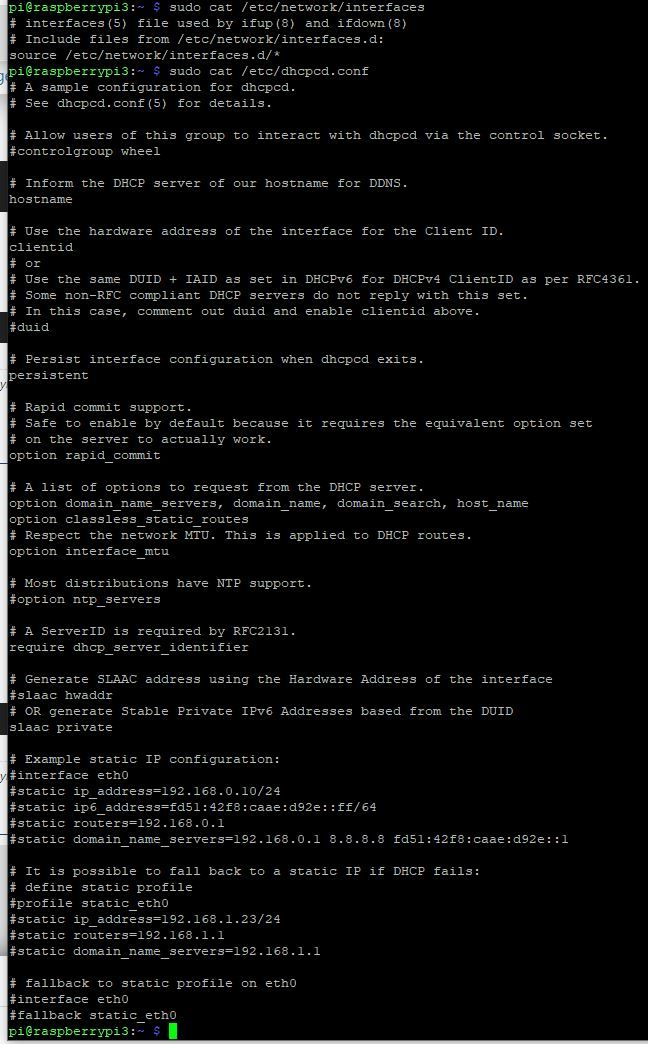
  • Pulse
  • Sandstone
  • Simplex
  • Sketchy
  • Spacelab
  • United
  • Yeti
  • Zephyr
  • Dark
  • Cyborg
  • Darkly
  • Quartz
  • Slate
  • Solar
  • Superhero
  • Vapor

  • Standard: (Kein Skin)
  • Kein Skin
Einklappen
ioBroker Logo

Community Forum

donate donate
  1. ioBroker Community Home
  2. Deutsch
  3. ioBroker Allgemein
  4. Modbus Verbindungsfehler

NEWS

  • UPDATE 31.10.: Amazon Alexa - ioBroker Skill läuft aus ?
    apollon77A
    apollon77
    48
    3
    8.9k

  • Monatsrückblick – September 2025
    BluefoxB
    Bluefox
    13
    1
    2.3k

  • Neues Video "KI im Smart Home" - ioBroker plus n8n
    BluefoxB
    Bluefox
    16
    1
    3.4k

Modbus Verbindungsfehler

Geplant Angeheftet Gesperrt Verschoben ioBroker Allgemein
39 Beiträge 4 Kommentatoren 2.6k Aufrufe 5 Watching
  • Älteste zuerst
  • Neuste zuerst
  • Meiste Stimmen
Antworten
  • In einem neuen Thema antworten
Anmelden zum Antworten
Dieses Thema wurde gelöscht. Nur Nutzer mit entsprechenden Rechten können es sehen.
  • D ducis

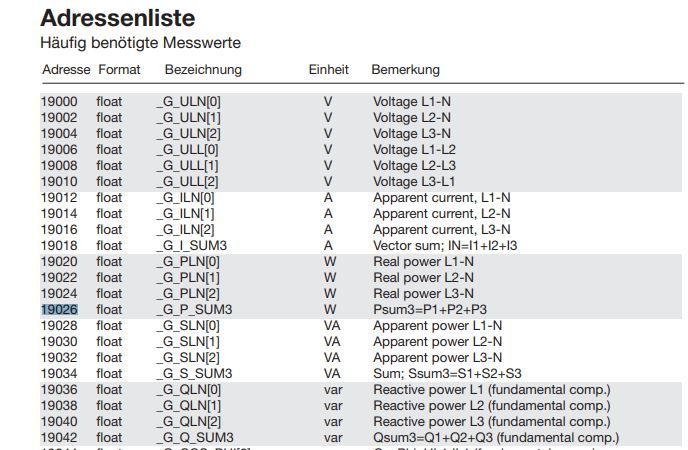
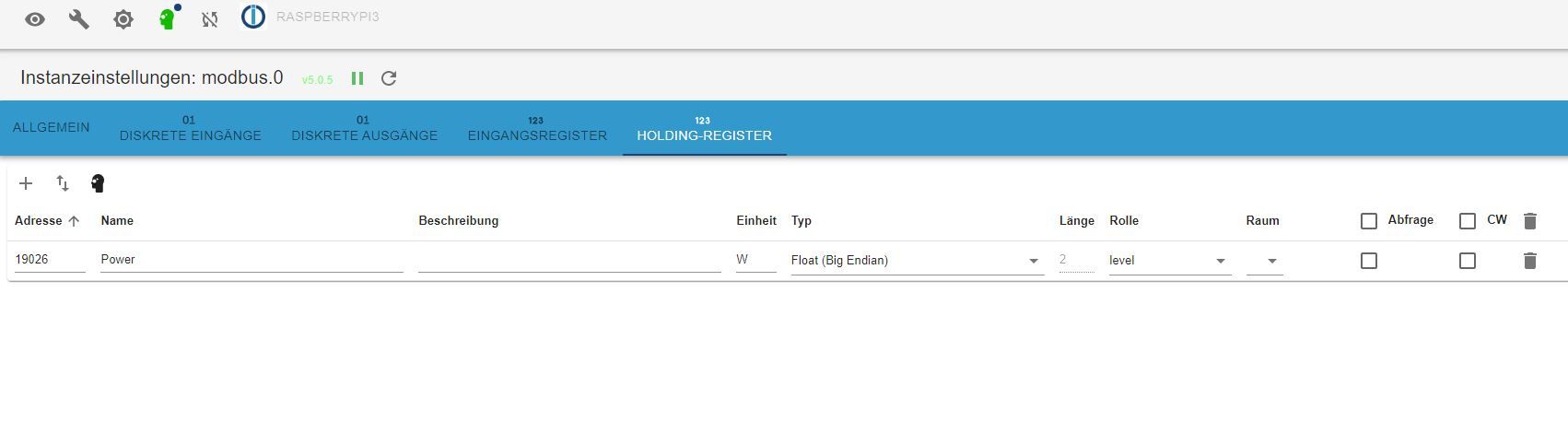
    @glasfaser aaa3.JPG aaa2.JPG aaa1.JPG

    19026 Ist das register für Gesamtleistung in W.

    D Offline
    D Offline
    ducis
    schrieb am zuletzt editiert von
    #7

    @ducis aaa4.JPG

    D 1 Antwort Letzte Antwort
    0
    • D ducis

      @ducis aaa4.JPG

      D Offline
      D Offline
      ducis
      schrieb am zuletzt editiert von
      #8

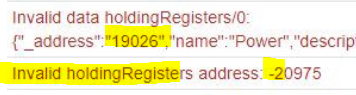
      klar,der Haken. ist beim Probieren rausgeflogen....... Ist aber immer noch der gleiche Fehler.
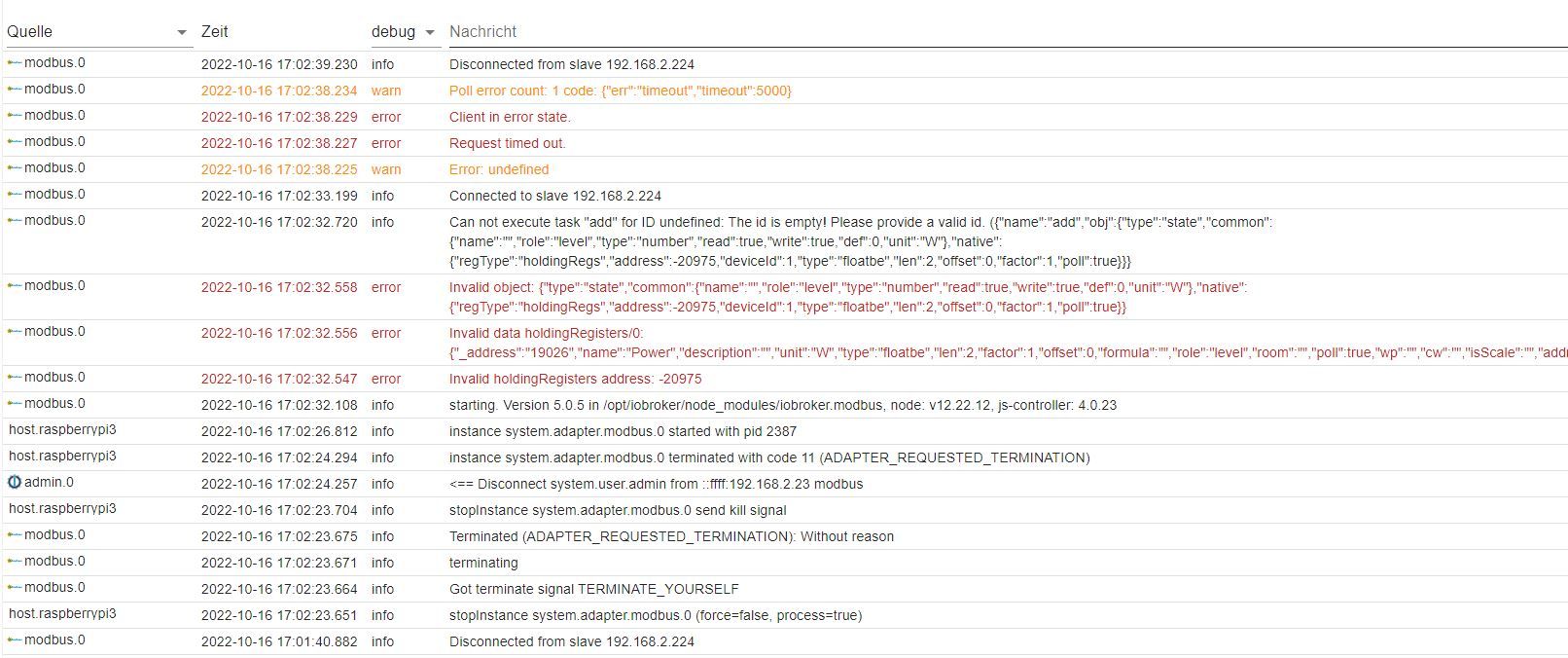
      aaa5.JPG

      GlasfaserG 1 Antwort Letzte Antwort
      0
      • D ducis

        klar,der Haken. ist beim Probieren rausgeflogen....... Ist aber immer noch der gleiche Fehler.

        aaa5.JPG

        GlasfaserG Offline
        GlasfaserG Offline
        Glasfaser
        schrieb am zuletzt editiert von Glasfaser
        #9

        @ducis

        den mal rausnehmen :

        ef9727d4-2cf8-49cb-89f5-e2e93ae78cd6-grafik.png

        da

        9d865388-f883-4b13-8908-1eff92400189-grafik.png

        Synology 918+ 16GB - ioBroker in Docker v9 , VISO auf Trekstor Primebook C13 13,3" , Hikvision Domkameras mit Surveillance Station .. CCU RaspberryMatic in Synology VM .. Zigbee CC2538+CC2592 .. Sonoff .. KNX .. Modbus ..

        1 Antwort Letzte Antwort
        0
        • D Offline
          D Offline
          ducis
          schrieb am zuletzt editiert von
          #10

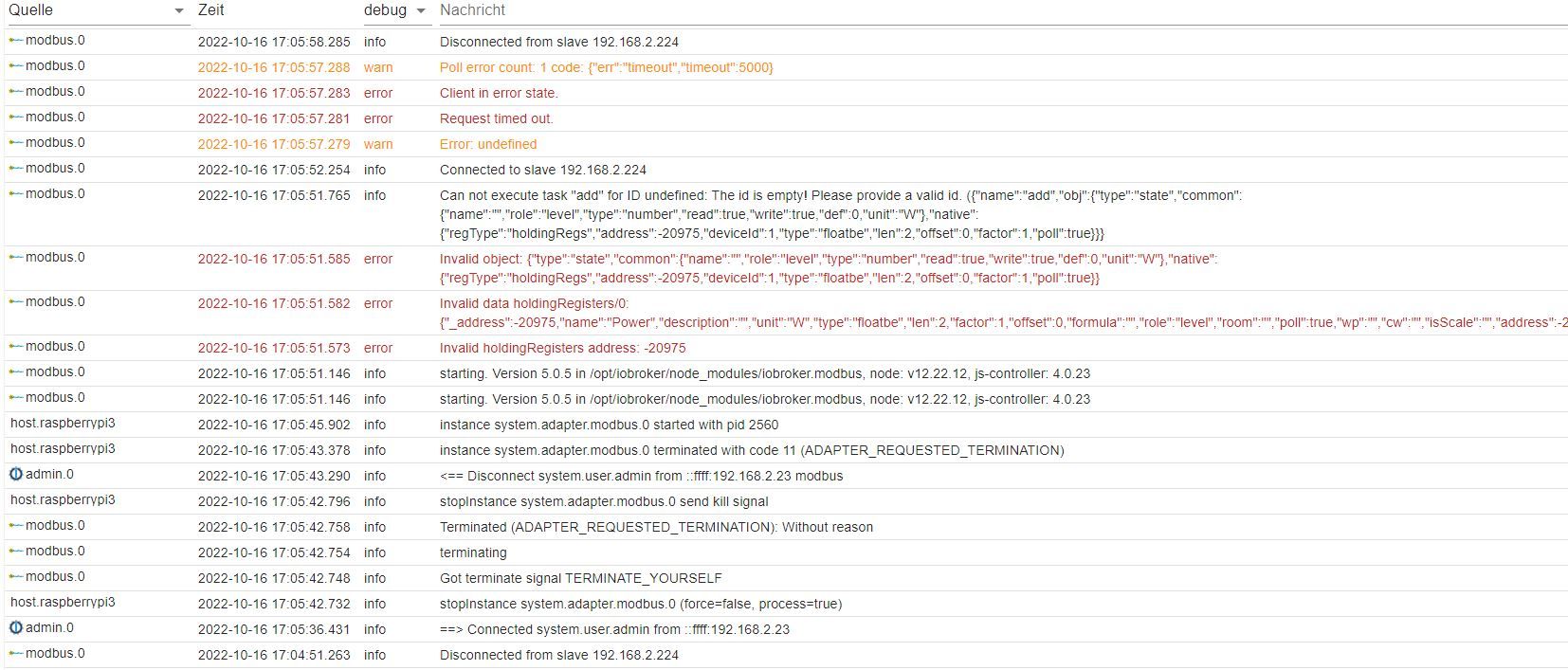
          immer noch

          aaa6.JPG

          GlasfaserG 1 Antwort Letzte Antwort
          0
          • D ducis

            immer noch

            aaa6.JPG

            GlasfaserG Offline
            GlasfaserG Offline
            Glasfaser
            schrieb am zuletzt editiert von
            #11

            @ducis

            Lösche das Register und lege es neu an im Holding

            Synology 918+ 16GB - ioBroker in Docker v9 , VISO auf Trekstor Primebook C13 13,3" , Hikvision Domkameras mit Surveillance Station .. CCU RaspberryMatic in Synology VM .. Zigbee CC2538+CC2592 .. Sonoff .. KNX .. Modbus ..

            D 1 Antwort Letzte Antwort
            0
            • GlasfaserG Glasfaser

              @ducis

              Lösche das Register und lege es neu an im Holding

              D Offline
              D Offline
              ducis
              schrieb am zuletzt editiert von
              #12

              gemacht. Fehler bleibt. "unbekannter Fehler" und dann Timeout

              1 Antwort Letzte Antwort
              0
              • D ducis

                Hallo, ich komme nicht so recht weiter.

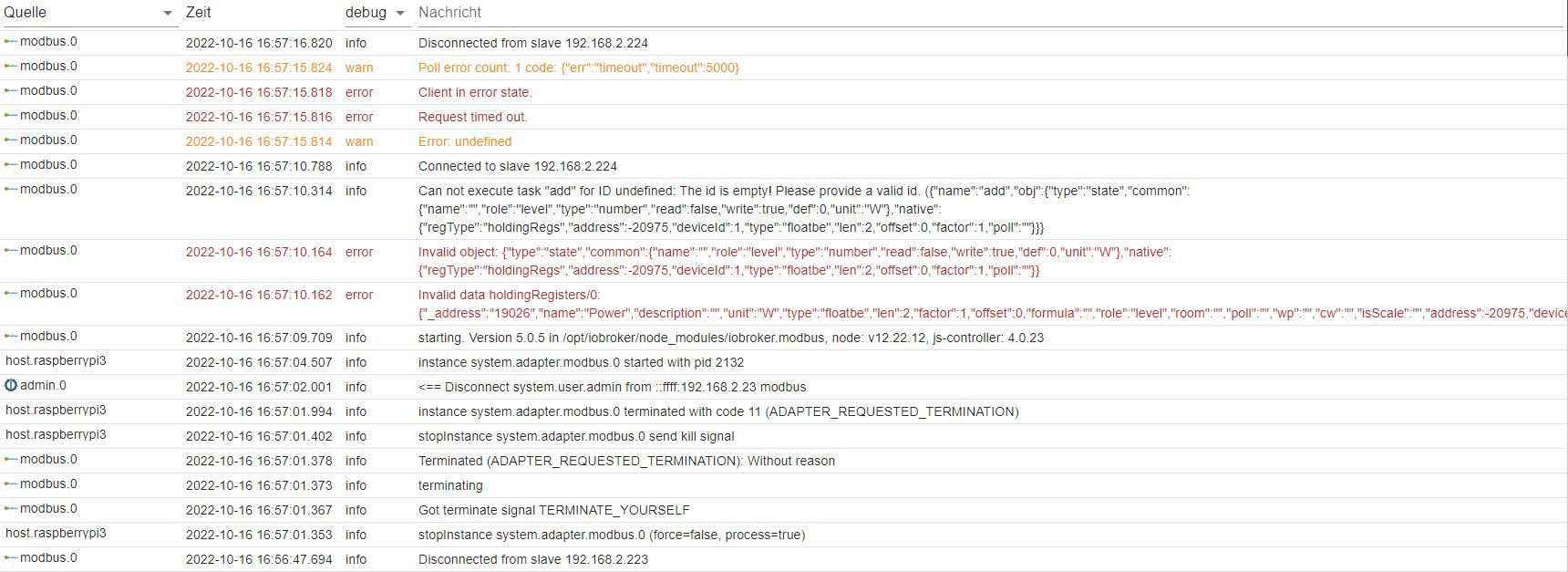
                Ich möchte per Modbus TCP eine Janitza 604 Netzüberwachung abfragen. Adresse, Port, ID passen. Mit Python konnte ich mit diesen Daten Werte auslesen. Hier kommt nach der Anmeldung gleich wieder die Abmeldung.
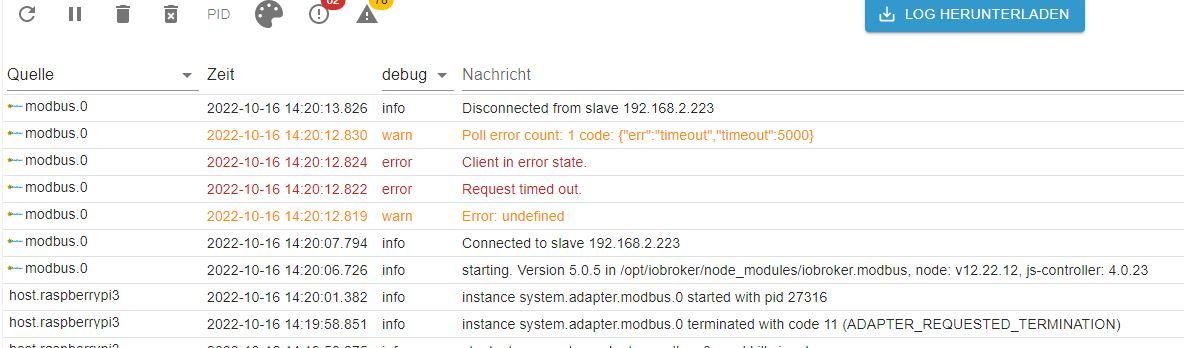
                Unbenannt.JPG

                Habt Ihr eine Idee?
                Mit allen anderen Geräten, die ich per Modbus TCP abfragen will, habe ich den gleichen Fehler.
                Eine Adressabfrage habe ich noch nicht drin. Bringt nur noch mehr Fehler.
                Grüße
                ducis

                GlasfaserG Offline
                GlasfaserG Offline
                Glasfaser
                schrieb am zuletzt editiert von
                #13

                @ducis sagte in Modbus Verbindungsfehler:
                Modbus TCP eine Janitza 604

                Ich hatte auch mal ein .... war aber 2018 ... finde das Register dazu nicht mehr .. schon zu lange her .

                aber ich lade mal @bernhard61 hier im Thread dazu ein vielleicht kann er dir sein Register / Einstellung hier im Thread zu posten

                https://forum.iobroker.net/topic/52523/probleme-mit-modbusregister-abfragen

                Synology 918+ 16GB - ioBroker in Docker v9 , VISO auf Trekstor Primebook C13 13,3" , Hikvision Domkameras mit Surveillance Station .. CCU RaspberryMatic in Synology VM .. Zigbee CC2538+CC2592 .. Sonoff .. KNX .. Modbus ..

                D 1 Antwort Letzte Antwort
                1
                • GlasfaserG Glasfaser

                  @ducis sagte in Modbus Verbindungsfehler:

                  Modbus TCP eine Janitza 604

                  Ich hatte auch mal ein .... war aber 2018 ... finde das Register dazu nicht mehr .. schon zu lange her .

                  aber ich lade mal @bernhard61 hier im Thread dazu ein vielleicht kann er dir sein Register / Einstellung hier im Thread zu posten

                  https://forum.iobroker.net/topic/52523/probleme-mit-modbusregister-abfragen

                  D Offline
                  D Offline
                  ducis
                  schrieb am zuletzt editiert von
                  #14

                  @glasfaser Der Fehelr muss noch woanders liegen, denn ich habe bei der Abfrage eines Huawei Smartloggers3000 das gleiche Problem.

                  Vor ein paar Monaten habe ich die Abfrage beider Systeme mit einem RPi und Phyton gemacht. Das funktionierte es.

                  D 1 Antwort Letzte Antwort
                  0
                  • D ducis

                    @glasfaser Der Fehelr muss noch woanders liegen, denn ich habe bei der Abfrage eines Huawei Smartloggers3000 das gleiche Problem.

                    Vor ein paar Monaten habe ich die Abfrage beider Systeme mit einem RPi und Phyton gemacht. Das funktionierte es.

                    D Offline
                    D Offline
                    ducis
                    schrieb am zuletzt editiert von
                    #15

                    aaa7.JPG

                    Mist der ist nicht erreichbar.......

                    GlasfaserG 1 Antwort Letzte Antwort
                    0
                    • D ducis

                      aaa7.JPG

                      Mist der ist nicht erreichbar.......

                      GlasfaserG Offline
                      GlasfaserG Offline
                      Glasfaser
                      schrieb am zuletzt editiert von
                      #16

                      @ducis sagte in Modbus Verbindungsfehler:

                      Mist der ist nicht erreichbar.......

                      deshalb meine Frage ... ganz am Anfang

                      @glasfaser sagte in Modbus Verbindungsfehler:
                      Ist er auch über den ioBroker per Ping erreichbar !?

                      Synology 918+ 16GB - ioBroker in Docker v9 , VISO auf Trekstor Primebook C13 13,3" , Hikvision Domkameras mit Surveillance Station .. CCU RaspberryMatic in Synology VM .. Zigbee CC2538+CC2592 .. Sonoff .. KNX .. Modbus ..

                      1 Antwort Letzte Antwort
                      0
                      • D ducis

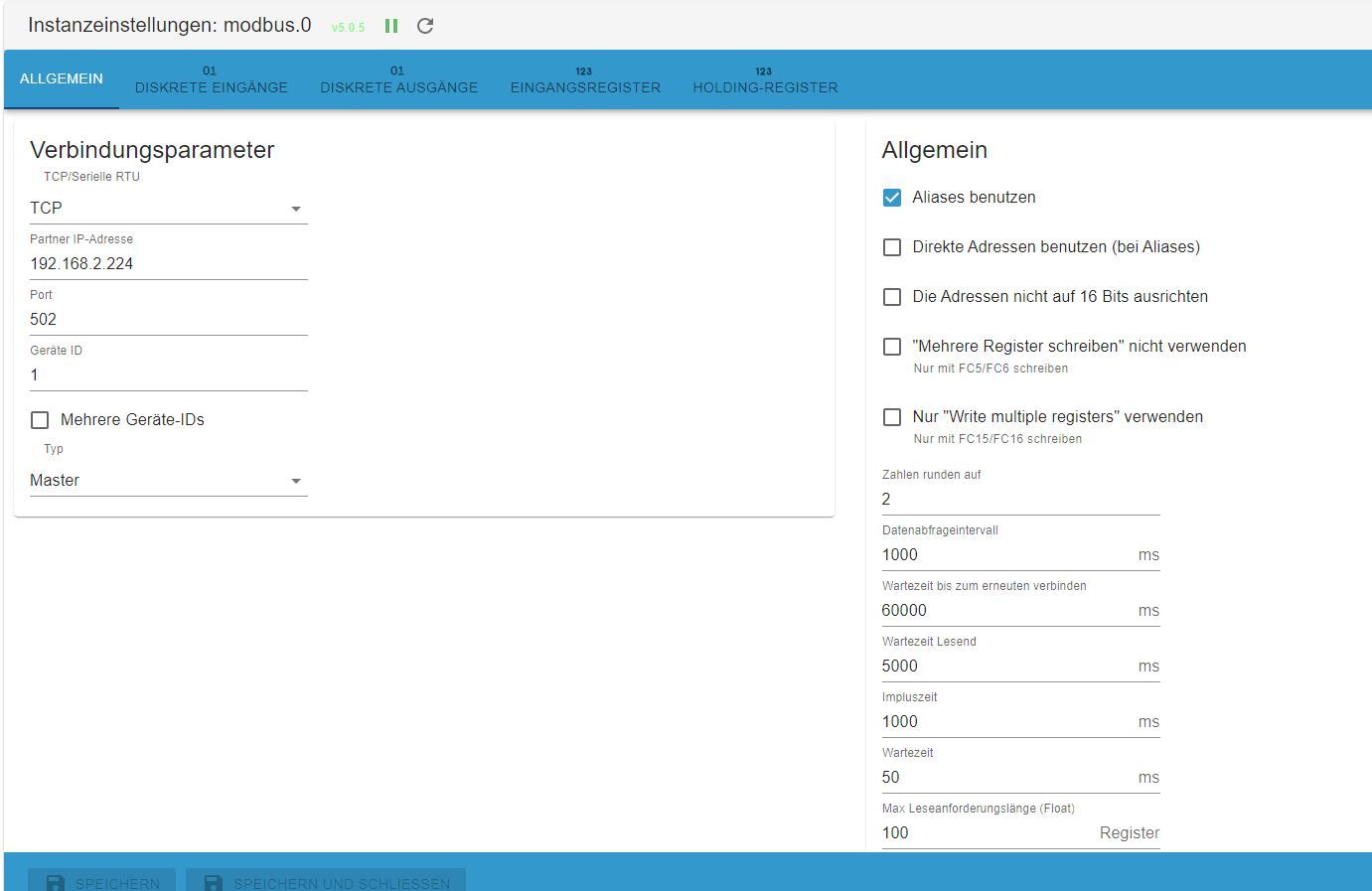
                        @glasfaser aaa3.JPG aaa2.JPG aaa1.JPG

                        19026 Ist das register für Gesamtleistung in W.

                        K Offline
                        K Offline
                        klassisch
                        Most Active
                        schrieb am zuletzt editiert von klassisch
                        #17

                        @ducis sagte in Modbus Verbindungsfehler:

                        aaa2.JPG ![aaa1.JPG](/assets/uploads/files/1665932393221-

                        Was passiert, wenn Du hier "RTU over TCP" auswählst?

                        GlasfaserG 1 Antwort Letzte Antwort
                        0
                        • K klassisch

                          @ducis sagte in Modbus Verbindungsfehler:

                          aaa2.JPG ![aaa1.JPG](/assets/uploads/files/1665932393221-

                          Was passiert, wenn Du hier "RTU over TCP" auswählst?

                          GlasfaserG Offline
                          GlasfaserG Offline
                          Glasfaser
                          schrieb am zuletzt editiert von
                          #18

                          @klassisch sagte in Modbus Verbindungsfehler:

                          Was passiert, wenn Du hier "RTU over TCP" auswählst?

                          Erstmal gar nicht ... der ist nicht erreichbar ... :) .... siehe oben

                          Synology 918+ 16GB - ioBroker in Docker v9 , VISO auf Trekstor Primebook C13 13,3" , Hikvision Domkameras mit Surveillance Station .. CCU RaspberryMatic in Synology VM .. Zigbee CC2538+CC2592 .. Sonoff .. KNX .. Modbus ..

                          D 1 Antwort Letzte Antwort
                          0
                          • GlasfaserG Glasfaser

                            @klassisch sagte in Modbus Verbindungsfehler:

                            Was passiert, wenn Du hier "RTU over TCP" auswählst?

                            Erstmal gar nicht ... der ist nicht erreichbar ... :) .... siehe oben

                            D Offline
                            D Offline
                            ducis
                            schrieb am zuletzt editiert von
                            #19

                            Beim Ping findet der RPi gar nichts. Nicht mal die Fritzbox oder den Rechner mit dem ich ihn per Putty steuern kann........

                            GlasfaserG 2 Antworten Letzte Antwort
                            0
                            • D ducis

                              Beim Ping findet der RPi gar nichts. Nicht mal die Fritzbox oder den Rechner mit dem ich ihn per Putty steuern kann........

                              GlasfaserG Offline
                              GlasfaserG Offline
                              Glasfaser
                              schrieb am zuletzt editiert von Glasfaser
                              #20

                              @ducis

                              was sagt

                              sudo cat /etc/network/interfaces
                              sudo cat /etc/dhcpcd.conf
                              

                              Edit

                              und

                              ip a
                              

                              Synology 918+ 16GB - ioBroker in Docker v9 , VISO auf Trekstor Primebook C13 13,3" , Hikvision Domkameras mit Surveillance Station .. CCU RaspberryMatic in Synology VM .. Zigbee CC2538+CC2592 .. Sonoff .. KNX .. Modbus ..

                              1 Antwort Letzte Antwort
                              0
                              • D ducis

                                Beim Ping findet der RPi gar nichts. Nicht mal die Fritzbox oder den Rechner mit dem ich ihn per Putty steuern kann........

                                GlasfaserG Offline
                                GlasfaserG Offline
                                Glasfaser
                                schrieb am zuletzt editiert von
                                #21

                                @ducis sagte in Modbus Verbindungsfehler:

                                Beim Ping findet der RPi gar nichts.

                                Nicht mal die Fritzbox

                                oder ... mal ein Neustart durchführen

                                sudo reboot
                                

                                Synology 918+ 16GB - ioBroker in Docker v9 , VISO auf Trekstor Primebook C13 13,3" , Hikvision Domkameras mit Surveillance Station .. CCU RaspberryMatic in Synology VM .. Zigbee CC2538+CC2592 .. Sonoff .. KNX .. Modbus ..

                                D 1 Antwort Letzte Antwort
                                0
                                • GlasfaserG Glasfaser

                                  @ducis sagte in Modbus Verbindungsfehler:

                                  Beim Ping findet der RPi gar nichts.

                                  Nicht mal die Fritzbox

                                  oder ... mal ein Neustart durchführen

                                  sudo reboot
                                  
                                  D Offline
                                  D Offline
                                  ducis
                                  schrieb am zuletzt editiert von
                                  #22

                                  Neustart habe ich schon gemacht.

                                  aaa8.JPG

                                  GlasfaserG 1 Antwort Letzte Antwort
                                  0
                                  • D ducis

                                    Neustart habe ich schon gemacht.

                                    aaa8.JPG

                                    GlasfaserG Offline
                                    GlasfaserG Offline
                                    Glasfaser
                                    schrieb am zuletzt editiert von
                                    #23

                                    @ducis

                                    kann man nicht lesen ... bitte die Ausgabe in Code-Tags </> einfügen .

                                    was sagt noch

                                    ip a
                                    

                                    Synology 918+ 16GB - ioBroker in Docker v9 , VISO auf Trekstor Primebook C13 13,3" , Hikvision Domkameras mit Surveillance Station .. CCU RaspberryMatic in Synology VM .. Zigbee CC2538+CC2592 .. Sonoff .. KNX .. Modbus ..

                                    D 2 Antworten Letzte Antwort
                                    0
                                    • GlasfaserG Glasfaser

                                      @ducis

                                      kann man nicht lesen ... bitte die Ausgabe in Code-Tags </> einfügen .

                                      was sagt noch

                                      ip a
                                      
                                      D Offline
                                      D Offline
                                      ducis
                                      schrieb am zuletzt editiert von
                                      #24
                                      
                                      pi@raspberrypi3:~ $ sudo cat /etc/network/interfaces
                                      # interfaces(5) file used by ifup(8) and ifdown(8)
                                      # Include files from /etc/network/interfaces.d:
                                      source /etc/network/interfaces.d/*
                                      pi@raspberrypi3:~ $ sudo cat /etc/dhcpcd.conf
                                      # A sample configuration for dhcpcd.
                                      # See dhcpcd.conf(5) for details.
                                      
                                      # Allow users of this group to interact with dhcpcd via the control socket.
                                      #controlgroup wheel
                                      
                                      # Inform the DHCP server of our hostname for DDNS.
                                      hostname
                                      
                                      # Use the hardware address of the interface for the Client ID.
                                      clientid
                                      # or
                                      # Use the same DUID + IAID as set in DHCPv6 for DHCPv4 ClientID as per RFC4361.
                                      # Some non-RFC compliant DHCP servers do not reply with this set.
                                      # In this case, comment out duid and enable clientid above.
                                      #duid
                                      
                                      # Persist interface configuration when dhcpcd exits.
                                      persistent
                                      
                                      # Rapid commit support.
                                      # Safe to enable by default because it requires the equivalent option set
                                      # on the server to actually work.
                                      option rapid_commit
                                      
                                      # A list of options to request from the DHCP server.
                                      option domain_name_servers, domain_name, domain_search, host_name
                                      option classless_static_routes
                                      # Respect the network MTU. This is applied to DHCP routes.
                                      option interface_mtu
                                      
                                      # Most distributions have NTP support.
                                      #option ntp_servers
                                      
                                      # A ServerID is required by RFC2131.
                                      require dhcp_server_identifier
                                      
                                      # Generate SLAAC address using the Hardware Address of the interface
                                      #slaac hwaddr
                                      # OR generate Stable Private IPv6 Addresses based from the DUID
                                      slaac private
                                      
                                      # Example static IP configuration:
                                      #interface eth0
                                      #static ip_address=192.168.0.10/24
                                      #static ip6_address=fd51:42f8:caae:d92e::ff/64
                                      #static routers=192.168.0.1
                                      #static domain_name_servers=192.168.0.1 8.8.8.8 fd51:42f8:caae:d92e::1
                                      
                                      # It is possible to fall back to a static IP if DHCP fails:
                                      # define static profile
                                      #profile static_eth0
                                      #static ip_address=192.168.1.23/24
                                      #static routers=192.168.1.1
                                      #static domain_name_servers=192.168.1.1
                                      
                                      # fallback to static profile on eth0
                                      #interface eth0
                                      #fallback static_eth0
                                      pi@raspberrypi3:~ $ ip a
                                      1: lo: <LOOPBACK,UP,LOWER_UP> mtu 65536 qdisc noqueue state UNKNOWN group default qlen 1000
                                          link/loopback 00:00:00:00:00:00 brd 00:00:00:00:00:00
                                          inet 127.0.0.1/8 scope host lo
                                             valid_lft forever preferred_lft forever
                                          inet6 ::1/128 scope host
                                             valid_lft forever preferred_lft forever
                                      2: eth0: <BROADCAST,MULTICAST,UP,LOWER_UP> mtu 1500 qdisc pfifo_fast state UP group default qlen 1000
                                          link/ether b8:27:eb:73:50:f1 brd ff:ff:ff:ff:ff:ff
                                          inet 192.168.2.43/24 brd 192.168.2.255 scope global dynamic noprefixroute eth0
                                             valid_lft 862524sec preferred_lft 754524sec
                                          inet6 2003:cf:7f17:7300:d004:f30:ccf8:38ae/64 scope global dynamic mngtmpaddr noprefixroute
                                             valid_lft 6958sec preferred_lft 1026sec
                                          inet6 fe80::9d79:21a8:d93e:8d0e/64 scope link
                                             valid_lft forever preferred_lft forever
                                      pi@raspberrypi3:~ $
                                      
                                      
                                      1 Antwort Letzte Antwort
                                      0
                                      • GlasfaserG Glasfaser

                                        @ducis

                                        kann man nicht lesen ... bitte die Ausgabe in Code-Tags </> einfügen .

                                        was sagt noch

                                        ip a
                                        
                                        D Offline
                                        D Offline
                                        ducis
                                        schrieb am zuletzt editiert von
                                        #25

                                        @glasfaser Danke für deine Mühen. Ich mach jetzt erstmal Ende.

                                        D 1 Antwort Letzte Antwort
                                        0
                                        • D ducis

                                          @glasfaser Danke für deine Mühen. Ich mach jetzt erstmal Ende.

                                          D Offline
                                          D Offline
                                          ducis
                                          schrieb am zuletzt editiert von
                                          #26

                                          Also ich habe mich jetzt nochmal drangemacht.
                                          Über die Konsole und Putty kann ich meine Geräte per Ping erreichen.
                                          Dann habe ich den Adapter Ping in ioBroker installiert. Wenn ich mir dann die ObjektIDs ansehe, habe ich unter indicator reachable nur false zu stehen.aaa7.JPG

                                          Also irgendwie funktioniert das von IOBroker aus nicht.
                                          bahnuhrB 1 Antwort Letzte Antwort
                                          0
                                          Antworten
                                          • In einem neuen Thema antworten
                                          Anmelden zum Antworten
                                          • Älteste zuerst
                                          • Neuste zuerst
                                          • Meiste Stimmen


                                          Support us

                                          ioBroker
                                          Community Adapters
                                          Donate
                                          FAQ Cloud / IOT
                                          HowTo: Node.js-Update
                                          HowTo: Backup/Restore
                                          Downloads
                                          BLOG

                                          801

                                          Online

                                          32.4k

                                          Benutzer

                                          81.6k

                                          Themen

                                          1.3m

                                          Beiträge
                                          Community
                                          Impressum | Datenschutz-Bestimmungen | Nutzungsbedingungen | Einwilligungseinstellungen
                                          ioBroker Community 2014-2025
                                          logo
                                          • Anmelden

                                          • Du hast noch kein Konto? Registrieren

                                          • Anmelden oder registrieren, um zu suchen
                                          • Erster Beitrag
                                            Letzter Beitrag
                                          0
                                          • Home
                                          • Aktuell
                                          • Tags
                                          • Ungelesen 0
                                          • Kategorien
                                          • Unreplied
                                          • Beliebt
                                          • GitHub
                                          • Docu
                                          • Hilfe