




MQTT-Client 4.0.7 - Startet nicht
-
@mahumuc sagte in MQTT-Client 4.0.7 - Startet nicht:
Hallo hier das gleiche, ist vermutlich ne blöde Frage aber warum wurde mir das Update überhaupt angezeigt da ich nur stable installieren will und wie komm ich jetzt zur alten Version ?
iobroker repo list
iobroker update -i
zeigen.
@thomas-braun said in MQTT-Client 4.0.7 - Startet nicht:
pi@iobroker131:~ $ iobroker repo list stable : http://download.iobroker.net/sources-dist.json beta : http://download.iobroker.net/sources-dist-latest.json Active repo(s): stable pi@iobroker131:~ $ iobroker update -i Used repository: stable Adapter "admin" : 5.3.8 , installed 5.3.8 Adapter "alexa2" : 3.11.2 , installed 3.11.2 Adapter "backitup" : 2.4.9 , installed 2.4.9 Adapter "discovery" : 3.0.5 , installed 3.0.5 Adapter "influxdb" : 3.1.7 , installed 3.1.7 Adapter "iot" : 1.11.8 , installed 1.11.8 Adapter "javascript" : 5.7.0 , installed 5.7.0 Controller "js-controller": 4.0.23 , installed 4.0.23 Adapter "lgtv" : 1.1.10 , installed 1.1.10 Adapter "luftdaten" : 2.2.4 , installed 2.2.4 Adapter "mqtt" : 4.0.7 , installed 4.0.7 Adapter "net-tools" : 0.2.0 , installed 0.2.0 Adapter "nina" : 0.0.25 , installed 0.0.25 Adapter "odl" : 2.0.5 , installed 2.0.5 Adapter "shelly" : 5.3.2 , installed 5.3.2 Adapter "simple-api" : 2.7.0 , installed 2.7.0 Adapter "socketio" : 4.2.0 , installed 4.2.0 Adapter "sonoff" : 2.5.1 , installed 2.5.1 Adapter "telegram" : 1.13.0 , installed 1.13.0 Adapter "tr-064" : 4.2.16 , installed 4.2.16 Adapter "vis" : 1.4.15 , installed 1.4.15 Adapter "vis-hqwidgets": 1.2.0 , installed 1.2.0 Adapter "web" : 4.3.0 , installed 4.3.0 Adapter "windows-control": 0.1.5 , installed 0.1.5 Adapter "ws" : 1.3.0 , installed 1.3.0 Adapter "zigbee" : 1.7.5 , installed 1.7.5 -
@thomas-braun said in MQTT-Client 4.0.7 - Startet nicht:
pi@iobroker131:~ $ iobroker repo list stable : http://download.iobroker.net/sources-dist.json beta : http://download.iobroker.net/sources-dist-latest.json Active repo(s): stable pi@iobroker131:~ $ iobroker update -i Used repository: stable Adapter "admin" : 5.3.8 , installed 5.3.8 Adapter "alexa2" : 3.11.2 , installed 3.11.2 Adapter "backitup" : 2.4.9 , installed 2.4.9 Adapter "discovery" : 3.0.5 , installed 3.0.5 Adapter "influxdb" : 3.1.7 , installed 3.1.7 Adapter "iot" : 1.11.8 , installed 1.11.8 Adapter "javascript" : 5.7.0 , installed 5.7.0 Controller "js-controller": 4.0.23 , installed 4.0.23 Adapter "lgtv" : 1.1.10 , installed 1.1.10 Adapter "luftdaten" : 2.2.4 , installed 2.2.4 Adapter "mqtt" : 4.0.7 , installed 4.0.7 Adapter "net-tools" : 0.2.0 , installed 0.2.0 Adapter "nina" : 0.0.25 , installed 0.0.25 Adapter "odl" : 2.0.5 , installed 2.0.5 Adapter "shelly" : 5.3.2 , installed 5.3.2 Adapter "simple-api" : 2.7.0 , installed 2.7.0 Adapter "socketio" : 4.2.0 , installed 4.2.0 Adapter "sonoff" : 2.5.1 , installed 2.5.1 Adapter "telegram" : 1.13.0 , installed 1.13.0 Adapter "tr-064" : 4.2.16 , installed 4.2.16 Adapter "vis" : 1.4.15 , installed 1.4.15 Adapter "vis-hqwidgets": 1.2.0 , installed 1.2.0 Adapter "web" : 4.3.0 , installed 4.3.0 Adapter "windows-control": 0.1.5 , installed 0.1.5 Adapter "ws" : 1.3.0 , installed 1.3.0 Adapter "zigbee" : 1.7.5 , installed 1.7.5iobroker upgrade mqtt@3.0.6 -
iobroker upgrade mqtt@3.0.6@thomas-braun said in MQTT-Client 4.0.7 - Startet nicht:
iobroker upgrade mqtt@3.0.6
This downgrade of "mqtt" will at least remove the following changes:
==========================================================================
-> 4.0.7
Remove unneeded dependency

-> 4.0.6
Corrected sentry issue

-> 4.0.4
lower loglevel for log messages about messages with unknown message IDs to info

-> 4.0.3
Corrected publish states on start by client

-> 4.0.2
Added possibility to publish own states as client, additionally to `mqtt.x`

-> 4.0.1
Fix Number detection for values

-> 4.0.0
BREAKING CHANGE: in client mode only "mqtt.X.*" states will be subscribed
BREAKING CHANGE: in server mode by empty "publish" setting no states will be sub                                                                                                                 scribed. Early all states were subscribed
Added new option: All new topics will be processed as binary
==========================================================================

BE CAREFUL: THIS IS A MAJOR DOWNGRADE, WHICH WILL MOST LIKELY INTRODUCE BREAKING                                                                                                                  CHANGES!
Would you like to downgrade mqtt from @4.0.7 to @3.0.6 now? [(y)es, (n)o]:
Bevor ich mir jetzt was kaputt mache, wie wahrscheinlich ist es dass die admin 5.4.3 demnächst stable wird ?
Danke
-
@thomas-braun said in MQTT-Client 4.0.7 - Startet nicht:
iobroker upgrade mqtt@3.0.6
This downgrade of "mqtt" will at least remove the following changes:
==========================================================================
-> 4.0.7
Remove unneeded dependency

-> 4.0.6
Corrected sentry issue

-> 4.0.4
lower loglevel for log messages about messages with unknown message IDs to info

-> 4.0.3
Corrected publish states on start by client

-> 4.0.2
Added possibility to publish own states as client, additionally to `mqtt.x`

-> 4.0.1
Fix Number detection for values

-> 4.0.0
BREAKING CHANGE: in client mode only "mqtt.X.*" states will be subscribed
BREAKING CHANGE: in server mode by empty "publish" setting no states will be sub                                                                                                                 scribed. Early all states were subscribed
Added new option: All new topics will be processed as binary
==========================================================================

BE CAREFUL: THIS IS A MAJOR DOWNGRADE, WHICH WILL MOST LIKELY INTRODUCE BREAKING                                                                                                                  CHANGES!
Would you like to downgrade mqtt from @4.0.7 to @3.0.6 now? [(y)es, (n)o]:
Bevor ich mir jetzt was kaputt mache, wie wahrscheinlich ist es dass die admin 5.4.3 demnächst stable wird ?
Danke
@mahumuc sagte in MQTT-Client 4.0.7 - Startet nicht:
wie wahrscheinlich ist es dass die admin 5.4.3 demnächst stable wird ?
Ich mache keine Releases, kann ich dir also nicht beantworten.
-
@mahumuc sagte in MQTT-Client 4.0.7 - Startet nicht:
Hallo hier das gleiche, ist vermutlich ne blöde Frage aber warum wurde mir das Update überhaupt angezeigt da ich nur stable installieren will und wie komm ich jetzt zur alten Version ?
iobroker repo list
iobroker update -i
zeigen.
@thomas-braun
Komisch, bei zeigt er so etwas an:pi@ioBroker:~ $ iobroker repro list iobroker [command] Commands: iobroker setup Setup ioBroker iobroker start [all|<adapter>.<instance>] Starts the js-controller or a specified adapter instance iobroker stop [<adapter>.<instance>] stops the js-controller or a specified adapter instance iobroker restart [<adapter>.<instance>] Restarts js-controller or a specified adapter instance [aliases: r] iobroker debug <adapter>[.<instance>] Starts a Node.js debugging session for the adapter instance iobroker info Shows the host info iobroker logs [<adapter>] Monitor log iobroker add <adapter> [desiredNumber] Add instance of adapter [aliases: a] iobroker install <adapter> Installs a specified adapter [aliases: i] iobroker rebuild [<module>] Rebuild all native modules or path iobroker url <url> [<name>] Install adapter from specified url, e.g. GitHub iobroker del <adapter> Remove adapter and all instances from this host [aliases: delete] iobroker del <adapter>.<instance> Remove adapter instance [aliases: delete] iobroker update [<repositoryUrl>] Update repository and list adapters iobroker upgrade Upgrade management iobroker upload [all|<adapter>] Upload management [aliases: u] iobroker object Object management [aliases: o] iobroker state State management [aliases: s] iobroker message <adapter>[.instance] <command> [<message>] Send message to adapter instance/s iobroker list <type> [<filter>] List all entries, like objects iobroker chmod <mode> <file> Change file rights iobroker chown <user> <group> <file> Change file ownership iobroker touch <file> Touch file iobroker rm <file> Remove file iobroker file File management iobroker user User commands iobroker group group management iobroker host <hostname> Set host to given hostname iobroker set <adapter>.<instance> Change settings of adapter config iobroker license <license.file or license.text> Update license by given file iobroker cert Certificate management iobroker clean <yes> Clears all objects and states iobroker backup Create backup iobroker restore <backup name or path> Restore a specified backup iobroker validate <backup name or path> Validate a specified backup iobroker status [all|<adapter>.<instance>] Status of ioBroker or adapter instance [aliases: isrun] iobroker repo [<name>] Show repo information iobroker uuid Show uuid of the installation [aliases: id] iobroker unsetup Reset license, installation secret and language iobroker fix Execute the installation fixer script, this updates your ioBroker installation iobroker multihost Multihost management iobroker compact compact group management iobroker plugin Plugin management iobroker version [<adapter>] Show version of js-controller or specified adapter [aliases: v] Options: --help Show help [boolean]Ist da was nicht installiert?
-
@thomas-braun
Komisch, bei zeigt er so etwas an:pi@ioBroker:~ $ iobroker repro list iobroker [command] Commands: iobroker setup Setup ioBroker iobroker start [all|<adapter>.<instance>] Starts the js-controller or a specified adapter instance iobroker stop [<adapter>.<instance>] stops the js-controller or a specified adapter instance iobroker restart [<adapter>.<instance>] Restarts js-controller or a specified adapter instance [aliases: r] iobroker debug <adapter>[.<instance>] Starts a Node.js debugging session for the adapter instance iobroker info Shows the host info iobroker logs [<adapter>] Monitor log iobroker add <adapter> [desiredNumber] Add instance of adapter [aliases: a] iobroker install <adapter> Installs a specified adapter [aliases: i] iobroker rebuild [<module>] Rebuild all native modules or path iobroker url <url> [<name>] Install adapter from specified url, e.g. GitHub iobroker del <adapter> Remove adapter and all instances from this host [aliases: delete] iobroker del <adapter>.<instance> Remove adapter instance [aliases: delete] iobroker update [<repositoryUrl>] Update repository and list adapters iobroker upgrade Upgrade management iobroker upload [all|<adapter>] Upload management [aliases: u] iobroker object Object management [aliases: o] iobroker state State management [aliases: s] iobroker message <adapter>[.instance] <command> [<message>] Send message to adapter instance/s iobroker list <type> [<filter>] List all entries, like objects iobroker chmod <mode> <file> Change file rights iobroker chown <user> <group> <file> Change file ownership iobroker touch <file> Touch file iobroker rm <file> Remove file iobroker file File management iobroker user User commands iobroker group group management iobroker host <hostname> Set host to given hostname iobroker set <adapter>.<instance> Change settings of adapter config iobroker license <license.file or license.text> Update license by given file iobroker cert Certificate management iobroker clean <yes> Clears all objects and states iobroker backup Create backup iobroker restore <backup name or path> Restore a specified backup iobroker validate <backup name or path> Validate a specified backup iobroker status [all|<adapter>.<instance>] Status of ioBroker or adapter instance [aliases: isrun] iobroker repo [<name>] Show repo information iobroker uuid Show uuid of the installation [aliases: id] iobroker unsetup Reset license, installation secret and language iobroker fix Execute the installation fixer script, this updates your ioBroker installation iobroker multihost Multihost management iobroker compact compact group management iobroker plugin Plugin management iobroker version [<adapter>] Show version of js-controller or specified adapter [aliases: v] Options: --help Show help [boolean]Ist da was nicht installiert?
@qqolli repro geht nicht "repo"

iobroker repo listLehrling seit 1975 !!!
Beitrag geholfen ? dann gerne ein upvote rechts unten im Beitrag klicken ;)
https://forum.iobroker.net/topic/51555/hinweise-f%C3%BCr-gute-forenbeitr%C3%A4ge -
@thomas-braun
Komisch, bei zeigt er so etwas an:pi@ioBroker:~ $ iobroker repro list iobroker [command] Commands: iobroker setup Setup ioBroker iobroker start [all|<adapter>.<instance>] Starts the js-controller or a specified adapter instance iobroker stop [<adapter>.<instance>] stops the js-controller or a specified adapter instance iobroker restart [<adapter>.<instance>] Restarts js-controller or a specified adapter instance [aliases: r] iobroker debug <adapter>[.<instance>] Starts a Node.js debugging session for the adapter instance iobroker info Shows the host info iobroker logs [<adapter>] Monitor log iobroker add <adapter> [desiredNumber] Add instance of adapter [aliases: a] iobroker install <adapter> Installs a specified adapter [aliases: i] iobroker rebuild [<module>] Rebuild all native modules or path iobroker url <url> [<name>] Install adapter from specified url, e.g. GitHub iobroker del <adapter> Remove adapter and all instances from this host [aliases: delete] iobroker del <adapter>.<instance> Remove adapter instance [aliases: delete] iobroker update [<repositoryUrl>] Update repository and list adapters iobroker upgrade Upgrade management iobroker upload [all|<adapter>] Upload management [aliases: u] iobroker object Object management [aliases: o] iobroker state State management [aliases: s] iobroker message <adapter>[.instance] <command> [<message>] Send message to adapter instance/s iobroker list <type> [<filter>] List all entries, like objects iobroker chmod <mode> <file> Change file rights iobroker chown <user> <group> <file> Change file ownership iobroker touch <file> Touch file iobroker rm <file> Remove file iobroker file File management iobroker user User commands iobroker group group management iobroker host <hostname> Set host to given hostname iobroker set <adapter>.<instance> Change settings of adapter config iobroker license <license.file or license.text> Update license by given file iobroker cert Certificate management iobroker clean <yes> Clears all objects and states iobroker backup Create backup iobroker restore <backup name or path> Restore a specified backup iobroker validate <backup name or path> Validate a specified backup iobroker status [all|<adapter>.<instance>] Status of ioBroker or adapter instance [aliases: isrun] iobroker repo [<name>] Show repo information iobroker uuid Show uuid of the installation [aliases: id] iobroker unsetup Reset license, installation secret and language iobroker fix Execute the installation fixer script, this updates your ioBroker installation iobroker multihost Multihost management iobroker compact compact group management iobroker plugin Plugin management iobroker version [<adapter>] Show version of js-controller or specified adapter [aliases: v] Options: --help Show help [boolean]Ist da was nicht installiert?
@qqolli sagte in MQTT-Client 4.0.7 - Startet nicht:
Ist da was nicht installiert?
Nein, du hast nicht richtig geschaut.
Das heißtrepo, nichtrepro. -
-
Hallo zusammen,
habe gerade das Adapter-Update gemacht und soweit ich verstanden hatte, sollte man das Password neu eingeben. Aber da ich mal wieder zu schnell war, habe ich bestimmt was übersehen.
Adapter bleibt nämlich rot
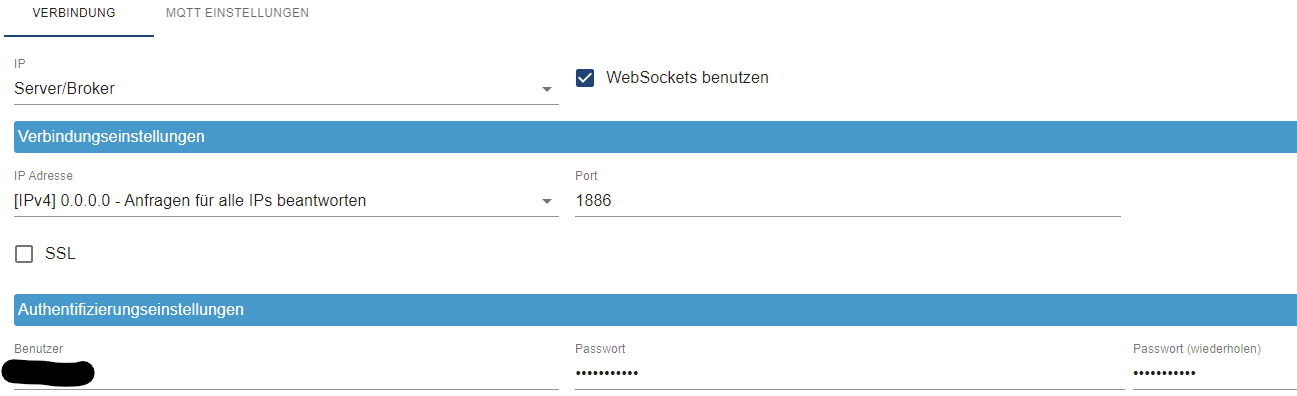
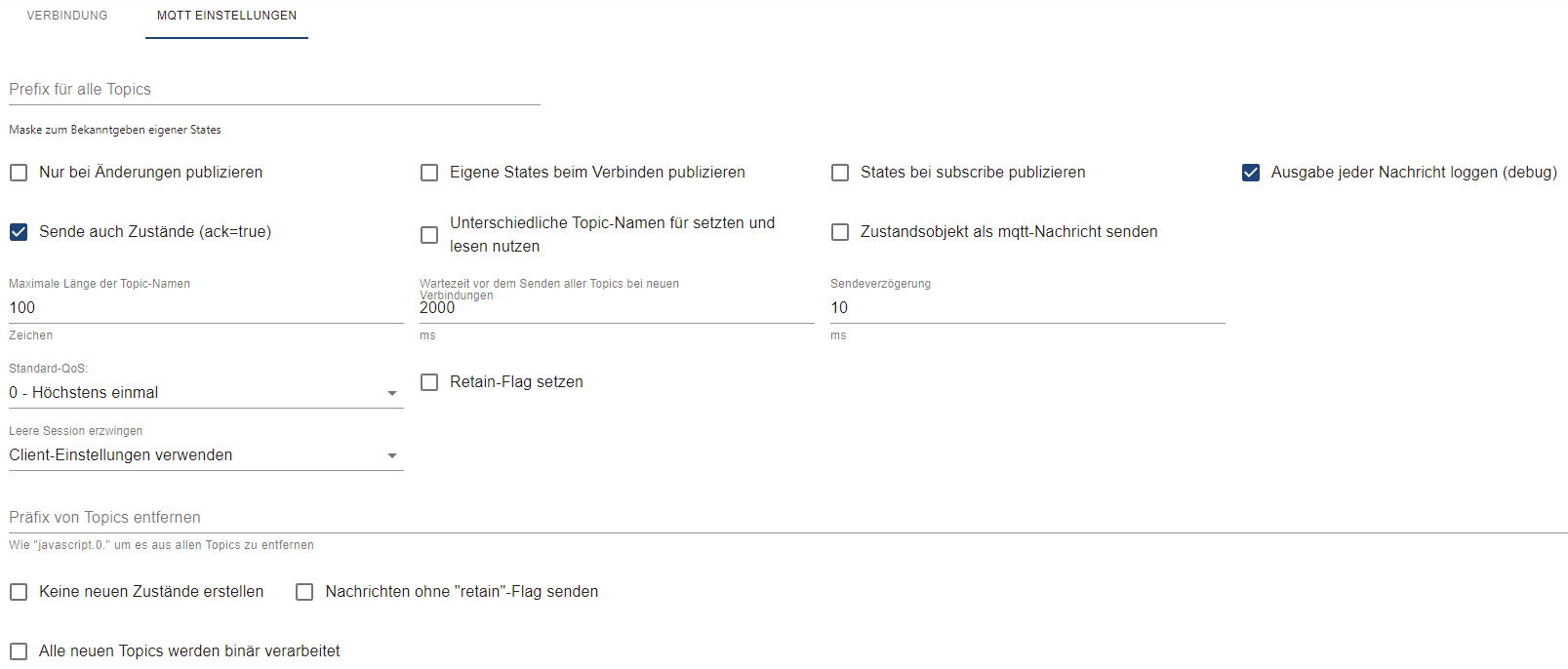
@qqolli Ich habs gerade in einem anderen Thread gepostet. Ich hatte die Meldung damals auch und habe halt den Admin dann hochgezogen. Blöd ist nur, dass mittlerweile im npm wahrscheinlich eine admin 6 Version zu finden ist. Deshalb kann ich Dir noch sagen, dass es
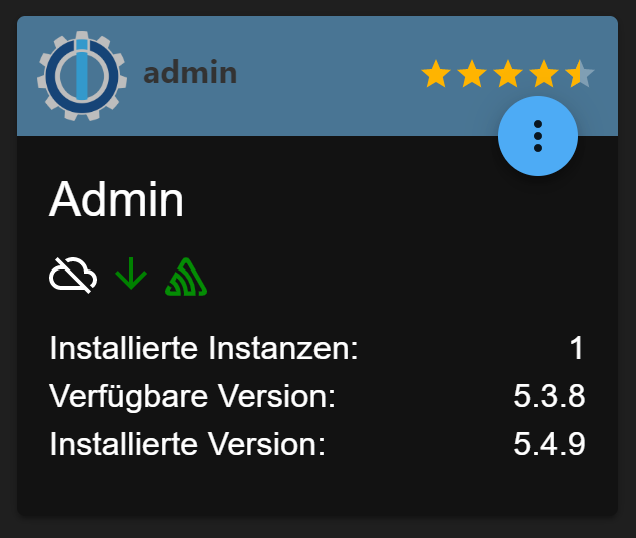
mit 5.4.9 funktioniert und würde Dir diese empfehlen.





Hey! Du scheinst an dieser Unterhaltung interessiert zu sein, hast aber noch kein Konto.
Hast du es satt, bei jedem Besuch durch die gleichen Beiträge zu scrollen? Wenn du dich für ein Konto anmeldest, kommst du immer genau dorthin zurück, wo du zuvor warst, und kannst dich über neue Antworten benachrichtigen lassen (entweder per E-Mail oder Push-Benachrichtigung). Du kannst auch Lesezeichen speichern und Beiträge positiv bewerten, um anderen Community-Mitgliedern deine Wertschätzung zu zeigen.
Mit deinem Input könnte dieser Beitrag noch besser werden 💗
Registrieren Anmelden435
Online33.0k
Benutzer83.5k
Themen1.3m
Beiträge