Skip to content
  • Home
  • Aktuell
  • Tags
  • 0 Ungelesen 0
  • Kategorien
  • Unreplied
  • Beliebt
  • GitHub
  • Docu
  • Hilfe
Skins
  • Light
  • Brite
  • Cerulean
  • Cosmo
  • Flatly
  • Journal
  • Litera
  • Lumen
  • Lux
  • Materia
  • Minty
  • Morph
  • Pulse
  • Sandstone
  • Simplex
  • Sketchy
  • Spacelab
  • United
  • Yeti
  • Zephyr
  • Dark
  • Cyborg
  • Darkly
  • Quartz
  • Slate
  • Solar
  • Superhero
  • Vapor

  • Standard: (Kein Skin)
  • Kein Skin
Einklappen
ioBroker Logo

Community Forum

donate donate
  1. ioBroker Community Home
  2. Deutsch
  3. ioBroker Allgemein
  4. MQTT-Client 4.0.7 - Startet nicht

NEWS

  • Neuer Blogbeitrag: Monatsrückblick - Dezember 2025 🎄
    BluefoxB
    Bluefox
    11
    1
    325

  • Weihnachtsangebot 2025! 🎄
    BluefoxB
    Bluefox
    24
    1
    1.5k

  • UPDATE 31.10.: Amazon Alexa - ioBroker Skill läuft aus ?
    apollon77A
    apollon77
    48
    3
    9.5k

MQTT-Client 4.0.7 - Startet nicht

Geplant Angeheftet Gesperrt Verschoben ioBroker Allgemein
mqtt-client
20 Beiträge 6 Kommentatoren 1.5k Aufrufe 7 Watching
  • Älteste zuerst
  • Neuste zuerst
  • Meiste Stimmen
Antworten
  • In einem neuen Thema antworten
Anmelden zum Antworten
Dieses Thema wurde gelöscht. Nur Nutzer mit entsprechenden Rechten können es sehen.
  • DJMarc75D DJMarc75

    @mahumuc sagte in MQTT-Client 4.0.7 - Startet nicht:

    warum wurde mir das Update überhaupt angezeigt da ich nur stable installieren will

    4.0.7 ist stable !

    Thomas BraunT Online
    Thomas BraunT Online
    Thomas Braun
    Most Active
    schrieb am zuletzt editiert von Thomas Braun
    #10

    @djmarc75

    Stimmt...

    Aber der hat

        "globalDependencies": [
          {
            "admin": ">=5.4.3"
          }
        ],
    

    admin ist aber in stable 5.3.8.
    Entweder kommt der admin in Kürze in passender Version, oder man zieht den mqtt wieder auf eine Vorversion runter.

    Linux-Werkzeugkasten:
    https://forum.iobroker.net/topic/42952/der-kleine-iobroker-linux-werkzeugkasten
    NodeJS Fixer Skript:
    https://forum.iobroker.net/topic/68035/iob-node-fix-skript
    iob_diag: curl -sLf -o diag.sh https://iobroker.net/diag.sh && bash diag.sh

    1 Antwort Letzte Antwort
    0
    • Thomas BraunT Thomas Braun

      @mahumuc sagte in MQTT-Client 4.0.7 - Startet nicht:

      Hallo hier das gleiche, ist vermutlich ne blöde Frage aber warum wurde mir das Update überhaupt angezeigt da ich nur stable installieren will und wie komm ich jetzt zur alten Version ?

      iobroker repo list
      iobroker update -i
      

      zeigen.

      mahuMUCM Offline
      mahuMUCM Offline
      mahuMUC
      schrieb am zuletzt editiert von
      #11

      @thomas-braun said in MQTT-Client 4.0.7 - Startet nicht:

      pi@iobroker131:~ $ iobroker repo list
      stable        : http://download.iobroker.net/sources-dist.json
      beta          : http://download.iobroker.net/sources-dist-latest.json
      
      Active repo(s): stable
      pi@iobroker131:~ $ iobroker update -i
      Used repository: stable
      Adapter    "admin"        : 5.3.8    , installed 5.3.8
      Adapter    "alexa2"       : 3.11.2   , installed 3.11.2
      Adapter    "backitup"     : 2.4.9    , installed 2.4.9
      Adapter    "discovery"    : 3.0.5    , installed 3.0.5
      Adapter    "influxdb"     : 3.1.7    , installed 3.1.7
      Adapter    "iot"          : 1.11.8   , installed 1.11.8
      Adapter    "javascript"   : 5.7.0    , installed 5.7.0
      Controller "js-controller": 4.0.23   , installed 4.0.23
      Adapter    "lgtv"         : 1.1.10   , installed 1.1.10
      Adapter    "luftdaten"    : 2.2.4    , installed 2.2.4
      Adapter    "mqtt"         : 4.0.7    , installed 4.0.7
      Adapter    "net-tools"    : 0.2.0    , installed 0.2.0
      Adapter    "nina"         : 0.0.25   , installed 0.0.25
      Adapter    "odl"          : 2.0.5    , installed 2.0.5
      Adapter    "shelly"       : 5.3.2    , installed 5.3.2
      Adapter    "simple-api"   : 2.7.0    , installed 2.7.0
      Adapter    "socketio"     : 4.2.0    , installed 4.2.0
      Adapter    "sonoff"       : 2.5.1    , installed 2.5.1
      Adapter    "telegram"     : 1.13.0   , installed 1.13.0
      Adapter    "tr-064"       : 4.2.16   , installed 4.2.16
      Adapter    "vis"          : 1.4.15   , installed 1.4.15
      Adapter    "vis-hqwidgets": 1.2.0    , installed 1.2.0
      Adapter    "web"          : 4.3.0    , installed 4.3.0
      Adapter    "windows-control": 0.1.5  , installed 0.1.5
      Adapter    "ws"           : 1.3.0    , installed 1.3.0
      Adapter    "zigbee"       : 1.7.5    , installed 1.7.5
      
      Thomas BraunT 1 Antwort Letzte Antwort
      0
      • mahuMUCM mahuMUC

        @thomas-braun said in MQTT-Client 4.0.7 - Startet nicht:

        pi@iobroker131:~ $ iobroker repo list
        stable        : http://download.iobroker.net/sources-dist.json
        beta          : http://download.iobroker.net/sources-dist-latest.json
        
        Active repo(s): stable
        pi@iobroker131:~ $ iobroker update -i
        Used repository: stable
        Adapter    "admin"        : 5.3.8    , installed 5.3.8
        Adapter    "alexa2"       : 3.11.2   , installed 3.11.2
        Adapter    "backitup"     : 2.4.9    , installed 2.4.9
        Adapter    "discovery"    : 3.0.5    , installed 3.0.5
        Adapter    "influxdb"     : 3.1.7    , installed 3.1.7
        Adapter    "iot"          : 1.11.8   , installed 1.11.8
        Adapter    "javascript"   : 5.7.0    , installed 5.7.0
        Controller "js-controller": 4.0.23   , installed 4.0.23
        Adapter    "lgtv"         : 1.1.10   , installed 1.1.10
        Adapter    "luftdaten"    : 2.2.4    , installed 2.2.4
        Adapter    "mqtt"         : 4.0.7    , installed 4.0.7
        Adapter    "net-tools"    : 0.2.0    , installed 0.2.0
        Adapter    "nina"         : 0.0.25   , installed 0.0.25
        Adapter    "odl"          : 2.0.5    , installed 2.0.5
        Adapter    "shelly"       : 5.3.2    , installed 5.3.2
        Adapter    "simple-api"   : 2.7.0    , installed 2.7.0
        Adapter    "socketio"     : 4.2.0    , installed 4.2.0
        Adapter    "sonoff"       : 2.5.1    , installed 2.5.1
        Adapter    "telegram"     : 1.13.0   , installed 1.13.0
        Adapter    "tr-064"       : 4.2.16   , installed 4.2.16
        Adapter    "vis"          : 1.4.15   , installed 1.4.15
        Adapter    "vis-hqwidgets": 1.2.0    , installed 1.2.0
        Adapter    "web"          : 4.3.0    , installed 4.3.0
        Adapter    "windows-control": 0.1.5  , installed 0.1.5
        Adapter    "ws"           : 1.3.0    , installed 1.3.0
        Adapter    "zigbee"       : 1.7.5    , installed 1.7.5
        
        Thomas BraunT Online
        Thomas BraunT Online
        Thomas Braun
        Most Active
        schrieb am zuletzt editiert von
        #12

        @mahumuc

        iobroker upgrade mqtt@3.0.6
        

        Linux-Werkzeugkasten:
        https://forum.iobroker.net/topic/42952/der-kleine-iobroker-linux-werkzeugkasten
        NodeJS Fixer Skript:
        https://forum.iobroker.net/topic/68035/iob-node-fix-skript
        iob_diag: curl -sLf -o diag.sh https://iobroker.net/diag.sh && bash diag.sh

        mahuMUCM 1 Antwort Letzte Antwort
        1
        • Thomas BraunT Thomas Braun

          @mahumuc

          iobroker upgrade mqtt@3.0.6
          
          mahuMUCM Offline
          mahuMUCM Offline
          mahuMUC
          schrieb am zuletzt editiert von
          #13

          @thomas-braun said in MQTT-Client 4.0.7 - Startet nicht:

          iobroker upgrade mqtt@3.0.6

          This downgrade of "mqtt" will at least remove the following changes:
          ==========================================================================
          -> 4.0.7
          Remove unneeded dependency
          
          -> 4.0.6
          Corrected sentry issue
          
          -> 4.0.4
          lower loglevel for log messages about messages with unknown message IDs to info
          
          -> 4.0.3
          Corrected publish states on start by client
          
          -> 4.0.2
          Added possibility to publish own states as client, additionally to `mqtt.x`
          
          -> 4.0.1
          Fix Number detection for values
          
          -> 4.0.0
          BREAKING CHANGE: in client mode only "mqtt.X.*" states will be subscribed
          BREAKING CHANGE: in server mode by empty "publish" setting no states will be sub                                                                                                                 scribed. Early all states were subscribed
          Added new option: All new topics will be processed as binary
          ==========================================================================
          
          BE CAREFUL: THIS IS A MAJOR DOWNGRADE, WHICH WILL MOST LIKELY INTRODUCE BREAKING                                                                                                                  CHANGES!
          Would you like to downgrade mqtt from @4.0.7 to @3.0.6 now? [(y)es, (n)o]:


          Bevor ich mir jetzt was kaputt mache, wie wahrscheinlich ist es dass die admin 5.4.3 demnächst stable wird ?

          Danke

          Thomas BraunT 1 Antwort Letzte Antwort
          0
          • mahuMUCM mahuMUC

            @thomas-braun said in MQTT-Client 4.0.7 - Startet nicht:

            iobroker upgrade mqtt@3.0.6

            This downgrade of "mqtt" will at least remove the following changes:
            ==========================================================================
            -> 4.0.7
            Remove unneeded dependency
            
            -> 4.0.6
            Corrected sentry issue
            
            -> 4.0.4
            lower loglevel for log messages about messages with unknown message IDs to info
            
            -> 4.0.3
            Corrected publish states on start by client
            
            -> 4.0.2
            Added possibility to publish own states as client, additionally to `mqtt.x`
            
            -> 4.0.1
            Fix Number detection for values
            
            -> 4.0.0
            BREAKING CHANGE: in client mode only "mqtt.X.*" states will be subscribed
            BREAKING CHANGE: in server mode by empty "publish" setting no states will be sub                                                                                                                 scribed. Early all states were subscribed
            Added new option: All new topics will be processed as binary
            ==========================================================================
            
            BE CAREFUL: THIS IS A MAJOR DOWNGRADE, WHICH WILL MOST LIKELY INTRODUCE BREAKING                                                                                                                  CHANGES!
            Would you like to downgrade mqtt from @4.0.7 to @3.0.6 now? [(y)es, (n)o]:


            Bevor ich mir jetzt was kaputt mache, wie wahrscheinlich ist es dass die admin 5.4.3 demnächst stable wird ?

            Danke

            Thomas BraunT Online
            Thomas BraunT Online
            Thomas Braun
            Most Active
            schrieb am zuletzt editiert von
            #14

            @mahumuc sagte in MQTT-Client 4.0.7 - Startet nicht:

            wie wahrscheinlich ist es dass die admin 5.4.3 demnächst stable wird ?

            Ich mache keine Releases, kann ich dir also nicht beantworten.

            Linux-Werkzeugkasten:
            https://forum.iobroker.net/topic/42952/der-kleine-iobroker-linux-werkzeugkasten
            NodeJS Fixer Skript:
            https://forum.iobroker.net/topic/68035/iob-node-fix-skript
            iob_diag: curl -sLf -o diag.sh https://iobroker.net/diag.sh && bash diag.sh

            1 Antwort Letzte Antwort
            0
            • Thomas BraunT Thomas Braun

              @mahumuc sagte in MQTT-Client 4.0.7 - Startet nicht:

              Hallo hier das gleiche, ist vermutlich ne blöde Frage aber warum wurde mir das Update überhaupt angezeigt da ich nur stable installieren will und wie komm ich jetzt zur alten Version ?

              iobroker repo list
              iobroker update -i
              

              zeigen.

              qqolliQ Offline
              qqolliQ Offline
              qqolli
              schrieb am zuletzt editiert von
              #15

              @thomas-braun
              Komisch, bei zeigt er so etwas an:

              pi@ioBroker:~ $ iobroker repro list
              iobroker [command]
              
              Commands:
                iobroker setup                                               Setup ioBroker
                iobroker start [all|<adapter>.<instance>]                    Starts the js-controller or a specified adapter instance
                iobroker stop [<adapter>.<instance>]                         stops the js-controller or a specified adapter instance
                iobroker restart [<adapter>.<instance>]                      Restarts js-controller or a specified adapter instance  [aliases: r]
                iobroker debug <adapter>[.<instance>]                        Starts a Node.js debugging session for the adapter instance
                iobroker info                                                Shows the host info
                iobroker logs [<adapter>]                                    Monitor log
                iobroker add <adapter> [desiredNumber]                       Add instance of adapter  [aliases: a]
                iobroker install <adapter>                                   Installs a specified adapter  [aliases: i]
                iobroker rebuild [<module>]                                  Rebuild all native modules or path
                iobroker url <url> [<name>]                                  Install adapter from specified url, e.g. GitHub
                iobroker del <adapter>                                       Remove adapter and all instances from this host  [aliases: delete]
                iobroker del <adapter>.<instance>                            Remove adapter instance  [aliases: delete]
                iobroker update [<repositoryUrl>]                            Update repository and list adapters
                iobroker upgrade                                             Upgrade management
                iobroker upload [all|<adapter>]                              Upload management  [aliases: u]
                iobroker object                                              Object management  [aliases: o]
                iobroker state                                               State management  [aliases: s]
                iobroker message <adapter>[.instance] <command> [<message>]  Send message to adapter instance/s
                iobroker list <type> [<filter>]                              List all entries, like objects
                iobroker chmod <mode> <file>                                 Change file rights
                iobroker chown <user> <group> <file>                         Change file ownership
                iobroker touch <file>                                        Touch file
                iobroker rm <file>                                           Remove file
                iobroker file                                                File management
                iobroker user                                                User commands
                iobroker group                                               group management
                iobroker host <hostname>                                     Set host to given hostname
                iobroker set <adapter>.<instance>                            Change settings of adapter config
                iobroker license <license.file or license.text>              Update license by given file
                iobroker cert                                                Certificate management
                iobroker clean <yes>                                         Clears all objects and states
                iobroker backup                                              Create backup
                iobroker restore <backup name or path>                       Restore a specified backup
                iobroker validate <backup name or path>                      Validate a specified backup
                iobroker status [all|<adapter>.<instance>]                   Status of ioBroker or adapter instance  [aliases: isrun]
                iobroker repo [<name>]                                       Show repo information
                iobroker uuid                                                Show uuid of the installation  [aliases: id]
                iobroker unsetup                                             Reset license, installation secret and language
                iobroker fix                                                 Execute the installation fixer script, this updates your ioBroker installation
                iobroker multihost                                           Multihost management
                iobroker compact                                             compact group management
                iobroker plugin                                              Plugin management
                iobroker version [<adapter>]                                 Show version of js-controller or specified adapter  [aliases: v]
              
              Options:
                --help  Show help  [boolean]
              

              Ist da was nicht installiert?

              DJMarc75D Thomas BraunT 2 Antworten Letzte Antwort
              0
              • qqolliQ qqolli

                @thomas-braun
                Komisch, bei zeigt er so etwas an:

                pi@ioBroker:~ $ iobroker repro list
                iobroker [command]
                
                Commands:
                  iobroker setup                                               Setup ioBroker
                  iobroker start [all|<adapter>.<instance>]                    Starts the js-controller or a specified adapter instance
                  iobroker stop [<adapter>.<instance>]                         stops the js-controller or a specified adapter instance
                  iobroker restart [<adapter>.<instance>]                      Restarts js-controller or a specified adapter instance  [aliases: r]
                  iobroker debug <adapter>[.<instance>]                        Starts a Node.js debugging session for the adapter instance
                  iobroker info                                                Shows the host info
                  iobroker logs [<adapter>]                                    Monitor log
                  iobroker add <adapter> [desiredNumber]                       Add instance of adapter  [aliases: a]
                  iobroker install <adapter>                                   Installs a specified adapter  [aliases: i]
                  iobroker rebuild [<module>]                                  Rebuild all native modules or path
                  iobroker url <url> [<name>]                                  Install adapter from specified url, e.g. GitHub
                  iobroker del <adapter>                                       Remove adapter and all instances from this host  [aliases: delete]
                  iobroker del <adapter>.<instance>                            Remove adapter instance  [aliases: delete]
                  iobroker update [<repositoryUrl>]                            Update repository and list adapters
                  iobroker upgrade                                             Upgrade management
                  iobroker upload [all|<adapter>]                              Upload management  [aliases: u]
                  iobroker object                                              Object management  [aliases: o]
                  iobroker state                                               State management  [aliases: s]
                  iobroker message <adapter>[.instance] <command> [<message>]  Send message to adapter instance/s
                  iobroker list <type> [<filter>]                              List all entries, like objects
                  iobroker chmod <mode> <file>                                 Change file rights
                  iobroker chown <user> <group> <file>                         Change file ownership
                  iobroker touch <file>                                        Touch file
                  iobroker rm <file>                                           Remove file
                  iobroker file                                                File management
                  iobroker user                                                User commands
                  iobroker group                                               group management
                  iobroker host <hostname>                                     Set host to given hostname
                  iobroker set <adapter>.<instance>                            Change settings of adapter config
                  iobroker license <license.file or license.text>              Update license by given file
                  iobroker cert                                                Certificate management
                  iobroker clean <yes>                                         Clears all objects and states
                  iobroker backup                                              Create backup
                  iobroker restore <backup name or path>                       Restore a specified backup
                  iobroker validate <backup name or path>                      Validate a specified backup
                  iobroker status [all|<adapter>.<instance>]                   Status of ioBroker or adapter instance  [aliases: isrun]
                  iobroker repo [<name>]                                       Show repo information
                  iobroker uuid                                                Show uuid of the installation  [aliases: id]
                  iobroker unsetup                                             Reset license, installation secret and language
                  iobroker fix                                                 Execute the installation fixer script, this updates your ioBroker installation
                  iobroker multihost                                           Multihost management
                  iobroker compact                                             compact group management
                  iobroker plugin                                              Plugin management
                  iobroker version [<adapter>]                                 Show version of js-controller or specified adapter  [aliases: v]
                
                Options:
                  --help  Show help  [boolean]
                

                Ist da was nicht installiert?

                DJMarc75D Offline
                DJMarc75D Offline
                DJMarc75
                schrieb am zuletzt editiert von DJMarc75
                #16

                @qqolli repro geht nicht "repo" :grinning:

                iobroker repo list
                

                Lehrling seit 1975 !!!
                Beitrag geholfen ? dann gerne ein upvote rechts unten im Beitrag klicken ;)
                https://forum.iobroker.net/topic/51555/hinweise-f%C3%BCr-gute-forenbeitr%C3%A4ge

                qqolliQ 1 Antwort Letzte Antwort
                0
                • qqolliQ qqolli

                  @thomas-braun
                  Komisch, bei zeigt er so etwas an:

                  pi@ioBroker:~ $ iobroker repro list
                  iobroker [command]
                  
                  Commands:
                    iobroker setup                                               Setup ioBroker
                    iobroker start [all|<adapter>.<instance>]                    Starts the js-controller or a specified adapter instance
                    iobroker stop [<adapter>.<instance>]                         stops the js-controller or a specified adapter instance
                    iobroker restart [<adapter>.<instance>]                      Restarts js-controller or a specified adapter instance  [aliases: r]
                    iobroker debug <adapter>[.<instance>]                        Starts a Node.js debugging session for the adapter instance
                    iobroker info                                                Shows the host info
                    iobroker logs [<adapter>]                                    Monitor log
                    iobroker add <adapter> [desiredNumber]                       Add instance of adapter  [aliases: a]
                    iobroker install <adapter>                                   Installs a specified adapter  [aliases: i]
                    iobroker rebuild [<module>]                                  Rebuild all native modules or path
                    iobroker url <url> [<name>]                                  Install adapter from specified url, e.g. GitHub
                    iobroker del <adapter>                                       Remove adapter and all instances from this host  [aliases: delete]
                    iobroker del <adapter>.<instance>                            Remove adapter instance  [aliases: delete]
                    iobroker update [<repositoryUrl>]                            Update repository and list adapters
                    iobroker upgrade                                             Upgrade management
                    iobroker upload [all|<adapter>]                              Upload management  [aliases: u]
                    iobroker object                                              Object management  [aliases: o]
                    iobroker state                                               State management  [aliases: s]
                    iobroker message <adapter>[.instance] <command> [<message>]  Send message to adapter instance/s
                    iobroker list <type> [<filter>]                              List all entries, like objects
                    iobroker chmod <mode> <file>                                 Change file rights
                    iobroker chown <user> <group> <file>                         Change file ownership
                    iobroker touch <file>                                        Touch file
                    iobroker rm <file>                                           Remove file
                    iobroker file                                                File management
                    iobroker user                                                User commands
                    iobroker group                                               group management
                    iobroker host <hostname>                                     Set host to given hostname
                    iobroker set <adapter>.<instance>                            Change settings of adapter config
                    iobroker license <license.file or license.text>              Update license by given file
                    iobroker cert                                                Certificate management
                    iobroker clean <yes>                                         Clears all objects and states
                    iobroker backup                                              Create backup
                    iobroker restore <backup name or path>                       Restore a specified backup
                    iobroker validate <backup name or path>                      Validate a specified backup
                    iobroker status [all|<adapter>.<instance>]                   Status of ioBroker or adapter instance  [aliases: isrun]
                    iobroker repo [<name>]                                       Show repo information
                    iobroker uuid                                                Show uuid of the installation  [aliases: id]
                    iobroker unsetup                                             Reset license, installation secret and language
                    iobroker fix                                                 Execute the installation fixer script, this updates your ioBroker installation
                    iobroker multihost                                           Multihost management
                    iobroker compact                                             compact group management
                    iobroker plugin                                              Plugin management
                    iobroker version [<adapter>]                                 Show version of js-controller or specified adapter  [aliases: v]
                  
                  Options:
                    --help  Show help  [boolean]
                  

                  Ist da was nicht installiert?

                  Thomas BraunT Online
                  Thomas BraunT Online
                  Thomas Braun
                  Most Active
                  schrieb am zuletzt editiert von
                  #17

                  @qqolli sagte in MQTT-Client 4.0.7 - Startet nicht:

                  Ist da was nicht installiert?

                  Nein, du hast nicht richtig geschaut.
                  Das heißt repo, nicht repro.

                  Linux-Werkzeugkasten:
                  https://forum.iobroker.net/topic/42952/der-kleine-iobroker-linux-werkzeugkasten
                  NodeJS Fixer Skript:
                  https://forum.iobroker.net/topic/68035/iob-node-fix-skript
                  iob_diag: curl -sLf -o diag.sh https://iobroker.net/diag.sh && bash diag.sh

                  1 Antwort Letzte Antwort
                  0
                  • DJMarc75D DJMarc75

                    @qqolli repro geht nicht "repo" :grinning:

                    iobroker repo list
                    
                    qqolliQ Offline
                    qqolliQ Offline
                    qqolli
                    schrieb am zuletzt editiert von
                    #18

                    @djmarc75
                    Tja, wer lesen kann ... Danke!

                    Thomas BraunT 1 Antwort Letzte Antwort
                    0
                    • qqolliQ qqolli

                      @djmarc75
                      Tja, wer lesen kann ... Danke!

                      Thomas BraunT Online
                      Thomas BraunT Online
                      Thomas Braun
                      Most Active
                      schrieb am zuletzt editiert von
                      #19

                      @qqolli

                      https://github.com/ioBroker/ioBroker.mqtt/issues/308

                      Linux-Werkzeugkasten:
                      https://forum.iobroker.net/topic/42952/der-kleine-iobroker-linux-werkzeugkasten
                      NodeJS Fixer Skript:
                      https://forum.iobroker.net/topic/68035/iob-node-fix-skript
                      iob_diag: curl -sLf -o diag.sh https://iobroker.net/diag.sh && bash diag.sh

                      1 Antwort Letzte Antwort
                      2
                      • qqolliQ qqolli

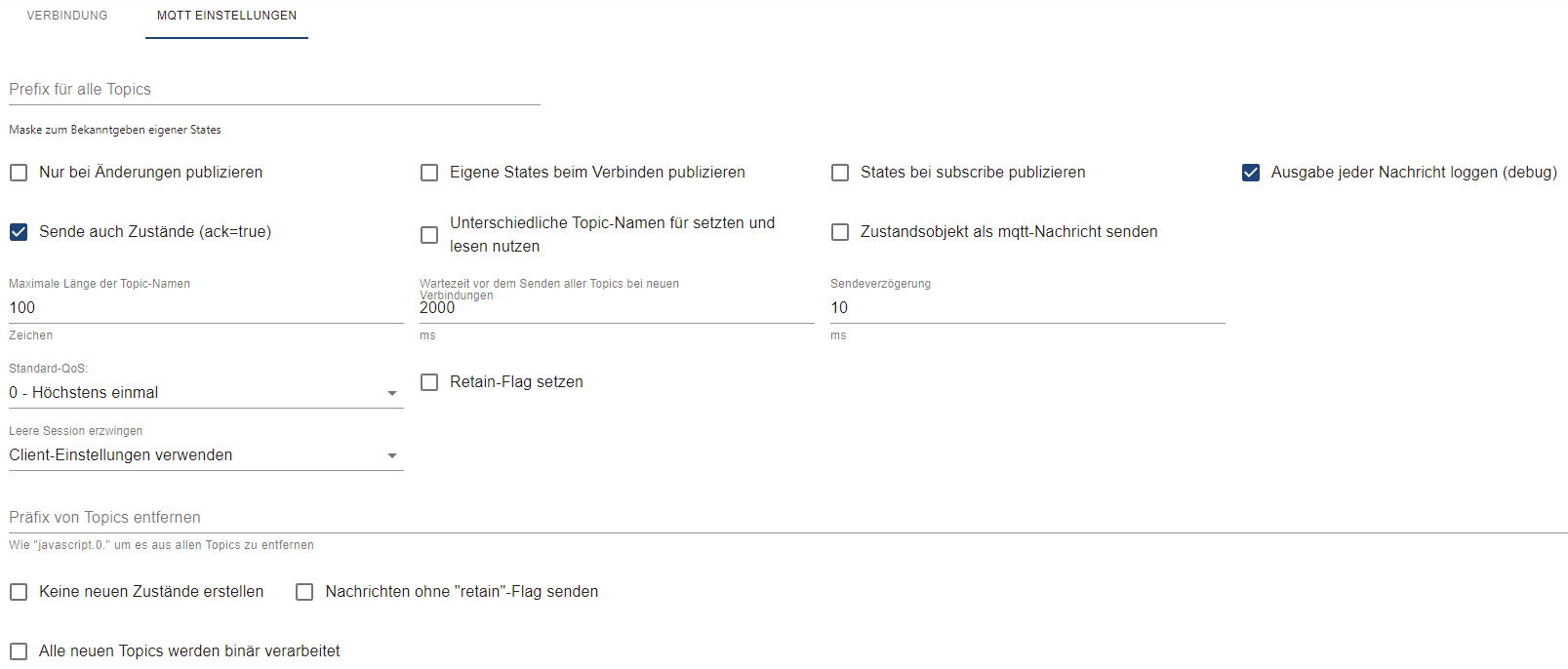
                        Hallo zusammen,

                        habe gerade das Adapter-Update gemacht und soweit ich verstanden hatte, sollte man das Password neu eingeben. Aber da ich mal wieder zu schnell war, habe ich bestimmt was übersehen.

                        Adapter bleibt nämlich rot
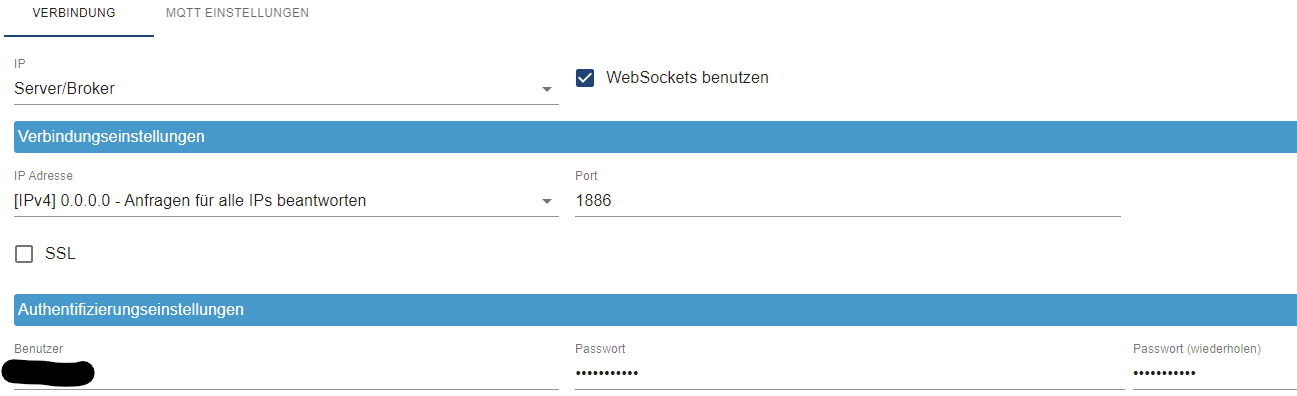
                        98dbddec-3a6a-4c9d-9094-fcfeb9bce87d-image.png

                        20dc9b73-e15b-4957-a26c-50f37c0dd83d-image.png

                        mickymM Online
                        mickymM Online
                        mickym
                        Most Active
                        schrieb am zuletzt editiert von
                        #20

                        @qqolli Ich habs gerade in einem anderen Thread gepostet. Ich hatte die Meldung damals auch und habe halt den Admin dann hochgezogen. Blöd ist nur, dass mittlerweile im npm wahrscheinlich eine admin 6 Version zu finden ist. Deshalb kann ich Dir noch sagen, dass es
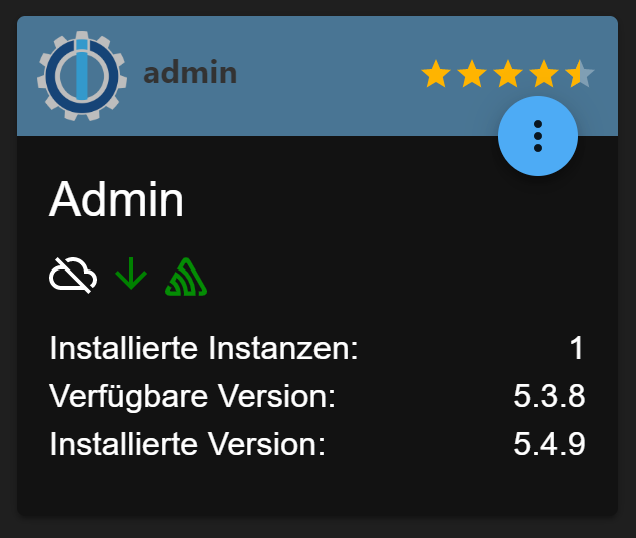
                        c1077df8-0e96-41a5-99a9-f049643b18ee-image.png
                        mit 5.4.9 funktioniert und würde Dir diese empfehlen.

                        Jeder Flow bzw. jedes Script, das ich hier poste implementiert jeder auf eigene Gefahr. Flows und Scripts können Fehler aufweisen und weder der Seitenbetreiber noch ich persönlich können hierfür haftbar gemacht werden. Das gleiche gilt für Empfehlungen aller Art.

                        1 Antwort Letzte Antwort
                        1
                        Antworten
                        • In einem neuen Thema antworten
                        Anmelden zum Antworten
                        • Älteste zuerst
                        • Neuste zuerst
                        • Meiste Stimmen


                        Support us

                        ioBroker
                        Community Adapters
                        Donate
                        FAQ Cloud / IOT
                        HowTo: Node.js-Update
                        HowTo: Backup/Restore
                        Downloads
                        BLOG

                        531

                        Online

                        32.5k

                        Benutzer

                        81.7k

                        Themen

                        1.3m

                        Beiträge
                        Community
                        Impressum | Datenschutz-Bestimmungen | Nutzungsbedingungen | Einwilligungseinstellungen
                        ioBroker Community 2014-2025
                        logo
                        • Anmelden

                        • Du hast noch kein Konto? Registrieren

                        • Anmelden oder registrieren, um zu suchen
                        • Erster Beitrag
                          Letzter Beitrag
                        0
                        • Home
                        • Aktuell
                        • Tags
                        • Ungelesen 0
                        • Kategorien
                        • Unreplied
                        • Beliebt
                        • GitHub
                        • Docu
                        • Hilfe