




Updates funktionieren nicht mehr
-
Jetzt ruf ich den Admin Adapter mit 192.168.0.73.8181 auf. Sind diese Fehlermeldungen normal?
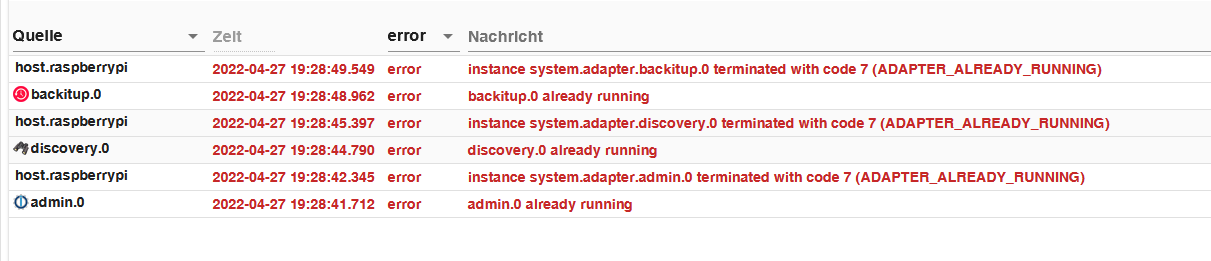
Die Zeitzone scheint schonmal falsch zu sein.
-
Die Zeitzone scheint schonmal falsch zu sein.
Die Zeitzone passt jetzt schonmal
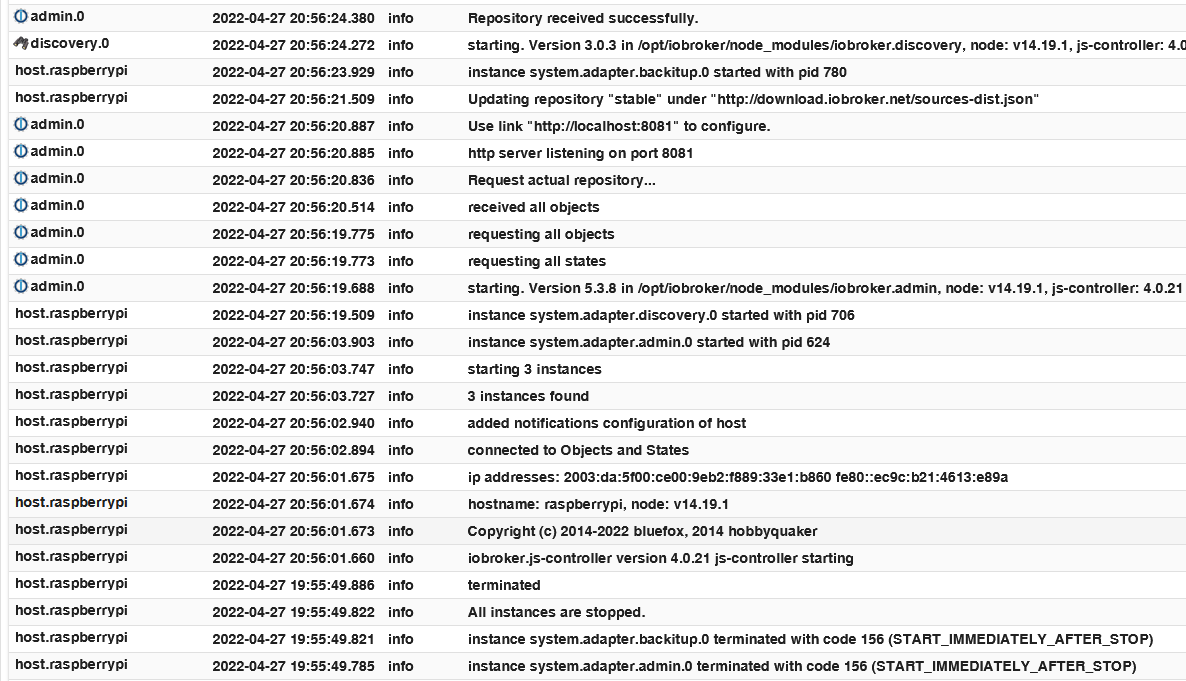
Soll ich jetzt das Restore über den backitup-Adapter machen oder manuell, also die Backup-Datei nach /opt/iobroker/backups kopieren und dann mit
iobroker restore 0starten?
-
Die Zeitzone passt jetzt schonmal
Soll ich jetzt das Restore über den backitup-Adapter machen oder manuell, also die Backup-Datei nach /opt/iobroker/backups kopieren und dann mit
iobroker restore 0starten?
Ich mache meine Backups immer über den Adapter.
Bitte keine Screenshots des Logs, bitte überiobroker logs --watchaus der Konsole kopieren und in CodeTags eingebettet hier rein.
-
Die Zeitzone passt jetzt schonmal
Soll ich jetzt das Restore über den backitup-Adapter machen oder manuell, also die Backup-Datei nach /opt/iobroker/backups kopieren und dann mit
iobroker restore 0starten?
@mfroeschl am besten über Backitup, das genauso konfiguriert wird wie bisher, das letzte Backup vom Original Speicherort wiederherstellen.
Wenn manuell dann mit den Dateinamen aufrufen
-
@mfroeschl am besten über Backitup, das genauso konfiguriert wird wie bisher, das letzte Backup vom Original Speicherort wiederherstellen.
Wenn manuell dann mit den Dateinamen aufrufen
Hab das Backup jetzt über den Adapter gestartet.
pi@raspberrypi:~ $ iobroker logs --watch
2022-04-27 21:13:40.309  - info: backitup.0 (923) cleaned everything up...
2022-04-27 21:13:40.301  - info: host.raspberrypi received SIGTERM
2022-04-27 21:13:40.304  - info: admin.0 (624) terminating http server on port 8081
2022-04-27 21:13:40.319  - info: host.raspberrypi stopInstance system.adapter.admin.0 (force=false, proc                              ess=true)
2022-04-27 21:13:40.320  - info: host.raspberrypi stopInstance system.adapter.discovery.0 (force=false,                               process=true)
2022-04-27 21:13:40.322  - info: host.raspberrypi stopInstance system.adapter.backitup.0 (force=false, p                              rocess=true)
2022-04-27 21:13:40.357  - info: admin.0 (624) Got terminate signal TERMINATE_YOURSELF
2022-04-27 21:13:40.359  - info: discovery.0 (706) Got terminate signal TERMINATE_YOURSELF
2022-04-27 21:13:40.365  - info: backitup.0 (923) Got terminate signal TERMINATE_YOURSELF
2022-04-27 21:13:40.370  - info: admin.0 (624) Terminated (START_IMMEDIATELY_AFTER_STOP): Without reason
2022-04-27 21:13:40.371  - info: backitup.0 (923) Terminated (START_IMMEDIATELY_AFTER_STOP): Without rea                              son
2022-04-27 21:13:40.373  - info: host.raspberrypi stopInstance system.adapter.admin.0 send kill signal
2022-04-27 21:13:40.378  - info: discovery.0 (706) Terminated (START_IMMEDIATELY_AFTER_STOP): Without re                              ason
2022-04-27 21:13:40.381  - info: host.raspberrypi stopInstance system.adapter.discovery.0 send kill sign                              al
2022-04-27 21:13:40.383  - info: host.raspberrypi stopInstance system.adapter.backitup.0 send kill signa                              l
2022-04-27 21:13:40.309  - info: backitup.0 (923) cleaned everything up...
2022-04-27 21:13:40.301  - info: host.raspberrypi received SIGTERM
2022-04-27 21:13:40.304  - info: admin.0 (624) terminating http server on port 8081
2022-04-27 21:13:40.319  - info: host.raspberrypi stopInstance system.adapter.admin.0 (force=false, proc                              ess=true)
2022-04-27 21:13:40.320  - info: host.raspberrypi stopInstance system.adapter.discovery.0 (force=false,                               process=true)
2022-04-27 21:13:40.322  - info: host.raspberrypi stopInstance system.adapter.backitup.0 (force=false, p                              rocess=true)
2022-04-27 21:13:40.357  - info: admin.0 (624) Got terminate signal TERMINATE_YOURSELF
2022-04-27 21:13:40.359  - info: discovery.0 (706) Got terminate signal TERMINATE_YOURSELF
2022-04-27 21:13:40.365  - info: backitup.0 (923) Got terminate signal TERMINATE_YOURSELF
2022-04-27 21:13:40.370  - info: admin.0 (624) Terminated (START_IMMEDIATELY_AFTER_STOP): Without reason
2022-04-27 21:13:40.371  - info: backitup.0 (923) Terminated (START_IMMEDIATELY_AFTER_STOP): Without rea                              son
2022-04-27 21:13:40.373  - info: host.raspberrypi stopInstance system.adapter.admin.0 send kill signal
2022-04-27 21:13:40.378  - info: discovery.0 (706) Terminated (START_IMMEDIATELY_AFTER_STOP): Without re                              ason
2022-04-27 21:13:40.381  - info: host.raspberrypi stopInstance system.adapter.discovery.0 send kill sign                              al
2022-04-27 21:13:40.383  - info: host.raspberrypi stopInstance system.adapter.backitup.0 send kill signa                              l
2022-04-27 21:13:41.083  - info: host.raspberrypi instance system.adapter.admin.0 terminated with code 1                              56 (START_IMMEDIATELY_AFTER_STOP)
2022-04-27 21:13:41.087  - info: host.raspberrypi instance system.adapter.backitup.0 terminated with cod                              e 156 (START_IMMEDIATELY_AFTER_STOP)
2022-04-27 21:13:41.089  - info: host.raspberrypi instance system.adapter.discovery.0 terminated with co                              de 156 (START_IMMEDIATELY_AFTER_STOP)
2022-04-27 21:13:41.091  - info: host.raspberrypi All instances are stopped.
2022-04-27 21:13:41.168  - info: host.raspberrypi terminated
2022-04-27 21:13:41.083  - info: host.raspberrypi instance system.adapter.admin.0 terminated with code 1                              56 (START_IMMEDIATELY_AFTER_STOP)
2022-04-27 21:13:41.087  - info: host.raspberrypi instance system.adapter.backitup.0 terminated with cod                              e 156 (START_IMMEDIATELY_AFTER_STOP)
2022-04-27 21:13:41.089  - info: host.raspberrypi instance system.adapter.discovery.0 terminated with co                              de 156 (START_IMMEDIATELY_AFTER_STOP)
2022-04-27 21:13:41.091  - info: host.raspberrypi All instances are stopped.
2022-04-27 21:13:41.168  - info: host.raspberrypi terminated
2022-04-27 21:17:44.858  - info: host.raspberrypi iobroker.js-controller version 4.0.21 js-controller starting
2022-04-27 21:17:44.870  - info: host.raspberrypi Copyright (c) 2014-2022 bluefox, 2014 hobbyquaker
2022-04-27 21:17:44.872  - info: host.raspberrypi hostname: raspberrypi, node: v14.19.1
2022-04-27 21:17:44.873  - info: host.raspberrypi ip addresses: 192.168.0.73 2003:da:5f00:ce00:9eb2:f889:33e1:b860 fe80::ec9c:b21:4613:e89a
2022-04-27 21:17:44.858  - info: host.raspberrypi iobroker.js-controller version 4.0.21 js-controller starting
2022-04-27 21:17:44.870  - info: host.raspberrypi Copyright (c) 2014-2022 bluefox, 2014 hobbyquaker
2022-04-27 21:17:44.872  - info: host.raspberrypi hostname: raspberrypi, node: v14.19.1
2022-04-27 21:17:44.873  - info: host.raspberrypi ip addresses: 192.168.0.73 2003:da:5f00:ce00:9eb2:f889:33e1:b860 fe80::ec9c:b21:4613:e89a
2022-04-27 21:18:14.908  - error: host.raspberrypi No connection to databases possible, restart
2022-04-27 21:18:14.929  - info: host.raspberrypi iobroker _restart
2022-04-27 21:18:14.908  - error: host.raspberrypi No connection to databases possible, restart
2022-04-27 21:18:14.929  - info: host.raspberrypi iobroker _restart
2022-04-27 21:18:21.502  - info: host.raspberrypi iobroker.js-controller version 4.0.21 js-controller starting
2022-04-27 21:18:21.514  - info: host.raspberrypi Copyright (c) 2014-2022 bluefox, 2014 hobbyquaker
2022-04-27 21:18:21.516  - info: host.raspberrypi hostname: raspberrypi, node: v14.19.1
2022-04-27 21:18:21.517  - info: host.raspberrypi ip addresses: 192.168.0.73 2003:da:5f00:ce00:9eb2:f889:33e1:b860 fe80::ec9c:b21:4613:e89a
2022-04-27 21:18:21.502  - info: host.raspberrypi iobroker.js-controller version 4.0.21 js-controller starting
2022-04-27 21:18:21.514  - info: host.raspberrypi Copyright (c) 2014-2022 bluefox, 2014 hobbyquaker
2022-04-27 21:18:21.516  - info: host.raspberrypi hostname: raspberrypi, node: v14.19.1
2022-04-27 21:18:21.517  - info: host.raspberrypi ip addresses: 192.168.0.73 2003:da:5f00:ce00:9eb2:f889:33e1:b860 fe80::ec9c:b21:4613:e89a
2022-04-27 21:18:51.552  - error: host.raspberrypi No connection to databases possible, restart
2022-04-27 21:18:51.572  - info: host.raspberrypi iobroker _restart
2022-04-27 21:18:51.552  - error: host.raspberrypi No connection to databases possible, restart
2022-04-27 21:18:51.572  - info: host.raspberrypi iobroker _restart
2022-04-27 21:18:57.999  - info: host.raspberrypi iobroker.js-controller version 4.0.21 js-controller starting
2022-04-27 21:18:58.011  - info: host.raspberrypi Copyright (c) 2014-2022 bluefox, 2014 hobbyquaker
2022-04-27 21:18:58.013  - info: host.raspberrypi hostname: raspberrypi, node: v14.19.1
2022-04-27 21:18:58.014  - info: host.raspberrypi ip addresses: 192.168.0.73 2003:da:5f00:ce00:9eb2:f889:33e1:b860 fe80::ec9c:b21:4613:e89a
2022-04-27 21:18:57.999  - info: host.raspberrypi iobroker.js-controller version 4.0.21 js-controller starting
2022-04-27 21:18:58.011  - info: host.raspberrypi Copyright (c) 2014-2022 bluefox, 2014 hobbyquaker
2022-04-27 21:18:58.013  - info: host.raspberrypi hostname: raspberrypi, node: v14.19.1
2022-04-27 21:18:58.014  - info: host.raspberrypi ip addresses: 192.168.0.73 2003:da:5f00:ce00:9eb2:f889:33e1:b860 fe80::ec9c:b21:4613:e89a
Ich poste jetzt ein letztes mal noch einen Screenshot von der Ausgabe des Restore-Prozesses über den Adapter weil nich alle Meldungen im iobroker-log zu sehen sind:
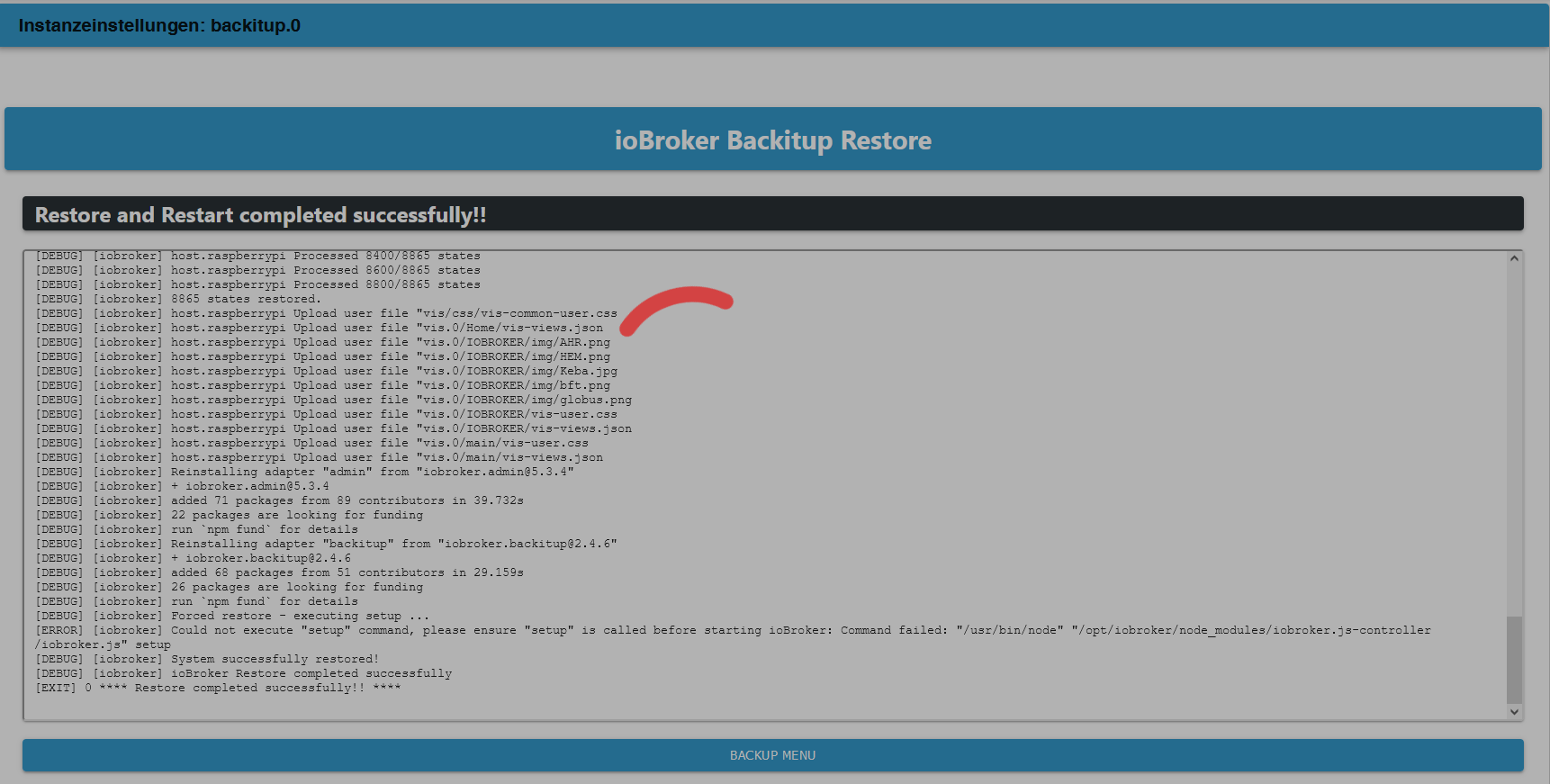
Im Endergebnis bin ich jetzt soweit wie die letzen 4 mal auch schon, der Admin-Adapter lässt sich nicht mehr aufrufen.
-
Hab das Backup jetzt über den Adapter gestartet.
pi@raspberrypi:~ $ iobroker logs --watch
2022-04-27 21:13:40.309  - info: backitup.0 (923) cleaned everything up...
2022-04-27 21:13:40.301  - info: host.raspberrypi received SIGTERM
2022-04-27 21:13:40.304  - info: admin.0 (624) terminating http server on port 8081
2022-04-27 21:13:40.319  - info: host.raspberrypi stopInstance system.adapter.admin.0 (force=false, proc                              ess=true)
2022-04-27 21:13:40.320  - info: host.raspberrypi stopInstance system.adapter.discovery.0 (force=false,                               process=true)
2022-04-27 21:13:40.322  - info: host.raspberrypi stopInstance system.adapter.backitup.0 (force=false, p                              rocess=true)
2022-04-27 21:13:40.357  - info: admin.0 (624) Got terminate signal TERMINATE_YOURSELF
2022-04-27 21:13:40.359  - info: discovery.0 (706) Got terminate signal TERMINATE_YOURSELF
2022-04-27 21:13:40.365  - info: backitup.0 (923) Got terminate signal TERMINATE_YOURSELF
2022-04-27 21:13:40.370  - info: admin.0 (624) Terminated (START_IMMEDIATELY_AFTER_STOP): Without reason
2022-04-27 21:13:40.371  - info: backitup.0 (923) Terminated (START_IMMEDIATELY_AFTER_STOP): Without rea                              son
2022-04-27 21:13:40.373  - info: host.raspberrypi stopInstance system.adapter.admin.0 send kill signal
2022-04-27 21:13:40.378  - info: discovery.0 (706) Terminated (START_IMMEDIATELY_AFTER_STOP): Without re                              ason
2022-04-27 21:13:40.381  - info: host.raspberrypi stopInstance system.adapter.discovery.0 send kill sign                              al
2022-04-27 21:13:40.383  - info: host.raspberrypi stopInstance system.adapter.backitup.0 send kill signa                              l
2022-04-27 21:13:40.309  - info: backitup.0 (923) cleaned everything up...
2022-04-27 21:13:40.301  - info: host.raspberrypi received SIGTERM
2022-04-27 21:13:40.304  - info: admin.0 (624) terminating http server on port 8081
2022-04-27 21:13:40.319  - info: host.raspberrypi stopInstance system.adapter.admin.0 (force=false, proc                              ess=true)
2022-04-27 21:13:40.320  - info: host.raspberrypi stopInstance system.adapter.discovery.0 (force=false,                               process=true)
2022-04-27 21:13:40.322  - info: host.raspberrypi stopInstance system.adapter.backitup.0 (force=false, p                              rocess=true)
2022-04-27 21:13:40.357  - info: admin.0 (624) Got terminate signal TERMINATE_YOURSELF
2022-04-27 21:13:40.359  - info: discovery.0 (706) Got terminate signal TERMINATE_YOURSELF
2022-04-27 21:13:40.365  - info: backitup.0 (923) Got terminate signal TERMINATE_YOURSELF
2022-04-27 21:13:40.370  - info: admin.0 (624) Terminated (START_IMMEDIATELY_AFTER_STOP): Without reason
2022-04-27 21:13:40.371  - info: backitup.0 (923) Terminated (START_IMMEDIATELY_AFTER_STOP): Without rea                              son
2022-04-27 21:13:40.373  - info: host.raspberrypi stopInstance system.adapter.admin.0 send kill signal
2022-04-27 21:13:40.378  - info: discovery.0 (706) Terminated (START_IMMEDIATELY_AFTER_STOP): Without re                              ason
2022-04-27 21:13:40.381  - info: host.raspberrypi stopInstance system.adapter.discovery.0 send kill sign                              al
2022-04-27 21:13:40.383  - info: host.raspberrypi stopInstance system.adapter.backitup.0 send kill signa                              l
2022-04-27 21:13:41.083  - info: host.raspberrypi instance system.adapter.admin.0 terminated with code 1                              56 (START_IMMEDIATELY_AFTER_STOP)
2022-04-27 21:13:41.087  - info: host.raspberrypi instance system.adapter.backitup.0 terminated with cod                              e 156 (START_IMMEDIATELY_AFTER_STOP)
2022-04-27 21:13:41.089  - info: host.raspberrypi instance system.adapter.discovery.0 terminated with co                              de 156 (START_IMMEDIATELY_AFTER_STOP)
2022-04-27 21:13:41.091  - info: host.raspberrypi All instances are stopped.
2022-04-27 21:13:41.168  - info: host.raspberrypi terminated
2022-04-27 21:13:41.083  - info: host.raspberrypi instance system.adapter.admin.0 terminated with code 1                              56 (START_IMMEDIATELY_AFTER_STOP)
2022-04-27 21:13:41.087  - info: host.raspberrypi instance system.adapter.backitup.0 terminated with cod                              e 156 (START_IMMEDIATELY_AFTER_STOP)
2022-04-27 21:13:41.089  - info: host.raspberrypi instance system.adapter.discovery.0 terminated with co                              de 156 (START_IMMEDIATELY_AFTER_STOP)
2022-04-27 21:13:41.091  - info: host.raspberrypi All instances are stopped.
2022-04-27 21:13:41.168  - info: host.raspberrypi terminated
2022-04-27 21:17:44.858  - info: host.raspberrypi iobroker.js-controller version 4.0.21 js-controller starting
2022-04-27 21:17:44.870  - info: host.raspberrypi Copyright (c) 2014-2022 bluefox, 2014 hobbyquaker
2022-04-27 21:17:44.872  - info: host.raspberrypi hostname: raspberrypi, node: v14.19.1
2022-04-27 21:17:44.873  - info: host.raspberrypi ip addresses: 192.168.0.73 2003:da:5f00:ce00:9eb2:f889:33e1:b860 fe80::ec9c:b21:4613:e89a
2022-04-27 21:17:44.858  - info: host.raspberrypi iobroker.js-controller version 4.0.21 js-controller starting
2022-04-27 21:17:44.870  - info: host.raspberrypi Copyright (c) 2014-2022 bluefox, 2014 hobbyquaker
2022-04-27 21:17:44.872  - info: host.raspberrypi hostname: raspberrypi, node: v14.19.1
2022-04-27 21:17:44.873  - info: host.raspberrypi ip addresses: 192.168.0.73 2003:da:5f00:ce00:9eb2:f889:33e1:b860 fe80::ec9c:b21:4613:e89a
2022-04-27 21:18:14.908  - error: host.raspberrypi No connection to databases possible, restart
2022-04-27 21:18:14.929  - info: host.raspberrypi iobroker _restart
2022-04-27 21:18:14.908  - error: host.raspberrypi No connection to databases possible, restart
2022-04-27 21:18:14.929  - info: host.raspberrypi iobroker _restart
2022-04-27 21:18:21.502  - info: host.raspberrypi iobroker.js-controller version 4.0.21 js-controller starting
2022-04-27 21:18:21.514  - info: host.raspberrypi Copyright (c) 2014-2022 bluefox, 2014 hobbyquaker
2022-04-27 21:18:21.516  - info: host.raspberrypi hostname: raspberrypi, node: v14.19.1
2022-04-27 21:18:21.517  - info: host.raspberrypi ip addresses: 192.168.0.73 2003:da:5f00:ce00:9eb2:f889:33e1:b860 fe80::ec9c:b21:4613:e89a
2022-04-27 21:18:21.502  - info: host.raspberrypi iobroker.js-controller version 4.0.21 js-controller starting
2022-04-27 21:18:21.514  - info: host.raspberrypi Copyright (c) 2014-2022 bluefox, 2014 hobbyquaker
2022-04-27 21:18:21.516  - info: host.raspberrypi hostname: raspberrypi, node: v14.19.1
2022-04-27 21:18:21.517  - info: host.raspberrypi ip addresses: 192.168.0.73 2003:da:5f00:ce00:9eb2:f889:33e1:b860 fe80::ec9c:b21:4613:e89a
2022-04-27 21:18:51.552  - error: host.raspberrypi No connection to databases possible, restart
2022-04-27 21:18:51.572  - info: host.raspberrypi iobroker _restart
2022-04-27 21:18:51.552  - error: host.raspberrypi No connection to databases possible, restart
2022-04-27 21:18:51.572  - info: host.raspberrypi iobroker _restart
2022-04-27 21:18:57.999  - info: host.raspberrypi iobroker.js-controller version 4.0.21 js-controller starting
2022-04-27 21:18:58.011  - info: host.raspberrypi Copyright (c) 2014-2022 bluefox, 2014 hobbyquaker
2022-04-27 21:18:58.013  - info: host.raspberrypi hostname: raspberrypi, node: v14.19.1
2022-04-27 21:18:58.014  - info: host.raspberrypi ip addresses: 192.168.0.73 2003:da:5f00:ce00:9eb2:f889:33e1:b860 fe80::ec9c:b21:4613:e89a
2022-04-27 21:18:57.999  - info: host.raspberrypi iobroker.js-controller version 4.0.21 js-controller starting
2022-04-27 21:18:58.011  - info: host.raspberrypi Copyright (c) 2014-2022 bluefox, 2014 hobbyquaker
2022-04-27 21:18:58.013  - info: host.raspberrypi hostname: raspberrypi, node: v14.19.1
2022-04-27 21:18:58.014  - info: host.raspberrypi ip addresses: 192.168.0.73 2003:da:5f00:ce00:9eb2:f889:33e1:b860 fe80::ec9c:b21:4613:e89a
Ich poste jetzt ein letztes mal noch einen Screenshot von der Ausgabe des Restore-Prozesses über den Adapter weil nich alle Meldungen im iobroker-log zu sehen sind:
Im Endergebnis bin ich jetzt soweit wie die letzen 4 mal auch schon, der Admin-Adapter lässt sich nicht mehr aufrufen.
@mfroeschl was kommt bei
iobroker statusundiobroker list instances? -
@mfroeschl was kommt bei
iobroker statusundiobroker list instances?Kann es sein, dass durch den Fehler der Node/NPM Installation auf dem Backup-System die Backup-Datei einen Schaden hat?
pi@raspberrypi:~ $ iobroker status No connection to databases possible ... pi@raspberrypi:~ $ iobroker list instances No connection to databases possible ... pi@raspberrypi:~ $ -
Kann es sein, dass durch den Fehler der Node/NPM Installation auf dem Backup-System die Backup-Datei einen Schaden hat?
pi@raspberrypi:~ $ iobroker status No connection to databases possible ... pi@raspberrypi:~ $ iobroker list instances No connection to databases possible ... pi@raspberrypi:~ $@mfroeschl sagte in Updates funktionieren nicht mehr:
Kann es sein, dass durch den Fehler der Node/NPM Installation auf dem Backup-System die Backup-Datei einen Schaden hat?
ich weiß nicht was du damit genau meinst.
kann aber auch das angesprochene mögliche Problem mit der internen Datenbank sein -
@mfroeschl sagte in Updates funktionieren nicht mehr:
Kann es sein, dass durch den Fehler der Node/NPM Installation auf dem Backup-System die Backup-Datei einen Schaden hat?
ich weiß nicht was du damit genau meinst.
kann aber auch das angesprochene mögliche Problem mit der internen Datenbank seinDas Restore funktio
@homoran said in Updates funktionieren nicht mehr:
ich weiß nicht was du damit genau meinst.
Das Restore funktioniert ja offenschtlich nicht. Da das Restore auf einem komplett neu aufgesetzen System stattfindet kann doch eigentlich nur noch die Backup-Datei das Problem sein.
Ist halt alles saublöd. Hab täglich ein Backup gemacht und trotzdem alles seit Januar futsch :-(
-
Das Restore funktio
@homoran said in Updates funktionieren nicht mehr:
ich weiß nicht was du damit genau meinst.
Das Restore funktioniert ja offenschtlich nicht. Da das Restore auf einem komplett neu aufgesetzen System stattfindet kann doch eigentlich nur noch die Backup-Datei das Problem sein.
Ist halt alles saublöd. Hab täglich ein Backup gemacht und trotzdem alles seit Januar futsch :-(
@mfroeschl probier mal
Editiere /opt/iobroker/iobroker-data/iobroker.json Unter objects und states gibt es jeweils ein ' "connectTimeout": 2000,` Zahl ändern auf 5000 -
@mfroeschl probier mal
Editiere /opt/iobroker/iobroker-data/iobroker.json Unter objects und states gibt es jeweils ein ' "connectTimeout": 2000,` Zahl ändern auf 5000@crunchip said in Updates funktionieren nicht mehr:
/opt/iobroker/iobroker-data/iobroker.json
Hab in der oben erwähnten Datei gerade gesehen, dass hier die IP-Adresse des Systems das die Backup-Datei erzeugt hat drinnen steht:
objects": {
    "type": "jsonl",
    "typeComment": "Possible values: 'file' - [port 9001], redis - [port 6379], couch - [port 5984].",
    "host": "192.168.25.10",
    "port": 9001,
    "noFileCache": false,
    "maxQueue": 1000,
    "connectTimeout": 2000,
    "writeFileInterval": 5000,
Also das produktive System welches täglich die Backup-Dateien erzeugt hat hatte eine feste IP-Adresse, nämlich die 192.168.25.10.
Der neue Host, auf dem das Restore jetzt durchgeführt wurde hat aber natürlich eine andere IP, nämlich die 192.168.0.73.Wird denn versucht durch das Restore die IP-Adresse vom alten Host auf den neuen übertragen?
-
@crunchip said in Updates funktionieren nicht mehr:
/opt/iobroker/iobroker-data/iobroker.json
Hab in der oben erwähnten Datei gerade gesehen, dass hier die IP-Adresse des Systems das die Backup-Datei erzeugt hat drinnen steht:
objects": {
    "type": "jsonl",
    "typeComment": "Possible values: 'file' - [port 9001], redis - [port 6379], couch - [port 5984].",
    "host": "192.168.25.10",
    "port": 9001,
    "noFileCache": false,
    "maxQueue": 1000,
    "connectTimeout": 2000,
    "writeFileInterval": 5000,
Also das produktive System welches täglich die Backup-Dateien erzeugt hat hatte eine feste IP-Adresse, nämlich die 192.168.25.10.
Der neue Host, auf dem das Restore jetzt durchgeführt wurde hat aber natürlich eine andere IP, nämlich die 192.168.0.73.Wird denn versucht durch das Restore die IP-Adresse vom alten Host auf den neuen übertragen?
@mfroeschl sagte in Updates funktionieren nicht mehr:
Wird denn durch das Restore die IP-Adresse vom alten Host auf den neuen übertragen?
ja!
eigentlich sollte vor dem anschließenden start von iobroker der Befehl
iobroker host thiszumindest den Hostnamen anpassen.
Wenn du jedoch fälschlicherweise im admin nicht 0.0.0.0 sondern eine IP eingegeben hattest, kommst du nicht mehr drauf.
das hätte aberiobroker list instancesgezeigt.ich tippe immer noch, dass dein Backup keine jsonl Datenbank hatte
-
@mfroeschl sagte in Updates funktionieren nicht mehr:
Wird denn durch das Restore die IP-Adresse vom alten Host auf den neuen übertragen?
ja!
eigentlich sollte vor dem anschließenden start von iobroker der Befehl
iobroker host thiszumindest den Hostnamen anpassen.
Wenn du jedoch fälschlicherweise im admin nicht 0.0.0.0 sondern eine IP eingegeben hattest, kommst du nicht mehr drauf.
das hätte aberiobroker list instancesgezeigt.ich tippe immer noch, dass dein Backup keine jsonl Datenbank hatte
@homoran said in Updates funktionieren nicht mehr:
Wenn du jedoch fälschlicherweise im admin nicht 0.0.0.0 sondern eine IP eingegeben hattest,
Da stand definiv 0.0.0.0 drinnen. Die fest IP wurde im Raspberry vergeben, nicht im iobroker
Das ändern der IP in der Datei bringt auch nix, Admin ist trotzdem nicht erreichtbar
-
Das Restore funktio
@homoran said in Updates funktionieren nicht mehr:
ich weiß nicht was du damit genau meinst.
Das Restore funktioniert ja offenschtlich nicht. Da das Restore auf einem komplett neu aufgesetzen System stattfindet kann doch eigentlich nur noch die Backup-Datei das Problem sein.
Ist halt alles saublöd. Hab täglich ein Backup gemacht und trotzdem alles seit Januar futsch :-(
@mfroeschl sagte in Updates funktionieren nicht mehr:
kann doch eigentlich nur noch die Backup-Datei das Problem sein.
dann entpack die mal und sieh dir an was da drin steht.
-
@mfroeschl sagte in Updates funktionieren nicht mehr:
kann doch eigentlich nur noch die Backup-Datei das Problem sein.
dann entpack die mal und sieh dir an was da drin steht.
Eine kleine Erfolgsmeldung, nachdem ich das Timeout auf 5000 hochgestellt habe und die IP-Adresse unter objects und unter states umgestellt habe funktionert der Befehl iobroker list instances :-)
Ich vermute allerdings, dass der wesentlich Punkt das umstellen der IP Adresse unter Objects UND unter states den Unterschied macht.pi@raspberrypi:~ $ iob list instances + system.adapter.admin.0 : admin : raspberrypi - enabled, port: 8081, bind: 0.0.0.0, run as: admin system.adapter.backitup.0 : backitup : raspberrypi - enabled system.adapter.backitup.1 : backitup : raspberrypi - enabled system.adapter.bmw.0 : bmw : raspberrypi - disabled system.adapter.discovery.0 : discovery : raspberrypi - disabled system.adapter.flot.0 : flot : raspberrypi - disabled system.adapter.fullybrowser.0 : fullybrowser : raspberrypi - disabled system.adapter.habpanel.0 : habpanel : raspberrypi - disabled system.adapter.ical.0 : ical : raspberrypi - disabled system.adapter.icons-addictive-flavour-png.0: icons-addictive-flavour-png: raspberrypi - disabled system.adapter.icons-mfd-png.0 : icons-mfd-png : raspberrypi - disabled system.adapter.icons-mfd-svg.0 : icons-mfd-svg : raspberrypi - disabled system.adapter.icons-open-icon-library-png.0: icons-open-icon-library-png: raspberrypi - disabled system.adapter.icons-ultimate-png.0 : icons-ultimate-png : raspberrypi - disabled system.adapter.influxdb.0 : influxdb : raspberrypi - disabled, port: 8086 system.adapter.info.0 : info : raspberrypi - disabled system.adapter.iot.0 : iot : raspberrypi - disabled system.adapter.javascript.0 : javascript : raspberrypi - disabled system.adapter.javascript.1 : javascript : raspberrypi - disabled system.adapter.kecontact.0 : kecontact : raspberrypi - disabled system.adapter.modbus.0 : modbus : raspberrypi - disabled system.adapter.node-red.2 : node-red : raspberrypi - disabled, port: 1880, bind: 0.0.0.0 system.adapter.pushover.0 : pushover : raspberrypi - disabled system.adapter.shelly.0 : shelly : raspberrypi - disabled, port: 1883, bind: 0.0.0.0 system.adapter.smartmeter.0 : smartmeter : raspberrypi-volkszaehler - disabled system.adapter.solarlog.0 : solarlog : raspberrypi - disabled, port: 80 system.adapter.sonoff.0 : sonoff : raspberrypi - disabled, port: 1883, bind: 0.0.0.0 system.adapter.sourceanalytix.0 : sourceanalytix : raspberrypi - disabled system.adapter.sql.0 : sql : raspberrypi - disabled, port: 3306 system.adapter.statistics.0 : statistics : raspberrypi - disabled system.adapter.tankerkoenig.0 : tankerkoenig : raspberrypi - disabled system.adapter.trashschedule.0 : trashschedule : raspberrypi - disabled system.adapter.vis-canvas-gauges.0 : vis-canvas-gauges : raspberrypi - disabled system.adapter.vis-hqwidgets.0 : vis-hqwidgets : raspberrypi - disabled system.adapter.vis-icontwo.0 : vis-icontwo : raspberrypi - disabled system.adapter.vis-inventwo.0 : vis-inventwo : raspberrypi - disabled system.adapter.vis-rgraph.0 : vis-rgraph : raspberrypi - disabled system.adapter.vis.0 : vis : raspberrypi - disabled system.adapter.web.0 : web : raspberrypi - disabled, port: 8082, bind: 0.0.0.0, run as: admin system.adapter.zigbee.0 : zigbee : raspberrypi - disabled, port: /dev/ttyUSB0 system.adapter.zigbee.1 : zigbee : raspberrypi-volkszaehler - disabled, port: /dev/ttyUSB1 + instance is aliveUnd das coolste: der Admin-Adampter ist jetzt auch erreichbar :-)
Wie geht es jetzt weiter, werden die Adapter jetzt automatisch nachgeladen oder muss ich noch was machen?
-
Eine kleine Erfolgsmeldung, nachdem ich das Timeout auf 5000 hochgestellt habe und die IP-Adresse unter objects und unter states umgestellt habe funktionert der Befehl iobroker list instances :-)
Ich vermute allerdings, dass der wesentlich Punkt das umstellen der IP Adresse unter Objects UND unter states den Unterschied macht.pi@raspberrypi:~ $ iob list instances + system.adapter.admin.0 : admin : raspberrypi - enabled, port: 8081, bind: 0.0.0.0, run as: admin system.adapter.backitup.0 : backitup : raspberrypi - enabled system.adapter.backitup.1 : backitup : raspberrypi - enabled system.adapter.bmw.0 : bmw : raspberrypi - disabled system.adapter.discovery.0 : discovery : raspberrypi - disabled system.adapter.flot.0 : flot : raspberrypi - disabled system.adapter.fullybrowser.0 : fullybrowser : raspberrypi - disabled system.adapter.habpanel.0 : habpanel : raspberrypi - disabled system.adapter.ical.0 : ical : raspberrypi - disabled system.adapter.icons-addictive-flavour-png.0: icons-addictive-flavour-png: raspberrypi - disabled system.adapter.icons-mfd-png.0 : icons-mfd-png : raspberrypi - disabled system.adapter.icons-mfd-svg.0 : icons-mfd-svg : raspberrypi - disabled system.adapter.icons-open-icon-library-png.0: icons-open-icon-library-png: raspberrypi - disabled system.adapter.icons-ultimate-png.0 : icons-ultimate-png : raspberrypi - disabled system.adapter.influxdb.0 : influxdb : raspberrypi - disabled, port: 8086 system.adapter.info.0 : info : raspberrypi - disabled system.adapter.iot.0 : iot : raspberrypi - disabled system.adapter.javascript.0 : javascript : raspberrypi - disabled system.adapter.javascript.1 : javascript : raspberrypi - disabled system.adapter.kecontact.0 : kecontact : raspberrypi - disabled system.adapter.modbus.0 : modbus : raspberrypi - disabled system.adapter.node-red.2 : node-red : raspberrypi - disabled, port: 1880, bind: 0.0.0.0 system.adapter.pushover.0 : pushover : raspberrypi - disabled system.adapter.shelly.0 : shelly : raspberrypi - disabled, port: 1883, bind: 0.0.0.0 system.adapter.smartmeter.0 : smartmeter : raspberrypi-volkszaehler - disabled system.adapter.solarlog.0 : solarlog : raspberrypi - disabled, port: 80 system.adapter.sonoff.0 : sonoff : raspberrypi - disabled, port: 1883, bind: 0.0.0.0 system.adapter.sourceanalytix.0 : sourceanalytix : raspberrypi - disabled system.adapter.sql.0 : sql : raspberrypi - disabled, port: 3306 system.adapter.statistics.0 : statistics : raspberrypi - disabled system.adapter.tankerkoenig.0 : tankerkoenig : raspberrypi - disabled system.adapter.trashschedule.0 : trashschedule : raspberrypi - disabled system.adapter.vis-canvas-gauges.0 : vis-canvas-gauges : raspberrypi - disabled system.adapter.vis-hqwidgets.0 : vis-hqwidgets : raspberrypi - disabled system.adapter.vis-icontwo.0 : vis-icontwo : raspberrypi - disabled system.adapter.vis-inventwo.0 : vis-inventwo : raspberrypi - disabled system.adapter.vis-rgraph.0 : vis-rgraph : raspberrypi - disabled system.adapter.vis.0 : vis : raspberrypi - disabled system.adapter.web.0 : web : raspberrypi - disabled, port: 8082, bind: 0.0.0.0, run as: admin system.adapter.zigbee.0 : zigbee : raspberrypi - disabled, port: /dev/ttyUSB0 system.adapter.zigbee.1 : zigbee : raspberrypi-volkszaehler - disabled, port: /dev/ttyUSB1 + instance is aliveUnd das coolste: der Admin-Adampter ist jetzt auch erreichbar :-)
Wie geht es jetzt weiter, werden die Adapter jetzt automatisch nachgeladen oder muss ich noch was machen?
@mfroeschl sagte in Updates funktionieren nicht mehr:
werden die Adapter jetzt automatisch nachgeladen
@homoran sagte in Updates funktionieren nicht mehr:
wie lange hast du dann gewartet um den admin aufzurufen?
Danach werden erst alle Adapter neu gebaut. Das dauert schon mal gerne 1h+Voraussetzung ist natürlich, dass du diesen Vorgang nicht unterbrochen hast
-
Eine kleine Erfolgsmeldung, nachdem ich das Timeout auf 5000 hochgestellt habe und die IP-Adresse unter objects und unter states umgestellt habe funktionert der Befehl iobroker list instances :-)
Ich vermute allerdings, dass der wesentlich Punkt das umstellen der IP Adresse unter Objects UND unter states den Unterschied macht.pi@raspberrypi:~ $ iob list instances + system.adapter.admin.0 : admin : raspberrypi - enabled, port: 8081, bind: 0.0.0.0, run as: admin system.adapter.backitup.0 : backitup : raspberrypi - enabled system.adapter.backitup.1 : backitup : raspberrypi - enabled system.adapter.bmw.0 : bmw : raspberrypi - disabled system.adapter.discovery.0 : discovery : raspberrypi - disabled system.adapter.flot.0 : flot : raspberrypi - disabled system.adapter.fullybrowser.0 : fullybrowser : raspberrypi - disabled system.adapter.habpanel.0 : habpanel : raspberrypi - disabled system.adapter.ical.0 : ical : raspberrypi - disabled system.adapter.icons-addictive-flavour-png.0: icons-addictive-flavour-png: raspberrypi - disabled system.adapter.icons-mfd-png.0 : icons-mfd-png : raspberrypi - disabled system.adapter.icons-mfd-svg.0 : icons-mfd-svg : raspberrypi - disabled system.adapter.icons-open-icon-library-png.0: icons-open-icon-library-png: raspberrypi - disabled system.adapter.icons-ultimate-png.0 : icons-ultimate-png : raspberrypi - disabled system.adapter.influxdb.0 : influxdb : raspberrypi - disabled, port: 8086 system.adapter.info.0 : info : raspberrypi - disabled system.adapter.iot.0 : iot : raspberrypi - disabled system.adapter.javascript.0 : javascript : raspberrypi - disabled system.adapter.javascript.1 : javascript : raspberrypi - disabled system.adapter.kecontact.0 : kecontact : raspberrypi - disabled system.adapter.modbus.0 : modbus : raspberrypi - disabled system.adapter.node-red.2 : node-red : raspberrypi - disabled, port: 1880, bind: 0.0.0.0 system.adapter.pushover.0 : pushover : raspberrypi - disabled system.adapter.shelly.0 : shelly : raspberrypi - disabled, port: 1883, bind: 0.0.0.0 system.adapter.smartmeter.0 : smartmeter : raspberrypi-volkszaehler - disabled system.adapter.solarlog.0 : solarlog : raspberrypi - disabled, port: 80 system.adapter.sonoff.0 : sonoff : raspberrypi - disabled, port: 1883, bind: 0.0.0.0 system.adapter.sourceanalytix.0 : sourceanalytix : raspberrypi - disabled system.adapter.sql.0 : sql : raspberrypi - disabled, port: 3306 system.adapter.statistics.0 : statistics : raspberrypi - disabled system.adapter.tankerkoenig.0 : tankerkoenig : raspberrypi - disabled system.adapter.trashschedule.0 : trashschedule : raspberrypi - disabled system.adapter.vis-canvas-gauges.0 : vis-canvas-gauges : raspberrypi - disabled system.adapter.vis-hqwidgets.0 : vis-hqwidgets : raspberrypi - disabled system.adapter.vis-icontwo.0 : vis-icontwo : raspberrypi - disabled system.adapter.vis-inventwo.0 : vis-inventwo : raspberrypi - disabled system.adapter.vis-rgraph.0 : vis-rgraph : raspberrypi - disabled system.adapter.vis.0 : vis : raspberrypi - disabled system.adapter.web.0 : web : raspberrypi - disabled, port: 8082, bind: 0.0.0.0, run as: admin system.adapter.zigbee.0 : zigbee : raspberrypi - disabled, port: /dev/ttyUSB0 system.adapter.zigbee.1 : zigbee : raspberrypi-volkszaehler - disabled, port: /dev/ttyUSB1 + instance is aliveUnd das coolste: der Admin-Adampter ist jetzt auch erreichbar :-)
Wie geht es jetzt weiter, werden die Adapter jetzt automatisch nachgeladen oder muss ich noch was machen?
Port 1883 ist wohl doppelt vergeben.
Sollte/darf nicht sein.Und der Hostname mit volkszaehler drin kommt woher?
-
@mfroeschl sagte in Updates funktionieren nicht mehr:
werden die Adapter jetzt automatisch nachgeladen
@homoran sagte in Updates funktionieren nicht mehr:
wie lange hast du dann gewartet um den admin aufzurufen?
Danach werden erst alle Adapter neu gebaut. Das dauert schon mal gerne 1h+Voraussetzung ist natürlich, dass du diesen Vorgang nicht unterbrochen hast
@homoran said in Updates funktionieren nicht mehr:
Voraussetzung ist natürlich, dass du diesen Vorgang nicht unterbrochen hast
Ich hab da garnix unterbrochen. Die Adapter werden jetzt aber scheinbar nicht nachgeladen, zumindest sind alle Apdater ausgegraut.
Kann ich den Prozess manuell anstoßen? -
Port 1883 ist wohl doppelt vergeben.
Sollte/darf nicht sein.Und der Hostname mit volkszaehler drin kommt woher?
@thomas-braun said in Updates funktionieren nicht mehr:
@mfroeschl
Port 1883 ist wohl doppelt vergeben.
Sollte/darf nicht sein.
Und der Hostname mit volkszaehler drin kommt woher?Der Hostname volkszaehler kommt von einem Slave-iobroker System. Da sind 2 Adapter am Laufen
Was meinst du mit Port 1883 ist doppelt vergeben?
-
@thomas-braun said in Updates funktionieren nicht mehr:
@mfroeschl
Port 1883 ist wohl doppelt vergeben.
Sollte/darf nicht sein.
Und der Hostname mit volkszaehler drin kommt woher?Der Hostname volkszaehler kommt von einem Slave-iobroker System. Da sind 2 Adapter am Laufen
Was meinst du mit Port 1883 ist doppelt vergeben?
@mfroeschl sagte in Updates funktionieren nicht mehr:
Port 1883
shelly und sonoff
diese dürfen nicht auf dem gleichen Port laufen


Hey! Du scheinst an dieser Unterhaltung interessiert zu sein, hast aber noch kein Konto.
Hast du es satt, bei jedem Besuch durch die gleichen Beiträge zu scrollen? Wenn du dich für ein Konto anmeldest, kommst du immer genau dorthin zurück, wo du zuvor warst, und kannst dich über neue Antworten benachrichtigen lassen (entweder per E-Mail oder Push-Benachrichtigung). Du kannst auch Lesezeichen speichern und Beiträge positiv bewerten, um anderen Community-Mitgliedern deine Wertschätzung zu zeigen.
Mit deinem Input könnte dieser Beitrag noch besser werden 💗
Registrieren AnmeldenSupport us
469
Online33.0k
Benutzer83.6k
Themen1.3m
Beiträge