




[gelöst] Probleme bei Update von admin
-
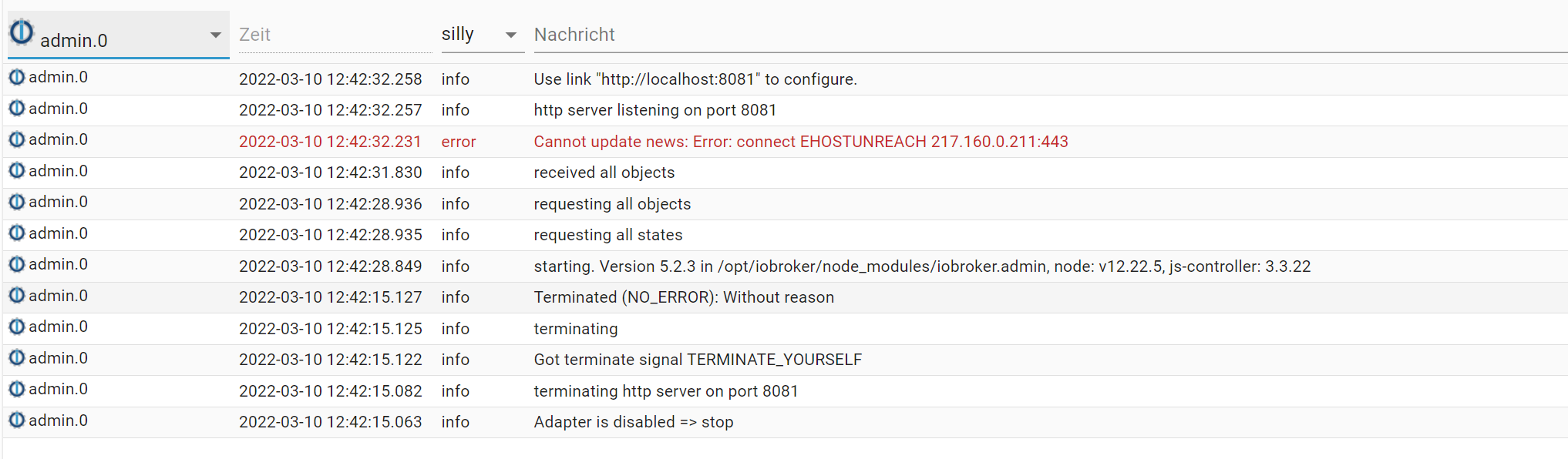
@thomas-braun hab versucht den admin adapter upzudaten. Hat so ausgesehen als ob es funktioniert hat. War danach auf 5.3.1
Dann hats ein bisschen gedauert. Dann kam diese Meldung und nichts ging mehr: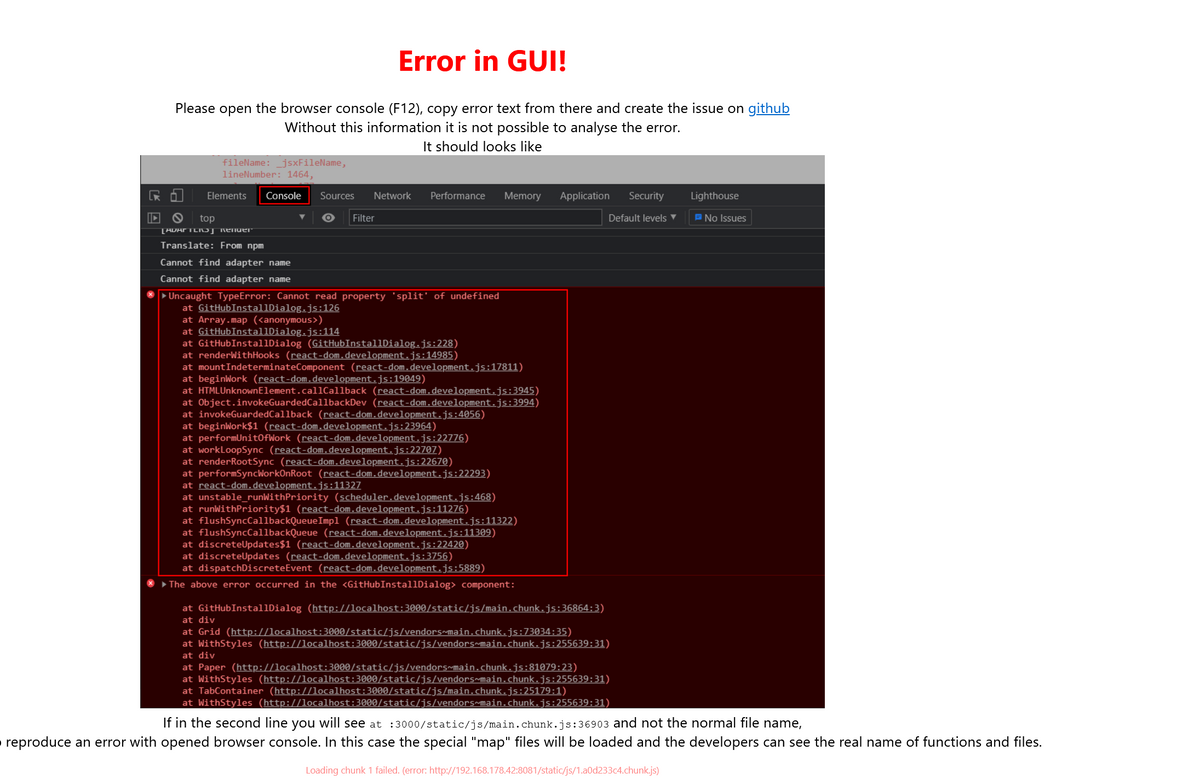
Da half dann nur noch komplett ausschalten.
Jetzt neu hochgefahren und der admin adapter war wieder zurück auf 5.2.3
Keine Ahnung was hier los ist. :-(Das log sieht dazu folgendermaßen aus:
2022-03-11 09:48:58.968 - info: hm-rpc.3 (1125) xmlrpc client is trying to connect to 192.168.178.69:2010/ with ["http://192.168.178.42:2010","raspberrypi:hm-rpc.3"] 2022-03-11 09:48:59.198 - info: hm-rpc.3 (1125) Connected 2022-03-11 09:48:59.449 - info: hm-rpc.3 (1125) xmlrpc <- listDevices ["raspberrypi:hm-rpc.3"] 2022-03-11 09:48:59.538 - info: hm-rpc.3 (1125) xmlrpc -> 0 devices 2022-03-11 09:49:00.907 - info: hm-rpc.3 (1125) xmlrpc <- newDevices 66 2022-03-11 09:49:01.032 - error: javascript.0 (965) Traceback (most recent call last): File "/usr/lib/node_modules/npm/node_modules/node-gyp/gyp/gyp_main.py", line 47, in import gyp File "/usr/lib/node_modules/npm/node_modules/node-gyp/gyp/pylib/gyp/__init__.py", line 10, in 2022-03-11 09:49:01.037 - error: javascript.0 (965) import gyp.input File "/usr/lib/node_modules/npm/node_modules/node-gyp/gyp/pylib/gyp/input.py", line 7, in import ast ImportError: No module named ast 2022-03-11 09:49:01.043 - error: javascript.0 (965) gyp 2022-03-11 09:49:01.046 - error: javascript.0 (965) ERR! configure error gyp ERR! stack Error: `gyp` failed with exit code: 1 gyp ERR! stack at ChildProcess.onCpExit (/usr/lib/node_modules/npm/node_modules/node-gyp/lib/configure.js:351:16) gyp ERR! stack at ChildProcess.emit (events.js:400:28) gyp ERR! stack at Process.ChildProcess._handle.onexit (internal/child_process.js:282:12) 2022-03-11 09:49:01.050 - error: javascript.0 (965) gyp ERR! System Linux 5.10.103-v7l+ gyp ERR! command "/usr/bin/node" "/usr/lib/node_modules/npm/node_modules/node-gyp/bin/node-gyp.js" "rebuild" gyp ERR! cwd /opt/iobroker/node_modules/iobroker.javascript/node_modules/node-expat gyp ERR! node -v v14.19.0 gyp ERR! node-gyp -v v5.1.0 gyp ERR! not ok 2022-03-11 09:49:01.169 - info: hm-rpc.3 (1125) new HMIP devices/channels after filter: 0 2022-03-11 09:49:01.530 - info: hue.0 (1146) starting. Version 3.5.31 in /opt/iobroker/node_modules/iobroker.hue, node: v14.19.0, js-controller: 3.3.22 2022-03-11 09:49:01.861 - info: hue.0 (1146) Use legacy structure, because existing 2022-03-11 09:49:01.875 - info: hue.0 (1146) skip switch: Philips hue.Daylight.configured 2022-03-11 09:49:01.876 - info: hue.0 (1146) skip switch: Philips hue.Daylight.sunriseoffset 2022-03-11 09:49:01.878 - info: hue.0 (1146) skip switch: Philips hue.Daylight.sunsetoffset 2022-03-11 09:49:01.879 - info: hue.0 (1146) created/updated 1 sensor channels 2022-03-11 09:49:01.933 - info: hue.0 (1146) created/updated 1 light channels 2022-03-11 09:49:02.017 - info: host.raspberrypi instance scheduled system.adapter.ical.0 0,30 * * * * 2022-03-11 09:49:02.052 - info: host.raspberrypi instance system.adapter.ical.0 started with pid 1189 2022-03-11 09:49:02.075 - warn: hue.0 (1146) channel "Philips_hue.Entertainment_area" already exists, using "Philips_hue.Entertainment_area_Entertainment" for group 201 2022-03-11 09:49:02.081 - warn: hue.0 (1146) channel "Philips_hue.Entertainment_area" already exists, using "Philips_hue.Entertainment_area_Entertainment" for group 202 2022-03-11 09:49:02.087 - warn: hue.0 (1146) channel "Philips_hue.Entertainment_area" already exists, using "Philips_hue.Entertainment_area_Entertainment" for group 203 2022-03-11 09:49:02.088 - info: hue.0 (1146) created/updated 7 groups channels 2022-03-11 09:49:02.094 - info: hue.0 (1146) created/updated 11 scenes 2022-03-11 09:49:02.095 - info: hue.0 (1146) creating/updating bridge device 2022-03-11 09:49:03.183 - error: javascript.0 (965) npm 2022-03-11 09:49:03.186 - error: javascript.0 (965) 2022-03-11 09:49:03.188 - error: javascript.0 (965) ERR! 2022-03-11 09:49:03.199 - error: javascript.0 (965) code ELIFECYCLE npm ERR! errno 1 2022-03-11 09:49:03.281 - error: javascript.0 (965) npm 2022-03-11 09:49:03.284 - error: javascript.0 (965) ERR! node-expat@2.4.0 install: `node-gyp rebuild` npm ERR! Exit status 1 npm ERR! npm ERR! Failed at the node-expat@2.4.0 install script. npm ERR! This is probably not a problem with npm. There is likely additional logging output above. 2022-03-11 09:49:03.392 - error: javascript.0 (965) 2022-03-11 09:49:03.393 - error: javascript.0 (965) npm ERR! A complete log of this run can be found in: npm ERR! /home/iobroker/.npm/_logs/2022-03-11T08_49_03_336Z-debug.log 2022-03-11 09:49:03.439 - error: javascript.0 (965) Cannot install xml2js: 1 2022-03-11 09:49:03.441 - info: javascript.0 (965) npm install owlintuition --production (System call) 2022-03-11 09:49:06.762 - info: host.raspberrypi instance system.adapter.nut.0 started with pid 1220 2022-03-11 09:49:07.215 - info: ical.0 (1189) starting. Version 1.11.4 in /opt/iobroker/node_modules/iobroker.ical, node: v14.19.0, js-controller: 3.3.22 2022-03-11 09:49:08.430 - info: ical.0 (1189) processing URL: Entsorgungstermine http://p61-caldav.icloud.com/published/2/MTM3NzU4MzQ1ODEzNzc1OEKio7cqzHid6trK6D-89qGqT8yJF33oUlgqF6zTT_QYM6-GV1Ffg24vGilDcBXKV4FJUExgBrtrIjJVZSd-6Lg 2022-03-11 09:49:08.770 - info: ical.0 (1189) processing URL: Feiertage http://p61-caldav.icloud.com/published/2/MTM3NzU4MzQ1ODEzNzc1OEKio7cqzHid6trK6D-89qG19X_3NOEtYGJxgdKE8yk19k0qiKhBtDQluafn6pkGO246Y2s7YenfnbthqjFkKlI 2022-03-11 09:49:08.986 - error: javascript.0 (965) npm 2022-03-11 09:49:08.989 - error: javascript.0 (965) WARN read-shrinkwrap This version of npm is compatible with lockfileVersion@1, but package-lock.json was generated for lockfileVersion@2. I'll try to do my best with it! 2022-03-11 09:49:09.857 - info: host.raspberrypi instance system.adapter.rpi2.0 started with pid 1260 2022-03-11 09:49:11.263 - info: nut.0 (1220) starting. Version 1.5.0 in /opt/iobroker/node_modules/iobroker.nut, node: v14.19.0, js-controller: 3.3.22 2022-03-11 09:49:13.612 - info: rpi2.0 (1260) starting. Version 1.3.1 in /opt/iobroker/node_modules/iobroker.rpi2, node: v14.19.0, js-controller: 3.3.22 2022-03-11 09:49:14.024 - info: host.raspberrypi instance system.adapter.shelly.0 started with pid 1287 2022-03-11 09:49:14.592 - error: javascript.0 (965) npm 2022-03-11 09:49:14.594 - error: javascript.0 (965) WARN deprecated hoek@4.2.1: This version has been deprecated in accordance with the hapi support policy (hapi.im/support). Please upgrade to the latest version to get the best features, bug fixes, and security patches. If you are unable to upgrade at this time, paid support is available for older versions (hapi.im/commercial). 2022-03-11 09:49:14.678 - error: javascript.0 (965) npm 2022-03-11 09:49:14.682 - error: javascript.0 (965) 2022-03-11 09:49:14.684 - error: javascript.0 (965) WARN 2022-03-11 09:49:14.689 - error: javascript.0 (965) deprecated joi@13.7.0: This version has been deprecated in accordance with the hapi support policy (hapi.im/support). Please upgrade to the latest version to get the best features, bug fixes, and security patches. If you are unable to upgrade at this time, paid support is available for older versions (hapi.im/commercial). 2022-03-11 09:49:14.918 - error: rpi2.0 (1260) No Value found for cpu_frequency 2022-03-11 09:49:15.290 - error: javascript.0 (965) npm 2022-03-11 09:49:15.292 - error: javascript.0 (965) WARN deprecated hoek@5.0.4: This version has been deprecated in accordance with the hapi support policy (hapi.im/support). Please upgrade to the latest version to get the best features, bug fixes, and security patches. If you are unable to upgrade at this time, paid support is available for older versions (hapi.im/commercial). 2022-03-11 09:49:15.455 - error: javascript.0 (965) npm 2022-03-11 09:49:15.457 - error: javascript.0 (965) WARN deprecated topo@3.0.3: This module has moved and is now available at @hapi/topo. Please update your dependencies as this version is no longer maintained an may contain bugs and security issues. 2022-03-11 09:49:15.496 - error: javascript.0 (965) npm 2022-03-11 09:49:15.498 - error: javascript.0 (965) WARN deprecated hoek@6.1.3: This module has moved and is now available at @hapi/hoek. Please update your dependencies as this version is no longer maintained an may contain bugs and security issues. 2022-03-11 09:49:17.815 - info: host.raspberrypi instance system.adapter.sonoff.0 started with pid 1351 2022-03-11 09:49:18.630 - error: rpi2.0 (1260) Cannot initialize/setMode GPIO: Error: The module '/opt/iobroker/node_modules/epoll/build/Release/epoll.node' was compiled against a different Node.js version using NODE_MODULE_VERSION 64. This version of Node.js requires NODE_MODULE_VERSION 83. Please try re-compiling or re-installing the module (for instance, using `npm rebuild` or `npm install`). 2022-03-11 09:49:19.950 - info: shelly.0 (1287) starting. Version 5.3.2 in /opt/iobroker/node_modules/iobroker.shelly, node: v14.19.0, js-controller: 3.3.22 2022-03-11 09:49:20.201 - warn: shelly.0 (1287) State "shelly.0.SHSW-1#76A1BD#1.online" has no existing object, this might lead to an error in future versions 2022-03-11 09:49:20.332 - warn: shelly.0 (1287) State "shelly.0.SHSW-1#8CAAB561C3BD#1.online" has no existing object, this might lead to an error in future versions 2022-03-11 09:49:20.371 - warn: shelly.0 (1287) State "shelly.0.SHEM#B049DB#1.online" has no existing object, this might lead to an error in future versions 2022-03-11 09:49:20.393 - info: shelly.0 (1287) Starting in CoAP mode. 2022-03-11 09:49:20.476 - info: ical.0 (1189) processing URL: Meine Termine http://p61-caldav.icloud.com/published/2/MTM3NzU4MzQ1ODEzNzc1OEKio7cqzHid6trK6D-89qE_-EnALIMu14hqvDV7g4YMLuu9RR6veTt5-O7FzFjG75m8kFB4Ek185sNpkJPVHqU 2022-03-11 09:49:20.533 - info: shelly.0 (1287) [CoAP] Listening for packets in the network 2022-03-11 09:49:20.717 - warn: shelly.0 (1287) State "shelly.0.SHSW-1#76A1BD#1.online" has no existing object, this might lead to an error in future versions 2022-03-11 09:49:20.727 - warn: shelly.0 (1287) State "shelly.0.SHSW-1#8CAAB561C3BD#1.online" has no existing object, this might lead to an error in future versions 2022-03-11 09:49:20.730 - warn: shelly.0 (1287) State "shelly.0.SHEM#B049DB#1.online" has no existing object, this might lead to an error in future versions 2022-03-11 09:49:22.903 - info: host.raspberrypi instance system.adapter.ping.0 started with pid 1374 2022-03-11 09:49:24.361 - info: sonoff.0 (1351) starting. Version 2.4.7 in /opt/iobroker/node_modules/iobroker.sonoff, node: v14.19.0, js-controller: 3.3.22 2022-03-11 09:49:24.498 - info: sonoff.0 (1351) Starting MQTT server on port 1884 2022-03-11 09:49:24.768 - info: shelly.0 (1287) [CoAP] Device 192.168.178.79 (shelly1 / shelly1-76A1BD / SHSW-1#76A1BD#1) connected! Polltime set to 10 sec. 2022-03-11 09:49:25.535 - info: shelly.0 (1287) [CoAP] Device 192.168.178.108 (shelly1 / shelly1-8CAAB561C3BD / SHSW-1#8CAAB561C3BD#1) connected! Polltime set to 10 sec. 2022-03-11 09:49:26.090 - info: host.raspberrypi instance system.adapter.mqtt-client.0 started with pid 1393 2022-03-11 09:49:29.379 - info: ical.0 (1189) Terminated (NO_ERROR): Without reason 2022-03-11 09:49:29.431 - info: ping.0 (1374) starting. Version 1.5.0 in /opt/iobroker/node_modules/iobroker.ping, node: v14.19.0, js-controller: 3.3.22 2022-03-11 09:49:30.270 - info: javascript.0 (965) > node-expat@2.4.0 install /opt/iobroker/node_modules/iobroker.javascript/node_modules/node-expat > node-gyp rebuild 2022-03-11 09:49:30.375 - info: host.raspberrypi instance system.adapter.ical.0 terminated with code 0 (NO_ERROR) 2022-03-11 09:49:30.412 - info: host.raspberrypi instance system.adapter.alexa2.0 started with pid 1424 2022-03-11 09:49:31.964 - info: mqtt-client.0 (1393) starting. Version 1.5.0 in /opt/iobroker/node_modules/iobroker.mqtt-client, node: v14.19.0, js-controller: 3.3.22 2022-03-11 09:49:32.197 - info: mqtt-client.0 (1393) enabled syncing of 0_userdata.0.MQTT_Daten.Test (publish/subscribe:false/true) 2022-03-11 09:49:32.199 - info: mqtt-client.0 (1393) Try to connect to mqtt://MQTT_Broker:*******************@192.168.178.41:1883?clientId=IOBROKER_MQTT 2022-03-11 09:49:32.417 - info: mqtt-client.0 (1393) connected to broker 2022-03-11 09:49:32.557 - error: javascript.0 (965) Traceback (most recent call last): 2022-03-11 09:49:32.568 - error: javascript.0 (965) File "/usr/lib/node_modules/npm/node_modules/node-gyp/gyp/gyp_main.py", line 47, in 2022-03-11 09:49:32.570 - error: javascript.0 (965) 2022-03-11 09:49:32.572 - error: javascript.0 (965) import gyp 2022-03-11 09:49:32.574 - error: javascript.0 (965) File "/usr/lib/node_modules/npm/node_modules/node-gyp/gyp/pylib/gyp/__init__.py", line 10, in 2022-03-11 09:49:32.585 - error: javascript.0 (965) import gyp.input File "/usr/lib/node_modules/npm/node_modules/node-gyp/gyp/pylib/gyp/input.py", line 7, in import ast ImportError: No module named ast 2022-03-11 09:49:32.588 - error: javascript.0 (965) gyp 2022-03-11 09:49:32.590 - error: javascript.0 (965) ERR! configure error 2022-03-11 09:49:32.592 - error: javascript.0 (965) gyp ERR! stack Error: `gyp` failed with exit code: 1 gyp ERR! stack at ChildProcess.onCpExit (/usr/lib/node_modules/npm/node_modules/node-gyp/lib/configure.js:351:16) gyp ERR! stack at ChildProcess.emit (events.js:400:28) gyp ERR! stack at Process.ChildProcess._handle.onexit (internal/child_process.js:282:12) 2022-03-11 09:49:32.594 - error: javascript.0 (965) gyp ERR! System Linux 5.10.103-v7l+ gyp ERR! command "/usr/bin/node" "/usr/lib/node_modules/npm/node_modules/node-gyp/bin/node-gyp.js" "rebuild" gyp ERR! cwd /opt/iobroker/node_modules/iobroker.javascript/node_modules/node-expat gyp ERR! node -v v14.19.0 gyp ERR! node-gyp -v v5.1.0 gyp ERR! not ok 2022-03-11 09:49:33.842 - info: host.raspberrypi instance system.adapter.backitup.0 started with pid 1458 2022-03-11 09:49:35.029 - error: javascript.0 (965) npm 2022-03-11 09:49:35.031 - error: javascript.0 (965) 2022-03-11 09:49:35.035 - error: javascript.0 (965) ERR! 2022-03-11 09:49:35.039 - error: javascript.0 (965) code ELIFECYCLE npm ERR! errno 1 2022-03-11 09:49:35.078 - error: javascript.0 (965) npm 2022-03-11 09:49:35.080 - error: javascript.0 (965) 2022-03-11 09:49:35.082 - error: javascript.0 (965) ERR! 2022-03-11 09:49:35.084 - error: javascript.0 (965) node-expat@2.4.0 install: `node-gyp rebuild` 2022-03-11 09:49:35.097 - error: javascript.0 (965) npm ERR! Exit status 1 npm ERR! npm ERR! Failed at the node-expat@2.4.0 install script. npm ERR! This is probably not a problem with npm. There is likely additional logging output above. 2022-03-11 09:49:35.115 - error: javascript.0 (965) 2022-03-11 09:49:35.117 - error: javascript.0 (965) npm 2022-03-11 09:49:35.119 - error: javascript.0 (965) 2022-03-11 09:49:35.121 - error: javascript.0 (965) ERR! 2022-03-11 09:49:35.123 - error: javascript.0 (965) A complete log of this run can be found in: 2022-03-11 09:49:35.126 - error: javascript.0 (965) npm ERR! /home/iobroker/.npm/_logs/2022-03-11T08_49_35_093Z-debug.log 2022-03-11 09:49:35.150 - error: javascript.0 (965) Cannot install owlintuition: 1 2022-03-11 09:49:35.151 - info: javascript.0 (965) npm install owlintuition --production (System call) 2022-03-11 09:49:35.316 - info: shelly.0 (1287) [CoAP] Device 192.168.178.127 (shellyem / shellyem-B049DB / SHEM#B049DB#1) connected! Polltime set to 10 sec. 2022-03-11 09:49:37.169 - info: alexa2.0 (1424) starting. Version 3.11.2 in /opt/iobroker/node_modules/iobroker.alexa2, node: v14.19.0, js-controller: 3.3.22 2022-03-11 09:49:37.798 - info: host.raspberrypi instance scheduled system.adapter.daswetter.0 */15 * * * * 2022-03-11 09:49:37.836 - info: host.raspberrypi instance system.adapter.daswetter.0 started with pid 1495 2022-03-11 09:49:38.829 - info: backitup.0 (1458) starting. Version 2.2.3 in /opt/iobroker/node_modules/iobroker.backitup, node: v14.19.0, js-controller: 3.3.22 2022-03-11 09:49:38.953 - info: backitup.0 (1458) [iobroker] backup was activated at 20:00 every 1 day(s) 2022-03-11 09:49:40.230 - debug: daswetter.0 (1495) Redis Objects: Use Redis connection: 127.0.0.1:9001 2022-03-11 09:49:40.346 - debug: daswetter.0 (1495) Objects client ready ... initialize now 2022-03-11 09:49:40.359 - debug: daswetter.0 (1495) Objects create System PubSub Client 2022-03-11 09:49:40.362 - debug: daswetter.0 (1495) Objects create User PubSub Client 2022-03-11 09:49:40.364 - debug: daswetter.0 (1495) Objects client initialize lua scripts 2022-03-11 09:49:40.403 - debug: daswetter.0 (1495) Objects connected to redis: 127.0.0.1:9001 2022-03-11 09:49:40.416 - debug: daswetter.0 (1495) objectDB connected 2022-03-11 09:49:40.421 - debug: daswetter.0 (1495) Redis States: Use Redis connection: 127.0.0.1:9000 2022-03-11 09:49:40.450 - debug: daswetter.0 (1495) States create System PubSub Client 2022-03-11 09:49:40.452 - debug: daswetter.0 (1495) States create User PubSub Client 2022-03-11 09:49:40.480 - debug: daswetter.0 (1495) States connected to redis: 127.0.0.1:9000 2022-03-11 09:49:40.482 - debug: daswetter.0 (1495) statesDB connected 2022-03-11 09:49:40.726 - error: javascript.0 (965) npm 2022-03-11 09:49:40.731 - error: javascript.0 (965) 2022-03-11 09:49:40.733 - error: javascript.0 (965) WARN 2022-03-11 09:49:40.735 - error: javascript.0 (965) 2022-03-11 09:49:40.743 - error: javascript.0 (965) read-shrinkwrap This version of npm is compatible with lockfileVersion@1, but package-lock.json was generated for lockfileVersion@2. I'll try to do my best with it! 2022-03-11 09:49:40.871 - info: alexa2.0 (1424) Alexa-Push-Connection (macDms = true) established. Disable Polling 2022-03-11 09:49:41.125 - debug: daswetter.0 (1495) Plugin sentry Initialize Plugin (enabled=true) 2022-03-11 09:49:42.443 - info: daswetter.0 (1495) starting. Version 3.0.9 in /opt/iobroker/node_modules/iobroker.daswetter, node: v14.19.0, js-controller: 3.3.22 2022-03-11 09:49:42.483 - info: host.raspberrypi instance system.adapter.fritzbox.0 started with pid 1549 2022-03-11 09:49:42.511 - debug: daswetter.0 (1495) set timeout to 60 sec 2022-03-11 09:49:42.518 - debug: daswetter.0 (1495) calling forecast hourly: http://api.daswetter.com/index.php?api_lang=de&localidad=97771&affiliate_id=sbwsuizf8446&v=2.0&h=1 2022-03-11 09:49:42.732 - debug: daswetter.0 (1495) got response "https://www.daswetter.com/wetter_Wenzenbach-Europa-Deutschland-Bayern--1-97771.html" 2022-03-11 09:49:43.031 - debug: daswetter.0 (1495) result {"report":{"location":{"city":"Wenzenbach 2022-03-11 09:49:47.455 - info: fritzbox.0 (1549) try to connect: 192.168.178.1 2022-03-11 09:49:47.543 - info: fritzbox.0 (1549) adapter connected to fritzbox: 192.168.178.1 2022-03-11 09:49:47.526 - debug: daswetter.0 (1495) insert NextHours.Location_1.Day_1.Hour_4.hour_value with 04:00 2022-03-11 09:49:48.676 - info: fritzbox.0 (1549) State value to set for "fritzbox.0.calls.ringActualNumbers" has to be type "string" but received type "object" 2022-03-11 09:49:48.684 - info: fritzbox.0 (1549) State value to set for "fritzbox.0.calls.connectNumbers" has to be type "string" but received type "object" 2022-03-11 09:49:21.125 - info: host.raspberrypi iobroker.js-controller version 3.3.22 js-controller starting 2022-03-11 09:49:21.133 - info: host.raspberrypi Copyright (c) 2014-2021 bluefox, 2014 hobbyquaker 2022-03-11 09:49:21.134 - info: host.raspberrypi hostname: raspberrypi, node: v14.19.0 2022-03-11 09:49:21.134 - info: host.raspberrypi ip addresses: 2022-03-11 09:49:21.190 - error: host.raspberrypi-Server Cannot load /opt/iobroker/iobroker-data/objects.json: /opt/iobroker/iobroker-data/objects.json: Unexpected end of JSON input. We try last Backup! 2022-03-11 09:52:29.719 - info: host.raspberrypi connected to Objects and States 2022-03-11 09:52:29.930 - info: host.raspberrypi added notifications configuration of host 2022-03-11 09:52:30.729 - info: host.raspberrypi 70 instances found 2022-03-11 09:52:30.860 - info: host.raspberrypi starting 50 instances 2022-03-11 09:52:30.888 - warn: host.raspberrypi startInstance cannot find adapter "zigbee@1.6.16". Try to install it... 1 attempt 2022-03-11 09:52:30.890 - info: host.raspberrypi iobroker install zigbee@1.6.16 using installedFrom 2022-03-11 09:52:31.298 - info: host.raspberrypi instance system.adapter.admin.0 started with pid 829 2022-03-11 09:52:33.946 - error: admin.0 (829) admin.0 already running 2022-03-11 09:52:33.950 - warn: admin.0 (829) Terminated (ADAPTER_ALREADY_RUNNING): Without reason 2022-03-11 09:52:34.631 - error: host.raspberrypi instance system.adapter.admin.0 terminated with code 7 (ADAPTER_ALREADY_RUNNING) 2022-03-11 09:52:34.633 - info: host.raspberrypi Restart adapter system.adapter.admin.0 because enabled 2022-03-11 09:52:34.906 - info: host.raspberrypi instance system.adapter.email.0 started with pid 912 2022-03-11 09:52:34.971 - info: host.raspberrypi iobroker npm-install: NPM version: 6.14.16 2022-03-11 09:52:34.973 - info: host.raspberrypi iobroker npm-install: npm install iobroker.zigbee@1.6.16 --loglevel error --prefix "/opt/iobroker" (System call) 2022-03-11 09:52:36.809 - error: email.0 (912) email.0 already running 2022-03-11 09:52:36.814 - warn: email.0 (912) Terminated (ADAPTER_ALREADY_RUNNING): Without reason 2022-03-11 09:52:37.504 - error: host.raspberrypi instance system.adapter.email.0 terminated with code 7 (ADAPTER_ALREADY_RUNNING) 2022-03-11 09:52:37.506 - info: host.raspberrypi Restart adapter system.adapter.email.0 because enabled 2022-03-11 09:52:39.068 - info: host.raspberrypi instance system.adapter.history.0 started with pid 962 2022-03-11 09:52:40.698 - error: history.0 (962) history.0 already running 2022-03-11 09:52:40.703 - warn: history.0 (962) Terminated (ADAPTER_ALREADY_RUNNING): Without reason 2022-03-11 09:52:41.404 - error: host.raspberrypi instance system.adapter.history.0 terminated with code 7 (ADAPTER_ALREADY_RUNNING) 2022-03-11 09:52:41.406 - info: host.raspberrypi Restart adapter system.adapter.history.0 because enabled 2022-03-11 09:52:43.055 - info: host.raspberrypi instance system.adapter.javascript.0 started with pid 984 2022-03-11 09:52:46.563 - error: javascript.0 (984) javascript.0 already running 2022-03-11 09:52:46.567 - warn: javascript.0 (984) Terminated (ADAPTER_ALREADY_RUNNING): Without reason 2022-03-11 09:52:47.035 - info: host.raspberrypi instance system.adapter.scenes.0 started with pid 1001 2022-03-11 09:52:47.303 - error: host.raspberrypi instance system.adapter.javascript.0 terminated with code 7 (ADAPTER_ALREADY_RUNNING) 2022-03-11 09:52:47.304 - info: host.raspberrypi Restart adapter system.adapter.javascript.0 because enabled 2022-03-11 09:52:48.709 - error: scenes.0 (1001) scenes.0 already running 2022-03-11 09:52:48.714 - warn: scenes.0 (1001) Terminated (ADAPTER_ALREADY_RUNNING): Without reason 2022-03-11 09:52:49.430 - error: host.raspberrypi instance system.adapter.scenes.0 terminated with code 7 (ADAPTER_ALREADY_RUNNING) 2022-03-11 09:52:49.431 - info: host.raspberrypi Restart adapter system.adapter.scenes.0 because enabled 2022-03-11 09:52:51.041 - info: host.raspberrypi instance system.adapter.pushover.0 started with pid 1018 2022-03-11 09:52:52.795 - error: pushover.0 (1018) pushover.0 already running 2022-03-11 09:52:52.800 - warn: pushover.0 (1018) Terminated (ADAPTER_ALREADY_RUNNING): Without reason 2022-03-11 09:52:53.490 - error: host.raspberrypi instance system.adapter.pushover.0 terminated with code 7 (ADAPTER_ALREADY_RUNNING) 2022-03-11 09:52:53.491 - info: host.raspberrypi Restart adapter system.adapter.pushover.0 because enabled 2022-03-11 09:52:55.157 - info: host.raspberrypi instance system.adapter.hm-rega.0 started with pid 1036 2022-03-11 09:52:57.223 - error: hm-rega.0 (1036) hm-rega.0 already running 2022-03-11 09:52:57.227 - warn: hm-rega.0 (1036) Terminated (ADAPTER_ALREADY_RUNNING): Without reason 2022-03-11 09:52:57.963 - error: host.raspberrypi instance system.adapter.hm-rega.0 terminated with code 7 (ADAPTER_ALREADY_RUNNING) 2022-03-11 09:52:57.964 - info: host.raspberrypi Restart adapter system.adapter.hm-rega.0 because enabled 2022-03-11 09:52:58.993 - info: host.raspberrypi instance system.adapter.hm-rpc.0 started with pid 1053 2022-03-11 09:53:00.799 - error: hm-rpc.0 (1053) hm-rpc.0 already running 2022-03-11 09:53:00.803 - warn: hm-rpc.0 (1053) Terminated (ADAPTER_ALREADY_RUNNING): Without reason 2022-03-11 09:53:01.505 - error: host.raspberrypi instance system.adapter.hm-rpc.0 terminated with code 7 (ADAPTER_ALREADY_RUNNING) 2022-03-11 09:53:01.507 - info: host.raspberrypi Restart adapter system.adapter.hm-rpc.0 because enabled 2022-03-11 09:53:02.996 - info: host.raspberrypi instance system.adapter.hm-rpc.1 started with pid 1074 2022-03-11 09:53:04.612 - error: hm-rpc.1 (1074) hm-rpc.1 already running 2022-03-11 09:53:04.616 - warn: hm-rpc.1 (1074) Terminated (ADAPTER_ALREADY_RUNNING): Without reason 2022-03-11 09:53:04.663 - info: host.raspberrypi instance system.adapter.admin.0 started with pid 1087 2022-03-11 09:53:05.503 - error: host.raspberrypi instance system.adapter.hm-rpc.1 terminated with code 7 (ADAPTER_ALREADY_RUNNING) 2022-03-11 09:53:05.506 - info: host.raspberrypi Restart adapter system.adapter.hm-rpc.1 because enabled 2022-03-11 09:53:07.091 - info: host.raspberrypi instance system.adapter.hm-rpc.2 started with pid 1102 2022-03-11 09:53:07.618 - info: host.raspberrypi instance system.adapter.email.0 started with pid 1110 2022-03-11 09:53:08.763 - info: admin.0 (1087) starting. Version 5.2.3 in /opt/iobroker/node_modules/iobroker.admin, node: v14.19.0, js-controller: 3.3.22 2022-03-11 09:53:08.994 - info: admin.0 (1087) requesting all states 2022-03-11 09:53:08.996 - info: admin.0 (1087) requesting all objects 2022-03-11 09:53:11.887 - info: host.raspberrypi instance system.adapter.history.0 started with pid 1135 2022-03-11 09:53:11.898 - error: hm-rpc.2 (1102) hm-rpc.2 already running 2022-03-11 09:53:11.905 - warn: hm-rpc.2 (1102) Terminated (ADAPTER_ALREADY_RUNNING): Without reason 2022-03-11 09:53:12.082 - info: host.raspberrypi instance system.adapter.hm-rpc.3 started with pid 1142 2022-03-11 09:53:13.146 - info: admin.0 (1087) received all objects 2022-03-11 09:53:13.828 - error: host.raspberrypi instance system.adapter.hm-rpc.2 terminated with code 7 (ADAPTER_ALREADY_RUNNING) 2022-03-11 09:53:13.830 - info: host.raspberrypi Restart adapter system.adapter.hm-rpc.2 because enabled 2022-03-11 09:53:13.986 - info: admin.0 (1087) http server listening on port 8081 2022-03-11 09:53:13.987 - info: admin.0 (1087) Use link "http://localhost:8081" to configure. 2022-03-11 09:53:14.446 - info: email.0 (1110) starting. Version 1.0.10 in /opt/iobroker/node_modules/iobroker.email, node: v14.19.0, js-controller: 3.3.22 2022-03-11 09:53:14.536 - error: hm-rpc.3 (1142) hm-rpc.3 already running 2022-03-11 09:53:14.540 - warn: hm-rpc.3 (1142) Terminated (ADAPTER_ALREADY_RUNNING): Without reason 2022-03-11 09:53:14.773 - info: history.0 (1135) starting. Version 1.10.5 in /opt/iobroker/node_modules/iobroker.history, node: v14.19.0, js-controller: 3.3.22 2022-03-11 09:53:14.855 - info: history.0 (1135) enabled logging of nut.0.battery.charge (Count=1), Alias=false 2022-03-11 09:53:14.856 - info: history.0 (1135) enabled logging of nut.0.battery.runtime-low (Count=2), Alias=false 2022-03-11 09:53:14.857 - info: history.0 (1135) enabled logging of nut.0.battery.voltage (Count=3), Alias=false 2022-03-11 09:53:14.858 - info: history.0 (1135) enabled logging of nut.0.input.voltage (Count=4), Alias=false 2022-03-11 09:53:14.858 - info: history.0 (1135) enabled logging of shelly.0.SHEM#B049DB#1.Emeter1.Power (Count=5), Alias=false 2022-03-11 09:53:14.859 - info: history.0 (1135) enabled logging of shelly.0.SHEM#B049DB#1.Emeter1.Total (Count=6), Alias=false 2022-03-11 09:53:14.860 - info: history.0 (1135) enabled logging of hm-rpc.3.000D5D89AAED1D.1.CURRENT_ILLUMINATION (Count=7), Alias=false 2022-03-11 09:53:15.360 - info: host.raspberrypi instance system.adapter.hue.0 started with pid 1170 2022-03-11 09:53:15.487 - error: host.raspberrypi instance system.adapter.hm-rpc.3 terminated with code 7 (ADAPTER_ALREADY_RUNNING) 2022-03-11 09:53:15.488 - info: host.raspberrypi Restart adapter system.adapter.hm-rpc.3 because enabled 2022-03-11 09:53:17.188 - error: hue.0 (1170) hue.0 already running 2022-03-11 09:53:17.192 - warn: hue.0 (1170) Terminated (ADAPTER_ALREADY_RUNNING): Without reason 2022-03-11 09:53:17.345 - info: host.raspberrypi instance system.adapter.javascript.0 started with pid 1184 2022-03-11 09:53:17.853 - error: host.raspberrypi instance system.adapter.hue.0 terminated with code 7 (ADAPTER_ALREADY_RUNNING) 2022-03-11 09:53:17.854 - info: host.raspberrypi Restart adapter system.adapter.hue.0 because enabled 2022-03-11 09:53:19.079 - info: host.raspberrypi instance scheduled system.adapter.ical.0 0,30 * * * * 2022-03-11 09:53:19.101 - info: host.raspberrypi instance system.adapter.ical.0 started with pid 1194 2022-03-11 09:53:19.876 - info: host.raspberrypi instance system.adapter.scenes.0 started with pid 1202 2022-03-11 09:53:21.292 - info: javascript.0 (1184) starting. Version 5.2.21 in /opt/iobroker/node_modules/iobroker.javascript, node: v14.19.0, js-controller: 3.3.22 2022-03-11 09:53:21.407 - info: javascript.0 (1184) npm install owlintuition --production (System call) 2022-03-11 09:53:22.855 - info: ical.0 (1194) starting. Version 1.11.4 in /opt/iobroker/node_modules/iobroker.ical, node: v14.19.0, js-controller: 3.3.22 2022-03-11 09:53:22.863 - info: scenes.0 (1202) starting. Version 2.3.8 in /opt/iobroker/node_modules/iobroker.scenes, node: v14.19.0, js-controller: 3.3.22 2022-03-11 09:53:23.117 - info: host.raspberrypi instance system.adapter.nut.0 started with pid 1250 2022-03-11 09:53:24.080 - info: host.raspberrypi instance system.adapter.pushover.0 started with pid 1258 2022-03-11 09:53:24.369 - info: ical.0 (1194) processing URL: Entsorgungstermine http://p61-caldav.icloud.com/published/2/MTM3NzU4MzQ1ODEzNzc1OEKio7cqzHid6trK6D-89qGqT8yJF33oUlgqF6zTT_QYM6-GV1Ffg24vGilDcBXKV4FJUExgBrtrIjJVZSd-6Lg 2022-03-11 09:53:24.718 - info: ical.0 (1194) processing URL: Feiertage http://p61-caldav.icloud.com/published/2/MTM3NzU4MzQ1ODEzNzc1OEKio7cqzHid6trK6D-89qG19X_3NOEtYGJxgdKE8yk19k0qiKhBtDQluafn6pkGO246Y2s7YenfnbthqjFkKlI 2022-03-11 09:53:25.180 - error: javascript.0 (1184) npm 2022-03-11 09:53:25.183 - error: javascript.0 (1184) 2022-03-11 09:53:25.185 - error: javascript.0 (1184) WARN 2022-03-11 09:53:25.186 - error: javascript.0 (1184) 2022-03-11 09:53:25.188 - error: javascript.0 (1184) read-shrinkwrap 2022-03-11 09:53:25.201 - error: javascript.0 (1184) This version of npm is compatible with lockfileVersion@1, but package-lock.json was generated for lockfileVersion@2. I'll try to do my best with it! 2022-03-11 09:53:26.683 - error: nut.0 (1250) nut.0 already running 2022-03-11 09:53:26.687 - warn: nut.0 (1250) Terminated (ADAPTER_ALREADY_RUNNING): Without reason 2022-03-11 09:53:27.134 - info: host.raspberrypi instance system.adapter.rpi2.0 started with pid 1278 2022-03-11 09:53:27.436 - error: host.raspberrypi instance system.adapter.nut.0 terminated with code 7 (ADAPTER_ALREADY_RUNNING) 2022-03-11 09:53:27.438 - info: host.raspberrypi Restart adapter system.adapter.nut.0 because enabled 2022-03-11 09:53:28.369 - info: host.raspberrypi instance system.adapter.hm-rega.0 started with pid 1287 2022-03-11 09:53:29.481 - error: javascript.0 (1184) npm 2022-03-11 09:53:29.483 - error: javascript.0 (1184) WARN deprecated hoek@4.2.1: This version has been deprecated in accordance with the hapi support policy (hapi.im/support). Please upgrade to the latest version to get the best features, bug fixes, and security patches. If you are unable to upgrade at this time, paid support is available for older versions (hapi.im/commercial). 2022-03-11 09:53:29.487 - error: javascript.0 (1184) npm 2022-03-11 09:53:29.489 - error: javascript.0 (1184) WARN deprecated joi@13.7.0: This version has been deprecated in accordance with the hapi support policy (hapi.im/support). Please upgrade to the latest version to get the best features, bug fixes, and security patches. If you are unable to upgrade at this time, paid support is available for older versions (hapi.im/commercial). 2022-03-11 09:53:29.545 - error: javascript.0 (1184) npm 2022-03-11 09:53:29.547 - error: javascript.0 (1184) WARN deprecated hoek@5.0.4: This version has been deprecated in accordance with the hapi support policy (hapi.im/support). Please upgrade to the latest version to get the best features, bug fixes, and security patches. If you are unable to upgrade at this time, paid support is available for older versions (hapi.im/commercial). 2022-03-11 09:53:29.608 - error: javascript.0 (1184) npm 2022-03-11 09:53:29.610 - error: javascript.0 (1184) WARN deprecated topo@3.0.3: This module has moved and is now available at @hapi/topo. Please update your dependencies as this version is no longer maintained an may contain bugs and security issues. 2022-03-11 09:53:29.664 - error: javascript.0 (1184) npm 2022-03-11 09:53:29.666 - error: javascript.0 (1184) WARN deprecated hoek@6.1.3: This module has moved and is now available at @hapi/hoek. Please update your dependencies as this version is no longer maintained an may contain bugs and security issues. 2022-03-11 09:53:30.180 - error: rpi2.0 (1278) rpi2.0 already running 2022-03-11 09:53:30.184 - warn: rpi2.0 (1278) Terminated (ADAPTER_ALREADY_RUNNING): Without reason 2022-03-11 09:53:33.398 - info: pushover.0 (1258) starting. Version 2.0.5 in /opt/iobroker/node_modules/iobroker.pushover, node: v14.19.0, js-controller: 3.3.22 2022-03-11 09:53:33.568 - error: pushover.0 (1258) Cannot send notification while not configured 2022-03-11 09:53:33.832 - info: ical.0 (1194) processing URL: Meine Termine http://p61-caldav.icloud.com/published/2/MTM3NzU4MzQ1ODEzNzc1OEKio7cqzHid6trK6D-89qE_-EnALIMu14hqvDV7g4YMLuu9RR6veTt5-O7FzFjG75m8kFB4Ek185sNpkJPVHqU 2022-03-11 09:53:33.867 - error: host.raspberrypi instance system.adapter.rpi2.0 terminated with code 7 (ADAPTER_ALREADY_RUNNING) 2022-03-11 09:53:33.868 - info: host.raspberrypi Restart adapter system.adapter.rpi2.0 because enabled 2022-03-11 09:53:33.913 - info: host.raspberrypi instance system.adapter.hm-rpc.0 started with pid 1314 2022-03-11 09:53:34.118 - info: host.raspberrypi instance system.adapter.shelly.0 started with pid 1321 2022-03-11 09:53:35.060 - info: host.raspberrypi instance system.adapter.sonoff.0 started with pid 1330 2022-03-11 09:53:36.197 - info: host.raspberrypi instance system.adapter.hm-rpc.1 started with pid 1338 2022-03-11 09:53:37.610 - info: hm-rega.0 (1287) starting. Version 3.0.35 in /opt/iobroker/node_modules/iobroker.hm-rega, node: v14.19.0, js-controller: 3.3.22 2022-03-11 09:53:40.584 - info: host.raspberrypi instance system.adapter.ping.0 started with pid 1381 2022-03-11 09:53:40.795 - error: sonoff.0 (1330) sonoff.0 already running 2022-03-11 09:53:40.803 - warn: sonoff.0 (1330) Terminated (ADAPTER_ALREADY_RUNNING): Without reason 2022-03-11 09:53:41.088 - error: shelly.0 (1321) shelly.0 already running 2022-03-11 09:53:41.093 - warn: shelly.0 (1321) Terminated (ADAPTER_ALREADY_RUNNING): Without reason 2022-03-11 09:53:41.187 - info: hm-rega.0 (1287) subscribe hm-rpc.0.BidCoS-RF.50.PRESS_SHORT 2022-03-11 09:53:41.541 - info: hm-rega.0 (1287) ReGaHSS 192.168.178.69 up 2022-03-11 09:53:42.404 - error: host.raspberrypi instance system.adapter.sonoff.0 terminated with code 7 (ADAPTER_ALREADY_RUNNING) 2022-03-11 09:53:42.405 - info: host.raspberrypi Restart adapter system.adapter.sonoff.0 because enabled 2022-03-11 09:53:42.542 - info: javascript.0 (1184) > node-expat@2.4.0 install /opt/iobroker/node_modules/iobroker.javascript/node_modules/node-expat > node-gyp rebuild 2022-03-11 09:53:43.384 - error: host.raspberrypi instance system.adapter.shelly.0 terminated with code 7 (ADAPTER_ALREADY_RUNNING) 2022-03-11 09:53:43.385 - info: host.raspberrypi Restart adapter system.adapter.shelly.0 because enabled 2022-03-11 09:53:43.513 - info: host.raspberrypi instance system.adapter.mqtt-client.0 started with pid 1412 2022-03-11 09:53:43.579 - info: hm-rega.0 (1287) time difference local-ccu -53s 2022-03-11 09:53:43.698 - error: ping.0 (1381) ping.0 already running 2022-03-11 09:53:43.703 - warn: ping.0 (1381) Terminated (ADAPTER_ALREADY_RUNNING): Without reason 2022-03-11 09:53:44.330 - info: host.raspberrypi instance system.adapter.hm-rpc.2 started with pid 1421 2022-03-11 09:53:44.812 - error: host.raspberrypi instance system.adapter.ping.0 terminated with code 7 (ADAPTER_ALREADY_RUNNING) 2022-03-11 09:53:44.814 - info: host.raspberrypi Restart adapter system.adapter.ping.0 because enabled 2022-03-11 09:53:45.064 - info: hm-rpc.0 (1314) starting. Version 1.15.0 in /opt/iobroker/node_modules/iobroker.hm-rpc, node: v14.19.0, js-controller: 3.3.22 2022-03-11 09:53:45.137 - error: javascript.0 (1184) Traceback (most recent call last): File "/usr/lib/node_modules/npm/node_modules/node-gyp/gyp/gyp_main.py", line 47, in 2022-03-11 09:53:45.140 - error: javascript.0 (1184) import gyp File "/usr/lib/node_modules/npm/node_modules/node-gyp/gyp/pylib/gyp/__init__.py", line 10, in import gyp.input File "/usr/lib/node_modules/npm/node_modules/node-gyp/gyp/pylib/gyp/input.py", line 7, in import ast ImportError: No module named ast 2022-03-11 09:53:45.158 - error: javascript.0 (1184) gyp 2022-03-11 09:53:45.161 - error: javascript.0 (1184) ERR! configure error 2022-03-11 09:53:45.163 - error: javascript.0 (1184) gyp ERR! stack Error: `gyp` failed with exit code: 1 gyp ERR! stack at ChildProcess.onCpExit (/usr/lib/node_modules/npm/node_modules/node-gyp/lib/configure.js:351:16) gyp ERR! stack at ChildProcess.emit (events.js:400:28) gyp ERR! stack at Process.ChildProcess._handle.onexit (internal/child_process.js:282:12) 2022-03-11 09:53:45.168 - error: javascript.0 (1184) gyp ERR! System Linux 5.10.103-v7l+ gyp ERR! command "/usr/bin/node" "/usr/lib/node_modules/npm/node_modules/node-gyp/bin/node-gyp.js" "rebuild" gyp ERR! cwd /opt/iobroker/node_modules/iobroker.javascript/node_modules/node-expat gyp ERR! node -v v14.19.0 gyp ERR! node-gyp -v v5.1.0 gyp ERR! not ok 2022-03-11 09:53:45.461 - info: ical.0 (1194) Terminated (NO_ERROR): Without reason 2022-03-11 09:53:45.554 - info: host.raspberrypi instance system.adapter.hm-rpc.3 started with pid 1436 2022-03-11 09:53:45.681 - info: hm-rpc.0 (1314) binrpc server is trying to listen on 192.168.178.42:8082 2022-03-11 09:53:45.685 - info: hm-rpc.1 (1338) starting. Version 1.15.0 in /opt/iobroker/node_modules/iobroker.hm-rpc, node: v14.19.0, js-controller: 3.3.22 2022-03-11 09:53:45.683 - info: hm-rpc.0 (1314) binrpc client is trying to connect to 192.168.178.69:2001/ with ["xmlrpc_bin://192.168.178.42:8082","raspberrypi:hm-rpc.0"] 2022-03-11 09:53:45.802 - info: hm-rpc.0 (1314) binrpc <- system.listMethods ["raspberrypi:hm-rpc.0"] 2022-03-11 09:53:45.864 - info: hm-rpc.0 (1314) binrpc <- listDevices ["raspberrypi:hm-rpc.0"] 2022-03-11 09:53:46.162 - info: hm-rpc.0 (1314) binrpc -> 157 devices 2022-03-11 09:53:47.482 - info: hm-rpc.1 (1338) binrpc server is trying to listen on 192.168.178.42:8083 2022-03-11 09:53:47.483 - info: hm-rpc.1 (1338) binrpc client is trying to connect to 192.168.178.69:2000/ with ["xmlrpc_bin://192.168.178.42:8083","raspberrypi:hm-rpc.1"] 2022-03-11 09:53:47.576 - info: hm-rpc.1 (1338) binrpc <- system.listMethods ["raspberrypi:hm-rpc.1"] 2022-03-11 09:53:47.606 - info: hm-rpc.0 (1314) Connected 2022-03-11 09:53:47.607 - info: hm-rpc.1 (1338) binrpc <- listDevices ["raspberrypi:hm-rpc.1"] 2022-03-11 09:53:47.860 - info: host.raspberrypi instance system.adapter.ical.0 terminated with code 0 (NO_ERROR) 2022-03-11 09:53:47.927 - info: host.raspberrypi instance system.adapter.alexa2.0 started with pid 1458 2022-03-11 09:53:48.027 - info: hm-rpc.1 (1338) binrpc -> 58 devices 2022-03-11 09:53:48.108 - error: mqtt-client.0 (1412) mqtt-client.0 already running 2022-03-11 09:53:48.151 - info: host.raspberrypi instance system.adapter.hue.0 started with pid 1465 2022-03-11 09:53:48.152 - warn: mqtt-client.0 (1412) Terminated (ADAPTER_ALREADY_RUNNING): Without reason 2022-03-11 09:53:48.453 - info: hm-rpc.1 (1338) Connected 2022-03-11 09:53:48.604 - error: javascript.0 (1184) npm ERR! code ELIFECYCLE 2022-03-11 09:53:48.606 - error: javascript.0 (1184) npm ERR! errno 1 2022-03-11 09:53:48.715 - error: javascript.0 (1184) npm ERR! 2022-03-11 09:53:48.717 - error: javascript.0 (1184) node-expat@2.4.0 install: `node-gyp rebuild` npm ERR! Exit status 1 npm ERR! npm ERR! Failed at the node-expat@2.4.0 install script. npm ERR! This is probably not a problem with npm. There is likely additional logging output above. 2022-03-11 09:53:48.764 - error: javascript.0 (1184) 2022-03-11 09:53:48.766 - error: javascript.0 (1184) npm ERR! A complete log of this run can be found in: npm ERR! /home/iobroker/.npm/_logs/2022-03-11T08_53_48_732Z-debug.log 2022-03-11 09:53:48.799 - error: javascript.0 (1184) Cannot install owlintuition: 1 2022-03-11 09:53:48.801 - info: javascript.0 (1184) npm install owlintuition --production (System call) 2022-03-11 09:53:49.011 - error: host.raspberrypi instance system.adapter.mqtt-client.0 terminated with code 7 (ADAPTER_ALREADY_RUNNING) 2022-03-11 09:53:49.013 - info: host.raspberrypi Restart adapter system.adapter.mqtt-client.0 because enabled 2022-03-11 09:53:50.464 - info: hm-rpc.2 (1421) starting. Version 1.15.0 in /opt/iobroker/node_modules/iobroker.hm-rpc, node: v14.19.0, js-controller: 3.3.22 2022-03-11 09:53:51.034 - info: hm-rpc.2 (1421) binrpc server is trying to listen on 192.168.178.42:8701 2022-03-11 09:53:51.036 - info: hm-rpc.2 (1421) binrpc client is trying to connect to 192.168.178.69:8701/ with ["xmlrpc_bin://192.168.178.42:8701","raspberrypi:hm-rpc.2"] 2022-03-11 09:53:51.133 - info: host.raspberrypi instance system.adapter.backitup.0 started with pid 1501 2022-03-11 09:53:51.434 - info: hm-rpc.3 (1436) starting. Version 1.15.0 in /opt/iobroker/node_modules/iobroker.hm-rpc, node: v14.19.0, js-controller: 3.3.22 2022-03-11 09:53:51.622 - error: alexa2.0 (1458) alexa2.0 already running 2022-03-11 09:53:51.627 - warn: alexa2.0 (1458) Terminated (ADAPTER_ALREADY_RUNNING): Without reason 2022-03-11 09:53:51.677 - info: hm-rpc.2 (1421) binrpc -> listDevices 25 2022-03-11 09:53:51.815 - info: hm-rpc.2 (1421) new CUxD devices/channels after filter: 0 2022-03-11 09:53:51.817 - info: hm-rpc.2 (1421) Connected 2022-03-11 09:53:52.003 - info: hm-rpc.3 (1436) xmlrpc server is trying to listen on 192.168.178.42:2010 2022-03-11 09:53:52.015 - info: hm-rpc.3 (1436) xmlrpc client is trying to connect to 192.168.178.69:2010/ with ["http://192.168.178.42:2010","raspberrypi:hm-rpc.3"] 2022-03-11 09:53:52.202 - info: hm-rpc.3 (1436) Connected 2022-03-11 09:53:52.394 - info: hm-rpc.3 (1436) xmlrpc <- listDevices ["raspberrypi:hm-rpc.3"] 2022-03-11 09:53:52.398 - error: host.raspberrypi instance system.adapter.alexa2.0 terminated with code 7 (ADAPTER_ALREADY_RUNNING) 2022-03-11 09:53:52.399 - info: host.raspberrypi Restart adapter system.adapter.alexa2.0 because enabled 2022-03-11 09:53:52.475 - info: hm-rpc.3 (1436) xmlrpc -> 0 devices 2022-03-11 09:53:53.852 - info: hm-rpc.3 (1436) xmlrpc <- newDevices 66 2022-03-11 09:53:54.084 - error: javascript.0 (1184) npm 2022-03-11 09:53:54.087 - error: javascript.0 (1184) 2022-03-11 09:53:54.089 - error: javascript.0 (1184) WARN 2022-03-11 09:53:54.091 - error: javascript.0 (1184) 2022-03-11 09:53:54.093 - error: javascript.0 (1184) read-shrinkwrap 2022-03-11 09:53:54.101 - error: javascript.0 (1184) This version of npm is compatible with lockfileVersion@1, but package-lock.json was generated for lockfileVersion@2. I'll try to do my best with it! 2022-03-11 09:53:54.492 - info: hm-rpc.3 (1436) new HMIP devices/channels after filter: 0 2022-03-11 09:53:54.505 - info: hue.0 (1465) starting. Version 3.5.31 in /opt/iobroker/node_modules/iobroker.hue, node: v14.19.0, js-controller: 3.3.22 2022-03-11 09:53:54.628 - error: backitup.0 (1501) backitup.0 already running 2022-03-11 09:53:54.632 - warn: backitup.0 (1501) Terminated (ADAPTER_ALREADY_RUNNING): Without reason 2022-03-11 09:53:54.830 - info: hue.0 (1465) Use legacy structure, because existing 2022-03-11 09:53:54.834 - info: hue.0 (1465) skip switch: Philips hue.Daylight.configured 2022-03-11 09:53:54.835 - info: hue.0 (1465) skip switch: Philips hue.Daylight.sunriseoffset 2022-03-11 09:53:54.836 - info: hue.0 (1465) skip switch: Philips hue.Daylight.sunsetoffset 2022-03-11 09:53:54.837 - info: hue.0 (1465) created/updated 1 sensor channels 2022-03-11 09:53:54.866 - info: hm-rega.0 (1287) request state values 2022-03-11 09:53:54.890 - info: hue.0 (1465) created/updated 1 light channels 2022-03-11 09:53:54.906 - warn: hue.0 (1465) channel "Philips_hue.Entertainment_area" already exists, using "Philips_hue.Entertainment_area_Entertainment" for group 201 2022-03-11 09:53:54.912 - warn: hue.0 (1465) channel "Philips_hue.Entertainment_area" already exists, using "Philips_hue.Entertainment_area_Entertainment" for group 202 2022-03-11 09:53:54.947 - info: host.raspberrypi instance scheduled system.adapter.daswetter.0 */15 * * * * 2022-03-11 09:53:54.975 - info: host.raspberrypi instance system.adapter.daswetter.0 started with pid 1530 2022-03-11 09:53:54.983 - warn: hue.0 (1465) channel "Philips_hue.Entertainment_area" already exists, using "Philips_hue.Entertainment_area_Entertainment" for group 203 2022-03-11 09:53:54.984 - info: hue.0 (1465) created/updated 7 groups channels 2022-03-11 09:53:54.988 - info: hue.0 (1465) created/updated 11 scenes 2022-03-11 09:53:54.989 - info: hue.0 (1465) creating/updating bridge device 2022-03-11 09:53:55.315 - error: host.raspberrypi instance system.adapter.backitup.0 terminated with code 7 (ADAPTER_ALREADY_RUNNING) 2022-03-11 09:53:55.316 - info: host.raspberrypi Restart adapter system.adapter.backitup.0 because enabled 2022-03-11 09:53:56.587 - info: hm-rega.0 (1287) Updated all datapoints 2022-03-11 09:53:56.613 - info: hm-rega.0 (1287) got 27 variables 2022-03-11 09:53:57.100 - debug: daswetter.0 (1530) Redis Objects: Use Redis connection: 127.0.0.1:9001 2022-03-11 09:53:57.227 - debug: daswetter.0 (1530) Objects client ready ... initialize now 2022-03-11 09:53:57.231 - debug: daswetter.0 (1530) Objects create System PubSub Client 2022-03-11 09:53:57.233 - debug: daswetter.0 (1530) Objects create User PubSub Client 2022-03-11 09:53:57.235 - debug: daswetter.0 (1530) Objects client initialize lua scripts 2022-03-11 09:53:57.272 - debug: daswetter.0 (1530) Objects connected to redis: 127.0.0.1:9001 2022-03-11 09:53:57.284 - debug: daswetter.0 (1530) objectDB connected 2022-03-11 09:53:57.287 - debug: daswetter.0 (1530) Redis States: Use Redis connection: 127.0.0.1:9000 2022-03-11 09:53:57.308 - debug: daswetter.0 (1530) States create System PubSub Client 2022-03-11 09:53:57.309 - debug: daswetter.0 (1530) States create User PubSub Client 2022-03-11 09:53:57.337 - debug: daswetter.0 (1530) States connected to redis: 127.0.0.1:9000 2022-03-11 09:53:57.339 - debug: daswetter.0 (1530) statesDB connected 2022-03-11 09:53:57.352 - error: daswetter.0 (1530) daswetter.0 already running 2022-03-11 09:53:57.354 - debug: daswetter.0 (1530) Plugin sentry destroyed 2022-03-11 09:53:57.355 - warn: daswetter.0 (1530) Terminated (ADAPTER_ALREADY_RUNNING): Without reason 2022-03-11 09:53:57.410 - info: hm-rega.0 (1287) added/updated 27 variables 2022-03-11 09:53:57.411 - info: hm-rega.0 (1287) deleted 0 variables 2022-03-11 09:53:57.437 - info: hm-rega.0 (1287) got 22 programs 2022-03-11 09:53:57.465 - info: hm-rega.0 (1287) update rooms to enum.rooms 2022-03-11 09:53:57.482 - info: host.raspberrypi instance system.adapter.nut.0 started with pid 1544 2022-03-11 09:53:57.648 - info: hm-rega.0 (1287) update functions to enum.functions 2022-03-11 09:53:57.822 - info: hm-rega.0 (1287) update favorites to enum.favorites 2022-03-11 09:53:58.045 - error: host.raspberrypi instance system.adapter.daswetter.0 terminated with code 7 (ADAPTER_ALREADY_RUNNING) 2022-03-11 09:53:58.397 - error: javascript.0 (1184) npm WARN deprecated hoek@4.2.1: This version has been deprecated in accordance with the hapi support policy (hapi.im/support). Please upgrade to the latest version to get the best features, bug fixes, and security patches. If you are unable to upgrade at this time, paid support is available for older versions (hapi.im/commercial). 2022-03-11 09:53:58.642 - error: javascript.0 (1184) npm 2022-03-11 09:53:58.643 - error: javascript.0 (1184) WARN deprecated joi@13.7.0: This version has been deprecated in accordance with the hapi support policy (hapi.im/support). Please upgrade to the latest version to get the best features, bug fixes, and security patches. If you are unable to upgrade at this time, paid support is available for older versions (hapi.im/commercial). 2022-03-11 09:53:58.679 - error: javascript.0 (1184) npm 2022-03-11 09:53:58.680 - error: javascript.0 (1184) WARN deprecated hoek@5.0.4: This version has been deprecated in accordance with the hapi support policy (hapi.im/support). Please upgrade to the latest version to get the best features, bug fixes, and security patches. If you are unable to upgrade at this time, paid support is available for older versions (hapi.im/commercial). 2022-03-11 09:53:58.708 - error: javascript.0 (1184) npm 2022-03-11 09:53:58.709 - error: javascript.0 (1184) WARN deprecated topo@3.0.3: This module has moved and is now available at @hapi/topo. Please update your dependencies as this version is no longer maintained an may contain bugs and security issues. 2022-03-11 09:53:58.727 - error: javascript.0 (1184) npm 2022-03-11 09:53:58.729 - error: javascript.0 (1184) WARN deprecated hoek@6.1.3: This module has moved and is now available at @hapi/hoek. Please update your dependencies as this version is no longer maintained an may contain bugs and security issues. 2022-03-11 09:53:58.786 - info: hm-rega.0 (1287) added/updated 22 programs 2022-03-11 09:53:58.787 - info: hm-rega.0 (1287) deleted 0 programs 2022-03-11 09:53:58.962 - info: host.raspberrypi instance system.adapter.fritzbox.0 started with pid 1557 2022-03-11 09:54:00.818 - info: nut.0 (1544) starting. Version 1.5.0 in /opt/iobroker/node_modules/iobroker.nut, node: v14.19.0, js-controller: 3.3.22 2022-03-11 09:54:01.620 - info: fritzbox.0 (1557) starting. Version 0.2.1 in /opt/iobroker/node_modules/iobroker.fritzbox, node: v14.19.0, js-controller: 3.3.22 2022-03-11 09:54:01.670 - info: fritzbox.0 (1557) try to connect: 192.168.178.1 2022-03-11 09:54:01.706 - info: fritzbox.0 (1557) adapter connected to fritzbox: 192.168.178.1 2022-03-11 09:54:01.717 - info: fritzbox.0 (1557) State value to set for "fritzbox.0.calls.ringActualNumbers" has to be type "string" but received type "object" 2022-03-11 09:54:01.719 - info: fritzbox.0 (1557) State value to set for "fritzbox.0.calls.connectNumbers" has to be type "string" but received type "object" 2022-03-11 09:54:01.720 - info: fritzbox.0 (1557) State value to set for "fritzbox.0.calls.counterActualCalls.ringCount" has to be type "string" but received type "number" 2022-03-11 09:54:01.722 - info: fritzbox.0 (1557) State value to set for "fritzbox.0.calls.counterActualCalls.callCount" has to be type "string" but received type "number" 2022-03-11 09:54:01.723 - info: fritzbox.0 (1557) State value to set for "fritzbox.0.calls.counterActualCalls.connectCount" has to be type "string" but received type "number" 2022-03-11 09:54:01.725 - info: fritzbox.0 (1557) State value to set for "fritzbox.0.calls.counterActualCalls.allActiveCount" has to be type "string" but received type "number" 2022-03-11 09:54:03.081 - info: host.raspberrypi instance system.adapter.geofency.0 started with pid 1583 2022-03-11 09:54:04.071 - info: host.raspberrypi instance system.adapter.rpi2.0 started with pid 1591 2022-03-11 09:54:05.556 - info: geofency.0 (1583) starting. Version 1.0.3 in /opt/iobroker/node_modules/iobroker.geofency, node: v14.19.0, js-controller: 3.3.22 2022-03-11 09:54:05.637 - info: geofency.0 (1583) Adapter got 'Ready' Signal - initiating Main function... 2022-03-11 09:54:05.696 - info: geofency.0 (1583) http server listening on port 7999 2022-03-11 09:54:06.700 - info: javascript.0 (1184) > node-expat@2.4.0 install /opt/iobroker/node_modules/iobroker.javascript/node_modules/node-expat > node-gyp rebuild 2022-03-11 09:54:07.119 - info: host.raspberrypi instance system.adapter.harmony.0 started with pid 1624 2022-03-11 09:54:07.362 - info: rpi2.0 (1591) starting. Version 1.3.1 in /opt/iobroker/node_modules/iobroker.rpi2, node: v14.19.0, js-controller: 3.3.22 2022-03-11 09:54:07.981 - error: rpi2.0 (1591) No Value found for cpu_frequency 2022-03-11 09:54:08.287 - error: javascript.0 (1184) Traceback (most recent call last): 2022-03-11 09:54:08.289 - error: javascript.0 (1184) File "/usr/lib/node_modules/npm/node_modules/node-gyp/gyp/gyp_main.py", line 47, in import gyp File "/usr/lib/node_modules/npm/node_modules/node-gyp/gyp/pylib/gyp/__init__.py", line 10, in import gyp.input File "/usr/lib/node_modules/npm/node_modules/node-gyp/gyp/pylib/gyp/input.py", line 7, in import ast ImportError: No module named ast 2022-03-11 09:54:08.322 - error: javascript.0 (1184) gyp ERR! configure error gyp ERR! stack Error: `gyp` failed with exit code: 1 gyp ERR! stack at ChildProcess.onCpExit (/usr/lib/node_modules/npm/node_modules/node-gyp/lib/configure.js:351:16) gyp ERR! stack at ChildProcess.emit (events.js:400:28) gyp ERR! stack at Process.ChildProcess._handle.onexit (internal/child_process.js:282:12) 2022-03-11 09:54:08.323 - error: javascript.0 (1184) gyp ERR! System Linux 5.10.103-v7l+ gyp ERR! command "/usr/bin/node" "/usr/lib/node_modules/npm/node_modules/node-gyp/bin/node-gyp.js" "rebuild" gyp ERR! cwd /opt/iobroker/node_modules/iobroker.javascript/node_modules/node-expat 2022-03-11 09:54:08.327 - error: javascript.0 (1184) gyp ERR! node -v v14.19.0 gyp ERR! node-gyp -v v5.1.0 gyp ERR! not ok 2022-03-11 09:54:09.877 - error: rpi2.0 (1591) Cannot initialize/setMode GPIO: Error: The module '/opt/iobroker/node_modules/epoll/build/Release/epoll.node' was compiled against a different Node.js version using NODE_MODULE_VERSION 64. This version of Node.js requires NODE_MODULE_VERSION 83. Please try re-compiling or re-installing the module (for instance, using `npm rebuild` or `npm install`). 2022-03-11 09:54:10.076 - error: javascript.0 (1184) npm 2022-03-11 09:54:10.077 - error: javascript.0 (1184) ERR! code ELIFECYCLE npm ERR! errno 1 2022-03-11 09:54:10.107 - error: javascript.0 (1184) npm ERR! node-expat@2.4.0 install: `node-gyp rebuild` npm ERR! Exit status 1 npm ERR! npm ERR! Failed at the node-expat@2.4.0 install script. npm ERR! This is probably not a problem with npm. There is likely additional logging output above. 2022-03-11 09:54:10.117 - error: javascript.0 (1184) 2022-03-11 09:54:10.120 - error: javascript.0 (1184) npm ERR! A complete log of this run can be found in: npm ERR! /home/iobroker/.npm/_logs/2022-03-11T08_54_10_109Z-debug.log 2022-03-11 09:54:10.137 - error: javascript.0 (1184) Cannot install owlintuition: 1 2022-03-11 09:54:10.139 - info: javascript.0 (1184) npm install owlintuition --production (System call) 2022-03-11 09:54:10.159 - info: harmony.0 (1624) starting. Version 1.2.2 in /opt/iobroker/node_modules/iobroker.harmony, node: v14.19.0, js-controller: 3.3.22 2022-03-11 09:54:10.251 - info: harmony.0 (1624) [DISCOVER] Searching for Harmony Hubs on 255.255.255.255 2022-03-11 09:54:10.963 - info: host.raspberrypi instance system.adapter.heatingcontrol.0 started with pid 1715 2022-03-11 09:54:12.875 - info: host.raspberrypi instance system.adapter.sonoff.0 started with pid 1729 2022-03-11 09:54:13.428 - info: host.raspberrypi instance system.adapter.shelly.0 started with pid 1736 2022-03-11 09:54:13.629 - info: heatingcontrol.0 (1715) starting. Version 2.7.2 in /opt/iobroker/node_modules/iobroker.heatingcontrol, node: v14.19.0, js-controller: 3.3.22 2022-03-11 09:54:13.765 - info: heatingcontrol.0 (1715) start CreateDatabase 2022-03-11 09:54:13.770 - warn: heatingcontrol.0 (1715) CreateDatabase: none active thermostats found! [] 2022-03-11 09:54:13.771 - info: heatingcontrol.0 (1715) CreateDatabase done with 2 rooms 2022-03-11 09:54:13.776 - info: heatingcontrol.0 (1715) start CreateDatapoints 2022-03-11 09:54:14.069 - info: heatingcontrol.0 (1715) CreateDatapoints done 2022-03-11 09:54:14.185 - info: heatingcontrol.0 (1715) start SetInfo 2022-03-11 09:54:14.263 - info: heatingcontrol.0 (1715) SetInfo done 2022-03-11 09:54:14.269 - error: javascript.0 (1184) npm 2022-03-11 09:54:14.264 - info: heatingcontrol.0 (1715) start SetCurrent 2022-03-11 09:54:14.282 - error: javascript.0 (1184) 2022-03-11 09:54:14.284 - error: javascript.0 (1184) WARN 2022-03-11 09:54:14.286 - error: javascript.0 (1184) 2022-03-11 09:54:14.289 - error: javascript.0 (1184) read-shrinkwrap 2022-03-11 09:54:14.290 - info: heatingcontrol.0 (1715) SetCurrent done 2022-03-11 09:54:14.301 - error: javascript.0 (1184) This version of npm is compatible with lockfileVersion@1, but package-lock.json was generated for lockfileVersion@2. I'll try to do my best with it! 2022-03-11 09:54:14.309 - info: heatingcontrol.0 (1715) subscribe devices start 2022-03-11 09:54:14.310 - info: heatingcontrol.0 (1715) subscribe thermostats current 0 2022-03-11 09:54:14.311 - info: heatingcontrol.0 (1715) subscribe devices done 2022-03-11 09:54:14.332 - info: heatingcontrol.0 (1715) start create cron jobs for profile type 1 (Mo - Su) 2022-03-11 09:54:14.492 - info: heatingcontrol.0 (1715) 5 cron job(s) created 2022-03-11 09:54:14.494 - info: heatingcontrol.0 (1715) start statemachine 2022-03-11 09:54:14.700 - info: heatingcontrol.0 (1715) check all active sensors 2022-03-11 09:54:14.706 - info: heatingcontrol.0 (1715) checking external states 2022-03-11 09:54:14.944 - info: host.raspberrypi instance system.adapter.ping.0 started with pid 1754 2022-03-11 09:54:15.460 - info: host.raspberrypi instance system.adapter.info.0 started with pid 1761 2022-03-11 09:54:17.622 - info: sonoff.0 (1729) starting. Version 2.4.7 in /opt/iobroker/node_modules/iobroker.sonoff, node: v14.19.0, js-controller: 3.3.22 2022-03-11 09:54:17.825 - info: sonoff.0 (1729) Starting MQTT server on port 1884 2022-03-11 09:54:19.197 - info: host.raspberrypi instance system.adapter.mqtt-client.0 started with pid 1794 2022-03-11 09:54:19.245 - info: host.raspberrypi instance system.adapter.statistics.0 started with pid 1800 2022-03-11 09:54:19.587 - error: javascript.0 (1184) npm 2022-03-11 09:54:19.589 - error: javascript.0 (1184) 2022-03-11 09:54:19.591 - error: javascript.0 (1184) WARN 2022-03-11 09:54:19.593 - error: javascript.0 (1184) 2022-03-11 09:54:19.602 - error: javascript.0 (1184) deprecated joi@13.7.0: This version has been deprecated in accordance with the hapi support policy (hapi.im/support). Please upgrade to the latest version to get the best features, bug fixes, and security patches. If you are unable to upgrade at this time, paid support is available for older versions (hapi.im/commercial). 2022-03-11 09:54:19.735 - info: heatingcontrol.0 (1715) checking external states done 2022-03-11 09:54:19.736 - info: heatingcontrol.0 (1715) calculate current profile point for all rooms 2022-03-11 09:54:19.747 - info: heatingcontrol.0 (1715) start calculate current profile point for profile type 1 (Mo - Su) 2022-03-11 09:54:20.467 - info: heatingcontrol.0 (1715) start calculate current profile point for profile type 1 (Mo - Su) 2022-03-11 09:54:20.555 - error: javascript.0 (1184) npm 2022-03-11 09:54:20.557 - error: javascript.0 (1184) 2022-03-11 09:54:20.558 - error: javascript.0 (1184) WARN 2022-03-11 09:54:20.560 - error: javascript.0 (1184) 2022-03-11 09:54:20.578 - error: javascript.0 (1184) deprecated hoek@4.2.1: This version has been deprecated in accordance with the hapi support policy (hapi.im/support). Please upgrade to the latest version to get the best features, bug fixes, and security patches. If you are unable to upgrade at this time, paid support is available for older versions (hapi.im/commercial). 2022-03-11 09:54:20.696 - error: javascript.0 (1184) npm 2022-03-11 09:54:20.699 - error: javascript.0 (1184) 2022-03-11 09:54:20.707 - error: javascript.0 (1184) WARN 2022-03-11 09:54:20.709 - error: javascript.0 (1184) 2022-03-11 09:54:20.713 - error: javascript.0 (1184) deprecated 2022-03-11 09:54:20.718 - error: javascript.0 (1184) hoek@5.0.4: This version has been deprecated in accordance with the hapi support policy (hapi.im/support). Please upgrade to the latest version to get the best features, bug fixes, and security patches. If you are unable to upgrade at this time, paid support is available for older versions (hapi.im/commercial). 2022-03-11 09:54:20.816 - info: shelly.0 (1736) starting. Version 5.3.2 in /opt/iobroker/node_modules/iobroker.shelly, node: v14.19.0, js-controller: 3.3.22 2022-03-11 09:54:21.096 - info: ping.0 (1754) starting. Version 1.5.0 in /opt/iobroker/node_modules/iobroker.ping, node: v14.19.0, js-controller: 3.3.22 2022-03-11 09:54:21.380 - info: heatingcontrol.0 (1715) statemachine started 2022-03-11 09:54:21.524 - error: javascript.0 (1184) npm 2022-03-11 09:54:21.526 - error: javascript.0 (1184) WARN deprecated topo@3.0.3: This module has moved and is now available at @hapi/topo. Please update your dependencies as this version is no longer maintained an may contain bugs and security issues. 2022-03-11 09:54:21.556 - error: javascript.0 (1184) npm 2022-03-11 09:54:21.562 - error: javascript.0 (1184) 2022-03-11 09:54:21.563 - error: javascript.0 (1184) WARN 2022-03-11 09:54:21.566 - error: javascript.0 (1184) 2022-03-11 09:54:21.568 - error: javascript.0 (1184) deprecated 2022-03-11 09:54:21.572 - error: javascript.0 (1184) hoek@6.1.3: This module has moved and is now available at @hapi/hoek. Please update your dependencies as this version is no longer maintained an may contain bugs and security issues. 2022-03-11 09:54:21.638 - info: shelly.0 (1736) Starting in CoAP mode. 2022-03-11 09:54:21.837 - info: shelly.0 (1736) [CoAP] Listening for packets in the network 2022-03-11 09:54:22.351 - info: shelly.0 (1736) [CoAP] Device 192.168.178.127 (shellyem / shellyem-B049DB / SHEM#B049DB#1) connected! Polltime set to 10 sec. 2022-03-11 09:54:22.452 - debug: statistics.0 (1800) Redis Objects: Use Redis connection: 127.0.0.1:9001 2022-03-11 09:54:22.585 - info: host.raspberrypi instance system.adapter.alexa2.0 started with pid 1835 2022-03-11 09:54:22.636 - debug: statistics.0 (1800) Objects client ready ... initialize now 2022-03-11 09:54:22.656 - debug: statistics.0 (1800) Objects create System PubSub Client 2022-03-11 09:54:22.659 - debug: statistics.0 (1800) Objects create User PubSub Client 2022-03-11 09:54:22.661 - debug: statistics.0 (1800) Objects client initialize lua scripts 2022-03-11 09:54:22.719 - debug: statistics.0 (1800) Objects connected to redis: 127.0.0.1:9001 2022-03-11 09:54:22.743 - debug: statistics.0 (1800) objectDB connected 2022-03-11 09:54:22.746 - debug: statistics.0 (1800) Redis States: Use Redis connection: 127.0.0.1:9000 2022-03-11 09:54:22.775 - debug: statistics.0 (1800) States create System PubSub Client 2022-03-11 09:54:22.777 - debug: statistics.0 (1800) States create User PubSub Client 2022-03-11 09:54:22.819 - debug: statistics.0 (1800) States connected to redis: 127.0.0.1:9000 2022-03-11 09:54:22.820 - debug: statistics.0 (1800) statesDB connected 2022-03-11 09:54:23.045 - info: host.raspberrypi instance system.adapter.tankerkoenig.0 started with pid 1842 2022-03-11 09:54:25.536 - debug: statistics.0 (1800) Plugin sentry Initialize Plugin (enabled=true) 2022-03-11 09:54:25.613 - info: host.raspberrypi instance system.adapter.backitup.0 started with pid 1861 2022-03-11 09:54:25.787 - info: mqtt-client.0 (1794) starting. Version 1.5.0 in /opt/iobroker/node_modules/iobroker.mqtt-client, node: v14.19.0, js-controller: 3.3.22 2022-03-11 09:54:26.233 - info: info.0 (1761) starting. Version 1.9.8 in /opt/iobroker/node_modules/iobroker.info, node: v14.19.0, js-controller: 3.3.22 2022-03-11 09:54:26.236 - info: mqtt-client.0 (1794) enabled syncing of 0_userdata.0.MQTT_Daten.Test (publish/subscribe:false/true) 2022-03-11 09:54:26.238 - info: mqtt-client.0 (1794) Try to connect to mqtt://MQTT_Broker:*******************@192.168.178.41:1883?clientId=IOBROKER_MQTT 2022-03-11 09:54:26.609 - info: mqtt-client.0 (1794) connected to broker 2022-03-11 09:54:26.684 - info: info.0 (1761) Reading/updating systemdata. 2022-03-11 09:54:27.109 - info: statistics.0 (1800) starting. Version 1.0.9 in /opt/iobroker/node_modules/iobroker.statistics, node: v14.19.0, js-controller: 3.3.22 2022-03-11 09:54:27.363 - info: shelly.0 (1736) [CoAP] Device 192.168.178.79 (shelly1 / shelly1-76A1BD / SHSW-1#76A1BD#1) connected! Polltime set to 10 sec. 2022-03-11 09:54:27.504 - info: statistics.0 (1800) [INFO] statistics observes 0 values after startup 2022-03-11 09:54:27.640 - info: host.raspberrypi instance system.adapter.terminal.0 started with pid 1903 2022-03-11 09:54:27.682 - debug: statistics.0 (1800) [INFO] avg5min status = true next event: 11 Mar 2022 09:55:00 2022-03-11 09:54:27.685 - debug: statistics.0 (1800) [INFO] fifteenMinSave status = true next event: 11 Mar 2022 10:00:00 2022-03-11 09:54:27.687 - debug: statistics.0 (1800) [INFO] hourSave status = true next event: 11 Mar 2022 10:00:00 2022-03-11 09:54:27.730 - debug: statistics.0 (1800) [INFO] dayTriggerTimeCount status = true next event: 11 Mar 2022 23:59:58 2022-03-11 09:54:27.734 - debug: statistics.0 (1800) [INFO] daySave status = true next event: 12 Mar 2022 00:00:00 2022-03-11 09:54:27.736 - debug: statistics.0 (1800) [INFO] weekSave status = true next event: 14 Mar 2022 00:00:00 2022-03-11 09:54:27.740 - debug: statistics.0 (1800) [INFO] monthSave status = true next event: 1 Apr 2022 00:00:00 2022-03-11 09:54:27.742 - debug: statistics.0 (1800) [INFO] quarterSave status = true next event: 1 Apr 2022 00:00:00 2022-03-11 09:54:27.750 - debug: statistics.0 (1800) [INFO] yearSave status = true next event: 1 Jan 2023 00:00:00 2022-03-11 09:54:28.114 - info: shelly.0 (1736) [CoAP] Device 192.168.178.108 (shelly1 / shelly1-8CAAB561C3BD / SHSW-1#8CAAB561C3BD#1) connected! Polltime set to 10 sec. 2022-03-11 09:54:28.446 - info: alexa2.0 (1835) starting. Version 3.11.2 in /opt/iobroker/node_modules/iobroker.alexa2, node: v14.19.0, js-controller: 3.3.22 2022-03-11 09:54:29.014 - info: tankerkoenig.0 (1842) starting. Version 2.1.1 in /opt/iobroker/node_modules/iobroker.tankerkoenig, node: v14.19.0, js-controller: 3.3.22 2022-03-11 09:54:29.122 - info: tankerkoenig.0 (1842) Sync time set to 10 minutes or 600000 ms 2022-03-11 09:54:32.217 - info: alexa2.0 (1835) Alexa-Push-Connection (macDms = true) established. Disable Polling 2022-03-11 09:54:32.353 - info: host.raspberrypi instance system.adapter.text2command.0 started with pid 1975 2022-03-11 09:54:32.713 - info: info.0 (1761) State value to set for "info.0.sysinfo.cpu.info.speed" has to be type "string" but received type "number" 2022-03-11 09:54:33.555 - info: terminal.0 (1903) starting. Version 0.1.2 in /opt/iobroker/node_modules/iobroker.terminal, node: v14.19.0, js-controller: 3.3.22 2022-03-11 09:54:33.570 - info: info.0 (1761) State value to set for "info.0.sysinfo.cpu.info.cache-l1d" has to be type "number" but received type "string" 2022-03-11 09:54:33.712 - info: info.0 (1761) State value to set for "info.0.sysinfo.cpu.info.cache-l1i" has to be type "number" but received type "string" 2022-03-11 09:54:33.807 - info: info.0 (1761) State value to set for "info.0.sysinfo.cpu.info.cache-l2" has to be type "number" but received type "string" 2022-03-11 09:54:33.833 - info: terminal.0 (1903) http server listening on port 8088 2022-03-11 09:54:34.148 - info: info.0 (1761) State value to set for "info.0.sysinfo.cpu.info.cache-l3" has to be type "number" but received type "string" 2022-03-11 09:54:35.088 - info: backitup.0 (1861) starting. Version 2.2.3 in /opt/iobroker/node_modules/iobroker.backitup, node: v14.19.0, js-controller: 3.3.22 2022-03-11 09:54:35.146 - info: host.raspberrypi instance system.adapter.upnp.0 started with pid 1997 2022-03-11 09:54:35.276 - info: backitup.0 (1861) [iobroker] backup was activated at 20:00 every 1 day(s) 2022-03-11 09:54:35.391 - info: javascript.0 (1184) > node-expat@2.4.0 install /opt/iobroker/node_modules/iobroker.javascript/node_modules/node-expat > node-gyp rebuild 2022-03-11 09:54:36.681 - info: info.0 (1761) Reading CPU data every 3 seconds. 2022-03-11 09:54:36.811 - info: info.0 (1761) cpu Temp res = {"main":50.147,"cores":[],"max":50.147,"socket":[],"chipset":null} 2022-03-11 09:54:37.172 - info: info.0 (1761) Reading CPU temp data every 3 seconds. 2022-03-11 09:54:37.943 - error: javascript.0 (1184) Traceback (most recent call last): 2022-03-11 09:54:37.956 - error: javascript.0 (1184) File "/usr/lib/node_modules/npm/node_modules/node-gyp/gyp/gyp_main.py", line 47, in 2022-03-11 09:54:37.958 - error: javascript.0 (1184) 2022-03-11 09:54:37.960 - error: javascript.0 (1184) import gyp 2022-03-11 09:54:37.972 - error: javascript.0 (1184) File "/usr/lib/node_modules/npm/node_modules/node-gyp/gyp/pylib/gyp/__init__.py", line 10, in import gyp.input File "/usr/lib/node_modules/npm/node_modules/node-gyp/gyp/pylib/gyp/input.py", line 7, in import ast ImportError: No module named ast 2022-03-11 09:54:38.021 - error: javascript.0 (1184) gyp ERR! configure error gyp ERR! stack Error: `gyp` failed with exit code: 1 gyp ERR! 2022-03-11 09:54:38.023 - error: javascript.0 (1184) stack 2022-03-11 09:54:38.028 - error: javascript.0 (1184) at ChildProcess.onCpExit (/usr/lib/node_modules/npm/node_modules/node-gyp/lib/configure.js:351:16) gyp ERR! stack at ChildProcess.emit (events.js:400:28) gyp ERR! stack at Process.ChildProcess._handle.onexit (internal/child_process.js:282:12) gyp ERR! System Linux 5.10.103-v7l+ gyp ERR! command "/usr/bin/node" "/usr/lib/node_modules/npm/node_modules/node-gyp/bin/node-gyp.js" "rebuild" gyp ERR! cwd /opt/iobroker/node_modules/iobroker.javascript/node_modules/node-expat gyp ERR! node -v v14.19.0 gyp ERR! node-gyp -v v5.1.0 gyp ERR! not ok 2022-03-11 09:54:38.639 - info: info.0 (1761) Reading CPU current speed every 3 seconds. 2022-03-11 09:54:39.064 - info: text2command.0 (1975) starting. Version 2.1.1 in /opt/iobroker/node_modules/iobroker.text2command, node: v14.19.0, js-controller: 3.3.22 2022-03-11 09:54:39.317 - info: info.0 (1761) Reading memory data every 3 seconds. 2022-03-11 09:54:40.049 - error: javascript.0 (1184) npm ERR! code ELIFECYCLE npm ERR! errno 1 2022-03-11 09:54:40.068 - info: upnp.0 (1997) starting. Version 1.0.19 in /opt/iobroker/node_modules/iobroker.upnp, node: v14.19.0, js-controller: 3.3.22 2022-03-11 09:54:40.094 - error: javascript.0 (1184) npm 2022-03-11 09:54:40.095 - error: javascript.0 (1184) ERR! node-expat@2.4.0 install: `node-gyp rebuild` npm ERR! Exit status 1 npm ERR! npm ERR! Failed at the node-expat@2.4.0 install script. npm ERR! This is probably not a problem with npm. There is likely additional logging output above. 2022-03-11 09:54:40.110 - error: javascript.0 (1184) 2022-03-11 09:54:40.113 - error: javascript.0 (1184) npm ERR! A complete log of this run can be found in: npm ERR! /home/iobroker/.npm/_logs/2022-03-11T08_54_40_100Z-debug.log 2022-03-11 09:54:40.116 - info: upnp.0 (1997) Auto discover: true 2022-03-11 09:54:40.133 - error: javascript.0 (1184) Cannot install owlintuition: 1 2022-03-11 09:54:40.134 - error: javascript.0 (1184) Cannot install npm packet: owlintuition 2022-03-11 09:54:40.392 - info: javascript.0 (1184) requesting all states 2022-03-11 09:54:40.396 - info: javascript.0 (1184) requesting all objects 2022-03-11 09:54:40.985 - info: info.0 (1761) Reading battery data every 8 seconds. 2022-03-11 09:54:44.324 - info: javascript.0 (1184) received all objects 2022-03-11 09:54:44.718 - info: javascript.0 (1184) received all states 2022-03-11 09:54:47.202 - info: javascript.0 (1184) Start javascript script.js.Alarmmeldungen.Fensterzustand 2022-03-11 09:54:47.461 - warn: javascript.0 (1184) getState "mihome.0.devices.magnet_158d000204ad93.state" not found (3) 2022-03-11 09:54:47.503 - warn: javascript.0 (1184) at beiProgrammStart (script.js.Alarmmeldungen.Fensterzustand:8:7)@markus-faltermeier sagte in Probleme bei Update von admin:
Da half dann nur noch komplett ausschalten.
Das heißt, du kappst abrupt den Strom ohne die Kiste sauber herunterzufahren?
Lösch mal den npm cache:
cd /opt/iobroker sudo -H -u iobroker npm cache clear --force -
@markus-faltermeier sagte in Probleme bei Update von admin:
Da half dann nur noch komplett ausschalten.
Das heißt, du kappst abrupt den Strom ohne die Kiste sauber herunterzufahren?
Lösch mal den npm cache:
cd /opt/iobroker sudo -H -u iobroker npm cache clear --force@thomas-braun
ich hab vorher noch den IOBROKER beendet über Putty. Dann ging nichts mehr -
@markus-faltermeier sagte in Probleme bei Update von admin:
Da half dann nur noch komplett ausschalten.
Das heißt, du kappst abrupt den Strom ohne die Kiste sauber herunterzufahren?
Lösch mal den npm cache:
cd /opt/iobroker sudo -H -u iobroker npm cache clear --force@thomas-braun
habe ich gemacht. Hab aber immer noch Fehler.
Das sieht bei allen Adaptern ähnlich aus. Hier mal das Beispiel mit den Meldungen vom Bachitupiobroker upgrade backitup@2.3.3 Update backitup from @2.2.3 to @2.3.3 host.raspberrypi Adapter "system.adapter.backitup.0" is stopped. NPM version: 6.14.16npm install iobroker.backitup@2.3.3 --loglevel error --prefix "/opt/iobroker" (System call) Traceback (most recent call last): File "/usr/lib/node_modules/npm/node_modules/node-gyp/gyp/gyp_main.py", line 47, in <module> import gyp File "/usr/lib/node_modules/npm/node_modules/node-gyp/gyp/pylib/gyp/__init__.py", line 10, in <module> import gyp.input File "/usr/lib/node_modules/npm/node_modules/node-gyp/gyp/pylib/gyp/input.py", line 7, in <module> import astImportError: No module named ast gyp ERR! configure error gyp ERR! stack Error: `gyp` failed with exit code: 1gyp ERR! stack at ChildProcess.onCpExit (/usr/lib/node_modules/npm/node_modules/node-gyp/lib/configure.js:351:16)gyp ERR! stack at ChildProcess.emit (events.js:400:28)gyp ERR! stack at Process.ChildProcess._handle.onexit (internal/child_process.js:282:12)gyp ERR! System Linux 5.10.103-v7l+gyp ERR! command "/usr/bin/node" "/usr/lib/node_modules/npm/node_modules/node-gyp/bin/node-gyp.js" "rebuild"gyp ERR! cwd /opt/iobroker/node_modules/@serialport/bindingsgyp ERR! node -v v14.19.0gyp ERR! node-gyp -v v5.1.0gyp ERR! not ok node-pre-gyp ERR! install response status 404 Not Found on https://github.com/Automattic/node-canvas/releases/download/v2.9.0/canvas-v2.9.0-node-v83-linux-glibc-arm.tar.gz Traceback (most recent call last): File "/usr/lib/node_modules/npm/node_modules/node-gyp/gyp/gyp_main.py", line 47, in <module> import gyp File "/usr/lib/node_modules/npm/node_modules/node-gyp/gyp/pylib/gyp/__init__.py", line 10, in <module> import gyp.input File "/usr/lib/node_modules/npm/node_modules/node-gyp/gyp/pylib/gyp/input.py", line 7, in <module> import astImportError: No module named ast gyp ERR! configure error gyp ERR! stack Error: `gyp` failed with exit code: 1gyp ERR! stack at ChildProcess.onCpExit (/usr/lib/node_modules/npm/node_modules/node-gyp/lib/configure.js:351:16)gyp ERR! stack at ChildProcess.emit (events.js:400:28)gyp ERR! stack at Process.ChildProcess._handle.onexit (internal/child_process.js:282:12)gyp ERR! System Linux 5.10.103-v7l+gyp ERR! command "/usr/bin/node" "/usr/lib/node_modules/npm/node_modules/node-gyp/bin/node-gyp.js" "configure" "--fallback-to-build" "--module=/opt/iobroker/node_modules/canvas/build/Release/canvas.node" "--module_name=canvas" "--module_path=/opt/iobroker/node_modules/canvas/build/Release" "--napi_version=8" "--node_abi_napi=napi" "--napi_build_version=0" "--node_napi_label=node-v83"gyp ERR! cwd /opt/iobroker/node_modules/canvasgyp ERR! node -v v14.19.0gyp ERR! node-gyp -v v5.1.0gyp ERR! not ok node-pre-gyp ERR! build error node-pre-gyp ERR! stack Error: Failed to execute '/usr/bin/node /usr/lib/node_modules/npm/node_modules/node-gyp/bin/node-gyp.js configure --fallback-to-build --module=/opt/iobroker/node_modules/canvas/build/Release/canvas.node --module_name=canvas --module_path=/opt/iobroker/node_modules/canvas/build/Release --napi_version=8 --node_abi_napi=napi --napi_build_version=0 --node_napi_label=node-v83' (1) node-pre-gyp ERR! stack at ChildProcess.<anonymous> (/opt/iobroker/node_modules/@mapbox/node-pre-gyp/lib/util/compile.js:89:23)node-pre-gyp ERR! stack at ChildProcess.emit (events.js:400:28)node-pre-gyp ERR! stack at maybeClose (internal/child_process.js:1058:16)node-pre-gyp ERR! stack at Process.ChildProcess._handle.onexit (internal/child_process.js:293:5)node-pre-gyp ERR! System Linux 5.10.103-v7l+node-pre-gyp ERR! command "/usr/bin/node" "/opt/iobroker/node_modules/.bin/node-pre-gyp" "install" "--fallback-to-build"node-pre-gyp ERR! cwd /opt/iobroker/node_modules/canvasnode-pre-gyp ERR! node -v v14.19.0node-pre-gyp ERR! node-pre-gyp -v v1.0.8node-pre-gyp ERR! not ok Traceback (most recent call last): File "/usr/lib/node_modules/npm/node_modules/node-gyp/gyp/gyp_main.py", line 47, in <module> import gyp File "/usr/lib/node_modules/npm/node_modules/node-gyp/gyp/pylib/gyp/__init__.py", line 10, in <module> import gyp.input File "/usr/lib/node_modules/npm/node_modules/node-gyp/gyp/pylib/gyp/input.py", line 7, in <module> import astImportError: No module named ast gyp ERR! configure error gyp ERR! stack Error: `gyp` failed with exit code: 1gyp ERR! stack at ChildProcess.onCpExit (/usr/lib/node_modules/npm/node_modules/node-gyp/lib/configure.js:351:16) gyp ERR! stack at ChildProcess.emit (events.js:400:28)gyp ERR! stack at Process.ChildProcess._handle.onexit (internal/child_process.js:282:12) gyp ERR! System Linux 5.10.103-v7l+ gyp ERR! command "/usr/bin/node" "/usr/lib/node_modules/npm/node_modules/node-gyp/bin/node-gyp.js" "rebuild"gyp ERR! cwd /opt/iobroker/node_modules/sharpgyp ERR! node -v v14.19.0 gyp ERR! node-gyp -v v5.1.0gyp ERR! not ok Traceback (most recent call last): File "/usr/lib/node_modules/npm/node_modules/node-gyp/gyp/gyp_main.py", line 47, in <module> import gyp File "/usr/lib/node_modules/npm/node_modules/node-gyp/gyp/pylib/gyp/__init__.py", line 10, in <module> import gyp.input File "/usr/lib/node_modules/npm/node_modules/node-gyp/gyp/pylib/gyp/input.py", line 7, in <module> import astImportError: No module named ast gyp ERR! configure error gyp ERR! stack Error: `gyp` failed with exit code: 1gyp ERR! stack at ChildProcess.onCpExit (/usr/lib/node_modules/npm/node_modules/node-gyp/lib/configure.js:351:16)gyp ERR! stack at ChildProcess.emit (events.js:400:28)gyp ERR! stack at Process.ChildProcess._handle.onexit (internal/child_process.js:282:12)gyp ERR! System Linux 5.10.103-v7l+gyp ERR! command "/usr/bin/node" "/usr/lib/node_modules/npm/node_modules/node-gyp/bin/node-gyp.js" "rebuild" gyp ERR! cwd /opt/iobroker/node_modules/zigbee-herdsman-converters/node_modules/zigbee-herdsman/node_modules/@serialport/bindingsgyp ERR! node -v v14.19.0gyp ERR! node-gyp -v v5.1.0gyp ERR! not ok npm ERR! code ELIFECYCLE npm ERR! errno 1 npm ERR! @serialport/bindings@9.2.8 install: `prebuild-install --tag-prefix @serialport/bindings@ || node-gyp rebuild`npm ERR! Exit status 1 npm ERR! npm ERR! Failed at the @serialport/bindings@9.2.8 install script.npm ERR! This is probably not a problem with npm. There is likely additional logging output above. npm ERR! A complete log of this run can be found in:npm ERR! /home/iobroker/.npm/_logs/2022-03-11T11_17_16_464Z-debug.log upload [10] backitup.admin /opt/iobroker/node_modules/iobroker.backitup/admin/words.js words.js application/javascript upload [9] backitup.admin /opt/iobroker/node_modules/iobroker.backitup/admin/tab_m.js tab_m.js application/javascript upload [8] backitup.admin /opt/iobroker/node_modules/iobroker.backitup/admin/tab_m.html tab_m.html text/html upload [7] backitup.admin /opt/iobroker/node_modules/iobroker.backitup/admin/tab_m.css tab_m.css text/css upload [6] backitup.admin /opt/iobroker/node_modules/iobroker.backitup/admin/style.css style.css text/css upload [5] backitup.admin /opt/iobroker/node_modules/iobroker.backitup/admin/index_m.js index_m.js application/javascript upload [4] backitup.admin /opt/iobroker/node_modules/iobroker.backitup/admin/index_m.html index_m.html text/html upload [3] backitup.admin /opt/iobroker/node_modules/iobroker.backitup/admin/index.html index.html text/html upload [2] backitup.admin /opt/iobroker/node_modules/iobroker.backitup/admin/backitup.svg backitup.svg image/svg+xml upload [1] backitup.admin /opt/iobroker/node_modules/iobroker.backitup/admin/backitup.png backitup.png image/png upload [0] backitup.admin /opt/iobroker/node_modules/iobroker.backitup/admin/adapter-settings.js adapter-settings.js application/javascript Adapter "backitup" updated host.raspberrypi Adapter "system.adapter.backitup.0" is started Process exited with code 0Er schreibt zwar, dass upgedated wurde aber nach dem aktualisieren der Seite wird wieder der alte Stand angezeigt
-
@thomas-braun
habe ich gemacht. Hab aber immer noch Fehler.
Das sieht bei allen Adaptern ähnlich aus. Hier mal das Beispiel mit den Meldungen vom Bachitupiobroker upgrade backitup@2.3.3 Update backitup from @2.2.3 to @2.3.3 host.raspberrypi Adapter "system.adapter.backitup.0" is stopped. NPM version: 6.14.16npm install iobroker.backitup@2.3.3 --loglevel error --prefix "/opt/iobroker" (System call) Traceback (most recent call last): File "/usr/lib/node_modules/npm/node_modules/node-gyp/gyp/gyp_main.py", line 47, in <module> import gyp File "/usr/lib/node_modules/npm/node_modules/node-gyp/gyp/pylib/gyp/__init__.py", line 10, in <module> import gyp.input File "/usr/lib/node_modules/npm/node_modules/node-gyp/gyp/pylib/gyp/input.py", line 7, in <module> import astImportError: No module named ast gyp ERR! configure error gyp ERR! stack Error: `gyp` failed with exit code: 1gyp ERR! stack at ChildProcess.onCpExit (/usr/lib/node_modules/npm/node_modules/node-gyp/lib/configure.js:351:16)gyp ERR! stack at ChildProcess.emit (events.js:400:28)gyp ERR! stack at Process.ChildProcess._handle.onexit (internal/child_process.js:282:12)gyp ERR! System Linux 5.10.103-v7l+gyp ERR! command "/usr/bin/node" "/usr/lib/node_modules/npm/node_modules/node-gyp/bin/node-gyp.js" "rebuild"gyp ERR! cwd /opt/iobroker/node_modules/@serialport/bindingsgyp ERR! node -v v14.19.0gyp ERR! node-gyp -v v5.1.0gyp ERR! not ok node-pre-gyp ERR! install response status 404 Not Found on https://github.com/Automattic/node-canvas/releases/download/v2.9.0/canvas-v2.9.0-node-v83-linux-glibc-arm.tar.gz Traceback (most recent call last): File "/usr/lib/node_modules/npm/node_modules/node-gyp/gyp/gyp_main.py", line 47, in <module> import gyp File "/usr/lib/node_modules/npm/node_modules/node-gyp/gyp/pylib/gyp/__init__.py", line 10, in <module> import gyp.input File "/usr/lib/node_modules/npm/node_modules/node-gyp/gyp/pylib/gyp/input.py", line 7, in <module> import astImportError: No module named ast gyp ERR! configure error gyp ERR! stack Error: `gyp` failed with exit code: 1gyp ERR! stack at ChildProcess.onCpExit (/usr/lib/node_modules/npm/node_modules/node-gyp/lib/configure.js:351:16)gyp ERR! stack at ChildProcess.emit (events.js:400:28)gyp ERR! stack at Process.ChildProcess._handle.onexit (internal/child_process.js:282:12)gyp ERR! System Linux 5.10.103-v7l+gyp ERR! command "/usr/bin/node" "/usr/lib/node_modules/npm/node_modules/node-gyp/bin/node-gyp.js" "configure" "--fallback-to-build" "--module=/opt/iobroker/node_modules/canvas/build/Release/canvas.node" "--module_name=canvas" "--module_path=/opt/iobroker/node_modules/canvas/build/Release" "--napi_version=8" "--node_abi_napi=napi" "--napi_build_version=0" "--node_napi_label=node-v83"gyp ERR! cwd /opt/iobroker/node_modules/canvasgyp ERR! node -v v14.19.0gyp ERR! node-gyp -v v5.1.0gyp ERR! not ok node-pre-gyp ERR! build error node-pre-gyp ERR! stack Error: Failed to execute '/usr/bin/node /usr/lib/node_modules/npm/node_modules/node-gyp/bin/node-gyp.js configure --fallback-to-build --module=/opt/iobroker/node_modules/canvas/build/Release/canvas.node --module_name=canvas --module_path=/opt/iobroker/node_modules/canvas/build/Release --napi_version=8 --node_abi_napi=napi --napi_build_version=0 --node_napi_label=node-v83' (1) node-pre-gyp ERR! stack at ChildProcess.<anonymous> (/opt/iobroker/node_modules/@mapbox/node-pre-gyp/lib/util/compile.js:89:23)node-pre-gyp ERR! stack at ChildProcess.emit (events.js:400:28)node-pre-gyp ERR! stack at maybeClose (internal/child_process.js:1058:16)node-pre-gyp ERR! stack at Process.ChildProcess._handle.onexit (internal/child_process.js:293:5)node-pre-gyp ERR! System Linux 5.10.103-v7l+node-pre-gyp ERR! command "/usr/bin/node" "/opt/iobroker/node_modules/.bin/node-pre-gyp" "install" "--fallback-to-build"node-pre-gyp ERR! cwd /opt/iobroker/node_modules/canvasnode-pre-gyp ERR! node -v v14.19.0node-pre-gyp ERR! node-pre-gyp -v v1.0.8node-pre-gyp ERR! not ok Traceback (most recent call last): File "/usr/lib/node_modules/npm/node_modules/node-gyp/gyp/gyp_main.py", line 47, in <module> import gyp File "/usr/lib/node_modules/npm/node_modules/node-gyp/gyp/pylib/gyp/__init__.py", line 10, in <module> import gyp.input File "/usr/lib/node_modules/npm/node_modules/node-gyp/gyp/pylib/gyp/input.py", line 7, in <module> import astImportError: No module named ast gyp ERR! configure error gyp ERR! stack Error: `gyp` failed with exit code: 1gyp ERR! stack at ChildProcess.onCpExit (/usr/lib/node_modules/npm/node_modules/node-gyp/lib/configure.js:351:16) gyp ERR! stack at ChildProcess.emit (events.js:400:28)gyp ERR! stack at Process.ChildProcess._handle.onexit (internal/child_process.js:282:12) gyp ERR! System Linux 5.10.103-v7l+ gyp ERR! command "/usr/bin/node" "/usr/lib/node_modules/npm/node_modules/node-gyp/bin/node-gyp.js" "rebuild"gyp ERR! cwd /opt/iobroker/node_modules/sharpgyp ERR! node -v v14.19.0 gyp ERR! node-gyp -v v5.1.0gyp ERR! not ok Traceback (most recent call last): File "/usr/lib/node_modules/npm/node_modules/node-gyp/gyp/gyp_main.py", line 47, in <module> import gyp File "/usr/lib/node_modules/npm/node_modules/node-gyp/gyp/pylib/gyp/__init__.py", line 10, in <module> import gyp.input File "/usr/lib/node_modules/npm/node_modules/node-gyp/gyp/pylib/gyp/input.py", line 7, in <module> import astImportError: No module named ast gyp ERR! configure error gyp ERR! stack Error: `gyp` failed with exit code: 1gyp ERR! stack at ChildProcess.onCpExit (/usr/lib/node_modules/npm/node_modules/node-gyp/lib/configure.js:351:16)gyp ERR! stack at ChildProcess.emit (events.js:400:28)gyp ERR! stack at Process.ChildProcess._handle.onexit (internal/child_process.js:282:12)gyp ERR! System Linux 5.10.103-v7l+gyp ERR! command "/usr/bin/node" "/usr/lib/node_modules/npm/node_modules/node-gyp/bin/node-gyp.js" "rebuild" gyp ERR! cwd /opt/iobroker/node_modules/zigbee-herdsman-converters/node_modules/zigbee-herdsman/node_modules/@serialport/bindingsgyp ERR! node -v v14.19.0gyp ERR! node-gyp -v v5.1.0gyp ERR! not ok npm ERR! code ELIFECYCLE npm ERR! errno 1 npm ERR! @serialport/bindings@9.2.8 install: `prebuild-install --tag-prefix @serialport/bindings@ || node-gyp rebuild`npm ERR! Exit status 1 npm ERR! npm ERR! Failed at the @serialport/bindings@9.2.8 install script.npm ERR! This is probably not a problem with npm. There is likely additional logging output above. npm ERR! A complete log of this run can be found in:npm ERR! /home/iobroker/.npm/_logs/2022-03-11T11_17_16_464Z-debug.log upload [10] backitup.admin /opt/iobroker/node_modules/iobroker.backitup/admin/words.js words.js application/javascript upload [9] backitup.admin /opt/iobroker/node_modules/iobroker.backitup/admin/tab_m.js tab_m.js application/javascript upload [8] backitup.admin /opt/iobroker/node_modules/iobroker.backitup/admin/tab_m.html tab_m.html text/html upload [7] backitup.admin /opt/iobroker/node_modules/iobroker.backitup/admin/tab_m.css tab_m.css text/css upload [6] backitup.admin /opt/iobroker/node_modules/iobroker.backitup/admin/style.css style.css text/css upload [5] backitup.admin /opt/iobroker/node_modules/iobroker.backitup/admin/index_m.js index_m.js application/javascript upload [4] backitup.admin /opt/iobroker/node_modules/iobroker.backitup/admin/index_m.html index_m.html text/html upload [3] backitup.admin /opt/iobroker/node_modules/iobroker.backitup/admin/index.html index.html text/html upload [2] backitup.admin /opt/iobroker/node_modules/iobroker.backitup/admin/backitup.svg backitup.svg image/svg+xml upload [1] backitup.admin /opt/iobroker/node_modules/iobroker.backitup/admin/backitup.png backitup.png image/png upload [0] backitup.admin /opt/iobroker/node_modules/iobroker.backitup/admin/adapter-settings.js adapter-settings.js application/javascript Adapter "backitup" updated host.raspberrypi Adapter "system.adapter.backitup.0" is started Process exited with code 0Er schreibt zwar, dass upgedated wurde aber nach dem aktualisieren der Seite wird wieder der alte Stand angezeigt
@markus-faltermeier sagte in Probleme bei Update von admin:
Er schreibt zwar, dass upgedated wurde aber nach dem aktualisieren der Seite wird wieder der alte Stand angezeigt
hatten wir gestern erst:
https://forum.iobroker.net/topic/53259/gelöst-kann-nichts-updaten/22?_=1646992450663hast du zufällig auch den Uralt TR-064 installiert (gehabt)?
-
@thomas-braun
habe ich gemacht. Hab aber immer noch Fehler.
Das sieht bei allen Adaptern ähnlich aus. Hier mal das Beispiel mit den Meldungen vom Bachitupiobroker upgrade backitup@2.3.3 Update backitup from @2.2.3 to @2.3.3 host.raspberrypi Adapter "system.adapter.backitup.0" is stopped. NPM version: 6.14.16npm install iobroker.backitup@2.3.3 --loglevel error --prefix "/opt/iobroker" (System call) Traceback (most recent call last): File "/usr/lib/node_modules/npm/node_modules/node-gyp/gyp/gyp_main.py", line 47, in <module> import gyp File "/usr/lib/node_modules/npm/node_modules/node-gyp/gyp/pylib/gyp/__init__.py", line 10, in <module> import gyp.input File "/usr/lib/node_modules/npm/node_modules/node-gyp/gyp/pylib/gyp/input.py", line 7, in <module> import astImportError: No module named ast gyp ERR! configure error gyp ERR! stack Error: `gyp` failed with exit code: 1gyp ERR! stack at ChildProcess.onCpExit (/usr/lib/node_modules/npm/node_modules/node-gyp/lib/configure.js:351:16)gyp ERR! stack at ChildProcess.emit (events.js:400:28)gyp ERR! stack at Process.ChildProcess._handle.onexit (internal/child_process.js:282:12)gyp ERR! System Linux 5.10.103-v7l+gyp ERR! command "/usr/bin/node" "/usr/lib/node_modules/npm/node_modules/node-gyp/bin/node-gyp.js" "rebuild"gyp ERR! cwd /opt/iobroker/node_modules/@serialport/bindingsgyp ERR! node -v v14.19.0gyp ERR! node-gyp -v v5.1.0gyp ERR! not ok node-pre-gyp ERR! install response status 404 Not Found on https://github.com/Automattic/node-canvas/releases/download/v2.9.0/canvas-v2.9.0-node-v83-linux-glibc-arm.tar.gz Traceback (most recent call last): File "/usr/lib/node_modules/npm/node_modules/node-gyp/gyp/gyp_main.py", line 47, in <module> import gyp File "/usr/lib/node_modules/npm/node_modules/node-gyp/gyp/pylib/gyp/__init__.py", line 10, in <module> import gyp.input File "/usr/lib/node_modules/npm/node_modules/node-gyp/gyp/pylib/gyp/input.py", line 7, in <module> import astImportError: No module named ast gyp ERR! configure error gyp ERR! stack Error: `gyp` failed with exit code: 1gyp ERR! stack at ChildProcess.onCpExit (/usr/lib/node_modules/npm/node_modules/node-gyp/lib/configure.js:351:16)gyp ERR! stack at ChildProcess.emit (events.js:400:28)gyp ERR! stack at Process.ChildProcess._handle.onexit (internal/child_process.js:282:12)gyp ERR! System Linux 5.10.103-v7l+gyp ERR! command "/usr/bin/node" "/usr/lib/node_modules/npm/node_modules/node-gyp/bin/node-gyp.js" "configure" "--fallback-to-build" "--module=/opt/iobroker/node_modules/canvas/build/Release/canvas.node" "--module_name=canvas" "--module_path=/opt/iobroker/node_modules/canvas/build/Release" "--napi_version=8" "--node_abi_napi=napi" "--napi_build_version=0" "--node_napi_label=node-v83"gyp ERR! cwd /opt/iobroker/node_modules/canvasgyp ERR! node -v v14.19.0gyp ERR! node-gyp -v v5.1.0gyp ERR! not ok node-pre-gyp ERR! build error node-pre-gyp ERR! stack Error: Failed to execute '/usr/bin/node /usr/lib/node_modules/npm/node_modules/node-gyp/bin/node-gyp.js configure --fallback-to-build --module=/opt/iobroker/node_modules/canvas/build/Release/canvas.node --module_name=canvas --module_path=/opt/iobroker/node_modules/canvas/build/Release --napi_version=8 --node_abi_napi=napi --napi_build_version=0 --node_napi_label=node-v83' (1) node-pre-gyp ERR! stack at ChildProcess.<anonymous> (/opt/iobroker/node_modules/@mapbox/node-pre-gyp/lib/util/compile.js:89:23)node-pre-gyp ERR! stack at ChildProcess.emit (events.js:400:28)node-pre-gyp ERR! stack at maybeClose (internal/child_process.js:1058:16)node-pre-gyp ERR! stack at Process.ChildProcess._handle.onexit (internal/child_process.js:293:5)node-pre-gyp ERR! System Linux 5.10.103-v7l+node-pre-gyp ERR! command "/usr/bin/node" "/opt/iobroker/node_modules/.bin/node-pre-gyp" "install" "--fallback-to-build"node-pre-gyp ERR! cwd /opt/iobroker/node_modules/canvasnode-pre-gyp ERR! node -v v14.19.0node-pre-gyp ERR! node-pre-gyp -v v1.0.8node-pre-gyp ERR! not ok Traceback (most recent call last): File "/usr/lib/node_modules/npm/node_modules/node-gyp/gyp/gyp_main.py", line 47, in <module> import gyp File "/usr/lib/node_modules/npm/node_modules/node-gyp/gyp/pylib/gyp/__init__.py", line 10, in <module> import gyp.input File "/usr/lib/node_modules/npm/node_modules/node-gyp/gyp/pylib/gyp/input.py", line 7, in <module> import astImportError: No module named ast gyp ERR! configure error gyp ERR! stack Error: `gyp` failed with exit code: 1gyp ERR! stack at ChildProcess.onCpExit (/usr/lib/node_modules/npm/node_modules/node-gyp/lib/configure.js:351:16) gyp ERR! stack at ChildProcess.emit (events.js:400:28)gyp ERR! stack at Process.ChildProcess._handle.onexit (internal/child_process.js:282:12) gyp ERR! System Linux 5.10.103-v7l+ gyp ERR! command "/usr/bin/node" "/usr/lib/node_modules/npm/node_modules/node-gyp/bin/node-gyp.js" "rebuild"gyp ERR! cwd /opt/iobroker/node_modules/sharpgyp ERR! node -v v14.19.0 gyp ERR! node-gyp -v v5.1.0gyp ERR! not ok Traceback (most recent call last): File "/usr/lib/node_modules/npm/node_modules/node-gyp/gyp/gyp_main.py", line 47, in <module> import gyp File "/usr/lib/node_modules/npm/node_modules/node-gyp/gyp/pylib/gyp/__init__.py", line 10, in <module> import gyp.input File "/usr/lib/node_modules/npm/node_modules/node-gyp/gyp/pylib/gyp/input.py", line 7, in <module> import astImportError: No module named ast gyp ERR! configure error gyp ERR! stack Error: `gyp` failed with exit code: 1gyp ERR! stack at ChildProcess.onCpExit (/usr/lib/node_modules/npm/node_modules/node-gyp/lib/configure.js:351:16)gyp ERR! stack at ChildProcess.emit (events.js:400:28)gyp ERR! stack at Process.ChildProcess._handle.onexit (internal/child_process.js:282:12)gyp ERR! System Linux 5.10.103-v7l+gyp ERR! command "/usr/bin/node" "/usr/lib/node_modules/npm/node_modules/node-gyp/bin/node-gyp.js" "rebuild" gyp ERR! cwd /opt/iobroker/node_modules/zigbee-herdsman-converters/node_modules/zigbee-herdsman/node_modules/@serialport/bindingsgyp ERR! node -v v14.19.0gyp ERR! node-gyp -v v5.1.0gyp ERR! not ok npm ERR! code ELIFECYCLE npm ERR! errno 1 npm ERR! @serialport/bindings@9.2.8 install: `prebuild-install --tag-prefix @serialport/bindings@ || node-gyp rebuild`npm ERR! Exit status 1 npm ERR! npm ERR! Failed at the @serialport/bindings@9.2.8 install script.npm ERR! This is probably not a problem with npm. There is likely additional logging output above. npm ERR! A complete log of this run can be found in:npm ERR! /home/iobroker/.npm/_logs/2022-03-11T11_17_16_464Z-debug.log upload [10] backitup.admin /opt/iobroker/node_modules/iobroker.backitup/admin/words.js words.js application/javascript upload [9] backitup.admin /opt/iobroker/node_modules/iobroker.backitup/admin/tab_m.js tab_m.js application/javascript upload [8] backitup.admin /opt/iobroker/node_modules/iobroker.backitup/admin/tab_m.html tab_m.html text/html upload [7] backitup.admin /opt/iobroker/node_modules/iobroker.backitup/admin/tab_m.css tab_m.css text/css upload [6] backitup.admin /opt/iobroker/node_modules/iobroker.backitup/admin/style.css style.css text/css upload [5] backitup.admin /opt/iobroker/node_modules/iobroker.backitup/admin/index_m.js index_m.js application/javascript upload [4] backitup.admin /opt/iobroker/node_modules/iobroker.backitup/admin/index_m.html index_m.html text/html upload [3] backitup.admin /opt/iobroker/node_modules/iobroker.backitup/admin/index.html index.html text/html upload [2] backitup.admin /opt/iobroker/node_modules/iobroker.backitup/admin/backitup.svg backitup.svg image/svg+xml upload [1] backitup.admin /opt/iobroker/node_modules/iobroker.backitup/admin/backitup.png backitup.png image/png upload [0] backitup.admin /opt/iobroker/node_modules/iobroker.backitup/admin/adapter-settings.js adapter-settings.js application/javascript Adapter "backitup" updated host.raspberrypi Adapter "system.adapter.backitup.0" is started Process exited with code 0Er schreibt zwar, dass upgedated wurde aber nach dem aktualisieren der Seite wird wieder der alte Stand angezeigt
@markus-faltermeier sagte in Probleme bei Update von admin:
Das sieht bei allen Adaptern ähnlich aus.
Ja, weil das kein Fehler in den jeweiligen Adaptern ist sondern da steht was quer in der Pipeline. Solange das nicht weg ist kommen solche Meldungen.
iobroker list adapters iobroker list instances iobroker update -u -
@markus-faltermeier sagte in Probleme bei Update von admin:
Er schreibt zwar, dass upgedated wurde aber nach dem aktualisieren der Seite wird wieder der alte Stand angezeigt
hatten wir gestern erst:
https://forum.iobroker.net/topic/53259/gelöst-kann-nichts-updaten/22?_=1646992450663hast du zufällig auch den Uralt TR-064 installiert (gehabt)?
-
@homoran
ja den hab ich drauf ist aber deaktiviertDann deinstallier den.
-
Dann deinstallier den.
@thomas-braun
hab ihn jetzt gelöscht -
@markus-faltermeier sagte in Probleme bei Update von admin:
Das sieht bei allen Adaptern ähnlich aus.
Ja, weil das kein Fehler in den jeweiligen Adaptern ist sondern da steht was quer in der Pipeline. Solange das nicht weg ist kommen solche Meldungen.
iobroker list adapters iobroker list instances iobroker update -u@thomas-braun
ich bekomme folgende Ausgabe:
iobroker list adapter funktioniert aber nichtpi@raspberrypi:/ $ iobroker list adapter Unknown type: adapter pi@raspberrypi:/ $ iobroker list instances + system.adapter.admin.0 : admin : raspberrypi - enabled, port: 8081, bind: 192.168.178.42, run as: admin + system.adapter.alexa2.0 : alexa2 : raspberrypi - enabled + system.adapter.backitup.0 : backitup : raspberrypi - enabled system.adapter.cloud.0 : cloud : raspberrypi - disabled system.adapter.daswetter.0 : daswetter : raspberrypi - disabled system.adapter.deconz.0 : deconz : raspberrypi - disabled, port: 80 system.adapter.denon.0 : denon : raspberrypi - disabled system.adapter.dwd.0 : dwd : raspberrypi - disabled + system.adapter.email.0 : email : raspberrypi - enabled system.adapter.fhem.0 : fhem : raspberrypi - disabled, port: 7072 system.adapter.flot.0 : flot : raspberrypi - enabled + system.adapter.fritzbox.0 : fritzbox : raspberrypi - enabled + system.adapter.geofency.0 : geofency : raspberrypi - enabled, port: 7999 + system.adapter.harmony.0 : harmony : raspberrypi - enabled + system.adapter.heatingcontrol.0 : heatingcontrol : raspberrypi - enabled + system.adapter.history.0 : history : raspberrypi - enabled + system.adapter.hm-rega.0 : hm-rega : raspberrypi - enabled + system.adapter.hm-rpc.0 : hm-rpc : raspberrypi - enabled, port: 8081 + system.adapter.hm-rpc.1 : hm-rpc : raspberrypi - enabled, port: 8081 + system.adapter.hm-rpc.2 : hm-rpc : raspberrypi - enabled, port: 0 + system.adapter.hm-rpc.3 : hm-rpc : raspberrypi - enabled, port: 0 + system.adapter.hue.0 : hue : raspberrypi - enabled, port: 80 system.adapter.ical.0 : ical : raspberrypi - enabled system.adapter.icons-icons8.0 : icons-icons8 : raspberrypi - enabled system.adapter.icons-mfd-svg.0 : icons-mfd-svg : raspberrypi - enabled system.adapter.icons-ultimate-png.0 : icons-ultimate-png : raspberrypi - enabled + system.adapter.info.0 : info : raspberrypi - enabled + system.adapter.iot.0 : iot : raspberrypi - enabled + system.adapter.javascript.0 : javascript : raspberrypi - enabled system.adapter.lightify.0 : lightify : raspberrypi - disabled + system.adapter.mihome-vacuum.0 : mihome-vacuum : raspberrypi - enabled, port: 54321 + system.adapter.mihome.0 : mihome : raspberrypi - enabled, port: 9898, bind: 192.168.178.42 system.adapter.mobile.0 : mobile : raspberrypi - enabled + system.adapter.mqtt-client.0 : mqtt-client : raspberrypi - enabled, port: 1883 system.adapter.mqtt.0 : mqtt : raspberrypi - disabled, port: 1886, bind: 0.0.0.0 system.adapter.mqtt.1 : mqtt : raspberrypi - disabled, port: 1883, bind: 0.0.0.0 + system.adapter.nut.0 : nut : raspberrypi - enabled system.adapter.octoprint.0 : octoprint : raspberrypi - disabled + system.adapter.ping.0 : ping : raspberrypi - enabled + system.adapter.pushover.0 : pushover : raspberrypi - enabled system.adapter.radar.0 : radar : raspberrypi - disabled + system.adapter.rpi2.0 : rpi2 : raspberrypi - enabled + system.adapter.scenes.0 : scenes : raspberrypi - enabled + system.adapter.shelly.0 : shelly : raspberrypi - enabled, port: 1882, bind: 0.0.0.0 system.adapter.snmp.0 : snmp : raspberrypi - disabled + system.adapter.sonoff.0 : sonoff : raspberrypi - enabled, port: 1884, bind: 0.0.0.0 system.adapter.spotify-premium.0 : spotify-premium : raspberrypi - disabled + system.adapter.statistics.0 : statistics : raspberrypi - enabled system.adapter.synology.0 : synology : raspberrypi - disabled, port: 5000 + system.adapter.tankerkoenig.0 : tankerkoenig : raspberrypi - enabled system.adapter.telegram.0 : telegram : raspberrypi - disabled, port: 8443, bind: 192.168.178.42 + system.adapter.terminal.0 : terminal : raspberrypi - enabled, port: 8088, bind: 0.0.0.0, run as: admin + system.adapter.text2command.0 : text2command : raspberrypi - enabled + system.adapter.upnp.0 : upnp : raspberrypi - enabled system.adapter.vis-bars.0 : vis-bars : raspberrypi - enabled system.adapter.vis-beta.0 : vis-beta : raspberrypi - enabled system.adapter.vis-colorpicker.0 : vis-colorpicker : raspberrypi - enabled system.adapter.vis-fancyswitch.0 : vis-fancyswitch : raspberrypi - enabled system.adapter.vis-google-fonts.0 : vis-google-fonts : raspberrypi - enabled system.adapter.vis-hqwidgets.0 : vis-hqwidgets : raspberrypi - enabled system.adapter.vis-jqui-mfd.0 : vis-jqui-mfd : raspberrypi - enabled system.adapter.vis-metro.0 : vis-metro : raspberrypi - enabled system.adapter.vis-players.0 : vis-players : raspberrypi - enabled system.adapter.vis-plumb.0 : vis-plumb : raspberrypi - enabled system.adapter.vis-timeandweather.0 : vis-timeandweather : raspberrypi - enabled system.adapter.vis-weather.0 : vis-weather : raspberrypi - enabled system.adapter.vis.0 : vis : raspberrypi - enabled + system.adapter.web.0 : web : raspberrypi - enabled, port: 8084, bind: 0.0.0.0, run as: admin system.adapter.zigbee.0 : zigbee : raspberrypi - disabled, port: tcp://192.168.178.135:8888 + instance is alive pi@raspberrypi:/ $ iobroker update -u Used repository: stable hash unchanged, use cached sources update done Adapter "admin" : 5.3.1 , installed 5.2.3 [Updateable] Adapter "discovery" : 2.7.5 , installed 2.7.3 [Updateable] Adapter "hue" : 3.6.5 , installed 3.5.31 [Updateable] Controller "js-controller" : 4.0.19 , installed 3.3.22 [Updateable] Adapter "mihome-vacuum" : 3.3.1 , installed 1.1.5 [Updateable] Adapter "shelly" : 5.3.2 , installed 4.0.7 [Updateable] -
@thomas-braun
hab ihn jetzt gelöschtDie drei Befehlszeilen von oben liefern?
-
@thomas-braun
ich bekomme folgende Ausgabe:
iobroker list adapter funktioniert aber nichtpi@raspberrypi:/ $ iobroker list adapter Unknown type: adapter pi@raspberrypi:/ $ iobroker list instances + system.adapter.admin.0 : admin : raspberrypi - enabled, port: 8081, bind: 192.168.178.42, run as: admin + system.adapter.alexa2.0 : alexa2 : raspberrypi - enabled + system.adapter.backitup.0 : backitup : raspberrypi - enabled system.adapter.cloud.0 : cloud : raspberrypi - disabled system.adapter.daswetter.0 : daswetter : raspberrypi - disabled system.adapter.deconz.0 : deconz : raspberrypi - disabled, port: 80 system.adapter.denon.0 : denon : raspberrypi - disabled system.adapter.dwd.0 : dwd : raspberrypi - disabled + system.adapter.email.0 : email : raspberrypi - enabled system.adapter.fhem.0 : fhem : raspberrypi - disabled, port: 7072 system.adapter.flot.0 : flot : raspberrypi - enabled + system.adapter.fritzbox.0 : fritzbox : raspberrypi - enabled + system.adapter.geofency.0 : geofency : raspberrypi - enabled, port: 7999 + system.adapter.harmony.0 : harmony : raspberrypi - enabled + system.adapter.heatingcontrol.0 : heatingcontrol : raspberrypi - enabled + system.adapter.history.0 : history : raspberrypi - enabled + system.adapter.hm-rega.0 : hm-rega : raspberrypi - enabled + system.adapter.hm-rpc.0 : hm-rpc : raspberrypi - enabled, port: 8081 + system.adapter.hm-rpc.1 : hm-rpc : raspberrypi - enabled, port: 8081 + system.adapter.hm-rpc.2 : hm-rpc : raspberrypi - enabled, port: 0 + system.adapter.hm-rpc.3 : hm-rpc : raspberrypi - enabled, port: 0 + system.adapter.hue.0 : hue : raspberrypi - enabled, port: 80 system.adapter.ical.0 : ical : raspberrypi - enabled system.adapter.icons-icons8.0 : icons-icons8 : raspberrypi - enabled system.adapter.icons-mfd-svg.0 : icons-mfd-svg : raspberrypi - enabled system.adapter.icons-ultimate-png.0 : icons-ultimate-png : raspberrypi - enabled + system.adapter.info.0 : info : raspberrypi - enabled + system.adapter.iot.0 : iot : raspberrypi - enabled + system.adapter.javascript.0 : javascript : raspberrypi - enabled system.adapter.lightify.0 : lightify : raspberrypi - disabled + system.adapter.mihome-vacuum.0 : mihome-vacuum : raspberrypi - enabled, port: 54321 + system.adapter.mihome.0 : mihome : raspberrypi - enabled, port: 9898, bind: 192.168.178.42 system.adapter.mobile.0 : mobile : raspberrypi - enabled + system.adapter.mqtt-client.0 : mqtt-client : raspberrypi - enabled, port: 1883 system.adapter.mqtt.0 : mqtt : raspberrypi - disabled, port: 1886, bind: 0.0.0.0 system.adapter.mqtt.1 : mqtt : raspberrypi - disabled, port: 1883, bind: 0.0.0.0 + system.adapter.nut.0 : nut : raspberrypi - enabled system.adapter.octoprint.0 : octoprint : raspberrypi - disabled + system.adapter.ping.0 : ping : raspberrypi - enabled + system.adapter.pushover.0 : pushover : raspberrypi - enabled system.adapter.radar.0 : radar : raspberrypi - disabled + system.adapter.rpi2.0 : rpi2 : raspberrypi - enabled + system.adapter.scenes.0 : scenes : raspberrypi - enabled + system.adapter.shelly.0 : shelly : raspberrypi - enabled, port: 1882, bind: 0.0.0.0 system.adapter.snmp.0 : snmp : raspberrypi - disabled + system.adapter.sonoff.0 : sonoff : raspberrypi - enabled, port: 1884, bind: 0.0.0.0 system.adapter.spotify-premium.0 : spotify-premium : raspberrypi - disabled + system.adapter.statistics.0 : statistics : raspberrypi - enabled system.adapter.synology.0 : synology : raspberrypi - disabled, port: 5000 + system.adapter.tankerkoenig.0 : tankerkoenig : raspberrypi - enabled system.adapter.telegram.0 : telegram : raspberrypi - disabled, port: 8443, bind: 192.168.178.42 + system.adapter.terminal.0 : terminal : raspberrypi - enabled, port: 8088, bind: 0.0.0.0, run as: admin + system.adapter.text2command.0 : text2command : raspberrypi - enabled + system.adapter.upnp.0 : upnp : raspberrypi - enabled system.adapter.vis-bars.0 : vis-bars : raspberrypi - enabled system.adapter.vis-beta.0 : vis-beta : raspberrypi - enabled system.adapter.vis-colorpicker.0 : vis-colorpicker : raspberrypi - enabled system.adapter.vis-fancyswitch.0 : vis-fancyswitch : raspberrypi - enabled system.adapter.vis-google-fonts.0 : vis-google-fonts : raspberrypi - enabled system.adapter.vis-hqwidgets.0 : vis-hqwidgets : raspberrypi - enabled system.adapter.vis-jqui-mfd.0 : vis-jqui-mfd : raspberrypi - enabled system.adapter.vis-metro.0 : vis-metro : raspberrypi - enabled system.adapter.vis-players.0 : vis-players : raspberrypi - enabled system.adapter.vis-plumb.0 : vis-plumb : raspberrypi - enabled system.adapter.vis-timeandweather.0 : vis-timeandweather : raspberrypi - enabled system.adapter.vis-weather.0 : vis-weather : raspberrypi - enabled system.adapter.vis.0 : vis : raspberrypi - enabled + system.adapter.web.0 : web : raspberrypi - enabled, port: 8084, bind: 0.0.0.0, run as: admin system.adapter.zigbee.0 : zigbee : raspberrypi - disabled, port: tcp://192.168.178.135:8888 + instance is alive pi@raspberrypi:/ $ iobroker update -u Used repository: stable hash unchanged, use cached sources update done Adapter "admin" : 5.3.1 , installed 5.2.3 [Updateable] Adapter "discovery" : 2.7.5 , installed 2.7.3 [Updateable] Adapter "hue" : 3.6.5 , installed 3.5.31 [Updateable] Controller "js-controller" : 4.0.19 , installed 3.3.22 [Updateable] Adapter "mihome-vacuum" : 3.3.1 , installed 1.1.5 [Updateable] Adapter "shelly" : 5.3.2 , installed 4.0.7 [Updateable]@markus-faltermeier sagte in Probleme bei Update von admin:
terminal
Den terminal-Adapter auch rauswerfen. Der sorgt auch für Probleme bei Updates.
radar? Ist das nicht mittlerweile radar2? Wenn nicht benötigt, rauswerfen.
-
@markus-faltermeier sagte in Probleme bei Update von admin:
terminal
Den terminal-Adapter auch rauswerfen. Der sorgt auch für Probleme bei Updates.
radar? Ist das nicht mittlerweile radar2? Wenn nicht benötigt, rauswerfen.
@thomas-braun
hab ich gelöscht. Muss ich nach dem löschen den IOBROKER eigentlich rebooten? -
@thomas-braun
hab ich gelöscht. Muss ich nach dem löschen den IOBROKER eigentlich rebooten?Nee.
-
@thomas-braun
ich bekomme folgende Ausgabe:
iobroker list adapter funktioniert aber nichtpi@raspberrypi:/ $ iobroker list adapter Unknown type: adapter pi@raspberrypi:/ $ iobroker list instances + system.adapter.admin.0 : admin : raspberrypi - enabled, port: 8081, bind: 192.168.178.42, run as: admin + system.adapter.alexa2.0 : alexa2 : raspberrypi - enabled + system.adapter.backitup.0 : backitup : raspberrypi - enabled system.adapter.cloud.0 : cloud : raspberrypi - disabled system.adapter.daswetter.0 : daswetter : raspberrypi - disabled system.adapter.deconz.0 : deconz : raspberrypi - disabled, port: 80 system.adapter.denon.0 : denon : raspberrypi - disabled system.adapter.dwd.0 : dwd : raspberrypi - disabled + system.adapter.email.0 : email : raspberrypi - enabled system.adapter.fhem.0 : fhem : raspberrypi - disabled, port: 7072 system.adapter.flot.0 : flot : raspberrypi - enabled + system.adapter.fritzbox.0 : fritzbox : raspberrypi - enabled + system.adapter.geofency.0 : geofency : raspberrypi - enabled, port: 7999 + system.adapter.harmony.0 : harmony : raspberrypi - enabled + system.adapter.heatingcontrol.0 : heatingcontrol : raspberrypi - enabled + system.adapter.history.0 : history : raspberrypi - enabled + system.adapter.hm-rega.0 : hm-rega : raspberrypi - enabled + system.adapter.hm-rpc.0 : hm-rpc : raspberrypi - enabled, port: 8081 + system.adapter.hm-rpc.1 : hm-rpc : raspberrypi - enabled, port: 8081 + system.adapter.hm-rpc.2 : hm-rpc : raspberrypi - enabled, port: 0 + system.adapter.hm-rpc.3 : hm-rpc : raspberrypi - enabled, port: 0 + system.adapter.hue.0 : hue : raspberrypi - enabled, port: 80 system.adapter.ical.0 : ical : raspberrypi - enabled system.adapter.icons-icons8.0 : icons-icons8 : raspberrypi - enabled system.adapter.icons-mfd-svg.0 : icons-mfd-svg : raspberrypi - enabled system.adapter.icons-ultimate-png.0 : icons-ultimate-png : raspberrypi - enabled + system.adapter.info.0 : info : raspberrypi - enabled + system.adapter.iot.0 : iot : raspberrypi - enabled + system.adapter.javascript.0 : javascript : raspberrypi - enabled system.adapter.lightify.0 : lightify : raspberrypi - disabled + system.adapter.mihome-vacuum.0 : mihome-vacuum : raspberrypi - enabled, port: 54321 + system.adapter.mihome.0 : mihome : raspberrypi - enabled, port: 9898, bind: 192.168.178.42 system.adapter.mobile.0 : mobile : raspberrypi - enabled + system.adapter.mqtt-client.0 : mqtt-client : raspberrypi - enabled, port: 1883 system.adapter.mqtt.0 : mqtt : raspberrypi - disabled, port: 1886, bind: 0.0.0.0 system.adapter.mqtt.1 : mqtt : raspberrypi - disabled, port: 1883, bind: 0.0.0.0 + system.adapter.nut.0 : nut : raspberrypi - enabled system.adapter.octoprint.0 : octoprint : raspberrypi - disabled + system.adapter.ping.0 : ping : raspberrypi - enabled + system.adapter.pushover.0 : pushover : raspberrypi - enabled system.adapter.radar.0 : radar : raspberrypi - disabled + system.adapter.rpi2.0 : rpi2 : raspberrypi - enabled + system.adapter.scenes.0 : scenes : raspberrypi - enabled + system.adapter.shelly.0 : shelly : raspberrypi - enabled, port: 1882, bind: 0.0.0.0 system.adapter.snmp.0 : snmp : raspberrypi - disabled + system.adapter.sonoff.0 : sonoff : raspberrypi - enabled, port: 1884, bind: 0.0.0.0 system.adapter.spotify-premium.0 : spotify-premium : raspberrypi - disabled + system.adapter.statistics.0 : statistics : raspberrypi - enabled system.adapter.synology.0 : synology : raspberrypi - disabled, port: 5000 + system.adapter.tankerkoenig.0 : tankerkoenig : raspberrypi - enabled system.adapter.telegram.0 : telegram : raspberrypi - disabled, port: 8443, bind: 192.168.178.42 + system.adapter.terminal.0 : terminal : raspberrypi - enabled, port: 8088, bind: 0.0.0.0, run as: admin + system.adapter.text2command.0 : text2command : raspberrypi - enabled + system.adapter.upnp.0 : upnp : raspberrypi - enabled system.adapter.vis-bars.0 : vis-bars : raspberrypi - enabled system.adapter.vis-beta.0 : vis-beta : raspberrypi - enabled system.adapter.vis-colorpicker.0 : vis-colorpicker : raspberrypi - enabled system.adapter.vis-fancyswitch.0 : vis-fancyswitch : raspberrypi - enabled system.adapter.vis-google-fonts.0 : vis-google-fonts : raspberrypi - enabled system.adapter.vis-hqwidgets.0 : vis-hqwidgets : raspberrypi - enabled system.adapter.vis-jqui-mfd.0 : vis-jqui-mfd : raspberrypi - enabled system.adapter.vis-metro.0 : vis-metro : raspberrypi - enabled system.adapter.vis-players.0 : vis-players : raspberrypi - enabled system.adapter.vis-plumb.0 : vis-plumb : raspberrypi - enabled system.adapter.vis-timeandweather.0 : vis-timeandweather : raspberrypi - enabled system.adapter.vis-weather.0 : vis-weather : raspberrypi - enabled system.adapter.vis.0 : vis : raspberrypi - enabled + system.adapter.web.0 : web : raspberrypi - enabled, port: 8084, bind: 0.0.0.0, run as: admin system.adapter.zigbee.0 : zigbee : raspberrypi - disabled, port: tcp://192.168.178.135:8888 + instance is alive pi@raspberrypi:/ $ iobroker update -u Used repository: stable hash unchanged, use cached sources update done Adapter "admin" : 5.3.1 , installed 5.2.3 [Updateable] Adapter "discovery" : 2.7.5 , installed 2.7.3 [Updateable] Adapter "hue" : 3.6.5 , installed 3.5.31 [Updateable] Controller "js-controller" : 4.0.19 , installed 3.3.22 [Updateable] Adapter "mihome-vacuum" : 3.3.1 , installed 1.1.5 [Updateable] Adapter "shelly" : 5.3.2 , installed 4.0.7 [Updateable]@markus-faltermeier sagte in Probleme bei Update von admin:
iobroker list adapter funktioniert aber nicht
da fehlt ja auch ein s
iobroker list adapters -
@markus-faltermeier sagte in Probleme bei Update von admin:
iobroker list adapter funktioniert aber nicht
da fehlt ja auch ein s
iobroker list adapters@homoran
ups du hast recht :-)pi@raspberrypi:/ $ iobroker list adapters system.adapter.admin : admin - v5.3.1 system.adapter.alexa2 : alexa2 - v3.11.2 system.adapter.backitup : backitup - v2.3.3 system.adapter.cloud : cloud - v4.1.0 system.adapter.daswetter : daswetter - v3.0.9 system.adapter.deconz : deconz - v1.3.19 system.adapter.denon : denon - v1.12.1 system.adapter.discovery : discovery - v2.7.5 system.adapter.dwd : dwd - v2.7.7 system.adapter.email : email - v1.0.10 system.adapter.fhem : fhem - v1.6.3 system.adapter.flot : flot - v1.10.7 system.adapter.fritzbox : fritzbox - v0.2.1 system.adapter.geofency : geofency - v1.0.3 system.adapter.harmony : harmony - v1.2.2 system.adapter.heatingcontrol : heatingcontrol - v2.7.2 system.adapter.history : history - v1.10.5 system.adapter.hm-rega : hm-rega - v3.0.35 system.adapter.hm-rpc : hm-rpc - v1.15.0 system.adapter.hmm : hmm - v1.0.1 system.adapter.hue : hue - v3.6.5 system.adapter.ical : ical - v1.11.4 system.adapter.icons-icons8 : icons-icons8 - v0.0.1 system.adapter.icons-mfd-svg : icons-mfd-svg - v1.0.2 system.adapter.icons-ultimate-png : icons-ultimate-png - v1.0.1 system.adapter.info : info - v1.9.8 system.adapter.iot : iot - v1.8.24 system.adapter.javascript : javascript - v5.2.21 system.adapter.lightify : lightify - v0.2.16 system.adapter.mihome : mihome - v1.3.7 system.adapter.mihome-vacuum : mihome-vacuum - v1.1.5 system.adapter.mobile : mobile - v1.0.1 system.adapter.mqtt : mqtt - v2.4.1 system.adapter.mqtt-client : mqtt-client - v1.5.0 system.adapter.node-red : node-red - v1.9.0 system.adapter.nut : nut - v1.5.0 system.adapter.octoprint : octoprint - v2.1.0 system.adapter.ping : ping - v1.5.0 system.adapter.pushover : pushover - v2.0.5 system.adapter.radar : radar - v1.1.3 system.adapter.rpi2 : rpi2 - v1.3.1 system.adapter.scenes : scenes - v2.3.8 system.adapter.shelly : shelly - v5.3.2 system.adapter.simple-api : simple-api - v2.6.2 system.adapter.snmp : snmp - v0.5.0 system.adapter.socketio : socketio - v3.1.5 system.adapter.sonoff : sonoff - v2.4.7 system.adapter.spotify-premium : spotify-premium - v1.0.0 system.adapter.statistics : statistics - v1.0.9 system.adapter.synology : synology - v1.1.3 system.adapter.tankerkoenig : tankerkoenig - v2.1.1 system.adapter.telegram : telegram - v1.11.1 system.adapter.terminal : terminal - v0.1.2 system.adapter.text2command : text2command - v2.1.1 system.adapter.tr-064 : tr-064 - v4.2.15 system.adapter.upnp : upnp - v1.0.19 system.adapter.vis : vis - v1.4.5 system.adapter.vis-bars : vis-bars - v0.1.4 system.adapter.vis-beta : vis-beta - v0.12.11 system.adapter.vis-colorpicker : vis-colorpicker - v1.2.0 system.adapter.vis-fancyswitch : vis-fancyswitch - v1.1.0 system.adapter.vis-google-fonts : vis-google-fonts - v1.0.3 system.adapter.vis-hqwidgets : vis-hqwidgets - v1.1.9 system.adapter.vis-jqui-mfd : vis-jqui-mfd - v1.0.12 system.adapter.vis-metro : vis-metro - v1.1.2 system.adapter.vis-players : vis-players - v0.1.6 system.adapter.vis-plumb : vis-plumb - v1.0.2 system.adapter.vis-timeandweather : vis-timeandweather - v1.1.7 system.adapter.vis-weather : vis-weather - v2.5.5 system.adapter.web : web - v3.4.16 system.adapter.zigbee : zigbee - v1.6.16Da taucht aber der TR064 wieder auf, obwohl ich die Instanz gelöscht habe...
-
@homoran
ups du hast recht :-)pi@raspberrypi:/ $ iobroker list adapters system.adapter.admin : admin - v5.3.1 system.adapter.alexa2 : alexa2 - v3.11.2 system.adapter.backitup : backitup - v2.3.3 system.adapter.cloud : cloud - v4.1.0 system.adapter.daswetter : daswetter - v3.0.9 system.adapter.deconz : deconz - v1.3.19 system.adapter.denon : denon - v1.12.1 system.adapter.discovery : discovery - v2.7.5 system.adapter.dwd : dwd - v2.7.7 system.adapter.email : email - v1.0.10 system.adapter.fhem : fhem - v1.6.3 system.adapter.flot : flot - v1.10.7 system.adapter.fritzbox : fritzbox - v0.2.1 system.adapter.geofency : geofency - v1.0.3 system.adapter.harmony : harmony - v1.2.2 system.adapter.heatingcontrol : heatingcontrol - v2.7.2 system.adapter.history : history - v1.10.5 system.adapter.hm-rega : hm-rega - v3.0.35 system.adapter.hm-rpc : hm-rpc - v1.15.0 system.adapter.hmm : hmm - v1.0.1 system.adapter.hue : hue - v3.6.5 system.adapter.ical : ical - v1.11.4 system.adapter.icons-icons8 : icons-icons8 - v0.0.1 system.adapter.icons-mfd-svg : icons-mfd-svg - v1.0.2 system.adapter.icons-ultimate-png : icons-ultimate-png - v1.0.1 system.adapter.info : info - v1.9.8 system.adapter.iot : iot - v1.8.24 system.adapter.javascript : javascript - v5.2.21 system.adapter.lightify : lightify - v0.2.16 system.adapter.mihome : mihome - v1.3.7 system.adapter.mihome-vacuum : mihome-vacuum - v1.1.5 system.adapter.mobile : mobile - v1.0.1 system.adapter.mqtt : mqtt - v2.4.1 system.adapter.mqtt-client : mqtt-client - v1.5.0 system.adapter.node-red : node-red - v1.9.0 system.adapter.nut : nut - v1.5.0 system.adapter.octoprint : octoprint - v2.1.0 system.adapter.ping : ping - v1.5.0 system.adapter.pushover : pushover - v2.0.5 system.adapter.radar : radar - v1.1.3 system.adapter.rpi2 : rpi2 - v1.3.1 system.adapter.scenes : scenes - v2.3.8 system.adapter.shelly : shelly - v5.3.2 system.adapter.simple-api : simple-api - v2.6.2 system.adapter.snmp : snmp - v0.5.0 system.adapter.socketio : socketio - v3.1.5 system.adapter.sonoff : sonoff - v2.4.7 system.adapter.spotify-premium : spotify-premium - v1.0.0 system.adapter.statistics : statistics - v1.0.9 system.adapter.synology : synology - v1.1.3 system.adapter.tankerkoenig : tankerkoenig - v2.1.1 system.adapter.telegram : telegram - v1.11.1 system.adapter.terminal : terminal - v0.1.2 system.adapter.text2command : text2command - v2.1.1 system.adapter.tr-064 : tr-064 - v4.2.15 system.adapter.upnp : upnp - v1.0.19 system.adapter.vis : vis - v1.4.5 system.adapter.vis-bars : vis-bars - v0.1.4 system.adapter.vis-beta : vis-beta - v0.12.11 system.adapter.vis-colorpicker : vis-colorpicker - v1.2.0 system.adapter.vis-fancyswitch : vis-fancyswitch - v1.1.0 system.adapter.vis-google-fonts : vis-google-fonts - v1.0.3 system.adapter.vis-hqwidgets : vis-hqwidgets - v1.1.9 system.adapter.vis-jqui-mfd : vis-jqui-mfd - v1.0.12 system.adapter.vis-metro : vis-metro - v1.1.2 system.adapter.vis-players : vis-players - v0.1.6 system.adapter.vis-plumb : vis-plumb - v1.0.2 system.adapter.vis-timeandweather : vis-timeandweather - v1.1.7 system.adapter.vis-weather : vis-weather - v2.5.5 system.adapter.web : web - v3.4.16 system.adapter.zigbee : zigbee - v1.6.16Da taucht aber der TR064 wieder auf, obwohl ich die Instanz gelöscht habe...
@markus-faltermeier
jetzt hab uch den ganzen Adapter gelöscht -
@homoran
ups du hast recht :-)pi@raspberrypi:/ $ iobroker list adapters system.adapter.admin : admin - v5.3.1 system.adapter.alexa2 : alexa2 - v3.11.2 system.adapter.backitup : backitup - v2.3.3 system.adapter.cloud : cloud - v4.1.0 system.adapter.daswetter : daswetter - v3.0.9 system.adapter.deconz : deconz - v1.3.19 system.adapter.denon : denon - v1.12.1 system.adapter.discovery : discovery - v2.7.5 system.adapter.dwd : dwd - v2.7.7 system.adapter.email : email - v1.0.10 system.adapter.fhem : fhem - v1.6.3 system.adapter.flot : flot - v1.10.7 system.adapter.fritzbox : fritzbox - v0.2.1 system.adapter.geofency : geofency - v1.0.3 system.adapter.harmony : harmony - v1.2.2 system.adapter.heatingcontrol : heatingcontrol - v2.7.2 system.adapter.history : history - v1.10.5 system.adapter.hm-rega : hm-rega - v3.0.35 system.adapter.hm-rpc : hm-rpc - v1.15.0 system.adapter.hmm : hmm - v1.0.1 system.adapter.hue : hue - v3.6.5 system.adapter.ical : ical - v1.11.4 system.adapter.icons-icons8 : icons-icons8 - v0.0.1 system.adapter.icons-mfd-svg : icons-mfd-svg - v1.0.2 system.adapter.icons-ultimate-png : icons-ultimate-png - v1.0.1 system.adapter.info : info - v1.9.8 system.adapter.iot : iot - v1.8.24 system.adapter.javascript : javascript - v5.2.21 system.adapter.lightify : lightify - v0.2.16 system.adapter.mihome : mihome - v1.3.7 system.adapter.mihome-vacuum : mihome-vacuum - v1.1.5 system.adapter.mobile : mobile - v1.0.1 system.adapter.mqtt : mqtt - v2.4.1 system.adapter.mqtt-client : mqtt-client - v1.5.0 system.adapter.node-red : node-red - v1.9.0 system.adapter.nut : nut - v1.5.0 system.adapter.octoprint : octoprint - v2.1.0 system.adapter.ping : ping - v1.5.0 system.adapter.pushover : pushover - v2.0.5 system.adapter.radar : radar - v1.1.3 system.adapter.rpi2 : rpi2 - v1.3.1 system.adapter.scenes : scenes - v2.3.8 system.adapter.shelly : shelly - v5.3.2 system.adapter.simple-api : simple-api - v2.6.2 system.adapter.snmp : snmp - v0.5.0 system.adapter.socketio : socketio - v3.1.5 system.adapter.sonoff : sonoff - v2.4.7 system.adapter.spotify-premium : spotify-premium - v1.0.0 system.adapter.statistics : statistics - v1.0.9 system.adapter.synology : synology - v1.1.3 system.adapter.tankerkoenig : tankerkoenig - v2.1.1 system.adapter.telegram : telegram - v1.11.1 system.adapter.terminal : terminal - v0.1.2 system.adapter.text2command : text2command - v2.1.1 system.adapter.tr-064 : tr-064 - v4.2.15 system.adapter.upnp : upnp - v1.0.19 system.adapter.vis : vis - v1.4.5 system.adapter.vis-bars : vis-bars - v0.1.4 system.adapter.vis-beta : vis-beta - v0.12.11 system.adapter.vis-colorpicker : vis-colorpicker - v1.2.0 system.adapter.vis-fancyswitch : vis-fancyswitch - v1.1.0 system.adapter.vis-google-fonts : vis-google-fonts - v1.0.3 system.adapter.vis-hqwidgets : vis-hqwidgets - v1.1.9 system.adapter.vis-jqui-mfd : vis-jqui-mfd - v1.0.12 system.adapter.vis-metro : vis-metro - v1.1.2 system.adapter.vis-players : vis-players - v0.1.6 system.adapter.vis-plumb : vis-plumb - v1.0.2 system.adapter.vis-timeandweather : vis-timeandweather - v1.1.7 system.adapter.vis-weather : vis-weather - v2.5.5 system.adapter.web : web - v3.4.16 system.adapter.zigbee : zigbee - v1.6.16Da taucht aber der TR064 wieder auf, obwohl ich die Instanz gelöscht habe...
@markus-faltermeier sagte in Probleme bei Update von admin:
Da taucht aber der TR064 wieder auf, obwohl ich die Instanz gelöscht habe...
natürlich.
du solltest ja auch den Adapter löschen.
Warum meinst du dass der Befehl ....adapters heisst :-) -
@markus-faltermeier sagte in Probleme bei Update von admin:
Da taucht aber der TR064 wieder auf, obwohl ich die Instanz gelöscht habe...
natürlich.
du solltest ja auch den Adapter löschen.
Warum meinst du dass der Befehl ....adapters heisst :-)@homoran
habs probiert. aber auch beim Löschen kommen ähnliche Fehler...
geht also auch nicht$ iobroker del tr-064 Delete adapter "tr-064" host.raspberrypi Counted 2 meta of tr-064 host.raspberrypi Counted 1 adapter for tr-064 host.raspberrypi Counted 1 states of system.adapter.tr-064 host.raspberrypi Counted 1 states (system.adapter.tr-064.*) from states host.raspberrypi file tr-064.admin deleted host.raspberrypi object tr-064 deleted host.raspberrypi object tr-064.admin deleted host.raspberrypi Deleting 4 object(s). host.raspberrypi Deleting 1 state(s). npm uninstall iobroker.tr-064 --loglevel error --prefix "/opt/iobroker" (System call) Traceback (most recent call last): File "/usr/lib/node_modules/npm/node_modules/node-gyp/gyp/gyp_main.py", line 47, in <module> import gyp File "/usr/lib/node_modules/npm/node_modules/node-gyp/gyp/pylib/gyp/__init__.py", line 10, in <module> import gyp.input File "/usr/lib/node_modules/npm/node_modules/node-gyp/gyp/pylib/gyp/input.py", line 7, in <module> import astImportError: No module named astgyp ERR! configure error gyp ERR! stack Error: `gyp` failed with exit code: 1gyp ERR! stack at ChildProcess.onCpExit (/usr/lib/node_modules/npm/node_modules/node-gyp/lib/configure.js:351:16)gyp ERR! stack at ChildProcess.emit (events.js:400:28)gyp ERR! stack at Process.ChildProcess._handle.onexit (internal/child_process.js:282:12)gyp ERR! System Linux 5.10.103-v7l+gyp ERR! command "/usr/bin/node" "/usr/lib/node_modules/npm/node_modules/node-gyp/bin/node-gyp.js" "rebuild"gyp ERR! cwd /opt/iobroker/node_modules/@serialport/bindingsgyp ERR! node -v v14.19.0gyp ERR! node-gyp -v v5.1.0gyp ERR! not ok node-pre-gyp ERR! install response status 404 Not Found on https://github.com/Automattic/node-canvas/releases/download/v2.9.0/canvas-v2.9.0-node-v83-linux-glibc-arm.tar.gz Traceback (most recent call last): File "/usr/lib/node_modules/npm/node_modules/node-gyp/gyp/gyp_main.py", line 47, in <module> import gyp File "/usr/lib/node_modules/npm/node_modules/node-gyp/gyp/pylib/gyp/__init__.py", line 10, in <module> import gyp.input File "/usr/lib/node_modules/npm/node_modules/node-gyp/gyp/pylib/gyp/input.py", line 7, in <module> import astImportError: No module named ast gyp ERR! configure error gyp ERR! stack Error: `gyp` failed with exit code: 1 gyp ERR! stack at ChildProcess.onCpExit (/usr/lib/node_modules/npm/node_modules/node-gyp/lib/configure.js:351:16) gyp ERR! stack at ChildProcess.emit (events.js:400:28) gyp ERR! stack at Process.ChildProcess._handle.onexit (internal/child_process.js:282:12) gyp ERR! System Linux 5.10.103-v7l+gyp ERR! command "/usr/bin/node" "/usr/lib/node_modules/npm/node_modules/node-gyp/bin/node-gyp.js" "configure" "--fallback-to-build" "--module=/opt/iobroker/node_modules/canvas/build/Release/canvas.node" "--module_name=canvas" "--module_path=/opt/iobroker/node_modules/canvas/build/Release" "--napi_version=8" "--node_abi_napi=napi" "--napi_build_version=0" "--node_napi_label=node-v83" gyp ERR! cwd /opt/iobroker/node_modules/canvasgyp ERR! node -v v14.19.0gyp ERR! node-gyp -v v5.1.0gyp ERR! not ok node-pre-gyp ERR! build error node-pre-gyp ERR! stack Error: Failed to execute '/usr/bin/node /usr/lib/node_modules/npm/node_modules/node-gyp/bin/node-gyp.js configure --fallback-to-build --module=/opt/iobroker/node_modules/canvas/build/Release/canvas.node --module_name=canvas --module_path=/opt/iobroker/node_modules/canvas/build/Release --napi_version=8 --node_abi_napi=napi --napi_build_version=0 --node_napi_label=node-v83' (1)node-pre-gyp ERR! stack at ChildProcess.<anonymous> (/opt/iobroker/node_modules/@mapbox/node-pre-gyp/lib/util/compile.js:89:23)node-pre-gyp ERR! stack at ChildProcess.emit (events.js:400:28)node-pre-gyp ERR! stack at maybeClose (internal/child_process.js:1058:16) node-pre-gyp ERR! stack at Process.ChildProcess._handle.onexit (internal/child_process.js:293:5)node-pre-gyp ERR! System Linux 5.10.103-v7l+node-pre-gyp ERR! command "/usr/bin/node" "/opt/iobroker/node_modules/.bin/node-pre-gyp" "install" "--fallback-to-build"node-pre-gyp ERR! cwd /opt/iobroker/node_modules/canvasnode-pre-gyp ERR! node -v v14.19.0node-pre-gyp ERR! node-pre-gyp -v v1.0.8node-pre-gyp ERR! not ok Traceback (most recent call last): File "/usr/lib/node_modules/npm/node_modules/node-gyp/gyp/gyp_main.py", line 47, in <module> import gyp File "/usr/lib/node_modules/npm/node_modules/node-gyp/gyp/pylib/gyp/__init__.py", line 10, in <module> import gyp.input File "/usr/lib/node_modules/npm/node_modules/node-gyp/gyp/pylib/gyp/input.py", line 7, in <module> import astImportError: No module named ast gyp ERR! configure error gyp ERR! stack Error: `gyp` failed with exit code: 1 gyp ERR! stack at ChildProcess.onCpExit (/usr/lib/node_modules/npm/node_modules/node-gyp/lib/configure.js:351:16)gyp ERR! stack at ChildProcess.emit (events.js:400:28)gyp ERR! stack at Process.ChildProcess._handle.onexit (internal/child_process.js:282:12)gyp ERR! System Linux 5.10.103-v7l+gyp ERR! command "/usr/bin/node" "/usr/lib/node_modules/npm/node_modules/node-gyp/bin/node-gyp.js" "rebuild"gyp ERR! cwd /opt/iobroker/node_modules/sharpgyp ERR! node -v v14.19.0gyp ERR! node-gyp -v v5.1.0gyp ERR! not ok Traceback (most recent call last): File "/usr/lib/node_modules/npm/node_modules/node-gyp/gyp/gyp_main.py", line 47, in <module> import gyp File "/usr/lib/node_modules/npm/node_modules/node-gyp/gyp/pylib/gyp/__init__.py", line 10, in <module> import gyp.input File "/usr/lib/node_modules/npm/node_modules/node-gyp/gyp/pylib/gyp/input.py", line 7, in <module> import astImportError: No module named ast gyp ERR! configure error gyp ERR! stack Error: `gyp` failed with exit code: 1gyp ERR! stack at ChildProcess.onCpExit (/usr/lib/node_modules/npm/node_modules/node-gyp/lib/configure.js:351:16)gyp ERR! stack at ChildProcess.emit (events.js:400:28)gyp ERR! stack at Process.ChildProcess._handle.onexit (internal/child_process.js:282:12)gyp ERR! System Linux 5.10.103-v7l+gyp ERR! command "/usr/bin/node" "/usr/lib/node_modules/npm/node_modules/node-gyp/bin/node-gyp.js" "rebuild"gyp ERR! cwd /opt/iobroker/node_modules/zigbee-herdsman-converters/node_modules/zigbee-herdsman/node_modules/@serialport/bindingsgyp ERR! node -v v14.19.0gyp ERR! node-gyp -v v5.1.0gyp ERR! not ok npm ERR! code ELIFECYCLE npm ERR! errno 1 npm ERR! @serialport/bindings@9.2.8 install: `prebuild-install --tag-prefix @serialport/bindings@ || node-gyp rebuild` npm ERR! Exit status 1npm ERR! npm ERR! Failed at the @serialport/bindings@9.2.8 install script.npm ERR! This is probably not a problem with npm. There is likely additional logging output above. npm ERR! A complete log of this run can be found in:npm ERR! /home/iobroker/.npm/_logs/2022-03-11T12_00_44_147Z-debug.log Error deleting adapter tr-064 from disk: Error: host.raspberrypi: Cannot uninstall iobroker.tr-064: 1You might have to delete it yourself! Process exited with code 0 -
@homoran
habs probiert. aber auch beim Löschen kommen ähnliche Fehler...
geht also auch nicht$ iobroker del tr-064 Delete adapter "tr-064" host.raspberrypi Counted 2 meta of tr-064 host.raspberrypi Counted 1 adapter for tr-064 host.raspberrypi Counted 1 states of system.adapter.tr-064 host.raspberrypi Counted 1 states (system.adapter.tr-064.*) from states host.raspberrypi file tr-064.admin deleted host.raspberrypi object tr-064 deleted host.raspberrypi object tr-064.admin deleted host.raspberrypi Deleting 4 object(s). host.raspberrypi Deleting 1 state(s). npm uninstall iobroker.tr-064 --loglevel error --prefix "/opt/iobroker" (System call) Traceback (most recent call last): File "/usr/lib/node_modules/npm/node_modules/node-gyp/gyp/gyp_main.py", line 47, in <module> import gyp File "/usr/lib/node_modules/npm/node_modules/node-gyp/gyp/pylib/gyp/__init__.py", line 10, in <module> import gyp.input File "/usr/lib/node_modules/npm/node_modules/node-gyp/gyp/pylib/gyp/input.py", line 7, in <module> import astImportError: No module named astgyp ERR! configure error gyp ERR! stack Error: `gyp` failed with exit code: 1gyp ERR! stack at ChildProcess.onCpExit (/usr/lib/node_modules/npm/node_modules/node-gyp/lib/configure.js:351:16)gyp ERR! stack at ChildProcess.emit (events.js:400:28)gyp ERR! stack at Process.ChildProcess._handle.onexit (internal/child_process.js:282:12)gyp ERR! System Linux 5.10.103-v7l+gyp ERR! command "/usr/bin/node" "/usr/lib/node_modules/npm/node_modules/node-gyp/bin/node-gyp.js" "rebuild"gyp ERR! cwd /opt/iobroker/node_modules/@serialport/bindingsgyp ERR! node -v v14.19.0gyp ERR! node-gyp -v v5.1.0gyp ERR! not ok node-pre-gyp ERR! install response status 404 Not Found on https://github.com/Automattic/node-canvas/releases/download/v2.9.0/canvas-v2.9.0-node-v83-linux-glibc-arm.tar.gz Traceback (most recent call last): File "/usr/lib/node_modules/npm/node_modules/node-gyp/gyp/gyp_main.py", line 47, in <module> import gyp File "/usr/lib/node_modules/npm/node_modules/node-gyp/gyp/pylib/gyp/__init__.py", line 10, in <module> import gyp.input File "/usr/lib/node_modules/npm/node_modules/node-gyp/gyp/pylib/gyp/input.py", line 7, in <module> import astImportError: No module named ast gyp ERR! configure error gyp ERR! stack Error: `gyp` failed with exit code: 1 gyp ERR! stack at ChildProcess.onCpExit (/usr/lib/node_modules/npm/node_modules/node-gyp/lib/configure.js:351:16) gyp ERR! stack at ChildProcess.emit (events.js:400:28) gyp ERR! stack at Process.ChildProcess._handle.onexit (internal/child_process.js:282:12) gyp ERR! System Linux 5.10.103-v7l+gyp ERR! command "/usr/bin/node" "/usr/lib/node_modules/npm/node_modules/node-gyp/bin/node-gyp.js" "configure" "--fallback-to-build" "--module=/opt/iobroker/node_modules/canvas/build/Release/canvas.node" "--module_name=canvas" "--module_path=/opt/iobroker/node_modules/canvas/build/Release" "--napi_version=8" "--node_abi_napi=napi" "--napi_build_version=0" "--node_napi_label=node-v83" gyp ERR! cwd /opt/iobroker/node_modules/canvasgyp ERR! node -v v14.19.0gyp ERR! node-gyp -v v5.1.0gyp ERR! not ok node-pre-gyp ERR! build error node-pre-gyp ERR! stack Error: Failed to execute '/usr/bin/node /usr/lib/node_modules/npm/node_modules/node-gyp/bin/node-gyp.js configure --fallback-to-build --module=/opt/iobroker/node_modules/canvas/build/Release/canvas.node --module_name=canvas --module_path=/opt/iobroker/node_modules/canvas/build/Release --napi_version=8 --node_abi_napi=napi --napi_build_version=0 --node_napi_label=node-v83' (1)node-pre-gyp ERR! stack at ChildProcess.<anonymous> (/opt/iobroker/node_modules/@mapbox/node-pre-gyp/lib/util/compile.js:89:23)node-pre-gyp ERR! stack at ChildProcess.emit (events.js:400:28)node-pre-gyp ERR! stack at maybeClose (internal/child_process.js:1058:16) node-pre-gyp ERR! stack at Process.ChildProcess._handle.onexit (internal/child_process.js:293:5)node-pre-gyp ERR! System Linux 5.10.103-v7l+node-pre-gyp ERR! command "/usr/bin/node" "/opt/iobroker/node_modules/.bin/node-pre-gyp" "install" "--fallback-to-build"node-pre-gyp ERR! cwd /opt/iobroker/node_modules/canvasnode-pre-gyp ERR! node -v v14.19.0node-pre-gyp ERR! node-pre-gyp -v v1.0.8node-pre-gyp ERR! not ok Traceback (most recent call last): File "/usr/lib/node_modules/npm/node_modules/node-gyp/gyp/gyp_main.py", line 47, in <module> import gyp File "/usr/lib/node_modules/npm/node_modules/node-gyp/gyp/pylib/gyp/__init__.py", line 10, in <module> import gyp.input File "/usr/lib/node_modules/npm/node_modules/node-gyp/gyp/pylib/gyp/input.py", line 7, in <module> import astImportError: No module named ast gyp ERR! configure error gyp ERR! stack Error: `gyp` failed with exit code: 1 gyp ERR! stack at ChildProcess.onCpExit (/usr/lib/node_modules/npm/node_modules/node-gyp/lib/configure.js:351:16)gyp ERR! stack at ChildProcess.emit (events.js:400:28)gyp ERR! stack at Process.ChildProcess._handle.onexit (internal/child_process.js:282:12)gyp ERR! System Linux 5.10.103-v7l+gyp ERR! command "/usr/bin/node" "/usr/lib/node_modules/npm/node_modules/node-gyp/bin/node-gyp.js" "rebuild"gyp ERR! cwd /opt/iobroker/node_modules/sharpgyp ERR! node -v v14.19.0gyp ERR! node-gyp -v v5.1.0gyp ERR! not ok Traceback (most recent call last): File "/usr/lib/node_modules/npm/node_modules/node-gyp/gyp/gyp_main.py", line 47, in <module> import gyp File "/usr/lib/node_modules/npm/node_modules/node-gyp/gyp/pylib/gyp/__init__.py", line 10, in <module> import gyp.input File "/usr/lib/node_modules/npm/node_modules/node-gyp/gyp/pylib/gyp/input.py", line 7, in <module> import astImportError: No module named ast gyp ERR! configure error gyp ERR! stack Error: `gyp` failed with exit code: 1gyp ERR! stack at ChildProcess.onCpExit (/usr/lib/node_modules/npm/node_modules/node-gyp/lib/configure.js:351:16)gyp ERR! stack at ChildProcess.emit (events.js:400:28)gyp ERR! stack at Process.ChildProcess._handle.onexit (internal/child_process.js:282:12)gyp ERR! System Linux 5.10.103-v7l+gyp ERR! command "/usr/bin/node" "/usr/lib/node_modules/npm/node_modules/node-gyp/bin/node-gyp.js" "rebuild"gyp ERR! cwd /opt/iobroker/node_modules/zigbee-herdsman-converters/node_modules/zigbee-herdsman/node_modules/@serialport/bindingsgyp ERR! node -v v14.19.0gyp ERR! node-gyp -v v5.1.0gyp ERR! not ok npm ERR! code ELIFECYCLE npm ERR! errno 1 npm ERR! @serialport/bindings@9.2.8 install: `prebuild-install --tag-prefix @serialport/bindings@ || node-gyp rebuild` npm ERR! Exit status 1npm ERR! npm ERR! Failed at the @serialport/bindings@9.2.8 install script.npm ERR! This is probably not a problem with npm. There is likely additional logging output above. npm ERR! A complete log of this run can be found in:npm ERR! /home/iobroker/.npm/_logs/2022-03-11T12_00_44_147Z-debug.log Error deleting adapter tr-064 from disk: Error: host.raspberrypi: Cannot uninstall iobroker.tr-064: 1You might have to delete it yourself! Process exited with code 0@markus-faltermeier
aber weg ist er jetzt. trotz Fehlermeldungen -
@homoran
habs probiert. aber auch beim Löschen kommen ähnliche Fehler...
geht also auch nicht$ iobroker del tr-064 Delete adapter "tr-064" host.raspberrypi Counted 2 meta of tr-064 host.raspberrypi Counted 1 adapter for tr-064 host.raspberrypi Counted 1 states of system.adapter.tr-064 host.raspberrypi Counted 1 states (system.adapter.tr-064.*) from states host.raspberrypi file tr-064.admin deleted host.raspberrypi object tr-064 deleted host.raspberrypi object tr-064.admin deleted host.raspberrypi Deleting 4 object(s). host.raspberrypi Deleting 1 state(s). npm uninstall iobroker.tr-064 --loglevel error --prefix "/opt/iobroker" (System call) Traceback (most recent call last): File "/usr/lib/node_modules/npm/node_modules/node-gyp/gyp/gyp_main.py", line 47, in <module> import gyp File "/usr/lib/node_modules/npm/node_modules/node-gyp/gyp/pylib/gyp/__init__.py", line 10, in <module> import gyp.input File "/usr/lib/node_modules/npm/node_modules/node-gyp/gyp/pylib/gyp/input.py", line 7, in <module> import astImportError: No module named astgyp ERR! configure error gyp ERR! stack Error: `gyp` failed with exit code: 1gyp ERR! stack at ChildProcess.onCpExit (/usr/lib/node_modules/npm/node_modules/node-gyp/lib/configure.js:351:16)gyp ERR! stack at ChildProcess.emit (events.js:400:28)gyp ERR! stack at Process.ChildProcess._handle.onexit (internal/child_process.js:282:12)gyp ERR! System Linux 5.10.103-v7l+gyp ERR! command "/usr/bin/node" "/usr/lib/node_modules/npm/node_modules/node-gyp/bin/node-gyp.js" "rebuild"gyp ERR! cwd /opt/iobroker/node_modules/@serialport/bindingsgyp ERR! node -v v14.19.0gyp ERR! node-gyp -v v5.1.0gyp ERR! not ok node-pre-gyp ERR! install response status 404 Not Found on https://github.com/Automattic/node-canvas/releases/download/v2.9.0/canvas-v2.9.0-node-v83-linux-glibc-arm.tar.gz Traceback (most recent call last): File "/usr/lib/node_modules/npm/node_modules/node-gyp/gyp/gyp_main.py", line 47, in <module> import gyp File "/usr/lib/node_modules/npm/node_modules/node-gyp/gyp/pylib/gyp/__init__.py", line 10, in <module> import gyp.input File "/usr/lib/node_modules/npm/node_modules/node-gyp/gyp/pylib/gyp/input.py", line 7, in <module> import astImportError: No module named ast gyp ERR! configure error gyp ERR! stack Error: `gyp` failed with exit code: 1 gyp ERR! stack at ChildProcess.onCpExit (/usr/lib/node_modules/npm/node_modules/node-gyp/lib/configure.js:351:16) gyp ERR! stack at ChildProcess.emit (events.js:400:28) gyp ERR! stack at Process.ChildProcess._handle.onexit (internal/child_process.js:282:12) gyp ERR! System Linux 5.10.103-v7l+gyp ERR! command "/usr/bin/node" "/usr/lib/node_modules/npm/node_modules/node-gyp/bin/node-gyp.js" "configure" "--fallback-to-build" "--module=/opt/iobroker/node_modules/canvas/build/Release/canvas.node" "--module_name=canvas" "--module_path=/opt/iobroker/node_modules/canvas/build/Release" "--napi_version=8" "--node_abi_napi=napi" "--napi_build_version=0" "--node_napi_label=node-v83" gyp ERR! cwd /opt/iobroker/node_modules/canvasgyp ERR! node -v v14.19.0gyp ERR! node-gyp -v v5.1.0gyp ERR! not ok node-pre-gyp ERR! build error node-pre-gyp ERR! stack Error: Failed to execute '/usr/bin/node /usr/lib/node_modules/npm/node_modules/node-gyp/bin/node-gyp.js configure --fallback-to-build --module=/opt/iobroker/node_modules/canvas/build/Release/canvas.node --module_name=canvas --module_path=/opt/iobroker/node_modules/canvas/build/Release --napi_version=8 --node_abi_napi=napi --napi_build_version=0 --node_napi_label=node-v83' (1)node-pre-gyp ERR! stack at ChildProcess.<anonymous> (/opt/iobroker/node_modules/@mapbox/node-pre-gyp/lib/util/compile.js:89:23)node-pre-gyp ERR! stack at ChildProcess.emit (events.js:400:28)node-pre-gyp ERR! stack at maybeClose (internal/child_process.js:1058:16) node-pre-gyp ERR! stack at Process.ChildProcess._handle.onexit (internal/child_process.js:293:5)node-pre-gyp ERR! System Linux 5.10.103-v7l+node-pre-gyp ERR! command "/usr/bin/node" "/opt/iobroker/node_modules/.bin/node-pre-gyp" "install" "--fallback-to-build"node-pre-gyp ERR! cwd /opt/iobroker/node_modules/canvasnode-pre-gyp ERR! node -v v14.19.0node-pre-gyp ERR! node-pre-gyp -v v1.0.8node-pre-gyp ERR! not ok Traceback (most recent call last): File "/usr/lib/node_modules/npm/node_modules/node-gyp/gyp/gyp_main.py", line 47, in <module> import gyp File "/usr/lib/node_modules/npm/node_modules/node-gyp/gyp/pylib/gyp/__init__.py", line 10, in <module> import gyp.input File "/usr/lib/node_modules/npm/node_modules/node-gyp/gyp/pylib/gyp/input.py", line 7, in <module> import astImportError: No module named ast gyp ERR! configure error gyp ERR! stack Error: `gyp` failed with exit code: 1 gyp ERR! stack at ChildProcess.onCpExit (/usr/lib/node_modules/npm/node_modules/node-gyp/lib/configure.js:351:16)gyp ERR! stack at ChildProcess.emit (events.js:400:28)gyp ERR! stack at Process.ChildProcess._handle.onexit (internal/child_process.js:282:12)gyp ERR! System Linux 5.10.103-v7l+gyp ERR! command "/usr/bin/node" "/usr/lib/node_modules/npm/node_modules/node-gyp/bin/node-gyp.js" "rebuild"gyp ERR! cwd /opt/iobroker/node_modules/sharpgyp ERR! node -v v14.19.0gyp ERR! node-gyp -v v5.1.0gyp ERR! not ok Traceback (most recent call last): File "/usr/lib/node_modules/npm/node_modules/node-gyp/gyp/gyp_main.py", line 47, in <module> import gyp File "/usr/lib/node_modules/npm/node_modules/node-gyp/gyp/pylib/gyp/__init__.py", line 10, in <module> import gyp.input File "/usr/lib/node_modules/npm/node_modules/node-gyp/gyp/pylib/gyp/input.py", line 7, in <module> import astImportError: No module named ast gyp ERR! configure error gyp ERR! stack Error: `gyp` failed with exit code: 1gyp ERR! stack at ChildProcess.onCpExit (/usr/lib/node_modules/npm/node_modules/node-gyp/lib/configure.js:351:16)gyp ERR! stack at ChildProcess.emit (events.js:400:28)gyp ERR! stack at Process.ChildProcess._handle.onexit (internal/child_process.js:282:12)gyp ERR! System Linux 5.10.103-v7l+gyp ERR! command "/usr/bin/node" "/usr/lib/node_modules/npm/node_modules/node-gyp/bin/node-gyp.js" "rebuild"gyp ERR! cwd /opt/iobroker/node_modules/zigbee-herdsman-converters/node_modules/zigbee-herdsman/node_modules/@serialport/bindingsgyp ERR! node -v v14.19.0gyp ERR! node-gyp -v v5.1.0gyp ERR! not ok npm ERR! code ELIFECYCLE npm ERR! errno 1 npm ERR! @serialport/bindings@9.2.8 install: `prebuild-install --tag-prefix @serialport/bindings@ || node-gyp rebuild` npm ERR! Exit status 1npm ERR! npm ERR! Failed at the @serialport/bindings@9.2.8 install script.npm ERR! This is probably not a problem with npm. There is likely additional logging output above. npm ERR! A complete log of this run can be found in:npm ERR! /home/iobroker/.npm/_logs/2022-03-11T12_00_44_147Z-debug.log Error deleting adapter tr-064 from disk: Error: host.raspberrypi: Cannot uninstall iobroker.tr-064: 1You might have to delete it yourself! Process exited with code 0@markus-faltermeier sagte in Probleme bei Update von admin:
geht also auch nicht
hast du den verlinkten Thread gelesen?
und auch den darin enthaltenen Link?
https://forum.iobroker.net/topic/46210/npm-problem/7?_=1646992450721


Hey! Du scheinst an dieser Unterhaltung interessiert zu sein, hast aber noch kein Konto.
Hast du es satt, bei jedem Besuch durch die gleichen Beiträge zu scrollen? Wenn du dich für ein Konto anmeldest, kommst du immer genau dorthin zurück, wo du zuvor warst, und kannst dich über neue Antworten benachrichtigen lassen (entweder per E-Mail oder Push-Benachrichtigung). Du kannst auch Lesezeichen speichern und Beiträge positiv bewerten, um anderen Community-Mitgliedern deine Wertschätzung zu zeigen.
Mit deinem Input könnte dieser Beitrag noch besser werden 💗
Registrieren Anmelden403
Online33.1k
Benutzer84.0k
Themen1.4m
Beiträge