Skip to content
  • Home
  • Aktuell
  • Tags
  • 0 Ungelesen 0
  • Kategorien
  • Unreplied
  • Beliebt
  • GitHub
  • Docu
  • Hilfe
Skins
  • Light
  • Brite
  • Cerulean
  • Cosmo
  • Flatly
  • Journal
  • Litera
  • Lumen
  • Lux
  • Materia
  • Minty
  • Morph
  • Pulse
  • Sandstone
  • Simplex
  • Sketchy
  • Spacelab
  • United
  • Yeti
  • Zephyr
  • Dark
  • Cyborg
  • Darkly
  • Quartz
  • Slate
  • Solar
  • Superhero
  • Vapor

  • Standard: (Kein Skin)
  • Kein Skin
Einklappen
ioBroker Logo

Community Forum

donate donate
  1. ioBroker Community Home
  2. Deutsch
  3. Visualisierung
  4. yr.no Widget

NEWS

  • Jahresrückblick 2025 – unser neuer Blogbeitrag ist online! ✨
    BluefoxB
    Bluefox
    16
    1
    1.1k

  • Neuer Blogbeitrag: Monatsrückblick - Dezember 2025 🎄
    BluefoxB
    Bluefox
    13
    1
    707

  • Weihnachtsangebot 2025! 🎄
    BluefoxB
    Bluefox
    25
    1
    2.0k

yr.no Widget

Geplant Angeheftet Gesperrt Verschoben Visualisierung
52 Beiträge 4 Kommentatoren 5.7k Aufrufe 3 Watching
  • Älteste zuerst
  • Neuste zuerst
  • Meiste Stimmen
Antworten
  • In einem neuen Thema antworten
Anmelden zum Antworten
Dieses Thema wurde gelöscht. Nur Nutzer mit entsprechenden Rechten können es sehen.
  • P plc

    @plc said in yr.no Widget:

    @homoran

    jetzt sieht es richtig aus also nach der Deinstallation kein Adapter vorhanden.

    HomoranH Offline
    HomoranH Offline
    Homoran
    Global Moderator Administrators
    schrieb am zuletzt editiert von Homoran
    #23

    @plc sagte in yr.no Widget:

    @plc said in yr.no Widget:

    @homoran

    jetzt sieht es richtig aus also nach der Deinstallation kein Adapter vorhanden.

    keine Nacherzählungen - Beweise!
    Konfigs als Screenshots, logs und Code als Text in code-tags

    Auch alle Objekte vollständig weg?

    kein Support per PN! - Fragen im Forum stellen - es gibt fast nichts, was nicht auch für andere interessant ist.

    Benutzt das Voting rechts unten im Beitrag wenn er euch geholfen hat.

    der Installationsfixer: curl -fsL https://iobroker.net/fix.sh | bash -

    P 1 Antwort Letzte Antwort
    0
    • HomoranH Homoran

      @plc sagte in yr.no Widget:

      @plc said in yr.no Widget:

      @homoran

      jetzt sieht es richtig aus also nach der Deinstallation kein Adapter vorhanden.

      keine Nacherzählungen - Beweise!
      Konfigs als Screenshots, logs und Code als Text in code-tags

      Auch alle Objekte vollständig weg?

      P Offline
      P Offline
      plc
      schrieb am zuletzt editiert von
      #24

      @homoran

      P 1 Antwort Letzte Antwort
      0
      • P plc

        @homoran

        P Offline
        P Offline
        plc
        schrieb am zuletzt editiert von
        #25

        @plc

        1.JPG

        nach der Deinstallation unter Objekten

        HomoranH 1 Antwort Letzte Antwort
        0
        • P plc

          @plc

          1.JPG

          nach der Deinstallation unter Objekten

          HomoranH Offline
          HomoranH Offline
          Homoran
          Global Moderator Administrators
          schrieb am zuletzt editiert von
          #26

          @plc schön!
          Vertrauen ist gut - Kontrolle ist besser:

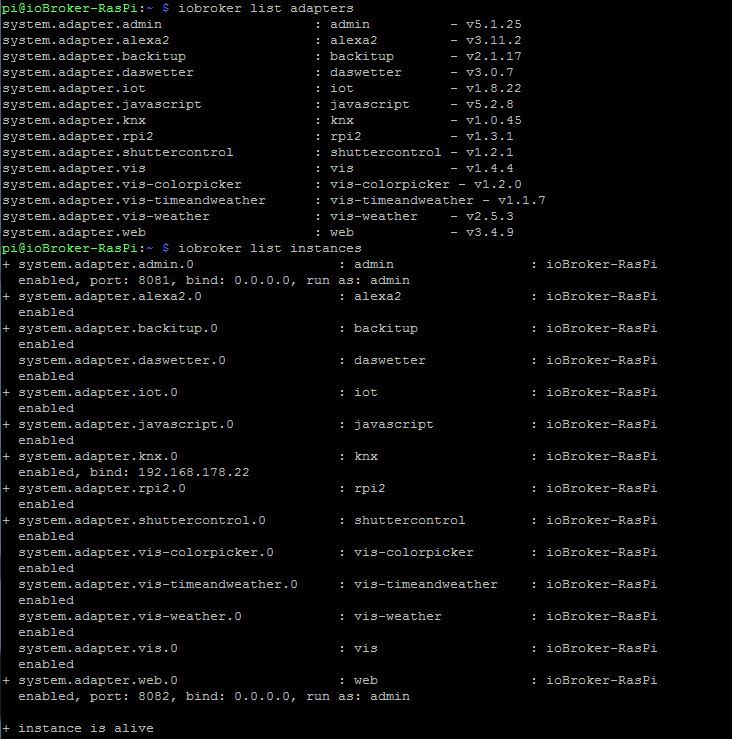
          iobroker list adapters
          iobroker list instances
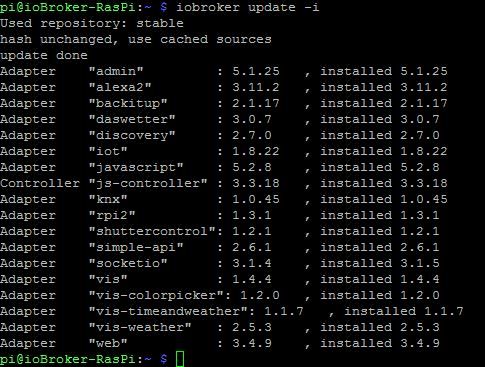
          iobroker update -i
          

          kein Support per PN! - Fragen im Forum stellen - es gibt fast nichts, was nicht auch für andere interessant ist.

          Benutzt das Voting rechts unten im Beitrag wenn er euch geholfen hat.

          der Installationsfixer: curl -fsL https://iobroker.net/fix.sh | bash -

          P 1 Antwort Letzte Antwort
          0
          • HomoranH Homoran

            @plc schön!
            Vertrauen ist gut - Kontrolle ist besser:

            iobroker list adapters
            iobroker list instances
            iobroker update -i
            
            P Offline
            P Offline
            plc
            schrieb am zuletzt editiert von
            #27

            @homoran

            2.JPG

            3.JPG

            HomoranH 1 Antwort Letzte Antwort
            0
            • P plc

              @homoran

              2.JPG

              3.JPG

              HomoranH Offline
              HomoranH Offline
              Homoran
              Global Moderator Administrators
              schrieb am zuletzt editiert von
              #28

              @plc sagte in yr.no Widget:

              @homoran

              2.JPG

              3.JPG

              @homoran sagte in yr.no Widget:

              Konfigs als Screenshots, logs und Code als Text in code-tags

              kein Support per PN! - Fragen im Forum stellen - es gibt fast nichts, was nicht auch für andere interessant ist.

              Benutzt das Voting rechts unten im Beitrag wenn er euch geholfen hat.

              der Installationsfixer: curl -fsL https://iobroker.net/fix.sh | bash -

              P 1 Antwort Letzte Antwort
              0
              • HomoranH Homoran

                @plc sagte in yr.no Widget:

                @homoran

                2.JPG

                3.JPG

                @homoran sagte in yr.no Widget:

                Konfigs als Screenshots, logs und Code als Text in code-tags

                P Offline
                P Offline
                plc
                schrieb am zuletzt editiert von
                #29

                @homoran
                wie kann ich aus Putty Konsole Queltex rauskopieren

                HomoranH 1 Antwort Letzte Antwort
                0
                • P plc

                  @homoran
                  wie kann ich aus Putty Konsole Queltex rauskopieren

                  HomoranH Offline
                  HomoranH Offline
                  Homoran
                  Global Moderator Administrators
                  schrieb am zuletzt editiert von
                  #30

                  @plc sagte in yr.no Widget:

                  wie kann ich aus Putty Konsole Queltex rauskopieren

                  einfach markieren, dann ist es in der Zwischenablage

                  kein Support per PN! - Fragen im Forum stellen - es gibt fast nichts, was nicht auch für andere interessant ist.

                  Benutzt das Voting rechts unten im Beitrag wenn er euch geholfen hat.

                  der Installationsfixer: curl -fsL https://iobroker.net/fix.sh | bash -

                  P 1 Antwort Letzte Antwort
                  0
                  • HomoranH Homoran

                    @plc sagte in yr.no Widget:

                    wie kann ich aus Putty Konsole Queltex rauskopieren

                    einfach markieren, dann ist es in der Zwischenablage

                    P Offline
                    P Offline
                    plc
                    schrieb am zuletzt editiert von
                    #31

                    @homoran

                    pi@ioBroker-RasPi:~ $ iobroker list adapters
                    system.adapter.admin                   : admin          - v5.1.25
                    system.adapter.alexa2                  : alexa2         - v3.11.2
                    system.adapter.backitup                : backitup       - v2.1.17
                    system.adapter.daswetter               : daswetter      - v3.0.7
                    system.adapter.iot                     : iot            - v1.8.22
                    system.adapter.javascript              : javascript     - v5.2.8
                    system.adapter.knx                     : knx            - v1.0.45
                    system.adapter.rpi2                    : rpi2           - v1.3.1
                    system.adapter.shuttercontrol          : shuttercontrol - v1.2.1
                    system.adapter.vis                     : vis            - v1.4.4
                    system.adapter.vis-colorpicker         : vis-colorpicker - v1.2.0
                    system.adapter.vis-timeandweather      : vis-timeandweather - v1.1.7
                    system.adapter.vis-weather             : vis-weather    - v2.5.3
                    system.adapter.web                     : web            - v3.4.9
                    pi@ioBroker-RasPi:~ $ iobroker list instances
                    + system.adapter.admin.0                  : admin                 : ioBroker-RasPi                           -  enabled, port: 8081, bind: 0.0.0.0, run as: admin
                    + system.adapter.alexa2.0                 : alexa2                : ioBroker-RasPi                           -  enabled
                    + system.adapter.backitup.0               : backitup              : ioBroker-RasPi                           -  enabled
                      system.adapter.daswetter.0              : daswetter             : ioBroker-RasPi                           -  enabled
                    + system.adapter.iot.0                    : iot                   : ioBroker-RasPi                           -  enabled
                    + system.adapter.javascript.0             : javascript            : ioBroker-RasPi                           -  enabled
                    + system.adapter.knx.0                    : knx                   : ioBroker-RasPi                           -  enabled, bind: 192.168.178.22
                    + system.adapter.rpi2.0                   : rpi2                  : ioBroker-RasPi                           -  enabled
                    + system.adapter.shuttercontrol.0         : shuttercontrol        : ioBroker-RasPi                           -  enabled
                      system.adapter.vis-colorpicker.0        : vis-colorpicker       : ioBroker-RasPi                           -  enabled
                      system.adapter.vis-timeandweather.0     : vis-timeandweather    : ioBroker-RasPi                           -  enabled
                      system.adapter.vis-weather.0            : vis-weather           : ioBroker-RasPi                           -  enabled
                      system.adapter.vis.0                    : vis                   : ioBroker-RasPi                           -  enabled
                    + system.adapter.web.0                    : web                   : ioBroker-RasPi                           -  enabled, port: 8082, bind: 0.0.0.0, run as: admin
                    
                    + instance is alive
                    pi@ioBroker-RasPi:~ $ iobroker update -i
                    Used repository: stable
                    hash unchanged, use cached sources
                    update done
                    Adapter    "admin"         : 5.1.25   , installed 5.1.25
                    Adapter    "alexa2"        : 3.11.2   , installed 3.11.2
                    Adapter    "backitup"      : 2.1.17   , installed 2.1.17
                    Adapter    "daswetter"     : 3.0.7    , installed 3.0.7
                    Adapter    "discovery"     : 2.7.0    , installed 2.7.0
                    Adapter    "iot"           : 1.8.22   , installed 1.8.22
                    Adapter    "javascript"    : 5.2.8    , installed 5.2.8
                    Controller "js-controller" : 3.3.18   , installed 3.3.18
                    Adapter    "knx"           : 1.0.45   , installed 1.0.45
                    Adapter    "rpi2"          : 1.3.1    , installed 1.3.1
                    Adapter    "shuttercontrol": 1.2.1    , installed 1.2.1
                    Adapter    "simple-api"    : 2.6.1    , installed 2.6.1
                    Adapter    "socketio"      : 3.1.4    , installed 3.1.5
                    Adapter    "vis"           : 1.4.4    , installed 1.4.4
                    Adapter    "vis-colorpicker": 1.2.0   , installed 1.2.0
                    Adapter    "vis-timeandweather": 1.1.7   , installed 1.1.7
                    Adapter    "vis-weather"   : 2.5.3    , installed 2.5.3
                    Adapter    "web"           : 3.4.9    , installed 3.4.9
                    
                    
                    HomoranH 1 Antwort Letzte Antwort
                    0
                    • P plc

                      @homoran

                      pi@ioBroker-RasPi:~ $ iobroker list adapters
                      system.adapter.admin                   : admin          - v5.1.25
                      system.adapter.alexa2                  : alexa2         - v3.11.2
                      system.adapter.backitup                : backitup       - v2.1.17
                      system.adapter.daswetter               : daswetter      - v3.0.7
                      system.adapter.iot                     : iot            - v1.8.22
                      system.adapter.javascript              : javascript     - v5.2.8
                      system.adapter.knx                     : knx            - v1.0.45
                      system.adapter.rpi2                    : rpi2           - v1.3.1
                      system.adapter.shuttercontrol          : shuttercontrol - v1.2.1
                      system.adapter.vis                     : vis            - v1.4.4
                      system.adapter.vis-colorpicker         : vis-colorpicker - v1.2.0
                      system.adapter.vis-timeandweather      : vis-timeandweather - v1.1.7
                      system.adapter.vis-weather             : vis-weather    - v2.5.3
                      system.adapter.web                     : web            - v3.4.9
                      pi@ioBroker-RasPi:~ $ iobroker list instances
                      + system.adapter.admin.0                  : admin                 : ioBroker-RasPi                           -  enabled, port: 8081, bind: 0.0.0.0, run as: admin
                      + system.adapter.alexa2.0                 : alexa2                : ioBroker-RasPi                           -  enabled
                      + system.adapter.backitup.0               : backitup              : ioBroker-RasPi                           -  enabled
                        system.adapter.daswetter.0              : daswetter             : ioBroker-RasPi                           -  enabled
                      + system.adapter.iot.0                    : iot                   : ioBroker-RasPi                           -  enabled
                      + system.adapter.javascript.0             : javascript            : ioBroker-RasPi                           -  enabled
                      + system.adapter.knx.0                    : knx                   : ioBroker-RasPi                           -  enabled, bind: 192.168.178.22
                      + system.adapter.rpi2.0                   : rpi2                  : ioBroker-RasPi                           -  enabled
                      + system.adapter.shuttercontrol.0         : shuttercontrol        : ioBroker-RasPi                           -  enabled
                        system.adapter.vis-colorpicker.0        : vis-colorpicker       : ioBroker-RasPi                           -  enabled
                        system.adapter.vis-timeandweather.0     : vis-timeandweather    : ioBroker-RasPi                           -  enabled
                        system.adapter.vis-weather.0            : vis-weather           : ioBroker-RasPi                           -  enabled
                        system.adapter.vis.0                    : vis                   : ioBroker-RasPi                           -  enabled
                      + system.adapter.web.0                    : web                   : ioBroker-RasPi                           -  enabled, port: 8082, bind: 0.0.0.0, run as: admin
                      
                      + instance is alive
                      pi@ioBroker-RasPi:~ $ iobroker update -i
                      Used repository: stable
                      hash unchanged, use cached sources
                      update done
                      Adapter    "admin"         : 5.1.25   , installed 5.1.25
                      Adapter    "alexa2"        : 3.11.2   , installed 3.11.2
                      Adapter    "backitup"      : 2.1.17   , installed 2.1.17
                      Adapter    "daswetter"     : 3.0.7    , installed 3.0.7
                      Adapter    "discovery"     : 2.7.0    , installed 2.7.0
                      Adapter    "iot"           : 1.8.22   , installed 1.8.22
                      Adapter    "javascript"    : 5.2.8    , installed 5.2.8
                      Controller "js-controller" : 3.3.18   , installed 3.3.18
                      Adapter    "knx"           : 1.0.45   , installed 1.0.45
                      Adapter    "rpi2"          : 1.3.1    , installed 1.3.1
                      Adapter    "shuttercontrol": 1.2.1    , installed 1.2.1
                      Adapter    "simple-api"    : 2.6.1    , installed 2.6.1
                      Adapter    "socketio"      : 3.1.4    , installed 3.1.5
                      Adapter    "vis"           : 1.4.4    , installed 1.4.4
                      Adapter    "vis-colorpicker": 1.2.0   , installed 1.2.0
                      Adapter    "vis-timeandweather": 1.1.7   , installed 1.1.7
                      Adapter    "vis-weather"   : 2.5.3    , installed 2.5.3
                      Adapter    "web"           : 3.4.9    , installed 3.4.9
                      
                      
                      HomoranH Offline
                      HomoranH Offline
                      Homoran
                      Global Moderator Administrators
                      schrieb am zuletzt editiert von
                      #32

                      @plc Danke - das kann ich lesen!
                      Sieht soweit alles gut aus

                      Jetzt bitte nochmal den Adapter yr installieren

                      kein Support per PN! - Fragen im Forum stellen - es gibt fast nichts, was nicht auch für andere interessant ist.

                      Benutzt das Voting rechts unten im Beitrag wenn er euch geholfen hat.

                      der Installationsfixer: curl -fsL https://iobroker.net/fix.sh | bash -

                      P 1 Antwort Letzte Antwort
                      0
                      • HomoranH Homoran

                        @plc Danke - das kann ich lesen!
                        Sieht soweit alles gut aus

                        Jetzt bitte nochmal den Adapter yr installieren

                        P Offline
                        P Offline
                        plc
                        schrieb am zuletzt editiert von
                        #33

                        @homoran
                        install log

                        $ iobroker add yr --host ioBroker-RasPi
                        
                        NPM version: 6.14.15
                        
                        npm install iobroker.yr@3.0.5 --loglevel error --prefix "/opt/iobroker" (System call)
                        
                        host.ioBroker-RasPi install adapter yr
                        
                        upload [90] yr.admin /opt/iobroker/node_modules/iobroker.yr/admin/icons/snowshowers_polartwilight.svg icons/snowshowers_polartwilight.svg image/svg+xml
                        
                        upload [80] yr.admin /opt/iobroker/node_modules/iobroker.yr/admin/icons/sleetshowers_day.svg icons/sleetshowers_day.svg image/svg+xml
                        
                        upload [70] yr.admin /opt/iobroker/node_modules/iobroker.yr/admin/icons/rain.svg icons/rain.svg image/svg+xml
                        
                        upload [60] yr.admin /opt/iobroker/node_modules/iobroker.yr/admin/icons/lightsnowshowers_polartwilight.svg icons/lightsnowshowers_polartwilight.svg image/svg+xml
                        
                        upload [50] yr.admin /opt/iobroker/node_modules/iobroker.yr/admin/icons/lightrainshowersandthunder_polartwilight.svg icons/lightrainshowersandthunder_polartwilight.svg image/svg+xml
                        
                        upload [40] yr.admin /opt/iobroker/node_modules/iobroker.yr/admin/icons/heavysnowshowersandthunder_day.svg icons/heavysnowshowersandthunder_day.svg image/svg+xml
                        
                        upload [30] yr.admin /opt/iobroker/node_modules/iobroker.yr/admin/icons/heavysleetshowers_night.svg icons/heavysleetshowers_night.svg image/svg+xml
                        
                        upload [20] yr.admin /opt/iobroker/node_modules/iobroker.yr/admin/icons/heavyrainandthunder.svg icons/heavyrainandthunder.svg image/svg+xml
                        
                        upload [19] yr.admin /opt/iobroker/node_modules/iobroker.yr/admin/icons/heavyrain.svg icons/heavyrain.svg image/svg+xml
                        
                        upload [18] yr.admin /opt/iobroker/node_modules/iobroker.yr/admin/icons/fog.svg icons/fog.svg image/svg+xml
                        
                        upload [17] yr.admin /opt/iobroker/node_modules/iobroker.yr/admin/icons/fair_polartwilight.svg icons/fair_polartwilight.svg image/svg+xml
                        
                        upload [16] yr.admin /opt/iobroker/node_modules/iobroker.yr/admin/icons/fair_night.svg icons/fair_night.svg image/svg+xml
                        
                        upload [15] yr.admin /opt/iobroker/node_modules/iobroker.yr/admin/icons/fair_day.svg icons/fair_day.svg image/svg+xml
                        
                        upload [14] yr.admin /opt/iobroker/node_modules/iobroker.yr/admin/icons/cloudy.svg icons/cloudy.svg image/svg+xml
                        
                        upload [13] yr.admin /opt/iobroker/node_modules/iobroker.yr/admin/icons/clearsky_polartwilight.svg icons/clearsky_polartwilight.svg image/svg+xml
                        
                        upload [12] yr.admin /opt/iobroker/node_modules/iobroker.yr/admin/icons/clearsky_night.svg icons/clearsky_night.svg image/svg+xml
                        
                        upload [11] yr.admin /opt/iobroker/node_modules/iobroker.yr/admin/icons/clearsky_day.svg icons/clearsky_day.svg image/svg+xml
                        
                        upload [10] yr.admin /opt/iobroker/node_modules/iobroker.yr/admin/icons/LICENSE icons/LICENSE null
                        
                        upload [9] yr.admin /opt/iobroker/node_modules/iobroker.yr/admin/i18n/zh-cn/translations.json i18n/zh-cn/translations.json application/json
                        
                        upload [8] yr.admin /opt/iobroker/node_modules/iobroker.yr/admin/i18n/ru/translations.json i18n/ru/translations.json application/json
                        
                        upload [7] yr.admin /opt/iobroker/node_modules/iobroker.yr/admin/i18n/pt/translations.json i18n/pt/translations.json application/json
                        
                        upload [6] yr.admin /opt/iobroker/node_modules/iobroker.yr/admin/i18n/pl/translations.json i18n/pl/translations.json application/json
                        
                        upload [5] yr.admin /opt/iobroker/node_modules/iobroker.yr/admin/i18n/nl/translations.json i18n/nl/translations.json application/json
                        
                        upload [4] yr.admin /opt/iobroker/node_modules/iobroker.yr/admin/i18n/it/translations.json i18n/it/translations.json application/json
                        
                        upload [3] yr.admin /opt/iobroker/node_modules/iobroker.yr/admin/i18n/fr/translations.json i18n/fr/translations.json application/json
                        
                        upload [2] yr.admin /opt/iobroker/node_modules/iobroker.yr/admin/i18n/es/translations.json i18n/es/translations.json application/json
                        
                        upload [1] yr.admin /opt/iobroker/node_modules/iobroker.yr/admin/i18n/en/translations.json i18n/en/translations.json application/json
                        
                        upload [0] yr.admin /opt/iobroker/node_modules/iobroker.yr/admin/i18n/de/translations.json i18n/de/translations.json application/json
                        
                        host.ioBroker-RasPi object system.adapter.yr created/updated
                        
                        host.ioBroker-RasPi create instance yr
                        
                        host.ioBroker-RasPi object system.adapter.yr.0.logLevel created
                        
                        host.ioBroker-RasPi object system.adapter.yr.0.sigKill created
                        
                        host.ioBroker-RasPi object system.adapter.yr.0.eventLoopLag created
                        
                        host.ioBroker-RasPi object system.adapter.yr.0.outputCount created
                        
                        host.ioBroker-RasPi object system.adapter.yr.0.inputCount created
                        
                        host.ioBroker-RasPi object system.adapter.yr.0.uptime created
                        
                        host.ioBroker-RasPi object system.adapter.yr.0.memRss created
                        
                        host.ioBroker-RasPi object system.adapter.yr.0.memHeapTotal created
                        
                        host.ioBroker-RasPi object system.adapter.yr.0.memHeapUsed created
                        
                        host.ioBroker-RasPi object system.adapter.yr.0.cputime created
                        
                        host.ioBroker-RasPi object system.adapter.yr.0.cpu created
                        
                        host.ioBroker-RasPi object system.adapter.yr.0.compactMode created
                        
                        host.ioBroker-RasPi object system.adapter.yr.0.connected created
                        
                        host.ioBroker-RasPi object system.adapter.yr.0.alive created
                        
                        host.ioBroker-RasPi object system.adapter.yr.0 created
                        
                        Process exited with code 0
                        
                        HomoranH 1 Antwort Letzte Antwort
                        0
                        • P plc

                          @homoran
                          install log

                          $ iobroker add yr --host ioBroker-RasPi
                          
                          NPM version: 6.14.15
                          
                          npm install iobroker.yr@3.0.5 --loglevel error --prefix "/opt/iobroker" (System call)
                          
                          host.ioBroker-RasPi install adapter yr
                          
                          upload [90] yr.admin /opt/iobroker/node_modules/iobroker.yr/admin/icons/snowshowers_polartwilight.svg icons/snowshowers_polartwilight.svg image/svg+xml
                          
                          upload [80] yr.admin /opt/iobroker/node_modules/iobroker.yr/admin/icons/sleetshowers_day.svg icons/sleetshowers_day.svg image/svg+xml
                          
                          upload [70] yr.admin /opt/iobroker/node_modules/iobroker.yr/admin/icons/rain.svg icons/rain.svg image/svg+xml
                          
                          upload [60] yr.admin /opt/iobroker/node_modules/iobroker.yr/admin/icons/lightsnowshowers_polartwilight.svg icons/lightsnowshowers_polartwilight.svg image/svg+xml
                          
                          upload [50] yr.admin /opt/iobroker/node_modules/iobroker.yr/admin/icons/lightrainshowersandthunder_polartwilight.svg icons/lightrainshowersandthunder_polartwilight.svg image/svg+xml
                          
                          upload [40] yr.admin /opt/iobroker/node_modules/iobroker.yr/admin/icons/heavysnowshowersandthunder_day.svg icons/heavysnowshowersandthunder_day.svg image/svg+xml
                          
                          upload [30] yr.admin /opt/iobroker/node_modules/iobroker.yr/admin/icons/heavysleetshowers_night.svg icons/heavysleetshowers_night.svg image/svg+xml
                          
                          upload [20] yr.admin /opt/iobroker/node_modules/iobroker.yr/admin/icons/heavyrainandthunder.svg icons/heavyrainandthunder.svg image/svg+xml
                          
                          upload [19] yr.admin /opt/iobroker/node_modules/iobroker.yr/admin/icons/heavyrain.svg icons/heavyrain.svg image/svg+xml
                          
                          upload [18] yr.admin /opt/iobroker/node_modules/iobroker.yr/admin/icons/fog.svg icons/fog.svg image/svg+xml
                          
                          upload [17] yr.admin /opt/iobroker/node_modules/iobroker.yr/admin/icons/fair_polartwilight.svg icons/fair_polartwilight.svg image/svg+xml
                          
                          upload [16] yr.admin /opt/iobroker/node_modules/iobroker.yr/admin/icons/fair_night.svg icons/fair_night.svg image/svg+xml
                          
                          upload [15] yr.admin /opt/iobroker/node_modules/iobroker.yr/admin/icons/fair_day.svg icons/fair_day.svg image/svg+xml
                          
                          upload [14] yr.admin /opt/iobroker/node_modules/iobroker.yr/admin/icons/cloudy.svg icons/cloudy.svg image/svg+xml
                          
                          upload [13] yr.admin /opt/iobroker/node_modules/iobroker.yr/admin/icons/clearsky_polartwilight.svg icons/clearsky_polartwilight.svg image/svg+xml
                          
                          upload [12] yr.admin /opt/iobroker/node_modules/iobroker.yr/admin/icons/clearsky_night.svg icons/clearsky_night.svg image/svg+xml
                          
                          upload [11] yr.admin /opt/iobroker/node_modules/iobroker.yr/admin/icons/clearsky_day.svg icons/clearsky_day.svg image/svg+xml
                          
                          upload [10] yr.admin /opt/iobroker/node_modules/iobroker.yr/admin/icons/LICENSE icons/LICENSE null
                          
                          upload [9] yr.admin /opt/iobroker/node_modules/iobroker.yr/admin/i18n/zh-cn/translations.json i18n/zh-cn/translations.json application/json
                          
                          upload [8] yr.admin /opt/iobroker/node_modules/iobroker.yr/admin/i18n/ru/translations.json i18n/ru/translations.json application/json
                          
                          upload [7] yr.admin /opt/iobroker/node_modules/iobroker.yr/admin/i18n/pt/translations.json i18n/pt/translations.json application/json
                          
                          upload [6] yr.admin /opt/iobroker/node_modules/iobroker.yr/admin/i18n/pl/translations.json i18n/pl/translations.json application/json
                          
                          upload [5] yr.admin /opt/iobroker/node_modules/iobroker.yr/admin/i18n/nl/translations.json i18n/nl/translations.json application/json
                          
                          upload [4] yr.admin /opt/iobroker/node_modules/iobroker.yr/admin/i18n/it/translations.json i18n/it/translations.json application/json
                          
                          upload [3] yr.admin /opt/iobroker/node_modules/iobroker.yr/admin/i18n/fr/translations.json i18n/fr/translations.json application/json
                          
                          upload [2] yr.admin /opt/iobroker/node_modules/iobroker.yr/admin/i18n/es/translations.json i18n/es/translations.json application/json
                          
                          upload [1] yr.admin /opt/iobroker/node_modules/iobroker.yr/admin/i18n/en/translations.json i18n/en/translations.json application/json
                          
                          upload [0] yr.admin /opt/iobroker/node_modules/iobroker.yr/admin/i18n/de/translations.json i18n/de/translations.json application/json
                          
                          host.ioBroker-RasPi object system.adapter.yr created/updated
                          
                          host.ioBroker-RasPi create instance yr
                          
                          host.ioBroker-RasPi object system.adapter.yr.0.logLevel created
                          
                          host.ioBroker-RasPi object system.adapter.yr.0.sigKill created
                          
                          host.ioBroker-RasPi object system.adapter.yr.0.eventLoopLag created
                          
                          host.ioBroker-RasPi object system.adapter.yr.0.outputCount created
                          
                          host.ioBroker-RasPi object system.adapter.yr.0.inputCount created
                          
                          host.ioBroker-RasPi object system.adapter.yr.0.uptime created
                          
                          host.ioBroker-RasPi object system.adapter.yr.0.memRss created
                          
                          host.ioBroker-RasPi object system.adapter.yr.0.memHeapTotal created
                          
                          host.ioBroker-RasPi object system.adapter.yr.0.memHeapUsed created
                          
                          host.ioBroker-RasPi object system.adapter.yr.0.cputime created
                          
                          host.ioBroker-RasPi object system.adapter.yr.0.cpu created
                          
                          host.ioBroker-RasPi object system.adapter.yr.0.compactMode created
                          
                          host.ioBroker-RasPi object system.adapter.yr.0.connected created
                          
                          host.ioBroker-RasPi object system.adapter.yr.0.alive created
                          
                          host.ioBroker-RasPi object system.adapter.yr.0 created
                          
                          Process exited with code 0
                          
                          HomoranH Offline
                          HomoranH Offline
                          Homoran
                          Global Moderator Administrators
                          schrieb am zuletzt editiert von
                          #34

                          sieht gut aus, auch die ganzen Icons werden hochgeladen

                          @plc sagte in yr.no Widget:

                          upload [70] yr.admin /opt/iobroker/node_modules/iobroker.yr/admin/icons/rain.svg icons/rain.svg image/svg+xml

                          kein Support per PN! - Fragen im Forum stellen - es gibt fast nichts, was nicht auch für andere interessant ist.

                          Benutzt das Voting rechts unten im Beitrag wenn er euch geholfen hat.

                          der Installationsfixer: curl -fsL https://iobroker.net/fix.sh | bash -

                          P 1 Antwort Letzte Antwort
                          0
                          • HomoranH Homoran

                            sieht gut aus, auch die ganzen Icons werden hochgeladen

                            @plc sagte in yr.no Widget:

                            upload [70] yr.admin /opt/iobroker/node_modules/iobroker.yr/admin/icons/rain.svg icons/rain.svg image/svg+xml

                            P Offline
                            P Offline
                            plc
                            schrieb am zuletzt editiert von
                            #35

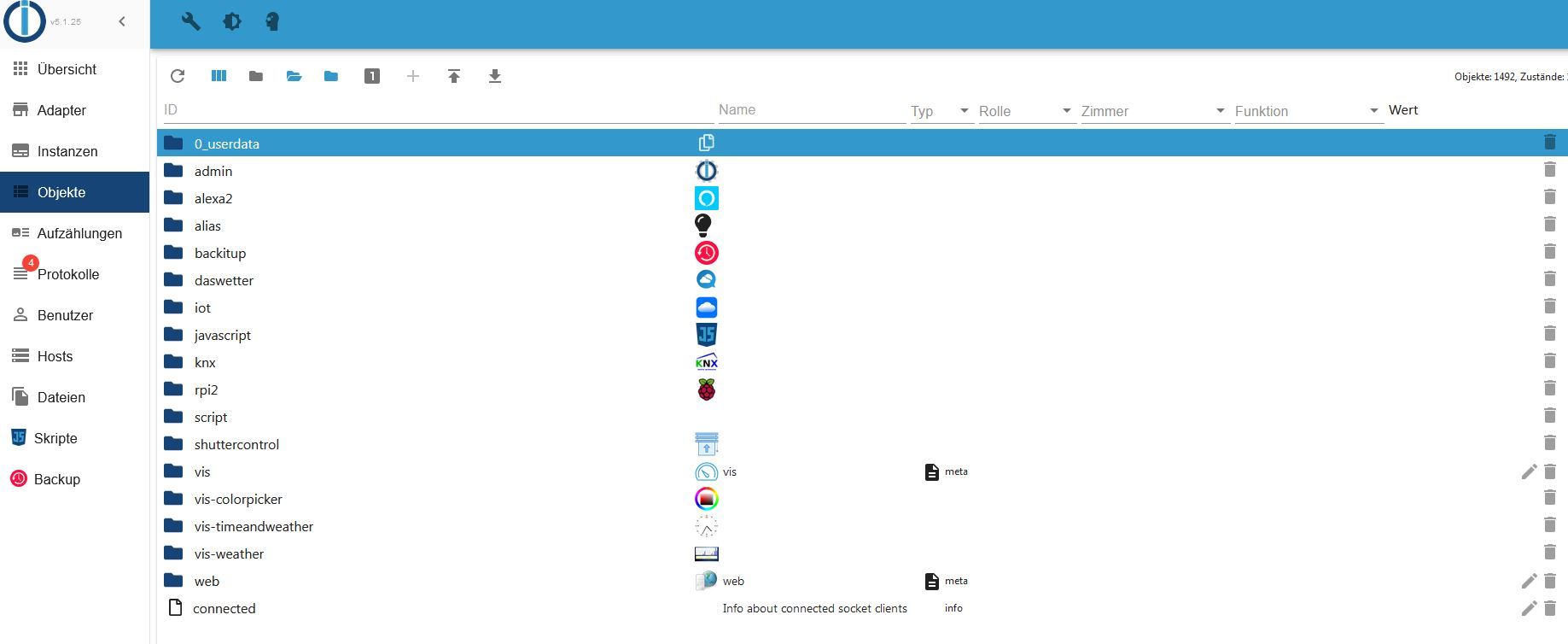
                            @homoran

                            so sieht es unter Objekten aus
                            4.JPG

                            HomoranH 1 Antwort Letzte Antwort
                            0
                            • P plc

                              @homoran

                              so sieht es unter Objekten aus
                              4.JPG

                              HomoranH Offline
                              HomoranH Offline
                              Homoran
                              Global Moderator Administrators
                              schrieb am zuletzt editiert von
                              #36

                              @plc sieht doch genauso aus wie bei @Glasfaser

                              kein Support per PN! - Fragen im Forum stellen - es gibt fast nichts, was nicht auch für andere interessant ist.

                              Benutzt das Voting rechts unten im Beitrag wenn er euch geholfen hat.

                              der Installationsfixer: curl -fsL https://iobroker.net/fix.sh | bash -

                              GlasfaserG P 2 Antworten Letzte Antwort
                              0
                              • HomoranH Homoran

                                @plc sieht doch genauso aus wie bei @Glasfaser

                                GlasfaserG Offline
                                GlasfaserG Offline
                                Glasfaser
                                schrieb am zuletzt editiert von
                                #37

                                @homoran sagte in yr.no Widget:

                                @plc sieht doch genauso aus wie bei @Glasfaser

                                Nur mal zur INFO :

                                Ich habe geschrieben :

                                Kenne den Adapter nicht , aber wenn ich mir ein Screenshot dazu anschaue , mußt du ein HTML Widget nehmen inkl. diesem Datenpunkt html

                                Das war ein Screenshot hier aus dem Forum .....

                                Synology 918+ 16GB - ioBroker in Docker v9 , VISO auf Trekstor Primebook C13 13,3" , Hikvision Domkameras mit Surveillance Station .. CCU RaspberryMatic in Synology VM .. Zigbee CC2538+CC2592 .. Sonoff .. KNX .. Modbus ..

                                HomoranH 1 Antwort Letzte Antwort
                                1
                                • HomoranH Homoran

                                  @plc sieht doch genauso aus wie bei @Glasfaser

                                  P Offline
                                  P Offline
                                  plc
                                  schrieb am zuletzt editiert von
                                  #38

                                  @homoran
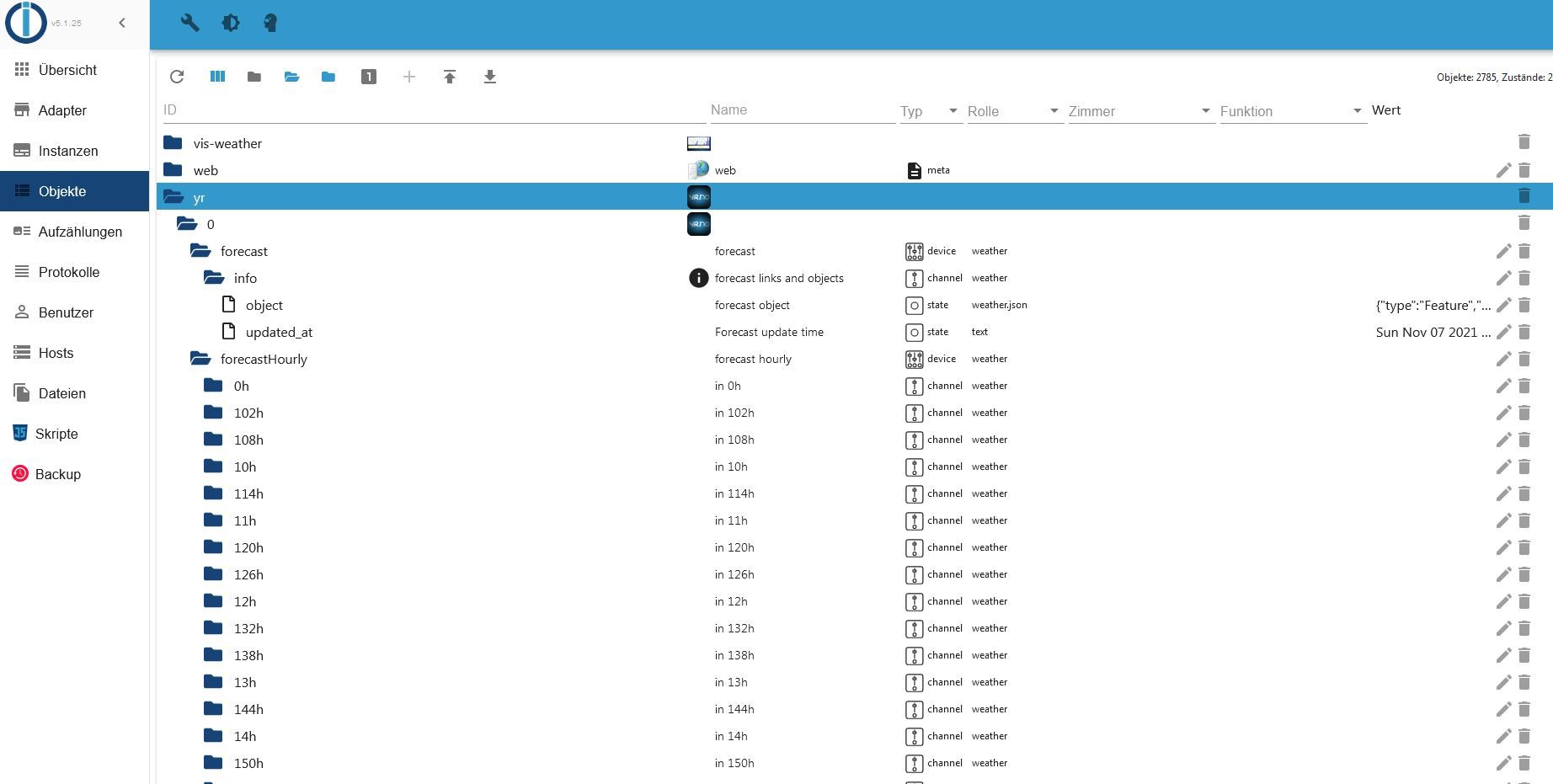
                                  aber wenn ich richtig verstanden habe muss irgendwo zumindest ein Datenpunkt mit URL geben

                                  GlasfaserG Samson71S 2 Antworten Letzte Antwort
                                  0
                                  • P plc

                                    @homoran
                                    aber wenn ich richtig verstanden habe muss irgendwo zumindest ein Datenpunkt mit URL geben

                                    GlasfaserG Offline
                                    GlasfaserG Offline
                                    Glasfaser
                                    schrieb am zuletzt editiert von
                                    #39

                                    @plc sagte in yr.no Widget:

                                    Datenpunkt mit URL geben

                                    Hast du die Location in der Instanz eingetragen

                                    Synology 918+ 16GB - ioBroker in Docker v9 , VISO auf Trekstor Primebook C13 13,3" , Hikvision Domkameras mit Surveillance Station .. CCU RaspberryMatic in Synology VM .. Zigbee CC2538+CC2592 .. Sonoff .. KNX .. Modbus ..

                                    P 1 Antwort Letzte Antwort
                                    0
                                    • P plc

                                      @homoran
                                      aber wenn ich richtig verstanden habe muss irgendwo zumindest ein Datenpunkt mit URL geben

                                      Samson71S Offline
                                      Samson71S Offline
                                      Samson71
                                      Global Moderator
                                      schrieb am zuletzt editiert von
                                      #40

                                      @plc sagte in yr.no Widget:

                                      @homoran
                                      aber wenn ich richtig verstanden habe muss irgendwo zumindest ein Datenpunkt mit URL geben

                                      Korrekt. Bei Dir "fehlt" da was

                                      So sieht es bei mir aus

                                      13ae2cdc-30fb-4980-a255-cbf58f486780-image.png

                                      Markus

                                      Bitte beachten:
                                      Hinweise für gute Forenbeiträge
                                      Maßnahmen zum Schutz des Forums

                                      GlasfaserG 1 Antwort Letzte Antwort
                                      0
                                      • GlasfaserG Glasfaser

                                        @plc sagte in yr.no Widget:

                                        Datenpunkt mit URL geben

                                        Hast du die Location in der Instanz eingetragen

                                        P Offline
                                        P Offline
                                        plc
                                        schrieb am zuletzt editiert von
                                        #41

                                        @glasfaser

                                        steht leer, aber er nimmt aus denn Einstellungen wenn leer ist.
                                        P 1 Antwort Letzte Antwort
                                        0
                                        • P plc

                                          @glasfaser

                                          steht leer, aber er nimmt aus denn Einstellungen wenn leer ist.
                                          P Offline
                                          P Offline
                                          plc
                                          schrieb am zuletzt editiert von
                                          #42

                                          @plc
                                          day0 usw habe ich gar nicht

                                          1 Antwort Letzte Antwort
                                          0
                                          Antworten
                                          • In einem neuen Thema antworten
                                          Anmelden zum Antworten
                                          • Älteste zuerst
                                          • Neuste zuerst
                                          • Meiste Stimmen


                                          Support us

                                          ioBroker
                                          Community Adapters
                                          Donate

                                          362

                                          Online

                                          32.6k

                                          Benutzer

                                          82.0k

                                          Themen

                                          1.3m

                                          Beiträge
                                          Community
                                          Impressum | Datenschutz-Bestimmungen | Nutzungsbedingungen | Einwilligungseinstellungen
                                          ioBroker Community 2014-2025
                                          logo
                                          • Anmelden

                                          • Du hast noch kein Konto? Registrieren

                                          • Anmelden oder registrieren, um zu suchen
                                          • Erster Beitrag
                                            Letzter Beitrag
                                          0
                                          • Home
                                          • Aktuell
                                          • Tags
                                          • Ungelesen 0
                                          • Kategorien
                                          • Unreplied
                                          • Beliebt
                                          • GitHub
                                          • Docu
                                          • Hilfe