



Skip to content
  • Home
  • Aktuell
  • Tags
  • 0 Ungelesen 0
  • Kategorien
  • Unreplied
  • Beliebt
  • GitHub
  • Docu
  • Hilfe
Skins
  • Light
  • Brite
  • Cerulean
  • Cosmo
  • Flatly
  • Journal
  • Litera
  • Lumen
  • Lux
  • Materia
  • Minty
  • Morph
  • Pulse
  • Sandstone
  • Simplex
  • Sketchy
  • Spacelab
  • United
  • Yeti
  • Zephyr
  • Dark
  • Cyborg
  • Darkly
  • Quartz
  • Slate
  • Solar
  • Superhero
  • Vapor

  • Standard: (Kein Skin)
  • Kein Skin
Einklappen
ioBroker Logo

Community Forum

donate donate
  1. ioBroker Community Home
  2. Deutsch
  3. Visualisierung
  4. yr.no Widget

NEWS

  • Jahresrückblick 2025 – unser neuer Blogbeitrag ist online! ✨
    BluefoxB
    Bluefox
    16
    1
    1.1k

  • Neuer Blogbeitrag: Monatsrückblick - Dezember 2025 🎄
    BluefoxB
    Bluefox
    13
    1
    707

  • Weihnachtsangebot 2025! 🎄
    BluefoxB
    Bluefox
    25
    1
    2.0k

yr.no Widget

Geplant Angeheftet Gesperrt Verschoben Visualisierung
52 Beiträge 4 Kommentatoren 5.7k Aufrufe 3 Watching
  • Älteste zuerst
  • Neuste zuerst
  • Meiste Stimmen
Antworten
  • In einem neuen Thema antworten
Anmelden zum Antworten
Dieses Thema wurde gelöscht. Nur Nutzer mit entsprechenden Rechten können es sehen.
  • P plc

    @homoran
    wie kann ich aus Putty Konsole Queltex rauskopieren

    HomoranH Nicht stören
    HomoranH Nicht stören
    Homoran
    Global Moderator Administrators
    schrieb am zuletzt editiert von
    #30

    @plc sagte in yr.no Widget:

    wie kann ich aus Putty Konsole Queltex rauskopieren

    einfach markieren, dann ist es in der Zwischenablage

    kein Support per PN! - Fragen im Forum stellen - es gibt fast nichts, was nicht auch für andere interessant ist.

    Benutzt das Voting rechts unten im Beitrag wenn er euch geholfen hat.

    der Installationsfixer: curl -fsL https://iobroker.net/fix.sh | bash -

    P 1 Antwort Letzte Antwort
    0
    • HomoranH Homoran

      @plc sagte in yr.no Widget:

      wie kann ich aus Putty Konsole Queltex rauskopieren

      einfach markieren, dann ist es in der Zwischenablage

      P Offline
      P Offline
      plc
      schrieb am zuletzt editiert von
      #31

      @homoran

      pi@ioBroker-RasPi:~ $ iobroker list adapters
      system.adapter.admin                   : admin          - v5.1.25
      system.adapter.alexa2                  : alexa2         - v3.11.2
      system.adapter.backitup                : backitup       - v2.1.17
      system.adapter.daswetter               : daswetter      - v3.0.7
      system.adapter.iot                     : iot            - v1.8.22
      system.adapter.javascript              : javascript     - v5.2.8
      system.adapter.knx                     : knx            - v1.0.45
      system.adapter.rpi2                    : rpi2           - v1.3.1
      system.adapter.shuttercontrol          : shuttercontrol - v1.2.1
      system.adapter.vis                     : vis            - v1.4.4
      system.adapter.vis-colorpicker         : vis-colorpicker - v1.2.0
      system.adapter.vis-timeandweather      : vis-timeandweather - v1.1.7
      system.adapter.vis-weather             : vis-weather    - v2.5.3
      system.adapter.web                     : web            - v3.4.9
      pi@ioBroker-RasPi:~ $ iobroker list instances
      + system.adapter.admin.0                  : admin                 : ioBroker-RasPi                           -  enabled, port: 8081, bind: 0.0.0.0, run as: admin
      + system.adapter.alexa2.0                 : alexa2                : ioBroker-RasPi                           -  enabled
      + system.adapter.backitup.0               : backitup              : ioBroker-RasPi                           -  enabled
        system.adapter.daswetter.0              : daswetter             : ioBroker-RasPi                           -  enabled
      + system.adapter.iot.0                    : iot                   : ioBroker-RasPi                           -  enabled
      + system.adapter.javascript.0             : javascript            : ioBroker-RasPi                           -  enabled
      + system.adapter.knx.0                    : knx                   : ioBroker-RasPi                           -  enabled, bind: 192.168.178.22
      + system.adapter.rpi2.0                   : rpi2                  : ioBroker-RasPi                           -  enabled
      + system.adapter.shuttercontrol.0         : shuttercontrol        : ioBroker-RasPi                           -  enabled
        system.adapter.vis-colorpicker.0        : vis-colorpicker       : ioBroker-RasPi                           -  enabled
        system.adapter.vis-timeandweather.0     : vis-timeandweather    : ioBroker-RasPi                           -  enabled
        system.adapter.vis-weather.0            : vis-weather           : ioBroker-RasPi                           -  enabled
        system.adapter.vis.0                    : vis                   : ioBroker-RasPi                           -  enabled
      + system.adapter.web.0                    : web                   : ioBroker-RasPi                           -  enabled, port: 8082, bind: 0.0.0.0, run as: admin
      
      + instance is alive
      pi@ioBroker-RasPi:~ $ iobroker update -i
      Used repository: stable
      hash unchanged, use cached sources
      update done
      Adapter    "admin"         : 5.1.25   , installed 5.1.25
      Adapter    "alexa2"        : 3.11.2   , installed 3.11.2
      Adapter    "backitup"      : 2.1.17   , installed 2.1.17
      Adapter    "daswetter"     : 3.0.7    , installed 3.0.7
      Adapter    "discovery"     : 2.7.0    , installed 2.7.0
      Adapter    "iot"           : 1.8.22   , installed 1.8.22
      Adapter    "javascript"    : 5.2.8    , installed 5.2.8
      Controller "js-controller" : 3.3.18   , installed 3.3.18
      Adapter    "knx"           : 1.0.45   , installed 1.0.45
      Adapter    "rpi2"          : 1.3.1    , installed 1.3.1
      Adapter    "shuttercontrol": 1.2.1    , installed 1.2.1
      Adapter    "simple-api"    : 2.6.1    , installed 2.6.1
      Adapter    "socketio"      : 3.1.4    , installed 3.1.5
      Adapter    "vis"           : 1.4.4    , installed 1.4.4
      Adapter    "vis-colorpicker": 1.2.0   , installed 1.2.0
      Adapter    "vis-timeandweather": 1.1.7   , installed 1.1.7
      Adapter    "vis-weather"   : 2.5.3    , installed 2.5.3
      Adapter    "web"           : 3.4.9    , installed 3.4.9
      
      
      HomoranH 1 Antwort Letzte Antwort
      0
      • P plc

        @homoran

        pi@ioBroker-RasPi:~ $ iobroker list adapters
        system.adapter.admin                   : admin          - v5.1.25
        system.adapter.alexa2                  : alexa2         - v3.11.2
        system.adapter.backitup                : backitup       - v2.1.17
        system.adapter.daswetter               : daswetter      - v3.0.7
        system.adapter.iot                     : iot            - v1.8.22
        system.adapter.javascript              : javascript     - v5.2.8
        system.adapter.knx                     : knx            - v1.0.45
        system.adapter.rpi2                    : rpi2           - v1.3.1
        system.adapter.shuttercontrol          : shuttercontrol - v1.2.1
        system.adapter.vis                     : vis            - v1.4.4
        system.adapter.vis-colorpicker         : vis-colorpicker - v1.2.0
        system.adapter.vis-timeandweather      : vis-timeandweather - v1.1.7
        system.adapter.vis-weather             : vis-weather    - v2.5.3
        system.adapter.web                     : web            - v3.4.9
        pi@ioBroker-RasPi:~ $ iobroker list instances
        + system.adapter.admin.0                  : admin                 : ioBroker-RasPi                           -  enabled, port: 8081, bind: 0.0.0.0, run as: admin
        + system.adapter.alexa2.0                 : alexa2                : ioBroker-RasPi                           -  enabled
        + system.adapter.backitup.0               : backitup              : ioBroker-RasPi                           -  enabled
          system.adapter.daswetter.0              : daswetter             : ioBroker-RasPi                           -  enabled
        + system.adapter.iot.0                    : iot                   : ioBroker-RasPi                           -  enabled
        + system.adapter.javascript.0             : javascript            : ioBroker-RasPi                           -  enabled
        + system.adapter.knx.0                    : knx                   : ioBroker-RasPi                           -  enabled, bind: 192.168.178.22
        + system.adapter.rpi2.0                   : rpi2                  : ioBroker-RasPi                           -  enabled
        + system.adapter.shuttercontrol.0         : shuttercontrol        : ioBroker-RasPi                           -  enabled
          system.adapter.vis-colorpicker.0        : vis-colorpicker       : ioBroker-RasPi                           -  enabled
          system.adapter.vis-timeandweather.0     : vis-timeandweather    : ioBroker-RasPi                           -  enabled
          system.adapter.vis-weather.0            : vis-weather           : ioBroker-RasPi                           -  enabled
          system.adapter.vis.0                    : vis                   : ioBroker-RasPi                           -  enabled
        + system.adapter.web.0                    : web                   : ioBroker-RasPi                           -  enabled, port: 8082, bind: 0.0.0.0, run as: admin
        
        + instance is alive
        pi@ioBroker-RasPi:~ $ iobroker update -i
        Used repository: stable
        hash unchanged, use cached sources
        update done
        Adapter    "admin"         : 5.1.25   , installed 5.1.25
        Adapter    "alexa2"        : 3.11.2   , installed 3.11.2
        Adapter    "backitup"      : 2.1.17   , installed 2.1.17
        Adapter    "daswetter"     : 3.0.7    , installed 3.0.7
        Adapter    "discovery"     : 2.7.0    , installed 2.7.0
        Adapter    "iot"           : 1.8.22   , installed 1.8.22
        Adapter    "javascript"    : 5.2.8    , installed 5.2.8
        Controller "js-controller" : 3.3.18   , installed 3.3.18
        Adapter    "knx"           : 1.0.45   , installed 1.0.45
        Adapter    "rpi2"          : 1.3.1    , installed 1.3.1
        Adapter    "shuttercontrol": 1.2.1    , installed 1.2.1
        Adapter    "simple-api"    : 2.6.1    , installed 2.6.1
        Adapter    "socketio"      : 3.1.4    , installed 3.1.5
        Adapter    "vis"           : 1.4.4    , installed 1.4.4
        Adapter    "vis-colorpicker": 1.2.0   , installed 1.2.0
        Adapter    "vis-timeandweather": 1.1.7   , installed 1.1.7
        Adapter    "vis-weather"   : 2.5.3    , installed 2.5.3
        Adapter    "web"           : 3.4.9    , installed 3.4.9
        
        
        HomoranH Nicht stören
        HomoranH Nicht stören
        Homoran
        Global Moderator Administrators
        schrieb am zuletzt editiert von
        #32

        @plc Danke - das kann ich lesen!
        Sieht soweit alles gut aus

        Jetzt bitte nochmal den Adapter yr installieren

        kein Support per PN! - Fragen im Forum stellen - es gibt fast nichts, was nicht auch für andere interessant ist.

        Benutzt das Voting rechts unten im Beitrag wenn er euch geholfen hat.

        der Installationsfixer: curl -fsL https://iobroker.net/fix.sh | bash -

        P 1 Antwort Letzte Antwort
        0
        • HomoranH Homoran

          @plc Danke - das kann ich lesen!
          Sieht soweit alles gut aus

          Jetzt bitte nochmal den Adapter yr installieren

          P Offline
          P Offline
          plc
          schrieb am zuletzt editiert von
          #33

          @homoran
          install log

          $ iobroker add yr --host ioBroker-RasPi
          
          NPM version: 6.14.15
          
          npm install iobroker.yr@3.0.5 --loglevel error --prefix "/opt/iobroker" (System call)
          
          host.ioBroker-RasPi install adapter yr
          
          upload [90] yr.admin /opt/iobroker/node_modules/iobroker.yr/admin/icons/snowshowers_polartwilight.svg icons/snowshowers_polartwilight.svg image/svg+xml
          
          upload [80] yr.admin /opt/iobroker/node_modules/iobroker.yr/admin/icons/sleetshowers_day.svg icons/sleetshowers_day.svg image/svg+xml
          
          upload [70] yr.admin /opt/iobroker/node_modules/iobroker.yr/admin/icons/rain.svg icons/rain.svg image/svg+xml
          
          upload [60] yr.admin /opt/iobroker/node_modules/iobroker.yr/admin/icons/lightsnowshowers_polartwilight.svg icons/lightsnowshowers_polartwilight.svg image/svg+xml
          
          upload [50] yr.admin /opt/iobroker/node_modules/iobroker.yr/admin/icons/lightrainshowersandthunder_polartwilight.svg icons/lightrainshowersandthunder_polartwilight.svg image/svg+xml
          
          upload [40] yr.admin /opt/iobroker/node_modules/iobroker.yr/admin/icons/heavysnowshowersandthunder_day.svg icons/heavysnowshowersandthunder_day.svg image/svg+xml
          
          upload [30] yr.admin /opt/iobroker/node_modules/iobroker.yr/admin/icons/heavysleetshowers_night.svg icons/heavysleetshowers_night.svg image/svg+xml
          
          upload [20] yr.admin /opt/iobroker/node_modules/iobroker.yr/admin/icons/heavyrainandthunder.svg icons/heavyrainandthunder.svg image/svg+xml
          
          upload [19] yr.admin /opt/iobroker/node_modules/iobroker.yr/admin/icons/heavyrain.svg icons/heavyrain.svg image/svg+xml
          
          upload [18] yr.admin /opt/iobroker/node_modules/iobroker.yr/admin/icons/fog.svg icons/fog.svg image/svg+xml
          
          upload [17] yr.admin /opt/iobroker/node_modules/iobroker.yr/admin/icons/fair_polartwilight.svg icons/fair_polartwilight.svg image/svg+xml
          
          upload [16] yr.admin /opt/iobroker/node_modules/iobroker.yr/admin/icons/fair_night.svg icons/fair_night.svg image/svg+xml
          
          upload [15] yr.admin /opt/iobroker/node_modules/iobroker.yr/admin/icons/fair_day.svg icons/fair_day.svg image/svg+xml
          
          upload [14] yr.admin /opt/iobroker/node_modules/iobroker.yr/admin/icons/cloudy.svg icons/cloudy.svg image/svg+xml
          
          upload [13] yr.admin /opt/iobroker/node_modules/iobroker.yr/admin/icons/clearsky_polartwilight.svg icons/clearsky_polartwilight.svg image/svg+xml
          
          upload [12] yr.admin /opt/iobroker/node_modules/iobroker.yr/admin/icons/clearsky_night.svg icons/clearsky_night.svg image/svg+xml
          
          upload [11] yr.admin /opt/iobroker/node_modules/iobroker.yr/admin/icons/clearsky_day.svg icons/clearsky_day.svg image/svg+xml
          
          upload [10] yr.admin /opt/iobroker/node_modules/iobroker.yr/admin/icons/LICENSE icons/LICENSE null
          
          upload [9] yr.admin /opt/iobroker/node_modules/iobroker.yr/admin/i18n/zh-cn/translations.json i18n/zh-cn/translations.json application/json
          
          upload [8] yr.admin /opt/iobroker/node_modules/iobroker.yr/admin/i18n/ru/translations.json i18n/ru/translations.json application/json
          
          upload [7] yr.admin /opt/iobroker/node_modules/iobroker.yr/admin/i18n/pt/translations.json i18n/pt/translations.json application/json
          
          upload [6] yr.admin /opt/iobroker/node_modules/iobroker.yr/admin/i18n/pl/translations.json i18n/pl/translations.json application/json
          
          upload [5] yr.admin /opt/iobroker/node_modules/iobroker.yr/admin/i18n/nl/translations.json i18n/nl/translations.json application/json
          
          upload [4] yr.admin /opt/iobroker/node_modules/iobroker.yr/admin/i18n/it/translations.json i18n/it/translations.json application/json
          
          upload [3] yr.admin /opt/iobroker/node_modules/iobroker.yr/admin/i18n/fr/translations.json i18n/fr/translations.json application/json
          
          upload [2] yr.admin /opt/iobroker/node_modules/iobroker.yr/admin/i18n/es/translations.json i18n/es/translations.json application/json
          
          upload [1] yr.admin /opt/iobroker/node_modules/iobroker.yr/admin/i18n/en/translations.json i18n/en/translations.json application/json
          
          upload [0] yr.admin /opt/iobroker/node_modules/iobroker.yr/admin/i18n/de/translations.json i18n/de/translations.json application/json
          
          host.ioBroker-RasPi object system.adapter.yr created/updated
          
          host.ioBroker-RasPi create instance yr
          
          host.ioBroker-RasPi object system.adapter.yr.0.logLevel created
          
          host.ioBroker-RasPi object system.adapter.yr.0.sigKill created
          
          host.ioBroker-RasPi object system.adapter.yr.0.eventLoopLag created
          
          host.ioBroker-RasPi object system.adapter.yr.0.outputCount created
          
          host.ioBroker-RasPi object system.adapter.yr.0.inputCount created
          
          host.ioBroker-RasPi object system.adapter.yr.0.uptime created
          
          host.ioBroker-RasPi object system.adapter.yr.0.memRss created
          
          host.ioBroker-RasPi object system.adapter.yr.0.memHeapTotal created
          
          host.ioBroker-RasPi object system.adapter.yr.0.memHeapUsed created
          
          host.ioBroker-RasPi object system.adapter.yr.0.cputime created
          
          host.ioBroker-RasPi object system.adapter.yr.0.cpu created
          
          host.ioBroker-RasPi object system.adapter.yr.0.compactMode created
          
          host.ioBroker-RasPi object system.adapter.yr.0.connected created
          
          host.ioBroker-RasPi object system.adapter.yr.0.alive created
          
          host.ioBroker-RasPi object system.adapter.yr.0 created
          
          Process exited with code 0
          
          HomoranH 1 Antwort Letzte Antwort
          0
          • P plc

            @homoran
            install log

            $ iobroker add yr --host ioBroker-RasPi
            
            NPM version: 6.14.15
            
            npm install iobroker.yr@3.0.5 --loglevel error --prefix "/opt/iobroker" (System call)
            
            host.ioBroker-RasPi install adapter yr
            
            upload [90] yr.admin /opt/iobroker/node_modules/iobroker.yr/admin/icons/snowshowers_polartwilight.svg icons/snowshowers_polartwilight.svg image/svg+xml
            
            upload [80] yr.admin /opt/iobroker/node_modules/iobroker.yr/admin/icons/sleetshowers_day.svg icons/sleetshowers_day.svg image/svg+xml
            
            upload [70] yr.admin /opt/iobroker/node_modules/iobroker.yr/admin/icons/rain.svg icons/rain.svg image/svg+xml
            
            upload [60] yr.admin /opt/iobroker/node_modules/iobroker.yr/admin/icons/lightsnowshowers_polartwilight.svg icons/lightsnowshowers_polartwilight.svg image/svg+xml
            
            upload [50] yr.admin /opt/iobroker/node_modules/iobroker.yr/admin/icons/lightrainshowersandthunder_polartwilight.svg icons/lightrainshowersandthunder_polartwilight.svg image/svg+xml
            
            upload [40] yr.admin /opt/iobroker/node_modules/iobroker.yr/admin/icons/heavysnowshowersandthunder_day.svg icons/heavysnowshowersandthunder_day.svg image/svg+xml
            
            upload [30] yr.admin /opt/iobroker/node_modules/iobroker.yr/admin/icons/heavysleetshowers_night.svg icons/heavysleetshowers_night.svg image/svg+xml
            
            upload [20] yr.admin /opt/iobroker/node_modules/iobroker.yr/admin/icons/heavyrainandthunder.svg icons/heavyrainandthunder.svg image/svg+xml
            
            upload [19] yr.admin /opt/iobroker/node_modules/iobroker.yr/admin/icons/heavyrain.svg icons/heavyrain.svg image/svg+xml
            
            upload [18] yr.admin /opt/iobroker/node_modules/iobroker.yr/admin/icons/fog.svg icons/fog.svg image/svg+xml
            
            upload [17] yr.admin /opt/iobroker/node_modules/iobroker.yr/admin/icons/fair_polartwilight.svg icons/fair_polartwilight.svg image/svg+xml
            
            upload [16] yr.admin /opt/iobroker/node_modules/iobroker.yr/admin/icons/fair_night.svg icons/fair_night.svg image/svg+xml
            
            upload [15] yr.admin /opt/iobroker/node_modules/iobroker.yr/admin/icons/fair_day.svg icons/fair_day.svg image/svg+xml
            
            upload [14] yr.admin /opt/iobroker/node_modules/iobroker.yr/admin/icons/cloudy.svg icons/cloudy.svg image/svg+xml
            
            upload [13] yr.admin /opt/iobroker/node_modules/iobroker.yr/admin/icons/clearsky_polartwilight.svg icons/clearsky_polartwilight.svg image/svg+xml
            
            upload [12] yr.admin /opt/iobroker/node_modules/iobroker.yr/admin/icons/clearsky_night.svg icons/clearsky_night.svg image/svg+xml
            
            upload [11] yr.admin /opt/iobroker/node_modules/iobroker.yr/admin/icons/clearsky_day.svg icons/clearsky_day.svg image/svg+xml
            
            upload [10] yr.admin /opt/iobroker/node_modules/iobroker.yr/admin/icons/LICENSE icons/LICENSE null
            
            upload [9] yr.admin /opt/iobroker/node_modules/iobroker.yr/admin/i18n/zh-cn/translations.json i18n/zh-cn/translations.json application/json
            
            upload [8] yr.admin /opt/iobroker/node_modules/iobroker.yr/admin/i18n/ru/translations.json i18n/ru/translations.json application/json
            
            upload [7] yr.admin /opt/iobroker/node_modules/iobroker.yr/admin/i18n/pt/translations.json i18n/pt/translations.json application/json
            
            upload [6] yr.admin /opt/iobroker/node_modules/iobroker.yr/admin/i18n/pl/translations.json i18n/pl/translations.json application/json
            
            upload [5] yr.admin /opt/iobroker/node_modules/iobroker.yr/admin/i18n/nl/translations.json i18n/nl/translations.json application/json
            
            upload [4] yr.admin /opt/iobroker/node_modules/iobroker.yr/admin/i18n/it/translations.json i18n/it/translations.json application/json
            
            upload [3] yr.admin /opt/iobroker/node_modules/iobroker.yr/admin/i18n/fr/translations.json i18n/fr/translations.json application/json
            
            upload [2] yr.admin /opt/iobroker/node_modules/iobroker.yr/admin/i18n/es/translations.json i18n/es/translations.json application/json
            
            upload [1] yr.admin /opt/iobroker/node_modules/iobroker.yr/admin/i18n/en/translations.json i18n/en/translations.json application/json
            
            upload [0] yr.admin /opt/iobroker/node_modules/iobroker.yr/admin/i18n/de/translations.json i18n/de/translations.json application/json
            
            host.ioBroker-RasPi object system.adapter.yr created/updated
            
            host.ioBroker-RasPi create instance yr
            
            host.ioBroker-RasPi object system.adapter.yr.0.logLevel created
            
            host.ioBroker-RasPi object system.adapter.yr.0.sigKill created
            
            host.ioBroker-RasPi object system.adapter.yr.0.eventLoopLag created
            
            host.ioBroker-RasPi object system.adapter.yr.0.outputCount created
            
            host.ioBroker-RasPi object system.adapter.yr.0.inputCount created
            
            host.ioBroker-RasPi object system.adapter.yr.0.uptime created
            
            host.ioBroker-RasPi object system.adapter.yr.0.memRss created
            
            host.ioBroker-RasPi object system.adapter.yr.0.memHeapTotal created
            
            host.ioBroker-RasPi object system.adapter.yr.0.memHeapUsed created
            
            host.ioBroker-RasPi object system.adapter.yr.0.cputime created
            
            host.ioBroker-RasPi object system.adapter.yr.0.cpu created
            
            host.ioBroker-RasPi object system.adapter.yr.0.compactMode created
            
            host.ioBroker-RasPi object system.adapter.yr.0.connected created
            
            host.ioBroker-RasPi object system.adapter.yr.0.alive created
            
            host.ioBroker-RasPi object system.adapter.yr.0 created
            
            Process exited with code 0
            
            HomoranH Nicht stören
            HomoranH Nicht stören
            Homoran
            Global Moderator Administrators
            schrieb am zuletzt editiert von
            #34

            sieht gut aus, auch die ganzen Icons werden hochgeladen

            @plc sagte in yr.no Widget:

            upload [70] yr.admin /opt/iobroker/node_modules/iobroker.yr/admin/icons/rain.svg icons/rain.svg image/svg+xml

            kein Support per PN! - Fragen im Forum stellen - es gibt fast nichts, was nicht auch für andere interessant ist.

            Benutzt das Voting rechts unten im Beitrag wenn er euch geholfen hat.

            der Installationsfixer: curl -fsL https://iobroker.net/fix.sh | bash -

            P 1 Antwort Letzte Antwort
            0
            • HomoranH Homoran

              sieht gut aus, auch die ganzen Icons werden hochgeladen

              @plc sagte in yr.no Widget:

              upload [70] yr.admin /opt/iobroker/node_modules/iobroker.yr/admin/icons/rain.svg icons/rain.svg image/svg+xml

              P Offline
              P Offline
              plc
              schrieb am zuletzt editiert von
              #35

              @homoran

              so sieht es unter Objekten aus
              4.JPG

              HomoranH 1 Antwort Letzte Antwort
              0
              • P plc

                @homoran

                so sieht es unter Objekten aus
                4.JPG

                HomoranH Nicht stören
                HomoranH Nicht stören
                Homoran
                Global Moderator Administrators
                schrieb am zuletzt editiert von
                #36

                @plc sieht doch genauso aus wie bei @Glasfaser

                kein Support per PN! - Fragen im Forum stellen - es gibt fast nichts, was nicht auch für andere interessant ist.

                Benutzt das Voting rechts unten im Beitrag wenn er euch geholfen hat.

                der Installationsfixer: curl -fsL https://iobroker.net/fix.sh | bash -

                GlasfaserG P 2 Antworten Letzte Antwort
                0
                • HomoranH Homoran

                  @plc sieht doch genauso aus wie bei @Glasfaser

                  GlasfaserG Offline
                  GlasfaserG Offline
                  Glasfaser
                  schrieb am zuletzt editiert von
                  #37

                  @homoran sagte in yr.no Widget:

                  @plc sieht doch genauso aus wie bei @Glasfaser

                  Nur mal zur INFO :

                  Ich habe geschrieben :

                  Kenne den Adapter nicht , aber wenn ich mir ein Screenshot dazu anschaue , mußt du ein HTML Widget nehmen inkl. diesem Datenpunkt html

                  Das war ein Screenshot hier aus dem Forum .....

                  Synology 918+ 16GB - ioBroker in Docker v9 , VISO auf Trekstor Primebook C13 13,3" , Hikvision Domkameras mit Surveillance Station .. CCU RaspberryMatic in Synology VM .. Zigbee CC2538+CC2592 .. Sonoff .. KNX .. Modbus ..

                  HomoranH 1 Antwort Letzte Antwort
                  1
                  • HomoranH Homoran

                    @plc sieht doch genauso aus wie bei @Glasfaser

                    P Offline
                    P Offline
                    plc
                    schrieb am zuletzt editiert von
                    #38

                    @homoran
                    aber wenn ich richtig verstanden habe muss irgendwo zumindest ein Datenpunkt mit URL geben

                    GlasfaserG Samson71S 2 Antworten Letzte Antwort
                    0
                    • P plc

                      @homoran
                      aber wenn ich richtig verstanden habe muss irgendwo zumindest ein Datenpunkt mit URL geben

                      GlasfaserG Offline
                      GlasfaserG Offline
                      Glasfaser
                      schrieb am zuletzt editiert von
                      #39

                      @plc sagte in yr.no Widget:

                      Datenpunkt mit URL geben

                      Hast du die Location in der Instanz eingetragen

                      Synology 918+ 16GB - ioBroker in Docker v9 , VISO auf Trekstor Primebook C13 13,3" , Hikvision Domkameras mit Surveillance Station .. CCU RaspberryMatic in Synology VM .. Zigbee CC2538+CC2592 .. Sonoff .. KNX .. Modbus ..

                      P 1 Antwort Letzte Antwort
                      0
                      • P plc

                        @homoran
                        aber wenn ich richtig verstanden habe muss irgendwo zumindest ein Datenpunkt mit URL geben

                        Samson71S Offline
                        Samson71S Offline
                        Samson71
                        Global Moderator
                        schrieb am zuletzt editiert von
                        #40

                        @plc sagte in yr.no Widget:

                        @homoran
                        aber wenn ich richtig verstanden habe muss irgendwo zumindest ein Datenpunkt mit URL geben

                        Korrekt. Bei Dir "fehlt" da was

                        So sieht es bei mir aus

                        13ae2cdc-30fb-4980-a255-cbf58f486780-image.png

                        Markus

                        Bitte beachten:
                        Hinweise für gute Forenbeiträge
                        Maßnahmen zum Schutz des Forums

                        GlasfaserG 1 Antwort Letzte Antwort
                        0
                        • GlasfaserG Glasfaser

                          @plc sagte in yr.no Widget:

                          Datenpunkt mit URL geben

                          Hast du die Location in der Instanz eingetragen

                          P Offline
                          P Offline
                          plc
                          schrieb am zuletzt editiert von
                          #41

                          @glasfaser

                          steht leer, aber er nimmt aus denn Einstellungen wenn leer ist.

                          P 1 Antwort Letzte Antwort
                          0
                          • P plc

                            @glasfaser

                            steht leer, aber er nimmt aus denn Einstellungen wenn leer ist.

                            P Offline
                            P Offline
                            plc
                            schrieb am zuletzt editiert von
                            #42

                            @plc
                            day0 usw habe ich gar nicht

                            1 Antwort Letzte Antwort
                            0
                            • GlasfaserG Glasfaser

                              @homoran sagte in yr.no Widget:

                              @plc sieht doch genauso aus wie bei @Glasfaser

                              Nur mal zur INFO :

                              Ich habe geschrieben :

                              Kenne den Adapter nicht , aber wenn ich mir ein Screenshot dazu anschaue , mußt du ein HTML Widget nehmen inkl. diesem Datenpunkt html

                              Das war ein Screenshot hier aus dem Forum .....

                              HomoranH Nicht stören
                              HomoranH Nicht stören
                              Homoran
                              Global Moderator Administrators
                              schrieb am zuletzt editiert von
                              #43

                              @glasfaser sagte in yr.no Widget:

                              Das war ein Screenshot hier aus dem Forum .....

                              Danke für die Klarstellung

                              kein Support per PN! - Fragen im Forum stellen - es gibt fast nichts, was nicht auch für andere interessant ist.

                              Benutzt das Voting rechts unten im Beitrag wenn er euch geholfen hat.

                              der Installationsfixer: curl -fsL https://iobroker.net/fix.sh | bash -

                              1 Antwort Letzte Antwort
                              0
                              • Samson71S Samson71

                                @plc sagte in yr.no Widget:

                                @homoran
                                aber wenn ich richtig verstanden habe muss irgendwo zumindest ein Datenpunkt mit URL geben

                                Korrekt. Bei Dir "fehlt" da was

                                So sieht es bei mir aus

                                13ae2cdc-30fb-4980-a255-cbf58f486780-image.png

                                GlasfaserG Offline
                                GlasfaserG Offline
                                Glasfaser
                                schrieb am zuletzt editiert von Glasfaser
                                #44

                                und so sieht es gerade bei mir aktuell aus
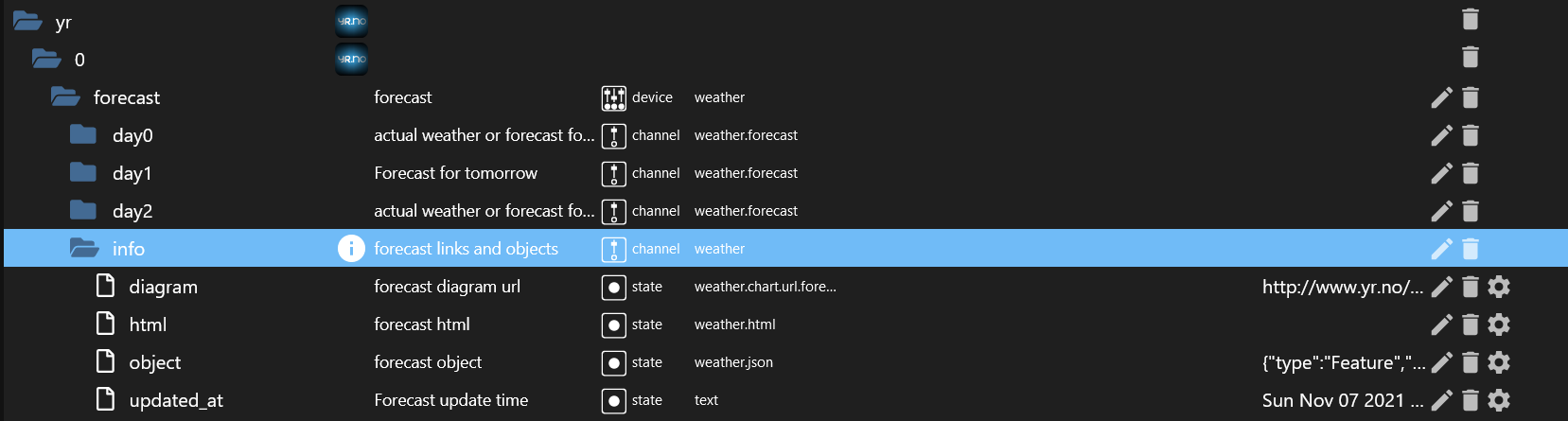
                                3404a649-0112-46a8-9bbc-bc8809cb95a1-grafik.png

                                URL ist : http://www.yr.no/place//avansert_meteogram.png

                                Die HTML ist auch leer .

                                Bin noch am Suchen wo der Fehler ist .
                                Auch das Widget fehlt immer noch

                                Synology 918+ 16GB - ioBroker in Docker v9 , VISO auf Trekstor Primebook C13 13,3" , Hikvision Domkameras mit Surveillance Station .. CCU RaspberryMatic in Synology VM .. Zigbee CC2538+CC2592 .. Sonoff .. KNX .. Modbus ..

                                P HomoranH Samson71S 4 Antworten Letzte Antwort
                                0
                                • GlasfaserG Glasfaser

                                  und so sieht es gerade bei mir aktuell aus

                                  3404a649-0112-46a8-9bbc-bc8809cb95a1-grafik.png

                                  URL ist : http://www.yr.no/place//avansert_meteogram.png

                                  Die HTML ist auch leer .

                                  Bin noch am Suchen wo der Fehler ist .
                                  Auch das Widget fehlt immer noch

                                  P Offline
                                  P Offline
                                  plc
                                  schrieb am zuletzt editiert von
                                  #45

                                  @glasfaser
                                  unter info habe ich nur object und updated_at

                                  1 Antwort Letzte Antwort
                                  0
                                  • GlasfaserG Glasfaser

                                    und so sieht es gerade bei mir aktuell aus

                                    3404a649-0112-46a8-9bbc-bc8809cb95a1-grafik.png

                                    URL ist : http://www.yr.no/place//avansert_meteogram.png

                                    Die HTML ist auch leer .

                                    Bin noch am Suchen wo der Fehler ist .
                                    Auch das Widget fehlt immer noch

                                    HomoranH Nicht stören
                                    HomoranH Nicht stören
                                    Homoran
                                    Global Moderator Administrators
                                    schrieb am zuletzt editiert von
                                    #46

                                    @glasfaser sagte in yr.no Widget:

                                    URL ist : http://www.yr.no/place//avansert_meteogram.png

                                    TODO

                                    Add meteogram (png probably will discontinue with new API)

                                    https://github.com/ioBroker/ioBroker.yr#todo

                                    kein Support per PN! - Fragen im Forum stellen - es gibt fast nichts, was nicht auch für andere interessant ist.

                                    Benutzt das Voting rechts unten im Beitrag wenn er euch geholfen hat.

                                    der Installationsfixer: curl -fsL https://iobroker.net/fix.sh | bash -

                                    1 Antwort Letzte Antwort
                                    0
                                    • GlasfaserG Glasfaser

                                      und so sieht es gerade bei mir aktuell aus

                                      3404a649-0112-46a8-9bbc-bc8809cb95a1-grafik.png

                                      URL ist : http://www.yr.no/place//avansert_meteogram.png

                                      Die HTML ist auch leer .

                                      Bin noch am Suchen wo der Fehler ist .
                                      Auch das Widget fehlt immer noch

                                      Samson71S Offline
                                      Samson71S Offline
                                      Samson71
                                      Global Moderator
                                      schrieb am zuletzt editiert von
                                      #47

                                      @glasfaser sagte in yr.no Widget:

                                      Auch das Widget fehlt immer noch

                                      Das habe ich aber auch nicht.

                                      Markus

                                      Bitte beachten:
                                      Hinweise für gute Forenbeiträge
                                      Maßnahmen zum Schutz des Forums

                                      GlasfaserG 1 Antwort Letzte Antwort
                                      0
                                      • Samson71S Samson71

                                        @glasfaser sagte in yr.no Widget:

                                        Auch das Widget fehlt immer noch

                                        Das habe ich aber auch nicht.

                                        GlasfaserG Offline
                                        GlasfaserG Offline
                                        Glasfaser
                                        schrieb am zuletzt editiert von Glasfaser
                                        #48

                                        @samson71 sagte in yr.no Widget:

                                        Das habe ich aber auch nicht.

                                        Das war ja die Anfangsfrage , vom TE .

                                        Und dazu habe ich auch geantwortet , das nur ICONS da sind.
                                        Widgets gibt es nicht

                                        Synology 918+ 16GB - ioBroker in Docker v9 , VISO auf Trekstor Primebook C13 13,3" , Hikvision Domkameras mit Surveillance Station .. CCU RaspberryMatic in Synology VM .. Zigbee CC2538+CC2592 .. Sonoff .. KNX .. Modbus ..

                                        1 Antwort Letzte Antwort
                                        0
                                        • GlasfaserG Glasfaser

                                          und so sieht es gerade bei mir aktuell aus

                                          3404a649-0112-46a8-9bbc-bc8809cb95a1-grafik.png

                                          URL ist : http://www.yr.no/place//avansert_meteogram.png

                                          Die HTML ist auch leer .

                                          Bin noch am Suchen wo der Fehler ist .
                                          Auch das Widget fehlt immer noch

                                          HomoranH Nicht stören
                                          HomoranH Nicht stören
                                          Homoran
                                          Global Moderator Administrators
                                          schrieb am zuletzt editiert von
                                          #49

                                          @glasfaser sagte in yr.no Widget:

                                          Auch das Widget fehlt immer noch

                                          kann das sein, dass das dem Hackebeil zum Opfer gefallen ist?

                                          3.0.0 [2021-06-06]

                                          (withstu) Switch to new JSON API and change data Structure (breaking)
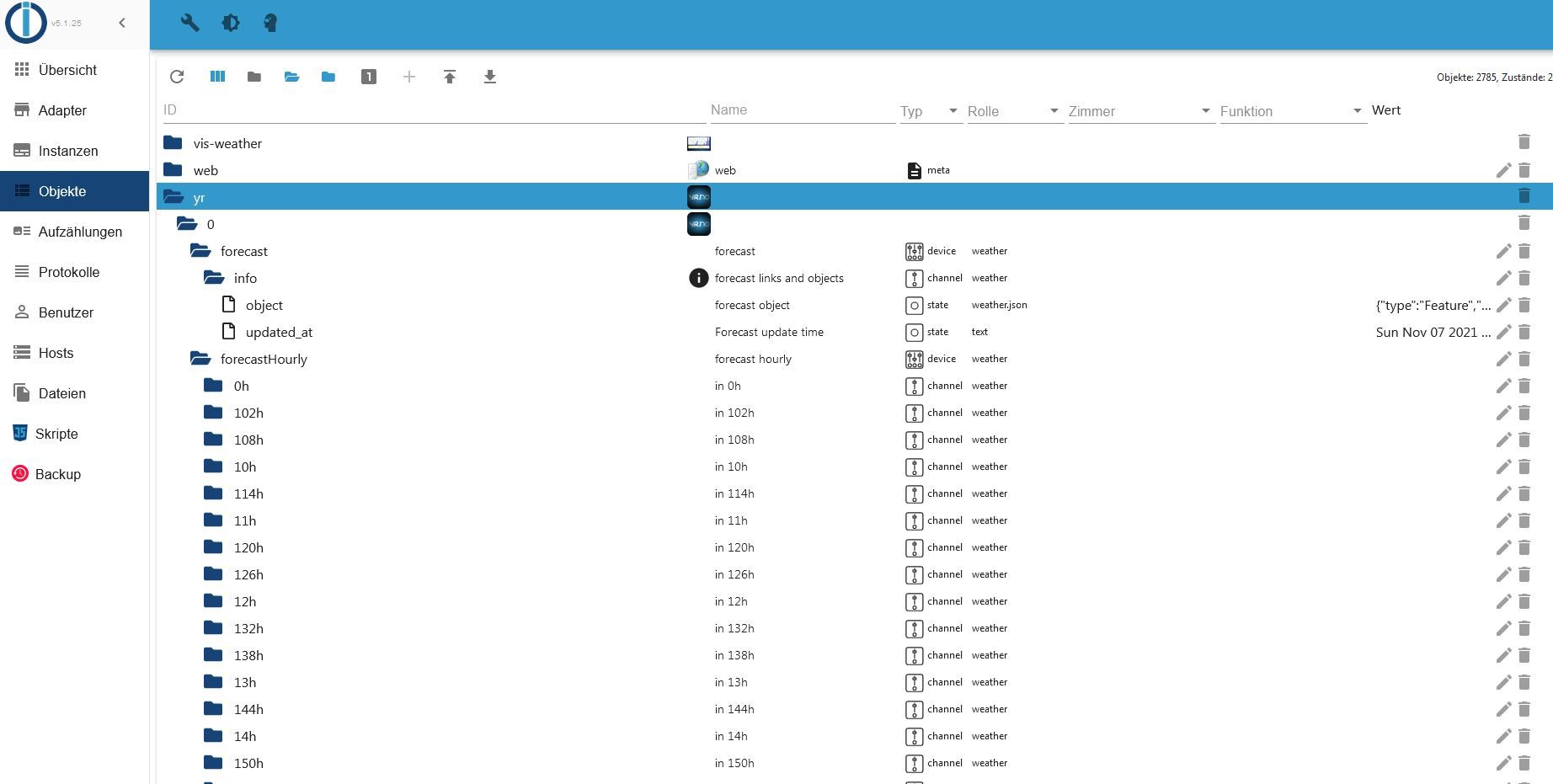
                                          kein Support per PN! - Fragen im Forum stellen - es gibt fast nichts, was nicht auch für andere interessant ist.

                                          Benutzt das Voting rechts unten im Beitrag wenn er euch geholfen hat.

                                          der Installationsfixer: curl -fsL https://iobroker.net/fix.sh | bash -

                                          1 Antwort Letzte Antwort
                                          0
                                          Antworten
                                          • In einem neuen Thema antworten
                                          Anmelden zum Antworten
                                          • Älteste zuerst
                                          • Neuste zuerst
                                          • Meiste Stimmen


                                          Support us

                                          ioBroker
                                          Community Adapters
                                          Donate

                                          367

                                          Online

                                          32.6k

                                          Benutzer

                                          82.0k

                                          Themen

                                          1.3m

                                          Beiträge
                                          Community
                                          Impressum | Datenschutz-Bestimmungen | Nutzungsbedingungen | Einwilligungseinstellungen
                                          ioBroker Community 2014-2025
                                          logo
                                          • Anmelden

                                          • Du hast noch kein Konto? Registrieren

                                          • Anmelden oder registrieren, um zu suchen
                                          • Erster Beitrag
                                            Letzter Beitrag
                                          0
                                          • Home
                                          • Aktuell
                                          • Tags
                                          • Ungelesen 0
                                          • Kategorien
                                          • Unreplied
                                          • Beliebt
                                          • GitHub
                                          • Docu
                                          • Hilfe

