



Skip to content
  • Home
  • Aktuell
  • Tags
  • 0 Ungelesen 0
  • Kategorien
  • Unreplied
  • Beliebt
  • GitHub
  • Docu
  • Hilfe
Skins
  • Light
  • Brite
  • Cerulean
  • Cosmo
  • Flatly
  • Journal
  • Litera
  • Lumen
  • Lux
  • Materia
  • Minty
  • Morph
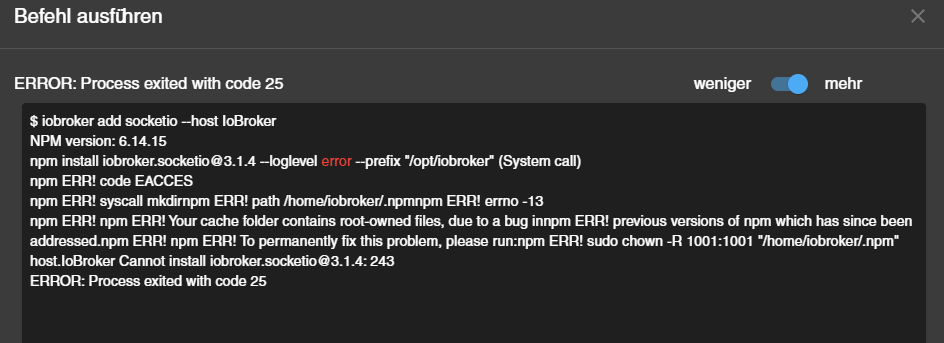
  • Pulse
  • Sandstone
  • Simplex
  • Sketchy
  • Spacelab
  • United
  • Yeti
  • Zephyr
  • Dark
  • Cyborg
  • Darkly
  • Quartz
  • Slate
  • Solar
  • Superhero
  • Vapor

  • Standard: (Kein Skin)
  • Kein Skin
Einklappen
ioBroker Logo

Community Forum

donate donate
  1. ioBroker Community Home
  2. Deutsch
  3. Error/Bug
  4. Nach Neuinstallation ERROR: Process exited with code 25
NEWS

  • UPDATE 31.10.: Amazon Alexa - ioBroker Skill läuft aus ?
    apollon77A
    apollon77
    48
    3
    8.7k

  • Monatsrückblick – September 2025
    BluefoxB
    Bluefox
    13
    1
    2.2k

  • Neues Video "KI im Smart Home" - ioBroker plus n8n
    BluefoxB
    Bluefox
    16
    1
    3.1k

Nach Neuinstallation ERROR: Process exited with code 25

Geplant Angeheftet Gesperrt Verschoben Error/Bug
42 Beiträge 3 Kommentatoren 3.4k Aufrufe 2 Watching
  • Älteste zuerst
  • Neuste zuerst
  • Meiste Stimmen
Antworten
  • In einem neuen Thema antworten
Anmelden zum Antworten
Dieses Thema wurde gelöscht. Nur Nutzer mit entsprechenden Rechten können es sehen.
  • Thomas BrodmannT Thomas Brodmann

    @homoran sagte in Nach Neuinstallation ERROR: Process exited with code 25:

    @thomas-brodmann sagte in Nach Neuinstallation ERROR: Process exited with code 25:

    Leider keine Veränderung.

    In der Meldung steht ja was passiert ist.
    (Leider kann ich aus einem Screenshot nichts zitieren - deswegen Code immer als Text in code-tags posten)

    da laut Meldung der Cache betroffen ist könnte ein npm cache clean im Installationsverzeichnis vielleicht schon helfen (Wenn du dazu berechtig bist)

    Die Meldung kommt nach dem cache clean:

    root@IoBroker:/# npm cache clean
    npm ERR! As of npm@5, the npm cache self-heals from corruption issues and data extracted from the cache is guaranteed to be valid. If you want to make sure everything is consistent, use 'npm cache verify' instead. On the other hand, if you're debugging an issue with the installer, you can use `npm install --cache /tmp/empty-cache` to use a temporary cache instead of nuking the actual one.
    npm ERR!
    npm ERR! If you're sure you want to delete the entire cache, rerun this command with --force.
    
    npm ERR! A complete log of this run can be found in:
    npm ERR!     /root/.npm/_logs/2021-11-04T16_09_29_475Z-debug.log
    
    
    Thomas BraunT Online
    Thomas BraunT Online
    Thomas Braun
    Most Active
    schrieb am zuletzt editiert von
    #13

    @thomas-brodmann sagte in Nach Neuinstallation ERROR: Process exited with code 25:

    root@IoBroker:/# npm cache clean

    Nutzung vom root: Macht man nicht.
    npm cache clean im ~ vom root: Macht man nicht, falsches Verzeichnis
    npm cache clean: Funktioniert nicht ohne --force - Option

    Linux-Werkzeugkasten:
    https://forum.iobroker.net/topic/42952/der-kleine-iobroker-linux-werkzeugkasten
    NodeJS Fixer Skript:
    https://forum.iobroker.net/topic/68035/iob-node-fix-skript
    iob_diag: curl -sLf -o diag.sh https://iobroker.net/diag.sh && bash diag.sh

    1 Antwort Letzte Antwort
    0
    • Thomas BrodmannT Thomas Brodmann

      @homoran sagte in Nach Neuinstallation ERROR: Process exited with code 25:

      @thomas-brodmann sagte in Nach Neuinstallation ERROR: Process exited with code 25:

      Leider keine Veränderung.

      In der Meldung steht ja was passiert ist.
      (Leider kann ich aus einem Screenshot nichts zitieren - deswegen Code immer als Text in code-tags posten)

      da laut Meldung der Cache betroffen ist könnte ein npm cache clean im Installationsverzeichnis vielleicht schon helfen (Wenn du dazu berechtig bist)

      Die Meldung kommt nach dem cache clean:

      root@IoBroker:/# npm cache clean
      npm ERR! As of npm@5, the npm cache self-heals from corruption issues and data extracted from the cache is guaranteed to be valid. If you want to make sure everything is consistent, use 'npm cache verify' instead. On the other hand, if you're debugging an issue with the installer, you can use `npm install --cache /tmp/empty-cache` to use a temporary cache instead of nuking the actual one.
      npm ERR!
      npm ERR! If you're sure you want to delete the entire cache, rerun this command with --force.
      
      npm ERR! A complete log of this run can be found in:
      npm ERR!     /root/.npm/_logs/2021-11-04T16_09_29_475Z-debug.log
      
      
      HomoranH Nicht stören
      HomoranH Nicht stören
      Homoran
      Global Moderator Administrators
      schrieb am zuletzt editiert von
      #14

      @Thomas-Brodmann
      also erst einmal nie als root arbeiten.
      Das hat dich in diesen Zustand gebracht!

      zweitens solltest du das im Installationsverzeichnis, also üblicherweise /opt/iobroker ausführen.

      Dann versuche das bitte nochmal so:

      @thomas-brodmann sagte in Nach Neuinstallation ERROR: Process exited with code 25:

      If you're sure you want to delete the entire cache, rerun this command with --force.

      kein Support per PN! - Fragen im Forum stellen - es gibt fast nichts, was nicht auch für andere interessant ist.

      Benutzt das Voting rechts unten im Beitrag wenn er euch geholfen hat.

      der Installationsfixer: curl -fsL https://iobroker.net/fix.sh | bash -

      Thomas BrodmannT 1 Antwort Letzte Antwort
      0
      • HomoranH Homoran

        @Thomas-Brodmann
        also erst einmal nie als root arbeiten.
        Das hat dich in diesen Zustand gebracht!

        zweitens solltest du das im Installationsverzeichnis, also üblicherweise /opt/iobroker ausführen.

        Dann versuche das bitte nochmal so:

        @thomas-brodmann sagte in Nach Neuinstallation ERROR: Process exited with code 25:

        If you're sure you want to delete the entire cache, rerun this command with --force.

        Thomas BrodmannT Offline
        Thomas BrodmannT Offline
        Thomas Brodmann
        schrieb am zuletzt editiert von
        #15

        @homoran sagte in Nach Neuinstallation ERROR: Process exited with code 25:

        @Thomas-Brodmann
        also erst einmal nie als root arbeiten.
        Das hat dich in diesen Zustand gebracht!
        Ich habe einen neuen User angelegt und arbeite jetzt mit diesem.

        zweitens solltest du das im Installationsverzeichnis, also üblicherweise /opt/iobroker ausführen.

        Dann versuche das bitte nochmal so:

        @thomas-brodmann sagte in Nach Neuinstallation ERROR: Process exited with code 25:

        If you're sure you want to delete the entire cache, rerun this command with --force.

        thommy@IoBroker:/opt/iobroker$ npm cache clean --force
        npm WARN using --force I sure hope you know what you are doing.
        
        Thomas BrodmannT 1 Antwort Letzte Antwort
        0
        • Thomas BrodmannT Thomas Brodmann

          @homoran sagte in Nach Neuinstallation ERROR: Process exited with code 25:

          @Thomas-Brodmann
          also erst einmal nie als root arbeiten.
          Das hat dich in diesen Zustand gebracht!
          Ich habe einen neuen User angelegt und arbeite jetzt mit diesem.

          zweitens solltest du das im Installationsverzeichnis, also üblicherweise /opt/iobroker ausführen.

          Dann versuche das bitte nochmal so:

          @thomas-brodmann sagte in Nach Neuinstallation ERROR: Process exited with code 25:

          If you're sure you want to delete the entire cache, rerun this command with --force.

          thommy@IoBroker:/opt/iobroker$ npm cache clean --force
          npm WARN using --force I sure hope you know what you are doing.
          
          Thomas BrodmannT Offline
          Thomas BrodmannT Offline
          Thomas Brodmann
          schrieb am zuletzt editiert von
          #16

          @thomas-brodmann sagte in Nach Neuinstallation ERROR: Process exited with code 25:

          @homoran sagte in Nach Neuinstallation ERROR: Process exited with code 25:

          @Thomas-Brodmann
          also erst einmal nie als root arbeiten.
          Das hat dich in diesen Zustand gebracht!
          Ich habe einen neuen User angelegt und arbeite jetzt mit diesem.

          zweitens solltest du das im Installationsverzeichnis, also üblicherweise /opt/iobroker ausführen.

          Dann versuche das bitte nochmal so:

          @thomas-brodmann sagte in Nach Neuinstallation ERROR: Process exited with code 25:

          If you're sure you want to delete the entire cache, rerun this command with --force.

          thommy@IoBroker:/opt/iobroker$ npm cache clean --force
          npm WARN using --force I sure hope you know what you are doing.
          

          Leider keine Veränderung.

          HomoranH Thomas BraunT 2 Antworten Letzte Antwort
          0
          • Thomas BrodmannT Thomas Brodmann

            @thomas-brodmann sagte in Nach Neuinstallation ERROR: Process exited with code 25:

            @homoran sagte in Nach Neuinstallation ERROR: Process exited with code 25:

            @Thomas-Brodmann
            also erst einmal nie als root arbeiten.
            Das hat dich in diesen Zustand gebracht!
            Ich habe einen neuen User angelegt und arbeite jetzt mit diesem.

            zweitens solltest du das im Installationsverzeichnis, also üblicherweise /opt/iobroker ausführen.

            Dann versuche das bitte nochmal so:

            @thomas-brodmann sagte in Nach Neuinstallation ERROR: Process exited with code 25:

            If you're sure you want to delete the entire cache, rerun this command with --force.

            thommy@IoBroker:/opt/iobroker$ npm cache clean --force
            npm WARN using --force I sure hope you know what you are doing.
            

            Leider keine Veränderung.

            HomoranH Nicht stören
            HomoranH Nicht stören
            Homoran
            Global Moderator Administrators
            schrieb am zuletzt editiert von
            #17

            @thomas-brodmann sagte in Nach Neuinstallation ERROR: Process exited with code 25:

            Leider keine Veränderung.

            hast du es denn überhaupt nach der Warnung gestartet?

            kein Support per PN! - Fragen im Forum stellen - es gibt fast nichts, was nicht auch für andere interessant ist.

            Benutzt das Voting rechts unten im Beitrag wenn er euch geholfen hat.

            der Installationsfixer: curl -fsL https://iobroker.net/fix.sh | bash -

            Thomas BrodmannT 1 Antwort Letzte Antwort
            0
            • Thomas BrodmannT Thomas Brodmann

              @thomas-brodmann sagte in Nach Neuinstallation ERROR: Process exited with code 25:

              @homoran sagte in Nach Neuinstallation ERROR: Process exited with code 25:

              @Thomas-Brodmann
              also erst einmal nie als root arbeiten.
              Das hat dich in diesen Zustand gebracht!
              Ich habe einen neuen User angelegt und arbeite jetzt mit diesem.

              zweitens solltest du das im Installationsverzeichnis, also üblicherweise /opt/iobroker ausführen.

              Dann versuche das bitte nochmal so:

              @thomas-brodmann sagte in Nach Neuinstallation ERROR: Process exited with code 25:

              If you're sure you want to delete the entire cache, rerun this command with --force.

              thommy@IoBroker:/opt/iobroker$ npm cache clean --force
              npm WARN using --force I sure hope you know what you are doing.
              

              Leider keine Veränderung.

              Thomas BraunT Online
              Thomas BraunT Online
              Thomas Braun
              Most Active
              schrieb am zuletzt editiert von
              #18

              @thomas-brodmann

              Wenn da root-owned Zeug dring liegt, dann kann der thommy die auch nicht löschen.
              Deswegen halt auch die Maxime: NIE als root anmelden.

              Versuchs mal mit

              sudo npm cache clean --force
              

              im Verzeichnis /opt/iobroker.

              Linux-Werkzeugkasten:
              https://forum.iobroker.net/topic/42952/der-kleine-iobroker-linux-werkzeugkasten
              NodeJS Fixer Skript:
              https://forum.iobroker.net/topic/68035/iob-node-fix-skript
              iob_diag: curl -sLf -o diag.sh https://iobroker.net/diag.sh && bash diag.sh

              Thomas BrodmannT 1 Antwort Letzte Antwort
              0
              • HomoranH Homoran

                @thomas-brodmann sagte in Nach Neuinstallation ERROR: Process exited with code 25:

                Leider keine Veränderung.

                hast du es denn überhaupt nach der Warnung gestartet?

                Thomas BrodmannT Offline
                Thomas BrodmannT Offline
                Thomas Brodmann
                schrieb am zuletzt editiert von
                #19

                @homoran sagte in Nach Neuinstallation ERROR: Process exited with code 25:

                @thomas-brodmann sagte in Nach Neuinstallation ERROR: Process exited with code 25:

                Leider keine Veränderung.

                hast du es denn überhaupt nach der Warnung gestartet?

                Wenn ich den Befehl mit Enter bestätige, kommt nur das:

                thommy@IoBroker:/opt/iobroker$ npm cache clean --force
                npm WARN using --force I sure hope you know what you are doing.
                thommy@IoBroker:/opt/iobroker$
                
                Thomas BraunT 1 Antwort Letzte Antwort
                0
                • Thomas BrodmannT Thomas Brodmann

                  @homoran sagte in Nach Neuinstallation ERROR: Process exited with code 25:

                  @thomas-brodmann sagte in Nach Neuinstallation ERROR: Process exited with code 25:

                  Leider keine Veränderung.

                  hast du es denn überhaupt nach der Warnung gestartet?

                  Wenn ich den Befehl mit Enter bestätige, kommt nur das:

                  thommy@IoBroker:/opt/iobroker$ npm cache clean --force
                  npm WARN using --force I sure hope you know what you are doing.
                  thommy@IoBroker:/opt/iobroker$
                  
                  Thomas BraunT Online
                  Thomas BraunT Online
                  Thomas Braun
                  Most Active
                  schrieb am zuletzt editiert von
                  #20

                  @thomas-brodmann

                  iobroker stop 
                  iobroker fix
                  iobroker update
                  iobroker upgrade
                  iobroker start
                  iobroker add socketio --host IoBroker
                  

                  Linux-Werkzeugkasten:
                  https://forum.iobroker.net/topic/42952/der-kleine-iobroker-linux-werkzeugkasten
                  NodeJS Fixer Skript:
                  https://forum.iobroker.net/topic/68035/iob-node-fix-skript
                  iob_diag: curl -sLf -o diag.sh https://iobroker.net/diag.sh && bash diag.sh

                  1 Antwort Letzte Antwort
                  0
                  • Thomas BraunT Thomas Braun

                    @thomas-brodmann

                    Wenn da root-owned Zeug dring liegt, dann kann der thommy die auch nicht löschen.
                    Deswegen halt auch die Maxime: NIE als root anmelden.

                    Versuchs mal mit

                    sudo npm cache clean --force
                    

                    im Verzeichnis /opt/iobroker.

                    Thomas BrodmannT Offline
                    Thomas BrodmannT Offline
                    Thomas Brodmann
                    schrieb am zuletzt editiert von
                    #21

                    @thomas-braun sagte in Nach Neuinstallation ERROR: Process exited with code 25:

                    sudo npm cache clean --force

                    Der Benutzer hat nicht die Berechtigung für root.

                    thommy@IoBroker:/opt/iobroker$ sudo npm cache clean --force
                    [sudo] Passwort für thommy:
                    Leider darf der Benutzer thommy »/usr/bin/npm cache clean --force« als root auf IoBroker nicht ausführen.
                    thommy@IoBroker:/opt/iobroker$
                    
                    
                    Thomas BraunT 1 Antwort Letzte Antwort
                    0
                    • Thomas BrodmannT Thomas Brodmann

                      @thomas-braun sagte in Nach Neuinstallation ERROR: Process exited with code 25:

                      sudo npm cache clean --force

                      Der Benutzer hat nicht die Berechtigung für root.

                      thommy@IoBroker:/opt/iobroker$ sudo npm cache clean --force
                      [sudo] Passwort für thommy:
                      Leider darf der Benutzer thommy »/usr/bin/npm cache clean --force« als root auf IoBroker nicht ausführen.
                      thommy@IoBroker:/opt/iobroker$
                      
                      
                      Thomas BraunT Online
                      Thomas BraunT Online
                      Thomas Braun
                      Most Active
                      schrieb am zuletzt editiert von Thomas Braun
                      #22

                      @thomas-brodmann
                      Dann pack den thommy in die Gruppe sudo rein. Das dann halt notgedrungen nochmal als root.
                      Danach nie mehr als root anmelden.
                      thommy einmal abmelden und wieder anmelden. Fertig.
                      Detaillierter im 'Kleinen Linux-Werkzeugkasten' nachzulesen. Siehe Signatur.

                      Linux-Werkzeugkasten:
                      https://forum.iobroker.net/topic/42952/der-kleine-iobroker-linux-werkzeugkasten
                      NodeJS Fixer Skript:
                      https://forum.iobroker.net/topic/68035/iob-node-fix-skript
                      iob_diag: curl -sLf -o diag.sh https://iobroker.net/diag.sh && bash diag.sh

                      Thomas BrodmannT HomoranH 2 Antworten Letzte Antwort
                      0
                      • Thomas BraunT Thomas Braun

                        @thomas-brodmann
                        Dann pack den thommy in die Gruppe sudo rein. Das dann halt notgedrungen nochmal als root.
                        Danach nie mehr als root anmelden.
                        thommy einmal abmelden und wieder anmelden. Fertig.
                        Detaillierter im 'Kleinen Linux-Werkzeugkasten' nachzulesen. Siehe Signatur.

                        Thomas BrodmannT Offline
                        Thomas BrodmannT Offline
                        Thomas Brodmann
                        schrieb am zuletzt editiert von
                        #23

                        @thomas-braun sagte in Nach Neuinstallation ERROR: Process exited with code 25:

                        @thomas-brodmann
                        Dann pack den thommy in die Gruppe sudo rein. Das dann halt notgedrungen nochmal als root.
                        Danach nie mehr als root anmelden.
                        thommy einmal abmelden und wieder anmelden. Fertig.
                        Detaillierter im 'Kleinen Linux-Werkzeugkasten' nachzulesen. Siehe Signatur.

                        Habe alles gemacht. (anscheinend auch viel Mist als root :grimacing: )

                        Aber immer noch keine Veränderung.

                        thommy@IoBroker:~$ sudo npm cache clean --force
                        [sudo] Passwort für thommy:
                        npm WARN using --force I sure hope you know what you are doing.
                        
                        
                        thommy@IoBroker:~$ iobroker stop
                        thommy@IoBroker:~$ iobroker fix
                        library: loaded
                        Library version=2021-08-05
                        
                        ==========================================================================
                        
                            Welcome to the ioBroker installation fixer!
                            Script version: 2021-04-07
                        
                            You might need to enter your password a couple of times.
                        
                        ==========================================================================
                        
                        
                        ==========================================================================
                            Installing prerequisites (1/3)
                        ==========================================================================
                        
                        OK:1 https://dl.yarnpkg.com/debian stable InRelease
                        OK:3 https://deb.debian.org/debian buster InRelease
                        OK:4 https://deb.debian.org/debian buster-updates InRelease
                        OK:5 https://deb.nodesource.com/node_12.x buster InRelease
                        Holen:6 https://deb.debian.org/debian-security buster/updates InRelease [65,4 kB]
                        OK:7 https://deb.debian.org/debian buster-backports InRelease
                        OK:2 http://armbian.16z.eu/apt buster InRelease
                        Es wurden 65,4 kB in 3 s geholt (21,2 kB/s).
                        Paketlisten werden gelesen... Fertig
                        Installed gcc-c++
                        
                        ==========================================================================
                            Checking ioBroker user and directory permissions (2/3)
                        ==========================================================================
                        
                        Created /etc/sudoers.d/iobroker
                        Fixing directory permissions...
                        
                        ==========================================================================
                            Checking autostart (3/3)
                        ==========================================================================
                        
                        Enabling autostart...
                        Autostart enabled!
                        
                        ==========================================================================
                        
                            Your installation was fixed successfully
                            Run iobroker start to start ioBroker again!
                        
                        ==========================================================================
                        
                        thommy@IoBroker:~$ iobroker update
                        Used repository: default
                        hash unchanged, use cached sources
                        update done
                        Adapter    "admin"         : 5.1.25   , installed 5.1.25
                        Adapter    "backitup"      : 2.1.17   , installed 2.1.17
                        Adapter    "discovery"     : 2.7.0    , installed 2.7.0
                        Controller "js-controller" : 3.3.18   , installed 3.3.18
                        thommy@IoBroker:~$ iobroker upgrade
                        All adapters are up to date
                        thommy@IoBroker:~$ iobroker start
                        thommy@IoBroker:~$ iobroker add socketio --host IoBroker
                        NPM version: 6.14.15
                        npm install iobroker.socketio@3.1.4 --loglevel error --prefix "/opt/iobroker" (System call)
                        npm ERR! code EACCES
                        npm ERR! syscall mkdir
                        npm ERR! path /home/iobroker/.npm
                        npm ERR! errno -13
                        npm ERR!
                        npm ERR! Your cache folder contains root-owned files, due to a bug in
                        npm ERR! previous versions of npm which has since been addressed.
                        npm ERR!
                        npm ERR! To permanently fix this problem, please run:
                        npm ERR!   sudo chown -R 1001:1001 "/home/iobroker/.npm"
                        host.IoBroker Cannot install iobroker.socketio@3.1.4: 243
                        thommy@IoBroker:~$
                        
                        
                        1 Antwort Letzte Antwort
                        0
                        • Thomas BraunT Thomas Braun

                          @thomas-brodmann
                          Dann pack den thommy in die Gruppe sudo rein. Das dann halt notgedrungen nochmal als root.
                          Danach nie mehr als root anmelden.
                          thommy einmal abmelden und wieder anmelden. Fertig.
                          Detaillierter im 'Kleinen Linux-Werkzeugkasten' nachzulesen. Siehe Signatur.

                          HomoranH Nicht stören
                          HomoranH Nicht stören
                          Homoran
                          Global Moderator Administrators
                          schrieb am zuletzt editiert von Homoran
                          #24

                          @thomas-braun was hältst du von den Anweisungen in dem Screenshot?
                          https://forum.iobroker.net/assets/uploads/files/1636039841103-error-25.png

                          EDIT:

                          jetzt gibbet das ja auch als code ;-)

                          npm ERR! To permanently fix this problem, please run:
                          npm ERR!   sudo chown -R 1001:1001 "/home/iobroker/.npm"
                          

                          kein Support per PN! - Fragen im Forum stellen - es gibt fast nichts, was nicht auch für andere interessant ist.

                          Benutzt das Voting rechts unten im Beitrag wenn er euch geholfen hat.

                          der Installationsfixer: curl -fsL https://iobroker.net/fix.sh | bash -

                          Thomas BraunT 1 Antwort Letzte Antwort
                          0
                          • HomoranH Homoran

                            @thomas-braun was hältst du von den Anweisungen in dem Screenshot?
                            https://forum.iobroker.net/assets/uploads/files/1636039841103-error-25.png

                            EDIT:

                            jetzt gibbet das ja auch als code ;-)

                            npm ERR! To permanently fix this problem, please run:
                            npm ERR!   sudo chown -R 1001:1001 "/home/iobroker/.npm"
                            
                            Thomas BraunT Online
                            Thomas BraunT Online
                            Thomas Braun
                            Most Active
                            schrieb am zuletzt editiert von
                            #25

                            @homoran Ja, natürlich. Hatte den Screenshot nicht ganz gesehen.

                            @Thomas-Brodmann

                            sudo chown -R 1001:1001 /home/iobroker/.npm
                            

                            sollte das auch wieder gerade rupfen.

                            Linux-Werkzeugkasten:
                            https://forum.iobroker.net/topic/42952/der-kleine-iobroker-linux-werkzeugkasten
                            NodeJS Fixer Skript:
                            https://forum.iobroker.net/topic/68035/iob-node-fix-skript
                            iob_diag: curl -sLf -o diag.sh https://iobroker.net/diag.sh && bash diag.sh

                            Thomas BrodmannT 1 Antwort Letzte Antwort
                            0
                            • Thomas BraunT Thomas Braun

                              @homoran Ja, natürlich. Hatte den Screenshot nicht ganz gesehen.

                              @Thomas-Brodmann

                              sudo chown -R 1001:1001 /home/iobroker/.npm
                              

                              sollte das auch wieder gerade rupfen.

                              Thomas BrodmannT Offline
                              Thomas BrodmannT Offline
                              Thomas Brodmann
                              schrieb am zuletzt editiert von
                              #26

                              @thomas-braun sagte in Nach Neuinstallation ERROR: Process exited with code 25:

                              sudo chown -R 1001:1001 /home/iobroker/.npm

                              thommy@IoBroker:/opt/iobroker$ sudo chown -R 1001:1001 /home/iobroker/.npm
                              chown: Zugriff auf '/home/iobroker/.npm' nicht möglich: Datei oder Verzeichnis nicht gefunden
                              thommy@IoBroker:/opt/iobroker$ cd /home/iobroker/
                              thommy@IoBroker:/home/iobroker$ ls
                              
                              
                              Thomas BraunT 1 Antwort Letzte Antwort
                              0
                              • Thomas BrodmannT Thomas Brodmann

                                @thomas-braun sagte in Nach Neuinstallation ERROR: Process exited with code 25:

                                sudo chown -R 1001:1001 /home/iobroker/.npm

                                thommy@IoBroker:/opt/iobroker$ sudo chown -R 1001:1001 /home/iobroker/.npm
                                chown: Zugriff auf '/home/iobroker/.npm' nicht möglich: Datei oder Verzeichnis nicht gefunden
                                thommy@IoBroker:/opt/iobroker$ cd /home/iobroker/
                                thommy@IoBroker:/home/iobroker$ ls
                                
                                
                                Thomas BraunT Online
                                Thomas BraunT Online
                                Thomas Braun
                                Most Active
                                schrieb am zuletzt editiert von
                                #27

                                @thomas-brodmann

                                ls -la /home/iobroker
                                

                                Linux-Werkzeugkasten:
                                https://forum.iobroker.net/topic/42952/der-kleine-iobroker-linux-werkzeugkasten
                                NodeJS Fixer Skript:
                                https://forum.iobroker.net/topic/68035/iob-node-fix-skript
                                iob_diag: curl -sLf -o diag.sh https://iobroker.net/diag.sh && bash diag.sh

                                Thomas BrodmannT 1 Antwort Letzte Antwort
                                0
                                • Thomas BraunT Thomas Braun

                                  @thomas-brodmann

                                  ls -la /home/iobroker
                                  
                                  Thomas BrodmannT Offline
                                  Thomas BrodmannT Offline
                                  Thomas Brodmann
                                  schrieb am zuletzt editiert von
                                  #28

                                  @thomas-braun sagte in Nach Neuinstallation ERROR: Process exited with code 25:

                                  ls -la /home/iobroker

                                  thommy@IoBroker:/home/iobroker$ ls -la /home/iobroker
                                  insgesamt 8
                                  drwxr-xr-x 2 root root 4096 Nov  4 15:05 .
                                  drwxr-xr-x 5 root root 4096 Nov  4 17:25 ..
                                  thommy@IoBroker:/home/iobroker$
                                  
                                  
                                  Thomas BraunT 1 Antwort Letzte Antwort
                                  0
                                  • Thomas BrodmannT Thomas Brodmann

                                    @thomas-braun sagte in Nach Neuinstallation ERROR: Process exited with code 25:

                                    ls -la /home/iobroker

                                    thommy@IoBroker:/home/iobroker$ ls -la /home/iobroker
                                    insgesamt 8
                                    drwxr-xr-x 2 root root 4096 Nov  4 15:05 .
                                    drwxr-xr-x 5 root root 4096 Nov  4 17:25 ..
                                    thommy@IoBroker:/home/iobroker$
                                    
                                    
                                    Thomas BraunT Online
                                    Thomas BraunT Online
                                    Thomas Braun
                                    Most Active
                                    schrieb am zuletzt editiert von Thomas Braun
                                    #29

                                    @thomas-brodmann
                                    Stimmt, da ist nix drin.

                                    sudo ls -la /root
                                    

                                    Linux-Werkzeugkasten:
                                    https://forum.iobroker.net/topic/42952/der-kleine-iobroker-linux-werkzeugkasten
                                    NodeJS Fixer Skript:
                                    https://forum.iobroker.net/topic/68035/iob-node-fix-skript
                                    iob_diag: curl -sLf -o diag.sh https://iobroker.net/diag.sh && bash diag.sh

                                    Thomas BrodmannT HomoranH 2 Antworten Letzte Antwort
                                    0
                                    • Thomas BraunT Thomas Braun

                                      @thomas-brodmann
                                      Stimmt, da ist nix drin.

                                      sudo ls -la /root
                                      
                                      Thomas BrodmannT Offline
                                      Thomas BrodmannT Offline
                                      Thomas Brodmann
                                      schrieb am zuletzt editiert von
                                      #30

                                      @thomas-braun sagte in Nach Neuinstallation ERROR: Process exited with code 25:

                                      sudo ls -la /root

                                      thommy@IoBroker:/home/iobroker$ sudo ls -la /root
                                      [sudo] Passwort für thommy:
                                      insgesamt 88
                                      drwx------ 11 root root 4096 Nov  4 17:42 .
                                      drwxr-xr-x 21 root root 4096 Jan 18  2021 ..
                                      -rw-------  1 root root 6588 Nov  4 17:44 .bash_history
                                      -rw-r--r--  1 root root 3720 Nov  4 17:47 .bashrc
                                      drwxr-xr-x  8 root root 4096 Okt 16 22:20 .cache
                                      drwxr-xr-x  9 root root 4096 Jan 23  2021 .config
                                      drwxr-xr-x  2 root root 4096 Jan 18  2021 Desktop
                                      drwx------  3 root root 4096 Jan 20  2020 .gnupg
                                      -rw-r--r--  1 root root  140 Jan 18  2021 .gtk-bookmarks
                                      drwxr-xr-x  2 root root 4096 Okt 16 22:20 .iobroker
                                      drwx------  3 root root 4096 Jan 23  2021 .local
                                      -rw-------  1 root root   36 Nov  4 16:56 .node_repl_history
                                      drwxr-xr-x  4 root root 4096 Nov  4 17:22 .npm
                                      -rw-------  1 root root   36 Nov  4 14:21 .npmrc
                                      -rw-r--r--  1 root root  148 Aug 17  2015 .profile
                                      -rw-r--r--  1 root root   66 Jan 23  2021 .selected_editor
                                      drwxr-xr-x  2 root root 4096 Jan 20  2020 .ssh
                                      -rw-r--r--  1 root root 2828 Nov  4 17:42 terminfo.txt
                                      drwxr-xr-x  2 root root 4096 Nov  4 13:43 .vnc
                                      -rw-r--r--  1 root root  294 Jan 18  2021 .wget-hsts
                                      -rw-------  1 root root  102 Nov  4 13:43 .Xauthority
                                      thommy@IoBroker:/home/iobroker$
                                      
                                      
                                      1 Antwort Letzte Antwort
                                      0
                                      • Thomas BraunT Thomas Braun

                                        @thomas-brodmann
                                        Stimmt, da ist nix drin.

                                        sudo ls -la /root
                                        
                                        HomoranH Nicht stören
                                        HomoranH Nicht stören
                                        Homoran
                                        Global Moderator Administrators
                                        schrieb am zuletzt editiert von
                                        #31

                                        @thomas-braun sagte in Nach Neuinstallation ERROR: Process exited with code 25:

                                        Stimmt, da ist nix drin.

                                        hat der clean rausgespült, oder liegt woanders

                                        kein Support per PN! - Fragen im Forum stellen - es gibt fast nichts, was nicht auch für andere interessant ist.

                                        Benutzt das Voting rechts unten im Beitrag wenn er euch geholfen hat.

                                        der Installationsfixer: curl -fsL https://iobroker.net/fix.sh | bash -

                                        Thomas BraunT 1 Antwort Letzte Antwort
                                        0
                                        • HomoranH Homoran

                                          @thomas-braun sagte in Nach Neuinstallation ERROR: Process exited with code 25:

                                          Stimmt, da ist nix drin.

                                          hat der clean rausgespült, oder liegt woanders

                                          Thomas BraunT Online
                                          Thomas BraunT Online
                                          Thomas Braun
                                          Most Active
                                          schrieb am zuletzt editiert von
                                          #32

                                          @homoran
                                          Ja, liegt wohl im /root:

                                          drwxr-xr-x  4 root root 4096 Nov  4 17:22 .npm
                                          -rw-------  1 root root   36 Nov  4 14:21 .npmrc
                                          

                                          @Thomas-Brodmann
                                          Und da läuft auch ein Desktop mit. Macht man eben falls nicht!
                                          Desktop AUSKNIPSEN!

                                          Linux-Werkzeugkasten:
                                          https://forum.iobroker.net/topic/42952/der-kleine-iobroker-linux-werkzeugkasten
                                          NodeJS Fixer Skript:
                                          https://forum.iobroker.net/topic/68035/iob-node-fix-skript
                                          iob_diag: curl -sLf -o diag.sh https://iobroker.net/diag.sh && bash diag.sh

                                          HomoranH 1 Antwort Letzte Antwort
                                          0
                                          Antworten
                                          • In einem neuen Thema antworten
                                          Anmelden zum Antworten
                                          • Älteste zuerst
                                          • Neuste zuerst
                                          • Meiste Stimmen


                                          Support us

                                          ioBroker
                                          Community Adapters
                                          Donate

                                          410

                                          Online

                                          32.4k

                                          Benutzer

                                          81.5k

                                          Themen

                                          1.3m

                                          Beiträge
                                          Community
                                          Impressum | Datenschutz-Bestimmungen | Nutzungsbedingungen | Einwilligungseinstellungen
                                          ioBroker Community 2014-2025
                                          logo
                                          • Anmelden

                                          • Du hast noch kein Konto? Registrieren

                                          • Anmelden oder registrieren, um zu suchen
                                          • Erster Beitrag
                                            Letzter Beitrag
                                          0
                                          • Home
                                          • Aktuell
                                          • Tags
                                          • Ungelesen 0
                                          • Kategorien
                                          • Unreplied
                                          • Beliebt
                                          • GitHub
                                          • Docu
                                          • Hilfe
