



Skip to content
  • Home
  • Aktuell
  • Tags
  • 0 Ungelesen 0
  • Kategorien
  • Unreplied
  • Beliebt
  • GitHub
  • Docu
  • Hilfe
Skins
  • Light
  • Brite
  • Cerulean
  • Cosmo
  • Flatly
  • Journal
  • Litera
  • Lumen
  • Lux
  • Materia
  • Minty
  • Morph
  • Pulse
  • Sandstone
  • Simplex
  • Sketchy
  • Spacelab
  • United
  • Yeti
  • Zephyr
  • Dark
  • Cyborg
  • Darkly
  • Quartz
  • Slate
  • Solar
  • Superhero
  • Vapor

  • Standard: (Kein Skin)
  • Kein Skin
Einklappen
ioBroker Logo

Community Forum

donate donate
  1. ioBroker Community Home
  2. Deutsch
  3. ioBroker Allgemein
  4. Broker->BackItUp FTP->Synology
NEWS

  • UPDATE 31.10.: Amazon Alexa - ioBroker Skill läuft aus ?
    apollon77A
    apollon77
    48
    3
    8.9k

  • Monatsrückblick – September 2025
    BluefoxB
    Bluefox
    13
    1
    2.3k

  • Neues Video "KI im Smart Home" - ioBroker plus n8n
    BluefoxB
    Bluefox
    16
    1
    3.4k

Broker->BackItUp FTP->Synology
Geplant Angeheftet Gesperrt Verschoben ioBroker Allgemein
53 Beiträge 4 Kommentatoren 3.8k Aufrufe 3 Watching
  • Älteste zuerst
  • Neuste zuerst
  • Meiste Stimmen
Antworten
  • In einem neuen Thema antworten
Anmelden zum Antworten
Dieses Thema wurde gelöscht. Nur Nutzer mit entsprechenden Rechten können es sehen.
  • HomoranH Homoran

    @berlon sagte in Broker->BackItUp FTP->Synology:

    mit dem Browser meinte ich den Dateiexplorer

    da sollte dann aber das Verzeichnis aufgehen

    B Offline
    B Offline
    Berlon
    schrieb am zuletzt editiert von
    #30

    @homoran
    bei mir geht mit Eingabe einer IP-Adresse im Dateiexplorer der Firefox auf. Gerade auch mit der IP des RasPi versucht.

    HomoranH 1 Antwort Letzte Antwort
    0
    • B Berlon

      @homoran
      bei mir geht mit Eingabe einer IP-Adresse im Dateiexplorer der Firefox auf. Gerade auch mit der IP des RasPi versucht.

      HomoranH Nicht stören
      HomoranH Nicht stören
      Homoran
      Global Moderator Administrators
      schrieb am zuletzt editiert von
      #31

      @berlon sagte in Broker->BackItUp FTP->Synology:

      bei mir geht mit Eingabe einer IP-Adresse im Dateiexplorer der Firefox auf. Gerade auch mit der IP des RasPi versucht.

      hast du die beide // davor gesetzt?

      kein Support per PN! - Fragen im Forum stellen - es gibt fast nichts, was nicht auch für andere interessant ist.

      Benutzt das Voting rechts unten im Beitrag wenn er euch geholfen hat.

      der Installationsfixer: curl -fsL https://iobroker.net/fix.sh | bash -

      HomoranH B 2 Antworten Letzte Antwort
      0
      • GlasfaserG Glasfaser

        @Berlon

        Was sagt die Ausgabe von

        cat /proc/filesystems|grep cifs
        

        auf der Pi

        GlasfaserG Offline
        GlasfaserG Offline
        Glasfaser
        schrieb am zuletzt editiert von Glasfaser
        #32

        @Berlon

        @glasfaser sagte in Broker->BackItUp FTP->Synology:
        @Berlon

        Was sagt die Ausgabe von

        cat /proc/filesystems|grep cifs
        

        auf der Pi

        Teste mal :

        //192.168.6.10/Backup/RPI_IOBroker /IOBroker
        //192.168.6.10/Backup /RPI_IOBroker/IOBroker

        Synology 918+ 16GB - ioBroker in Docker v9 , VISO auf Trekstor Primebook C13 13,3" , Hikvision Domkameras mit Surveillance Station .. CCU RaspberryMatic in Synology VM .. Zigbee CC2538+CC2592 .. Sonoff .. KNX .. Modbus ..

        GlasfaserG 2 Antworten Letzte Antwort
        0
        • HomoranH Homoran

          @berlon sagte in Broker->BackItUp FTP->Synology:

          bei mir geht mit Eingabe einer IP-Adresse im Dateiexplorer der Firefox auf. Gerade auch mit der IP des RasPi versucht.

          hast du die beide // davor gesetzt?

          HomoranH Nicht stören
          HomoranH Nicht stören
          Homoran
          Global Moderator Administrators
          schrieb am zuletzt editiert von
          #33

          @homoran sagte in Broker->BackItUp FTP->Synology:

          @berlon sagte in Broker->BackItUp FTP->Synology:

          bei mir geht mit Eingabe einer IP-Adresse im Dateiexplorer der Firefox auf. Gerade auch mit der IP des RasPi versucht.

          hast du die beide // davor gesetzt?

          @Berlon

          sorry, bei WIN natürlich \\

          kein Support per PN! - Fragen im Forum stellen - es gibt fast nichts, was nicht auch für andere interessant ist.

          Benutzt das Voting rechts unten im Beitrag wenn er euch geholfen hat.

          der Installationsfixer: curl -fsL https://iobroker.net/fix.sh | bash -

          1 Antwort Letzte Antwort
          0
          • HomoranH Homoran

            @berlon sagte in Broker->BackItUp FTP->Synology:

            bei mir geht mit Eingabe einer IP-Adresse im Dateiexplorer der Firefox auf. Gerade auch mit der IP des RasPi versucht.

            hast du die beide // davor gesetzt?

            B Offline
            B Offline
            Berlon
            schrieb am zuletzt editiert von Berlon
            #34

            @homoran
            mit oder ohne Doppelslash, es grüßt immer der FF

            @homoran said in Broker->BackItUp FTP->Synology:

            sorry, bei WIN natürlich \

            ok so passiert was.
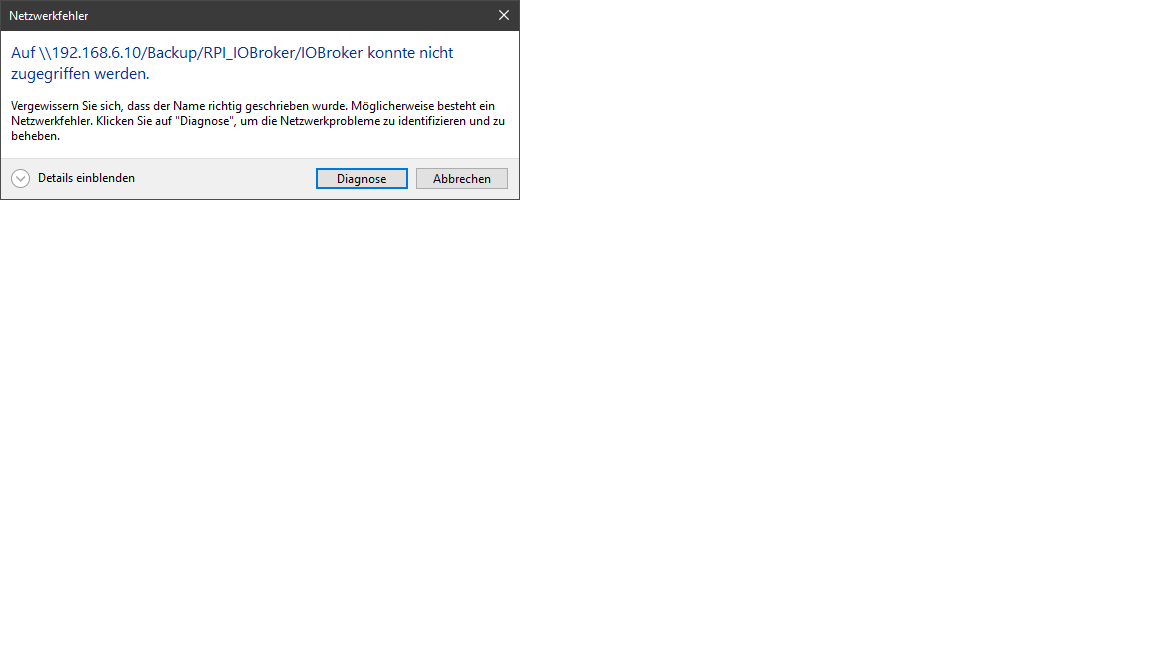
            Bild24.png

            Thomas BraunT 1 Antwort Letzte Antwort
            0
            • B Berlon

              @homoran
              mit oder ohne Doppelslash, es grüßt immer der FF

              @homoran said in Broker->BackItUp FTP->Synology:

              sorry, bei WIN natürlich \

              ok so passiert was.
              Bild24.png

              Thomas BraunT Online
              Thomas BraunT Online
              Thomas Braun
              Most Active
              schrieb am zuletzt editiert von
              #35

              @berlon

              Linux /
              Windows \

              Mix nicht möglich.

              Linux-Werkzeugkasten:
              https://forum.iobroker.net/topic/42952/der-kleine-iobroker-linux-werkzeugkasten
              NodeJS Fixer Skript:
              https://forum.iobroker.net/topic/68035/iob-node-fix-skript
              iob_diag: curl -sLf -o diag.sh https://iobroker.net/diag.sh && bash diag.sh

              1 Antwort Letzte Antwort
              0
              • GlasfaserG Glasfaser

                @Berlon

                @glasfaser sagte in Broker->BackItUp FTP->Synology:
                @Berlon

                Was sagt die Ausgabe von

                cat /proc/filesystems|grep cifs
                

                auf der Pi

                Teste mal :

                //192.168.6.10/Backup/RPI_IOBroker /IOBroker
                //192.168.6.10/Backup /RPI_IOBroker/IOBroker

                GlasfaserG Offline
                GlasfaserG Offline
                Glasfaser
                schrieb am zuletzt editiert von Glasfaser
                #36

                @berlon sagte in Broker->BackItUp FTP->Synology:

                ok so passiert was.

                \192.168.6.10\Backup\RPI_IOBroker\IOBroker
                \192.168.6.10\Backup\RPI_IOBroker \IOBroker
                \192.168.6.10\Backup \RPI_IOBroker \IOBroker

                EDIT :
                davor ist natürlich der \\ wird nur hier als \ angezeigt ,

                Synology 918+ 16GB - ioBroker in Docker v9 , VISO auf Trekstor Primebook C13 13,3" , Hikvision Domkameras mit Surveillance Station .. CCU RaspberryMatic in Synology VM .. Zigbee CC2538+CC2592 .. Sonoff .. KNX .. Modbus ..

                B 1 Antwort Letzte Antwort
                1
                • GlasfaserG Glasfaser

                  @berlon sagte in Broker->BackItUp FTP->Synology:

                  ok so passiert was.

                  \192.168.6.10\Backup\RPI_IOBroker\IOBroker
                  \192.168.6.10\Backup\RPI_IOBroker \IOBroker
                  \192.168.6.10\Backup \RPI_IOBroker \IOBroker

                  EDIT :
                  davor ist natürlich der \\ wird nur hier als \ angezeigt ,

                  B Offline
                  B Offline
                  Berlon
                  schrieb am zuletzt editiert von Berlon
                  #37

                  @glasfaser said in Broker->BackItUp FTP->Synology:

                  \192.168.6.10\Backup\RPI_IOBroker\IOBroker

                  hat nach Eingabe der Zugangsdaten vollen Zugriff, auch auf die darüber liegenden Ordner.

                  HomoranH 1 Antwort Letzte Antwort
                  0
                  • B Berlon

                    @glasfaser said in Broker->BackItUp FTP->Synology:

                    \192.168.6.10\Backup\RPI_IOBroker\IOBroker

                    hat nach Eingabe der Zugangsdaten vollen Zugriff, auch auf die darüber liegenden Ordner.

                    HomoranH Nicht stören
                    HomoranH Nicht stören
                    Homoran
                    Global Moderator Administrators
                    schrieb am zuletzt editiert von
                    #38

                    @berlon sagte in Broker->BackItUp FTP->Synology:

                    hat nach Eingabe der Zugangsdaten

                    die wurden aber doch vorhin nicht abgefragt!

                    ich dachte \\192.168.6.10\Backup wäre dein share?
                    hast du die Rechte doch nicht korrekt vergeben, so dass der User erst im Unterverzeichnis abgefragt wird, oder ist das Unterverzeichnis der share?

                    kein Support per PN! - Fragen im Forum stellen - es gibt fast nichts, was nicht auch für andere interessant ist.

                    Benutzt das Voting rechts unten im Beitrag wenn er euch geholfen hat.

                    der Installationsfixer: curl -fsL https://iobroker.net/fix.sh | bash -

                    1 Antwort Letzte Antwort
                    0
                    • GlasfaserG Glasfaser

                      @Berlon

                      @glasfaser sagte in Broker->BackItUp FTP->Synology:
                      @Berlon

                      Was sagt die Ausgabe von

                      cat /proc/filesystems|grep cifs
                      

                      auf der Pi

                      Teste mal :

                      //192.168.6.10/Backup/RPI_IOBroker /IOBroker
                      //192.168.6.10/Backup /RPI_IOBroker/IOBroker

                      GlasfaserG Offline
                      GlasfaserG Offline
                      Glasfaser
                      schrieb am zuletzt editiert von
                      #39

                      @Berlon

                      @glasfaser sagte in Broker->BackItUp FTP->Synology:
                      @Berlon
                      Was sagt die Ausgabe von
                      cat /proc/filesystems|grep cifs

                      auf der Pi

                      Zum dritten

                      Synology 918+ 16GB - ioBroker in Docker v9 , VISO auf Trekstor Primebook C13 13,3" , Hikvision Domkameras mit Surveillance Station .. CCU RaspberryMatic in Synology VM .. Zigbee CC2538+CC2592 .. Sonoff .. KNX .. Modbus ..

                      HomoranH 1 Antwort Letzte Antwort
                      0
                      • GlasfaserG Glasfaser

                        @Berlon

                        @glasfaser sagte in Broker->BackItUp FTP->Synology:
                        @Berlon
                        Was sagt die Ausgabe von
                        cat /proc/filesystems|grep cifs

                        auf der Pi

                        Zum dritten

                        HomoranH Nicht stören
                        HomoranH Nicht stören
                        Homoran
                        Global Moderator Administrators
                        schrieb am zuletzt editiert von
                        #40

                        @glasfaser sagte in Broker->BackItUp FTP->Synology:

                        @Berlon

                        @glasfaser sagte in Broker->BackItUp FTP->Synology:
                        @Berlon
                        Was sagt die Ausgabe von
                        cat /proc/filesystems|grep cifs

                        auf der Pi

                        Zum dritten

                        Das Leben ist kein Ponyhof!

                        kein Support per PN! - Fragen im Forum stellen - es gibt fast nichts, was nicht auch für andere interessant ist.

                        Benutzt das Voting rechts unten im Beitrag wenn er euch geholfen hat.

                        der Installationsfixer: curl -fsL https://iobroker.net/fix.sh | bash -

                        B GlasfaserG 2 Antworten Letzte Antwort
                        1
                        • HomoranH Homoran

                          @glasfaser sagte in Broker->BackItUp FTP->Synology:

                          @Berlon

                          @glasfaser sagte in Broker->BackItUp FTP->Synology:
                          @Berlon
                          Was sagt die Ausgabe von
                          cat /proc/filesystems|grep cifs

                          auf der Pi

                          Zum dritten

                          Das Leben ist kein Ponyhof!

                          B Offline
                          B Offline
                          Berlon
                          schrieb am zuletzt editiert von
                          #41

                          so
                          ich habe Zugriff auf:
                          \192.168.6.10\Backup
                          auf:
                          \192.168.6.10\Backup\RPI_IOBroker
                          und:
                          \192.168.6.10\Backup\RPI_IOBroker\IOBroker
                          Da sollten die Rechte stimmen.

                          pi@raspberrypi:~ $ cat /proc/filesystems|grep cifs
                          pi@raspberrypi:~ $
                          

                          Keine Ausgabe

                          Auch mit sudo voran gestellt.

                          pi@raspberrypi:~ $ sudo cat /proc/filesystems|grep cifs
                          pi@raspberrypi:~ $
                          
                          GlasfaserG Thomas BraunT 2 Antworten Letzte Antwort
                          0
                          • B Berlon

                            so
                            ich habe Zugriff auf:
                            \192.168.6.10\Backup
                            auf:
                            \192.168.6.10\Backup\RPI_IOBroker
                            und:
                            \192.168.6.10\Backup\RPI_IOBroker\IOBroker
                            Da sollten die Rechte stimmen.

                            pi@raspberrypi:~ $ cat /proc/filesystems|grep cifs
                            pi@raspberrypi:~ $
                            

                            Keine Ausgabe

                            Auch mit sudo voran gestellt.

                            pi@raspberrypi:~ $ sudo cat /proc/filesystems|grep cifs
                            pi@raspberrypi:~ $
                            
                            GlasfaserG Offline
                            GlasfaserG Offline
                            Glasfaser
                            schrieb am zuletzt editiert von Glasfaser
                            #42

                            @berlon

                            sudo reboot
                            

                            danach nochmal prüfen

                            Synology 918+ 16GB - ioBroker in Docker v9 , VISO auf Trekstor Primebook C13 13,3" , Hikvision Domkameras mit Surveillance Station .. CCU RaspberryMatic in Synology VM .. Zigbee CC2538+CC2592 .. Sonoff .. KNX .. Modbus ..

                            B 1 Antwort Letzte Antwort
                            0
                            • GlasfaserG Glasfaser

                              @berlon

                              sudo reboot
                              

                              danach nochmal prüfen

                              B Offline
                              B Offline
                              Berlon
                              schrieb am zuletzt editiert von
                              #43

                              @glasfaser
                              Immer noch keine Ausgabe

                              pi@raspberrypi:~ $ cat /proc/filesystems|grep cifs
                              pi@raspberrypi:~ $
                              
                              GlasfaserG 1 Antwort Letzte Antwort
                              0
                              • B Berlon

                                @glasfaser
                                Immer noch keine Ausgabe

                                pi@raspberrypi:~ $ cat /proc/filesystems|grep cifs
                                pi@raspberrypi:~ $
                                
                                GlasfaserG Offline
                                GlasfaserG Offline
                                Glasfaser
                                schrieb am zuletzt editiert von Glasfaser
                                #44

                                @berlon sagte in Broker->BackItUp FTP->Synology:

                                @glasfaser
                                Immer noch keine Ausgabe

                                pi@raspberrypi:~ $ cat /proc/filesystems|grep cifs
                                pi@raspberrypi:~ $
                                

                                Dann nochmal cifs De- und installieren

                                Synology 918+ 16GB - ioBroker in Docker v9 , VISO auf Trekstor Primebook C13 13,3" , Hikvision Domkameras mit Surveillance Station .. CCU RaspberryMatic in Synology VM .. Zigbee CC2538+CC2592 .. Sonoff .. KNX .. Modbus ..

                                B 1 Antwort Letzte Antwort
                                0
                                • B Berlon

                                  so
                                  ich habe Zugriff auf:
                                  \192.168.6.10\Backup
                                  auf:
                                  \192.168.6.10\Backup\RPI_IOBroker
                                  und:
                                  \192.168.6.10\Backup\RPI_IOBroker\IOBroker
                                  Da sollten die Rechte stimmen.

                                  pi@raspberrypi:~ $ cat /proc/filesystems|grep cifs
                                  pi@raspberrypi:~ $
                                  

                                  Keine Ausgabe

                                  Auch mit sudo voran gestellt.

                                  pi@raspberrypi:~ $ sudo cat /proc/filesystems|grep cifs
                                  pi@raspberrypi:~ $
                                  
                                  Thomas BraunT Online
                                  Thomas BraunT Online
                                  Thomas Braun
                                  Most Active
                                  schrieb am zuletzt editiert von
                                  #45

                                  @berlon sagte in Broker->BackItUp FTP->Synology:

                                  Auch mit sudo voran gestellt.

                                  Warum immer diese Fixierung auf root/sudo? Das hatte niemand geschrieben.

                                  Linux-Werkzeugkasten:
                                  https://forum.iobroker.net/topic/42952/der-kleine-iobroker-linux-werkzeugkasten
                                  NodeJS Fixer Skript:
                                  https://forum.iobroker.net/topic/68035/iob-node-fix-skript
                                  iob_diag: curl -sLf -o diag.sh https://iobroker.net/diag.sh && bash diag.sh

                                  1 Antwort Letzte Antwort
                                  0
                                  • GlasfaserG Glasfaser

                                    @berlon sagte in Broker->BackItUp FTP->Synology:

                                    @glasfaser
                                    Immer noch keine Ausgabe

                                    pi@raspberrypi:~ $ cat /proc/filesystems|grep cifs
                                    pi@raspberrypi:~ $
                                    

                                    Dann nochmal cifs De- und installieren

                                    B Offline
                                    B Offline
                                    Berlon
                                    schrieb am zuletzt editiert von
                                    #46

                                    @glasfaser
                                    wie ist der Befehl zum deinstallieren?

                                    installieren würde ich mit

                                    sudo apt-get install cifs-utils
                                    
                                    GlasfaserG 1 Antwort Letzte Antwort
                                    0
                                    • B Berlon

                                      @glasfaser
                                      wie ist der Befehl zum deinstallieren?

                                      installieren würde ich mit

                                      sudo apt-get install cifs-utils
                                      
                                      GlasfaserG Offline
                                      GlasfaserG Offline
                                      Glasfaser
                                      schrieb am zuletzt editiert von
                                      #47

                                      @berlon

                                      sudo apt purge cifs-utils
                                      

                                      Synology 918+ 16GB - ioBroker in Docker v9 , VISO auf Trekstor Primebook C13 13,3" , Hikvision Domkameras mit Surveillance Station .. CCU RaspberryMatic in Synology VM .. Zigbee CC2538+CC2592 .. Sonoff .. KNX .. Modbus ..

                                      B 1 Antwort Letzte Antwort
                                      0
                                      • GlasfaserG Glasfaser

                                        @berlon

                                        sudo apt purge cifs-utils
                                        
                                        B Offline
                                        B Offline
                                        Berlon
                                        schrieb am zuletzt editiert von
                                        #48

                                        @glasfaser
                                        Juchu, ganz zum Schluss eine Ausgabe (hoffentlich die Richtige)

                                        pi@raspberrypi:~ $ apt policy cifs-utils
                                        cifs-utils:
                                          Installiert:           (keine)
                                          Installationskandidat: 2:6.8-2
                                          Versionstabelle:
                                             2:6.8-2 500
                                                500 http://raspbian.raspberrypi.org/raspbian buster/main armhf Packages
                                        pi@raspberrypi:~ $ sudo apt-get install cifs-utils
                                        Paketlisten werden gelesen... Fertig
                                        Abhängigkeitsbaum wird aufgebaut.
                                        Statusinformationen werden eingelesen.... Fertig
                                        Das folgende Paket wurde automatisch installiert und wird nicht mehr benötigt:
                                          python-colorzero
                                        Verwenden Sie »sudo apt autoremove«, um es zu entfernen.
                                        Vorgeschlagene Pakete:
                                          smbclient winbind
                                        Die folgenden NEUEN Pakete werden installiert:
                                          cifs-utils
                                        0 aktualisiert, 1 neu installiert, 0 zu entfernen und 0 nicht aktualisiert.
                                        Es müssen 69,6 kB an Archiven heruntergeladen werden.
                                        Nach dieser Operation werden 212 kB Plattenplatz zusätzlich benutzt.
                                        Holen:1 http://ftp.halifax.rwth-aachen.de/raspbian/raspbian buster/main armhf cifs-utils armhf 2:6.8-2 [69,6 kB]
                                        Es wurden 69,6 kB in 0 s geholt (200 kB/s).
                                        Vormals nicht ausgewähltes Paket cifs-utils wird gewählt.
                                        (Lese Datenbank ... 49800 Dateien und Verzeichnisse sind derzeit installiert.)
                                        Vorbereitung zum Entpacken von .../cifs-utils_2%3a6.8-2_armhf.deb ...
                                        Entpacken von cifs-utils (2:6.8-2) ...
                                        cifs-utils (2:6.8-2) wird eingerichtet ...
                                        update-alternatives: /usr/lib/arm-linux-gnueabihf/cifs-utils/idmapwb.so wird verwendet, um /etc/cifs-utils/idmap-plugin (idmap-plugin) im automatischen Modus bereitzustellen
                                        Trigger für man-db (2.8.5-2) werden verarbeitet ...
                                        pi@raspberrypi:~ $ sudo reboot
                                        pi@raspberrypi:~ $ apt policy cifs-utils
                                        cifs-utils:
                                          Installiert:           2:6.8-2
                                          Installationskandidat: 2:6.8-2
                                          Versionstabelle:
                                         *** 2:6.8-2 500
                                                500 http://raspbian.raspberrypi.org/raspbian buster/main armhf Packages
                                                100 /var/lib/dpkg/status
                                        pi@raspberrypi:~ $ cat /proc/filesystems|grep cifs
                                        nodev   cifs
                                        pi@raspberrypi:~ $
                                        
                                        HomoranH 1 Antwort Letzte Antwort
                                        0
                                        • B Berlon

                                          @glasfaser
                                          Juchu, ganz zum Schluss eine Ausgabe (hoffentlich die Richtige)

                                          pi@raspberrypi:~ $ apt policy cifs-utils
                                          cifs-utils:
                                            Installiert:           (keine)
                                            Installationskandidat: 2:6.8-2
                                            Versionstabelle:
                                               2:6.8-2 500
                                                  500 http://raspbian.raspberrypi.org/raspbian buster/main armhf Packages
                                          pi@raspberrypi:~ $ sudo apt-get install cifs-utils
                                          Paketlisten werden gelesen... Fertig
                                          Abhängigkeitsbaum wird aufgebaut.
                                          Statusinformationen werden eingelesen.... Fertig
                                          Das folgende Paket wurde automatisch installiert und wird nicht mehr benötigt:
                                            python-colorzero
                                          Verwenden Sie »sudo apt autoremove«, um es zu entfernen.
                                          Vorgeschlagene Pakete:
                                            smbclient winbind
                                          Die folgenden NEUEN Pakete werden installiert:
                                            cifs-utils
                                          0 aktualisiert, 1 neu installiert, 0 zu entfernen und 0 nicht aktualisiert.
                                          Es müssen 69,6 kB an Archiven heruntergeladen werden.
                                          Nach dieser Operation werden 212 kB Plattenplatz zusätzlich benutzt.
                                          Holen:1 http://ftp.halifax.rwth-aachen.de/raspbian/raspbian buster/main armhf cifs-utils armhf 2:6.8-2 [69,6 kB]
                                          Es wurden 69,6 kB in 0 s geholt (200 kB/s).
                                          Vormals nicht ausgewähltes Paket cifs-utils wird gewählt.
                                          (Lese Datenbank ... 49800 Dateien und Verzeichnisse sind derzeit installiert.)
                                          Vorbereitung zum Entpacken von .../cifs-utils_2%3a6.8-2_armhf.deb ...
                                          Entpacken von cifs-utils (2:6.8-2) ...
                                          cifs-utils (2:6.8-2) wird eingerichtet ...
                                          update-alternatives: /usr/lib/arm-linux-gnueabihf/cifs-utils/idmapwb.so wird verwendet, um /etc/cifs-utils/idmap-plugin (idmap-plugin) im automatischen Modus bereitzustellen
                                          Trigger für man-db (2.8.5-2) werden verarbeitet ...
                                          pi@raspberrypi:~ $ sudo reboot
                                          pi@raspberrypi:~ $ apt policy cifs-utils
                                          cifs-utils:
                                            Installiert:           2:6.8-2
                                            Installationskandidat: 2:6.8-2
                                            Versionstabelle:
                                           *** 2:6.8-2 500
                                                  500 http://raspbian.raspberrypi.org/raspbian buster/main armhf Packages
                                                  100 /var/lib/dpkg/status
                                          pi@raspberrypi:~ $ cat /proc/filesystems|grep cifs
                                          nodev   cifs
                                          pi@raspberrypi:~ $
                                          
                                          HomoranH Nicht stören
                                          HomoranH Nicht stören
                                          Homoran
                                          Global Moderator Administrators
                                          schrieb am zuletzt editiert von
                                          #49

                                          @berlon sagte in Broker->BackItUp FTP->Synology:

                                          ganz zum Schluss eine Ausgabe

                                          dann jag jetzt mal ein Backup los

                                          kein Support per PN! - Fragen im Forum stellen - es gibt fast nichts, was nicht auch für andere interessant ist.

                                          Benutzt das Voting rechts unten im Beitrag wenn er euch geholfen hat.

                                          der Installationsfixer: curl -fsL https://iobroker.net/fix.sh | bash -

                                          B 1 Antwort Letzte Antwort
                                          0
                                          Antworten
                                          • In einem neuen Thema antworten
                                          Anmelden zum Antworten
                                          • Älteste zuerst
                                          • Neuste zuerst
                                          • Meiste Stimmen


                                          Support us

                                          ioBroker
                                          Community Adapters
                                          Donate
                                          FAQ Cloud / IOT
                                          HowTo: Node.js-Update
                                          HowTo: Backup/Restore
                                          Downloads
                                          BLOG

                                          806

                                          Online

                                          32.4k

                                          Benutzer

                                          81.6k

                                          Themen

                                          1.3m

                                          Beiträge
                                          Community
                                          Impressum | Datenschutz-Bestimmungen | Nutzungsbedingungen | Einwilligungseinstellungen
                                          ioBroker Community 2014-2025
                                          logo
                                          • Anmelden

                                          • Du hast noch kein Konto? Registrieren

                                          • Anmelden oder registrieren, um zu suchen
                                          • Erster Beitrag
                                            Letzter Beitrag
                                          0
                                          • Home
                                          • Aktuell
                                          • Tags
                                          • Ungelesen 0
                                          • Kategorien
                                          • Unreplied
                                          • Beliebt
                                          • GitHub
                                          • Docu
                                          • Hilfe